
So, I blogged back in February about how I was having some problems with the “Play to” feature in the new Windows Media Player that will be part of Windows 7. Since getting the Release Candidate of Windows 7, I’ve been playing around with this feature, and I think I’m beginning to get to the bottom of why it will sometimes work and sometimes fail.
First, a bit of background on the underlying technology specification, which hails from the industry consortium that goes by the pretentious moniker of the Digital Living Networking Alliance, or DLNA for short. As an aside, I note that their motto is “Connect and enjoy”. At this stage of the technology, it’s often felt more like “Connect and tear your hair out”, but I digress…
Their specification defines how a variety of different types of digital devices can connect and share information. This I’ve summarised in the following table:
| Device Class | What it does | Examples |
| Digital Media Server (DMS) | Stores content and makes it available to networked digital media players (DMP) and digital media renderers (DMR). Some digital media servers can also help protect your content once stored. | PCs and network attached storage (NAS) devices |
Digital Media Player (DMP) |
Finds content on digital media servers (DMS) and provides playback and rendering capabilities. | TVs, stereos and home theaters, wireless monitors and game consoles |
Digital Media Renderer (DMR) |
These devices play content received from a digital media controller (DMC), which will find content from a digital media server (DMS). | TVs, audio/video receivers, video displays and remote speakers for music. |
| Digital Media Controller (DMC) | These devices find content on digital media servers (DMS) and play it on digital media renderers (DMR). | Internet tablets, Wi-Fi® enabled digital cameras and personal digital assistants (PDA). |
| Digital Media Printer (DMPr) | These devices provide printing services to the DLNA home network. Generally, digital media players (DMP) and digital media controllers (DMC) with print capability can print to DMPr. | Networked photo printers and networked all-in-one printers. |
Table 1: Information drawn from the DLNA web site.
Windows 7 implements a number of these classes as shown here:
| Device Class | Windows Implementations |
| Digital Media Server (DMS) | When media streaming is enabled, Windows acts as a DMS. |
Digital Media Player (DMP) |
Windows Media Player and Windows Media Center act as a DMP when browsing shared media libraries |
Digital Media Renderer (DMR) |
Windows Media Player acts as a DMR when configured to allow remote control of the Player. |
| Digital Media Controller (DMC) | The “Play To” feature from Windows Media Player and Windows Explorer launches a DMC to control the media playback experience |
Table 2: Information drawn from the Engineering Windows 7 Blog.
Note that in the above table, Microsoft had planned to have “Play to” added to Windows Explorer in Windows 7. This did not materialise.
At its simplest, just two devices can be involved: a Server and a Player. These can even be running on the same physical device, as in the case where your Windows Media Player on your Desktop PC is streaming music or video stored on the PC itself. The next step up is where the server and player are on separate physical devices. Two typical scenarios are shown in figure 1:
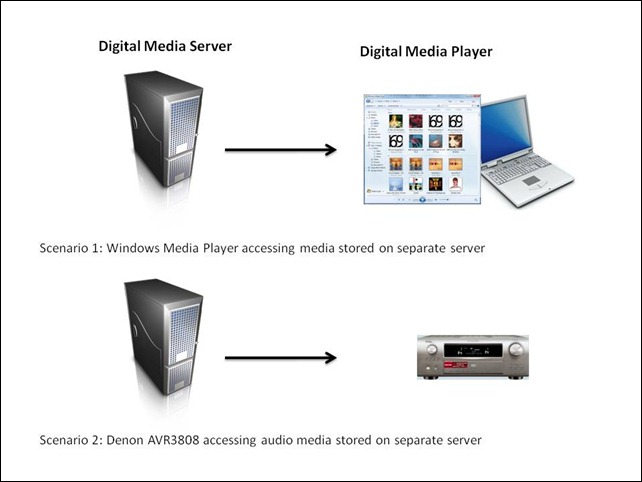
Figure 1: Typical scenarios of simple case of DMP devices accessing DMS devices.
I’ve used the Denon AVR3808 as an example, since this is what I have in my home network. My main DMS is an old headless (no monitor, keyboard or mouse) Dell PC running the Windows Home Server operating system. Actually, to be strictly accurate, the Dell is running two Digital Media Servers. The first is Microsoft’s Windows Media Connector version 2.0, which is built into WHS. The second is the Asset UPnP media server, which is a free piece of third party software installed onto WHS. The fact that I have two DMSes running will prove significant once I get into describing the next set of scenarios.
In my particular case, all flavours of the two scenarios shown above will work, that is, both DMSes running on the Dell box will stream audio to other PCs in the home network, and to the Denon AVR3808. Under the covers, there’s actually some negotiation of streaming formats going on. This is because I have stored all my music files on the Dell server box in Windows Media Audio Lossless (WMAL) format. This presents no problems for the PCs, since the Windows Media Players installed on them can handle WMAL. But the Denon can only handle standard Windows Media Audio, not the Lossless variant. So when I use the Denon to browse my music library on the Dell and select a track to play, the DMS that I’m using sees that the Denon can’t handle WMAL and transcodes the stream into standard PCM (which the Denon can handle) on the fly. Both the Asset and the Windows Media Connect will do this. But this breaks down in the next set of scenarios.
So, the interesting scenarios are where there are three devices linked together: a Digital Media Server, a Digital Media Controller, and a Digital Media Renderer.
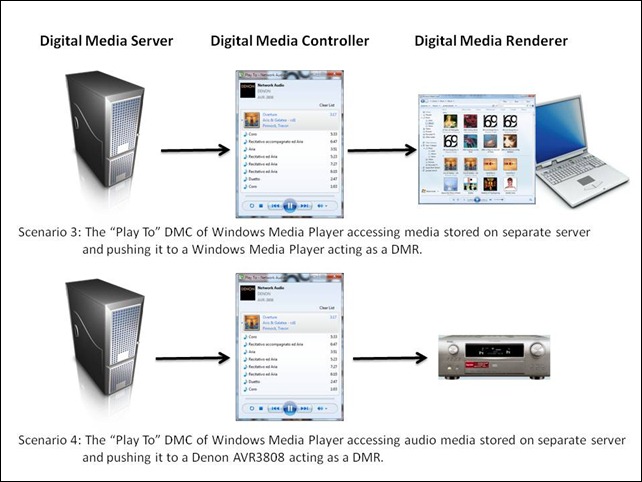
Figure 2: Typical scenarios of a three device link (DMS-DMC-DMR).
Once again, in my case, all flavours of scenario 3 will work. That is, I can stream from either DMS running on my Dell Windows Home Server using the “Play To” feature of Windows Media Player in Windows 7, and push the stream to either of my PCs that are currently running Windows 7.
But scenario 4 has been giving me all sorts of problems. Sometimes it would seem to work, and other times it wouldn’t. I think I have finally got to the bottom of it.
The issue is that media libraries in Windows Media Player in Windows 7 can be built up in a number of ways. Take a look at this screenshot of the first few albums in my music library:
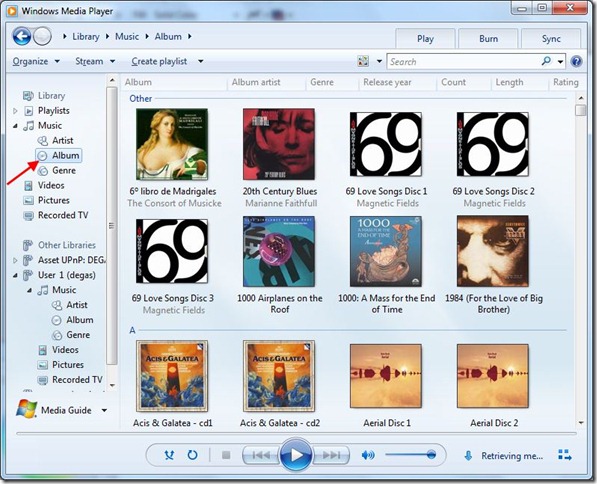
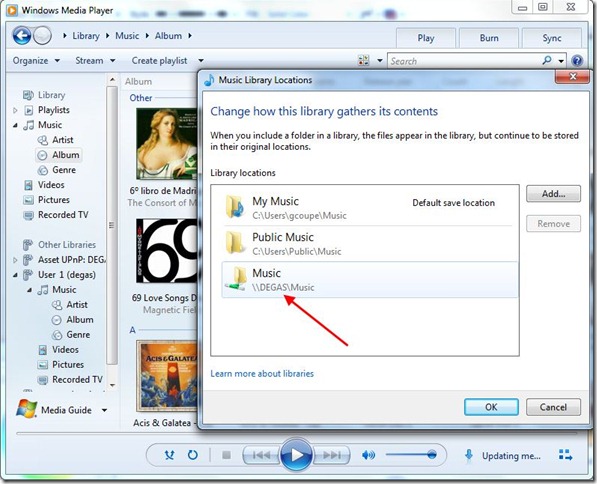
I’ve highlighted the fact that you are looking at the content of my music library in “Album” view. That is shown as part of the “Library” tree (Library – Music – Album). This screenshot has been taken from my Tablet PC, which is running the Windows 7 Release Candidate. Now the interesting part is where these albums are physically stored. There is far more storage required than my Tablet PC can cope with, so in fact these album files are sitting on my Windows Home Server. This next screenshot shows that my music library is in fact being comprised of three storage locations: my own music folders on the Tablet PC, the “Public” music folders on the Tablet PC, and the music folders on Degas – which is my Windows Home Server:
But hang on a minute, Windows Media Player is showing two navigation trees on the left hand side of its window: the “Library” tree and another one called “Other Libraries”. The content of the “Other Libraries” tree is populated by other Digital Media Servers which Windows Media Player discovers on the network. Sure enough, it’s found the Windows Media Connect DMS running on the Dell Windows Home Server (Degas), and this next screenshot shows the same album files being seen in the Album view under the “Other Libraries” tree:
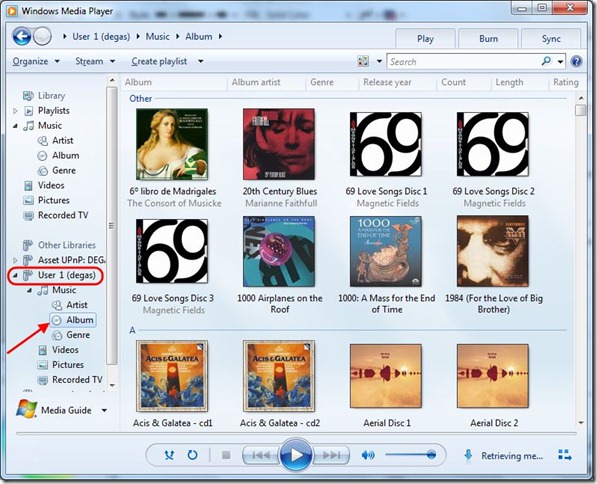
You’ll notice that just above “User 1 (degas)”, which is the Windows Media Connect DMS, is the Asset UPnP server entry, shown as “Asset UPnP: DEGAS”. So, under scenario 4, I can stream the same album in three different ways:
- Using “Play To” to pull from the Tablet PC’s Windows Media Player streaming server and push it out to the Denon.
- Using “Play To” to pull from the Windows Media Connect streaming server on the Dell and push it out to the Denon.
- Using “Play To” to pull from the Asset UPnP streaming server on the Dell and push it out to the Denon.
What I’ve found is that method (1) and (3) will work, but that method (2) does not. These are illustrated in the following screenshots:

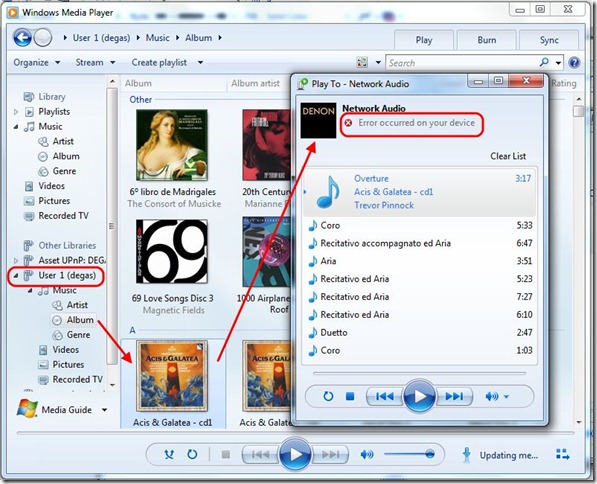

I should just point out that I’ve configured the Asset UPnP server to always stream in PCM format. If I didn’t do this, then while it would work in the simple case of scenario 2, in the case of scenario 4, it would fail just as the Windows Media Connect server does.
The conclusion that I draw from all this is that in these “man-in-the-middle” scenarios, it looks as though end-to-end negotiation of the proper streaming format is not always being done correctly. I suspect that in scenario 4, method 2, the Windows Media Connect server is simply serving up WMAL format to the Denon, which causes it to fail. Now, I don’t know whether this is a shortcoming of the DLNA specification itself, or simply an outcome of how Microsoft have implemented it in the case where there are physically separate servers out on the network. Time will tell.
At least I now know which scenarios work and which will fail. On to the next problem…


 Geoff Coupe's Blog
Leave a comment