Reflections on life at “De Witte Wand”…

Year: 2010

  • Living In Fear

    Brian Whitaker has an article in the Near East Quarterly describing the targeting of gay men in Iraq by vigilantes. It makes for sobering reading. Yet, at the same time, some of the absurdities that are resulting would be laughable, if it weren’t for the fact that their perpetrators wield guns and are only too prepared to use them:

    The problem in post-Saddam Iraq, though, is that the official legal position counts for less than realities on the ground. The wave of “gay” killings was made possible by the breakdown of state control and the rise of local militias, some of them seeking to enforce their own interpretations of Islamic law. That resulted in people being killed for the most trivial of “sins” – among them barbers who gave customers “un-Islamic” haircuts. It reached a peak of absurdity when al-Qa‘eda elements in Iraq sought to impose “gender” segregation of vegetables. Claiming that tomatoes are feminine and cucumbers masculine, they argued that greengrocers should not place them next to each other, and that women should not buy or handle cucumbers.

  • Metropolis

    There can be no understanding between the hands and the head unless the heart acts as mediator

    That is the opening and closing motto of Fritz Lang’s Metropolis. A silent film released in 1927 that has become recognised as a masterpiece. It did not start out life that way; a poor critical reception led to it being heavily cut for distribution  shortly after its release, and the original version was lost. Then in 2008, in a small museum in Buenos Aires, a poor, but complete, copy of the original was discovered. It has been used to supply the missing sequences, and now a restored version of Metropolis has been released that, at 150 minutes running time, is as close as possible to the original version and which has an additional 25 minutes of footage. It also has the original orchestral score composed by Gottfried Huppertz.

    Until now, I’d never actually watched a screening of any version of Metropolis. Of course, I’d seen stills in books and magazines, or short sequences in TV programmes many times; but the whole thing? – no.

    Now I have. I bought the Blu-ray/DVD of the restored version. It is indeed a revelation. The imagery is quite breathtaking in places – mixing both ancient (Rotwang’s house and the Cathedral) and modern (the city and the machine halls). The film is full of allegory (for example, the machine hall becomes a vision of Moloch to the city owner’s son) and often makes use of occult and religious symbolism. For example, Rotwang, the evil scientist, is almost akin to a medieval alchemist, much given to decorating his house and equipment with pentagrams, while the subterranean cavern where Maria speaks to the workers is full of Christian imagery.

    The acting, as was the fashion in silent films, is not very subtle, and the ending is rather simplistic. However, its visual power cannot be faulted and the orchestral score adds to the effect. Lang certainly knew how to do crowd scenes – the workers’ mob pursuing the false Maria, or the children fleeing the flooding underground city have an intensity that astounds. Metropolis is indeed a masterpiece.

  • World AIDS Day

    Today is World AIDS Day. One of those occasions that you wish you didn’t have to have, but which is important to remember and do something about. 

    At  a personal level, it’s a chance for me to recall some lost friends: Kerry, Lance, Eric, Humphrey, Peter, John, Kingsley, Graham, and Neil. I’m sorry that you’re not around with the rest of us today.

    Ach, another year. Meanwhile, I have to ask myself WTF are the younger generation doing ignoring the lessons of history?

  • Windows Live Photo Gallery 2011 – Status Report 2

    Just over a week ago, I gave a status report on the issues that I was having with Windows Live Photo Gallery 2011. In summary, there are three major issues that I’m concerned with at the moment:

    1. Unwanted, and often inaccurate, GPS coordinates being inserted by WLPG 2011 into the Exif of images that have IPTC location metadata present, but no GPS coordinates currently set.
    2. Corruption of Makernotes in the Exif section of JPEG image files by WLPG.
    3. Unwanted compression of the file, even if only metadata is being changed by WLPG 2011.

    Microsoft acknowledged issue (1), and have now produced a fix. If you go to the Download page of the Windows Live Essentials software, and re-download, you’ll get the updated version. The build number of the WLPG 2011 that was released on the 30th September was 15.4.3502.922. The updated version is now 15.4.3508.1109.

    In summary, Microsoft have told me the changes are:

    • GPS coordinates on a file are read-only inside of WLPG.  WLPG will never add, change or delete the GPS coordinates.
    • If a file contains GPS coordinates when it’s brought in to WLPG, reverse geocoding will be triggered and location strings are displayed in the info pane, users can rename or remove the strings but GPS coordinates won’t be touched. Users may Rename a location but it will then leave a mismatch between the coordinates and the string since the coordinates are read-only.
    • If a file does not contain GPS coordinates, users will be able to geotag by adding a string (that gets validated against Bing as it does today) but no GPS coordinates are added to the file.  The user can remove the string or rename it.
    • If the file contains a geo name only, there will be no GPS coordinates calculated for it.

    I’ve done a few quick tests, and I think I can point to a couple of additional behaviours:

    • If a file contains IPTC Location metadata when it’s brought into WLPG, then WLPG will behave in a similar fashion to the second point above. That is, WLPG will use the IPTC Location data to set the location strings in the geotag field of the info pane. If the geotag is deleted or changed in WLPG, then there will be a mismatch between the IPTC Location metadata and the geotag because the IPTC Location metadata will be left untouched.
    • Changing a geotag in WLPG, while it leaves the IPTC Location metadata untouched, will also cause WLPG to write out the contents of the geotag as IPTC Extension LocationCreated metadata. In other words, the file will now contain different location metadata in two places: the original location recorded in the IPTC Location metadata elements, and the new location now recorded in the IPTC Extension LocationCreated metadata elements.

    So as far as I can see, I can use this latest version of WLPG 2011 safely, provided that I do all my geotagging and geocoding work outside of WLPG 2011. That way, WLPG 2011 is only ever reading GPS and IPTC Location information, and it will never write out GPS or geocodes into my files.

    Microsoft acknowledge that there’s room for improvement here in future versions of WLPG and will be revisiting this feature. For example, I think that if they were to provide a mapping interface within WLPG itself, then users could check or modify the GPS coordinates and use WLPG to write them out into the files.

    So long as WLPG 2011 never writes out any metadata to my files, then I won’t get hit by issue 2 (Makernotes corruption) or issue 3 (file compression).

    What’s the current status of those issues?

    Well, Microsoft also acknowledge issue (2), but currently treat this as a lower priority. I see that today the issue has been escalated, so perhaps they’ve begun to work on it. Until it’s resolved, I personally don’t want to use WLPG 2011 to do any tagging (e.g. people or descriptive tags), because then metadata gets written out to the files, and that will trigger the Makernotes corruption.

    As I noted in my last status report, issue (3) is interesting, because not everybody is being affected by this. As I reported last time, it does seem to be caused by some kind of interaction between WLPG 2011, the Windows Imaging Component library in Windows itself and third-party Codecs that some of us need to install to handle non-JEPG image formats.

    I’ve been doing some more investigation, and I think I have a workaround for my particular case.

    I’m using the FastPictureViewer Codec Pack, because the codecs handle a wide range of image formats, which Windows and WLPG cannot do by themselves. One of the codecs is designed to handle auto-rotate of JPEG images. It looks as though that if this is installed into the WLPG/WIC/Codec pipeline, then I get the unwanted file compression. So my workaround is to de-install this particular codec in the FastPictureViewer Codec Pack. Hopefully, this issue will get resolved in a more robust fashion in the future.

    So, of the three major issues that I started with, the first has been satisfactorily resolved (with room for future improvement), the second is being worked on, and the third has been identified and perhaps Microsoft and the third-party Codec developers will come to some sort of resolution in the future.

    This all means that while I won’t be using WLPG 2011 to do any tagging work, It can safely be used as an easy-to-use photo browser by family members. And it can also be used by family members to edit photos, since the original files get preserved. It’s a major step forwards from the geotag disaster that hit me back in August. My thanks to the WLPG team for their work in addressing the issue.

    Addendum, 12 July 2011: Last week, a new version of WLPG 2011 was released; build number 15.4.3538.0513. However, even though Microsoft acknowledged the MakerNotes corruption bug back in December 2010, this new build of WLPG still has the bug. Sigh.

  • Statistics Made Fun

    Nobody does this better than Hans Rosling. Here’s a particularly nice example:

    (hat tip to Pharyngula)

  • Hitchens and Paxman

    Last night, BBC Two had a terrific interview of Christopher Hitchens conducted by Jeremy Paxman. It was a joy to listen to Hitchens laying out his ideas and thoughts on his life and politics. What was not a joy was to look at him and realise that he is not long for this world. He has a particularly virulent cancer that gives its hosts only a 5% chance of pulling through more than five years.

    Still, at least we will have the record of his work to remind us of the need to keep fighting for reason and the Enlightenment against the forces of superstition and theocracy. And for the moment, at least, we still have Hitch.

    …and here’s to KBO…

  • The Wine Cellar

    A rather clever illusion. Simple, but the timing has to be just right…

    (hat tip to anaglyph on Richard Wiseman’s blog)

  • An Ethical Dilemma

    Foie Gras – simply delicious and simply cruel in its method of production. An article in today’s Guardian puts both sides of the argument well:

    Foie gras is objectively, indisputably cruel. What a tragedy, then, that it should be so delicious, with an incomparable interplay of sweet and fat, the semi-solid and semi-liquid, the smooth, buttery earthiness and the velvet blush of offal. For many who love food, it has a kind of beauty, even though that beauty was wrought from agony.

    Yes, I’ve tasted it – and it is every bit as good as described above. However, knowing now what I know about the method of production, I would think hard about eating it again.

  • Open Mouth, Change Feet

    There seems to be something in the water at the campus at Redmond. That must be the reason why I cannot fathom some of the decisions being made in Microsoft at the moment.

    The latest is today’s announcement from the Windows Home Server team that they will be dropping the Drive Extender technology for the next version of Windows Home Server (codenamed Vail) due to be released in 2011.

    I just don’t understand the rationale behind this. As far as I’m concerned, it’s been a brilliant piece of technology that just worked, and has been the underpinning of why I bought version 1 of WHS in the first place. If a drive failed, I could just slot in a new one, and the system would automatically recover. The drives didn’t all have to be the same size (as in a RAID setup).

    And now, Microsoft announce that they are dropping this for Vail, and claim that customers don’t want or need it. Hello, I’m a customer, and I want it… It was, and is, one of the major selling points of WHS.

    Is the world going mad? Or is it just Microsoft?

    Update 24 November 2010

    Well there’s been quite an outcry from WHS users since yesterday’s announcement. So much so that the unfortunate Michael Leworthy felt it necessary to issue a second statement . Reading the two together merely underlines the title of my post, and serves to point out the disingenuousness of Mr. Leworthy.

    Yesterday, for example, his reason for announcing the dropping of the Driver Extender technology was:

    When weighing up the future direction of storage in the consumer and SMB market, the team felt the Drive Extender technology was not meeting our customer needs.

    Yet today, clearly somewhat shocked, and yet knowing that the reaction was only to be expected he says:

    Hi, it is a rough day for Vail, and I have been dreading today for a while as an avid Vail user myself. We know this is popular feature in regards to our home server product, and as such all expected that it would have created this type of outreach from our community.

    Meanwhile, Paul Thurrot, over at his blog, probably reveals the real reason behind the dropping of the technology:

    In a briefing last month, I was told that Microsoft and its partners discovered problems with Drive Extender once they began typical server loads (i.e. server applications) on the system. This came about because Drive Extender was being moved from a simple system, WHS, to a more complex, server-like OS )(SBS “Aurora”) that would in fact be used to run true server applications. And these applications were causing problems.

    In addition, the Windows Home Server group now finds itself lumped in organisationally with the big boys: the Business Server group. So the business scenarios where the Driver Extender technology is showing shortcomings is overriding the simple fact that for home use by ordinary consumers, the technology works well and unobtrusively. Just which customers was Mr. Leworthy talking about when he claimed the “technology was not meeting our customer needs”?

    I suppose that the writing has been on the wall for Windows Home Server since last week, when HP suddenly announced that it would be selling Drobo servers – a clear rival to HP’s own MediaSmart servers based on WHS. What’s the betting that HP will shortly announce the dropping of the MediaSmart Server line entirely?

    (Update 1 December: well, that was an easy bet – HP has announced the dropping of the line, and the Windows Home Server team do their best “Crisis? What crisis?” impression)

    I think it’s worth quoting a chunk from the post over at We Got Served:

    Back in August 2008, Charlie Kindel, then General Manager for Windows Home Server at Microsoft outlined the guiding principles of Drive Extender, the spirit of which runs right across the platform “as a server designed for ordinary people”:

    Windows Home Server storage system design requirements

    • Must be extremely simple to use.Must not add any new concepts or terminology average consumers would not understand. Simple operations should be simple and there should not be any complex operations.
    • Must be infinitely & transparently extendible.Users should be able to just plug in more hard drives and the amount of storage available should just grow accordingly. There should be no arbitrary limits to the kinds of hard drives used. Users should be able to plug in any number of drives.  Different brands, sizes, and technologies should be able to be mixed without the user having to worry about details.
    • All storage must be accessible using a single namespace. In other words, no drive letters.  Drive letters are a 1970′s anachronism and must be squashed out of existence!
    • The storage namespace must be prescriptive.In other words, our research told us that consumers want guidance on where to store stuff. Our storage system needs to be able to tell users where photos go. Where music goes. Etc…
    • Must be redundant & reliable. There are two components in every modern computer that are guaranteedto fail: fans and hard drives. Because they have moving parts,  Windows Home Server must be resilient to the failure of one or more hard drives.
    • Must be compatible.Compatible with existing software, devices, disk drives, etc…
    • Must have great performance.
    • Must be secure.
    • Must enable future innovation. Both the amount of storage consumers are using, and capacity/$ are growing at Moore’s Law like rates (while nothing else really is). This creates a discontinuity in the industry and an opportunity for innovation. The storage system must operate at a higher level of abstraction to enable rich software innovation (file level vs. block level).

    These guiding principles remain as valid today as when they were coined. Unfortunately, with yesterday’s announcement, Microsoft has simply torn them up.

    Update 25 November 2010

    The outcry continues. However, every now and then, someone comments that Microsoft are doing the right thing, because all we need is RAID in place of the Drive Extender technology. Clearly, not only are such people techies who simply don’t appreciate that Windows Home Server is intended for the home, to be used by non-techie consumers, but they haven’t appreciated the very real advantages that DE technology has over RAID.

    To illustrate these, it’s worth quoting in full the comment by LarryA from the MediaSmartServer.Net blog:

    After reading all the comments on this subject, I’m beginning to wonder if some of the people suggesting that RAID is a good replacement for WHS or how WHS isn’t reliable have ever used WHS. I have used WHS from the very first day it was available from Amazon and have never had a corrupted file. Also there are some features of WHS that RAID doesn’t provide. A few examples:

    WHS backs up only one copy of identical files from multiple PCs. This saves a ton of space and backup time.

    WHS backs up only those sectors that have changed. Again a savings of a ton of space and time. After the first backup of a PC, the daily backup for my 5 PCs is less than 10 minutes each.

    Because of the first two automatic features I mentioned, I have about 20 terabytes of backups stored in only 2.6 terabytes of disk space. I have about 17 backups of each of my 5 PCs.

    I can choose to duplicate a folder for extra security by a single click. I can undo duplication with a single click.

    My WHS started with a single 500-GB drive and now contains drives ranging in size from 500-GB to 1.5-TB for a total of 4.78-TB of space available.

    I can start a backup prior to installation of new software with two clicks and have to wait for less than 10 minutes for it to complete. On at least 2 occasions I’ve had to restore a PC because of a bad installation.

    I don’t have to do anything to manage any of these features. Installation could not be simpler and my HP WHS takes up a tiny little bit of space under my desk.

    I don’t know of any existing system, RAID or otherwise, that has all these features. If anyone knows of one I would like to hear about it.

    And oh yea, I will never store my data or backups in the cloud!!! I’ve been a programmer in the financial industry for more than 35 years. So I have lots of experience with the internet, clouds and networks, all of which have been hacked.

    Without DE WHS is a dead product. Microsoft take your cloud and RAID solutions and stuff’um!! Screwed by Microsoft again!!

    Amen.

    Oh, and one other thing. I see lots of comments in the blogs from people thinking that the Drobo FS product is a replacement for WHS. As far as I can see, it is no such thing. It’s primarily intended as a data store, not as the complete systems store concept of WHS. Yes, it does give you the storage pool concept of WHS, but that’s the end of it. It will not:

    • back up only one copy of identical files from multiple PCs. Instead, you will end up with multiple copies of the same file, one for each PC.
    • back up only those sectors that have changed in a file. Instead, even if only one bit has changed in the file, the whole file must be backed up. No intelligent storage here.
    • be able to roll back to a complete backup snapshot taken earlier in time, without the need to take up additional storage space to actually hold all those multiple backups.
    • be able to restore a PC with a working image with one click, if the PC has a failure.
    • act as a DLNA media server out of the box. You have to add a third party application for this.

    Update 27 November 2010

    I can’t resist just pointing out that over at the Microsoft Connect (tagline “your feedback improving Microsoft products”) forum devoted to Windows Home Server, the responses from those of us asking Microsoft to put the DE technology back into the next version of WHS versus those who are saying that Microsoft should not is running at approximately 80-1 90-1 93-1 95-1 97-1 in favour of restoring DE to WHS. At the moment, it’s 3273 3602 3908 4088 4281 votes in favour of the restoration versus 44 against (as of 2 December).

    Nonetheless, I wouldn’t mind betting that Microsoft will simply go ahead and ignore this.

    I was watching the presentation that the unfortunate Mr. Leworthy gave at the recent TechEd conference held in Berlin earlier this month (i.e. just before the news broke about the removal of DE). Two things struck me:

    • He didn’t mention the automatic duplication of selected data across drives at all – whereas in previous TechEd presentations, this point (which depends on DE) would have been highlighted.
    • He made the point that the most requested feature for the next version of WHS was the inclusion of Media Center functionality. However, he said, it wasn’t going to happen, despite the requests.

    So I take from that that despite the outcry over the dropping of DE from the next version of WHS, Microsoft will almost certainly blithely ignore it and carry on as if nothing has happened. Which rather gives the “your feedback improving Microsoft products” a cynical air worthy of typical marketing-speak. What a surprise.

  • Price and Value

    I read in today’s Guardian that there was an auction today of Alan Turing’s papers. While I was pleased to see that Google had donated $100,000 to the bid of Bletchley Park to keep the papers for the nation, I couldn’t help but feel disheartened by the thought that Turing’s papers could potentially disappear into a private collection, to be gazed upon by a single, wealthy individual, quite possibly hailing from Silicon Valley.

    Turing was an important individual in the history of not only computing, but in the fact that Nazi Germany was eventually defeated by the Allies. And Britain repaid that debt by persecuting him because he was gay, with the result that Turing committed suicide by eating an apple laced with cyanide.

    I can’t help feeling that Turing’s papers should have been acquired for the nation and humanity at large. Once again, we seem to understand only the price of everything and the value of nothing.

    Perhaps all is not lost; if the new owner will arrange for the papers to be made available online, then something may come out of this. Perhaps the Complete Works of Charles Darwin Online can serve as a model here.

  • Windows Live Photo Gallery 2011 – A Status Report

    In view of the issues I’ve been having with WLPG 2011, I thought that it would be worthwhile to report that Microsoft are listening to those of us who are reporting tales of woe caused by using WLPG 2011. I’ve had a number of emails from the lead Project Manager of the WLPG team on the subject.

    It seems to me that there are three major issues being reported at the moment:

    1. Unwanted, and often inaccurate, GPS coordinates being inserted by WLPG 2011 into the Exif of images that have IPTC location metadata present, but no GPS coordinates currently set.
    2. Corruption of Makernotes in the Exif section of JPEG image files by WLPG.
    3. Unwanted compression of the file, even if only metadata is being changed by WLPG 2011.

    Microsoft have acknowledged issue (1), and are working on a fix. I’ve been told that they hope to roll out an update soon for WLPG 2011 that may resolve the issue going forward.

    Microsoft also acknowledge issue (2), but currently treat this as a lower priority. I think that’s understandable, because unlike the case for RAW files, Makernotes are not vital for JPEG files.

    Issue (3) is interesting, because not everybody, it seems, is being affected by this. Some people are reporting that no compression occurs, whereas others of us are plainly seeing it. Indeed, I had an email from Microsoft stating that this reported compression was of utmost concern to them, but expressing confusion that they also weren’t seeing compression in their tests.

    After thinking about this, it seems to me that one possible hypothesis to account for the difference is that those of us who are seeing file compression are using third-party codecs.

    Most professional photographers (and many keen amateurs) are probably taking their digital photos in a RAW format. Windows and WLPG will not display such images out of the box; they require a codec to be installed to do this. Codecs are available from either the camera manufacturers or other third parties.

    Now, it just so happens that I have a number of photos held in RAW or DNG formats in my collection, so I need to have a codec installed to view these in Windows and WLPG. I’m using the FastPictureViewer codec to do this, because it handles a wide range of image formats, which Windows and WLPG cannot do by themselves.

    I noticed a thread in the PC Talk forum on the Digital Photography Review site where the original poster reported that he was also seeing this compression of files with WLPG 2011. Interestingly, there’s a number of contributions to the thread by Axel Rietschin, the developer of the FastPictureViewer codec. He claims that the Windows Imaging Components (WIC) library and Microsoft’s own JPEG codec use private and undocumented interfaces that are not available to any third party codec:

    The underlying problem is that lossless transcoding, where a file is reconstructed to make room for new metadata, is not possible with the normal Windows Imaging Components codec interfaces: there is nothing that would allow anyone to retrieve the packed data, only pixels. Microsoft implemented this feature in their own JPEG codec using an undocumented interface called IMILCJpegDecoderFrame that WIC uses internally, but no 3rd-party JPEG codec (or 3rd-party codec for any other lossy formats) is able to provide this functionality.

    And in a later message on the same thread:

    Just to clarify: Microsoft worked around the limitation of the(ir own) API by implementing a private interface in their JPEG codec that presumably let them read/write the pixel data without decompressing it, and as a result both Windows and WLPG are able to perform lossless metadata updates and rotations on JPEG files when using the stock codec.

    The problem starts only when replacing the default codec with a 3rd-party one which cannot possibly implement the internal (and undocumented) interface they use privately.

    I think that this is what must be happening. Because I need to have a third party codec installed to handle my RAW and DNG images, this is also being used by WIC for JPEG images, and hence I’m seeing the file compression. Those people who only use JPEG formatted images have no cause to install an additional codec, so they are not seeing the compression.

    This compression will only occur when WLPG 2011 touches an image file to write back information into it.

    To date, I’ve been pretty lucky – I use IDimager to do my cataloguing and metadata work, and this does not use WIC. So all the image data is left untouched in the file, even though the metadata may have been edited. This is as it should be. (Note: IDimager is no longer available. Its successor is Photo Supreme, which I am now using)

    Previous versions of WLPG I’ve been using were (mostly) just reading these files to capture the metadata for their internal databases. I say “mostly”, because I’ve seen some earlier files that have had Microsoft-specific metadata written into them, and some of them have been compressed. Those that weren’t would have been written before the time that I got a digital camera capable of using RAW format – so the built-in Microsoft codec with its undocumented private interfaces would have been used. Those that are compressed will be examples done after I had installed the third-party codec to handle RAW formats on my PC. There aren’t many of them, because it was rare that I used WLPG directly to edit metadata.

    However, with the advent of WLPG 2011, and its current habit of writing GPS and IPTC Extension metadata into files (issue 1 above), then I’ve had a deluge of files that have been compressed, because when WLPG writes out the metadata, the file gets compressed.

    In one sense, of the three issues, only issue (1) can be laid squarely at the door of WLPG 2011. Issue (2) is probably down to the implementation of WIC itself, and is independent of any application such as WLPG calling it.

    However, issue (3) is somewhat more messy. It would seem to be caused by the architecture of WIC, and the fact that there are private interfaces being used by Microsoft that are not available to third party codec developers. It also has the result of making WLPG 2011 lie to the user whenever third-party codecs are installed. If the user sets WLPG to have no compression, then WLPG assumes that WIC will follow suit, but it doesn’t, and file compression will still result.

    This leads me to a concern about the possible solution Microsoft are working on for issue (1). Originally, I had suggested that a simple solution would be to offer the user a way of turning off the writing of GPS coordinates into the Exif of a file. But now I realise that that is not sufficient. If WLPG 2011 goes ahead and constructs a geotag because it finds IPTC Location metadata in a file, then it will also use WIC to write out new IPTC Extension “LocationCreated” metadata into the file as part of its geotagging/geocoding function. And if a third-party codec is installed, the file will be compressed.

    So really, the only immediate solution is to be able to turn off geotagging/geocoding entirely, otherwise metadata gets written, and the file gets compressed.

    It’s the same with the face recognition features of WLPG 2011. I can’t use them, otherwise when the metadata gets written, WIC will compress the file. As far as I can see, the bottom line is that whenever WLPG writes out metadata into the file, it uses WIC, and if there’s a third party codec installed, the file will be compressed.

    The only real solution, it seems to me, is for Microsoft to document the currently private interfaces of WIC, so that they can be used by third-party codec developers. In the meantime, it looks as though my only option is to install the Windows XP version of Windows Live Essentials. That way I’ll get a version of WLPG which will only ever read my image files and never be used to write to them.

    Update 24 November 2010

    I’ve just been using my laptop as a test system to see if I can reproduce the conditions under which issue (3) (the file compression) will occur. I think I can convincingly show that it is, as I suspected, the combination of WIC and the third-party codec.

    First, on the laptop, I uninstalled the third-party codec (FastPictureViewer) that I had on there, and also, for the sake of completeness, Picasa 3.8.

    The system was then Windows 7 Home Premium, with WLPG 2011 (build 15.4.3502.922), together with the built-in codecs of windows.

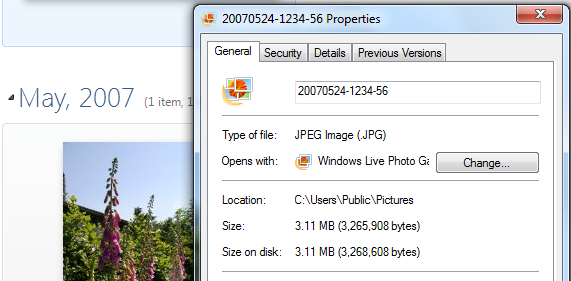
    I then copied a folder of photos taken in May 2007 across from my Windows Home Server into the My Pictures folder of the laptop. These are the photos that are showing in the screenshots of the “24 Hours Later” section of this post. I also chose these photos to test, because one of them I had included in a batch sent to Microsoft to test. When Microsoft checked the size before and after the images had been geotagged, they found little or no difference in size:
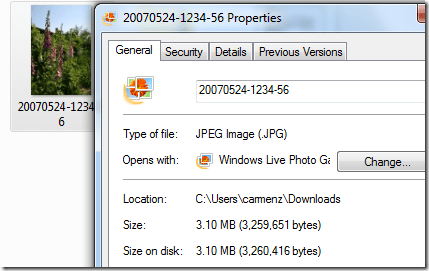
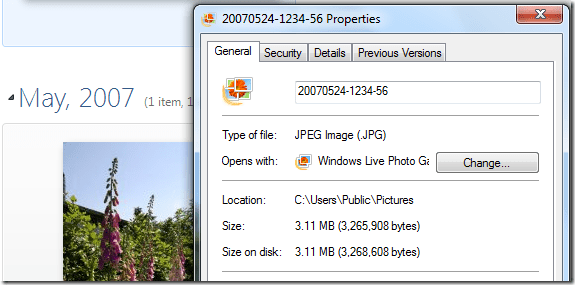
    Microsoft test1

    Microsoft test2

    Yet when I had done the same thing on my PC, I got a reduction in size of about 50%.

    So I repeated the test on the laptop (which remember now has no third-party codecs installed).

    I first used Geosetter to examine the metadata and size of the files. The files had IPTC Location metadata and the particular file illustrated above (20070524-1234-56) was 3.10MB in size.

    Then I opened WLPG 2011, and let it discover the new folder of files. I waited a few minutes, and then went back to Geosetter to examine the files, and the above file in particular.

    As expected, all the files now had GPS metadata added to them (this is issue (1) in action), but the interesting thing was that, just as Microsoft had found, the file sizes were very little different than they had been. This seems to suggest that, with the built-in codecs, no compression will occur.

    Now I deleted the test folder, waited for this to be registered in WLPG and then installed the FastPictureViewer codecs. I then got a fresh copy of the folder from my Windows Home Server and repeated the test. This time, once WLPG 2011 had added the GPS coordinates, I found that the files had been shrunk by about 50%.

    So it definitely seems to be a combination of the third party codec and WIC that triggers the file size reduction. One further interesting thing: since all the pictures are JPEGs before and after, then really only the built-in Windows JPEG codec should be used. There is a FastPictureViewer codec that handles JPEG rotation, but I wasn’t doing this, just adding metadata. So why is there a file size reduction?

    Update 2 December 2010

    There’s an update to WLPG 2011 that addresses the geotagging issue. See here for more information.

  • Passing The Exam

    I was somewhat nervous this morning. Today was the day that Watson and I were taking an exam to see whether he was a well-behaved dog. We’ve taken a number of courses together, beginning with a puppy course a year ago, but now came the test of the final course, which would be adjudicated  by an independent examiner from the Dutch National Federation of Dogsports.

    The exam involves a number of different tests, such as seeing how Watson responds to commands, and how he behaves towards other dogs and people.

    I have to say that my confidence was not high – we did a dummy run a few weeks ago with our instructors, and Watson (and I) were bordering on the fail mark. The main problem area is that Watson is simply too over-enthusiastic about meeting people. The exam contains a couple of exercises that test how a dog reacts to people, and the idea is that he will remain quietly sitting when he’s in a group of people sitting at a pavement café, or when someone comes up and shakes hands with his owner. Watson, of course, loves people and jumps all over them at any opportunity. If he jumped up on people during the café test, it would be curtains – instant fail.

    So we started with the test of him walking beside me, as I traversed a course. The dog has to sit on command at three points in the course – at the beginning, halfway through and at the end. We managed to do that, although the examiner said later that he was amused by all the hand signals and “turn left!”, “sit!”, and “turn right!” commands that I was giving to Watson…

    Next up was the exercise of walking past food lying on the ground. The dog is supposed to ignore this and carry on. Watson has a habit of wanting to grab anything that smells as though it’s food, so I was a trifle worried about this. In the event, he walked past the food without reacting, so a quick sigh of relief, and then onto the most difficult test: the café test.

    We approached the four chairs, three of them occupied, and the fourth empty, waiting for me to take my place. Watson, of course, was immediately fixated on the three people; tail furiously wagging and bounding forward wanting to greet them. Just what I didn’t want. I managed to get him sitting beside me with some difficulty, and then came the second part of the test. Two of the three people want to stroke the dog under test, the third is supposedly afraid of dogs, and there must be no contact between that person and the dog being tested. Watson is not so discriminating; he wants to say hello to everyone… Thankfully, I managed to steer him towards to the two people that he should approach, and keep him away from the third. The end of the test is when he returns to a sitting or lying position next to his owner’s chair. It was only with some effort that I managed to do this – Watson wanted to carry on saying hello to all the nice people…

    After this, the rest of the tests were not so taxing. I stumbled through them, while reviewing in my mind what the outcome of the café test might be. Had we passed? Had we failed?

    Finally, all the dogs had been through the exam, and we all waited anxiously while the examiner and the instructors deliberated over the outcome. We were called into the canteen, and given the results: we had all passed!

    Watson had done well. Only the café test got a “Voldoende” (sufficient) mark, the rest were all “Goed” (good). I must admit I was a little surprised at the overall high marks – but I am very pleased that Watson did so well. Here’s the evidence:

    fnh

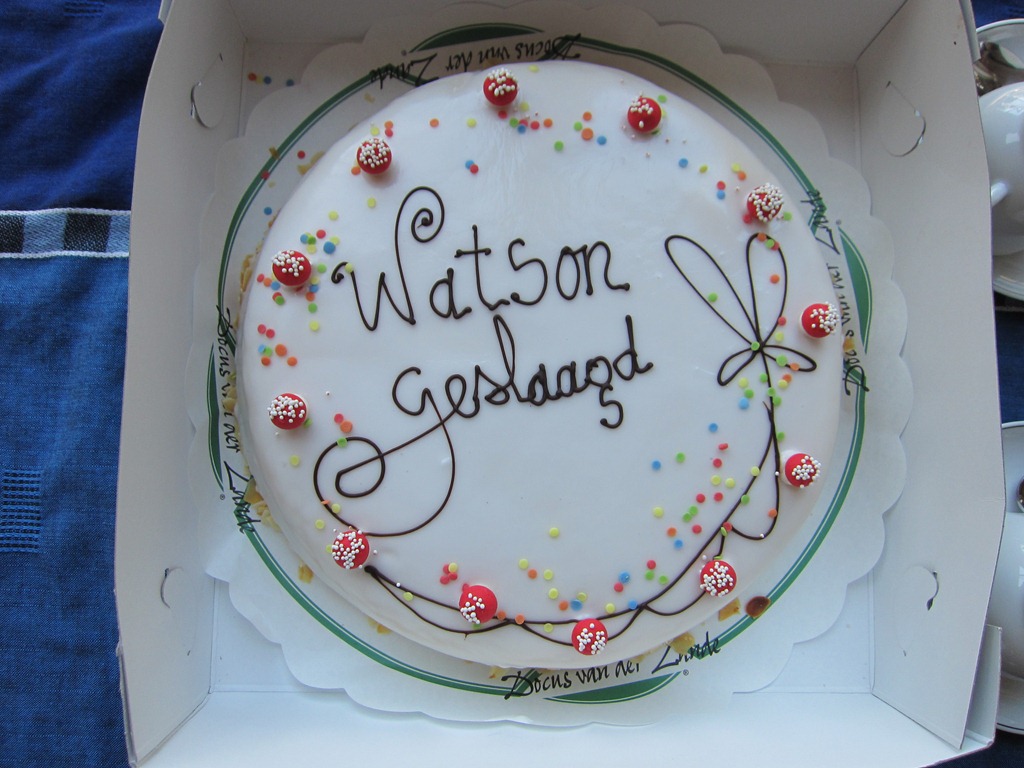
    With much relief, I headed home with Watson. As I turned into our drive, I noticed that Martin had decorated the entrance with bunting. He obviously had more faith in Watson that I did.  A fact that was given further evidence by the appearance of a cake decorated with the words “Watson Geslaagd” (Watson Passed) and friends and neighbours to celebrate.

    20101121-1318-16

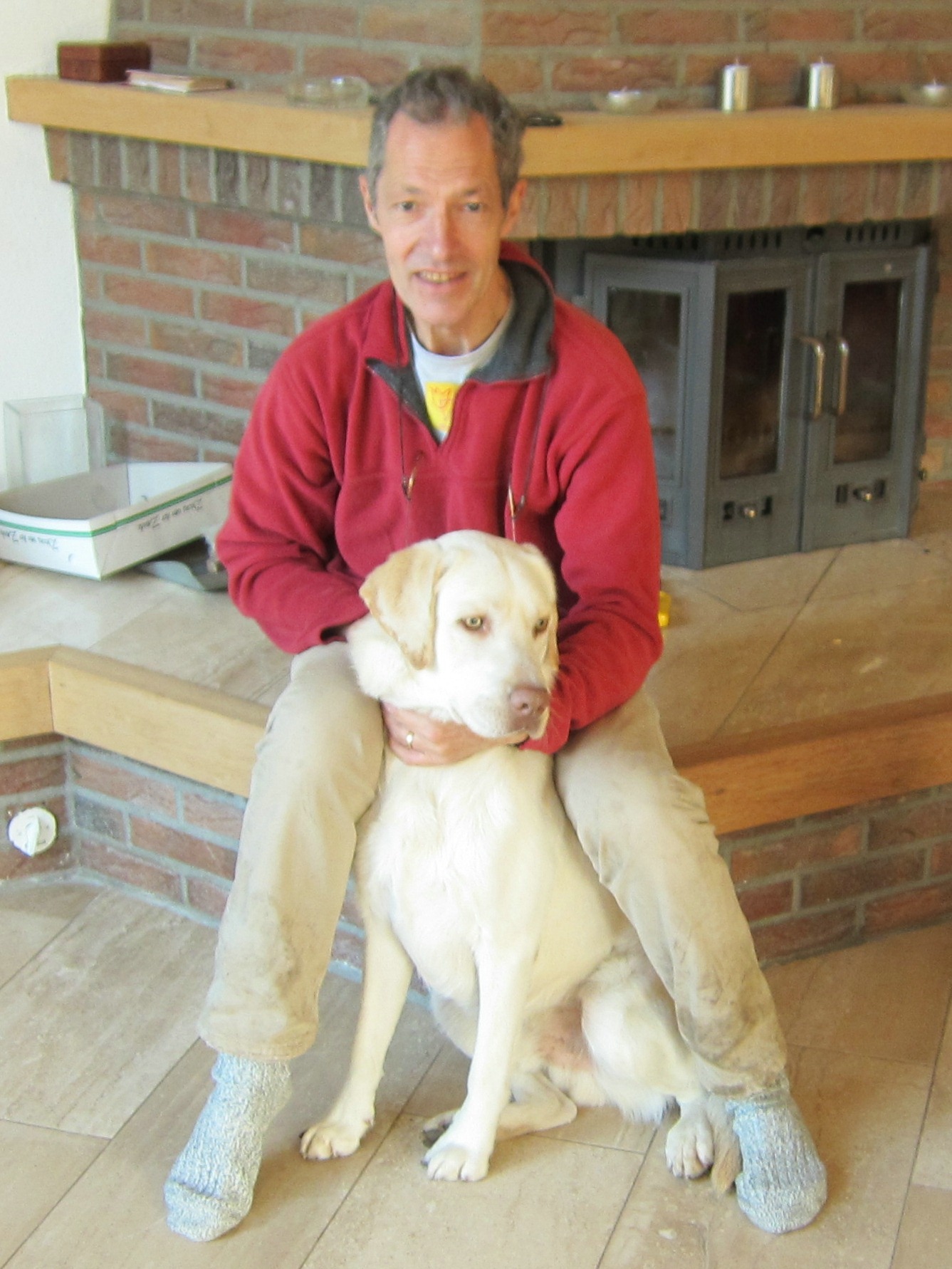
    Thanks to everyone: the instructors at Agility Club Achterhoek (Sandra and Jonna, not forgetting Wendy for the first puppy course), the support of friends and neighbours, and of course Martin, but most of all to Watson for coming through on the day. I’m proud of you.

    20101121-1341-13

    …and if I look exhausted in the photo above, then so I was. And so was Watson – he slept practically all afternoon…

  • What Lies Beneath

    As you may be aware, I’m not very happy with the current version of Windows Live Photo Gallery at the moment. I believe strongly that it has problems that desperately need to be fixed.

    There are other, less pressing, issues with WLPG 2011 as well. These include the fact that slideshow quality is degraded in comparison to earlier versions. Another is the fact that people are finding that their workflow performance has taken a nose-dive since upgrading to WLPG 2011.

    However, apart from all that, there are other things that niggle. These days most people are unaware of how much of their identity is available online. That almost certainly includes me, even though I think I’m being careful. Thus, here’s another example from WLPG 2011. It has automatic face recognition in it. People are probably happily tagging (identifying) their friends in photos using WLPG 2011, which in turn is squirreling away metadata containing this information into the photos. If these photos are subsequently uploaded to online sites where they can be viewed by anyone, then this metadata is often equally available to all.

    And what is this metadata? Well, it is at minimum, the names of the people in the photos. But if those people are also known to you as email contacts, or have a Windows Live identity, then this information is also included as metadata in the uploaded photos. True, the metadata will not spell out their email addresses for all to see – they are at least encrypted. However, after reading this comment, (from a Microsoft employee) I do wonder about the Windows Live ID:

    PersonLiveCID is the unique ID generated for everyone with a Windows Live ID, it might be possible to use this and I’ll be playing with some of the Azure Services sometime to see if you can resolve this to a contact. That could create some very interesting possibilities.

    That would be “interesting” in the Chinese sense, I think.

  • Metadata Myths or Misconceptions

    David Riecks, over at the Controlled Vocabulary web site has put together a list of the top twelve myths of embedded photo metadata. Well worth checking out if you’re a keen photographer interested in learning more about just what else lurks inside your digital photos besides the images themselves…

  • “Treating People Like Pigeons Really Does Work”

    Adam Curtis has another fascinating blog entry. This time he takes as his cue the Behavioural Insights Unit recently set up by David Cameron to advise the UK Government. Curtis argues that this unit is built on the Operant Conditioning ideas of B. F. Skinner.

    It makes for fascinating, and somewhat unsettling, reading. Do check out the videoclips that Curtis includes, particularly the one of the two market researchers and the final comment from Lewis Mumford.

  • A Taxonomy of European Birds

    Looking through my photo collection, I see that I have taken over 1,300 photos that have a bird or birds as the subject. Up until now, I’ve catalogued these in a rather haphazard fashion, that’s to say that as I’ve photographed a new bird (for example a Green Woodpecker), I’ve added its common name to the list of keywords in my catalogue. As the list has grown, I’ve also tried to group the bird species a bit e.g. put the birds of prey together, or waterbirds together. So I’ve ended up with a rather messy taxonomy of birds.

    Then, a few days ago, I noticed that someone had posted a message in the Controlled Vocabulary group to say that he’d put together a list of keywords for Adobe’s Lightroom that followed the taxonomy of the list of Western Paleartic Birds produced by the Association of European Records and Rarities Committees, the AERC. As an aside, I note that whoever is responsible for the AERC web site needs to fix the missing or broken links that pepper it.

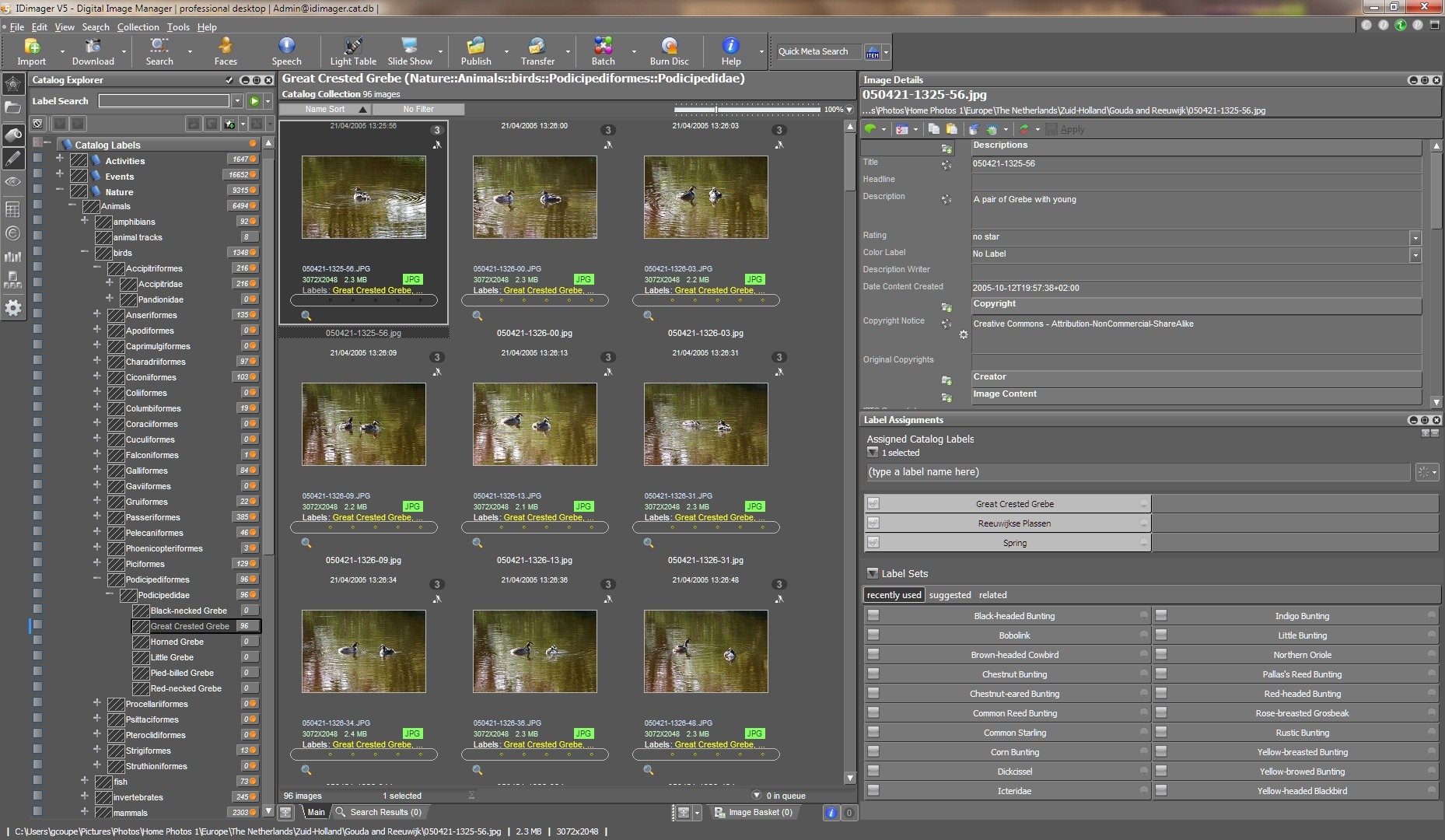
    Anyway, Rudi Theunis made his keywords list available to the members of the Controlled Vocabulary group, and I grabbed a copy to see if I could use it with IDimager, the program that I use to catalogue my photos. (Note: IDimager is no longer available. Its successor is Photo Supreme, which I am now using) It turns out that IDimager can easily import Lightroom keyword lists with one click, so I’ve now got a complete taxonomy of European Birds set up, with both common names and the scientific names as synonyms. See the following screenshot showing a partial view of the taxonomy (click on the image to see the full size screenshot in a new window).

    ID Birds Catalog

    I spent a few hours re-cataloguing my bird photos, and now they are all nicely fitted into the new taxonomy, thanks to Mr. Theunis.

  • The Alternative Masterchef Final

    I rather like watching the Masterchef programmes on the BBC. The series for professional chefs has just ended. I rather like this spoof version of the finale:

    Hat tip to Andy Hayler for the link.

  • “The Story of Us, Then”

    BBC Two is currently running a series of programmes on History. Last night kicked off with the first episode of a series called Ancient Worlds, fronted by historian and archaeologist Richard Miles. I thought it was very good. Here’s a Guardian article about Miles and the programme.

    I was struck by Miles’ statement in the programme that this was not a story of long-dead civilisations, but that this was “the story of us, then” – his point being that despite living 6,000 years ago, the people were recognisably just like us. He illustrated this by reading a letter (incised on a clay tablet) from a merchant’s wife to her husband, who was working away from home in a city. She was bemoaning the fact that he never sent her enough money to cover her expenses in running the house, and their neighbour had just had a new house built for his wife; why wouldn’t he do that for her?

    As I’ve mentioned before, our operating system is still at Homo sapiens version 1.0, despite our strides in technology, so Miles has a point, I believe.

    In watching the programme and listening to Miles, I was also reminded of the atmosphere of Samuel R. Delany’s Return to Nevèrÿon series of books. Tales that seem to be set in an ancient civilisation (or possibly in the far future, where much of technology has been once again lost), yet which deal with human themes immediately recognisable to us today. I must reread them again.

  • The Answer Is No

    There’s an article in today’s Observer that asks: Has Strictly made a national treasure of Ann Widdecombe?

    For those of you unfamiliar with both British politics and the BBC TV entertainment show Strictly Come Dancing, I should perhaps point out that Ms. Widdecombe is a former British politician of the Conservative stripe, and Strictly is an entertainment program that partners professional dancers with “celebrities”.

    I confess that I have found it strange to understand the adulation heaped upon Ms. Widdicombe in the program. She clearly has no talent for dancing whatsoever. And while the British might like rooting for the underdog, I cannot let the memory of her politics go. Her views I find simply abhorrent.

    It’s rather as though I was watching a Geert Wilders or a Tariq Ramadan pirouetting in a celebrity dance contest. Forget what they have done and what they represent? Become blinded by the sequins and the feel-good factor? Nope, I don’t think so.

  • More Problems With Windows Live Photo Gallery 2011

    Yes, I know that I’ve said before that Windows Live Photo Gallery 2011 is a disaster, but more problems caused by using it just keep crawling out of the woodwork.

    The first problem I stumbled across was that if you are a photographer who uses IPTC metadata to record information about where your photos were taken, then WLPG 2011 will write false GPS data into your photos without telling you that it is doing so.

    I, and others, have reported this issue to Microsoft, and I understand that they are looking into ways of correcting it. Meanwhile, I’ve become aware of another issue with WLPG 2011. It also screws up the Exif section of the metadata in images.

    While trying to scrub my images clean of the false GPS data inserted by WLPG 2011, I noticed ExifTool was reporting that many of my images had problems with their Exif metadata. Often it was a simple warning that the Makernotes in the Exif section have been damaged. This is a warning from ExifTool that another utility has written to the Exif section and damaged the structure in some way.

    In many cases, however, ExifTool is reporting that more serious damage has occurred and some of the data written into the original Exif section by the camera that took the image has been corrupted.

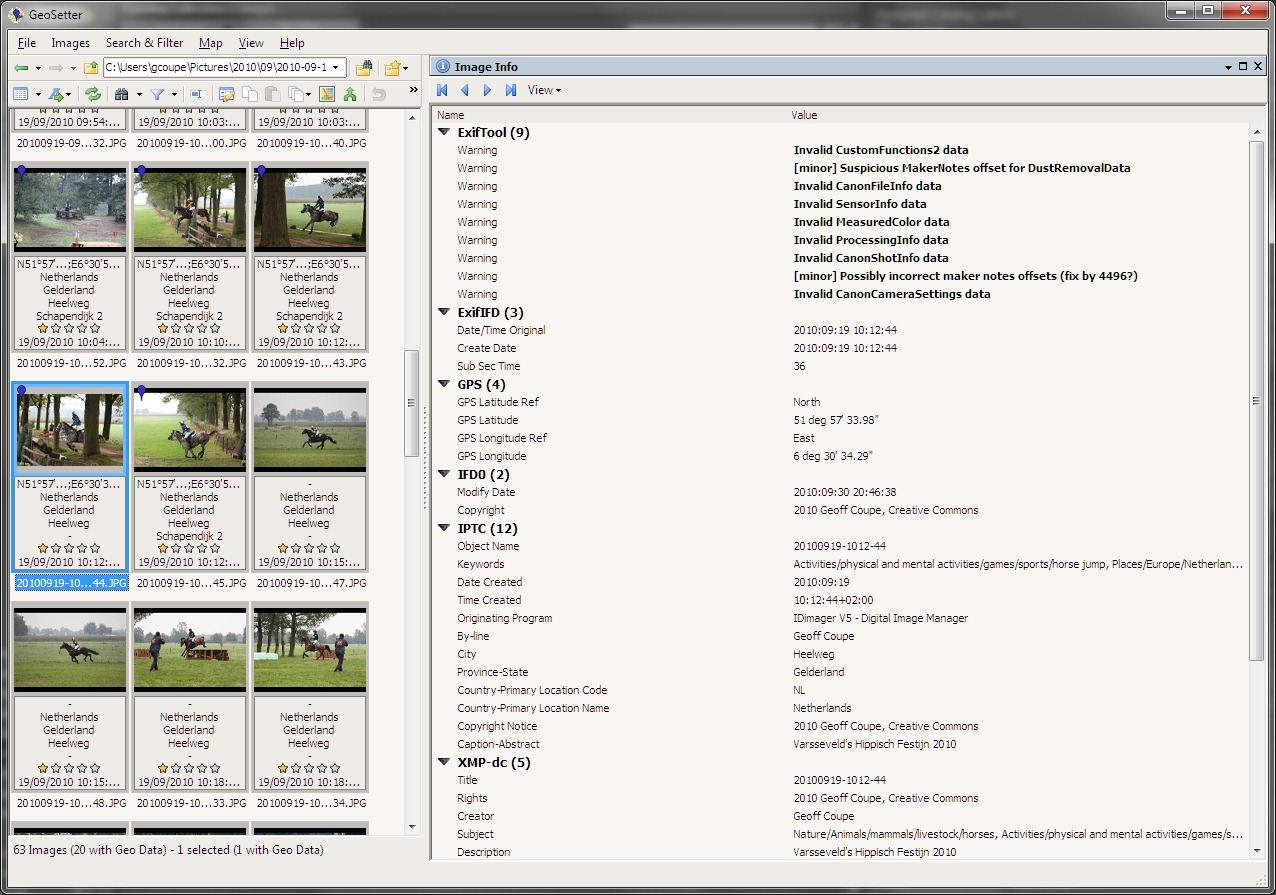
    Here’s a screenshot that shows an example of an image exhibiting both types of issue (warnings and corruption). The screenshot is of Geosetter, and the highlighted image shows errors being reported by ExifTool (Geosetter uses ExifTool under the covers to do all the heavy lifting). Click on the image to open it full sized in a new window.

    Exif errors 1

    You’ll notice that the thumbnail, and some of the others, have a dark blue marker pin in the top left corner. That indicates that the image contains GPS information. But the interesting thing is that, for that particular image, I did not supply GPS data; WLPG 2011 has inserted it by itself.

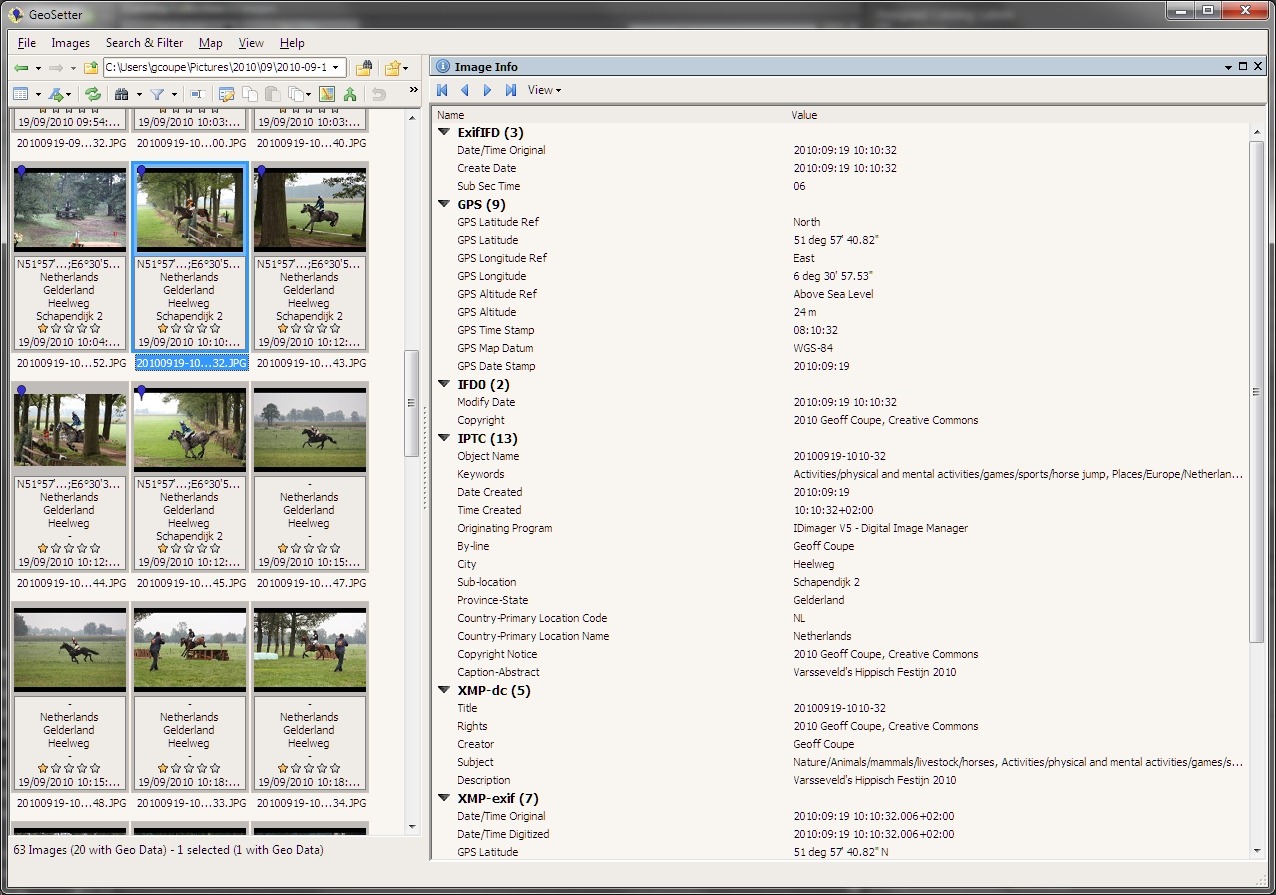
    Now here’s a screenshot of one of the other thumbnails that Geosetter is indicating have GPS information. For these thumbnails, I explicitly inserted GPS information myself, in other words, WLPG 2011 has not had cause to write anything out to the files. Notice that for this thumbnail, ExifTool is not reporting any errors or warnings. That’s the case for all the images where I have explicitly added GPS information.

    Exif errors 2

    By the way, even though these two shots were taken at the same place, the GPS inserted (without my knowledge) by WLPG 2011 is wrong, and is located 500 metres distant.

    I’m now going back through my images, and as far as I can see, all those which are being reported by ExifTool as having problems with their Exif metadata are ones that have had GPS information inserted by WLPG 2011.

    The really irritating thing about this discovery is that WLPG has a track record of not dealing correctly with Exif metadata. Previous versions of WLPG have been reported as corrupting the Makernotes (data written by the camera manufacturer) in Exif.

    It would appear that nothing has been done with WLPG 2011 to address this issue. So not only does it insert gratuitous, and false, GPS data into your images, it will also screw up their Exif metadata.

    I repeat, this is a disaster.

    24 Hours Later

    So, I’ve been looking into this a bit more, but the more I look, the more I think: OMFG. The damage that has been done appears to be quite extensive, and will take some time to repair.

    Today, for example, I decided to examine just one folder of photos and compare the contents with the contents of the same folder as it was in a backup taken on the 1st June 2010 – a date chosen because it was before any of the betas of WLPG 2011 had been released to the public. On that date, I would have had the previous version of WLPG installed and running. The first beta of WLPG 2011 wasn’t available to the public until the 24th June.

    I looked for a folder that had photos containing entries in the IPTC Extension “Location Created” metadata fields. These fields are used by WLPG 2011 to store textual information for a location (e.g. the street address, city, state and country) in the image files. I don’t use these fields; I use the older IPTC Core “Location” fields for this purpose. So if I find an image file that contains IPTC Extension “Location Created” metadata, then I know it has been touched by WLPG 2011.

    I chose a folder containing 24 photos that had been taken back in 2007, and which had IPTC Extension metadata present. I then got the same folder from the 1st June backup to compare the two side by side.

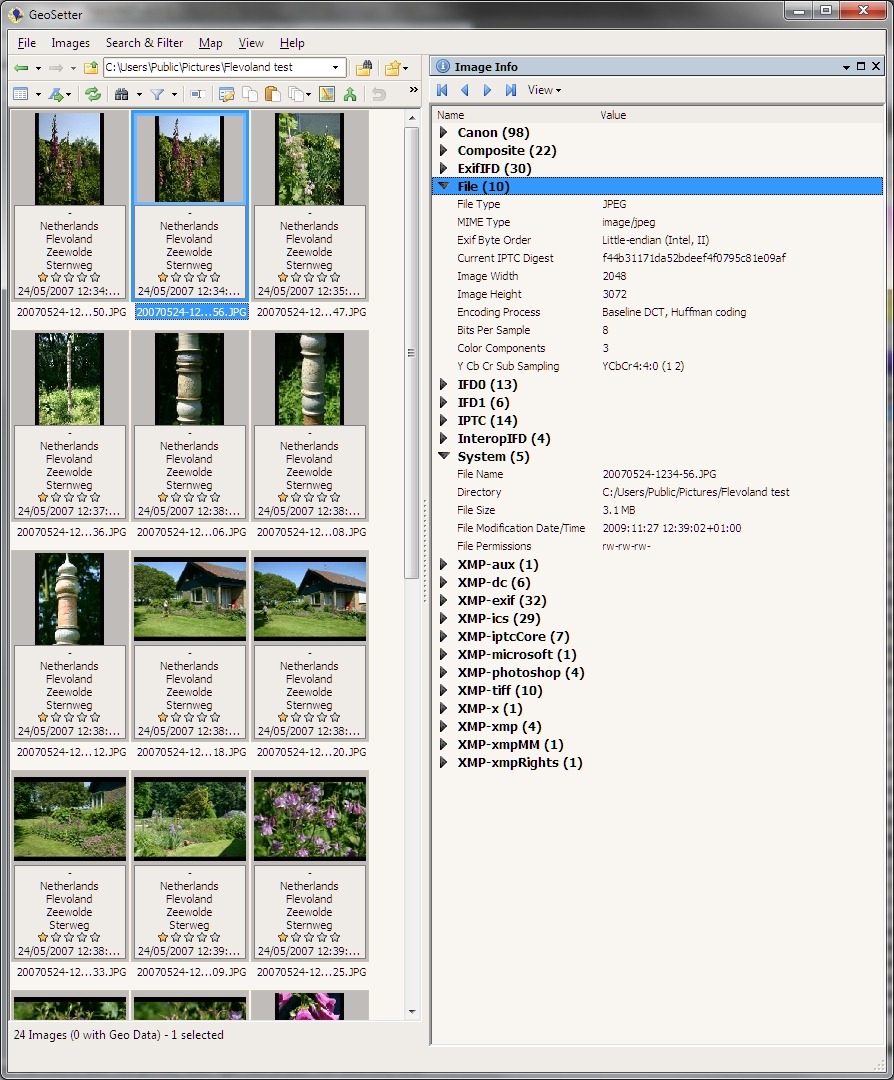
    Here’s a screenshot of the folder, as it was on the 1st June, being displayed in Geosetter, with the metadata of the selected photo being shown (click on the screenshot to see it full-size in a new window):

    Exif errors 7

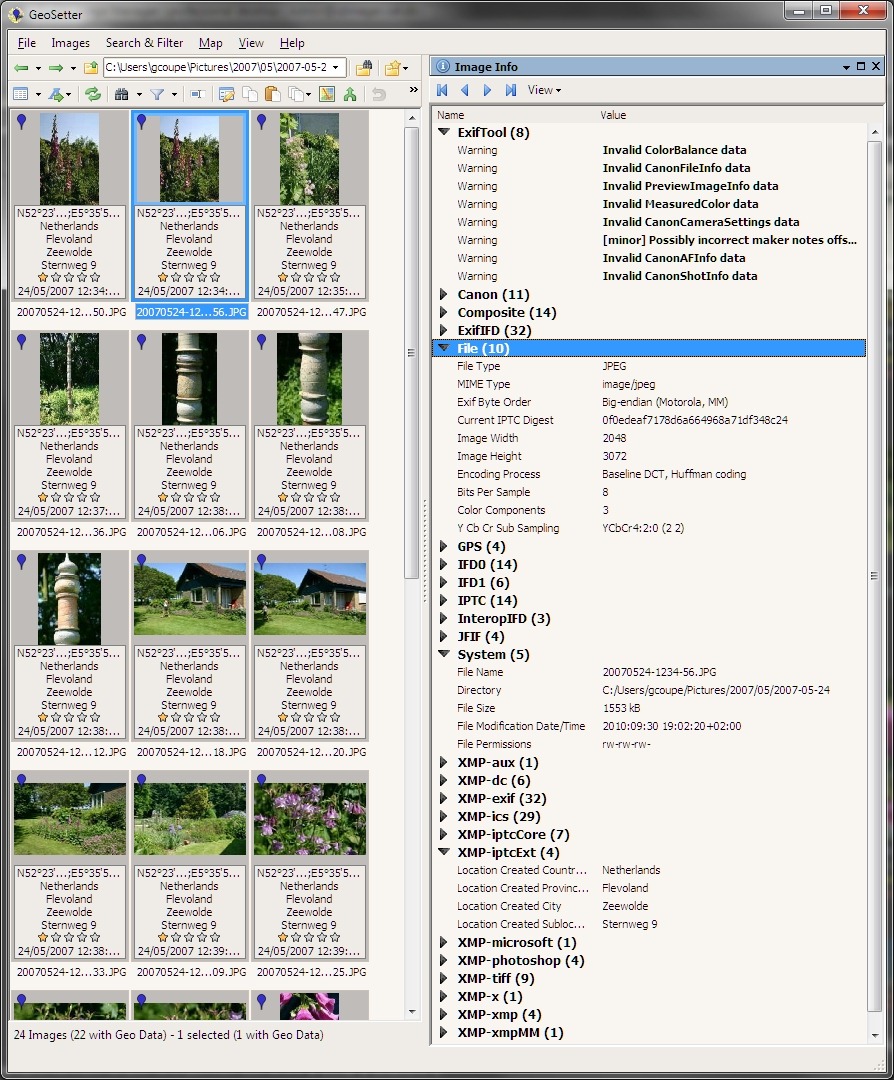
    Now here’s a screenshot of the same folder as it currently exists in my computer. The same image file has been selected to show its image metadata:

    Exif errors 6

    I’ve expanded some of the more interesting metadata sections. As you can see, the metadata has changed substantially. Let me list the ways:

    1. ExifTool is now listing a warning about a possibly incorrect Maker notes offset, together with three warnings about invalid camera data in the Exif section.
    2. While the original (backup) file had 98 elements of camera maker data in Exif, the current file has now only 11 left.
    3. The current file now has GPS metadata present in the Exif. This has been inserted by WLPG 2011, not by me. You will note from the other thumbnails in the second screenshot, that all the other files are also showing that they now have GPS data in them. None of the original files had GPS data. By the way, the GPS data is also incorrect by 300 metres.
    4. The original file had its Exif byte order in little-endian fashion; in the current file it is big-endian. According to the guidelines of the Metadata Working Group (of which Microsoft is a founding member), the “endianness” should be preserved, not reversed.
    5. The original file had a filesize of 3.1 MB; the current file has shrunk to a mere 1,553 KB.
    6. The current file now contains a JFIF block, which is not present in the original file. It also has changed YCbCr values, possibly as a result of this.
    7. The current file now contains an IPTC Extension metadata section, which lists textual information for the “Location Created”. This section is not present in the original file.
    8. The original file is showing that it was last modified on the 27th November 2009. The current file is showing that it was last modified on the 30th September 2010, which also happens to be the date of the final release of WLPG 2011. This is not a coincidence.

    There may be other, more subtle, differences between the original and current versions of the files, but I’m already disheartened enough by the above list, particularly by the Exif corruption and by the fact that my JPEGs have been compressed in size without my knowledge or permission.

    I suppose I can cut my losses by doing a full restore of the photo folders from the backup taken on the 1st June, but this will still not take account of new files that have been created since that time, or of older files that I have been working on.

    What a mess. Thanks, WLPG 2011.

    48 Hours Later

    Oh gawd, it just keeps getting worse… I had hoped that WLPG 2011 was only corrupting Exif metadata when it actually changed the metadata, for example when it added (false) GPS coordinates to the Exif section.

    After further examination of files today, I have discovered that WLPG 2011 will merrily corrupt Exif metadata even when it doesn’t need to change any of the Exif content.

    You see, one of the new features of WLPG 2011 is automatic face recognition. When it discovers what it thinks is a face in a photograph, it will ask the user to confirm the person’s name. Once it gets confirmation, it will then write XMP metadata into the image file. This XMP metadata is structured according to Microsoft’s People Tag. However, when WLPG 2011 writes this XMP metadata out to the file it will also (a) corrupt the Exif metadata section and (b ) compress the JPEG image.

    I’m afraid that I’ve been confirming face tags suggested by WLPG 2011. And now, every single one of those images that contain face tags has also had its Exif corrupted.

    What a f*cking mess. Thanks, WLPG 2011.

    Update 23 November 2010

    I thought that it would be worthwhile to report that Microsoft are listening to those of us who are reporting tales of woe caused by using WLPG 2011. Please see here for a status report on where I think we are…

    Update 2 December 2010

    There’s an update to WLPG 2011 that addresses the geotagging issue. See here for more information.