Reflections on life at “De Witte Wand”…

Year: 2010

  • All Passports Are Equal…

    …Except when they’re not.

    We’re currently experiencing a local disturbance in the ether here in the Netherlands. After months of wrangling, we’ve finally got a new coalition government (I didn’t vote for any of them, but that’s by-the-by). However, it turns out that the new Junior Minister for Health, Marlies Veldhuizen van Zanten, holds dual nationalities, Swedish and Dutch. She was born in Gothenburg and her father is Swedish.

    Cue much breast-beating over whether government ministers can hold dual nationalities. Needless to say, Geert Wilders is agin it, what a surprise. But then it appears that this issue is giving ample rein to our new Prime Minister, Mark Rutte, to demonstrate his shortcomings. 

    He’s on record as stating that a minister in the last government should have given up her second nationality, but now he’s backtracking and saying that it is not a problem for van Zanten.

    And he’s now opened his mouth to change feet by saying that the reason is that a Swedish passport is not the same as a Turkish passport. Quite honestly, the man appears to be a hostage to fortune, No wonder that Wilders is loving every minute of it. By the way, I wonder if Wilders’ wife still holds her Hungarian passport?

    As someone who wants to continue to hold both Dutch and British nationalities, I obviously have some skin in the game, but frankly, the presumption that because someone holds dual nationalities that they are obviously suspect is beyond contempt.

  • Decision Time

    If you’ve been following my blog, you will know that I originally started it on Windows Live Spaces over five years ago. Then in June this year, Microsoft suddenly switched off some features in Windows Live Spaces without warning, and I decided to jump ship to another blogging platform.

    As far as I was concerned, there were two primary contenders for my future blogging platform: Blogger and WordPress. In the end, I decided to go with Blogger, primarily because there I could use a couple of widgets that I rather liked (the widgets use Javascript, which isn’t permitted on WordPress.com).

    Then a couple of months after I had made the decision, Microsoft eventually decided to come clean and announced that they would be pulling the plug on Windows Live Spaces. Fortunately, they also announced a migration path that would enable users to preserve their existing blog content by moving it over to the replacement blogging platform. Unfortunately, this replacement platform was WordPress, rather than Blogger.

    So I found myself in the situation where all my historical blog content was now sitting on the WordPress platform, while I was blogging new content on the Blogger platform. I also found myself duplicating many of the new entries on WordPress, In addition, in the past few months I have been able to compare the statistics features of both platforms directly, and, currently at least, WordPress is far superior to Blogger in this respect.

    This straddling of two platforms does not strike me as particularly elegant. So I have two options:

    1. Stop using Blogger, and continue to build my blog on WordPress
    2. Stop using WordPress, and manually migrate all my old posts over to Blogger.

    Option (1) means that I lose my dynamic LibraryThing widget that displays a rolling selection of books from my library (see image 1) and instead have a static, textual selection that only gets refreshed when the whole web page is refreshed (image 2). On the plus side, I get access to a better statistics feature that keeps me informed as to how my blog is being read.                               

    LibraryThing

    Image 1
    LibraryThing

    Image 2

    Option (2) means that I get to keep my LibraryThing eye-candy. But on the downside, the blog statistics are not very useful, and there will also be a large amount of work to migrate five years of past entries over to Blogger before I switch off the WordPress blog.

    After weighing up the pros and cons, I think, on balance, that the best way forward is to stop using Blogger, and concentrate on just using WordPress from this point on.

    So, what was called my “Old” Blog on WordPress now gets renamed to be just “Geoff Coupe’s Blog”; and what was my “New” blog on Blogger now gets frozen and will no longer be added to.

    You are now on the current blog where both the historical and current content is to be found…

  • It Gets Better–Part II

    Here’s another video response to the rising wave of anti-gay sentiment towards American LGBT teens. This time it’s from Google employees who are themselves LGBT.

    I think that the testimony of “ordinary” people as opposed to “celebrities” makes a much more powerful message. And good for Google for standing behind this video.

  • NUI vs. GUI

    Here’s Bill Buxton, Principal Researcher at Microsoft Research giving a terrific presentation on Natural User Interfaces, and the fact that many of the “new” technologies have been around for many years. Well worth watching.

    He’s the same age as I am, and like him, I remember many of those technologies that appeared back in the 1970s and 1980s, but which have all but been forgotten by the younger generation of engineers and designers. Those who forget history are condemned to repeat it…

  • A Treasured Heritage

    As the trial of Geert Wilders goes on, I thought that it would be useful to link to a translation of a statement given to the court by a Dutch law student. It makes for sobering reading

  • Baggini’s Dog Whistle

    The phrase Dog Whistle Politics refers to a type of political campaigning or speechmaking which employs coded language that appears to mean one thing to the general population but has a different or more specific meaning for a targeted subgroup of the audience.

    It seems to me that something of this sort is increasingly on display in opinion pieces that suggest that militant or strident atheists should pipe down because their tactics are “not helping”.

    In today’s Guardian, for example, Julian Baggini has a piece on how Atheists and Believers can get along. At first blush, it appears to be a reasonable enough piece. Who, for example, could fail to disagree with Baggini when he writes:

    I see my allies as being the community of the reasonable, and my enemies as the community of blind faith and dogmatism. Any religion that is not unreasonable and not dogmatic should likewise recognise that it has a kinship with atheists who hold those same values. And it should realise that it has more to fear from other people of faith who deny those values than it does from reasonable atheists like myself.

    But hang on, who would Baggini then classify as “unreasonable” atheists? Tellingly, he doesn’t actually name names, but I don’t think it’s too much of a stretch to hear the “dog whistle” calling out names such as Christopher Hitchens and Richard Dawkins. Indeed, the very first comment following his piece says:

    Nice article Julian and I think you’ve made an important distinction between fair minded atheists like yourself and hateful bigotted [sic] “anti-theists” like Dawkins.

    Clearly, this person has heard a dog whistle loud and clear and responded with Pavlovian predictability.

    It’s all a bit depressing. We seem to be moving towards a situation where robust and overt debate of religious matters is being increasingly thought of as being “shrill” and “militant”. Ophelia is noticing the tendency as well. She suspects that, as an overt atheist, she would be lumped by Baggini into the class of “unreasonable” atheists, but since he, like others brandishing their dog whistles, doesn’t name names, it’s difficult to be definite. But the implication is clearly there. As Eric MacDonald points out in a comment:

    This is beginning to border on the absurd! First of all, where are Ruse and Baggini and Mooney, and the rest of the gang, getting the idea that the gnu atheists are hostile? There is actually very little hostility. Listen to some of the debates that Hitchens and Dawkins have taken part in. There’s no evident hatred or hostility. Instead, what you see is an incredible willingness to discuss, to debate, to answer questions, to give explanations, etc. etc. Where did the myth of hostility and stridency and shrillness come from?

    It’s all very strange.

  • Things Will Get Better…

    A speech from the heart of Joel Burns, councilman in Fort Worth, Texas. He made it to adulthood. It would seem that today, in 21st Century America, it is becoming even more difficult for gay teens to escape being bullied.

    (hat tip to PZ Myers)

  • RIP, Claire

    Damn, Claire Rayner has died. A wonderful woman. While I never had the privilege to know her personally, I spoke with her many years ago on one of her phone-ins. She was forthright, sensible, and I would have trusted her to the ends of the earth. She will be missed.

    And here’s another tribute to her from Roy Greenslade. I did enjoy the quote that he gave of her commenting on a far more powerful, yet by comparison an immeasurably poorer example of a human being than she was:

    “I have no language with which to adequately describe Joseph Alois Ratzinger, AKA the Pope. In all my years as a campaigner I have never felt such animus against any individual as I do against this creature. His views are so disgusting, so repellent and so hugely damaging to the rest of us, that the only thing to do is to get rid of him.”

    It also took this piece from Greenslade to cause some pieces to finally fall together in my increasingly addled brain. I simply hadn’t realised that Jay Rayner was the son of Claire. I leave you with his tweet:

    My dear old mum, Claire Rayner, died yesterday aged 79. I, like so many others, will miss her terribly.

    Amen.

  • A Bit Of (Photographic) Fun

    I am constantly amazed at the relentless march of consumer technology. in 1996, I was using a pocket camera (an early Canon Ixus) that was using the APS film format. Something of a step down in film quality as compared to 35mm, but a great little camera. For 35mm work, I had my trusty Olympus AZ-300.

    I made the move to digital in about 2000, again a Canon, this time an early Powershot. I switched back to the digital IXUS range in about 2004 with the Digital IXUS 400. That’s been our point-and-shoot camera until a few weeks ago when it was finally replaced by an IXUS 300 HS.

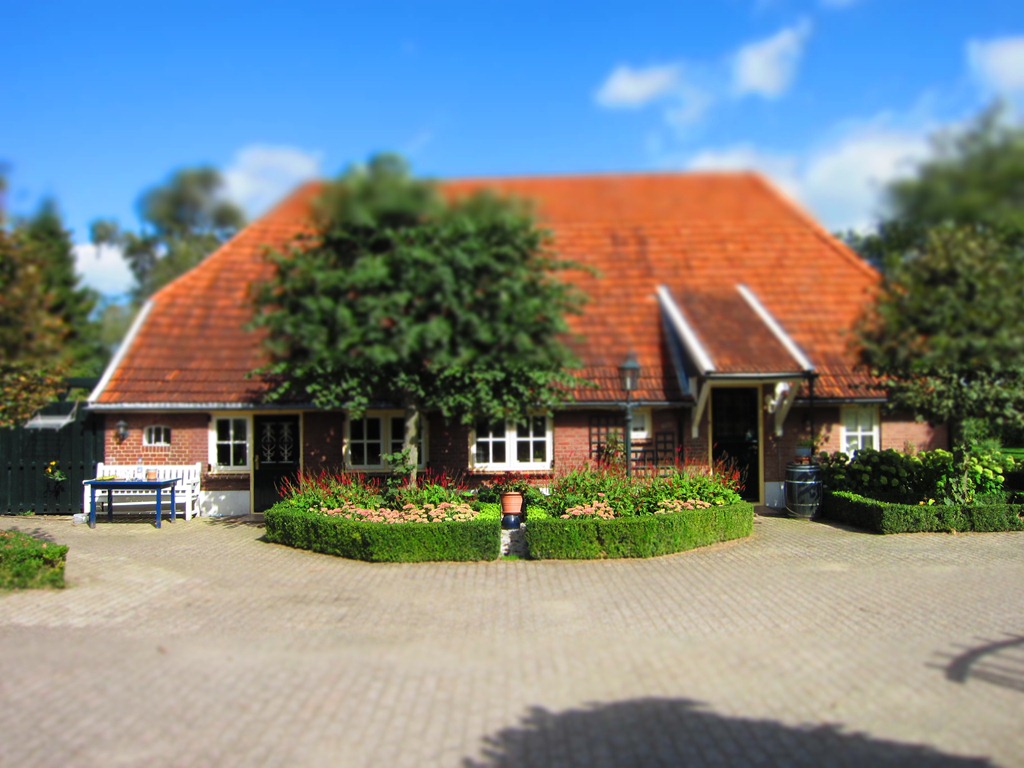
    In just six years, the IXUS range has evolved to a point where I can now shoot HD videos as well as take photos, and the camera has a range of digital effects built-in that I find somewhat overwhelming. For example, whereas a few years back, if I had wanted to take a tilt-shift shot of our house, I would have had to invest in an expensive lens built for the purpose for my Canon SLR camera. Now, I just have to select the “miniature model” effect from the IXUS 300 HS’s menu and I turn this:

    20100915-1254-22

    into this:

    20100915-1253-41

  • Photoshop Elements 9

    I see that Adobe has recently released Photoshop Elements 9. I last used Photoshop Elements when it was at version 4, and stopped using it because the Organizer part of the package had too many limitations for me. I did like the features of the Photoshop Editor, but I hated the Organizer with a passion.

    Still, time passes and now we’ve arrived at version 9, so I thought I’d just take it out for a test drive and downloaded the trial version.

    Since the Organizer was the weak point the last time around as far as I was concerned, I fired that up first to take a look at it. I imported a subset of photos taken this year and started kicking the tyres.

    The first thing I noticed was that the Organizer had successfully imported the IPTC Keyword metadata from the files and used this to create Keyword Tags. However, it did not, unlike Windows Live Photo Gallery, recognise that these were hierarchical tags and create the Keyword Tag hierarchy automatically. Take a look at this screenshot (click on the image to open a larger version in a new window):

    PE9 1

    You can see the imported Tags under the “Imported Keyword Tags” category, but notice how the Organizer has simply imported them all as a flat list – it has not grouped them into a hierarchy. Also notice how a Tag with multiple levels is too long to be displayed properly.

    Now, it is possible for the Organizer to have a Keyword Tag hierarchy, you can see the start of one in the screenshot above, with the first levels being “People”, “Places”, “Events”, “Other” and the “Imported Keyword Tags”. So, having imported all my tags as a flat list, I would have to manually, and laboriously, re-create my tag hierarchy in Organizer to match the hierarchy described in my files’ metadata. This would not be a quick job…

    The next question would be, having got a tag hierarchy created in Organizer, what happens when I write out Tags into files as metadata? Does it store them in a hierarchical manner?

    To test that, I created a simple hierarchy under People (People/Family/Test level 1/Test level 2/Family member 1) and assigned that tag to a test image in the Organizer:

    PE9 4

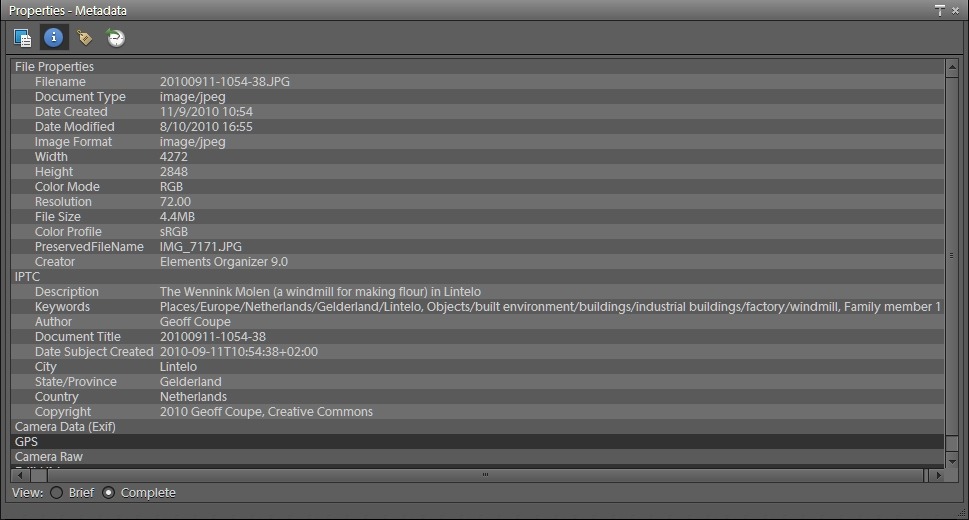
    Here is a screenshot of what the Organizer tells me about the IPTC metadata of this image before I applied the tag:

    PE9 3

    You can see that there are two hierarchical Keywords already present in the file’s metadata. Here’s what the file’s metadata becomes after I tell Organizer to write out the Tags to the file:

    PE9 5

    Not good. Although the Tag “Family member 1” is in a hierarchy in the Organizer, it’s just been written out as a flat, single level, tag to the IPTC metadata.

    From this I conclude that the Organizer does not support hierarchical tags in file metadata. That was the case back with version 4. It’s disappointing that it’s still this way.

    One other thing I looked at with the Organizer is how well it plays in a multi-tool workflow. Like many digital photographers, I have a number of different applications that I use for different purposes. It’s extremely important that these will all play together, and do it as transparently as possible, with little or no effort on my part.

    So, for example, what happens if the metadata of a file gets changed by another tool outside of Photoshop Elements 9?

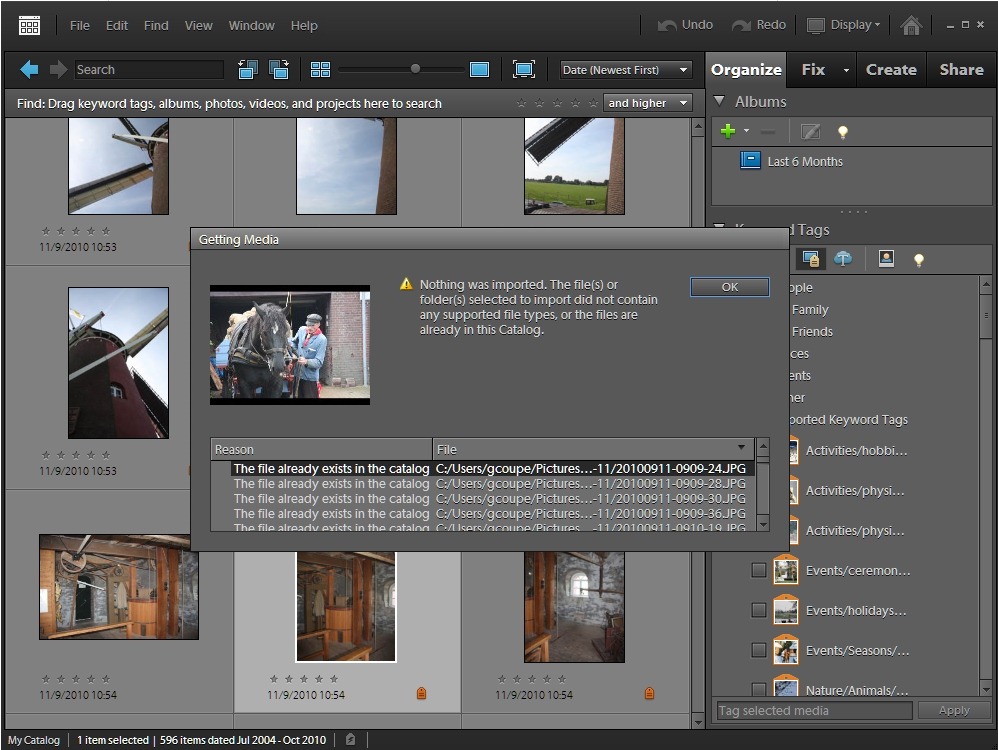
    I tested this by first importing some image files into the Organizer. I then added a tag to a selection of the files using another tool (IDimager). Both Picasa and Windows Live Photo Gallery will pick this change up and update their Tag list to reflect the new one and the files that contain it. Not the Organizer, though. It just sat there and insisted that the tags associated with the files in question were as originally imported, and nothing had changed.

    I thought I’d try and reimport the files to see if Organizer would then realise that a new tag had been added. Not a bit of it – it simply insisted that it already knew about these files and did not realise that the metadata had changed:

    PE9 2

    As far as I’m concerned, this is a showstopper. The Organizer in Photoshop Elements 9 just doesn’t play at all well in a multi-tool digital workflow. It was the same back in the days of version 4. Plus ça change

    And just in case you think I’m being unnecessarily hard on the Organizer here, which is intended for ordinary mortals rather than professional photographers, just consider this… If you have a family and you have a number of computers in your household, then you had better make sure that just one computer is devoted to cataloguing your photo collection. These limitations of the Organizer mean that you can’t have Photoshop Elements installed on multiple computers, and expect the metadata and Keyword Tag hierarchies automatically synchronised between the family PCs. That is one of the plus points about Picasa and Windows Live Photo Gallery. I do all the heavy lifting of cataloguing and Keyword maintenance on my main computer using IDimager, and all the other computers in the household running Picasa or WLPG pick up the changes automatically. That will not be the case with Photoshop Elements. It may export the Tags as metadata, but it doesn’t export the tag hierarchy.

    Oh, one other disappointing thing about the Organizer: geotagging. It uses Yahoo Maps in the geotag interface. The satellite coverage of Yahoo maps in comparison to Google or Bing Maps is but a pale shadow. For the majority of my photographs, I get a plaintive “imagery not available” message if I try to place a geotag accurately.

    After all this, I haven’t had a chance to look at the editor in Photoshop Elements 9. I’m sure it will be powerful, but frankly, my dears, I don’t give a damn… On the odd occasion when I need more capability than my usual tools give, I can always fire up the editor from Photoshop Elements 4. I see no reason to upgrade to version 9.

  • One Step Forward, Two Steps Back…

    This is a bit of a rant. This is a bit of a rant about Microsoft software. This is a bit of a rant about Windows Live Essentials 2011.

    Windows Live Essentials (WLE) is a suite of utilities from Microsoft that began life back in 2006. WLE 2011 is the fourth major iteration of the suite, and was released in its final version on 30th September 2010. It now contains a number of utilities:

    Of these eight utilities, I really only made extensive use of four of them (Mail, Messenger, Photo Gallery and Writer). With the release of WLE 2011, and the acquisition of a camera that can shoot HD video in addition to photos, I had expected to start making use of Movie Maker.

    Instead, I’ve found that the 2011 versions of both Movie Maker and Photo Gallery have surprising limitations that represent a step backwards from earlier versions. Worse still, Windows Live Photo Gallery 2011 has a showstopper of an issue that means that I cannot use it until it is resolved in a satisfactory manner by Microsoft.

    Windows Live Movie Maker

    Windows Live Movie Maker (WLMM) is a complete re-write of an earlier effort by Microsoft: Windows Movie Maker (WMM). Unfortunately, in the rewrite, Microsoft’s desire to make easy-to-use software has resulted in the dumbing-down of the software to the point where functionality has been removed.

    Windows Movie Maker had both a “storyboard” view and a “timeline” view for editing and assembling videos. Windows Live Movie Maker 2011, on the other hand, has dropped the timeline view and only offers a storyboard view for editing. That’s a great pity, because having the timeline view makes some operations very easy to do, and they can only be done with difficulty, if at all, in the storyboard view. For example, in WMM’s timeline view, you could edit the audio of a video clip. You simply can’t do this in WLMM’s storyboard.

    Limitation number two is that, as far as Microsoft is concerned, we all live in either North America or a few other places. That’s because when you produce your finished video, WLMM will produce it in the NSTC standard. Much of the world (over 120 countries and territories) uses the PAL standard, but Microsoft does not support this in WLMM by default. You can cook up your own custom settings, but this is not always straightforward. Take a look at this discussion on the WLMM Help Forum to get an idea of some of the issues involved.

    One would think that since Microsoft is apparently trying to make easy-to-use software that they would offer a simple “NTSC or PAL” switch in WLMM, just as practically every other video editing software does, but no; for some reason they have concluded not to do it, leaving us to hunt for information as to how to set it up for ourselves. Two steps back…

    Windows Live Photo Gallery

    Windows Live Photo Gallery (WLPG) has had more functionality added to it in each of the major releases. WLPG 2011, for example, now has automatic face recognition, geotagging, and a “photo fuse” feature added to it over the features that were in WLPG 2010.

    However, there is at least one limitation that I’ve found in comparison with WLPG 2010, so it’s not just a simple move forward. WLPG 2010 had a slideshow function – select your photos, click on the Slideshow button, and you got an instant slideshow of your selected photos. WLPG 2011 seems to offer the same functionality, but when you click on its Slideshow button, what is actually happening is that it passes the job over to Windows Live Movie Maker 2011 to do the work of producing and running the slideshow. And here’s the limitation: the quality of the slideshow produced by WLMM 2011 is noticeably poorer than that which was produced by WLPG 2010.

    When I raised this issue in the WLPG Help Forum, the first response back from Microsoft was to deny that anything had changed between WLPG 2010 and WLPG 2011. They then conceded that things had in fact been changed and that “photo quality in slide shows in Windows Live Photo Gallery Beta is indeed a bit degraded when compared to the original file source”. The reason given was that “since videos have been incorporated to the feature, high definition photos in the slide show are forced to level with the resolution capacity of a video format”.

    While Microsoft may think that slideshow quality has been “a bit degraded”, I see it as noticeably degraded – to the point where I consider it unacceptable in quality, and a step backwards from what was available in WLPG 2010.

    And then we come to the showstopper in WLPG 2011: geotagging.

    Unlike every other application I’ve seen (IDimager, Picasa, PhotoShop Elements, Lightroom, Microsoft Pro Photo Tools, Geosetter) that offers geotagging either directly or via a plug-in, WLPG 2011 does not offer a map-based interface to position geotags. Instead, it uses a text-driven database to assign geotags. The problem with this, as I’ve pointed out here and here, is that this is very prone to errors of interpretation.  If Microsoft had left it at simply a textual description of a geotag, I could have lived with it. But no, they go a step further: they also write out GPS coordinates into the Exif metadata of the image. In effect, WLPG 2011 is guessing the GPS coordinates based on text contained in the contents of the IPTC metadata fields that deal with information about location. Microsoft are really doing geocoding, rather than geotagging. The problem is that very often, these guesses turn out to be wildly wrong. Even that I could live with, if WLPG 2011 had given me an option to stop it writing out these GPS coordinates into my images; but it doesn’t, and that is an unforgivable showstopper in my book. WLPG 2011 has entered false GPS data into thousands of my images.

    It’s really odd, the automatic face recognition feature of WLPG 2011 asks the user to confirm its guesses as to who the person in a photo is each and every time. Yet the geotagging feature is making guesses about GPS coordinates and writing these out to image metadata without even notifying the user that it is doing this.

    I, and others, have raised the issue in the WLPG Help Forum here and here. The worrying thing is that so far, while the issue has been acknowledged by Microsoft, the manner of their replies are, to my eyes at least, rather along the lines of “it’s not a bug, but a feature…” Sorry, Microsoft, it’s not a feature, it’s a disaster. One that could have easily been avoided if they had given us the option to turn off the writing of GPS coordinates into image metadata. And if they had given us a map-based interface, like any decent geotagging application, then users could have checked WLPG’s guesses, confirmed those that were correct, and rejected the false ones.

    WLPG 2011, despite the fact that it uses the term “geotag” in the application, is actually doing geocoding, rather than geotagging if you follow the strict definition of the terms. There’s probably a reason that everyone else does geotagging in their applications, and that is probably because it isn’t so prone to horrible errors as Microsoft’s geocoding approach has turned out to be.

    This issue makes WLPG 2011 not so much two steps back in comparison to WLPG 2010, but more of a step off the cliff…

    Update 2 December 2010

    There’s an update to WLPG 2011 that addresses the geotagging issue. See here for more information.


  • RIP, Norman

    One of the great clowns has died: Norman Wisdom. You can read an official obituary here, but I would advise you to also go and read the personal vignette about Norman written by Stuart Hartill over at Clinging to a Rock. Like Stuart, Norman and I once lived on the Isle of Man. Now only Stuart remains.

  • Undecided

    You may have noticed that some of my blog entries are appearing on both what I nominally call my “old” blog over at WordPress.com and on my “new” blog over at Blogger… That’s because I’m torn on where to settle and continue blogging forthwith. Both have their pros and cons.

    Ah, decisions, decisions…

  • Windows Live Essentials 2011

    So the final version of Windows Live Essentials was released today. I see from this blog post by Chris Jones that apparently 95% of the bugs that were present in the beta version have been addressed by this final release.

    I suppose it was inevitable that I would find myself continuing to be bitten by one of the remaining 5% of bugs.

    Windows Live Photo Gallery still continues to write false GPS coordinates into my images.

    This is unacceptable behaviour as far as I’m concerned. I can’t afford to have it running on my computers and introducing garbage into my image metadata.

  • The Other Shoe Drops

    If you’ve been following this blog, you’ll be aware that I recently moved across to hosting it on Blogger after more than five years of it being hosted on Microsoft’s Windows Live Spaces.

    I made the move in June when Microsoft started removing features of the Spaces service. Despite a chorus of complaints from users, Microsoft would not come clean about their plans for the service. Indeed, they denied that anything was amiss. Nevertheless, I’ve been waiting for the other shoe to drop, and today it did.

    Microsoft have announced that they are pulling the plug on Windows Live Spaces. They have at least tried to sugar the pill by offering existing users the chance to migrate their blogs over to being hosted on WordPress.com, but the Microsoft gadgets that people used to customise the look and feel of their blogs are no more. So it’s not a full migration, just a migration of the core blog entries and nothing else.

    Although I had set up an account on WordPress.com in June as a trial, I finally decided to move to Blogger, because there I was able to use Javascript in widgets and blog entries. WordPress.com, like Windows Live Spaces, does not allow the use of Javascript. That meant that I could not embed my Photosynths in my posts, or use the LibraryThing widget to display a rolling selection of books from my library on my blog.

    I’ve decided to stick with hosting my blog on Blogger, but I have migrated the content of my old blog from Windows Live Spaces to WordPress.com in order to preserve it once Microsoft wipe out Spaces. That content can be found at Geoff Coupe’s (Old) Blog.

    So what can we learn from all of this? Well, it seems to me that Microsoft’s customer relations in this instance have clearly followed the mushroom model; i.e. keep your customers in the dark and throw shit on them. Not a good way to deal with your customers I would have thought. This debacle has certainly left a bad impression on me.

    Update: Cough, after a couple of months, I left Blogger and moved back to WordPress

  • Baroness Warnock, Please Check Your Facts

    The latest issue of Hew Humanist has an interview with Mary Warnock, a redoubtable campaigner on moral ethics and member of the House of Lords. The interview no doubt was prompted by the publication of her new book: Dishonest to God: On Keeping Religion out of Politics.

    For the most part, it’s quite a good interview, but it does contain what I found to be an astonishing statement by Baroness Warnock:

    “That’s absolutely right. I find Dawkins’ simple-minded view of religion very difficult to take. It pays no proper attention to the history and tradition of religion. It says that religions have done nothing but harm but that is manifestly not true. He omits all the good things, the education, the cathedrals, the music. All that’s disregarded.”

    She’s talking about Richard Dawkins, of course. The author of The God Delusion. The book in which he says:

    …an atheistic world-view provides no justification for cutting the Bible, and other sacred books, out of our education. And of course we can retain a sentimental loyalty to the cultural and literary traditions of, say, Judaism, Anglicanism or Islam, and even participate in religious rituals such as marriages and funerals, without buying into the supernatural beliefs that historically went along with those traditions. We can give up belief in God while not losing touch with a treasured heritage.

    Dawkins has said of himself that he is a “cultural Christian”, and that he gets enjoyment from such things as Carol music. So how Mary Warnock can claim that he “omits all the good things”, I really don’t know. A surprising lapse from a usually reliable philosopher.

    (hat tip to Francis Sedgemore for pointing out this stumble from Baroness Warnock)

  • This Is Charity?

    I’m not a charitable person, not in the sense of the act of giving to charity, but in the sense that I have a heartfelt distrust of celebrities and those who say how wonderful they are. So I almost missed this story from Marina Hyde on Bono’s “charity” ONE.

    The arresting (and would that it were so) fact is that:

    ONE took $14,993,873 in donations from philanthropists, of which a thrifty $184,732 was distributed to charity. More than $8m was spent on executive and employee salaries.

    Frankly, it doesn’t really surprise me, it just stokes my feelings of misanthropy.

  • Dog Training

    I’m currently enrolled with Watson in a series of dog training courses. We’ve got an exam coming up in November, whereby I have to convince an independent examiner that Watson is well-behaved and obeys me. I can’t say that I’m full of confidence. Watson has a will of his own, and usually demonstrates that he does not yet see me as top dog.

    Having wrestled with training, I’m always impressed when I see other dogs who apparently obey their owners every command. Like these dogs in OK Go’s latest music video:

    Did you spot the goat?

  • René is Missing

    Jan Chipchase photographs a “missing” notice taped to a lamppost in New York.

    While it might be genuine, I suspect it’s more likely to be a viral Ad campaign for the tiresome René Lacoste brand of clothing…

  • Moving Forward

    Two news items that seem to reinforce each other.

    The first is Jan Chipchase’s presentation on the Ideas Economy. Key point:

    Within a few years time, in any part of the world where there is a cellular data connection you’ll be able to point camera phone at someone’s face and know within a reasonable time-frame and level of certainty who they are, their history and their history of interactions. And the same goes for them of you.

    And in today’s Observer, a story about the unveiling (hah!) of a hi-tech way for Egyptian women to report sexual harrassment:

    HarassMap allows women to instantly report incidents of sexual harassment by sending a text message to a centralised computer.

    The future rushes to meet us.