
I’m channelling Victor Meldrew again today. And the cause of my frustration is once again the forthcoming Windows Home Server 2011. I wasn’t too impressed with some of the backup features I found when I looked at them a few days ago. After digging a bit further, I’ve come across one “feature” that has flabbergasted me. It really should be called a bug, because it introduces an extraordinary limitation into WHS 2011.
It turns out that the maximum size of a server backup that can be made is 2TB.
OK, you say, but WHS 2011 recognises multiple backup discs. So suppose my WHS has 5 TB of data that needs to be backed up, then I just use three backup discs, right? Two discs of 2TB capacity and one disc of 1TB capacity (or three discs each of 2TB capacity; the third will only be half-used). Plug ‘em in, let the server backup processes run, and everything’s hunky-dory, right?
Wrong.
Even though WHS 2011 will recognise multiple backup discs, it won’t let you slice up the server storage across them. You can only backup the same files and folders to any of the multiple discs. So, in the example I used above, even though I have three backup discs, I can only ever backup a maximum of 2TB of the 5TB stored on my server.
I ask you, what sort of design is that? The term brain-dead springs to mind.
The WHS team at least do recognise the limitation. Over at the Microsoft Connect bug-reporting site, a member of the team has written:
At this time we can only back up to 1 single 2 TB disk. We realize the limitation and are working with the Core Windows team to fix this. Hopefully it’s something we can provide in future releases. For now you have to pick your critical data.
Er, “hopefully” you can fix it? Dear lord, is that the best that you can do?
It turns out that there seems to be a workaround, but it’s not, I think, for the average home user – you know, the sort of person that WHS 2011 is targeted at.
WHS 2011 is built on top of Windows Server 2008 R2 – an extremely powerful server operating system. This has its own Backup and Restore mechanism, which is equally powerful. However, this mechanism is designed for IT people, not for the home user. Here, for example, is a screenshot of partof the Overview of Windows Server Backup, taken from the online help manual (click to see in its full gory glory). Full of jargon and certainly not for the faint of heart (or non-IT person)…
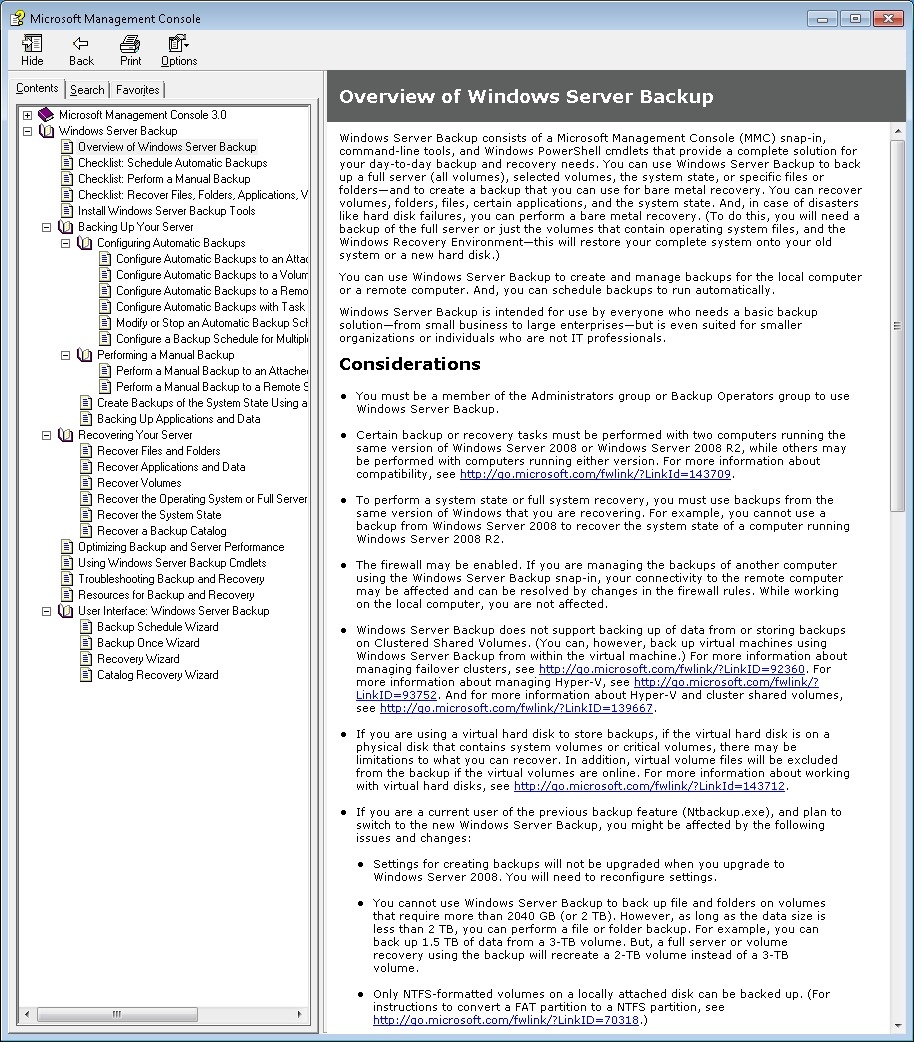
If you want to take a look at the full manual, then please, be my guest, and visit Microsoft’s online help web site.
Now, it is certainly possible to use the Backup and Restore mechanism of Windows Server 2008 R2 to do what I want to do – slice the 5TB of storage on my WHS across three backup discs, but I’ll have to figure it out for myself, and start being an IT person again.
The whole point is that I shouldn’t have to do this. WHS 2011 is supposed to be for the home user.
The last irony about all of this is that in fact the backup features of WHS 2011 do seem to be using the underlying mechanisms of Windows Server 2008 R2, it’s just that their current design is extraordinarily limited, and, in my case with more than 2TB of data on my server, utterly useless.
Update 20 October 2011: I see that Microsoft have now posted a TechNet article covering this 2TB limit in the TechNet Wiki. Since it’s a wiki, I’ve edited it to improve the language and the grammar. The original was clearly written by someone for whom English is not their first language.
Update 31 March 2014: It appears as though there has been some improvement made to the Server Backup function in the Dashboard since I originally wrote this article. It remains the case that WHS 2011 continues to use the VHD format for backup, which has a maximum capacity of 2TB. However, it now appears (contrary to what Microsoft originally stated) as though the Server Backup function can now deal with multiple VHDs, providing the backup drive is big enough. So, if your backup drive is 4TB, that means you can have 2 VHDs of 2TB created on it. That, in turn, means that you can backup up to 4TB of data from your data storage drives (with a maximum of 2TB for any one drive). That’s a theoretical maximum, since Microsoft also recommend having some free space in the VHDs to handle incremental backups.


 Geoff Coupe's Blog
Leave a comment