
The OK Go band + Pilobolus = Amazing Video.
Year: 2011
-
Through The Looking Glass
Sometimes I feel like Alice – I’m in a looking-glass world where black is portrayed as white, good is bad, or up is down. It’s at times like these when I’m likely to throw a Victor Meldrew fit at the apparent stupidity, cupidity or just plain bare-faced effrontery of those in charge, who have the power to dictate what we will experience in our daily lives.
What’s brought on this latest attack is the publication in yesterday’s Volkskrant newspaper of a two page spread covering the likely future of rail transport in the Netherlands.
The kernel of the report was the finding that breaking up the national rail network into separate chunks and putting services out to tender will reduce delays, according to research by network operator ProRail.
Let’s just savour that, shall we? And why would that proposition be true, in any meaning in the real world? Ah, we read, it’s because services will not be so interdependent, reducing the domino effect of delays, ProRail is quoting as saying.
Dear god in heaven, do these people not have two braincells to rub together?
Let’s just take a practical example. I want to travel from Amsterdam to my home – nearest station Varsseveld. That means that I’m using the Dutch National Railways (the NS) from Amsterdam until Arnhem, and then changing over to Syntus for the last hour from Arnhem to Varsseveld.
So excuse me, but surely for me, these services are interdependent – I want to step out at Arnhem and step onto a train bound for Varsseveld with the minimum of delay.
As a matter of fact, at the moment, Syntus (one of the independent rail operators that the Dutch Government is so in love with) offer what can only be described as a truly shitty service. I’ve lost count of the number of times that services have been delayed or cancelled, while the hapless train drivers run around like headless chickens, glued to their mobile phones receiving zero practical information.
On more than one occasion, I, together with my fellow travellers in the outer regions of Hell, have been herded from one platform to another in Zevenaar at the behest of the Syntus staff for what seemed like hours at a time. “The next train for Winterswijk will leave from platform 3”, “no, platform 4”, “no, that’s going back to Arnhem”, “Platform 1”, “no, we’re putting buses on” – so three train’s worth of passengers have to fight for seats on a single bus.
So, ProRail, don’t tell me that delays are not interdependent. Wherever they happen, they will have a domino effect on the individual traveller, if that traveller is where the delays are.
I note, with a roll of my eyes, that the ProRail research report was carried out at the request of the private rail operators. I can’t say I’m totally surprised at the findings then, although it only serves to underline the fact that we are indeed in looking-glass land.
And, oh joy, because of the love affair the Dutch Government have with the idea that more independent operators make for more efficiency, we have the situation to look forward to that if we want to travel from Amsterdam to Varsseveld, we will have not two, but three train operators to deal with: the NS, Breng and Syntus.
It’s at times like this when I earnestly wish to be face to face with the authors of these research reports and the faceless bureaucrats who decide our transport fate and slap them hard around the face with a wet fish.
-
Home Server Status
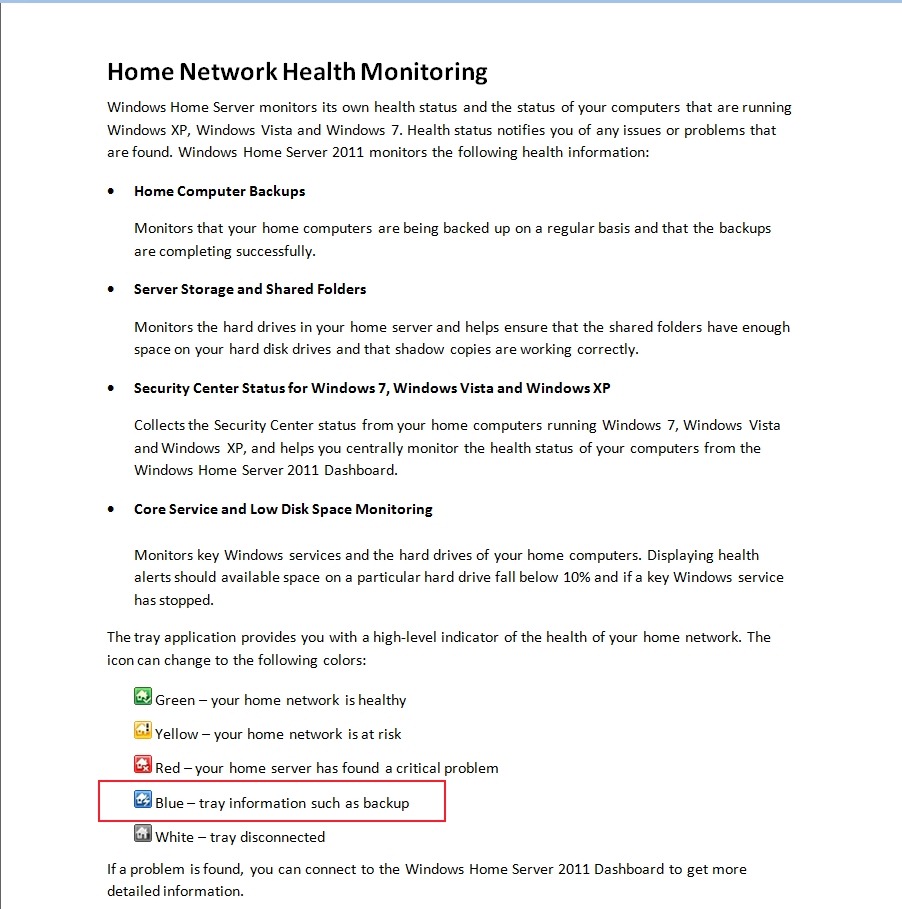
If you were (or are!) using the original version of Microsoft’s Windows Home Server, you will probably have noticed that the WHS icon in the System tray changed colour to provide notifications at-a-glance:
- Green – your home network is healthy
- Yellow – your home network is at risk
- Red – your Home Server has found a critical problem
- Blue – your PC is currently being backed-up to the Home Server
- Grey – your Home Server is offline or unreachable
If you’re now running Windows Home Server 2011, then the WHS icon (now the Launchpad icon) no longer shows this range of notifications. Basically, you now have a choice of one colour: green. Green now simply means that the Launchpad is running.
However, the Getting Started Guide for WHS 2011 still shows the WHS v1 colour notifications as being present in WHS 2011:
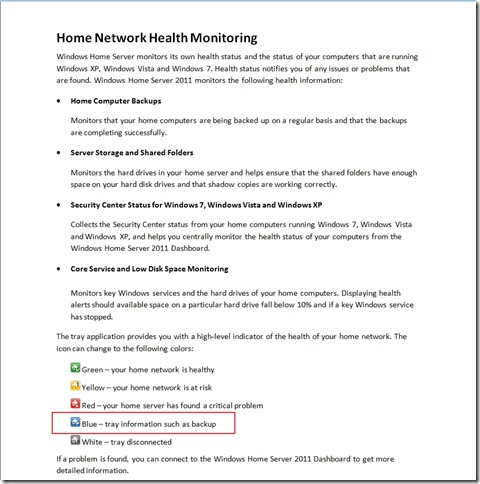
Not surprisingly, some people, reading this document, thought that they had found a bug, and reported it as such over at the Microsoft Connect web site (note: if you aren’t registered at this site, you won’t be able to see the actual bug report).
Microsoft did their “it’s not a bug, it’s a feature” trick and replied that:
we decided in the 2011 release that backups should be seamless and not neccessarily [sic] notify the user of when they are in place
and said that it would not be fixed. This is all very well, but it ignores the wishes of those folks who found that the additional notifications, particularly of backups, are extremely useful. It also points up Microsoft’s rather sloppy approach to the documentation of WHS 2011.
Since Microsoft, in their infinite wisdom, have declined to fix what many see as a bug, I’m pleased to report that a third party has stepped forward instead.
Jerry Wade has developed a utility (Home Server Status) for your Desktops and Laptops that indicates when a backup is in progress. Plus, it does a few other nifty things as well.
Check it out here.
I installed it and stopped using Microsoft’s Launchpad application, and have never looked back. I can thoroughly recommend it to ex-WHS v1 users who think that WHS 2011 has lost the plot with its bloated Launchpad application. And for those WHS 2011 users who are new to all of this, you could do worse than to check HSS out.
-
Practical Bliss
As you may be aware, I’m not very happy with the Media Library in Windows Home Server 2011. As well as the shortcomings and design issues that I wrote about here, it also turned out that WHS 2011 has a tendency to corrupt music metadata and Album art stored in the Music Library.
In one of the discussions about these issues that went on in various forums, I came across a reference to an application called Bliss. It’s an application that seeks out Album covers online and will download and install them into your music collection automatically.
Since WHS 2011 had blithely overwritten all my carefully-prepared high-resolution Album art with its own low-resolution versions, I thought that I would give Bliss a whirl to see if it could repair the damage wreaked by WHS 2011.
To cut to the bottom line, Bliss does what it says on the tin, and I can recommend it; but there are a few quirks to be aware of if you want to use it to maintain Album art on a WHS 2011 system.
What follows is the detail of what I did and what I found…
While Bliss can be installed and run on WHS 2011, it is not packaged as a true Add-in application for WHS 2011. Add-ins are designed to be downloaded onto your Desktop PC or your Laptop, and installed onto your WHS 2011 from there. Once installed, the Add-in appears in the WHS 2011 Dashboard, where the application can be accessed and controlled. Bliss, on the other hand, is packaged as a traditional application. Once installed and started, it runs in the background and is accessed and controlled via your web browser. This means that it can be installed on your Desktop, your laptop, or the home server. Once running, you can point Bliss at the location of your Music Library, and it will go to work.
To install Bliss on WHS 2011, you need to open up a Remote Desktop Connection to your WHS 2011 system to gain access to the Administrator’s Desktop on the server. From there, you can double-click on the Bliss Setup program, and it will be installed on the server. Since it is installed in a server environment, it is best that it is running as a Windows service. That way, it will automatically start up when the server is booted – you won’t need to manually start it. Full instructions on how to install it as a Windows service are given on the Bliss web site here.
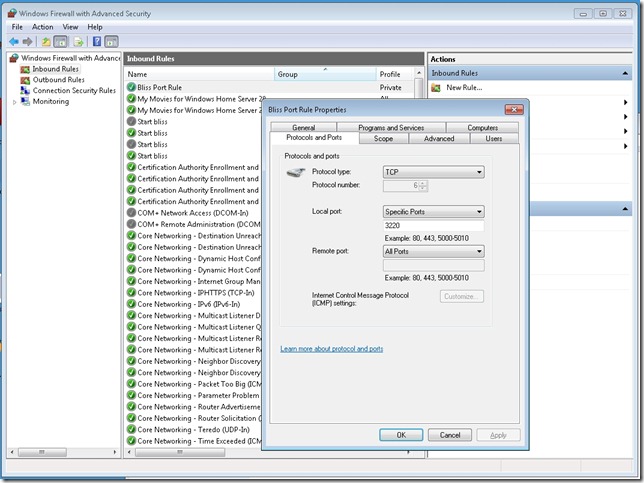
Once Bliss is running (either as a Windows service, or by being started manually), then access to the functions of Bliss is done via a web browser. If Bliss is running on your Desktop, then accessing Bliss is done via the URL: http://localhost:3220. However, if it is running on your WHS 2011, then you’ll need to point your Desktop PC web browser to http://Servername:3220, where Servername is the name of your server. And here comes the first quirk. When I tried that, the web browser failed to find the Bliss web page.
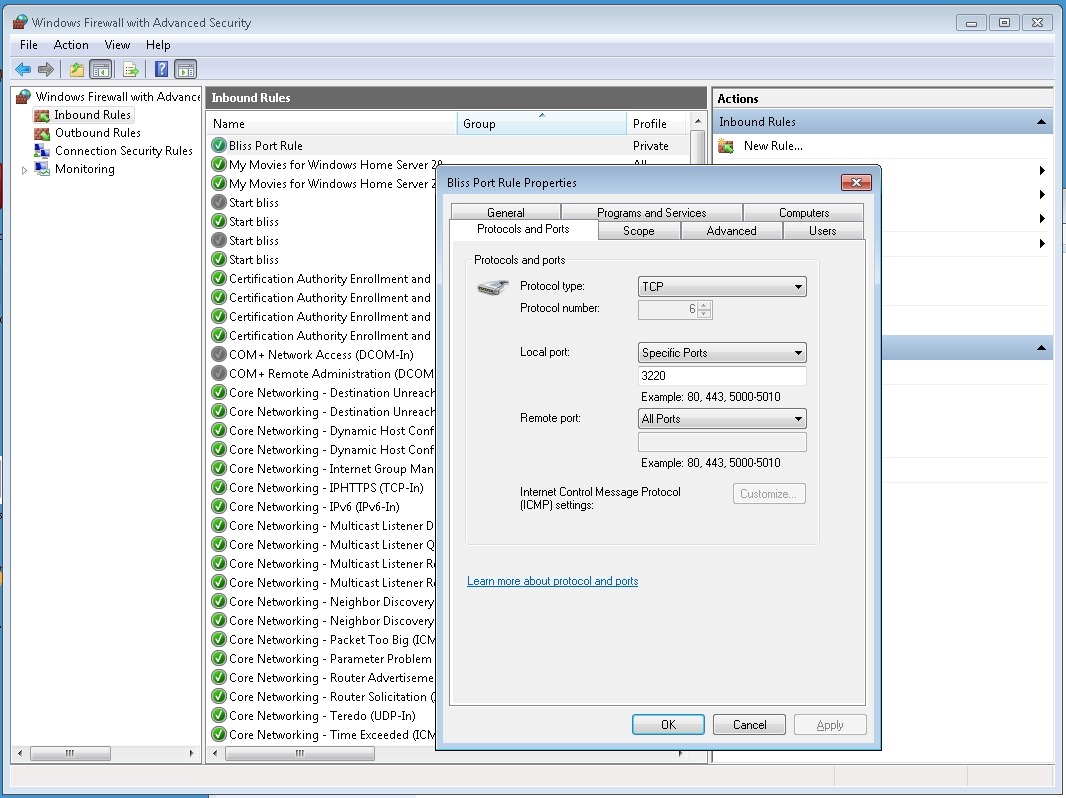
The reason is that installing Bliss on WHS 2011 does not automatically add in a Firewall rule to allow access via the 3220 TCP port. I needed to once again open up a Remote Desktop Connection to my WHS 2011 system to gain access to the Administrator’s Desktop on the server. From there, I used the Windows Firewall Management applet to create a new TCP port rule to allow inbound access to port 3220:
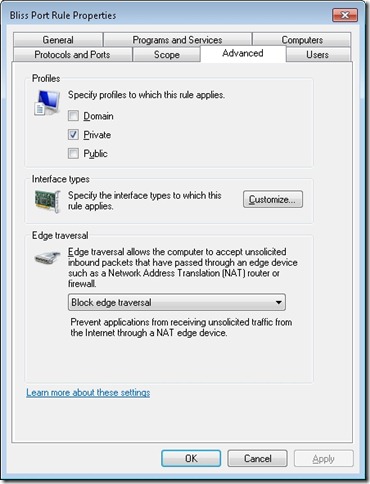
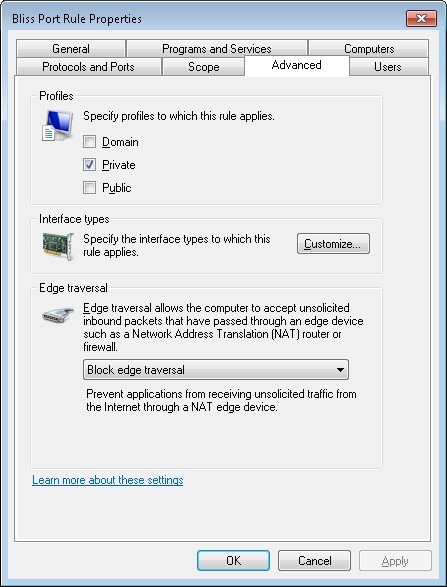
I also made sure that this rule was only valid for my Home (private) network:
Now, to me, all this remote accessing of the Administrator’s Desktop of the WHS 2011 system in order to install the program (preferably as a Windows service) and configure the firewall stretches beyond what I think the average Home User can reasonably be expected to cope with. It is OK for those of us who are comfortable rummaging about under the hood, but not, I think, for your average Home User who really wants to view WHS 2011 as a backup and storage appliance for his or her digital media. The design principle of WHS 2011 should be that such a user can access and control all the necessary functionality of the system via the WHS 2011 Dashboard. The system should be simple to install, run and maintain.
For Bliss to fit this paradigm, it would be necessary for it to be available as a true WHS 2011 Add-in. Since it’s not available in this form, if you are going to install it on your WHS 2011 system, you have to know what you’re doing, and feel comfortable about rummaging in the innards of WHS 2011.
Please don’t think that I’m casting aspersions on the developer because Bliss is not a WHS 2011 Add-in. Turning Bliss into a proper WHS 2011 Add-in can be a major development and rewrite project, and frankly, given the less than stellar impact WHS 2011 has had in the market, I doubt that the monetary returns would justify the work for many applications such as Bliss.
Given all the above, then if you are just an ordinary Home User who wants to have a nifty Album art application for your music collection on your WHS 2011 system, then what should you do? My recommendation would be simply to install it on your Desktop PC or Laptop, and use it from there. You can point Bliss to your music library on your WHS 2011 system and everything’s hunky-dory.
Well, almost.
Remember that I said that WHS 2011 corrupts Album art? The reason is that, by default, WHS 2011 runs a scheduled task every 24 hours to replace what you think the Album art should be with what Microsoft thinks it should be.
That’s bad enough, but even worse is that when this task replaces your high-resolution Album art file with its crappy low-resolution version, it sets the attributes of the file to “Hidden” and “System”. A file with these attributes cannot be updated by Bliss – any attempt to do so will generate an “Access denied” error.
So, I’m afraid that even if you are just an ordinary Home User, you will still need to use a Remote Desktop Connection to your WHS 2011 system to do three things:
- Stop and delete that damned scheduled task (then reboot your server).
- Go to the root folder of your Music Library and search for all files named Folder.jpg in the root folder and subfolders.
- Delete all the Folder.jpg files in your search result.
Then Bliss will be free to do its stuff and supply decent quality Album art where it can.
You know, it’s somewhat ironic that Microsoft has shot itself in the foot here. Far from supplying an operating system that can form the basis of a backup and storage appliance, the shortcomings of WHS 2011 are often working against that goal. Applications such as Bliss are in danger of being subject to collateral damage through no fault of their own.
I’m happy to continue to use Bliss, because, as I said, it does what it says on the tin. I just have to keep an eye on WHS 2011, because it often does not.
-
“Put Hitler in the Cupboard”
So the final half of the sixth series of the regenerated Doctor Who kicked off last night with “Let’s Kill Hitler”. Oh, but I did enjoy every single moment of it. Steven Moffat is such a brilliant and audacious writer, and the excellent actors have a field day with his lines.
Look, I don’t care that there were some probable plot holes – the Doctor should have known about River’s lipstick trick by now – I was still loving every single moment: the introduction of Mel, the growing-up sequences, the use of Hitler as a MacGuffin, the antibodies in the tesselrator channelling the Sirius Cybernetic Corporation of Douglas Adams, the redemption of Mel/River… It was a blast. Knocked the current sorry mess of Torchwood into a cocked hat.
-
Using RAW Codecs in Windows
If you are an enthusiast photographer using a digital camera, you may well have set your camera to take photos using its RAW format. It’s what every professional photographer does. The rest of us take the easy way out, and take photos using our cameras, smartphones, or similar image capture devices using the ubiquitous JPEG format.
The advantage of the RAW format is that, like the old film negative, it contains the truest record of the data captured by the camera’s image sensor. That data can be processed to suit what the photographer wants as the final image. In traditional photography, this is equivalent to processing the negative into the final positive print.
The JPEG format, on the other hand, can be thought of as the end result of the image processing that happens in the camera itself using a standard set of parameters. While the image can be further tweaked in computer applications, the flexibility of what can be done, as compared to that when using the RAW format, is severely limited.
Microsoft’s Windows has, over the years, supported the JPEG format out of the box. That means that utilities such as the Windows Explorer will display thumbnails of your JPEG images and tools such as Microsoft’s Windows Live Photo Gallery will be able to process those images further.
However, up until now, support of the RAW format has not been present in Windows itself. If you have images using a RAW format, Windows has probably given you a message telling you that it can’t display the image, and suggesting that you go to your camera manufacturer’s web site to download and install an image codec to plug into the Windows Imaging Component of Windows that will enable the display of your images.
There are also third party software solutions that offer portmanteau RAW codecs for a wide range of cameras and RAW formats (each camera manufacturer defines their own RAW format in a unique way). These third party solutions have been around since the days of Windows XP.
Now, Microsoft have trumpeted that, in order to make it easy for the consumer, they have developed their own portmanteau codec for a range of RAW formats. This can be downloaded and installed into Windows. It enables both Windows Explorer and Windows Live Photo Gallery to display RAW images directly.
While I think it’s a good thing that Microsoft have done this, what left a nasty taste in my mouth, in both the announcement and the accompanying video, was there was no acknowledgement whatsoever of existing third party solutions. Even worse were the statements such as that made by Jason Cahill in the video that the Microsoft codec supports “all the cameras you may have had or may have now”. Er, no, it doesn’t.
Axel Rietschin, the developer of the excellent FastPictureViewer Codec Pack has made an excellent comparison between his own offering and Microsoft’s codec. If you are interested in seeing the full picture, and wanting a superior codec pack, then you should read it.
-
The Volcano Is Now Extinct
This is a very difficult post to write. It concerns my oldest and closest friend.
We first met back in the early 1970s when I first moved up to London. I wanted to do some volunteer work, and ended up asking a gay counselling organisation, Centre, if I could be a volunteer. I was interviewed by, amongst others, Dr. Leonard Patrick Curran, a psychologist who was working for the UK’s Home Office in the Prison Service department at the time.
Thus began a friendship that has continued for almost forty years. Alas, it has now been brought to a close because Len has died.
Len Curran was a psychologist and an epidemiologist. He worked for many years in the UK’s Prison Service where he was responsible for the development of policy on HIV/AIDS in prisons, for medical research and ethics. After leaving the Prison Service he worked for international agencies such as the World Health Organisation and the International Red Cross as a consultant on infectious diseases in uniformed services. In this capacity he worked in over 40 countries across the globe. He was also a Trustee on the Board of Red Kite Learning for six years.
He was, perhaps, the most intelligent man I have ever known personally. He could also be, and frequently was, the most frustrating, infuriating, and angst-inducing friend that ever was inflicted upon us mere mortals. Len did not suffer fools gladly.
I liken the experience of knowing Len to that of living on the slopes of a volcano. The intellectual view is amazing, wonderful and far-reaching, the soil of intelligent discussion is rich, deep and fertile. But every now and then there comes an eruption, seemingly out of nowhere, and then you are simply left wondering what you have done to incur the wrath of the gods.
I don’t think I ever measured up to his exacting standards – I suspect very few did. But, all the same, I kept going back for more. He was a powerful drug, that at its best delivered pure enlightenment and joie de vivre.
He supported me through good times and bad times, and he also provided the lash to my back when he thought I was not measuring up.
In the late 1970s, we bought a house together in London’s Maida Vale. A former squat, it was a Victorian terrace house that had seen far better days. I remember the first time he drove me along the street – Bristol Gardens – pointing out the two properties that he thought we should put in a bid for. He was very excited at the prospect of us going into a joint project together, I was just looking at the faded glory, the bricked-up windows and thinking: “Aarghh!”


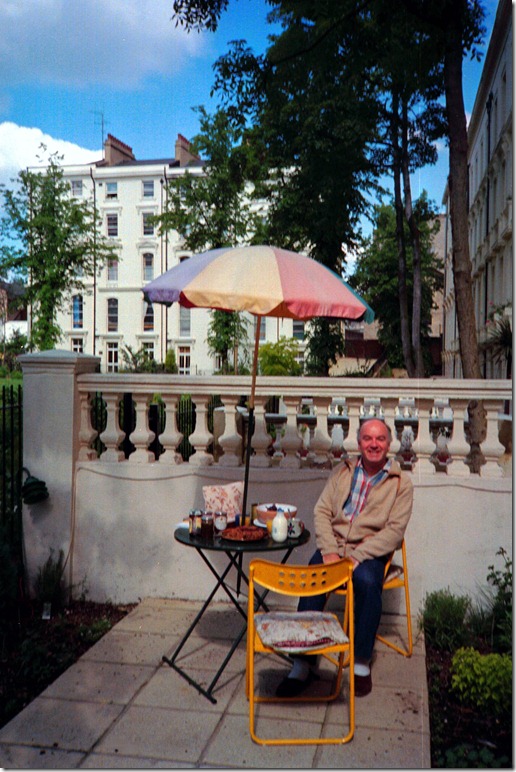
I thought he was out of his mind. However, such was his persuasive power that we ended up as the successful bidders for one of the two properties: 15 Bristol Gardens. Then came the heartburn of securing the finance – Len’s first option, the Allied Irish Bank (Len was born in Belfast), got cold feet, but finally we managed to persuade Barclays Bank to come through with the mortgages. With the help of an architect friend (Peter W.) and a builder (Peter B.), this disaster of a house was turned into two flats – one for Len (the garden flat) and one for me (the top two floors). I’m afraid that we managed to drive our builder into bankruptcy in the process, but eventually, and through a lot of our own work, we ended up with two flats in the up and coming area of Maida Vale. The house was a bit cantankerous, but it did deliver a lot of pleasure and good times during the 1980s to us both. Here’s Len partaking of breakfast in his garden at the back of the house.
I moved to the Netherlands for my work in late 1983, and eventually started renting out the top flat to a succession of people. This put Len in the position of being the landlord’s representative living downstairs, a role that he certainly didn’t want or ask for. However, after telling me in no uncertain terms that he objected to the role being thrust upon him, he accepted it with good grace and performed it admirably. Finally, in 1995, I sold the flat to Len. I can’t now recall how long he continued to live in Bristol Gardens, but eventually he sold the house and moved to a house in a nearby Mews.
Up until mid-2004, I would often be back in London on business, and very often stayed with Len. That invariably meant very late nights full of wide-ranging conversations washed down by a bottle or two of wine (or, as he would say: a bucket of wine). I recall one occasion, following a visit to the newly-opened Tate Modern, where we sat up all night talking about the art, and life in general. Fortunately, I did not have to go to work the following morning.
Because I was living in the Netherlands in the mid-1980s, Len stepped in to being in direct contact with a friend of mine who was HIV-positive. As a result, he became close friends with Kerry, with whom he shared the same wicked sense of humour. The three of us went on holiday together to the South of Spain in September 1986.
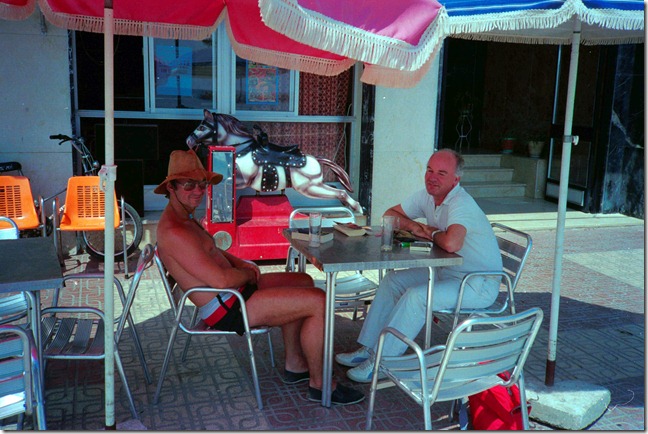
We stayed in the holiday home owned by Kerry’s sister in Murcia. They drove down in Kerry’s car from Calais, having many adventures on the way, while I flew to Malaga, where they picked me up. By the time we arrived at the house, it was dark, so they asked me to go ahead and switch on the porch light while they got the case out of the car. I didn’t suspect a thing, so I went ahead, found the switch and turned it on. Instantly, a swarm of insects and beetles flew straight at me – some of them bright green, and hard, like dried peas. Naturally, I let out a shriek, whereupon Len and Kerry turned to each other and said loudly in unison: “Yep, he’s a queen…”
Kerry and Len could both truthfully say that they had danced with Nureyev. Kerry, because he was a ballet dancer by profession, and Len, because he once met Nureyev at a party and asked him for a dance.
Len lived life to the full; I could never keep up with him. So I contented myself with listening to the many tales that he told. He was a great raconteur, and at many a dinner-party would hold us all spellbound as he wove his tales, which were frequently outrageous and would reduce his listeners to tears of laughter. He moved through all of society’s strata, and brought back stories to share with us. As a result of this oral storytelling, most of his anecdotes only exist in our memories, but here’s one I found in one of his letters:
It reminds me of when I was staying at the Loyal Liver Hotel in Bangkok (Royal River Hotel). Eventually I got so used to this that I used to leap into a taxi and with a straight face say in perfect Thai-English “Loyal Liver Hotel, Sangheee!” Which usually worked, though not always, because not all taxi drivers spoke Tinglish. So the hotels had cards printed with the address in English on one side and in Thai on the other.
One night I had been out visiting the boy-boy and boy-girl bars with the AIDS Task Force and they gave me a card showing their new condom promotion campaign for sex tourists which said: “Welcome to Bangkok. We want you to be safe whilst you are here. Please wear this condom when you are with me and it will make me feel safer and we can have good times together”. English on one side, Thai language on the other.
At the end of the evening, I leapt into a taxi and said “Loyal Liver hotel Sangheee!”, but no response so I took out a card and gave it to the taxi driver, who as Thais do when they haven’t understood, went into a meditative state to work out what you mean. We sat like that for a few minutes until I realised I’d given him the wrong card. I can imagine him later telling his wife in Thai: “Hey Martha, you’ll never guess what happened tonight!”
He also had a reflective side, so that his stories could also be moving and profound. I keep a letter in which he describes the experience of attending the funeral of a friend’s father where he pens loving portraits of the participants that bring them instantly to mind for me.
In September 1996, Len turned 50. Despite living in London, Len decided to mark the occasion by holding the party in Southern Spain at a campsite run by José and Tony, two close friends of his. People came from far and wide and it was a huge success. We ended the party dinner with a singing contest between the Spaniards and the rest of the guests fighting back with a variety of Irish, Scottish, American and German ditties. I think it was a draw, but my memory was extremely hazy by that point in the evening…
Len was born into an Irish Catholic family. Whilst in later life, he was an atheist and no longer a practicing Catholic, he recognised the value of his Catholic education:
During that time I received a very good education, compassion for those poorer and needier than me, a sense of honesty and of public service which I followed all my working life. I never suffered any guilt and I often laugh when I hear my ex-prison service psychologist (English) colleagues pontificate about ‘Catholic’ guilt. The most guilt ridden people I’ve met have been the English… not the French, Spanish, Irish or Italians. It’s true that in Ireland ‘Holy Mother Church’ was very down on sex but without that the whole country would have been at it day and night!!
Late in life, he had the rewards of being the “uncle” to the twin children of his dearest friend, Mo (Mohammed). He doted on Ayman and Ayaa, and they adored him in return.

He often remarked to me on the simple and unalloyed joy that they brought him. They, like his beloved Mo, will miss Len sorely.
In 2009, although he was not in the best of health, he still made the effort to travel to the Netherlands and attend my 60th birthday party. During the weekend we were together we again had the opportunity to talk about life in general and at length. We talked about the choice of music for our own funerals. Typical of Len, as well as the Mozart and Monteverdi, one of the songs he wanted to have at his own memorial service was Marlene Dietrich singing “See What the Boys in the Backroom Will Have”:
See what the boys in the backroom will have
And tell them I’m having the same
Go see what the boys in the backroom will have
And give them the poison they nameAnd when I die don’t spend my money
On flowers and my picture in a frameChorus: Just see what the boys in the backroom will have
And tell them I sighed and tell them I cried
And tell them I died of the sameAnd when I die don’t buy a casket of silver
With the candles all aflameJust see what the boys in the backroom will have
And tell them I sighed and tell them I cried
And tell them I died of the sameAnd when I die don’t pay the preacher
For speaking of my glory and my fameJust see what the boys in the backroom will have
And tell them I sighed and tell them I cried
And tell them I died of the sameI last saw Len in person in January 2011, when I visited him in the Royal Free Hospital in London over the course of three days. It was the opportunity for him to confirm his choice of music for his memorial service; he gave me my instructions as to what he wanted, and which versions. It was also an opportunity to reminisce on all the times we had together. When the time came to take our leave, we both fully expected that this would be the last we would see of each other. It was bittersweet, but with no regrets. However, Len had one last trick up his sleeve.
Len was moved to a Nursing Home, but he was determined to get back home to his house in Oliphant Street and lead as independent a life as he could to the very end. It seemed an impossible goal back in January, but once Len put his mind to something, he would get there. And get there, he did. In June, he moved back home. I spoke to him a few times via computer video conference, and he was very much improved and on very good form. The difference between then and when I saw him in January was incredible.
It was, perhaps, too good to last. He went back into hospital very recently, and developed heart problems last Sunday. He died a peaceful death yesterday. Mo rang us late last night with the news. Martin says that we should open our best bottle of champagne and drink it to his memory, and today that’s just what we’ll do.
Len, for all the ups and downs we had, it’s been wonderful. We miss you.

Leonard Patrick Curran
16 September 1946 – 10 August 2011
-
Charlie Kindel – ex-Microsoftie
After 21 years, Charlie Kindel has left Microsoft to set up a company of his own. As far as I can remember from my days of having contacts with Microsoft, I’ve never met the man, but I know that he’s been a driving force behind some of the best consumer-focused projects within Microsoft.
The pity is that once he moved on to other projects within Microsoft, that focus on the consumer experience seems to have moved with him, and, in my opinion, the products he left behind have become moribund without his hand on the helm, or his support of the project in Microsoft’s executive circles.
I’ll give you two examples. He played a major role in the development of Windows Media Center, and he led the development of the first version of Windows Home Server.
Windows Media Center started out life in the days of the Windows XP operating system as Windows XP Media Center Edition, first available back in 2002. Later, Windows Media Center was included, as standard, in every copy of Windows for the home consumer since the days of Vista. So it’s there in Vista Home Premium and Windows 7 Home Premium. Yet I suspect that the majority of Windows users simply have no idea that it’s there or what it’s capable of. It’s left to a small band of enthusiasts who exploit WMC’s capabilities in their Home Entertainment or Home Theater systems. There have been no major new features added to WMC since 2008, and many enthusiasts fear that Microsoft will drop it altogether with the forthcoming introduction of Windows 8.
It’s been a similar story with Windows Home Server. Kindel led the development of the Q project (that became the first version of Windows Home Server released in 2007) with an absolute focus on the home consumer. He even went so far as to issue a set of guiding principles for the design of the storage system for WHS that were predicated on the needs of the home consumer. After the release of that first version of WHS, Kindel moved on. The WHS team got reorganised, and this year released the second version: Windows Home Server 2011. In the process, they effectively tore up Kindel’s guiding principles, and the result has been a product that while it bears the word “Home” in its title, is far less focused on the home consumer than the first version.
Kindel’s last project at Microsoft has been to lead the development of Windows Phone 7. I sincerely hope that with his departure that project will also not lose its way.
-
Amsterdam Canal Parade
Today is the 6th August, 2011, and it’s the day of the annual Canal Parade in Amsterdam. I usually travel the 150 km to Amsterdam and join the 400,000+ onlookers to watch it, but this year I’m staying home. However, my thoughts will be there, in particular for my old colleagues from Shell who will be dancing on the Company Pride boat. Good luck, guys and gals – hope the weather gods smile on you today!
My photos of some of the previous Canal Parades can be found up on Flickr.
-
Torchwood – Miracle Day
Well, I’ve been watching the new series of Torchwood for the last three weeks, and I still can’t make up my mind about it. While it seems to be getting good reviews Stateside, I’m not convinced that all the American money that has been pumped into it has actually improved things. The production values are extremely glossy, and the storyline is intriguing, but it all feels as though everything’s been turned up to such a pitch that something has been lost. Sometimes, less is more.
Take last night, for example. There was a scene between Oswald Danes and Captain Jack, which drew a connection between the motivations of both men who have each brought about the death of a child. Danes gloried in the fact while Jack has an almost unbearable sense of guilt. It was a powerful scene, with good writing and acting, but I wished that they could have got rid of the music that kept thumping away. In trying to build tension, the music actually destroyed the horror and power of the scene for me.
Still, there are some good things in it. There are good ideas in it, starting with the deceptively simple theme of “no one dies” and building out from there. And the writers have clearly had some fun with the exchanges between the characters – last week’s comic relief of the air steward insisting that he wasn’t gay, or last night’s cutting remark from Rex telling Jack to act his age, when of course there’s another level of irony there that Rex is currently unaware of. Serious moments, too, as when Jack desperately wants reassurance from Gwen that their partnership means something, but while she initially gives him that, she is soon distracted by the sight of her husband and baby, and leaves Jack talking into his phone by himself, unaware that the connection has been lost.
I’m not entirely convinced by all the new characters introduced in this series. Most still feel one-dimensional to me. But I do particularly like the character of Jilly Kitzinger, played by Lauren Ambrose. With her flaming red hair, bright red lipstick and red clothes, I wonder who – or what – Kitzinger is. The devil in disguise, probably.
Update: I see that the Guardian has raised the question of whether this series of Torchwood is any good or not.
For what it’s worth, I don’t think it’s a patch on Children of Earth. But then, that was an unexpected treasure, given the rather hit and miss results of the earlier series of Torchwood.
I’ve stopped watching Miracle Day. I really can’t be bothered. Mind you, I still think that Lauren Ambrose was mesmerising.
-
The Buurt’s New Baby
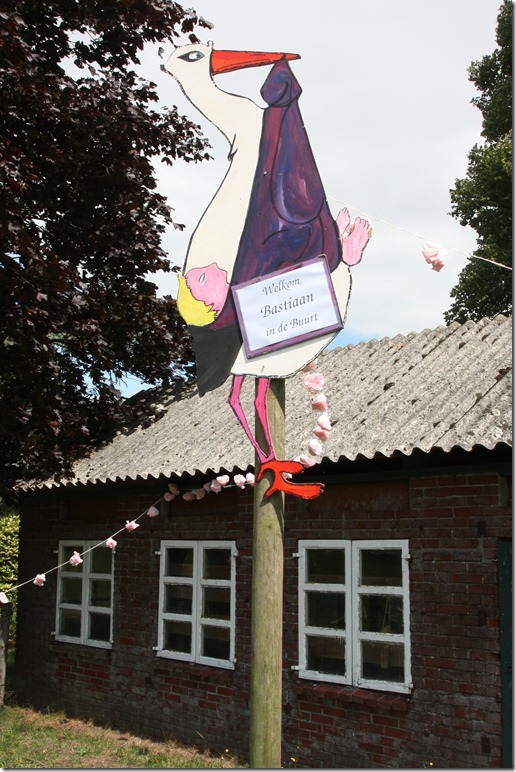
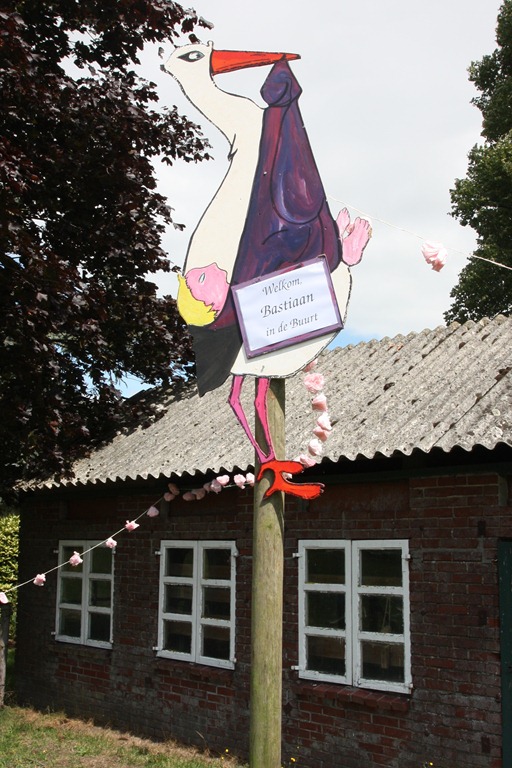
It’s become something of a tradition here in this part of the Netherlands that when a baby is born, the neighbours (the buurt) will celebrate the fact by erecting a wooden stork, festooned with clotheslines of baby clothes.
This week, our nearest neighbours had the birth of their first baby, a boy. Since we are noaste naobers to them, it fell to us to organise the decorations in celebration of the fact. So, together with the other neighbours, we did. Naturally, we had to have the traditional stork:
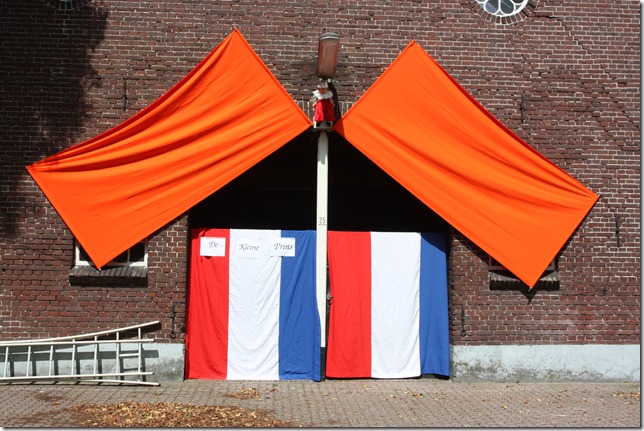
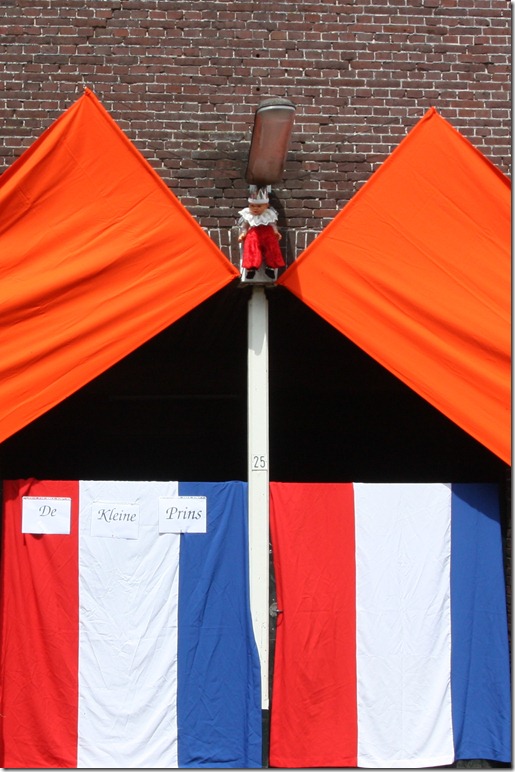
But Martin thought that we should also push the envelope a bit. Since José and Herman have referred to their new baby as their “little prince” (kleine prins), we thought we’d take them at their word…

-
Server Backups in Windows Home Server 2011
Now that I’ve been running my Windows Home Server 2011 system for a while, I’ve been able to observe some of the behaviours and quirks that require time to show themselves. Here are my notes on the server backup function.
As you are probably aware, WHS 2011 can only take a backup of the server data that is 2TB or less in size, and can only handle backup drives that are limited to 2TB.
[Update 31 March 2014: It appears as though there has been some improvement made to the Server Backup function in the Dashboard since I originally wrote this article. It remains the case that WHS 2011 continues to use the VHD format for backup, which has a maximum capacity of 2TB. However, it now appears (contrary to what Microsoft originally stated) as though the Server Backup function can now deal with multiple VHDs, providing the backup drive is big enough. So, if your backup drive is 4TB, that means you can have 2 VHDs of 2TB created on it. That, in turn, means that you can backup up to 4TB of data from your data storage drives (with a maximum of 2TB for any one drive). That’s a theoretical maximum, since Microsoft also recommend having some free space in the VHDs to handle incremental backups.]
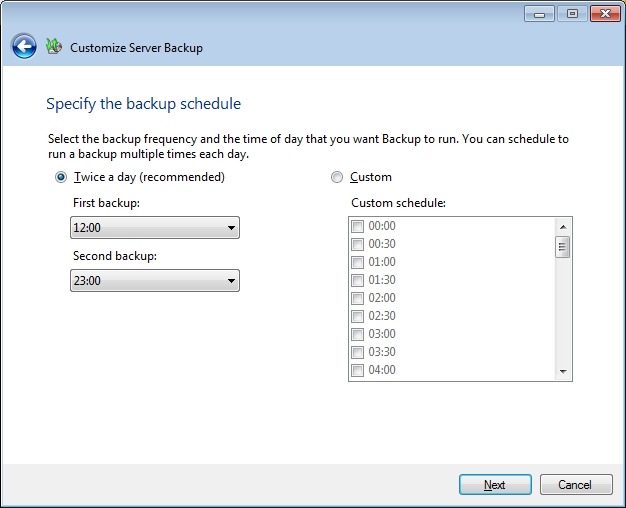
With this in mind, I have defined my server backup data set to consist only of what I think of as critical data: the server system itself, the client backup data, and a few other folders. This all adds up to around 610GB of data. I have two 1TB drives that I have designated as backup drives in the WHS 2011 system. I have a single-bay ICY Dock enclosure, and I rotate the two drives between the enclosure and an offsite storage location. I take backups twice daily, at 12:00 and 23:00 (this is the default setting for the server backup function of WHS 2011).
The first time I used each drive in the system, a full copy of the server backup dataset was written to the drive. This meant that each drive then had around 320 GB free capacity. After the first backup, only changes to the data are recorded in subsequent backups. Each time a backup was made, some of the 320GB free capacity was used up to hold these changes.
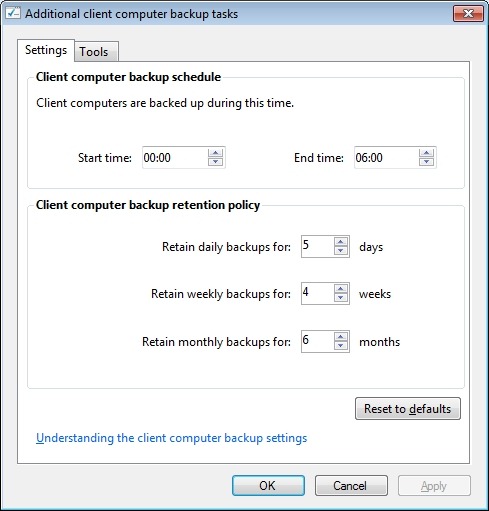
It is possible to define a retention policy for client computer backups (that is, how long the client computer backups will be kept before they are deleted and the space reclaimed for newer backups). See the following screenshot showing how the retention policy can be defined.

But the interesting thing is that there is no equivalent setup screen to define the retention policy for server backups. So the question naturally arises: what happens when the backup drives used for the server backups become full?
Over on the WHS forums, some folks say that WHS 2011 will automatically clear out old backups once a backup drive fills up, but others have reported that it doesn’t always happen; thus, it’s a bit unclear.
So I was curious to see what would happen as time went on, and my backup drives got full.
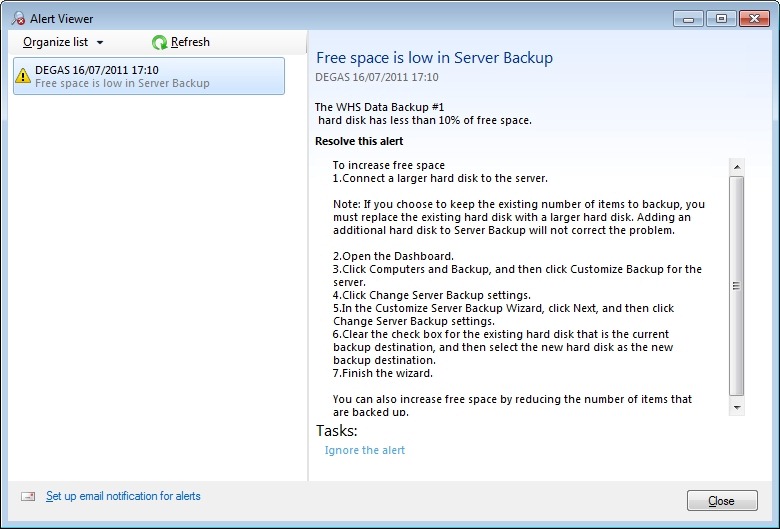
The first thing that happened, about a week ago, was that I received an alert to say that one of my backup drives had less than 10% of free space:

You’ll notice that the only possibilities offered by this alert to resolve the issue are either to replace the drive with a larger one, or to cut down on the size of the server backup. Neither of these options were particularly attractive, and nothing is said about the possibility of deleting older backups. So I thought I would just carry on and see what would happen.
I got to the situation today when drive #1 had less than 6GB free space left. I triggered a further backup manually to see what would happen. The backup was successful, and then I saw that the drive had 320 GB free. WHS 2011 had deleted all the backups from the drive and created a fresh complete backup. Drive #1 then had one backup on it.
That means that drive #1 now holds one server backup, time stamped today (23rd July). Drive #2 currently holds 38 server backups dating back to 14 June (one full backup plus 37 incremental changes). Once drive #2 runs out of space I expect the same thing to happen; all the old backups will be deleted and a new server backup will be taken. At that point, my earliest server backup will be today’s backup (23rd July) on drive #1.
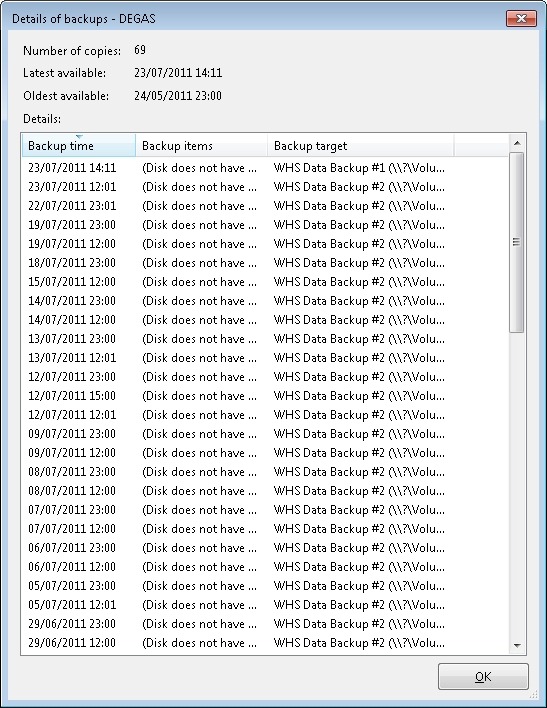
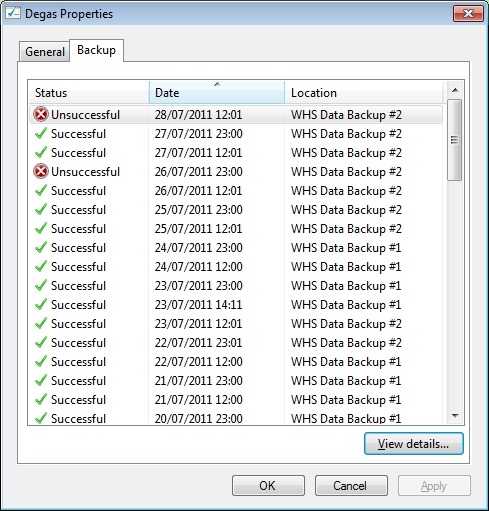
I see one slight quirk in all of this. If I look at the server properties in the WHS 2011 Dashboard, and examine the Backup tab, I see this:

Notice how it is listing backups taken to drive #1 that are now no longer available. If I compare this with the list that is given by the Windows Server Backup screens in the underlying Windows Server 2008 Server Manager (which your average Home User would never see or be aware of), then I see this:

In other words, all the backups taken to drive #1 that were deleted in order to make room for today’s backup have also now been removed from this list. Up until this point, they would have been shown. I would argue that this list is a more accurate reflection of the actual situation than the list shown in the WHS 2011 Dashboard information.
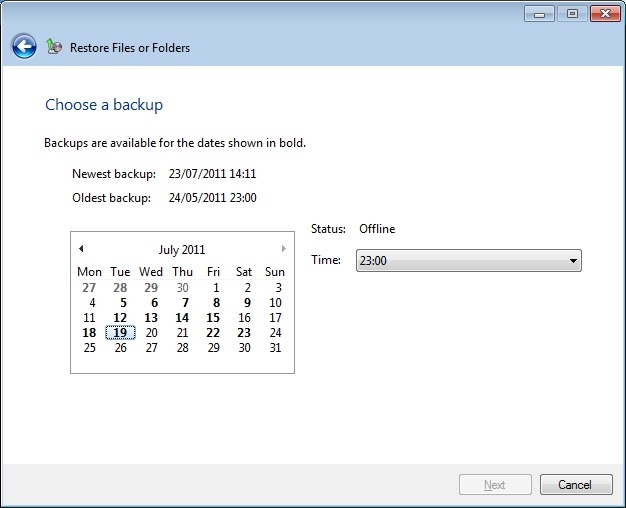
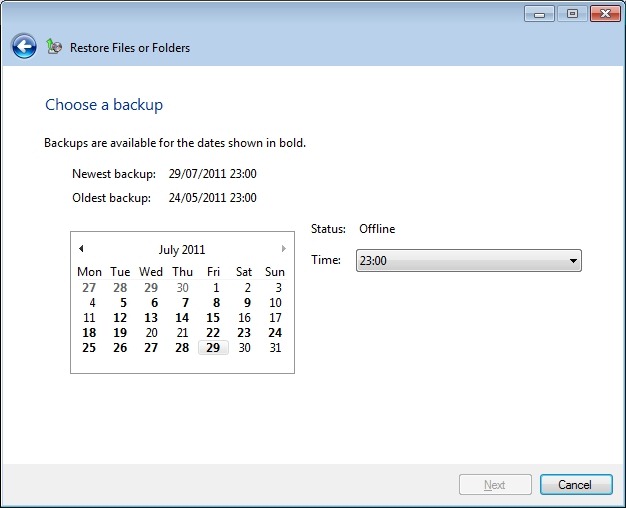
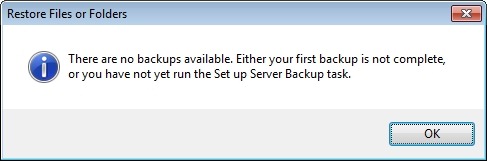
If I then ask WHS 2011 to show me what backups are available for restoring, then it doesgive me an accurate picture:

The dates shown in bold before the 23rd July are for the backups held on drive #2 – it shows that there are no backups available for the 20th and 21st July, for example. There were backups taken on this date, but they were taken to drive #1, and were subsequently deleted today when drive #1 ran out of space.
Depending on where you look in the Dashboard, you will get slightly different answers… Personally, I would prefer the list of backups to reflect the actual state of available backups, rather than state that backups that are no longer available were successful at the time. I don’t want to be lulled into a false sense of security.
Update 29 July 2011
Sigh. Murphy’s Law has struck. I wrote earlier in this post:
Once drive #2 runs out of space I expect the same thing to happen; all the old backups will be deleted and a new server backup will be taken.
Well, yesterday, Backup drive #2 ran out of space. And what happened? I got an error, and the backup failed…
Before the backup started, I had 3.1GB free space on the drive, so I was expecting WHS 2011 to realise that there wasn’t enough space for a backup, and to wipe the drive before starting with a complete new backup. After all, that’s what I think it did with drive #1.
No such luck.
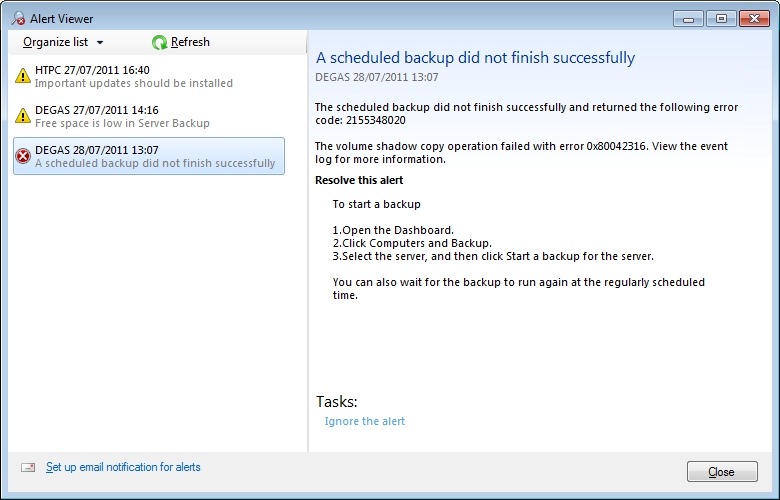
Instead, it attempted to do a backup, and I got an alert saying that the scheduled backup did not finish successfully:

Notice that it’s given me an error code 2155348020, and, as I’ve written before:
I love the way that this message simply tosses out the fact that we should view the event log for more information. I think that most Home Users presented with this message would simply think: WTF is the Event log? And they can’t view the Event log via the WHS 2011 Dashboard anyway – you have to be sufficiently IT-savvy to be able to open up a Remote Desktop Connection and then start up the Event Viewer on the server.
Going to the Event Log, I see this message from the Backup application:
The backup operation that started at ‘2011-07-28T10:01:02.660930800Z’ has failed with following error code ‘2155348020’ (Windows Backup failed to create the shadow copy on the storage location.). Please review the event details for a solution, and then rerun the backup operation once the issue is resolved.
The event details are given by a link to a Microsoft online help page for Windows Server 2008 R2, and it’s clearly written for IT support staff. To a Home User, it might as well be written in Martian.
Admittedly, it is fairly clear what the problem is – the backup drive does not have enough room to store the shadow copy – but the resolution doesn’t seem possible. As we’ve already established at the beginning of this saga, WHS 2011 has no way for a Home User to clear out old server backups, we seem to have to be reliant on WHS 2011 deleting the backups itself. And if it doesn’t do this, as appears to be the case here, we’re screwed.
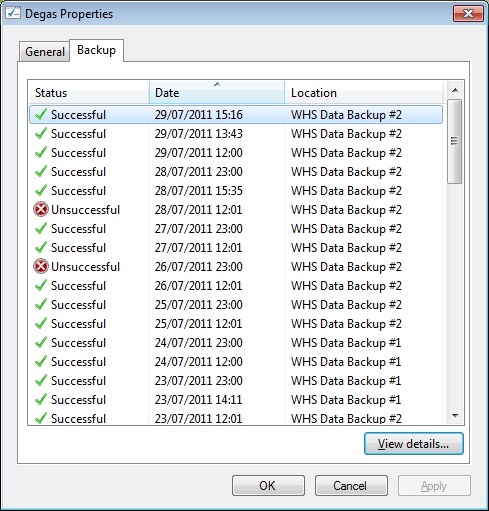
A couple of other oddities I noticed with this failed backup. Even though it was reported as unsuccessful in the Alert viewer and here:
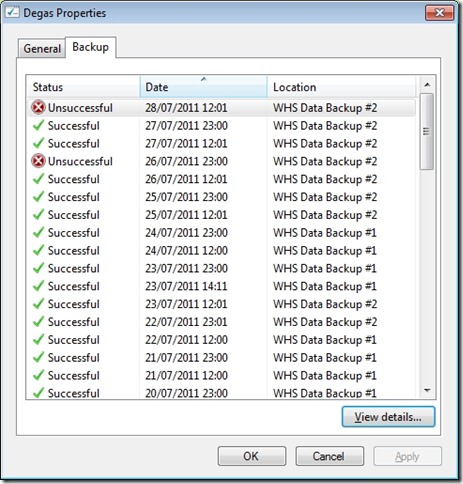
… if I click on the “View details…” button shown above, I am told that while the backup was unsuccessful, it does seem to have successfully backed up all the drives and folders that it was supposed to:
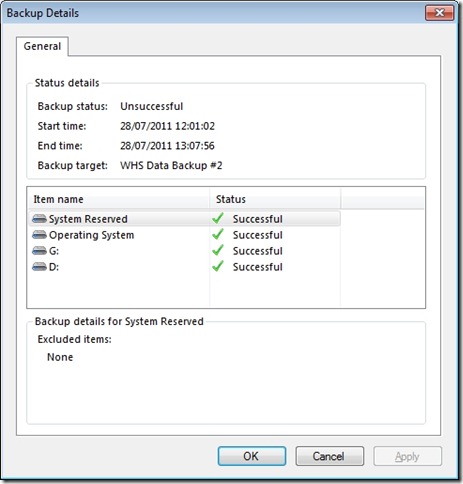
Something else that is a bit odd. I said that, going in to this backup, the drive had 3.1GB free. Now it has 9.6GB free. I’m not sure what to make of that…
I kicked off a manual backup of the server using drive #2, and this time it completed successfully. I’ve done a mixture of scheduled and manual backups since then, and they’ve all completed successfully. The amount of free space left on the backup drive varies between 0.7GB and 6GB. It’s currently at 1.7GB.

What it’s not doing, as was the case with drive #1, is to clear out all the old backups and start again.
I think I’ll just leave drive #2 in the system for the moment and see what happens. I would prefer that the system behave in predictable ways. I am unsettled by the fact that it seems to behave according to its own rules. Rules that Microsoft have never bothered to define. Perhaps, like me, they don’t know what they are…
Update 30 July 2011
Oh well, hitting a brick wall again. Last night’s backup proceeded without a problem, and I ended up with only 1.2GB free space on the backup drive. So I thought that when today’s backup kicked off at noon, WHS 2011 would have the nous to realise that it would need to clear out all the backups from the drive and start again (as it had done with drive #1).
Nope – I just got another error:

I then tried to see if doing a manual backup would clear out the backup drive…
Nope, the same error.
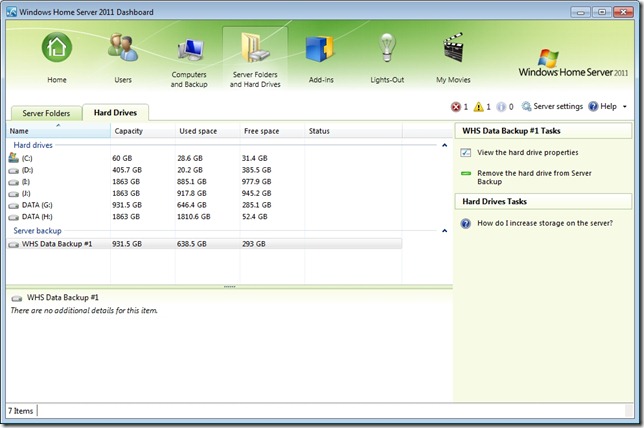
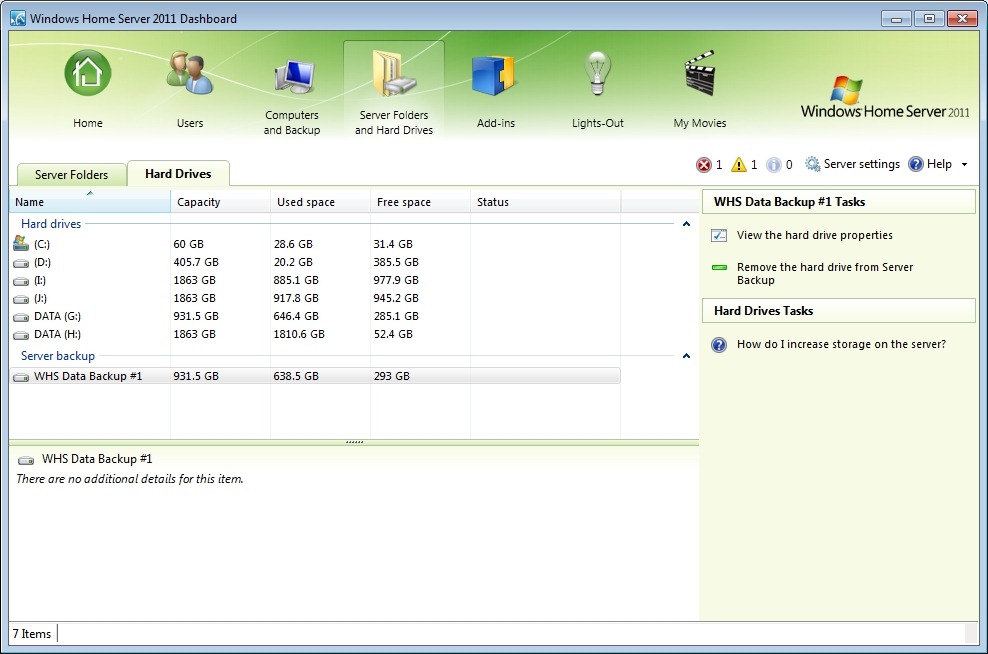
What now? I suppose I can try removing the drive from the server backup function and then re-attaching it as though it were a totally fresh drive… Right, so I select backup drive #2 and choose the “Remove the hard drive from Server Backup” task:

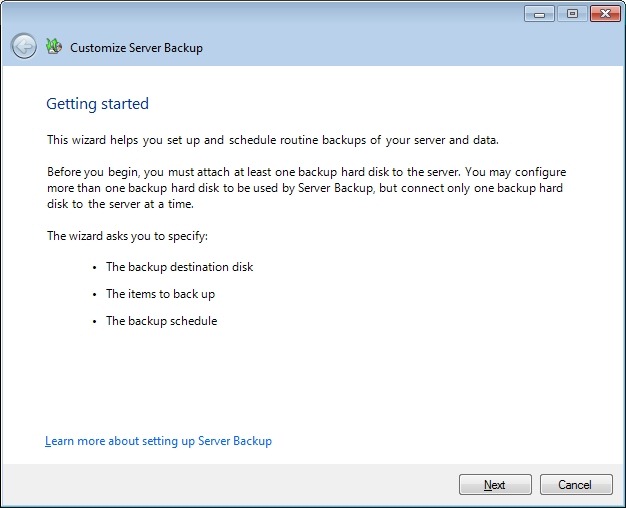
That then kicks off the Server Backup wizard…

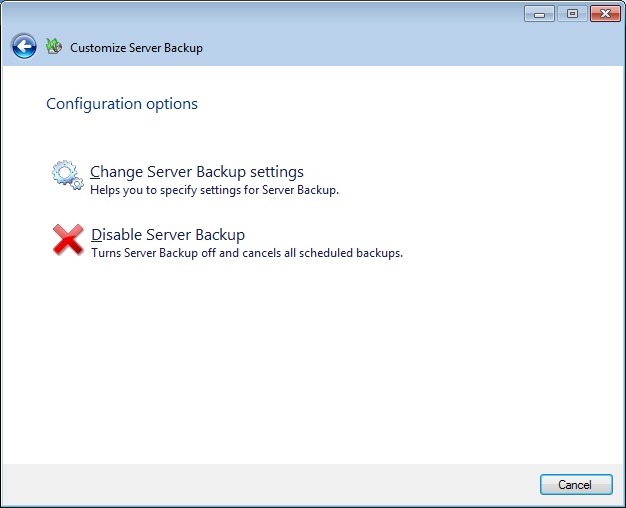
Perhaps it’s just me, but this strikes me as a trifle confusing – I just want to remove the backup drive from the Server Backup, why do I have to trudge through this wizard again. Oh well, onwards…

Right, so I suppose I need to choose the “Change Server Backup settings” option. So let’s do that…
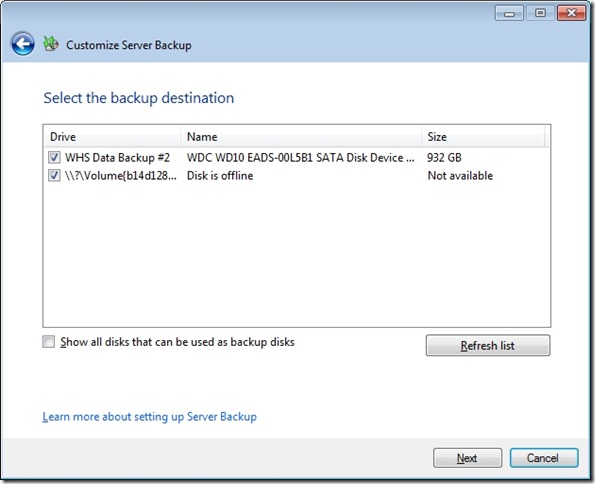
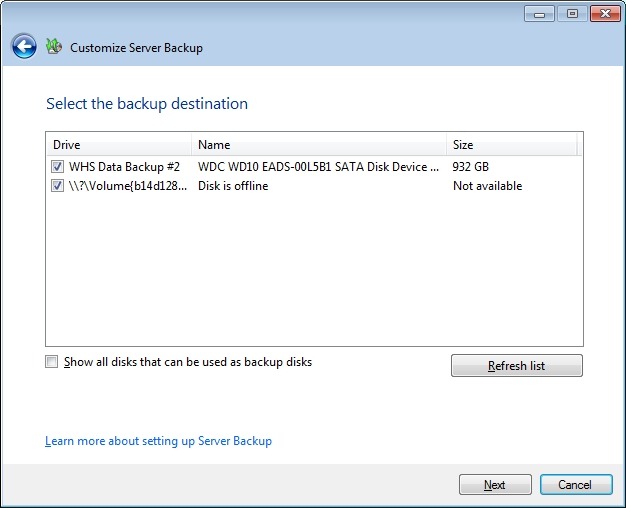
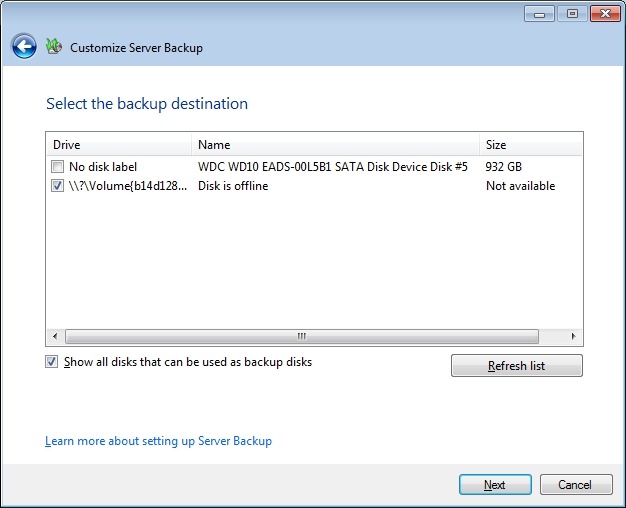
I assume that to remove backup drive #2, I will need to uncheck the first checkbox. As an aside, note how the offline backup drive (backup drive #1) is not given its user-friendly name (WHS Data Backup #1), but the internal gobbledegook that Windows Server 2008 R2 knows it by: \\?\Volume(b14d1287-95dd-11e0-a8fc-002354da5014). I’m sure this is perfectly obvious to your average Home User, of course.
I uncheck the first checkbox and click “Next”, only to be presented with this:
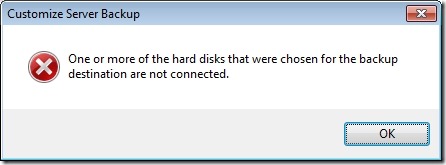
Well, yes, I know that; and the purpose of telling me this is? So I click on “OK”, and am returned to the screen before. Since I’m trying to remove the damn drive, I click on “Next” only to get this error message again. I’m now just bouncing back and forth between these two screens.
Sigh.
Perhaps the way out of this mess is to:
- Cancel out of this wizard
- Remove backup drive #2 manually from its dock
- Replace backup drive #1 into the dock (to get it online)
- Select backup drive #1 and then select “Remove the hard drive from Server Backup” to go through the damn wizard again, but this time select the now-offline backup drive #2 at the appropriate point.
You’ll note that even though WHS 2011 is telling me that it’s going to remove drive #1 from Server Backup, I have to do this in order to remove drive #2… Make sense? No, I thought not. OK, here we go…
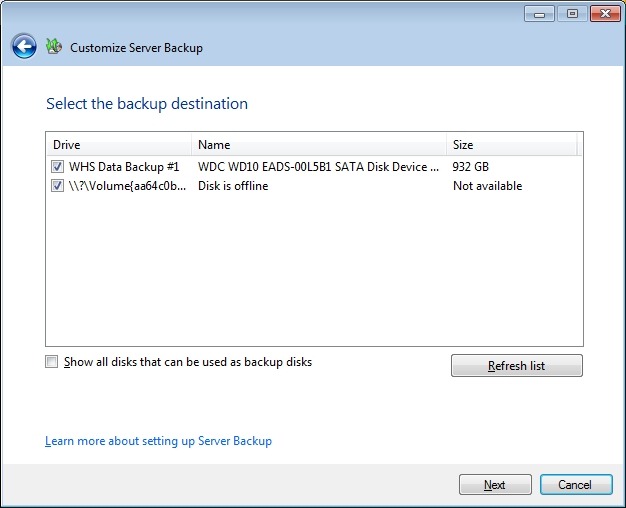
Here we are back at the screen that caused the problem the last time around. Now, it’s backup drive #1 that’s online, and backup drive #2 (which is now offline and has its own gobbledegook name showing) that I need to deselect in order to remove it from the backup destination:

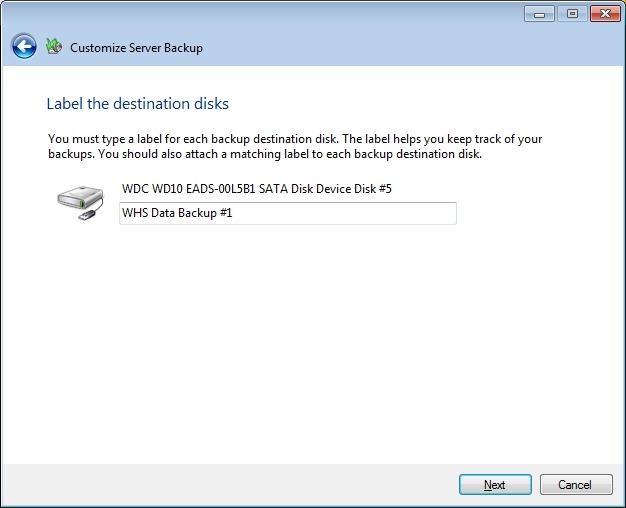
This time, I make it to the next screen, which has the existing name of backup drive #1 already filled in:

Clicking “Next” gets me to the schedule screen:
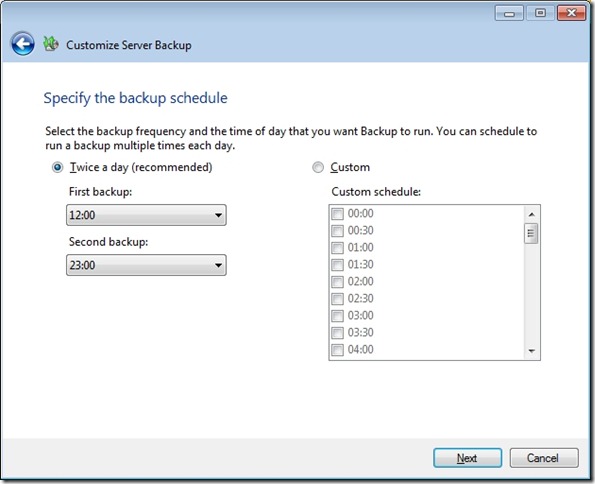
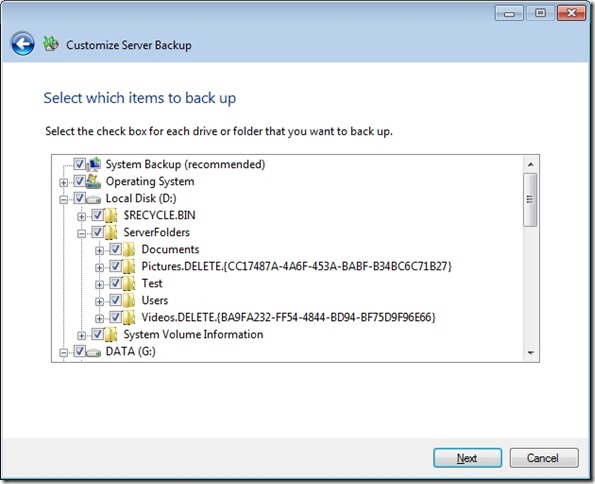
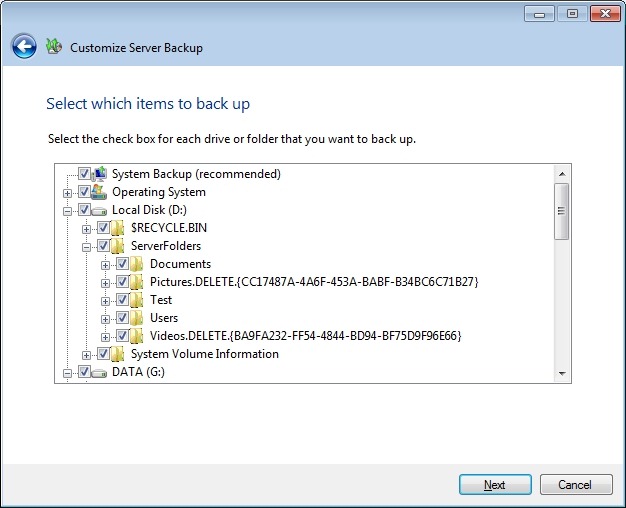
Then I get to choose what I want backed up (it’s already filled in with my last choices):
And at last I reach the confirmation screen, where I see that backup drive #2 is now removed.
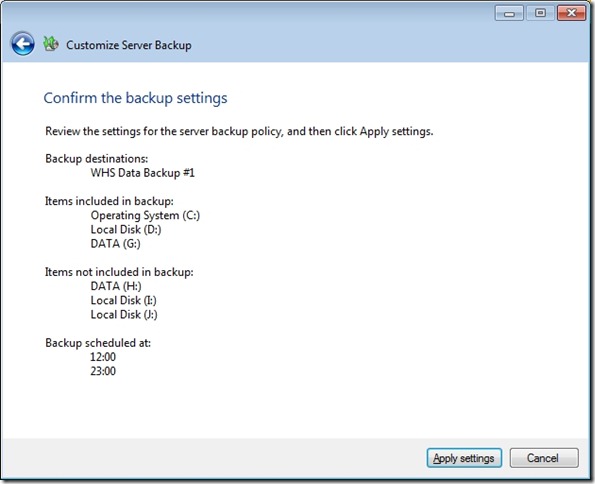
Remember, that I started off from a screen that offered to remove backup drive #1 from Server backup; however, the design of WHS 2011 leads you into a dead-end if you assume that this is what it will remove. Did no-one spot this problem before product release?
It seems a very roundabout way of removing a backup drive. I also have my suspicions that we are not out of the woods yet.
Just because I’ve removed a backup drive from the backup schedule doesn’t necessarily mean that WHS 2011 has forgotten about it. Sure enough, if I start the server restore wizard, and look at available backups, it shows me backups that were taken on to drive #2:

So now, if I reformat backup drive #2 and add it back into the server backup schedule, will WHS 2011 continue to think that these backups are still available?
I added backup drive #2 into the server dock. WHS 2011 does not show it as an available disk:

Let’s try and add it back into the Server Backup schedule… I start the Customize Server Backup wizard and reach the “select the backup destination” screen. At first, I didn’t see the backup drive, only after I checked the “Show all disks that can be used as backup disks” did it appear as the first item in this screenshot:

I checked it (to add it into the list of backup destinations) and clicked “Next”.
FINALLY – I get a screen that acknowledges that WHS 2011 knows that this drive has been used for backups before:
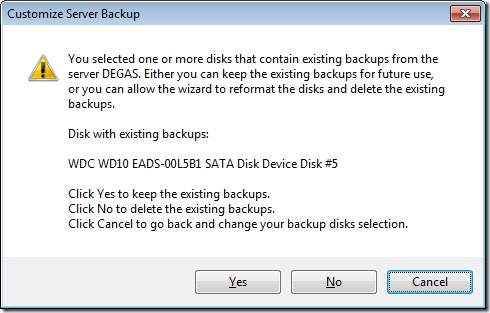
I choose “No” and get a confirmation screen:
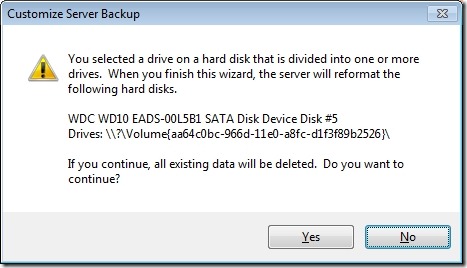
I chose “Yes” and got to give a name to the disk. I chose “WHS Data backup drive #2a”, since I’m curious to see whether WHS 2011 has now deleted all references to “WHS Data backup drive #2” from its list of available backups. Let’s check by starting the Server Restore wizard:

WHAT? Excuse me, I have backups taken on drive #1 available, don’t tell me you’ve deleted everything?
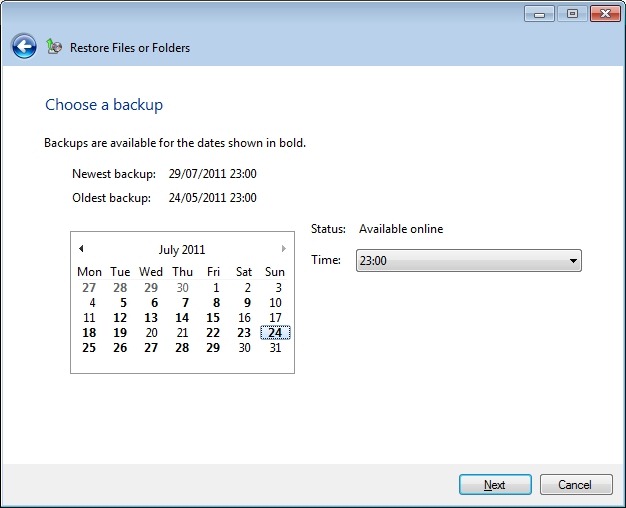
I hurriedly put in backup drive #1, and start the Server Restore wizard again. This time, I get further, and elect to choose the backup I want to restore from. If I choose a backup that was taken onto backup drive #1 (the one that’s currently plugged into the system), I get confirmation that the backup is online and available (in this case, the backup of 24th July at 23:00):

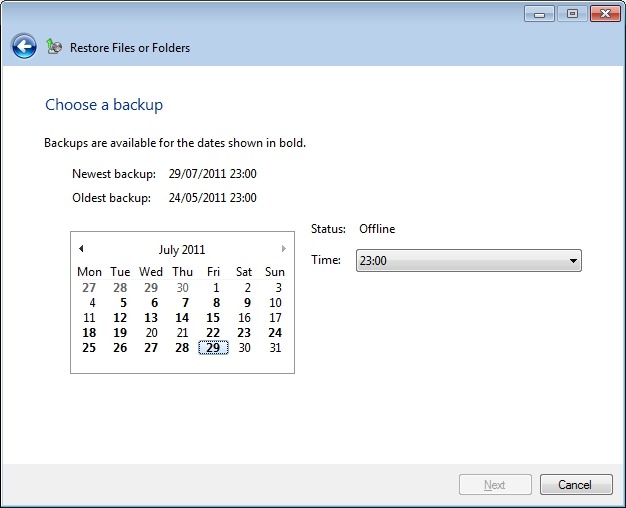
But, what’s this? WHS 2011 is still claiming that backups are available from backup drive #2 (e.g. the backup of 29 July at 23:00):
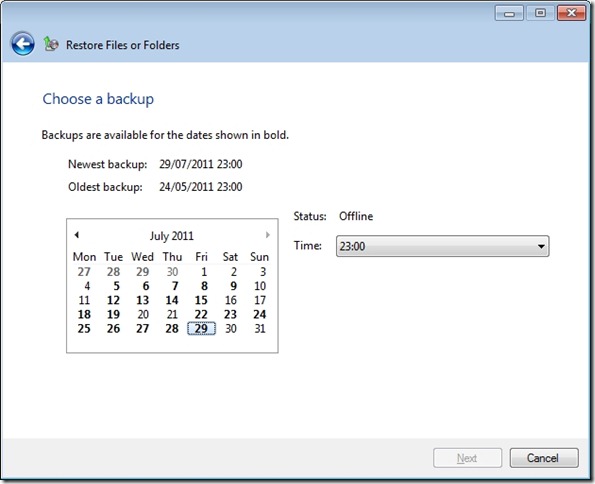
True enough, it’s saying that it’s offline, because the drive isn’t plugged into the system, but it’s still claiming that it’s available. Oh no it isn’t, says I, because you’ve just formatted that drive. Oh yes it is, replies WHS 2011…
Sometimes I feel as though I’m taking part in a Panto with WHS 2011…
So, to summarise. Removing a drive from Server Backup is not straightforward – the task design is flawed and leads you to a dead end. You can get WHS 2011 to reformat a backup drive, but it won’t go the extra mile with you and remove the previous entries for the deleted backups from its internal database. So it will quite happily lie to you about what backups are available…
Wonderful.
-
The Annotated Jules Verne
A couple of months ago, I went to the book market at Bredevoort. I found a version of Jules Verne’s Twenty Thousand Leagues Under The Sea published in an English translation with annotations by Walter James Miller. It is a large (almost A4-sized) book, profusely annotated in the margins of the text and containing many illustrations sourced from old engravings – some of which come from the original French edition of the book.
Intrigued, I bought it, and have now finished reading it. It’s been a revelation. I knew of the story, of course, along with others by Verne, but I have never actually read any of them. I had always thought that they were books written for children, but it turns out that my view was probably formed by osmosis from the reactions of the English-speaking literary establishment to the English translations.
Miller takes as his starting point the standard English translation produced in the 1870s by one “Mercier Lewis”. This turns out to be Lewis Page Mercier, a theologian. This “grim parson” (Miller’s description) thought nothing of excising 23 percent of Verne’s original text, often where he apparently disagrees with Verne’s views (e.g. on Darwinism). The remaining text is subject to hundreds of errors of translation, and he destroys many of Verne’s character sketches and jokes. What remained, and has formed the basis of the English translations ever since, is a travesty of the original novel.
Miller restored the missing 23 percent with his own translation, and provides annotations to show where Mercier, either unknowingly or deliberately got it wrong. Some of the translation howlers seem unbelievable, as where Mercier translates lentille (French for either the lentil or a lens) and has Verne write that Ned Land (the harpooner) could light a fire by holding a lentil up to the sun…
The restored and annotated translation thus becomes a completely new and powerful story for adults containing Verne’s scientific, social and political predictions. To quote from the dust-jacket:
In an imperialist age, Verne was concerned not only with the treatment of primitive peoples, but with the burgeoning power of what today we call the military-industrial complex; Nemo himself lives out the principles of philosophical anarchism. Verne also foresaw the smouldering of French separatism in Canada, the rebirth of China, and the rise of the American Goliath – all this in addition to his scientific prophecies, ranging from the use of electric “stun guns” to the ecological problems that would be caused by hunting the whale and other sea creatures to extinction.
What adds another layer of resonance to this tale is that the copy of the book I have is stamped with the imprint of the library of the merchant ship Royal Viking Star. So perhaps this book, before coming to rest in my library for the moment, has travelled twenty thousand leagues over the sea…
-
Arrrr! – I Can’t Wait
Aardman Animation’s latest, due in 2012. The Pirates! In an adventure with scientists. It doesn’t get better than this.
-
A Frame of Groans Revisited
The latest (and, I assume, the last) book of George R. R. Martin’s epic fantasy series A Song of Ice and Fire has finally been published. It’s A Dance With Dragons, bringing the saga that began with A Game of Thrones to an end (he said, hopefully).
As you will gather, I am not a fan of the series, having lost hope whilst slogging through book two (or was it three?). In that, I seem to be in a minority, but I took heart today from coming across a fellow critic: Hulk!
-
The Psychopath Test
Some weeks back I mentioned that I should put Jon Ronson’s new book: The Psychopath Test on my list of books to read. I did, and I’ve now read it.
I liked it very much. Ronson’s style of writing is easy to read and often laugh-out-loud funny, although there are parts of the book that also made me gasp in astonishment. Don’t get it expecting to read an academic study on psychopathy (as some people who have reviewed the book on Amazon.com appear to have done, and who are then pissed-off to find it’s not). It’s not that at all. It’s more an exploration of some of the ways in which humans can behave, for better or worse. His jumping-off point is the strange story of a mysterious book: Being and Nothingness by an author Joe K (not Jean-Paul Sartre) copies of which were sent, out of the blue, to a number of neurologists and other academics. Ronson is invited by one of the recipients to get on the trail of who was behind the book, and along the way becomes intrigued by what defines mental illness.
From there he meets Tony, an inmate of Broadmoor (one of Britain’s three high security psychiatric hospitals) who claims that he faked a mental disorder in order to get a lighter sentence, but who is now stuck there, because nobody believes he is sane.
At the end of his book, Ronson returns to the story of both the mysterious book and Tony. Along the way, he meets many people involved in the “madness industry”; those who define the various labels of madness, those who wear the labels and those who use the label-wearers to make a living.
I found chapter 8 – The Madness of David Shayler – the saddest. Partly because it tells of the impact on Rachel North, who survived the Kings Cross bombing of 7/7, only to discover that conspiracy theorists claimed that there were no bombs and that she herself was a government mouthpiece who had been tasked with disseminating disinformation. And partly because it tells of the journey of David Shayler from being a former MI5 security officer to someone who believes that he is the Messiah. Ronson charts the degree of media interest in Shayler and concludes:
David Shayler’s tragedy is that his madness has spiralled into something too outlandish, too far out of the ball park and consequently useless. We don’t want obvious exploitation, we want smoke-and-mirrors exploitation.
At the heart of the book is the Hare PCL-R Checklist, used to identify psychopathic traits. Ronson meets Bob Hare, the inventor of the checklist, on a number of occasions. The checklist becomes a leitmotif in the book, with Ronson musing on particular checklist items whilst describing the behaviour of those he meets, or even whilst describing his own behaviour and thoughts.
It’s a good book.
-
Microsoft Slash the Price of Windows Home Server 2011
Just eight weeks after WHS 2011 became available to purchase, Microsoft have slashed the price. It’s now available to purchase for almost half of its original price. While I expected the price to fall, I didn’t think it would fall so far, so soon. I wonder whether Microsoft are trying to cut their losses on this?
As someone has just said on a forum, WHS 2011 looks as though it’s becoming the Microsoft Bob for this era…
-
Gawd–That Voice!
Meryl Streep is playing the role of Margaret Thatcher in a forthcoming biopic. The first trailer is now available. Streep has caught the voice to a “T”, as it were, and it sends shivers down my spine.
I’m torn between wanting to see the film, and dreading all the negative emotions that will be dredged up thinking about the impact Thatcher has had on British society.
-
Windows Home Server Support
Yes, I know I’ve complained about the poor quality of the support documentation for Windows Home Server before (here, here, and here), but I just keep finding more examples.
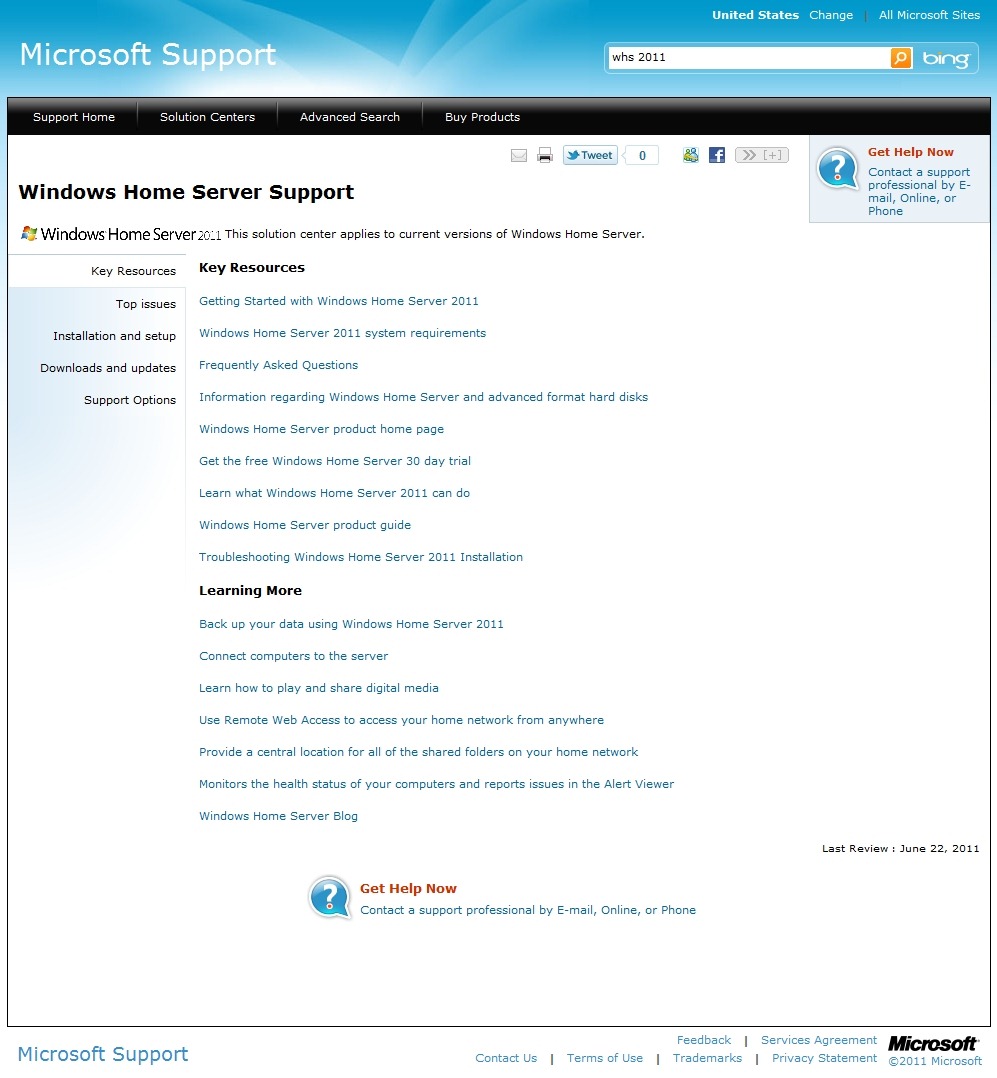
The latest is the Solution Center page for Windows Home Server 2011 in the Microsoft Support web site.

It says at the top: “Windows Home Server 2011” and “The solution center applies to current versions of Windows Home Server” (i.e. Windows Home Server 2011). According to the page, it was last reviewed by Microsoft, presumably for correctness, on June 22nd, 2011.
Yet, if you click the link for the Windows Home Server product guide, what you will get is the Product Guide that was issued for version 1 of Windows Home Server in January 2009. So, not for Windows Home Server 2011, then.
And under the Learning More section, the penultimate link should really read “Monitor the health…” not “Monitors the health…” Yes, it’s a little thing, but it seems to me to be indicative of a continuing lack of attention to quality of product.
-
Storms In Teacups
I see that Torchwood is returning to our haunted fishtanks next month. While I’ve been pretty disparaging about the series in the past, I have to say that I thought that it redeemed itself with the Children of Earth series.
Now, however, there is some faux controversy being drummed up by a certain Dan Martin over in a Guardian blog. He is fulminating over the fact that viewers in the US get to see the show a whole six days before viewers in the UK:
We get the culture we deserve, really. But it’s hard not to think that the BBC is treating a big show – a show that it developed and established – recklessly. Yes, of course, contracts are contracts. But a two-day broadcast gap worked perfectly well for Game Of Thrones. Why the long pause here?
Shock. Horror. It’s six days, Mr. Martin. Get over it. Deferred gratification is a good thing, and a sign of maturity in a human.










 Geoff Coupe's Blog