
Unlike many people, I don’t consider myself a dyed-in-the-wool hater of Windows 8. In fact, I find much to like in Microsoft’s latest operating system, which will be available this October. Nevertheless, I thought it might be useful to gather together in one place all the bugs, quirks, and the WTFs that I’ve come across in the last few months of kicking the tyres of the pre-release versions of Windows 8.
This post will be updated and/or corrected as I come across new information.
The List
- I really dislike the marketing decision that Microsoft has made concerning Windows Media Center. However, on the upside, it means that I won’t be upgrading my HTPC to Windows 8. It will remain on Windows 7, running Windows Media Center, until something better comes along.
NOTE: since writing that, Microsoft has announced an upgrade offer of just $40 to upgrade Windows 7 systems to Windows 8 Pro. That sweetens the pill substantially, since the Pro version will include Media Center for free until 31st January 2013. - Not only is Microsoft’s marketing going to hamper Windows Media Center, but they have also deliberately removed two of its features that are required for use in dedicated HTPC systems.
- Windows 8 takes full advantage of modern PC hardware, such as UEFI for firmware and GPT drives. However, Microsoft’s dirty little secret is that their Windows Home Server 2011 product cannot backup or restore any systemusing UEFI and GPT drives. [Update 4th March 2013: Microsoft has at last issued a Hotfix to add backup support for UEFI-based computers to back up to servers that are running Windows Home Server 2011]
- Your Microsoft Account is tied to a single country/region, and can’t be changed, either by you or Microsoft. Bad news if you move to a different country. Microsoft claims to be working on addressing this, but when we will see results is anyone’s guess (this has been a known issue since at least 2007 – it’s caused by a limitation in the Xbox Live infrastructure).
Update 17th October 2012 – it looks as though Microsoft are starting to offer Xbox Live customers the ability to migrate their accounts under certain circumstances. - The Photos App cannot access pictures held on Network Shares. This includes photo libraries held on Windows Home Server systems.
See Update 1 and Update 2 below. - The Music App only has four views of your music library: songs, albums, artists and playlists. I miss the sorting by composer that I have in Windows Media Player or Windows Media Center. And where is “Play to” or Podcast support?
- The “Play to” feature that was introduced in Windows 7 is now broken in Windows 8.
Update: This has been fixed in the final release of Windows 8. - I consider that the Windows Explorer in Windows 8 is more clumsy than the version in Windows 7. I find it’s a step backwards in usability.
- The Mail App still doesn’t have IMAP or POP support. This is a staggering omission, since these protocols are the foundation on which internet email clients have been based for years.
See Update 2 below. - To search within a Metro App, you use Winkey+Q. However, not all Apps support this, including, rather strangely, the Reader App. Here, you have to right-click in the App to reveal the Search button (which then has to be clicked to reveal the Search box where you type your search terms).
- Searches in the Video App will only return results from the Video Marketplace (if your region has a Marketplace). It does not seem to search any of your own content, not even filenames that match the search terms. As for searching on any metadata, such as tags, in your video files; forget it.
- The Weather App is supposed to have a “Live Tile”. On my system it doesn’t; why, I have no idea.
- Microsoft’s News App looks good, but the news it displays is hardly up-to-the-minute, is it? There are articles dating from 4 days ago (at least in the UK feeds). That’s not news – that’s what we use to wrap fish and chips in. Also, this App (like too many others) can’t use Printing Devices. I’m sufficiently old-fashioned to want to be able to print things for hardcopy now and then.
- Printing in Metro Apps. So tell me, how do I just print the current page, or a selection of pages? Something that’s easily done with the traditional Windows Print dialog, but that seems totally impossible with the whizzo new Metro design with certain Apps. The Metro Mail and IE10 Apps, for example. They drop the “Pages” setting from the Metro Print screen. See below for screenshots. Sigh.
- Backing up your data. Windows 8 has a new backup method: File History. Be aware that it only covers the contents of your Libraries, Desktop, Contacts and Favourites. It won’t cover application data, or your mail messages… Microsoft assumes that we all hold our email in the Cloud. Er, no, we don’t.
Here’s examples of the confusing Print screen in Metro. This is what you see when you want to print something in the Metro Reader App:
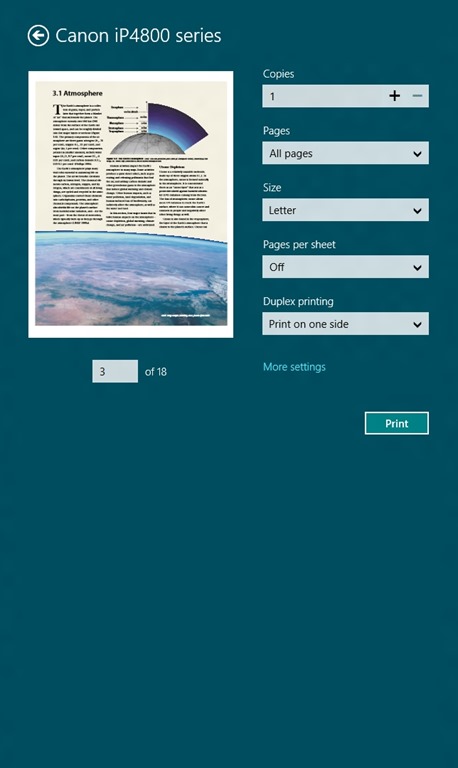
Note that you’ve got a “Pages” setting, where you can select to print “All pages”, “Current page” or a “Custom” selection of pages from the document.
Now here’s what you see (using the same printer device) when you want to print out a mail message from the Metro Mail App (you’ll also see the same settings when you print out a web site in the Metro IE10 App):
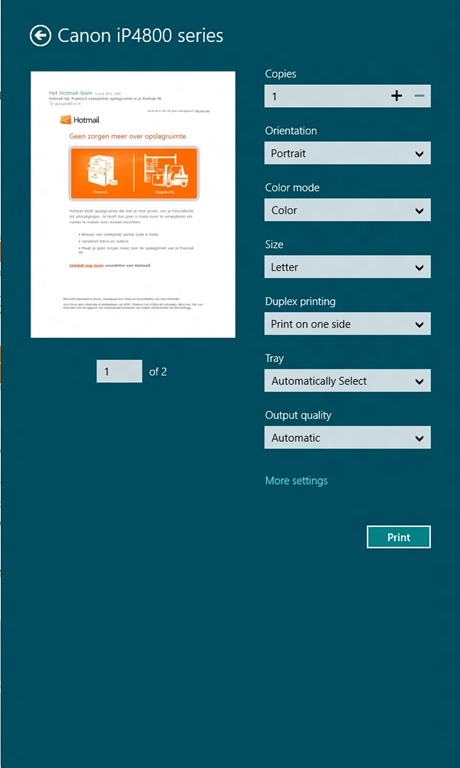
Er, hello? We’ve got additional options, but the “Pages” setting has disappeared altogether. Don’t bother clicking on the “More settings” link, it’s not lurking under there either. I like consistency in my tools, not nasty surprises.
Update 28th October 2012: This inconsistent print behaviour is still present in the final version of Windows 8, despite some of the Apps being updated. The Mail App and IE10, for example, still can’t print out a single page or a range of pages. Sigh.
Update 1: Brad Weed, a program manager in the Windows Live team has contributed a post on the Photos App in the Building Windows 8 blog. I note that he doesn’t even mention the fact that the Photos App cannot display photos held on Windows Home Server, yet he boasts that the Photos App will “display photos from all your devices”. Er, no, Mr. Weed, it won’t, as you damn well know. Please try harder.
Update 2: On October 5th, Microsoft announced that many of its Modern Apps would be updated in the run-up to the release of Windows 8 on October 26th. This includes the the Mail App, which will at long last get IMAP support, and the Photo App, which will finally be able to support network locations. I found it rather curious that only a couple of days earlier, Analy Otero, on the Photo App team, said (my emphasis):
…support for network locations is definitely something we will consider for future versions of the app.
When she could quite easily have said:
…support for network locations is definitely something we will provide for future versions of the app.
Odd. Mind you, it still doesn’t support searching on Tags. So, the Photo App is still a miserable excuse for what it should be.
Microsoft are doing themselves no favours with the current collection of Metro Apps, which are little better than toys.
Update 26th March 2013: The Mail, People, Calendar and Xbox Music Apps have been updated. Some small improvements, but there are still shortcomings.


 Geoff Coupe's Blog
Leave a comment