Reflections on life at “De Witte Wand”…

Year: 2012

  • Gone, But Not Forgotten

    I didn’t write about the fact that Ray Bradbury died on the 5th June 2012, simply because I didn’t feel able to say anything of note. Like millions of people, I grew up recognising my feelings and emotions in some of his stories, and being amazed and shaken by the visions of others.

    However, Neil Gaiman has the ability to pen something that is a worthy memento of Bradbury. Go and read his short story: The Man Who Forgot Ray Bradbury.

    If you have ever read anything by Bradbury, you will feel the echoes and remember anew.

  • Windows 8 “Play to” Revisited

    Important Update 27 October 2012: The bug I describe below does seem to have been fixed in the final release of Windows 8. I can now use the “Play to” feature with my Denon AVR-3808.

    Hoorah!

    However, this is just one cheer. The Denon is not a “Windows Certified Play to” device, so the Microsoft-supplied Music Modern UI App does not recognise it as a device that can be used in a “Play to” scenario. While I can use the desktop Windows Media Player to “Play to” my Denon (as I could under Windows 7), the new Music App doesn’t even recognise the Denon as a “Play to” device.

    In a post on the Building Windows 8 blog, Microsoft states:

    Metro style apps work only with Windows certified Play To receivers [my emphasis]. These devices are validated to support modern media formats, are DLNA standards-compliant, and have great performance (including the updated Xbox 360 available later this year). The desktop experience first introduced in Windows 7 has been added to the Explorer Ribbon and will continue to support all DLNA DMR devices.

    So if I get one of the new tablets (e.g. Microsoft Surface) which run Windows RT, I won’t be able to use it to play music to my Denon. Why? Well, Windows RT does not support the desktop Windows Media Player, and Microsoft has just told me that their Metro Media Apps will not support my Denon, even though it is DLNA-certified. Yet another reason not to touch the Microsoft Surface with a bargepole, I think.

    It looks as though Microsoft are building proprietary extensions on top of the cross-industry DLNA specifications. I’m not convinced that this is a good thing.

    Update 4 February 2013: I see that Paul Thurrott has just written an article on this subject: The Sad Tale of Play To and Windows 8, with much the same conclusions. As I write in the comments here, it’s good to see that Mr. Thurrott is banging the same drum. He is able to make far more noise than I, but I think that Microsoft will remain deaf to the sounds. BTW, it’s worth reading the comment by John Galt after the Thurrott article. He lists a number of shortcomings in the media “features” that Microsoft have implemented in Windows 8, any one of which has me tearing my hair out. One wonders how Microsoft can be so dismal in delivering a product that should delight, not disappoint in so many ways.

    Update 31 March 2013: Barb Bowman has found a way to hack the Registry to get Windows 8 to recognize “uncertified” DLNA devices, and to use them within Windows 8 Apps. Like her, I wish that Microsoft would give advanced users the option to add our DLNA devices directly, without the need for these hacks.

    Update 21 October 2013: Well, now that the final release of Windows 8.1 is available, the Play to experience seems to be broken again. I applied the registry fix given by Barb Bowman (and which came originally from Microsoft’s Gabe Frost), and that no longer seems to work for me. One step forward, two steps back yet again. Thank you Microsoft.

    Update 24 October 2013: I posted the Windows 8.1 issue in a Microsoft forum, and got some useful feedback from Gabe Frost. The issue is not resolved, but at least we now know what’s going on. See https://gcoupe.wordpress.com/2013/10/23/play-to-and-windows-8-1/

    Original post

    You may recall that I’ve found that the “Play to” feature of Windows 8 is broken. I’ve been poking around trying different scenarios to see what’s going on, and come up with some further information.

    The bottom line is, yes, the Windows 8 implementation is broken as far as I’m concerned. However, I fear that Microsoft will simply say that this is not a bug, it’s a feature… What’s the old joke? Ah yes:

    Q: How many Microsoft developers does it take to change a lightbulb?
    A: None. Microsoft simply declares darkness to be the new standard.

    This is what I think I have found:

    • In Windows 7, the “Play to” feature will negotiate with the media renderer device to ensure that the audio format streamed from the server can be handled. If it can’t, it will try and have the server transcode it to a format that can be understood by the renderer.
    • In Windows 8, the “Play to” feature doesn’t bother to find out whether the device can cope with the streamed format, it just sends it, and the consequences be damned…

    Here are the details:

    First, let me recapitulate some of the terms and technology specification used by Microsoft in its implementation of “Play to”. These come from the Digital Living Networking Alliance, or DLNA for short. Their specification defines how a variety of different types of digital devices can connect and share information. I’ve summarised the devices used in “Play to” in the following table:

    Device Class What it Does Examples
    Digital Media Server (DMS) Stores content and makes it available to networked digital media players (DMP) and digital media renderers (DMR). PCs, Windows Home Server, and network attached storage (NAS) devices
    Digital Media Player (DMP) Finds content on digital media servers (DMS) and provides playback and rendering capabilities. TVs, stereos and home theaters, wireless monitors and game consoles. Windows Media Player also has a DMP capability
    Digital Media Renderer (DMR) These devices play content received from a digital media controller (DMC), which will find content from a digital media server (DMS). TVs, audio/video receivers, video displays and remote speakers for music
    Digital Media Controller (DMC) These devices find content on digital media servers (DMS) and play it on digital media renderers (DMR). Internet tablets, Wi-Fi® enabled digital cameras and the “Play to” function in Windows 7 and Windows 8.

    Table 1: Information drawn from the DLNA web site.

    Windows 7 and Windows 8 implement a number of these classes as shown here:

    Device Class Windows Implementations
    Digital Media Server (DMS) When media streaming is enabled, Windows acts as a DMS.
    Digital Media Player (DMP) Windows Media Player and Windows Media Center act as a DMP when browsing shared media libraries
    Digital Media Renderer (DMR) Windows Media Player acts as a DMR when configured to allow remote control of the Player.
    Digital Media Controller (DMC) The “Play To” feature from Windows Media Player (and the Windows Explorer in Windows 8) launches a DMC to control the media playback experience

    Table 2: Information drawn from the Engineering Windows 7 Blog.

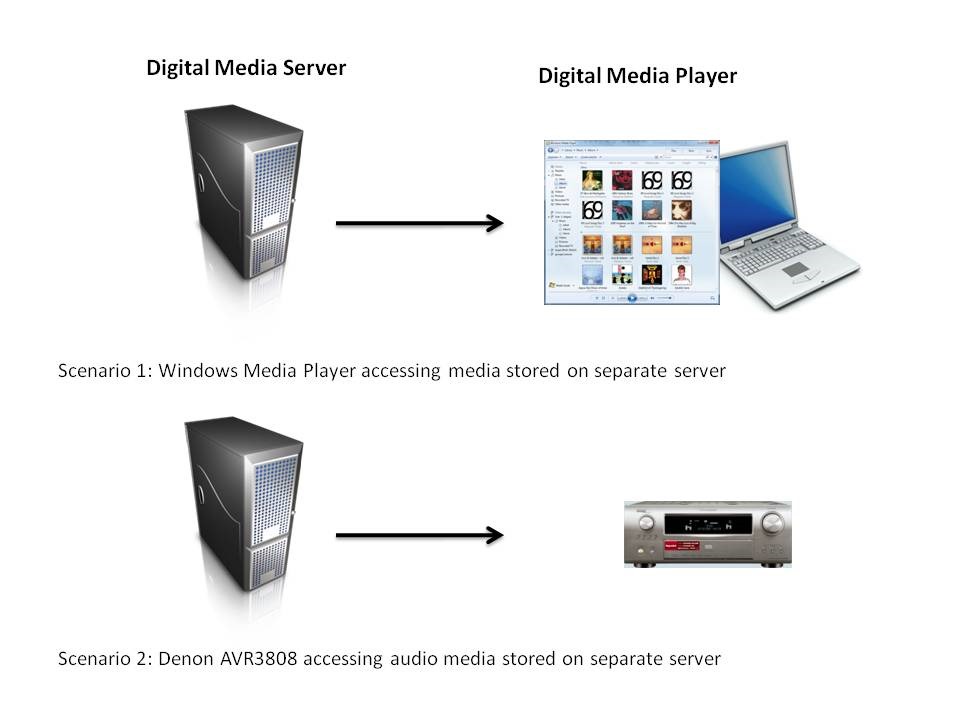
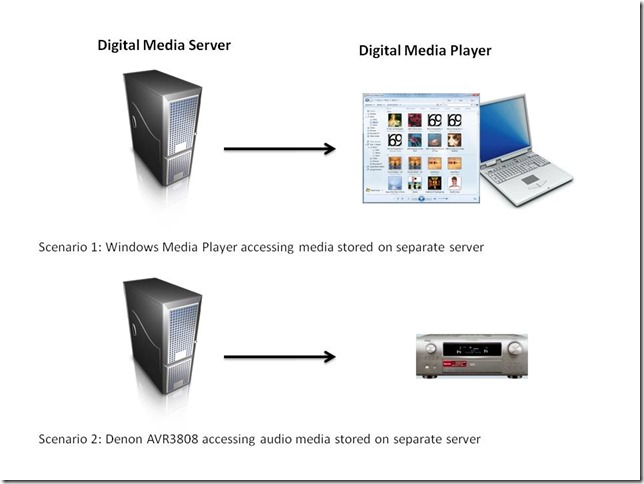
    At its simplest, just two devices can be involved: a Server and a Player. These can even be running on the same physical device, as in the case where your Windows Media Player on your Desktop PC is streaming music or video stored on the PC itself. The next step up is where the server and player are on separate physical devices. Two typical scenarios are shown in figure 1:
    WMP Scenarios

    Figure 1: Typical scenarios of simple case of DMP devices accessing DMS devices.

    I’ve used the Denon AVR-3808 as an example, since this is what I have in my home network. My DMS is a headless (no monitor, keyboard or mouse) home-built PC running the Windows Home Server 2011 operating system.

    In my particular case, both the two scenarios shown above will work, that is, the DMS that is part of WHS 2011 will stream audio to other PCs in the home network, and to the Denon AVR3808.

    Now, this next bit is important, I’ll return to it later: Under the covers, there’s actually some negotiation of streaming formats going on.

    This is because I have stored all my music files on the WHS 2011 in Windows Media Audio Lossless (WMAL) format. This presents no problems for the PCs, since the Windows Media Players installed on them can handle WMAL. But while the Denon can handle standard Windows Media Audio, it can’t handle the Lossless variant. So when I use the Denon to browse my music library on the server and select a track to play, the DMS in WHS 2011 sees that the Denon can’t handle WMAL and transcodes the stream into a format that the Denon can handle on the fly – it transcodes it into a PCM stream, which the Denon can deal with.

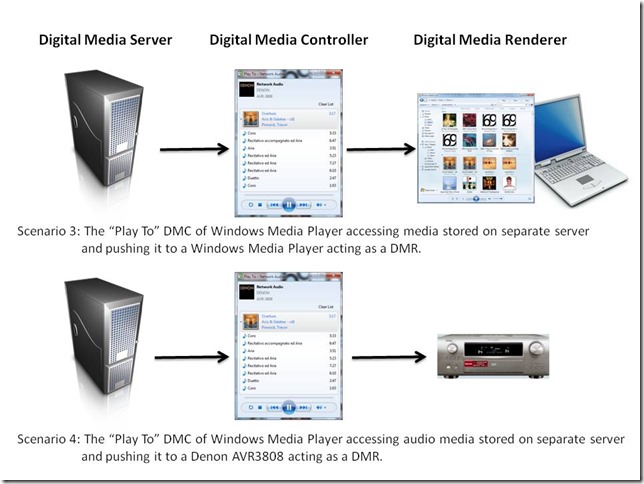
    Now let’s look at scenarios are where there are three devices linked together: a Digital Media Server, a Digital Media Controller, and a Digital Media Renderer.
    WMP Scenarios 2

    Figure 2: Typical scenarios of a three device link (DMS-DMC-DMR).

    In my case, all flavours of scenario 3 will work. That is, I can stream from my Windows Home Server using the “Play To” feature in either Windows 7 or Windows 8 Release Preview, and push the stream to PCs that are running Windows Media Player in Windows 7 or the Windows 8 Release Preview.

    But while scenario 4 (streaming to the Denon) works with the “Play to” of Windows 7, it does not always work with the “Play to” of Windows 8 Release Preview.

    The following table shows which formats work and which don’t, when using scenario 4:

    Format Windows 7 Windows 8
    MP3 Yes Yes
    Windows Media Audio Yes Yes
    Windows Media Audio Lossless Yes No

    Table 3: Audio formats used with “Play to” features in Windows 7 and Windows 8

    Now take a look at a table showing which formats are supported by the Denon AVR-3808:

    Format Supported by the Denon
    MP3 Yes
    Windows Media Audio Yes
    Windows Media Audio Lossless No
    FLAC Yes

    Table 4: Audio formats supported by the Denon AVR-3808

    My very strong suspicion, therefore, is that the Windows 8 “Play to” does not negotiate a playable format with the DMR of the the Denon, it simply sends the source format regardless. The Denon’s display panel has indicators  (MP3, WMA, PCM) that show the audio formats being received.  Let’s take another look at Table 3, but this time, show the state of the Denon indicators:

    Format Windows 7 Windows 8
    MP3 MP3 MP3
    Windows Media Audio WMA WMA
    Windows Media Audio (Lossless) MP3

    Table 5: Denon front panel indicators state

    You can see that, for Windows 7, the WMA Lossless format of the source media has been transcoded into an MP3 stream so that the Denon can deal with it. In scenario 2 (the Denon communicating directly with the Windows Home Server), the PCM indicator lights, showing that the negotiation with WHS 2011 has resulted in an alternative format being used.

    If the Windows 8 “Play to” is not carrying out any negotiation, as I think is happening in scenario 4, then of course the Denon will respond with an error – it cannot play native Windows Media Audio Lossless format.

    I note that Microsoft states that:

    Improved device experience: Metro style apps work only with Windows certified Play To receivers. These devices are validated to support modern media formats, are DLNA standards-compliant, and have great performance (including the updated Xbox 360 available later this year). The desktop experience first introduced in Windows 7 has been added to the Explorer Ribbon and will continue to support all DLNA DMR devices.

    Fine words, except that Microsoft are being economical with the truth at the moment. “The desktop experience first introduced in Windows 7” does not “continue to support all DLNA DMR devices”.

    It’s broken.

  • Onward Christian Soldiers…

    I see that the Church of England has now formally submitted its response to the UK Government’s consultation on same-sex marriage. They’re against it. If I were a Christian, like Giles Fraser, then, like him, I would be both ashamed and angry at the Church’s stance. But I’m not a Christian, so I’m simply disgusted and appalled at their continuing bigotry, and not in the least little bit surprised.

    The summary of the C of E’s 13-page submission makes interesting reading. They’re against it because:

    Such a move would alter the intrinsic nature of marriage as the union of a man and a woman, as enshrined in human institutions throughout history.

    Marriage, as they very well know, has taken on many forms in human institutions throughout history. There is nothing “intrinsic” about it. And if we’re talking about human institutions here, then your God can damn well keep his nose out of my marriage, thank you very much.

    Marriage benefits society in many ways, not only by promoting mutuality and fidelity, but also by acknowledging an underlying biological complementarity which, for many, includes the possibility of procreation.

    I totally agree with the first part of this statement, marriage does benefit society in many ways, including promoting mutuality and fidelity. However, after stating this, the C of E wants to erect “keep-out” signs to prevent this being available to same-sex couples. How very charitable of them. And as for “an underlying biological complementarity” it’s certainly easier if a married couple already possess the right bits, but if they don’t, it still doesn’t rule out the possibility of procreation and raising children in a loving family.

    We have supported various legal changes in recent years to remove unjustified discrimination and create greater legal rights for same sex couples and we welcome that fact that previous legal and material inequities between heterosexual and same-sex partnerships have now been satisfactorily addressed. To change the nature of marriage for everyone will be divisive and deliver no obvious legal gains given the rights already conferred by civil partnerships. We also believe that imposing for essentially ideological reasons a new meaning on a term as familiar and fundamental as marriage would be deeply unwise.

    To claim that the CofE has “supported various legal changes in recent years to remove unjustified discrimination and create greater legal rights for same sex couples” is a downright lie. As Giles Fraser writes:

    In the main House of Lords debate in June 2004 the majority spoke against it and voted six to one in favour of a wrecking amendment. The leadership of the C of E will do anything to keep gay people out of the church. It uses the sickly language of welcome but won’t let gay priests (even celibate ones) become bishops and is prepared to cut the Church of England off from the Episcopal church in the US because they do. At every turn, the Church of England treats gay people as an unwanted headache.

    As I say, I am not surprised that the C of E objects to the proposals, they’ve cherry-picked the bits of scriptures to form the basis of their objections. The bible also condones slavery and the stoning of adulterers, but somehow society (at least in the West) has managed to move on from that. But what I do object to is their insistence that their beliefs should apply to the rest of us:

    In common with almost all other Churches, the Church of England holds, as a matter of doctrine and derived from the teaching of Christ himself, that marriage in general – and not just the marriage of Christians – is, in its nature, a lifelong union of one man with one woman.

    from page 2 of the submission, my emphasis in bold. As I said above, their god can keep his nose out of my marriage.

    Then there’s the usual cry of “allowing same-sex marriages will dilute traditional marriage”. Section 13, page 4, of their submission (bold in the original):

    We believe that redefining marriage to include same-sex relationships will entail a dilution in the meaning of marriage for everyone by excluding the fundamental complementarity of men and women from the social and legal definition of marriage.

    You know, it’s ironic. Here in The Netherlands, civil partnership was introduced for same-sex couples back in 1998, and then in 2001 full civil marriage for same-sex couples became available. There’s been no “dilution in the meaning of marriage for everyone” at all. There are still church weddings for those who believe, but importantly, every couple first goes through a secular civil marriage ceremony, performed by a civil servant authorised to conduct weddings. This has long been the case – certainly before same-sex marriage became available. And there have been no challenges to the European Court of Human Rights to force Dutch Churches to marry same-sex couples, as the C of E apparently fears will happen in the UK.

    The news of the C of E’s submission has appeared on the 12th June 2012. By coincidence, this is what we consider as our 14th Wedding Anniversary. Martin and I had a civil partnership ceremony on the 12th June 1998. In 2003, we had this upgraded to a full civil marriage. The C of E’s continuing scaremongering on this issue of same-sex marriage is just another example of how, to quote Christopher Hitchens, religion poisons everything.

  • A Boerenbruiloft

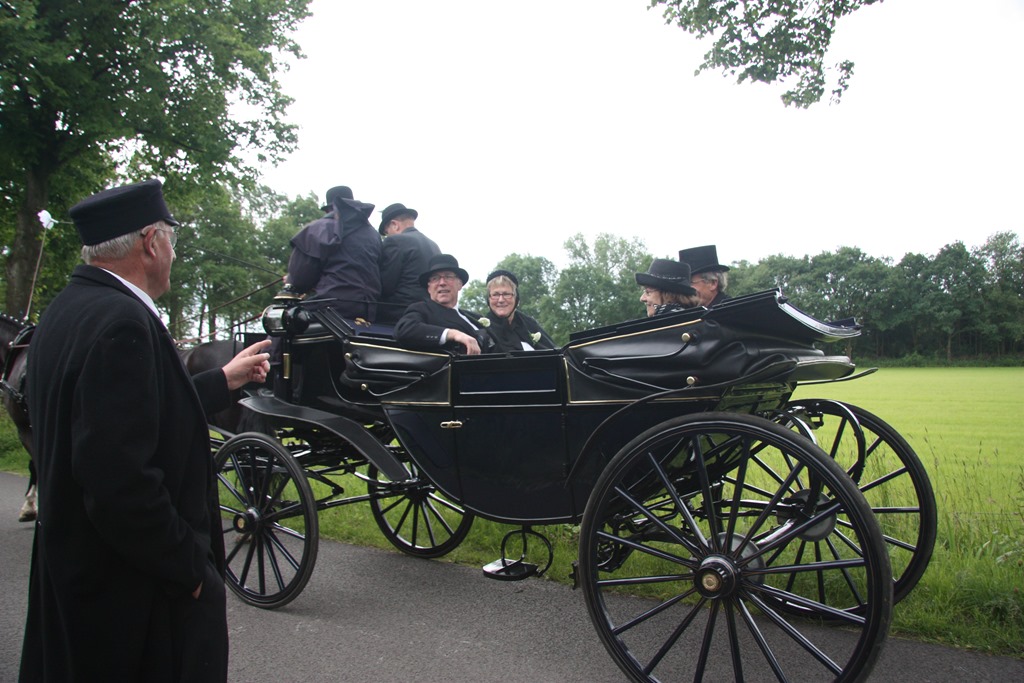
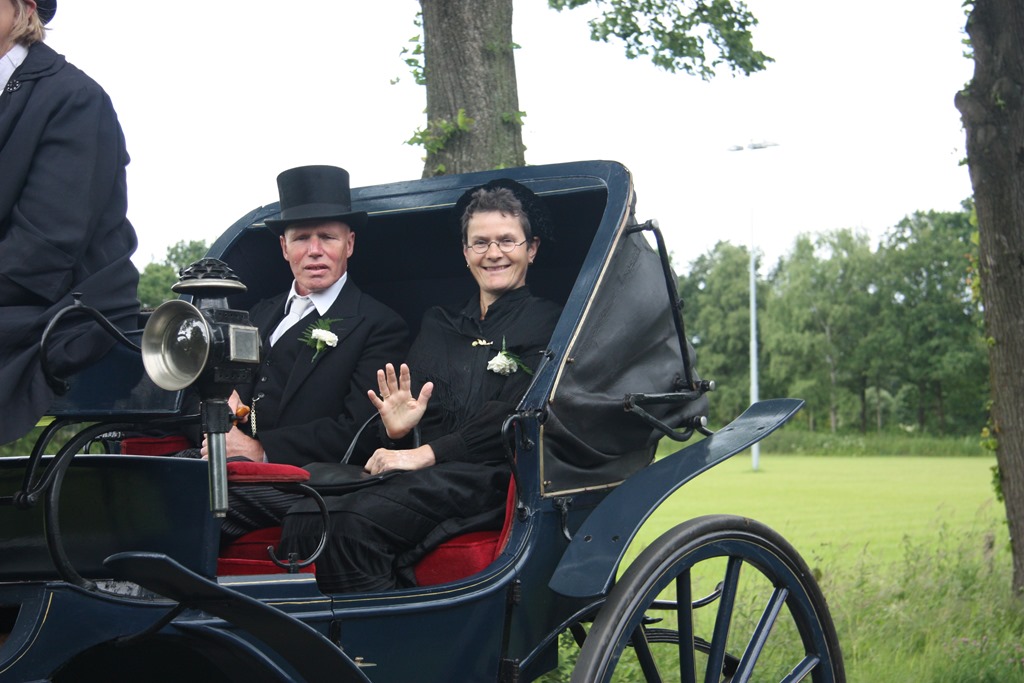
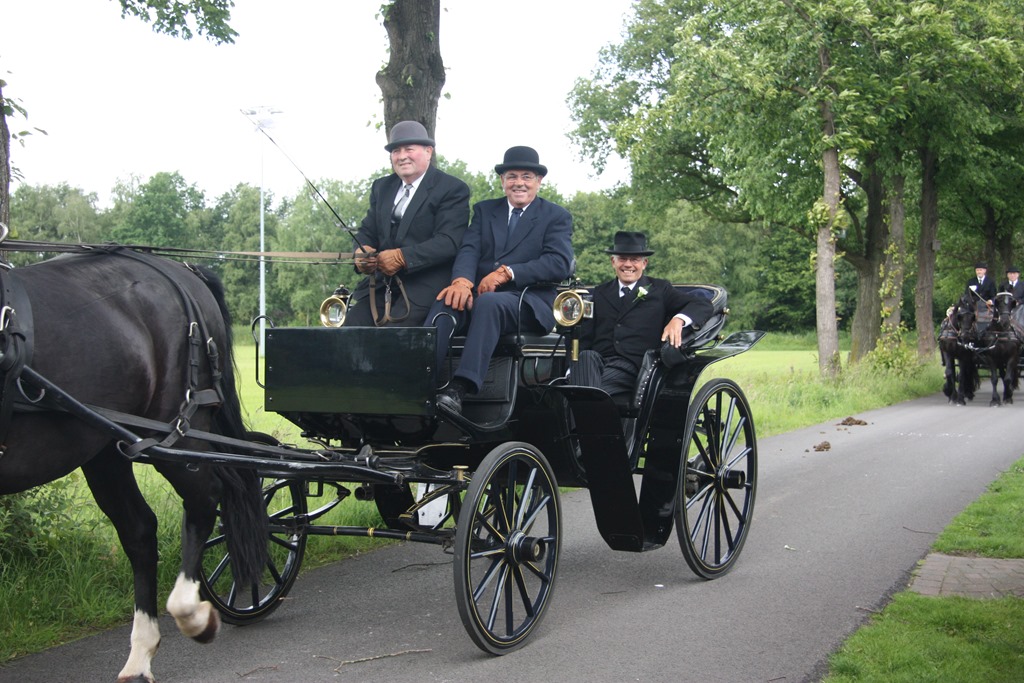
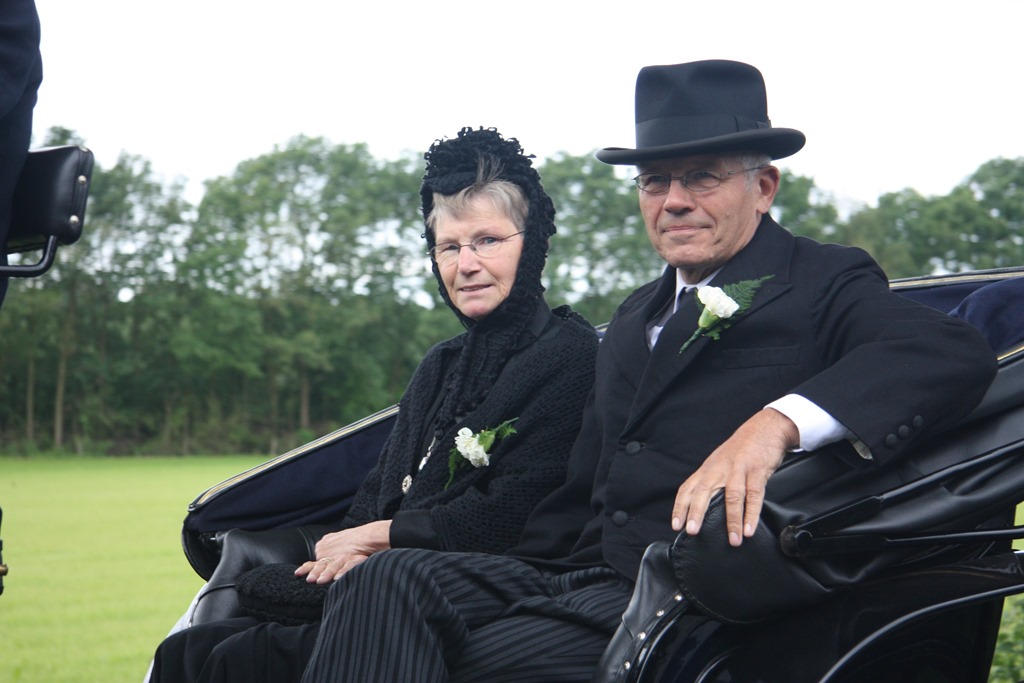
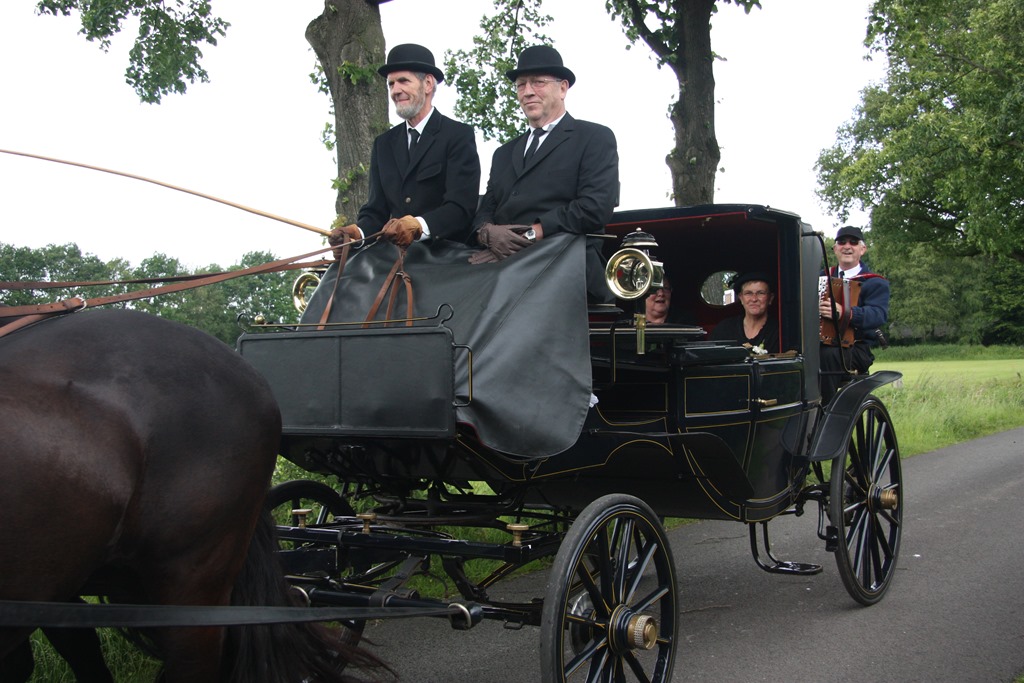
    Boerenbruiloft is the Dutch word for a farmers’ wedding. Here in the Achterhoek area of the Netherlands, the sense of tradition is still very strong, so last Saturday I was able to be an onlooker of a boerenbruiloft. It was actually all a bit of play-acting from the members of the local horse and carriage club to celebrate thirty years of their existence. So they set out to show how a happy couple would get married with all the trappings and traditions that would accompany a typical farmer’s wedding in the first couple of decades of the 20th century.

    That would involve the bridegroom travelling in horse and carriage to the house of the bride’s parents:

    20120609-1222-08 

    Once the bride was collected, the whole entourage (bride and bridegroom, parents, witnesses, and guests) would set off for the wedding ceremony:

    20120609-1237-51

    20120609-1240-25

    20120609-1240-32

    20120609-1240-46

    20120609-1240-50

    20120609-1241-04

    20120609-1241-14

    This being the Netherlands of the 21st century, Health and Safety issues seemed to also be creeping in…

    20120609-1242-29

    The “marriage” ceremony itself was conducted in the Hofshuus in Varsseveld, an old farmhouse that dates from the 17th century.

    Here in the Netherlands, marriage is a secular institution, with marriages conducted by a civil servant (ambtenaar) who has the right to perform marriages (an ambtenaar van de burgerlijke stand). So the “ambtenaar” formally asked the parents and the couple if they assented to the marriage, and then invited the couple to exchange rings.

    20120609-1353-00

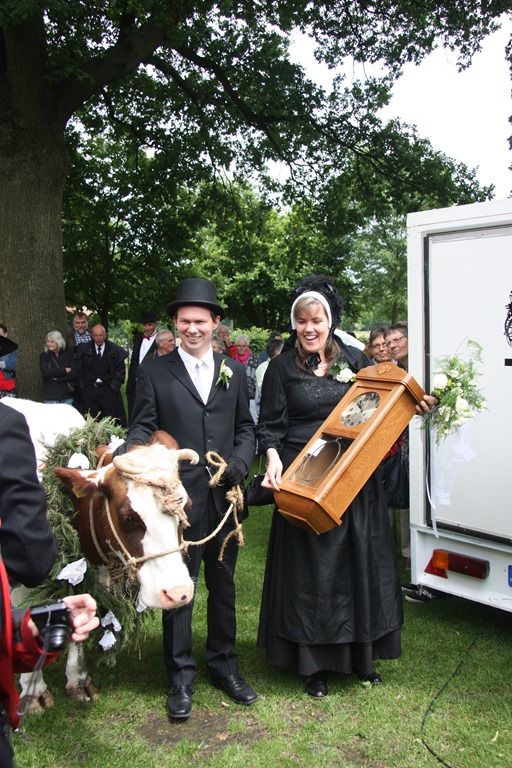
    Following the “marriage” ceremony, we had a re-enactment of another tradition that was once common in the Actherhoek: the presentation of a cow (the bruidskoe) to the bride by the bride’s father:

    20120609-1408-25

    The people living in the neighbourhood (the buurt) of the new couple would also traditionally present the couple with a gift to welcome them into the buurt. Very often this would be a clock for the farmhouse:

    20120609-1410-17

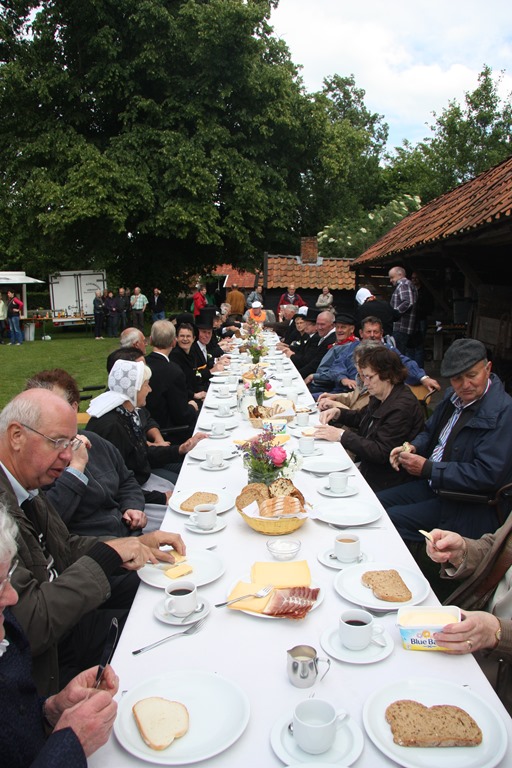
    There would then be a communal meal for everyone to celebrate the marriage:

    20120609-1445-50

    The forms may change, but the essentials remain the same, from the time of Brueghel the Elder to today…

    Following the meal, the bride and bridegroom would travel back to their new home, but along the way, the buurt would stretch a rope across the road, and demand payment of a toll.

    20120609-1534-16

    That would take the form of a glass of strong drink offered by the couple to the buurt. Note that the glasses have no foot – you’re meant to down the drink in one go…

    20120609-1535-59(001)

  • Tracing The Family Tree

    I’ve mentioned my family tree on the blog before. That post got responses from distant relatives whom I never knew I had. So here’s another post, prompted by my brother and one of my cousins, in the hope that we might get back in contact with a particular long-lost relative.

    I’ll start with my maternal grandparents: Edward Thomas Johnson and Eleanor Johnson:

    Grandparents Kate & Ted Johnson 1942.

    They had six children, three boys and three girls. In order of age (eldest first), they were Claude, Olive (my mother), Hilda, Eric, Murray, and Eugenie.

    This post concerns my uncle: Murray Johnson (born 7 October 1912, died 31 March 1988).

    Now, I only have a scattering of photos of Murray. Here are three examples: one as a toddler, one as a youngish man (on the right in glasses), and one taken in 1987, flanked by his nephews – me, the obviously gay one on the left in the picture, and my brother on the right.

    Family0152

    Family0158

    Murray, G & M, Richmond Park, July 1987

    Murray had three marriages. The first was to Jane Foreman. The second to Violet Gray, and the last to Barbara Pavitt. As a child, and a teenager, I can only ever recall Barbara, I can’t recall anything of his previous partners.

    Now, the point of this post is that Murray and Jane had a daughter: Juanita Johnson, born in 1940, in Brentford, England.

    My older brother tells me that Juanita was adopted, and thus grew up in a family other than either of her birth parents.

    So now: I have put this message in a virtual bottle and I have cast it out into the ocean of the internet.

    Should Juanita, or her descendants, ever retrieve this and would like to get in touch with us, then we would be delighted to hear from you…

  • The Secret History of our Streets

    Last night, BBC Two broadcast the first in a series of documentaries about streets in London. It was The Secret History of our Streets: Deptford High Street.

    It was truly excellent – up there with what the BBC does best. Starting with the sociological maps of Charles Booth, it moved to the present day with vox pop interviews of residents and those connected with the history of Deptford High Street.

    The centre of the programme was John Price, whose family have lived in and around Deptford High Street for 250 years. His was the arresting voice of a community that was forced into a diaspora by the well-meaning, but ultimately ruinous, city planners of the 1960s.

    It was riveting television, that, as Lucy Mangan writes, prodded your brain awake as it broke your heart. Do read the comments on her article, and the comments on the producer’s blog of the programme, they are worth it.

    I was close to tears at several points, and moved to white-hot fury as the programme revealed that one street in Deptford had been saved from the city planners’ bulldozers. In a final irony, it turned out that the street that survived was of housing stock that was at the absolute bottom of the pile. Better streets, one of which contained John Price’s family, were flattened. And now, this street, consisting of tiny terraced houses built for the poorest of the poor in the 19th century, has properties that are on the market for £750,000.

    We were treated to the spectacle of an oleaginous estate agent showing a well-to-do couple around one such tiny property. I have never come closer to wanting to hurl something through the television as at that moment. It made me sick to the bottom of my heart.

    And while the programme showed some of the new life that has come to Deptford High Street, including the (to me) rather questionable evangelical preacher, I couldn’t help feeling that the programme makers had made the right choice by using the song and words of the evangelical choir to close what was a brilliant example of a documentary. The  choir sang ‘Will the Circle be Unbroken’ – a bitter comment on how a community was shattered for ever by the Council’s bulldozers. The chorus, ‘There’s a better home a-waitin’ – in the Sky, Lord, in the Sky’ was perhaps a cruel, but knowing, joke about the highrise apartment blocks the Council built. The new slums to be marked as such on the map of a 21st Century Charles Booth, whilst the original community has been scattered to the four winds…

  • What’s Not To Like In Windows 8?

    Unlike many people, I don’t consider myself a dyed-in-the-wool hater of Windows 8. In fact, I find much to like in Microsoft’s latest operating system, which will be available this October. Nevertheless, I thought it might be useful to gather together in one place all the bugs, quirks, and the WTFs that I’ve come across in the last few months of kicking the tyres of the pre-release versions of Windows 8.

    This post will be updated and/or corrected as I come across new information.

    The List

    • I really dislike the marketing decision that Microsoft has made concerning Windows Media Center. However, on the upside, it means that I won’t be upgrading my HTPC to Windows 8. It will remain on Windows 7, running Windows Media Center, until something better comes along.
      NOTE: since writing that, Microsoft has announced an upgrade offer of just $40 to upgrade Windows 7 systems to Windows 8 Pro. That sweetens the pill substantially, since the Pro version will include Media Center for free until 31st January 2013.
    • Not only is Microsoft’s marketing going to hamper Windows Media Center, but they have also deliberately removed two of its features that are required for use in dedicated HTPC systems.
    • Windows 8 takes full advantage of modern PC hardware, such as UEFI for firmware and GPT drives. However, Microsoft’s dirty little secret is that their Windows Home Server 2011 product cannot backup or restore any systemusing UEFI and GPT drives. [Update 4th March 2013: Microsoft has at last issued a Hotfix to add backup support for UEFI-based computers to back up to servers that are running Windows Home Server 2011]
    • Your Microsoft Account is tied to a single country/region, and can’t be changed, either by you or Microsoft. Bad news if you move to a different country. Microsoft claims to be working on addressing this, but when we will see results is anyone’s guess (this has been a known issue since at least 2007 – it’s caused by a limitation in the Xbox Live infrastructure).
      Update 17th October 2012 – it looks as though Microsoft are starting to offer Xbox Live customers the ability to migrate their accounts under certain circumstances.
    • The Photos App cannot access pictures held on Network Shares. This includes photo libraries held on Windows Home Server systems.
      See Update 1 and Update 2 below.
    • The Music App only has four views of your music library: songs, albums, artists and playlists. I miss the sorting by composer that I have in Windows Media Player or Windows Media Center. And where is “Play to” or Podcast support?
    • The “Play to” feature that was introduced in Windows 7 is now broken in Windows 8.
      Update: This has been fixed in the final release of Windows 8.
    • I consider that the Windows Explorer in Windows 8 is more clumsy than the version in Windows 7. I find it’s a step backwards in usability.
    • The Mail App still doesn’t have IMAP or POP support. This is a staggering omission, since these protocols are the foundation on which internet email clients have been based for years.
      See Update 2 below.
    • To search within a Metro App, you use Winkey+Q. However, not all Apps support this, including, rather strangely, the Reader App. Here, you have to right-click in the App to reveal the Search button (which then has to be clicked to reveal the Search box where you type your search terms).
    • Searches in the Video App will only return results from the Video Marketplace (if your region has a Marketplace). It does not seem to search any of your own content, not even filenames that match the search terms. As for searching on any metadata, such as tags, in your video files; forget it.
    • The Weather App is supposed to have a “Live Tile”. On my system it doesn’t; why, I have no idea.
    • Microsoft’s News App looks good, but the news it displays is hardly up-to-the-minute, is it? There are articles dating from 4 days ago (at least in the UK feeds). That’s not news – that’s what we use to wrap fish and chips in. Also, this App (like too many others) can’t use Printing Devices. I’m sufficiently old-fashioned to want to be able to print things for hardcopy now and then.

    • Printing in Metro Apps. So tell me, how do I just print the current page, or a selection of pages? Something that’s easily done with the traditional Windows Print dialog, but that seems totally impossible with the whizzo new Metro design with certain Apps. The Metro Mail and IE10 Apps, for example. They drop the “Pages” setting from the Metro Print screen. See below for screenshots. Sigh.
    • Backing up your data. Windows 8 has a new backup method: File History. Be aware that it only covers the contents of your Libraries, Desktop, Contacts and Favourites. It won’t cover application data, or your mail messages… Microsoft assumes that we all hold our email in the Cloud. Er, no, we don’t.

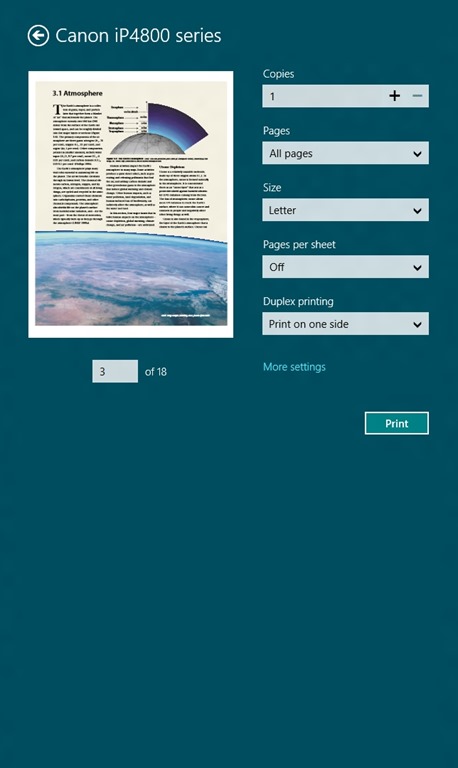
    Here’s examples of the confusing Print screen in Metro. This is what you see when you want to print something in the Metro Reader App:

    W8RP 10

    Note that you’ve got a “Pages” setting, where you can select to print “All pages”, “Current page” or a “Custom” selection of pages from the document.

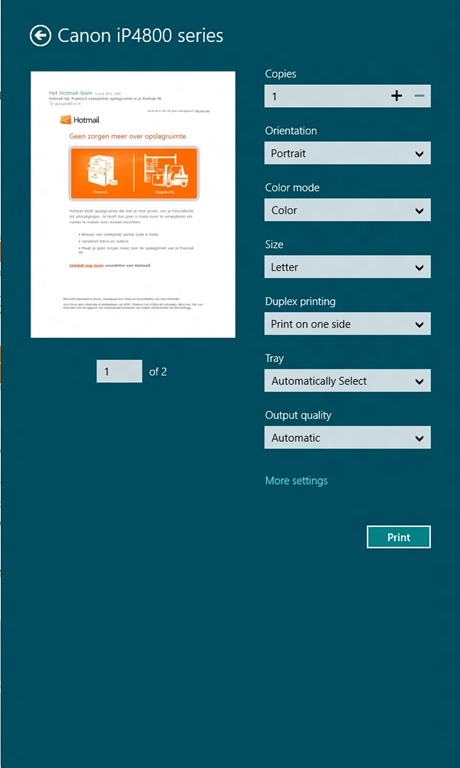
    Now here’s what you see (using the same printer device) when you want to print out a mail message from the Metro Mail App (you’ll also see the same settings when you print out a web site in the Metro IE10 App):

    W8RP 08

    Er, hello? We’ve got additional options, but the “Pages” setting has disappeared altogether. Don’t bother clicking on the “More settings” link, it’s not lurking under there either. I like consistency in my tools, not nasty surprises.

    Update 28th October 2012: This inconsistent print behaviour is still present in the final version of Windows 8, despite some of the Apps being updated. The Mail App and IE10, for example, still can’t print out a single page or a range of pages. Sigh.

    Update 1: Brad Weed, a program manager in the Windows Live team has contributed a post on the Photos App in the Building Windows 8 blog. I note that he doesn’t even mention the fact that the Photos App cannot display photos held on Windows Home Server, yet he boasts that the Photos App will “display photos from all your devices”. Er, no, Mr. Weed, it won’t, as you damn well know. Please try harder.

    Update 2: On October 5th, Microsoft announced that many of its Modern Apps would be updated in the run-up to the release of Windows 8 on October 26th. This includes the the Mail App, which will at long last get IMAP support, and the Photo App, which will finally be able to support network locations. I found it rather curious that only a couple of days earlier, Analy Otero, on the Photo App team, said (my emphasis):

    …support for network locations is definitely something we will consider for future versions of the app.

    When she could quite easily have said:

    …support for network locations is definitely something we will provide for future versions of the app.

    Odd. Mind you, it still doesn’t support searching on Tags. So, the Photo App is still a miserable excuse for what it should be.

    Microsoft are doing themselves no favours with the current collection of Metro Apps, which are little better than toys.

    Update 26th March 2013: The Mail, People, Calendar and Xbox Music Apps have been updated. Some small improvements, but there are still shortcomings.

  • Fun With Technology – Part VIII

    Important Update 27th October 2012: The bug I describe below was fixed in the final release of Windows 8. I can now use the “Play to” feature with my Denon AVR-3808 receiver.

    Hoorah!

    Update 24 October 2013: With the release of Windows 8.1, I was getting problems with “Play to” again. I posted the Windows 8.1 issue in a Microsoft forum, and got some useful feedback from Microsoft’s Gabe Frost. The issue is not resolved, but at least we now know what’s going on. See https://gcoupe.wordpress.com/2013/10/23/play-to-and-windows-8-1/

    Original Post

    Sigh. I’m having another facepalm moment with Microsoft again. I’ve downloaded and installed the Windows 8 Release Preview, and am currently kicking the tyres. I’ve already found some nasty things in Microsoft’s Metro Apps; this post is about something else.

    Microsoft introduced the “Play to” feature in Windows 7. It’s a very useful feature that allows Windows Media Player to stream music to other devices (e.g. my Hi-Fi amplifier) on the network. I found that this feature was broken when I tried it in the Windows 8 Consumer Preview. Now that I have the Release Preview installed, I had hoped that Microsoft would have fixed it.

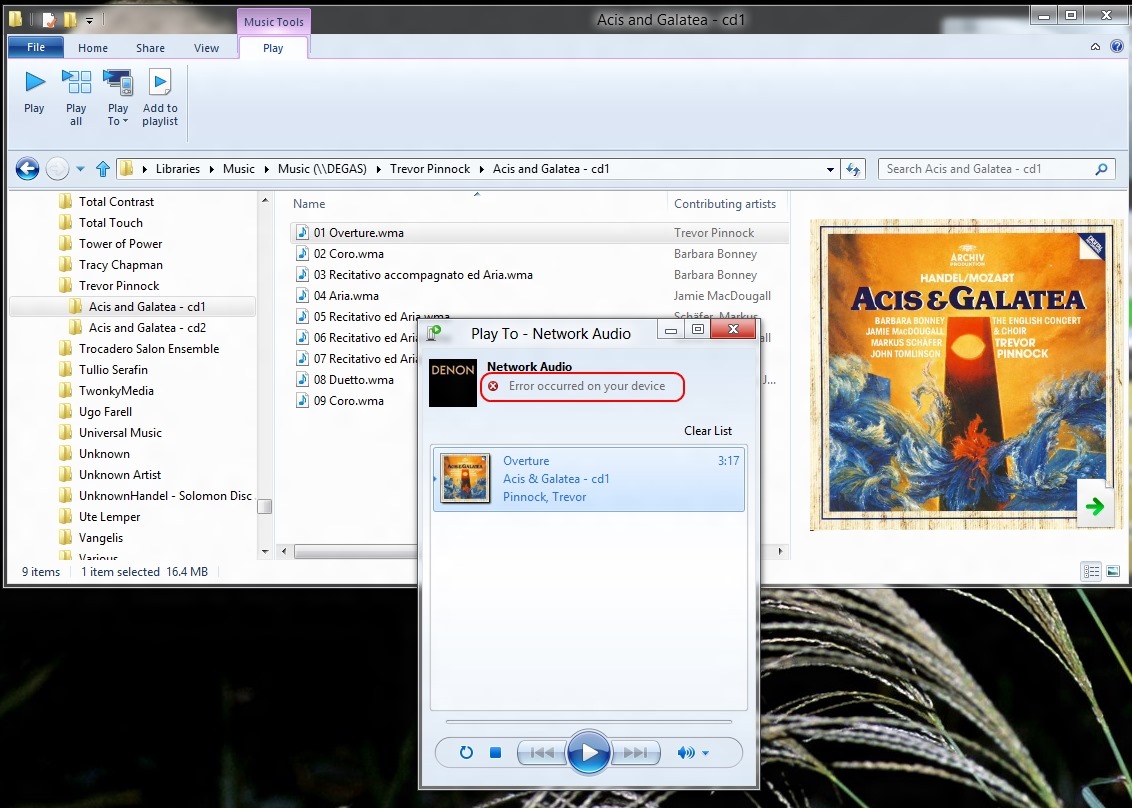
    Alas, no, it still doesn’t work, and there’s been a rather worrying development… Here’s what I saw when I tried it in the Consumer Preview:

    WMP 12 13

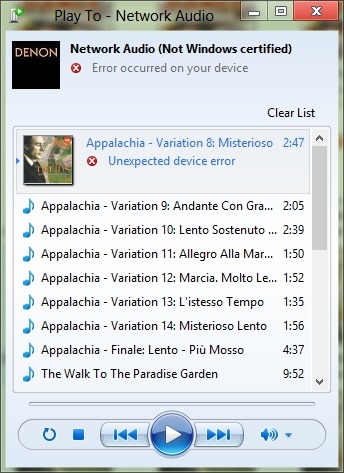
    Now take a look at the error message I get when I try using the “Play to” feature in the Release Preview:

    W8RP 06

    Er, what’s that “Not Windows certified” message? I thought the whole point of having DLNA-certified devices (which I have) was that they would plug and play. It worked in Windows 7. Now it seems as though Microsoft are introducing something else for Windows 8 – and breaking the whole concept that DLNA is trying to address.

    I would have thought that Microsoft would have learned from the failure of their “Plays for Sure” branding, but no, they’re at it again. In a final irony, my Hi-Fi amplifier, a Denon 3808 AVR, proudly bears a Microsoft “Plays for Sure” sticker. Well, it doesn’t “play for sure” any more, thanks to Microsoft and Windows 8.

  • Thoughts on the Windows 8 Release Preview

    I must admit, since Windows 8 is going to be released in October 2012, I was expecting Microsoft’s Metro Apps in the Windows 8 Release Preview to be more fully functional than they are. To my mind, they are still little better than toy demos. Yes, I know that they are still labelled “Previews”, but there’s precious little time left before October, and an enormous amount of functional ground left to cover.

    For example, the Mail App still doesn’t have IMAP or POP support. This is a staggering omission, since these protocols are the foundation on which internet email clients have been based for years. Then there’s all the extra stuff in the Windows Live Mail client that is missing from the Metro App, such as message rules or the ability to define extra storage folders. Since my email is hosted on an IMAP mail server by my internet service provider, I haven’t been able to use the Metro Mail App in earnest. There may well be other shortcomings that I haven’t discovered yet.

    The Music App only has four views of your music library: songs, albums, artists and playlists, as shown in this screenshot:

    W8RP 04

    Since you can’t define your own additional views, I miss the sorting by genre or composer that I have in Windows Media Player or Windows Media Center. And where is “Play to” or Podcast support? Missing in action, it would seem.

    The Photos App is still only a viewer, not an organizer/editor/metadata tagger in the manner of Windows Live Photo Gallery or Picasa.

    And then there are the bugs.

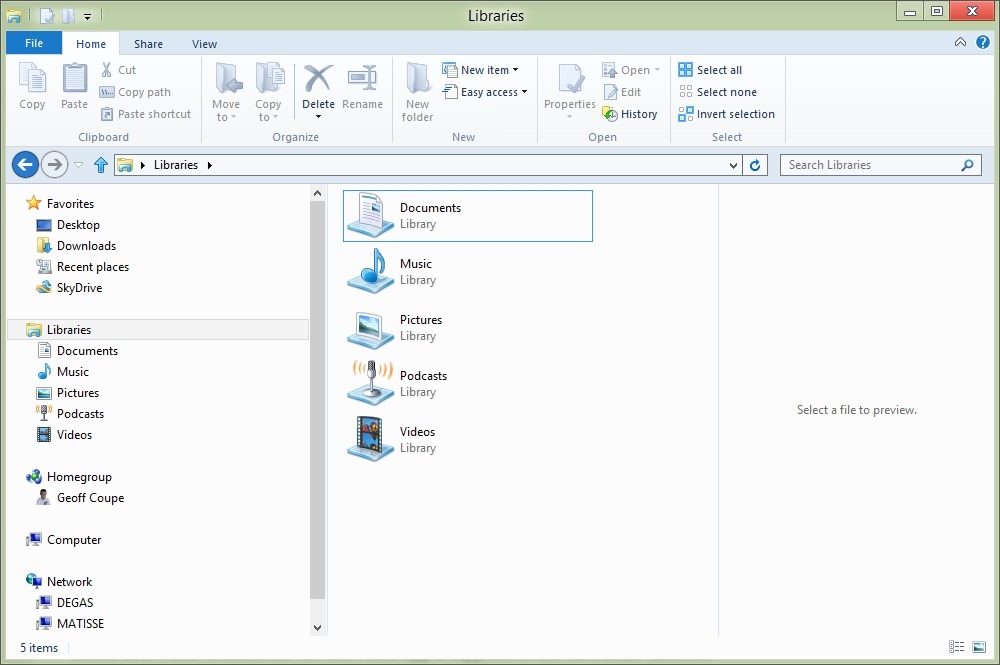
    For example, amazingly, it turns out that the Photos App cannot deal with photos that are stored on a Windows Home Server. The Photos App is supposed to use the Picture Libraries that you define in Windows 8. In both Windows 7 and Windows 8, you have a standard set of libraries defined for your media. See this screenshot:

    W8RP 01

    The Documents, Music, Pictures and Videos libraries are defined by default in installations of Windows 7 or Windows 8. If you install the Zune client (which is currently needed to support Windows Phones), then you get a Library defined for Podcasts as well.

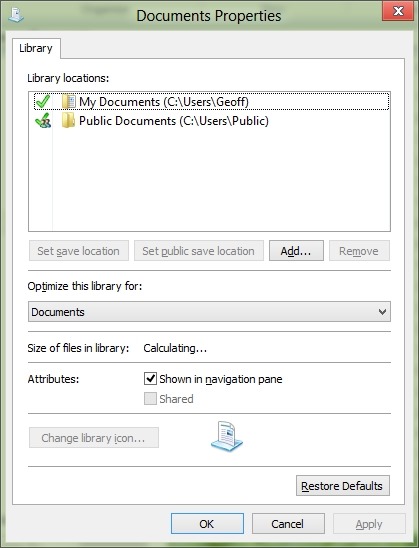
    By default, each of these libraries point to the corresponding folder in your Windows account on your PC, plus a pointer to the corresponding folder in the Public account on your PC. Here’s the pointers for the Documents library as an example:

    W8RP 02

    You can add additional pointers to folder hierarchies held locally on your PC, or network locations. If you have a Windows Home Server, then it will automatically add pointers to the corresponding Shared Folders on the server. Here’s a screenshot of the pointers to my music folders in the Music Library as an example:

    W8RP 03

    However, it turns out that the Photos App can only handle local folders, not network locations, such as the Shared Folder for pictures held on a Windows Home Server.

    This is even more curious when you realise that the Music App can handle music held in the Shared Folder for music on a Windows Home Server… That screenshot above of the Music App is showing music stored on my Windows Home Server.

    Now, the team responsible for the Photos App have admitted this is an issue. In this thread on the Microsoft Answers forum, Analy Otero, a member of the Photos App’s team states:

    The Photos team is aware of the concerns and issues that surround network locations, removable storage and Windows Home Servers. Unfortunately there are technical limitations to supporting them completely and correctly and as you have noted those locations are not supported in the Release Preview version either. 

    Rest assured that we are want to see these scenarios work and we aspire to support them just as all of you do so that you can use the Photos app as one place to see all of your photos regardless of where they are.

    If you have your photos in other PCs (Vista, Win7 or Win8 machines) you have the option to install the recently released SkyDrive client on them to be able to fetch files from them from anywhere. This includes being able to browse all your photos (and videos) from the Photos app as well. Definitely check it out if you have a chance.

    Thanks for the feedback, we’re definitely are listening and understand that support for WHS and other network locations is important for you.

    Notice that she mentions that the SkyDrive client can be used as a workaround to allow the Photos App to access files and folders held on other PCs in your network. It’s not clear whether the client is officially supported on the WHS operating system. This post on the SkyDrive forum does say that it will run on Windows Server 2008 R2, and that is the operating system that underlies WHS 2011. However, whether this also means that Microsoft will support the use of the client on WHS 2011 is another matter.  Update: Analy Otero has confirmed that Microsoft does not support the use of the SkyDrive client on WHS 2011, and it won’t install at all on WHS v1.

    I downloaded the SkyDrive client onto my Windows 8 system (which is 64bit), and then copied it across to my WHS 2011 (this is a 64bit operating system). I then did a Remote Desktop connection into my (headless) WHS, and successfully installed the client.

    Sure enough, the client then started synchronizing with my SkyDrive photos, but interestingly, something else also started happening… When I next opened the Metro Photo App, an additional pane had appeared on the opening screen – it was for “Degas” – the name of my WHS 2011 system.

    W8RP 05

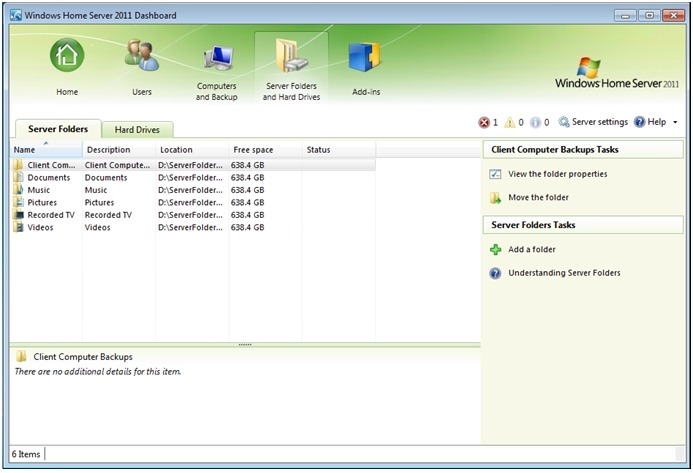
    This view of the pictures folder on my Windows Home Server is not the default Pictures Shared Folder. Instead, it appears to be mapped to the Pictures folder of the Public user on WHS 2011. Now, while this is logical when the SkyDrive client is installed on a Vista, Windows 7, or Windows 8 PC, it makes no sense at all for a Windows Home Server. For one thing, no user account folders, including the Public user account folders, are ever exposed over the network in a standard Windows Home Server setup. A standard WHS 2011 system uses Shared Folders that are not tied to the Public user account.

    WHS2011 57a

    Also, I discovered that the Public Folders are only exposed so long as you are logged on to the Administrator’s Desktop (so that the SkyDrive Client runs). So if you want to use this workaround, you’re going to have to Remote Desktop in to your WHS, and populate the Pictures folder of the Public user account and keep logged on via Remote Desktop; photos in the standard Shared Folder for Pictures simply aren’t accessible by the Photos App. In my opinion, it’s a kludge. An unsupported kludge. Sigh.

    Update: I’ve gathered together in one place all the bugs, quirks and WTFs that I’ve found thus far with Windows 8. Check it out if you want to see the full list.

  • A Close Shave

    On the other side of the lane that runs past our property is a narrow verge and a ditch. Every year in Spring, the verge erupts with nettles. And every year, I do battle with the brush-cutter to try and trim the verge back a bit.

    This year was no different. Yesterday, I strode forth and did battle with the nettles such that they lay vanquished.

    This morning, I noticed that Watson, our youngest Labrador, was interested in something that had been exposed by the trimming of the nettles.

    It turned out to be a blackbird’s nest. I’m surprised that she had built it at ground-level, even if it had been hidden in the nettles. While I’m thankful that I didn’t decapitate the chicks, I do fear for their safety now that they are so exposed.

    20120526-1555-15

    20120526-1145-39

    20120526-1554-36

    Update: as I feared, one day later and the nest is empty. The chicks have been predated.

  • Facets of Delius

    I was first introduced to the music of Frederick Delius back in 1968 via Ken Russell’s brilliant biographical film portrait: Song of Summer. The film dealt with Delius’s last six years of life, when he was a cantankerous old man; blind, paralysed, and dealing with tertiary syphilis. It is a superb film. Apparently, Eric Fenby, who was Delius’s amanuensis at the time, found the film so true to life that he suffered a nervous breakdown as a result of seeing it.

    We’ve had to wait nearly 45 years for another film portrait of Delius. Last night, we got it, in the shape of John Bridcut’s glorious film documentary: Delius: Lover, Composer, Enigma shown on BBC Four. This took a view of the whole of Delius’s life, from growing up as Fritz Delius in a German family in Bradford, through his time in Florida, and the flesh-pots of Paris, to his old age in Grez-sur-Loing, when he was married to the long-suffering Jelka Rosen.

    It was simply stunning. And it has made me want to explore more of Delius’s music – particularly his early work. His opera Koanga pre-dates Gershwin’s Porgy and Bess by thirty years, and his A Mass of Life celebrates the joy of life, without religious overtones.

    John Bridcut does good work – his biography of Benjamin Britten: Britten’s Children, which I read before I saw his documentary film on which the book was based, alerted me to his talent. Delius: Lover, Composer, Enigma is equally good. It contains many interviews, both current and archival material (e.g. Sir Thomas Beecham – a champion of Delius’s music), that elucidate Delius’s genius. I’ve just ordered more CDs of Delius’s music as a result. Thank you, Mr. Bridcut. And thank you, Frederick Delius.

  • A Prelate’s Pork Pies

    I drew your attention to John Sentamu’s piece on why he does not support same-sex marriage a few days ago. One thing I missed in that farrago is that His Grace was being economical with the truth. He stated that the bishops in the House of Lords supported civil partnerships when the bill was debated.

    Strange that, if one checks Hansard, as Iain McLean has done, that is not what you will find:

    The main Lords debate on the civil partnership bill took place in June 2004. Richard Harries, then bishop of Oxford, did indeed signal Church of England support for civil partnerships. But his efforts were contradicted by the five conservative bishops who spoke on the other side. Going by the bishops’ contributions to debate, the score is 5/3 against. Going by the bishops’ votes, it is 6/1 against. Six bishops voted for a successful wrecking amendment in the name of Lady O’Cathain, which made the bill unworkable. Only the Commons’ insistence on rejecting the O’Cathain amendment made it possible to enact civil partnerships.

    His Grace tells porkies. What a surprise. 

    A tip of the hat to Eric McDonald for drawing my attention to this doubtless unintended failure of His Grace to recall facts correctly when it suits him to do so.

  • Origami Computing

    As you may be aware, I’ve been following the development of Microsoft’s Windows 8 operating system with some interest.

    I confess that I have been somewhat taken aback at the amount of negative press that Windows 8 has been receiving, both from technology pundits and users, because I’m finding Windows 8 rather exciting. I’ve been using it on my main desktop PC since the Windows 8 Consumer Preview was released in February, and I’ve never thought for a moment about uninstalling it and going back to Windows 7. Indeed, I’m looking forward to the Release Preview of Windows 8 that will be available in a couple of weeks.

    It’s true that my joy over Windows 8 has not been entirely unalloyed. At the moment, I have a list of three negatives:

    I can live with the first two, but the last does worry me. New PC systems are increasingly based on UEFI/GPT technology, so I am likely to be faced with a problem in the future if Microsoft don’t fix this. Update: I’ve gathered all the bugs, quirks, and WTFs that I’ve found in Windows 8 thus far into one place: here.

    It seems to me that with Windows 8, Microsoft has a chance to move personal computing into a new era, one where not only can a range of computing devices (PCs, Tablets, Smartphones) share a common operating system and applications, but where the hardware itself can have a range of flexibility that goes beyond what we have seen so far.

    I got a taste of this with my old HP TX2000 Tablet PC, but running Windows 7, it couldn’t deliver what will be possible with Windows 8.

    Paul Thurrott touches upon this in his latest opinion piece. I think he is right. My next PC purchase is unlikely to be a Desktop PC. It will be a Slate, running Windows 8, based on Intel’s Broadwell. It will have multitouch and a pressure-sensitive stylus. I will be able to carry it around and take notes/photos/videos on the move, and I’ll be able to plug it into multiple monitors, a keyboard, and a mouse for my next generation Desktop.

    We are at the dawn of Origami Computing. Apple and Android are way behind.

  • A Prelate’s Petitio Principii

    …Or, a bigot begs the question. John Sentamu explains why he objects to same-sex marriage. It’s a staggering piece, chock-full of circular arguments and some breathtaking disingenuousness. A prime example of the latter is his opening:

    I will be the first to accept that homosexual people have suffered discrimination and sometimes worse through the decades and that the churches have, at times, been complicit in this.

    Er, at times the churches have been complicit in this? Dear God, Sentamu, your Christian church has our blood on its hands. It has been the powerhouse of discrimination and violence against us for centuries, and remains so in many cases, the Roman Catholic Church and the African Anglican churches to name but two.

    I think it’s instructive, as one of the commenters on this piece has done, to use Sentamu’s opening words and replace the targets of his piece. It throws into sharp relief Senatmu’s bigotry:

    I will be the first to accept that slaves have suffered discrimination and sometimes worse through the decades and that the churches have, at times, been complicit in this. There is much penance to be done before we can look our enslaved brothers and sisters in the eye. But that baleful history does not diminish the need to speak the truth in love.

    I firmly believe that redefining society to embrace emancipation would mean diminishing the meaning of life for most people, with very little if anything gained for black people. If I am right, in the long term we would all be losers.

    Of course, if someone should ask, “how will my household be affected if servants can be free to come and go as they please?”, the answer is: not at all. But let me put the question another way: what sort of a society would we have if we came to see all social relations primarily in terms of equal rights? Society is designed to meet the different needs of its different members in different ways. It is the model of the just society that responds intelligently to differences rather than treating everyone the same.

    While I am a strong supporter of justice and equality of opportunity for all people, I want to insist that with those rights go our responsibilities to one another. These are enshrined, I believe, in our legal definition of human property. Would we be a better society if we made the master-servant relation simply a private contract between two individuals, with no wider implications of society and property rights? I do not believe that we would. The issue is not the implication for any existing household,  but the implication for people in the future, when the social meaning of bondage has been changed and, in my view, diminished.

    Drawing parallels between the proposed emancipation and the introduction of same-sex marriage ignores the fact that there is more than one paradigm of equality. For me, sexual equality rests on the doctrine that there is only one dominant race – the white race – and any difference of treatment on sexual grounds is therefore unjustifiable. But there is another view, based on the complementary nature of blacks and whites. In short, should there be equality between the races because a black man  can do anything a white man can do or because a good society needs the different perspectives of blacks and whites equally?

    We’ve moved on from the days when people, including influential churchmen (they’re always men), could say something like the above in polite society. Sentamu may well believe that he is speaking the truth in love, but he is not. He is preaching the same old hatreds that have bedevilled humanity down the centuries.

    Sentamu is likely to be the next Archbishop of Canterbury. I’m glad I’m no longer a Christian.

  • At Long Last – A Result!

    You may recall that I’ve been trying for some time to get Microsoft to correct some false data that they’ve been holding on me. My Microsoft account for their online stores (the Zune/Xbox Live/Windows Phone service account) states that I live in the US, and not The Netherlands. It’s not possible for the owner of the personal data held in these service accounts to change this, so I’ve been asking Microsoft since December 2010 to either change it on my behalf, or delete the account so that I can create a new one with the correct data.

    The answer (stated in both Microsoft’s Support Forums and by their online Customer Support Teams) has always been that neither of these two options are possible.

    The only option that has ever been offered is to create a new Windows Live ID (WLID) and then use this to create a new service account that is linked to the new Windows Live ID. This has never been an attractive option to me, because it means I would end up with multiple online identities (the WLIDs), and multiple service accounts – at least one of which would still be holding incorrect data.

    It also seems to me that Microsoft could also be said to be contravening EU law on Data Protection, by refusing to correct false data that they hold on me.

    After feeling like I was beating my head against a brick wall with Microsoft’s online Customer Support Teams about this, in March I wrote to Microsoft’s European Headquarters to complain.

    I received a reply from Rob Warwick, XBOX EMEA Senior Advocacy Team, that had me scratching my head, because he was claiming that it was possible to delete my old service account (with the false information) and set up a new one that used my existing Windows Live ID. This directly contradicted everything stated in Microsoft’s Support Forums and by their Customer Support Teams, so I wrote and told him this. For good measure, I also wrote a formal complaint to Microsoft in The Netherlands, using text supplied by the Dutch Data Protection Authority, pointing out that, by holding incorrect data about me, Microsoft was in contravention of Dutch Law (artikel 36 van de Wet bescherming persoonsgegevens).

    I don’t know which of the two complaints worked (see update below), but last week I received an email from a member of Microsoft’s Xbox Global Escalations team. He informed me that they are the highest point of escalation for Xbox across the whole of Europe and that my case had been passed up to them to handle and they now had full ownership.

    He proposed creating a new temporary email address that would be attached to my old service account, thus freeing up my existing Windows Live ID to create a new service account (with the correct data). The old service account, and the temporary email address, would then be deleted by Microsoft. This is effectively what I had been asking for since December 2010.

    I must say that I was a little surprised that I had to get it escalated so far. I’ve asked repeatedly on the Microsoft Answers forums for the old account to be deleted and a new account opened with the same WLID, and had two attempts via online chat with Customer Support to get this done. In all cases, I (and many other people who asked for the same thing) have been repeatedly told that this was not possible, but that I needed to create a new WLID and use it to create a new account. However, it appears, as the Xbox Global Escalations team have demonstrated, to be perfectly possible.

    There are many people who are still in the same situation as I was, and equally frustrated. I find it strange that Microsoft should continue to frustrate and anger its customers, and not take steps to rectify the false information spread via its own Answers forum and Customer Support staff. I should add that the person in the Escalation Team that was dealing with my case has told me that he has now passed the case details regarding this to Microsoft’s Call Center feedback team to ensure the support staff are aware of this process and to ensure that moving forward this is an option for future customers. So hopefully things will improve.

    So to summarise, if you find yourself in the same position as I was, and are being given the runaround by Microsoft’s Customer Support, just write a formal letter of complaint to Microsoft, and ask that it get escalated within Microsoft.

    Update: I’m now pretty sure that it was writing to Microsoft’s European Headquarters, and the subsequent correspondence with Rob Warwick, that got my complaint escalated and successfully addressed. I say this because last week I was phoned by the Dutch Xbox Live support team. My letter to Microsoft in the Netherlands had been passed to them to deal with. The support team proceeded to tell me that the data could not be corrected, and that I’d need to create a new Windows Live ID and a new service account. The same old story, in other words. I took some delight in being able to tell them that in fact I had already got my data corrected, and I did not need to have a new Windows Live ID created. Clearly, the message from the Xbox Global Escalations team has not yet got out to customer support…

    Update 11 October 2012: I’ve seen it being reported in several places on the web that Microsoft Customer Support is now able to migrate your account from one country to another. So it’s just taken five months for the message to get out from the Global Escalation team to Customer Support that migrations are possible…

    Update 25 January 2014: I’m back battling with Microsoft again. This time it’s because of the same problem that has occurred with Martin’s WLID (now called Microsoft Account). It has a US billing account associated with it, despite the fact that we live in the Netherlands. Trying to get Microsoft to resolve the issue is proving frustrating, to say the least.

  • OK, So I’m Old…

    Scott Hanselman has a post about computer icons that refer to dead technology.

    Depressingly, I found that I knew all of them firsthand. In my defense, I claim that books are not a dead technology.

  • Botanicula

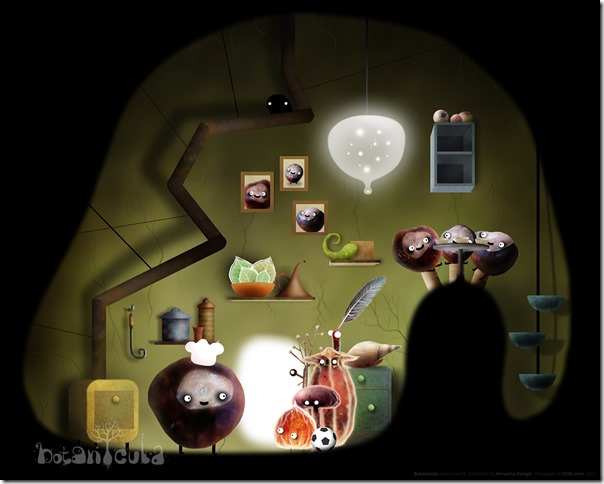
    The makers of Machinarium have come up with a new game: Botanicula. I have a fondness for Adventure Games, and I quite liked Machinarium, although all the point-and-clicking did get a bit tedious at times.

    With Botanicula, although it’s also a point-and-click game, it never got tedious. That’s probably because of the strength of the story, the game’s charm and its inventiveness. Playing the game brought a smile to my face, as well as a couple of laugh out loud moments.

    The story is a quest of five unlikely heroes, and their attempt to plant a new tree.

    Botanicula artwork - Heroes

    They travel through fantastical landscapes and meet with over one hundred bizarre creatures.

    4_botanicula_1280x1024

    10_botanicula_1280x1024

    Highly recommended.

  • Designing an Online Ordering System

    …or: how not to do it.

    If you’ve ever worked in computing, as I have, then this story should cause chills to run up your spine. If it doesn’t, then, trust me, you’re in the wrong job.

  • Garden Visitor

    We had a visitor at the bird feeder yesterday. It was a female Great Spotted Woodpecker (Dendrocopus major) making the most of the last remaining scraps of food. While we often see (or hear) a pair of Green Woodpeckers in the garden, the Great Spotted variety mostly stick to the woods nearby.

    20120503-1654-03(001)

    20120503-1654-29(002)

  • Through The Valley Of The Nest Of Spiders

    That’s the title of the latest book by Samuel R. Delany.

    Judging by this review, it is a book that, like The Mad Man, simultaneously repels and attracts.

    Delany writes like an angel even when he’s describing the depths of hell, and he makes it sound like paradise.

    Um, I think I’ll add this to the library and open it when I feel strong enough.