Reflections on life at “De Witte Wand”…

Year: 2012

  • A Talent To Watch…

    He’s a young man called Cosmo Jarvis, a singer-songwriter. I came across the video of his song “Gay Pirates”, and thought it was pretty good…

    And then I found a much darker song: “Sure As Hell Not Jesus

    Jarvis directed these videos as well. The boy’s got talent…

  • “Features Have Changed”

    Oh gawd, here’s yet another example of Microsoft opening its mouth in order to change feet.

    We happy band of Windows Phone owners (a select few, I grant you) have had a number of ways to purchase Apps for our phone. We can browse the Apps Marketplace via our phones, via a web browser, or via the Zune software running on a PC. I say “had”, because as of yesterday, Microsoft has pulled the ability to browse the Apps Marketplace from the Zune software.

    Microsoft announced the change (on the same day as they implemented it) on their Windows Phone Blog. According to them, they’ve done it because their telemetry data tells them that only a minority of Windows Phone owners use the Zune software to browse the Apps Marketplace. That’s as maybe, but Microsoft could really have done a far better job of communicating the change than merely announcing it on a blog, which is probably read by a tiny minority of Windows Phone owners.

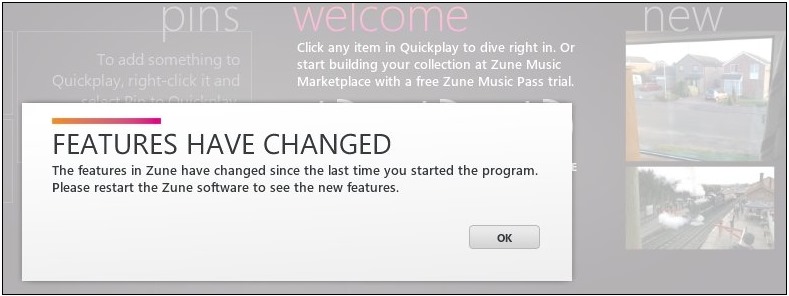
    Let’s imagine, for a moment, that you are one of the people (like me) who uses the Zune software to browse the Apps Marketplace. When you started up Zune on your PC yesterday, this is what you would have seen:

    Zune 5

    No information whatsoever about what the “new features” are, and you might be forgiven for thinking that the “new features” are something that has been added, when in fact something has been removed.

    You might think that it would have been far better to have had an explicit message communicating the fact that the ability to browse the Apps Marketplace has been removed, and to have had a link to the Apps Marketplace on the web, as well as saying that owners can also use their phones directly to browse.

    A number of people (myself included) have commented on the blog post to the effect that the communication of this change could have been handled far better. I see that the author of the post (Mahzar Mohammed) has responded in the comments, but he is still prattling on about the necessity to make the engineering changes. He doesn’t acknowledge (or perhaps didn’t even realise) that the bland “Features have changed” message in the Zune software was a terrible way to communicate the changes to users.

  • Left Hand, Meet Right Hand…

    Sigh, this is yet another rant about Microsoft…

    You may recall that I am concerned about the limitation in Microsoft’s Zune/Xbox Live/Windows Phone service account whereby you can’t change your country of residence if you move. You also can’t delete your Zune/Xbox Live/Windows Phone account without first deleting your linked Windows Live ID.

    I don’t want to delete my Windows Live ID (which I’ve had for more than 10 years), but I’d be perfectly happy to delete my Zune/Xbox Live/Windows Phone service account in order to start afresh with a new one.

    I’m not the only one so concerned, and there’s also an online petition about the issue.

    Last month, I wrote to Microsoft about this issue, asking that they give consideration to introducing the ability for consumers to delete a service account themselves, without also first having to delete the Windows Live ID linked to that account.

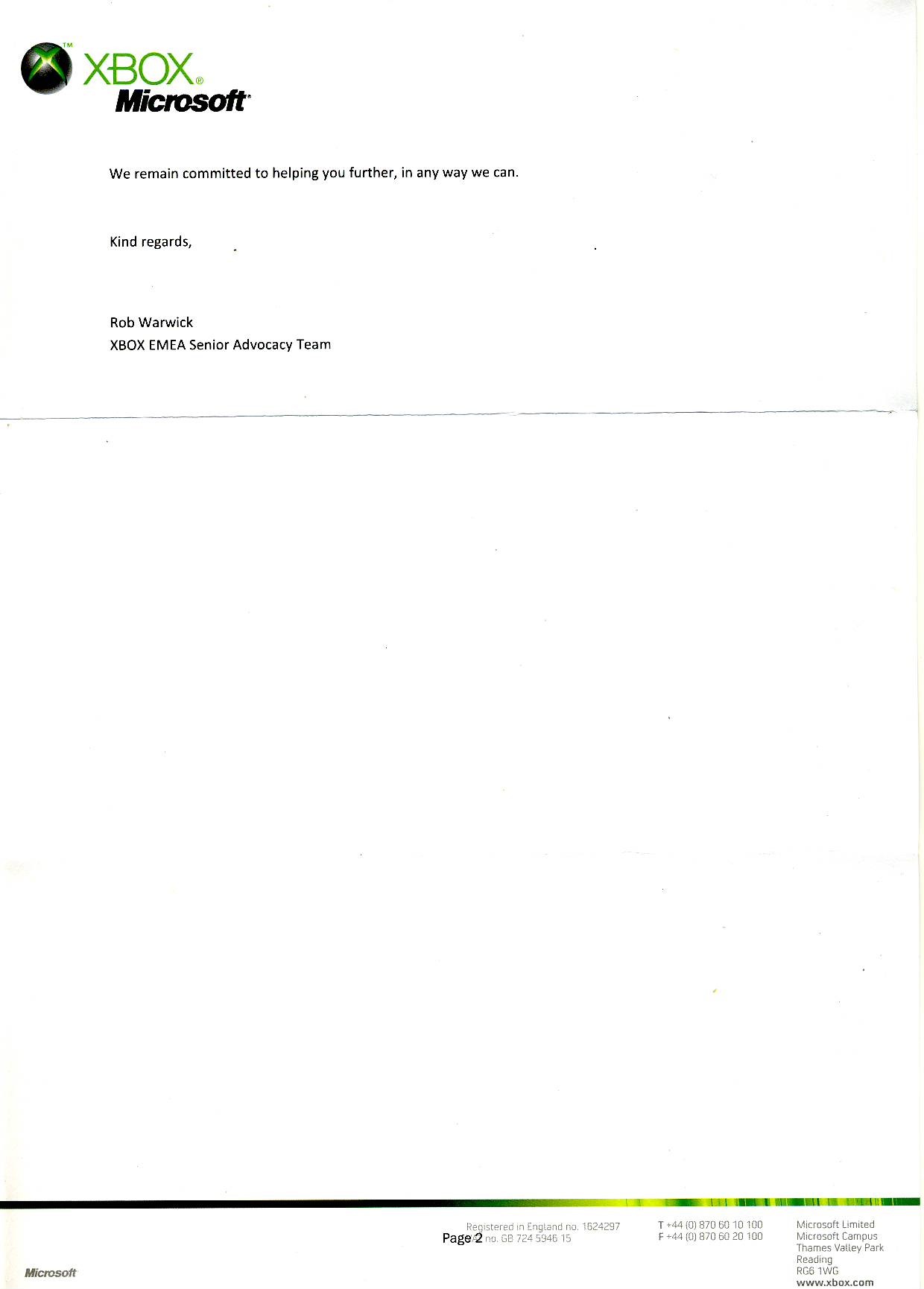
    Today, I got a reply from Rob Warwick, XBOX EMEA Senior Advocacy Team. It’s reproduced below (click for full size versions):

    Microsoft Reply scan

    Microsoft Reply scan0001

    I draw your attention to the bit where he says:

    …despite the fact a Windows Live ID needs to be linked to both these accounts, you can cancel either/or both Xbox Live and Zune without deleting the linked Windows Live ID.

    There will be a reply in the post to Mr. Warwick tomorrow. In part, it says:

    I am afraid that either you, or Microsoft’s Zune/Xbox Live Customer Support Teams, are very mistaken in this matter.

    I have tried, on two separate occasions, via online chats with Zune/Xbox Live Customer Support to get my Zune/Xbox Live service account deleted without deleting the linked Windows Live ID. On both occasions, the Microsoft representative flatly informed me that this was impossible, and that my Windows Live ID would have to be deleted first. Only then would the linked Zune/Xbox Live account be deleted.

    Their advice was to create a second Windows Live ID, and then create a new Zune/Xbox Live service account. This is also the answer that is frequently given in the online Microsoft Answers forums.

    Nowhere has it ever been stated that it is possible to cancel either/or both Xbox Live and Zune without deleting the linked Windows Live ID as you claim. In addition, Microsoft’s online self-help account management does not currently offer this option.

    Therefore, with regret, I state that your answer has completely failed to clarify the state of my accounts and the options open to me. I look forward to your further help in resolving this matter.

    Yours sincerely,

    Geoff Coupe

    Left hand, meet right hand…

  • Meet The Romans With Mary Beard

    May I just say, what an absolute pleasure it was to be in the company of Professor Mary Beard last night when she introduced us to a variety of long-dead Romans.

    This was TV in the very best tradition of the BBC: to educate, inform and entertain.

    I’m pleased to see that I was not the only one so impressed.

    Roll on next week when we get to see Professor Beard enthusiastically declaiming about the social impact of the Roman latrines…

  • Another Facepalm Moment

    Sigh. Microsoft has announced the versions of Windows 8 that will be available later this year, and I am once again shaking my head trying to understand what on earth they were thinking about when they came up with the scheme.

    Let me explain.

    At the moment, there’s a component that ships as standard in most versions of Windows 7: Windows Media Center. Most people don’t even know it’s there, which is a pity, because it’s a pretty good piece of software for turning your PC into a combined Entertainment Center for TV, movies, music and photos, and also provides DVR functionality for record and playback of TV. I’ve used it to set up our HTPC, which uses our TV to display our digital media (movies, music and photos).

    For the upcoming versions of Windows 8, Microsoft has done two things:

    1. Removed Windows Media Center from being a standard component shipped with Windows, to being an Add-on component (the “Media Pack”) that will be charged for separately.
    2. Prevented the Media Pack Add-on from being available to the consumer version of Windows 8, but only making it available for Windows 8 Pro.

    Now, I can understand Microsoft’s rationale behind (1). There are third party licensing costs involved (e.g. Dolby Digital codecs) in Windows Media Center, and by spinning the Media Pack off to be a separately charged item means that Microsoft can reduce the cost of Windows 8 slightly.

    But I really fail to understand why Microsoft are forcing those of us who are interested in buying the Media Pack to upgrade to Windows 8 Pro, instead of being able to continue with the consumer version of Windows 8. After all, Windows Media Center runs on Windows 7 Home Premium (the consumer product) today. It does not require Windows 7 Professional. Looking at the price differentials of Windows 7 Home Premium and Windows 7 Professional upgrades for XP and Vista today, I suspect I will have to pay almost twice as much for Windows 8 Pro as I would for Windows 8.

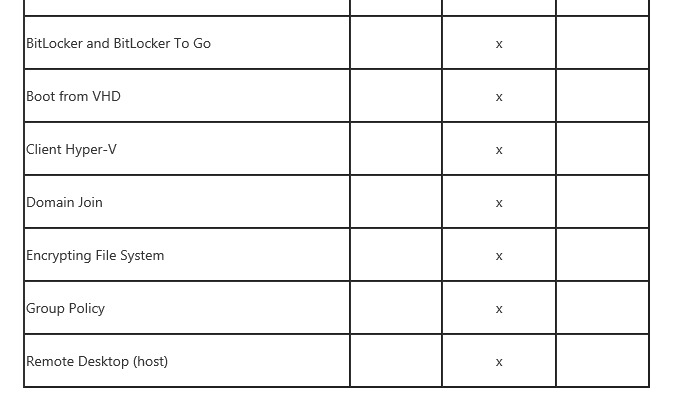
    The seven additional features of Windows 8 Pro are of absolutely zero interest to me, and have no bearing (as far as I can see) on the running of the Media Pack. Yet I, and others like me, who would consider upgrading to the Windows 8 version of Windows Media Center are faced with double costs: first upgrade from Windows 7 Home Premium to Windows 8 Pro, and then acquire the Media Pack.

    I think I’ll be seriously considering the zero-cost option of sticking with Windows Media Center running on Windows 7 Home Premium for as long as I possibly can, and I don’t think that I’ll be the only one.

    It seems to me that Microsoft has killed the potential market for the Media Pack with this move. That may, of course, have been their real objective in coming up with this scheme.

    Update 4 May 2012

    Oh dearie me. Microsoft has issued another post to clarify the situation. Except it seems to me to have changed absolutely nothing.

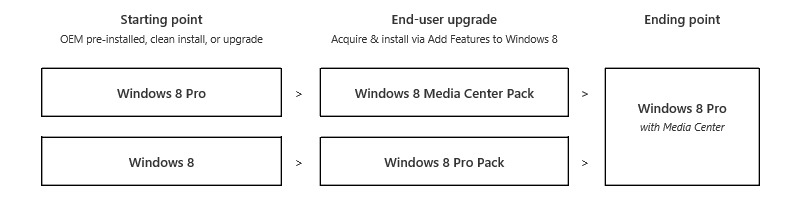
    The post contains a diagram showing the possible upgrade paths to a version of Windows 8 that will contain Windows Media Center:

    W8CP 07

    So, let me understand this. Let’s look at the starting points; you have a choice between plain old Windows 8 or Windows 8 Pro. The difference between these two features was defined in Microsoft’s original announcement of the Windows 8 versions. Here’s a part of the Features Table from that post showing the seven additional features that are included in Windows 8 Pro:

    W8CP 08

    The difference in cost between the two versions is likely to be in the region of $100, judging by the price differential between Windows 7 Home Premium and Windows 7 Professional.

    Now, looking at the diagram of the upgrade paths again, it is clear that, just as the original announcement stated, it will not be possible to simply add Windows Media Center to Windows 8 via an add-on pack that just contains WMC. Oh no, you have to buy an add-on pack that contains WMC and the additional features of Windows 8 Pro. So I would still end up buying Windows 8 Pro features that I don’t want or need (at a likely $100 cost) along with a cost for the WMC component.

    To add insult to injury, it appears that the version of WMC that will be available for Windows 8 is essentially the same old version as the one that we currently get for free in Windows 7.

    I think that seals the deal for me: I’m sticking with my Windows 7 Home Premium (with its free WMC) as the operating system on my HTPC. I see no point in paying $100+ for a version of Windows 8 that gives me no advantages whatsoever.

    Update 11 May 2012

    I see that Microsoft has now closed the comments on both of their posts on the Building Windows 8 blog on this issue. Too many negative reactions, I suppose, and who can blame us?

    Paul Thurrott has also now weighed in with a column in which he also vents about Microsoft’s media direction.

    The thing is: Microsoft had something in WMC that was ahead of the curve, and they have dropped the ball. Their vision has failed – probably the original team got disbanded, and their executive sponsorship vanished. Much the same thing has happened with Windows Home Server.

    It’s also true that streaming of content is on the rise; but there will always be a minority of users for whom streaming will never be the answer. I’m in the countryside, at the end of a piece of wet string – I depend on optical media for high quality content. I also depend on optical media for content that is otherwise not legally available in my market.

    It’s all very well for Microsoft to say that I can get my DVD codecs from third parties, if I’m not prepared to pay top whack for Windows 8 Pro, with its features that I don’t want. But quite honestly, the sort of bloatware that third parties provide is something that I don’t want to be forced to accept.

    We seem to be heading back to the old days, when we had to buy something like Nero in order to be able to burn a CD in Windows. Over the years, Nero ballooned into a software suite that was truly appalling. It was a relief to be able to dump it, and just use the features built-into newer versions of Windows to handle my optical media.

    Now, with Windows 8, Microsoft seem to be turning the clock back to the bad old days. The bean-counters are in charge. The people with vision have left the company.

    Update 7 June 2012

    Microsoft has quietly removed two features from the version of Windows Media Center for Windows 8. These features are required for dedicated HTPCs. See this post at The Digital Media site for details. Two more reasons not to upgrade my HTPC, it would seem.

    Update 3 July 2012

    Well now, Microsoft has just thrown a curve ball. They’ve announced that the upgrade price from Windows 7 to Windows 8 Pro (note: the Pro version!) will be $39.99 up until 31 January 2013. That is a very attractive price, I have to say. It also includes a free upgrade to Windows Media Center. Now at that price, while I will certainly upgrade our other PCs with Windows 8 Pro, it is also going to make me think hard about whether I should not just take the plunge and upgrade our HTPC as well.

    I find it interesting that the upgrade is for the Pro version of Windows 8, rather than simply the base Windows 8 version. Perhaps Microsoft has been stung by all the negative reactions from the technical press and blogs about Windows 8 and is making a gamble here to regain lost ground. Whatever the reason, I find it an attractive offer.

  • Persecution?– I Think Not

    I see that Lord Carey, former Archbishop of Canterbury, is claiming that Christians are being persecuted in the UK.

    What I see is that UK society is waking up to the fact that historical privilege accorded to religion to practise its bigotry and condemnation of others is being questioned.

    Quite right too.

    Humanity is better than you, Lord Carey. Get over it.

    Oh, and I see that Shuggy has a few relevant examples over at his blog concerning Christian persecution. And I simply can’t resist mentioning Urban Grandier as an example of Christian persecution.

    Motes and beams, George?

  • Don Norman on Windows 8

    Don Norman is a well-respected consultant and author working in the field of product design and ergonomics. His classic “The Psychology of Everyday Things” (1988) – in his own words: part polemic, part science. Part serious, part fun – contains a critique of design and design principles that are still relevant today. And his later book “Turn Signals Are the Facial Expressions of Automobiles” (1992) carries that forward, with one chapter – the Teddy – being especially thought-provoking and prescient over how we seem to be developing a symbiotic/dependence relationship with our Smartphones.

    So I was interested to read what Norman thinks about Windows 8. As I’ve written before, an awful lot of people seem to think it is a disaster (I’m not one of them). And it appears, like me, Donald Norman is a fan of Windows 8:

    Windows 8 is brilliant, and its principles have been extended to phones, tablets, laptops, and desktop machines (and larger – for example, Surface), whether operated by gesture, mouse and keyboard, or stylus, but with appropriately changed interaction styles for the different sizes of devices and different input devices.

    Of course, being the thorough observer that he is, he references some of the negative reviews of Windows 8 in his piece:

    Here is a critical review by Troy Wolverton of Silicon Valley.com who used Windows 8 for awhile.  Nice dress, he says, but crappy fit. Multitasking is difficult or not even possible beyond two metro apps. Most work still requires the old (Windows 7) desktop, and switching between Metro and desktop is difficult. And he gives a simple example of quitting a Metro application that should send shivers down all of our backs

    Perhaps, but I notice that Wolverton doesn’t exactly play fair. His example is not correctly reported. What he says is:

    Take a simple example: closing programs. Since Windows 95, users have typically just clicked on the “x” in the upper right hand corner of the program’s window to close it. For those who prefer to use the menu bar, you can usually click on “File” and then “Exit.”

    But with Metro-style apps, you won’t find a close-program “x.” You won’t even find a menu bar. Instead, to close a program you have to move your pointer to the top edge of the screen, click and hold until the app screen becomes a thumbnail and then drag that thumbnail image to the bottom of the screen. And you have to do all this without any clues: there’s nothing to “grab” at the top edge of the screen and the interface gives you no indication of what you should do with the thumbnail once you’ve grabbed it.

    That’s merely one of many commands that are not only different but also hidden by the Metro interface.

    Er, no, Mr Wolverton – you don’t need to “click and hold until the app screen becomes a thumbnail” – merely moving to the top of the screen turns the cursor into a thumbnail. At that point, there are two options open to the user. You can click and drag the cursor to the bottom of the screen to close the App; or you can click and drag it to the left or the right border of the screen to split the screen for multi-app working.

    It’s true that the options are not spelled out. But on the other hand, neither are much of the workings of the current version of Windows. People learn about them over time. And, yes, some people never learn, despite good design. But let’s not throw the baby out with the bathwater. Windows 8 is a radical rethinking. It has excellent design principles and it deserves a chance. What it does not deserve is lazy condemnation by people who don’t approach it with an open mind. 

  • The European LGBT Survey

    I noticed on the web site of the European Parliament’s Intergroup on LGBT Rights an item about the fact that members of the European Parliament have welcomed a new survey into the lives of lesbian, gay, bisexual and transgender people in the European Union and Croatia.

    The survey asks a range of questions about LGBT people’s experiences including:

    • Personal circumstances
    • Public perceptions and responses to homophobia and/or transphobia
    • Discrimination
    • Rights awareness
    • Safe environment
    • Violence and harassment
    • The social context of being an LGBT person

    The survey has been drawn up on behalf of the the European Union Agency for Fundamental Rights (FRA) in order to gather data in support of equal treatment legislation and policy making.

    I’ve just filled in my response. If you are an LGBT person living in the EU (or Croatia), I urge you to do the same.

  • Blogging Logging

    Near where we live is an area known as the Zwarte Veen (the Black Bog). The bog has long since been drained and is now farmland. We often walk the dogs along a track running through the area. The track has had trees planted on either side, and these are now mature.

    20120407-1054-55

    The owners of the trees have started logging at the end of the avenue. Seeing them piled up by the side of the road brings home just how big the trees were.

    20120407-1053-44

  • The Newton Channel

    Today, the Guardian newspaper launched a promotion of the Newton Channel, a company that makes short films on science topics. Whilst the Newton Channel has been around for a while, this is the first time that I’ve come across it.

    I’m rather looking forward to browsing through their catalogue, which has such eminent science stars as Richard Dawkins, Brian Cox and Marcus du Sautoy dealing with a variety of scientific topics.

    I began with Marcus du Sautoy, whose exploration of the land of mathematics is always rewarding. And while this capsule on probability is good, I confess that I found the reference to Sally Clark rather superficial. Yes, du Sautoy pointed out the faulty statistics behind her conviction, but what was left unsaid was the human cost. Sally Clark is dead, almost certainly as a result of what she was put through. The cold equations have a human side that must not be forgotten.

  • Fun With Technology–Part VII

    Important Update 27th October 2012: The bug described below has been fixed in the final release of Windows 8.

    Hoorah!

    Update 24 October 2013: With the release of Windows 8.1, I found another issue with “Play to”. I posted it in a Microsoft forum, and got some useful feedback from Microsoft’s Gabe Frost. The issue is not resolved, but at least we now know what’s going on. See https://gcoupe.wordpress.com/2013/10/23/play-to-and-windows-8-1/

    Original Post

    Here we go again – one step forwards, two steps back… Something that was working under Windows 7 has stopped working in the Windows 8 Consumer Preview, and that is the “Play to” feature of Windows Media Player.

    Almost three years ago, I wrote a post (Fun With Technology – Part IV) describing my trials and tribulations with this feature of Windows Media Player in an early version of Windows 7. Sometimes it would seem to work, and sometimes it didn’t. I eventually found out, and described in that post, what was going on. I also identified how to get “Play to” working very satisfactorily for the devices on my home network. And there matters have rested until now, when I’ve found that Windows 8 Consumer Preview has broken things again.

    First, let me recapitulate some of the background terms and technology specification used by Microsoft in its implementation of “Play to” and how I’m using it at home. These come from the Digital Living Networking Alliance, or DLNA for short. Their specification defines how a variety of different types of digital devices can connect and share information. This I’ve summarised in the following table:

    Device Class What it does Examples
    Digital Media Server (DMS) Stores content and makes it available to networked digital media players (DMP) and digital media renderers (DMR). Some digital media servers can also help protect your content once stored. PCs and network attached storage (NAS) devices
    Digital Media Player (DMP)
    Finds content on digital media servers (DMS) and provides playback and rendering capabilities. TVs, stereos and home theaters, wireless monitors and game consoles
    Digital Media Renderer (DMR)
    These devices play content received from a digital media controller (DMC), which will find content from a digital media server (DMS). TVs, audio/video receivers, video displays and remote speakers for music.
    Digital Media Controller (DMC) These devices find content on digital media servers (DMS) and play it on digital media renderers (DMR). Internet tablets, Wi-Fi® enabled digital cameras and personal digital assistants (PDA).
    Digital Media Printer (DMPr) These devices provide printing services to the DLNA home network. Generally, digital media players (DMP) and digital media controllers (DMC) with print capability can print to DMPr. Networked photo printers and networked all-in-one printers.

    Table 1: Information drawn from the DLNA web site.

    Windows 7 implements a number of these classes as shown here:

    Device Class Windows Implementations
    Digital Media Server (DMS) When media streaming is enabled, Windows acts as a DMS.
    Digital Media Player (DMP)
    Windows Media Player and Windows Media Center act as a DMP when browsing shared media libraries
    Digital Media Renderer (DMR)
    Windows Media Player acts as a DMR when configured to allow remote control of the Player.
    Digital Media Controller (DMC) The “Play To” feature from Windows Media Player launches a DMC to control the media playback experience

    Table 2: Information drawn from the Engineering Windows 7 Blog.

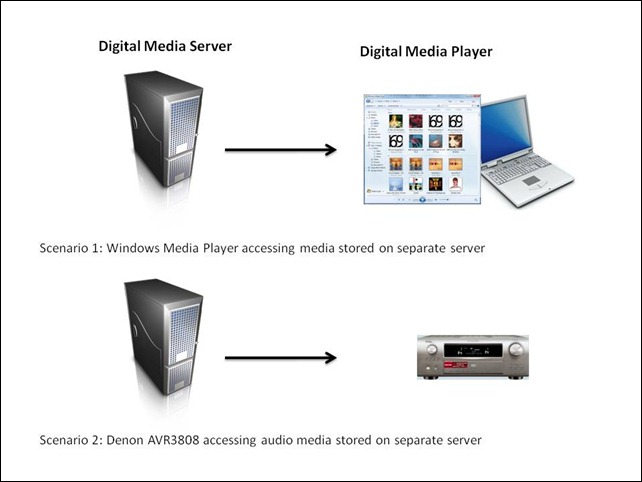
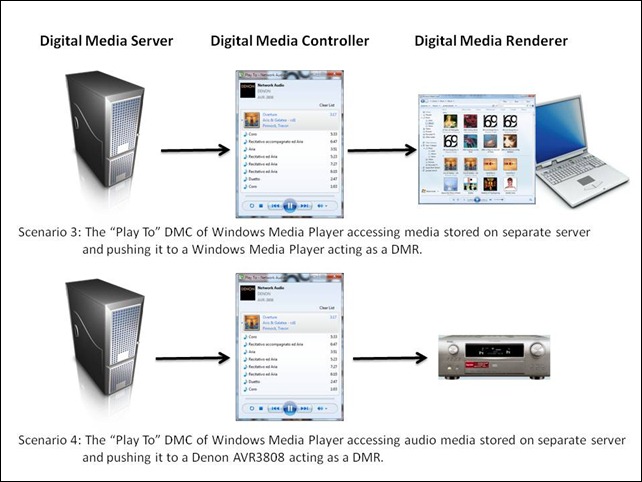
    At its simplest, just two devices can be involved: a Server and a Player. These can even be running on the same physical device, as in the case where your Windows Media Player on your Desktop PC is streaming music or video stored on the PC itself. The next step up is where the server and player are on separate physical devices. Two typical scenarios are shown in figure 1:

    WMP Scenarios
    Figure 1: Typical scenarios of simple case of DMP devices accessing DMS devices.

    I’ve used the Denon AVR3808 as an example, since this is what I have in my home network. My DMS is a headless (no monitor, keyboard or mouse) home-built PC running the Windows Home Server 2011 operating system.

    In my particular case, both the two scenarios shown above will work, that is, the DMS that is part of WHS 2011 will stream audio to other PCs in the home network, and to the Denon AVR3808. Under the covers, there’s actually some negotiation of streaming formats going on. This is because I have stored all my music files on the WHS 2011 in Windows Media Audio Lossless (WMAL) format. This presents no problems for the PCs, since the Windows Media Players installed on them can handle WMAL. But while the Denon can handle standard Windows Media Audio, it can’t handle the Lossless variant. So when I use the Denon to browse my music library on the server and select a track to play, the DMS in WHS 2011 sees that the Denon can’t handle WMAL and transcodes the stream into a format that the Denon can handle on the fly.

    The interesting scenarios are where there are three devices linked together: a Digital Media Server, a Digital Media Controller, and a Digital Media Renderer.

    WMP Scenarios 2
    Figure 2: Typical scenarios of a three device link (DMS-DMC-DMR).

    In my case, all flavours of scenario 3 will work. That is, I can stream from my Windows Home Server using the “Play To” feature of Windows Media Player running in either Windows 7 or Windows 8 Consumer Preview, and push the stream to PCs that are running Windows 7 or the Windows 8 Consumer Preview.

    But while scenario 4 works if “Play to” is running in Windows 7, it does not work if “Play to” is running in Windows 8 Consumer Preview.

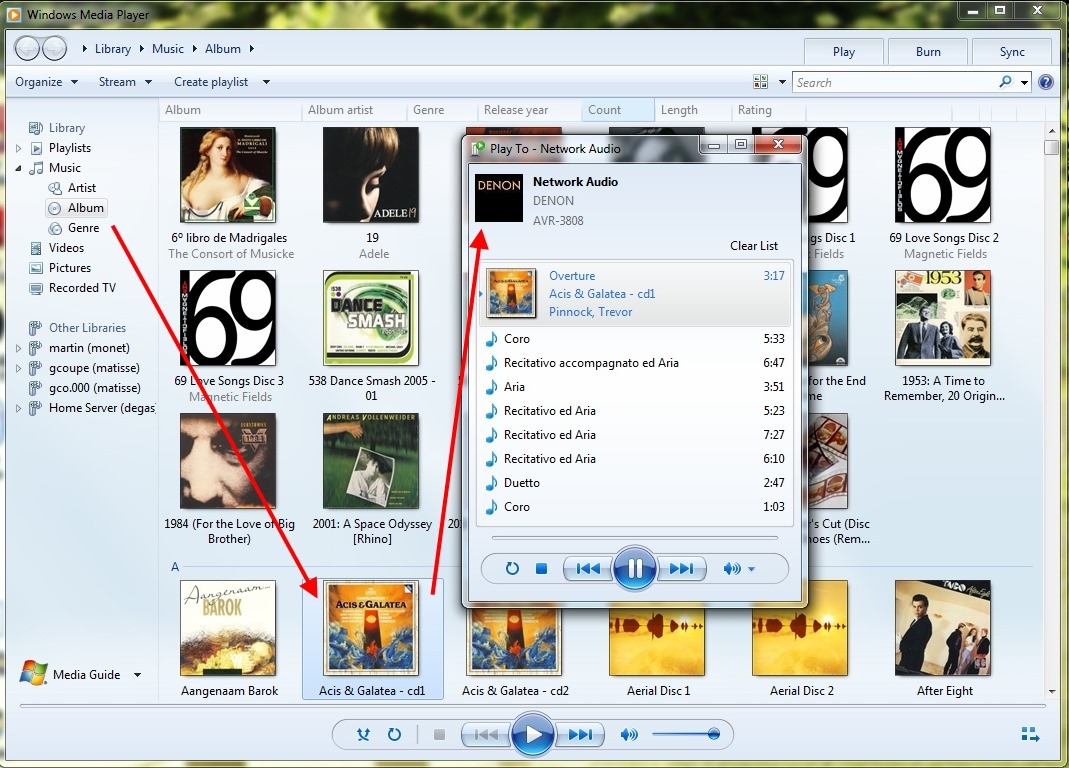
    Here’s a screenshot of the “Play to” of Windows Media Player running in Windows 7, and streaming a WMA Lossless file to my Denon:

    WMP 12 12

    The WMA Lossless file is held on the WHS 2011 system, and is being transcoded into a different format on the fly so that the Denon can play it. I’m not sure whether the transcoding is being done on the Windows 7 PC (where the Windows Media Player is running), or whether it is being done at source on the WHS 2011 system. Either way, the Denon is being fed with a stream in a format that it understands, so it plays it without problem.

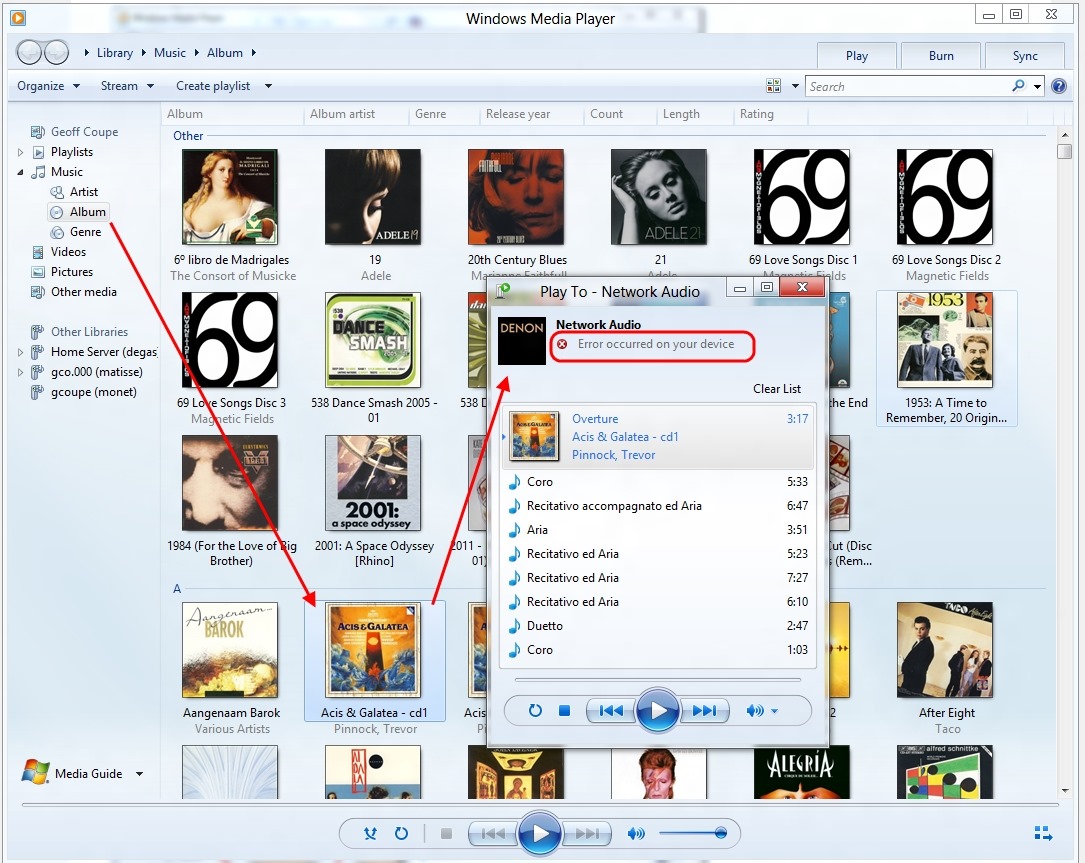
    Now look at the following screenshot. It’s the very same music file that has been chosen from the Music Library held on the WHS 2011 system, but this time the “Play to” and the Windows Media Player are running on Windows 8 Consumer Preview:

    WMP 12 11

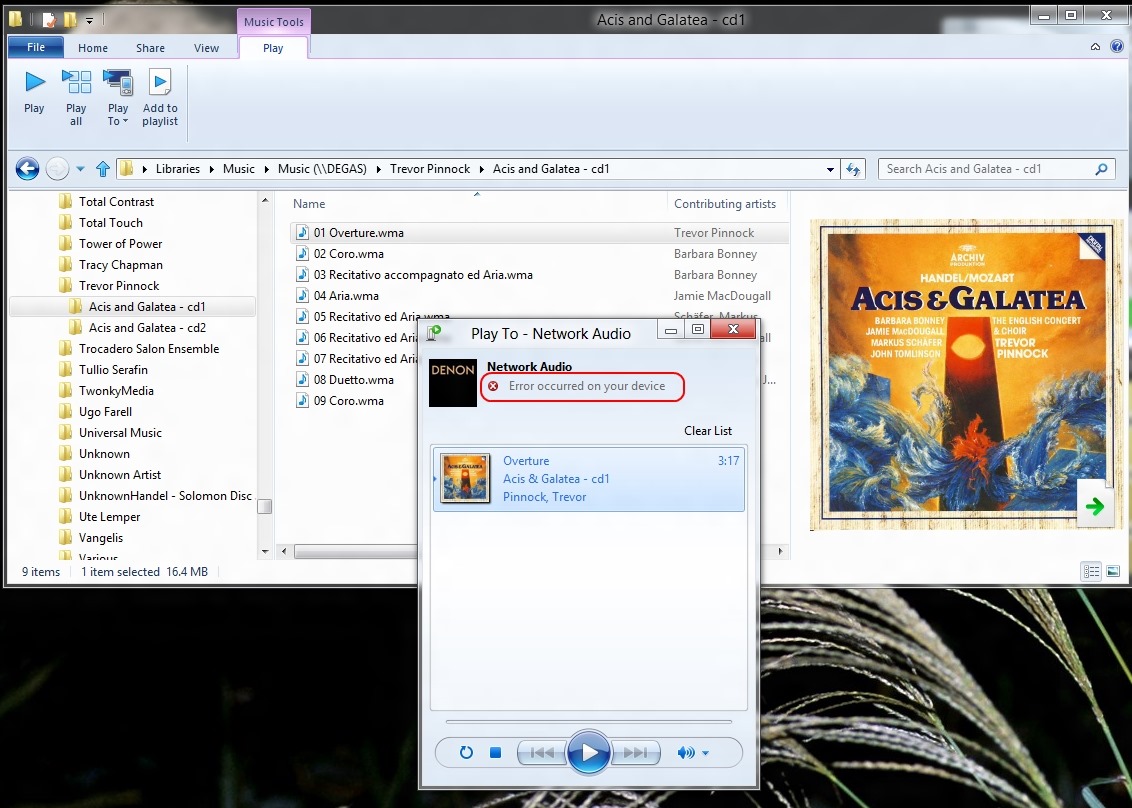
    As you can see, the Denon is reporting an error – it can’t play the file. I’m pretty sure that this is because no transcoding is being done – the WMA Lossless file is being sent straight to the Denon.

    In Windows 8, the Windows Explorer also has the “Play to” feature, and the same error occurs:

    WMP 12 13

    So, to sum up; something has been broken in the “Play to” feature in Windows 8 Consumer Preview. Hopefully it will get fixed before Windows 8 is released

  • The Devils

    Hurrah! The British Film Institute has just released the complete UK ‘X’-rated version of Ken Russell’s The Devils on DVD. It’s in its original aspect ratio of 2:35:1 and looks absolutely stunning. Derek Jarman’s sets are seen to the best effect, and the cast give all they’ve got to Ken’s extraordinary vision.

    It’s forty years since the film was first released, and Russell had problems with both the studio (Warner Brothers) and the censors. For years, the only version that was available was a cut version of questionable technical quality in the wrong aspect ratio.

    In retrospect, it’s hardly surprising that Russell had to fight to get his vision realised. Even after forty years, the mixture of religion, politics, sex (both sacred and profane) and violence is a heady brew, with more than a whiff of brimstone about it. As my favourite film critic, Mark Kermode, says, it is:

    Russell’s greatest work. A fearsome, breathtaking masterpiece.

    Despite the extravagance of Russell’s vision, the core facts of the story are historically true. His screenplay is based on Aldous Huxley’s The Devils of Loudun, which documents the events of the time, and includes letters written by the protagonists. Wikipedia sums it up thus:

    Urbain Grandier was a priest burned at the stake at Loudun, France on August 18, 1634. He was accused of seducing an entire convent of Ursuline nuns and of being in league with the devil. Grandier was probably too promiscuous and too insolent to his peers. He had antagonised the Mother Superior, Sister Jeanne of the Angels, when he rejected her offer to become the spiritual advisor to the convent. He faced an ecclesiastical tribunal and was acquitted.

    It was only after he had publicly spoken against Cardinal Richelieu that a new trial was ordered by the Cardinal. He was tortured, found guilty and executed by being burnt alive but never admitted guilt.

    I must get a copy of the book for myself.

    I watched the DVD last night and what struck me was how little things change, the same religious and political struggles are still with us, as are those who are prepared to use them for their own ends.

  • People Don’t Like Change

    It’s been a month now since I, like probably over one million others, downloaded and installed Microsoft’s Windows 8 Consumer Preview. As I wrote at the time, people seemed to either love it or hate it.

    The haters seem to hold that opinion because the user interface of Windows 8 is so very different from all the previous versions of Windows from Windows 95 onwards.

    I think it’s worth remembering that when Windows 95 was introduced, its user interface was radically different from previous versions of Windows, and there was a similar outcry from people who hated the new interface. Over time, people accepted the change, and now, once again, it seems that many cannot conceive of Windows in any way other than what they are used to.

    As for me, after a month of using Windows 8, I am very relaxed about the new user interface. It doesn’t bother me, and I seem to be accomplishing my tasks equally well, albeit in a different way. It is still the fact that, at the moment, I rarely use any of the new Metro applications (except to play the occasional game), but that’s simply because their functionality is not yet on a par with their traditional Desktop equivalents. The only Metro App I have permanently displayed alongside my desktop (using the tile function of Windows 8) is the Calendar App:

    W8CP 06

    On the whole, I like what Microsoft has done to reimagine Windows. The past is another country, they do things differently there. I don’t want to live in the past, I want to look forward to the future.

  • It’s the Daffodils Turn

    Following on from my post about the field of crocuses, it’s now the turn of the daffodils to have their day in the sun…

    20120324-1018-10

    20120324-1051-43

  • Spambots and Sofas

    Jon Ronson always seems to turn up some interesting aspects of society. Sometimes however, it seems as though he’s turned over a stone and found something particularly unpleasant underneath.

    For example, I found it very difficult to watch the three specimens sitting on this sofa. The one in the middle, in particular, strikes me as someone I would find it very difficult to warm to under any circumstance. His name is Dan O’Hara, lecturer in literature at the University of Cologne. His rationale for doing what he did to Jon Ronson (when he finally reveals it at the end of the video) seemed to me to be thin, unconvincing, and insincere.

  • Chroma

    I’m not always a fan of modern ballet, but I have to say that I found this performance of Wayne McGregor’s Chroma by the Royal Ballet absolutely stunning.

  • Testimony

    Yes, it’s pulling at the heartstrings, it’s trying to be Stephen Sondheim (but it’s Stephen Schwartz).

    Nevertheless.

    It speaks to me. Maybe, as Noel Coward once said: never underestimate the potency of cheap music – but still.

    This has power. It speaks to me. It speaks to what I went through growing up. It speaks to what I have achieved.

    Hang on in there. It gets more than better.

  • Lightroom 4 – A Mixed Blessing?

    Adobe has just released the latest version of their Swiss Army knife for digital photography: Lightroom 4.

    Since there’s a free trial available (which lasts for 30 days), I thought I’d download it and give it a go.

    Lightroom is a Digital Asset Management (DAM) tool for digital photographs. That is to say, it covers all aspects of dealing with digital photos, such as acquisition of the photos from the camera, selecting the ones to keep, editing for the final versions, organisation of photo collections, and publishing.

    At the moment, I use IDimager as my DAM tool, so I was interested to see how this latest version of Lightroom would compare. In some respects, the two tools are fairly similar, but there are also some substantial differences. (Note: IDimager is no longer available. Its successor is Photo Supreme, which I am now using)

    One area that I found to be similar is the acquisition process – getting your photos off a camera’s memory card and into your PC environment. Both products allow flexible renaming of your files, and applying metadata templates to the resulting files as part of the acquisition process. So far, so good.

    Once the files are in the tools’ workspaces then the main work of selecting the photos you want to keep and adding metadata to help organise the collection can begin in earnest. Again, both Lightroom and IDimager have similar features. For example, you can rapidly compare photos side-by-side in a virtual “light table” to aid in selection of those images that you want to keep.

    However, I quickly ran into a couple of issues with Lightroom’s handling of photo metadata that, for me, are quite serious.

    First, some background. Both Lightroom and IDimager use the concept of a Catalogue to hold a list of keywords that are used to organise your photo collection (or collections). While this list of keywords can be just a simple list, both products support, and encourage, the use of a keyword hierarchy for ease of use and flexibility.

    As I described a while back, the keyword hierarchy I use has been built up from a number of sources:

    I’ve ended up with a structure that has the following items at the top level of the hierarchy:

    • Activities
    • Events
    • Nature
    • Objects
    • People
    • Places
    • Science
    • Styles

    Each of these splits down into further categories as necessary as you go down the levels. For example, Activities splits into

    • Disciplines
    • Hobbies
    • Physical and mental activities
    • Processes and techniques

    So then a photo of a tennis match would have the structured keyword string of Activities/physical and mental activities/games/sports/ball game/tennisassigned to it.

    You’ll notice that I’m using the “/” character to separate the various levels contained in a keyword. The choice of the separation character is arbitrary, some applications use the period (“.”) or the pipe (“|”) character , since there is no industry standard at the moment. A standard for handling keyword hierarchies in image metadata has been proposed (by the Metadata Working Group), but as far as I am aware, there is no product on the market that implements it as yet.

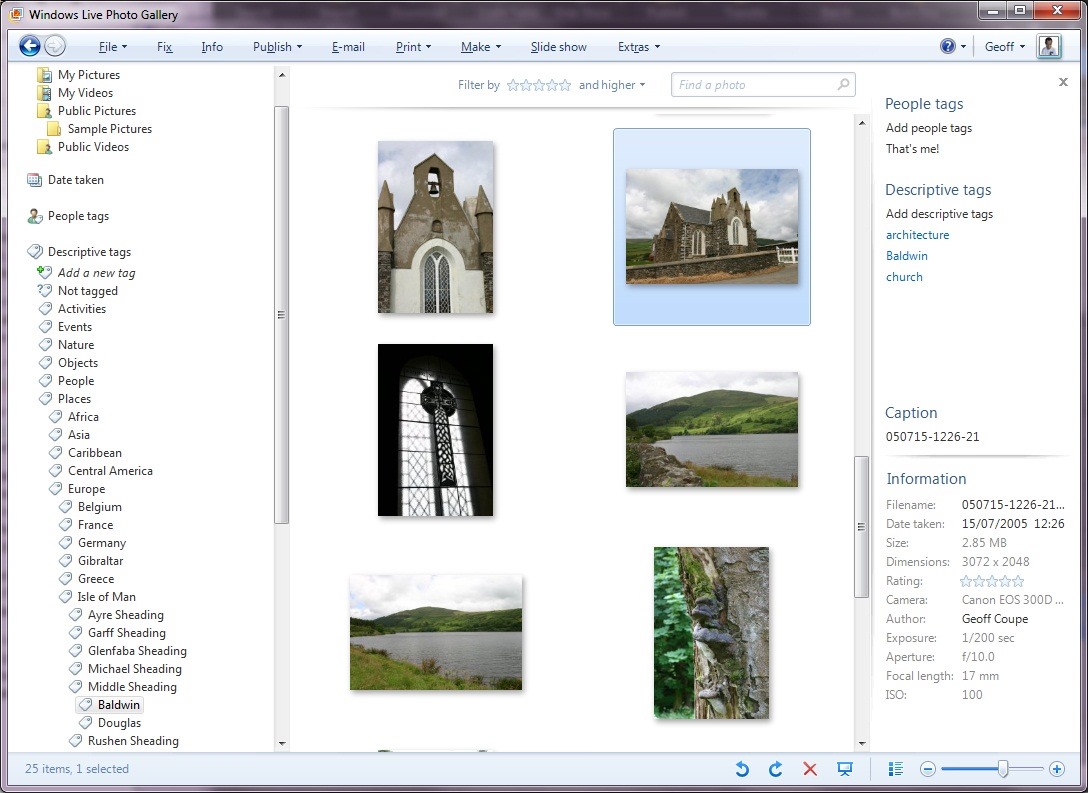
    I chose the “/” character because Microsoft’s Windows Live Photo Galleryuses it as the separator to structure the keyword hierarchy (Microsoft calls keywords “Tags” in Windows Live Photo Gallery).

    For example, here’s a screenshot of Windows Live Photo Gallery with a thumbnail photo of a church in the Isle of Man shown being selected (the light blue frame around the image).

    Church2

    You can see, on the right of the screenshot, that the photo has three keywords (tags) associated with it: architecture, Baldwin, church. These are actually all structured keywords stored in the photo’s metadata as:

    • Styles/design/architecture
    • Places/Europe/Isle of Man/Middle Sheading/Baldwin
    • Objects/built environment/buildings/ceremonial buildings/religious buildings/church

    You can see part of the “Places” hierarchy being shown on the left of the screenshot, with the “Baldwin” tag being highlighted.

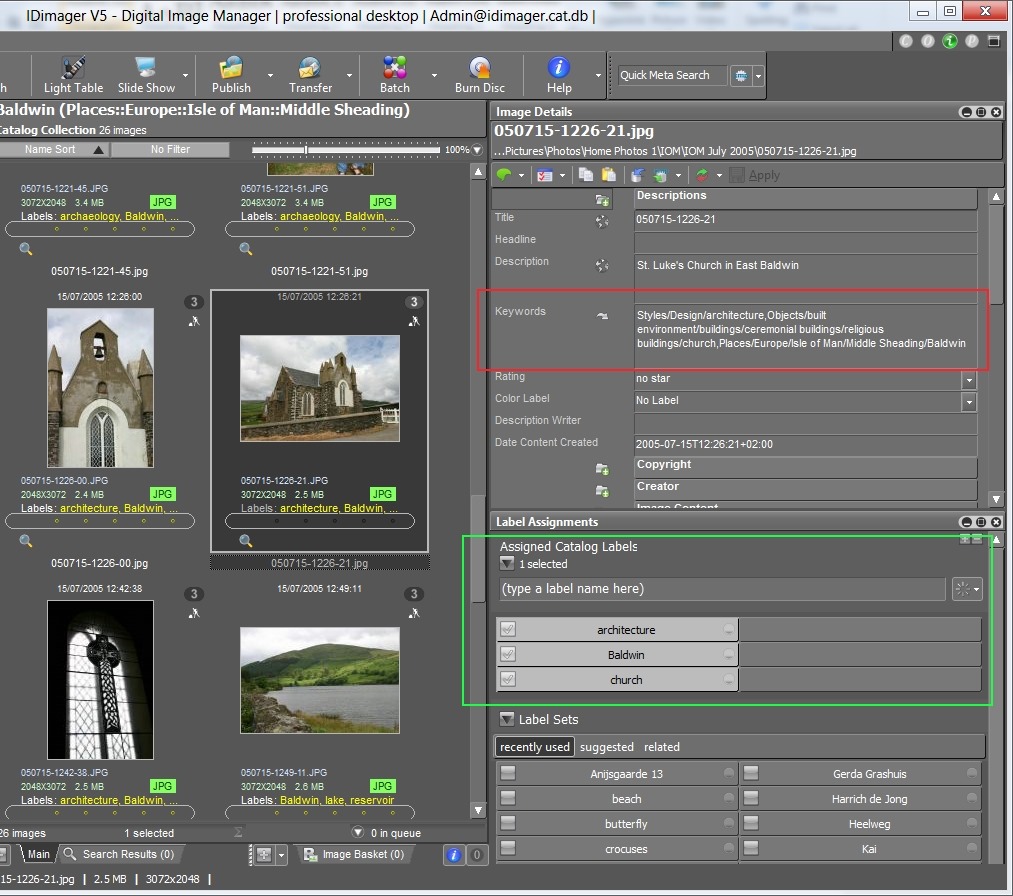
    Because Windows Live Photo Gallery is easy to use for other family members, I’ve adopted this method of implementing a keyword hierarchy, i.e. using the “/” separator, in my main DAM tool: IDimager. Here’s a screenshot of IDimager showing the same photo:

    Church1

    You can see on the left that IDimager uses the same keyword hierarchy. And on the right of the screenshot, you see the keyword strings that are being stored in the photo’s metadata.

    Now, the reason that both IDimager and Windows Live Photo Gallery have the same keyword hierarchy is that both tools are constructing it from the keywords stored in the photo metadata. And because they understand that the “/” is the separator character, they build up the same keyword structure on the fly as they read the photos in my collection. IDimager is the more flexible of the two applications, since you can define different separator characters if necessary. WLPG is fixed, and only understands the “/” character.

    So, what happens with Lightroom 4?

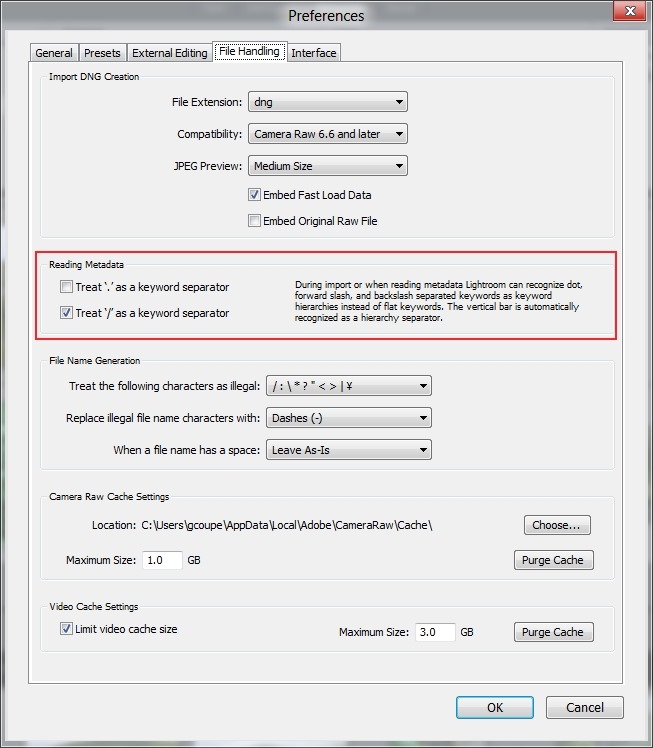
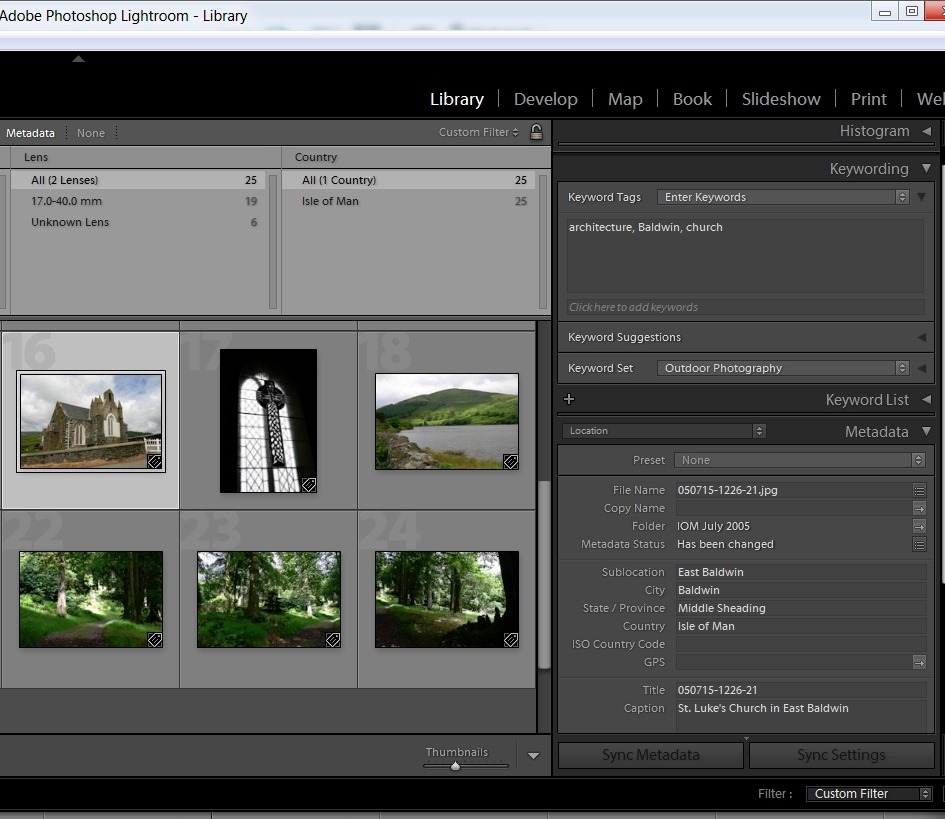
    Well, at first I thought everything was going to play nicely together. Just as with IDimager, Lightroom 4 has an option to choose the separator character that you want to use when reading the keywords in your photo metadata:

    LR4 002

    I’ve chosen “/” as the separator character – the same as for IDimager and WLPG.

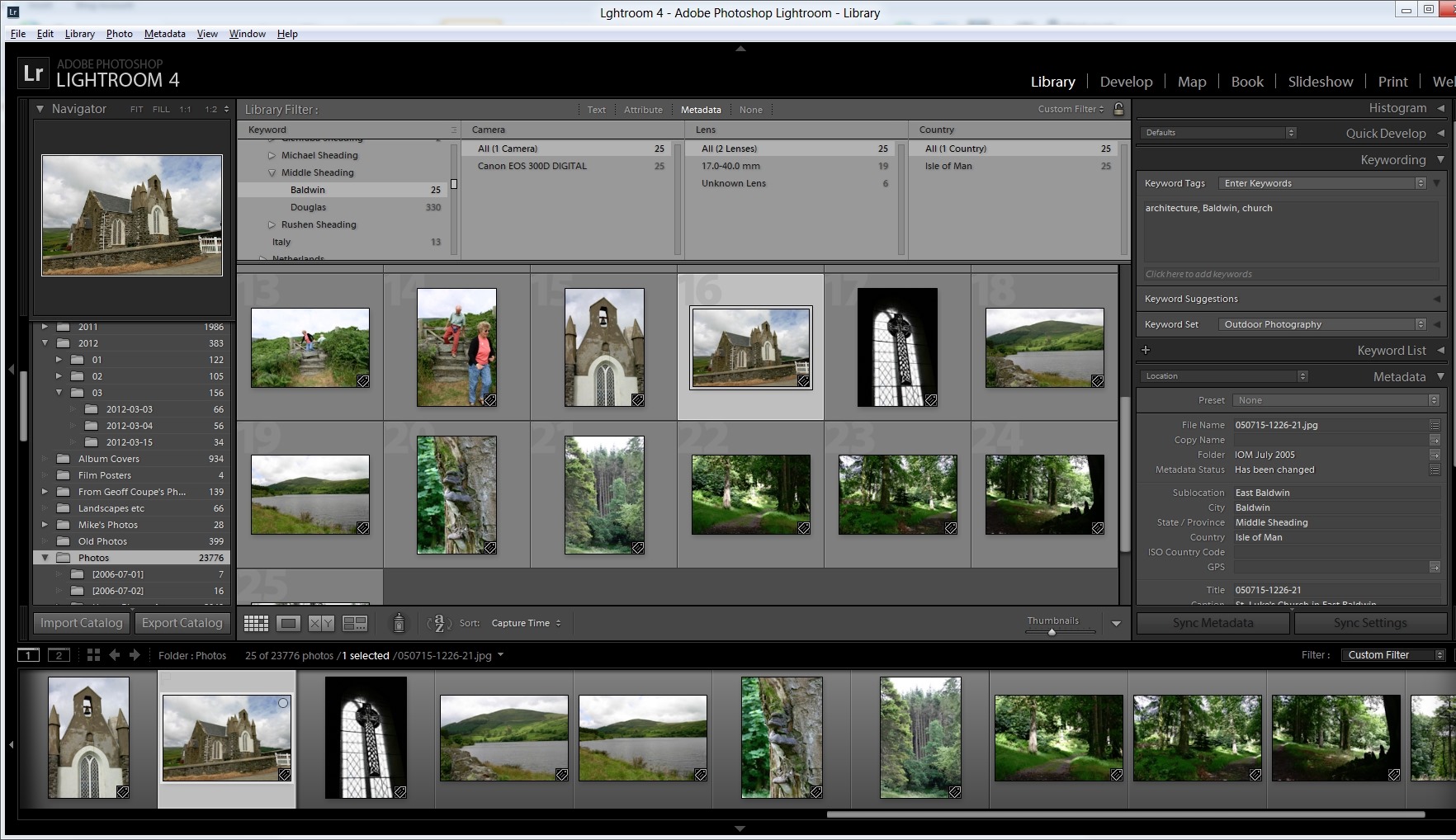
    Sure enough, when I imported my photo collection into Lightroom 4, the keyword hierarchy got reconstructed to match the ones in IDimager and WLPG (click on the screenshot to see it full-size in a new window):
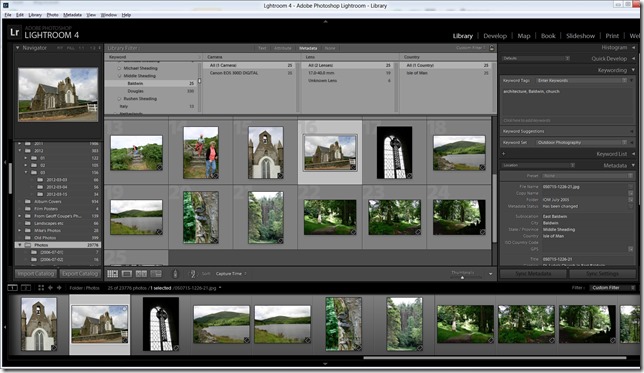
    Church3

    But then things started to go wrong.

    First, I discovered that although this process of recognising the separator works when importing photos into the Lightroom 4 Catalogue, it doesn’t work when reading metadata from individual photos – even though Lightroom claims it does (see the text in the “Preferences” screenshot above).

    I added the keyword “Christmas” to a photo using IDimager. This is a structured keyword, so the keyword string that was written to the photo’s metadata was actually: Events/holidays/Christmas. Lightroom 4 correctly saw that the photo had had its metadata altered, but when I used Lightroom to read in the photo metadata, instead of adding the photo to the “Christmas” keyword in the existing hierarchy in its Catalogue, it created a brand-new single-level keyword string: Events/holidays/Christmas – it did not treat the “/” character as a level separator.

    Now, this, I think is a simple bug, and has been reported as such. However, much to my dismay, I discovered I was not out of the woods yet.

    Up to now, I use IDimager to do all my keyword work. When a keyword in the IDimager Catalogue is assigned to a photo, IDimager will write out the structured keyword string into the photo, and WLPG will then pick up the change and modify its own Catalogue of tags automatically.

    As a test, let’s use that photo of the church in Baldwin in the Isle of Man. Here you can see the current keywords assigned to it: architecture, Baldwin, church, as seen in Lightroom 4.

    LR4 003

    Remember, these are all structured keywords with a hierarchy. Lightroom, like WLPG, is just showing the lowest level of each keyword. Using IDimager, I can look at both the actual photo metadata (showing the full keyword strings), highlighted in red, as well as the Catalogue keywords/labels, highlighted in green:

    Church4

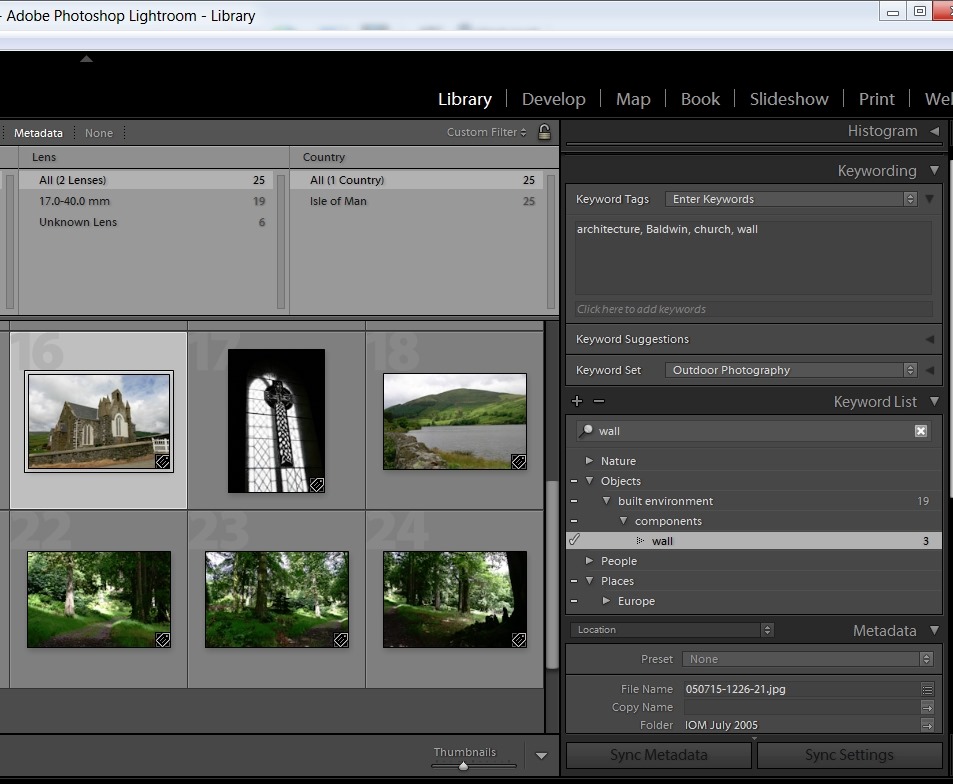
    Now, let’s use Lightroom 4 to add a keyword to the photo, and then get Lightroom 4 to write out the changed metadata into the photo. Here, I’ve added the keyword wall:
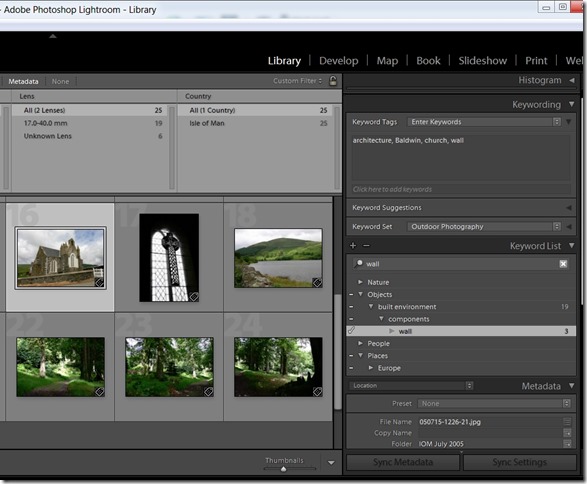
    LR4 004

    Looking at the photo in IDimager, what do I see:
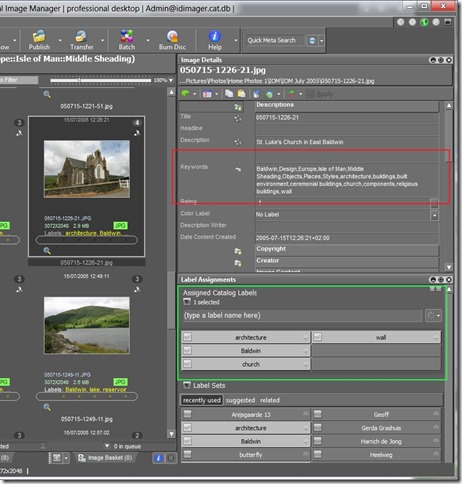
    Church5

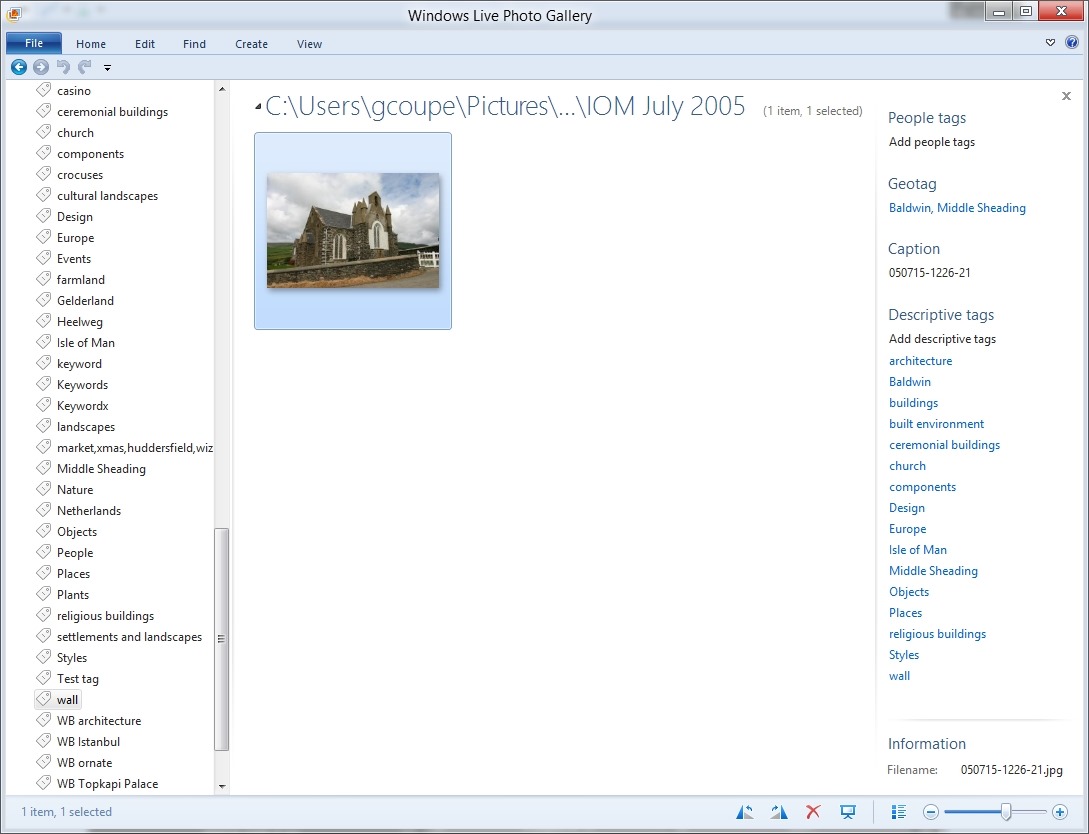
    Disaster! Lightroom has not written out a structured keyword string, but a series of individual keywords separated by commas. While IDimager has been able to sort the wheat from the chaff (the labels, highlighted in green, show that it knows that the structured keyword wall has been added), Windows Live Photo Gallery is not so clever.

    Church6

    It is now showing all the individual keywords assigned to the image, and worse, it has created new, false, levels in the keyword hierarchy shown on the left in the screenshot. For example, wall is now shown as a top-level keyword.

    So Lightroom 4 will read structured keyword strings using the “/” character as a separator from photo metadata, but, unlike IDimager, it will not write out structured keyword strings to photo metadata. Instead it writes single level keywords and additional, Adobe-proprietary, metadata to describe the hierarchy. This is, apparently, expected behaviour.

    Well, it may be expected, but it’s pretty much useless to me if I want to keep WLPG as the easy to use browser for others in the family. If I use Lightroom 4 to do any metadata work, it will destroy the keyword structure that I use as far as other programs are concerned.

    So where does this leave me, as far as the trial of Lightroom 4 is concerned?

    I have to say that the Lightroom tools for editing and developing photos (especially those in RAW format) are far in advance of anything that IDimager or WLPG possess. So while I could continue to use IDimager for metadata work, I could supplement that with the image adjustment tools of Lightroom 4. Frankly, the other modules of Lightroom (Map, Book, Print and Web) are of little use to me; my other tools give me all that I require in those areas. So, are the image adjustment tools of Lightroom alone worth an investment of 130 Euros to me? If I were heavily into manipulating my images using the RAW format, then, yes, very probably. But at the moment? To be honest, I’m not sure.

  • Field of Crocuses

    One of our local farmers has changed from growing the usual crops to cultivating flowers. His fields are currently full of crocuses.

    20120315-1038-34 Stitch

    20120315-1038-00

    20120315-1039-21

    20120315-1110-33

  • An Orrery For The 21st Century

    Ever since I was a small boy with an interest in astronomy, I’ve wanted an Orrery.

    Today, 55 years further on, I’m no closer to owning my very own Orrery than ever I was.

    Still, hope is on the horizon. Dr. David Brown has been working on the 21st century’s equivalent of an Orrery with his NUIverse designed for Microsoft Surface. I reckon it will be between 5 and 10 years before this trickles down to Windows 8 Tablets.

    I might just be able to make it before I die.