Reflections on life at “De Witte Wand”…

Year: 2013

  • Lenovo Mobile Access – Deactivated

    I have a Lenovo ThinkPad Tablet 2, which I bought with the 3G capability, and it came with a Lenovo SIM card linked to Lenovo’s Mobile Access Service.

    For the majority of the time, the Tablet is connected to the Internet via WiFi, but occasionally, I use the Lenovo Mobile Access service and buy internet access when travelling outside of WiFi hotspots.

    As a trip is coming up, I tried to connect via LMA a few days ago to check that everything was working. However, the connection failed – see the screenshot with the “internal error during processing” message.

    TPT2 Network 04

    I put in a support request via email, and was astonished to receive a reply today telling me that since I had not used the service during the last six months, my SIM card had been deactivated and I would need to buy a new one.

    I don’t recall seeing anything about this time limit in the documentation I received with my tablet, and there is nothing about it on the LMA web site that I can see. Indeed, the web site says, and I quote:

    There are no contracts and no long-term commitments.

    They seem to have overlooked the salient fact that there is a long-term commitment – you need to use the service at least once every six months to avoid having your SIM card deactivated.

    Needless to say, I am not impressed. I will NOT be buying a new SIM card, since it costs more than purchasing a pre-paid SIM card from, for example, Vodafone NL – and their SIM cards do not deactivate themselves after six months.

    I won’t be using the LMA service again.

  • This Royal Pardon Is Wrong

    The British Queen has granted a posthumous royal pardon to Alan Turing. I can’t help feeling that this is not right; it is sending entirely the wrong message.

    I agreed wholeheartedly with the petition raised a few years ago for him to receive a posthumous formal apology from the British Government. And I was delighted when the apology was made.

    However, a Royal Pardon is quite a different thing. It is saying, in effect, that the Queen and country forgives Turing for the crime of being homosexual because he was such a brilliant man and for his contribution to the war effort. Well, I’m sorry, so he gets his pardon while thousands of other men convicted for the same “crime” do not, simply because they don’t happen to be geniuses or their contributions to the war effort is somehow deemed insufficient? Some of these men are still alive. I wonder how they must be feeling at the moment, with their criminal records still intact?

    If Turing is going to get a Royal Pardon, then it should be simply because he did nothing wrong, and the same pardon should be granted to an estimated 75,000 other men whose lives were wrecked by the insidious legislation that existed at the time.

    As Ally Fogg writes:

    It is shocking to realise that there are still people alive today who were unjustly criminalised in their youth, and who have carried the stain of a criminal record, as a sex offender, through almost their entire adult lives. In 2012 the Protection of Freedoms Act was passed, which allows those who were convicted of homosexuality offences to apply to have their entire criminal records removed if the facts of the case would no longer count as a crime.

    As the legal commentator David Allen Green has pointed out, there is no reason why this provision could not be extended to cover all those convicted, whether living or dead, without the requirement for a personal application. With a little bit of political marketing, it could become known as the Turing law, recorded as such in the history books for generations to come. Now that really would be a fitting tribute to a national hero.

    I agree.

  • Season’s Greetings

    20131129-1702-14a (2) (693x1024)

    We’re nearing the end of another year here in the Witte Wand farmhouse. For the most part, it’s been a good year, with happy memories; however, there have been a couple of bumps along the way. We lost a member of the family at far too young an age, and in June, Martin suffered a slight stroke. I’m happy to report that he has made an amazing recovery, and is practically back to his normal self.

    We hope that you and yours have a peaceful Yule, and that 2014 will be a good year.

  • “I Am Officially Illegal”

    That was the tweet from Dr. Frank Mugisha today at the news that the Ugandan Parliament has passed the Anti-Homosexuality Bill. The bill apparently:

    • bans the ‘promotion of homosexuality’ with a maximum of 7 years imprisonment.
    • punishes same-sex marriage with life imprisonment

    It’s not clear what the final wording and provisions of the bill are, the original bill contained some wide-ranging powers to drive the LGBT community underground, both literally and figuratively, as well as have consequences for human rights defenders active in the LGBT field.

    I cannot imagine what it must be like for LGBT people in Uganda at the moment.  One thing is for certain, if Martin and I were living in Uganda instead of here, we would both be looking at life imprisonment.

  • Manx Wallpapers

    The background of the Desktop screen on my Windows PCs is generally set to display landscape themes. There’s a whole range of them, and other themes, available to download and use.

    Today, I noticed from a Microsoft blog, that there is now a landscape theme devoted to pictures from my birthplace, the Isle of Man. Taken by Mark Wallace, there are some suitably moody shots of Peel Castle, the ruins of St. Trinian’s church, the Calf of Man and more.

    They’ve been installed and serve as a reminder of my original home.

  • Abraham And Sarah

    Here in the Netherlands, there’s a tradition that when someone reaches the age of 50, they are said to be an Abraham (if they’re a man) or a Sarah (if they’re a woman).

    And in this part of the Netherlands, that is often marked by friends and neighbours installing an appropriately (or inappropriately) dressed mannequin outside the celebrant’s house.

    Last Wednesday, one of our neighbours reached his 50th, so late on Tuesday night his garden was invaded by a series of groups each installing their own version of an Abraham and accompanying signs and decorations. This was the scene the following morning…

    20131120-1018-24

  • The Bankers Do It Again

    There’s a small village, Bredevoort, that lies about 7 kilometres distant from us. It’s a pretty little village of about 1,500 inhabitants, and it also has a disproportionate number of antiquarian bookshops in it. That’s because, since 1993, it has become known as a Boekenstad (book-town). Apart from the 20 or so bookshops, there are also regular antiquarian bookmarkets, with market stalls placed in and around the central market square.

    I often go along to the bookmarkets, and when I do, one of the things I invariably see is a queue of people waiting to get cash from Bredevoort’s one and only cash machine.

    Today, I read in the Volkskrant that the Rabobank, the bank responsible for the cash machine, intends to remove it from the village. According to Nicole Olde Meule, the person responsible for the bank’s consumer clients in this area, the number of transactions has fallen by 9% over the past year to 25,000 per year. And that, she thinks, is justification enough to remove the service.

    She clearly needs her head examined. At a time when the Rabobank has had its image severely dented by being fined €774m for its part in the Libor scandal, she thinks its OK to heap further hardship on the village, tourists and booklovers.

    She knows the cost of everything and the value of nothing.

  • Xbox Music App – Metadata Madness

    I’m doing the old one-step-forwards-two-steps-back shuffle with Microsoft again. This time it’s the latest version of the Xbox Music App that is raising my frustration levels.

    Windows 8.1 has arrived with a new version of the Xbox Music App (version 2.2.177.0). While it has improved in certain respects from earlier versions of the App, in one respect it seems to have got a whole lot worse: it does not handle Album Art well at all.

    By default, when you add your collection of music albums and tracks to the App, it will query Microsoft’s online metadata service and fill in metadata such as the album name, artists and the cover art of the album (the Album Art) for display within the App. The first thing I had to do when installing the App was to change this default and prevent it from downloading any metadata and writing it into my music collection. I have learned, from bitter experience, that Microsoft’s music metadata is, to put it bluntly, utter crap for the music I listen to. I have spent many hours correcting the errors that Microsoft has injected into my music metadata from earlier incarnations of their music applications. Windows Media Player, Windows Media Center, Zune, Windows Home Server, they’ve all stomped all over my carefully prepared music metadata in their jackboots without so much as a by-your-leave. So when you tell a Microsoft music application that it must not, under any circumstances, use the online service to supply metadata when importing audio tracks and folders into its library, then what it should do is to look at the tracks and folders themselves to see if there is any metadata that it can use.

    As I say, I have spent many hours using Media Monkey to provide accurate metadata and high-resolution Album Art (at least 500×500 pixels) in every audio track (over 14,000) and Album folder in my collection and Windows Media Player, Windows Media Center and Zune will all read this metadata and use it properly.

    The Xbox Music App on my Desktop PC does not. It fails to read the metadata quite spectacularly. Let me illustrate this.

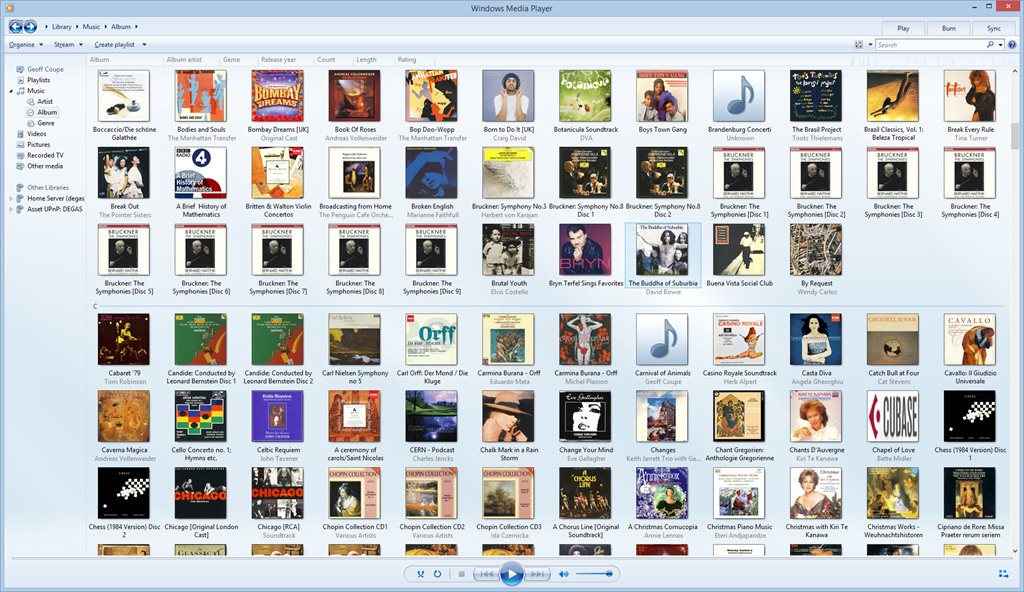
    Here’s a snapshot of part of my music collection being displayed in Windows Media Player:

    Xbox Music issue 11

    WMP has picked up the album art metadata and displays it (there are two albums shown with the default “music note” icon – but that is also correct, the tracks in these two folders do not have any album art metadata).

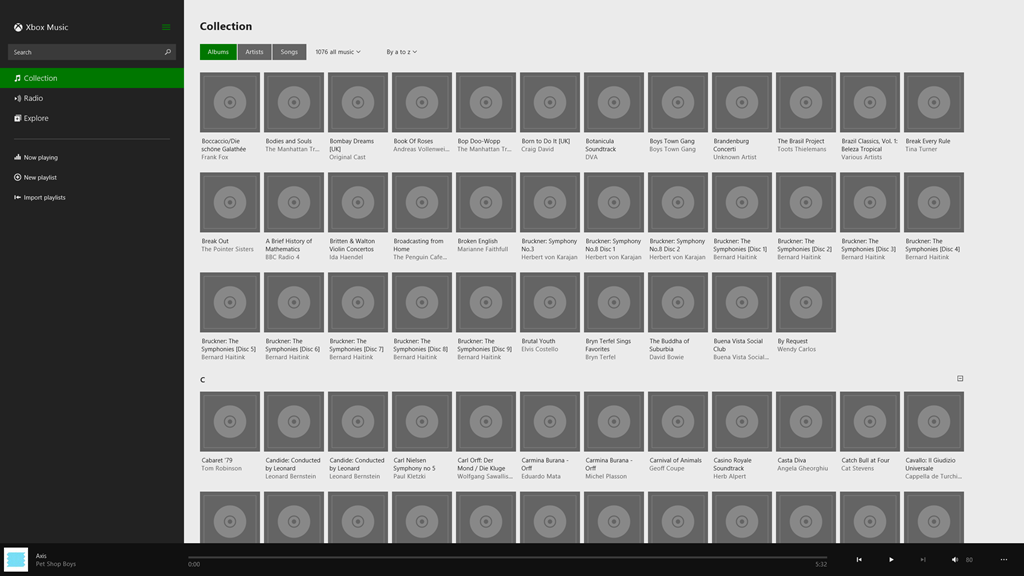
    And here’s the same part of the same music collection being displayed by the Xbox Music App running on the same Windows 8.1 PC:

    Xbox Music issue 10

    Er, hello? Is this supposed to be a good user experience?

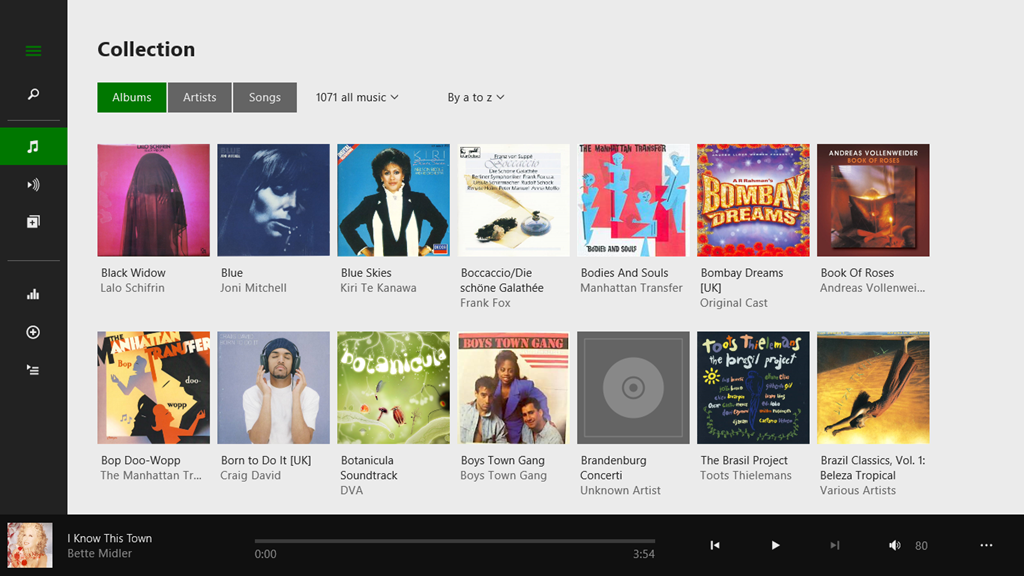
    Interestingly, if I use the same version of the Xbox Music App running on my Windows 8.1 tablet, then that manages to do a slightly better job:

    Xbox Music issue 12

    There are fewer albums shown, because the App is running on a device with a lower-resolution screen. But the point is, here, the Xbox Music App does appear to be reading my Album Art metadata, whereas on the Desktop PC, the same App fails miserably.

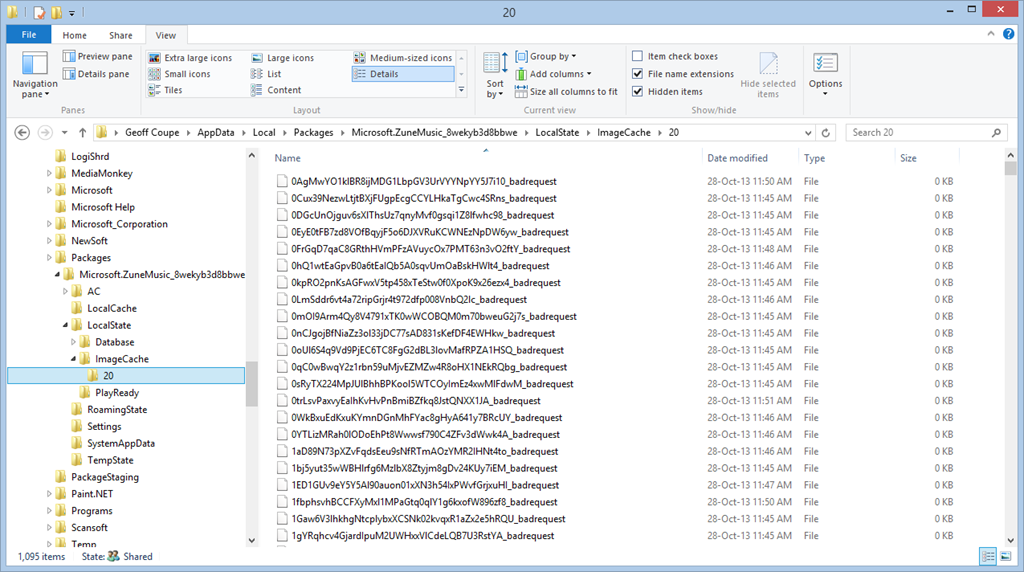
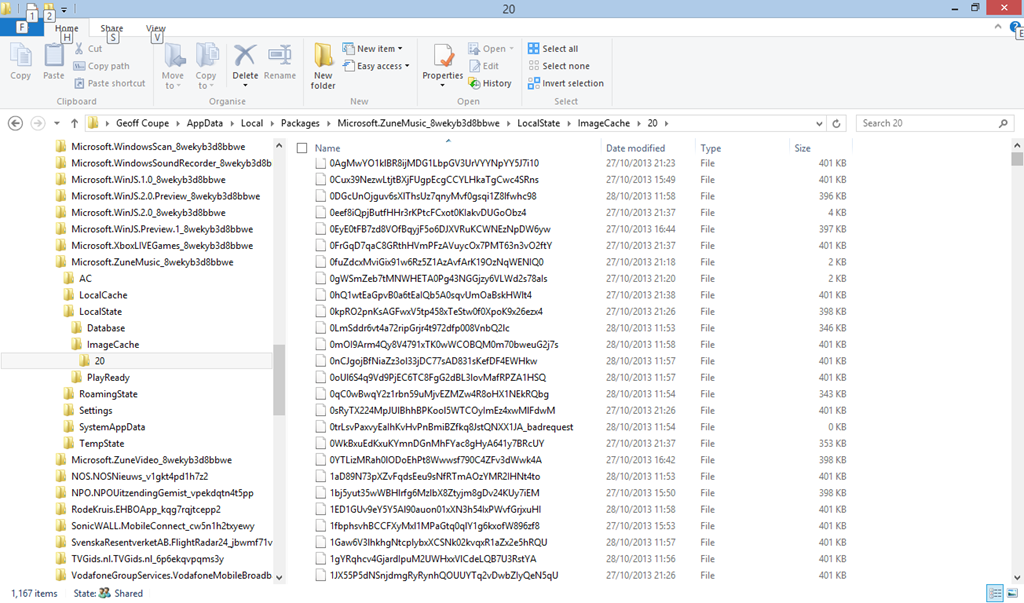
    I’ve found where the Xbox Music App caches the Album Art images that it uses for display. It’s in the folder:

    C:\Users\Username\AppData\Local\Packages\Microsoft.ZuneMusic_8wekyb3d8bbwe\
    LocalState\ImageCache\20.

    On my Desktop PC, that folder is filled almost entirely with files of the form <some long string>_badrequest:

    Xbox Music issue 13

    Whereas on the tablet, that same folder is filled almost entirely with files having the same form and names, but without the “_badrequest” suffix. These are, in fact Album Art images:

    Xbox Music issue 14

    So the question is, why is the Xbox Music App running on the tablet able to succeed, while the same App running on the Desktop PC can not? Both Apps are working against the same music collection, which is held on a Windows Home Server 2011.

    The only thing that occurs to me is that there is possibly a race condition in the software that causes the App to fail on the much faster Desktop PC. Whatever the cause, I would like to think that Microsoft will fix it. We shall see.

    Update 17 December 2013: well, another new version has arrived from Microsoft (version 2.2.339.0) and been installed on my computers. Alas, it’s made no difference to this issue – the bug is still there; great swathes of non-existent Album Art.

    Update 23 January 2014: another day, another update of the Xbox Music App, this time to version 2.2.444.0. Still doesn’t fix the metadata bug though…

    Update 11 February 2014: another day, another update of the Xbox Music App, this time to version 2.2.550.0. Still no fix for the metadata bug though…

    Update 11 March 2014: This issue of disappearing Album art doesn’t seem to have started until I upgraded to Windows 8.1 on the Desktop PC.

    So I decided to implement a scorched earth policy: I did a fresh install of Windows 7 Home Premium, applied the 250+ updates that were required; installed Windows 8 Pro plus the 100+ updates that it required, and finally upgraded to Windows 8.1 Pro via the Store (and applied its updates…).

    Now, finally, Xbox Music is showing my album covers correctly for my music collection held on the WHS 2011.

    I’m still in the process of reinstalling all my applications and Apps – this will take a day or two to complete – but at the moment, Xbox Music appears to be working as it should.

    So, whatever the problem was, it does appear as though it was caused by something not being right in the previous installation of Windows 8.1, and now we’ll never know what it was…

    Update 17 April 2014: It’s very likely that this problem was caused by an obscure interaction between the Xbox Music App and another desktop application that integrates with the Windows Shell to add additional menu options in the Windows Explorer. In my old installation of Windows 8.1, I had the dBpoweramp Music Converter installed. Someone else had the same Xbox Music issue of no Album Art being displayed, and tracked it down to the Shell integration feature.

  • “Play to” and Windows 8.1

    Back in the distant days of 2009, Microsoft introduced a feature called “Play to” into its new operating system, Windows 7. Play to, so Microsoft claimed:

    makes it easy to stream music, video, and photos from your computer to other PCs, TVs, or stereos on your home network. You can stream music from your PC to your home entertainment system or stream slide shows and videos to another computer or to your TV. Just right-click the tracks you want to enjoy, or add them to your Windows Media Player 12 playlist, and click Play To. Now you’re hearing—or watching—what you want, where you want it.

    In those early days, it was something of a rocky road to negotiate; there were many bumps along the way. Nevertheless, I was happy with the end result. It worked for what I wanted.

    Then along came Windows 8. Once again, in the pre-release versions of Windows 8, there were issues, but these were fixed in the final version of Windows 8. However, while the operating system and the venerable Windows Media Player (unchanged from Windows 7) were working, the (brand-spanking-new-supposedly-fancy-but-really-very limited) Xbox Music App from Microsoft still had a number of shortcomings.

    Windows 8 also introduced a new wrinkle into Play to. I discovered that my ancient (5 years old) Denon AVR-3808 was being reported as a “not Windows Certified” device. Whilst I could continue to use it with Windows Media Player, I could not use it at all with any of the new Modern UI Apps, such as Xbox Music. Fortunately, digital mediaphile Barb Bowman came to the rescue and discovered a Registry fix, which allowed non-Windows Certified devices to be used in Modern UI Apps. Subsequent to that, Microsoft’s Gabe Frost supplied a simpler Registry fix to accomplish the same thing.

    I used Gabe’s fix, and all seemed fine.

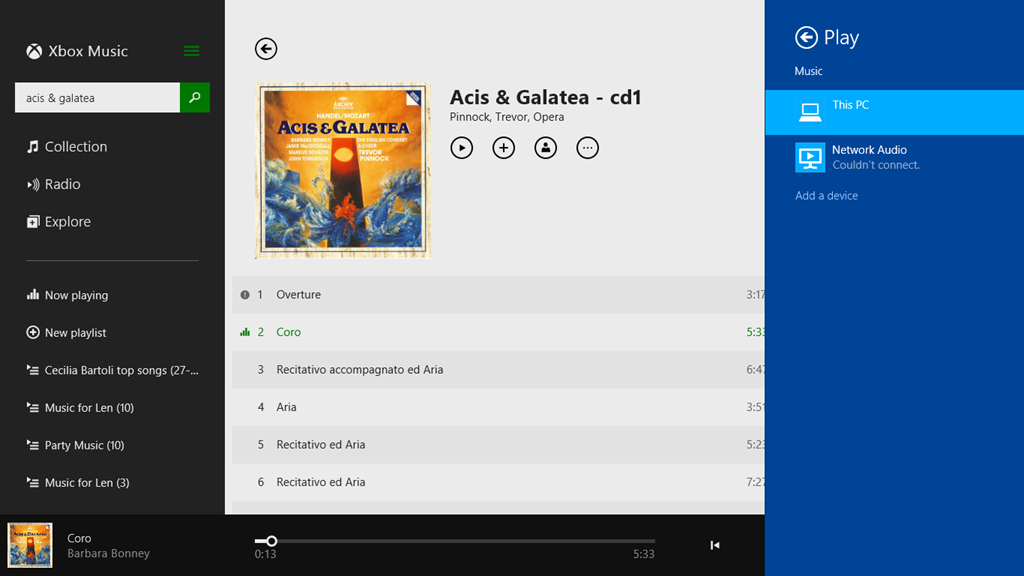
    Now we have Windows 8.1 and a much-improved Xbox Music App, and once again I seem to be taking a step back. While Windows Media Player continues to work as usual, Xbox Music is behaving very strangely when I attempt to use the Play to function. Here’s a screenshot of an attempt to use the Denon as a Play to device in Xbox Music (the Denon shows up with the name Network Audio in Windows):

    PlayTo 03

    Here, I’ve attempted to stream the first track to the Denon. That has failed, and Windows is telling me that it couldn’t connect to the Network Audio (the Denon), but in fact the second track is actually playing through the Denon. In addition, there’s a small information icon by the first track, click on it and you get:

    PlayTo 04

    which is a very odd message, since these tracks are not DRM-protected.

    I tried another Modern UI App, Media Monkey, and this seemed to behave much better. Occasionally it would refuse to Play to the Denon when first starting up, but once it got going, it seemed to be much more solid.

    So, what’s going on here?

    I raised the issue in a thread on one of Microsoft’s Answers forums. Gabe Frost himself responded:

    We have not seen this, and do not have this specific Denon model to test with, so would like to get further information from you.

    I provided the information he asked for, and very quickly the answer came back, and it’s very interesting.

    From the traces, we can see you’re trying to stream a WMA file from the Music app. Since Denon does not support WMA, the file has to be transcoded real-time into LPCM. When a file is transcoded in real-time, no system can know the resulting number of bytes, so in order to support seek, it has to be time-based (we do know the duration). However, Denon also does not support time-based seeking. In Windows 8.1, we introduced a feature that emulates time-based seeking for devices that do not support it. This is really nice in that users can seek their music or videos when they previously could not.

    In your case, since the Music app was already playing the song locally for a bit, we are doing “Seek Emulation” to seek the stream to the same position the Music app was last playing at. This involves sending some additional SetAVTransportURI requests to the Denon DMR. We see the Denon DMR reporting an error, “TransportStatus = ERROR_OCCURRED”.  Probably this is the result of the additional SetAVTransportURI requests that we send.

    That would explain why the bug does not happen when using WMP as the media controller (DMC) in Desktop. With the Desktop controller, we don’t try to seek immediately after starting to play.

    Looking at our code, we see that careful tuning was required to work with Denon because they often tend (incorrectly) to report an error when they are no longer in an error state. Denon tends to forget to set TransportStatus back to “OK” when it has received a new URL to play. While we tested with a wide range of devices (including some newer Denon devices) It appears that your Denon device is incompatible with this seek emulation because of the device bugs.

    We are investigating potential workarounds and will get back to you via this thread. A fix will take longer, unfortunately.

    One slight correction to what Gabe has written; the Denon (and all Denon AVR models, as far as I’m aware) does not support the WMA Lossless format, but they all support standard WMA format. My Denon even came with a Microsoft “PlaysForSure” sticker on it – so it was certified by Microsoft as being able to play standard WMA format!

    The issue I’m stuck with is that I have deliberately chosen to store my music collection in WMA Lossless format because it delivers higher-quality playback than standard WMA format. Lossless formats (e.g. WMA Lossless, FLAC) are better than formats that use lossy compression, such as WMA and MP3. The Denon supports FLAC, WMA and MP3, so in an ideal world, I would have chosen FLAC as my archival storage format.

    Unfortunately, Microsoft don’t support FLAC. While I can get a third-party FLAC add-on for Windows Media Player, there appears no way to use a third-party add-on for the Xbox Music App. And while I can use Media Monkey to play back FLAC files, in addition to WMA, WMA Lossless and MP3, the Xbox Music App is linked into a music store for purchasing downloads.

    I am going to have to think about the way forward for a while…

    Addendum: The Xbox Music App has other problems of its own. See Xbox Music App – Metadata Madness

    Addendum 2: As of April 8, 2014, Microsoft has released an Update to Windows 8.1 that makes it unnecessary to perform any registry edits to enable a DLNA Digital Media Renderer (DMR) to work with Modern Apps on the Start Screen. Devices will no longer appear as “uncertified” when Play is selected within an individual app (but if not certified will appear as such in the PC and Devices menu).

    Addendum 3: Native support for the FLAC format will apparently be coming in Windows 10. Good news, as far as I’m concerned.

    Addendum 4: Things will change yet again for Windows 10. First, the “Play to” function has been renamed to “Cast to”. Second, and more importantly, this function will have fundamental changes.  It appears as though Microsoft has removed DLNA DMR devices from system-level control (e.g. the Devices item in the Win 8.1 Charms bar), and demoted that function to needing to be controlled on an app-by-app basis.

    That’s all very well if app developers actually take account of it. I note that neither of Microsoft’s Music apps (Music or Music Preview) do this, and I also note that the Microsoft spokesperson uses the qualifier “eventually” in the context of support by the Microsoft app. That could mean it will be available on July 29 or it could mean in five years time. That does not give me a warm feeling.

    So, in summary, the “Play to” user experience is likely to take a step backwards in Windows 10 as compared to Windows 8/8.1. That’s a tad disappointing.

    Addendum 5: Well, Windows 10 has been released (on the 29th July 2015), and as expected Microsoft’s Music app (now called “Groove”) still does not have the “Cast to” function implemented. Sigh.

  • RIP, Norm

    One of the bloggers that I make a habit of reading is Norman Geras. That is, until last Friday, when I found an entry on his blog from Jenny Geras (his daughter) saying that Norm had died that day.

    Another voice of reason stilled. Here’s his obituary. It’s worth reading to get a sense of the man, and of course you can still read his writings on his blog.

  • Out There

    Stephen Fry has collaborated with film-maker Fergus O’Brien to make a two-part documentary Out There. In it, Fry reflects just how much, and how little, things have changed in his lifetime for gay people around the world.

    Martin and I watched the first part last night. Yes, we know that we are incredibly lucky to be able to live where we do, but to see the reality of the extent of homophobia elsewhere, much of it State-sponsored, is very depressing. Uganda featured prominently in last-night’s programme. Fry was shown participating in a Ugandan radio phone-in programme with Pastor Solomon Male, who seems obsessed with homosexual sex to a quite unhealthy degree. Fry also had an interview with the Ugandan State Minister for Integrity and Ethics, who amply demonstrated a complete absence of both of these qualities. Fry found the latter interview in particular quite stressful, in part I suspect because the Minister at one point was shouting that he would arrest Fry.

    But never underestimate the smugness of TV reviewers. Rupert Hawksley, in the Telegraph, wrote that:

    As a homosexual man himself, it was entirely understandable that Fry took the poisonous opinions he encountered in Uganda and Los Angeles as personal attacks. Nonetheless, I was surprised at how quickly he allowed himself to be drawn into a slanging match, his gravitas deserting him minutes into a debate with Ugandan pastor Solomon Male. It was all much too shouty and felt like the opportunity for instructive discussion had been lost. Later, in an invective-filled session with the Ugandan State Minister for Integrity and Ethics, Fry resorted to childish taunts: “Homosexuality is fantastic. You should try it, it’s really good fun.” This, surely, was not the best way to counter deep-rooted prejudice.

    Easy for you to say Mr. Hawksley, but then I doubt that you’ve been much at the receiving end of institutionalised homophobia. If I were in Fry’s place, I’d probably have lost my temper much sooner with the odious human being that is the Ugandan Minister. “Instructive discussion” with people such as Male and the minister is an oxymoron, as I know from experience.

    The second part of the documentary will be shown tonight, in which Fry visits Russia, and gets to meet Deputy Milanov of St. Petersburg. Somehow, I think Mr. Hawksley will once again have to suffer a sense of disappointment that there is no “instructive discussion”. As Stephen Fry writes:

    I have visited Russia, stood up to the political deputy who introduced the first of these laws, in his city of St Petersburg. I looked into the face of the man and, on camera, tried to reason with him, counter him, make him understand what he was doing. All I saw reflected back at me was what Hannah Arendt called, so memorably, “the banality of evil.” A stupid man, but like so many tyrants, one with an instinct of how to exploit a disaffected people by finding scapegoats. Putin may not be quite as oafish and stupid as Deputy Milonov but his instincts are the same.

    The struggle continues.

  • Jesus And Mo – The Author Speaks

    I’m definitely a fan of the Jesus and Mo cartoon strip. The anonymous author has given a rare interview that appears on the Council of Ex-Muslims forum. Worth reading.

  • Photo Metadata Tools – The Saga Continues

    A couple of weeks ago, I blogged about the tools I use to manage my collection of photos and the metadata contained in them.

    In it, I noted that interoperability issues between metadata editing tools was a problem. Never was a truer word spoken (or written).

    One of the complaints I have had for a long while about Microsoft’s Windows Photo Gallery (WPG) is that, in my experience, it corrupts the Makernotes metadata in images produced by my Canon cameras. That led to an interesting discussion in the comments of that blog post with Mike Lee. He said that he wasn’t seeing the metadata corruption when he used WPG. We established that we were both using the same version of WPG (build 16.4.3508.205), so then we had a mystery: why was I seeing metadata corruption, and he wasn’t? A further surprise was when he said that a sample file that I had uploaded to SkyDrive to share with him contained metadata errors, whereas I was positive that it was error-free.

    So I set out to investigate. I took a photo using my Canon EOS 450D camera, and copied it onto my Desktop PC. This original file has the name IMG_7383.jpg:

    IMG_7383

    Using Mike’s MetadataMirror tool (which uses Phil Harvey’s most excellent ExifTool under the covers), I obtained a listing of all the metadata present in this original file. As expected, the only metadata present in the file (other than the Windows metadata) is the Exif data inserted by the camera itself. This is in three groups: standard Exif, Canon Makernotes and Canon Composite tags. Here’s a link to the file (IMG_7383.txt) containing the metadata listing:

    http://sdrv.ms/1aVOMkn

    The next step was to use Photo Supreme (PSU) on a copy of the image (IMG_7383 – PSU.jpg) to stamp in my usual boilerplate of metadata: e.g. my name and copyright information. The  file (IMG_7383 – PSU.txt) listing the metadata resulting from using PSU on this image file is here:

    http://sdrv.ms/1a16hx6

    PSU has preserved the original metadata, while adding some new items. This new metadata is both XMP-based and IPTC-IIM (for backwards compatibility). PSU also writes XMP equivalents for many of the original Exif items. So for example, if you look in the file, you will see items such as:

    [EXIF] Make: Canon
    [EXIF] Model: Canon EOS 450D
    [EXIF] Orientation: Horizontal (normal)
    [EXIF] XResolution: 72
    [EXIF] YResolution: 72
    [EXIF] ResolutionUnit: inches
    [EXIF] ModifyDate: 2013:10:04 21:06:31
    [EXIF] YCbCrPositioning: Co-sited

    PSU creates XMP equivalents:

    [XMP] Make: Canon
    [XMP] Model: Canon EOS 450D
    [XMP] Orientation: Horizontal (normal)
    [XMP] XResolution: 72
    [XMP] YResolution: 72
    [XMP] ResolutionUnit: inches
    [XMP] DateTime: 2013:10:04 21:06:31.300+02:00
    [XMP] YCbCrPositioning: Co-sited

    PSU also adds in the boilerplate that I use in XMP, e.g.:

    [XMP] Title: IMG_7383 – PSU
    [XMP] Rights: 2013 Geoff Coupe, Creative Commons
    [XMP] Creator: Geoff Coupe
    [XMP] CreatorWorkURL: https://gcoupe.wordpress.com
    [XMP] UsageTerms: Creative Commons Attribution Non-commercial Share-alike

    It also includes a notification that it has been used to edit the file, together with a timestamp. This is all as it should be, according to metadata standards.

    [XMP] CreatorTool: IDimagerSU (1.9.5.170)
    [XMP] MetadataDate: 2013:10:05 10:03:31.353+02:00

    In summary, there is absolutely nothing untoward about the resulting image file, as far as I can see. The structure of the Exif metadata is preserved, and XMP-based metadata has been added correctly.

    The next step was to take a copy of this file and add one item of metadata using WPG. This file is IMG_7383 – PSU+WPG.jpg and the corresponding file listing the metadata is IMG_7383 – PSU+WPG.txt:

    http://sdrv.ms/16pxkoF

    Immediately, you can see there’s a problem – errors are being reported:

    [ExifTool] Warning: [minor] Possibly incorrect maker notes offsets (fix by 4476?)
    [ExifTool] Warning: Invalid CanonCameraSettings data
    [ExifTool] Warning: Invalid CanonShotInfo data
    [ExifTool] Warning: Invalid CanonFileInfo data
    [ExifTool] Warning: [minor] Suspicious MakerNotes offset for DustRemovalData
    [ExifTool] Warning: Invalid CustomFunctions2 data
    [ExifTool] Warning: Invalid ProcessingInfo data
    [ExifTool] Warning: Invalid MeasuredColor data
    [ExifTool] Warning: Invalid SensorInfo data

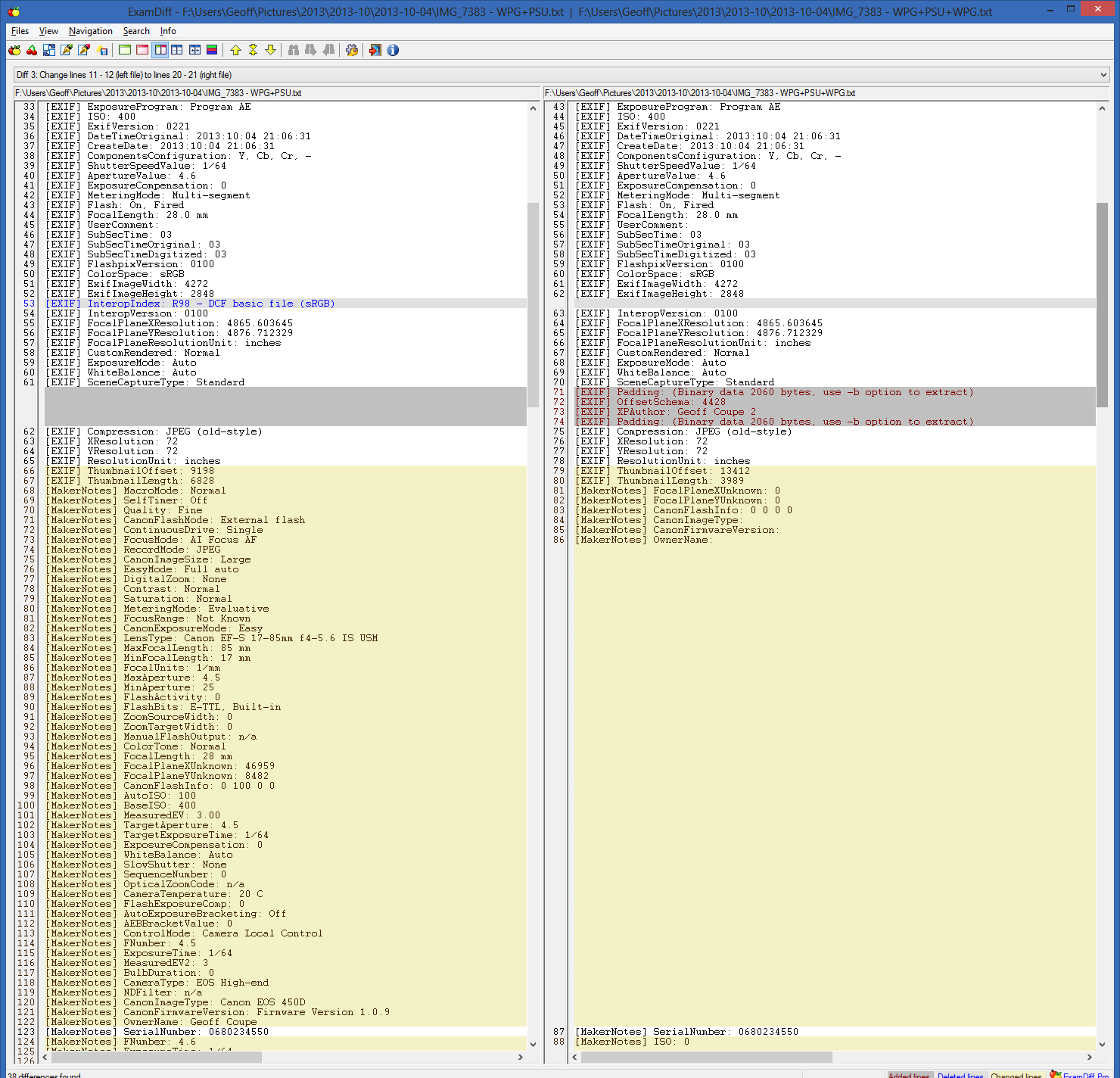
    And indeed, whole chunks of the Canon Makernotes are missing from the image file (left is the metadata in IMG-7383 – PSU.jpg and right is that in IMG_7383 – PSU+WPG.jpg):

    Metadata test 05

    There are also two other possibly significant things about this image file, captured in the metadata. The first is that when WPG writes back to the image file, it reverses the byte order of the Exif data structure. Originally, the Exif is in Little-endian order as shown in this line from both the original IMG_7383.txt and the IMG_7383 – PSU.txt files:

    [File] ExifByteOrder: Little-endian (Intel, II)

    However, once WPG has changed the file, the byte order is now Big-endian:

    [File] ExifByteOrder: Big-endian (Motorola, MM)

    Now, this may, or may not, be a problem, but it is definitely contrary to the advice given by the Metadata Working Group, which states that byte order should be preserved by tools that operate on image files.

    Secondly, WPG introduces an offset in the Exif data structure when adding the changed metadata:

    EXIF] Padding: (Binary data 2060 bytes, use -b option to extract)
    [EXIF] OffsetSchema: 4476
    [EXIF] XPAuthor: Geoff Coupe 2
    [EXIF] Padding: (Binary data 2060 bytes, use -b option to extract)

    So, at this point in the saga, I believe that I’ve established that for any given image that contains Canon Makernotes data, using PSU followed by WPG to edit metadata will result in the corruption of the Makernotes data. This is repeatable for all such image files that I’ve tested.

    What happens if I use WPG followed by PSU to edit metadata? Let’s find out. 

    I used WPG to add myself as author to a copy of the original image: IMG_7383 WPG.jpg. The metadata listing (IMG_7383 WPG.txt) is here:

    http://sdrv.ms/1e16G6W

    You’ll notice immediately that ExifTool gives a warning about the Makernotes structure:

    [ExifTool] Warning: [minor] Adjusted MakerNotes base by 4176

    Also, the byte order has been changed, and padding introduced:

    [File] ExifByteOrder: Big-endian (Motorola, MM)

    [EXIF] Padding: (Binary data 2060 bytes, use -b option to extract)
    [EXIF] OffsetSchema: 4176
    [EXIF] XPAuthor: Geoff Coupe
    [EXIF] Padding: (Binary data 2060 bytes, use -b option to extract)

    However, there is no Makernotes corruption.

    Now let us use PSU to edit the metadata in this file (I changed the Title to read IMG_7383 – WPG+PSU). The resulting image file is IMG_7383 – WPG+PSU.jpg and the corresponding listing of the metadata is IMG_7383 – WPG+PSU.txt, and can be found here:

    http://sdrv.ms/GEzvu1

    The interesting thing here is that the byte order has been switched back to Little-endian, and the padding removed:

    Metadata test 06

    Other than that, the metadata looks fine; no Makernotes are missing, and ExifTool reports no errors.

    So far, so good, but now if I go back and use WPG once more, I get Makernotes corruption again. The image file is IMG_7383 – WPG+PSU+WPG.jpg and the metadata listing is IMG_7383 – WPG+PSU+WPG.txt:

    http://sdrv.ms/192O5V7

    The byte order has been switched again, padding introduced, and ExifTool reports:

    [ExifTool] Warning: [minor] Possibly incorrect maker notes offsets (fix by 4428?)
    [ExifTool] Warning: Invalid CanonCameraSettings data
    [ExifTool] Warning: Invalid CanonShotInfo data
    [ExifTool] Warning: Invalid CanonFileInfo data
    [ExifTool] Warning: [minor] Suspicious MakerNotes offset for DustRemovalData
    [ExifTool] Warning: Invalid CustomFunctions2 data
    [ExifTool] Warning: Invalid ProcessingInfo data
    [ExifTool] Warning: Invalid MeasuredColor data
    [ExifTool] Warning: Invalid SensorInfo data

    And once again, chunks of Makernotes have gone:

    Metadata test 07

    So it seems that using PSU first, followed by WPG, will trigger a corruption of Canon Makernotes; however, using WPG followed by PSU does not.

    But there is one more twist to this saga.

    Remember that Mike had said that a sample file that I had uploaded to SkyDrive to share with him contained metadata errors, whereas I was positive that it was error-free?

    I know that the image files IMG_7383 – PSU.jpg and IMG_7383 – WPG+PSU.jpg do not contain errors. I have the metadata listings to prove it. And yet, if you download these files from SkyDrive, you will find that the Makernotes have also been corrupted. By comparison, if you download the same files from this set on Flickr, you’ll find that they are error-free.

    What’s going on here? I can only surmise that SkyDrive is doing some metadata processing on the images stored on the service, and that a similar, or the same, code library has the processing fault that triggers the Makernotes corruption on images that have already been processed by PSU.

    The SkyDrive folder containing these test images and their metadata files is here.

    The Flickr set containing the same test images is here.

    I like both PSU and WPG, but using them together can be dangerous.

    Addendum 7 October 2013

    I’ve been doing some further investigation and established the following

    • WPG definitely doesn’t like something about the metadata structures that PSU creates
    • None of my other metadata tools complain about PSU
    • ExifTool shows nothing amiss with the metadata that PSU creates.

    I can have an image file that has had metadata edited by a whole series of tools, but if at any point I have used PSU followed at some point further down the chain by WPG, then WPG will corrupt my Makernotes metadata.

    For example, I created two examples of chained metadata operations on files. The first was the sequence: Geosetter, XnViewMP, Lightroom 5, and WPG. At each stage I added a keyword identifying which tool I was using. The final result is given in the metadata listing: IMG_7383 – G+X+LR+WPG.txt, and there’s no corruption; here’s the start of the listing (but note the final offset, and the reversed byte order):

    [ExifTool] ExifToolVersion: 9.35
    [ExifTool] Warning: [minor] Adjusted MakerNotes base by 4236
    [File] FileName: IMG_7383 – G+X+LR+WPG.JPG
    [File] Directory: F:/Users/Geoff/Pictures/2013/2013-10/2013-10-07
    [File] FileSize: 3.9 MB
    [File] FileModifyDate: 2013:10:07 18:10:04+02:00
    [File] FileAccessDate: 2013:10:07 18:10:03+02:00
    [File] FileCreateDate: 2013:10:07 18:09:27+02:00
    [File] FilePermissions: rw-rw-rw-
    [File] FileType: JPEG
    [File] MIMEType: image/jpeg
    [File] ExifByteOrder: Big-endian (Motorola, MM)
    [File] CurrentIPTCDigest: f042c8560b6fafea9c47a1c0249baec1
    [File] ImageWidth: 4272

    The second was the sequence: PSU, Geosetter, XnViewMP, Lightroom 5, and WPG. Again, at each stage I added a keyword identifying which tool I was using. At each step, the metadata was as expected. Then in the last step, WPG is used to add another keyword, and bang – corruption occurs . The final result is given in the metadata listing: IMG_7383 – PSU+G+X+LR+WPG.txt. Here, WPG will corrupt the Makernotes metadata; here’s the start of the listing:

    [ExifTool] ExifToolVersion: 9.35
    [ExifTool] Warning: [minor] Possibly incorrect maker notes offsets (fix by 4526?)
    [ExifTool] Warning: Invalid CanonCameraSettings data
    [ExifTool] Warning: Invalid CanonShotInfo data
    [ExifTool] Warning: Invalid CanonFileInfo data
    [ExifTool] Warning: [minor] Suspicious MakerNotes offset for DustRemovalData
    [ExifTool] Warning: Invalid CustomFunctions2 data
    [ExifTool] Warning: Invalid ProcessingInfo data
    [ExifTool] Warning: Invalid MeasuredColor data
    [ExifTool] Warning: Invalid SensorInfo data
    [File] FileName: IMG_7383 – PSU+G+X+LR+WPG.JPG
    [File] Directory: F:/Users/Geoff/Pictures/2013/2013-10/2013-10-07
    [File] FileSize: 3.9 MB
    [File] FileModifyDate: 2013:10:07 18:25:07+02:00
    [File] FileAccessDate: 2013:10:07 18:25:07+02:00
    [File] FileCreateDate: 2013:10:07 18:24:37+02:00
    [File] FilePermissions: rw-rw-rw-
    [File] FileType: JPEG
    [File] MIMEType: image/jpeg
    [File] ExifByteOrder: Big-endian (Motorola, MM)

    WPG is sniffing out something that PSU puts in a file, and throws a fit… I’ve asked the developer of PSU for help, but he can’t guess what WPG chokes on. Right now, without input from Microsoft, it’s all guesswork and that could take forever.

    Microsoft were informed about this a couple of years ago, but since acknowledging that there was an issue, there’s been complete silence. 

  • Indistinguishable From Magic

    Arthur C. Clarke once wrote:

    Any sufficiently advanced technology is indistinguishable from magic.

    That’s the thought behind this video: Box.

    (hat tip: Richard Wiseman)

  • RIP Margi

    I’m afraid I’m of an age where I read the obituaries to see if another connection with my past or present has gone. Most of the time they are of somebody famous, a well-known author perhaps, whose work has influenced me, but with whom I have had no personal connection.

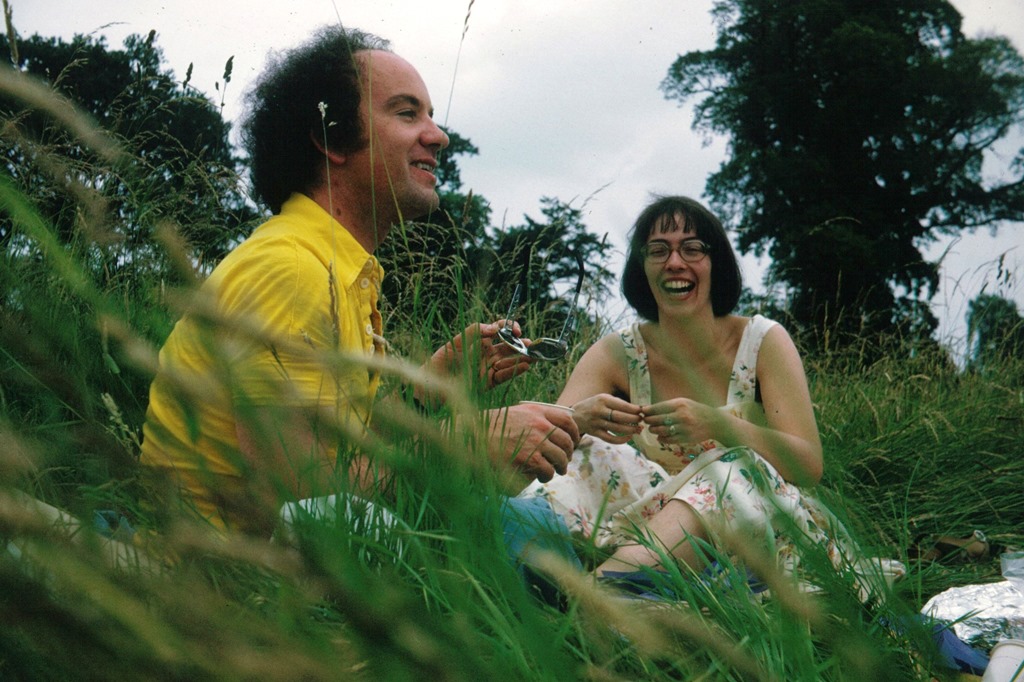
    Occasionally, however, I come across the obituary of someone whom I have known quite well, and it comes as something of a shock. It happened again last Thursday, when I read the obituary of Margi Levy in the Guardian. I knew Margi back in the 1970s. She was warm, funny, passionate and intelligent. I met her via a mutual friend, Len Curran. He was a great one for having parties, and I would often see Margi at one of these affairs, where wine and good conversation would flow freely. I still have a photo of a picnic that the three of us (and two other friends) had in August 1974 in Windsor Great Park. The photo is of Len and Margi sharing a joke, and Margi has the same broad smile as in the photo that accompanies her obituary.

    img381

    We became geographically separated in the 1980s – I moved to the Netherlands, Margi moved to Australia, and I lost touch with her. Alas, both Len and Margi are now gone, but their memories will remain for a while with me. I thank them for the time we shared.

  • Nothing Can Go Wrong…

    …go wrong…go wrong…

    I was reminded of the old joke about the fully automated system when I looked at Microsoft’s web page for the pre-ordering of Surface Pro 2. Half is in Dutch, the other half is in Portuguese.

    Microsoft Store 01

    It doesn’t exactly inspire confidence…

  • Surface – The Next Generation

    Yesterday, Microsoft announced the next generation of its Surface line of computers: the Surface 2 and the Surface Pro 2.

    The Surface 2 is a substantially upgraded version of the original Surface RT, while the Surface Pro 2 is an upgrade to the Surface Pro, but not to such a degree.

    I have to say that I am somewhat underwhelmed by the new machines, despite the fact that they are indeed improvements over the originals.

    Taking the Surface 2 first, the showstopper issue that I have with this machine is the simple fact that it does not run traditional Windows applications. It can only run the new Windows 8 Apps, and as far as I’m concerned, they are still a sorry bunch, with minimal functionality. That was what drove me to choose an Intel Atom-based tablet (the Lenovo ThinkPad Tablet 2) last January. It’s a decision that I don’t regret, and I am still very satisfied with my choice.

    I’ve said before that, if I don’t build my next desktop PC myself, I want to have a multi-functional device. It will be a tablet, running Windows 8 or its successors. It will have multitouch and a pressure-sensitive stylus. I will be able to carry it around and take notes/photos/videos on the move, and I’ll be able to plug it into a docking unit to support multiple monitors, a keyboard, and a mouse for my next generation Desktop. This is what I call Origami Computing.

    The issue with the original Surface Pro was that it was running 3rd generation Intel processors, which meant that it had to be fan-cooled. Personally, I much prefer using a tablet that is fanless – that’s one of the reasons I like the ThinkPad so much. The new Surface Pro 2 still has fans, but it is using the new 4th generation of Intel processors (the Haswell line). That means that it has both increased processing power and lower thermal output, so the device should hopefully be both cooler and quieter.

    Microsoft has also announced a docking unit for the Surface Pro line, so it becomes possible to consider it as a candidate for my first Origami device.

    Nevertheless, I don’t think that the Surface Pro 2 is quite there yet for me. I am disappointed by the following:

    Connected Standby is a new power-saving mode possible in both the new Atom and Haswell chips from Intel. It’s a sleep mode whereby the device can still respond to incoming events such as email, alarms or Skype calls, and wake itself up. My ThinkPad Tablet 2 has this, and I find it to be an invaluable feature. As far as I’m concerned it is a “must-have” for a modern tablet. As to why it is not present in the Surface Pro 2, it may be because it is not a fanless tablet; it may require devices to have passive cooling, although I would be surprised if this really is the case. After all, laptops have fans, and they can happily go into traditional sleep modes without problems. Connected Standby uses no more power than that, as far as I am aware.

    Like the Surface Pro, the Surface Pro 2 does not have GPS. I find this surprising. Many tablets and convertibles (e.g. the ThinkPad Tablet 2) have this; why would a top-of-the-line tablet not have it? Perhaps Microsoft thinks that it is necessary to have 3G/4G/LTE mobile connectivity (the Surface Pro line does not have this) before GPS is provided. If so, they are wrong. It is true that Microsoft’s own Maps App for Windows 8 requires internet connectivity to get map data while on the move, but not all navigation applications require this. Indeed, Microsoft’s own AutoRoute and Streets and Trips applications are designed to run on Windows laptops without internet connectivity. All they need is GPS data to be supplied. But there again, Microsoft have shot themselves in the foot here, because these applications don’t use the new Windows 8 GPS data interfaces.

    As for NFC, I would have thought that a flagship product, which Microsoft clearly consider the Surface Pro 2 to be, would have had it built in. True, it’s new, but it is making inroads into the smartphone market. I would have thought that Microsoft would have had it in their flagship tablet so as not to be behind the curve. (Update: it appears that it wasn’t included because it won’t work through the all-metal case of the Surface Pro 2. This may also apply to GPS as well)

    One area where Microsoft are not being backwards in coming forwards is in their pricing of Surface. They are clearly following Apple’s line of setting premium pricing. If I were to specify a configuration suitable for Origami Computing, I’d be looking at a price of around €1,620 for a system with a Windows Experience index in the region of 6-7). This would replace a PC of roughly equivalent specs and performance (Windows Experience Index of 7.3) that I built for about €600. Somehow, I don’t think I’ll rush to do this.

    So, all in all, I am rather disappointed. I’ll wait a year or two…

  • Autumn Sunset

    Just a couple of pictures of a rather stunning sunset that we had here last week…

    20130918-1934-18

    20130918-1934-58 Stitch

  • Sharing Photos

    Long-time readers of the blog know that one of the topics I return to every now and then is that of photography.

    A couple of days ago, one of my posts had the following comment and question from michaelfanous:

    I recently started trying to organize my photo albums, which are stored across several external devices. (Trying to organize over 50,000 photos). I am not a professional photographer by any means. However, I am the “family/event” historian so to speak, so I love documenting and taking pictures of everything. I wanted to know your thoughts are current software out there? Lightroom 5, Photo Gallery (Windows), ACDSee, Picasa 3.9.

    My main concern is that all these files will eventually be stored in 1 central location, and the family can access them at their own over the network. However, I want to make sure that all the tagging is accessible across platforms. i.e. No matter which hardware device, or which software, when a user looks at the picture, they can see the tags.

    I remember in the earlier years (which is what caused me to stop for a bit) I would tag something in Windows Photo Gallery or in Picasa, but the tags wouldn’t transfer over appropriately. I am not so much concerned with actually editing the individual pictures (I am sure that will come later once I am organized)

    The other requirement is that the metadata is stored in the actual file, and not in some random database. The last thing I need is for that external database to get corrupted and lose out all the information.

    Suggestions?

    That sounds like a good opportunity to try and sum up what I might propose given the current state of things.

    First, a recap of my groundrule for managing photo collections (which echoes what Michael has stated as a requirement):

    I insist that any software used in the digital workflow (transfer from camera to computer, image selection, digital processing, cataloguing, publishing and asset management) will respect any Exif, IPTC and XMP metadata that may be stored in the image file itself.

    I am not interested in asset management software that stores image metadata away in a proprietary format in the software itself. That way lies painting oneself into a corner down the road… However, I will accept asset management software that copies metadata from image files into its own database for performance reasons, so long as the database and the image files metadata content are kept in sync transparently (i.e. it takes little or no effort on my part).

    The challenge is that different software treats image metadata in different ways, and interoperability can seem more of a goal than actuality. Not all image management applications will work together, and often, only a subset of all possible image metadata can be successfully exchanged between applications. Add to that the fact that many of the new photo editor applications for smartphones and tablets ignore image metadata altogether, or, even worse, strip it out. The same goes for many online social networks.

    Over the last seven years, I’ve used a number of image management applications to organise and tag my photos. These include versions of:

    I’ve also used tools that are no longer available. These include:

    • Microsoft’s Expression Media and Digital Image Suite
    • IDimager 5
    • Picajet
    • PixVue

    My primary image management tool at the moment is Photo Supreme. That’s because (for me) it has the best support for handling metadata and for image management of all the tools that I’ve used. I use GeoSetter in conjunction with Photo Supreme for handling geotagging.

    [Addendum: Version 2 of Photo Supreme now supports geotagging directly, and does it very well, so I no longer need to use GeoSetter in conjunction with Photo Supreme]

    Adobe’s Lightroom would rate high with me if I used Raw format in my images, because it has better digital darkroom features for processing Raw images than those of Photo Supreme. However, as I don’t often use Raw format, I prefer Photo Supreme’s metadata handling, which I consider to be much superior to Lightroom’s. Photo Supreme’s features for image acquisition and selection/culling are also, for my purposes, as good as anything that Lightroom has to offer.

    Since I use the ecosystem of Windows, I also have Windows Photo Gallery installed on our PCs. It’s an easy to use tool for browsing our photo collection, but I don’t use it as my primary tool for editing metadata or images. First, because while the metadata tools are usable, they are basic. However, more importantly for me, Windows Photo Gallery has a nasty habit of corrupting the Makernotes that our Canon cameras insert in the Exif section of images. This is a long standing issue that Microsoft has acknowledged and known about for some years, but clearly something that they won’t devote resources to for fixing. Microsoft seems to be using the same code in the Photos App of Windows 8, because it too will corrupt Canon Makernotes in any image that it edits. Now, I acknowledge that the majority of people either don’t know about the issue or wouldn’t bother themselves about it if they did. However, I would suggest that to a serious photographer, preservation of the original file is of paramount importance. This bug of Microsoft means that even adding a single piece of metadata to an image file will corrupt your Makernotes. That’s why I only ever use Windows Photo Gallery in a read-only mode. Anything else and it’s goodbye to your precious image data.

    And don’t think that Picasa is any better in this respect. Picasa will strip out Makernotes from your image files entirely.

    The bottom line: if you’re serious about photography, avoid using either Windows Photo Gallery or Picasa to do metadata work on your images. You can certainly use them to edit the images of copies of your original files, just don’t ever let them get near to your originals.

    The other tools in my first list above also offer metadata handling features, but they are pretty basic, and only cover the bare minimum of the Exif and IPTC metadata standards.

    One area where Photo Supreme (and Lightroom for that matter) is lagging is that of being able to handle automatic face recognition used to add metadata relating to people. Both Picasa and Windows Photo Gallery now offer this. Unfortunately, they do not use the same standard for storing people tags, so they do not interoperate. Photo Gallery uses a standard defined by Microsoft itself, whilst Picasa (in the latest version) uses a standard defined by a cross-industry consortium – the Metadata Working Group. Ironically, both Microsoft and Adobe are founder members of this consortium, yet Windows Photo Gallery and Lightroom do not yet use the consortium’s metadata standard for people tags.

    The Microsoft and MWG standards allow for metadata to be applied to specific regions in the image, that is, individual faces can be marked up with the names of the people depicted in the image. There is a third competing standard used for people tags, and that is contained in the IPTC Extension standard, which contains an element used to define persons shown in an image. However, this metadata element refers to the image as a whole, so for a group photograph, for example, you can list the names of all the people shown in the photo, but not explicitly identify who is who in the image. I am aware of just one application that implements this IPTC standard for people tags: Daminion, but there may be others. Correction: I completely forgot that since Photo Supreme implements all the IPTC standards fully (Core, Extension and Plus), then it too also implements the IPTC people tag. Photo Supreme also has its own proprietary standard for manually tagging regions in images for face tags, but I don’t use it. Photo Supreme now supports the MWG Region metadata, which means that it can identify face regions that have been tagged in Picasa. It also recognises the Microsoft People Tag, but any face regions that are defined in Photo Supreme will be written out using the MWG standard, rather than the proprietary Microsoft standard.

    So, to sum up at this stage: it’s possible to use a small number of different tools that will interoperate using a minimum subset of metadata standards – a basic set of Exif and IPTC Core metadata standards. That will give you a starter set of metadata elements. See this blog post for the list of IPTC elements that I use. The Exif elements are the technical data provided by the cameras I use (e.g. camera model, shutter speed, ISO, lens, date taken) plus optional GPS latitude/longitude/altitude data.

    Anything beyond this, e.g. People Tags, and you are likely to run into interoperability issues.

    Even with this subset, there can be bumps in the road. For example, Picasa uses the “Description” metadata field from the IPTC Core standard to display the caption for a photo, while Windows Photo Gallery uses the “Title” metadata field from the IPTC Core standard to display the caption. Even more bizarre, Windows itself (in Windows Explorer)uses “Title” according to the IPTC Core definition, and uses “Subject” to align with the IPTC Core definition of “Description”. So Windows is better aligned with the IPTC standard for photo metadata than Windows Photo Gallery…

    And the icing on the cake is that both Windows Photo Gallery and Picasa will damage your files if you use either of them to edit images. Bottom line: if you use either of these tools use them in read-only mode, or use copies of your original files.

    Right, you’ve now got your tools to hand, and you’ve used them to add your metadata to your images. You’ve also used your tools to tweak the original images and produced copies that have all your improvements applied: cropping, colour balance and so on. Now you want to share them with other people. What are your options?

    Assuming that at least some of the people you want to share with are physically located outside of your home, then you are looking at either using one of the online Social Networks or exposing your photo collection held on your home network to (selected) people via the internet.

    Let’s look at the Social Networks route first. As I’ve already said, Social Networks are not the best at preserving the metadata that you’ve spent blood, sweat and tears adding to your photos. There are also quirks involved. I use both Flickr and Microsoft’s SkyDrive, so I’ll use those to illustrate some of the oddities.

    Flickr has the advantage that when you upload your photos from your local storage, the metadata in your photos gets read by Flickr. So you can search your (and other people’s) collection of photos using keywords held in metadata. Even better, if you download the original size of a photo held on Flickr, then the metadata contained within it is preserved. However, if you select to download a different-sized copy of the original photo, then Flickr will strip out the metadata. It used to be the case that even different-sized copies of the original would have the metadata of the original preserved within them. But somewhere along the line, Flickr changed the rules of their playground and made their service the poorer as a result.

    Microsoft’s SkyDrive also has its faults. It does preserve metadata in downloaded copies of the originals held on its service. However, the metadata is neither exposed in the user interface, nor searchable with one exception – that of Microsoft’s proprietary People Tags. Frankly, this is abysmal. It makes sharing of photo collections with other people needlessly difficult.

    There are many other Social Networks available, e.g. FaceBook, Google+, but I don’t use them, so I can’t document the inevitable issues that they will have. I leave that as an exercise for the reader.

    There is also the route of exposing your photo collection held on your home network to (selected) people via the internet. I use Microsoft’s Windows Home Server 2011 on our home network to store all our media for sharing to a variety of networked devices, and to back up our attached PCs. It is very good at that. It is also possible to use WHS 2011 to allow selected people to access its media collection via the internet. At least, that’s the theory. In practice, the software is riddled with problems. I cannot use it, and Microsoft has no intention of fixing it.

    I see that Michael has a Synology device that he will use as a centralised nework attached storage device. It also has the feature of being able to give access to selected people over the internet. It runs a media application called Photo Station. I have no working knowledge of Synology devices or Photo Station, but I’ll just add a couple of comments. First, I noticed from the Synology documentation that Photo Station claims to:

    • Search photos with keywords, time slots, or tags
    • Supports people tags from Windows Live Photo Gallery
    • Supports IPTC tags of photos

    Nice to see IPTC tags explicitly mentioned, but I hope that these are at least the XMP-based IPTC Core set of tags, and not the legacy IPTC-IIM tags. If it is only the latter, then interoperability issues will arise sooner or later.

    As I’ve already written, the People tags in Windows (Live) Photo Gallery are Microsoft-proprietary. Also, if you make a conscious decision to use them, be aware that you can kiss goodbye to your Makernotes if you use Canon cameras (and possibly other makes of cameras as well).

    Secondly, Microsoft has also set a snake in the grass for Networked Attached Storage devices. The Windows indexing service is designed to collate results from network-attached Windows devices. It won’t collate results from NAS devices that don’t run a Windows operating system.

    The new generation of Microsoft Apps for Windows 8 (e.g. Xbox Music, Photos, Videos) cannot access media stored on non-Windows NAS devices, even if the media locations are stored in your Windows Libraries on the accessing PC.

    This is just something to be aware of going forward. The current generation of Desktop Applications (both Microsoft and third party) are generally OK. However, the new generation of Windows 8 Metro Apps, especially those from Microsoft itself, may present problems. Check them out before buying.

    I’ve already said that I have been unimpressed by the first wave of photo editors designed for Metro. The situation is not improving. In the process of writing this blog entry, I thought I’d check the Windows Store to see if there were Metro Apps available for editing photo metadata. I tried two that I found:

    Now, admittedly I have over 50,000 photos in my photo library collection. However, neither of them could open the collection without crashing. I sent an email to Photo TagEd’s support. Their response:

    Sorry, we didn’t test for thousands photos by our environment.

    And we can’t recommend to this App to your problem.

    We have no plans to continue support for this App, because technical difficulties by Windows 8 App SDK.

    Once again, We’re sorry. You can find out other apps for your Tablet PC in Windows Store.

    From IV Type Team.

    Sigh.

    Addendum: Prompted by a discussion in the comments on this post, I’ve put up a new post that documents the corruption of Makernotes by Windows Photo Gallery:

    Photo Metadata Tools – The Saga Continues

  • Gee’s Swizz

    There was a time, round about 2008, when I was a regular reader of Henry Gee’s blog. He’s a senior editor of Nature, and I found his blog writing amusing enough. After a while though, I found I became somewhat disenchanted with his views, and stopped reading him.

    He popped up again this week with an opinion piece in The Guardian where he set out his case that Science is a religion that must not be questioned. I found it mostly to be a load of old bollocks, and it served as a reminder as to why I stopped reading him. The one point where I found myself half-nodding in agreement was his charge that:

    TV programmes on science pursue a line that’s often cringe-makingly reverential. Switch on any episode of Horizon, and the mood lighting, doom-laden music and Shakespearean voiceover convince you that you are entering the Houses of the Holy – somewhere where debate and dissent are not so much not permitted as inconceivable.

    But even here, my argument would not be because the programmes are reverential, but because they are bad. I’ve said in the past that Horizon has been simultaneously both dumbed-down and jazzed up by the programme makers to an almost unwatchable extent. With rare exceptions, the programmes are not made by the scientists themselves, but by non-scientists who seem to prefer (questionable) style over substance.

    For a proper rebuttal of Gee’s piece, I refer you to Jerry Coyne, who takes it apart in a most satisfying manner.