
Yesterday, Microsoft added some functions to SkyDrive – its online storage service. The additions are described in this blog post by Omar Shahine, a Group Program Manager at SkyDrive.
Now, some of the additions are worthwhile, but I am still missing something that Microsoft removed back in June 2011: the display and searching of Descriptive Tags (aka Keywords) in photos. Up until that time, you could show the Descriptive Tags that were contained in the metadata of photos uploaded to SkyDrive. Then, Microsoft did a major revamp of the user interface of SkyDrive, and started using HTML5 to drive the interface. In that revamp, something odd happened. Photos that I knew contained Descriptive Tags were suddenly shown as having no Tags, and I was being invited to re-enter Tags into the photos on SkyDrive.
Here’s an example of what I started seeing at the time; this is a screenshot of photos on my PC being displayed in Microsoft’s Windows Live Photo Gallery (now renamed to Photo Gallery), an application running on my PC. One thumbnail has been selected, and you can see the metadata embedded in the photo being displayed in the information panel on the right hand side of Windows Live Photo Gallery (click on the image to see the full-size screenshot):
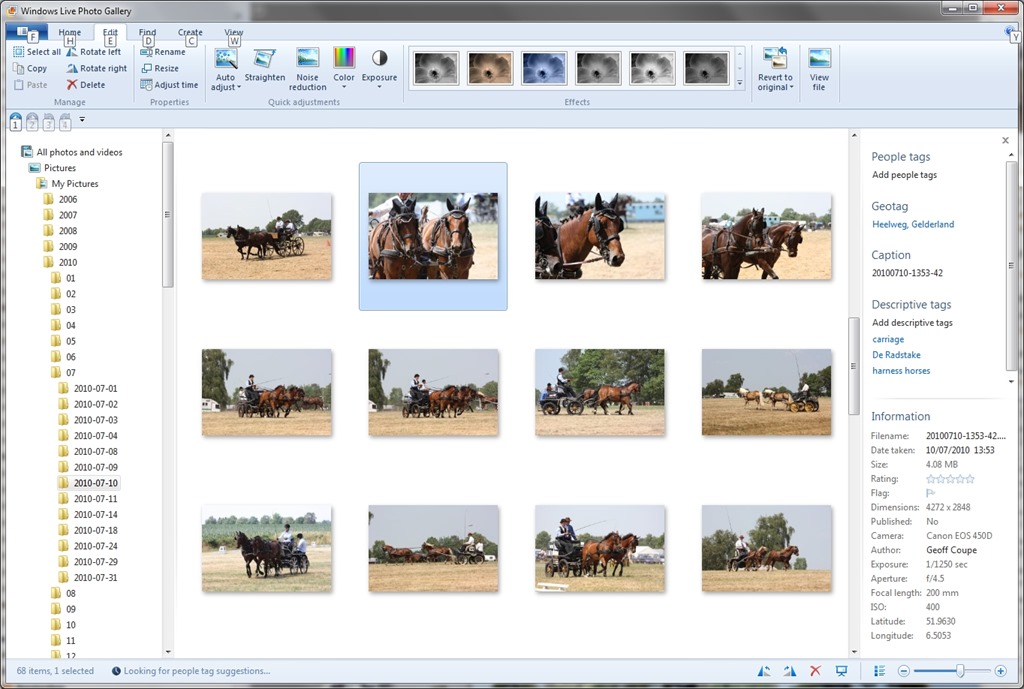
You can see that the metadata contains both descriptive tags (e.g. carriage and harness horses) as well as technical and copyright information (e.g. date taken, location, camera details, etc.).
This picture was uploaded to a SkyDrive photo album here. When I looked at the picture in SkyDrive, while I saw some (but not all) of the technical information, none of the descriptive tags had been transferred. Indeed, I was invited to add the tags again!

I blogged about this backwards step in November 2011, and had responses from Omar Shahine, and others, to my post. It turned out that the “Tags” label in SkyDrive no longer referred to Descriptive Tags, but People Tags.
I notice that since then, Microsoft has renamed the “Tags” label to “People Tags” – here’s the photo being displayed in SkyDrive today:

However, there is still no sign of any Descriptive Tags being displayed by SkyDrive, even though my photos are all tagged. Yesterday, Omar Shahine and Mona Akmal of the SkyDrive team held an “Ask Me Anything” session on Reddit. Someone asked about support of tagging on SkyDrive, to which Shahine replied:
Something we’ve talked a lot about on the team, but have nothing to share about this now.
So it’s something that has probably been talked about for the past two years, and we are still apparently no further forward? I have to say that I’m not impressed. If the team are serious about making SkyDrive relevant to photographers, then proper support of tags should be high on their to-do list.
And by “proper support”, I mean that SkyDrive should not just display Descriptive Tags as well as People Tags, but support searching of both types. Currently, they do neither.
I have a test image with a “People Tag” defined. Here it is being displayed in Windows Photo Gallery:
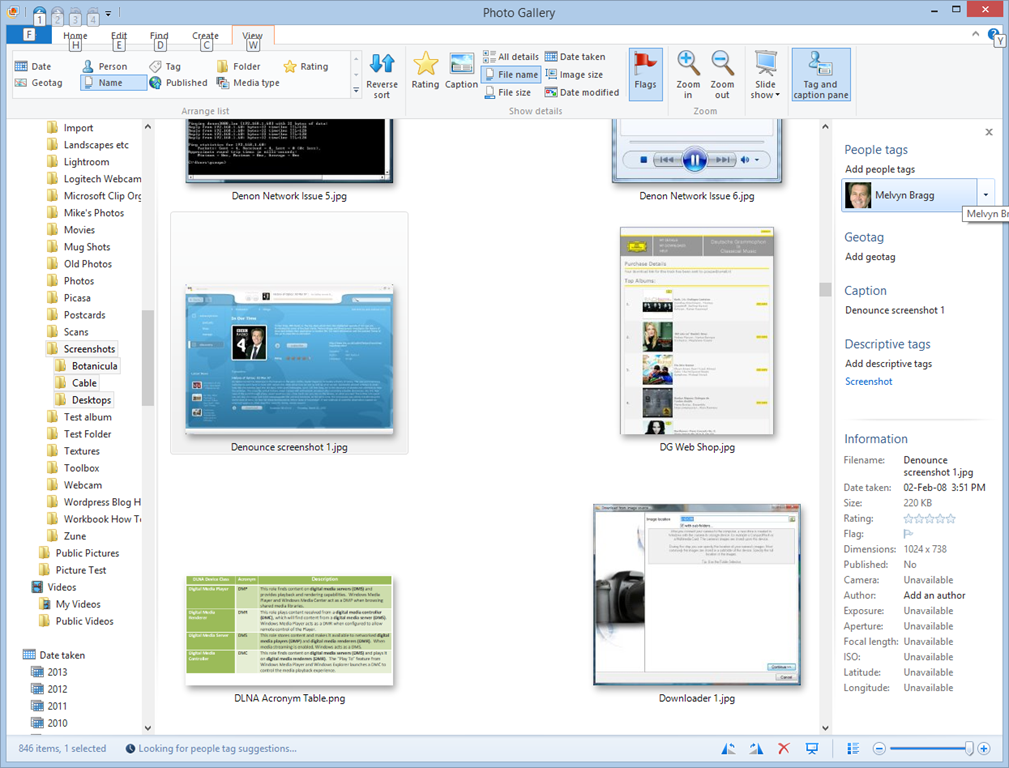
You can see that I have identified the face in the screenshot as being that of British broadcaster Melvyn Bragg, and that the image has a Descriptive Tag of “Screenshot”.
Now here’s the same image being displayed in SkyDrive:

It has lost all evidence of having a Descriptive Tag contained within the image, but at least it is displaying the fact that it has a People Tag, with the content “Melvyn Bragg”. Unfortunately, People Tags, just like Descriptive Tags, are not searchable on SkyDrive. If I search within my SkyDrive files for “Melvyn”, I get the message that nothing is found:

Both People Tags and Descriptive Tags are searchable on my PC – Windows supports searching within photo metadata, so here, the image is found:

But this won’t help someone trying to find something that has been tagged within my public SkyDrive folders, or friends and family looking for something within my shared folders.
So, to summarise:
- Microsoft removed the display of Descriptive Tags in photo metadata from SkyDrive in June 2011.
- They replaced it with the display of People Tags in photo metadata.
- Neither Descriptive Tags nor People Tags are searchable in SkyDrive
- Two years on, and nothing has changed.
Serious photographers need to look elsewhere.
Update 19th February 2014: Well, today Microsoft has changed the name of SkyDrive to OneDrive, but nothing else has changed. Tag support is still woeful, and searching of tags is still not supported.
Update 10th May 2014: Microsoft has introduced some new features into OneDrive, but unfortunately, the support for Tags is still very much broken.
Update 23rd January 2015: OneDrive has finally introduced support for searching on Tags!


 Geoff Coupe's Blog
Leave a comment