Reflections on life at “De Witte Wand”…

Year: 2013

  • Maybe It’s Just Me…

    …but I really don’t want to play Grand Theft Auto V, despite it getting rave reviews.

    Set mostly within the glitzily superficial city of Los Santos, a warped mirror of Los Angeles, GTA V is a sprawling tale of criminal maniacs self-destructing on a blood-splattered career trajectory to hell. Michael is the middle-aged thug, obsessed with movies, who pulled a witness protection deal with the feds after a failed heist many years ago. When his old partner Trevor, a sociopath who bakes meth out in the desert, turns up in town, the two join forces with a young black kid, Franklin, who’s set on leaving his gang-infested neighbourhood behind. The aim is a few final high-paying jobs, but there’s a festering resentment between Trev and Michael that goes back a long way, a fizzing fuse that trails all the way through the carnage.

    This three-character format emancipates the narrative, jettisoning the awkward requirement for one protagonist to be everywhere, witnessing everything in this vast world. Switching between the characters can be done at any time while off mission, and all three have their own little pet projects to get involved with, adding variety and a few amusing surprises: switching to Trevor usually involves some bodily function or weird violent episode, while Michael has his dysfunctional family to manage. And overlaying all this is a huge plot about warring government agencies and corrupt billionaires.

    Judging by the news, human behaviour in the real world is depressing enough without wanting to immerse myself in more of the same…

    Women are, once again, relegated to supporting roles as unfaithful wives, hookers and weirdos. The one successful female character in the story is suspected of just wanting to screw her boss. Of course, GTA is essentially an interactive gangster movie, and the genre has a long history of investigating straight male machismo at the expense of all other perspectives, but it would have been wonderful to see Rockstar challenging that convention. It’s fine to parody the idiotic misogyny of violent men, but how about doing it by providing their opposite? It seems Rockstar North’s all-male writing team is too in thrall to Tarantino and Brett Easton Ellis to really consider this.

    So GTA V fails the Bechdel Test then? What a surprise.

  • “100,000 dead, seven million displaced and a nation turned to rubble”

    Kenan Malik sums up the real consequences of the terrible conflict in Syria. It makes for depressing reading. The posturing of Putin in particular is pure politics. However, as Malik says, none of the players come out of this well. Meanwhile, the slaughter and the flood of refugees continue.

  • Strong Convictions

    While I often shake my head at some of the religious bollocks that emanates from the US, I would do well to remember that here in the Netherlands we have many examples of our own.

    The latest is of a Dutch school having to pulp 3,000 diaries printed for the pupils because some parents are convinced that they contain a sign of Satan. And what’s the sign, you ask? It’s the Peace sign. You know, the one designed by Gerald Holtom in 1958.

    School board chairman Johan van Puten is reported to have said:

    ‘The conviction of the parents that the symbol was unacceptable was so strong that I knew a rigorous approach was the only solution’

    Someone should point out to him that strong convictions do not necessarily equate to them being correct. And in this instance, it’s clearly the parents who need education as much as, if not more than, their children.

  • Mellow Fruitfulness

    At the moment, we’re seeing Keats’s poem To Autumn come to life all around us. We’re harvesting our fruit trees and shrubs. This year we have a bumper crop of plums, pears, elderberries and blackberries, backed up by a reasonable result from our walnut, hazelnut, and sweet chestnut trees.

    We have also discovered that we have Cornelian Cherry shrubs laden with berries, and so we’ll be making a new jam variety this year, to go alongside the pear jam (with hints of lemon and cinnamon), the blackberry and elderberry jams, and the plum jam and chutney. Trouble is, we’re rapidly running out of jam jars…

    20130904-1455-3120130911-1304-31

    20130911-1302-08

  • Under The Skin – Again

    As I wrote back in 2009, Michel Faber’s first novel Under The Skin will probably get under your skin, and provoke a severe reaction. I see that the novel has now been made into a film. While it sounds as though liberties have been taken with the plot, I hope that Isserly’s odyssey remains as strange and as haunting as in the original story.

  • TW3 and RIP

    It’s been something of a week for drawing breath, what with the announcements of the deaths of first Seamus Heaney, and now David Frost. Both were 74, and both, in very different ways, contributed to the cultural lives of many.

    Much as it pains me to say it; if I’m honest, then Frost’s influence on my life has been much greater than that of Heaney’s. I was transfixed, at an impressionable age, like a deer caught in the headlights of an oncoming car, by That Was The Week That Was on BBC TV.

    Devised by Ned Sherrin, fronted by Frost, but with sterling support from many others, TW3 was a satirical landmark in British Television. We shall not see its like again.

    It only ran in 1962 and 1963, when I was just 13 and 14. It was a late-night show, live, and ran each week for as long as it took to get through the material, often into the small hours. Looking back, I am slightly surprised that my parents allowed me to watch it at all.

    As is quoted on TW3’s Wikipedia page:

    TW3…did its research, thought its arguments through and seemed unafraid of anything or anyone… Every hypocrisy was highlighted and each contradiction was held up for sardonic inspection. No target was deemed out of bounds: royalty was reviewed by republicans; rival religions were subjected to no-nonsense ‘consumer reports’; pompous priests were symbolically defrocked; corrupt businessmen, closet bigots and chronic plagiarists were exposed; and topical ideologies were treated to swingeing critiques.”

    So thank you, David Frost (not forgetting Ned Sherrin, Timothy Birdsall, Bernard Levin, Lance Percival, Kenneth Cope, Roy Kinnear, Willie Rushton, Al Mancini, Robert Lang, Frankie Howerd, David Kernan, Millicent Martin, John Albery, John Antrobus, John Betjeman, John Bird, Graham Chapman, John Cleese, Peter Cook, Roald Dahl, Richard Ingrams, Lyndon Irving, Gerald Kaufman, Frank Muir, David Nobbs, Denis Norden, Bill Oddie, Dennis Potter, Eric Sykes, Kenneth Tynan, and Keith Waterhouse). You helped form me into the person I am today.

  • The Perseids

    I spent a hour or two outside in the garden looking for evidence of the Perseid meteor shower. I really should have been out on Monday – when the shower was at its peak – but, as usual, cloud cover won the night.

    I saw a few (less than ten), but I couldn’t help feeling that the Perseids are a bit overrated. They were both fast and faint; not very spectacular. By coincidence, I was out walking the dogs just after 10pm, when it was getting dark, and I saw an absolutely spectacular slow-moving meteor (not a Perseid) that went from the zenith almost down to the northern horizon, leaving a trail for half of its flight.

    During the observation of the Perseids, I attempted to make one of those time lapse films that are very popular these days. The Guardian has an example of one of these films, but they rather spoiled it by saying that the objects streaking across the sky are Perseids. Nope – they’re either aircraft or satellites.

    I was struck last night by just how many satellites are visible to the naked eye – flitting about in all directions. Several of them also displayed flaring – as the sun catches their antennae or solar panels – the so-called Iridium Flares. That almost made up for the disappointment in the Perseids.

  • Remembrance Day

    I travelled to Scotland last week for a funeral. It was not an unexpected trip, but one that came too soon, nonetheless.

    David, my niece’s husband, was diagnosed with a brain tumour a year ago, and he died peacefully, with Fiona by his side, on August 1st. He was just 50 years old.

    David was neither rich nor powerful, in the usual measures of these terms. He was a gardener and a family man. Yet he was loved and respected by many. His funeral was attended by over a hundred people paying their respects.

    The funeral service was held at the graveside in Kirkcudbright cemetery. It was a Humanist burial, led by a Humanist Celebrant. She delivered a moving summary of David’s life, and I, like many others present I’m sure, smiled through my tears.

    David and Fiona had chosen a Tom Leonard poem “Remembrance Day” to be read out. It was the perfect choice. It begins:

    I know what it is
    to be powerless

    I know what it is
    to be made to lie low

    while the unknown enemy
    invades you

    There’s a recording of Leonard reading his poem here.

    The cemetery is on a hillside, overlooking the small town of Kirkcudbright. It’s a wonderful spot.

    20130807-1442-11 Stitch

    David’s bodily remains lie here, but his memories live on in us.

    20130807-1434-07

  • Canal Parade 2013: Flyboarding and More

    I didn’t make the trip to Amsterdam this year for the annual Canal Parade, but by all accounts, it was a great success. The Armed Forces had a boat in the Parade, and the Minister of Defense was on board with five of her Generals. The Minister for Emancipation (from the Ministry of Education, Culture and Science) also had her own boat and she was also taking part. The Parade was opened by two Flyboarding cowboys – something I’ve not seen before…

    I have to say that the trick of flying through the air into the water and back out again looks pretty spectacular…

  • The Xbox Music App Is Lying To Me

    Last month, I mentioned that I was having difficulty with the Xbox Music App installed on one of my systems. It does not see my music collection, and claims that there’s no music on the PC. A couple of days ago, there was an update of the Xbox Music App from Microsoft, so I wondered if that might have fixed the problem.

    The answer is no; the problem is still there.

    I currently have three instances of the Xbox Music App: one (version 1.4.18.0) is running on Windows 8, and two (version 2.1.15.0 – the latest update) are running on Windows 8.1 Previews. Two out of the three are working as expected, but one of the 2.1.15.0 versions is not: it absolutely refuses to see the contents of my Music Library.

    I’ve uninstalled/reinstalled the App several times, and wiped out the folders containing the App data, all to no effect. Here’s what the App told me after the last installation:

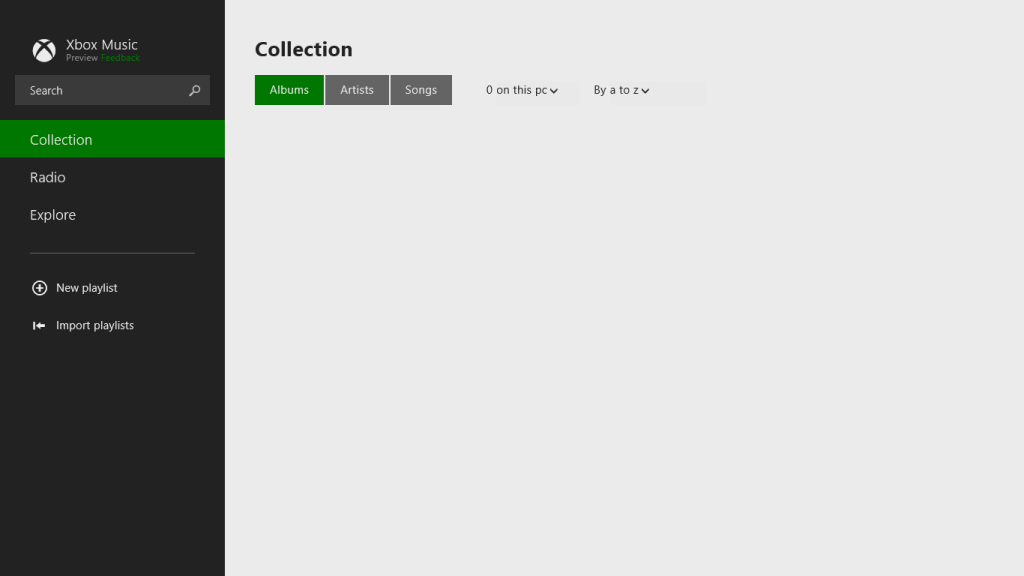
    xbox music issue 02

    “We didn’t find any music on this PC”.

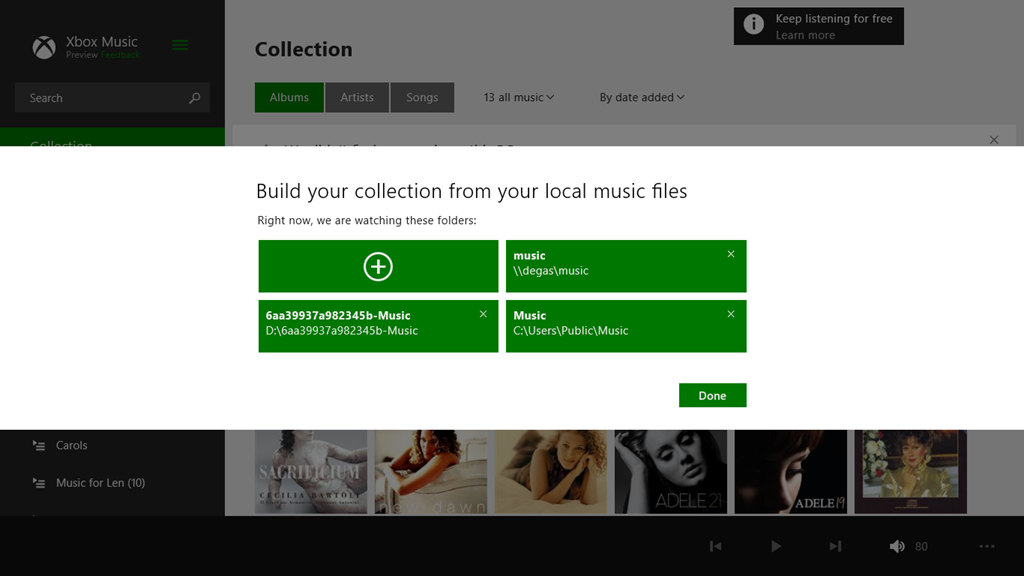
    It is displaying a few albums that I have stored in the Cloud, but that’s all. Tapping that message displays the folders that the App is supposed to be watching for music content:

    xbox music issue 03

    These are the folders included in the Music Library. I tried adding the main music folder for my music collection again, by tapping the “+” symbol, and navigating to the root folder of the music collection (\\degas\music):

    xbox music issue 04

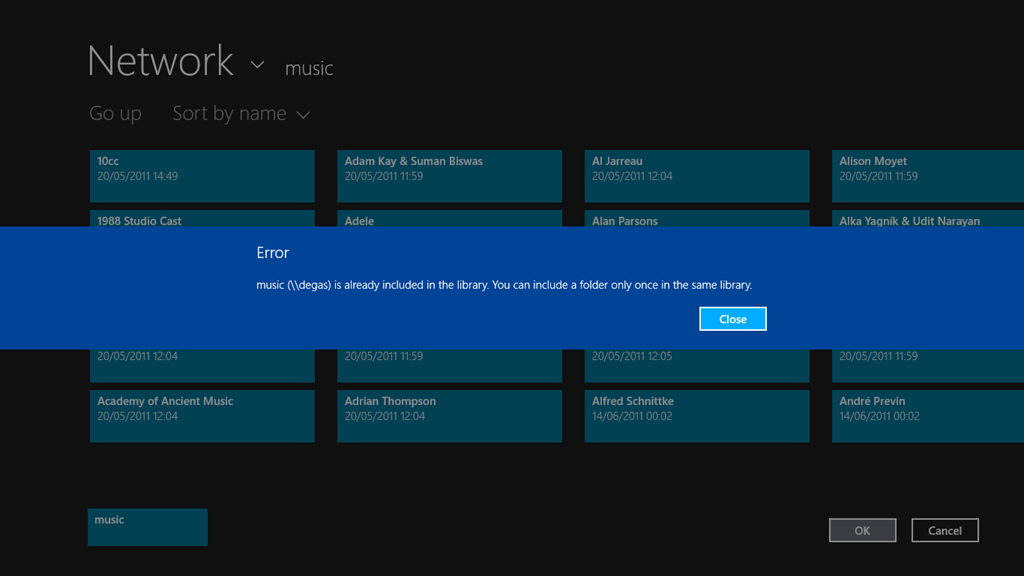
    However, when I tried to include the folder, I was told (not unexpectedly) that the folder had already been included in the library:

    xbox music issue 05

    So, Windows 8.1 knows where my music collection is, and so, apparently, does the Xbox Music App. However, the App refuses to do anything with it.

    Is this the same for all the locations currently defined for the Music Library? Let’s find out.

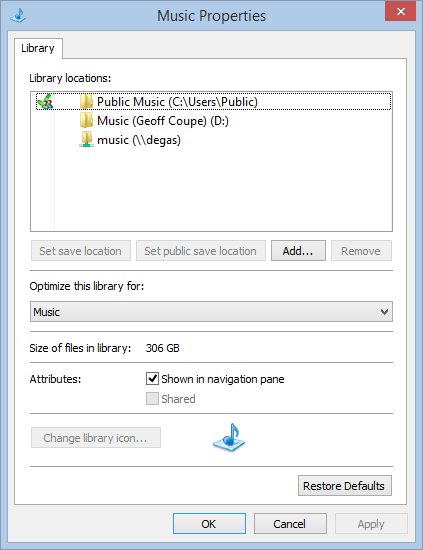
    Here’s the three locations currently defined for the Music Library on the system with the errant Xbox Music App:

    xbox music issue 06

    Note that one is a network location (\\degas\music – my main music collection), while the other two are local to the Windows 8.1 system; a location on the C: drive (C:\Users\Public\Music) and a location on the D: drive (called “Music (Geoff Coupe)”, but shown in the Xbox Music App with the user-friendly name of D:\6aa39937a982345b-Music… sigh). That location on the D: drive was set up by Windows 8.1 as the default location for saving music files.

    If I paste in a couple of test albums from my music collection to these local folders, then I find that the Xbox Music App will only react to the contents of the folder on the C: drive. It will ignore the contents of the supposedly “default” music folder on the D: drive.

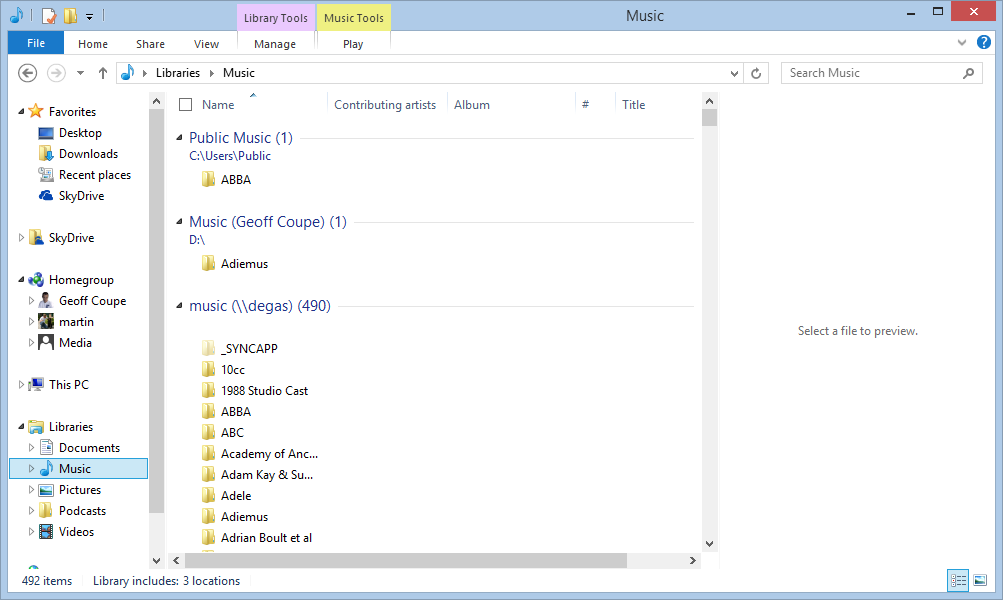
    Here’s a screenshot of the Music Library contents:

    xbox music issue 07

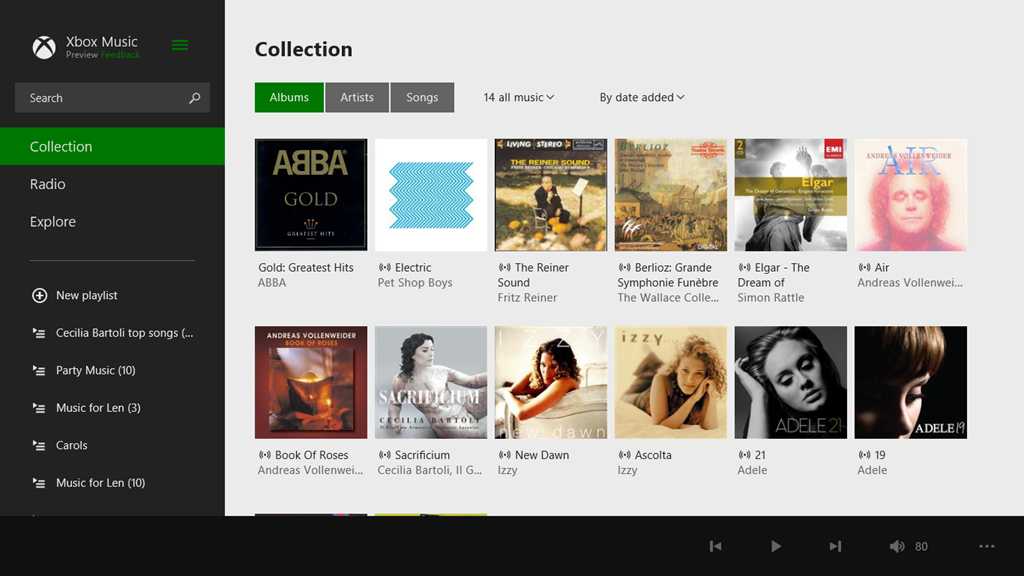
    As a test, I’ve copied an ABBA album to the Public Music library on the C: drive, while my default Music Library on the D: drive has an Adiemus album in it. The result in the Xbox Music App is that the ABBA album shows up, but the Adiemus album, along with the rest of my music, does not:

    xbox music issue 08

    Once again, let me stress that, on this Windows 8.1 system, Libraries are not broken for other third party apps, whether Desktop or Modern UI Apps. However, Microsoft’s own Apps (Xbox Music, Photos and Videos) are a disaster.

    I still fear that what we are seeing here is not a bug, but the natural consequences of Microsoft moving away from using Libraries. As they will no doubt proclaim in a month’s time: “it’s not a bug, it’s a feature!”. If so, this is one feature that I can definitely do without.

    Update 17th October 2013: I’ve just installed the final release of Windows 8.1 on my tablet, and the Music Library is now being accessed correctly by the Xbox Music App, so it looks as though the issue is now resolved. However, when one issue is resolved, another pops up.

  • SkyDrive – Still No Proper Support For Tags

    Yesterday, Microsoft added some functions to SkyDrive – its online storage service. The additions are described in this blog post by Omar Shahine, a Group Program Manager at  SkyDrive.

    Now, some of the additions are worthwhile, but I am still missing something that Microsoft removed back in June 2011: the display and searching of Descriptive Tags (aka Keywords) in photos. Up until that time, you could show the Descriptive Tags that were contained in the metadata of photos uploaded to SkyDrive. Then, Microsoft did a major revamp of the user interface of SkyDrive, and started using HTML5 to drive the interface. In that revamp, something odd happened. Photos that I knew contained Descriptive Tags were suddenly shown as having no Tags, and I was being invited to re-enter Tags into the photos on SkyDrive.

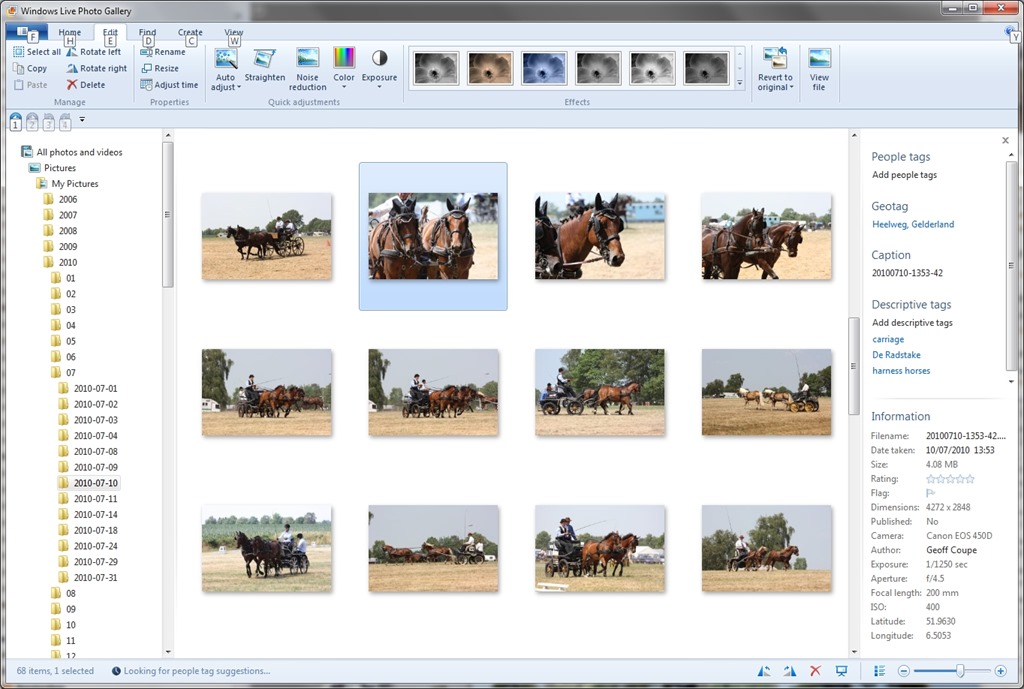
    Here’s an example of what I started seeing at the time; this is a screenshot of photos on my PC being displayed in Microsoft’s Windows Live Photo Gallery (now renamed to Photo Gallery), an application running on my PC. One thumbnail has been selected, and you can see the metadata embedded in the photo being displayed in the information panel on the right hand side of Windows Live Photo Gallery (click on the image to see the full-size screenshot):

    SkyDrive 1

    You can see that the metadata contains both descriptive tags (e.g. carriage and harness horses) as well as technical and copyright information (e.g. date taken, location, camera details, etc.).

    This picture was uploaded to a SkyDrive photo album here. When I looked at the picture in SkyDrive, while I saw some (but not all) of the technical information, none of the descriptive tags had been transferred. Indeed, I was invited to add the tags again!

    SkyDrive 2

    I blogged about this backwards step in November 2011, and had responses from Omar Shahine, and others, to my post. It turned out that the “Tags” label in SkyDrive no longer referred to Descriptive Tags, but People Tags.

    I notice that since then, Microsoft has renamed the “Tags” label to “People Tags” – here’s the photo being displayed in SkyDrive today:

    SkyDrive Tags 05

    However, there is still no sign of any Descriptive Tags being displayed by SkyDrive, even though my photos are all tagged. Yesterday, Omar Shahine and Mona Akmal of the SkyDrive team held an “Ask Me Anything” session on Reddit. Someone asked about support of tagging on SkyDrive, to which Shahine replied:

    Something we’ve talked a lot about on the team, but have nothing to share about this now.

    So it’s something that has probably been talked about for the past two years, and we are still apparently no further forward? I have to say that I’m not impressed. If the team are serious about making SkyDrive relevant to photographers, then proper support of tags should be high on their to-do list.

    And by “proper support”, I mean that SkyDrive should not just display Descriptive Tags as well as People Tags, but support searching of both types. Currently, they do neither.

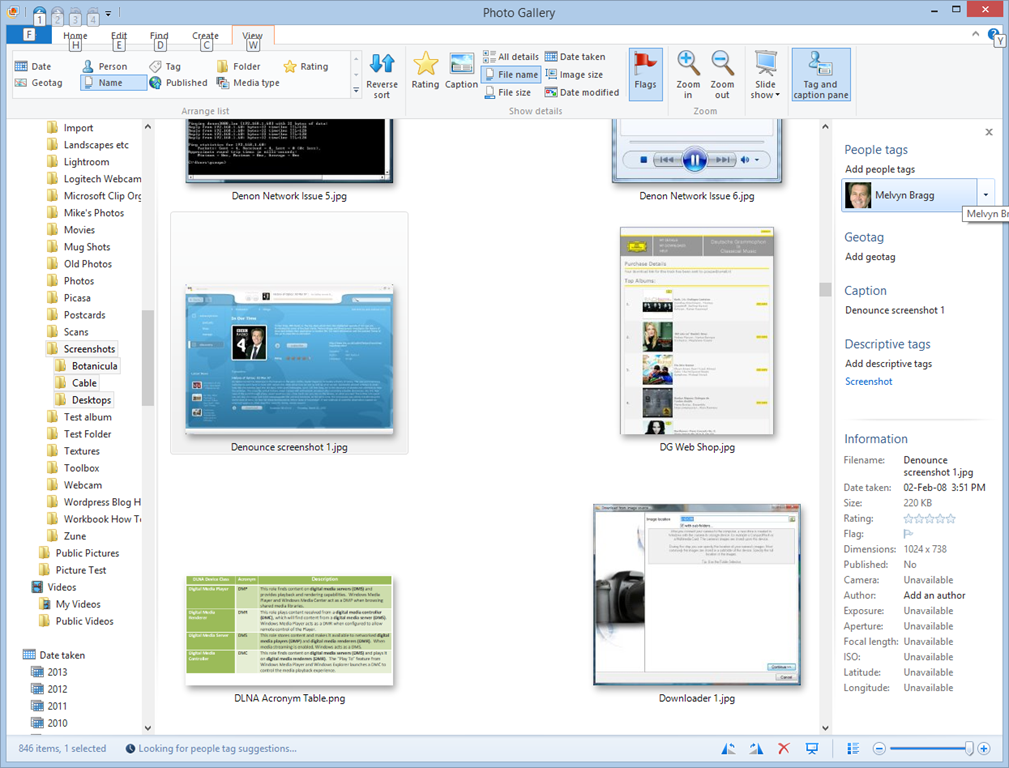
    I have a test image with a “People Tag” defined. Here it is being displayed in Windows Photo Gallery:

    SkyDrive Tags 06

    You can see that I have identified the face in the screenshot as being that of British broadcaster Melvyn Bragg, and that the image has a Descriptive Tag of “Screenshot”.

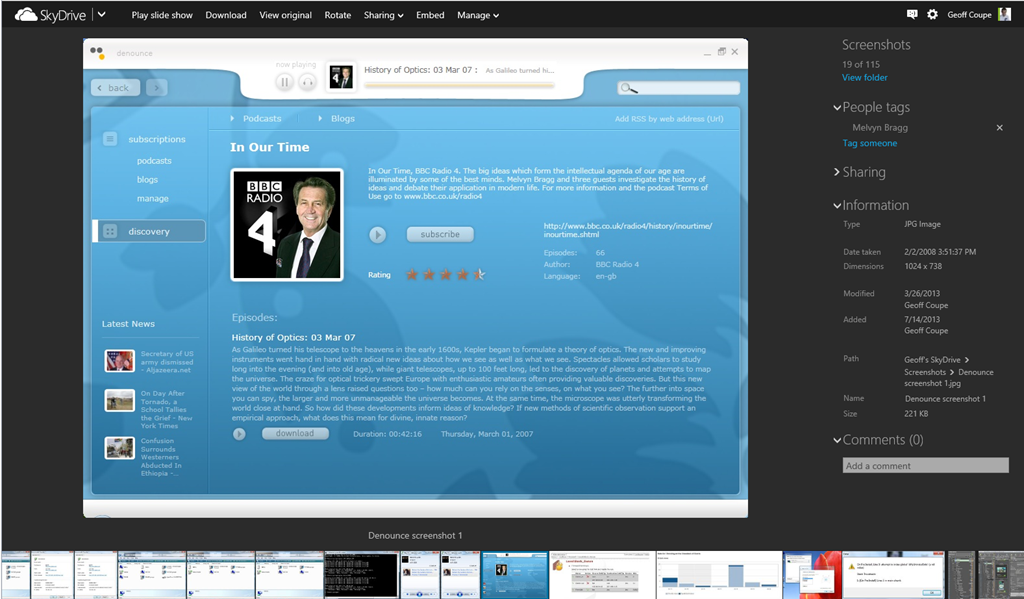
    Now here’s the same image being displayed in SkyDrive:

    SkyDrive Tags 02

    It has lost all evidence of having a Descriptive Tag contained within the image, but at least it is displaying the fact that it has a People Tag, with the content “Melvyn Bragg”. Unfortunately, People Tags, just like Descriptive Tags, are not searchable on SkyDrive. If I search within my SkyDrive files for “Melvyn”, I get the message that nothing is found:

    SkyDrive Tags 03

    Both People Tags and Descriptive Tags are searchable on my PC – Windows supports searching within photo metadata, so here, the image is found:

    SkyDrive Tags 04

    But this won’t help someone trying to find something that has been tagged within my public SkyDrive folders, or friends and family looking for something within my shared folders.

    So, to summarise:

    • Microsoft removed the display of Descriptive Tags in photo metadata from SkyDrive in June 2011.
    • They replaced it with the display of People Tags in photo metadata.
    • Neither Descriptive Tags nor People Tags are searchable in SkyDrive
    • Two years on, and nothing has changed.

    Serious photographers need to look elsewhere.

    Update 19th February 2014: Well, today Microsoft has changed the name of SkyDrive to OneDrive, but nothing else has changed. Tag support is still woeful, and searching of tags is still not supported.

    Update 10th May 2014: Microsoft has introduced some new features into OneDrive, but unfortunately, the support for Tags is still very much broken.

    Update 23rd January 2015: OneDrive has finally introduced support for searching on Tags!

  • I’m Clearly Missing Something…

    I don’t understand what all the fuss is about over news aggregator services, such as the (now-defunct) Google Reader.

    For years now, I’ve simply used the “Feeds” feature in my Internet Explorer to aggregate my own personalised collection of web sites that I’m interested in. I simply don’t see the need to register with an external news aggregator service (such as Feedly) to get the same information as I can get directly in my web browser. I’m getting a little fed up with having to hand details of my interests to Google and Feedly so they can monetise me.

    There must be some other reason why people do this that I’m simply not seeing. Isn’t there? If it’s simply that they can access a news aggregator service that is synchronised across a number of devices, then that’s not sufficient reason for me personally to sign up to such a service.

    I’ll just carry on with the feeds in my Internet Explorer. I will supplement that with a standalone feed reader on my Tablet. Veen Feed Reader looks to be the best of the bunch in the Windows Store for my purposes.

  • There’s the Demo, Then There’s the Reality…

    A new input device for your computer is available. I don’t think we’ve quite got to Minority Report fluidity yet…

    http://bcove.me/bydxiwxr

    (hat tip to Ars Technica)

  • Microsoft’s SkyDrive – Room for Improvement

    OneDrive (previously SkyDrive, Windows Live SkyDrive and Windows Live Folders) is the online storage service offered by Microsoft. It’s been around since 2007, and has been through a number of iterations. It really started to come into its own with the introduction of Windows 8, where it started to assume a much more prominent role. Now with the imminent introduction of Windows 8.1, it is becoming more tightly integrated with the Windows operating system than ever, and the distinction between local and online (cloud) storage is becoming even more blurred.

    I’ve changed all references to SkyDrive to OneDrive in this post since it was first written, to reflect the change of name given to the service by Microsoft. Some screenshots and external references still refer to the old SkyDrive name…

    There’s a good post (Inside SkyDrive) over at the Windows blog that describes some of this integration. However, it seems to me that there is still room for further improvement.

    For example, the author of the post (Mona Akmal, Group Program Manager, SkyDrive apps) writes:

    Many people use search to quickly access their files. So we’ve made search work just as you’d expect – SkyDrive files show up in search results just like your local files.

    Er, no, that’s not true. The way that the search function works is to index the information held in the small placeholder files held locally on your PC. These placeholder files represent the real files held up on the OneDrive service itself. At the moment, it seems that very little metadata is held in the placeholder files; only things such as the filename, and image thumbnails. So if I search for Descriptive Tags (aka Keywords) that are held in photo metadata, I get no results.

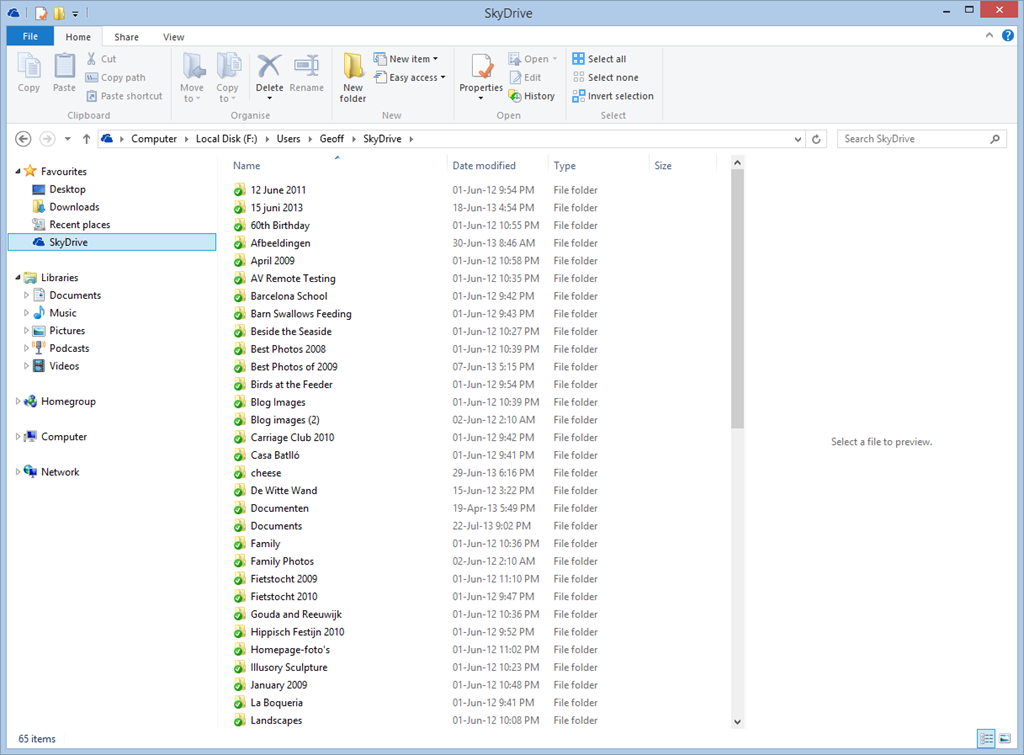
    Let me illustrate this. In Windows 8, it is possible to have a local copy of your SkyDrive folders and files. Here’s a screenshot showing some of the OneDrive folders that are held locally on my Desktop PC:

    SkyDrive 01

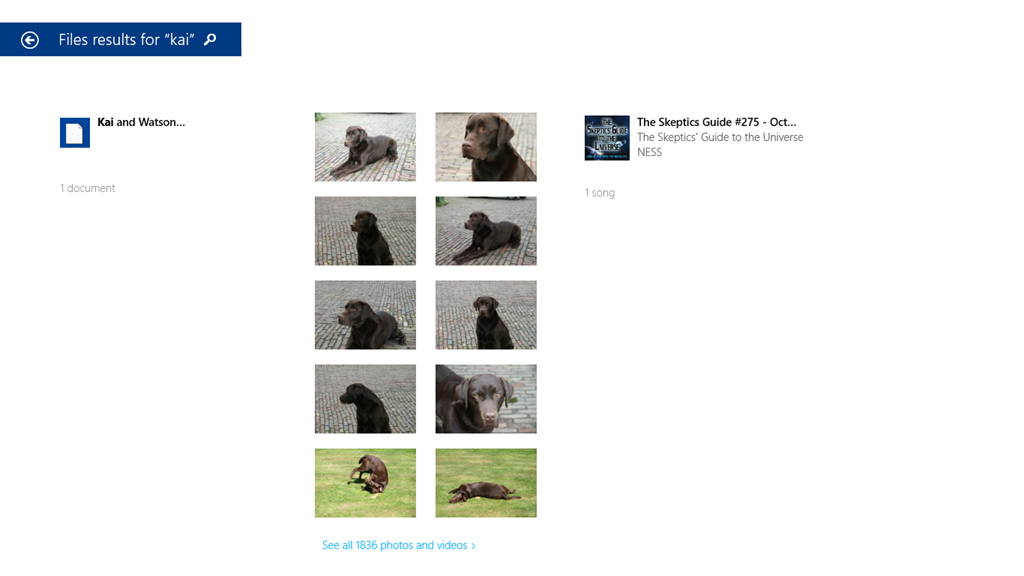
    These folders and the files within them are full local copies of the contents of my OneDrive storage. They are also included in the scope of the Windows Search engine running on the PC, and because they contain all the metadata, they are also searchable. So, for example, If I search for pictures of our dog, Kai, I get 16 hits of OneDrive photos that contain the Descriptive Tag: Kai:

    SkyDrive 02

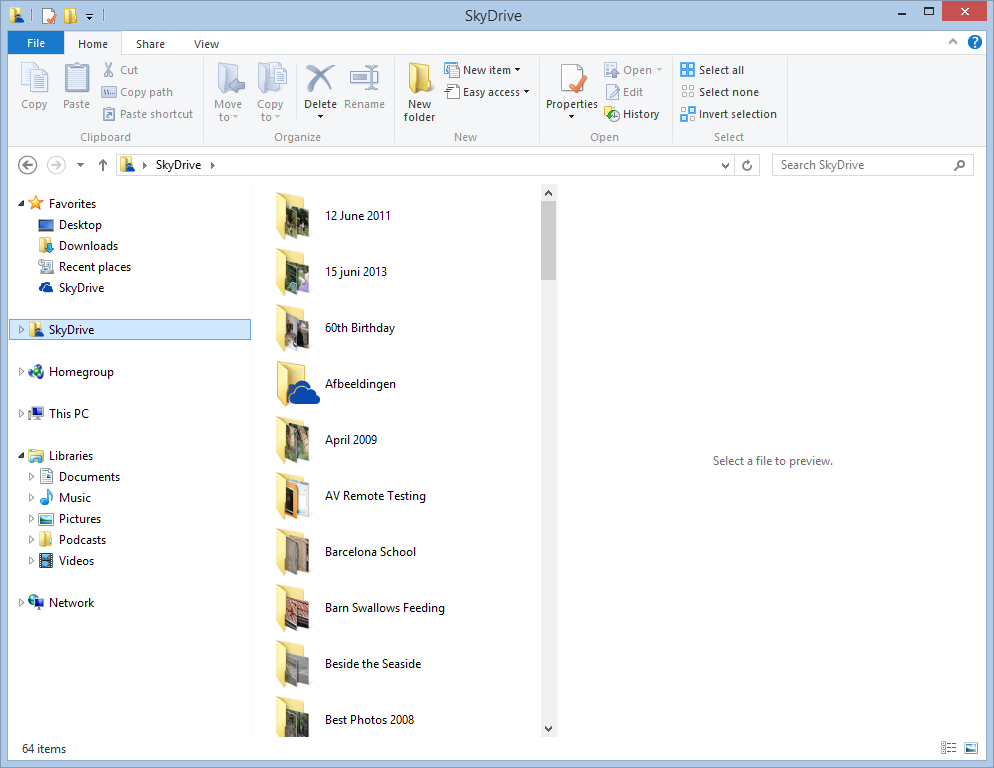
    My ThinkPad Tablet, on the other hand, is running the Windows 8.1 Preview. In Windows 8.1, the contents of my OneDrive storage is represented by placeholder files:

    SkyDrive 03

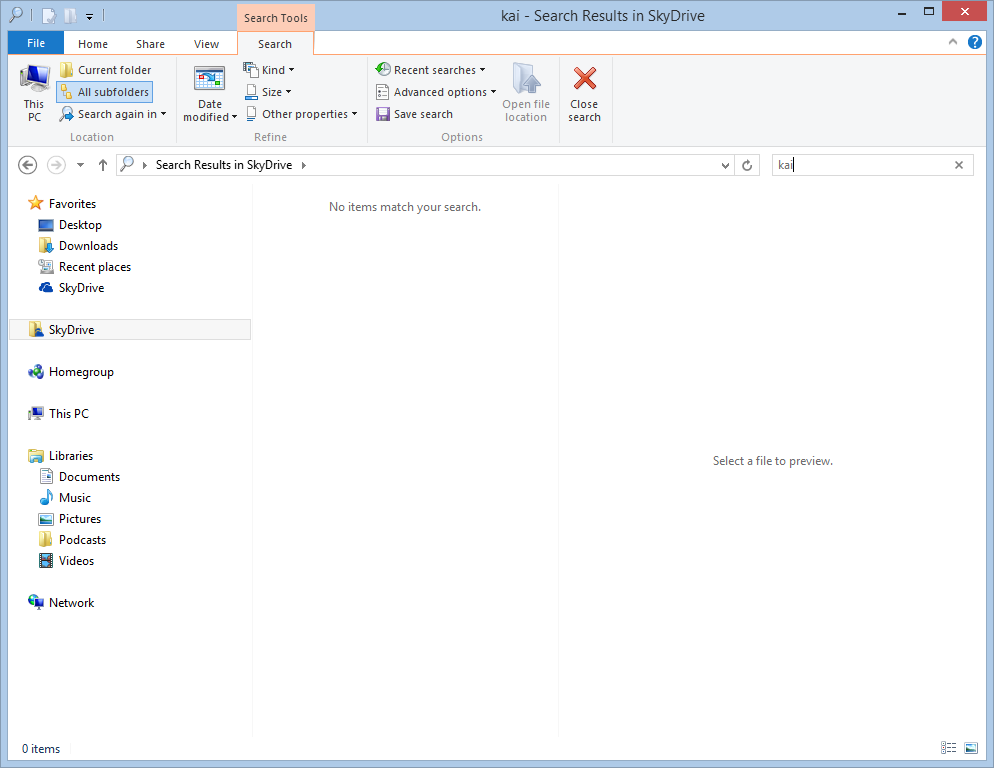
    To all intents and purposes, they look like the original Folders and Files held in my OneDrive , but they are not; merely placeholders. A full local copy of a file is not present on the Tablet, unless I have edited the file. So now, if I search for photos of Kai, I get a sad little “No items match your search” message:

    Skydrive 04

    That’s because the placeholder files do not contain any photo metadata. This seems to me like a real limitation, particularly since there is no way of searching Descriptive Tags in photos in OneDrive itself – even though the files themselves have the metadata.

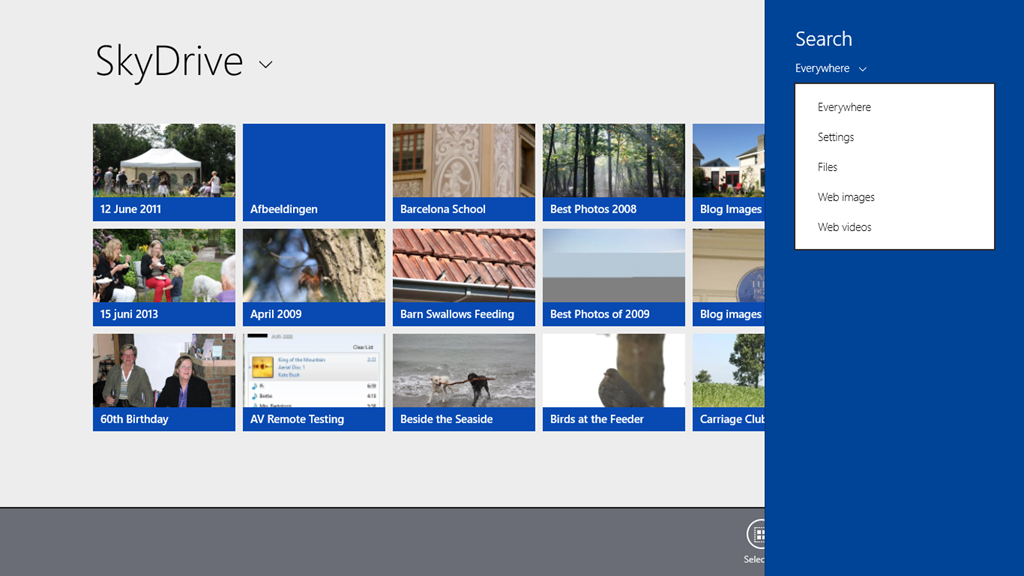
    Here, for example, is the OneDrive App in Windows 8.1. Note how the Search Charm is not able to search OneDrive , but only the web or local files:

    SkyDrive 05

    Searching for “Kai” produces only the results from my local libraries, not from OneDrive :

    SkyDrive 06

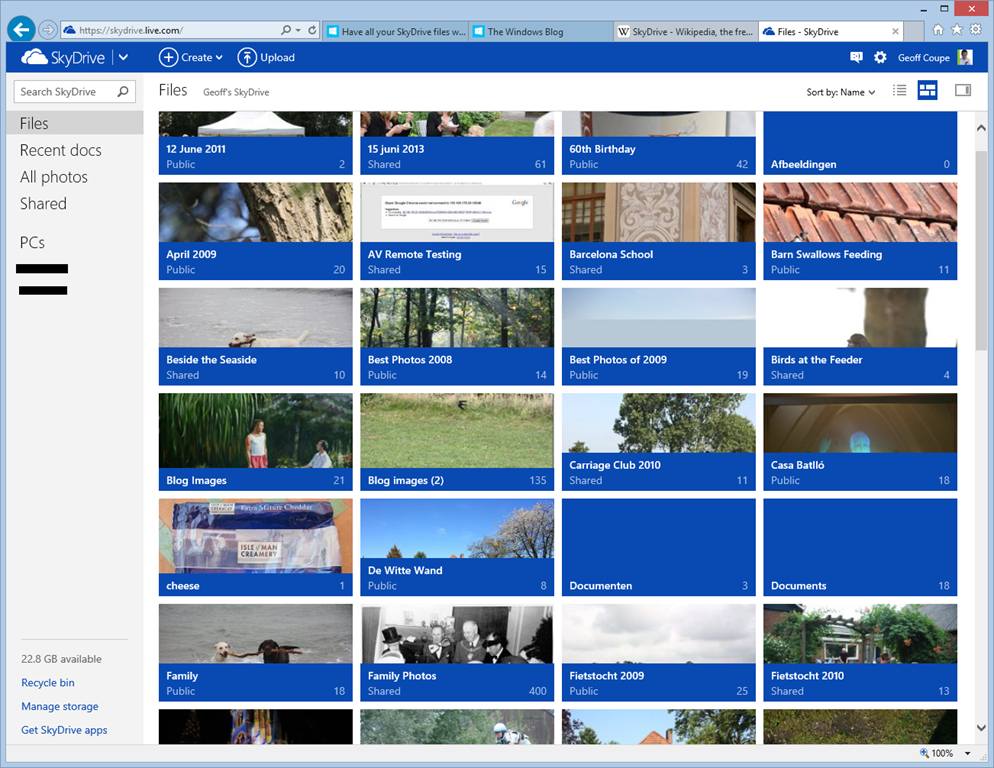
    If I use Internet Explorer to browse OneDrive directly, then I still can’t search on Descriptive Tags. Here’s the initial view of my OneDrive :

    SkyDrive 07

    If I use the “Search OneDrive” function at the top left, and search for “Kai”, then nothing is found:

    SkyDrive 08

    So the SkyDrive service is not indexing metadata such as the Descriptive Tags. This, by the way, is a long standing issue with the SkyDrive service. I’ve raised it on a number of occasions with the OneDrive team, and nothing has changed.

    In addition, the Windows 8.1 integration of OneDrive is also not indexing metadata, so perhaps the Microsoft statement should be rewritten as:

    Many people use search to quickly access their files. So we’ve made search work just not as you’d expect – SkyDrive files won’t always show up in search results unlike your local files.

    Sigh.

    Update 4 October 2013: If you read the comments below this post, you’ll see that members of the OneDrive team have replied. The good news is that they are working to address the shortcomings of the current search experience – photo metadata is now being included in the placeholder files. That’s good to hear.

    Update 7 May 2014: I’ve just done a test of uploading some files, containing IPTC Core keywords (tags) in their metadata, to OneDrive. You still can’t search for the tags using the browser accessing the online service – they don’t show up in the search results.

    However, it does appear as though the tags are now being included in the metadata contained in the placeholder files. So a search of the OneDrive folders on your local PC will find the tags. So, one step forward.

    Update 10 May 2014: The support for tags in the OneDrive service itself is still pretty much broken. Microsoft seem to have forgotten their one-time goal that “the truth is in the file“.

  • A Sense of Wonder

    The moon has stirred the imagination of humans for millennia. It still does. Here’s a view of the rising moon captured by Mark Gee. Worth watching.

    Full Moon Silhouettes from Mark Gee on Vimeo.

    (hat tip to Jerry Coyne)

  • Watch Anytime, Anywhere…

    I notice that some DVDs are now advertised as including a digital copy of the film, intended for playback on PCs, Smartphones and Tablets. I seem to recall that at one time, the digital copy was physically present on the DVD. These days, it seems as though you have to download it via the web. You go to a web site, type in the redemption code included with the DVD, and the digital copy gets downloaded to your PC.

    Well, that’s the theory, anyway. I’ve just bought a DVD of ParaNorman from Amazon UK. It boasts that this pack includes DVD + Digital Copy™ + Ultraviolet™ so that you can “Watch Anytime, Anywhere”.

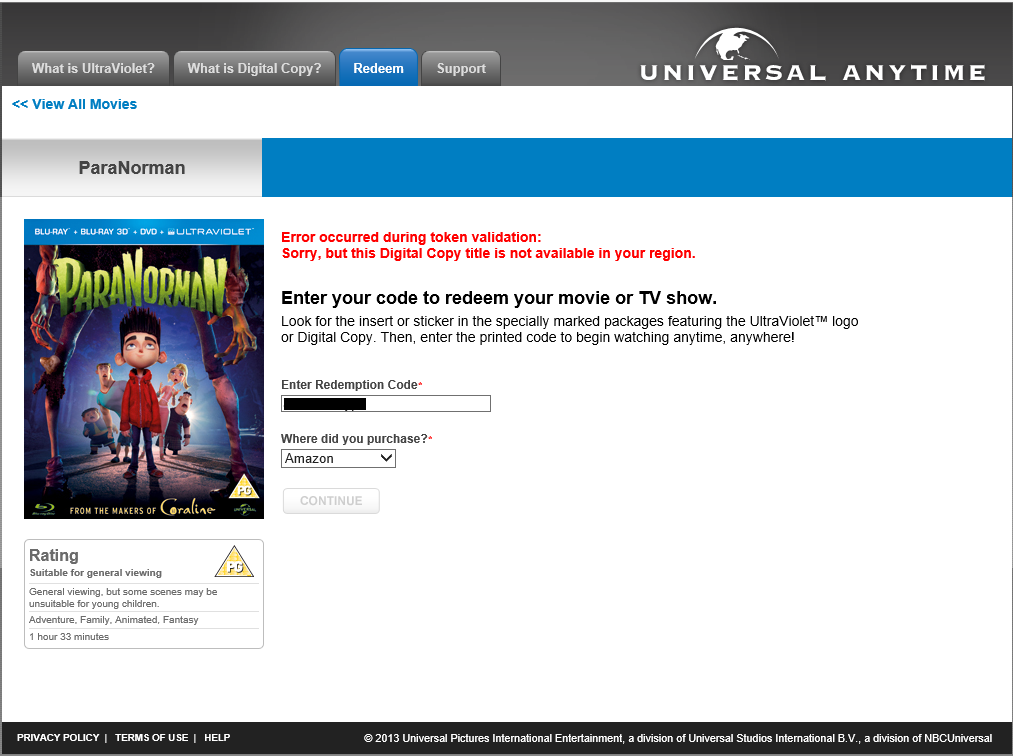
    I thought that I’d download the Digital Copy for my tablet, but when I entered my redemption code on the web site, I was greeted with:

    Ultraviolet

    “Error occurred during token validation: Sorry, but this Digital Copy title is not available in your region”.

    So much for “Watch Anytime, Anywhere”, then… It’s probably against EU law, but I doubt that Universal gives a damn about that. They’ll just carry on making it difficult for their paying customers.

    Update: I tried raising the issue with technical support. They basically gave me the brushoff:

    Hello,

    We are sorry to tell you that the Digital Copy feature for this title is only available inside UK as the webpage is Geo-filtered. We regret the inconvenience caused.

    Thank you.

    Universal Digital Copy Support

    Support Case Info:
    Product: Universal Digital Copy
    Issue: Technical Issues
    Status: Resolved
    Template: DC00045

    I suggested to them that they might consider spelling out this limitation in their terms and conditions on the packaging…

  • Xbox Music App and Libraries

    Here’s another episode in my look at Microsoft’s Windows 8.1 Preview. This time I’m looking at the Xbox Music App. I’ve found an inconsistency with how the App handles Libraries.

    I now have two systems on which I am running the Windows 8.1 Preview. The first is my main Desktop PC, where I have set up 8.1 in a dual boot with Windows 8. A few days ago Microsoft released drivers that enabled the 8.1 Preview to be set up on systems using the Clover Trail Atom chipset, such as my Lenovo ThinkPad Tablet 2. So that became the second of my systems. It’s probably of relevance to note that the 8.1 system on the Desktop was a clean install from a DVD, whilst on the tablet, it was an upgrade of the existing Windows 8 system to the 8.1 Preview, using the Installer in the Windows Store.

    Both systems are set up to access music files held on my Windows Home Server 2011 system. The problem is, the Xbox Music Apps on the two systems do not see the same content, when by rights, they should.

    Here’s a screenshot of the content of the music library as seen by the Xbox Music App on the Desktop PC:

    Xbox Music issue 05

    You will notice that it shows that I have 1,059 Albums in my music collection. Now here’s what I see in the Xbox Music App running on the tablet. Remember, it’s looking at the same music Library on the server:

    Xbox Music issue 07

    No albums at all…

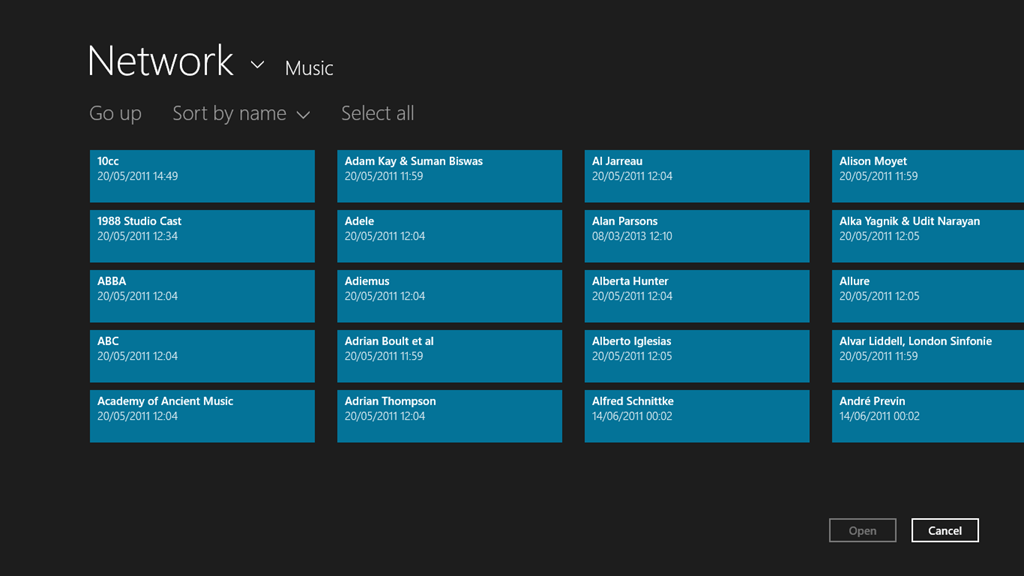
    Note that if I use the “open a file” function of the Xbox Music App, it will see the files and folders on the Windows Home Server:

    Xbox Music issue 09

    It just won’t add these files and folders into the music collection, despite them being linked to by an entry in the Music Library on the tablet.

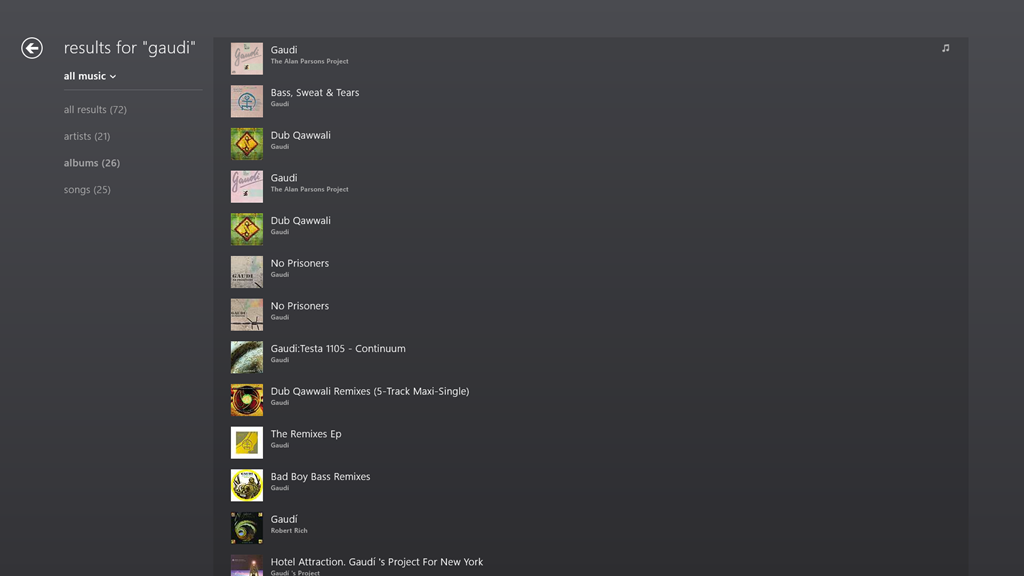
    If I search for an album that I know is in my music collection, then the Music App will only return results from the online music store. Here, for example is the result of a search for the album “Gaudi” by the Alan Parsons Project:

    Xbox Music issue 14

    Notice that here, the album is shown third in the list. This list is entirely made up of results from the online music store.

    If I do the same search using the Search function of Windows 8.1 itself, then I see this:

    Xbox Music issue 13

    Here, you can see that Windows Search has found the tracks from the Gaudi album by searching through my music collection held of the Windows Home Server.

    If I switch to the other Xbox Music App running on the Windows 8.1 on the Desktop PC, then searching within the App for Gaudi gives me this:

    Xbox Music issue 16

    The Gaudi album is now at the top of the list, and is the album contained in my music collection (signified by the musical notes icon on the right of the entry).

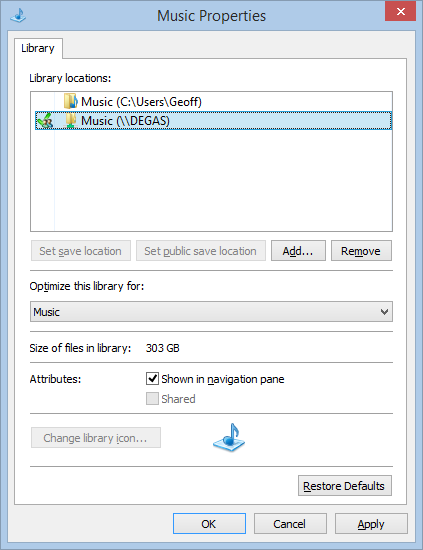
    Here’s the entries of the Music Library on the Desktop PC:

    Xbox Music issue 06

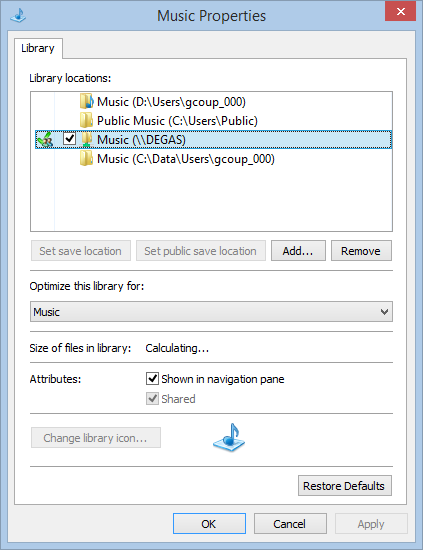
    And here’s the content of the Music Library on the tablet:

    Xbox Music issue 08

    In both cases, there are entries in the respective music libraries pointing to the music files held in the entry point of Degas, the WHS2011 server.

    The links defined for the Libraries on the tablet are the same as when it was running Windows 8. Then, the Windows 8 Music App happily accessed the music library on Degas. Now that the system has been upgraded to Windows 8.1 Preview, the 8.1 version of the Music App turns a blind eye. However, on the Desktop PC, the 8.1 version of the Music App sees the music library.

    So why does one Music App see everything, and the other see nothing at all?

    I have no idea; neither does Microsoft Support.

    Addendum: Despite a couple of updates to the Xbox Music App, this issue is still present.

  • Windows 8.1 Photo App

    I’ve been looking a bit more at the Photo App that is currently available as part of the Windows 8.1 Preview. As I mentioned in my last post, Barb Bowman has already mentioned two major strikes against it:

    The Photos App has changed:

    1. No longer includes the ability to show images from Facebook, Flickr, SkyDrive

    2. No longer allows images from other computers or the network –  am guessing that because there is now support for SkyDrive on RT and MS is heavily emphasizing that as the preferred storage location (when you upgrade, one of the questions asked before you even get to the desktop is if you want to use SkyDrive as your default storage area – and that seems to be the default – and MS feels the network, NAS, Homegroup, and other computers are deprecated.

    I’ll add another couple.

    • The editing functions will likely corrupt any Makernotes in the Exif that your camera may put there.
    • If the Exif section in your original image was created by your camera in Little-endian file order, then when the Photo App saves an edited image, it will reverse this to be a Big-endian file order.

    The Exif corruption is a long-standing issue. It’s been present for years in the Windows Photo Gallery application of Microsoft. They have acknowledged it as a bug, but they still haven’t bothered to do anything about it.

    The Little-endian to Big-endian switch is also a carry-over from the behaviour of Windows Photo Gallery. It’s also highly ironic. The guidance from the Metadata Working Group states that applications that change the contents of an image file should preserve the existing byte order. It’s ironic because Microsoft is one of the founder members of the Metadata Working Group. They can’t even be bothered to follow their own guidance.

    The Photo App as it stands is worse than useless.

  • Windows 8.1 Preview – Part II

    I’ve now installed the Windows 8.1 Preview on my Desktop PC; I went with the safe and boring option 2.

    With the caveat that this is not the final version of Windows 8.1, I’ve noticed some good things and bad things about the Preview.

    The good things are the tidying up and the further evolution of the Modern UI. So, for example, more of the traditional Desktop’s Control Panel functions are now exposed via the Modern UI, and they are grouped more logically. The sops thrown by Microsoft to the “Bring back the Start Button and the Desktop” crowd may satisfy them, but are of no interest to me – I never missed the Start Button in the first place.

    What does bother me are two things:

    1. The Mail development team still hasn’t got a clue on how to use the Windows 8 printing system.
    2. There are worrying signs that Microsoft may be deprecating the Libraries feature.

    With regard to (1), that’s been there since the very start of Windows 8. You can’t just print the current page, or a selection of pages from the Mail App. Something that’s easily done with the traditional Windows Print dialog, but which is totally impossible with this App. It is also the same with the IE10 App in Windows 8 (but that has been fixed for IE11 in Windows 8.1). They drop the “Pages” setting from the Modern UI Print screen. This is with a newer build (17.3.9431.0) of Mail from the one in Windows 8 (build 17.0.1119.516). Could someone please, please tell the development team how to use the printing system, for heaven’s sake?

    But the more worrying thing for me is that, starting with Windows 8.1, Microsoft seems to be deprecating the Libraries feature, which was first introduced in Windows 7.

    Libraries are the way to aggregate collections of data (e.g. documents, photos, music and videos) from disparate data sources (e.g. on the local PC, out in the network, or even in the cloud). I use them to give seamless access to photos and music that reside both locally and on our Windows Home Server, which serves media to our PCs and to other connected devices that support the DLNA standards.

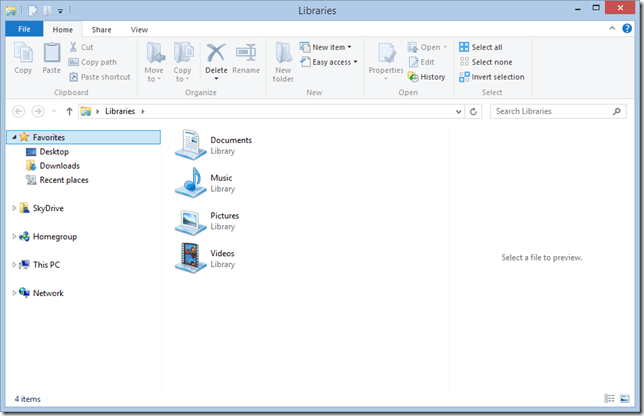
    In Windows 8.1, the emphasis has been put on SkyDrive as the primary storage location. Take a look at the traditional Desktop Windows Explorer in Windows 8.1. Here’s what you see when you first open it up:
    Win81 12

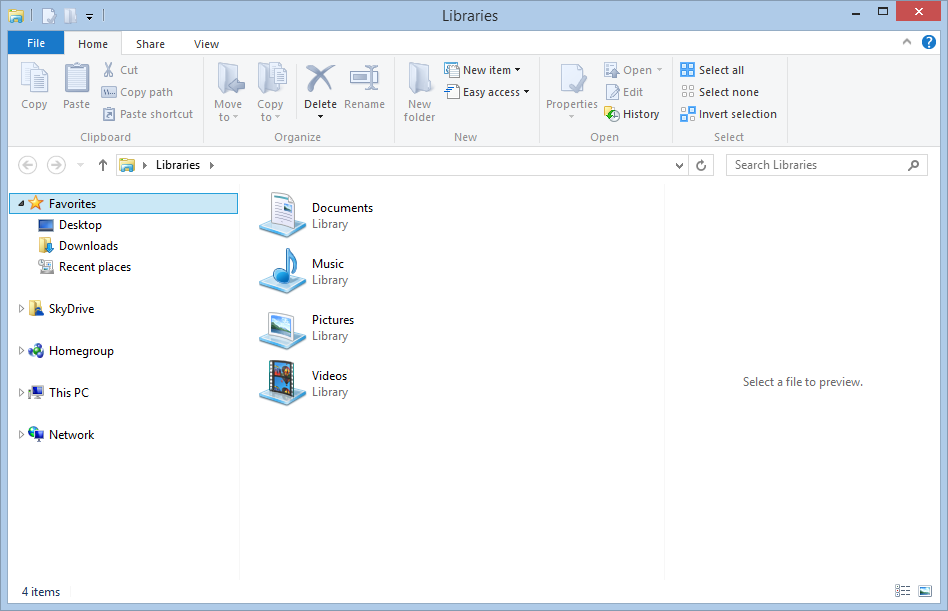
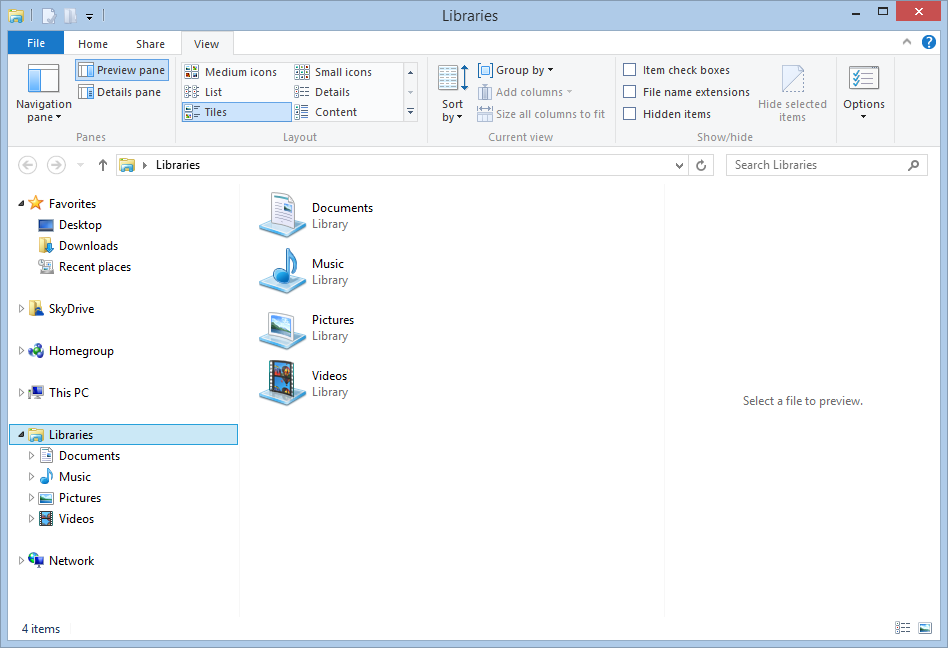
    Look at the Navigation Pane on the left. Note the prominence of SkyDrive, and the fact that what was called “Computer” in Windows 7 and 8 is now called “This PC”. Notice anything else? Yup – there’s no entries for the Libraries in the Navigation Pane. There is an option in the Explorer to turn them on, but it is off by default. Here’s what I wanted to see:
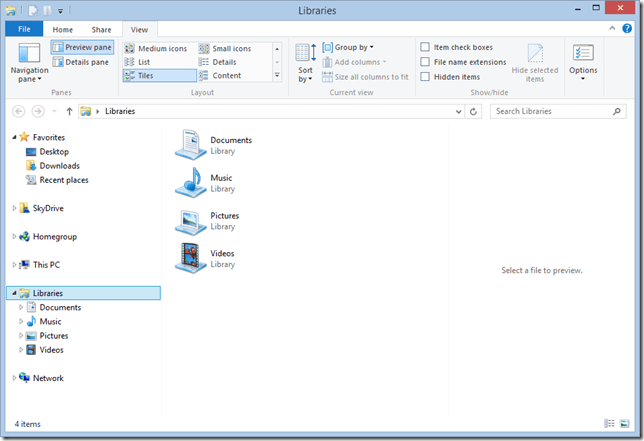
    Win81 13

    The Libraries feature is still there and working in Windows 8.1 – it’s just that not all Microsoft’s Modern UI Apps bother with it.

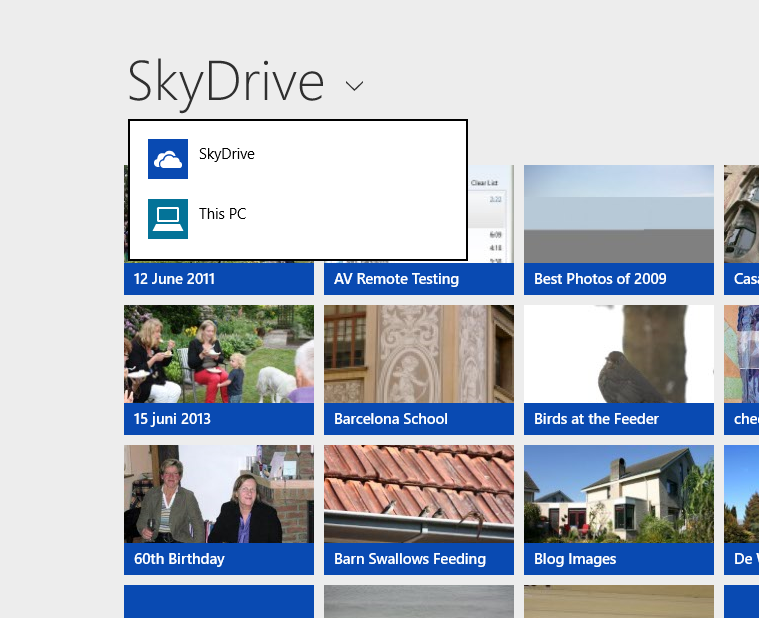
    For example, the SkyDrive App is clearly the first iteration of what is likely to become the Modern UI equivalent of the Windows Explorer, and its top-level entry points for accessing storage are “SkyDrive” and “This PC”; there are no “Libraries”or “Network” entries here:
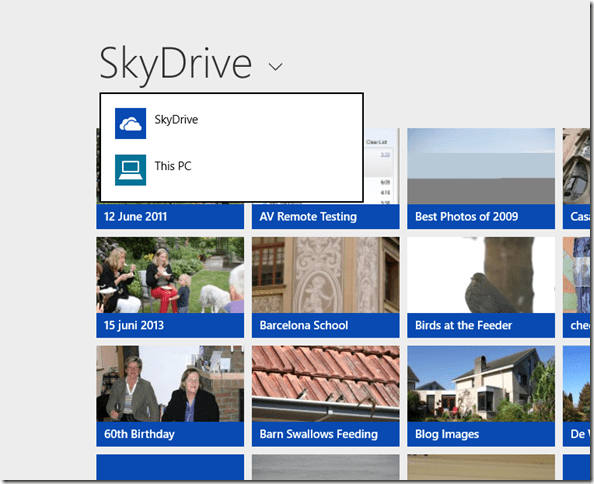
    Win81 02a

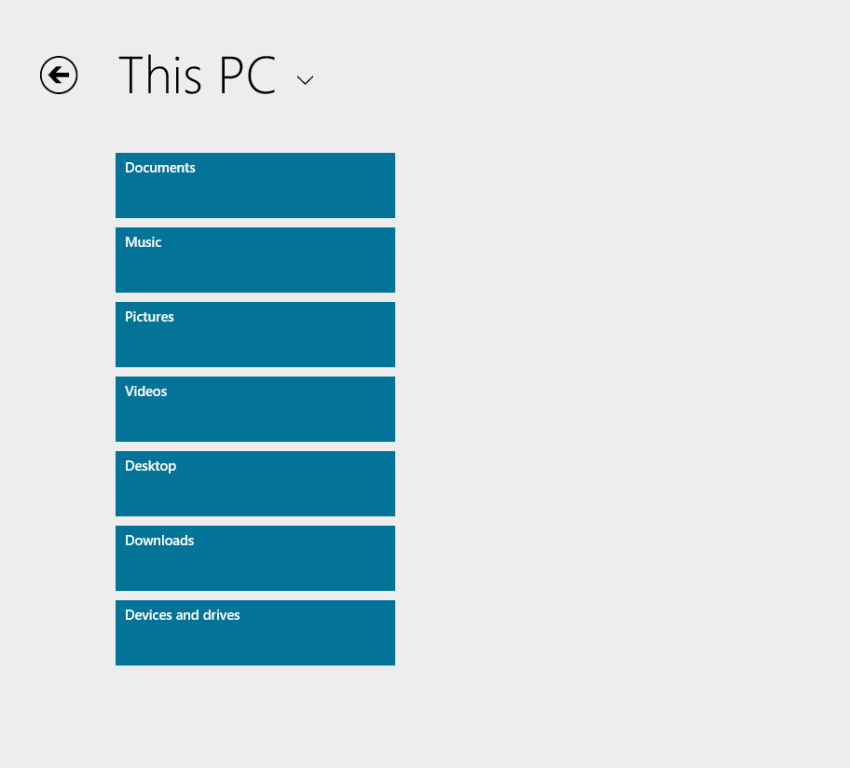
    Choose “This PC”, and you are presented only with the local storage locations; again, no Libraries or Network entries.
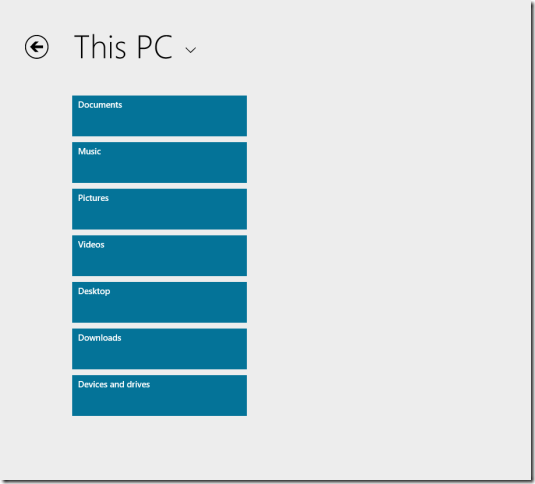
    Win81 03a

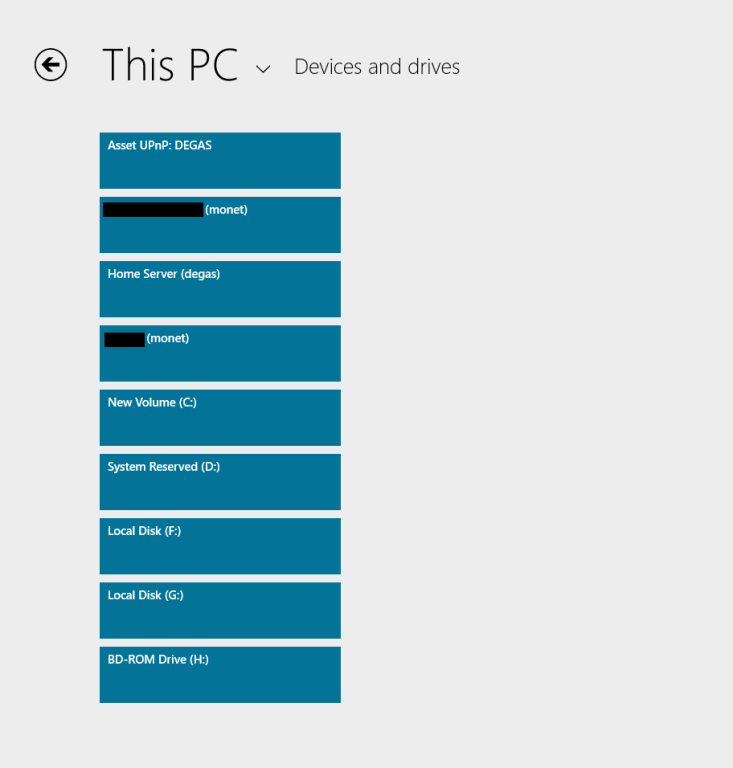
    There is that “Devices and drives” item at the bottom of the list; click (or touch) that, and you see a list of the local drives on the PC, and the media servers present on the local network:
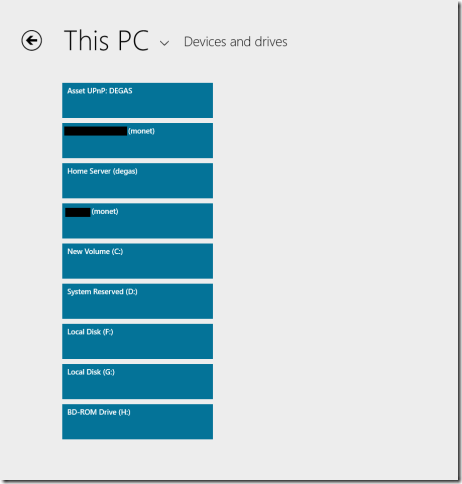
    Win81 10a

    So, “Libraries” are not exposed at all via this Modern UI Explorer… And we are still not out of the woods, because if I click on the “Home Server (degas)” item, this is what I see:

    Win81 11a

    Sigh. And yes, I’ve tried later, and there’s still no result. The Modern UI Explorer only works with SkyDrive and local storage on your PC – it ignores Libraries and Network Attached Storage – including Microsoft’s own Windows Home Server.

    It’s the same with the Photos App, except that it seems to be even more limited. It will only ever display photos held on the local PC in the C:\Users\Username\Pictures folder.

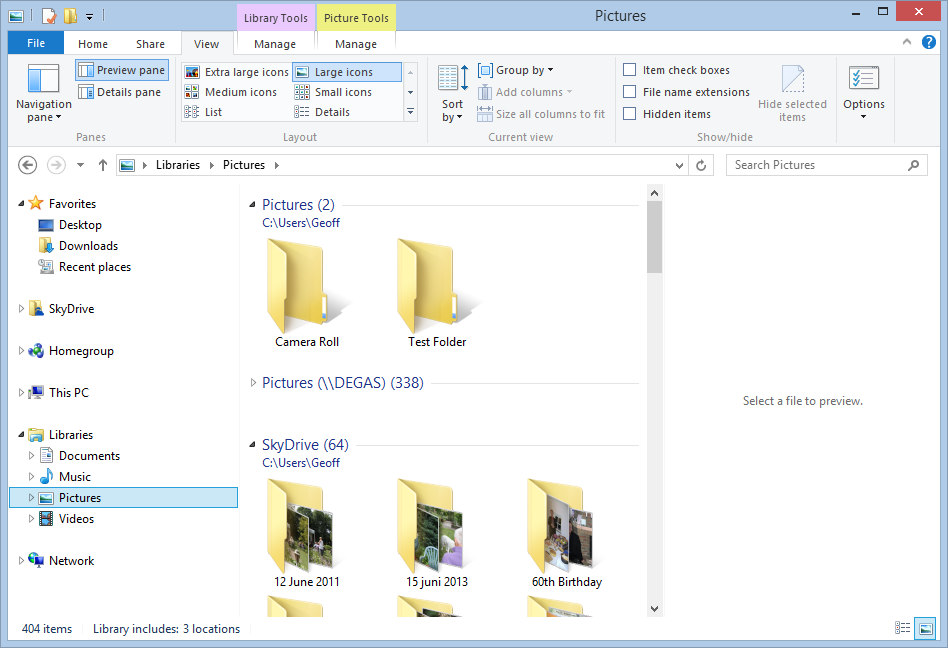
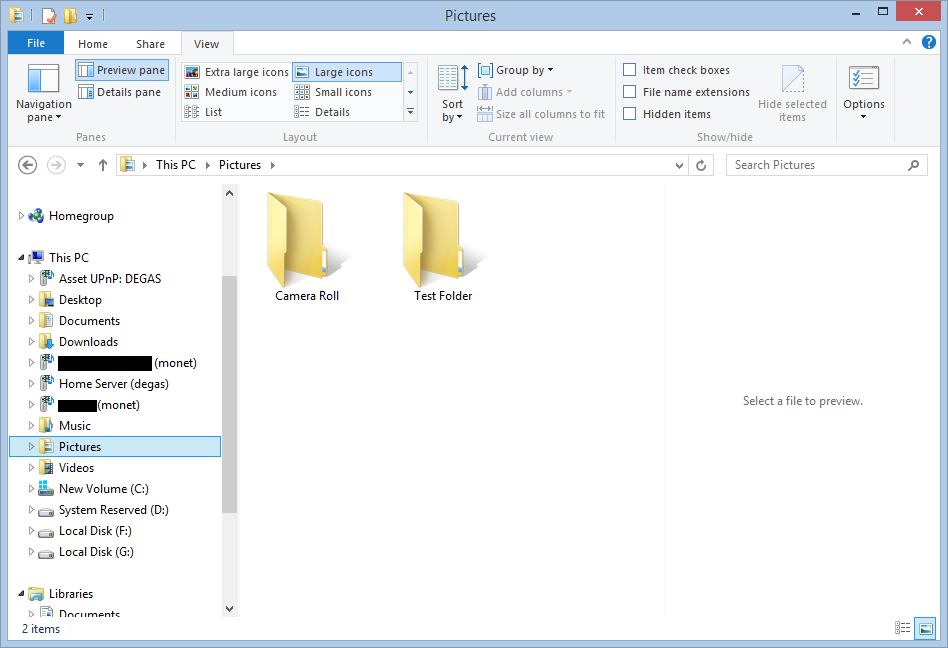
    Whereas the current Windows 8 version of the Photos App will display photos held in Picture Libraries, SkyDrive, Flickr and Facebook, the 8.1 version of Photos App will only display photos and folders held in the C:\Users\Username\Pictures folder. Here, for example, is what I have in my Pictures Library in Windows 8.1:
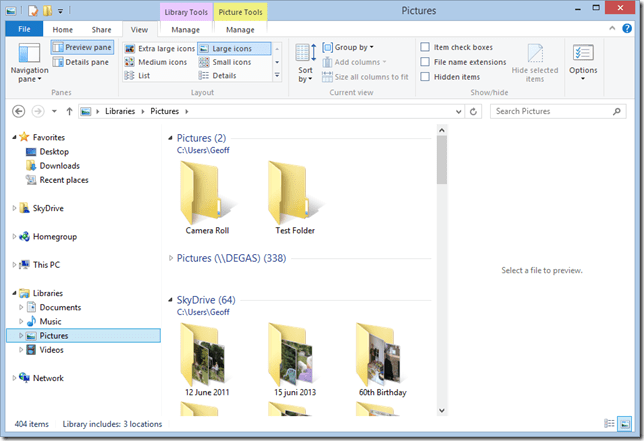
    Win81 14 

    I have three locations defined for the Pictures Library:

    • C:\Users\Geoff\Pictures (with two folders: Camera Roll and Test Folder)
    • \\Degas\Pictures (with several hundred top-level folders and 50,000+ photos)
    • C:\Users\Geoff\SkyDrive (with 64 folders)

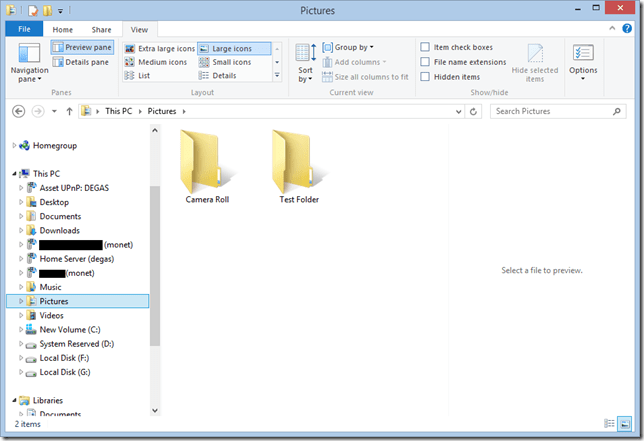
    If I open up the 8.1 Photos App, all I see are the two lonely folders in C:\Users\Geoff\Pictures:

    Win81 19

    So the Photos App is simply looking in the “This PC” hierarchy, and just picking up the local Pictures folder:
    Win81 18

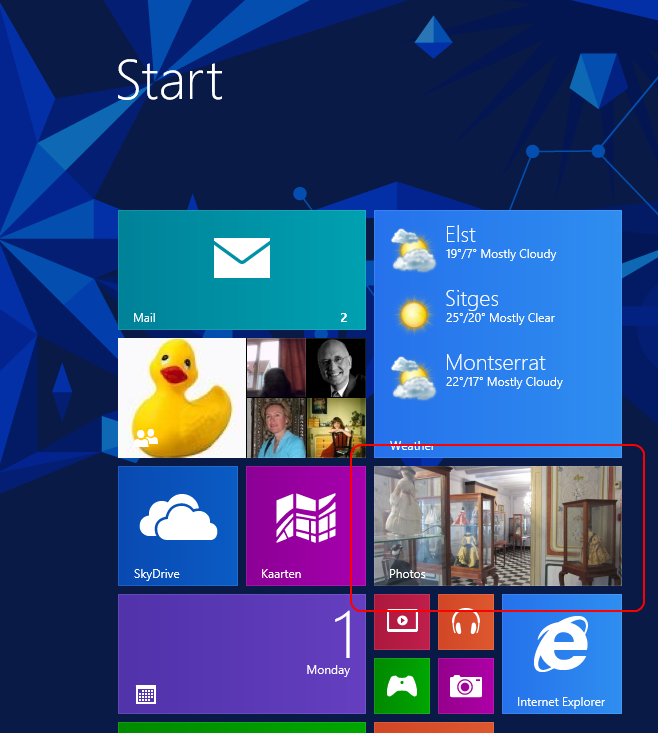
    This is useless. What is bizarre is that the live Tile for the Photos App is showing random photos from the Pictures Library, whilst the Photos App itself cannot:

    Win81 20

    The limitations of the Photos App have been raised by Barb Bowman on the Windows 8.1 Preview forum. Quote:

    The Photos App has changed:

    1. No longer includes the ability to show images from Facebook, Flickr, SkyDrive

    2. No longer allows images from other computers or the network –  am guessing that because there is now support for SkyDrive on RT and MS is heavily emphasizing that as the preferred storage location (when you upgrade, one of the questions asked before you even get to the desktop is if you want to use SkyDrive as your default storage area – and that seems to be the default – and MS feels the network, NAS, Homegroup, and other computers are deprecated.

    This got a response from Carmen Zlateff, a Principal Lead Program Manager on the Photos App team, who said in respect of point 1:

    Thanks for the feedback, everybody.  In Windows 8, we wanted to provide a way for folks to view their photos on other services knowing there would be few (if any) apps in the store at launch that would do so.  Now there are many apps in the store that offer ways to view photos on other services and soon there will even be a Facebook app from Facebook.  We’re confident Facebook will offer great ways to view and engage socially with photos on Facebook.  We welcome Flickr to do the same.  In addition, the People app still offers the ability to socially engage with your friends and even your own photos.

    Needless to say, this reply was treated with the contempt it deserves. Whether it will result in any change on Microsoft’s part, we shall see. I’m not holding my breath. And I fear that Microsoft is going down the path that there is only Cloud storage (i.e. SkyDrive) or local storage (i.e. This PC).

    To summarise:

    • I hold all my media on a Windows Home Server, and expect to be able to access it from devices (including DLNA devices) on my home network.
    • I have too much data for an affordable use of SkyDrive, and besides, internet access is like a piece of wet string in my location.
    • This is a massive jump backwards.
  • Postcards From Spain

    We’re just back from a week in sunny Sitges. We were first there 25 years ago, and stayed in the amazing Hotel Romantica. This time, we hired an apartment from SitgesHolidayAccommodation (thanks, Brian and Ryan!), and were equally at home.
    Sitges is a seaside town, outside of Barcelona. It has charm, and it is a holiday destination for both Spanish families, and a high proportion of gay men from all over Europe.


    Twenty-five years ago, and we would have been out on the gay beaches and in the gay bars each and every day and night. This time, we were content to stroll around, enjoying the sights and eating out in the many restaurants. We particularly enjoyed the restaurant by the pool in the gardens of the hotel Xalet, which has been stunningly restored.

    I took a day out to travel to the monastery on the Montserrat mountain (Martin lazed on the beach). I went to see the panoramic views from the mountain and its geology, not to bend the knee at the Black Virgin, I hasten to add.


    Once I’d arrived, via the cable car, I took the funicular further up the mountain. I walked around for a couple of hours, and then walked back down to the monastery. Almost invariably, the people I passed on the way down, were Polish Catholics making a pilgrimage on foot to the peaks.

    When leaving the mountain, I had a l’esprit de l’escalier moment.  I had arrived at the cable car station ahead of time, to ensure a place. In fact, I was the third in the queue. I was joined shortly by a Polish family, a mother and a young boy, accompanied by another woman with children. The mother did not have tickets for the return journey, so she went to the ticket office, which was shut for lunch and waited for it to open.

    Meanwhile, other passengers trickled in and formed a queue to wait for the cable car. The ticket office finally opened just before the departure of the cable car, and the mother purchased her tickets. She then attempted to move to the head of the queue to rejoin her child. She got halfway before she was forcibly stopped by another Polish woman who refused to let her move forward. It was clear that this woman did not approve of what she viewed as queue-jumping. In vain, the mother, and others, attempted to explain that she had been there earlier, but was forced to wait for the ticket office to open.

    In the end she managed to give a ticket to her small child and told him to wait for her to travel on the next cable car.

    I was sorry that I could not point out in Polish to the angry woman that her behaviour toward to the mother was neither Catholic nor Christian. My l’esprit de l’escalier moment came later whilst descending on the cable car. I realised that I should have given up my place in the queue to the mother and caught a later cable car and train. This godless atheist would then have demonstrated to the angry Catholic woman what Christianity should be…

    I returned to Sitges ruminating on how easily we hit out at others, and how easily we fail to offer support to them.