Reflections on life at “De Witte Wand”…

Year: 2013

  • Management Speak

    Steven Poole has hit a nerve with his article in the Guardian on 10 of the worst examples of management speak. It’s got over 1,800 comments all of them expressing their loathing of management speak.

    It reminds me of the old joke, which I came across at least ten years ago, of the Accenture consultant’s answer to the question of why did the chicken cross the road. It was a perfect echo of the language that was being used at my place of work:

    “Deregulation of the chicken’s side of the road was threatening its dominant market position. The chicken was faced with significant challenges to create and develop the competencies required for the newly competitive market. Accenture, in a partnering relationship with the client, helped the chicken by rethinking its physical distribution strategy and implementation processes. Using the Poultry Integration Model (PIM) Accenture helped the chicken use its skills, methodologies, knowledge capital and experiences to align the chicken’s people, processes and technology in support of its overall strategy within a Program Management framework. Accenture convened a diverse cross-spectrum of road analysts and best chickens along with Accenture consultants with deep skills in the transportation industry to engage in a two-day itinerary of meetings in order to leverage their personal knowledge capital, both tacit and explicit, and to enable them to synergize with each other in order to achieve the implicit goals of delivering and successfully architecting and implementing an enterprise-wide value framework across the continuum of poultry cross-median processes. The meeting was held in a park like setting enabling and creating an impactful environment which was strategically based, industry-focused, and built upon a consistent, clear, and unified market message and aligned with the chicken’s mission, vision, and core values. This was conducive towards the creation of a total business integration solution. Accenture helped the chicken change to become more successful.”

  • A Talent is Lost

    The sculptor and designer Graeme Gilmour has died far too early at the age of 48. I never had the privilege of seeing any of his outdoor theatre events, but I treasure my evening in the Amsterdam Schouwburg theatre watching Shockheaded Peter. A terrific production in every sense of the word.

  • A New Dawn

    We’ve just had twenty solar panels installed on the roof.

    20130418-1549-33

    Apparently, we’ve joined a growing trend in the Netherlands. In 2012, there was 260 MW of energy produced via solar panels – a doubling of what was produced in 2011.

    I must admit I get a kick out of watching our electricity meter run backwards – indicating that we are supplying electricity to the national grid (and getting paid for it by the Power Company!), rather than consuming from it.

    This is a long term investment – it will probably take ten years to break even, but I’m glad that we’ve done it.

  • Stop Digging, Theo…

    Ah, Theo Hobson. It’s been a while since I felt moved to document how much I disagree with his writings – well, I have to say that once I was astonished to find that I actually agreed with him. It was, truly, a miracle.

    However, he’s back and offers up an article in The Spectator in which he decrees that Richard Dawkins has lost. Sorry, Theo, you’re writing twaddle again. Eric MacDonald hands you your arse on a platter, and Jerry Coyne does likewise. Stop digging.

  • The End is Nigh

    Six years ago, along with 10,000 other people, I started testing the beta of the first version of Windows Home Server. When it was formally released in November 2007, I bought the software and built my first home server. I repeated this cycle for the next version of Windows Home Server: trying the beta, and then buying the product. Despite my many rants about the shortcomings of Windows Home Server 2011 and Microsoft’s lackluster support, overall I’ve been very satisfied with the product. It does its job of taking automatic backups of itself and our other computers in the house, and is the central storage for our collection of music, film, video and recorded TV programmes.

    However, it was clear that Microsoft no longer loved Windows Home Server, and it was no surprise when Microsoft announced in July 2012 that there would be no next version of WHS. That means, according to Microsoft’s Product Support Lifecycle rules, that WHS 2011 will continue to receive mainstream support until April 2016.

    That notwithstanding, Microsoft has also just told its band of enthusiasts in the WHS community of users that as from April 2014, WHS will be fully retired as an award expertise and technical interest. They do seem in an awful hurry to dispose of all trace of Windows Home Server.

    It’s a great pity – despite all the song and dance about the move to Cloud services, I am still firmly of the opinion that there is a place for a server in the home. Online streaming where I am in the rural Netherlands is neither fast enough, stable enough, nor cheap enough to be considered a viable alternative.

  • The Hidden Talents of Giraffes

    I never knew that giraffes could do this. They must have remarkably strong teeth.

  • The End

    So, she’s dead. She certainly changed our world, but, personally speaking, I’m not convinced she improved it. For me, Elvis Costello’s song: Shipbuilding is the perfect summary of that time.

    Craig Murray, while he personally found her quite likeable, sums her up rather well:

    …she was a terrible, terrible disaster to this country. The utter devastation of heavy industry, the writing off of countless billions worth of tooling and equipment, the near total loss of the world’s greatest concentrated manufacturing skills base, the horrible political division of society and tearing of the bonds within our community. She was a complete, utter disaster.

    The Guardian’s editorial, while praising her, also damns her:

    She was an exceptionally consequential leader, in many ways a very great woman. There should be no dancing on her grave but it is right there is no state funeral either. Her legacy is of public division, private selfishness and a cult of greed, which together shackle far more of the human spirit than they ever set free.

    Her legacy lives on.

    Addendum. Norman Geras makes my feelings succint,

  • A Fool, A Liar, or a Thief?

    Lucy Mangan poses the question about Ian Duncan Smith. It’s a valid question.

    I propose the answer is that he is at least two out of the three, and that he isn’t a fool. Unfortunately, he’s far from the only person in power who thinks that way.

  • Just Tying Threads Together

    The news that Roger Ebert has died has brought out instances of what he meant to many people. Including the shout-out from Nina Paley, who thanks Ebert for his review of her film.

    Sita Sings the Blues is wonderful. Roger Ebert thought so too.

  • More Bad News

    Following on from the news that Iain Banks is not long for this world, comes the news that Roger Ebert has now departed it.

    I admit that I was only an occasional reader of Ebert’s film reviews, but I always found them worthwhile and thought-provoking. I refer you to The Mumpsimus for a deeper appreciation of Ebert and his writing. From that piece is a quote from Ebert himself. It’s probably Ebert’s best memorial and something to live up to:

    “‘Kindness’ covers all of my political beliefs,” he wrote, at the end of his memoirs. “No need to spell them out. I believe that if, at the end, according to our abilities, we have done something to make others a little happier, and something to make ourselves a little happier, that is about the best we can do. To make others less happy is a crime. To make ourselves unhappy is where all crime starts. We must try to contribute joy to the world. That is true no matter what our problems, our health, our circumstances. We must try. I didn’t always know this and am happy I lived long enough to find it out.”

    Amen.

  • The Grand Reopening

    I’ve always enjoyed visiting the Rijksmuseum, the grand old lady of Amsterdam’s many museums. However, she’s been closed since 2003 for a refurbishment that was supposed to have been completed in 2006.

    Here we are in 2013, and she’s about to throw open her doors once more to the world. I’ll be paying her a visit later this year, to marvel at her many wonders.

  • The Xbox Music App – Still Disaster-Prone

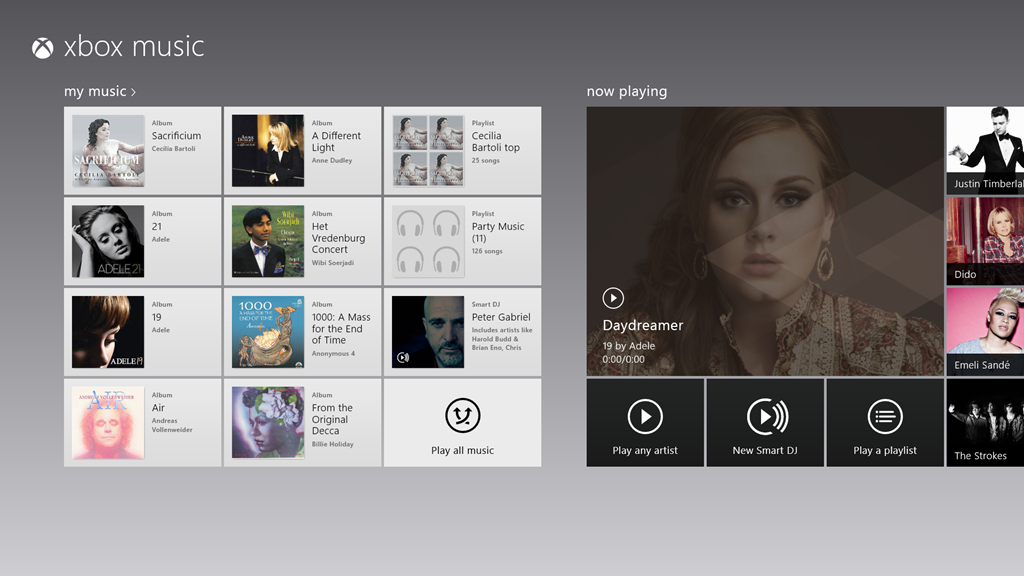
    Well, I thought at first that the new release of the Xbox Music App for Windows 8 was promising. That is, until my recent bad experience, and now something else has crept out of the woodwork.

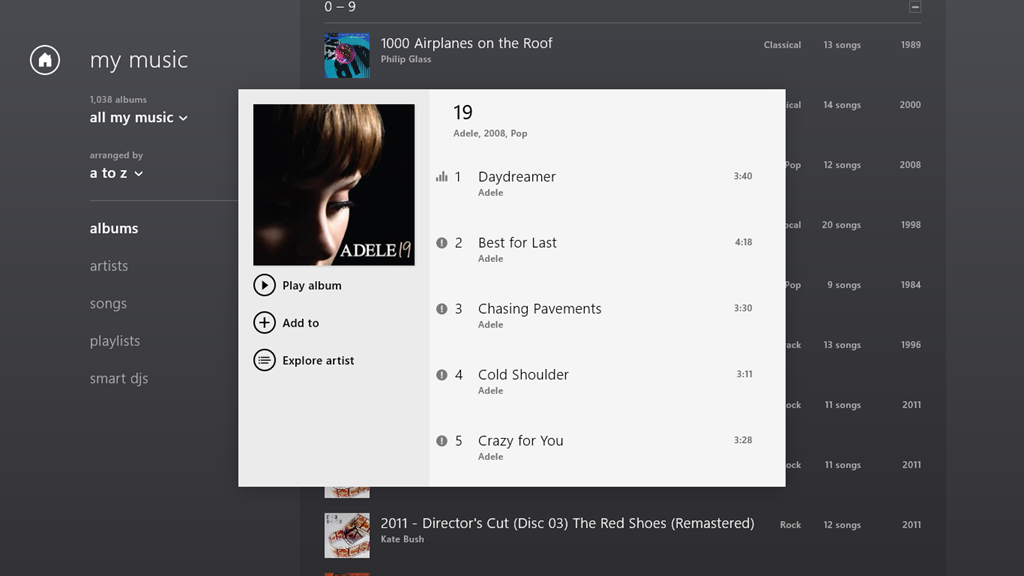
    The App is working as expected on my Desktop PC, but on my Lenovo ThinkPad Tablet 2, when I start playing an album, the first track will play, but all the rest start showing an error symbol (an exclamation mark) by them:

    xbox issue 04

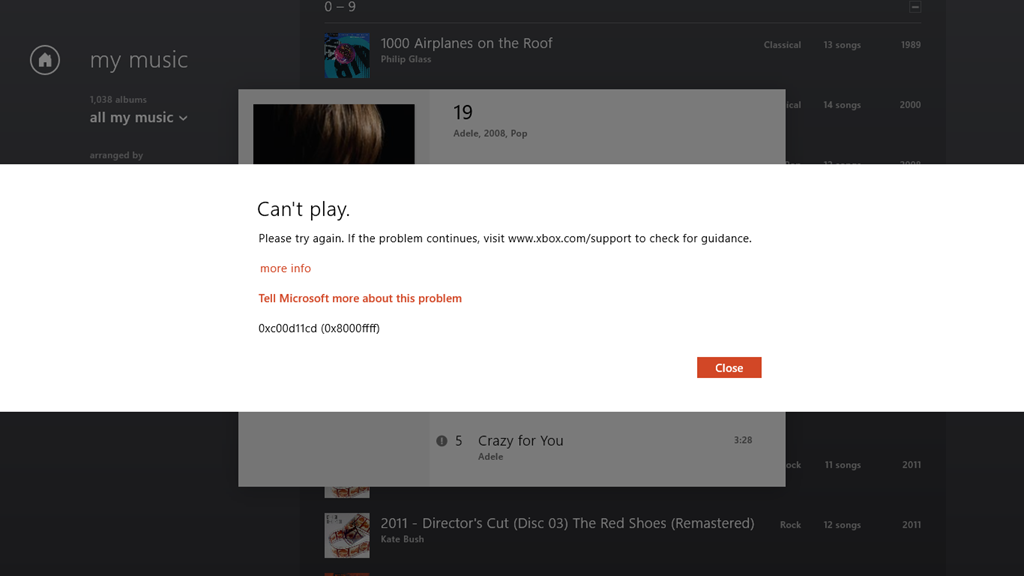
    If I click on the symbol, then I get this:

    xbox issue 05

    It says:

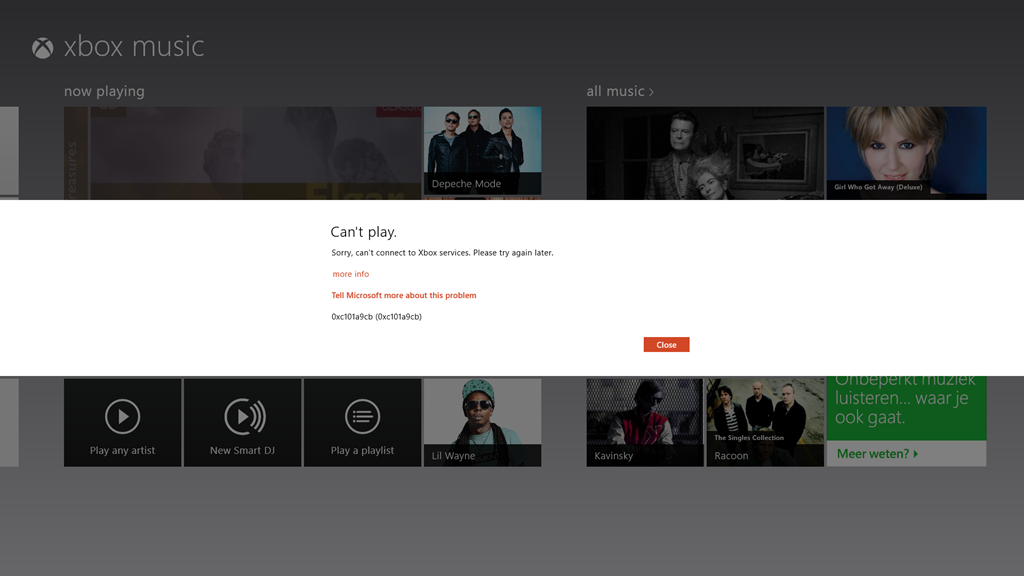
    Can’t play.

    Please try again. If the problem continues, visit www.xbox.com/support to check for guidance.

    more info

    Tell Microsoft more about this problem

    0xc00d11cd (0x8000ffff)

    Once again, of course, the links provided in the error message don’t provide any guidance whatsoever.

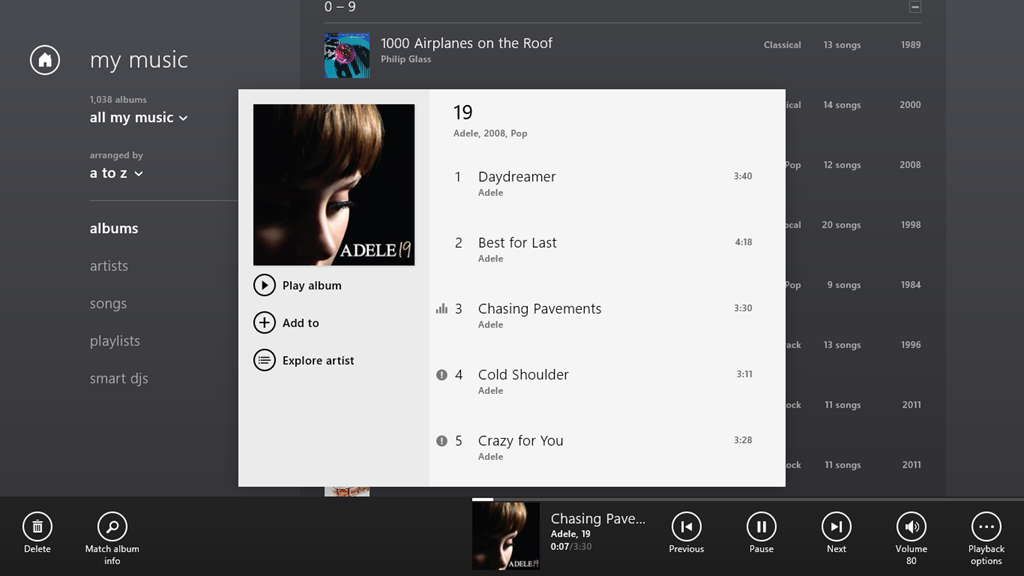
    If I let the playback continue, it will stop at the end of the currently playing track, because all the rest of the tracks are showing errors. However, I can manually advance to the next track, and it will start playing (with all the following tracks continuing to show errors):

    xbox issue 06

    Interestingly, I’m not the only one with this issue. And what I seem to have in common with the others is that we are using tablets built with the Intel Clover Trail chipset. This issue may well have been there for some time; it’s only with the latest release of the Xbox Music App (1.2.150.0) last week that I’ve really been using the App – it was so absymal before. It appears that it’s still dreadful.

    All my music (which is DRM-free) is stored on my Windows Home Server 2011 system. As I say, the Xbox Music App works fine on my Desktop PC, which, like my Tablet, is also running Windows 8 Pro. Other music applications, both traditional Desktop Apps (e.g. Windows Media Player, Zune and Media Monkey), and Modern UI Apps (e.g. Media Monkey for Windows 8) work fine on both the Desktop PC and my Tablet.

    But the Xbox Music App on the Tablet continues to be absolutely abysmal.

  • Windows 8 “Play to” Restrictions – And Overcoming Them

    I’ve written about Microsoft Windows and its “Play to” feature before. Back in the days of Windows 7, it caused a number of headaches, but the problems got resolved over time. Then with the introduction of Windows 8, it seemed that we all took a step back, and a new issue appeared.

    In Windows 8, it is not enough to have a piece of equipment (e.g. an amplifier or a TV) that is DLNA-certified for “Play to”, oh no; it also has to be Microsoft-certified before you can use it with a Modern UI (Metro) App in Windows 8. That means that although I can use the desktop Windows Media Player to “Play to” my trusty Denon AVR-3808 receiver (as I could under Windows 7), the new Xbox Music App in Windows 8 doesn’t even recognise the Denon as a “Play to” device.

    In a post on the Building Windows 8 blog, Microsoft states:

    Metro style apps work only with Windows certified Play To receivers [my emphasis]. These devices are validated to support modern media formats, are DLNA standards-compliant, and have great performance (including the updated Xbox 360 available later this year). The desktop experience first introduced in Windows 7 has been added to the Explorer Ribbon and will continue to support all DLNA DMR devices.

    Windows 8 bleats that my Denon is not Microsoft-certified, so it can’t be used by any Modern UI App. Gabe Frost, a Microsoft employee, gives these reasons for introducing this Microsoft certification:

    Since Windows 7, we have been certifying Play To devices (DMRs) for Windows. This certification program doesn’t invent any new standards or use any Microsoft proprietary technologies. Here is what our certification program does:

    1. DLNA guidelines have a bunch of optional requirements. An example is for a device to support volume control. These things that are optional in the guidelines have an impact on the user interface both within new Store apps and in Windows UI (such as providing a user the ability to control device volume using the app volume slider, or seek into a video, or update the state of transport control buttons (play/pause/etc.) in the app UI when a user uses the TV remote control). We think this stuff is important, so Windows certification makes mandatory a specific few requirements that are optional in DLNA.

    2. DLNA guidelines have mandatory requirements that they themselves don’t test. I won’t get into the details here, but the absence of a test for mandatory guidelines means that some devices implement things wrong, or don’t implement them at all, which causes weird behaviors that are hard to work around. No doubt, this isn’t on purpose (the device manufacturers always fix the issues when we bring them to their attention). Because the user experience can break because of this, we think it’s important and Windows certification actually tests the few specific requirements that are also mandatory in DLNA.

    3. Expanding on #1, DLNA makes optional certain media formats that are very popular today and expected by users. The primary example is MP4 video (M4V) and audio (M4A), or more specifically  H.264 (AVC) and AAC respectively. Windows 8 has a strong focus on HTML5 for sites and apps, which depends on MP4. If DMRs don’t support MP4, we wouldn’t be able to deliver on the promise of streaming HTML5-based audio and video from apps and sites to your TV or speakers. You might think transcoding to MPEG-2 is the answer, but Surface and other Windows RT tablets don’t have MPEG-2 encoder hardware in them (and even if we did decide to do this in software, the experience would be terrible and drain your battery).

    4.  Playback latency. To be competitive and to deliver a great user experience, we think a TV should start playing a video within 6 seconds and audio within 3 seconds when connected via wired Ethernet. I’d be surprised if anyone thought this was controversial.

    That’s it. UPnP/DLNA is our foundation technology. Remember though, DLNA means lots of things. A TV that only implements a media player (DMP) and a TV that implements a media renderer (DMR) both have the same DLNA logo, but only one of them is even capable of working with Play To (the DMR).

    While new apps from the Store won’t work with un-certified devices for reliability, performance, and other reasons, all your devices continue to work the same way they did in Windows 7. From File Explorer or Windows Media Player, these certified and un-certified devices will be shown in the context menu. We also added a button to the Ribbon to make it more friendly on touch screens. Try it on Surface or other Windows RT devices for example.

    However, despite all these fine words attempting to justify this new hurdle that Microsoft has placed in our way, it all boils down to:

    …new apps from the Store won’t work with un-certified devices…

    And if your device has not been put through the certification process, then, tough. My Denon receiver is positively ancient – five years old – and now discontinued, so absolutely no chance of getting it certified.

    However, help is at hand. Barb Bowman has been doing some detective work in the innards of the Windows Registry. She has discovered where the keys are stored that specify whether a DLNA device is Microsoft-certified. Better than that, she describes how to define your own key to “certify” your DLNA device so that it can work with Modern UI Apps.

    As she points out, there are precious few vendors (only five) currently certifying their devices, and Denon isn’t one of them.

    However, I followed her directions, and have now successfully created a key that enables my Denon receiver to work as a Microsoft-certified device with Modern UI Apps.

    My thanks to Barb and her detective work. No thanks to Microsoft for what I feel was an unnecessary hurdle.

    Update 16 July 2013: Barb has a new post up on her blog. Microsoft’s Gabe Frost has revealed that there is a simpler way of getting non-certified devices to work with Apps. Barb gives the details in her post.

    Update 21 October 2013: Well, now that the final release of Windows 8.1 is available, the Play to experience seems to be broken again. I applied the registry fix given by Barb Bowman (and which came originally from Microsoft’s Gabe Frost), and that no longer seems to work for me. One step forward, two steps back yet again. Thank you Microsoft.

    Update 24 October 2013: I posted the Windows 8.1 issue in a Microsoft forum, and got some useful feedback from Gabe Frost. The issue is not resolved, but at least we now know what’s going on. See https://gcoupe.wordpress.com/2013/10/23/play-to-and-windows-8-1/

    Update 8 April 2014: As of today, Microsoft has released an Update to Windows 8.1 that makes it unnecessary to perform any registry edits to enable a DLNA Digital Media Renderer (DMR) to work with Modern Apps on the Start Screen. Devices will no longer appear as “uncertified” when Play is selected within an individual app (but if not certified will appear as such in the PC and Devices menu).

  • Bad Experience: Xbox Music App

    As I wrote here, Microsoft has recently updated the Xbox Music App for Windows 8. The update improved the navigation of the music library to the extent where I thought I could start using the App (it was absymal on first release).

    So I’ve been using the Music App to play music stored in my Library, and I’ve got good news and bad news.

    The good news is that navigation is much improved (although more improvement would be welcome). You can also use the Music App to purchase additional Albums. For example, as an experiment, I used the App to purchase a Cecilia Bartoli album: Sacrificium. I was pleased to see that on completion of the purchase, the Music App automatically downloaded the album tracks to a folder that it created in my Music Library, held on my Windows Home Server 2011 system. So the tracks were located in \\DEGAS\Music\Xbox Music\Purchases\Cecilia Bartoli\Sacrificium (DEGAS is the name of my WHS 2011 server). Even better, the tracks were DRM-free MP3 files recorded at 320 kbps, and contained metadata (track title, album title, artist, album art, etc.).

    So far, so good. Buoyed up by that, I bought another album, this time Andreas Vollenweider’s Book of Roses. Same thing, on completion of the purchase, the Music App automatically created a folder in my Music Library (\\DEGAS\Music\Xbox Music\Purchases\Andreas Vollenweider\Book Of Roses) and downloaded the MP3 tracks to it.

    Flushed with success, I bought a second Andreas Vollenweider album: Air – and that’s when things went horribly wrong.

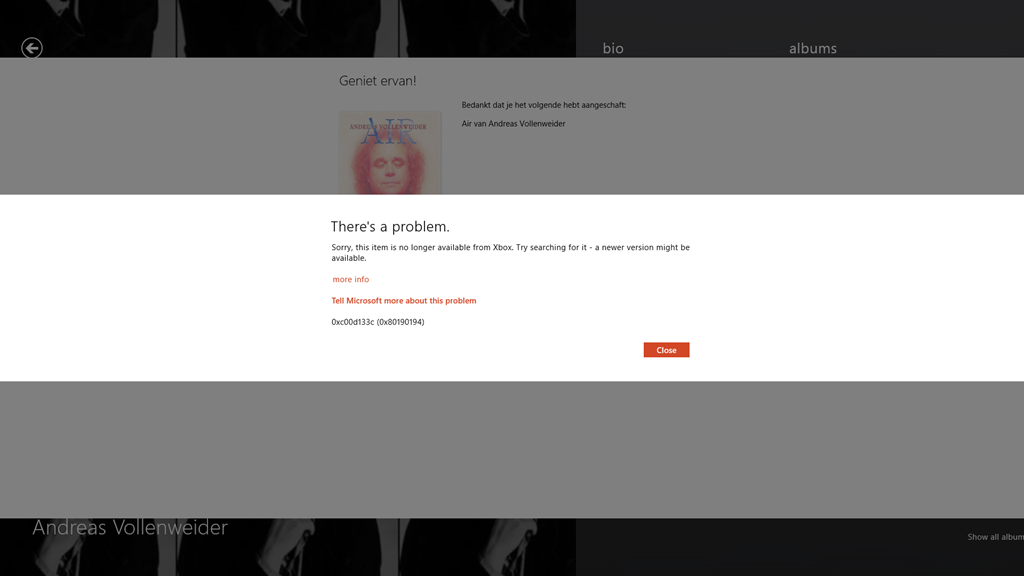
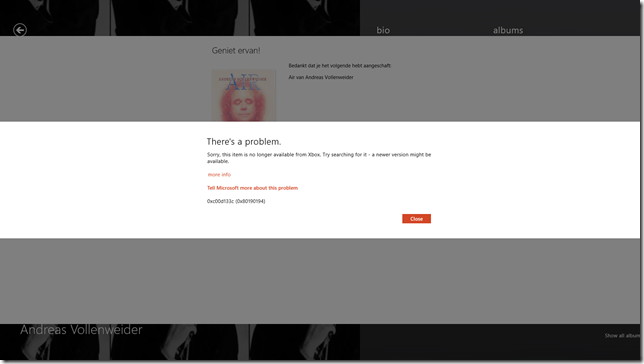
    The Music App allowed me to buy the album, but as soon as the purchase was completed, up popped this unwelcome message over the purchase confirmed screen:
    Xbox Music issue 01

    It says:

    There’s a problem.

    Sorry, this item is no longer available from Xbox. Try searching for it – a newer version might be available.

    more info

    Tell Microsoft more about this problem

    0xc00d133c (0×80190194)

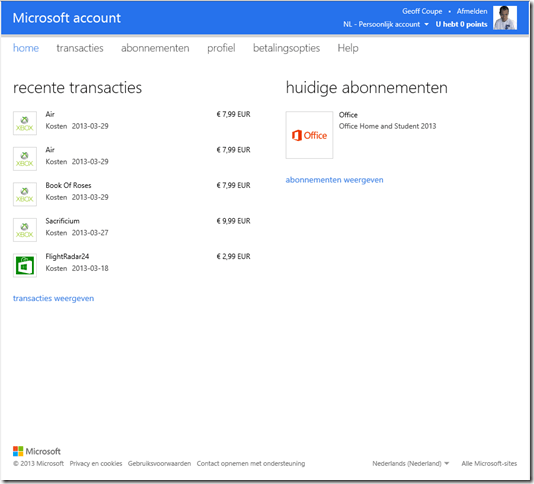
    Lovely, so Microsoft has taken my money, but failed to deliver the goods. Trying to follow the links to get more information failed miserably to resolve it. I took a gamble that this might have been a one-off glitch, and tried again. Same result, so I have now paid twice for an album that Microsoft will happily sell to me, but without ever providing the goods:
    Xbox Music issue 02

    Sigh. Fortunately, these purchases were made using PayPal, so I’ve opened two dispute cases, and these have now been escalated to claims. So with luck, I’ll get my money back.

    As a result of this experience, I’m somewhat leery of trying to purchase music via the Music App. I think I’ll stick to purchasing CDs.

    Update: 2nd April 2013

    It’s now three days later since I tried, unsuccessfully, to purchase Air. Today, I noticed that the Xbox Music App’s Home page was still listing the album as being in my collection:
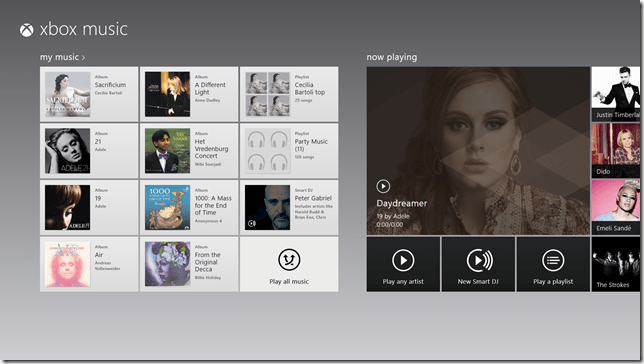
    Xbox Music issue 03

    So I clicked it. The album details page then showed up, with the “streaming” symbol showing by the individual tracks. The last time I was at this point, trying to play a track resulted in an error message, but I thought, what the hell… and clicked the first track.

    To my surprise, it started playing, and then to my even greater surprise, the “download track” symbol started appearing by the tracks. I clicked on one, and got a message that all 13 tracks were being downloaded. So it would appear that Microsoft has fixed the purchasing issue. Now I’ve just got to persuade PayPal to authorise just one of the two payments…

    Update 10th April 2013

    Sigh. Today I received a couple of messages from PayPal that said:

    Dear Geoff Coupe,
    We’ve completed our investigation for the following claim:
    Case ID:  PP-002-273-252-851
    Transaction Date:  29 Mar 2013
    Transaction Amount:  -7,99 EUR
    Seller’s Email:  MicrosoftBilling_donotreply.eu@microsoft.com
    Seller’s Name:  Microsoft Luxembourg S.a.r.l
    These items are not covered by PayPal Seller Protection. Only physical
    items that have been sent and can be traced online can be covered.
    We advise you to contact the seller directly and to solve the problem. You
    can find the contact details of the seller on the page ‘Transaction
    details’.
    Sincerely,
    PayPal team

    So. not our problem, please look elsewhere. I love that “only physical items can be covered” spiel. As we advance further into the 21st century, bits are becoming ever more financially important than atoms. It’s a pity that more services aren’t aware of this fact, or are they just in denial?

    Update 11th April 2013

    Sigh. I really don’t learn, do I? I thought I’d have another go at buying an album. This time, it was the Simon Rattle version of Elgar’s “The Dream of Gerontius” coupled with the “Enigma Variations”.

    And this time, I thought that I’d check that I could first stream a couple of the tracks – just to make sure that the album was in fact available before I purchased it. And, yes, the tracks were available, and streaming. So I went and shelled out 8.99 Euros for the album.

    Bang – Microsoft took my money. And Bang! – Microsoft refused to give me my album.

    Xbox Music issue 04

    I’m sorry, but this is getting beyond a joke.

    Update 13th April 2013

    Well, I’m still getting the “can’t connect” error, but I seemed to have found a way to force the Xbox Music service to give me the album that I have bought. I located it online once more, and this time, I clicked the “Add to” button, and discovered that I could add it to my music library. Once I did that, the “Buy Album” button disappeared, and then the album showed up in my Library, with the “streaming” symbol beside it. More importantly, I then discovered that I could manually download the album to my server. So now I’ve got the album downloaded. It all seems quite a palaver…


  • Best Laid Down – And Avoided

    In recent years, there’s been a fashion for “historical drama documentaries” on TV. You know the sort of thing – get a historian to front a programme on say, the Wars of the Roses, and fill most of the airtime with badly-paid and badly-acting extras re-enacting the battles. What could have been an opportunity for a knowledgeable expert to analyse a historical event gets pushed aside in favour of amateur dramatics and, shudder, “spectacle”.

    Tonight, for example, on BBC One, there will be a programme on Pompeii, fronted by Dr. Margaret Mountford. Now, Dr. Mountford recently completed her studies with her thesis on Papyrology, so she may well have the chops to be able to talk knowledgeably about the lives of Pompeiians in 79 AD, but I fear the worst. The programme is called Pompeii: The Mystery of the People Frozen in Time, and is billed as “a one-off landmark drama documentary”. The programme web site contains plenty of stills of costumed extras pretending to be citizens of Pompeii.

    Oh dear, this does not look promising. Particularly when I recall a documentary on the same subject that the BBC first broadcast in 2010: Pompeii: Life and Death in a Roman Town. No pointless dramatical reconstructions there – just an acknowledged expert on Roman life, Professor Mary Beard, talking about her beloved subject. And because of her knowledge and enthusiasm, she was able to bring the citizens of Pompeii to life for me far better than hordes of the toga-clad extras that I suspect will be paraded before us this evening.

    Just last year, the BBC broadcast a series of programmes made by Professor Beard on the Romans, and once again she brought them all to life without any need for “dramatical reconstructions”. Give me that sort of approach to history, and I’m happy. I think I’ll be giving Dr. Mountford’s drama documentary a miss this evening. I see that on BBC Two at the same time we have Sir Terry Pratchett contemplating the role of mankind in the eradication of the planet’s species, and considering his own inevitable extinction, hastened as it is likely to be by his Alzheimer’s disease. That sounds much more interesting and thought-provoking to me.

  • Wilson, Kepple, but no Betty

    Funny how things can stick in your mind. Impressions from years ago that, even then, were hand-me-downs from your parents and older family members. Things that you would never have experienced firsthand, yet were alive to you.

    So it is with Wilson, Kepple and Betty.

    I could never have seen this trio perform, yet somehow I grew up with them and the sand dance. here’s Wilson and Kepple, in a recording of their most famous number.

    Camp, endearing, and somehow absolutely wonderful.

  • Small Steps

    Microsoft released new versions of some of their Windows 8 Apps today. The ones that I’ve seen so far are the Mail, Calendar, People and Messaging Apps, together with a new version of the Xbox Music App.

    I’ve updated my post on the Xbox Music App here. In summary, whilst navigation has taken a step forward, there are many issues with this App that have not been addressed.

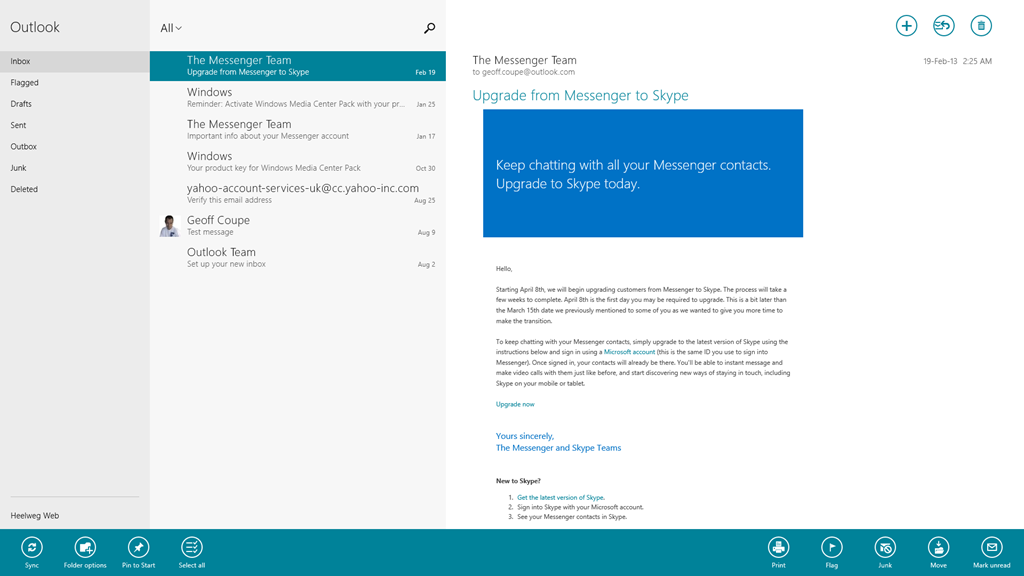
    The Mail App has got some improvements. I like the fact that I can at last create my own Folders and view them in the Mail App, and also that I can search both locally and in my online IMAP folders automatically. I see that the Mail App still cannot handle POP accounts. Yes, it’s legacy, but it is still in widespread use by many service providers who don’t yet support IMAP.

    Mail App 01

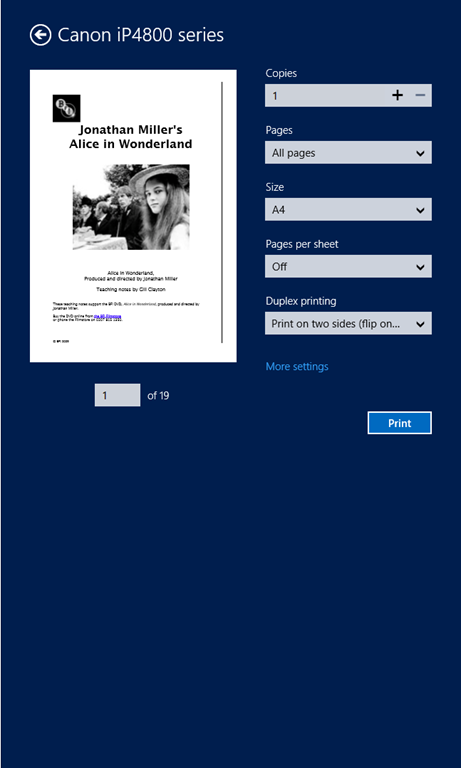
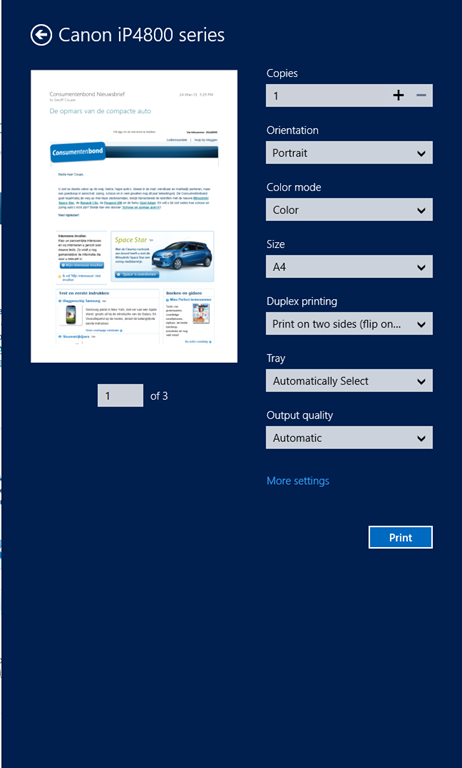
    In addition, the Mail App still hasn’t got a clue when it comes to printing out a message. It is still not possible to print just a range of pages – you can only print out every page in a message. It’s the same with the Modern UI version of Internet Explorer 10; it’s all or nothing. Clearly the Mail and IE 10 teams don’t understand how to use the new print subsystem of Windows 8 properly. They really should talk to their colleagues in the Microsoft Reader App team. Here’s an example of the print controls using the Reader App.

    W8 Print 03

    Note that you’ve got a “Pages” setting, where you can select to print “All pages”, “Current page” or a “Custom” selection of pages from the document.

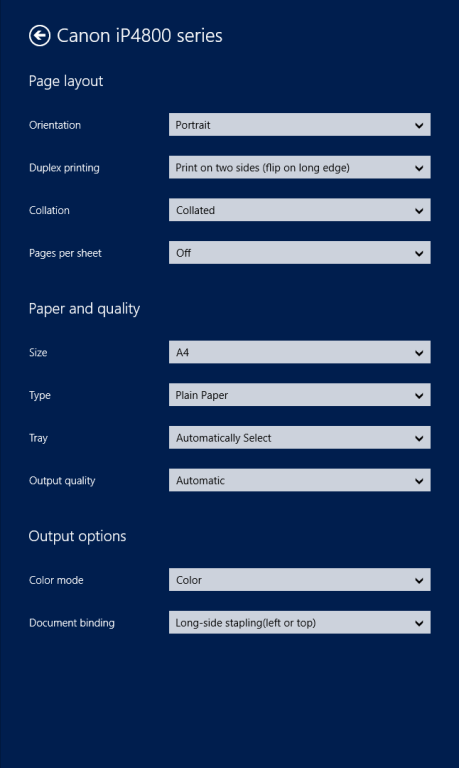
    Now here’s what you see (using the same printer device) when you want to print out a mail message from the Mail App (you’ll also see the same settings when you print out a web site in the IE10 App):

    W8 Print 01

    Whoops, no “Pages” option to print out a range of pages. And it’s not lurking under the “More settings” link, either:

    W8 Print 02

    I find it ironic that the Windows 8 Engineering Team posted an entry last year on the Building Windows 8 blog entitled: Simplifying Printing In Windows 8. It seems to me that when Microsoft’s own teams come up with inconsistent and poor user experiences for the task of printing out documents, then something is wrong somewhere. And talking of simplifying printing, I notice that the Mail App now sports a “Print” icon on the pop-up task bar at the bottom of the App. I suspect that many people are finding it confusing to print by going to the Charms bar, and choosing the “Devices” Charm…

    The new version of the Calendar App offers a few extra views, but personally, I don’t find it a great leap forward.

    Calendar App 01

    Clearly, Microsoft expect all their customers to have Smartphones or Tablets – there’s no way to print out anything from the Calendar App. Some of us do still occasionally like to have bits of paper handy…

    The People App remains very plain for me; most entries have simply the generic person icon. That’s because, by choice, I am not a Facebook or Twitter user. I communicate mostly by email.

    People App 01

    For the same reason, I’ve never had occasion to use the Messaging App, so I have no opinion on whether it’s any better in the new version.

    To sum up, despite these new versions of the Mail, Calendar and People Apps, I don’t see myself using them as my primary communication applications. I still find that job is better done using Windows Live Mail, which combines all these functions into one application that I prefer to use. Having said that, I do find myself occasionally using the Mail App on my ThinkPad Tablet to check email when I’m not at my Desktop PC. So it may grow on me, but I think further improvements will be needed first.

  • The Death of a Teacher

    Lucy Meadows is dead, most probably she committed suicide. What drove her to take her life was quite possibly the toxic combination of The Daily Mail and Richard Littlejohn.

    A petition has been set up to ask for a formal apology from the Mail, and for Littlejohn to be dropped from his job at the Mail.

  • I Am The Doctor – And I Am Afraid…

    It’s coming – the next series of Doctor Who. My place on (or behind) the sofa is booked. This will be the 50th year since Doctor Who has been showing in the haunted fish tank, and each year I seem to be getting more excited than ever.

    Ooh – I can hardly wait!