
We hope you and yours have a happy and peaceful time.
The photo is of our garden in January 2009. In these days of climate change, I wonder whether we’ll see its like again…

Reflections on life at “De Witte Wand”…
We hope you and yours have a happy and peaceful time.
The photo is of our garden in January 2009. In these days of climate change, I wonder whether we’ll see its like again…
Last Tuesday, I paid one of my very rare visits to a cinema. I went to see a midnight showing of The Hobbit – The Battle of the Five Armies, in 3D no less. It was a somewhat surreal experience; I think that with the possible exception of three others, I was the oldest person present. The majority seemed to be in their late teens or of student age. There were also two people in full costume; one dressed as Gandalf, and one dressed as Bilbo. Unfortunately, the Dutch are, on average, a tall race, and this Bilbo was no exception. He towered over me, which rather ruined the Hobbit effect. However, to give him credit, he really was barefoot, which in December in the Netherlands is rather a brave thing to attempt. And I was pleased to see that Gandalf removed his large hat when seated in the cinema.
TH-TBOTFA is the third film in Peter Jackson’s Hobbit trilogy, and come last Tuesday, I hadn’t actually seen the second part (The Hobbit – The Desolation of Smaug). However, I made the pilgrimage because I wanted to see it in 3D, and the cinema in Winterswijk, although bijou, and with slightly tired decor, has good sound and a decent screen.
So, was it worth it? Well, my answer would be a slightly qualified yes. It’s visually spectacular, partly down to the beauty of the New Zealand locations, and partly down to the wizardry of CGI and set design that produces locations that feel real and lived in. The acting is good, and in some cases excellent. And the eponymous battle is epic. However, I didn’t feel that it reached the intensity of visual spectacle that Jackson achieved with the Battle of Helm’s Deep in The Lord of the Rings – the Two Towers. There is humour in the film, almost slapstick in places, and this does serve to lighten the mix. I did like it though, and I will certainly get it when Jackson releases the inevitable Extended Version in Bluray format sometime in 2015.
Speaking of which, the Bluray format of the Extended Version of the second film in the trilogy landed in our letterbox on Thursday, so I have now seen all three films, albeit in the wrong order. Of course, this filmic version of The Hobbit is not the book. There are new characters introduced, or those, who in the book flit past in an instant, who have their characters greatly inflated in the film. Tolkien purists hate this, but personally, I accept that the film is not the book. I do think that Jackson and his co-writers, Fran Walsh, Philippa Boyens and Guillermo del Toro, have captured the essence of Middle Earth.
With the release of TH-TBOTFA, my seventeen hour sojourn in Middle Earth has been completed. I’ve already revisited it several times since the journey began 13 years ago, and no doubt I will continue to do so, because Jackson’s vision is a compelling one. And I will also continue to reread the source material, because it too has fired my imagination.
The bogeyman of English politics of the late 1960s was Enoch Powell, and Hanif Kureishi has written a masterful article on the effect of Powell: Knock, knock, it’s Enoch. It’s well worth reading.
Like Kureishi, I was a teenager in 1968 when Powell gave his Rivers of Blood speech. Like Kureishi, I was born in Britain, although unlike Kureishi, I was white. So even though I was appalled at what Powell unleashed, I was never the target of white racism. Ironically, I am a child with immigrant blood – my mother’s side of the family has maternal roots in 19th Century India. As I’ve written before, my great-aunts and great-uncle were clearly Indian (as can be seen in the photograph below), and my mother remembered the casual racism directed at her father when she was a young girl.

Perhaps because of what my mother remembered, I was brought up without being conscious of the fact that racism existed. I also grew up on the Isle of Man, and I only recall ever seeing one black person in real life as a child; he worked at one of the hotels during one summer season. I was more struck by the fact that his bicycle had a real radio on it, than by the fact that he was black. Nonetheless, racist attitudes existed in the wider society, and I must have subconsciously been aware of them. I recall one incident that happened when I must have been 11 or 12, and visiting my aunt and uncle who lived in Tottenham. I was walking along a London street and saw a very expensive car – it was either a Rolls or a Bentley – and being rather impressed by its beauty. Then, the owner and his family appeared and got into the car. They were black, and from seemingly nowhere, the thought popped into my head: “how have the likes of them got a car like that?” I stopped in shock, absolutely appalled at what I had just thought, and horrified that I could think such a thing. Despite my parents care and attention, racism had snuck in and lodged itself in my brain.
It’s an insidious thing. Look again at that photo of my great-uncle George above. The uncle that I was visiting in Tottenham looked just like a whiter version of George. By his, and my mother’s, generation, their Indian origins had faded enough so that they could pass for white. He lived in the same terrace house where he had grown up. Tottenham became a multicultural melting pot, and during the 1960s contained a large population of African-Caribbean people. I became very aware during that time that my uncle and aunt had racist attitudes towards their neighbours. I would often bite my tongue in their presence. Lovely people, but with that side to them that I found very difficult to deal with.
As Kureishi writes:
Appealing to the worst in people – their hate – is a guaranteed way to get attention, but it is also fatal. Powell talked in whole sentences and was forever translating Herodotus, so was known for his cleverness. But he wasn’t smart enough to resist the temptation of instant populism for which he traded in his reputation. Racism is the fool’s gold, or, rather, the crack cocaine of politics.
Forty-five years on, and it’s still happening. We have Nigel Farage and UKIP in the UK, and Geert Wilders and the PVV here in the Netherlands.
Kureishi again:
Britain survived Powell and became something he couldn’t possibly have envisioned. He was a pessimist and lacked faith in the ability of people to cooperate with one another, to collaborate and make alliances. The cultural collisions he was afraid of are the affirmative side of globalisation. People do not love one another because they are “the same”, and they don’t always kill one another because they are different. Where, indeed, does difference begin? Why would it begin with race or colour?
Racism is the lowest form of snobbery. Its language mutates: not long ago the word “immigrant” became an insult, a stand-in for “paki” or “nigger”. We remain an obstruction to “unity”, and people like Powell, men of ressentiment, with their omens and desire to humiliate, will return repeatedly to divide and create difference. The neoliberal experiment that began in the 80s uses racism as a vicious entertainment, as a sideshow, while the wealthy continue to accumulate. But we are all migrants from somewhere, and if we remember that, we could all go somewhere – together.
I hope we can survive Farage and Wilders as well.
A rather impressive short film, with the always impressive words of Carl Sagan. I won’t live to see these scenes in reality, but hopefully some of our species will.
Alexi Sayle is a comedian with Marxist leanings. I like him a lot. The BBC is currently into the twelfth series of its hit show Strictly Come Dancing, which is a dance competition that pairs celebrities with professional dancing partners. I like it a lot.
Alexi does not like it, not one little bit, so he’s penned a column in the Guardian to explain why. And, to be fair, he makes some good points. He clearly doesn’t like Ballroom Dancing, because, as he says:
Ballroom dancing is an aesthetic pursuit, an art form, that has been turned into a competition the result of which is that everything is done to attract the attention of the judges. The competitors must try to fit within a set of rules and so a tawdry, flashy, kitsch aesthetic takes over.
I can see what he means. But on the other hand, there must be many people who go Ballroom Dancing purely for the pleasure it gives them. I remember my parents, back in the 1950s, were avid ballroom dancers. They didn’t do it in any competitive sense, but purely for the pleasure – for the chance of dressing up a bit and having a good night out with their friends.

And quite frequently, when the evening was over, they would return home with their ballroom dancing friends and carry on the party, using the large lounge (my parents owned a small hotel), the piano, and the gramophone stacked with a bunch of Victor Silvester records.
Despite my parents passion for ballroom dancing, I never learned to dance; something that I’ve often regretted. And while I can understand Alexi’s distaste for what the Argentinian Tango has become:
If you see a couple performing a proper Argentine tango, you are watching a dance created in the brothels of Buenos Aires that reeks of melancholy and sex and is accompanied by complex music that has grown alongside the dance and is inseparable from it. Then you watch the ballroom version, all gurning faces and robotic, angular, hideous movement, which on the show is generally accompanied by awful music that has absolutely nothing to do with the dance; you are seeing a great popular art reduced to a terrible travesty.
… I can also appreciate that it doesn’t have to be this way. It can be the most wonderful sensual dance:
One of the less attractive things about living in the Dutch countryside is that the internet is usually delivered via the old copper cables used by the telephone companies. In the far distant days of using dialup modems (that is, 25 years ago), this was perfectly adequate. When ADSL technology was first introduced, using the same cabling, it seemed blazingly fast by comparison. And providing that you live close to the telephone exchange, it is still perfectly acceptable. However, the further away from the exchange that you are, the lower the internet speed becomes.
So for those of us out in the countryside, using the internet is usually akin to dealing with a piece of wet string. I’ve just surveyed the addresses around us that make up our postal area. It’s about 6 km by 3 km with two small villages in it surrounded by outlying farms and houses. There are, in total, 436 addresses. It’s possible to do an online check of what internet speed is available at each address, and this is the rather depressing result:

There are only 54 households that have internet (download) speeds of 8 Mbps or more, whilst the great majority (391) have 4 Mbps or less, with 101 households stuck with only 1 Mbps available via ADSL internet.
These days, such speeds are considered low, bordering on completely unacceptable, for the services that are being delivered via the internet. For example, there are changes in the Dutch Healthcare services coming that will require broadband speeds beyond what is currently available for most of us round here. The government and local authorities would like to see more of the elderly being able to live at home in their own houses for as long as possible, while being supported by healthcare professionals, carers, and volunteers. Their services will increasingly be delivered virtually by the internet. The district nurse and the doctor will no longer be carrying out housecalls by driving round, but using video conferencing to see their patients (or “clients” in the new Healthcare-speak).
At the other end of the age-range, today’s schoolchildren are using education services delivered via the internet, and this will only broaden and demand more bandwidth in the future. I know that the Director of our local schools is already concerned for the pupils at our village school. They are being disadvantaged in comparison with her pupils at the town school, which has broadband internet delivered via fibre optic cables.
The laying of fiber optic cables began ten years ago in the Netherlands, and now there are almost 2 million Dutch households connected to the network, mostly in large towns and cities. The issue has always been that it is more financially attractive for the cable provider to lay cable in built-up areas than in the open countryside. The Province of Gelderland tried to get an initiative off the ground earlier this year: a public-private partnership with a cable provider, but the deal fell through. Now they have just announced an initiative, in cooperation with ten of the Province’s local councils (including ours!), to lay fibre optic cables in countryside areas. The Province is making 32 million euros available for investment, with the ten local councils adding a further 25 to 30 million.
I expect that this investment will take the form of loans, with low or zero interest, made to individual householders who wish to pay for a connection to the fibre optic network. The challenge will be to get sufficient people willing to pay, so that the price per connection comes down to an attractive price for the majority of people. Our village community council is asking people how satisfied they are with the current situation for both internet and mobile telephone coverage. We’ll be using the results of that in our discussions with the Council. I’m hoping that we can get enough people around here to be interested in replacing the current pieces of wet string with pieces of glass – a fibre optics network.
The woman who has fired my imagination for more than forty-five years has received the US National Book Foundation’s Medal for Distinguished Contribution to American Letters. In her acceptance speech she reaffirmed her power. A wonderful author and great human.
Paul Ford has a very good article in the New Yorker on the cut and thrust involved in the making of standards, in particular, the making of Web Standards. My post’s title is a direct quote from Stephen Walli, who is mentioned in the article as “a veteran of many such [standardisation] efforts”.
The article brings back memories (both fond and frustrating) of the time when I was embroiled in the standardization processes swirling round the OSF and X/Open groups. I got to count Stephen as one of my friends and travelling companions from that time. As Stephen wrote:
Technology standardization is commercial diplomacy and the purpose of individual players (as with all diplomats) is to expand one’s area of economic influence while defending sovereign territory.
Ah, yes, I remember it well…
One of the pleasant things about living in the Dutch countryside is that we get to participate in traditions that are non-existent or being eclipsed in cities. One such tradition is Noaberschap (neighbourliness). Martin and I are the Noaste Noabers (closest neighbours) of Herman and José. This means that we are responsible for organising the rest of Herman and José’s neighbourhood (Buurt) in times of celebration or need.
Herman is a dairy farmer, and last month one of his cows, Hetty 176, reached a milestone. In her 14 years of life, she has produced 132,000 litres of milk and 10,000 Kg of fat and protein. That, coupled with the fact that the farm has been in existence for 101 years, meant that it was clearly time for a celebration. So last Friday evening, the Buurt gathered in a neighbour’s barn, and we decorated an arch with greenery and paper flowers (red, white, and blue, the colours of the Dutch flag). Late in the evening we took the arch round to Herman and José’s and erected it in front of the entrance to their barn.

Yesterday, the Buurt, together with Herman and José’s family, friends and farming colleagues, met in the barn to celebrate Hetty’s achievement. There were representatives from CRV (a Dutch cattle herd improvement company) to present a ribbon to Hetty and a certificate to Herman. Martin and I, on behalf of the Buurt, put a laurel wreath on Hetty, and presented gifts from the Buurt to Herman and José. More speeches followed, including an emotional one from José, who reminded us that farmers do not have an easy life, and that good farmers care about their animals above and beyond the call of duty. José is very proud of Herman, and rightly so.





The afternoon was rounded off by a meal at a nearby restaurant hosted by Herman and José. A very good day.
Microsoft has just released a new interim build of their forthcoming Windows 10 operating system: build 9879, and blogged about the changes here.
I notice that Gabe Aul (leader of the Data & Fundamentals Team in the Operating Systems Group) trumpets that the build has “cool new features”. Er, no, Gabe, what you have done is to remove a cool new feature that was introduced in Windows 8.1, and thereby damaged the user experience.
In Windows 8.1, Microsoft introduced the concept of “smart files”. These are small placeholder files, which represent the actual files stored in the OneDrive cloud, and which appear in the OneDrive Folder hierarchy listed in the File Explorer. Here, for example, is the contents of a OneDrive folder (“Beside the Seaside”) being viewed in the Windows 8.1 File Explorer:
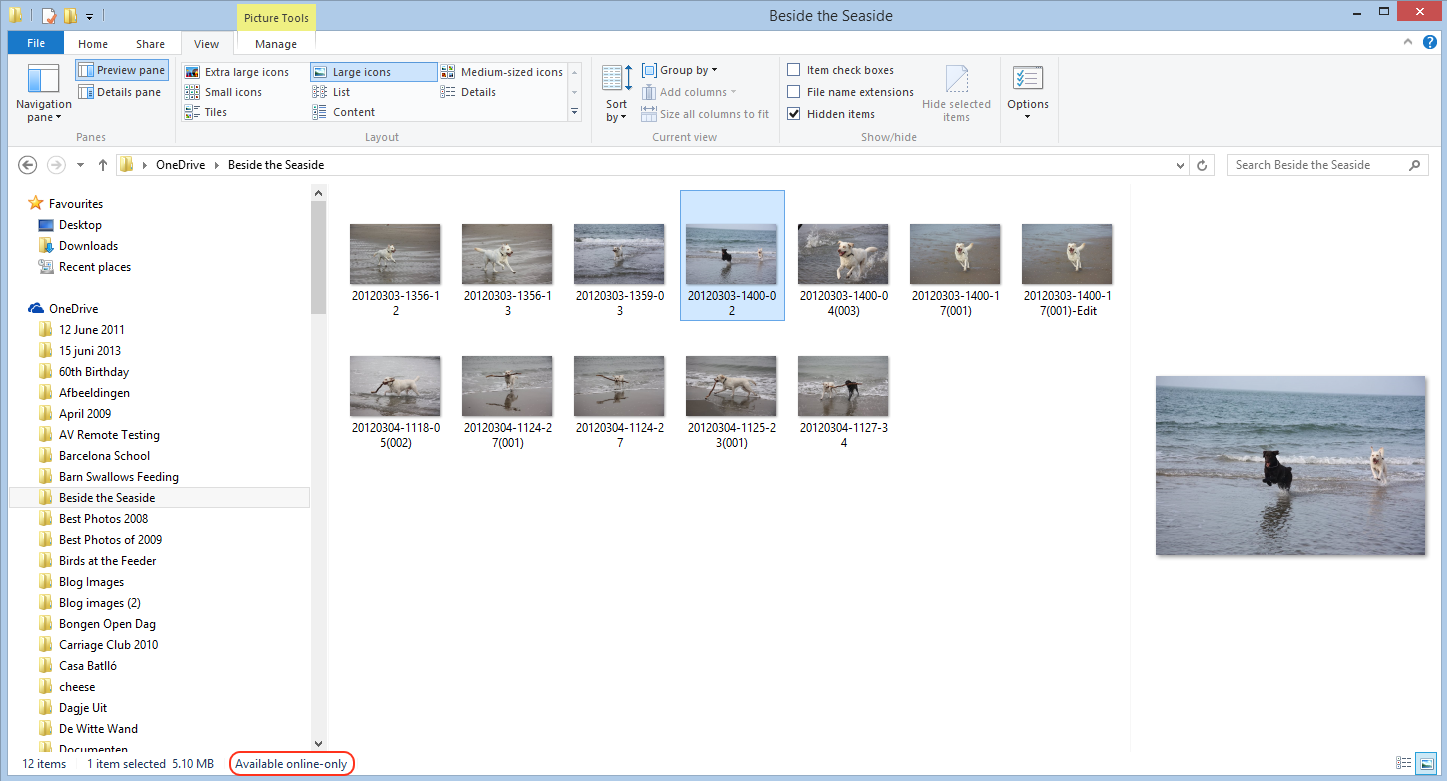
In Windows 8.1, the only indication you have that you’re looking at a smart file, rather than a full-size file is that “Available online-only” message at the bottom of the File Explorer window.
Other than that, to all intents and purposes, smart files look like the actual files, but they are usually a fraction of the size. They just hold the thumbnail and the metadata of the files they stand in for. In the example above, the selected image (in OneDrive) is 5.1 MB, but the smart file shown in File Explorer is just 44 KB in size:
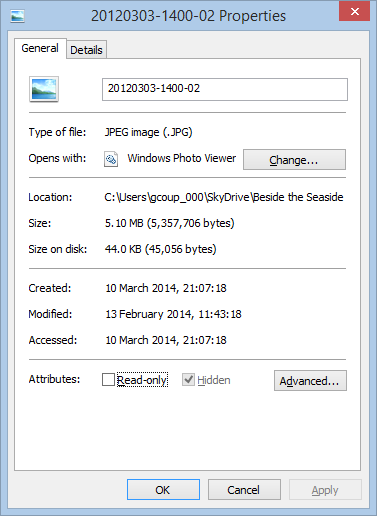
Because the smart files hold metadata, it means that you can use File Explorer to search your OneDrive folders. This is also better than the online OneDrive Search, which can only search on filenames.
When a smart file is opened for editing, the actual file is automatically synced down onto the PC and opened instead. After use, the user can choose whether to keep the full-size file (which is then automatically kept in sync with the file in OneDrive), or go back to using a smart file to save space. This choice can also be made at Folder level, so that the contents of a Folder can be either “offline” (i.e. full-size files are in the PC’s folder and kept in sync with OneDrive) or “online-only (i.e. smart files are used in the Folder to save space on the PC or tablet).
When this feature was introduced, Mona Akmal (a group program manager for SkyDrive – what OneDrive was then called) blogged that:
In the Windows 8.1 preview we saw consumers using SkyDrive in two distinct ways. The first group of people are very conscious of what they have saved to disk and most of their files are online-only. We found that the majority of people using smart files take up 80% less disk space than they would without smart files. The second group of people are on the other end of the spectrum: they explicitly chose to have all their files available offline, and so have their entire SkyDrive stored locally. This showed us that users understand smart files and are tailoring the feature to their needs.
Fast forward a year, and now Gabe Aul is telling us:
People had to learn the difference between what files were “available online” (placeholders) versus what was “available offline” and physically on your PC. We heard a lot of feedback around this behavior. For example, people would expect that any files they see in File Explorer would be available offline by default. Then they would hop onto a flight (or go someplace without connectivity) and try to access a file they thought was on their PC and it wasn’t available because it was just a placeholder. It didn’t feel like sync was as reliable as it needed to be. For Windows 10, having OneDrive provide fast and reliable sync of your files is important. Starting with this build, OneDrive will use selective sync. This means you choose what you want synced to your PC and it will be. What you see is really there and you don’t need to worry about downloading it. You can choose to have all of your OneDrive files synced to your PC, or just the ones you select.
In other words some people clearly don’t understand smart files. So smart files have been removed for everyone. Gabe, this is not a “cool new feature”, this is removing a cool new feature.
What we have now is a very basic experience. Either a OneDrive folder or file is synced to the PC, or it’s not. That, in turn means that the Search experience is now completely broken.
For example, here’s what I see when I search for photos of our dog Kai in OneDrive using the File Explorer of Windows 8.1:
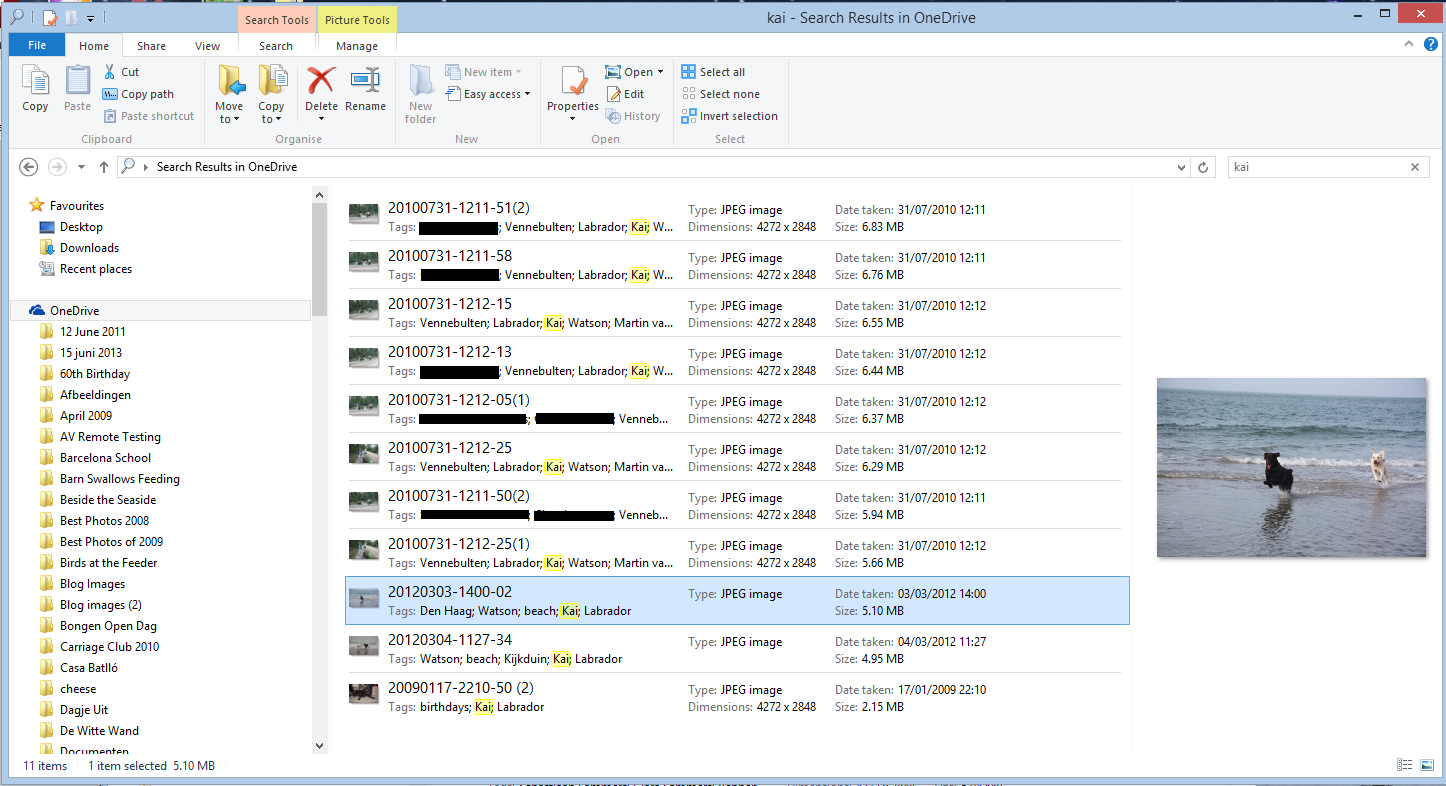
Search has found 11 images with the tag “Kai” from within three separate OneDrive folders, and as it happens, all of these are smart files, since I don’t have the contents of these folders held offline on my PC.
In the new build of Windows 10, however, the same search only returns two results:
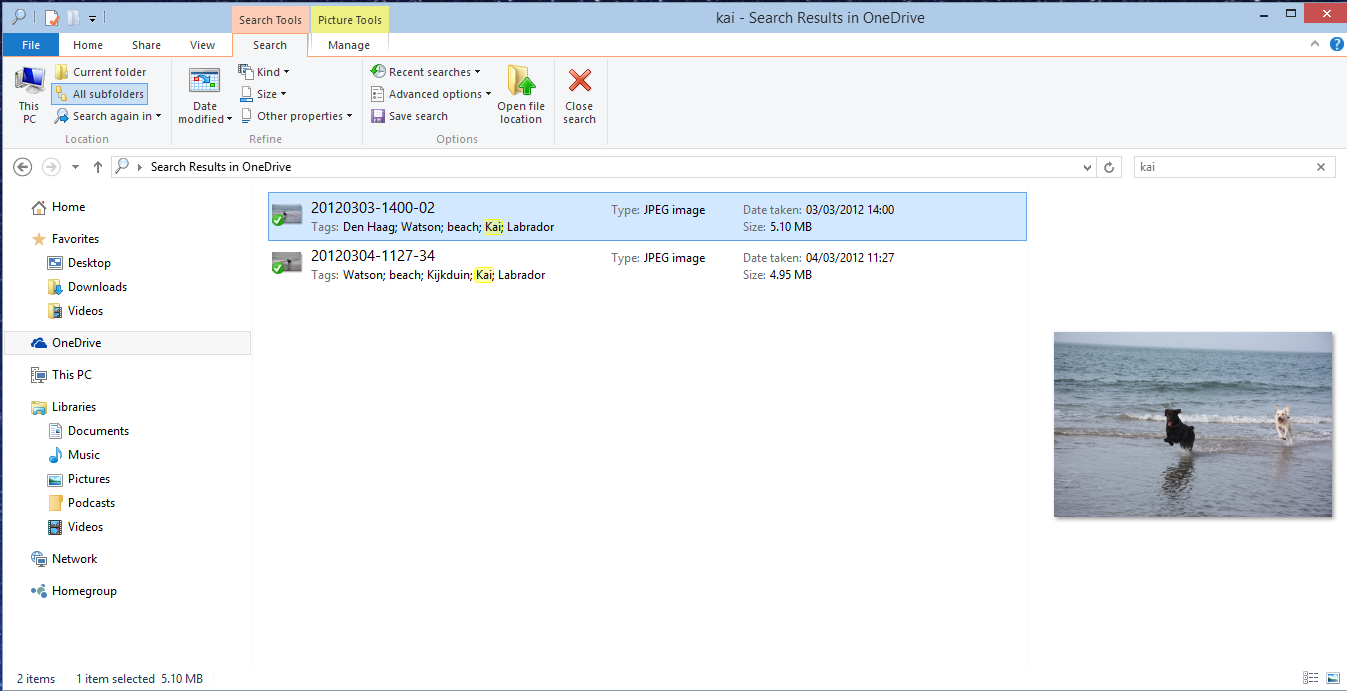
Why? Because I only have one folder (“Beside the Seaside”) synced to my PC, all the other folders (e.g. “Walking the Dogs”) claim that they are empty:


Of course, it’s only empty on my PC – in the OneDrive Cloud, it has photos of Kai. However, I also can’t search for photos of Kai in OneDrive – the online search doesn’t search tags, only filenames.
In summary, the removal of smart files is a huge step backwards. All Microsoft had to do was to use an overlay icon on files to distinguish between a smart file and the full-size original, and everybody would have been happy.
But no, Microsoft has removed a cool feature and broken the search experience completely. This does not bode well for Windows 10 as far as I’m concerned.
Addendum 15 November 2014: This removal of smart files has caused something of a disturbance in the Force. So much so, that Microsoft has moved to respond with a comment from a OneDrive team group program manager, Jason Moore:
Wanted to jump in here and address some of the questions and feedback we are getting about the changes we rolled out yesterday. As we look at the next version of OneDrive, we are working very hard to make sure it provides the best experience possible for our customers, and a big part of that is getting the sync model right.
We hear the feedback on placeholders, and we agree that there many great things about the model – for example, being able to see all your files in the cloud even if they are not all sync’ed to your PC. However, we were not happy with how we built placeholders, and we got clear feedback that some customers were confused (for example, with files not being available when offline), and that some applications didn’t work well with placeholders and that sync reliability was not where we needed it to be.
So, we stepped back to take a fresh look at OneDrive in Windows. The changes we made are significant. We didn’t just “turn off” placeholders – we’re making fundamental improvements to how Sync works, focusing on reliability in all scenarios, bringing together OneDrive and OneDrive for Business in one sync engine, and making sure we have a model that can scale to unlimited storage. In Windows 10, that means we’ll use selective sync instead of placeholders. But we’re adding additional capabilities, so the experience you get in Windows 10 build 9879 is just the beginning. For instance, you’ll be able to search all of your files on OneDrive – even those that aren’t sync’ed to your PC – and access those files directly from the search results. And we’ll solve for the scenario of having a large photo collection in the cloud but limited disk space on your PC.
Longer term, we’ll continue to improve the experience of OneDrive in Windows File Explorer, including bringing back key features of placeholders.
So keep the feedback coming. We’re working every day to improve OneDrive, and customer feedback is a hugely important part of that.”
It would thus appear that Microsoft has not in fact thrown the placeholder baby out with the bathwater, but is trying to improve it. That’s a good thing. However, it’s a pity that they couldn’t have been a bit more open about this upfront. Telling us that they were introducing cool new features, whilst in fact apparently removing one is yet another example of Microsoft opening its mouth, only to exchange feet.
Addendum 19 November 2014: Mary Branscombe has an excellent follow-up article on this whole debacle. Well worth reading.
Addendum 8 January 2015: Microsoft’s Chris Jones has posted an update on the OneDrive blog that (I think) tries to illuminate the OneDrive roadmap going forward. If I’m understanding what he’s writing, then Smart File functionality won’t be back in Windows 10 at release (Boo!), but should be returned at a later date (Hooray!), once the new technical solutions have been completed.
Addendum 23 January 2015: Microsoft has (finally) introduced full support for searching of tags into the OneDrive cloud service, so at least you can search your files online in a proper manner, even if you now can’t do it in the File Explorer in Windows 10. What Microsoft giveth with one hand, it taketh away with the other.
I know, it sounds almost like an old joke, but I thought something quite interesting happened a few days ago.
Scene: The UN International Centre in Vienna
Dramatis personæ: The Secretary-General of the United Nations: Ban Ki-Moon, and the Diva: Conchita Wurst.
Watch it and wonder. I really think the UN gets what human equality and respect for diversity means – unlike the Catholic Church.
Yesterday, I blogged about the Microsoft Band – the new wearable device from Microsoft that is aimed at people who do sports. Reading the press, I get the impression that relatively few commentators have understood what’s really going on here. Most of them are focusing on the device itself, and missing the real story. The device is a first generation attempt. It is limited, clunky, and will only used by early adopters. Better devices will inevitably follow, but that’s almost not the point.
The real point, and the real innovation, is Microsoft Health – the service in the Cloud where all the data collected by the Band can, and usually will, be held. Microsoft themselves talk about Microsoft Health being “the beginning of a journey”. It’s clear that the plan is that the data collected will be mined to provide value, and not just to you, but to Microsoft and its partners. I notice that Microsoft already has a connection not just between the Microsoft Health service and multiple (non-Microsoft) devices, but between Microsoft Health and Microsoft’s HealthVault:
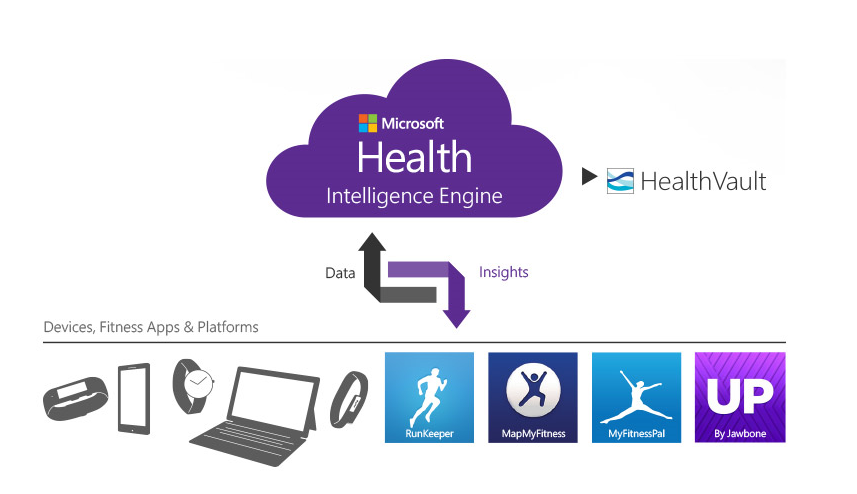
And just what is HealthVault? Well, it’s where you can store your health information and make it available to others: such as your health providers, and no doubt in the future, your insurers.
This is the inevitable rise of big data in the Healthcare industry. I think where Microsoft, and others, certainly Google, but maybe even Nintendo, are going is to aim for the point where their intelligent agents (Cortana, in Microsoft’s case) take on the role of your personal physician. It may seem farfetched today, but it is an inevitable endpoint of the changes that are happening all around us. There’s a McKinsey report that says that Big Data is the next frontier for innovation and competition, which may well be the case, but I can’t help feel that McKinsey hasn’t seen the writing on the wall when they state that:
There will be a shortage of talent necessary for organizations to take advantage of big data. By 2018, the United States alone could face a shortage of 140,000 to 190,000 people with deep analytical skills as well as 1.5 million managers and analysts with the know-how to use the analysis of big data to make effective decisions.
Um, sorry, but coming rapidly up on the inside are intelligent bots that have those deep analytical skills. Already, we have the fact that arguably the best oncologist in the world is not a human but an intelligent bot: Watson. We are rapidly approaching the position where for many jobs – not just assembly line workers, but white-collar workers and even the professional classes such as lawyers, doctors, and analysts – humans need not apply:
Last week, I attended a presentation in Silvolde, a small town nearby, which was given by Peter van der Wel – a Futurologist and Economist. He covered much the same ground as in the video above. While van der Wel was a self-confessed optimist about the technological changes that are heading our way, I’m not so sure. I agree that they will happen, but the resulting upheavals in society as we move from the pre-robot age to a post-robot one will not be easily managed. Today, most of us work to earn money in order to live. When it becomes difficult to find a job – any job – what will the impact be on society? I have no answer, but I think we “live in interesting times”, as the old Chinese curse would have it.
There have been rumours about it for a while now, but yesterday Microsoft announced the Microsoft Band, a wearable device that both tracks your health and provides notifications of emails, appointments and social media activity.
The wristband records the number of steps the wearer takes, the intensity of sleep, exercise performance and calories burned. It also tracks heart rate, location via GPS, skin temperature, perspiration and UV exposure. All that data is passed into Microsoft Health, a cloud-based service that builds up a picture of your physical activity and health indicators.
It’s clearly aimed at people who do sports, but I wonder whether Microsoft might not widen the target group to add others in the future, such as the elderly. Being on the wrong side of 65 myself, I would definitely be interested in a device that can monitor my health, and alert me when trends look to be going pear-shaped. A panic button might be a useful addition as well. And think of the add-on accessories – a Bluetooth blood pressure monitor for example.
As usual for Microsoft, the Microsoft Band is only currently available in the US, with no word as to when it might be expected elsewhere. I’ll probably be dead before it is available here.
Yes, I know, I sound like a broken record; but my excuse is that Microsoft’s actions just bring it upon themselves on a regular basis. So, what is it this time?
The spotlight of scorn is back on the OneDrive team, again. After generating lots of goodwill over the recent announcement that Office365 subscribers will get unlimited storage in OneDrive, the team promptly undid it by announcing a new UI for the Windows Phone app. The announcement has been greeted with a storm of protest, both on the OneDrive blog post, but also over at the feedback site for Windows Phone.
The reason that there has been such derision is that the “new UI” makes the Windows Phone app look very much as though it is an Android app. It flies in the face of Microsoft’s own guidelines for UI design of Windows Phone apps, and introduces Android UI elements instead.
Frankly, if I’d wanted an Android phone, I would have bought one. One of the key reasons why I went with a Windows Phone was the UI design. I like it a lot, and I am at ease with it. To have a key Microsoft team turn their back on it and introduce Android elements is a shock, to say the least. One might almost wonder if the team had actually read the “Review questions for prototype” section on the Design the best app you can page of the guidelines, in particular:
Even simple things, such as a transparent Tile for the app have been forgotten about (or ignored) in this bastardised design. I hope that the howls of protest that have greeted this version result in a swift redesign to make it a proper Windows Phone app. Good design and adhering to UI guidelines are important, and help to build a brand. This horror does just the opposite.
I’m an amateur photographer. I’m not a good photographer, but occasionally, more by luck than judgement, I take a photo that looks pretty good to me. Almost as important to me as the image is the information describing the photo; when it was taken, where, the subject – that sort of thing. In technical terms, this is the photo’s metadata.
I’ve been trying to capture, and manage, this sort of information since 2005, and have tried a lot of software applications in the process. In 2007, I settled on IDimager as the most suitable tool for what I was looking for. It was what I used for tagging my photos.
Two years ago, IDimager was suddenly withdrawn from the market by the company, and replaced by Photo Supreme. After my initial shock, I switched to Photo Supreme, and after an uncertain start, I found that it was, in large part, covering my requirements for a Digital Asset Management (DAM) tool.
This week, version 3 of Photo Supreme is announced. It has over 150 additions and improvements over version 2.
I was fortunate enough to be one of the beta testers for version 3. It is definitely a big step forward from version 2 (which in itself was a very good tool), so version 3 has become my DAM tool of choice going forward. I’m also a Lightroom 5 Standalone user, but the only reason I have that is for its image processing capabilities. The metadata handling of Photo Supreme strikes me as being head and shoulders above what Lightroom currently has to offer.
It supports a wide range of photo metadata standards out of the box: Exif, IPTC Core, Extension and Plus. I can now automatically synchronize entries for the IPTC Extension fields for “Person In Image”, “Places”, and “Event” IPTC fields – something that I had to do manually in V2. It also now supports the Image Region metadata standard defined by the Metadata Working Group – the same standard used by Google’s Picasa for People Tags. That means that as well as being able to list the people appearing in a photo, I can now show their names on the photo itself.
If you’re looking for a good tool to manage your photo metadata, take a look at Photo Supreme.
Four and a half years ago, I built my first HTPC for our Home Cinema setup. It was leading edge technology then, but with the rate of change being what it is, support for many of the software and hardware components very soon became either dying or dead.
The HTPC is currently running Windows 8.1 + Windows Media Center (WMC), which in turn is supplemented with MyMovies to provide the best experience with a library of films and recorded TV series. For Bluray films, I’ve been using Arcsoft’s TotalMedia Theatre to play both the discs themselves and ISO files that I’ve made from my discs. This setup works well, but the writing is on the wall indicating that it can’t continue this way forever. For one thing, it’s abundantly clear that Microsoft want to wash their hands of Windows Media Center, and for another, Arcsoft suddenly pulled TotalMedia Theatre from its web site last month and it is no longer available.
I need to prepare a contingency plan, so I’ve been looking at alternatives. A couple of years ago, I took a (quick) look at JRiver Media Center. I said at the time:
This is a total solution, replacing Windows Media Center, TMT5 and MyMovies in their entirety. JRiver Media Center is capable of handling Blu-ray. I must admit, on my HTPC it appears to handle them flawlessly, a pleasant change to the current disaster of TMT5. But if I adopted JRiver Media Center, I would also be moving away from WMC and MyMovies, and I do like the user experience of that combination.
JRiver Media Center has been around since 1998, and is currently on version 17 (!). It looks to be a very good product, well-supported, with an extremely enthusiastic user community of more than 26,000 members, some of whom are contributing plug-ins for the main application. However, I’m not sure that I want to move to it. It’s a personal thing, I know, but as I say, I feel very comfortable with WMC and MyMovies.
JMC is now at version 20, but I still have the impression that it has so many bells and whistles that it is overly-complex for what it is. I might take another look at it to see if it strikes me as being more attractive, but I can’t help feeling that it will just have yet more features, knobs and switches bolted on that I would never want to use. Addendum: It does, and I don’t. It’s not for me.
I’ve been looking at a couple of other alternatives over the past few months: MediaBrowser (now called Emby) and, more recently, Plex. They both have their strengths and weaknesses. A major strength of both of them (as far as I’m concerned) is that they both use a client/server architecture. That is, the core component of both is a media server to which a wide range of clients (TVs, HTPCs, PCs, tablets and smartphones) can connect and play the media. Since I hold all our media on a Windows Home Server 2011 system, that would be the logical place to install and run the media server. For both MediaBrowser and Plex, the media server can be administered on the WHS 2011 system via a web interface.
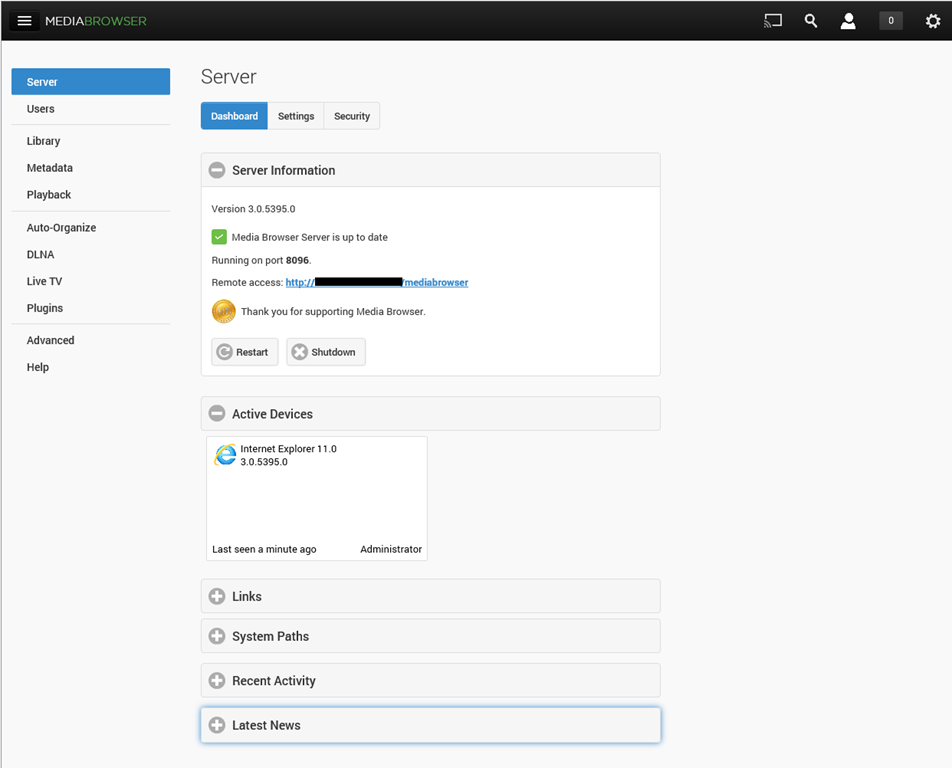
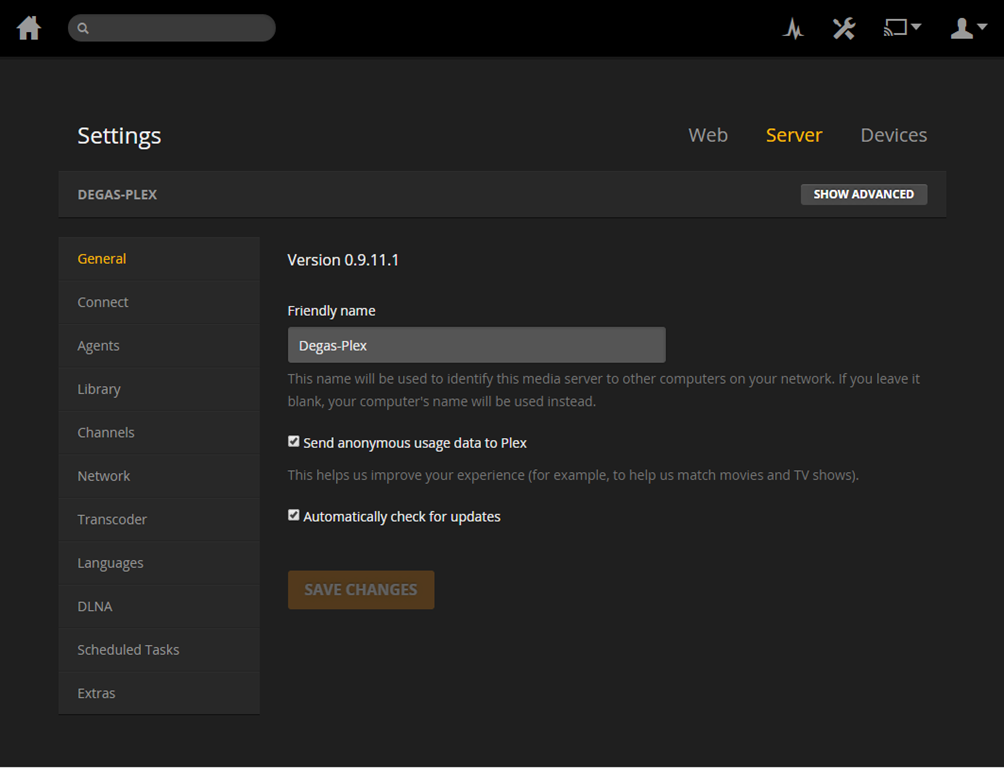
The weaknesses differ between the two, but both MediaBrowser and Plex are fast evolving systems, so changes, bugs, and bug fixes are very much the order of the day. As far as I’m concerned, neither one offers me a complete replacement for our current WMC + MyMovies setup at the moment. Ideally, I would like a combination of the features of the two, because of their current shortcomings.
For example, take the HTPC component of both: MediaBrowser Theater (MBT) and Plex Home Theater (PHT). MBT is still Alpha software; not even at Beta stage. While it is looking good, it clearly has a long way to go – it is very buggy and feature incomplete at the moment.
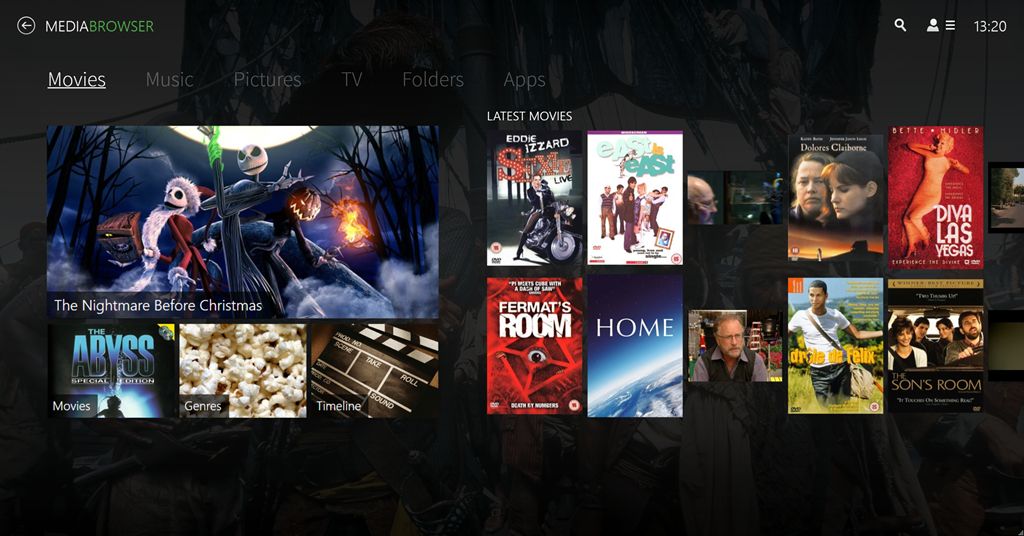
PHT, on the other hand, is much further down the development track. It looks good and seems fairly reliable on my HTPC.

Both MBT and PHT are so-called “10 foot interfaces” – they are designed for use on large screens, and to be driven by remote control. It would be really nice if PHT could use the remote I have for Windows Media Center, but for some reason best known to the designers, they have deliberately chosen not to stand upon the shoulders of giants, but to start from scratch with almost entirely a different set of commands.
Both MediaBrowser and Plex have player clients for Windows 8.1 and Windows Phone 8.1. Here are the Windows 8.1 clients:


One major shortcoming of the Plex clients (as far as I’m concerned), is that neither of them have no other way of browsing our Music library other than by an Artist view:
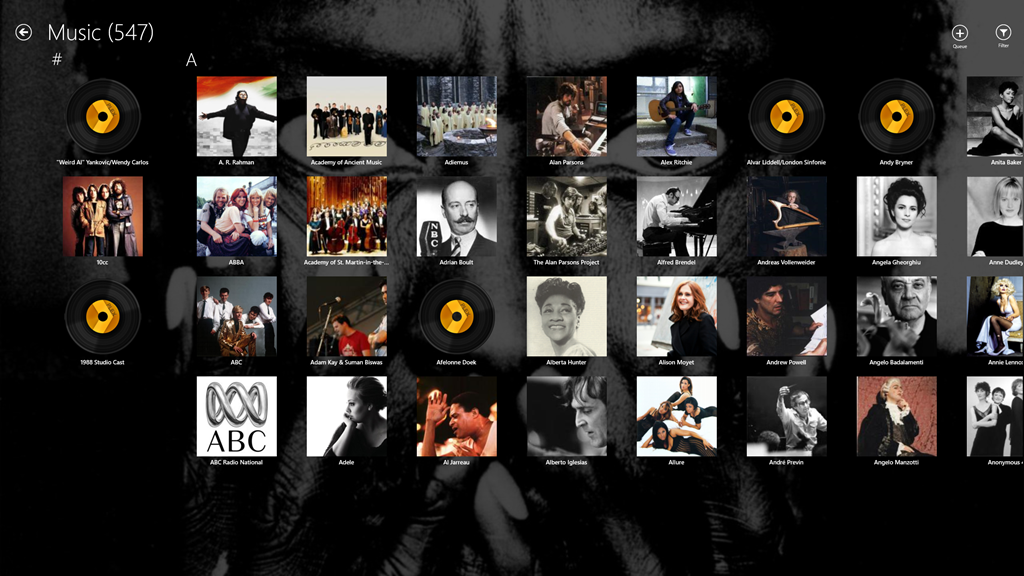
At least the MediaBrowser Windows 8.1 client offers a choice of being able to browse by Artist, Album or Genre, while the Windows Phone client adds the choice of being able to browse by song as well. However, this is nothing compared to Windows Media Center, which, since 2004 (ten years ago!), has offered a choice of being able to browse by Album, Artist (both per track and per Album), Genre, Song, Playlist, Composer, and Year:
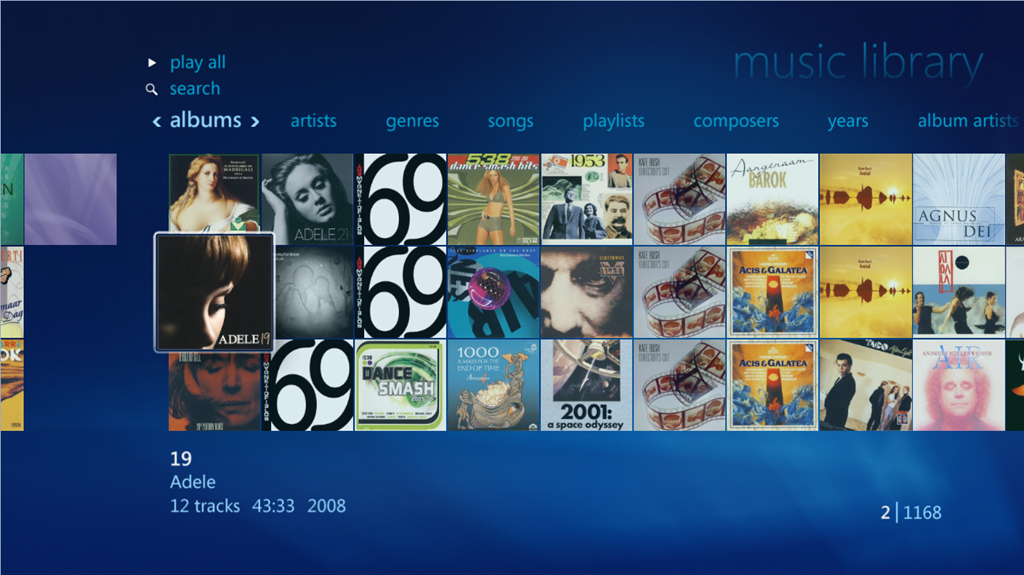
So as far as handling of a Music library is concerned then, both MediaBrowser and Plex have a very long way to go…
[Addendum 30 October 2014: Plex have just released new versions of the client for Windows 8.1 and Windows Phone, and the good news is that at last it is now possible to browse the Music library by Album. Semantic Zoom is also supported when the Album list is sorted by name. However, Semantic Zoom doesn’t work (in Windows 8.1) or is missing altogether (in Windows Phone) when Albums are sorted by Artist. Apparently, this is caused by limitations in the current version of the Server. Hopefully it will get fixed, but at least we are now a little further forward than we were…]
It’s a similar story when it comes to browsing Photo libraries. The MediaBrowser and Plex clients can only browse folders, while Windows Media Center can browse by Folder, Tags, Date taken, Ratings, Slide shows and Shared (browsing other media servers shared on the local network). The lack of support for browsing by Tags, I find particularly disappointing in the MediaBrowser and Plex clients. Still, support for these features may yet come. It’s clear, however, that both the MediaBrowser and the Plex developers view Movies and Video as where the action is. Music and Photo libraries are very much the poor relations.
One area where MediaBrowser and Plex has surpassed Windows Media Center is that of being able to play content on other devices. WMC was designed as an all-in-one solution, whereas both MediaBrowser and Plex have been designed as an ecosystem of interconnected server and client devices. So it is possible to browse my movie library on my Windows Tablet, or my Windows Phone; pick a movie, and then start it playing on the HPTC, and continue controlling playback from the browser device.
Plex can do this with its own player applications and selected Smart TVs. MediaBrowser has possibly a wider reach, because it should be able to work with any DLNA-certified device. However, the theory is not always borne out in practice; I have problems using my Denon AVR to play music sent to it by MediaBrowser.
Another area where MediaBrowser and Plex go beyond Windows Media Center is that of being able to access and share media collections outside of the home network. This raises a lot of questions around security, and indeed, Plex seems to have some architectural issues that need to be addressed in this area, and I would not be surprised if MediaBrowser might have similar questions asked of it. However, as I have no desire to share our media collections outside of our home network, I do not use this capability and have closed off the servers from outside access. (Note: since this section was written, Plex has had a totally redesigned security architecture implemented, which seems to have addressed the security issues)
In summary then, both MediaBrowser and Plex have promise, but I don’t feel that either of them have quite reached the stage where I will commit to one and drop my current Windows Media Center setup. Nonetheless, I’ll be continuing to monitor and try out both. We are getting ever closer to the release of Windows 10, and Microsoft’s possible removal of Windows Media Center from that operating system. The clock is ticking.
Addendum 6 August 2015: Well, Microsoft has just released Windows 10, and, as expected, Windows Media Center has been dropped from the operating system entirely. Since my last entry on this post, both Plex and Emby have improved. Plex, in particular, has considerably improved handling of Music collections. Still not as good as Windows Media Center, it has to be said, but not bad.
I’m still running both Plex and Emby in parallel, trying to make up my mind between them. Plex is currently in the lead as far as I (and my requirements) am concerned, but I’m waiting to see what the forthcoming version of the Emby Home Theater client will offer before I make my decision.
I watched Particle Fever last night. It’s a documentary about the Large Hadron Collider and the search for the Higgs Boson.
It’s staggeringly good.
Equally staggering is the scale of the physics experiment that the LHC embodies. It’s probably the largest experiment ever constructed by humans; built with a budget of 7.5 billion euros by over 10,000 scientists and engineers from more than 100 countries. The documentary easily delivers a sense of awe at the scale of the endeavour, but, more importantly by following six physicists over six years, also gives an insight into the purpose of the project and the passion of the people for the physics behind it.
Physicists fall into two camps: the theorists and the experimentalists, and both were represented in the documentary. Whilst all the featured physicists were interesting and engaging, I was particularly struck by two of them: experimentalist Monica Dunford (who came across as being exactly like Dr. Ellie Arroway, the character played by Jodie Foster, in the film Contact) and the theorist Nima Arkani-Hamed. His explanations, together with those of David Kaplan, another physicist and producer of the film, managed to make the physics clear to me, and pointed out the struggle of theories going on – supersymmetry versus multiverse – that the LHC experiments aim to resolve through discovering and understanding the Higgs Boson.
What I find fascinating is the way in which supersymmetry almost implies support for the strong Anthropic principle (the suspicion that someone/something is twiddling the knobs of the universe to fine-tune physical laws and constants so that the universe as we know it can actually exist). The Multiverse theory, on the other hand, removes the need for all this knob-twiddling, since it posits that our universe, with its particular knob settings, is just one possibility out of a myriad of alternative universes that might exist.
It was hoped that, if the Higgs Boson were to be discovered by the LHC experiments, then this would go some way to favouring one of the above opposing theories. Unfortunately, like some cosmic joke, the data that the LHC has given us about the nature of the Higgs Boson is almost exactly sitting on the fence, with neither theory being able to be declared the outright winner. This is like ascending a mountain, only to discover when you’re at the peak, that it is merely a foothill of some larger chain. If you have passion, as these physicists clearly demonstrate, this will simply act as the spur to drive you on further.
At a time when both religion and politics are increasingly demonstrating their most baleful influences on humanity, it warmed the cockles of my misanthropic old heart to see a scientific endeavour on the scale of the LHC uniting thousands in a common search for knowledge.
Naturally, I couldn’t resist taking a look at Microsoft’s Technical Preview of Windows 10. I signed up to the Windows Insider Program and downloaded a copy of the Windows 10 Technical Preview.
I’ve installed it on my Desktop PC (homebuild) in a Dual Boot configuration. Dual Boot seems the safest option at this stage; Windows 10 is nowhere near complete, and you can’t revert back to Windows 8.1 without doing a complete fresh reinstall of Windows. While I could have run Windows 10 in a Virtual Machine, I prefer to see what happens when running on actual hardware. With the Dual Boot configuration, I can choose to start up either the Windows 10 Technical Preview or the tried and trusted Windows 8.1 operating system. (Addendum: if you’d like to install the Technical Preview in a Virtual Machine, then Ludwig Keck has a “How-to” post over at his This ‘n That blog.)
The main thing to bear in mind is that at this stage, it’s very early days; the focus of the Technical Preview is on Enterprise users (who are probably still running Windows 7 on their PCs) and therefore using the traditional Desktop interface with mouse and keyboard. Touch devices are not the focus of this first Technical Preview. I’m already reading in forums of people who have installed it on touch-enabled devices (e.g. the Microsoft Surface Pro range) and who are reporting that the touch experience is in fact degraded…
For this and other reasons, there is no way that I would install the Technical Preview on my ThinkPad Tablet 2 at this stage. Knowing my luck I’d end up with a useless brick.
I suppose the big news of this Technical Preview is that the Start Menu (familiar to Windows 7 users) is back. This being Windows 10, the Start Menu also has elements of the Windows 8.1 Start Screen tacked onto it in the form of App Tiles:

It’s possible to customise this Start Menu (Start Panel?) in a variety of ways (resizing the panel, resizing and shuffling the Tiles) to arrive at your desired configuration. This could be a pure Windows 7-style of Start Menu, or a combination of Menu and Panel:
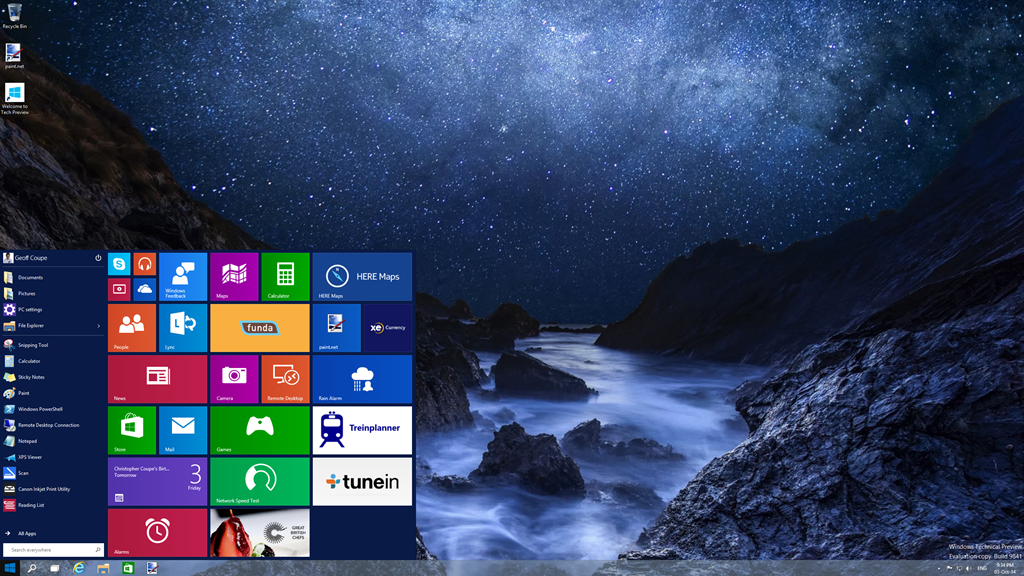
I have to say that, frankly, for me, this all seems like a step back into the past. I’ve got very comfortable with the Start Screen on all my devices (PCs and Tablets), and going back to the damn Start Menu doesn’t thrill me at all. Clearly, there are many for whom the Start Menu is a good thing, but I’m not one of them. I just hope that Microsoft don’t remove the option of having a Start Screen even when Windows 10 is running in Desktop mode.
What I also quickly noticed is that, in this Technical Preview, the Charms Bar has been removed from the Desktop as well. My muscle memory kept expecting to bring out the Charms bar, and I found it irritating that it was not there. This may be an issue with the Technical Preview build, because there’s a Control Panel setting that seems to imply that it should be possible to have the Charms Bar present, even in Desktop mode:
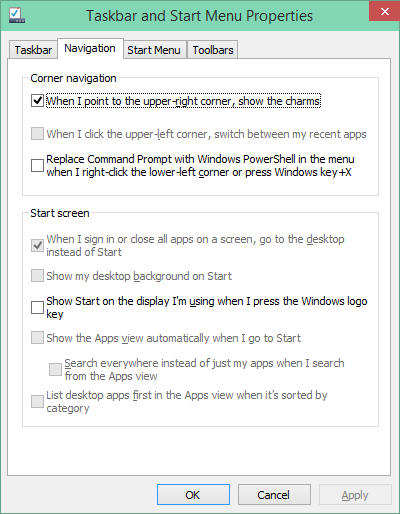
However, in this build of the Technical Preview, that checkbox doesn’t work.
One thing I do rather like is that Desktop Windows are now almost borderless, with just a faint shadow effect on underlying Windows:
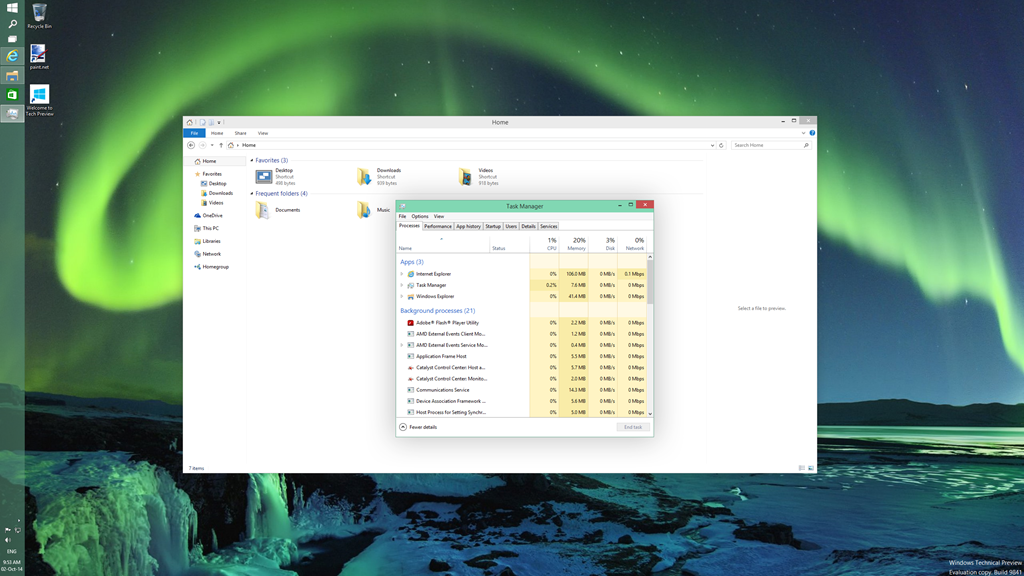
This seems to be a nod to the “flat” design language of the Modern UI. As I say, I rather like it, but I see from the forums that Desktop traditionalists hate it.
If you fire up a Modern UI app, then it displays almost fullscreen (by default, the Taskbar and a Title Bar still show):
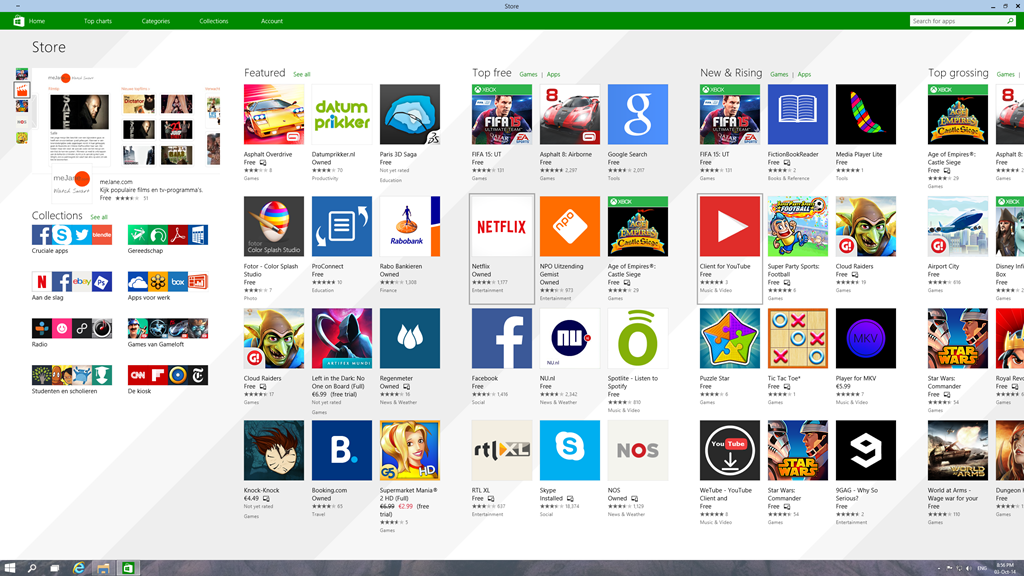
The big news here is that it is possible to resize the Window of the app. The trouble is, that the content doesn’t resize. It may get reshuffled a bit (but not always, as the Store app shown here illustrates), but fonts and graphics remain at their original size:
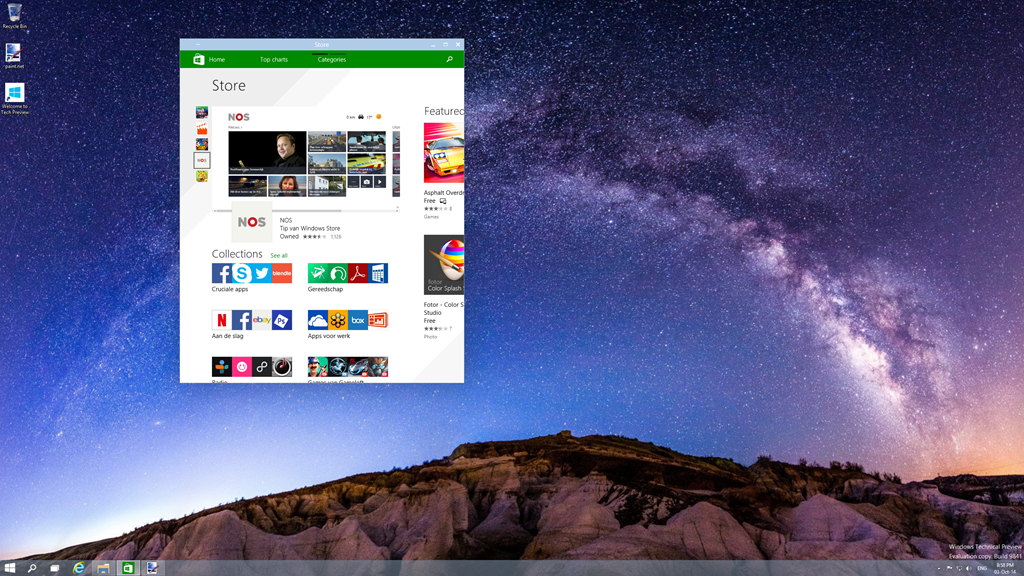
I don’t really think this works. The Mail app, for example, is really designed for a tablet-sized screen in fullscreen mode. Resizing it on a large desktop, and it looks overblown, even when in a smaller window. When in Desktop mode, I tend to stick to the traditional Windows Live Mail, which is a traditional Desktop application. That’s comfortable. When I’m using my tablet, I use the Mail app. That’s equally comfortable.
Microsoft are making a play that Windows 10 will be one platform that supports a tailored experience for a range of device form factors:
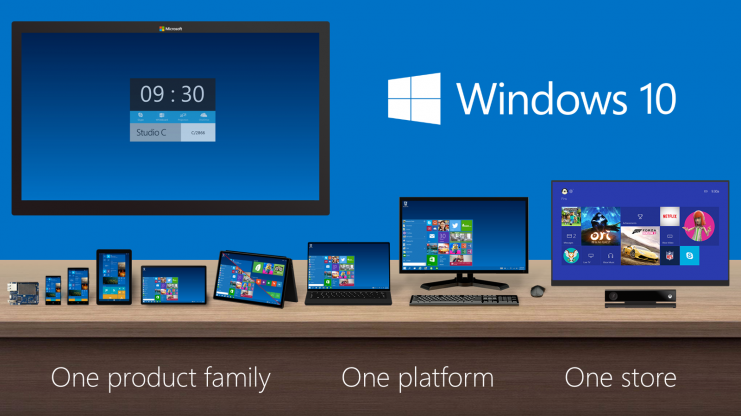
However, at this stage, it is clear that the experience is not tailored, it’s procrustean – at least as far as the current generation of Modern UI apps are concerned. This has to improve.
I’ll be following the developments with interest, but this first Technical Preview is addressing an area that I personally have moved beyond.
In January 2013, I bought a Lenovo ThinkPad Tablet 2 for myself. Since I’m firmly in the Windows ecosystem camp, I didn’t want to get either an iPad or an Android tablet, and the TPT2 was the first Windows tablet that started to tick all the boxes I had in my list. Being a tablet with a second generation Intel Atom processor at its heart, it was no powerhouse, but it suited me very well.
Fast forward to now, and there are tablets available with the next generation of Intel’s Atom, and new low-power versions of the Atom’s big brothers, the Core processor range, are also starting to appear in devices. For the past few months I’ve been comparing my trusty TPT2 to Lenovo’s new ThinkPad 10 tablet, and to Microsoft’s Surface Pro 3, wondering whether to make a move to a newer device. I finally came to the decision, after much vacillation, to sit this round out, hang on to my TPT2, and wait for up to a year before purchasing a replacement device.
However, yesterday a small box was delivered, courtesy of Lenovo, which contained a ThinkPad 10. I’ve been fairly active in a couple of online forums trying to help people with TPT2s, and Lenovo have sent me a TP10 on long-term loan so that I can move into helping with TP10 issues. Very nice of them, I must say, but I’m not going to let that sway my judgement.
I thought that one way to get started would be to compare the TP10 with its predecessor, the TPT2. It should be an improvement over the earlier product, but is that true in every respect? Let’s take a look…
First of all, here’s the comparison of the basic specifications of the particular models of the tablets I currently have:
| ThinkPad Tablet 2 | ThinkPad 10 | |
| Processor | Intel Atom Z2760 (2 cores, 1.80GHz, 1MB cache) | Intel Atom Z3795 (4 cores, burst 2.40GHz, 2MB cache) |
| Display | 1366 x 768 (16:9) | 1920 x 1200 (16:10) |
| Memory | 2GB / 800MHz LPDDR2 | 4GB / 1067MHz LPDDR3 |
| Storage | 64GB eMMC + MicroSD up to 32GB |
128 GB eMMC + MicroSD up to 64GB |
| O.S. | Windows 8.1 Pro* 32bit | Windows 8.1 Pro 64bit |
| Digitizer Pen | Yes | Yes |
| WLAN | 11a/b/g/n | 11a/b/g/n |
| WWAN | GPRS / WCDMA / HSPA / HSPA+ | No |
| Bluetooth | 4.0 | 4.0 |
| GNSS | Yes | Yes |
| NFC | Yes | No |
*The TPT2 originally came with Windows 8 installed. I upgraded it to Windows 8.1 when that became available.
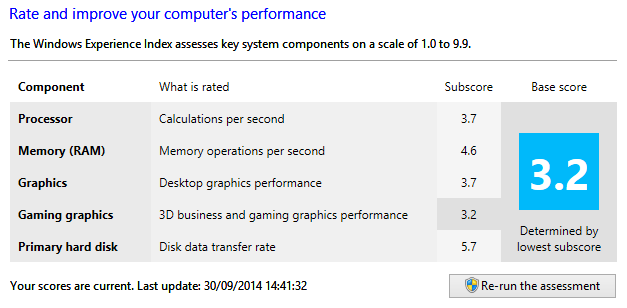
You’ll notice that the TP10 that I have on loan does not have WWAN or NFC fitted. These are available as options for some models of the TP10 line. Other than that, it is clear from the table that most of the important elements have performance improvements over the TPT2 equivalents. This is also borne out in benchmarks. Here, for example are the Windows Experience Index scores:
TPT2:
TP10:
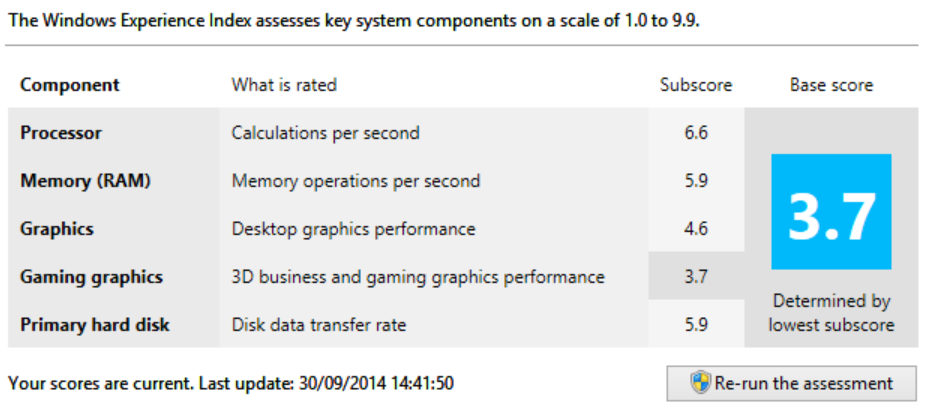
Whilst the gaming graphics and hard disk subscores are only slightly improved for the TP10 over the TPT2, the other measures show substantial improvement. That translates in practice into a snappier feel for the TP10 over my TPT2. Office programs start up much faster, for example.
Physically, the two tablets are close in size, the TP10 (on the left) being slightly taller and narrower than the TPT2:

Also shown in this photo is the Lenovo Quickshot cover fitted to the TP10, with an Armour Dog cover from Lente Designs fitted to my TPT2 on the right. The Armour Dog cover wraps around the TPT2, and is very stable when used as a stand, but it does add thickness to the tablet when closed. The Quickshot cover is thinner, and only covers the screen (it can be completely folded back under the TP10 in use). It can also act as a stand, but it is less stable, and with less angles to choose from.
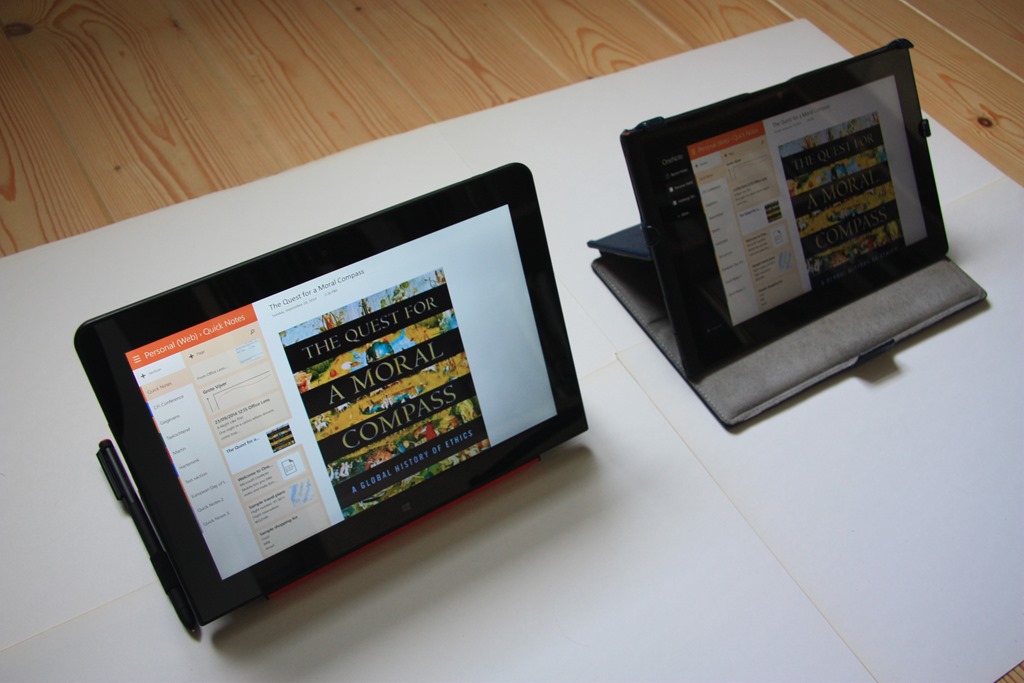
You’ll notice that it also has a loop to hold the TP10’s pen. Since the TP10 is slightly thinner than the TPT2, it is not possible to store even a small stylus in the tablet itself, as was done for the TPT2, so Lenovo has delivered a normal sized pen.
The TP10 has a larger display and a higher resolution than the TPT2, and I like the 16:10 aspect ratio of the TP10 over the 16:9 ratio of the TPT2. When I’m reading books, for example, I prefer the TP10 experience (on the right) over the slightly longer and narrower page rendered on the TPT2:
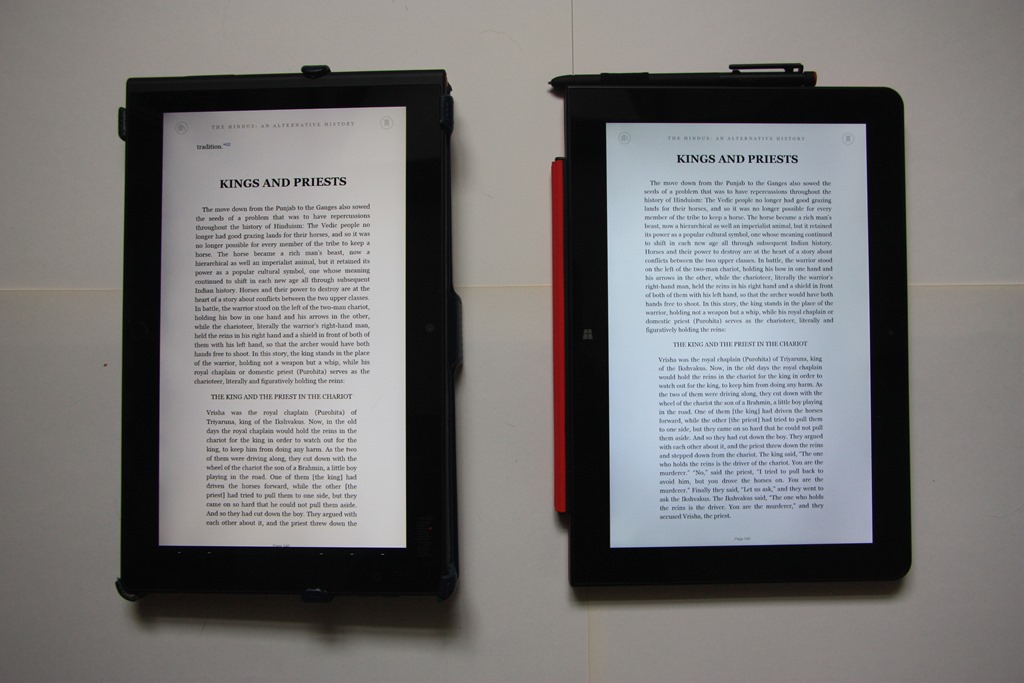
The difference in aspect ratio also means that I get five rows of Tiles on the Start screen with the TP10 versus four on the TPT2:


The TP10 is certainly sleeker than the TPT2, but there are aspects about the case that I find less ergonomic than the TPT2. For example, the TP10’s buttons are flush with the case, rather than being slightly raised as with the TPT2. Finding and using buttons (e.g. the volume controls) on the TP10 is an exercise in frustration for me.
On both the TP10 and the TPT2, the USB socket has a cover. It may be just me, but the cover on the TP10 seems much more fiddly to pop off and to put back in place than the one on the TPT2. Here’s a photo of the cover on the TP10, and next to it, the power charging socket:
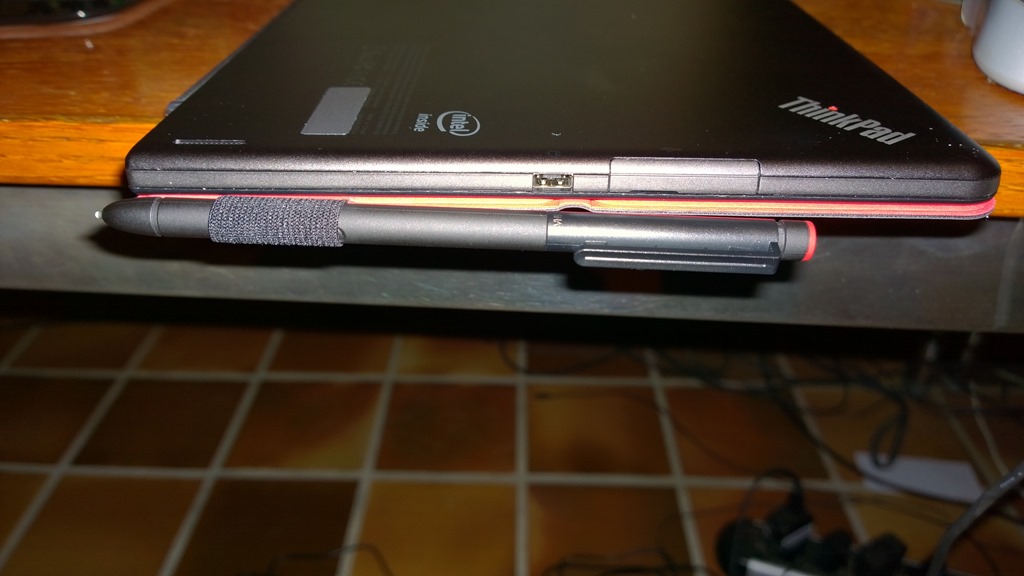
The power charging socket on the TP10 is proprietary to Lenovo; on the TPT2 it was a micro-USB. This means that you can’t use a micro-USB phone charger with the TP10 in an emergency. Some people might view that as a drawback. I’ve noticed one other concern about the design and position of this socket. Here’s a photo of the TP10 being charged while being used flat on a desk:

Notice how I have folded the Quickshot cover back under the tablet, as I think most people would tend to do. For one thing, it now protects the smooth metal back of the tablet from getting scratched. However, if the pen is stowed in its loop, then it pushes up on the charging plug and raises the tablet slightly on that side. I just wonder what the long term effects and stresses will be as a result.
The TP10 comes with a lot of software applications and apps pre-installed. This is stuff such as:
Frankly, most of this I view as Bloatware. The first thing I did was remove all but a couple of packages from the TP10. I then left the TP10 to update itself with Windows and Lenovo driver updates. A few hours, and 60+ updates later, it was ready to use.
I uninstalled Office 2013 Home & Student from my TPT2 and installed it on to the TP10. I needed to activate it via the telephone, rather than the painless internet route, but after punching in reams of numbers into my phone and into the TP10, Microsoft was happy and activated Office. After another round of software updates, this time for Office 2013, I think the TP10 is now finally ready to be put to work.
I’ll report back over the coming months on how I’m getting on.
Addendum: I do rather wish that manufacturers would strive for consistency with accessories across generations. For example:
Sigh.
A wonderful episode on Doctor Who last night: Listen. Right up there with Blink in terms of plot dovetailing and hide-behind-the-sofa factor. Clara is developing into a nicely-rounded character, and the restaurant scenes between her and Danny Pink were very good in their toe-curling embarrassments, and reminiscent of Moffat’s earlier work in Coupling.
I thought it was interesting that the central idea in Blink was that you must not look away from a Weeping Angel, but that in Listen, you must never look at a Listener; polar opposites, but both equally capable of racheting up the fear factor. And the reveals of the boy in the barn and the barn itself at the end – well, I gasped at the audacity of it.
I liked the way that the central idea of there being listeners hiding under every bed was never entirely resolved one way or the other. Is it all in our imaginations or not?
Classic Doctor Who.
 Geoff Coupe's Blog