With all the doom and gloom around as a result of Brexit; this cheered me up a bit.
How things have changed since the days I went on Gay Pride marches in London. Back in those days (the 1970s), the police were not at all friendly.


Reflections on life at “De Witte Wand”…
With all the doom and gloom around as a result of Brexit; this cheered me up a bit.
How things have changed since the days I went on Gay Pride marches in London. Back in those days (the 1970s), the police were not at all friendly.
So my fellow Brits voted for Brexit. I am depressed beyond words. A sad day for the EU and a glad day for the 51.9% of Little Englanders thumbing their noses at Johnny Foreigner.
As I’ve mentioned before, the speakers in my Hi-Fi system are a pair of QUAD electrostatic loudspeakers – the ESL 57 model to be precise – and this year, they will be forty years old. They still sound pretty good, but, like me, they are getting on in years. In order to celebrate their fortieth birthday, I thought that I should get them checked for a possible refurbishment.
A search on the internet turned up QUAD Musikwiedergabe in Germany. When QUAD stopped production of the ESL 57 model in 1996, QUAD Musikwiedergabe took over the necessary jigs and tools to Germany. Initially this was to manufacture spare parts for the ESL 57, but eventually they started building completely new ESL 57 speakers, such was the continuing demand.
I contacted them, and a few weeks later, the speakers were collected by Manfred Stein, the owner of QUAD Musikwiedergabe. His team checked them out, and he reported back that, considering their age, both speakers were not bad. However, he recommended replacements of the treble panels and the EHT units which deliver the high voltage. The treble panels had been overloaded (probably by me playing music far too loudly!) and the EHT’s were no longer delivering the right voltage. The bass panels were OK, but were now sounding “boomy”because of their age. I decided to go for a complete transplant of the internals, and the externals were smartened up with a fresh coat of paint.
Manfred returned the ESL 57s this morning, and I’ve been listening to Handel operas for most of the day.
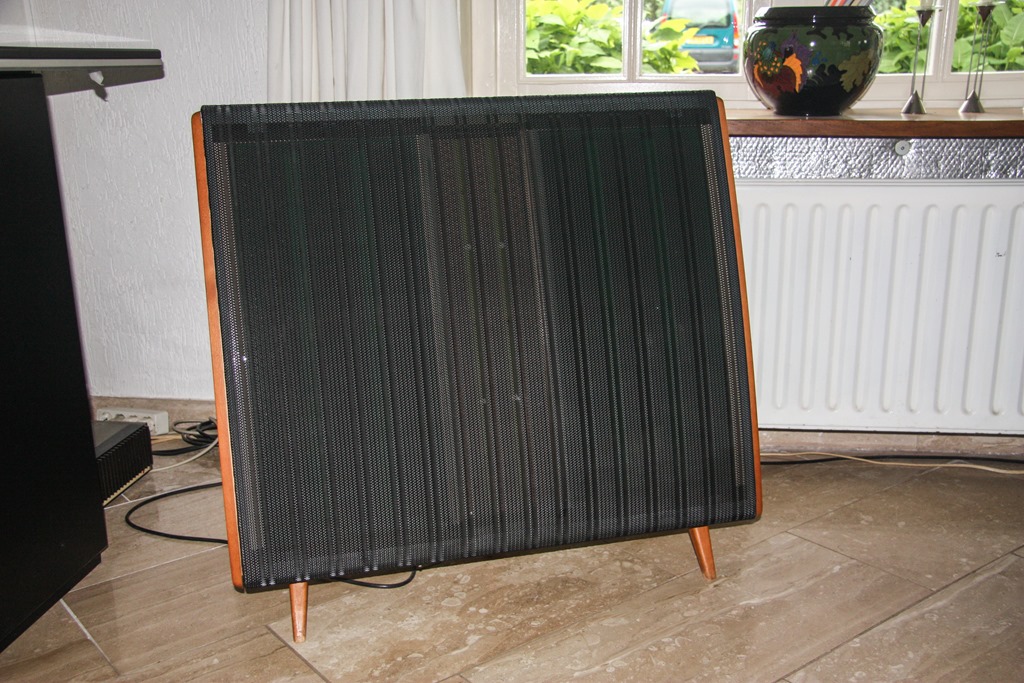
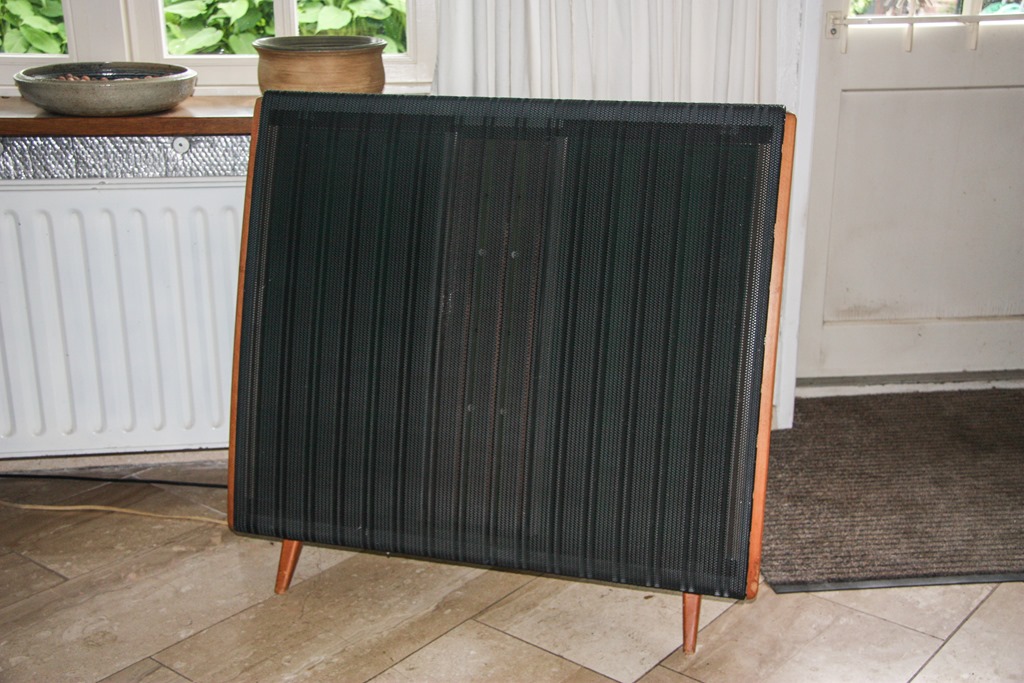
Bliss.
Yesterday, a British Member of Parliament was stabbed and shot. Her name was Jo Cox. I am numbed by the news. This column by Alex Massie in the Spectator puts into words my feelings at the moment, please go and read it. A sample:
When you shout BREAKING POINT over and over again, you don’t get to be surprised when someone breaks. When you present politics as a matter of life and death, as a question of national survival, don’t be surprised if someone takes you at your word. You didn’t make them do it, no, but you didn’t do much to stop it either.
Sometimes rhetoric has consequences. If you spend days, weeks, months, years telling people they are under threat, that their country has been stolen from them, that they have been betrayed and sold down the river, that their birthright has been pilfered, that their problem is they’re too slow to realise any of this is happening, that their problem is they’re not sufficiently mad as hell, then at some point, in some place, something or someone is going to snap. And then something terrible is going to happen.
All the demonisation of the “other”, whether they be immigrants, Muslims, or the EU by the likes of Nigel Farage and his ilk does have consequences. We have an even nastier example here in the Netherlands in the form of Geert Wilders.
My father was a politician, and was a member of the Manx parliament. Like Jo Cox, he always fought for the underdog. It would have broken his heart had he lived to have seen the events of yesterday.

The Rainbow flag in our garden flies at half mast today.
And here’s a message from Owen Jones that says what I want to say more eloquently than I am able to do.
I’m an occasional player of computer games. I loathe the first person shooter genre; I much prefer the adventure or puzzle genre.
Ten years ago, I recommended a little game called Samorost 2. And now after a long wait, Samorost 3 is available. It’s a little gem, with a beautiful soundscape. Every screen is a work of art. The puzzles are not difficult, so it won’t drive you to distraction. Highly recommended.
I’m dreading the EU Referendum – I can’t help feeling that my fellow Brits will choose to leave the EU…
And then, to top it all, the Americans will probably plump for President Trump.
Stop the world, I want to get off.
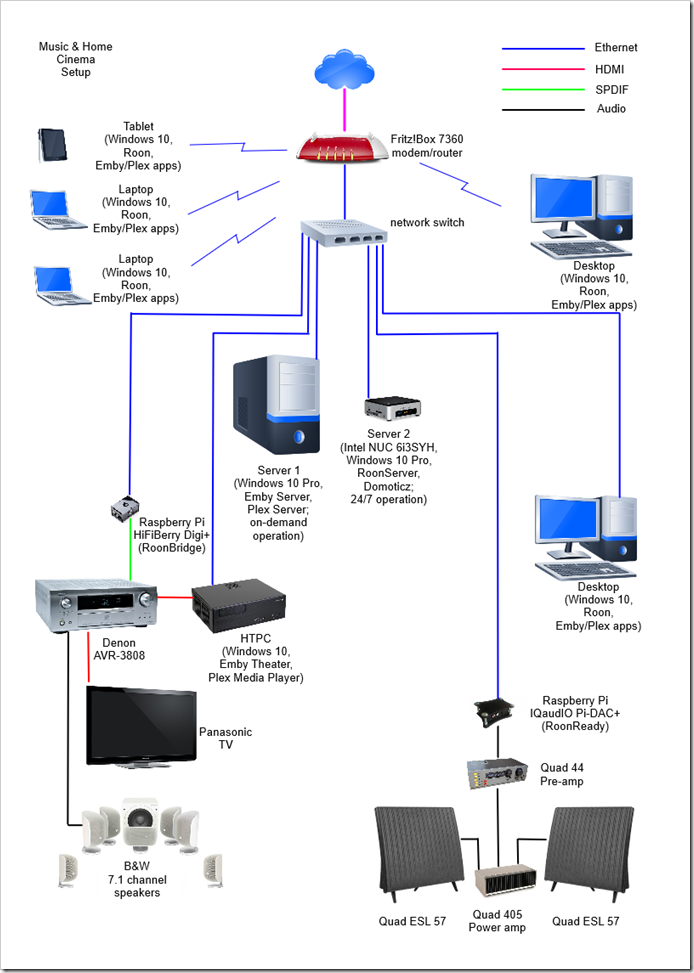
A month ago, I summarised the state of play concerning the media systems we have in our home. Since then, I’ve made some changes, so I thought I should once again summarise how things look at the moment.
The major change is that I’ve added a second server to the network. This is an Intel NUC (Next Unit of Computing) box, the NUC6i3SYH.
I did this because I need a server to be running 24/7 to host our Home Automation system (a Domoticz system). Originally, I had Domoticz installed on a low power Raspberry Pi2, but a couple of months back I repurposed the RPi2 to become a Roon Endpoint device for our music system, so the Domoticz system was moved across to the main media server. This meant that the media server had to be running 24/7 for the Home Automation role, and frankly, that was not particularly energy efficient (the server uses about 75 watts). I could have purchased another RPi2 solely for running Domoticz, but it struck me that we want to hear music much more often than sitting down to watch a film, so perhaps the alternative would be to split the roles of the main media server, and move the music server role off to a more energy-efficient server and combine it with the Home Automation role.
So that’s what I’ve done. The Intel NUC now runs 24/7 and hosts Domoticz and Roon. It has a 256 GB SSD for the OS and the Domoticz and Roon databases, while the music library (mainly FLAC files) is held on an internal 1TB 2.5” hard drive. Being an Intel NUC, its power consumption is much lower than the original media server (less than 20 watts as compared to 75 watts).
The original media server now holds our films, home videos, recorded TV and photo media, together with backups of our data from other PCs in the house. Since we don’t need this server running 24/7, I’ve installed the Lights Out software service on it so that it spends most of its time sleeping. Lights Out is set up so that when the HTPC is turned on, to watch a film for example, it will automatically wake up the server. When the HTPC is turned off, the server will go to sleep ten minutes later. If we want to view media from other PCs, laptops or tablets in the house, we can wake up the server remotely before launching a media player. That’s less than ideal, I’d prefer that launching a media player application would wake up the server automatically, but that’s not possible with Lights Out at the moment.
I should perhaps add that I’m still dithering between Plex and Emby for handling visual media. At the moment Emby is back in the lead – Emby Theater is currently much more complete and polished than the Plex Media Player. However, both are still evolving, so for the moment I’m keeping both ecosystems running.
As for music, I’m very happy with Roon, particularly over the wired connections to our Hi-Fi and Home Cinema systems. Its performance over WiFi still needs some further work I think. This may be down to our local setup, so I need to investigate further. In some rooms, I can have multiple laptops all playing different music without issue, whilst in other parts of the house I sometimes get dropouts even with just one music stream active. We do have WiFi repeaters installed here, but Roon seems particularly sensitive to network quality over WiFi.
As a result of the changes in the past month, this is the current network setup:
Victoria Wood has died. The news probably won’t mean much to most of you, but to me she was the laugh-out-loud, singing version of Alan Bennett. A brilliant writer and comedy performer. Beat me on the bottom with a Woman’s Weekly…
I’ve written a couple of posts over the past six weeks about Hi-Fi and Home Cinema, and I thought it would be useful to document the current state of play here in the Witte Wand.
Six weeks ago, I was at the point where I had come to the conclusion that Microsoft has lost the plot when it comes to integrating Hi-Fi systems into the Windows ecosystem. I was still trying to decide between Plex and Emby as the basis for an all-in-one media handling system, and I had just come across the Roon music system.
Part of the problem is that trying to base Hi-Fi audio streaming on the open protocol UPnP or Apple’s proprietary AirPlay protocol is an exercise ultimately doomed to failure. Some of the reasons why this is so are documented in this thread on the Roon Community forum.
In addition, it is clear that handling music is not the focus of either Plex or Emby – their prime objective is on handling visual media: movies and TV.
With this in mind, I decided that the way forward was to use Roon as the basis for managing and playing music to Hi-Fi quality in the house, and select between either Plex or Emby as the basis for our Home Cinema.
To my mind, Roon has two key strengths. The first is that the user experience is the best of all the music systems that I’ve ever tried. The second is its underlying audio streaming protocol, RAAT (Roon Advanced Audio Transport), which is far in advance of anything else out there for handling Hi-Fi quality streaming audio that I know of. RAAT is being adopted by audio hardware manufacturers into so-called “RoonReady” devices.
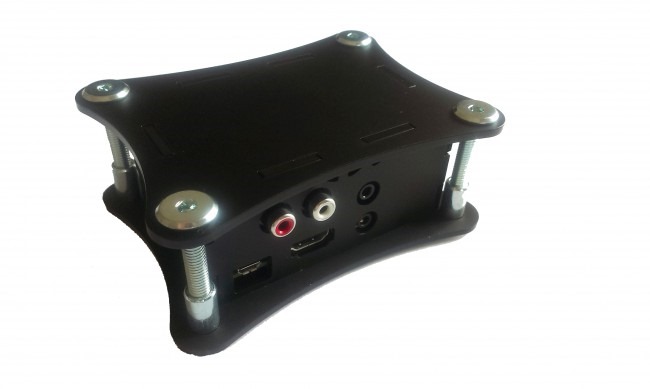 So I’ve put together a Raspberry Pi 3 with an IQaudIO Pi-DAC+ running the IQaudIO RoonReady software into a neat little enclosure from IQaudIO, and used it to connect Roon to my Quad 44 pre-amp. For a tad over €100, I’ve got an audiophile-quality network-connected DAC (Digital-to-Analogue Converter) delivering audio streams to my Hi-Fi system.
 I also wanted to connect Roon to the Denon AVR-3808 used in our home cinema system. This time, because the Denon has its own internal DAC, I wanted to feed the digital audio stream straight into one of the Denon’s coaxial digital inputs. So I assembled a Raspberry Pi 2 with a HiFiBerry Digi+ card into a HiFiBerry enclosure to give me a network-connected S/PDIF device; total cost: €83.
At the original time of writing this post, HiFiBerry didn’t have RoonReady software available, so originally I installed the open-source PiCorePlayer software onto the Raspberry Pi. Roon supports Squeezebox devices, so that both the Quad and the Denon systems were recognised as Roon endpoints in the network.
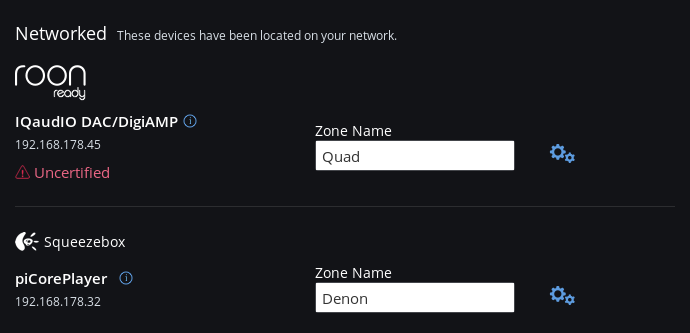
(note: the IQaudIO device is showing as “uncertified” because Roon haven’t released a Roon build since the device was approved in-house. Roon build 1.2 is expected in a few weeks, and then this warning will go away)
Addendum 19 April 2016: In mid-April, Roon Labs released version 1.2 of Roon. As part of the release, they introduced Roon Bridge – a software package that (according to Roon Labs):
…extends Roon’s audio playback capabilities to other devices or computers in your home.
After installing RoonBridge on a device, any audio hardware attached to that device is made available to your Roon install exactly as if Roon had direct access to to the audio hardware.
This enables you to place audio outputs anywhere in your home where you can connect an Ethernet cable or muster a decent WiFi signal, and makes it that much easier to separate the media server from your listening environment.
So then what I did was to install Raspbian on the Raspberry Pi with the HiFiBerry hardware, and download and install Roon Bridge onto it.
Now both the Raspberry Pi devices are recognised as true Roon endpoints, and I don’t need Squeezebox emulation any more.

As I said at the outset, the choice for handling our movie and TV collections was between Plex and Emby. I’ve decided to go for Emby for the following, completely personal, reasons:
Unfortunately, neither Emby nor Plex have a clue when it comes to supporting and displaying photo collections. The photo library functions in both is embarrassingly bad. This is particularly surprising given that one of the founders of Plex is a keen photographer. It may well be that Plex will buck their ideas up and deliver a more rounded product in the future. If so, I’ll revisit my current decision at that time. Until then, my money has gone to support Emby for at least the following year.
As a result of all of the above, our current home network now looks like this:

All our media is held on the central server (with off-site backup), and can be viewed/played on any of the attached PCs/laptops/tablets. In addition the Home Cinema system can handle both visual and music media, whilst the Quad system delivers the best Hi-Fi musical experience.
Nicholas Whyte, who lives and works in Brussels, gives his reaction to the terrorist attacks in Brussels yesterday. Go and read it – it’s worth it. A sample:
As with any awful event, there’s a temptation to grasp for easy explanations. I will give in to that temptation. It seems to my jaundiced eye that, dreadful as they were, yesterday’s attacks were botched. Maelbeek is actually the wrong metro station to attack – both Schuman, the stop before, and Arts-Loi, the stop after, would surely be much more attractive targets, being much busier intersections on the network (and also both recently renovated as prestige architectural projects). Only two of three planned explosions in the airport happened, the third attacker apparently losing his nerve and running away. To adopt a Trump-ism, these guys were losers.
This happened because they are losing. Less than a week ago, a major figure in the terror movement was arrested in Brussels; perhaps yesterday was revenge for his arrest, perhaps it was rushed into because they were afraid he would start talking (or knew that he already had). On the ground, their allies and sponsors are losing territory and resources in Syria and Iraq. I wrote a week ago about violence as story-telling, in the Irish context. This is an attempt to write a story about the weakness of our interconnected world, attacking places where people travel and meet, where many nationalities and cultures join together and build together.
It is a narrative that must not and will not win.
Amen to that.
Microsoft announced the first version of their Microsoft Band – a combination of fitness device and smartwatch – back in October 2014. As a first iteration, it had a number of issues; for one thing, it was uncomfortable to wear.
Fast forward to October 2015, and Microsoft announced the second generation: the Microsoft Band 2. The design appeared to be much improved, so much so that I decided I would treat myself to one for Christmas. I bought it from Amazon UK, since Microsoft do not sell it in the Netherlands.
Since then I’ve been wearing it for 22 hours each day (it monitors my sleep patterns as well as monitoring my activities during my waking hours). I like it a lot. As well as tracking my workouts in the gym, it monitors my walking and biking activities, and will alert me to incoming emails, as well as acting as my wristwatch/stopwatch/timer. All the activity results are also uploaded into the Microsoft Health web site, where I can track progress (or otherwise) over time.
So the idea is brilliant, but, 3 months on, I became aware today of a fatal flaw in the design. I noticed that the rubber strap is developing a split about 1.5cms away from the display. There’s an internal metal lug extending from the display into the rubber band, and the split is developing where the end of the lug is.

Researching online reveals that this is a common issue. Many people are experiencing the same thing. And Microsoft often seems to refuse replacement of the Band under warranty. They don’t accept it is a design issue.
I’ve sent an email into Amazon UK asking if they will replace what in my view is a clearly defective product, but I don’t hold out much hope. Black gaffer tape, here I come…
Once again Microsoft overpromises and under-delivers…
Addendum 21 March 2016: Well, I’m pleasantly surprised. Amazon responded to my email in less than 24 hours, and confirmed that if I return the Band, they will give me a refund.
I had said in my email that I have the Medium size band, and the Band is at its tightest position for a comfortable fit on my wrist. It seems to me that this might be the design flaw – perhaps the Small size band would not put the same stress on the rubber strap. The Amazon representative (Andrew) picked up on this, and arranged for a refund, rather than a replacement, and suggested that I order a Small size Band. So I’ve ordered this in the expectation that the refund will come through as promised.
Addendum 2, 31 March 2016: Well, Amazon has delivered on their promise. I’ve just had an email informing me that a full refund has been credited to my card account. I had rather expected the “trying to get blood out of a stone” treatment that is so prevalent these days, but contacts with Amazon customer service (in my case) have been speedy, polite, and delivered results. My flabber has been gasted.
…oh, really?
Yes folks, once again I’m referring to the good people at Microsoft, in particular the team behind OneDrive. They’ve just announced “A simpler sharing experience at OneDrive.com”. According to them:
The new experience is, in a word, simple. We show the two most popular options for sharing right up front with big blue buttons that are easy to see and easy to hit. We use terms that are understandable to a wider range of users. We optimized for the common cases and present the rarely used options in less distracting ways. Basically, it’s not as messy.
What they didn’t say is that they have removed one option: the ability to shorten a link from two lines of gobbledygook down to a simple string of 7 or 8 characters. This was perfect for those people who needed to include links in printed documents.
Now they have to rely on people being able to type, without errors, something like https: //onedrive.live.com/redir?resid=6AA39937A982345B!10782&authkey=!AMBcijD6MBaGeF0&v=3&ithint=photo%2cjpg. Many email clients will also break these long links by splitting them over two lines so that they won’t work when clicked on.
Needless to say, there’s been a storm of protest about this removal. So much so that Microsoft has (I suspect rather shamefacedly) now added an update to the post:
We’re working on a new approach to shortening the sharing links that will better enhance our users’ experience. Unfortunately, we had to remove the current experience in preparation for the new one. We always keep the best interest of our users in mind so we appreciate your patience as we work this out. We expect to have it ready soon.
What is even more astounding is that Microsoft apparently tested this new experience on “28,000 real-world users”. One might wonder why on earth none of the 28,000 users picked up on this removal of a very convenient feature (or perhaps Microsoft didn’t bother to ask them about it). One might also wonder why Microsoft didn’t get the new approach to short links ready before rolling out the complete new experience to the world, but I suppose we should never underestimate Microsoft’s unerring ability to snatch defeat from the jaws of victory.
A couple of weeks ago, I wrote about my adventures in the world of Hi-Fi. With the discovery of Roon, I’ve rekindled my quest to listen to music, rather than have it as background noise. It’s also had the side effect of making me take a look at my current Hi-Fi equipment and wondering whether I should upgrade or tweak it.
Ever since I started my journey into the lands of Hi-Fi, back in 1968, I’ve been aware that there were esoteric areas, complete with warring tribes, contained within. Now, revisiting the subject some fifty years later, it seems that Hi-Fi has got more complex, rather than completely mapped out.
There are many more companies involved in the field now. When I started there were a few well-known names, now there are seemingly thousands that I’ve never heard of. The choice is overwhelming. I’m finding it very difficult to sort the wheat from the chaff. Some decisions are easily made; for example, I don’t see myself plonking down £44,000 for an amplifier (the Dan D’Agostino Momentum Integrated Amplifier). Even if I had that sort of money lying around, I would be thinking twice or three times about it. And then there are the products which, to my mind, seem more associated with snake oil than science.
Connecting cables is the big area here. Some of the claims made for expensive cables seem, shall we say, somewhat over the top? But then, if you are going to pay $22,000 for a cable to connect one piece of equipment to another (the Skogrand Beethoven cable), you have to believe that it makes a difference. This reviewer (and his cat) clearly did, but me? I doubt it very much. I’d be asking for the guaranteed blind testing of all such claims, and even then I’d probably suck my teeth and say “thanks, but no thanks”.
As someone once said: ‘Although it is fully understood scientifically, the phenomenon of “gullibility” has been experienced by many audiophiles’.
With all this in mind, I looked at my current Quad 44 preamp + Quad 405 amp + Quad ESL 57 speakers, and wondered: upgrade or tweak?
My first port of call was Quad themselves. I see that they have introduced a new preamp/amp combo for the digital age: the Quad Artera. The product web page rather jarringly still gushes that it’s “coming soon for 2015” [since corrected, after I sent them an email to point it out]. That aside, it certainly looks good, and has very good specs. I took a look at the manual and noticed something missing: unlike the Quad 44 preamp, the Artera Play has no switched mains outlets. Those of us who use mains-powered loudspeakers (e.g. the Quad ESLs) like the convenience of being able to switch on the preamp, and everything else in the system gets powered up. Likewise for switching off. That convenience is gone with the Artera – it seems a step backwards to me, and something that seems to have been overlooked in the design. I wonder why?
I think at this stage, I’m leaning towards a tweak of my existing setup. Although I’ve now got the Quad system hooked into our HTPC so that I can play music from our music server through it, I think that I can improve the sound quality further. This coming week I hope to get a Pi-DAC+ from IQaudIO, and then I can re-use my spare Raspberry Pi 2 to build a Roon endpoint. I’ve run an ethernet cable into the cabinet housing the Quad system, and then I can connect the RPi2 + Pi-DAC+ (housed in a neat little box) up to the Quad 44. An upgrade that hasn’t cost an arm and a leg.
Addendum 1st March 2016: I emailed Quad to ask about the missing mains outlets, and got back the following from the Service Manager:
The Artera uses true standby function is this is why we did not place a mains outlet socket on either unit. The mains outlet sockets on the 44 pre-amp were for other Quad units and not really designed for ESL’s switching on and off.
They may not have been really designed for that purpose, but I’d be prepared to bet that the majority of ESL owners used them that way…
I see that Google has announced that it’s pulling the plug on its Picasa product; both the online service and the Windows application.
Frankly, I could care less about the online service, but I’m sorry to see that Google will no longer be supporting or developing the Picasa application for Windows. For a while, it was pretty good, supporting photo metadata standards more than many products on the market. Yes, there were issues with it, and bugfixes seemed to take forever to come through (if at all), but for many folks it was good enough.
I suppose we now know why those fixes were slow in coming, it seems obvious in hindsight that Google has had Picasa on the back burner for a while now. I note that the last major release was version 3.9, back in December 2011.
The nearest free equivalent to Picasa that I’ve seen is Microsoft’s Windows Photo Gallery, but I suspect that Picasa users jumping ship to that product will merely be jumping out of the frying pan into the fire. The last major update to Photo Gallery was in 2012, and since then there has been deathly silence. I think that Microsoft has probably got Photo Gallery on the life-support machine, and their hands are hovering very close to the “off” switch.
As for me, I shall carry on quite happily using Idimager’s Photo Supreme to do my metadata management, and Adobe Lightroom for digital development and retouching.
A long time ago, way back in 1999, a man by the name of Charlie Kindel had an idea: Microsoft was developing Windows for home PCs, why shouldn’t it develop Windows for a home server as well? His managers initially told him to focus on his real job, but his idea surfaced at CES in 2000 as a technology prototype called “Bedrock” focused on home automation and family applications. His idea went through more iterations until in February 2004, work began on a project called “Quattro” and that resulted in a product group to be formed in 2005 to produce what was to become Windows Home Server.
The first version of WHS was released to manufacturing in July 2007. I, along with thousands of others, had been testing the software at home prior to release. There were some issues that I found, but by the time of release, the majority had been resolved. Technically, it was pretty solid, but of course, Microsoft Management had got involved, and one of the potentially unique selling points had been removed. Despite being aimed at home users, remote access to your computers from outside the home wouldn’t work if you had home versions of Windows installed on your computers.
Apart from that castration by Management, WHS still had some very clever and innovative technology under the hood:
I bought an OEM license for WHS in November 2007, and have been running WHS ever since; first the original version of WHS, and then WHS 2011, which was released in April 2011.
WHS 2011 was not a straightforward improvement over the original WHS. Indeed, it dropped the major feature of the WHS Drive Extender, much to the dismay of WHS customers. There had also been organisational changes at Microsoft; the original product team had been part of the Windows product group, now it found itself lumped in with the big boys of the Business Server Group.
I had the distinct impression, watching the development of WHS 2011 and testing the betas over the months leading up to April 2011, that things were not going well with WHS 2011. As I wrote at the time: Microsoft had the chance to build upon the base of WHSv1 as a server and media appliance that could be used by the average consumer, and they threw that chance away.
So WHS 2011 turned out to be something of a damp squib, with some features that had obvious design shortcomings or that never worked properly – hello, Media Library, I’m looking at you… Even the new server backup feature of WHS 2011 had a design shortcoming that took my breath away.
Despite these shortcomings of WHS 2011, the positives still managed (just) to outweigh the negatives for me, so I migrated from WHS V1 to WHS 2011. I had built a dedicated server to hold all our media collections (CDs, DVDs, Blurays), and the backups from all the other PCs in the house. With the installation of WHS 2011, the server itself was being backed up using off-site storage.
However, it was clear that Microsoft no longer loved Windows Home Server, and it was no surprise when Microsoft announced in July 2012 that there would be no next version of WHS. That meant, according to Microsoft’s Product Support Lifecycle rules, that WHS 2011 would continue to receive mainstream support until April 2016. Well, hello, that’s just two short months away. Thus, I needed to prepare a contingency plan.
I could have replaced the server hardware with an off-the-shelf NAS, but it seemed to me that would be an unecessary waste of good hardware. Instead, I could just change the software environment and keep the hardware intact. Not feeling inclined to go to the dark side (i.e. Linux), or for shelling out for a copy of Microsoft’s Windows Server Essentials (at ten times the price of WHS), I decided the best approach would be to use Windows 10 Pro in headless mode (i.e. without an attached monitor, mouse or keyboard). The WeGotServed site publishes a useful guide on how to do this, called, not unexpectedly, Building A Windows 10 Home Server. Whilst I think I could have got by without purchasing this guide, it does cover the entire process from a to z, hardware and software. I found it useful as a refresher of my knowledge, and for someone who is new to the idea of building their own server, it would be invaluable.
The problem is that Windows 10 is not Windows Home Server. In particular, the feature of automatically backing-up client PCs to the server is substantially different in Windows 10, and it is not an improvement.
Instead of WHS’s automatic backup of client PCs to single-instance storage, we have, not one, but two backup technologies to choose from in Windows 10 – and neither of them are ideal. Windows 10 offers:
While there’s a lot to like about the Windows 10 File History feature, it only focuses on the user’s personal data. It will only backup data held in the user’s Libraries, Desktop, Contacts and Favourites. It will completely ignore applications that have their own databases, e.g. Adobe’s Lightroom. For some years, Microsoft has been telling developers to store application data in locations contained in the C:\ProgramData folder, and now the File History feature will totally ignore such files. Also, user data that is not document-based is supposed to be held in locations contained in the C:\Users\Username\AppData folder. That is also ignored by the File History feature. It turns out that Microsoft’s own Windows 10 Mail App stores mail messages in the AppData folder, so File History will not backup your mail messages. Microsoft seems to be assuming that we store all our mail in the Cloud, e.g. in their Outlook.com service. Not everyone does.
Also, unlike the elegant and simple-to-use client PC Backup function of Windows Home Server (which covers all files and also provides a bare-metal restore), File History does not use single-instance storage. So if a new version of a file changes even by one bit, the entire file is backed up as an entirely new copy onto your backup disc. It’s very inefficient and wasteful of storage.
As the title suggests, this technology is a legacy from earlier versions of Windows. It also works in a completely different manner from File History (or the Backup/Restore feature in WHS). It is a System Image backup utility, that is, the entire contents of the PC are backed up in one go – a snapshot of how your entire PC looked like at the point in time when you made the backup.
Whilst it’s useful to be able to make a snapshot in time of your PC, the WHS client PC can do this and more: it also allows you to restore individual files, and from different time points in their lives.
The fact that Microsoft has clearly marked this Backup and Restore technology as deprecated makes me wary. I would not be suprised to see it removed entirely from future versions of Windows 10.
Given that neither of the backup offerings in Windows 10 can match the simple and elegant solution of WHS, if I’m going to have to use Windows 10, what can be done? I suppose one route would be to purchase a separate backup and restore application. I’ll keep an eye out for that, but in the meantime, my approach will be to use the File History route to backup my personal data (documents, pictures and so forth), and manually including a specific list of application databases (e.g. Adobe Lightroom, Photo Supreme, etc.) to be covered by File History. For my email folders, I will make sure that all my email is automatically forwarded to an Outlook.com account as backup.
It’s not simple or elegant, but a kludge. Thank you Microsoft; one step forward, two steps back, as usual.
I could have stuck it out and carried on with WHS 2011 until at least April 2016. However, I’ve invested in a piece of server software that, it turns out, does not run well on WHS, but requires Windows 10. It is RoonServer. As a result, I have migrated from running WHS 2011 on our server to running Windows 10.
The migration was pretty straightforward, and all the media libraries and server software are now running quite happily under Windows 10. I miss the ease of WHS and its backup capabilities, but Microsoft has stuck the dagger in its back in the interests of getting us all to move to the Cloud. It’s a great pity – despite all the song and dance about Cloud services, I am still firmly of the opinion that there is a place for a server in the home. Online streaming where I am in the rural Netherlands is neither fast enough, stable enough, nor cheap enough to be considered a viable alternative.
Addendum, 27 February 2016: I see that Microsoft’s SBS group has just published a survey to ask the user community for feedback on the features of Windows Server Essentials to help them prioritise their planning for the next version. I left a comment:
Looking through the questions in the survey, it is very clear that you are targeting a particular group of business users. For those of us who grew up with Windows Home Server, and who mourn its passing, there is nothing to see here. Our feedback is clearly of no importance to your plans.
The comment is currently stuck in moderation. We’ll see whether it emerges and gets published. And, of course, it never did get published… Perhaps the truth hurts too much, or more likely, they couldn’t give a damn.
My journey to get the best experience of listening to music began many years ago, when I was still a teenager. That was when I first dipped my toes into the waters of HiFi. Using the wages from the first couple of years of summer jobs, I invested in a Quad 33 pre-amp and a Quad 303 power amp, coupled with a pair of modest KEF speakers, Goldring Lenco turntable and Shure pickup. The resulting sound was a revelation when compared with my parent’s radiogram that squatted in the lounge of our family home.
Over the course of the years I’ve been through several upgrades all of the components, and moved from vinyl to CD (yes, yes, I know many audiophiles will be frowning). There have been some constants over the years as well: I’ve stuck with Quad equipment. In 1976 I invested in a pair of Quad Electrostatic Loudspeakers, and in 1981 upgraded the amplifiers to a Quad 44 pre-amp and Quad 405 power amp. Today they are still going strong and continue to give me much listening pleasure.
The journey with Home Cinema only began in 2008, when I assembled our first flatscreen TV, a Bluray player, a Denon AVR, and eight B&W loudspeakers for our first Home Cinema system. This worked pretty well, but there were niggles. A couple of years later, these niggles grew in importance to the point where I decided to replace the Bluray player with an HTPC. So I built my first HTPC, and coupled it to my Windows Home Server, which by this time was holding the contents of our CD, DVD and Bluray discs.
The next couple of years proved that HTPCs are still for enthusiasts who are able to roll up their sleeves and fiddle about, still I was happy doing that. Fast forward to October 2014, and it was clear that major changes would be necessary in the media application software of the HTPC. Microsoft would be dropping support for Windows Media Center (WMC) and I would have to find an alternative. I found two candidates: Plex and Emby. Neither of them were as good as WMC at the time, but I placed them on the waiting list.
As promised, when Microsoft released Windows 10 at the end of July 2015, they had removed WMC from the operating system, so I needed a replacement. I was still not convinced that either Plex or Emby had Home Theater applications that were better than WMC had been, but needs must, and I ended up installing both on my HTPC, with the corresponding Plex and Emby server applications installed on the Windows Home Server 2011 system.
From my perspective, and requirements, the weak points of both Plex and Emby are that they focus primarily on movies and TV; music and photos are way down the list of priorities as far as the developers are concerned. Another drawback is that both Plex and Emby are in the throes of redeveloping their Home Theater applications, and the new versions are little better than early alphas. We may be six months to a year away from solid releases of the new versions. What is even more disappointing is that the Plex Media Player (the new HT application) is even more limited in its handling of music collections than the Plex Home Theater application that it is supposed to be replacing.
The current state of play is that I have both Plex and Emby servers running. I tend to use the old (now obsolete) Plex Home Theater application on the HTPC primarily for showing movies and TV episodes. I use both Plex and Emby Windows 10 apps on our other PCs and tablets, with a slight preference for the Emby app. I’m still looking at both to improve before being able to make a choice for one or the other.
There was a time when the HiFi system was integrated into the rest of the media environment. That was when I had Windows 7 or Windows 8.1 running on our PCs or tablets. Both operating systems supported “Play to”, which meant that I could use a music player application on a PC or tablet to stream music from the server to the Denon, and thence to the Quad pre-amp.
Microsoft has effectively ruined “Play to” in Windows 10 to the point where it is not usable. I’ve given up any hope that Microsoft will get its act together and sort this out; the Windows 10 music player Groove continues to be without a “Play to” function and is practically useless in other ways. In addition, with every release of Windows 10 Microsoft seems content to give us a new collection of bugs, whilst crowing how much its customers love Windows 10.
It’s difficult to switch between the Denon and the Quad when using either Plex or Emby; neither of them seem designed to handle multiple outputs, so I was rather resigned to going back to my physical CDs when I wanted to play music via the Quads.
Then, a couple of weeks ago, I chanced upon a post in a Plex forum that alerted me to a music application called Roon.
So, what is Roon? It is an application available for both Windows and Mac OSX (with Linux coming soon) that:
It certainly ain’t cheap (a yearly subscription costs $119 per year, while Lifetime membership costs $499). However, people choose to use Roon because it is the best “front end” for a music collection. The only thing like it is Sooloos, which is where Roon came from. Roon helps you organise and discover music.
Audiophiles like Roon because it supports high resolution digital files and the sound quality it provides is second only to a very small number of other programs.
Roon Labs is the company behind Roon, and although it is new, the people involved have been doing this stuff for a while (e.g. Sooloos). Roon Labs is working on the Roon software, and licenses software to hardware manufacturers for inclusion in output devices. So the Roon ecosystem over time will look something like:
In terms of software, Roon Labs are leaning towards:
Plus you can get output devices from hardware manufacturers:
And you can get server devices from hardware manufacturers (these devices run Roon Core and may or may not include Outputs):
Roon Labs haven’t committed to all the names yet, and that Roon Core Certified vs Roon Core Capable thing isn’t nailed down yet.
Being an (ex-)Software Architect, I was impressed by the software design, and decided I’d give it a trial.
Roon’s user interface is very elegant, and blows those of Plex, Emby and Groove clean out of the water. The entry screen gives an overview of your collection (note that it can be personalised for different users).
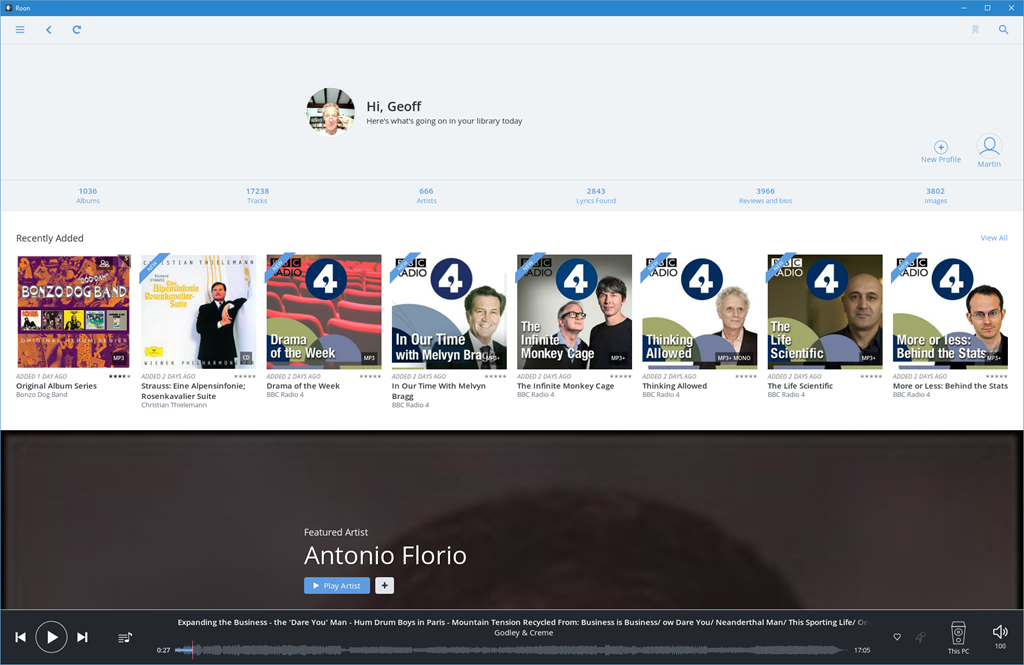
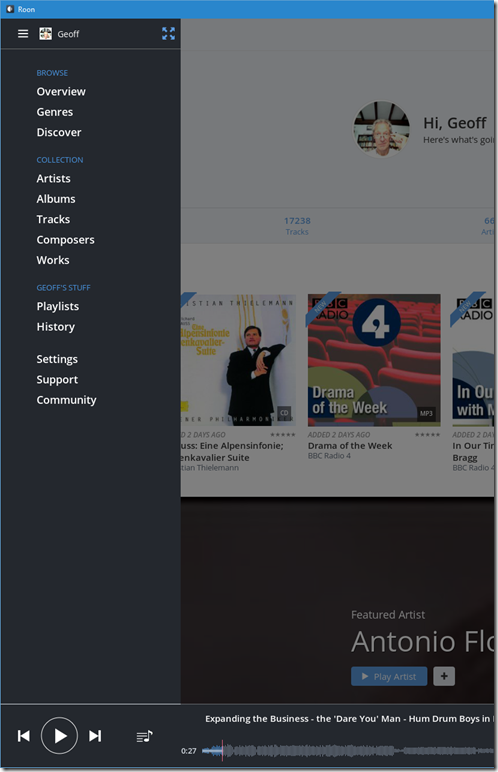
The top level menu immediately shows that in addition to Albums, Artists, and Tracks, Roon also knows about Composers and Works – these are elements that Plex, Emby and Groove haven’t got a clue about.
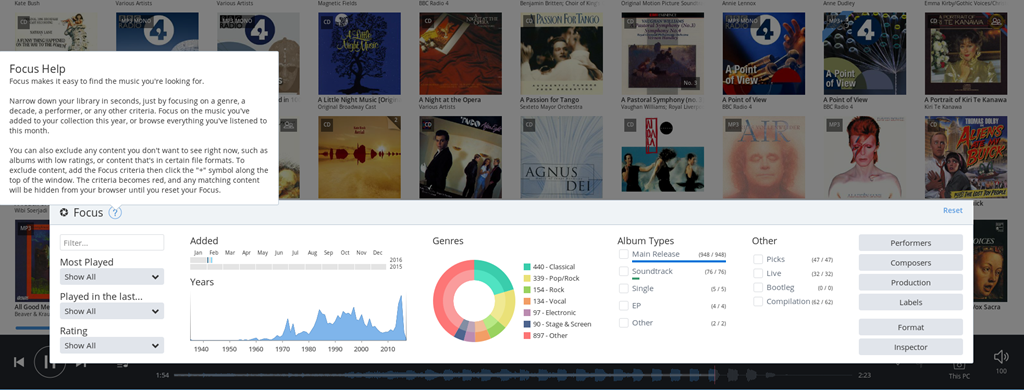
What I particularly like is that it can be clean and simple to use, but it is also easy to slice and dice your music collection (using the Focus feature) to find that hidden gem.
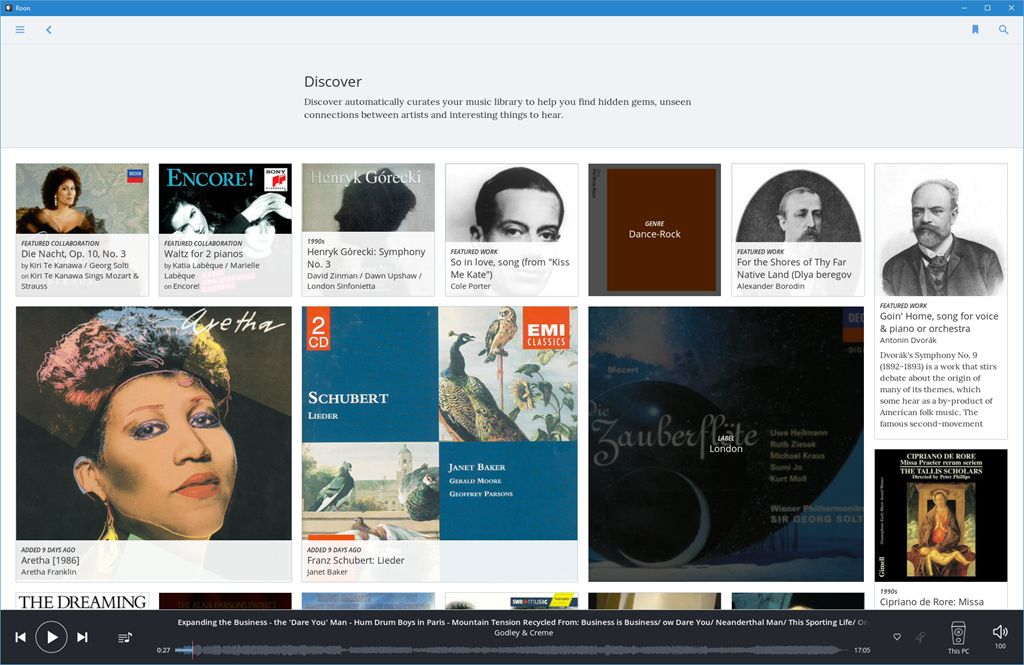
Or you can choose for serendipity, and follow links from the Discover screen, which changes over time:
Hans Beekhuyzen, a Dutch audiophile, has made a good introduction (in English) to the Roon user interface on his YouTube channel:
I decided I would trial a client/server configuration of Roon – have the Core component of Roon (RoonServer) installed on the Windows Home Server 2011 system, and install Roon software on all our tablets and PCs – including the HTPC. That way I could use any device to play back the content of our music library.
I also added an Audioquest Dragonfly DAC to the HTPC to connect it to the Quad pre-amp. Roon can support multiple outputs, so with the Roon software on the HTPC, I could easily choose to play music either through the Quad or through the Denon.
I ran into a couple of problems:
I solved problem 1 by deciding to migrate our server system off WHS 2011 to Windows 10 (which Roon Labs do support). The writing has been on the wall for a while that I would eventually have to do this migration. Microsoft stops mainstream support of WHS 2011 in April 2016. This issue with RoonServer was the straw that broke the camel’s back for me, and provided the impetus to migrate.
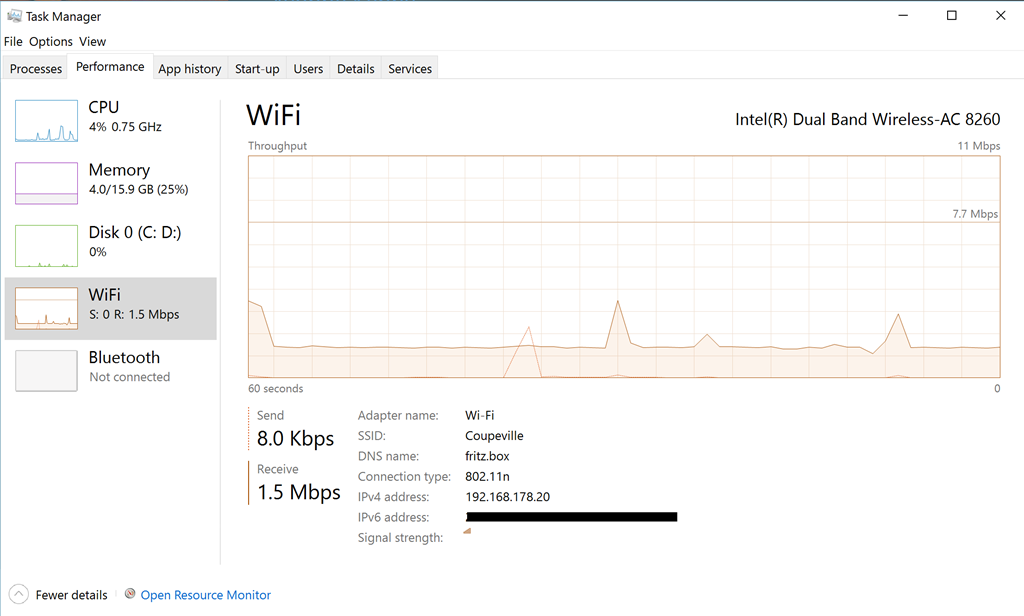
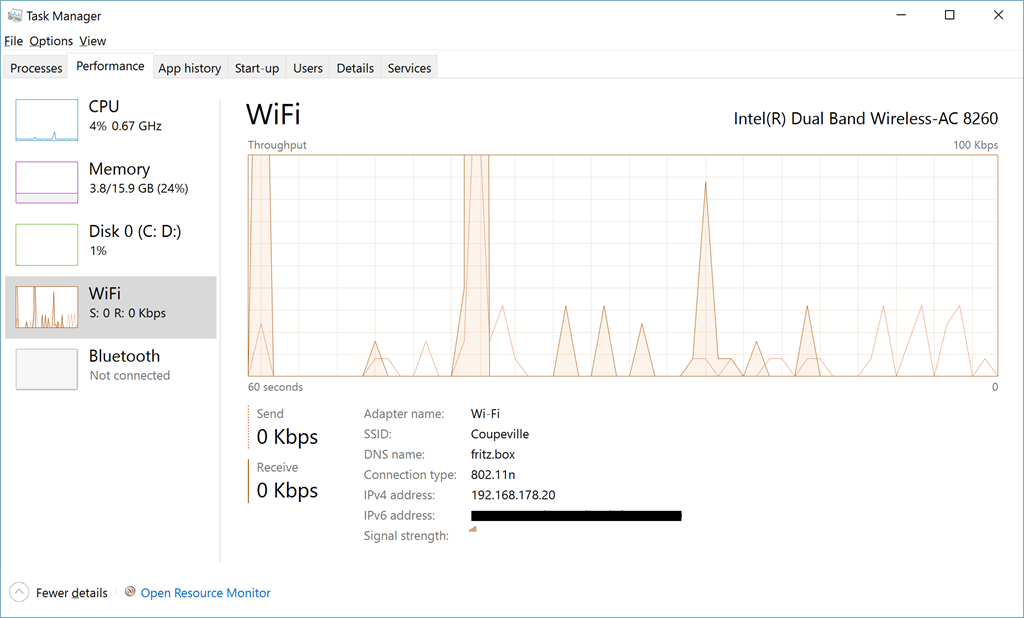
I’ve provided Roon logs to Roon Labs for the second problem, and they are investigating. I suspect that it is caused by the fact that I have two access points for our WiFi network here – the main access point at the router in the meter cupboard at the front of the house, and a repeater in the attic. In some parts of the house, a tablet will dynamically switch between taking the Wifi from the router or the repeater and vice versa. The network traffic of Roon seems to be a fairly constant 1,5 Mbps:
whereas that of Plex or Emby is much more “bursty”:
I am confident that this issue can be dealt with, and if the worst comes to the worst, I will still be able to use the tablets to browse the library and to control playback to the HTPC and the Quad. This feature comes in the upcoming version 1.2 of Roon. I can then continue with using Plex and Emby for music on our WiFi connected devices. Not perfect, but workable.
The journey is not at an end, but I think, at least as far as my music is concerned, I’ve reached a basecamp where I can pause awhile. It’s nice to be able to hear my music as it was intended to be heard on my Quad HiFi system once more, and that now includes high resolution music purchased online.
Yes, I’ve crossed the Rubicon and invested in a lifetime subscription to Roon. I just hope that both I and the company can survive long enough to give me a decent return on my investment…
With regards to our Home Theater experience, either Plex or Emby do it pretty well. I’ll wait to see how their Home Theater clients develop before deciding which one to go for. In the meantime, the now obsolete Plex Home Theater serves its purpose.
Addendum: 18 May 2021
I thought I’d add a note here to update the state of play as of the time of writing this addendum.
I’ve dropped the use of Emby, but still use Plex for playing movies and video. I don’t use it for anything else (e.g. for Music, Photos, or Live TV).
I’m still with Roon, which is now up to version 1.8, with much more functionality than when I started. And unlike some software applications, the additional functionality is genuinely useful.
Lenovo has a range of consumer-oriented computers named IdeaPad. The range has a number of different series within it, each designed for a different purpose or user group. The Yoga series is a line of tablets and laptops. The name “Yoga” was chosen because the laptops have hinges that allow the screen to be fully folded back (up to 360°) to convert a laptop into a tablet. A Yoga laptop can also be placed in “tent” or “stand” mode for showing presentations or movies.
Back in October 2015, I reviewed Lenovo’s Yoga 900 Ultrabook. In January 2016, Lenovo announced a variant of the 900: the Yoga 900s. Slightly smaller and even thinner and lighter than the Yoga 900, this is intended as the ultimate Ultrabook.
A few days ago, courtesy of Lenovo, UPS delivered a Yoga 900s to me for review. This blog post is the result and focuses on the Yoga 900s hardware and its performance. When I reviewed the Yoga 900, I made a separate post looking at the software environment of the Yoga 900, i.e. the setting up of Windows 10, and a look at the software bundled with the Yoga 900 by Lenovo. The software side of the Yoga 900s is essentially the same as for the Yoga 900, so refer to that post for my findings on the software experience.
Here’s a table that shows a quick comparison between the Yoga 900 and the new Yoga 900s:
| Yoga 900 | Yoga 900s | |
| OS | Windows 10 64 / 10 Pro 64* | Windows 10 64 / 10 Pro 64** |
| Screen | 13.3”QHD+ 3200×1800 IPS, 300nits 10 point Touch |
12.5” 1920×1080 FHD** or 2560x1440QHD 10 point Touch |
| CPU | Intel Core i7-6500U* / Intel Core i5-6200U |
Intel Core m7- 6Y75 |
| Graphics | Intel HD Graphics 520 | Intel HD Graphics 515 |
| Memory | Up to 16GB DDR3L | 8GB DDR3L |
| Storage | 256GB/512GB SSD | 256GB/512GB SSD** |
| Active Pen support | No | Yes** |
| Audio | JBL stereo speakers with Waves Audio and DOLBY Home Theatre certification | JBL stereo speakers with Waves Audio and DOLBY Home Theatre certification |
| Webcam | 720p, 30 fps | 720p, 30 fps |
| Connectivity | 802.11 a/c Wireless Bluetooth V4.0 |
802.11 a/c Wireless Bluetooth V4.0 |
| Battery Life | 66 Watt Hour – 9.2 hours | 54 Watt Hour – 10.5 hours |
| Ports | 2xUSB 3.0, 1xDC-in with USB 2.0 function, 4in1 card reader (SD, MMC, SDXC, SDHC), USB-C, Audio Combo Jack | 1xUSB 3.0, 1xDC-in with USB 2.0 function, USB-C, Audio Combo Jack |
| Weight | 1.29 kg. (2.84 lbs) | 999 gm. (2.2 lbs) |
| Dimensions |
324 x 225 x 14.9 mm (12.75” x 8.85” x 0.58”) |
304 x 212 x 12.8mm (12”x 8.35” x 0.5”) |
Table 1
*There is an i7-6500U, 16GB and 256GB SSD fitted on the Yoga 900 I have, and it is running Windows 10 Pro.
**The Yoga 900s I have for review has a 1920×1080 FHD display, with 512GB SSD and Windows 10 Pro installed. The unit I received did not ship with an active pen included in the box.
The Yogas are examples of what Intel calls the Ultrabook class of laptop. That is, they are ultrathin, using solid-state drives, low-power Intel Core processors, and (because of their thinness) do not have optical disc drives or full-size Ethernet ports.
The box is a minimalist design: white (on top) and orange (underneath), with four icons on the side representing the four Yoga configurations (Laptop, Stand, Tent, and Tablet).

Like the boxes of the earlier Yogas, it contains a slick piece of paper engineering – after taking off the lid, you fold back the two flaps covering the top, and as you do so, the Yoga 900s rises out of the box to greet you. It’s a nice touch.
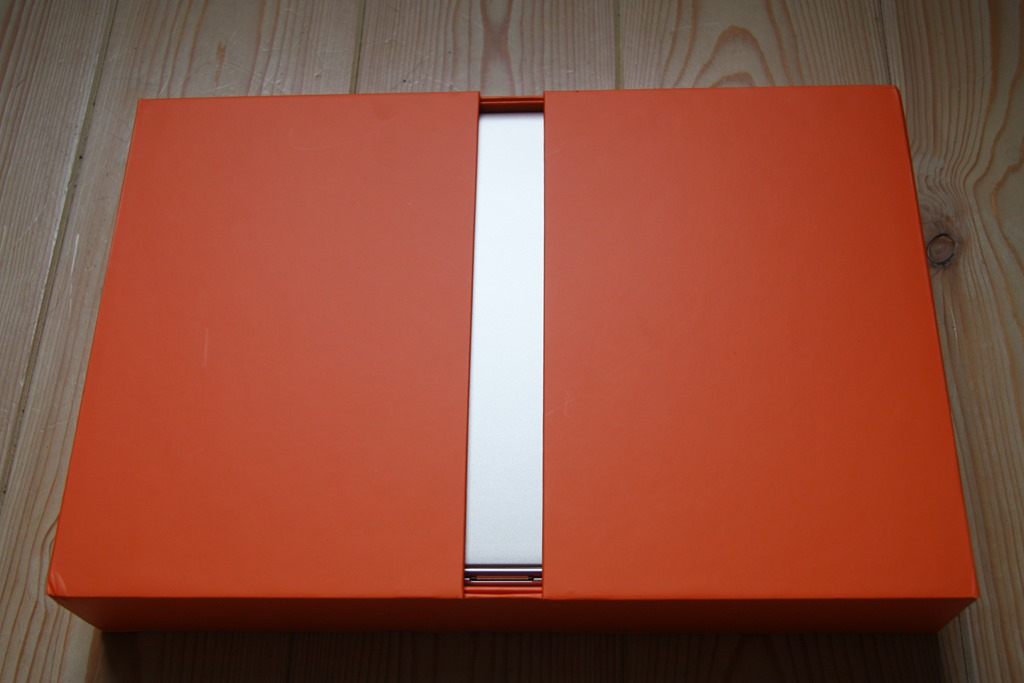

Underneath the Yoga 900s are compartments that hold the power adaptor, the special USB power cable, and a sleeve containing the quickstart user guide. Since my review machine is pre-production, the guide was missing.
A side-by-side comparison with the Yoga 900 shows that the 900s is clearly slightly smaller. The Yoga 900s came in the Champagne Gold colour, while the Yoga 900 that I have is finished in sliver.
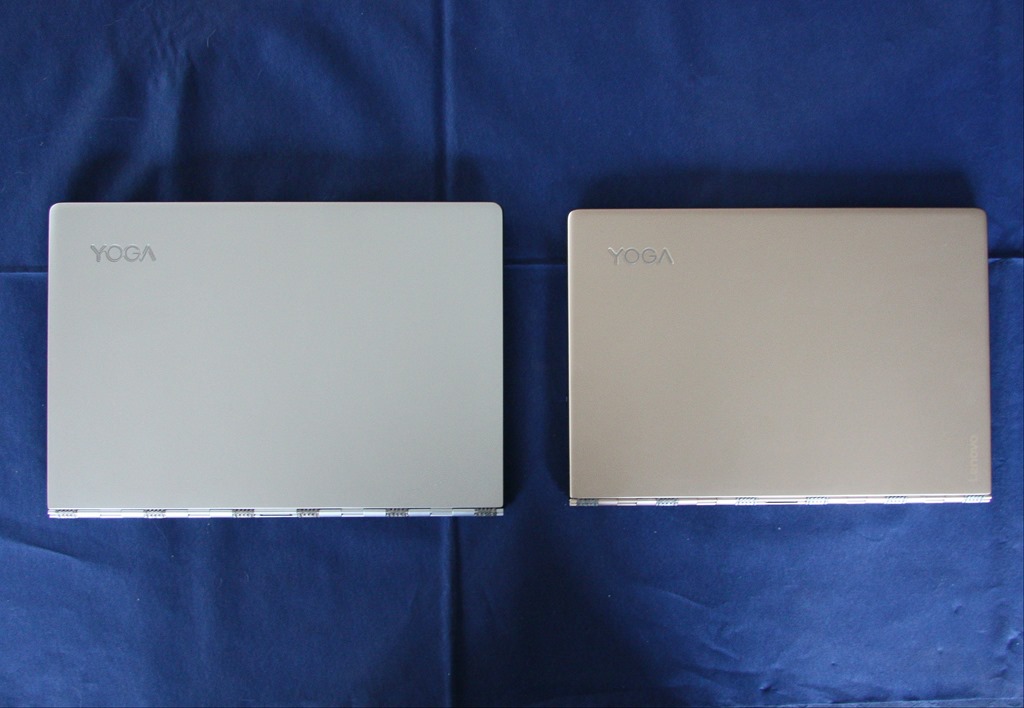
The hinge on the Yoga 900s is the distinctive “watchband” design, which I personally find appealing and which works smoothly and very well.
The Yoga 900 introduced a a USB-C port, supporting USB 3.0, native DisplayPort 1.2 video and VGA/HDMI output and which replaced the Micro-HDMI port of the Yoga 3 Pro. The Yoga 900s continues this direction.
Because the 900s is smaller than the 900, some features have had to be rearranged or dropped altogether. The recessed button that activates OneKey Recovery (see the post on the Yoga 900’s software) has moved from the right hand side of the Yoga 900 to the left on the Yoga 900s. Probably more serious for some, one button and two ports have now disappeared from the Yoga 900s. Just as the Yoga 900 dropped the physical volume controls present on the Yoga 3 Pro, the Yoga 900s goes one step further and has also dropped the display rotation lock button that was present on both earlier machines. The Yoga 900s also has one less USB 3.0 port than the earlier machines, and the card reader port has been removed altogether. Customers who used the card reader port in the past (e.g. photographers transferring images from their camera memory cards to the computer) will now have to use an external card reader attached via USB.
Here’s a comparison of the righthand side of the Yoga 900s (on top) and the Yoga 900:

The Yoga 900s shows (from left to right) the power button, the headphone jack and a USB 3.0 port that can also be used to charge external devices.
The lefthand side comparison:

In the photo above, the Yoga 900s shows (from left to right) the orange-coloured charging port, the USB C port, and the recessed OneKey Recovery button. The charging port can also act as a standard USB 2.0 port. Lenovo provide a special USB cable for charging their Yoga machines. It has a connector that is physically different from a standard USB male cable (it has a small “nub” on one side). Here’s a photo of the special USB charging cable connector (above) compared with a standard USB 2.0 connector (below):

The smaller size of the Yoga 900s compared to the Yoga 900 also means some rearrangement of the keyboard layout. Thankfully, it still has the sixth row of keys that was introduced on the Yoga 900. However, the keyboard is only 26 cm wide, compared with 28.4 cm on the Yoga 900. That means the rightmost column of keys has gone, resulting in one key missing altogether (the right-click menu key), with some keys moved around, or with different function combinations assigned to them.
Here’s the keyboard of the Yoga 900:

Note the right-click menu key between the Alt and Ctrl keys to the right of the Spacebar. And now here’s the keyboard of the Yoga 900s:
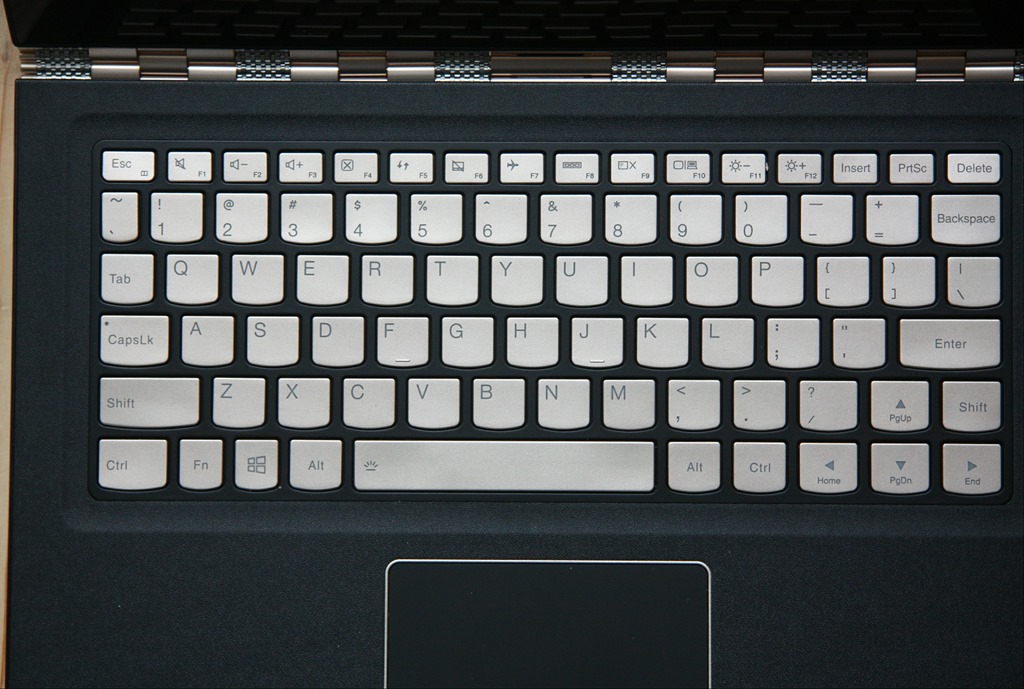
The Right-click menu key has gone. I can’t say that I like the fact that the right Shift key and the up-arrow keys have effectively been switched around in this arrangement. I suspect that for some people that will take some getting used to.
The keyboard backlight has the same two illumination levels as in the Yoga 900, as opposed to the single level of the Yoga 3 Pro. The champagne gold colour of the keys is a good contrast with the black surround. Apart from the rearrangement, the keyboard feels pleasant to use, and is comparable with that of the Yoga 900.
The trackpad appears to be the same in both machines, with an area of 60mm x 90mm. It’s a Synaptics trackpad, that unfortunately has not been certified by Microsoft as a Windows Precision Touchpad, perhaps because it is slightly smaller than Microsoft’s recommended optimal size of 65mm x 105mm. This also means that the trackpad settings are not integrated into Windows 10 Settings. More on the trackpad and keyboard in the Yoga’s Modes: Laptop section.
While the Yoga 900 had a QHD high-resolution (3200 x 1800) display as standard, the Yoga 900s will offer a QHD (2560×1440) display as an option. My review unit came with a standard FHD (1920 x 1080) display with 10-point touch and support for an active pen (no pen was supplied, however). To be honest, at this physical size (12.5 inches diagonally), my old eyes are perfectly satisfied with FHD resolution. The pursuit of ever-higher resolution in laptops is somewhat lost on me. It causes more drain on battery life, and can introduce scaling issues with older Windows software. What I do regret is that Lenovo has stuck with a display ratio of 16:9. See my further thoughts on this in the Yoga’s Modes section.
Lenovo has kept the aesthetic of the Yoga 900 by having a single piece of glass in the lid of the Yoga 900s. Both have a (very difficult to see) Windows button (with no haptic feedback) positioned below the display for use primarily when in Tablet mode. As I did in my review of the Yoga 900, I would argue that, with the advent of Windows 10, the Windows button has become redundant, since the Windows Taskbar with its Start button is always present – even in Tablet mode.
At the top of the screen is the Yoga 900s’s webcam; capable of 720p @ 30 fps (the same as for the Yoga 900), along with the dual-array microphone. The speaker grilles, with JBL speakers behind them, are positioned underneath on the Yogas.
After hearing feedback from customers that the performance of the Core M processor in the Yoga 3 Pro was slower than anticipated, Lenovo introduced the latest (6th) generation of Intel Core processors, codenamed “Skylake”, in the Yoga 900. Two versions are available in the Yoga 900 range; a Core i5 and a Core i7 model.
So it’s a bit of a surprise to see that the Yoga 900s has once more gone back to the Core M processor. However, it is also of the Skylake generation, so it should be an improvement over the earlier Core M processor in the Yoga 3 Pro. Being a Skylake generation Core M device, the Yoga 900s is not equipped with cooling fans, unlike the Yoga 900 models. So it is completely silent in operation. Skylake also introduces a new generation of the graphics processor architecture, and the Yoga 900s has an Intel HD Graphics 515 engine (the Yoga 900 has the Intel Graphics HD 520). The Benchmarks section will tell the story.
The Yoga 900s has 8 GB system memory installed as standard, whilst the Yoga 900 can have up to 16GB. Storage for both Yogas is the same; either 256 GB or 512 GB SSDs can be specified. However, while the Yoga 900 had a SATA interface to the SSD, the Yoga 900s is equipped with the more efficient NVM Express interface.
The wireless connectivity technologies and interfaces are the same in both Yogas; they support 802.11 A/C Wi-Fi and Bluetooth version 4.0.
The battery capacity in the Yoga 900s has been trimmed back to 54 Watt hours from the 66 Watt hours in the Yoga 900. However, this is more capacity than the rather disappointing 44 Watt hours of the Yoga 3 Pro.
And here’s my hobbyhorse again – like almost all laptops on the market today, there is no built-in GNSS to feed GPS coordinate data to the Windows Location service. I just feel that mobile devices should have a GNSS chip fitted as standard. Downloadable maps for map and navigation apps are supported directly by Windows 10, but I still can’t use the Yoga 900s (or indeed any of the Yogas) off the grid without an additional Bluetooth GPS logger to track its position.
However, that omission apart, the Yoga 900s is a very attractive looking Ultrabook, with a good display (with pen and touch support) and connectivity options.
PassMark Software provide benchmarking software and hardware. I downloaded their Performance Test 8.0 software and used it to run benchmarks on both Yogas (note: the Yoga 900 here is not the same 8GB pre-production machine as I reviewed back in October; it is a production machine fitted with 16GB memory). I’ve also included the results from the Yoga 3 Pro, as this was an Ultrabook that used the previous generation of the Intel Core M CPU. The results are shown in Table 2 below. I also downloaded HWMonitor from CPUID, to record the maximum temperature of the CPU reached when running the benchmarks.
| Yoga 900s | Yoga 900 | Yoga 3 Pro | |
| PassMark | 1623.6 | 1821 | 1575 |
| CPU Mark | 2860 | 4493 | 3628 |
| 2D Graphics Mark | 373.2 | 393.4 | 338.8 |
| 3D Graphics Mark | 435.6 | 426.6 | 392.9 |
| Memory Mark | 1528 | 1992 | 1598 |
| Disk Mark | 8139 | 3511 | 3208 |
| Max CPU Temperature | 62°C | 67°C | 71°C |
Notice the substantial improvement in the Disk Mark – that is doubtless because of the inclusion of the NVM Express interface – and, despite the lack of a fan, the maximum temperature reached by the CPU is not high.
The Windows System Assessment Tool was first introduced by Microsoft in Windows Vista as a means to compare the performance of the hardware of Windows PCs. For Windows Vista and Windows 7, Microsoft provided an applet (the Windows Experience Index applet) to display the results. Although Microsoft no longer provides this applet in Windows 8.1 and Windows 10, the assessment telemetry is still in place and can be used by third-party tools to display the Windows Experience Index. I used the WEI tool from ChrisPC to display the results for all the Yogas: the Yoga 900s, Yoga 900, and the Yoga 3 Pro.
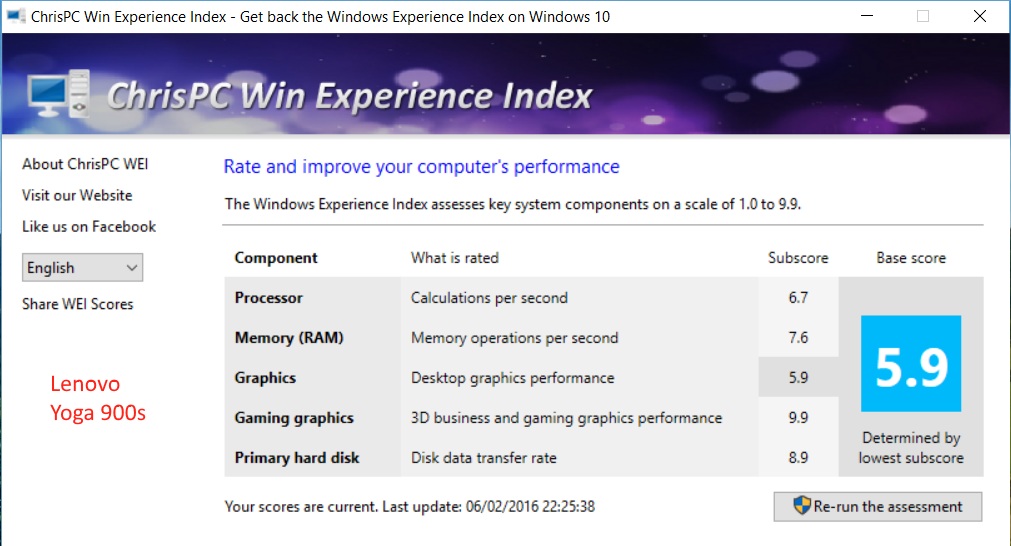
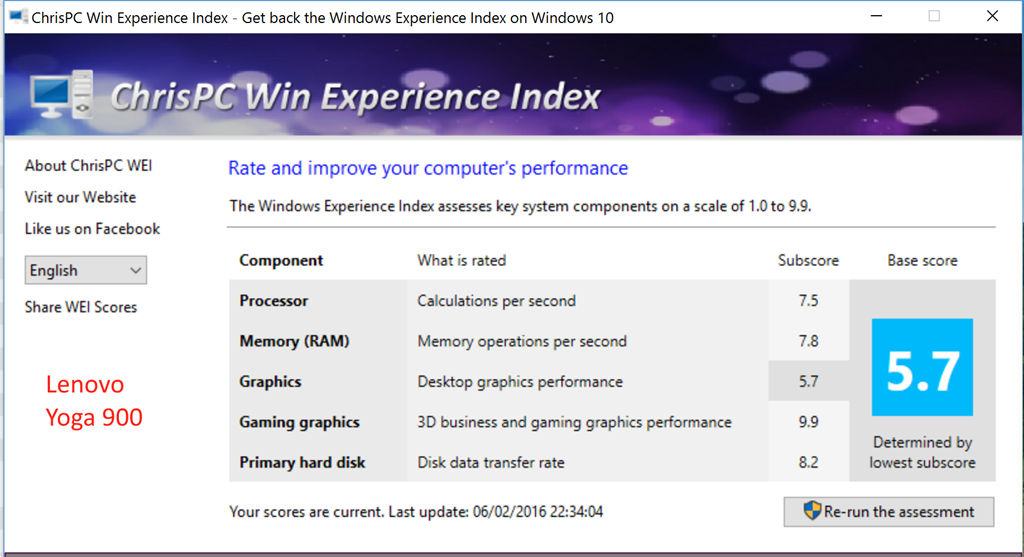
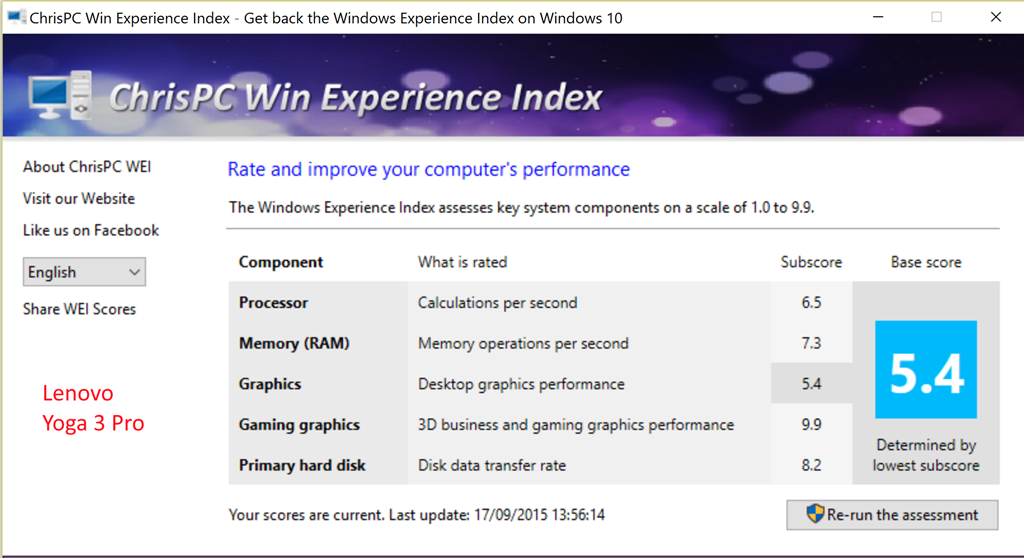
These benchmarks also demonstrate that, while clearly not matching the performance of the full Core i7 CPU of the Yoga 900, the Core M CPU in the Yoga 900s has improved performance over the previous generation used in the Yoga 3 Pro.
The Yoga 900s is a decent performer overall, no doubt helped by the fact that it has the best disk performance of the three machines.
Lenovo claims that the Yoga 900s battery can last for 10.5 hours between charges when playing HD video at 200nits. I did a simple test of battery life under the following conditions:
Under these conditions, after 9 hours continuous play, the battery still had 25% charge left. This is good, and far better than the Yoga 900, which ran out of puff completely after only 6.5 hours under the same conditions.
As a result of this testing, it seems clear that the Yoga 900s will perform very well in activities involving both productivity (office work) and media consumption (watching movies/videos and listening to music). Battery life is much improved over that of the Yoga 900.
This section is basically a repeat of the story I laid out in the review of the Yoga 900 from last October. The points remain, for the most part, the same for the Yoga 900s.
A prime selling point of the Yoga is the fact that it can be folded into a variety of modes. At the time of introduction of the original Yoga back in September 2012, this was a unique innovation. Since then, the concept has been copied by other manufacturers such as Dell, HP, Toshiba and ASUS, which proves that imitation is indeed the sincerest form of flattery. It also clearly demonstrates that the concept is perceived to have market value. Lenovo followed up with the introduction of the “watchband” hinge in September 2014, and now with the Yoga 900 we can see both innovations in a mature form.
These are the four modes of the Yoga:
The traditional laptop mode is probably the starting point for most people, and the mode in which I suspect most people will be using it for the majority of the time.
The Yoga 900s keyboard is good, but compared to the Yoga 900, I think it would be placed second by some people. It does have an extended keyboard (a dedicated top row of function keys), and a quality feel. However, the keyboard is smaller than that on the Yoga 900, which has led to some compromises. These might take some getting used to, particularly if you have been using a Yoga 900 already.
The trackpad is a Synaptics device that has not been certified as a Windows Precision Touchpad by Microsoft. The result is that it is not integrated in Windows 10 Settings, and Synaptics mimics the required Windows 10 touchpad gestures in their own driver. I also note that there have been complaints about the software driver in the community support forums of Lenovo. The latest version of the driver seems to have addressed the issues. Nonetheless, I feel that Lenovo should get their trackpads properly certified and fully integrated into Windows 10.
The FHD display is good. Subjectively, it feels somewhat less bright than the QHD display on my Yoga 900, but it is bright enough for me. It’s a 16:9 ratio display, ideal for watching movies. For office work (e.g. word processing in Word, Excel), I personally prefer at least a 16:10 ratio. Even better would be the 3:2 ratio of Microsoft’s Surface range, or indeed of the Lenovo ThinkPad X1 Tablet. The 16:9 ratio is also not ideal in the Tablet mode (see later). The Yoga 900s has a large bezel area surrounding the display, particularly along the bottom. It should be possible to fit a 16:10 ratio screen that is the same width as the current display into the Yoga’s lid. If the (now redundant) Windows Button were to be dropped in the next Yoga generation, this would be very easy to do. The overall dimensions of the Yoga would then remain the same, but having a 16:10 ratio display would serve the Laptop and Tablet modes far better than the current 16:9 ratio display, in my opinion.
This mode is ideal for media (movies and videos) presentations, particularly in space restricted situations, e.g. on a shelf or an aircraft table. For viewing movies, of course, the 16:9 ratio of the display is now ideal. Couple the Yoga with a wireless presenter, and you can use this mode for PowerPoint presentations as well. In this mode the keyboard and trackpad are automatically disabled.
As an alternative to the Tent mode, the Stand mode can be used for media and PowerPoint presentations. It requires more space than the Tent mode, but the screen can be set to a greater range of angles for the best viewing experience. The keyboard and trackpad are automatically disabled in this mode also.
The last mode is where the lid is completely folded back over the (disabled) keyboard, and to convert the Yoga 900s into a tablet. You can select to have Windows 10 automatically switch into Tablet mode, or to give you the option to switch manually. In this mode, the 10-point touchscreen and support for an active pen come into their own. I found that the size of the Yoga 900 (and the Yoga 3 Pro before it) made for a slightly unwieldy tablet. The smaller size and weight of the Yoga 900s works better for me. The overall size is very close to that of an A4 pad of paper, just 7mm longer. So the size (and light weight) of the Yoga 900s is good, but unfortunately I find the 16:9 display ratio not ideal in tablet mode.
The Yoga 900s has pen support, which the Yoga 900 did not have. Lenovo now use the new Wacom AES technology, which uses pens powered by battery or capacitor. I’ve ordered a Lenovo Pro Pen, which uses the AES technology. It will take a couple of weeks to arrive (I think Lenovo must be handcrafting it from the finest plastic somewhere in China), so I’ll add a note to this review about the pen performance at some point in the future.
Talking of A4 pads of paper brings up one last point. One of the frequent uses of a tablet is for reading books or magazines. And once again, the 16:9 ratio of the Yoga 900s or the Yoga 900 provides (in my view) a diminished reading experience over devices with 16:10 ratios (e.g. the ThinkPad 10) or 3:2 ratios (e.g. the Surface 3 or ThinkPad X1 Tablet). Pages are rendered longer and narrower in 16:9, and the reading experience suffers as a result.

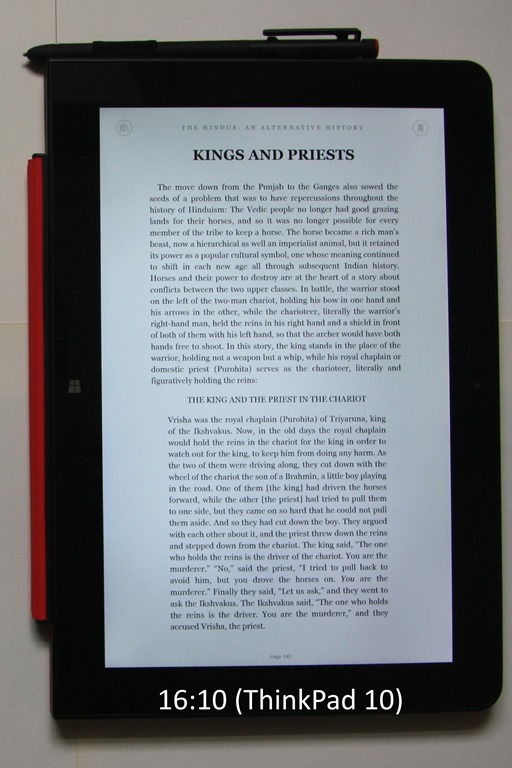
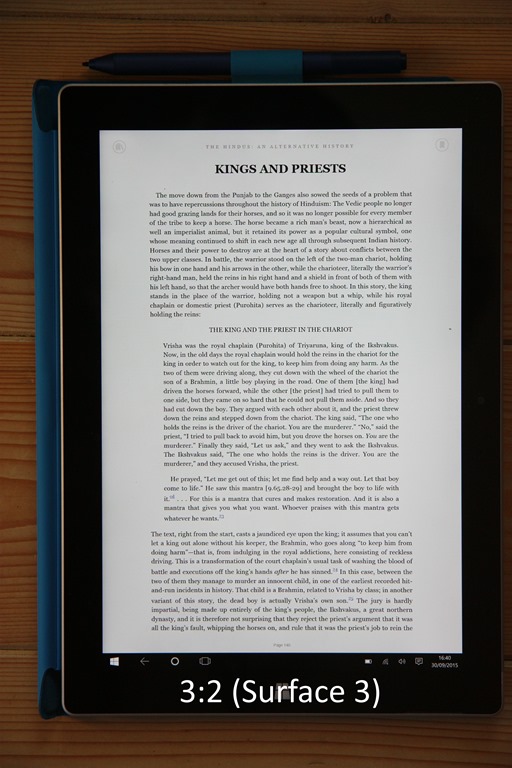
I would certainly make use of the tablet mode of the Yoga 900s, particularly now that it has pen support. It will be interesting to see over the next few weeks (after the pen finally arrives!) which 2-in-1 device I reach for the most often: the Yoga 900s or my Surface 3. I’ll be reporting back on this later.
In my review of the Yoga 900, I stated that the Yoga 900 was a clear advance over its predecessor, the Yoga 3 Pro. The Yoga 900s could be thought of as a refinement of the Yoga 900, a refinement that will appeal to a slightly different audience. If you want power and performance, and arguably a more ergonomic keyboard, then the Yoga 900 is your choice. If you want a smaller, lighter Ultrabook, with power for everyday productivity, and support for an active pen, then the Yoga 900s is an excellent choice. Small, but (almost) perfectly formed. The plus points of the Yoga 900s are:
There are some minus points (in my view):
And perhaps Lenovo could give consideration to the following for the next generation of the Yoga:
It is a fine example of the Ultrabook class of computer. It also offers additional flexibility with the configurations that it can be folded into. I like it.
Regualr readers of this blog may recall that I dipped my toe into the waters of Home Automation at the beginning of last year, and I have been running a Domoticz system since last March.
I’ve been pretty pleased with it up until now, and the system has been expanded to control more appliances and to record their power consumption.
This week, however, I hit a bump in the road. I noticed that since January 1st, we have apparently not been using any gas:
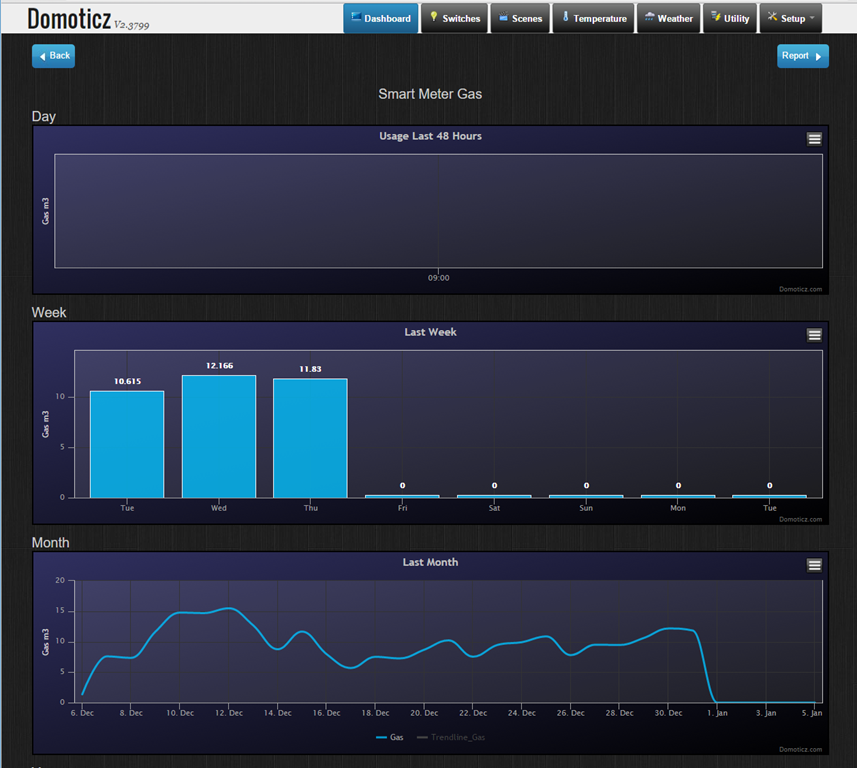
This clearly isn’t right, and in fact the gas meter itself is showing that gas is being used. However, the “smart meter” data connection to Domoticz is claiming that no gas is being used. It turns out that this is a software bug in the firmware of these smart meters, either in the gas meter itself, or in the electricity meter that reports consumption readings for both gas and electricity to Domoticz.
The problem manifests itself if you have the combination of an Iskra-type 382 DSMR 2.2+ electricity meter with a Flonidan or a Landis & Gyr gasmeter. These meters were installed in the Netherlands during 2011-2013. And yes, we’ve got this type of electricity meter and a Landis & Gyr gasmeter. Bingo!
Presumably, this “smart meter” is also reporting this same false reading back to the energy company. I suspect that they are all running around like chickens with their heads cut off wondering what to do about this.
Worst case scenario is that all the meters will have to be exchanged if the firmware can’t be fixed. At the very least they will have to send out humans to come and read every meter so that customers can be accurately charged. I hope that the meter readers come equipped with a box to upgrade the meter’s firmware so that it’s a one time visit…
Addendum 25 January 2016: Luckily, this issue has now been addressed, and a firmware fix is being rolled out to all the 400,000 gas meters affected by this problem. In addition, the fix is one that can be delivered over the network, so no humans are needed to visit every meter. It will take a couple of weeks before the fix is installed on every meter, but ours started working again as of yesterday…
 Geoff Coupe's Blog