
Introduction
Five years ago, I posted about my first foray into the realms of Home Automation. Then, after evaluating a number of HA systems available at the time, I chose Domoticz as the basis for my system here at the Witte Wand.
Domoticz has served me well over the past five years. It’s an open-source project, run by volunteers, that has grown in scope quite considerably, and with that have come some growing pains and project management issues. The last Stable release (March 2020), for example, broke many people’s production systems. When a new Stable version is released, Domoticz notifies you that it is available, and puts an “Update” button on the main Dashboard. Seeing that, many people just clicked the button, without reading the Release Notes. Big mistake. The developers had changed the underlying version of the Linux operating system from the previous version, and the new Stable release did not work on the old Linux. The result was a lot of very unhappy people.
Fortunately, I had learned to be cautious, and did not click the button. But it did mean that I had to build a completely new version of my Domoticz system from the ground up before I was able to move to the new Stable version, several months after it had been released.
That experience made me take stock of whether I wanted to continue using Domoticz, or move to another Home Automation system.
Looking around, I found another open-source project: Home Assistant. It seems to have started at around the same time as the Domoticz project, and the founders of both are Dutch. I have the distinct impression that the Home Assistant project is the better-managed of the two, an impression that is also shared by the author of this comparison article. For example, he writes:
Home Assistant
Home Assistant has split up their platform into several projects: Documentation, GUI, Hassio (the OS system) and Home Assistant itself. There are plenty of developers that develop the system but also review work of their peer developers. There are strict rules to maintain also the documentation of the commits. This is very professional and well managed open-source project.
Domoticz
The small group of developers is doing great work and every commit is checked / reviewed by Gizmocuz (the founder of Domoticz). But there is no control of the documentation and the actual commit is not always tested very well. When using the beta version you have always the latest features and it can took a while before the beta’s are integrated into the main stable branch. A lot of users are running the beta but are not helping the developers.
I decided to see if I could reproduce my current Home Automation system using Home Assistant in place of Domoticz.
My Domoticz system runs on a Raspberry Pi model 3, using an SSD for storage (in place of the default MicroSD card). I did this because Micro SD cards don’t like the constant read/write cycles of databases – and since Domoticz has a database in it, I decided to use an SSD instead. At the time, this was a project in itself. However, with the introduction of the Raspberry Pi model 4, the Raspberry Pi Foundation is moving towards full support of SSD devices, including as a boot device.
The Hardware
So, I bought an RPi4, a Pimoroni heatsink case, and an M.2 128GB SSD card in a USB enclosure:
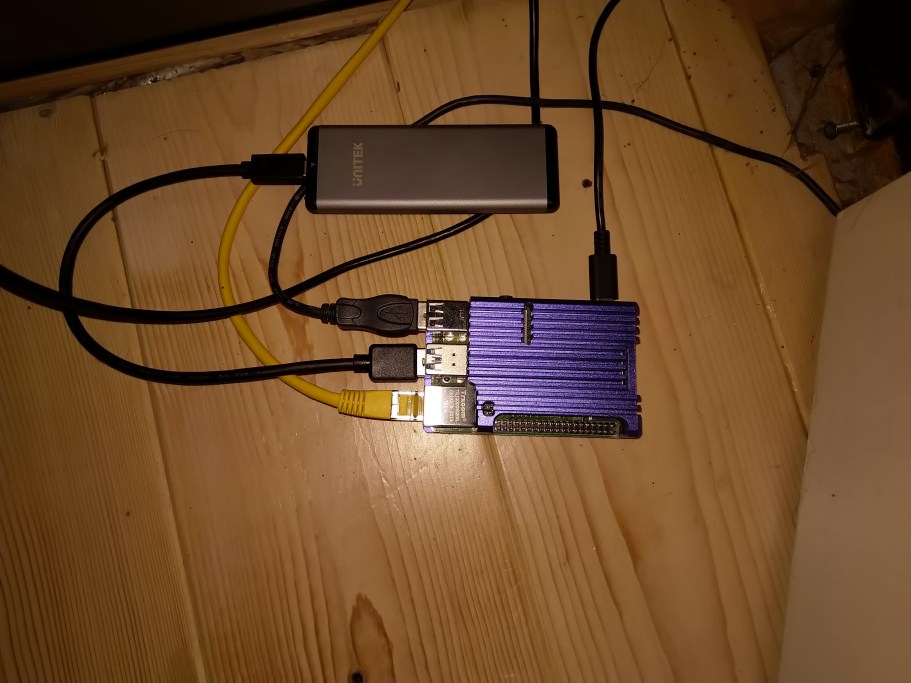
I followed this guide to install Home Assistant on the SSD, and to use it as the boot device for the RPi4. All proceeded according to plan, and I had a working Home Assistant platform ready to test my Z-Wave devices on.
My Domoticz installation uses an Aeotec Z-Stick Gen5 Z-Wave controller. The first problem I encountered was that apparently this device doesn’t work directly with the new RPi4 model. I would either have to perform surgery on the controller, use a USB hub as an intermediary connection, or purchase the new Aeotec Z-Stick Gen5+. I decided to get the new model of the Z-Stick. Using Aeotec software, I migrated my current Z-Wave network from the old to the new Z-Stick.
Z-Wave Support in Home Assistant
Home Assistant already has an integration for Z-Wave, but I noticed that the team had announced a new Z-Wave integration project in February this year. This is currently in beta. Which to choose? It seemed to me that there were pro’s and con’s for both:
Original Z-Wave integration:
pro’s
- stable
- well integrated into HA
con’s
- only supports version 1.4 of OpenZwave. Newer Z-Wave Plus devices may not be supported out of the box.
- Restarting HA forces restart of Z-Wave network
QT OpenZwave (beta) + Mosquitto (a message broker):
pro’s
- uses version 1.6 of OpenZwave
- touted as the future by the HA project team
- the developer apparently works on both the QT OpenZWave (beta) project and the OpenZwave project itself
- runs in a separate Docker instance so the Z-Wave network runs independently of HA itself.
con’s
- It’s a beta; lots of unfinished bits, particularly in the UI integration with HA.
- the Z-Wave admin tool is crude, but it works.
On balance, I decided to go with the Beta, since this was more likely to support newer Z-Wave devices, and is supposed to be the future for Z-Wave in the Home Assistant world.
I have thirty Z-Wave devices in my network. Aside from the controller there are devices such as smart wall plugs, switches, remote control, smoke detectors and a siren. The test would be to see if this network could be successfully migrated across to Home Assistant and then managed as a production system, with the ultimate aim of retiring Domoticz in favour of Home Assistant as the platform.
Moving to Home Assistant
I booted up Home Assistant for the first time, and waited until Home Assistant had got the latest version downloaded and set itself up ready for the Onboarding Step. This involved setting up the initial administrator account and telling HA where it is located. All very straightforward and well-described in the documentation.
The next step was to add and configure the integrations that I needed to use Z-Wave.
On the HA web-based interface, I clicked the Supervisor button, followed by the Add-on Store link. From the list of official add-ons, I chose the OpenZwave (beta) and the Mosquitto Broker:
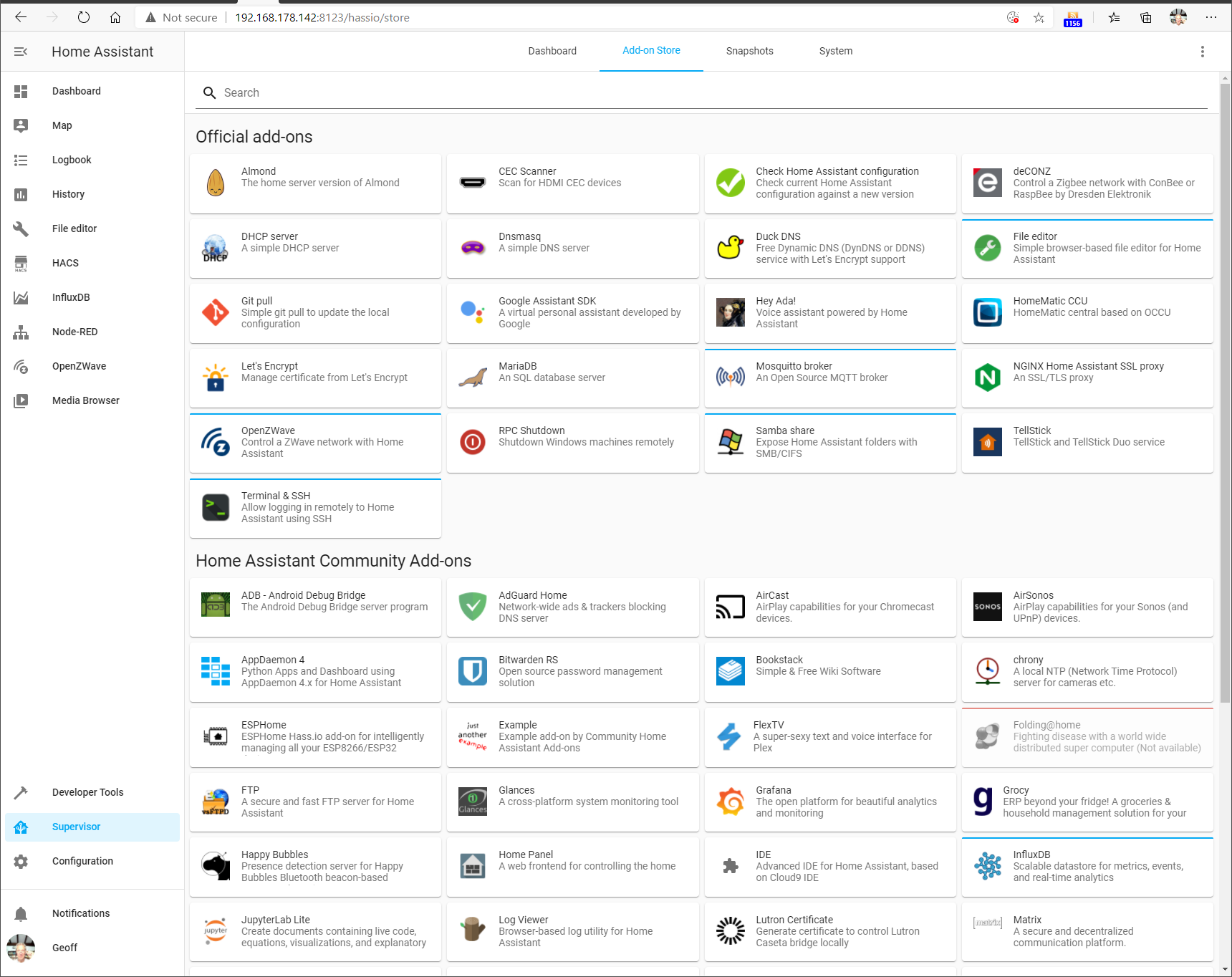
These are required for support of Z-Wave. Once added they appeared on the Dashboard screen (here shown together with some additional add-ons I included for testing)
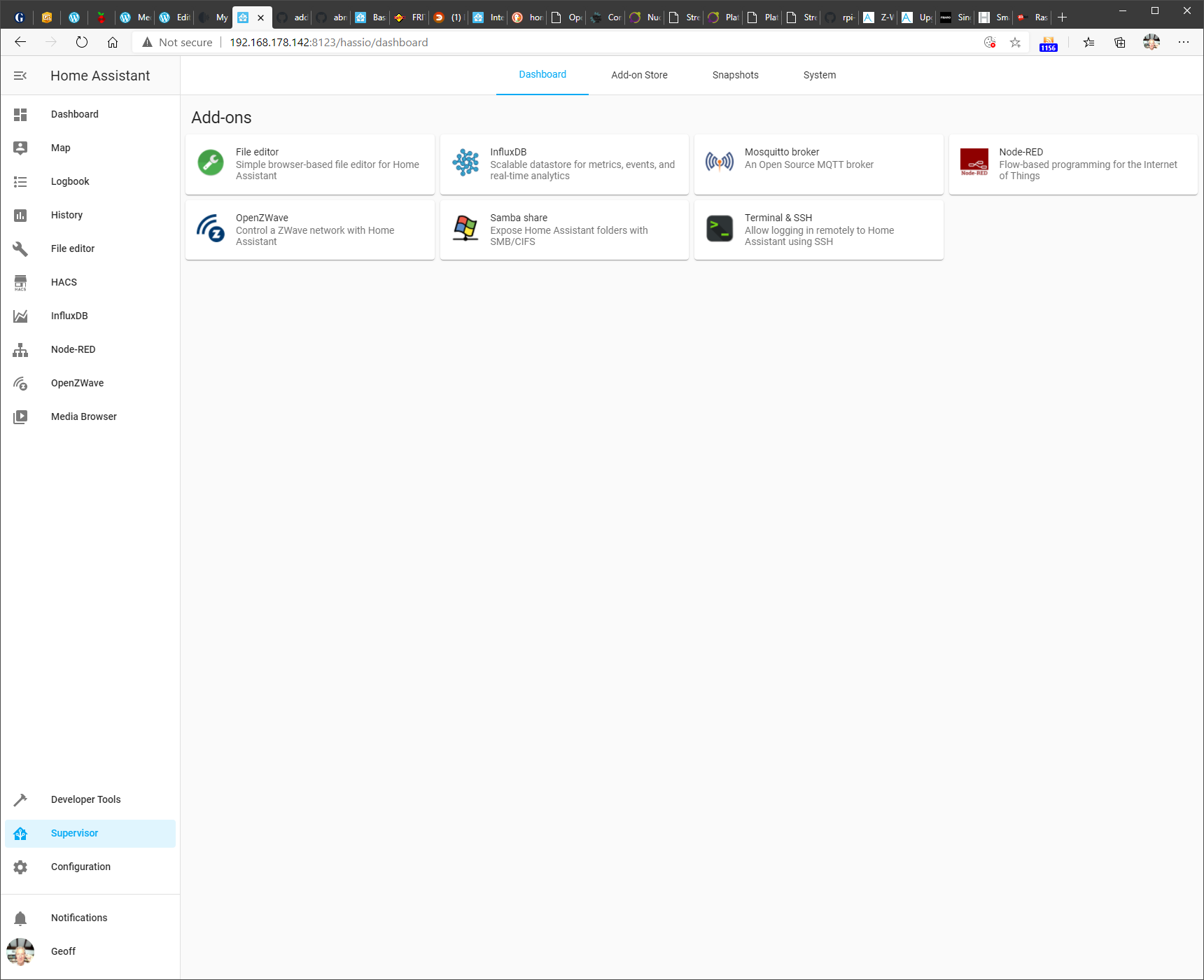
Clicking on a module shown in this dashboard gives access to the module’s documentation, configuration and module logs.
Configuration was fairly straightforward (after a couple of false starts), and the Z-Wave network was read from the Aeotec Z-Stick and after a few minutes of messages being passed between the OpenZwave beta and the Aeotec Z-Stick controller, the following appeared in the OpenZWave administration tool:

Actually, the details of the smoke detectors took a day or so before they were filled in. They spend most of their time “sleeping” and only wake up every 24 hours. So it took time for the new Z-Stick to discover the devices fully.
And as you can see, this is a separate administration tool – the beta does not yet have full integration of the administration into Home Assistant itself.
Nonetheless, the contents of the Z-Wave network was now fully available to Home Assistant, and I could start adding devices to my Home Automation Dashboard.
Here’s an example of what the current Dashboard looks like. This will likely evolve over time.
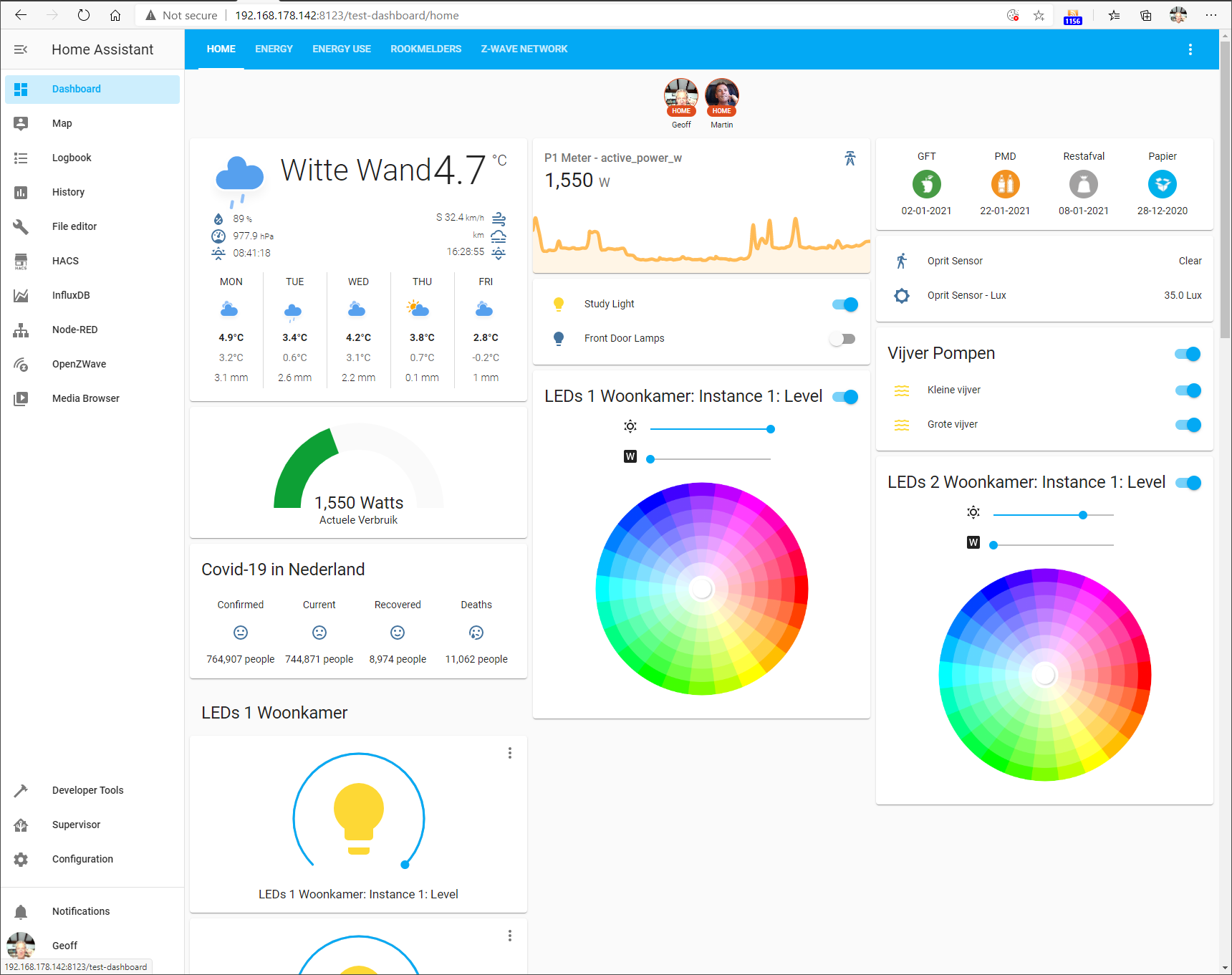
You’ll notice that besides the Z-Wave devices, there is some additional information being shown, e.g. the Weather here at our location, rubbish (garbage) collection dates, and electricity use.
This is being fed by additional devices and services supported by integrations in Home Assistant.
On the Home Assistant web-based interface, I clicked the Configuration button, and then chose Integrations from the list of configurable items:
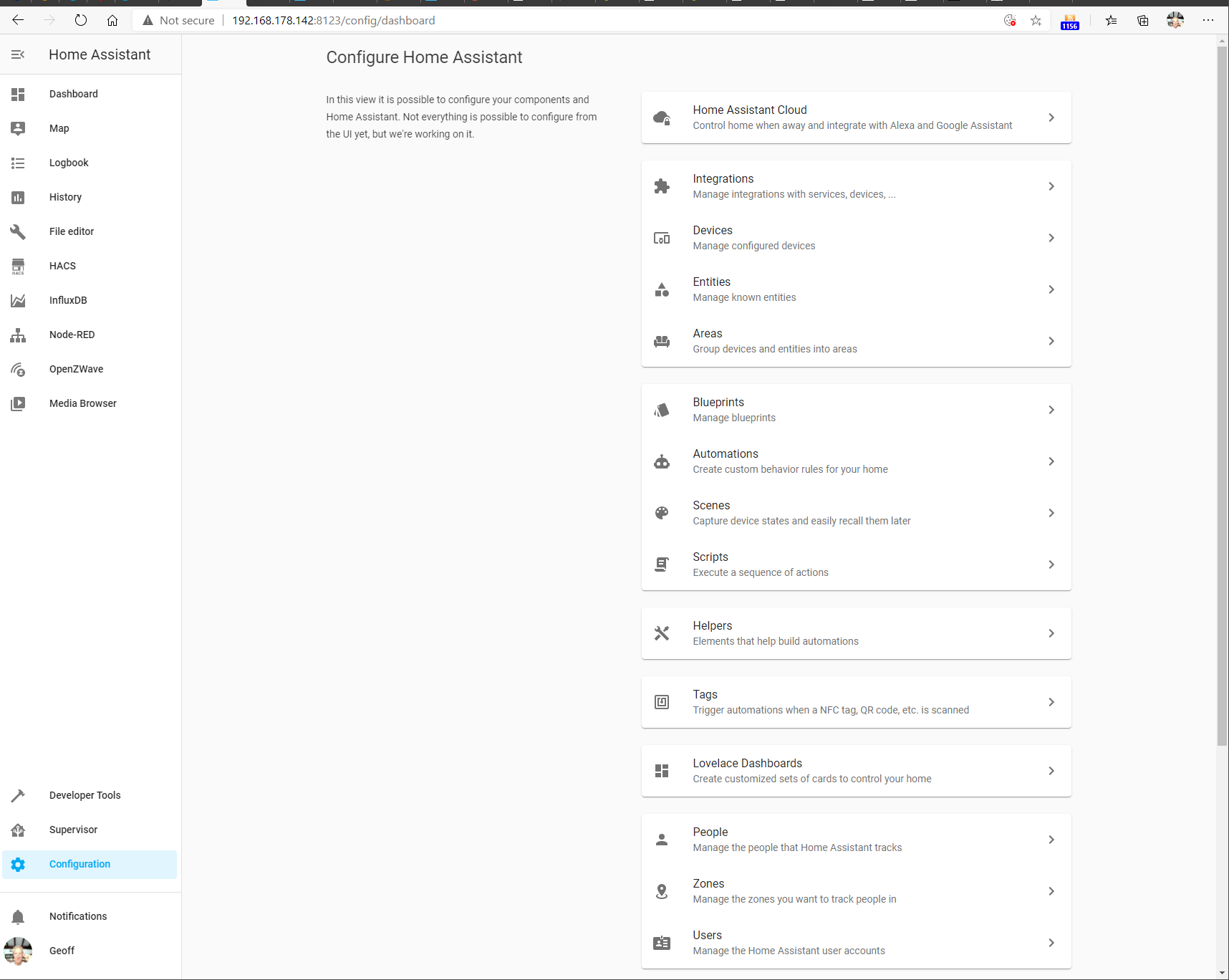
On this screen, I added the necessary integrations. For the support of Z-Wave, I had added the OpenZwave (beta) and the MQTT (the Mosquitto message broker) integrations. This screenshot shows them added, along with some other integration modules that I have added.
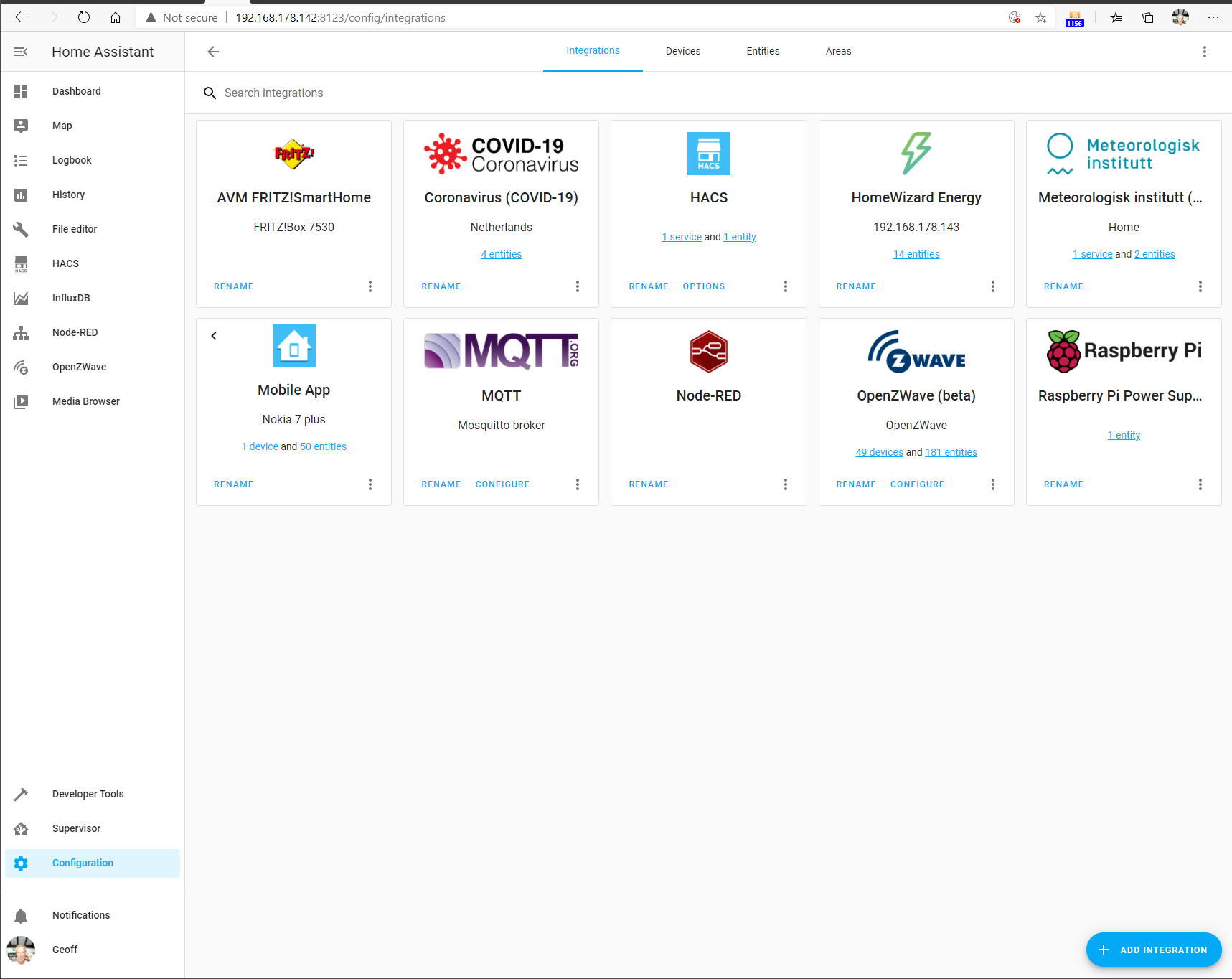
There are currently over 1,700 integration modules available for Home Assistant, including a module for Roon (but that’s another story…). Suffice it to say that Home Assistant is able to integrate a wide range of devices and services into a unified environment.
Automation in Home Assistant
The whole point about Home Automation is that it should take over the control of common tasks for you. For example, turn on the house lights when it gets dark.
Here in the Witte Wand, Domoticz had been set up to do the following simple tasks:
- Turn on the living room lights and the lamp in my study 45 minutes before the sun sets.
- Turn off the lamp in my study at 23:00 each evening
- If no-one has turned them off at night, then turn off the living room lights at midnight.
- Turn on the pond pumps at 08:00 each morning.
- Turn off the pond pumps 30 minutes after sunset.
- If the temperature falls below freezing at night, turn on the pond pumps.
- Turn on the water heater in the outbuilding at 08:00 and turn it off at 17:00 each day.
- If the motion sensor at the entrance detects movement, send a “Someone’s here” message to our smartphones.
- If it is dark, and the motion sensor detects movement, turn on the outside lights for 10 minutes.
- Turn on the Hi-Fi system and speakers at 08:00 each morning and turn them off at midnight.
- At Christmas, turn on the tree lights at 08:00 each morning and turn them off at midnight.
- At Christmas, turn on the garden lights 30 minutes before sunset, and turn them off at 23:30.
All these automations were easily reproduced in the Home Assistant environment, using the built-in automation tools.
Conclusion
I’ve been impressed with what the developers of Home Assistant have achieved and how the project is managed.
I have migrated my current Home Automation system from the Domoticz platform across to the Home Assistant platform.
I intend to carry on using Home Assistant as the platform for our Home Automation system for the foreseeable future.
Addendum 1: 11 January 2021
I thought I should just add a note here concerning the OpenZWave (Beta) integration in Home Assistant. Development of OpenZWave seems to have slowed to a standstill during the last six months. As a result, there’s been concern raised in the Home Assistant Community Forum about whether this integration is, or should be, the future direction for support of Z-Wave networks in Home Assistant.
It appears now that the developer of OpenZWave is stepping back from further active development of the software, he will continue to tinker with it, at his own pace, to his own demands.
That has led the leaders of the Home Assistant project to put in place a plan B for an alternative integration of Z-Wave networks into Home Assistant.
The current OpenZWave (Beta) integration will remain in place for the foreseeable future. It works for me and many others. OpenZWave itself is software that is used by 100,000+ users; not just in Home Assistant, but in Domoticz and other Home Automation platforms.
I will continue to use it until such time as the proposed Zwave-JS integration is mature enough to migrate to.
Addendum 2: 17 May 2021
A couple of months ago, I migrated the ZWave support in Home Assistant from the OpenZWave (Beta) integration to the Z-Wave JS to MQTT integration. This has been configured to use the ZWave JS add-on under the covers. At the moment, the control panel functions of the ZWave JS add-on are incomplete, whereas the Z-Wave JS to MQTT add-on has a complete set of ZWave control panel functions now.
I’m not actually using any MQTT broker functions at all, only using this integration for its ZWave control panel functions.
Once the work on ZWave JS is complete, I can decide whether I will migrate fully to it and drop the temporary use of the Z-Wave JS to MQTT integration.
Addendum 3: 10 January 2022
Still using Home Assistant, and still impressed by the management of this open-source project and the results that the team (mostly volunteers) have achieved.
There are over 127,000 installations of Home Assistant around the world. In 2021, 1,282 people contributed to the project, producing 15,972 new features, improvements, bug fixes, documentation , and other changes.
What I particularly like about Home Assistant is that operations and data are local; it does not rely on the Cloud either for its operation or for storing long-term data. This is good for privacy reasons, but also it means that Home Assistant will continue to work even if the connection to the internet is broken. It also reduces the risk of product obsolescence. A product that relies on using the Cloud for its operation will stop working if the Cloud service is withdrawn by the supplier.
In the year of using Home Assistant here, there has been one hardware issue. It began a few months back when I noticed that HA would stop working on an intermittent basis, and the RPi4 would need rebooting to get HA started again. Finally, one day it refused to restart, and that was when I discovered that the data disc (a M.2 SSD in an external Unitek USB housing) was no longer working. I replaced the external drive and USB housing with a UGREEN USB 3.1 Gen 2 housing and a Samsung 2.5inch 250 GB SSD a month ago, and the system has been running faultlessly ever since.
 Geoff Coupe's Blog
Leave a comment