Reflections on life at “De Witte Wand”…

Category: Computers and Internet

  • Unified Messaging

    This is another post about computers and the Internet, so if they don’t make your heart beat a little faster, then best turn away now.
     
    I was interested to see a case study recently published by Microsoft that concerned my old employer, Shell. When I worked there, our communications infrastructure was a horrendous patchwork of multiple technologies and vendors covering the channels of telephony, video, and computing (email and web). The dream was to try and bring some order to this chaos, but at the time it would have been very difficult for two reasons: immature technology and organisational politics, to put it politely.
     
    Still, times change and things move on. I was pleased to see an old colleague of mine, Johan Krebbers (Shell’s Group IT Architect), put forward the vision to provide a single user interface for all Shell’s 150,000 users of real-time communications. It’s a big challenge to consolidate about 200 PBX systems, multiple audio and video conferencing systems into a single service. I wish him and his colleagues the best of luck. Mind you, if anyone can make this work, it will be Johan – the man’s a phenomenon.
  • Now You See It…

    … and now you don’t. This is a tale about technology, about the little things that don’t quite work and hence irritate me out of all proportion, rhyme or reason. Unless you’re a technology nerd, this probably won’t interest you, so go and read something else. But if you are a technology nerd, then pull up a chair. Are you sitting comfortably? Then I’ll begin…

    I’ve recently acquired a Denon AVR-3808 to sit at the heart of our home’s audio-visual system. As well as being able to handle the usual array of audio visual devices (DVD and Blu-ray players, Satellite receivers and TVs), it also comes equipped with an Ethernet port. So I’ve connected it into our home network. There, it is able to connect to the Internet to receive Internet Radio streams, and also connect to the audio media held on our PCs and Windows Home Server. It even comes with a nice little Microsoft  PlaysForSure sticker on the front. Trouble is, it doesn’t “play for sure”.

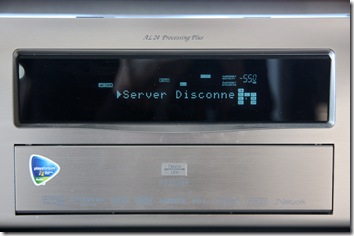
    It will quite happily play Internet Radio stations all day long, but if I try and play back music stored on any of the PCs or the Windows Home Server, then after a couple of hours, the connection will break, and the Denon will display a sad little “Server disconnected” message on its display.

    20090127-1445-13

    At this point, to get rid of the problem, I have to switch off the Denon and then switch it back on again. When it powers on, it will re-connect to the network, and then all will be well again for another couple of hours listening to music stored on the home network. It’s most odd – it will remain connected all the time as long as I play Internet Radio streams, but as soon as I try to play music stored on any of the devices connected to the home network, after a couple of hours the Denon will fall off its perch, and disappear off the network. Take a look at this snapshot of the network:

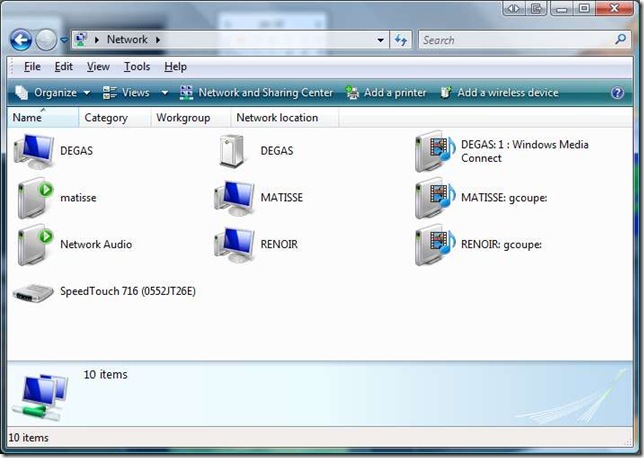
    Denon Network Issue 1

    Here you see two of the PCs (Matisse and Renoir) and the Server (Degas). There are several icons for each of them representing the different functions:

    • A PC that may have part of the file system and its attached printers accessible over the network
    • A File Server and Backup device
    • A Media Server device that can stream audio or video data on to the network. You can see that both PCs and the Windows Home Server can all act as Media Servers.
    • A Media Player device that can connect to a Media Server to playback either audio or video data. The device labelled “Network Audio” is the Denon AVR-3808.

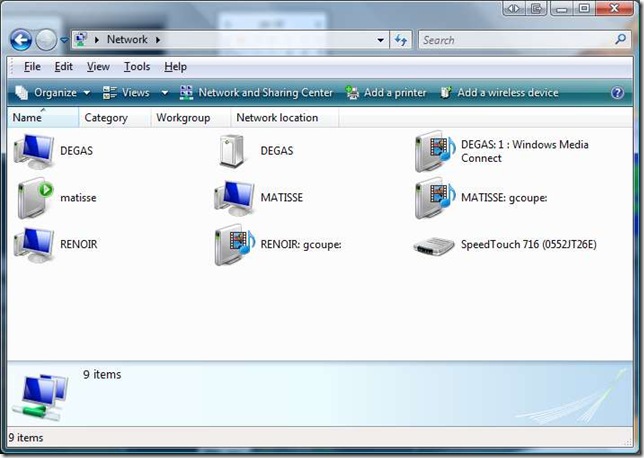
    In addition, you can see that Matisse can also act as a playback device for any of the Media Servers. The Speedtouch is my ADSL modem and Router – the device that joins the home network to the Internet. Now, the above snapshot represents the situation that I see most of the time. But if I start using the Denon as a Media Player device to play back music from any of the Media Servers, then after a couple of hours I get the “Server disconnected” message, and this is what I see on the network:

    Denon Network Issue 3

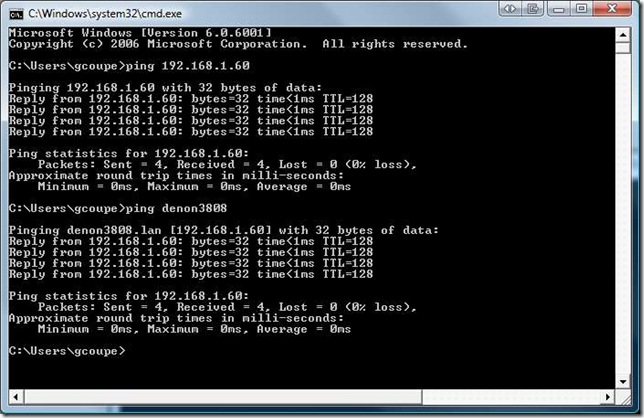
    … the Denon has disappeared from the network… As I say, it’s a case of “now you see it, now you don’t”. But curiously, even though it disappears from the network diagram, it’s still possible to ‘ping’ its IP address:

    Denon Network Issue 5

    So even though the low-level functions of the Denon’s networking capabilities are still there, something has happened to the higher levels. It appears to have had a lobotomy. Even more curiously, if I switch off the ADSL modem/router, so that there is no connection possible with the Internet, or have the ADSL modem/router on, but with its firewall set to block all incoming and outgoing traffic to the Internet, then the Denon will quite happily stream music from the Media Servers the whole day long.

    So it looks as though there is something in the Denon that has a heartbeat with something out on the Internet that conflicts with local audio streaming and which might lie at the bottom of the issue. I noticed something else that is curious. For those of you that are playing around with the Beta of Windows 7, you may have noticed there’s a new feature in the version of Windows Media Player than comes with it. While all versions of Windows Media Player can “pull” media from Media Servers, this new version can “push” media to Media Player devices out on the network. So, when you’re in Windows Media Player, you can select tracks to play, but instead of playing them locally, a right-click shows a new option: “Play to…” and a list of the Media Player devices attached to your network. Here’s an example of what I see when I “push” a track out to the Denon:
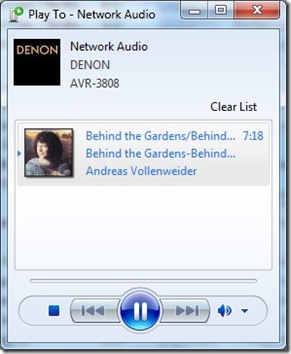
    Denon Network Issue 6

    Notice that Windows 7 has correctly identified that the Network Audio device is in fact a Denon AVR-3808 – I didn’t have to set that up myself, it’s done automatically. But here’s the interesting thing. See that “Clear List” in the snapshot above? That’s actually a button, which when clicked will clear out the contents of the playlist in the panel below and stop streaming to the network device. And when I click that, sure enough, the Denon stops playing, but its built-in display shows something very odd:

    20090127-1532-31

    What’s that “Rhapsody”? If I try to navigate to that item using the Denon’s controls, it instantly vanishes from the list of choices, which are normally: “Favorites, Internet Radio, Media Server, Recently Played”. Now Rhapsody is an online subscription digital music service. It looks as though the Denon is treating the Windows 7 Media Server as though it’s a Rhapsody stream, and that can’t be right. I have no idea why the Denon falls off the network when it’s connected to the Internet and streaming audio from our Media Servers on the home network, but I’m pretty sure that the problem lies with the Denon. Its firmware is the latest current version (2.01). This problem doesn’t seem to be common, but there is at least one other person who is seeing the same phenomenon. Trouble is, if it’s just the two of us, then this isn’t going to be fixed anytime soon. We’ll just have to continue to switch our Denons off and on every couple of hours… Sigh.

    Update: I think a number of people are seeing this problem on their Denon equipment, but not everyone does, so it’s likely to remain problematic as far as resolution is concerned. Meanwhile, I do have a workaround, although it’s not very elegant. I’ve created a new Firewall profile on my ADSL modem/router. That allows all traffic from devices on my home network to reach the Internet and vice versa, apart from the Denon 3808. The Firewall profile has a rule that prevents any traffic between the 3808 and the Internet, although local traffic on the home network subnet is permitted. With this rule in place, I can stream music from the Media Servers on my home network to my heart’s content and all day long. No more cutting out after a couple of hours as the 3808 falls off the network. It’s not elegant, because if I wish to switch to listening to Internet Radio stations on the 3808, then I have to switch over the Firewall profile on the ADSL modem/router first. But at least I’ve proved, to my satisfaction at least, that the problem lies within the 3808.

    Update II: A couple of people have run packet traces on their Denon’s network traffic and found that, even when using a local media server, an AVR-4308 or AVR-3808 will communicate with internet address 207.188.0.25 on port 443. Doing a “whois” lookup shows that this IP address is registered to Real Networks. My bet is that this is a server address of the Rhapsody Music service. Quite why the Denon receivers should be communicating with these servers out on the internet when using local media servers on a home network is anybody’s guess, but it looks like a bug to me, and definitely seems to be causing the “server disconnected” message.

    I therefore modified my original Firewall rule, which stopped all communication between the Denon and anything out on the internet, to one that stops the Denon communicating with this specific internet address. This modified Firewall rule also stops the “server disconnected” problem from occurring, while allowing the Denon to continue to receive Internet Radio and to communicate with Denon’s servers for firmware updates. Now all we need is for Denon to acknowledge that this is a bug and fix it.

    Update III: Denon provided a firmware upgrade A2.04, WEB=W200908260504 on October 15, 2009 that may have been to address this bug. I haven’t bothered to remove the Firewall rule, which I would need to do in order to test this, so I can’t confirm it.

    Update IV: Since that firmware update was released (and I installed it on my Denon), I have replaced my old ADSL Modem/Router with a new one (it was on free loan from my ISP). Although that has the possiblity to create Firewall rules, I have not done so. Therefore, the “Denon rule” is not present in the new modem, and I have not seen a repeat of the “server disconnected” issue. Therefore I conclude that the October 15 update has fixed this issue. I should add that I’m not using the Rhapsody music service (Denon don’t offer this in Europe, and even if they did I wouldn’t use it), so I don’t know how this affects Denon users based in the US who do use the service…

    Update V 9 May 2014: Damnation, the “Server Disconnected” message is back! And now it’s worse than before – it also affects Internet Radio as well as streaming from our home media server. I think I need to recreate the firewall rule again. Trouble is, I have a new router (a Fritz!Box 7360) which doesn’t seem to have a straightforward way of doing this.

    Update V1 29 May 2014: Damnation again. It transpires that Rhapsody have changed their servers, and Denon have issued a new firmware to fix this. Trouble is, Denon have only issued the firmware for their new products. There has been no update for the 3808. Unless Denon issue the firmware for the 3808, or I can find out what the new version of the firewall rule needs to be, this problem will remain.

  • Windows 7 Beta

    You probably won’t be surprised to learn that I’ve downloaded the beta of Microsoft’s upcoming successor to Vista, currently known as Windows 7. Originally, Microsoft’s plan was to limit the download to the first 25 million people who visited the web page, but because of demand, they relented and extended the download programme. However, they will definitely be pulling the plug after February 12th, so if you haven’t got the beta, and still want to try it out, you’d better get moving.
     
    I’ve installed the Beta on my Tablet PC (an HP TX2000), since this is my secondary machine, and not my "production" machine. Windows 7 is a Beta, after all. Still, I’ve been pleasantly surprised at how solid this first Beta is. It feels far more "finished" than Vista ever did at the equivalent stage of its development cycle. The only problem I’m seeing on my Tablet PC is that the Touchscreen driver is not working. However, the Pen driver is, so I can still use all of the Tablet functions.
     
    Update: I’ve now got the Touchscreen functions working. I downloaded the driver from the HP web site and reinstalled it…
  • TED Sits on the Whoopee Cushion

    Over the past few years, I’ve often linked to the TED web site, because they often have interesting talks from interesting people. The TED people have just run into a spot of bother with their video hosting supplier, which means that they have had to change over to a new host service. And while they have tried to minimise the impact, the string and sealing wax that characterises the worldwide web in general has snapped beyond repair as far as I’m concerned. All of the video embedded links that I have made in past blog entries are now broken. You can’t get to the videos that I posted about.
     
    Sorry about that. Blame them, not me.
     
    As has been said before, the web is like sitting on a whoopee cushion.
  • Windows Live Wave 3

    I see that the latest versions of the standalone applications (including Windows Live Mail, Windows Live Photo Gallery and Windows Live Writer) have now been released. This download page is still currently describing the applications as “beta”, but the applications themselves seem to have dropped that moniker from their titles.

    I’m pleased to see that at least one bug in Windows Live Photo Gallery that I reported to Microsoft over a year ago has finally been corrected.

    I’m using Windows Live Writer to create this post, and one thing that I want to check is how it handles image metadata. While it’s very easy to use WLW to insert images into your blog, the previous version seemed to be stripping out image metadata, and therefore creating orphan works, which I think is a very bad idea. So, here’s a test image, which in the original has my copyright information and IPTC Coreinformation as metadata embedded in the file.

    20080915-1152-07(1)

    Once an image is published in my blog, it can be downloaded from there as well. Let’s see what has happened to the metadata…

    Yep, all the metadata has been stripped out – copyright, creator, keywords – everything. That’s not good, in my opinion.

  • Windows Live

    You may have noticed that my Windows Live Space (a.k.a. Geoff Coupe’s Blog) has changed its appearance today. Microsoft has just rolled out major changes to its Windows Live Services. I can’t say that I’m particularly happy about them. Management of comments on the blog has just got really difficult, and it was badly designed before.
     
    It looks as though Microsoft is trying to build a Facebook clone. I don’t want a Facebook clone, I just want a nice simple blog. Sigh.
  • Homemade Wireless Keyboard

    How not to make your own wireless keyboard. The scary thing is that it took twenty seconds for the penny to drop.
  • Do No Evil?

    Hmm, I wonder. I had expected more from Google, but perhaps I should not be surprised.
  • Live Search Sucks

    Why is Microsoft’s Live Search so bad at searching? It’s a question I often ask myself. Take today, for example, I wanted to check my blog for entries about the woodpeckers that visit our garden. You may have noticed that on my Live Spaces homepage, there’s a Live Search gadget that enables you to search my blog entries directly.
     
    Live Search 
     
    So I go ahead and type in "woodpecker" and click the "Search" button. Result? Zilch, nada, nothing, zero result. That’s odd, think I, because I know that I have a blog entry on the woodpeckers in the garden. So I go to Google’s blog search and do the same thing. Result? A hit on the correct page.
     
    As I say, why is Microsoft’s Live Search so bad? It’s embarrassing.
     
    Update: you may note that now the results are more or less correct. That’s because months have gone by and Live Search’s spider has finally got around to visiting the relevant web pages. Well, whoop-de-doo. It still doesn’t excuse the miserable performance of the service as a whole.
     
    Update II: I’ve now removed the gadget entirely since it recently stopped working at all, and always returned zero hits. The reason is that bloody Microsoft went and changed the search query syntax of its search engine, so any code out there that uses the old syntax is now well and truly screwed.
     
    Update III: …and has Microsoft removed the gadget from the Windows Live Gallery? Nope, of course not. It’s still there, and in a prominent position. People – don’t you care that you’re increasing the noise to signal ratio? Clearly not. There’s a lesson for us all here… humankind will be Easter Island writ large…
     
  • Island Imagery

    I see that Google Earth has at last got higher resolution imagery for the Isle of Man. I can now clearly see at least some of the houses where I lived as a child. But the old Ivanhoe hotel, where I spent most of my childhood, was demolished some years back – a car park now marks the spot.
     
    The Google Earth and Maps team introduce the new imagery by running a quiz on their blog. The Isle of Man was supposedly the answer to this bizarre question:
    9) The currency of this island is known as Manx. 
    Er, no it isn’t. That’s like saying that the currency of England is known as English. Sigh.
     
    Update: Gawd, it gets worse. In the blog entry providing the answers, the Google team say that the Isle of Man is part of England. No, it isn’t, you stupid people!
  • Radio Silence

    Well, I’m back (touch wood) after a few days without an Internet connection. My ISP (Internet Service Provider), XS4ALL, has been having problems this weekend. It also happened to be the weekend when my ADSL connection was scheduled to be moved from KPN across to XS4ALL. So, bright and early on Friday morning, KPN pulled their ADSL plug on my line. The idea was that XS4ALL would then plug in their ADSL service shortly afterwards. Alas, some network-wide problem hit them, with a few thousand subscribers being unable to get internet access, so they put a hold on adding new clients until they got it sorted. Me being one of them, of course.
     
    Not having ADSL has both pushed my frustration levels up, but also given me the opportunity to catch up with my book reading. Hilary Mantel’s Beyond Black is highly recommended.
     
    I even managed to be pleasant, and share a joke or two, with Dennis on the XS4ALL Helpdesk today. Clearly I’ve calmed down from the idiotic fury I was spitting at some hapless minion in network control last Saturday. Whoever you are, I’m sorry. My emotions got the better of me.
  • Tribute To Jim Gray

    Jim Gray was an outstanding and influential computer scientist. He made major contributions in the field of database design. He vanished without a trace while on a short solo sailing trip on January 28 2007. I see from Pat Helland’s blog that there is to be a tribute to Jim on May 31st at UC Berkeley. He is missed.
  • The Problem With XML

    Cliff Longman, of Kalido, has a very good explanation of why XML should not be regarded as the universal panacea for data integration. He also talks about the genesis of Kalido. It was a tool developed to tackle the horrendous problems of data integration within the oil products businesses of Shell. As Cliff says, at the time, there were a hundred different operating companies, none of which agreed on the same way of defining their data. Trying to discover how much oil had been sold worldwide, and to whom, was a complete nightmare.
     
    (hat tip to Andy for the link)
  • Weeding Those Links

    A garden benefits from regular weeding. So does my list of links to web sites stored in the "Favourites" of my web browser. Up until now, I’ve done it manually, but with currently over 1,200 links in the list – it’s a real chore to check for dead links. Thanks to a tip I found on Watching The Net, I’ve discovered AM-Deadlink, a utility that will weed out all those dead links for me automatically. A terrific little tool that does its job very well indeed.
  • Fun With Vista

    While Microsoft Vista has been getting some bad press, on the whole, I’ve been pretty satisfied with it, and would not want to return to Windows XP. True, in the early days, the shortage of proper Vista software drivers from third party hardware manufacturers was a real issue, and I suffered from that as well. But now, those problems are mostly behind me(*), and my Vista systems have been humming along nicely. Until, that is, a couple of weeks ago.
     
    I began to notice that free disc space on the main drive on one of the systems was vanishing at an alarming rate, and I could see no reason for it. Gigabytes were disappearing daily. I ran the Disk Cleanup utility, but, as expected, that reported it could only recover a couple of gigabytes from the disc space allocated to my files. I began to wonder if the disc was beginning to fail, so I ran the low-level error check on the disc. This also revealed nothing untoward. Meanwhile, the relentless tumble in the amount of free space continued.
     
    Finally, I stumbled across the additional option in Disk Cleanup to delete Shadow Copies and Restore Points. Now, my versions of Vista (Home Premium) do not have the Shadow Copy feature, but they do use Restore Points. Well, nothing ventured, nothing gained, thought I and selected the additional option as I tried the Disk Cleanup utility again. This time, I got over 100 Gigabytes of free disc space back… 
     
    So, that was the cure, but what was the disease? Why would Vista’s Restore Points be taking up so much space? After further googling, I came across this excellent article: How To Reduce Disk Space Used By Windows Vista System Restore. It turns out that, by default, Vista should be set to use up to 15% of a drive to store Restore Points, but on my system, it was set to "Unbounded" – in other words, Vista was free to keep on grabbing disc space for Restore Points. I used the vssadmin command as described in the article to change from no limit to a reasonable 30GB (on a 400 GB drive). Something had occurred in the past few weeks to set that parameter on the Shadow Copy Service of Vista to "Unbounded" – I still don’t know what it was, but at least I have got it back on track.
     
    Aren’t computers fun?
     
    * It took over a year for Creative Technology to release proper Vista drivers for my EMU 1820m audio hardware. And I gave up waiting for Creative Technology to sort out the problems with the Vista drivers for the Audigy range of soundcards. I finally ripped the Audigy card out of my PC in disgust and replaced it with a soundcard from Terratec, which came with working Vista drivers. I’m still not completely out of the woods though. Steinberg, the company that many musicians love to hate, announced, to an angry chorus of frustrated users, that it would not be releasing 64 bit Vista/XP drivers for its Midex 8 interface. So that means I have to stick with the 32 bit version of Vista, where I can use the old XP driver for the Midex 8.
  • Vista SP1 Hiccups

    Microsoft released the first Service Pack (SP1) for the Vista family of operating systems a couple of days back. There are two machines running Vista in our house; one reported that SP1 was available to install, the other did not. It turns out that the machine that did not react is behaving perfectly correctly. I have a Logitech webcam installed on that machine, and there is a known conflict between a Logitech driver file and one of the files in SP1. The update process checks for the presence of files that can cause problems on target machines, and does not proceed if it finds a potential problem. I’ll just have to wait until Microsoft resolves this issue.
     
    That’s fine, but what I found disconcerting was the experience I had with the other machine, the one that flagged that it was OK to install SP1.
     
    I gave the OK to install SP1, and the process began. While it lasted a while (about 45 minutes, I think) and included a reboot, that was acceptable. What I don’t think is acceptable is that when the machine was finally up and running, it was clear that, even though a successful upgrade had been reported, something was not right. It turned out that:
     
    • the screen resolution was set to 800 x 600, and could not be set to the proper resolution of 1280 x 800
    • there was no sound
    Both of these were caused because the upgrade process did not use the required specific hardware drivers, but used default drivers from Microsoft. Now, because I’m a geek, I was able to use Vista’s device manager to diagnose and correct the problems by reinstalling the NVIDIA and RealTek drivers for the display and sound hardware respectively. But for the non-geeks amongst us, this would simply be a disaster.
     
    Even more alarming, Windows Update started reporting that it had one more important update to install, but every time it attempted to install it, the process failed with an error code 80070103. Vista’s Help and Support system suggested reinstalling the update (it was an new software driver for the touchpad), but this didn’t help – the process simply reported that the latest software driver was already installed, and meanwhile Windows Update kept on insisting that there was an important update to install. In the end, I had to completely uninstall the touchpad driver manually, and then let Windows Update take over to install the new driver. Once again, I can’t see that non-computer folks would be comfortable about doing this.
  • No Right Answer

    For the geeks amongst us, Joel Spolsky has a terrific post explaining precisely why Microsoft’s IE8 team are damned if they do or damned if they don’t.
  • XML People

    OK, if you’re not a geek, this will mean nothing to you. Tim Bray writes about the people behind XML. Wonderful. I have had the privilege of meeting some of them. What continues to give me electric shocks is the self evident fact that Ted was right; Tim BL has reinvented the whoopee cushion and the joy buzzer in Internet terms. But, ultimately, that doesn’t matter. Le roi est mort, vive le roi!
  • From The Desk of Mr. Thompson John

    I see that scamming is alive and well. I’ve just had a message "From The Desk of Mr. Thompson John" [sic], who purports to be the head of the auditing department in the Buckingham Palace Road branch of Barclays Bank in London. Yeah, sure. You’ll forgive me if I don’t bother to claim a share in the $10.5 million that you claim to have just lying around waiting for a sucker to send in their bank details to you.
     
    Actually, there’s now an emerging sport of folks who spin out the line to these scammers. My favourite at the moment is the exchange between Lewis D. Noogie and the Contract Killers. Worth reading… 
  • Service Change

    I’ve just noticed that Microsoft has introduced a change to Windows Live Spaces. For some reason best known to themselves, they’ve bolded the fonts used on Custom Lists, and the descriptions of List entries are no longer displayed when the list is displayed in narrow layout columns.
     
    This non-displaying of descriptions has transformed some of my lists into total incomprehensibility. For example, in my "Wines I Have Known" list, I used the description field in the entries to display a rating. Now, these ratings no longer show up on the main page – all you see is a simple list of links to the wine producers. Not very useful.
     
    Needless to say, Microsoft made this change without telling anyone. The Spaces product team even have a Windows Live Spaces blog – The Space Craft. I would have thought that they could have used it to announce changes like this; but no, they are wittering on about The Oscars. As if I could give a toss… I’m in full GOM mode today.
     
    Update: Well, as of the 27th March 2008, I’m pleased to see that Microsoft has responded and rolled back some of the changes. In particular, my wine list now works as I intended. Good stuff.