An excellent, and chilling, article in The Atlantic by Adrienne LaFrance about the power and dangers of Facebook. Worth reading.
I left Facebook, with absolutely no regrets, over six years ago. One user down, only another 2.9 billion to go…

Reflections on life at “De Witte Wand”…
An excellent, and chilling, article in The Atlantic by Adrienne LaFrance about the power and dangers of Facebook. Worth reading.
I left Facebook, with absolutely no regrets, over six years ago. One user down, only another 2.9 billion to go…
As I predicted a year ago, Microsoft is dropping Skype, and trying to persuade people to move to a version of Microsoft Teams intended for home users. It will come as standard in Windows 11, but it is already available for Window 10 as a download. Actually, it’s been available for some time for iOS and Android devices, with support for Windows having been added in the past few weeks.
I’ve been using the business version of Microsoft Teams for some time, but I thought I would check the personal version out in view of the likely demise of Skype in the not too distant future (if Microsoft has its way).
For years, I’ve had two Microsoft Accounts, each associated with its own separate email address, and for years, both accounts have had the same mobile number associated with them because I have a single mobile phone.
I’ve just tried to set up the personal Microsoft Teams application with the second Microsoft Account.
I get to the stage where it asks for a phone number to be added to the Microsoft Account. But, hang on I think, that account already has my number – why is Teams asking for it again? Oh well, no harm in giving it again I think.
Wrong.
I get a message saying: “That number is already taken”, followed by a message from the Authenticator app on my phone telling me that my phone number has been removed from my account. Er, what?
Could it be that the developers of Microsoft Teams cannot conceive of a use case where someone can have multiple email addresses, but only has one mobile? Please say it isn’t so.
Gah!
I see that Microsoft is demonstrating its endless capability to snatch defeat from the jaws of victory yet again.
Last week they proudly unveiled Windows 11.
Their web page for Windows 11 includes an App to check whether your Windows PCs are ready for Windows 11. Naturally, I downloaded it and ran it on all my PCs and tablets.
I had expected that my old desktop PC would not meet the requirements, but I was somewhat flabbergasted to see that my 1 year-old Surface Go 2 also failed to pass the tests:
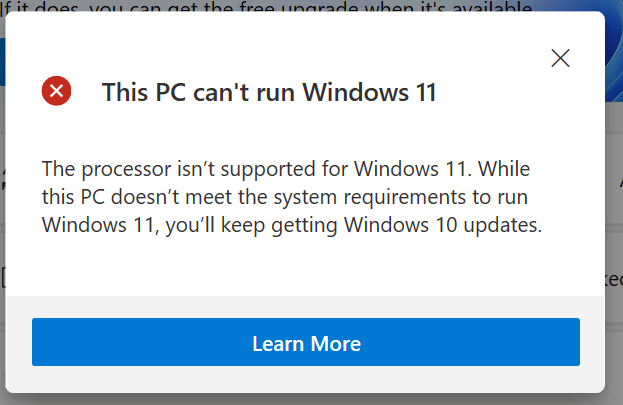
The Surface Go 2 has an Intel Core m3-8100Y CPU, which is actually on the list of supported Intel CPUs for Windows 11.
It turns out that the PC Health Check app is a load of dingos’ kidneys. And that Microsoft don’t seem to be able to agree amongst themselves what, precisely, the actual requirements are.
Oh, and I see that while Microsoft says Windows 11 “will be coming later this year”, the fine print later on the same page qualifies that to “The upgrade rollout plan is still being finalized but is scheduled to begin late in 2021 and continue into 2022. Specific timing will vary by device”.
‘Twas ever thus for Microsoft. Plus ça change…
Five years ago, I posted about my first foray into the realms of Home Automation. Then, after evaluating a number of HA systems available at the time, I chose Domoticz as the basis for my system here at the Witte Wand.
Domoticz has served me well over the past five years. It’s an open-source project, run by volunteers, that has grown in scope quite considerably, and with that have come some growing pains and project management issues. The last Stable release (March 2020), for example, broke many people’s production systems. When a new Stable version is released, Domoticz notifies you that it is available, and puts an “Update” button on the main Dashboard. Seeing that, many people just clicked the button, without reading the Release Notes. Big mistake. The developers had changed the underlying version of the Linux operating system from the previous version, and the new Stable release did not work on the old Linux. The result was a lot of very unhappy people.
Fortunately, I had learned to be cautious, and did not click the button. But it did mean that I had to build a completely new version of my Domoticz system from the ground up before I was able to move to the new Stable version, several months after it had been released.
That experience made me take stock of whether I wanted to continue using Domoticz, or move to another Home Automation system.
Looking around, I found another open-source project: Home Assistant. It seems to have started at around the same time as the Domoticz project, and the founders of both are Dutch. I have the distinct impression that the Home Assistant project is the better-managed of the two, an impression that is also shared by the author of this comparison article. For example, he writes:
Home Assistant
Home Assistant has split up their platform into several projects: Documentation, GUI, Hassio (the OS system) and Home Assistant itself. There are plenty of developers that develop the system but also review work of their peer developers. There are strict rules to maintain also the documentation of the commits. This is very professional and well managed open-source project.
Domoticz
The small group of developers is doing great work and every commit is checked / reviewed by Gizmocuz (the founder of Domoticz). But there is no control of the documentation and the actual commit is not always tested very well. When using the beta version you have always the latest features and it can took a while before the beta’s are integrated into the main stable branch. A lot of users are running the beta but are not helping the developers.
I decided to see if I could reproduce my current Home Automation system using Home Assistant in place of Domoticz.
My Domoticz system runs on a Raspberry Pi model 3, using an SSD for storage (in place of the default MicroSD card). I did this because Micro SD cards don’t like the constant read/write cycles of databases – and since Domoticz has a database in it, I decided to use an SSD instead. At the time, this was a project in itself. However, with the introduction of the Raspberry Pi model 4, the Raspberry Pi Foundation is moving towards full support of SSD devices, including as a boot device.
So, I bought an RPi4, a Pimoroni heatsink case, and an M.2 128GB SSD card in a USB enclosure:
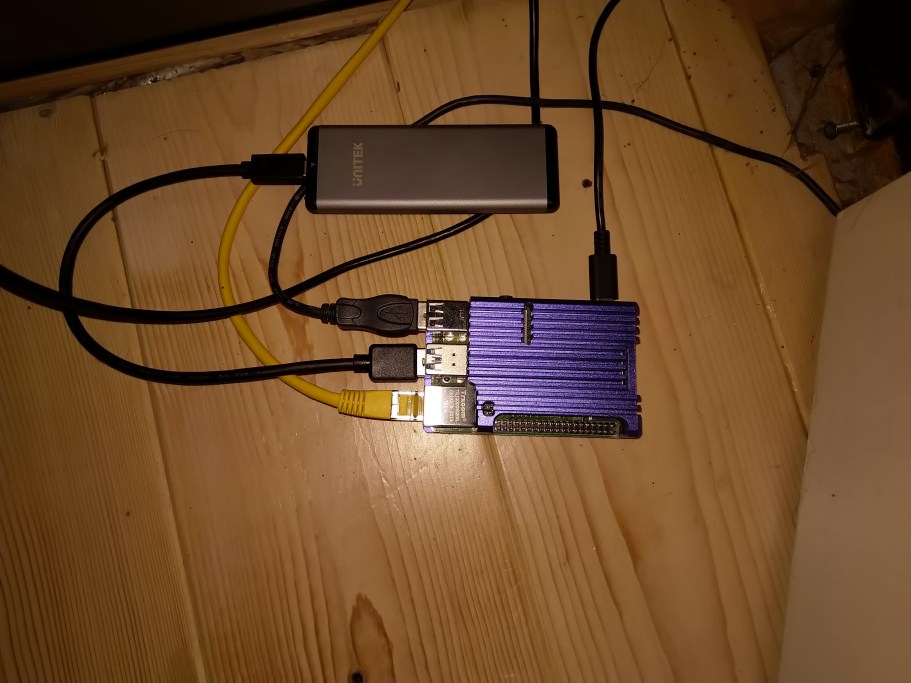
I followed this guide to install Home Assistant on the SSD, and to use it as the boot device for the RPi4. All proceeded according to plan, and I had a working Home Assistant platform ready to test my Z-Wave devices on.
My Domoticz installation uses an Aeotec Z-Stick Gen5 Z-Wave controller. The first problem I encountered was that apparently this device doesn’t work directly with the new RPi4 model. I would either have to perform surgery on the controller, use a USB hub as an intermediary connection, or purchase the new Aeotec Z-Stick Gen5+. I decided to get the new model of the Z-Stick. Using Aeotec software, I migrated my current Z-Wave network from the old to the new Z-Stick.
Home Assistant already has an integration for Z-Wave, but I noticed that the team had announced a new Z-Wave integration project in February this year. This is currently in beta. Which to choose? It seemed to me that there were pro’s and con’s for both:
con’s
con’s
On balance, I decided to go with the Beta, since this was more likely to support newer Z-Wave devices, and is supposed to be the future for Z-Wave in the Home Assistant world.
I have thirty Z-Wave devices in my network. Aside from the controller there are devices such as smart wall plugs, switches, remote control, smoke detectors and a siren. The test would be to see if this network could be successfully migrated across to Home Assistant and then managed as a production system, with the ultimate aim of retiring Domoticz in favour of Home Assistant as the platform.
I booted up Home Assistant for the first time, and waited until Home Assistant had got the latest version downloaded and set itself up ready for the Onboarding Step. This involved setting up the initial administrator account and telling HA where it is located. All very straightforward and well-described in the documentation.
The next step was to add and configure the integrations that I needed to use Z-Wave.
On the HA web-based interface, I clicked the Supervisor button, followed by the Add-on Store link. From the list of official add-ons, I chose the OpenZwave (beta) and the Mosquitto Broker:
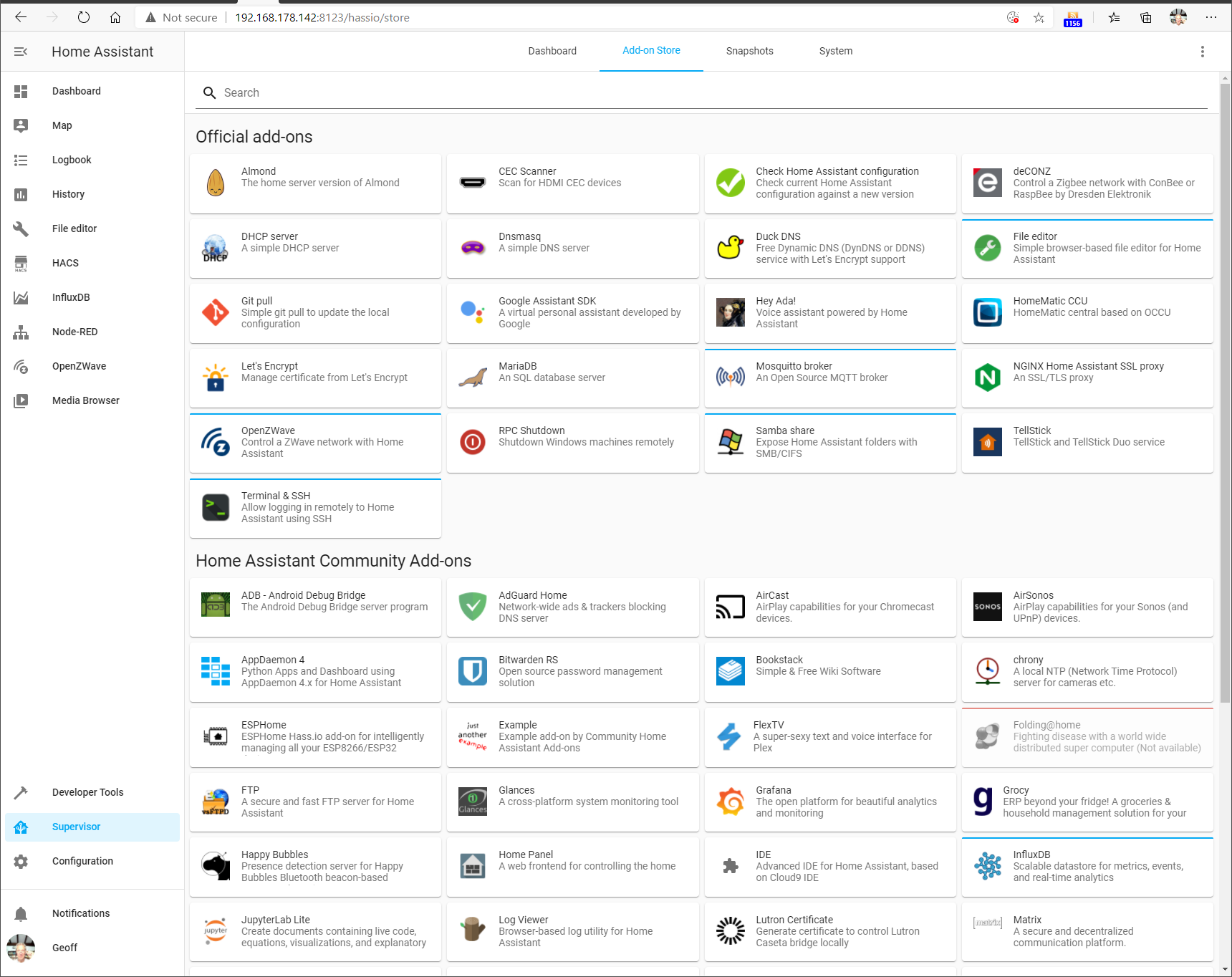
These are required for support of Z-Wave. Once added they appeared on the Dashboard screen (here shown together with some additional add-ons I included for testing)
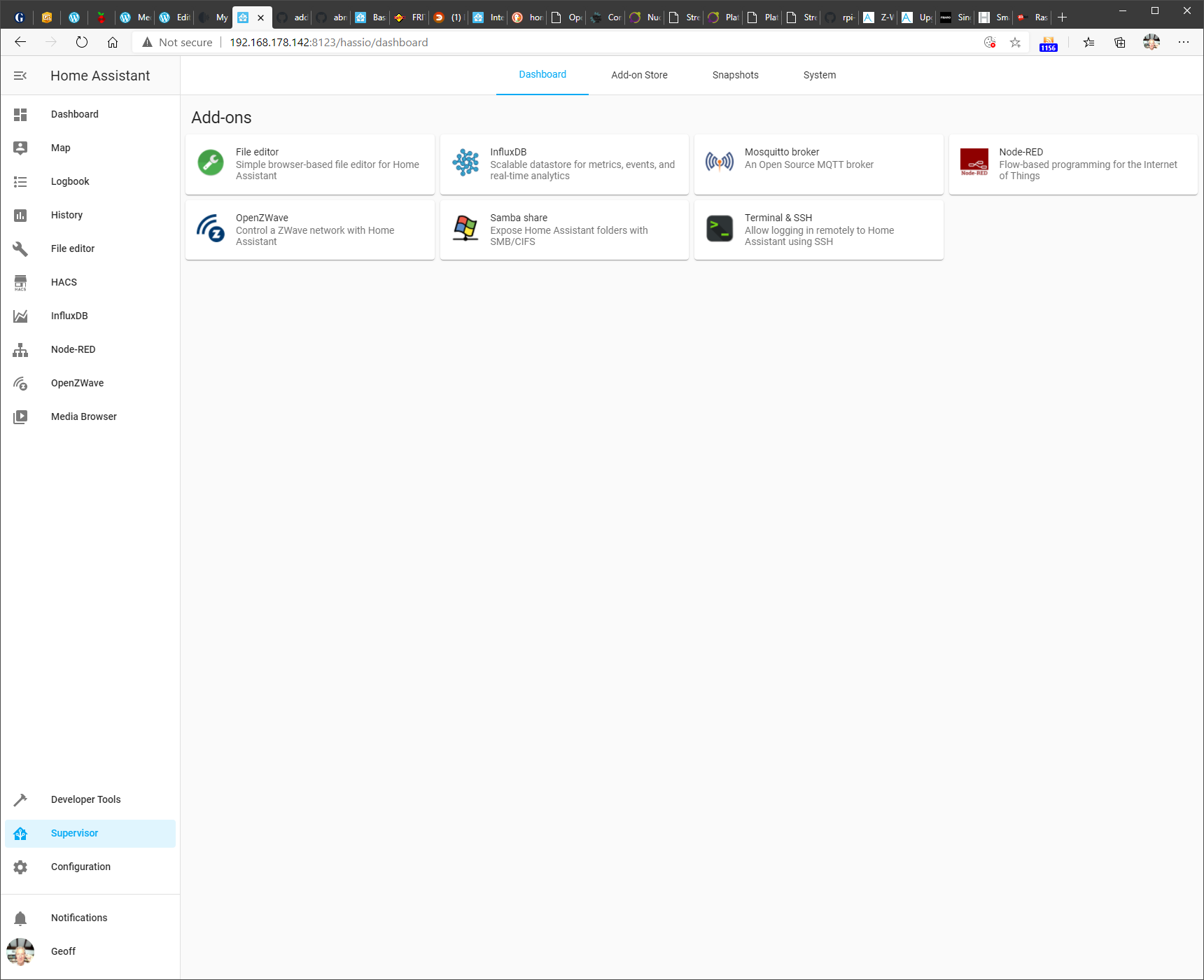
Clicking on a module shown in this dashboard gives access to the module’s documentation, configuration and module logs.
Configuration was fairly straightforward (after a couple of false starts), and the Z-Wave network was read from the Aeotec Z-Stick and after a few minutes of messages being passed between the OpenZwave beta and the Aeotec Z-Stick controller, the following appeared in the OpenZWave administration tool:

Actually, the details of the smoke detectors took a day or so before they were filled in. They spend most of their time “sleeping” and only wake up every 24 hours. So it took time for the new Z-Stick to discover the devices fully.
And as you can see, this is a separate administration tool – the beta does not yet have full integration of the administration into Home Assistant itself.
Nonetheless, the contents of the Z-Wave network was now fully available to Home Assistant, and I could start adding devices to my Home Automation Dashboard.
Here’s an example of what the current Dashboard looks like. This will likely evolve over time.
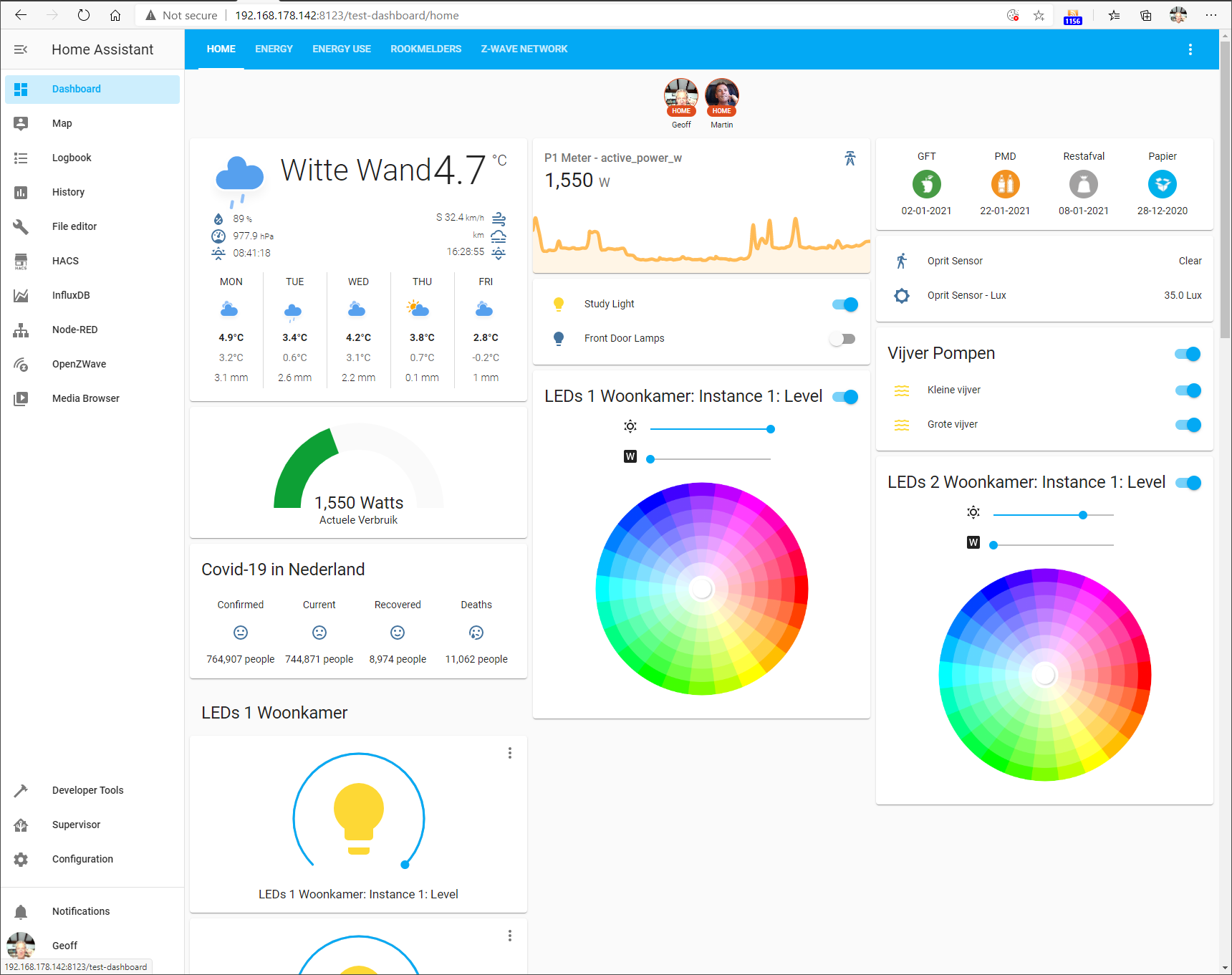
You’ll notice that besides the Z-Wave devices, there is some additional information being shown, e.g. the Weather here at our location, rubbish (garbage) collection dates, and electricity use.
This is being fed by additional devices and services supported by integrations in Home Assistant.
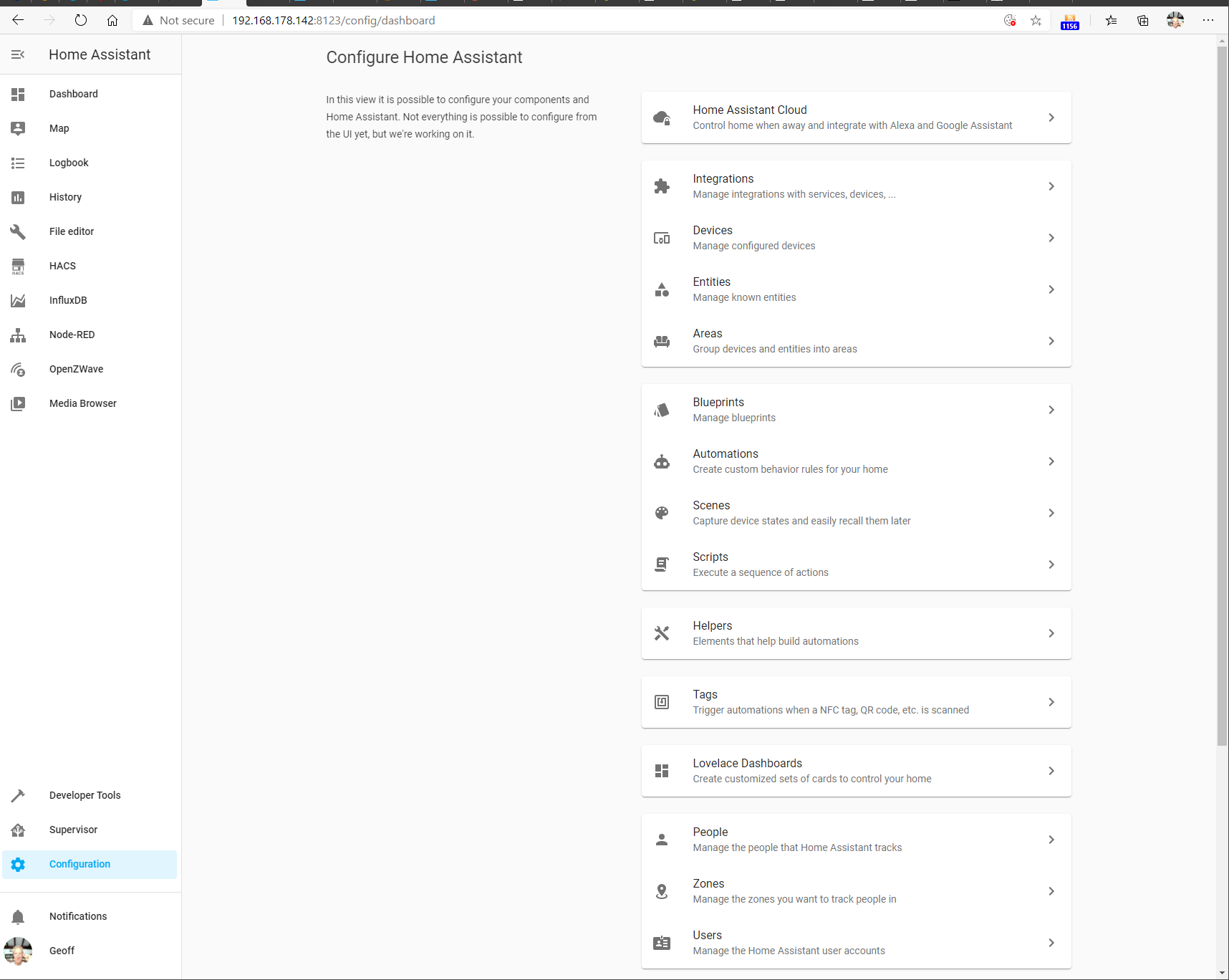
On the Home Assistant web-based interface, I clicked the Configuration button, and then chose Integrations from the list of configurable items:
On this screen, I added the necessary integrations. For the support of Z-Wave, I had added the OpenZwave (beta) and the MQTT (the Mosquitto message broker) integrations. This screenshot shows them added, along with some other integration modules that I have added.
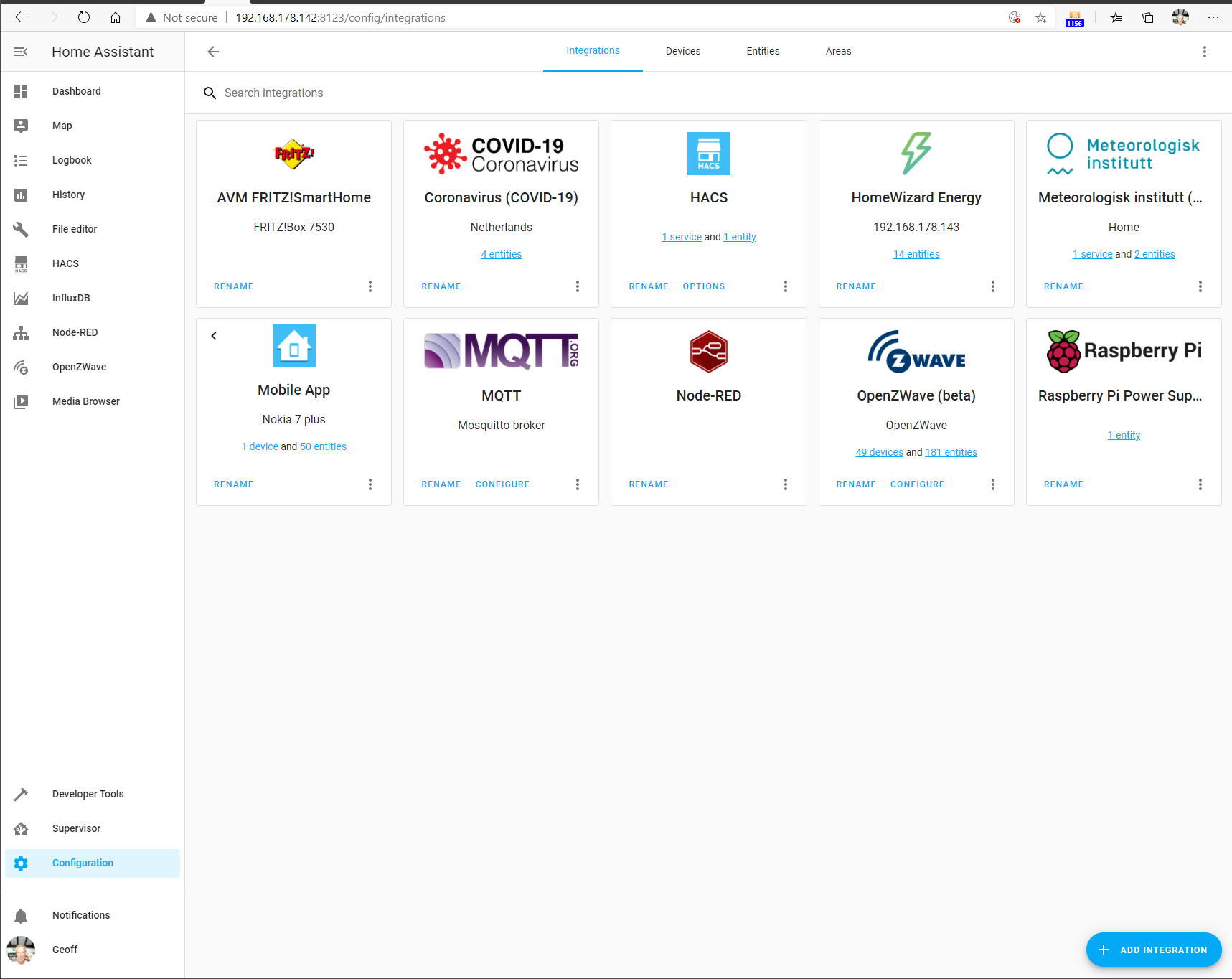
There are currently over 1,700 integration modules available for Home Assistant, including a module for Roon (but that’s another story…). Suffice it to say that Home Assistant is able to integrate a wide range of devices and services into a unified environment.
The whole point about Home Automation is that it should take over the control of common tasks for you. For example, turn on the house lights when it gets dark.
Here in the Witte Wand, Domoticz had been set up to do the following simple tasks:
All these automations were easily reproduced in the Home Assistant environment, using the built-in automation tools.
I’ve been impressed with what the developers of Home Assistant have achieved and how the project is managed.
I have migrated my current Home Automation system from the Domoticz platform across to the Home Assistant platform.
I intend to carry on using Home Assistant as the platform for our Home Automation system for the foreseeable future.
Addendum 1: 11 January 2021
I thought I should just add a note here concerning the OpenZWave (Beta) integration in Home Assistant. Development of OpenZWave seems to have slowed to a standstill during the last six months. As a result, there’s been concern raised in the Home Assistant Community Forum about whether this integration is, or should be, the future direction for support of Z-Wave networks in Home Assistant.
It appears now that the developer of OpenZWave is stepping back from further active development of the software, he will continue to tinker with it, at his own pace, to his own demands.
That has led the leaders of the Home Assistant project to put in place a plan B for an alternative integration of Z-Wave networks into Home Assistant.
The current OpenZWave (Beta) integration will remain in place for the foreseeable future. It works for me and many others. OpenZWave itself is software that is used by 100,000+ users; not just in Home Assistant, but in Domoticz and other Home Automation platforms.
I will continue to use it until such time as the proposed Zwave-JS integration is mature enough to migrate to.
Addendum 2: 17 May 2021
A couple of months ago, I migrated the ZWave support in Home Assistant from the OpenZWave (Beta) integration to the Z-Wave JS to MQTT integration. This has been configured to use the ZWave JS add-on under the covers. At the moment, the control panel functions of the ZWave JS add-on are incomplete, whereas the Z-Wave JS to MQTT add-on has a complete set of ZWave control panel functions now.
I’m not actually using any MQTT broker functions at all, only using this integration for its ZWave control panel functions.
Once the work on ZWave JS is complete, I can decide whether I will migrate fully to it and drop the temporary use of the Z-Wave JS to MQTT integration.
Addendum 3: 10 January 2022
Still using Home Assistant, and still impressed by the management of this open-source project and the results that the team (mostly volunteers) have achieved.
There are over 127,000 installations of Home Assistant around the world. In 2021, 1,282 people contributed to the project, producing 15,972 new features, improvements, bug fixes, documentation , and other changes.
What I particularly like about Home Assistant is that operations and data are local; it does not rely on the Cloud either for its operation or for storing long-term data. This is good for privacy reasons, but also it means that Home Assistant will continue to work even if the connection to the internet is broken. It also reduces the risk of product obsolescence. A product that relies on using the Cloud for its operation will stop working if the Cloud service is withdrawn by the supplier.
In the year of using Home Assistant here, there has been one hardware issue. It began a few months back when I noticed that HA would stop working on an intermittent basis, and the RPi4 would need rebooting to get HA started again. Finally, one day it refused to restart, and that was when I discovered that the data disc (a M.2 SSD in an external Unitek USB housing) was no longer working. I replaced the external drive and USB housing with a UGREEN USB 3.1 Gen 2 housing and a Samsung 2.5inch 250 GB SSD a month ago, and the system has been running faultlessly ever since.
The news that Facebook is saying that they may have to quit Europe brings a smile to my face. It can’t happen soon enough as far as I’m concerned. Good Riddance.
Another thought-provoking talk given by Jaron Lanier. It’s a recording of the talk he gave as the Willy Brandt Lecture in 2018, followed by a Q+A session with Ulrich Kelber, German Federal Commissioner for Data Protection and Freedom of Information.
“we live in a world that has been darkening recently” – and yet… I do like Jaron Lanier and his polemics and dissertations on where we are and where we are going…
Worth listening to.
This is an old cartoon showing the organisation chart of Microsoft and its warring fiefdoms.

It was certainly true back in the day when I had business contacts with Microsoft on behalf of my employer.
And it would seem that even today, plus ça change, plus c’est la même chose…
In this time of social-distancing, the need for an easy-to-use video-conferencing tool is self-evident. I needed to find one for our local village community committee (I’m the secretary) so that we could hold our meetings online.
I’ve been a Skype user since its introduction in 2003, and so that was my first thought. However, it was acquired by Microsoft in 2011 and the technology became enmeshed in Microsoft’s internal politics. Microsoft had its own rival technology: Windows Live Messenger, and a shotgun marriage was hastily arranged.
As a result, the evolution of Skype in Microsoft has not been smooth, and even today it looks as though it is the result of ideas that have been thrown at a wall to see if they would stick. There is also Microsoft’s Skype for Business (which, as Wikipedia points out is “Not to be confused with Skype”). Microsoft also announced in 2017 that Skype for Business would be phased out in favour of Microsoft Teams, yet another online collaboration platform.
I took a quick look at the free version of Microsoft Teams to see whether it might be suitable for use in our committee. I was not impressed. I set up a simple team of two users and found that the security hoops that you have to jump through before Microsoft Teams will accept someone into a team would try the patience of Job. It also seems as though having a Microsoft Account is essential for entry, and that is already a stumbling block for many people. I don’t think everyone on our committee has such a thing, and it would be a big ask for them to get one.
I then found that shared documents wouldn’t share – Teams would merely give me a cartoon of a melted ice-cream cone with the words “Something has gone wrong”. Not very helpful. Twenty-four hours later, it seems to have mysteriously fixed itself, but it doesn’t exactly fill me with confidence.
So the choice at the moment (in Microsoft products) is between the simpler Skype or the bells and whistles of Microsoft Teams, which is firmly aimed at business and enterprise users. The choice is not made easier by today’s announcement that Microsoft will be bringing a version of Teams aimed at home users – impinging on Skype’s turf. Skype is also under threat from non-Microsoft rivals such as Zoom. As Tom Warren says in his article in The Verge:
Microsoft wasn’t afraid of ditching the 100 million people using Windows Live Messenger years ago, and I wouldn’t be surprised to see the company try and push Skype users over to Teams in the months ahead. Like Microsoft said, “For now, Skype will remain a great option for customers who love it and want to connect with basic chat and video calling capabilities.” The “for now” part of that statement is a telling sign that Microsoft’s focus is now Teams, not Skype.
As I said: Plus ça change, plus c’est la même chose…
Addendum: I mentioned Zoom above. I see that it has rather become the victim of its own success. Because of Covid-19, the number of users has skyrocketed, and the resulting upsurge in numbers has revealed some rather worrying privacy and security issues in the product. I really don’t want to touch it with a bargepole, and will stick to Skype, thank you.
It’s been a journey that has taken more than five years, but we have a fibre-optic broadband network connection here at the farmhouse at last. Now we have an internet connection speed of 200 mbits/s instead of just 3 mbits/sec.
When we first moved to the farmhouse back in 2006, we had only dial-up internet access (50 kbit/s) via the telephone line during the first months of living here. We should have had ADSL internet access (3 mbit/s), but there was a mixup made by our service provider, and the ADSL service was not transferred from our previous house in Gouda to the farmhouse.
It’s also a bit strange to think that, back then, I thought of ADSL as “drinking from the firehose” – I suppose it was, considering it was 60 times faster than dial-up access. However, as the demands made by websites on internet speed grew over the years, a speed of 3 megabits per second dwindled in my perception to be akin to watching paint dry.
After a false start in 2015, the campaign to get a fibre-optic network in our region of the Netherlands got properly underway in November 2017. Work started on the network in March 2018, and the expectation was that we would be connected by mid-2019. In the event, there were delays caused by weather conditions, and getting licenses from the highway authorities to lay cables under motorways. However, by last September the physical network infrastructure had been completed for our area and there was a fibre-optic connection in the farmhouse. Then came some hiccups with my service provider, Solcon.
I finally received the fibre-optic modem and the router from Solcon on the 21st of November, complete with clear DIY installation instructions. That weekend I connected everything up, but the connection didn’t work. I rang the Solcon service desk, only to be told that my connection would not be activated until the 9th of December. This turned out to be the case for all Solcon customers in our area. Someone in Solcon should clearly rethink their business process for new connections – either make it clear that installing the equipment before the connection in the local distribution centre is ready is pointless and will only lead to frustration, or ship the equipment to the customer once the connection has been activated (as other service providers do).
Needless to say, on the 9th December my connection had still not been activated, so I had an angry telephone call with Solcon. Lo and behold, the following day everything started working at 11am. Well, almost everything – I discovered that phoning our home telephone number resulted in getting redirected to a mysterious voicemail system. Another call to Solcon got that fixed quickly. We’ve also noticed that the TV picture will freeze for a few seconds once or twice per evening’s viewing. This is a known problem, which is being investigated and hopefully will be fixed in the next few weeks.
So now we have internet, TV and telephone services via our new fibre-optic broadband network. Our subscriptions to our old service providers for internet, TV (via satellite dish) and telephone have been cancelled, and will stop working by the middle of January.
It’s been a journey, but I think a worthwhile one.
I use Ivideon occasionally to keep an eye on the dogs when we’re out of the house. A couple of days ago, I received an email from Ivideon’s newly appointed business development manager.
We are exciting [sic] to announce that we are launching an affordable and easy-to-use tool for business! With Facial Recognition System you would be able to know many essential features of your target and existing audience with a click of the button: age, gender, emotions – you name it.

I have a bad feeling about this…
I see that Sir Tim Berners-Lee has launched his “Contract for the Web” – that requires endorsing governments, companies and individuals to make concrete commitments to protect the web from abuse and ensure it benefits humanity.
Two of the nine principles in the Contract concern respecting users’ privacy and personal data in real and meaningful ways.
All very laudable – but then I see that two of the companies who are listed as endorsing the Contract are Facebook and Google.
I think my irony meter has just exploded.
Time for yet another instalment in the long-running saga of trying to get broadband internet available in our area. Our story began five years ago when I described the connection to the internet as being like a piece of wet string. Thus began our struggle to get a fibre-optic network laid around here.
After a number of false starts, things began to look up when work finally began on laying the network in July 2018. It was a big project that has taken more than a year to complete, but a couple of weeks ago people started getting connected and using the network.
However, it soon became apparent that not all was well. Consumers can choose between two internet service providers (ISPs) on the network: Caiway and Solcon. It became clear that the only people who were receiving the internet modems and able to activate their internet services were Caiway customers. Solcon customers were (and are, at this time of writing) being told that the network was not ready for use.
It seemed odd, so I contacted the network provider, Glasvezel buitenaf, who were clear that the network was indeed ready for use, and that they had told both Caiway and Solcon that this was the case. Indeed, their contractor, BAM, had completed the work on the distribution point in our local small town on the 19th of September. Then it was up to each ISP to define the settings in the distribution point’s patch panels, so that their internet services could be delivered to their subscribers’ addresses. Caiway has done this; Glasvezel buitenaf was, and is, still waiting to hear from Solcon.
Needless to say, I had chosen Solcon as my ISP (more fool me). So on the 28th October I sent them an email to ask when I could expect to have internet services delivered. The reply (also on the 28th) was (in translation):
I see that Solcon is still waiting on the fiber optic supplier. Of course we want you to have fiber optic internet as soon as possible, however, we are dependent on when Glasvezel buitenaf reports the line is available. To date, that has not happened yet.
Yesterday, I phoned Solcon, only to get the same story (we are waiting on Glasvezel buitenaf). I said that this was very odd, since a) Glasvezel buitenaf say they are waiting on Solcon, and b) my neighbours who are Caiway customers are happily using the network.
The helpdesk person promised to investigate further and send me an email reply on what the situation was. I’m still waiting for both the reply and any visible change in the status of my request for internet services. Oh, and Glasvezel buitenaf are still waiting to hear from Solcon what the patch panel settings need to be.
I think the next stage will be to assemble the torch and pitchfork brigade – if nothing happens soon, I’ll be asking the Village Community Council to alert our Solcon customers that a mass complaint is in order.
Addendum 8th November 2019: After publishing this post, I sent another email to Solcon yesterday. This was to outline the situation as I saw it, and to point out that I was still waiting for a reply. I have to say that I quickly received a reply from the Solcon Salesdesk that actually cast some light. Apparently there are three parties in the chain, not two, as I’ve always been led to believe. There is Glasvezel buitenaf, the owner of the network, then there is (new to me) the network operator: CAIWEAS, and finally there are the companies such as Caiway and Solcon, who deliver internet services to the customer. The Solcon reply stated that indeed, Glasvezel buitenaf has said the network is ready, but that control has now been passed to CAIWEAS, and it is this party that Solcon are waiting on, not Glasvezel buitenaf, as they originally stated.
A further clue is in the name CAIWEAS I think. It sounds suspiciously close to Caiway, so I suspect that the companies are intimately connected. Which probably explains why Caiway customers appear to be first in line to receive service. I expect that Solcon customers are banished to the back of the queue. Oh well, I’ve waited five years, a few weeks more isn’t going to kill me, I suppose.
A couple of weeks ago I wrote about Jaron Lanier’s book: Ten Arguments for Deleting Your Social Media Accounts Right Now, which is a warning against the rise of surveillance technology and algorithms capable of social manipulation.
In the West, that technology is in the hands of private companies (e.g. Facebook, Google), but in China, it is firmly in the grasp of the State. I hadn’t appreciated just how far this had progressed until I read a recent article in the London Review of Books: Document Number Nine, by John Lanchester. He reviews two books written about how the Chinese Communist Party (the CCP) has adopted the internet, AI and surveillance technologies to monitor and control its citizens.
It is the stuff of nightmares.
I’ve just bought one of the books: Kai Strittmatter’s We Have Been Harmonised. The blurb on the back cover says:
This is a journey into a land where Big Brother has acquired a whole new set of toys with which to control and cajole – ‘harmonise’- the masses. It is also a warning against Western complacency. Beijing is already finding eager buyers for its “Operating System for Dictators’- in Africa and Asia, Russia and the Middle East. And with China’s corporate giants – all ultimately under Party control – being offered a place at the heart of Europe’s vital infrastructure, it is time we paid attention.
As Lanchester writes:
Imagine a place in which there’s a police post every hundred metres, and tens of thousands of cameras linked to a state-run facial recognition system; where people are forced to have police-owned GPS systems in their cars, and you can buy petrol only after having your face scanned; where all mobile phones have a state app on them to monitor their activity and prevent access to ‘damaging information’; where religious activity is monitored; where the state knows whether you have family and friends abroad, and where the government offers free health clinics as a way of getting your fingerprint and iris scan and samples of your DNA. Strittmatter points out that you don’t need to imagine this place, because it exists: that’s life in Xinjiang for the minority population of Muslim Uighurs.
Meanwhile, I continue to be astounded at our willingness to trust Facebook. Lanchester again:
Do we want facial recognition technology to be in the hands of the least scrupulous technology giant? If we don’t, we’re too late – it already is. Facebook has changed its terms of service over ‘tagging’ people’s photos a couple of times, from opt-out to opt-in, but the gist is that it is too late: Facebook already owns your ‘faceprint’, the algorithmic representation of your face. How much do we think we can trust them with it?
Not one inch, as far as I’m concerned.
That’s the title of a book by Jaron Lanier. He poses the question:
How can you remain autonomous in a world where you are under constant surveillance and are constantly prodded by algorithms run by some of the richest corporations in history, which have no way of making money except by being paid to manipulate your behavior?
He wrote the book during the final months of 2017 – before the explosive events of the Cambridge Analytica scandal proved his thesis that we are the product of platforms such as Facebook and Google – not the customers – and that the real customers include bad actors who certainly do not have your, or society’s, best interests at heart.
As the title suggests, he presents ten (very persuasive) arguments as to why you should stop using these platforms. And as he says:
…being able to quit is a privilege; many genuinely can’t. But if you have the latitude to quit and don’t, you are not supporting the less fortunate; you are only reinforcing the system in which many people are trapped. I am living proof that you can have a public life in media without social media accounts. Those of us with options must explore those options or they will remain only theoretical. Business follows money, so we who have options have power and responsibility.
I have long loathed and detested Facebook, so when the Cambridge Analytica scandal broke, it provided the impetus to delete my Facebook account, and I’ve never regretted it for an instant. I confess that I still have a WhatsApp account (WhatsApp is owned by Facebook), but this is only because our neighbourhood and community council have group accounts. I would much prefer to stick to SMS, but alas, that ship has sailed.
I read (and have monetary subscriptions to) newspaper websites directly instead of getting news through personalised feeds – Lanier writes that when “Facebook announced that it will deemphasize news in its feed: the journalism world celebrated, for the most part, because now it might become freer to connect to audiences on its own terms”.
I use Pi-hole as our home network-wide Ad blocker, which has the added advantage of preventing Ad services from spying on us.
I avoid using Google services as much as I can (for example I use DuckDuckGo as my search provider, and refuse to use Gmail). Nonetheless, my smartphone runs Android – thanks to Microsoft not having the guts to persevere with Windows Phone, so Google probably know more about me and my habits than I do myself.
Instagram and Twitter have never appealed to me; I have never used them.
Here’s an interview with Lanier on the subject of his book. I heartily recommend that you read Lanier’s book for yourself – it is likely to be an eye-opener. Hopefully it may also help some social media addicts to kick their habit.
Back in the mists of time (i.e. 2006), I installed a home cinema setup here: a Denon AVR with 7.1 audio, B&W speakers, and a Bluray player connected to the TV. After four years of service, I began to wonder if I could replace the Bluray player with a PC – a Home Theater PC… Six weeks later, after some research, I had made the move.
Over the next few years the setup evolved further, but in 2014 it became clear that I would need to change the player software used in the HTPC. I looked at two alternatives, Plex and Emby. I used both, but over time came to depend on Plex as being the more polished alternative. It was not perfect, but for TV and Movie viewing, it was my preferred choice.
A few days ago, Plex dropped a bomb. In their blog, they proudly announced a new version of their Desktop app. And buried further down in the text I read this:
The new desktop app is notably lacking TV mode, which means that we’re going to stop supporting the traditional HTPC setup (using a desktop computer connected to your TV or home theater) with this app. There. We said it. It marks the end of an era for us, and we’d be lying if we said it wasn’t a little bittersweet. But take heart. We looked at how most people were using the app, and most of you will have an equal (if not better) experience with a streaming device and our new players.
No, I will not “take heart”. My HTPC is working perfectly well, and I’ve very happy with our home cinema setup as it is. I do not want to have to throw away my HTPC and buy a streamer, thank you very much.
I suspect I’m going to be switching back to Emby in the near future. I’m not feeling very charitable towards Plex at the moment.
Addendum 19 August 2019: I see that fellow HTPC owners are spitting feathers over at the Plex forum at the moment. It won’t make a blind bit of difference – Plex management has made it clear that the Plex Media Player for the HTPC is dead as far as they are concerned.
So I’ve switched back to Emby – where Emby management has also made it clear that they have no plans to drop support for the HTPC.
Addendum 2 – 23 August 2019: so as a result of the uproar, Plex management has been having second thoughts. I’ll still be sticking with Emby for a while, just to see how it performs compared to Plex. I have already noticed that Emby is now beginning to support photo metadata tags – something that Plex has been promising to do for at least the past five years, but somehow never got around to doing anything about.
So Facebook wants us all to use their new cryptocurrency Libra? I loathe and detest Facebook enough already without this being thrust upon us. As Kenan Malik writes: Libra cryptocurrency won’t set us free, it will further enslave us to Facebook. Count me out.
The truly terrifying thing is that apparently:
More than two dozen entities have signed on to be founding members of the Libra organization, including Visa and MasterCard, Uber and Lyft, eBay, and Spotify.
So Visa and Mastercard have already cast their lot with Facebook? We’re doomed.
Back in January, I blogged about the fact that my Internet Service Provider, XS4ALL, was going to be swallowed up by its parent company KPN. XS4ALL customers were not happy about this – over 50,000 of them (including me) signed a petition to keep the XS4ALL brand alive.
KPN naturally claimed that we would not notice any change in quality:
“With the focus on the KPN-brand we are going to extend the KPN service with the best elements of the individual brands, such as the highest rated service by XS4ALL, the affordable advantage services of Telfort and the personal service and expert business advice from Yes Telecom”
Well, pardon me for being sceptical, but the words “quality”and “KPN service” have not usually been used in the same sentence, judging by the experience of many of their customers.
And now, I have another piece of evidence of my own to add to that dossier.
Since 2017, to get increased speed alongside the slow ADSL connection of XS4ALL, I have been subscribing to a KPN service: Sneller Internet Buitengebied 4G (faster internet for the countryside 4G). It uses the KPN 4G mobile network to deliver internet connectivity to routers in the home.
There were some problems when I first started using it, web pages would frequently would not load, slow response, and loss of internet connectivity. However, after some discussions in the KPN user forum, the solution was found: the Access Point Name (the gateway between the internet and KPN’s Mobile Network) had to be given as “advancedinternet”. The other APNs were designed for mobile phones, and did not work well with the 4G router supplied by KPN for its Sneller Internet Buitengebied 4G service.
I suppose that I should have heard a bell ringing by the fact that the problem was not solved by KPN staff in the forum, but by other customers. Be that as it may, the problem was solved, and I was a happy bunny.
Fast forward to two weeks ago, and all the old problems had returned, even though I was still using the advancedinternet APN. At the same time, customers started complaining on the forum that the port-forwarding function of the service had stopped working. Port-forwarding is necessary for customers who require to connect to their systems remotely – for example to check their security cameras when travelling.
After two days, the forum moderator eventually discovered that KPN had pulled the plug on the advancedinternet APN, and all traffic was now being routed through the basicinternet APN. This had three consequences:
Forum moderators scrambled, and produced a link (to a hitherto unseen – by the customers – internal KPN document) – a FAQ that stated that port-forwarding was not supported on the service. This despite the fact that it had been happily working since 2017, and despite the fact that the service had been recommended by KPN salespeople to certain customers precisely because it supported port-forwarding.
So two weeks later, we still have a crappy service – for which I am paying €41.50 monthly. The forum moderators tell us that KPN is investigating what can be done – but we knew two years ago that this would happen.
Frankly, I think KPN would rather that we all go to their new 4G service for internet at home. Unfortunately, this requires an ADSL connection supplied by KPN, which many of the existing customers (including me) do not have, and I have no intention of being tied to a year-long contract. I shall just have to put up with KPN’s crappy service until our fibre-optic service arrives in a few month’s time.
As someone said on a forum:
Adjust the subscriptions so that existing customers lose features without informing the customers? The KPN manager who has thought that this would be a good idea urgently needs to be on a customer friendliness course. I will summarize what this manager is going to learn there: for existing customers you keep everything as is, for new customers offer new services. If you want a simple, unambiguous information structure, you make it attractive for existing customers to switch but you do not force them. And you do nothing at all without informing the customers!
Here in the Netherlands we have a number of internet service providers (ISPs) to choose from. One of the oldest is XS4ALL, and it has been offering internet access to private individuals since 1993. It’s been my ISP since 1994. Although it was sold to KPN in 1998, it has remained as an independent subsidiary. At least, it has up until now.
Yesterday, KPN announced its intention to phase out the XS4ALL brand (and selected other subsidiary brands) and continue operations solely under the KPN brand. According to KPN:
“With the focus on the KPN-brand we are going to extend the KPN service with the best elements of the individual brands, such as the highest rated service by XS4ALL, the affordable advantage services of Telfort and the personal service and expert business advice from Yes Telecom “
This has not gone down well with XS4ALL customers (including me). A petition to request the continuation of the XS4ALL brand has already been started. The issue is that XS4ALL scores consistently the highest in customer satisfaction and service as measured by the Dutch consumer organisation. It also has a wider range of products and services on offer than the parent KPN. So the fear is that those aspects that marked out XS4ALL from the rest of the pack will be lost in the mediocrity that is the oft-perceived hallmark of KPN.
XS4ALL has a strong brand image and is well-liked; it seems strange that KPN would seek to kill the goose that has been laying golden eggs for them.
I note that as a result of the (negative) reaction, a KPN spokesperson has now said that it’s not yet certain when the change is going to happen and in what stages…
For me, it will be shortly be irrelevant anyway. That’s because we should be getting a new fibre-optic network in the neighbourhood by mid-2019, and KPN (and hence XS4ALL) refuse to offer their services over it. I will have to switch over to a new ISP, and I have chosen for Solcon. The irony is that Solcon also happens to be a subsidiary of KPN since 2017, but KPN, for some reason best known to themselves, are letting the Solcon brand continue…
Another day, and yet another rant at Microsoft.
I’ve already ranted about the fact that the OneDrive ‘Files on Demand’ feature is a step backwards from the old ‘Smart Files’ feature in Windows. I’ve also complained numerous times that the Microsoft Photos app is severely lacking in comparison with the Windows Photo Gallery, which Microsoft has withdrawn from the market, and no longer supports.
And now these two – ‘Files on Demand’ and the Photos app – have together created the perfect storm, which has blown into the latest version of Windows 10 running on my Surface 3 tablet.
A few weeks back, the Surface 3 began acting up – the screen kept on breaking up. It had all the appearances of a fault in the graphics hardware or the screen, but I thought I would try doing a factory reset on the device. That actually worked, and I was back up and running in Windows 10 in a couple of hours. Of course, I had to reinstall all my apps and Office, but at least I had a working machine again.
All my documents and photos are now held in OneDrive, and shared across all my devices. I’ve got about 500 GB of data in OneDrive, and my Surface 3 only has about 80GB free. So I instructed OneDrive to use the Files on Demand feature, and save space by only downloading files as I used them on the Surface 3.
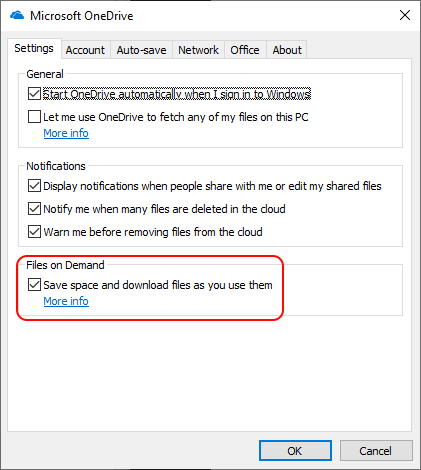
That was all fine and dandy, but the following day when I picked up the Surface 3 to use it, it immediately became apparent that it was running really slowly. A restart had no effect, and it wasn’t until I looked at the File Explorer that I realised why – there was only 110 MB of free space left on the C: drive. I have 330 GB of photos up on OneDrive, and OneDrive was trying to download all of them into the Surface 3.
I straightaway set the properties of all the files and folders in Pictures to ‘clear space’ – so that space would be regained, and sure enough, the amount of free space began to climb as the ‘Files on Demand’ placeholders were used instead of the full files.
I breathed a sigh of relief, but it was short-lived, as it quickly became apparent that OneDrive was starting to re-download all the files again. Something was going through all the files and folders in Pictures and accessing them. It certainly wasn’t me. OneDrive was saying that the ‘Runtime Broker’ application was doing it, and this was enough to make OneDrive copy the file from the cloud storage down to the Surface 3.
It turned out to be that damned Photos app – even though I wasn’t using it, it now apparently runs in the background, and naturally includes the Pictures files and folders as a default location. It spawns the Runtime Broker for some devious purpose of its own. It’s probably running the facial recognition algorithm to look for people’s faces in photos, and in order to process the photo, it needs to have the photo present locally on the Surface 3.
I thought perhaps something might have gone wrong during the initial re-install of Windows 10 – after all, surely I can’t be the only person suffering from this issue? So I did a second factory reset, and the issue is still there – OneDrive is still trying to pour a quart into a pintpot at the prompting of the Photos app.
As a temporary workaround, I’ve deleted the Pictures folder from the locations scanned by the Photos app, and that seems to have stopped this unwanted behaviour.
But the question remains, surely I can’t be the only person with this issue? Looking through Microsoft’s Feedback Hub reveals others – but we seem to be relatively few. Certainly too few for Microsoft to have noticed that anything is wrong. Doubtless it will never get fixed.
Addendum 2 December: I had sent this issue through to Microsoft as feedback on the 26th November. I had the following reply:
We have received your request for assistance and are busy researching a potential solution. We may need additional information. You can count on us to get back to you within within [sic] the next 24 hours.
Naturally, I’ve not heard anything further… Why am I not surprised?
 Geoff Coupe's Blog