I’ve just purchased a Microsoft Surface Pro 12 and keyboard to replace my aging Surface Go 2.
The experience of buying the Surface tablet has been illuminating of just how complex, and data-driven, supply chains have become.
The Surface comes in three available colours: platinum, violet and ocean-blue. The online Dutch Microsoft store only offers the platinum version, with a black keyboard with the US International layout. Naturally, I wanted a violet Surface and keyboard… So I went looking for other online sources for that combination. All the alternative online stores in the Netherlands were only offering the same combination as the Microsoft store. The online German Microsoft store did have both items in violet – but the keyboard was the German QWERTZ version – not what I wanted at all.
I returned to the Dutch store and explained what I wanted to a Dutch support person via Chat and after some research he confirmed to me in an email that we could source the Surface from the German store (because it was 50 euros cheaper – special offer) and the keyboard from the Irish Microsoft store. The only snag was that the keyboard would be the UK layout, rather than US international, but at least it would be better than the German QWERTZ layout. I replied to his email confirming that I wanted to place the order.
I attempted to reach him again via Chat, but that was not working, so after I sent him my phone number, he phoned me. After verification checks, he proceeded to place the order via the German and Irish online stores on my behalf. I got email order confirmations for the tablet (in German) and the keyboard (in English).
Because we had placed the orders in two different EU countries from where I actually live (the Netherlands), I was expecting shipment and delivery to take at least a week. However, the following day I got emails from both Microsoft and the courier that the goods were on the way and would be delivered the same day.
Bizarrely, although the orders were placed in the online stores of different countries, they both turned out to be fulfilled by the Irish operation. Even more bizarre, there’s apparently a warehouse in Venlo (in the Netherlands just 80 km from here) that bears the title Microsoft Ireland Operations Ltd. That had the items in stock and so they were shipped locally to me…
And a coda to this story is that before I had even set up and signed in to the Surface with its keyboard, Microsoft knew that I had bought them and had included them in the list of my devices in my Microsoft account. I think they must immediately track their serial numbers from the moment of placing the orders.
I’ve been running a Home Automation system here at the Witte Wand for the past 8 years. I started out using Domoticz software, but three years ago I switched to Home Assistant, which I felt was a much superior open source system. I’ve not regretted that decision, HA continues to develop and improve – it’s a very well-managed project.
One of the reasons I chose HA is that all my data is held locally, it does not depend on cloud services for its operation.
Most of my devices use the ZWave standard, but a few years ago I added some Hue devices, together with a Philips Hue Bridge that was easily integrated into HA.
Then, a few weeks ago I started getting messages in the Hue app on my smartphone that I would need to create an online account with Hue in order to continue using the system. It turns out that Signify (the company behind the Philips Hue products) have started forcing accounts on all users and upload user data to their cloud. For now, Signify says I’m still able to control my Hue devices locally as I’m currently used to, but I don’t know if this may change in the future. The fact remains that their privacy policy allows them to store my data and share it with partners.
Needless to say, this blows a hole in my desire to have all my data locally stored and not be dependent on cloud services.
It turns out that Hue devices use the Zigbee standard, and Home Assistant supports it. So I’ve purchased a Home Assistant Sky Connect to interface with my existing Hue devices and to replace the Philips Hue Bridge.
Migration of the devices was easy – simply a matter of removing them from the Philips Hue Bridge network and adding them to the Home Assistant Zigbee network. HA automates the addition process, so I just sat back and watched as the devices were discovered and added to the network. It was also an easy matter to edit my existing automations replacing the old Hue names with the new Zigbee names of the devices. Everything was done in an hour and all seems to be running smoothly.
The last step was to uninstall the Hue app from my smartphone and delete my Hue account.
Bye, bye Signify and Hue; hello to Home Assistant and Zigbee.
I predicted back in July that the end was nigh for the Surface Duo line of devices made by Microsoft. I think we can now categorically state that the plug has been pulled and it is well and truly dead.
The timing of the announcement is also interesting – coming as it does just three days before Microsoft’s annual Surface event where new products are announced. It seems almost inevitable that a Surface Duo 3 will not be in that lineup.
Panay himself will also not be at the event. Perhaps he didn’t want the embarrassment. I remember the strained performance of Steven Sinofsky, the champion of Windows 8, at its introduction event. He left the company very soon afterwards which led to the question of did he fall or was he pushed…
Once again, Microsoft appears to be stopping development on a product line. This time it’s the Surface Duo line of products.
Truth to tell, from day one Microsoft has made a series of missteps with the Surface Duo. First, they shipped the original Surface Duo in September 2020 with the software in an unfinished state – full of bugs. Unsurprisingly, the initial reviews in the Tech press were pretty damning, which put a damper on the product right from the start. Secondly, Microsoft never really advertised the device to the general consumer – it was positioned purely as a device for Business users.
The Surface Duo 2, which followed a year later, was a much improved device, with a better camera, battery life and performance.
Both models have two touchscreens and open like a book to expose them. Unlike a book, the devices can be fully folded back to put the touchscreens on the outside and assume a smartphone form factor.
I bought a Surface Duo 2 for myself, replacing my Nokia Smartphone. Because the Duo supports the Microsoft digital pens, it became my digital Moleskine notebook as well as the camera that I have with me at all times. I love the device for its flexibility and solid support for multitasking – I can be browsing the web on one screen while taking notes on the other.
When people see me using it, they are always curious about what it is – no-one has ever said “oh, you have a Surface Duo” – which speaks volumes about the results of Microsoft’s “marketing” of the device. The usual reaction on being told it is a Microsoft device is “I had no idea that Microsoft made something like that”.
And now it appears that the Surface Duo line is headed for the same scrapheap that has seen so many products from Microsoft before: Windows Phone, the Kin phone, Zune, Windows Home Server, Kinect, Microsoft Band, Microsoft Mice, Keyboards and Webcams…
Oh well, I’ll continue to use my Duo 2 for as long as it lasts – it’s a unique device with a unique experience that matches my needs. There’s nothing else quite like it.
Domoticz has served me well over the past five years. It’s an open-source project, run by volunteers, that has grown in scope quite considerably, and with that have come some growing pains and project management issues. The last Stable release (March 2020), for example, broke many people’s production systems. When a new Stable version is released, Domoticz notifies you that it is available, and puts an “Update” button on the main Dashboard. Seeing that, many people just clicked the button, without reading the Release Notes. Big mistake. The developers had changed the underlying version of the Linux operating system from the previous version, and the new Stable release did not work on the old Linux. The result was a lot of very unhappy people.
Fortunately, I had learned to be cautious, and did not click the button. But it did mean that I had to build a completely new version of my Domoticz system from the ground up before I was able to move to the new Stable version, several months after it had been released.
That experience made me take stock of whether I wanted to continue using Domoticz, or move to another Home Automation system.
Looking around, I found another open-source project: Home Assistant. It seems to have started at around the same time as the Domoticz project, and the founders of both are Dutch. I have the distinct impression that the Home Assistant project is the better-managed of the two, an impression that is also shared by the author of this comparison article. For example, he writes:
Home Assistant Home Assistant has split up their platform into several projects: Documentation, GUI, Hassio (the OS system) and Home Assistant itself. There are plenty of developers that develop the system but also review work of their peer developers. There are strict rules to maintain also the documentation of the commits. This is very professional and well managed open-source project.
Domoticz The small group of developers is doing great work and every commit is checked / reviewed by Gizmocuz (the founder of Domoticz). But there is no control of the documentation and the actual commit is not always tested very well. When using the beta version you have always the latest features and it can took a while before the beta’s are integrated into the main stable branch. A lot of users are running the beta but are not helping the developers.
I decided to see if I could reproduce my current Home Automation system using Home Assistant in place of Domoticz.
My Domoticz system runs on a Raspberry Pi model 3, using an SSD for storage (in place of the default MicroSD card). I did this because Micro SD cards don’t like the constant read/write cycles of databases – and since Domoticz has a database in it, I decided to use an SSD instead. At the time, this was a project in itself. However, with the introduction of the Raspberry Pi model 4, the Raspberry Pi Foundation is moving towards full support of SSD devices, including as a boot device.
The Hardware
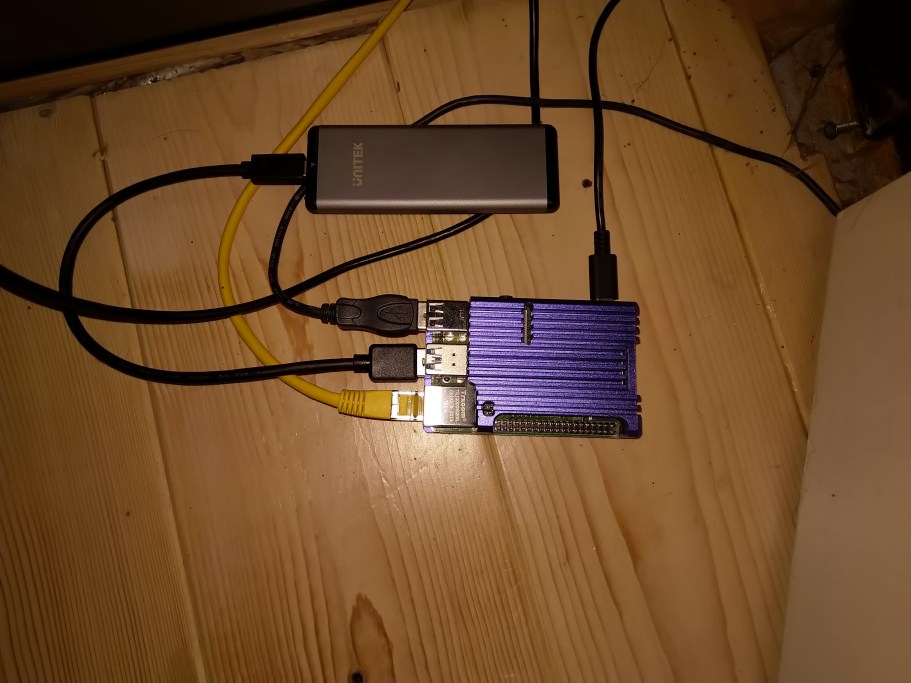
So, I bought an RPi4, a Pimoroni heatsink case, and an M.2 128GB SSD card in a USB enclosure:
I followed this guide to install Home Assistant on the SSD, and to use it as the boot device for the RPi4. All proceeded according to plan, and I had a working Home Assistant platform ready to test my Z-Wave devices on.
My Domoticz installation uses an Aeotec Z-Stick Gen5 Z-Wave controller. The first problem I encountered was that apparently this device doesn’t work directly with the new RPi4 model. I would either have to perform surgery on the controller, use a USB hub as an intermediary connection, or purchase the new Aeotec Z-Stick Gen5+. I decided to get the new model of the Z-Stick. Using Aeotec software, I migrated my current Z-Wave network from the old to the new Z-Stick.
Z-Wave Support in Home Assistant
Home Assistant already has an integration for Z-Wave, but I noticed that the team had announced a new Z-Wave integration project in February this year. This is currently in beta. Which to choose? It seemed to me that there were pro’s and con’s for both:
Original Z-Wave integration: pro’s
stable
well integrated into HA
con’s
only supports version 1.4 of OpenZwave. Newer Z-Wave Plus devices may not be supported out of the box.
Restarting HA forces restart of Z-Wave network
QT OpenZwave (beta) + Mosquitto (a message broker): pro’s
uses version 1.6 of OpenZwave
touted as the future by the HA project team
the developer apparently works on both the QT OpenZWave (beta) project and the OpenZwave project itself
runs in a separate Docker instance so the Z-Wave network runs independently of HA itself.
con’s
It’s a beta; lots of unfinished bits, particularly in the UI integration with HA.
the Z-Wave admin tool is crude, but it works.
On balance, I decided to go with the Beta, since this was more likely to support newer Z-Wave devices, and is supposed to be the future for Z-Wave in the Home Assistant world.
I have thirty Z-Wave devices in my network. Aside from the controller there are devices such as smart wall plugs, switches, remote control, smoke detectors and a siren. The test would be to see if this network could be successfully migrated across to Home Assistant and then managed as a production system, with the ultimate aim of retiring Domoticz in favour of Home Assistant as the platform.
Moving to Home Assistant
I booted up Home Assistant for the first time, and waited until Home Assistant had got the latest version downloaded and set itself up ready for the Onboarding Step. This involved setting up the initial administrator account and telling HA where it is located. All very straightforward and well-described in the documentation.
The next step was to add and configure the integrations that I needed to use Z-Wave.
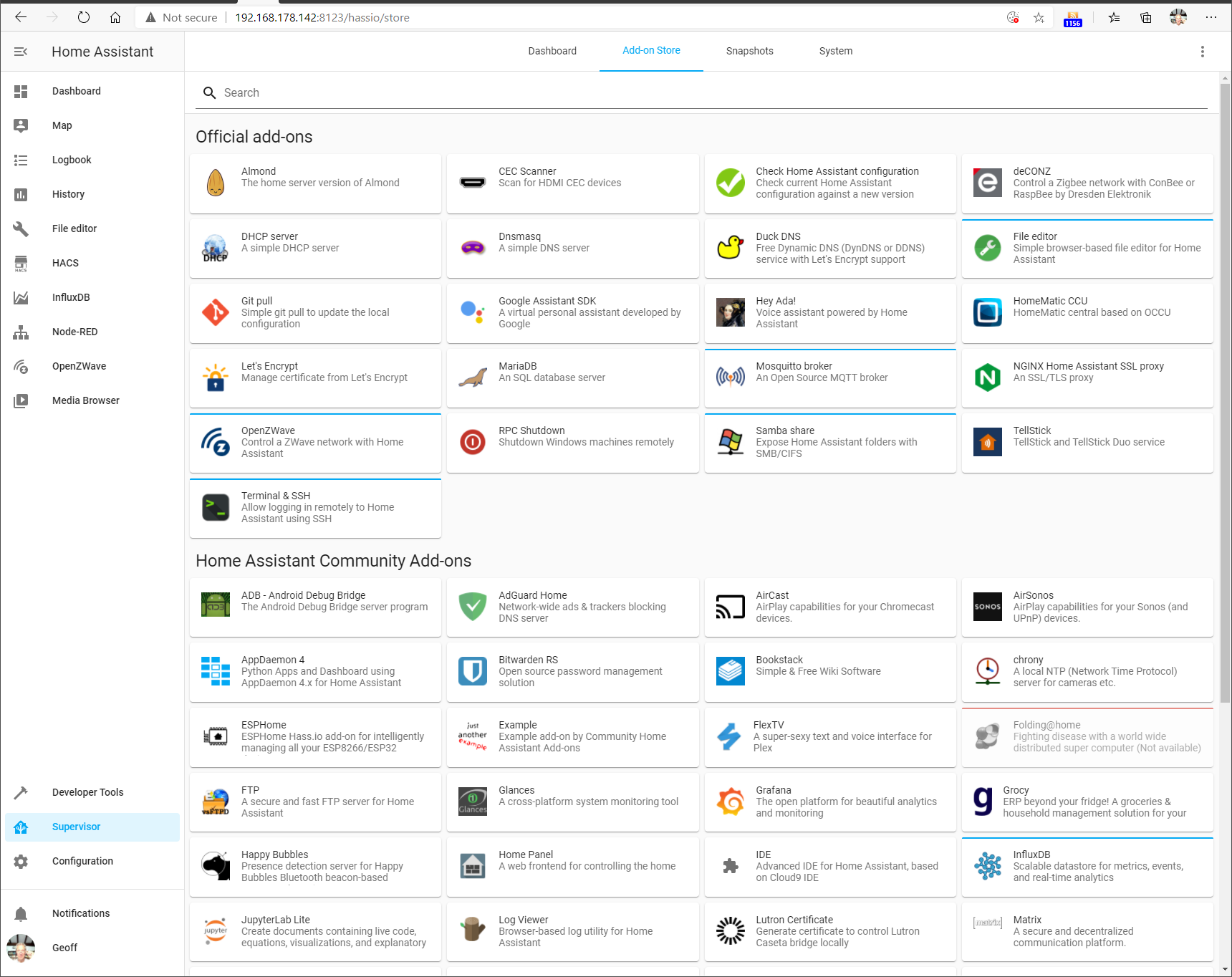
On the HA web-based interface, I clicked the Supervisor button, followed by the Add-on Store link. From the list of official add-ons, I chose the OpenZwave (beta) and the Mosquitto Broker:
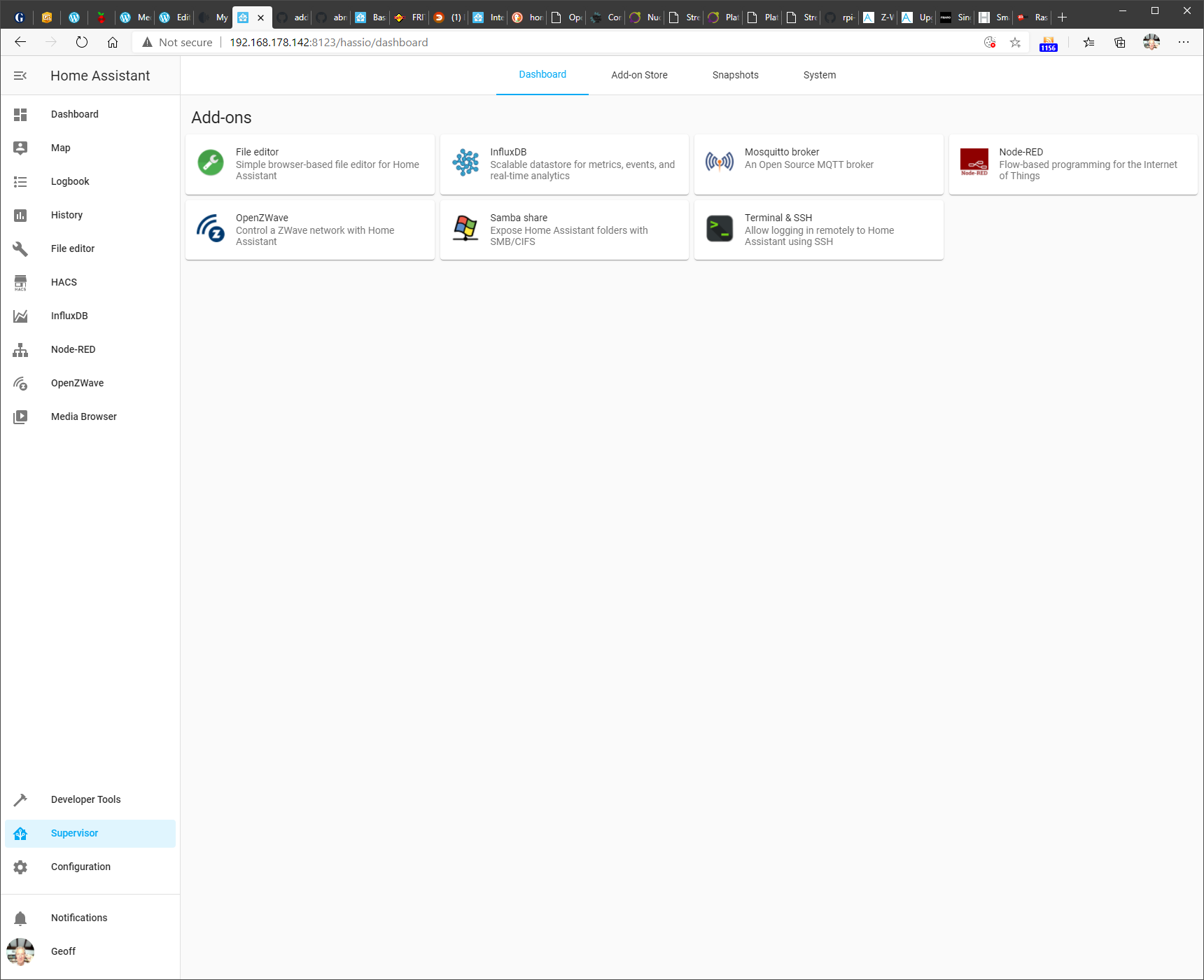
These are required for support of Z-Wave. Once added they appeared on the Dashboard screen (here shown together with some additional add-ons I included for testing)
Clicking on a module shown in this dashboard gives access to the module’s documentation, configuration and module logs.
Configuration was fairly straightforward (after a couple of false starts), and the Z-Wave network was read from the Aeotec Z-Stick and after a few minutes of messages being passed between the OpenZwave beta and the Aeotec Z-Stick controller, the following appeared in the OpenZWave administration tool:
Actually, the details of the smoke detectors took a day or so before they were filled in. They spend most of their time “sleeping” and only wake up every 24 hours. So it took time for the new Z-Stick to discover the devices fully.
And as you can see, this is a separate administration tool – the beta does not yet have full integration of the administration into Home Assistant itself.
Nonetheless, the contents of the Z-Wave network was now fully available to Home Assistant, and I could start adding devices to my Home Automation Dashboard.
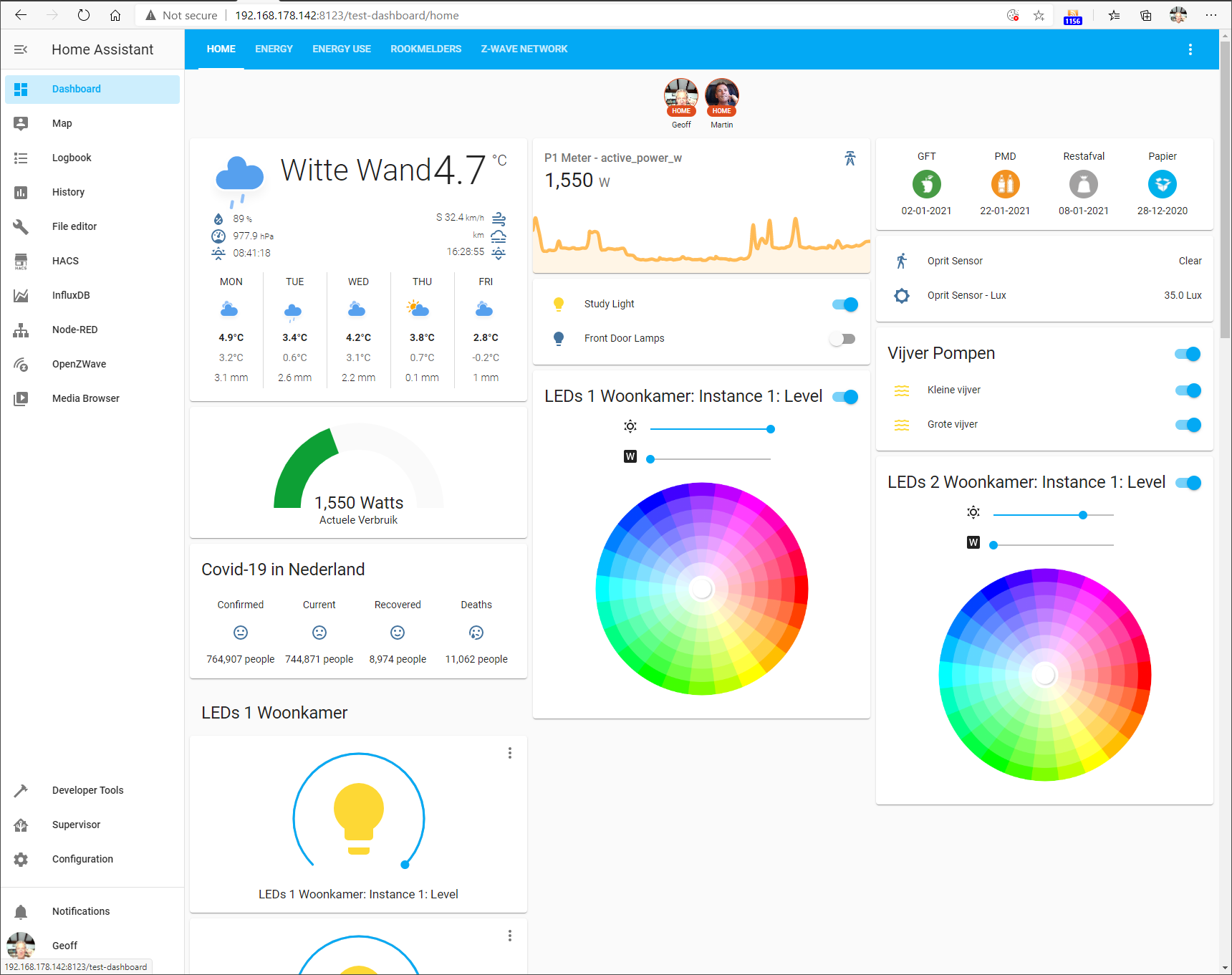
Here’s an example of what the current Dashboard looks like. This will likely evolve over time.
You’ll notice that besides the Z-Wave devices, there is some additional information being shown, e.g. the Weather here at our location, rubbish (garbage) collection dates, and electricity use.
This is being fed by additional devices and services supported by integrations in Home Assistant.
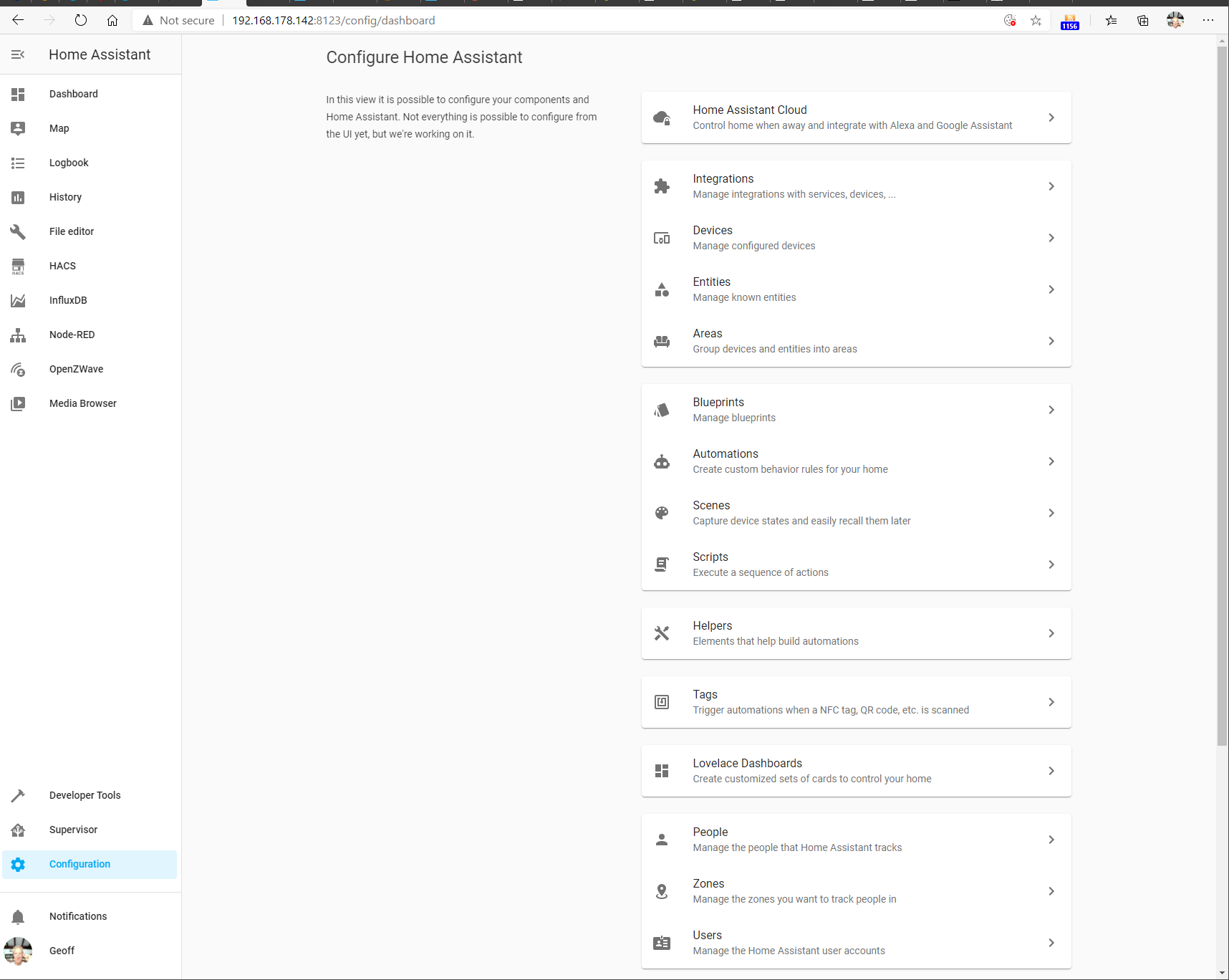
On the Home Assistant web-based interface, I clicked the Configuration button, and then chose Integrations from the list of configurable items:
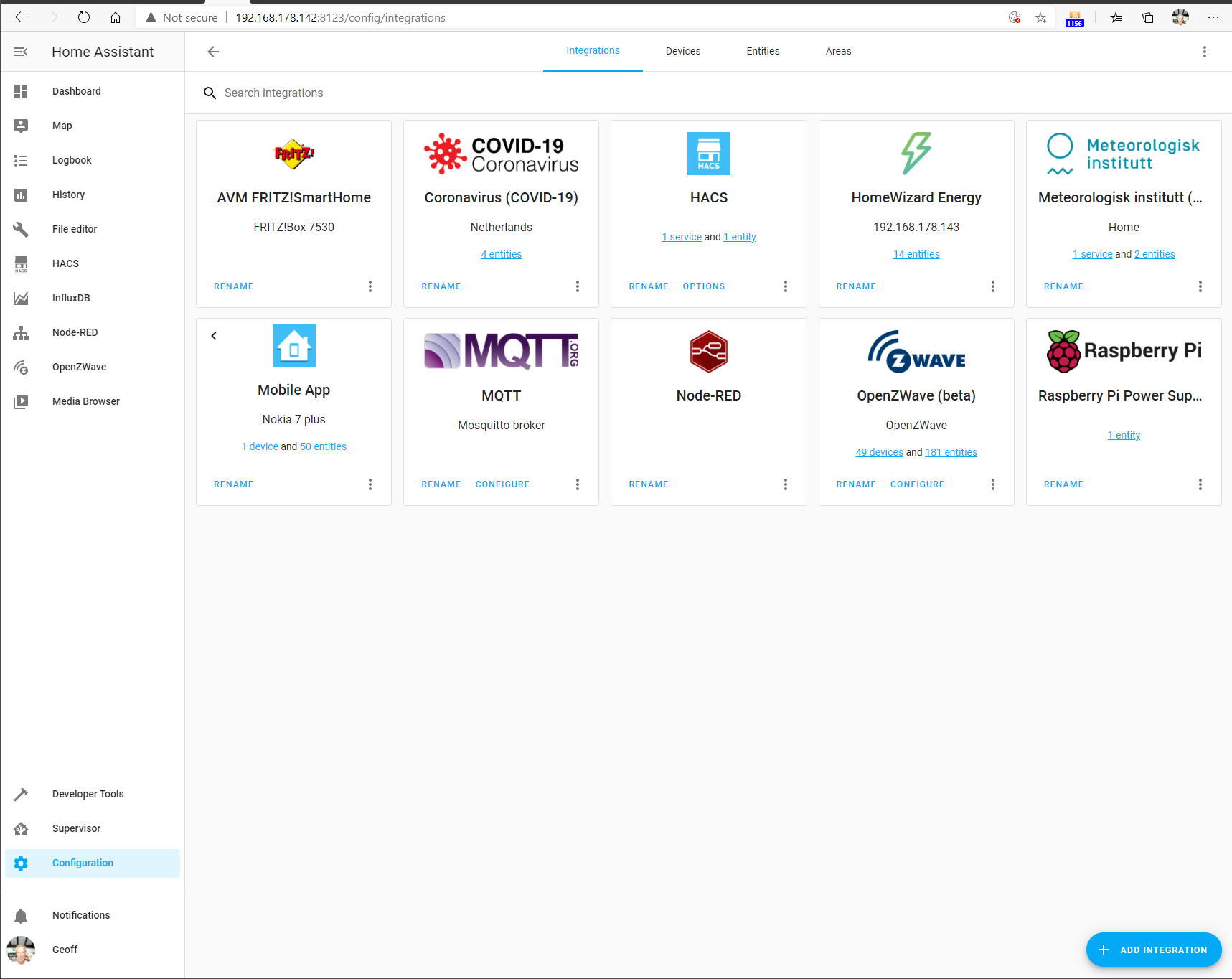
On this screen, I added the necessary integrations. For the support of Z-Wave, I had added the OpenZwave (beta) and the MQTT (the Mosquitto message broker) integrations. This screenshot shows them added, along with some other integration modules that I have added.
There are currently over 1,700 integration modules available for Home Assistant, including a module for Roon (but that’s another story…). Suffice it to say that Home Assistant is able to integrate a wide range of devices and services into a unified environment.
Automation in Home Assistant
The whole point about Home Automation is that it should take over the control of common tasks for you. For example, turn on the house lights when it gets dark.
Here in the Witte Wand, Domoticz had been set up to do the following simple tasks:
Turn on the living room lights and the lamp in my study 45 minutes before the sun sets.
Turn off the lamp in my study at 23:00 each evening
If no-one has turned them off at night, then turn off the living room lights at midnight.
Turn on the pond pumps at 08:00 each morning.
Turn off the pond pumps 30 minutes after sunset.
If the temperature falls below freezing at night, turn on the pond pumps.
Turn on the water heater in the outbuilding at 08:00 and turn it off at 17:00 each day.
If the motion sensor at the entrance detects movement, send a “Someone’s here” message to our smartphones.
If it is dark, and the motion sensor detects movement, turn on the outside lights for 10 minutes.
Turn on the Hi-Fi system and speakers at 08:00 each morning and turn them off at midnight.
At Christmas, turn on the tree lights at 08:00 each morning and turn them off at midnight.
At Christmas, turn on the garden lights 30 minutes before sunset, and turn them off at 23:30.
All these automations were easily reproduced in the Home Assistant environment, using the built-in automation tools.
Conclusion
I’ve been impressed with what the developers of Home Assistant have achieved and how the project is managed.
I have migrated my current Home Automation system from the Domoticz platform across to the Home Assistant platform.
I intend to carry on using Home Assistant as the platform for our Home Automation system for the foreseeable future.
Addendum1: 11 January 2021
I thought I should just add a note here concerning the OpenZWave (Beta) integration in Home Assistant. Development of OpenZWave seems to have slowed to a standstill during the last six months. As a result, there’s been concern raised in the Home Assistant Community Forum about whether this integration is, or should be, the future direction for support of Z-Wave networks in Home Assistant.
It appears now that the developer of OpenZWave is stepping back from further active development of the software, he will continue to tinker with it, at his own pace, to his own demands.
That has led the leaders of the Home Assistant project to put in place a plan B for an alternative integration of Z-Wave networks into Home Assistant.
The current OpenZWave (Beta) integration will remain in place for the foreseeable future. It works for me and many others. OpenZWave itself is software that is used by 100,000+ users; not just in Home Assistant, but in Domoticz and other Home Automation platforms.
I will continue to use it until such time as the proposed Zwave-JS integration is mature enough to migrate to.
Addendum 2: 17 May 2021
A couple of months ago, I migrated the ZWave support in Home Assistant from the OpenZWave (Beta) integration to the Z-Wave JS to MQTT integration. This has been configured to use the ZWave JS add-on under the covers. At the moment, the control panel functions of the ZWave JS add-on are incomplete, whereas the Z-Wave JS to MQTT add-on has a complete set of ZWave control panel functions now.
I’m not actually using any MQTT broker functions at all, only using this integration for its ZWave control panel functions.
Once the work on ZWave JS is complete, I can decide whether I will migrate fully to it and drop the temporary use of the Z-Wave JS to MQTT integration.
Addendum 3: 10 January 2022
Still using Home Assistant, and still impressed by the management of this open-source project and the results that the team (mostly volunteers) have achieved.
There are over 127,000 installations of Home Assistant around the world. In 2021, 1,282 people contributed to the project, producing 15,972 new features, improvements, bug fixes, documentation , and other changes.
What I particularly like about Home Assistant is that operations and data are local; it does not rely on the Cloud either for its operation or for storing long-term data. This is good for privacy reasons, but also it means that Home Assistant will continue to work even if the connection to the internet is broken. It also reduces the risk of product obsolescence. A product that relies on using the Cloud for its operation will stop working if the Cloud service is withdrawn by the supplier.
In the year of using Home Assistant here, there has been one hardware issue. It began a few months back when I noticed that HA would stop working on an intermittent basis, and the RPi4 would need rebooting to get HA started again. Finally, one day it refused to restart, and that was when I discovered that the data disc (a M.2 SSD in an external Unitek USB housing) was no longer working. I replaced the external drive and USB housing with a UGREEN USB 3.1 Gen 2 housing and a Samsung 2.5inch 250 GB SSD a month ago, and the system has been running faultlessly ever since.
My first fitness band was a Microsoft Band 2. The functions were well thought out, and it tracked my workouts at the gym very well indeed. Unfortunately, whilst the design was good, the build quality was appalling – so much so that I got through three examples before Microsoft pulled the plug on the product entirely.
So I looked around for an alternative and selected the Fitbit Ionic. While it didn’t track my workouts as closely as the Band 2, it was acceptable, and other functions (watch, timer, notifications) matched what I had with the Band.
The Ionic also had the capability to store music and play this back through Bluetooth headphones. This I found very useful – I now listen to Podcasts during my sessions at the gym. Getting the Podcasts onto the Ionic is a very slow and clunky process involving a badly-designed Fitbit Windows app and WiFi, but, OK, it more or less works.
My Ionic is now getting on for three years old, and despite a small crack in the screen in a corner, it is still working satisfactorily. However, sooner or later the inevitable will happen, and I will need to look for a replacement.
I see that Fitbit have just introduced two new models positioned as potential replacements of the Ionic – the Versa 3 and the Sense. Up until now, the Versa product line has closely matched the features of the Ionic, including music storage, while the Sense is a brand new introduction focusing more on health than fitness functions.
Both the Versa 3 and the Sense list “Music Experience” in their features, but the wording rang alarm bells in my head:
Store and play music and podcasts with Deezer, plus control Spotify from your wrist—then, use them to stay motivated with curated playlists specifically made for your favourite workouts.
Although Deezer is available as an app on my Ionic, I don’t, and won’t, subscribe to either the Deezer or Spotify streaming services. With local music storage on my Ionic, I don’t need them.
I checked the product manuals for the Versa 3 and the Sense, and yes, there was no reference to either of these products having the capability of storing local music. If you want to listen to music, you must be a subscriber to either Deezer or Spotify. That’s a deal-breaker for me. Unless this feature is restored to the Versa 3 or added to the Sense, neither are of interest to me. Judging from the Fitbit community forums, I’m not the only one.
I use Ivideon occasionally to keep an eye on the dogs when we’re out of the house. A couple of days ago, I received an email from Ivideon’s newly appointed business development manager.
We are exciting [sic] to announce that we are launching an affordable and easy-to-use tool for business! With Facial Recognition System you would be able to know many essential features of your target and existing audience with a click of the button: age, gender, emotions – you name it.
I see that Microsoft has announced that it is pulling the plug on the Microsoft Health Dashboard applications and services. I can’t say I’m surprised; the writing has been on the wall ever since Microsoft dropped the Microsoft Band two years ago.
When the first version of the Microsoft Band was introduced in 2014, I thought that the most interesting thing was the backend services of Microsoft Health. The combination of Big Data and AI could have been game-changing, and as recently as a year ago Microsoft made a series of announcements to push this further.
It may well be that these cloud-based initiatives in conjunction with the medical industries will continue, and all that is now being killed off is the consumer-facing tier of products and services.
Still, I regret the demise of the Microsoft Band and its application services. Although the device was flawed physically (wristbands split all too easily and could not be replaced), the design of the functionality was very good. I eventually replaced my (third) Microsoft Band 2 with a FitBit Ionic smartwatch, and frankly, it’s not a patch on what the Band offered me.
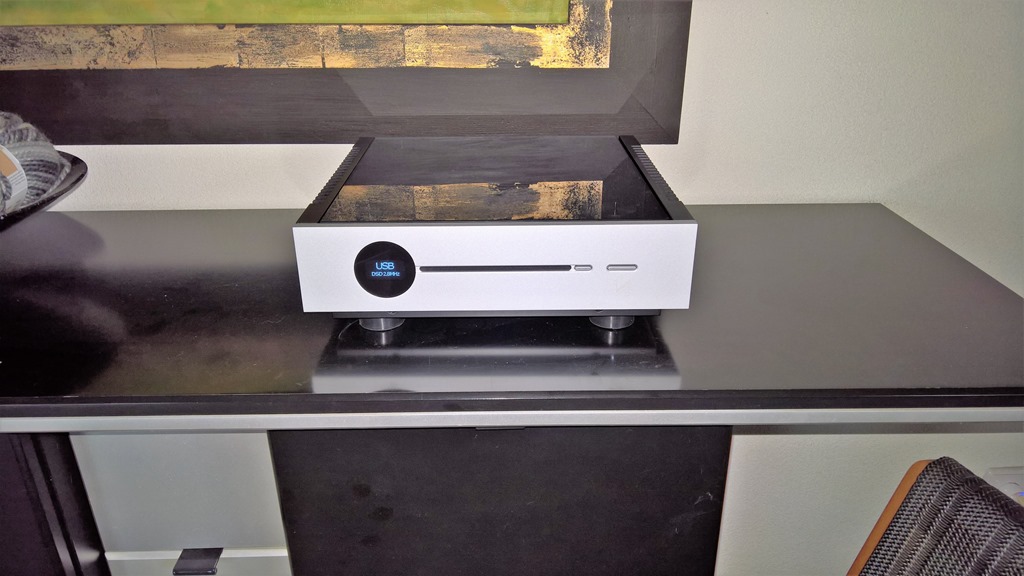
The audio manufacturer QUAD introduced the Artera line of products back in 2015. At the 2016 Sound and Vision show in Bristol, QUAD previewed two additional models in the range: an all-in-one player and amplifier (the Artera One) and a player and streamer (the Artera Link). A full year went by without these models appearing on the market, and they ended up being re-announced at the 2017 show, and production began.
Yet something odd happened; apart from a passing mention in the Artera product page at QUAD’s web site, the Artera One and the Artera Link models were rarer than hen’s teeth, and not found on QUAD’s dealer price lists. Then, a week ago, QUAD suddenly announced the Artera Solus – to all intents and purposes, exactly the same model as the Artera One (a player and amplifier), and all references to the Artera One and the Artera Link were expunged from QUAD’s web site. It is said that a second version of the Artera Solus will become available later this year, which will add streamer capabilities. This seems to suggest that a pure player/streamer model (i.e. equivalent to the Artera Link) is not part of QUAD’s plans.
So I seem to have ended up with one of the few Artera Links that have been produced. And with zero chance that it will become a Roon-Certified network player. That’s a pity.
This new version looks like a major advance, in that it will be connected to AI services in the cloud to power its learning capabilities. Of course, that probably also introduces all sorts of cybersecurity risks as well, so I hope Sony are prepared for the day when all the Aibos in the world rise up against their owners.
However, I think that if I were to get a second generation Aibo, Watson would not be best pleased, as shown in this test of a first generation Aibo in a Sony laboratory.
I suspect that Watson would make equally short work of an Aibo.
Yesterday I went to Arnhem to listen to a pair of the Kii Three speakers. They were being demonstrated in WiFi Media. They are a new product from a young company, and have had very good reviews in the audiophile press.
I have to admit that the speakers sounded very good. I’ve lived with a pair of Quad ESL57s for forty years (refurbished last year), and the Kii speakers were the first I’ve heard to make me think about a divorce.
I think if the Kiis were Roon Ready, I’d be signing papers. I asked about this, but Thomas Jansen, the Kii product manager, wouldn’t be drawn other than to say it would require a new model of the Kii Control to deliver this (and I’ve since heard that there is a rumour than a new control unit with expanded capabilities is under development).
I should probably sleep on the idea of selling all my Quad kit just at the moment, but I am rather tempted to ask for a home trial…
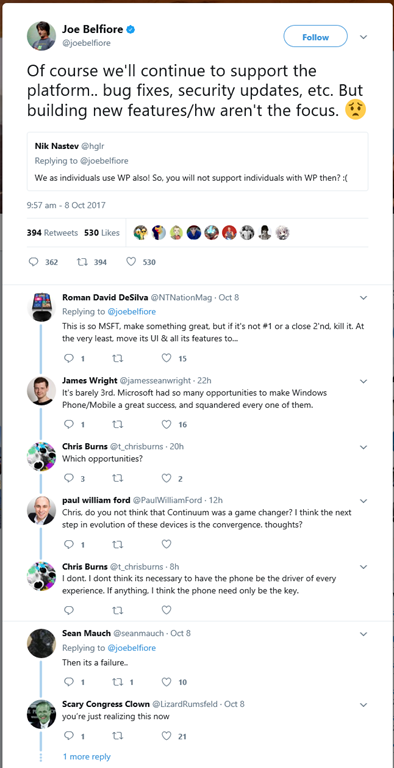
So Microsoft has finally admitted that the Windows Phone (or more precisely, the Windows Mobile operating system) is frozen. And as befitting the times where formal policy statements are apparently no longer issued via press announcements, the news was delivered via a series of tweets from Joe Belfiore.
This may not be quite the same as saying that it’s dead – but that is how the news has been greeted by the technical press and the market. It may not be dead, but it’s certainly on life support, and Microsoft will finally switch it off in the not too distant future. There will be no new Windows Phone hardware, and Microsoft stopped manufacture of its last phones (the Lumia 950 and the Lumia 950XL) back in mid-2016.
The sad and sorry saga of Windows Phone and all the attempts at trying to craft the software and hardware are well covered by Peter Bright in his Ars Technica article.
I’ve been using a Windows Phone since December 2011, and I continue to love it. The user interface is still a joy in comparison with iOS or Android. However, it is undeniable that the market does not love Windows Mobile, and frankly, many of us continue to harbour the suspicion that neither did Microsoft. As Peter points out in his article, there have been fumbles and missteps made.
Up until now I’ve not been bothered by the limited number of apps available for the phone – I’ve always found an app to do what I want.
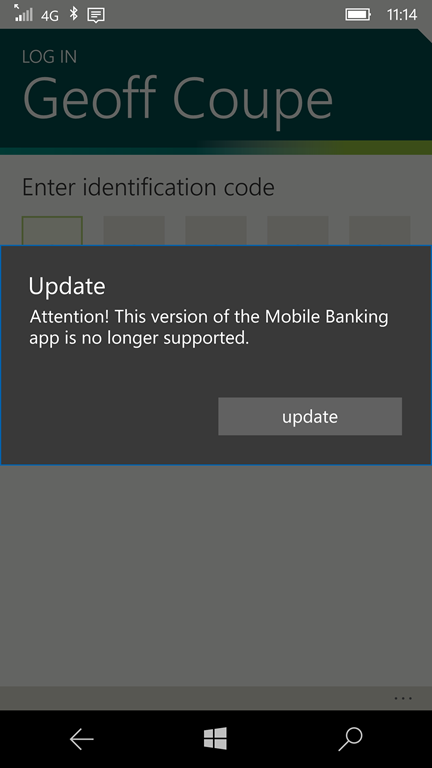
However, this month my bank has dropped its banking app from Windows 10 Mobile, and I now have to use the web browser to access the internet banking service. I personally find that this is not as good an experience as with the old app. I also am not impressed by the way the bank casually rubs salt into the wound by displaying the “update” button. If you click it, it doesn’t actually deliver an update. Basically, it’s more of a “tough shit” button.
I’ve also noticed a trend that for many new networked devices, they are increasingly reliant on being set up via a smartphone app, rather than via a web browser. And naturally, the app is only available for iOS and Android. Similarly for new services delivered via the internet – if there’s an app, there won’t be a version for Windows 10 Mobile.
So I fully expect that at some point in the (near?) future, there will be a device or service that I need that will force me to acquire an iPhone or Android phone to use it.
I really don’t look forward to that day. My current phone is a Lumia 950, and despite it being no longer manufactured, it still has advantages (to me) over the current range of Apple and Android phones. The camera, in particular, is still outstanding. And I have a spare battery waiting in the drawer for when my current battery runs out of puff. Replaceable batteries in smartphones are a rarity in these days of throwaway consumer goods.
As Peter Bright says in his article:
For now, all we can do is mourn: the best mobile platform isn’t under active development any more, and the prospects of new hardware to run it on are slim to non-existent.
As for me, I switched to an iPhone more than a year ago. Every day, I’m struck at how the main user interface is basically that of Windows 3.1’s Program Manager, and iOS 11 has been fantastically unstable for me. I don’t enjoy iOS in the way I enjoyed Windows Phone. But it’s actively developed, and third-party developers love it, and, ultimately, those factors both win out over Windows Mobile’s good looks and comfortable developer platform.
I get the distinct impression that Satya Nadella, Microsoft’s CEO, is much more focused on the business world and cloud services than on consumer devices. Windows Phone has just joined Zune, Microsoft Band, the KIN phone, Windows RT, the Surface Mini, and Windows Home Server on the scrapheap.
It’s a damn good question. IBM is totally irrelevant these days as far as consumers are concerned. Microsoft seems hell-bent on heading the same way. In ten years time, will people be asking: Windows? What is Windows?
I often castigate Microsoft here on the blog for their seemingly boneheaded decisions. Now it’s Amazon’s turn in the spotlight of shame.
I’ve been using their Kindle app for Windows 8 ever since it was launched back in 2012; never saw the need to buy an Amazon Kindle e-reader device.
Now Amazon has announced that they will be withdrawing the Kindle app from the Windows store later this month, and advise people to install the Kindle desktop application instead. Hooray – let’s all go back to 2005. Why on earth Amazon isn’t putting its development effort into a UWP version of the Kindle app instead, I have no idea. If they did, the app would be usable across all Microsoft Windows devices (PCs, Phones, Xbox, HoloLens, etc.).
It also rather begs the question as to what will happen to the existing Kindle app on Windows Phones. I’ll be prepared to bet that Amazon will shortly announce that it will be withdrawing that as well. Since you can’t use the Kindle desktop application on a Windows Phone, the only possibility will be to use the browser-based version of the Kindle reader on the phone. That promises to be such a poor experience that I expect to be giving up using my phone for Kindle books.
Ten months ago, I treated myself to a Microsoft Band 2 for Christmas. A combination of fitness band and smartwatch, I really like the functions that it offers. However, a brilliant idea has been let down horribly by poor hardware quality. I’m currently on my third example – the first two developed splits in the straps.
Microsoft could have learned from this, and produced a third version to address the product failings – it’s always been said, apocryphally, that Microsoft needs three goes to get anything right. Instead, Microsoft has thrown in the towel, withdrawn the Band 2 from the market, and announced that it has no plans for a Band 3.
I think it’s a real shame. I do like the Band 2, and I was looking forward to see what a Band 3 would be like. It would seem that Microsoft has blinked, rather than push the envelope. So Microsoft Band will join the list of products that Microsoft has failed: Zune, Windows Home Server, Windows Phone. And I can’t help feeling that they failed, not because of any fundamental shortcomings in the products themselves, but because Microsoft failed to deliver what it needed to do to get the products established in the market.
I need to plan for what I will get as the successor for my Band 2 when it finally kicks the bucket. I suspect it will be a Garmin vivosmart HR+ – this seems to be the closest match in functionality to the Band 2.
Thanks a bunch, Microsoft – you’ve failed me yet again.
Back in March, I blogged about my experience with the Microsoft Band 2, summarising it as a “nice idea, but bad execution”. After three months of use, the strap had begun to split. I bought it from Amazon UK, and they replaced it with a new one without question .
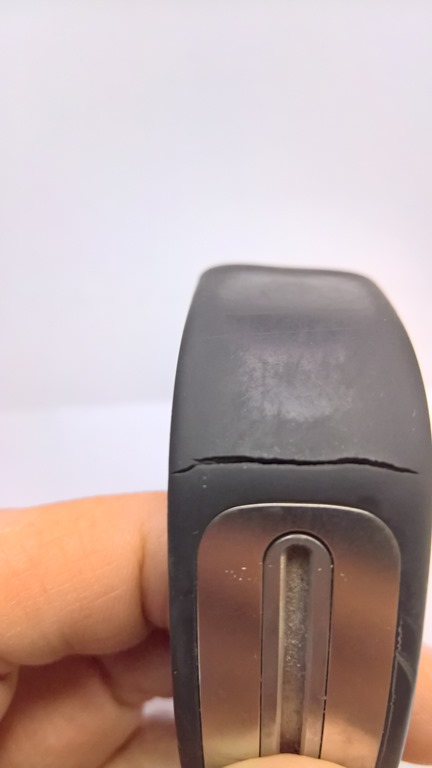
And now, after four months of use, the strap on the new Band has split:
Once again, Amazon UK has come through, and gave me the options of a replacement, a full refund, or a 20% partial refund if I could get the strap replaced. Since there’s no possibility of getting the strap replaced by Microsoft, I went for option 1: a replacement.
We’ll see just how long the strap on this one lasts. I fully expect that it will occur again. I hope that it does before my warranty expires in December this year (I bought my first Band in December 2015). If it does occur, then this time I’ll ask for a refund.
Microsoft is rumoured to announce the next version of the Band this October. Folk wisdom has it that it takes Microsoft three attempts before they get anything right. So the Microsoft Band 3 might last longer than four months. They really need to get it right, or once again, Microsoft’s reputation will take a hit.
Addendum 15 October 2016: Well, Microsoft hasn’t announced a Band 3. Instead, they’ve announced the immediate withdrawal of Band 2 from the market and said that there will be no Band 3, despite the fact that prototypes have been developed. Once again, Microsoft snatches defeat from the jaws of victory.
As I’ve mentioned before, the speakers in my Hi-Fi system are a pair of QUAD electrostatic loudspeakers – the ESL 57 model to be precise – and this year, they will be forty years old. They still sound pretty good, but, like me, they are getting on in years. In order to celebrate their fortieth birthday, I thought that I should get them checked for a possible refurbishment.
A search on the internet turned up QUAD Musikwiedergabe in Germany. When QUAD stopped production of the ESL 57 model in 1996, QUAD Musikwiedergabe took over the necessary jigs and tools to Germany. Initially this was to manufacture spare parts for the ESL 57, but eventually they started building completely new ESL 57 speakers, such was the continuing demand.
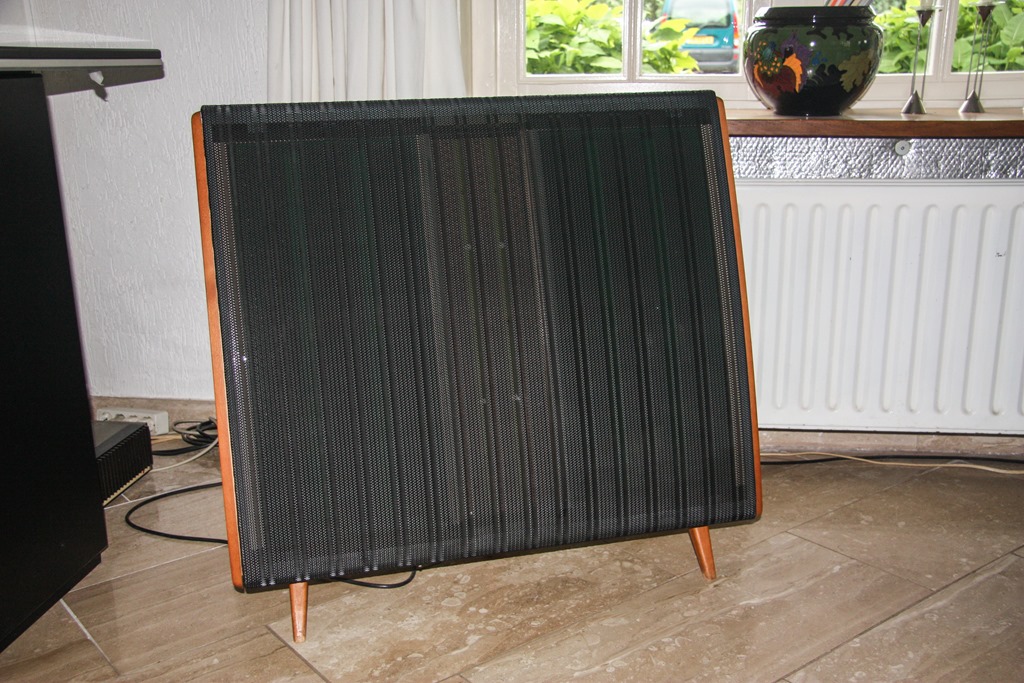
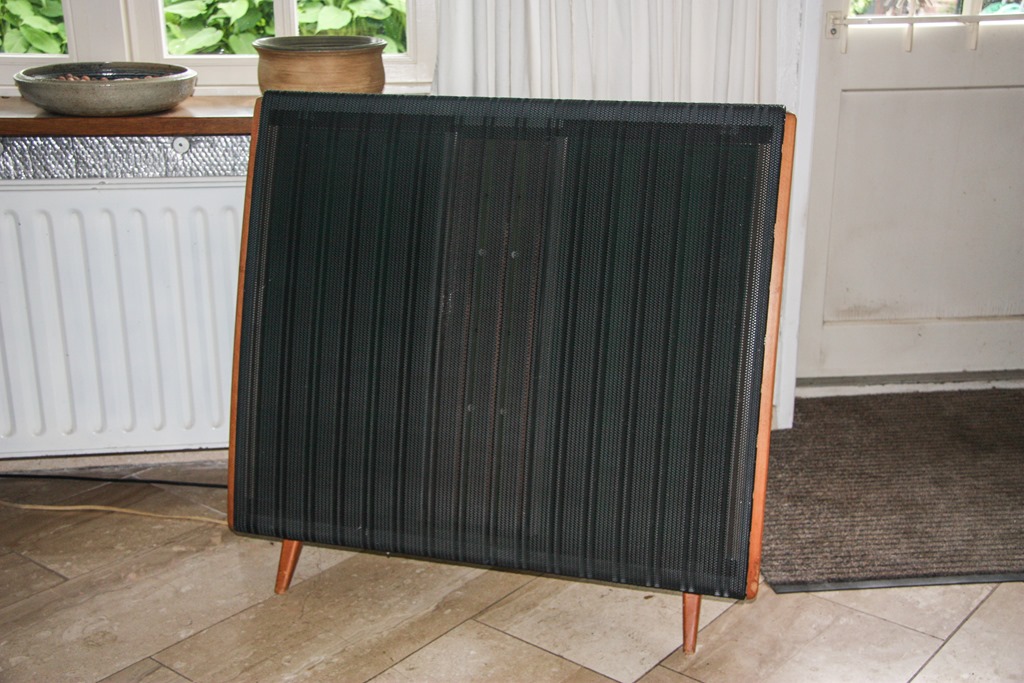
I contacted them, and a few weeks later, the speakers were collected by Manfred Stein, the owner of QUAD Musikwiedergabe. His team checked them out, and he reported back that, considering their age, both speakers were not bad. However, he recommended replacements of the treble panels and the EHT units which deliver the high voltage. The treble panels had been overloaded (probably by me playing music far too loudly!) and the EHT’s were no longer delivering the right voltage. The bass panels were OK, but were now sounding “boomy”because of their age. I decided to go for a complete transplant of the internals, and the externals were smartened up with a fresh coat of paint.
Manfred returned the ESL 57s this morning, and I’ve been listening to Handel operas for most of the day.
A month ago, I summarised the state of play concerning the media systems we have in our home. Since then, I’ve made some changes, so I thought I should once again summarise how things look at the moment.
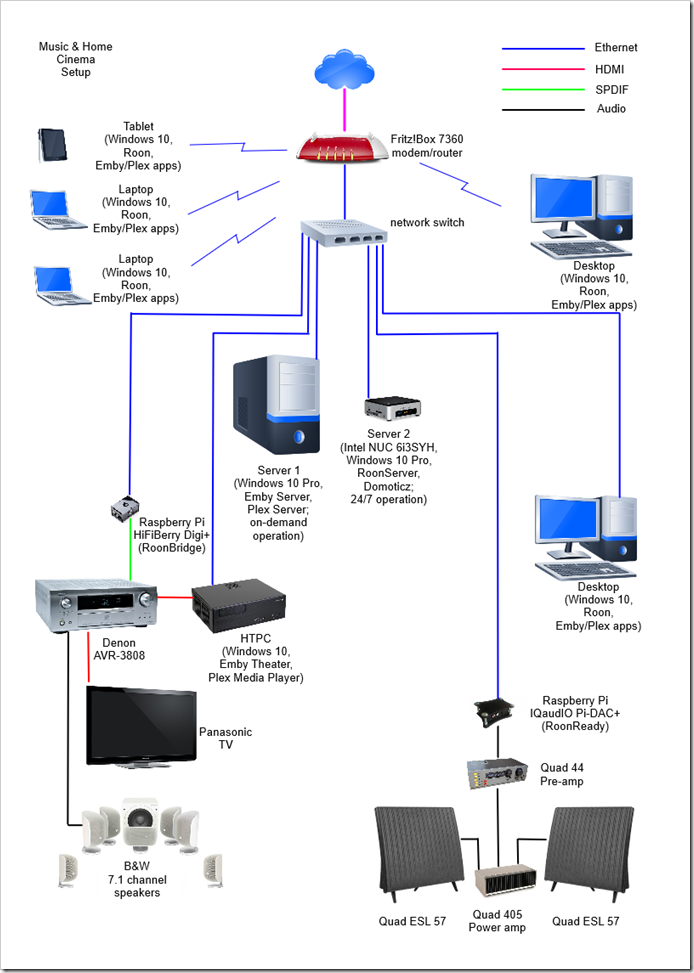
The major change is that I’ve added a second server to the network. This is an Intel NUC (Next Unit of Computing) box, the NUC6i3SYH.
I did this because I need a server to be running 24/7 to host our Home Automation system (a Domoticz system). Originally, I had Domoticz installed on a low power Raspberry Pi2, but a couple of months back I repurposed the RPi2 to become a Roon Endpoint device for our music system, so the Domoticz system was moved across to the main media server. This meant that the media server had to be running 24/7 for the Home Automation role, and frankly, that was not particularly energy efficient (the server uses about 75 watts). I could have purchased another RPi2 solely for running Domoticz, but it struck me that we want to hear music much more often than sitting down to watch a film, so perhaps the alternative would be to split the roles of the main media server, and move the music server role off to a more energy-efficient server and combine it with the Home Automation role.
So that’s what I’ve done. The Intel NUC now runs 24/7 and hosts Domoticz and Roon. It has a 256 GB SSD for the OS and the Domoticz and Roon databases, while the music library (mainly FLAC files) is held on an internal 1TB 2.5” hard drive. Being an Intel NUC, its power consumption is much lower than the original media server (less than 20 watts as compared to 75 watts).
The original media server now holds our films, home videos, recorded TV and photo media, together with backups of our data from other PCs in the house. Since we don’t need this server running 24/7, I’ve installed the Lights Out software service on it so that it spends most of its time sleeping. Lights Out is set up so that when the HTPC is turned on, to watch a film for example, it will automatically wake up the server. When the HTPC is turned off, the server will go to sleep ten minutes later. If we want to view media from other PCs, laptops or tablets in the house, we can wake up the server remotely before launching a media player. That’s less than ideal, I’d prefer that launching a media player application would wake up the server automatically, but that’s not possible with Lights Out at the moment.
I should perhaps add that I’m still dithering between Plex and Emby for handling visual media. At the moment Emby is back in the lead – Emby Theater is currently much more complete and polished than the Plex Media Player. However, both are still evolving, so for the moment I’m keeping both ecosystems running.
As for music, I’m very happy with Roon, particularly over the wired connections to our Hi-Fi and Home Cinema systems. Its performance over WiFi still needs some further work I think. This may be down to our local setup, so I need to investigate further. In some rooms, I can have multiple laptops all playing different music without issue, whilst in other parts of the house I sometimes get dropouts even with just one music stream active. We do have WiFi repeaters installed here, but Roon seems particularly sensitive to network quality over WiFi.
As a result of the changes in the past month, this is the current network setup:
I’ve written a couple of posts over the past six weeks about Hi-Fi and Home Cinema, and I thought it would be useful to document the current state of play here in the Witte Wand.
Six weeks ago, I was at the point where I had come to the conclusion that Microsoft has lost the plot when it comes to integrating Hi-Fi systems into the Windows ecosystem. I was still trying to decide between Plex and Emby as the basis for an all-in-one media handling system, and I had just come across the Roon music system.
Part of the problem is that trying to base Hi-Fi audio streaming on the open protocol UPnP or Apple’s proprietary AirPlay protocol is an exercise ultimately doomed to failure. Some of the reasons why this is so are documented in this thread on the Roon Community forum.
In addition, it is clear that handling music is not the focus of either Plex or Emby – their prime objective is on handling visual media: movies and TV.
With this in mind, I decided that the way forward was to use Roon as the basis for managing and playing music to Hi-Fi quality in the house, and select between either Plex or Emby as the basis for our Home Cinema.
Music
To my mind, Roon has two key strengths. The first is that the user experience is the best of all the music systems that I’ve ever tried. The second is its underlying audio streaming protocol, RAAT (Roon Advanced Audio Transport), which is far in advance of anything else out there for handling Hi-Fi quality streaming audio that I know of. RAAT is being adopted by audio hardware manufacturers into so-called “RoonReady” devices.
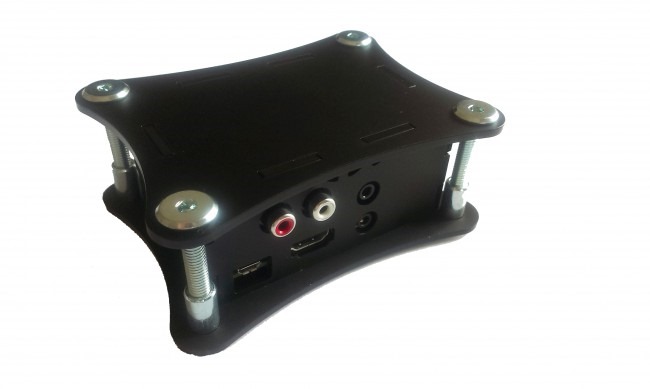
So I’ve put together a Raspberry Pi 3 with an IQaudIO Pi-DAC+ running the IQaudIO RoonReady software into a neat little enclosure from IQaudIO, and used it to connect Roon to my Quad 44 pre-amp. For a tad over €100, I’ve got an audiophile-quality network-connected DAC (Digital-to-Analogue Converter) delivering audio streams to my Hi-Fi system.
I also wanted to connect Roon to the Denon AVR-3808 used in our home cinema system. This time, because the Denon has its own internal DAC, I wanted to feed the digital audio stream straight into one of the Denon’s coaxial digital inputs. So I assembled a Raspberry Pi 2 with a HiFiBerry Digi+ card into a HiFiBerry enclosure to give me a network-connected S/PDIF device; total cost: €83.
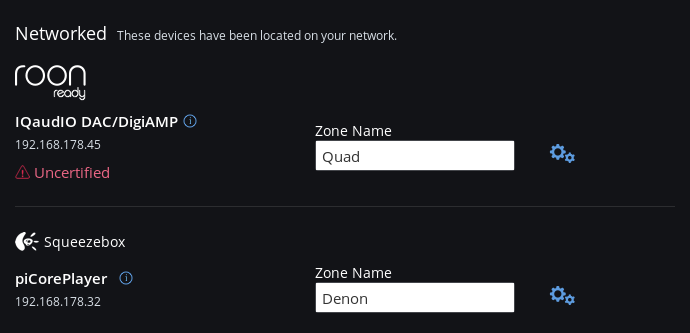
At the original time of writing this post, HiFiBerry didn’t have RoonReady software available, so originally I installed the open-source PiCorePlayer software onto the Raspberry Pi. Roon supports Squeezebox devices, so that both the Quad and the Denon systems were recognised as Roon endpoints in the network.
(note: the IQaudIO device is showing as “uncertified” because Roon haven’t released a Roon build since the device was approved in-house. Roon build 1.2 is expected in a few weeks, and then this warning will go away)
Addendum 19 April 2016: In mid-April, Roon Labs released version 1.2 of Roon. As part of the release, they introduced Roon Bridge – a software package that (according to Roon Labs):
…extends Roon’s audio playback capabilities to other devices or computers in your home.
After installing RoonBridge on a device, any audio hardware attached to that device is made available to your Roon install exactly as if Roon had direct access to to the audio hardware.
This enables you to place audio outputs anywhere in your home where you can connect an Ethernet cable or muster a decent WiFi signal, and makes it that much easier to separate the media server from your listening environment.
So then what I did was to install Raspbian on the Raspberry Pi with the HiFiBerry hardware, and download and install Roon Bridge onto it.
Now both the Raspberry Pi devices are recognised as true Roon endpoints, and I don’t need Squeezebox emulation any more.
Movies and TV
As I said at the outset, the choice for handling our movie and TV collections was between Plex and Emby. I’ve decided to go for Emby for the following, completely personal, reasons:
Even though the new generation of Home Theatre clients of both Plex and Emby are still in beta, that of Emby is already more mature and appears to be evolving faster. The Plex client is still very crude, and Plex’s UI Experience team are still sitting on the pot wondering what to do as far as I can see.
Emby has explicitly stated that their Home Theatre client is designed to be controlled by a simple six-button remote from the ground up. Plex has gone the mouse/keyboard route, with support of a remote seemingly added on as an afterthought (it didn’t work at all in early betas). Since I want to carry on using my trusty MCE Remote, the point is awarded to Emby.
Unfortunately, neither Emby nor Plex have a clue when it comes to supporting and displaying photo collections. The photo library functions in both is embarrassingly bad. This is particularly surprising given that one of the founders of Plex is a keen photographer. It may well be that Plex will buck their ideas up and deliver a more rounded product in the future. If so, I’ll revisit my current decision at that time. Until then, my money has gone to support Emby for at least the following year.
The Music and Home Cinema Setup
As a result of all of the above, our current home network now looks like this:
All our media is held on the central server (with off-site backup), and can be viewed/played on any of the attached PCs/laptops/tablets. In addition the Home Cinema system can handle both visual and music media, whilst the Quad system delivers the best Hi-Fi musical experience.
Microsoft announced the first version of their Microsoft Band – a combination of fitness device and smartwatch – back in October 2014. As a first iteration, it had a number of issues; for one thing, it was uncomfortable to wear.
Fast forward to October 2015, and Microsoft announced the second generation: the Microsoft Band 2. The design appeared to be much improved, so much so that I decided I would treat myself to one for Christmas. I bought it from Amazon UK, since Microsoft do not sell it in the Netherlands.
Since then I’ve been wearing it for 22 hours each day (it monitors my sleep patterns as well as monitoring my activities during my waking hours). I like it a lot. As well as tracking my workouts in the gym, it monitors my walking and biking activities, and will alert me to incoming emails, as well as acting as my wristwatch/stopwatch/timer. All the activity results are also uploaded into the Microsoft Health web site, where I can track progress (or otherwise) over time.
So the idea is brilliant, but, 3 months on, I became aware today of a fatal flaw in the design. I noticed that the rubber strap is developing a split about 1.5cms away from the display. There’s an internal metal lug extending from the display into the rubber band, and the split is developing where the end of the lug is.
Researching online reveals that this is a common issue. Many people are experiencing the same thing. And Microsoft often seems to refuse replacement of the Band under warranty. They don’t accept it is a design issue.
I’ve sent an email into Amazon UK asking if they will replace what in my view is a clearly defective product, but I don’t hold out much hope. Black gaffer tape, here I come…
Once again Microsoft overpromises and under-delivers…
Addendum 21 March 2016: Well, I’m pleasantly surprised. Amazon responded to my email in less than 24 hours, and confirmed that if I return the Band, they will give me a refund.
I had said in my email that I have the Medium size band, and the Band is at its tightest position for a comfortable fit on my wrist. It seems to me that this might be the design flaw – perhaps the Small size band would not put the same stress on the rubber strap. The Amazon representative (Andrew) picked up on this, and arranged for a refund, rather than a replacement, and suggested that I order a Small size Band. So I’ve ordered this in the expectation that the refund will come through as promised.
Addendum 2, 31 March 2016: Well, Amazon has delivered on their promise. I’ve just had an email informing me that a full refund has been credited to my card account. I had rather expected the “trying to get blood out of a stone” treatment that is so prevalent these days, but contacts with Amazon customer service (in my case) have been speedy, polite, and delivered results. My flabber has been gasted.






 Geoff Coupe's Blog