Reflections on life at “De Witte Wand”…

Category: Consumer Electronics

  • The Pursuit of Excellence or Excess?

    A couple of weeks ago, I wrote about my adventures in the world of Hi-Fi. With the discovery of Roon, I’ve rekindled my quest to listen to music, rather than have it as background noise. It’s also had the side effect of making me take a look at my current Hi-Fi equipment and wondering whether I should upgrade or tweak it.

    Ever since I started my journey into the lands of Hi-Fi, back in 1968, I’ve been aware that there were esoteric areas, complete with warring tribes, contained within. Now, revisiting the subject some fifty years later, it seems that Hi-Fi has got more complex, rather than completely mapped out.

    There are many more companies involved in the field now. When I started there were a few well-known names, now there are seemingly thousands that I’ve never heard of. The choice is overwhelming. I’m finding it very difficult to sort the wheat from the chaff. Some decisions are easily made; for example, I don’t see myself plonking down £44,000 for an amplifier (the Dan D’Agostino Momentum Integrated Amplifier). Even if I had that sort of money lying around, I would be thinking twice or three times about it. And then there are the products which, to my mind, seem more associated with snake oil than science.

    Connecting cables is the big area here. Some of the claims made for expensive cables seem, shall we say, somewhat over the top? But then, if you are going to pay $22,000 for a cable to connect one piece of equipment to another (the Skogrand Beethoven cable), you have to believe that it makes a difference. This reviewer (and his cat) clearly did, but me? I doubt it very much. I’d be asking for the guaranteed blind testing of all such claims, and even then I’d probably suck my teeth and say “thanks, but no thanks”.

    As someone once said: ‘Although it is fully understood scientifically, the phenomenon of “gullibility” has been experienced by many audiophiles’.

    With all this in mind, I looked at my current Quad 44 preamp + Quad 405 amp + Quad ESL 57 speakers, and wondered: upgrade or tweak?

    My first port of call was Quad themselves. I see that they have introduced a new preamp/amp combo for the digital age: the Quad Artera. The product web page rather jarringly still gushes that it’s “coming soon for 2015” [since corrected, after I sent them an email to point it out]. That aside, it certainly looks good, and has very good specs. I took a look at the manual and noticed something missing: unlike the Quad 44 preamp, the Artera Play has no switched mains outlets. Those of us who use mains-powered loudspeakers (e.g. the Quad ESLs) like the convenience of being able to switch on the preamp, and everything else in the system gets powered up. Likewise for switching off. That convenience is gone with the Artera – it seems a step backwards to me, and something that seems to have been overlooked in the design. I wonder why?

    I think at this stage, I’m leaning towards a tweak of my existing setup. Although I’ve now got the Quad system hooked into our HTPC so that I can play music from our music server through it, I think that I can improve the sound quality further. This coming week I hope to get a Pi-DAC+ from IQaudIO, and then I can re-use my spare Raspberry Pi 2 to build a Roon endpoint. I’ve run an ethernet cable into the cabinet housing the Quad system, and then I can connect the RPi2 + Pi-DAC+ (housed in a neat little box) up to the Quad 44. An upgrade that hasn’t cost an arm and a leg.

    Addendum 1st March 2016: I emailed Quad to ask about the missing mains outlets, and got back the following from the Service Manager:

    The Artera uses true standby function is this is why we did not place a mains outlet socket on either unit.  The mains outlet sockets on the 44 pre-amp were for other Quad units and not really designed for ESL’s switching on and off.

    They may not have been really designed for that purpose, but I’d be prepared to bet that the majority of ESL owners used them that way…

  • Bumps in the Road to the Internet of Things

    Regualr readers of this blog may recall that I dipped my toe into the waters of Home Automation at the beginning of last year, and I have been running a Domoticz system since last March.

    I’ve been pretty pleased with it up until now, and the system has been expanded to control more appliances and to record their power consumption.

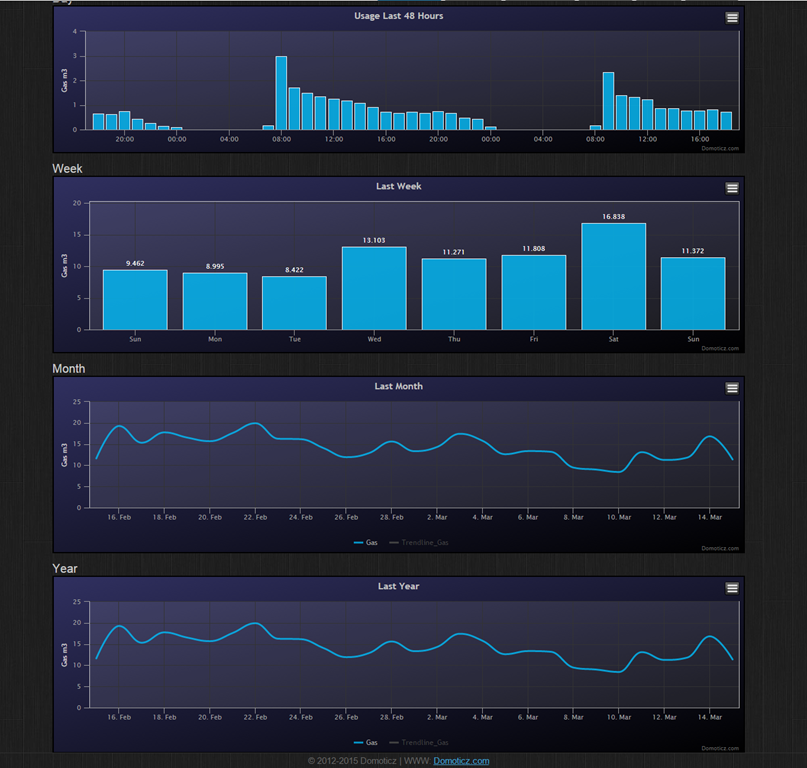
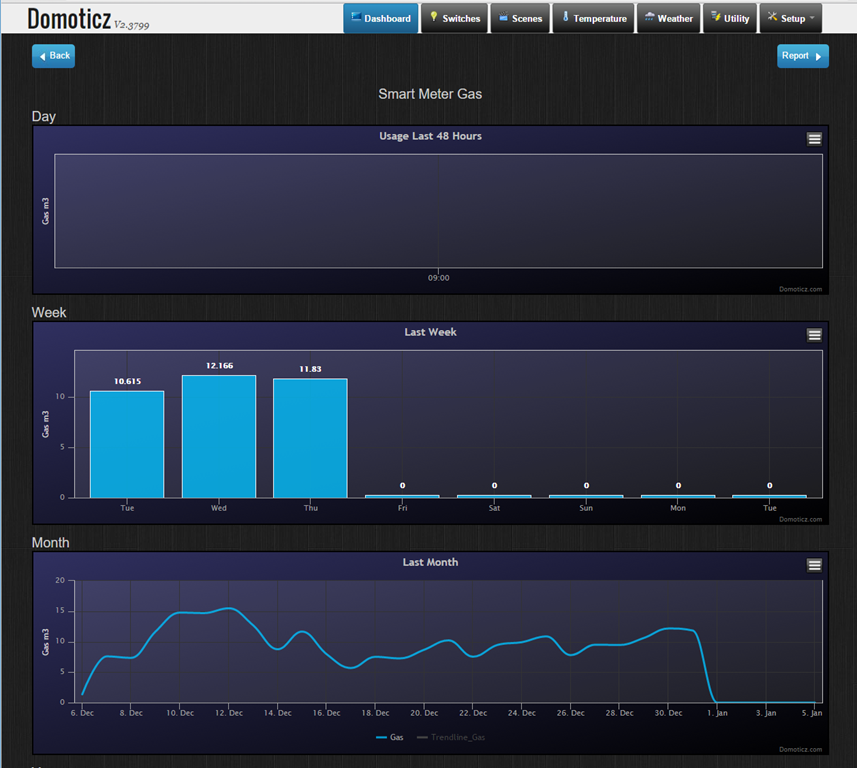
    This week, however, I hit a bump in the road. I noticed that since January 1st, we have apparently not been using any gas:

    Domoticz 48

    This clearly isn’t right, and in fact the gas meter itself is showing that gas is being used. However, the “smart meter” data connection to Domoticz is claiming that no gas is being used. It turns out that this is a software bug in the firmware of these smart meters, either in the gas meter itself, or in the electricity meter that reports consumption readings for both gas and electricity to Domoticz.

    The problem manifests itself if you have the combination of an Iskra-type 382 DSMR 2.2+ electricity meter with a Flonidan or a Landis & Gyr gasmeter. These meters were installed in the Netherlands during 2011-2013. And yes, we’ve got this type of electricity meter and a Landis & Gyr gasmeter. Bingo!

    Presumably, this “smart meter” is also reporting this same false reading back to the energy company. I suspect that they are all running around like chickens with their heads cut off wondering what to do about this.

    Worst case scenario is that all the meters will have to be exchanged if the firmware can’t be fixed. At the very least they will have to send out humans to come and read every meter so that customers can be accurately charged. I hope that the meter readers come equipped with a box to upgrade the meter’s firmware so that it’s a one time visit…

    Addendum 25 January 2016: Luckily, this issue has now been addressed, and a firmware fix is being rolled out to all the 400,000 gas meters affected by this problem. In addition, the fix is one that can be delivered over the network, so no humans are needed to visit every meter. It will take a couple of weeks before the fix is installed on every meter, but ours started working again as of yesterday…

  • Reading Between The Lines

    Microsoft’s Joe Belfiore has published a blog post today that has caused a slight disturbance amongst the company’s fans: Your Windows 10 PC will love all the devices you own.

    The reason for their discomfiture is that Microsoft is intent on bringing features, which hitherto have been unique to Windows, to rival smartphone operating systems. Personally, I think it’s an understandable strategy, and one that Microsoft has already shown that it wants to pursue.

    However, the post also caused me some discomfort, but not for the above reasons. My hackles went up with Belfiore’s opening sentence:

    Whether it’s a 3-year-old printer or projecting to your brand new TV with Miracast, we’re building Windows 10 to be terrific at connecting all your devices.

    Mr. Belfiore seems to be implying that a 3-year-old device is pretty well obsolete, and at the limits of supportability. I have an HP Laserjet 5MP printer that is still going strong, 20 years after I bought it. It almost sounds as though it will be more by luck than judgement that such devices will continue to work in Microsoft’s brave new world of Windows 10.

    The other part of the post that caused a slight intake of breath was where he wrote:

    Join the Windows Insider Program to try out the Phone Companion app on a new Windows 10 Insider Preview build we’ll flight out in a few weeks.

    “…flight out”? That’s a new verb to me, and a particularly ugly one to boot. What’s wrong with simply saying “we’ll release in a few weeks”? I realise that language constantly evolves, but does it have to do so in such awkward ways? However, I’m probably fighting a lost cause for British English here. I remember, with a shudder, the first time I heard an American airline stewardess announce on arrival in America that we should deplane. That was years ago, and I still haven’t got used to it.

  • Home Automation Revisited

    Back in January, I wrote about putting my toe into the waters of Home Automation. As I said at the time, there’s a bewildering array of products and standards out there. Over the past couple of months, I’ve been taking a look at some of the HA solutions out there, and I think I’ve landed on one that seems to fulfil my requirements pretty well.

    I had decided back in January that my solution would be one that used Z-Wave, and that’s still the case. I’ve been able to purchase Z-Wave HA devices from several different manufacturers, and they interoperate as promised. I’m satisfied that the choice of Z-Wave is a good one for me.

    As I said in January, there is a wide range of possibilities in the choice of the controller for a HA system. I could buy an off-the-shelf unit such as the Fibaro Home Center 2, the Zipato ZipaBox, a VeraEdge controller, or a HomeSeer controller. Or I could buy just the controller software, such as HomeSeer, and install it on a PC or a Rasberry Pi box.

    In the end, I decided not to purchase an off-the-shelf unit. Fibaro still seem to be struggling to deliver a stable version of their latest software for the Home Center 2, and not being able to trial the other hardware products meant that purchasing one would be a gamble. It seemed to me that a better approach would be to trial a software solution, using an existing computer.

    I ended up taking a look at the following software solutions:

    The first two are commercial products, the rest are open source projects, funded by donations.

    For my testing, I purchased a variety of devices:

    With the devices installed, and included in the ZWave network (registered in the ZStick controller), I connected the ZStick to a variety of software controllers in turn…

    HomeSeer has been around for a while. That means it’s comprehensive (it can control a wide range of devices using a variety of standards), and it has a wide range of third-party add-ons. However, it still strikes me as being expensive: $249.95 for the basic version of the controller software and $199.95 for the UI designer software. If I were to go with HomeSeer, it would probably make more sense for me to buy the basic (linux-based) HomeTroller Zee controller at $199.95. I installed the trial software of HomeSeer version 3, and used it for a week or two. It worked, and the diagnostic information was copious. However, the interface struck me simultaneously as being rather basic, and yet somewhat complex in places. I decided not to proceed further with HomeSeer.

    I admit I only took a cursory look at both Charmed Quark and OpenHAB. I found both difficult to set up, and got the impression that I would spend more time fiddling with them than using them. OpenHAB, in particular, seemed aimed at programmers and developers, rather than end-users at this stage. As a result, I moved on.

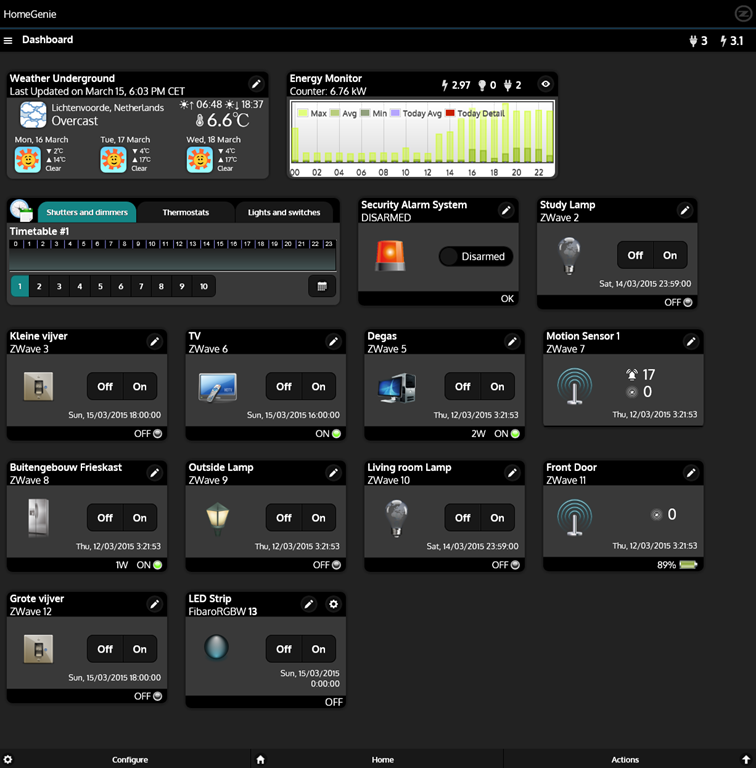
    HomeGenie is also something that will delight programmers and developers at the moment. Nonetheless, I was able to get it up and running very easily on Windows, and it works well. Here’s the “dashboard” that I see for the devices I currently have in my HA network:

    HomeGenie 06

    It’s primarily the result of the efforts of one developer, and he’s done a very good job. It’s still at a fairly early stage, so, for example, if you want to develop automated control of your devices, you will find yourself very rapidly at the limit of what the built-in “Wizards” are capable of, and have to turn to grown-up programming to get the job done. That’s all very well, if that’s your thing, but it’s really not what I want to do any more. I made a donation to the project, because I appreciate what has been achieved, and I hope it continues to develop. There’s a small (around 350 members) community forum where ideas are exchanged and bugs highlighted for solving. I could certainly make use of HomeGenie, if there were not other, and for my purposes, better solutions available.

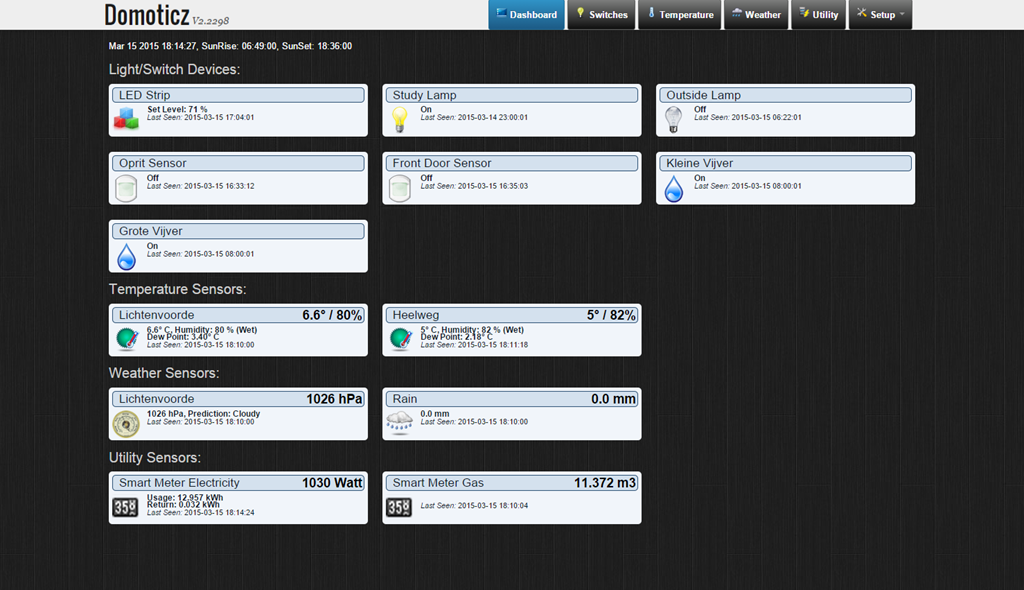
    Domoticz is another open-source project, and while it is primarily led by one developer, there are others actively involved, and the community forum is large (around 3,270 members) and active. Domoticz and HomeGenie are similar in many ways, but there are a few differences, which can be both strengths and weaknesses, depending on where you stand. Here’s the Domoticz dashboard:

    Domoticz 18

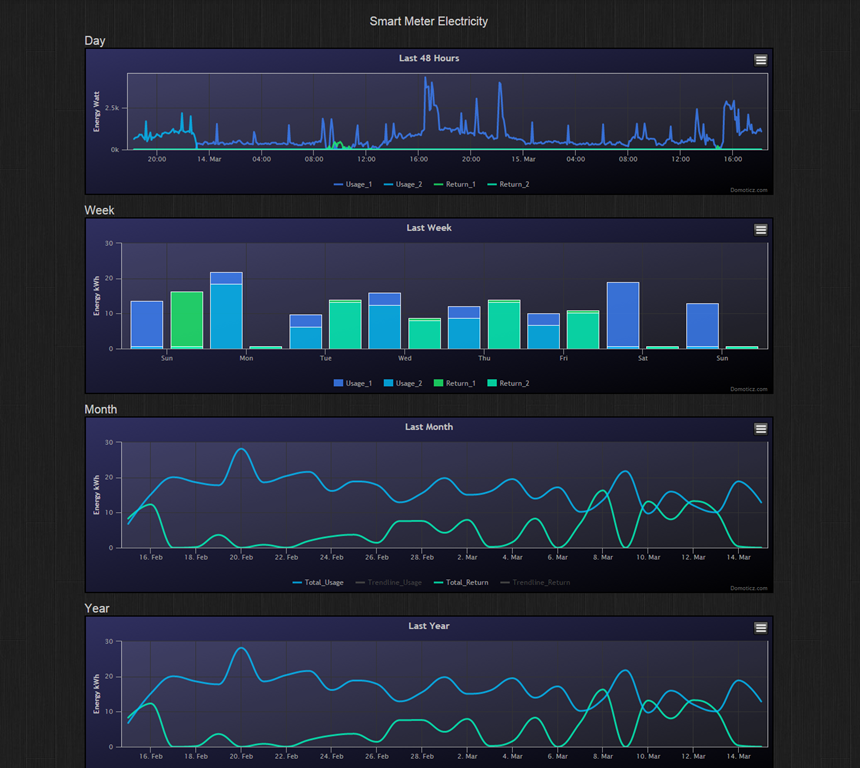
    The strength of Domoticz is its maturity; it already has solutions and support for a lot of hardware. In particular, it supports the reading and display of data supplied by our “Smart Meter” for our gas and electricity consumption. With the simple purchase of a cable, I was able to connect our smart meter to the Domoticz system and get real-time graphs of our energy consumption. Here’s what I see for our electricity usage:

    Domoticz 16

    It not only records our consumption (blue), but also the electricity generated by our solar panels (green) that is returned to the electricity grid. Gas consumption can also be tracked:

    Domoticz 17

    HomeGenie, at the moment, does not have this connection to Smart Meters built-in. The programmatic interfaces are there, and such an interface could be built, but I’m not the one to do it.

    For me, the strength of HomeGenie is that it is a complete solution, in that the developer has written software to control Z-Wave devices directly. Domoticz, on the other hand, hands off the control of Z-Wave devices to another piece of software, developed by a separate open source project: Open-ZWave. That means that there is the chance of issues arising out of effects caused by the fact that there are two different software components developed by two different groups. I’ve already come across an issue with my Z-Wave sensors, which may be caused by a bug in Domoticz, a bug in Open-ZWave, or some combination of the two.

    Nonetheless, I can live with that issue, and the quirk that the Fibaro wall plugs don’t always show the correct status in Domoticz. There are two reasons for this:

    • The fact that I can track our energy consumption directly in Domoticz (as shown above), and
    • the fact that Domoticz supports Blockly for building automation programs.

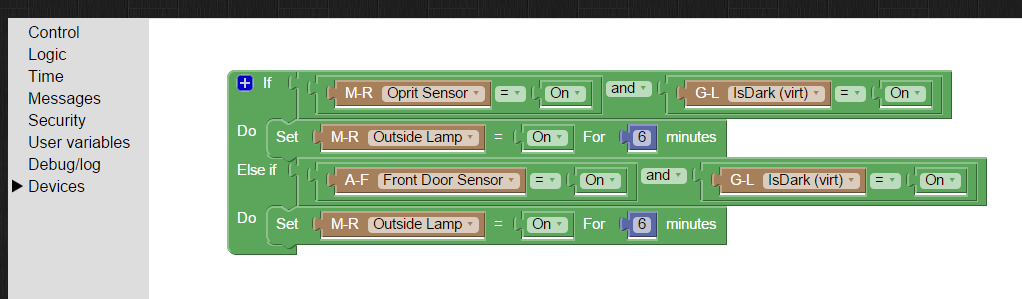
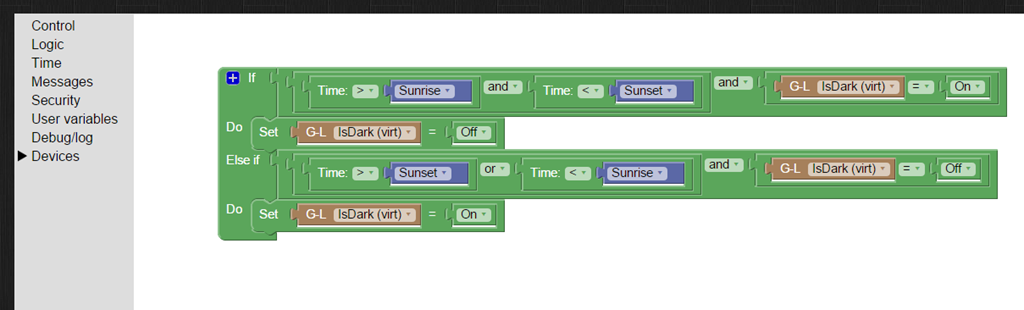
    Think of Blockly as Lego for programming. It’s wonderfully easy to use, and I’ve already programmed the motion sensors on the driveway and by the front door to turn on the outside lights if someone comes along during the hours of darkness (which have been defined, using Blockly and a “virtual device” in Domoticz that I defined: IsDark):

    Domoticz 19

    Domoticz 20

    So for the moment, I’m going to stick with Domoticz for our Home Automation system, with HomeGenie held in reserve as my fallback position.

    And while I tested both on Windows, both Domoticz and HomeGenie are available for the Raspberry Pi. I’ve also stuck my toe into the waters of using a Raspberry Pi, and Domoticz is currently running very happily on it. But that’s the subject of another post, I think…

  • Home Automation: A Modern Tower of Babel

    A little while back, I blogged about the fact that broadband internet in our neck of the Netherlands is like a piece of wet string. In trying to drum up local support for improving the situation, I’ve been looking into scenarios where real broadband internet (that is, speeds of at least 10 Mbps, and preferably 20+ Mbps) are going to be required.

    From a purely selfish perspective, I’m uncomfortably aware that given my age, there’s going to come a time when I may need to depend on healthcare services delivered through broadband internet direct to our home. One of the aspects of such services is support for home automation (or Domotica, as it’s often called here in the Netherlands). While HA is usually thought about in terms of ease, security and energy efficiency, there’s also a healthcare aspect to it as well. For example, remote monitoring can allow patients with dementia to continue to live at home in the environment that they are comfortable with.

    So I thought that I should start exploring the possibilities of HA for our home. I’d start simple, for example, have certain lights come on at around sunset, and turn off at midnight, or install a motion sensor in our driveway to get early warning when we have visitors; and at night the sensor could also turn on lights for the driveway. That would in turn be a convenience for visitors and a deterrent for intruders.

    Of course, these simple scenarios could be realised with a few timers and lights controlled by motion sensors, but the real advantages start to come when individual items are linked together into a system. An individual neuron doesn’t do much – intelligence is the emergent property that arises out of the interconnection between billions of them. While I’m not looking to build a brain, a flexible method of controlling the environment and security of our house would be nice.

    However, when I started researching the technologies available for Home Automation, I soon realised that there’s a dog’s breakfast of competing products and standards out there. Some have been around for years. The X10 standard for example was developed in 1975, and while popular and used by an installed base of millions of devices, is beginning to show its age and limitations. Other newer products, while technically impressive, rely on proprietary technology unique to the vendor. Examples are the Insteon or the Loxone systems. Navigating through the shoals of reefs and whirlpools of Home Automation was not going to be an easy matter. As the Automated Home site says:

    There are a multitude of Home Automation systems available, from budget plugin modules that are easily retro-fitted into existing properties, to professionally designed bespoke installations that require a CI (customer installer or integrator) and structured wiring at time of build.

    I think I can forget about the professionally designed bespoke installations with their structured wiring – I’m going to be looking at something that can be retro-fitted easily into our farmhouse. That means that I’ll be looking at wireless systems as much as possible. I’d also prefer to go for products that share a modern de facto standard, rather than rely on a single vendor. As a result, I’ve decided that devices that implement the Z-Wave wireless communications protocol are probably my best bet, given that Z-Wave is supported by over 250 manufacturers worldwide.

    I’ve started small, and invested in one switchable power plug (the Fibaro Wall Plug) and a motion sensor (the Everspring SP103) – both Z-Wave devices.

    The next step is to make a choice about the controller for the HA system. Once again, there is a wide range of possibilities here. I could buy an off-the-shelf unit such as the Fibaro Home Center 2, the Zipato ZipaBox, a VeraEdge controller, or a HomeSeer controller. Or I could buy just the controller software, such as HomeSeer, and install it on a PC or a Rasberry Pi box. There are also open source projects for Home Automation software, such as HomeGenie and Domoticz.

    I’m still exploring the possibilities here. I’ve come across a few issues so far. For example, while the Fibaro Home Center 2 looks good on paper, judging from the user support forum, Fibaro are struggling to deliver a stable version of the controller software. The ZipaBox relies on a Cloud service to provide much of the controller functionality, and that’s a design choice that I personally would be less comfortable with. The HomeSeer software has been around for a while, and is now in its third generation. That does mean that it is very comprehensive; it can control a wide range of Home Automation hardware – far more than I would ever need or use. It also has a wide range of third-party plugins. However, its user interface can best be described as old-school utilitarian. There is an additional software product that can be used to design custom user interfaces for smartphones and tablets. And the HomeSeer software strikes me as being pricey: $249.95 for the basic version of the controller software and $199.95 for the UI designer software. If I were to go with HomeSeer, it would probably make more sense for me to buy the basic (linux-based) HomeTroller Zee controller at $199.95.

    So I’ll probably spend the next month or two trying out some of the controller software that’s available for Z-Wave networks, and hanging out in the user support forums to read about the experiences of others who are using controllers, both packaged and software-only solutions. Watch this space.

  • The Rise of the Machines

    Yesterday, I blogged about the Microsoft Band – the new wearable device from Microsoft that is aimed at people who do sports. Reading the press, I get the impression that relatively few commentators have understood what’s really going on here. Most of them are focusing on the device itself, and missing the real story. The device is a first generation attempt. It is limited, clunky, and will only used by early adopters. Better devices will inevitably follow, but that’s almost not the point.

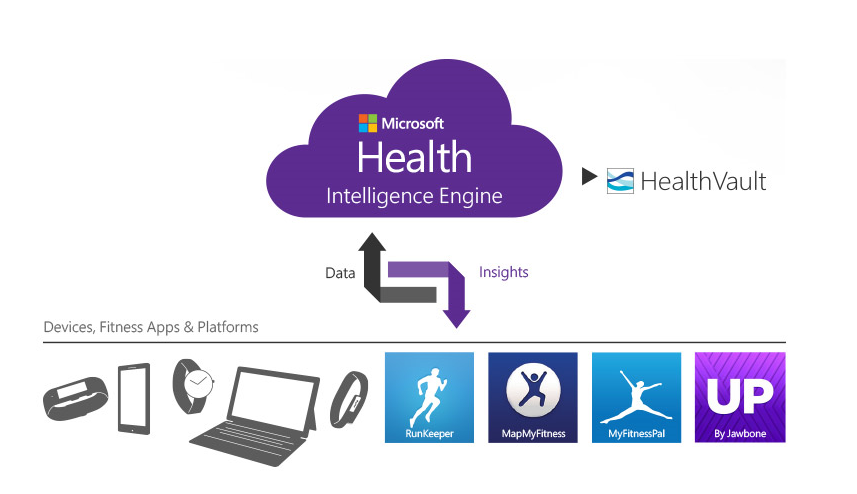
    The real point, and the real innovation, is Microsoft Health – the service in the Cloud where all the data collected by the Band can, and usually will, be held. Microsoft themselves talk about Microsoft Health being “the beginning of a journey”. It’s clear that the plan is that the data collected will be mined to provide value, and not just to you, but to Microsoft and its partners. I notice that Microsoft already has a connection not just between the Microsoft Health service and multiple (non-Microsoft) devices, but between Microsoft Health and Microsoft’s HealthVault:

    MS Health 01

    And just what is HealthVault? Well, it’s where you can store your health information and make it available to others: such as your health providers, and no doubt in the future, your insurers.

    This is the inevitable rise of big data in the Healthcare industry. I think where Microsoft, and others, certainly Google, but maybe even Nintendo, are going is to aim for the point where their intelligent agents (Cortana, in Microsoft’s case) take on the role of your personal physician. It may seem farfetched today, but it is an inevitable endpoint of the changes that are happening all around us. There’s a McKinsey report that says that Big Data is the next frontier for innovation and competition, which may well be the case, but I can’t help feel that McKinsey hasn’t seen the writing on the wall when they state that:

    There will be a shortage of talent necessary for organizations to take advantage of big data. By 2018, the United States alone could face a shortage of 140,000 to 190,000 people with deep analytical skills as well as 1.5 million managers and analysts with the know-how to use the analysis of big data to make effective decisions.

    Um, sorry, but coming rapidly up on the inside are intelligent bots that have those deep analytical skills. Already, we have the fact that arguably the best oncologist in the world is not a human but an intelligent bot: Watson. We are rapidly approaching the position where for many jobs – not just assembly line workers, but white-collar workers and even the professional classes such as lawyers, doctors, and analysts – humans need not apply:

    Last week, I attended a presentation in Silvolde, a small town nearby, which was given by Peter van der Wel – a Futurologist and Economist. He covered much the same ground as in the video above. While van der Wel was a self-confessed optimist about the technological changes that are heading our way, I’m not so sure. I agree that they will happen, but the resulting upheavals in society as we move from the pre-robot age to a post-robot one will not be easily managed. Today, most of us work to earn money in order to live. When it becomes difficult to find a job – any job – what will the impact be on society? I have no answer, but I think we “live in interesting times”, as the old Chinese curse would have it.

  • Microsoft’s Band-Aid

    There have been rumours about it for a while now, but yesterday Microsoft announced the Microsoft Band, a wearable device that both tracks your health and provides notifications of emails, appointments and social media activity.

    The wristband records the number of steps the wearer takes, the intensity of sleep, exercise performance and calories burned. It also tracks heart rate, location via GPS, skin temperature, perspiration and UV exposure. All that data is passed into Microsoft Health, a cloud-based service that builds up a picture of your physical activity and health indicators.

    It’s clearly aimed at people who do sports, but I wonder whether Microsoft might not widen the target group to add others in the future, such as the elderly. Being on the wrong side of 65 myself, I would definitely be interested in a device that can monitor my health, and alert me when trends look to be going pear-shaped. A panic button might be a useful addition as well. And think of the add-on accessories – a Bluetooth blood pressure monitor for example.

    As usual for Microsoft, the Microsoft Band is only currently available in the US, with no word as to when it might be expected elsewhere. I’ll probably be dead before it is available here.

  • Whither Next? A Media Center Journey

    Four and a half years ago, I built my first HTPC for our Home Cinema setup. It was leading edge technology then, but with the rate of change being what it is, support for many of the software and hardware components very soon became either dying or dead.

    The HTPC is currently running Windows 8.1 + Windows Media Center (WMC), which in turn is supplemented with MyMovies to provide the best experience with a library of films and recorded TV series. For Bluray films, I’ve been using Arcsoft’s TotalMedia Theatre to play both the discs themselves and ISO files that I’ve made from my discs.  This setup works well, but the writing is on the wall indicating that it can’t continue this way forever. For one thing, it’s abundantly clear that Microsoft want to wash their hands of Windows Media Center, and for another, Arcsoft suddenly pulled TotalMedia Theatre from its web site last month and it is no longer available.

    I need to prepare a contingency plan, so I’ve been looking at alternatives. A couple of years ago, I took a (quick) look at JRiver Media Center. I said at the time:

    This is a total solution, replacing Windows Media Center, TMT5 and MyMovies in their entirety. JRiver Media Center is capable of handling Blu-ray. I must admit, on my HTPC it appears to handle them flawlessly, a pleasant change to the current disaster of TMT5. But if I adopted JRiver Media Center, I would also be moving away from WMC and MyMovies, and I do like the user experience of that combination.

    JRiver Media Center has been around since 1998, and is currently on version 17 (!). It looks to be a very good product, well-supported, with an extremely enthusiastic user community of more than 26,000 members, some of whom are contributing plug-ins for the main application. However, I’m not sure that I want to move to it. It’s a personal thing, I know, but as I say, I feel very comfortable with WMC and MyMovies.

    JMC is now at version 20, but I still have the impression that it has so many bells and whistles that it is overly-complex for what it is. I might take another look at it to see if it strikes me as being more attractive, but I can’t help feeling that it will just have yet more features, knobs and switches bolted on that I would never want to use. Addendum: It does, and I don’t. It’s not for me.

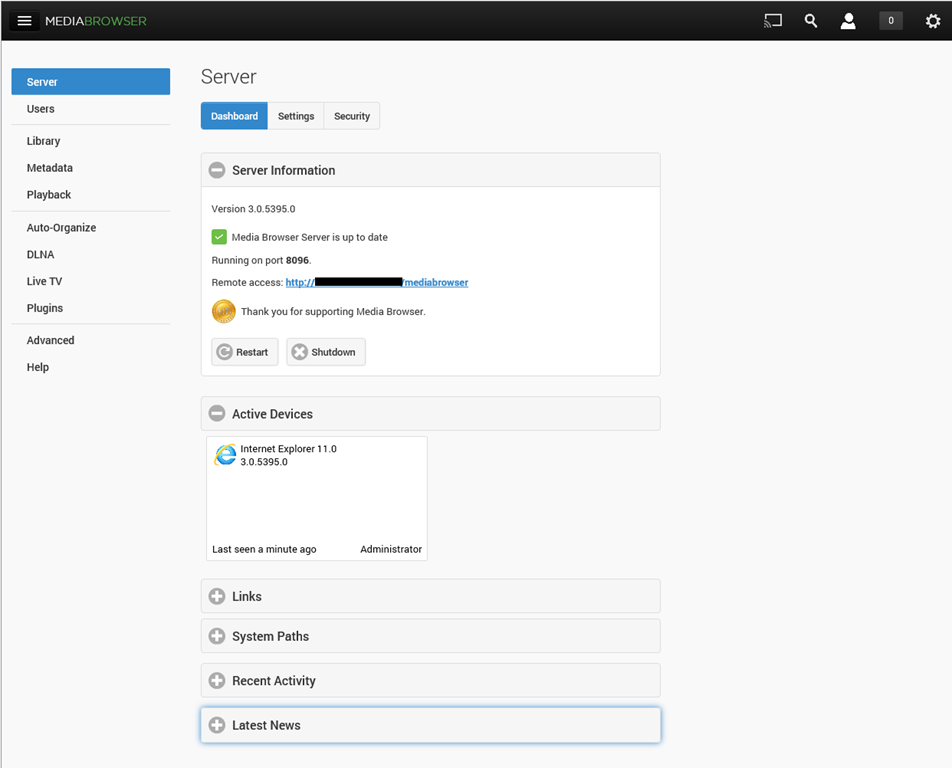
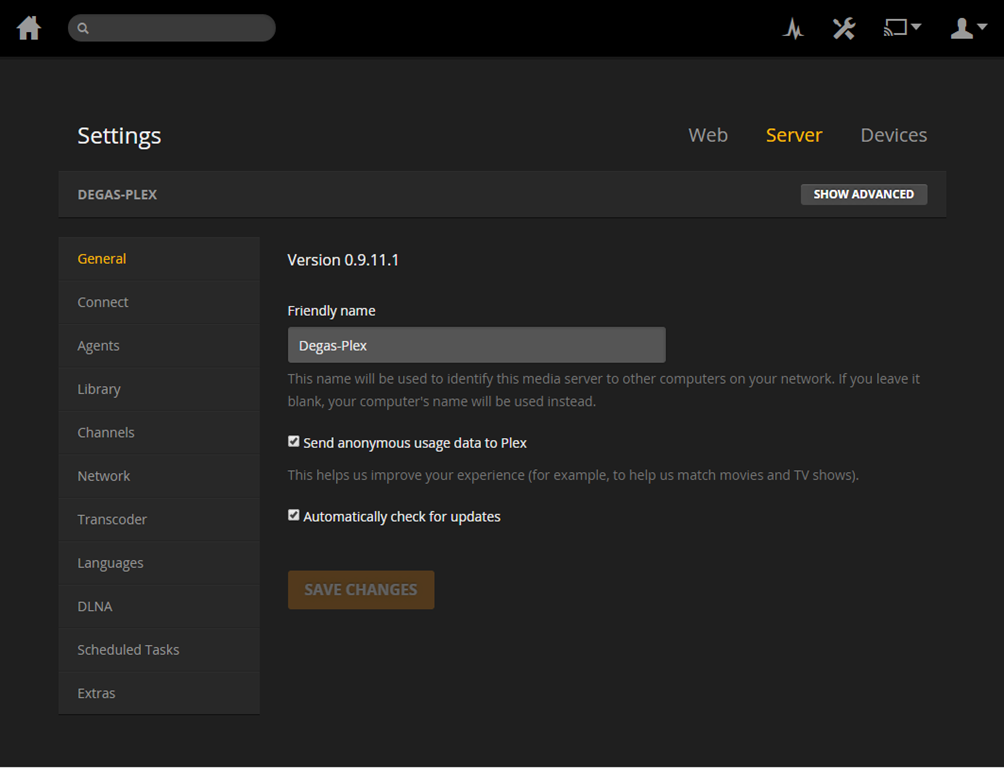
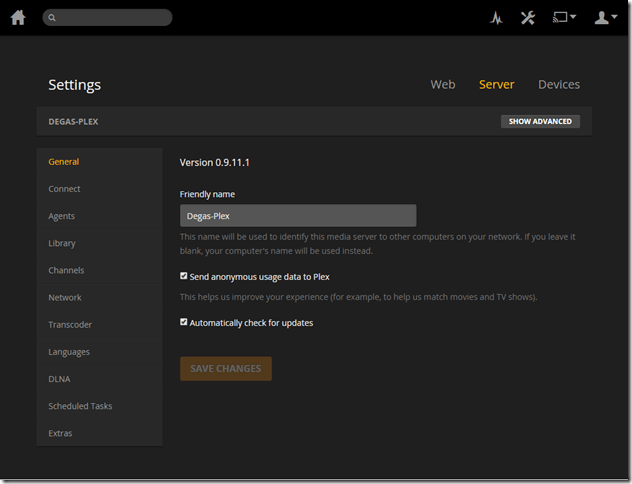
    I’ve been looking at a couple of other alternatives over the past few months:  MediaBrowser (now called Emby) and, more recently, Plex. They both have their strengths and weaknesses. A major strength of both of them (as far as I’m concerned) is that they both use a client/server architecture. That is, the core component of both is a media server to which a wide range of clients (TVs, HTPCs, PCs, tablets and smartphones) can connect and play the media. Since I hold all our media on a Windows Home Server 2011 system, that would be the logical place to install and run the media server. For both MediaBrowser and Plex, the media server can be administered on the WHS 2011 system via a web interface.
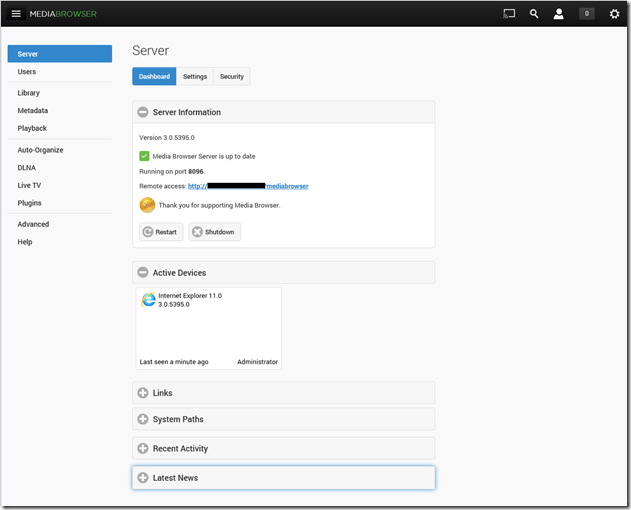
    MBS 01

    PMS 01

    The weaknesses differ between the two, but both MediaBrowser and Plex are fast evolving systems, so changes, bugs, and bug fixes are very much the order of the day. As far as I’m concerned, neither one offers me a complete replacement for our current WMC + MyMovies setup at the moment. Ideally, I would like a combination of the features of the two, because of their current shortcomings.

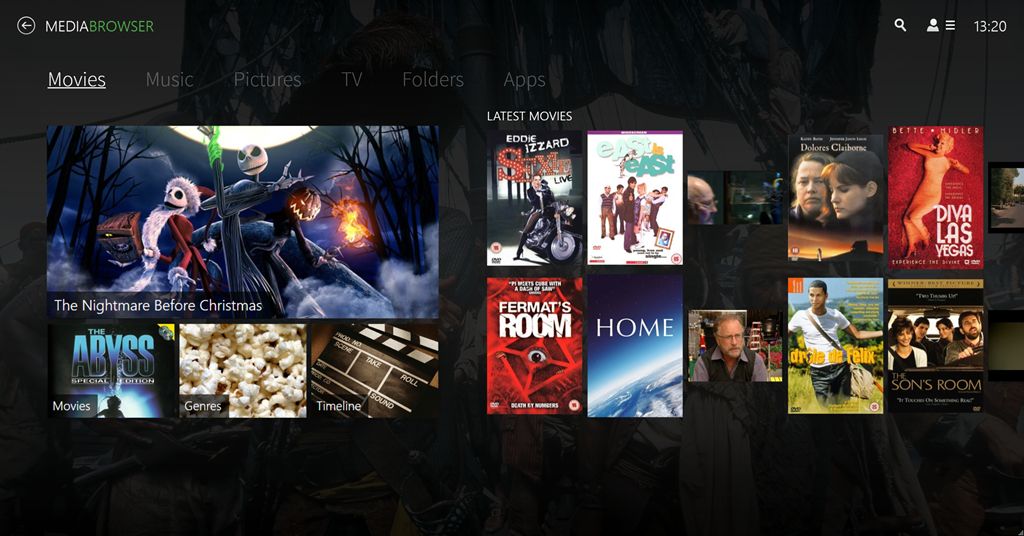
    For example, take the HTPC component of both: MediaBrowser Theater (MBT) and Plex Home Theater (PHT). MBT is still Alpha software; not even at Beta stage. While it is looking good, it clearly has a long way to go – it is very buggy and feature incomplete at the moment.
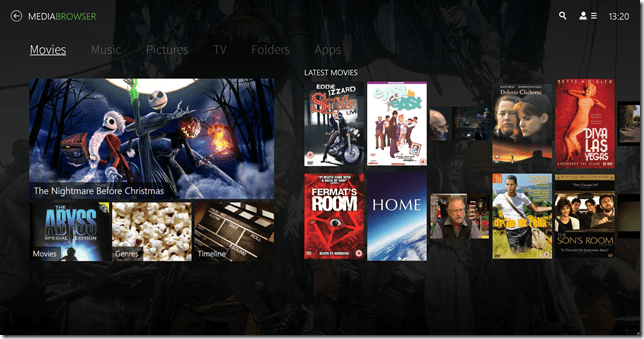
    MBT 01

    PHT, on the other hand, is much further down the development track. It looks good and seems fairly reliable on my HTPC.
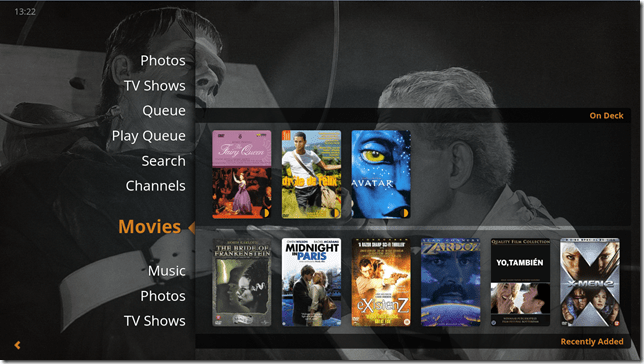
    PHT 01

    Both MBT and PHT are so-called “10 foot interfaces” – they are designed for use on large screens, and to be driven by remote control. It would be really nice if PHT could use the remote I have for Windows Media Center, but for some reason best known to the designers, they have deliberately chosen not to stand upon the shoulders of giants, but to start from scratch with almost entirely a different set of commands.

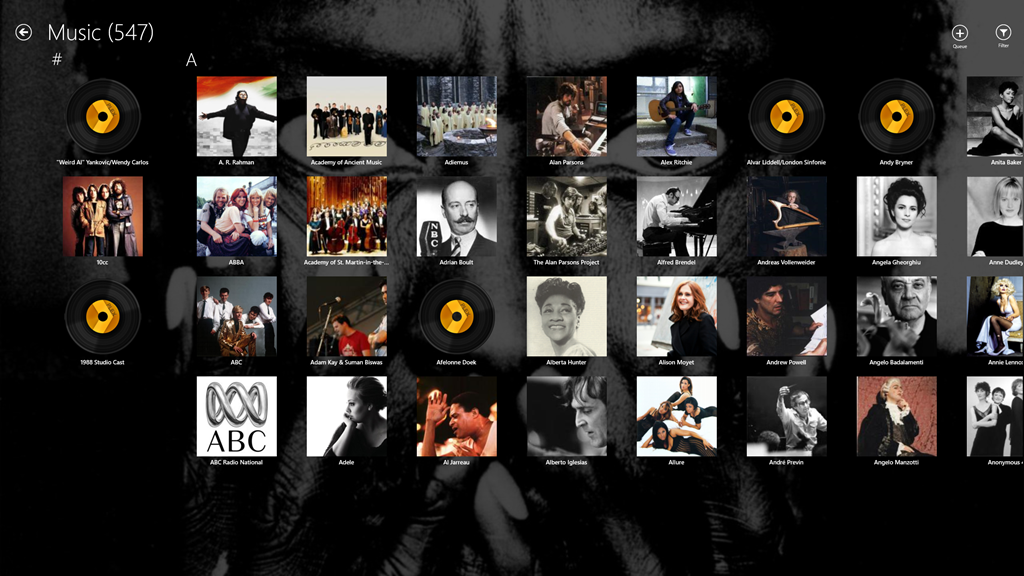
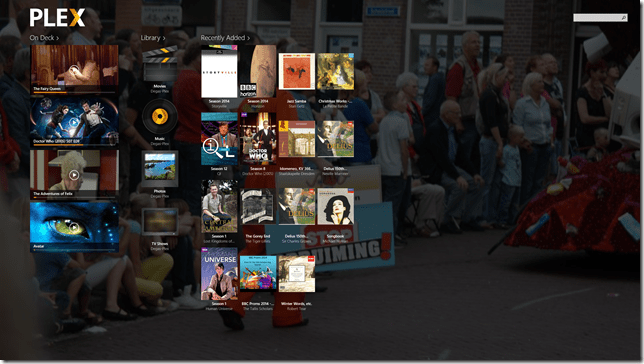
    Both MediaBrowser and Plex have player clients for Windows 8.1 and Windows Phone 8.1. Here are the Windows 8.1 clients:
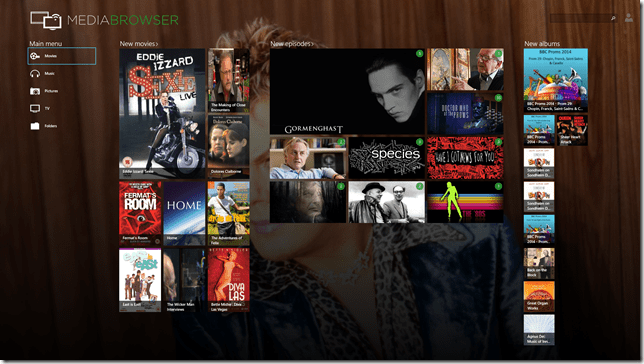
    MB W8.1 01

    Plex W8.1 01

    One major shortcoming of the Plex clients (as far as I’m concerned), is that neither of them have no other way of browsing our Music library other than by an Artist view:
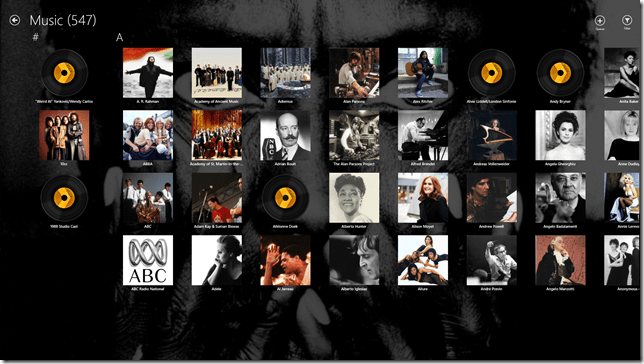
    Plex W8.1 02

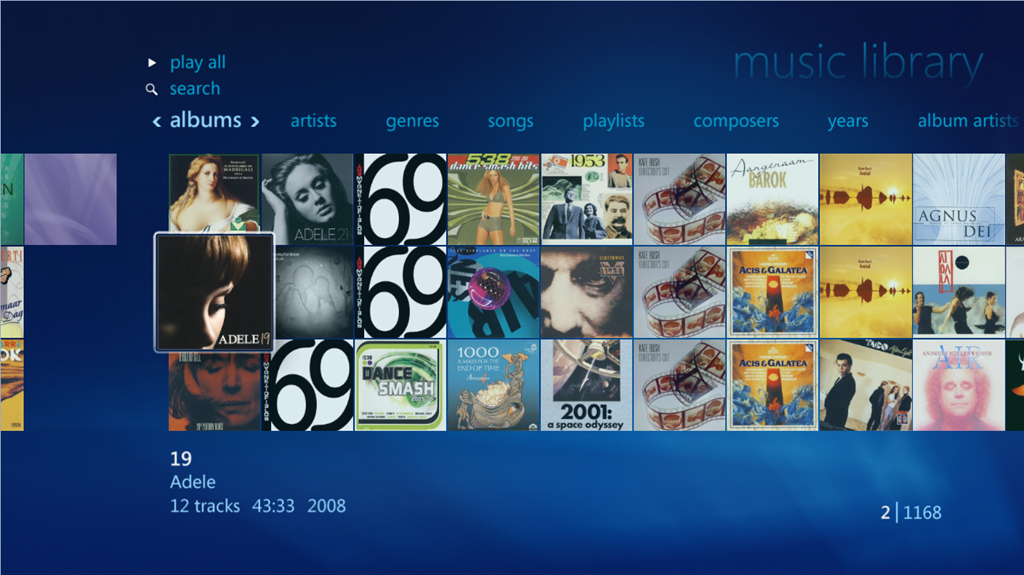
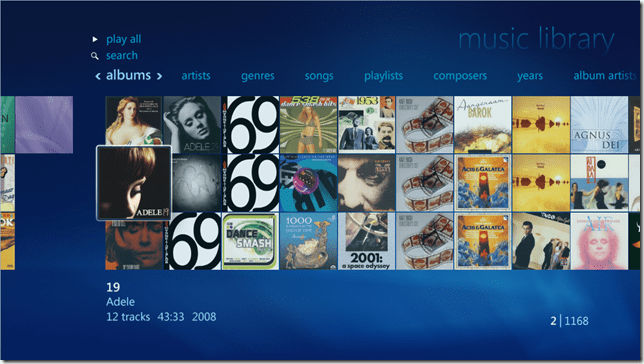
    At least the MediaBrowser Windows 8.1 client offers a choice of being able to browse by Artist, Album or Genre, while the Windows Phone client adds the choice of being able to browse by song as well. However, this is nothing compared to Windows Media Center, which, since 2004 (ten years ago!), has offered a choice of being able to browse by Album, Artist (both per track and per Album), Genre, Song, Playlist, Composer, and Year:
    WMC 01

    So as far as handling of a Music library is concerned then, both MediaBrowser and Plex have a very long way to go…

    [Addendum 30 October 2014: Plex have just released new versions of the client for Windows 8.1 and Windows Phone, and the good news is that at last it is now possible to browse the Music library by Album. Semantic Zoom is also supported when the Album list is sorted by name. However, Semantic Zoom doesn’t work (in Windows 8.1) or is missing altogether (in Windows Phone) when Albums are sorted by Artist. Apparently, this is caused by limitations in the current version of the Server. Hopefully it will get fixed, but at least we are now a little further forward than we were…]

    It’s a similar story when it comes to browsing Photo libraries. The MediaBrowser and Plex clients can only browse folders, while Windows Media Center can browse by Folder, Tags, Date taken, Ratings, Slide shows and Shared (browsing other media servers shared on the local network). The lack of support for browsing by Tags, I find particularly disappointing in the MediaBrowser and Plex clients. Still, support for these features may yet come. It’s clear, however, that both the MediaBrowser and the Plex developers view Movies and Video as where the action is. Music and Photo libraries are very much the poor relations.

    One area where MediaBrowser and Plex has surpassed Windows Media Center is that of being able to play content on other devices. WMC was designed as an all-in-one solution, whereas both MediaBrowser and Plex have been designed as an ecosystem of interconnected server and client devices. So it is possible to browse my movie library on my Windows Tablet, or my Windows Phone; pick a movie, and then start it playing on the HPTC, and continue controlling playback from the browser device.

    Plex can do this with its own player applications and selected Smart TVs. MediaBrowser has possibly a wider reach, because it should be able to work with any DLNA-certified device. However, the theory is not always borne out in practice; I have problems using my Denon AVR to play music sent to it by MediaBrowser.

    Another area where MediaBrowser and Plex go beyond Windows Media Center is that of being able to access and share media collections outside of the home network. This raises a lot of questions around security, and indeed, Plex seems to have some architectural issues that need to be addressed in this area, and I would not be surprised if MediaBrowser might have similar questions asked of it. However, as I have no desire to share our media collections outside of our home network, I do not use this capability and have closed off the servers from outside access. (Note: since this section was written, Plex has had a totally redesigned security architecture implemented, which seems to have addressed the security issues)

    In summary then, both MediaBrowser and Plex have promise, but I don’t feel that either of them have quite reached the stage where I will commit to one and drop my current Windows Media Center setup. Nonetheless, I’ll be continuing to monitor and try out both.  We are getting ever closer to the release of Windows 10, and Microsoft’s possible removal of Windows Media Center from that operating system. The clock is ticking.

    Addendum 6 August 2015: Well, Microsoft has just released Windows 10, and, as expected, Windows Media Center has been dropped from the operating system entirely. Since my last entry on this post, both Plex and Emby have improved. Plex, in particular, has considerably improved handling of Music collections. Still not as good as Windows Media Center, it has to be said, but not bad.

    I’m still running both Plex and Emby in parallel, trying to make up my mind between them. Plex is currently in the lead as far as I (and my requirements) am concerned, but I’m waiting to see what the forthcoming version of the Emby Home Theater client will offer before I make my decision.

  • Music and Windows Phone

    Back in the days of Windows Phone 7, Microsoft’s Zune application was used to copy or synchronise media (music, photos, videos and podcasts) between your PC’s media libraries and your Windows Phone. When I had a Nokia Lumia 800 (which used Windows Phone 7.8), it was wonderfully easy to transfer music and podcasts from my libraries to my phone and to manage them on my phone with it.

    Then I upgraded to a Nokia Lumia 1020, which uses Windows Phone 8, and found that I’d need to change the media management software, because Zune doesn’t work with Windows Phone 8. Microsoft has released a new generation of media management software for use with Windows Phone 8.

    Microsoft make two versions of this media management software for Windows, a desktop application and a Modern UI App.

    I have tried both of them, and I’m here to tell you that they are both absolutely abysmal. Microsoft should really be embarrassed at how bad they are.

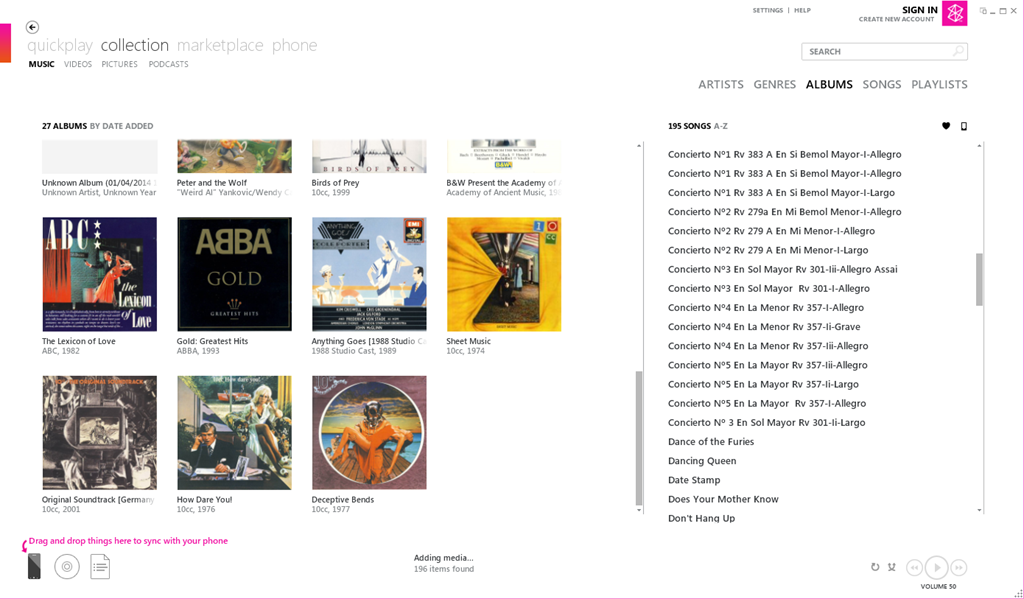
    Here’s a screenshot of Zune displaying some of my music albums. To copy an album across to the phone, I simply drag and drop the albums onto the icon of the phone:

    Zune 04

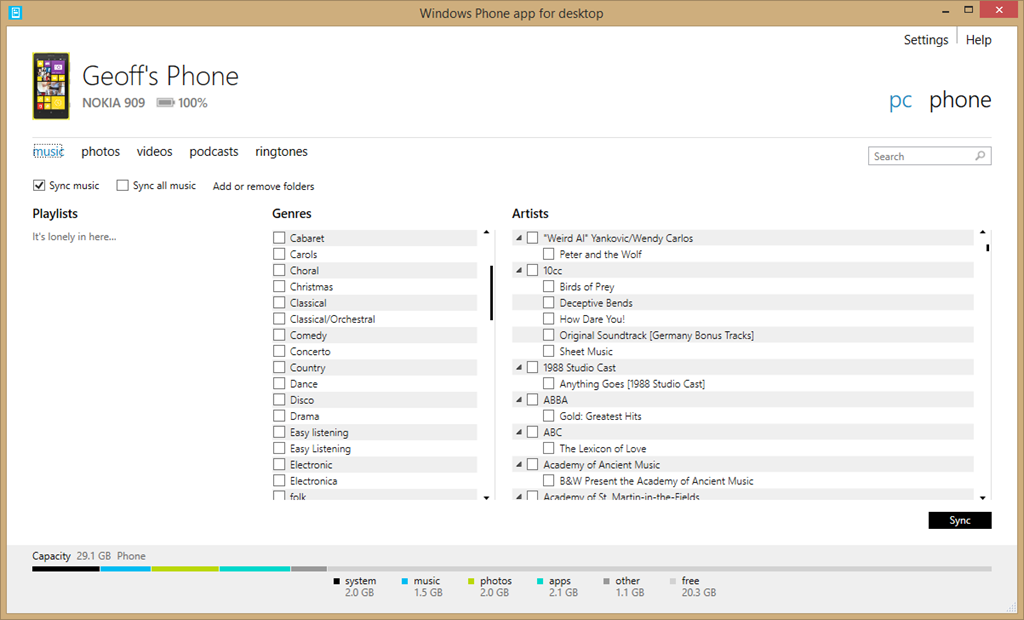
    Here’s the equivalent screen of the new desktop application:

    Zune 06

    For a start, there’s no way of displaying albums; only a list of genres and artists. Secondly, there’s no display of Album Art, which I find gives me useful visual cues. Thirdly, if I select a genre, then the list displayed under Artists does not change to display only those items (songs) that are tagged with the relevant genre, so I have no way of knowing the specifics of what I am about to sync. Also, I have no way of knowing how much space will be required on my phone.

    If you think this is bad, here’s the equivalent opening screenshot of the Modern UI App when adding music to your phone:

    Zune 07

    The problem is that Microsoft has focused on its subscription-based cloud service for music – Xbox Music – and forgotten about those of us who have our own music collections or have no interest in paying a monthly subscription fee. If you are a subscriber to the Xbox Music service, then you can download music from the service directly to your Windows Phone 8 device. But if you are not a subscriber, Microsoft will point you in the direction of one of their media management software applications to transfer music to your phone, and using them is a horribly painful process.

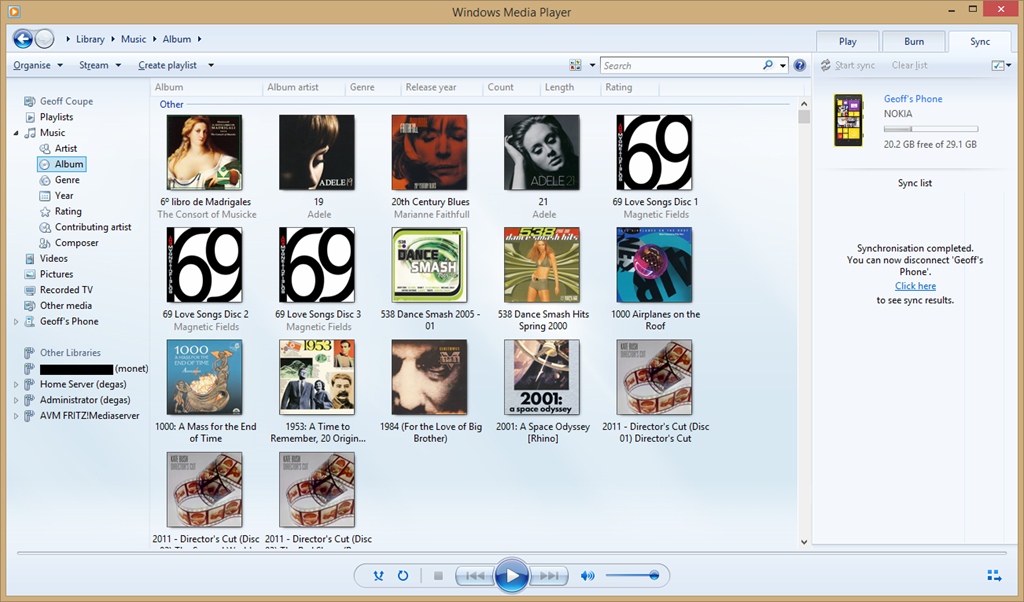
    Fortunately, I have discovered that there is another alternative; and that is Microsoft’s good old Windows Media Player. It knows about Windows Phone 8 devices, and can sync to them with ease. I can display my music collection by Album, Artist, Genre, Rating, even by Composer (none of the other Microsoft applications can do this), and sync my selection to my phone with ease.

    Zune 08

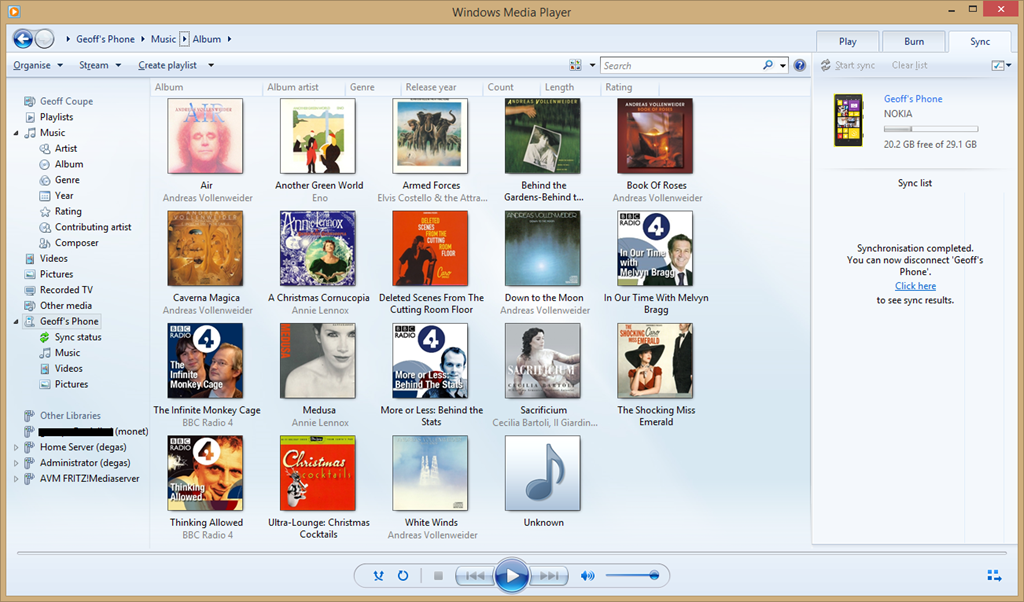
    You can also use it to browse the content of your Windows Phone and manage your media on the phone if you so wish. Here’s the Album view:

    Zune 09

    And here’s the photos on my phone:

    Zune 11

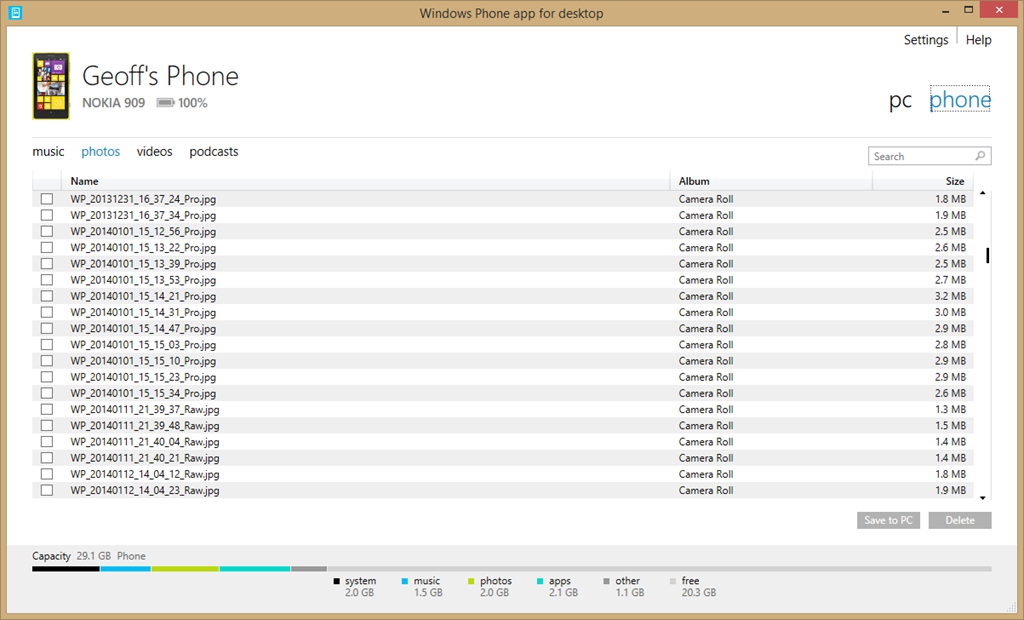
    By way of contrast, here’s what you see when you use Microsoft’s brand spanking new desktop application for Windows Phone to browse your photos:

    Zune 12

    Yup, it can’t even display thumbnails of your photos… As I say, Microsoft should be thoroughly ashamed of this rubbish.

    I’ll be sticking to Windows Media Player for managing the music media on my phone from now on.

    There’s a sting in the tail I’m afraid for those of you who are using a Windows device running Windows RT, such as the Surface 2. Windows Media Player isn’t available for Windows RT. I’m afraid you are stuck with Microsoft’s abysmal Windows Phone App.

  • Essential? – I Think Not

    I received an email today from Nokia which had the strapline:

    Essential Apps for your Lumia: Facebook, WhatsApp and Instagram

    Perhaps it’s just me, what with my hardening arteries, old age and all that, but “Essential”? – I think not. In fact, I refuse to touch any of them with a bargepole.

    I’ve long thought that Facebook is the spawn of the devil, and its recent acquisition of WhatsApp for the absurd sum of $19 billion merely confirms it. WhatsApp is a proprietary, cross-platform instant messaging subscription service for smartphones. It also has the nasty habit of harvesting all telephone numbers that are in a subscribers contact list, whether their owners are subscribers or not. Dutch newspapers are carrying the story today that the Dutch Data Protection Authority (the CBP) are saying that WhatsApp is breaking Dutch Law. The newspapers are a bit late, the CBP published its report on WhatsApp over a year ago, and it concluded:

    People who want to use the app must grant WhatsApp access to their entire electronic address book, including the mobile phone numbers of contacts that are not using the app (except in the latest app version on an iPhone with iOS 6). Because WhatsApp does not obtain unambiguous consent from non-users to process their personal data and does not have any other legal ground for processing that data, WhatsApp is acting in breach of the provisions of Article 8 of the Wbp [the Dutch Data Protection Act].

    I think I’ll stick to the good old-fashioned (non-proprietary) SMS for my Smartphone messaging needs, thank you very much.

    As Jeff Atwood puts it:

    Nothing terrifies me more than an app with no moral conscience in the desperate pursuit of revenue that has full access to everything on my phone: contacts, address book, pictures, email, auth tokens, you name it. I’m not excited by the prospect of installing an app on my phone these days. It’s more like a vague sense of impending dread, with my finger shakily hovering over the uninstall button the whole time. All I can think is what shitty thing is this “free” app going to do to me so they can satisfy their investors?

  • A Camera With A Phone Attached

    I dabble in photography, but I’d hesitate to call myself a photographer. Nevertheless, I invested in a Canon EOS 300D back in 2005, and replaced it with a Canon EOS 450D in 2008. Along with the cameras came investment in four lenses to cover a range of situations. I’ve been very satisfied with the equipment, despite having to spend 145 euros on a repair to the electronics in one of the lenses that failed during a shoot.

    However, having to lug the camera bag with a selection of lenses around means that I have to make a deliberate decision whether to take the camera with me if I’m going somewhere. That’s the advantage of point-and-shoot cameras; they are portable enough to slip into a pocket and be available at all times. Of course, the quality is not comparable with a DSLR. Martin has a Canon IXUS 300 HS, and I sometimes find that I borrow that rather than have the hassle of lugging around the Canon EOS and lenses.

    Meanwhile, smartphones have been in a race to improve the quality of the photos they made. I entered the race two years ago when I bought a Nokia Lumia 800. The quality and resolution of the Lumia was not quite up to that of the IXUS, but at least I had it with me at all times. Then, last July, Nokia introduced the Lumia 1020, which has a staggering 41 Megapixel image sensor.  To be fair, Nokia had also introduced the Nokia PureView 808 smartphone 18 months previously, which had a similar specification. However that smartphone runs the Symbian operating system, and represents an ecosystem that I have no interest in. The imaging technology that had been introduced in the PureView 808 was further tweaked for the Lumia 1020 to produce image quality that far outstrips any other smartphone. So the Lumia 1020 was the flagship phone at the time of introduction, and it commanded a flagship price – too rich for me. But six months is a long time in the smartphone market, the prices started to fall to the point where I became tempted. In the dying days of 2013, I purchased my own Lumia 1020.

    The Nokia Lumia 1020, like the Lumia 800 before it, is a Windows Phone, so I was able to move all my information and applications across without issue. The prime differentiator for me is the camera. It’s clearly not at DSLR quality, but it’s good enough for me for most occasions. If you want a comparison, then this article: Smartphones versus DSLRs versus film: A look at how far we’ve come, is highly recommended. A few choice quotes:

    When I first saw the images from the Nokia Lumia 1020, I did a double take. Clear and crisp, lots of detail and super strong colors that you’ll either love or wince at. I loved them. And did I mention the detail? After years of seeing bigger cameras perform better, I couldn’t believe that a tiny plastic and glass Zeiss lens could resolve so much from the center to the edge of the image. It was close to the Nikon D800. I was stunned. I’ll list the shortcomings of the Nokia below, but first, some more stand-out results.

    How many years are smartphones behind the best $2,000 DSLRs? Comparing detail resolved, I’ll say the iPhone 5S currently sits 8-9 years behind the DLSRs in bright light, while the Nokia trails by less than 6 years — probably nearer to 3. This is even when you allow the DSLRs the luxury of a $1,700 lens, and shooting in raw. In bright light, the Nokia came close to competing with the detail from the best DLSR yet made.

    The Nokia 1020 has redefined what I thought possible from a phone. I used to think of smartphones as a separate branch of ‘wannabe’ cameras, doomed to forever play catch-up with real cameras. I used to think like Takafumi Hongo, a Canon spokesperson who told the Wall Street Journal “Taking photos with smartphones and editing them with apps is like cooking with cheap ingredients and a lot of artificial flavoring. Using interchangeable [lens] cameras is like slow food cooked with natural, genuine ingredients.” He has a point. With a smartphone you’ll miss a lot of the joy of learning to cook traditionally. But in photography, the important ingredients come from you. Smartphones are now good enough not to need artificial flavoring from apps.

    I look forward to wielding my new camera that happens to have a phone attached to it. It will always be in my pocket, ready to hand.

  • “Play to” and Windows 8.1

    Back in the distant days of 2009, Microsoft introduced a feature called “Play to” into its new operating system, Windows 7. Play to, so Microsoft claimed:

    makes it easy to stream music, video, and photos from your computer to other PCs, TVs, or stereos on your home network. You can stream music from your PC to your home entertainment system or stream slide shows and videos to another computer or to your TV. Just right-click the tracks you want to enjoy, or add them to your Windows Media Player 12 playlist, and click Play To. Now you’re hearing—or watching—what you want, where you want it.

    In those early days, it was something of a rocky road to negotiate; there were many bumps along the way. Nevertheless, I was happy with the end result. It worked for what I wanted.

    Then along came Windows 8. Once again, in the pre-release versions of Windows 8, there were issues, but these were fixed in the final version of Windows 8. However, while the operating system and the venerable Windows Media Player (unchanged from Windows 7) were working, the (brand-spanking-new-supposedly-fancy-but-really-very limited) Xbox Music App from Microsoft still had a number of shortcomings.

    Windows 8 also introduced a new wrinkle into Play to. I discovered that my ancient (5 years old) Denon AVR-3808 was being reported as a “not Windows Certified” device. Whilst I could continue to use it with Windows Media Player, I could not use it at all with any of the new Modern UI Apps, such as Xbox Music. Fortunately, digital mediaphile Barb Bowman came to the rescue and discovered a Registry fix, which allowed non-Windows Certified devices to be used in Modern UI Apps. Subsequent to that, Microsoft’s Gabe Frost supplied a simpler Registry fix to accomplish the same thing.

    I used Gabe’s fix, and all seemed fine.

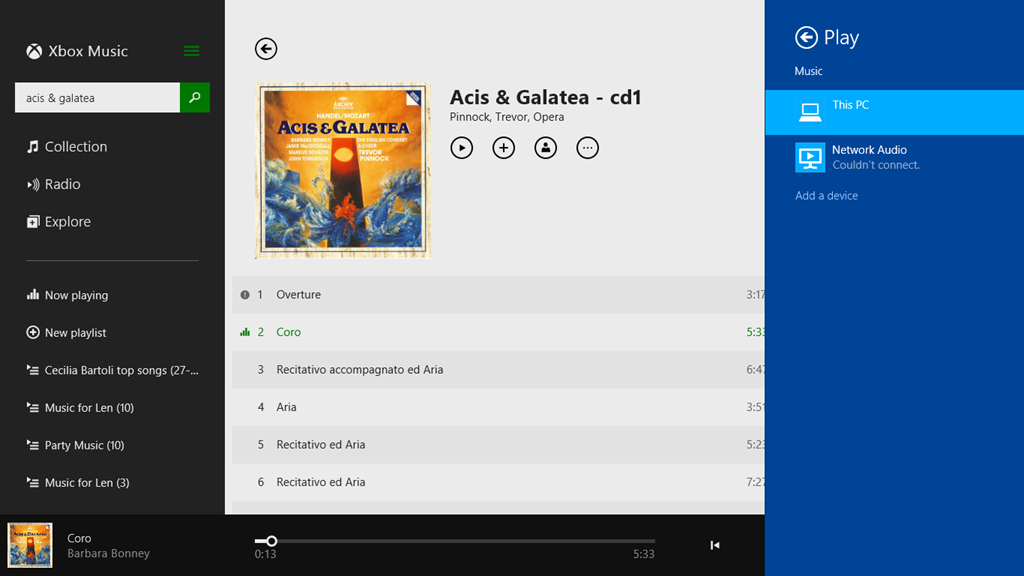
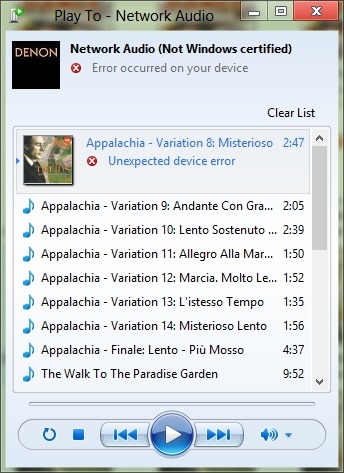
    Now we have Windows 8.1 and a much-improved Xbox Music App, and once again I seem to be taking a step back. While Windows Media Player continues to work as usual, Xbox Music is behaving very strangely when I attempt to use the Play to function. Here’s a screenshot of an attempt to use the Denon as a Play to device in Xbox Music (the Denon shows up with the name Network Audio in Windows):

    PlayTo 03

    Here, I’ve attempted to stream the first track to the Denon. That has failed, and Windows is telling me that it couldn’t connect to the Network Audio (the Denon), but in fact the second track is actually playing through the Denon. In addition, there’s a small information icon by the first track, click on it and you get:

    PlayTo 04

    which is a very odd message, since these tracks are not DRM-protected.

    I tried another Modern UI App, Media Monkey, and this seemed to behave much better. Occasionally it would refuse to Play to the Denon when first starting up, but once it got going, it seemed to be much more solid.

    So, what’s going on here?

    I raised the issue in a thread on one of Microsoft’s Answers forums. Gabe Frost himself responded:

    We have not seen this, and do not have this specific Denon model to test with, so would like to get further information from you.

    I provided the information he asked for, and very quickly the answer came back, and it’s very interesting.

    From the traces, we can see you’re trying to stream a WMA file from the Music app. Since Denon does not support WMA, the file has to be transcoded real-time into LPCM. When a file is transcoded in real-time, no system can know the resulting number of bytes, so in order to support seek, it has to be time-based (we do know the duration). However, Denon also does not support time-based seeking. In Windows 8.1, we introduced a feature that emulates time-based seeking for devices that do not support it. This is really nice in that users can seek their music or videos when they previously could not.

    In your case, since the Music app was already playing the song locally for a bit, we are doing “Seek Emulation” to seek the stream to the same position the Music app was last playing at. This involves sending some additional SetAVTransportURI requests to the Denon DMR. We see the Denon DMR reporting an error, “TransportStatus = ERROR_OCCURRED”.  Probably this is the result of the additional SetAVTransportURI requests that we send.

    That would explain why the bug does not happen when using WMP as the media controller (DMC) in Desktop. With the Desktop controller, we don’t try to seek immediately after starting to play.

    Looking at our code, we see that careful tuning was required to work with Denon because they often tend (incorrectly) to report an error when they are no longer in an error state. Denon tends to forget to set TransportStatus back to “OK” when it has received a new URL to play. While we tested with a wide range of devices (including some newer Denon devices) It appears that your Denon device is incompatible with this seek emulation because of the device bugs.

    We are investigating potential workarounds and will get back to you via this thread. A fix will take longer, unfortunately.

    One slight correction to what Gabe has written; the Denon (and all Denon AVR models, as far as I’m aware) does not support the WMA Lossless format, but they all support standard WMA format. My Denon even came with a Microsoft “PlaysForSure” sticker on it – so it was certified by Microsoft as being able to play standard WMA format!

    The issue I’m stuck with is that I have deliberately chosen to store my music collection in WMA Lossless format because it delivers higher-quality playback than standard WMA format. Lossless formats (e.g. WMA Lossless, FLAC) are better than formats that use lossy compression, such as WMA and MP3. The Denon supports FLAC, WMA and MP3, so in an ideal world, I would have chosen FLAC as my archival storage format.

    Unfortunately, Microsoft don’t support FLAC. While I can get a third-party FLAC add-on for Windows Media Player, there appears no way to use a third-party add-on for the Xbox Music App. And while I can use Media Monkey to play back FLAC files, in addition to WMA, WMA Lossless and MP3, the Xbox Music App is linked into a music store for purchasing downloads.

    I am going to have to think about the way forward for a while…

    Addendum: The Xbox Music App has other problems of its own. See Xbox Music App – Metadata Madness

    Addendum 2: As of April 8, 2014, Microsoft has released an Update to Windows 8.1 that makes it unnecessary to perform any registry edits to enable a DLNA Digital Media Renderer (DMR) to work with Modern Apps on the Start Screen. Devices will no longer appear as “uncertified” when Play is selected within an individual app (but if not certified will appear as such in the PC and Devices menu).

    Addendum 3: Native support for the FLAC format will apparently be coming in Windows 10. Good news, as far as I’m concerned.

    Addendum 4: Things will change yet again for Windows 10. First, the “Play to” function has been renamed to “Cast to”. Second, and more importantly, this function will have fundamental changes.  It appears as though Microsoft has removed DLNA DMR devices from system-level control (e.g. the Devices item in the Win 8.1 Charms bar), and demoted that function to needing to be controlled on an app-by-app basis.

    That’s all very well if app developers actually take account of it. I note that neither of Microsoft’s Music apps (Music or Music Preview) do this, and I also note that the Microsoft spokesperson uses the qualifier “eventually” in the context of support by the Microsoft app. That could mean it will be available on July 29 or it could mean in five years time. That does not give me a warm feeling.

    So, in summary, the “Play to” user experience is likely to take a step backwards in Windows 10 as compared to Windows 8/8.1. That’s a tad disappointing.

    Addendum 5: Well, Windows 10 has been released (on the 29th July 2015), and as expected Microsoft’s Music app (now called “Groove”) still does not have the “Cast to” function implemented. Sigh.

  • Nothing Can Go Wrong…

    …go wrong…go wrong…

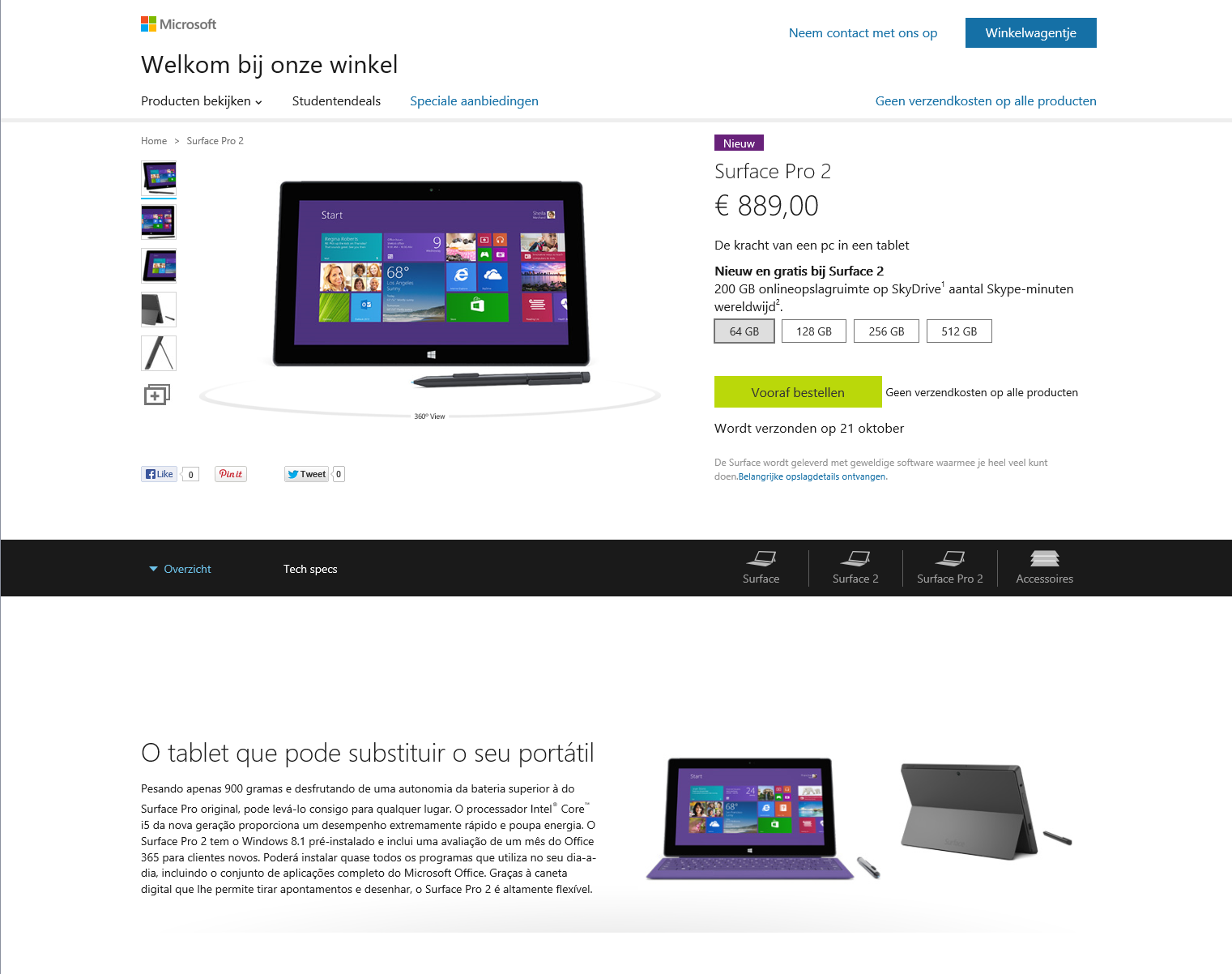
    I was reminded of the old joke about the fully automated system when I looked at Microsoft’s web page for the pre-ordering of Surface Pro 2. Half is in Dutch, the other half is in Portuguese.

    Microsoft Store 01

    It doesn’t exactly inspire confidence…

  • When All Else Fails…

    …change the cable.

    A few days ago, my Nokia Lumia 800 phone suddenly refused to connect to my PC for synchronising. I’d plug it in, but nothing would happen – Windows would not react to the connection, the Zune software would not start, zilch. And when I disconnected the phone, Windows would give me an error saying: “USB device not recognized”. However, the phone would still charge via the connecting cable, so at least something was happening.

    So I searched the web for this error and got lots of advice. Mostly involving uninstalling and re-installing the Zune software on the PC and doing a hard reset on the phone (which loses all my information on the phone).

    I followed all of this, without any resolution of the problem. I even installed the Zune software on another PC and tried connecting the phone there. Still the same error.

    Right, this then meant that there were two possibilities:

    • Either the phone was faulty, or
    • the connecting cable was faulty.

    Not having a spare micro-USB cable handy, I decided to buy a new cable, at – gulp – €24.95. It arrived today. With some trepidation, I plugged it in and voilá – synchronisation began.

    So the moral of the story is that even with modern electronic devices it can still be simply a  faulty cable that causes the problem.

  • The Gauntlet Has Been Thrown Down

    Just to follow up on my post about Microsoft Surface for a moment, I do think we live in interesting times.

    Peter Bright, over at Ars Technica, has a good article on the impact on OEMs of Microsoft entering the tablet hardware market; he likens it to Microsoft giving the OEMs a gentle kick in the teeth. The problem is that, compared with Apple’s iPad, the build quality of tablets running either Android or Windows is pretty dire. Even the so-called quality manufacturers have not exactly covered themselves with glory here. Samsung’s flagship Windows 7 Tablet, the 700T, for example is still plagued with the fact that its screen lifts away from the housing.

    As Peter Bright says:

    To allow Windows 8 to compete with iOS, Microsoft needs hardware to compete with the iPad. Bad hardware would jeopardize Redmond’s ability to play in the tablet space, but the PC OEMs have established for themselves a track record of producing little else. And while many of the OEMs have produced Android tablets to try to compete with the iPad, they’ve also consistently failed to match its quality.

    So Microsoft has drawn upon its 30-year history of producing hardware and made two models of Windows 8 tablets to show the OEMs how its done. Now admittedly, that 30-year history has been mostly spent in the area of producing mice and keyboards. But, on the other hand, Microsoft also makes the Xbox, which although it is a game console, has a similar level of complexity as a PC. Still, the engineering that is required for a high-quality tablet is definitely up a notch from the Xbox, so I am intrigued to see whether Microsoft can pull it off, and kick the OEMs in the teeth.

    What I also find intriguing is Peter Bright’s thoughts on how this might all play out. Scenario one is that the OEMs rise to the challenge and produce high-quality Windows 8 tablets. In which case, Microsoft can keep the Surface going as a small-scale, US-only operation.

    However, as Peter Bright points out, at least one OEM, Acer, has dismissed Microsoft’s challenge. In fact Acer, in the form of Oliver Ahrens, Acer’s senior VP and president for Europe, Middle East and Africa, believes that Microsoft is making a failed attempt to mimic Apple. He’s quoted as saying “I don’t think it will be successful because you cannot be a hardware player with two products”. Ahrens appears to overlook the fact that Apple dominates the tablet market with just two iPad products.

    Frankly, with friends like Oliver Ahrens, I don’t think Microsoft needs enemies.

    So then it might be opportune for Peter Bright’s second scenario to be realised. If the OEMs fail to rise to the challenge, the Microsoft must ramp up the Surface operation to a global scale, much as they have done with the Xbox.

    As I say, we live in interesting times.

    Addendum, 27 July 2012

    Charlie Kindel has an interesting post up on this subject of whether Microsoft is a hardware company. His view?

    Microsoft is not, and never will be, a hardware company.

    Kindel worked in Microsoft for over twenty years, and knows the company well. What I found particularly telling in today’s post was the observation that there are still organisational silos there:

    I know some of the people who drove the Xbox360 hardware design and supply chain management. They are now war scarred and seasoned experts. They are the type of people you want working on the next big thing. None of them even knew about Surface until it was announced. Typical Microsoft organizational silos.

    Oh dear.

  • Some People Just Don’t Grok It

    Yesterday, Microsoft revealed that it would be entering the Tablet market with two models of its own. I’ll come back to them later, but first, I must say that I’m struck by the continuing negative press that Windows 8 continues to receive. While it’s by no means perfect, I find the hyperbolical vitriol poured on it by some of the technical press quite astounding, and almost entirely without basis.

    Yes, the Metro user interface (UI) is very different from the UI of the traditional Windows Desktop, but I note that the iPad UI is very different from the traditional Mac desktop OS X UI, and yet none of the negative reviewers seem to even give this a second thought. Somehow, they seem to have adapted to being able to use both devices, and praise Apple to the skies.

    Apple, when it created iOS, took the view that a touch-oriented direct-manipulation user interface demands entirely different solutions and paradigms than mouse/pointer-driven user interfaces do. Microsoft, on the other hand, recognises the same challenge, yet is attempting to support both within the one operating system: Windows 8. That seems to me to be a far riskier strategy that the play-it-safe one that Apple has followed.

    I don’t have either a touchscreen or a touchpad on my PC, yet I’ve not found any problem about continuing to be productive using Windows 8, unlike some technical reviewers. I rather suspect that either they don’t like change, or they don’t like Microsoft.

    And now Microsoft has further upped the ante, by announcing two Tablets bearing the Microsoft name, and called Surface. The entry-level Tablet runs Windows RT (the version of Windows 8 designed to run on ARM hardware), while the top-of-the-range model runs Windows 8 Pro and uses Intel’s Ivy Bridge architecture.

    The entry-level Tablet is clearly aimed at the iPad market niche, but I’ve never found that market niche particularly interesting. I want something that is more than just a device for consuming content. I want one that has the power of a desktop available. So the more interesting one (to me) is the one running Windows 8 Pro. This comes with a pen, and (excellent) handwriting recognition is part of Windows 8. Coupled with the detachable keyboard, this model of the Surface range looks as though it meets my desire for origami computing.

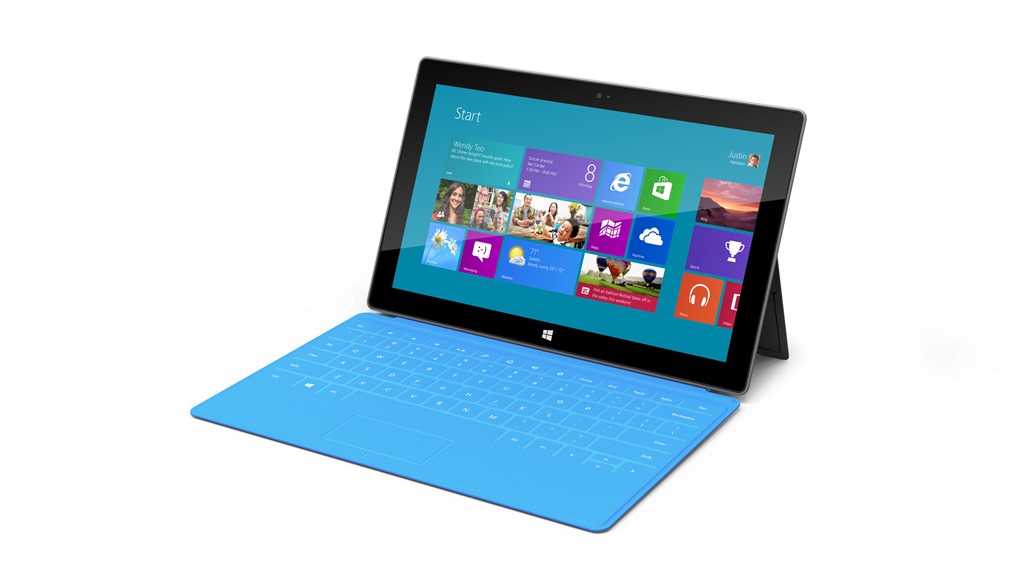
    surface_01

    As well as the Surface tablets, Microsoft also announced two new keyboards (which double as covers for the Surface). The “Touch” model (3mm thick) is shown in the picture above. The “Type” model (5 mm thick) comes with moving keys for a traditional feel.

    The specifications of the Surface tablets are still not spelt out in great detail, but the top model seems to have two cameras (one forward-facing and one rear-facing), and a screen resolution of 1920 x 1080 pixels. The Intel-based Surface has a mini DisplayPort for Video. I wonder whether this could also be a Thunderbolt port for connecting other devices, although I suspect that that will come in a future Surface model in 2013. No word on price, either, so I’ll have to wait to see whether this is a good match with my wishlist. But I have to say, it does look good.

    Update: I watched the video of the Microsoft presentation yesterday and picked up on a couple of things.

    First, the Windows RT machine being demonstrated by Steven Sinofsky froze up on him during the demo. He had to switch it for another machine. To be fair, demos of unreleased hardware and software are always a highwire act, so it’s hardly surprising he had to rely on the safety net of a second machine.

    Second, the words that are spoken during these Microsoft presentations are very carefully chosen. When Sinofsky talked about retail channels, he only talked about Microsoft’s own stores, both physical and online. These are both US-only, which leads me to worry that Surface may only ever be available in the US. It won’t be the first time Microsoft has done this; the Zune and Microsoft Kin products were also US-only. If that does turn out to be the case, then that will be a real disappointment to me.

    One other thought, I know that I said that it would be the Windows 8 Pro version of Surface that I would be interested in, because I thought the Windows RT Surface would be too limiting, like the iPad. Someone pointed out that you can still get the full PC experience on a Windows RT device by using the Remote Desktop App, and accessing the full environment of a desktop PC through the Surface tablet. Now that is a very interesting idea, and one that I had not considered. I often use the Remote Desktop App to remotely login to my Windows Home Server from my desktop PC, and the experience is indeed just as though I have my monitor, keyboard and mouse directly connected to the server. However, it would mean that I would have to upgrade my Desktop PC to Windows 8 Pro, so it is not a cost-free route.

    So I may have options. Options are good.

  • What’s Not To Like In Windows 8?

    Unlike many people, I don’t consider myself a dyed-in-the-wool hater of Windows 8. In fact, I find much to like in Microsoft’s latest operating system, which will be available this October. Nevertheless, I thought it might be useful to gather together in one place all the bugs, quirks, and the WTFs that I’ve come across in the last few months of kicking the tyres of the pre-release versions of Windows 8.

    This post will be updated and/or corrected as I come across new information.

    The List

    • I really dislike the marketing decision that Microsoft has made concerning Windows Media Center. However, on the upside, it means that I won’t be upgrading my HTPC to Windows 8. It will remain on Windows 7, running Windows Media Center, until something better comes along.
      NOTE: since writing that, Microsoft has announced an upgrade offer of just $40 to upgrade Windows 7 systems to Windows 8 Pro. That sweetens the pill substantially, since the Pro version will include Media Center for free until 31st January 2013.
    • Not only is Microsoft’s marketing going to hamper Windows Media Center, but they have also deliberately removed two of its features that are required for use in dedicated HTPC systems.
    • Windows 8 takes full advantage of modern PC hardware, such as UEFI for firmware and GPT drives. However, Microsoft’s dirty little secret is that their Windows Home Server 2011 product cannot backup or restore any systemusing UEFI and GPT drives. [Update 4th March 2013: Microsoft has at last issued a Hotfix to add backup support for UEFI-based computers to back up to servers that are running Windows Home Server 2011]
    • Your Microsoft Account is tied to a single country/region, and can’t be changed, either by you or Microsoft. Bad news if you move to a different country. Microsoft claims to be working on addressing this, but when we will see results is anyone’s guess (this has been a known issue since at least 2007 – it’s caused by a limitation in the Xbox Live infrastructure).
      Update 17th October 2012 – it looks as though Microsoft are starting to offer Xbox Live customers the ability to migrate their accounts under certain circumstances.
    • The Photos App cannot access pictures held on Network Shares. This includes photo libraries held on Windows Home Server systems.
      See Update 1 and Update 2 below.
    • The Music App only has four views of your music library: songs, albums, artists and playlists. I miss the sorting by composer that I have in Windows Media Player or Windows Media Center. And where is “Play to” or Podcast support?
    • The “Play to” feature that was introduced in Windows 7 is now broken in Windows 8.
      Update: This has been fixed in the final release of Windows 8.
    • I consider that the Windows Explorer in Windows 8 is more clumsy than the version in Windows 7. I find it’s a step backwards in usability.
    • The Mail App still doesn’t have IMAP or POP support. This is a staggering omission, since these protocols are the foundation on which internet email clients have been based for years.
      See Update 2 below.
    • To search within a Metro App, you use Winkey+Q. However, not all Apps support this, including, rather strangely, the Reader App. Here, you have to right-click in the App to reveal the Search button (which then has to be clicked to reveal the Search box where you type your search terms).
    • Searches in the Video App will only return results from the Video Marketplace (if your region has a Marketplace). It does not seem to search any of your own content, not even filenames that match the search terms. As for searching on any metadata, such as tags, in your video files; forget it.
    • The Weather App is supposed to have a “Live Tile”. On my system it doesn’t; why, I have no idea.
    • Microsoft’s News App looks good, but the news it displays is hardly up-to-the-minute, is it? There are articles dating from 4 days ago (at least in the UK feeds). That’s not news – that’s what we use to wrap fish and chips in. Also, this App (like too many others) can’t use Printing Devices. I’m sufficiently old-fashioned to want to be able to print things for hardcopy now and then.
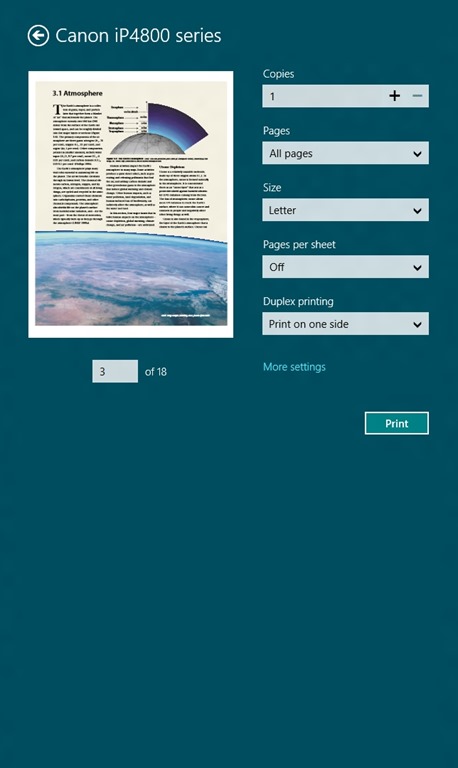
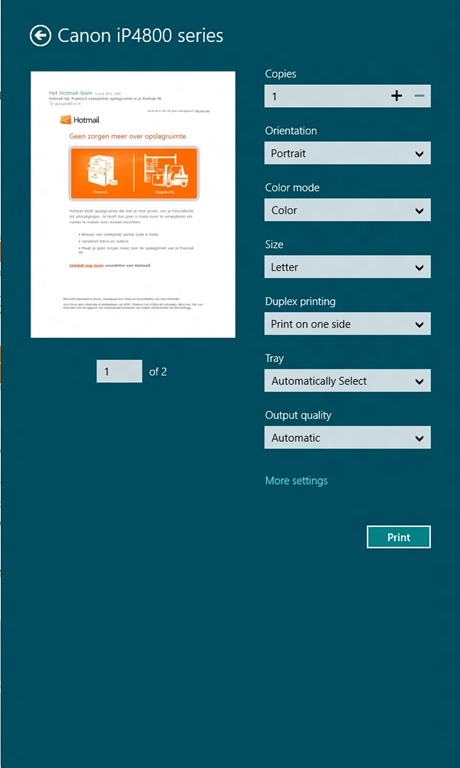
    • Printing in Metro Apps. So tell me, how do I just print the current page, or a selection of pages? Something that’s easily done with the traditional Windows Print dialog, but that seems totally impossible with the whizzo new Metro design with certain Apps. The Metro Mail and IE10 Apps, for example. They drop the “Pages” setting from the Metro Print screen. See below for screenshots. Sigh.
    • Backing up your data. Windows 8 has a new backup method: File History. Be aware that it only covers the contents of your Libraries, Desktop, Contacts and Favourites. It won’t cover application data, or your mail messages… Microsoft assumes that we all hold our email in the Cloud. Er, no, we don’t.

    Here’s examples of the confusing Print screen in Metro. This is what you see when you want to print something in the Metro Reader App:

    W8RP 10

    Note that you’ve got a “Pages” setting, where you can select to print “All pages”, “Current page” or a “Custom” selection of pages from the document.

    Now here’s what you see (using the same printer device) when you want to print out a mail message from the Metro Mail App (you’ll also see the same settings when you print out a web site in the Metro IE10 App):

    W8RP 08

    Er, hello? We’ve got additional options, but the “Pages” setting has disappeared altogether. Don’t bother clicking on the “More settings” link, it’s not lurking under there either. I like consistency in my tools, not nasty surprises.

    Update 28th October 2012: This inconsistent print behaviour is still present in the final version of Windows 8, despite some of the Apps being updated. The Mail App and IE10, for example, still can’t print out a single page or a range of pages. Sigh.

    Update 1: Brad Weed, a program manager in the Windows Live team has contributed a post on the Photos App in the Building Windows 8 blog. I note that he doesn’t even mention the fact that the Photos App cannot display photos held on Windows Home Server, yet he boasts that the Photos App will “display photos from all your devices”. Er, no, Mr. Weed, it won’t, as you damn well know. Please try harder.

    Update 2: On October 5th, Microsoft announced that many of its Modern Apps would be updated in the run-up to the release of Windows 8 on October 26th. This includes the the Mail App, which will at long last get IMAP support, and the Photo App, which will finally be able to support network locations. I found it rather curious that only a couple of days earlier, Analy Otero, on the Photo App team, said (my emphasis):

    …support for network locations is definitely something we will consider for future versions of the app.

    When she could quite easily have said:

    …support for network locations is definitely something we will provide for future versions of the app.

    Odd. Mind you, it still doesn’t support searching on Tags. So, the Photo App is still a miserable excuse for what it should be.

    Microsoft are doing themselves no favours with the current collection of Metro Apps, which are little better than toys.

    Update 26th March 2013: The Mail, People, Calendar and Xbox Music Apps have been updated. Some small improvements, but there are still shortcomings.

  • Fun With Technology – Part VIII

    Important Update 27th October 2012: The bug I describe below was fixed in the final release of Windows 8. I can now use the “Play to” feature with my Denon AVR-3808 receiver.

    Hoorah!

    Update 24 October 2013: With the release of Windows 8.1, I was getting problems with “Play to” again. I posted the Windows 8.1 issue in a Microsoft forum, and got some useful feedback from Microsoft’s Gabe Frost. The issue is not resolved, but at least we now know what’s going on. See https://gcoupe.wordpress.com/2013/10/23/play-to-and-windows-8-1/

    Original Post

    Sigh. I’m having another facepalm moment with Microsoft again. I’ve downloaded and installed the Windows 8 Release Preview, and am currently kicking the tyres. I’ve already found some nasty things in Microsoft’s Metro Apps; this post is about something else.

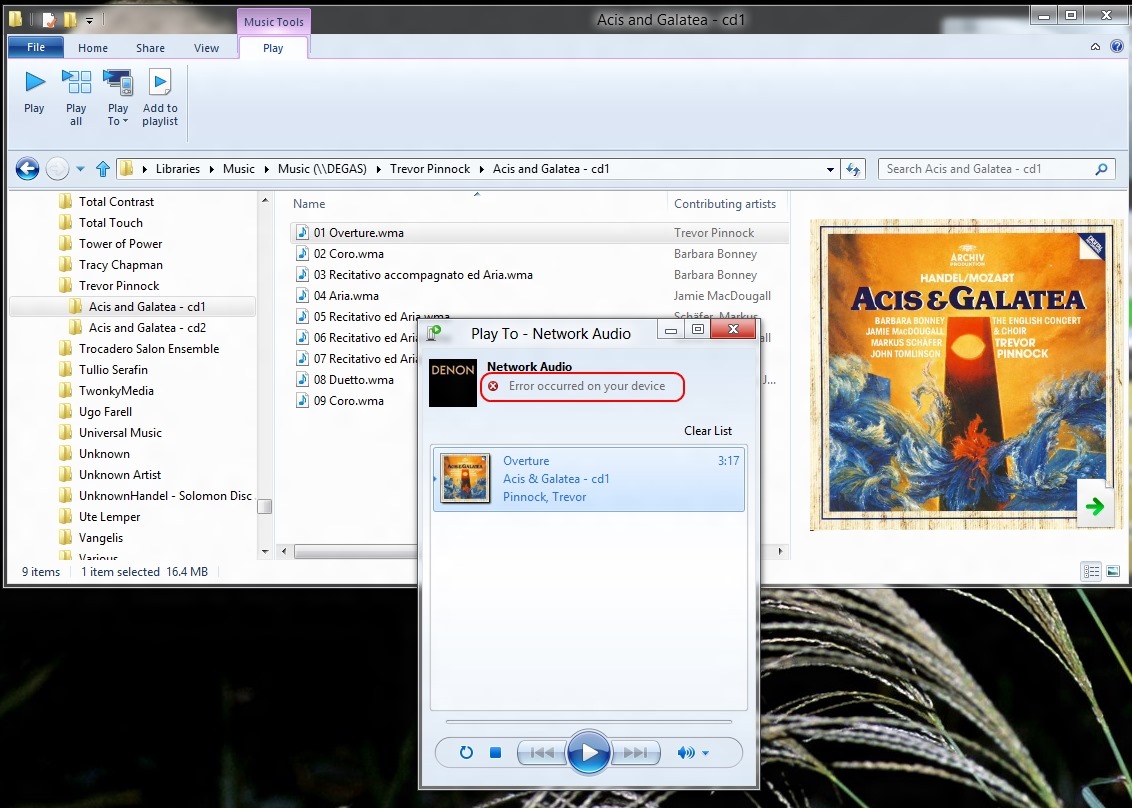
    Microsoft introduced the “Play to” feature in Windows 7. It’s a very useful feature that allows Windows Media Player to stream music to other devices (e.g. my Hi-Fi amplifier) on the network. I found that this feature was broken when I tried it in the Windows 8 Consumer Preview. Now that I have the Release Preview installed, I had hoped that Microsoft would have fixed it.

    Alas, no, it still doesn’t work, and there’s been a rather worrying development… Here’s what I saw when I tried it in the Consumer Preview:

    WMP 12 13

    Now take a look at the error message I get when I try using the “Play to” feature in the Release Preview:

    W8RP 06

    Er, what’s that “Not Windows certified” message? I thought the whole point of having DLNA-certified devices (which I have) was that they would plug and play. It worked in Windows 7. Now it seems as though Microsoft are introducing something else for Windows 8 – and breaking the whole concept that DLNA is trying to address.

    I would have thought that Microsoft would have learned from the failure of their “Plays for Sure” branding, but no, they’re at it again. In a final irony, my Hi-Fi amplifier, a Denon 3808 AVR, proudly bears a Microsoft “Plays for Sure” sticker. Well, it doesn’t “play for sure” any more, thanks to Microsoft and Windows 8.

  • Origami Computing

    As you may be aware, I’ve been following the development of Microsoft’s Windows 8 operating system with some interest.

    I confess that I have been somewhat taken aback at the amount of negative press that Windows 8 has been receiving, both from technology pundits and users, because I’m finding Windows 8 rather exciting. I’ve been using it on my main desktop PC since the Windows 8 Consumer Preview was released in February, and I’ve never thought for a moment about uninstalling it and going back to Windows 7. Indeed, I’m looking forward to the Release Preview of Windows 8 that will be available in a couple of weeks.

    It’s true that my joy over Windows 8 has not been entirely unalloyed. At the moment, I have a list of three negatives:

    I can live with the first two, but the last does worry me. New PC systems are increasingly based on UEFI/GPT technology, so I am likely to be faced with a problem in the future if Microsoft don’t fix this. Update: I’ve gathered all the bugs, quirks, and WTFs that I’ve found in Windows 8 thus far into one place: here.

    It seems to me that with Windows 8, Microsoft has a chance to move personal computing into a new era, one where not only can a range of computing devices (PCs, Tablets, Smartphones) share a common operating system and applications, but where the hardware itself can have a range of flexibility that goes beyond what we have seen so far.

    I got a taste of this with my old HP TX2000 Tablet PC, but running Windows 7, it couldn’t deliver what will be possible with Windows 8.

    Paul Thurrott touches upon this in his latest opinion piece. I think he is right. My next PC purchase is unlikely to be a Desktop PC. It will be a Slate, running Windows 8, based on Intel’s Broadwell. It will have multitouch and a pressure-sensitive stylus. I will be able to carry it around and take notes/photos/videos on the move, and I’ll be able to plug it into multiple monitors, a keyboard, and a mouse for my next generation Desktop.

    We are at the dawn of Origami Computing. Apple and Android are way behind.

  • “Features Have Changed”

    Oh gawd, here’s yet another example of Microsoft opening its mouth in order to change feet.

    We happy band of Windows Phone owners (a select few, I grant you) have had a number of ways to purchase Apps for our phone. We can browse the Apps Marketplace via our phones, via a web browser, or via the Zune software running on a PC. I say “had”, because as of yesterday, Microsoft has pulled the ability to browse the Apps Marketplace from the Zune software.

    Microsoft announced the change (on the same day as they implemented it) on their Windows Phone Blog. According to them, they’ve done it because their telemetry data tells them that only a minority of Windows Phone owners use the Zune software to browse the Apps Marketplace. That’s as maybe, but Microsoft could really have done a far better job of communicating the change than merely announcing it on a blog, which is probably read by a tiny minority of Windows Phone owners.

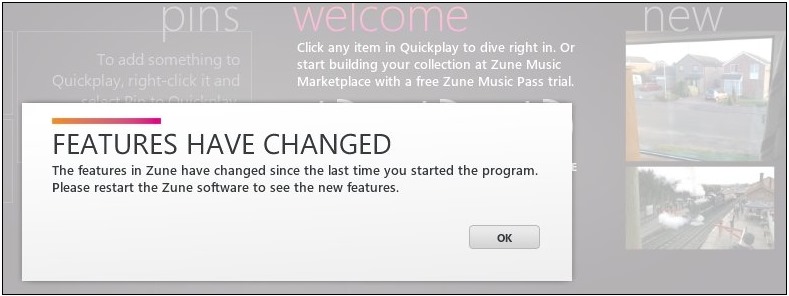
    Let’s imagine, for a moment, that you are one of the people (like me) who uses the Zune software to browse the Apps Marketplace. When you started up Zune on your PC yesterday, this is what you would have seen:

    Zune 5

    No information whatsoever about what the “new features” are, and you might be forgiven for thinking that the “new features” are something that has been added, when in fact something has been removed.

    You might think that it would have been far better to have had an explicit message communicating the fact that the ability to browse the Apps Marketplace has been removed, and to have had a link to the Apps Marketplace on the web, as well as saying that owners can also use their phones directly to browse.

    A number of people (myself included) have commented on the blog post to the effect that the communication of this change could have been handled far better. I see that the author of the post (Mahzar Mohammed) has responded in the comments, but he is still prattling on about the necessity to make the engineering changes. He doesn’t acknowledge (or perhaps didn’t even realise) that the bland “Features have changed” message in the Zune software was a terrible way to communicate the changes to users.