Reflections on life at “De Witte Wand”…

Category: Consumer Electronics

  • Petitioning Microsoft

    I’ve mentioned a number of times before on this blog how irritating it is to be saddled with a Zune/Xbox Live/Windows Phone account that has the wrong country shown for my country of residence, and being totally unable to correct it.

    The issue is now spelt out in detail over at the It Is Our Data web site, and there’s a petition set up asking Microsoft to rectify this shortcoming.

    I’ve signed, and will be sending letters to Microsoft and the relevant Data Protection authority. Will you?

    Update: As a result of sending letters, I finally managed to get Microsoft to correct the false data in my account, so it can be done…

  • A Plug for a Plug – Again

    A couple of years back, I wrote about Min-Kyu Choi’s brilliant idea for a folding plug. I see that the design is now more than a concept, and is now an actual product. It’s a pity that the idea has been reduced in scope to being simply a USB charger for Smartphones. I expect that the dizzying combinations of cable connections that would have been needed for the original concept of a mains plug would have been uneconomic to produce.

  • Just Wait…

    I mentioned a few months back that I was being tempted by the Samsung Slate PC Series 7 that is now available in a few markets around the globe. Now that CES 2012 is in full swing, a whole slew of new Tablets is being shown there. While most of them are running Android, it’s clear that some of them are being shown in anticipation of Windows 8, which could be available by late December this year (the first public beta will be available next month).

    One such Tablet is the Lenovo IdeaPad Yoga 13 – and this looks even more interesting than the Samsung.

    Really, the best course of action for me is to sit tight and wait. It makes no sense to rush into a decision at the moment. And I have to say that my desire to get a new Tablet PC to replace my now-defunct HP TX2000 has abated considerably since I got my Nokia Lumia 800 Windows Phone. I’m able to use it to do many of the things that I was persuading myself that I would need a new Tablet PC for. Not all, but sufficient to relieve the pressure and turn the “need” into a “rather nice-to-have” sensation.

    I’ll revisit the situation at the end of the year.

  • Open Mouth, Change Feet…

    For a moment there, I thought that Microsoft were improving. After a bad start in the process for rolling out updates for Windows Phone, they began communicating more transparently about the updates, and began rolling them out in a more timely manner. They even had Eric Hautala, General Manager, Customer Experience Engineering, posting weekly on the Windows Phone Blog about updates and their availability.

    Alas, all those improvements would appear to have come to a screaming halt. Yesterday, Hautala posted about a new Windows Phone update – 8107 – but also stated that it would only be available to those Carriers who requested it. Cue instant uproar from Windows Phone users who fought for improvements in the update process in the first place because Carriers were delaying the release of updates. And then to rub salt into the wounds, Hautala also wrote that Microsoft won’t be individually detailing country, model, and carrier details on the Where’s My Phone Update? site any longer.

    So much for a more transparent process.

    And what is in this update – 8107 – that carriers can elect to request, or not? Well, according to Microsoft it seems to have some pretty important bug fixes:

      • On-screen keyboard. Fixes an issue to prevent the keyboard from disappearing during typing.
      • Email. Fixes a Google mail syncing issue.
      • Location. Fixes a location access issue. With this fix, the Me feature in the People Hub sends anonymous information about nearby Wi-Fi access points and cell towers to Microsoft only if you agree to allow the Check In function to access and use location information.
      • Security. Revokes digital certificates from DigiCert Sdn Bhd to address an encryption issue.
      • Email threads. Fixes an email issue related to Microsoft Exchange Server 2003. With this fix, when you reply to or forward a message, the original message is now included in your response.
      • Voicemail. Fixes a voicemail notification display issue that occurs on some European and Asian networks under certain conditions.

    With the exception of the last bug fix, none of these are carrier-dependent, so why on earth is Hautala saying that we will only get these fixes if our carrier requests them? Frankly, I find this a staggering misstep by Microsoft. How to destroy customer trust overnight… I really am scratching my head trying to work out how an organisation that sets up a function called “Customer Experience Engineering” can do any worse.

  • My Nokia Lumia 800

    It’s now been almost two weeks since I got my new Windows Phone – a Nokia Lumia 800. How has it been so far?

    I think I’m still very much in the Honeymoon period. The hardware (Nokia) and the software (Microsoft) of the device continue to delight.

    The design of the Nokia Lumia 800 looks good and feels right to me; it whispers I’m a quality piece of consumer electronics and when I heft it in my hand it feels solid and dependable. Yes, I know that these are very subjective things, but, to me, it seems that the Nokia designers have done a good job with this particular product.

    And, heavens, I think that the Microsoft software designers have done a good job with Windows Phone 7.5. I know that I spend a lot of my time pointing out flaws in Microsoft software (Windows Live Photo Gallery, and Windows Home Server 2011, I’m looking at you), but the Windows Phone operating system is pretty damn good, particularly for what is essentially a brand-new operating system, when compared with Apple’s iOS and Google’s Android – both dating from 2007. The user interface (Metro) feels fast and fluid, even on what is fairly basic hardware. Android lovers seem to turn up their noses at the hardware in typical Windows Phones, but the fact of the matter is that Microsoft’s OS seems to be doing a better, and more efficient, job at exploiting the hardware. Then there are features such as the live Tiles on the Start screen, and these seem to me to be a clear step forward over Apple’s iOS and Android’s static icons.

    Of course, all is not perfect. The performance of the camera in the Nokia, despite the 8 megapixels and the Carl Zeiss lens, strikes me as being lacklustre. Nokia have acknowledged the issue, and say that a software upgrade will be forthcoming this month. The same goes for a battery life issue – some owners are struggling to get through a full day on one charge. Nokia say that there will be a software update this month to address the issue.

    But, on the whole, I remain very satisfied that I made the switch from a Nokia dumbphone to a Nokia smartphone running Windows Phone.

    I’ve been struck, when reading blogs and newspaper articles by others on their experience with the Nokia Lumia 800, by the fact that not everyone is as positive as I am. It seems to me that some of the negativity comes from the fact that this is not a Nokia Symbian or Apple or Android phone. If you’ve been running your life and social interactions through your smartphone, then the change from the Symbian environment (or an iOS or Android environment) to Windows Phone is more than just a culture shock to some people. It’s apostasy, and deserves death – preferably for Stephen Elop, for singlehandedly destroying Nokia. I’ve been dipping in to the discussions on the Nokia forums, and some of the vitriol from Symbian users is quite staggering, but, given that we are all human (I think), not surprising.

    Perhaps I’m fortunate in that, having come from a dumbphone, I have no previous smartphone religion to deal with. All I know is that I like what I see, and thus far, it seems to be an environment that I can comfortably live with.

  • My Windows Phone Apps

    I mentioned yesterday that I’d taken the plunge and acquired a Windows Phone – a Nokia Lumia 800. One of the things about moving from a dumbphone (my old Nokia 6310i) to a smartphone is that a world of applications opens up to you. For the Windows Phone ecosystem, that means over 50,000 Apps, and counting…

    Now, while the quality of Windows Phone Apps, just like everything else, is subject to Sturgeon’s Law, it seems to me that there’s a reasonable chance of finding a portfolio of decent applications that will suit my needs. Here’s what I currently have on my phone (in addition to the standard Apps that ship with Windows Phone, and the Nokia Apps – Nokia Drive, Nokia Maps and Nokia Music – that come with the Nokia Lumia 800):

    buienradar Buienradar A realtime viewer of where rain is falling over the Benelux region.
    face swap Face Swap A bit of photographic fun from Microsoft Research
    Flickr Flickr The official Flickr app to upload photos taken on your Windows Phone and upload them to Flickr. You can also browse your Flickr account from your Windows Phone. Nicely done.
    Het Weer Het Weer Comprehensive Weather application for The Netherlands. Basic interface, but gets the job done.
    Imdb IMDb Very comprehensive interface to the IMDb movie database. Well implemented – shows off the Windows Phone user interface to advantage.
    iss Iss Locator A basic app that just shows the current position on the ISS (International Space Station) superimposed on a 2D map of the globe. Not bad, but I’m left wanting more.
    media center remote Media Center Remote A very good Remote Control App for Windows Media Center. Covers the full range of function, including Search and Keyboard support for your Media. The only negative point is that it on start up it reads in the content of your Media libraries, and if you have large libraries, this can take a minute or two.
    meteor Meteor Another Remote Control App for Windows Media Center. While startup is faster than Media Center Remote, and the display of the Music Library is clearer, it does not support Search and Keyboard functions, which I find surprising, and a negative point.
    metrotube Metrotube The best App for browsing YouTube that there is. Makes full use of the Windows Phone user interface. Unfortunately, the developers have announced it will be withdrawn from the Marketplace because Google have not documented the YouTube interfaces, and continual reverse engineering is not a sustainable approach.
    my home server My Home Server A basic App to interface with Windows Home Server 2011. It has some Dashboard functions, and some capability to stream media (music, pictures, video) to your Windows Phone, but it is very basic. For example, the Album or Artist lists are single level lists (no jumping to initial title letters) that load agonisingly slowly. It does have a Search function, but it breaks the user interface guidelines in the way it operates.

    When using the Media functions, error messages are a frequent occurrence. This App is from Microsoft’s own WHS 2011 team, and is yet more evidence of their poor performance in design and delivery of a product.

    satview SatView A nicely-done realtime satellite tracker and orbit predictor with 2D and 3D views of over 1,300 satellites.
    SkyDrive SkyDrive An App to enable you to browse documents, folders, photos and files that are held on your SkyDrive storage (every Windows Live user ID has 25GB of free online storage). Works fairly well, but not faultlessly – I have at least one Word document that I can’t open on my Windows Phone, but which I can open on my PC.
    SkyMap SkyMap Probably the best skymap available for the Windows Phone. Actually useful!

    The Guardian The Guardian The official App for the Guardian newspaper. It’s not particularly innovative; it feels a bit tired and lazy. For example, the Search screen is only available in Portrait mode – I actually like to rotate my phone into Landscape when typing – the keyboard is bigger… The search engine also seems to be different from the Web version – the results are less and also more dated. Frankly, it’s almost better to browse the Guardian’s web site than bother with this App.
    Treintijden Treintijden There are several train timetables and planners available for the Dutch railway network. This is the best one that I’ve found. Simple and effective.

    Doubtless this list will get refined over time, but it will do to get me started. I have to say that, so far, I really like the Metro interface of the Windows Phone; it’s a well-designed and well-executed piece of work.

  • I’ve Been Seduced By A Windows Phone

    OK, so a year ago, I wrote about the fact that I had not upgraded my trusty old Nokia 6310i to a Smartphone.

    I didn’t want to get an iPhone (I’ve never liked Apple’s walled garden infrastructure) and Google’s Android environment seemed to me to be too much of a free-for-all, where, rather than evolution, cancerous growth seems to be the result of letting too many cooks spoil the broth.

    The third way seemed to be Microsoft’s Windows Phone, where a firm grip was taken on the base specification, while allowing for innovation in hardware. I was underwhelmed by the first release of Windows Phone 7, but by last September, with the Windows Phone 7.5 (Mango) release, Microsoft seemed to me to have achieved critical mass. The operating system had good reviews and seemed to offer something of interest. Yes, in terms of market share, Microsoft languish well behind Android and iOS, but I think that this can reasonably said to be because of other factors.

    So, from September onwards, my interest has been piqued by the possibility of buying a Windows Phone. Since I have been using a Nokia mobile phone since 2002, my first thought was that it should be a Nokia Windows Phone.

    When Nokia announced the Nokia Lumia 800 and the Nokia Lumia 710, my mental crosshairs centred upon the Lumia 800, in the Cyan colour. That seemed to me to be the best possible merging of hardware and software design in a mobile phone.

    Since then, I’ve been tracking the availability of the Nokia Lumia 800 here in the Netherlands, and comparing the price plans that the suppliers have been advertising. A couple of weeks ago, there was an offer that I could not refuse from The Phone House. A Nokia Lumia 800 on a one-year’s contract from Vodafone totalling less than 400 Euros – this at a time when the phone itself retails at between 450 to 480 Euros, without any additional connection charges included.

    I admit I was seduced.

    And so it was, on the 23rd December, that I took possession of a Cyaan Nokia Lumia 800, and today, Vodafone have completed the porting of my mobile number from my old Nokia 6310i to the Lumia 800.

    I have to say that the basic experience of the combination of the Nokia Lumia 800 and Windows Phone 7.5 is a joy. The physical design of the phone feels absolutely right, and the user experience of Windows Phone 7.5 is beautifully done.

    I was worried about the shortcomings of the Windows Phone Marketplace infrastructure, but I have to say that while they are still there, I’ve been able to paper over the cracks. I now have a unified inbox for all my email accounts, and I’ve been able to bring in my Contact lists and Calendars from other places on the web. It’s not perfect, but I think I can live with it, which is what I never thought that I would say a few months ago.

    I’ll follow up this post with some thoughts about the applications that I have installed on my Windows Phone. Some are brilliant, and some are so-so. The fact remains that I think I can now bid farewell to my trusty Nokia 6310i and hail my Nokia Lumia 800.

    Le Roi est mort – vive le Roi!

  • Gone Missing: Bowers & Wilkins Customer Service

    This is a tale of two British companies that supply Hi-Fi equipment, and my contrasting experiences of their after-sales service.

    The first is the Acoustical Manufacturing Company Limited (now called QUAD Electroacoustics), which was set up by Peter Walker in 1936. It began by manufacturing public address systems, but in the 1950s entered the emerging domestic Hi-Fi market. The second is Bowers & Wilkins (B&W) established in 1966 by John Bowers as a company manufacturing Hi-Fi loudspeakers.

    Back in the late 1960s, I became a Hi-Fi enthusiast, and my first system included a QUAD 33 pre-amp and QUAD 303 power amplifier paired with KEF loudspeakers – the cost of B&W or QUAD loudspeakers was beyond my budget at the time. Eventually, in 1976, I replaced the KEF speakers with a pair of QUAD ESL-57 electrostatic loudspeakers, which I still have and enjoy to this day. I upgraded the QUAD 33/303 combo to a QUAD 44/405 system in 1982, and once again, I still have and use them. Along the way, I also added a QUAD FM Radio tuner.

    In 2008, I branched out into setting up my first Home Cinema system. This time, for the loudspeakers, I went for the B&W M-1 series, which had got good reviews in the Hi-Fi and Home Cinema press.

    In the course of the years, I’ve had to use the after-sales service of QUAD just once. My FM tuner developed a fault in 2005. I emailed QUAD in the UK, and my service request was forwarded to their distributor in the Netherlands, who contacted me the very next day. They subsequently repaired my tuner; result – one happy customer.

    My experience with B&W has, so far, not been so satisfactory.

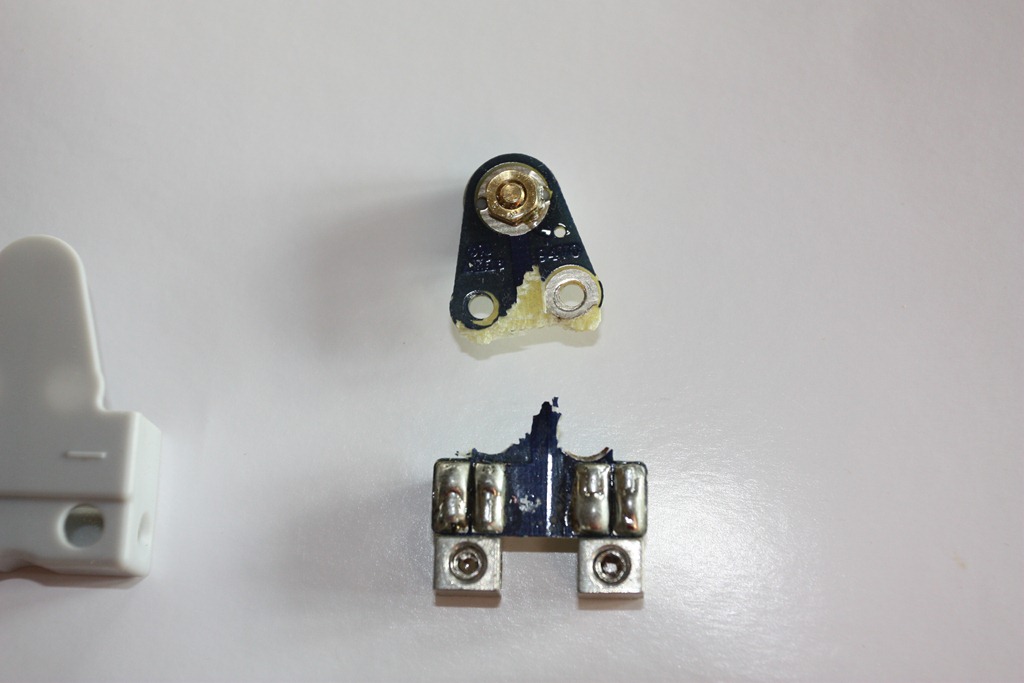
    Last month, on the night of the 15th November to be precise, a shelf collapsed in our living room. Unfortunately, one of the B&W M-1 speakers was sitting on it at the time. It fell to the floor, but the fall was broken by the speaker cable. However, these little speakers are surprisingly heavy, and the result was that a small circuit board in the table stand that connects the external cable connections to the speaker itself got ripped in two; one half remained attached to the cable, the other half remained in the stand:

    20111116-1415-00

    So, on the 16th November I contacted B&W, via their web site, to ask them if it would be possible to obtain a replacement. On submitting the request, the web site promised that I would have a reply from B&W within three working days, and an automated response, copying my request, was sent to my email address.

    Three working days went by, and nothing further was heard.

    On the 28th November, I submitted the request again. Once again, the web site promised a response within three working days, and once again an acknowledgement of the request arrived in my email inbox. That’s the only thing that arrived. Once again, I’ve heard nothing further from B&W. Er, hello? Is this supposed to be customer service? I think not.

    Bowers & Wilkins Customer Service – gone missing. Result: one very unhappy customer.

    I should have stuck to Quad.

    Update 7 December 2011

    Well, it seems as though blogging about my experience with B&W customer service has produced a result. I was contacted this morning, first by the Director of Export Sales, and subsequently by the Group Service Manager.

    It would appear that their web contact form misdirected my messages, so no action was taken. I just wonder how many other customers this may have affected, leaving a trail of bad feelings in its wake.

    However, in my case, the issue has been resolved, and I’ll be able to repair my speaker. B&W’s customer service has been found.

  • The End of an Era?

    Steve Jobs has died at the young age of 56. He had a massive influence on at least three industries: computing, film animation and music.

    I thought that Dan Gillmor’s eulogy on Jobs probably came closest to a rounded portrait: “a man of contradiction and genius”. Gillmor also links to the commencement speech Jobs gave at Stanford University a few years ago and that is certainly worth reading; in particular, his thoughts on life and death:

    No one wants to die. Even people who want to go to heaven don’t want to die to get there. And yet death is the destination we all share. No one has ever escaped it. And that is as it should be, because Death is very likely the single best invention of Life. It is Life’s change agent. It clears out the old to make way for the new. Right now the new is you, but someday not too long from now, you will gradually become the old and be cleared away. Sorry to be so dramatic, but it is quite true.

  • The iPad is Not a PC–Take 2

    Over a year ago, I blogged about Peter Bright’s article in Ars Technica on why Steve Ballmer and Microsoft didn’t understand how Apple’s iPad has been so successful.

    I wrote at the time that:

    It’s odd that Ballmer appears to be insisting that Tablet and Slates are just another PC form factor – they are not, and they need something other than simply loading them up with bog-standard Windows 7. A way forward may be to adopt the approach of the forthcoming Windows Phone user interface, which is designed from the ground up to be driven by the human finger. After all, the iPad owes more to its roots in the iPhone than it does to the traditional Mac. If Ballmer can’t see that as an analogy for the next generation of Tablets and Slates, then it seems likely that sales will continue to languish.

    Well, fast forward a year, and we have the Developer’s Preview of Windows 8, and we are beginning to see that Microsoft are indeed adopting the tenets of Metro – the interface used in Windows Phone.

    I had intended to download and install the Developer’s Preview of Windows 8 onto my HP TX2000 Tablet PC, but unfortunately it chose this moment to die. However, I went ahead and installed it on my main PC, as the secondary operating system that can be chosen at boot-up.

    I can see that Windows 8 is a gamble for Microsoft, and it’s one that I think that they might very well pull off. I think it’s because that they can have the same operating system running on a much broader range of devices (at different price points) than is possible currently, and all of these devices can be supported within the same ecosystem of backend (read: Cloud) services and applications.

    By way of illustration: a couple of friends visited us this last weekend. One of them works in a Dutch government Ministry, so she was fully equipped with a Smartphone and an iPad. This was my first chance to get my hands on an iPad and try it out. And, while I marvelled at the form factor, I soon found that it seemed to be very good at consuming content, but not particularly good at creating content – an impression that my friend concurred with.

    My old HP TX2000 – while it was larger and heavier than her iPad – ran a fully-fledged operating system (Windows 7) and was equipped with both a Touchscreen and pen interface, as well as a keyboard, so I could use it in ways that I simply could not accomplish with an iPad. Taking notes with my pen (using OneNote) or using the built-in handwriting recognition of Windows 7 (with its scary accuracy) is a task that is completely alien to the much more limited iPad. Then again, the iPad is designed from the bottom-up for fingers; Windows 7 needs a mouse or a pen. While it is possible to adjust Windows 7 to be more finger-friendly, this has its limits.

    This is where it starts to get interesting with Windows 8.

    Devices, with their operating systems and user interfaces are all about horses for courses. The iPad is a device designed for a much more limited purpose than a high-end notebook. And the newly-announced Kindle Fire is a device that aims at a purpose lower than both of them, but one which may well satisfy millions of people who simply want to read books or play games. The price points of the devices reflect their capabilities.

    I think that we about to see an opportunity for devices that can span a wider range, yet even though they have a higher price point, will be attractive to people.

    Samsung will introduce their Series 7 Slate PC (the XE700T1A) this month – well, hopefully this month, although I’m beginning to think that November might be nearer the mark.

    It has the specs – and the price – of a high-end notebook, yet can be used as a finger-driven Slate PC. In price, it’s comparable with the Apple MacBook Air models, yet the Series 7 Slate comes with a built-in Wacom digitiser in the display and a pen. I’ve long been a fan of Wacom digitisers – I had one back in the days of Windows XP; so did the HP TX2000 – the pressure sensitive pens combined with accurate sensing are a joy. If I were an artist, then the Series 7 Slate would replace my sketchpad. The Series 7 Slate also comes with the accelerometer, compass, and GPS (see Update below) sensors that are expected these days in tablets. As someone comments on this review here:

    The 11″ Air costs $999 for the base model, $1199 for the second tier model. This tablet costs $1099 for the base model, $1349 for the second tier model. That’s an extra 10-12%.

    Unlike an iPad, Android tablet, etc., this tablet can perform as a laptop in most scenarios — if you give it a keyboard, you can use it to run the full Excel, Photoshop, a full desktop browser, development tools, and anything else a laptop can do.

    If you want to be able to do some light reading and watch some video on your tablet sometimes, and you need to be able to run Photoshop sometimes, you have to buy a MacBook of some kind *and* an iPad. Buy one of these Samsungs, and you don’t have to choose. As an extra added bonus, you don’t have to sync anything between the two devices either. If that works for your, it’s a screaming deal.

    But again, for me, this just isn’t a good enough tablet without real tablet software. So hurry up, Win 8.

    Samsung have already said that the Series 7 Slate can be upgraded to Windows 8. 

    It’s possible that this is the first product that heralds the rebirth of Tablet PCs, and one that will be joined by lower-cost models running Windows 8. I’m sorely tempted.

    Update 3 November 2011: It appears as though the first units that are being delivered to the market are not equipped with a compass and GPS sensors. These were available on the units that were given to developers at the Microsoft Build conference in September, so these sensors must be part of the optional 3G mobile telecommunications capability. However, since the 3G card is apparently fitted inside the sealed case, it is not going to be something that an end-user can fit after purchase.

    There are also some concerns being raised about the build quality of these units. Some people are reporting the the screen glass is lifting away from the bezel along the bottom edge of the screen. Sounds as though Samsung’s glue is not good enough.

    All this is probably helpful in tempering my enthusiasm. It wouldn’t do any harm to wait a while…

  • Windows Phone 7.5

    Almost a year after the first release of Windows Phone 7, the first major upgrade (“Mango”) of the phone operating system is being rolled out. Although it is a major upgrade, the official version number is 7.5, rather than 8. I suspect that’s because Microsoft want to reserve that for a future major upgrade – presumably to be rolled out at, or around, the time that Windows 8 hits the market.

    WP7.5 apparently addresses most of the shortcomings of the original release. As usual, Peter Bright, over at Ars Technica, gives a very complete review of WP7.5.

    His final summing-up:

    With Mango, Microsoft has got the smartphone operating system right. It’s fast, it’s fun, it’s easy to use, it does everything you need, and it looks great. It takes the things that made the original release unique and makes them better, and it addresses nearly every criticism made of that version. As a piece of software, it’s a triumph, and it’s more than good enough to take on Android and iOS.

    As a complete package, though, questions remain. Much is being demanded of the hardware companies, and much is staked on Nokia’s ability to make hot handsets. If they don’t deliver phones that people want, Windows Phone will continue to struggle. But it won’t be because of the operating system.

    I find those last two sentences particularly telling. And in my view, it’s not just down to the hardware companies, it’s also down to Microsoft’s marketing, the phone application Marketplace, and to Microsoft’s infrastructure used in the Marketplace. That infrastructure has, I think, a pretty serious flaw, which I have pointed out before. And that is: it assumes that people stay in one country all their lives.

    Microsoft have chosen to use the infrastructure used by their Zune music player as the basis to support the application Marketplace for Windows Phone. The problem being that once you create an account in the Marketplace, and define your country of residence, you cannot change that country, nor even delete your account. I find this last point almost incredible. I can close my Windows Live ID account, but I can’t close my Zune account? Which bright spark thought that one up? 

    This shortcoming has been in the Zune Marketplace since at least 2007, and people have been complaining about it ever since. When Windows Phone was released in October 2010, and the Zune Marketplace, running as a PC application, was used to access, purchase, and deliver applications to Windows Phones, a whole new group of people were suddenly confronted with the shortcoming and started complaining. There are many threads about it on the support forums, such as this one, which is currently running at 17 pages of pure frustration.

    I had thought that with the introduction of WP7.5, together with a web-based Marketplace alongside the Zune Marketplace PC application, that perhaps the shortcoming would be addressed. Particularly since the Marketplace has been broadened to 35 countries from the original 16.

    But no, not a bit of it, you can still neither change your country nor delete your Zune account to start over again.

    Almost as frustrating are the assumptions that Microsoft make about the languages used in those countries. I see that because I am based in The Netherlands, I am given no choice about the language I use: it has to be Dutch. Even some native Dutch speakers prefer to use their computers and phones in English. Still, it could be worse, I could live in Switzerland, where there are four official languages, but the Swiss Marketplace only offers French or German…

    Microsoft are clearly firm believers in the Procrustean solution.

  • Bad Timing

    My HP TX2000 Tablet PC died this week, just as I wanted to put the Windows 8 Developer Preview on it. It won’t boot, or even display the BIOS screen. It turns out that this problem is fairly common, and apparently caused by the video chip.

    As is usual with these things, the three-year warranty that I had with the Tablet expired 6 months ago, so getting it repaired, even if it is possible, will not be cheap. It’s probably better to cut my losses by salvaging what I can from the Tablet (e.g. the hard disk) and dumping the rest.

    I haven’t got another machine lying around that I can install the Developer Preview on, so I’m just going to have to curb my curiosity. Perhaps I should just wait until Windows 8 Tablets start appearing in the market (end 2012?). However, I must admit that I am sorely tempted by Samsung’s Series 7 Slate PC that is supposedly going to be available next month. But then again, I think that the Financial Controller (a.k.a. Martin) will probably be reluctant to authorise the expenditure…

  • Using RAW Codecs in Windows

    If you are an enthusiast photographer using a digital camera, you may well have set your camera to take photos using its RAW format. It’s what every professional photographer does. The rest of us take the easy way out, and take photos using our cameras, smartphones, or similar image capture devices using the ubiquitous JPEG format.

    The advantage of the RAW format is that, like the old film negative, it contains the truest record of the data captured by the camera’s image sensor. That data can be processed to suit what the photographer wants as the final image. In traditional photography, this is equivalent to processing the negative into the final positive print.

    The JPEG format, on the other hand, can be thought of as the end result of the image processing that happens in the camera itself using a standard set of parameters. While the image can be further tweaked in computer applications, the flexibility of what can be done, as compared to that when using the RAW format, is severely limited.

    Microsoft’s Windows has, over the years, supported the JPEG format out of the box. That means that utilities such as the Windows Explorer will display thumbnails of your JPEG images and tools such as Microsoft’s Windows Live Photo Gallery will be able to process those images further.

    However, up until now, support of the RAW format has not been present in Windows itself. If you have images using a RAW format, Windows has probably given you a message telling you that it can’t display the image, and suggesting that you go to your camera manufacturer’s web site to download and install an image codec to plug into the Windows Imaging Component of Windows that will enable the display of your images.

    There are also third party software solutions that offer portmanteau RAW codecs for a wide range of cameras and RAW formats (each camera manufacturer defines their own RAW format in a unique way). These third party solutions have been around since the days of Windows XP.

    Now, Microsoft have trumpeted that, in order to make it easy for the consumer, they have developed their own portmanteau codec for a range of RAW formats. This can be downloaded and installed into Windows. It enables both Windows Explorer and Windows Live Photo Gallery to display RAW images directly.

    While I think it’s a good thing that Microsoft have done this, what left a nasty taste in my mouth, in both the announcement and the accompanying video, was there was no acknowledgement whatsoever of existing third party solutions. Even worse were the statements such as that made by Jason Cahill in the video that the Microsoft codec supports “all the cameras you may have had or may have now”. Er, no, it doesn’t.

    Axel Rietschin, the developer of the excellent FastPictureViewer Codec Pack has made an excellent comparison between his own offering and Microsoft’s codec. If you are interested in seeing the full picture, and wanting a superior codec pack, then you should read it.

  • Windows 8

    Microsoft have given the first public demo of the user interface that will be included in the next version of Windows, currently known as Windows 8.

    At the D9 conference yesterday, Windows and Windows Live President Steven Sinofsky brought Corporate Vice President of Windows Program Management, Julie Larson-Green with him to show a demo to the audience. She has also written about the design of the interface in this article.

    Microsoft have also posted the first of what promises to be a series of videos to YouTube. This one gives a good impression of the new user interface.

    It’s clear that it is designed around touch and gesture, and shares a lot in common with the Metro interface of Windows Phone 7. Thankfully, for old fogies like me, the traditional Windows 7 interface will still be available. While I think that the new touch interface will be wonderful on tablets, slates and other handheld devices, I’ve never been convinced about its efficacy on touchscreen PCs. Reaching out to the screen in front of me all day will have a tendency to give me gorilla arm, I’m sure.

    And while the interface can be driven by a mouse, I have the feeling that a mouse is not the best device for this sort of interface. For example, you can use a mouse in a paint application, but the experience has been likened to “painting with a rock”. A digitiser with either a touch interface or pen is much more suited to these applications. I suspect that we’ll see a resurgence of digitiser pads if Windows 8 takes off.

    I look forward to trying it out on my old HP TX2000 Tablet PC – Windows 8 and an SSD replacement for the hard drive should give it a whole new lease of life…

  • Dutch Windows Phone 7 Delay

    As I’ve blogged before, even though you can buy a Windows Phone 7 handset from mobile operators here in the Netherlands, there are at least a couple of things to be aware of:

    • The phones do not yet support the Dutch language (only English, French, German, Spanish and Italian are supported) – and you won’t be able to upgrade your WP7 phone to Dutch (or other additional languages) when it becomes available.
    • Even though the Zune Marketplace is available here in the Netherlands, it is only for renting videos – you can’t use it to download/buy Apps for your phone.

    Since at least January, the WP7 web page at Microsoft Nederland has been saying:

      • Nederlandstalige Windows Phone 7 toestellen komen medio 2011 beschikbaar.

    (Dutch language Windows Phone 7 handsets will be available mid-2011)

    I had also assumed that at that point the Dutch Zune Marketplace would be opened up to WP7 Apps. We had a false alarm last week when the Marketplace suddenly had an Apps placeholder appear for a day or two before it disappeared again.

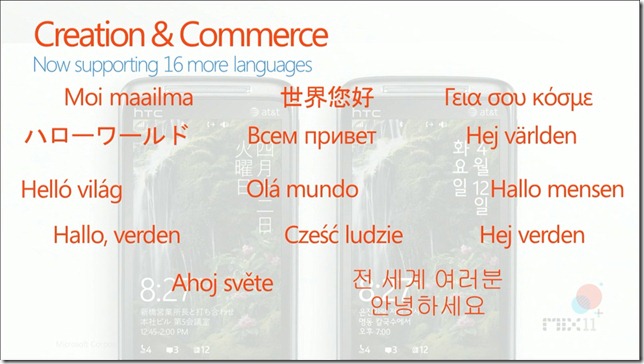
    However, it appears as though “mid-2011” is going to slip until at least the Autumn. Why? Because yesterday at the day 2 Keynote session of MIX11, Joe Belfiore (Microsoft’s Corporate VP, Windows Phone Program Management) stated that both the availability of additional languages (including Dutch) and the addition of WP7 Apps to additional Marketplaces would not occur until the Fall (Autumn), when the “Mango” update would be available. Here’s the language slide he used:

    WP7 1

    (“Hallo mensen” is Dutch for “Hello, people”)

    And here’s the slide for the Marketplace expansion, which here includes the Netherlands:

    WP7 2

    Both of these items were tied specifically to the availability of the Mango update by Belfiore, and he stated “Fall” as the timeframe.

    So, once again, Microsoft seems to be shooting itself in the foot by raising expectations (mid-2011 – Microsoft Nederland) and then not delivering on them (Fall – Belfiore). As I said before, I think I’ll be sticking with my trusty Nokia dumbphone, and at this rate, I think I’ll still be using it a year from now.

  • Windows Home Server 2011 Online Help

    While I’m deciding whether I should bother upgrading from my current Windows Home Server system to Microsoft’s brand spanking new Windows Home Server 2011, I thought that I should take a look at the online help system for WHS 2011. After all, when people get into difficulties, a well-designed online help system with relevant and accurate information should help them on their way, right?

    So, how does the online help for WHS 2011 measure up?

    Weeelll…

    • Could do better, I think is the diplomatic answer,
    • Could do an awful lot better, if we’re being more realistic.

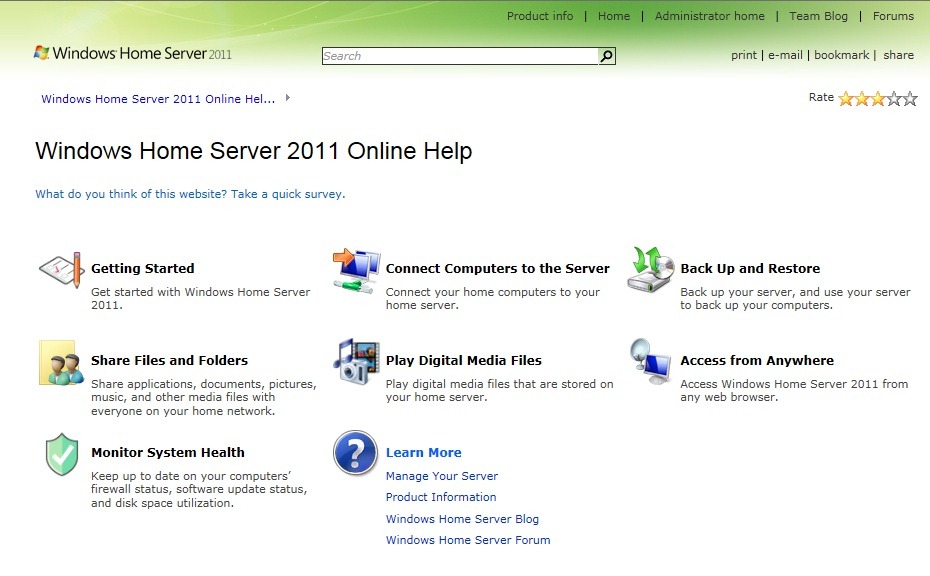
    Let’s start with the entry page of the help system:

    (Note: since writing this blog entry, Microsoft has dropped the original web pages, and moved all the help text into the TechNet Library. None of the typos/grammar/errors/text have been changed in the move, so my criticisms are still valid…)

    WHS help 1

    OK, let’s get started

    Oh, here’s a link about connecting computers to the Server

    Under the “Prepare to connect computers to the server” heading it says:

    The section provides information about the Connector software, the operated [sic] systems that are supported by Windows Home Server 2011, etc.

    The correct text would be operating systems.

    Further down the page, it has a section on how to “Connect computers to the server using the Connector software”. The first four subheadings are all to do with the concept of “How do I… (do a particular task)” . Three of the headings start with the phrase “How do I…”, yet for some reason the second item does not. It states baldly: “Install the Connector software?” when in fact what is implied is “How do I install the Connector software?”.

    There’s a minor omission on the last subheading  “Troubleshoot connecting computer to the server” – a missing indefinite article.

    So, back on the first subheading and link on the section “Connect computers to the server using the Connector software”, we arrive at the “How do I connect computers to the server page”…

    Here, there’s a minor typo in the third bullet point of the “Before you begin” section – a missing space between the words 2011 and when

    More importantly, in the text box labelled “Important”, there is reference to dynamic disks on client computers, without any further reference as to what, precisely, dynamic disks might be.

    Let’s just think about the target audience for WHS2011 for a moment. It is, I assume, the same as for the original version of WHS, that is, ordinary home consumers who have possibly a number of PCs, some or all of which will be holding digital media or documents, which need to be protected against loss.

    Using IT jargon (dynamic disks) without any further reference does not help – and this is supposed to be the online Help… This isn’t the last time this mistake will be made in the online Help…

    OK, let’s carry on… Under the “To connect your computer to the server” section, item 6, we read:

    a. From the Launchpad link, you can access the shared folders shortcut, configure computer backups, address alerts, and open the Remote Web Access site. For more information about the Launchpad, see Overview of the Dashboard

    Erm, I think that link should be “Overview of the Launchpad.”…

    After item 6 follows an extensive Important text box. There’s a typo at the end of the first bullet point: “For more information about user accounts see, see Manage User Accounts”.

    Back on the Connect Computers to the Server page, there’s a link promising help on Prerequisites for connecting a computer to the home server.

    Skating quickly over the reference to the fact that computer must be on the same IP subnet as the server that is running Windows Home Server 2011 – er, what’s an IP subnet? I’m just a home consumer… we come to the statement that:

    The boot partition—that is, the disk partition where the Windows operating system is installed—is formatted with the NTFS file system.

    Er, hang on – I thought that I could connect Macintosh computers to Windows Home Server 2011? What’s all this about Windows? Oh, don’t worry, the online Help system hasn’t got around to you yet…

    Just in case you thought that the online Help system was missing out crucial information, we come to a section where Microsoft has apparently thought it worthwhile to include irrelevant padding to further confuse the reader.

    Here’s the Install the Connector software? section (which as already noted, to be syntactically conformant and grammatically correct, should be titled How do I install the Connector software?). It reads:

    The Windows Home Server 2011 Connector software is installed when you connect your computer to the server using the Connect a Computer to the Server wizard. You can launch this wizard by typing http://<ServerName>/connect in the address bar of your web browser (where <ServerName> is the name of your server).

    • Connects your home computer to Windows Home Server 2011.
    • Automatically backs up your home computer nightly (if you configure the home server to backup your home computers).
    • Monitors the health of your home computer.
    • Enables you to configure and remotely administer Windows Home Server 2011 from your home computer.

    For step-by-step instructions about connecting your computer to the Windows Home Server 2011 server, see How do I connect computers to the server?. For additional information about connecting your home computer to the home server, see Connect Computers to the Server.

    Now, tell me – what do those four bullet points add in any way at all to the answer to the question “How do I install the Connector software?”? Answer: nothing whatsoever. They are pure fluff – and irrelevant fluff at that.

    OK, let’s skip now to one of the key areas of WHS2011 – Backup and Restore. We saw on the Home page of the online Help under the Backup and Restore heading the text:

    Back up your server, and use your server to back up your computers.

    So, clicking on the Backup and Restore link takes us to a page where there is information about backing up and restoring client computers, but not a single word about server backup and restore. A dead end. Oh well, never mind, after a bit of hunting, we find a page devoted to learning more about setting up server backup.

    After the throwaway line that “Server backup is not enabled during server setup” (why not? was this important? should I worry about it? – who knows…) we come to the first meat of the section under the heading Server backup schedule:

    You should protect your server and its data automatically by scheduling daily backups. It is recommended that you maintain a daily backup plan because most organizations cannot afford to lose the data that has been created over several days.

    Er, hello? I’m not an organization – I’m a home consumer. Who, exactly, are Microsoft talking to? I don’t think it’s me…

    Oh well, let’s continue… Under the section on considerations for the backup target drive, we read:

    Choose a drive that contains sufficient space to store your data. Your storage drives should contain at least 2.5 times the storage capacity of the data that you want to back up. The drives should also be large enough to accommodate the future growth of your server data. Because server backups are incremental, a backup drive of 300 GB in size or more can hold months of backup data.

    This advice is all very well, but nowhere does the help text spell out that (a ) your backup storage drives can not be bigger than 2TB in size and (b ) you can’t actually backup more than 2TB of server data in any case. And that “Because server backups are incremental, a backup drive of 300 GB in size or more can hold months of backup data” is possibly misleading if you’re a professional photographer doing daily shoots, or a TV addict recording lots of shows.

    Still, let’s skip to another help page: Move a server folder. Frankly, this whole page reads as though it has been written by someone to whom English is not their first language. Don’t Microsoft employ proofreaders any more?

    That same person appears to have been responsible for the Where should I add the Server folder? and the Where should I move the server folder? pages with:

    • their interesting sentence constructions (e.g. “If possible, avoid adding or moving a shared folder to the system (c:) hard drive as it make take away the necessary drive space that is required for operating system and its updates”.) and
    • their lack of clarity (e.g. “Also, avoid adding server or moving server folders to an external hard drive because you may not be able to access files in a folder on an external drive because they can be easily disconnected”. – using “they” when referring to “an external drive”).

    There’s another pile of help pages to wade through, but I’ve had enough for today. I’ll just leave you with another gem on the How do I remotely access my computer? page. Under the Home computer status: connection is disabled section, it says:

    The home computer connection is either blocked by a firewall, or the remote desktop is disabled at the computer or by Group Policy. It may take up to 6 hours for this status to be updated in the server if there is a change.

    Once again, I’m a home consumer – what in heaven’s name is “Group Policy”?

    Frankly, the majority of these help pages are written by IT people for IT people, not for ordinary people. This does not augur well for success in the supposed target market for WHS 2011.

  • Inching Closer?

    Back in January, I wrote about the fact that even though the Zune Marketplace was operational here in the Netherlands, it wasn’t offering any Apps for Windows Phone 7. The only thing that the Marketplace was offering here was videos to rent. Globally, Microsoft’s Marketplace is heavily fragmented or non-existent in most countries, in glaring contrast to the Android Market.

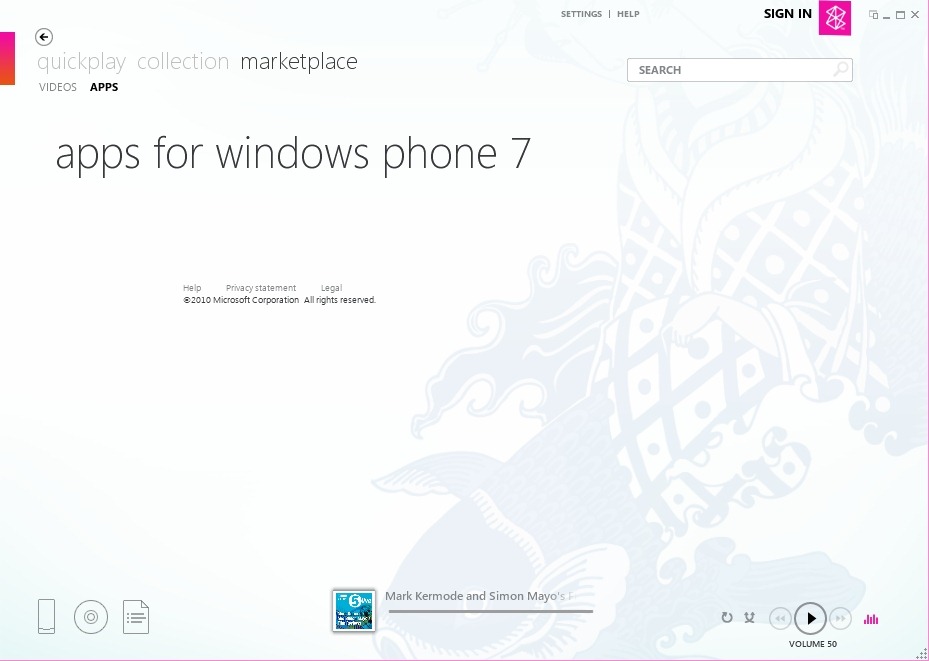
    However, it does look as though the log-jam is being tackled. I’m reading reports that the Windows Phone 7 Marketplace is now operational in India, and over the weekend, I noticed that the Zune client on my PC had an “Apps” entry in the Marketplace menu, which it didn’t before. However, there are as yet zero applications available…

    Zune 4

    While Microsoft management keep trumpeting about the thousands of applications available for WP7, it is somewhat irritating when they aren’t actually available to Windows Phones if you happen to live outside one of the few countries blessed with an operational marketplace…

    Addendum: sigh, it looks as though I spoke too soon. The “Apps” menu item has vanished again. Clearly, someone flipped a switch that they didn’t oughta and now it’s been turned off again. No Windows Phone Apps for the Netherlands, then…

  • A Damp Squib Splutters Into Life

    I see that Windows Home Server 2011 has been released to manufacturing. So it should be available on the market in April/May.

    I’m sorry, but I can only raise a faint cheer about this product. It doesn’t strike me as a major step forward from the original Windows Home Server, and in some respects – notably the removal of the Drive Extender technology – it is a step backwards.

    The comparison datasheet is long on marketing and short on actual comparison with WHSv1, and that’s not really surprising.

    What really gets to me is that Microsoft had the chance to build upon the base of WHSv1 as a server and media appliance that could be used by the average consumer, and they’ve thrown that chance away.

  • I Don’t Believe It!

    I’m channelling Victor Meldrew again today. And the cause of my frustration is once again the forthcoming Windows Home Server 2011. I wasn’t too impressed with some of the backup features I found when I looked at them a few days ago. After digging a bit further, I’ve come across one “feature” that has flabbergasted me. It really should be called a bug, because it introduces an extraordinary limitation into WHS 2011.

    It turns out that the maximum size of a server backup that can be made is 2TB.

    OK, you say, but WHS 2011 recognises multiple backup discs. So suppose my WHS has 5 TB of data that needs to be backed up, then I just use three backup discs, right? Two discs of 2TB capacity and one disc of 1TB capacity (or three discs each of 2TB capacity; the third will only be half-used). Plug ‘em in, let the server backup processes run, and everything’s hunky-dory, right?

    Wrong.

    Even though WHS 2011 will recognise multiple backup discs, it won’t let you slice up the server storage across them. You can only backup the same files and folders to any of the multiple discs. So, in the example I used above, even though I have three backup discs, I can only ever backup a maximum of 2TB of the 5TB stored on my server.

    I ask you, what sort of design is that? The term brain-dead springs to mind.

    The WHS team at least do recognise the limitation. Over at the Microsoft Connect bug-reporting site, a member of the team has written:

    At this time we can only back up to 1 single 2 TB disk. We realize the limitation and are working with the Core Windows team to fix this. Hopefully it’s something we can provide in future releases. For now you have to pick your critical data.

    Er, “hopefully” you can fix it? Dear lord, is that the best that you can do?

    It turns out that there seems to be a workaround, but it’s not, I think, for the average home user – you know, the sort of person that WHS 2011 is targeted at.

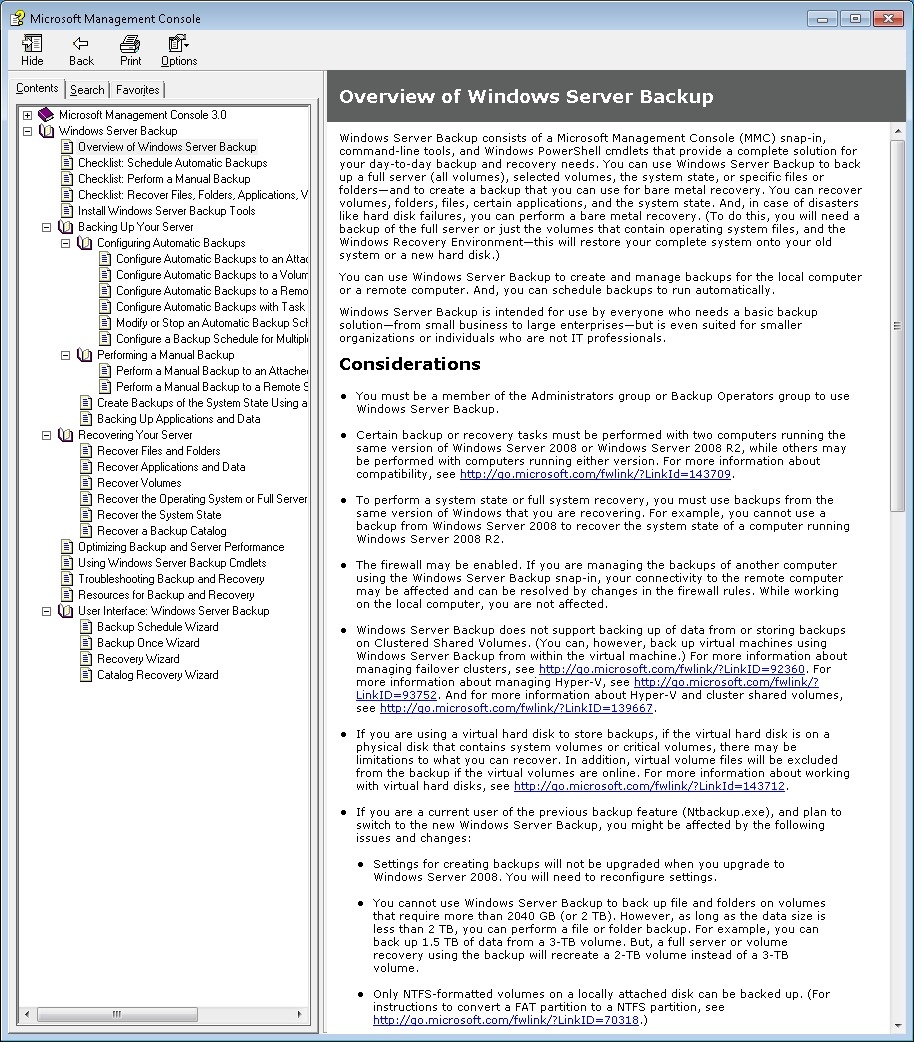
    WHS 2011 is built on top of Windows Server 2008 R2 – an extremely powerful server operating system. This has its own Backup and Restore mechanism, which is equally powerful. However, this mechanism is designed for IT people, not for the home user. Here, for example, is a screenshot of partof the Overview of Windows Server Backup, taken from the online help manual (click to see in its full gory glory). Full of jargon and certainly not for the faint of heart (or non-IT person)…

    WHS2011 19

    If you want to take a look at the full manual, then please, be my guest, and visit Microsoft’s online help web site.

    Now, it is certainly possible to use the Backup and Restore mechanism of Windows Server 2008 R2 to do what I want to do – slice the 5TB of storage on my WHS across three backup discs, but I’ll have to figure it out for myself, and start being an IT person again.

    The whole point is that I shouldn’t have to do this. WHS 2011 is supposed to be for the home user.

    The last irony about all of this is that in fact the backup features of WHS 2011 do seem to be using the underlying mechanisms of Windows Server 2008 R2, it’s just that their current design is extraordinarily limited, and, in my case with more than 2TB of data on my server, utterly useless.

    Update 20 October 2011: I see that Microsoft have now posted a TechNet article covering this 2TB limit in the TechNet Wiki. Since it’s a wiki, I’ve edited it to improve the language and the grammar. The original was clearly written by someone for whom English is not their first language.

    Update 31 March 2014: It appears as though there has been some improvement made to the Server Backup function in the Dashboard since I originally wrote this article. It remains the case that WHS 2011 continues to use the VHD format for backup, which has a maximum capacity of 2TB. However, it now appears (contrary to what Microsoft originally stated) as though the Server Backup function can now deal with multiple VHDs, providing the backup drive is big enough. So, if your backup drive is 4TB, that means you can have 2 VHDs of 2TB created on it. That, in turn, means that you can backup up to 4TB of data from your data storage drives (with a maximum of 2TB for any one drive). That’s a theoretical maximum, since Microsoft also recommend having some free space in the VHDs to handle incremental backups.

  • Backups in Windows Home Server 2011

    I wrote yesterday that I’d decided to kick the tyres of the Release Candidate of Windows Home Server 2011. Today, I thought I’d take a look at how server backups are handled in WHS 2011.

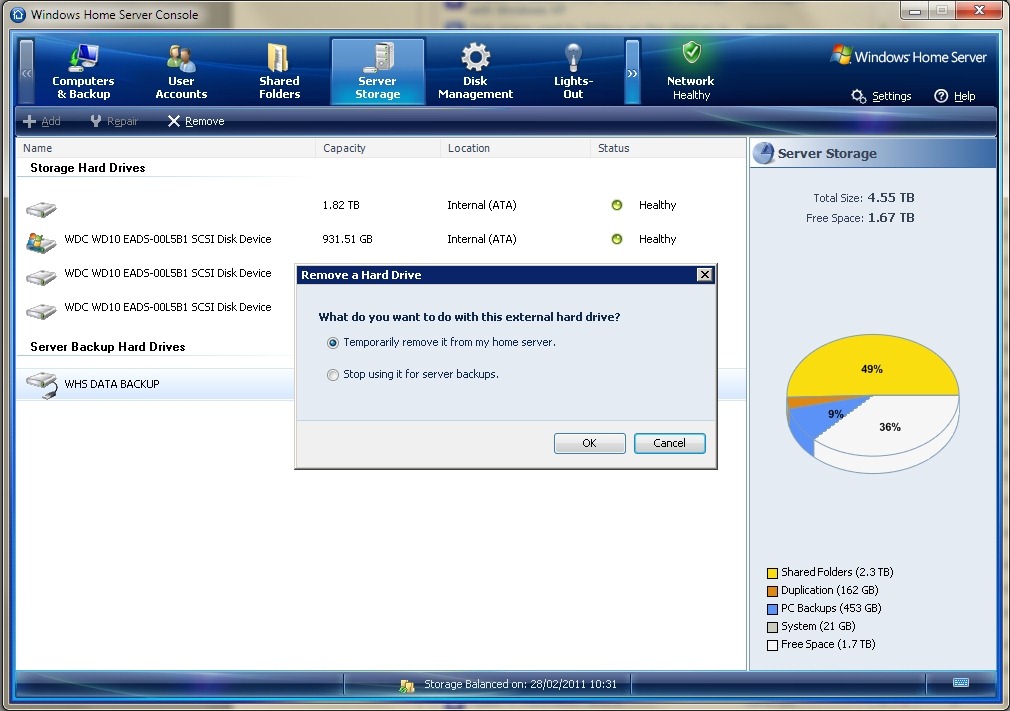
    First, a bit of background. WHS Version 1 can make backups of its shared folders (e.g. the Pictures, Videos, Music and User folders held on the server) to external discs. This is a one-click manual process (see figure 1). That means, unlike the backups of client computers attached to the server, there’s no built-in function in WHS V1 to schedule the backups of shared folders. Also, WHS V1 does not have the option of backing up the client computer backups from the server itself onto external discs. There’s a third-party add-in to do this, but this function is not built into WHS V1 by Microsoft.

    whs Storage 3

    figure 1

    When it comes to WHS 2011, there are a number of changes in this area over WHS V1. First, server backups are always scheduled – you can’t actually initiate a server backup manually with one click of a button (NOTE: the final version of WHS 2011 does now contain a button to start a server backup manually. Microsoft added this in). Second, in WHS 2011, server backups can include both the contents of the shared folders and the backups of the client computers held on the server.

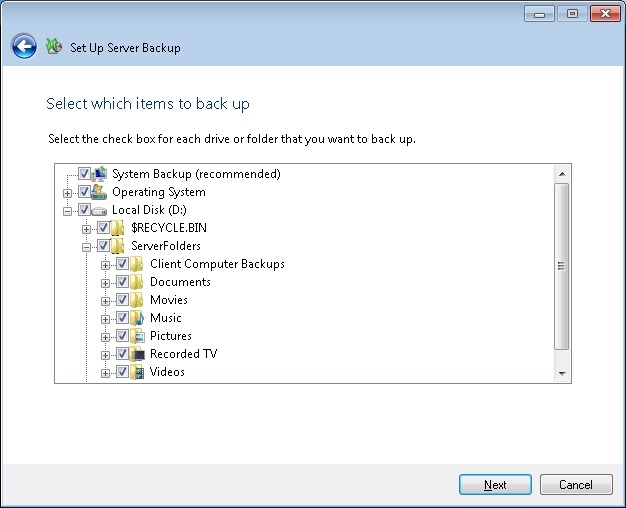
    I find these changes a bit of a mixed blessing. First the good news: it’s great that you can backup the client computer backups to external discs in addition to the shared folders (see figure 2).

    WHS2011 9

    figure 2

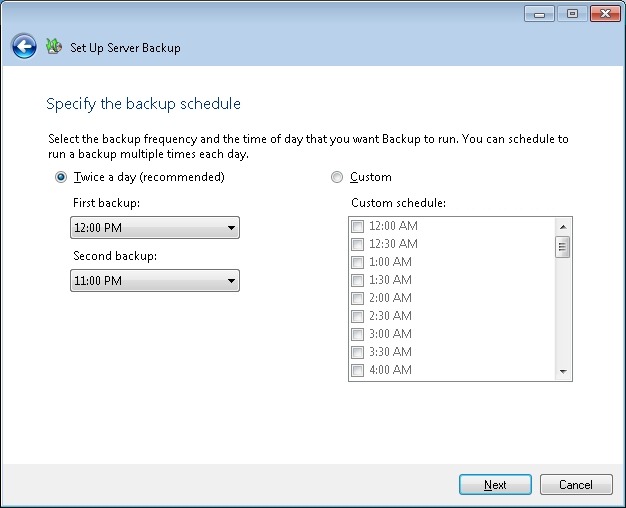
    However, I’m less enthusiastic about the fact that server backups are always scheduled, and that they run daily (see figure 3).

    WHS2011 8

    figure 3

    Let’s think a moment about the nature of these backups to external discs. As far as I’m concerned, they are for the purpose of making backups to be held offsite. That’s what I use them for, at any rate. If I were to have the external discs permanently connected to a WHS 2011 system, then, it seems to me, I’m only getting a slower version of the Shared Folder duplication that was built into WHS V1 and which was provided by the now-removed Drive Extender technology.

    And Microsoft’s own guidelines for Backup best practices for WHS 2011 state:

    You should backup server data to multiple external hard disks and rotate the hard disks between onsite and offsite storage locations. Doing so can improve your disaster preparedness planning by helping you recover your data if physical damage occurs to the hardware onsite.

    So if I’m going to be using the external discs for making server backups to be held offsite, then allowing the backups to be made only on a scheduled basis seems to be a bit counter-intuitive to me. I want to be able to fetch the discs from offsite, plug them in, push a button to initiate the server backups, and then return them offsite. I do this on a weekly basis. I can do this with WHS V1; I can’t do this with WHS 2011: (a ) there’s no manual server backup and (b ) the backups run on a daily schedule. At the time of originally writing this post, the Beta version of WHS 2011 did not have the capability to manually initiate a server backup. The final release version does. However, the backup task still continues to run on a daily basis…

    In fact, even the act of removing external discs seems less clear in WHS 2011. In WHS v1, once the server backup is complete, then I simply select the external drive and click “Remove drive”. WHS V1 will ask if I want to remove the drive temporarily or permanently (see figure 4), and I select the “temporary” option. The disc is then safely dismounted from the system, and it can be returned to its offsite location.

    WHS Storage 4

    figure 4

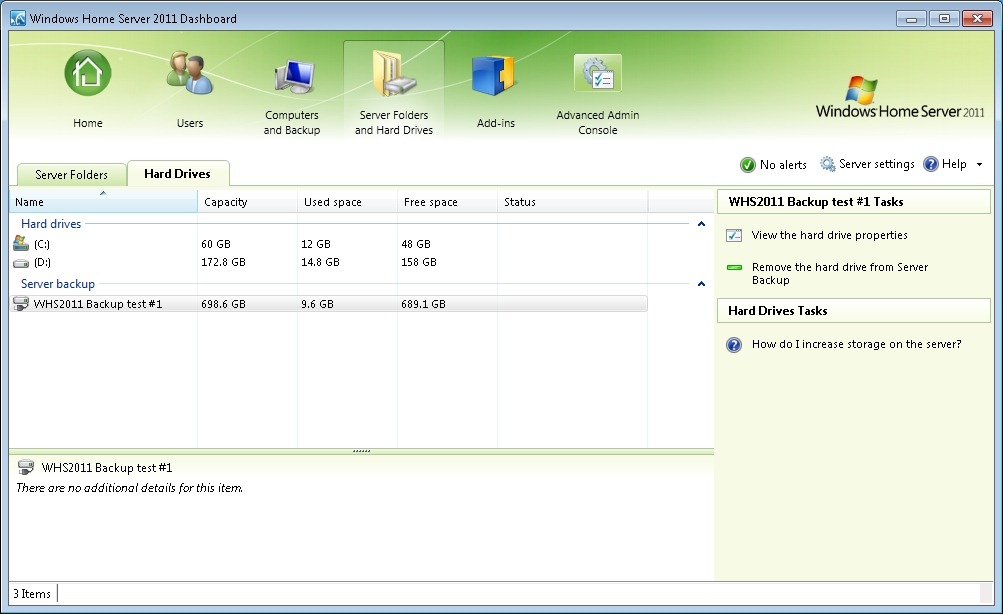
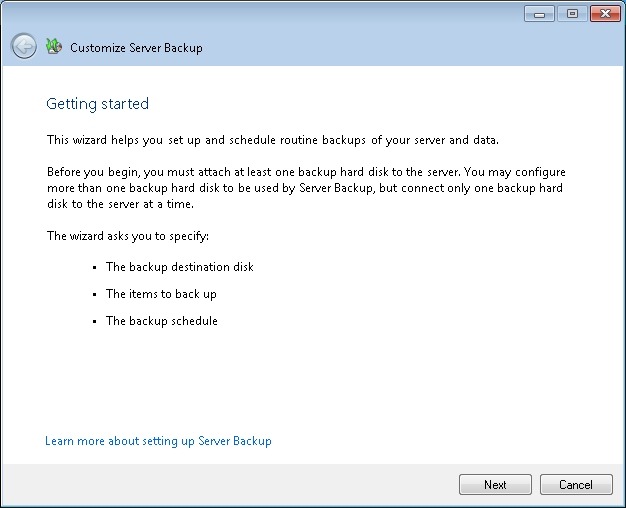
    In WHS 2011, if I select an external drive, I don’t get a choice to remove it temporarily, the only option shown is to remove it permanently from the server backup (see the tasks shown in figure 5). Choosing this starts the “Customise Server Backup” wizard (see figure 6), which I find somewhat confusing. I’m not trying to customise the server backup – I want to remove the drive… It turns out that the only way to temporarily remove a drive seems to be to yank out the cable. I suppose I’m set in my ways, but I always prefer to safely eject media (as WHS V1 allows me to do).

    WHS2011 14

    figure 5

    WHS2011 16

    figure 6

    The elephant in the room with server backups is that WHS 2011 can’t easily deal with discs bigger than 2TB. Now I know that even only a couple of years ago, this would have seemed an enormous capacity. However, with today’s high definition media, coupled with the ready availability of 3TB discs (with higher capacities on the horizon), then this limitation seems very surprising. The sad fact is that the backup method that Microsoft has chosen to go with in WHS 2011 has 2TB built-in as an upper limit. Never mind the fact that Windows 7 (even Windows Vista) and Windows Server 2008 (the operating system underneath WHS 2011) can support disks of more than 2TB capacity, WHS 2011 and its backup does not. If you install discs of more than 2TB into WHS 2011, then you must partition the disc into chunks, none of which can be more than 2TB in size. Even more frustrating, you can’t even backup a client computer that has a disc of more than 2TB assigned as one contiguous space. The Windows 7 client computer will be perfectly happy, but WHS 2011 will refuse to have anything to do with it (note: please see Addendum 2 at the bottom of this post for some clarification of this statement).

    I note that, on my WHS V1 server, my Movies shared folder is already at 1.86TB. Just a few more Blu-rays added to my library, and I won’t be able to use WHS 2011 without having to sit down and plan my storage, both for now, and in the future, very, very carefully.

    And this, to me, is the bottom line. WHS 2011 seems to force me to think like an IT support person; far, far more than WHS V1 ever did (or does!). That’s why I continue to think that the current WHS team don’t understand the home market sufficiently for WHS 2011 to succeed.

    Addendum 1: It just gets worse. It turns out that the 2TB limit doesn’t just apply to the size of a backup disc, but also to the maximum amount of server storage that you can backup for offsite storage. I don’t believe it!  Update 31 March 2014: It appears as though there has been some improvement made to the Server Backup function in the Dashboard since I originally wrote this article. It remains the case that WHS 2011 continues to use the VHD format for backup, which has a maximum capacity of 2TB. However, it now appears (contrary to what Microsoft originally stated) as though the Server Backup function can now deal with multiple VHDs, providing the backup drive is big enough. So, if your backup drive is 4TB, that means you can have 2 VHDs of 2TB created on it. That, in turn, means that you can backup up to 4TB of data from your data storage drives (with a maximum of 2TB for any one drive). That’s a theoretical maximum, since Microsoft also recommend having some free space in the VHDs to handle incremental backups.

    Addendum 2: Above, I wrote that: “you can’t even backup a client computer that has a disc of more than 2TB assigned as one contiguous space”. It turns out that’s too sweeping a statement. It was clarified by a discussion in the comments, and it’s worthwhile repeating the main points here in the blog entry itself.

    The issue is that you cannot Backup and then Restore a GPT OS drive with Windows Home Server. You can backup a GPT with v1 and perform the Restore but the disk will not boot. You can Restore individual files from a GPT backup but again not the OS into a bootable device.

    For WHS 2011, Microsoft’s release notes state:

    “If a client computer is running Windows Home Server 2011, and it has a hard disk that is configured to use the GUID Partition Table (GPT) format, you cannot use back up or restore data from the operating system, individual files, or folders on that computer. However, you can restore individual files or folders from other computers to a client computer that uses GPT formatting.

    In the event that a client computer is configured to use GPT hard disks, you must employ an alternative method to back up or restore that computer”.

    [Update 4th March 2013: Microsoft has at last issued a Hotfix to add backup support for UEFI-based computers to back up to servers that are running Windows Home Server 2011]

    Addendum 3: There are other issues with the Server Backup function in WHS 2011 that I explore in depth here. Sigh.