Reflections on life at “De Witte Wand”…

Category: Hobbies

  • A Marxist Demolition of “Strictly Come Dancing”

    Alexi Sayle is a comedian with Marxist leanings. I like him a lot. The BBC is currently into the twelfth series of its hit show Strictly Come Dancing, which is a dance competition that pairs celebrities with professional dancing partners. I like it a lot.

    Alexi does not like it, not one little bit, so he’s penned a column in the Guardian to explain why. And, to be fair, he makes some good points. He clearly doesn’t like Ballroom Dancing, because, as he says:

    Ballroom dancing is an aesthetic pursuit, an art form, that has been turned into a competition the result of which is that everything is done to attract the attention of the judges. The competitors must try to fit within a set of rules and so a tawdry, flashy, kitsch aesthetic takes over.

    I can see what he means. But on the other hand, there must be many people who go Ballroom Dancing purely for the pleasure it gives them. I remember my parents, back in the 1950s, were avid ballroom dancers. They didn’t do it in any competitive sense, but purely for the pleasure – for the chance of dressing up a bit and having a good night out with their friends.

    Family0153 

    And quite frequently, when the evening was over, they would return home with their ballroom dancing friends and carry on the party, using the large lounge (my parents owned a small hotel), the piano, and the gramophone stacked with a bunch of Victor Silvester records.

    Despite my parents passion for ballroom dancing, I never learned to dance; something that I’ve often regretted. And while I can understand Alexi’s distaste for what the Argentinian Tango has become:

    If you see a couple performing a proper Argentine tango, you are watching a dance created in the brothels of Buenos Aires that reeks of melancholy and sex and is accompanied by complex music that has grown alongside the dance and is inseparable from it. Then you watch the ballroom version, all gurning faces and robotic, angular, hideous movement, which on the show is generally accompanied by awful music that has absolutely nothing to do with the dance; you are seeing a great popular art reduced to a terrible travesty.

    … I can also appreciate that it doesn’t have to be this way. It can be the most wonderful sensual dance:

  • “Play to” and Windows 8.1

    Back in the distant days of 2009, Microsoft introduced a feature called “Play to” into its new operating system, Windows 7. Play to, so Microsoft claimed:

    makes it easy to stream music, video, and photos from your computer to other PCs, TVs, or stereos on your home network. You can stream music from your PC to your home entertainment system or stream slide shows and videos to another computer or to your TV. Just right-click the tracks you want to enjoy, or add them to your Windows Media Player 12 playlist, and click Play To. Now you’re hearing—or watching—what you want, where you want it.

    In those early days, it was something of a rocky road to negotiate; there were many bumps along the way. Nevertheless, I was happy with the end result. It worked for what I wanted.

    Then along came Windows 8. Once again, in the pre-release versions of Windows 8, there were issues, but these were fixed in the final version of Windows 8. However, while the operating system and the venerable Windows Media Player (unchanged from Windows 7) were working, the (brand-spanking-new-supposedly-fancy-but-really-very limited) Xbox Music App from Microsoft still had a number of shortcomings.

    Windows 8 also introduced a new wrinkle into Play to. I discovered that my ancient (5 years old) Denon AVR-3808 was being reported as a “not Windows Certified” device. Whilst I could continue to use it with Windows Media Player, I could not use it at all with any of the new Modern UI Apps, such as Xbox Music. Fortunately, digital mediaphile Barb Bowman came to the rescue and discovered a Registry fix, which allowed non-Windows Certified devices to be used in Modern UI Apps. Subsequent to that, Microsoft’s Gabe Frost supplied a simpler Registry fix to accomplish the same thing.

    I used Gabe’s fix, and all seemed fine.

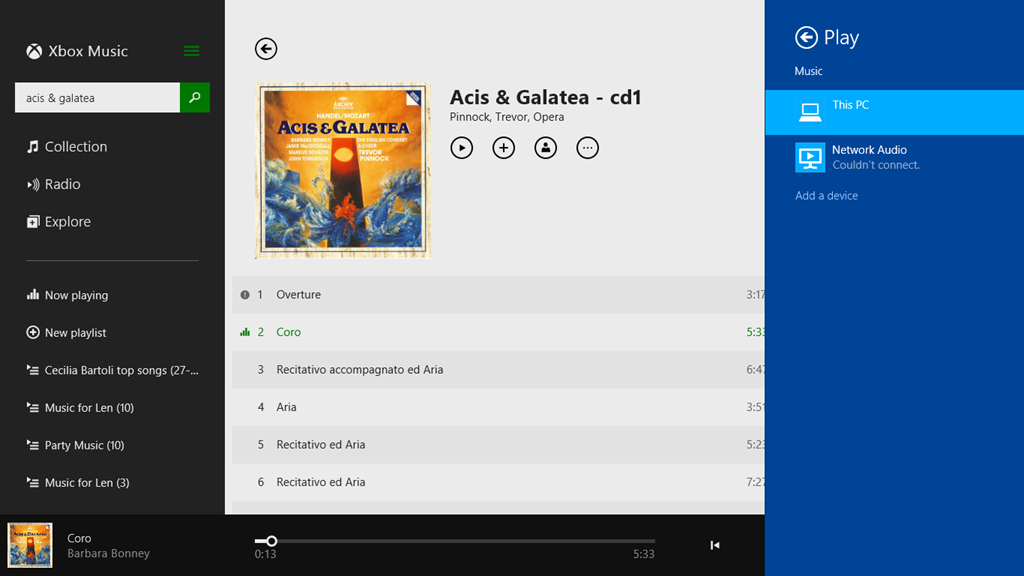
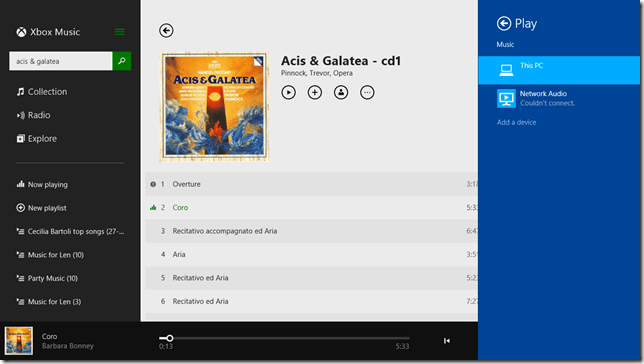
    Now we have Windows 8.1 and a much-improved Xbox Music App, and once again I seem to be taking a step back. While Windows Media Player continues to work as usual, Xbox Music is behaving very strangely when I attempt to use the Play to function. Here’s a screenshot of an attempt to use the Denon as a Play to device in Xbox Music (the Denon shows up with the name Network Audio in Windows):
    PlayTo 03

    Here, I’ve attempted to stream the first track to the Denon. That has failed, and Windows is telling me that it couldn’t connect to the Network Audio (the Denon), but in fact the second track is actually playing through the Denon. In addition, there’s a small information icon by the first track, click on it and you get:

    PlayTo 04

    which is a very odd message, since these tracks are not DRM-protected.

    I tried another Modern UI App, Media Monkey, and this seemed to behave much better. Occasionally it would refuse to Play to the Denon when first starting up, but once it got going, it seemed to be much more solid.

    So, what’s going on here?

    I raised the issue in a thread on one of Microsoft’s Answers forums. Gabe Frost himself responded:

    We have not seen this, and do not have this specific Denon model to test with, so would like to get further information from you.

    I provided the information he asked for, and very quickly the answer came back, and it’s very interesting.

    From the traces, we can see you’re trying to stream a WMA file from the Music app. Since Denon does not support WMA, the file has to be transcoded real-time into LPCM. When a file is transcoded in real-time, no system can know the resulting number of bytes, so in order to support seek, it has to be time-based (we do know the duration). However, Denon also does not support time-based seeking. In Windows 8.1, we introduced a feature that emulates time-based seeking for devices that do not support it. This is really nice in that users can seek their music or videos when they previously could not.

    In your case, since the Music app was already playing the song locally for a bit, we are doing “Seek Emulation” to seek the stream to the same position the Music app was last playing at. This involves sending some additional SetAVTransportURI requests to the Denon DMR. We see the Denon DMR reporting an error, “TransportStatus = ERROR_OCCURRED”.  Probably this is the result of the additional SetAVTransportURI requests that we send.

    That would explain why the bug does not happen when using WMP as the media controller (DMC) in Desktop. With the Desktop controller, we don’t try to seek immediately after starting to play.

    Looking at our code, we see that careful tuning was required to work with Denon because they often tend (incorrectly) to report an error when they are no longer in an error state. Denon tends to forget to set TransportStatus back to “OK” when it has received a new URL to play. While we tested with a wide range of devices (including some newer Denon devices) It appears that your Denon device is incompatible with this seek emulation because of the device bugs.

    We are investigating potential workarounds and will get back to you via this thread. A fix will take longer, unfortunately.

    One slight correction to what Gabe has written; the Denon (and all Denon AVR models, as far as I’m aware) does not support the WMA Lossless format, but they all support standard WMA format. My Denon even came with a Microsoft “PlaysForSure” sticker on it – so it was certified by Microsoft as being able to play standard WMA format!

    The issue I’m stuck with is that I have deliberately chosen to store my music collection in WMA Lossless format because it delivers higher-quality playback than standard WMA format. Lossless formats (e.g. WMA Lossless, FLAC) are better than formats that use lossy compression, such as WMA and MP3. The Denon supports FLAC, WMA and MP3, so in an ideal world, I would have chosen FLAC as my archival storage format.

    Unfortunately, Microsoft don’t support FLAC. While I can get a third-party FLAC add-on for Windows Media Player, there appears no way to use a third-party add-on for the Xbox Music App. And while I can use Media Monkey to play back FLAC files, in addition to WMA, WMA Lossless and MP3, the Xbox Music App is linked into a music store for purchasing downloads.

    I am going to have to think about the way forward for a while…

    Addendum: The Xbox Music App has other problems of its own. See Xbox Music App – Metadata Madness

    Addendum 2: As of April 8, 2014, Microsoft has released an Update to Windows 8.1 that makes it unnecessary to perform any registry edits to enable a DLNA Digital Media Renderer (DMR) to work with Modern Apps on the Start Screen. Devices will no longer appear as “uncertified” when Play is selected within an individual app (but if not certified will appear as such in the PC and Devices menu).

    Addendum 3: Native support for the FLAC format will apparently be coming in Windows 10. Good news, as far as I’m concerned.

    Addendum 4: Things will change yet again for Windows 10. First, the “Play to” function has been renamed to “Cast to”. Second, and more importantly, this function will have fundamental changes.  It appears as though Microsoft has removed DLNA DMR devices from system-level control (e.g. the Devices item in the Win 8.1 Charms bar), and demoted that function to needing to be controlled on an app-by-app basis.

    That’s all very well if app developers actually take account of it. I note that neither of Microsoft’s Music apps (Music or Music Preview) do this, and I also note that the Microsoft spokesperson uses the qualifier “eventually” in the context of support by the Microsoft app. That could mean it will be available on July 29 or it could mean in five years time. That does not give me a warm feeling.

    So, in summary, the “Play to” user experience is likely to take a step backwards in Windows 10 as compared to Windows 8/8.1. That’s a tad disappointing.

    Addendum 5: Well, Windows 10 has been released (on the 29th July 2015), and as expected Microsoft’s Music app (now called “Groove”) still does not have the “Cast to” function implemented. Sigh.

  • Surface – The Next Generation

    Yesterday, Microsoft announced the next generation of its Surface line of computers: the Surface 2 and the Surface Pro 2.

    The Surface 2 is a substantially upgraded version of the original Surface RT, while the Surface Pro 2 is an upgrade to the Surface Pro, but not to such a degree.

    I have to say that I am somewhat underwhelmed by the new machines, despite the fact that they are indeed improvements over the originals.

    Taking the Surface 2 first, the showstopper issue that I have with this machine is the simple fact that it does not run traditional Windows applications. It can only run the new Windows 8 Apps, and as far as I’m concerned, they are still a sorry bunch, with minimal functionality. That was what drove me to choose an Intel Atom-based tablet (the Lenovo ThinkPad Tablet 2) last January. It’s a decision that I don’t regret, and I am still very satisfied with my choice.

    I’ve said before that, if I don’t build my next desktop PC myself, I want to have a multi-functional device. It will be a tablet, running Windows 8 or its successors. It will have multitouch and a pressure-sensitive stylus. I will be able to carry it around and take notes/photos/videos on the move, and I’ll be able to plug it into a docking unit to support multiple monitors, a keyboard, and a mouse for my next generation Desktop. This is what I call Origami Computing.

    The issue with the original Surface Pro was that it was running 3rd generation Intel processors, which meant that it had to be fan-cooled. Personally, I much prefer using a tablet that is fanless – that’s one of the reasons I like the ThinkPad so much. The new Surface Pro 2 still has fans, but it is using the new 4th generation of Intel processors (the Haswell line). That means that it has both increased processing power and lower thermal output, so the device should hopefully be both cooler and quieter.

    Microsoft has also announced a docking unit for the Surface Pro line, so it becomes possible to consider it as a candidate for my first Origami device.

    Nevertheless, I don’t think that the Surface Pro 2 is quite there yet for me. I am disappointed by the following:

    Connected Standby is a new power-saving mode possible in both the new Atom and Haswell chips from Intel. It’s a sleep mode whereby the device can still respond to incoming events such as email, alarms or Skype calls, and wake itself up. My ThinkPad Tablet 2 has this, and I find it to be an invaluable feature. As far as I’m concerned it is a “must-have” for a modern tablet. As to why it is not present in the Surface Pro 2, it may be because it is not a fanless tablet; it may require devices to have passive cooling, although I would be surprised if this really is the case. After all, laptops have fans, and they can happily go into traditional sleep modes without problems. Connected Standby uses no more power than that, as far as I am aware.

    Like the Surface Pro, the Surface Pro 2 does not have GPS. I find this surprising. Many tablets and convertibles (e.g. the ThinkPad Tablet 2) have this; why would a top-of-the-line tablet not have it? Perhaps Microsoft thinks that it is necessary to have 3G/4G/LTE mobile connectivity (the Surface Pro line does not have this) before GPS is provided. If so, they are wrong. It is true that Microsoft’s own Maps App for Windows 8 requires internet connectivity to get map data while on the move, but not all navigation applications require this. Indeed, Microsoft’s own AutoRoute and Streets and Trips applications are designed to run on Windows laptops without internet connectivity. All they need is GPS data to be supplied. But there again, Microsoft have shot themselves in the foot here, because these applications don’t use the new Windows 8 GPS data interfaces.

    As for NFC, I would have thought that a flagship product, which Microsoft clearly consider the Surface Pro 2 to be, would have had it built in. True, it’s new, but it is making inroads into the smartphone market. I would have thought that Microsoft would have had it in their flagship tablet so as not to be behind the curve. (Update: it appears that it wasn’t included because it won’t work through the all-metal case of the Surface Pro 2. This may also apply to GPS as well)

    One area where Microsoft are not being backwards in coming forwards is in their pricing of Surface. They are clearly following Apple’s line of setting premium pricing. If I were to specify a configuration suitable for Origami Computing, I’d be looking at a price of around €1,620 for a system with a Windows Experience index in the region of 6-7). This would replace a PC of roughly equivalent specs and performance (Windows Experience Index of 7.3) that I built for about €600. Somehow, I don’t think I’ll rush to do this.

    So, all in all, I am rather disappointed. I’ll wait a year or two…

  • Mellow Fruitfulness

    At the moment, we’re seeing Keats’s poem To Autumn come to life all around us. We’re harvesting our fruit trees and shrubs. This year we have a bumper crop of plums, pears, elderberries and blackberries, backed up by a reasonable result from our walnut, hazelnut, and sweet chestnut trees.

    We have also discovered that we have Cornelian Cherry shrubs laden with berries, and so we’ll be making a new jam variety this year, to go alongside the pear jam (with hints of lemon and cinnamon), the blackberry and elderberry jams, and the plum jam and chutney. Trouble is, we’re rapidly running out of jam jars…

    20130904-1455-3120130911-1304-31

    20130911-1302-08

  • Swings and Roundabouts

    Almost two years ago, I wrote a blog post describing what I used to build my Home Theatre PC (HTPC). I’ve been pretty happy with the result. Over the course of that time, I’ve added a Solid State Drive (SSD) and reinstalled the Windows 7 operating system onto it. That had the result that the startup time from turning on the HTPC to seeing the Windows Media Center display on the TV was reduced to one minute. I’ve also upgraded the MyMovies and TotalMedia Theatre applications to the latest versions.

    The upgrade of TotalMedia Theatre from version 3 to version 5 has proved to be a problem. On my system, TMT5 does not perform satisfactorily at all. There is some sort of interaction between TMT5 and the software drivers of the ATi Radeon graphics card going on. With the latest version of the software drivers (Catalyst 12.1), I was getting bad video stuttering in the Blu-ray playback every 40 seconds or so. When I rolled back to an older version (Catalyst 11.4), then the stuttering went away, but then after about an hour or so, video playback of a Blu-ray movie would come to a juddering halt. I’ve tried all sorts of combinations of software settings in both the graphics software drivers and in TMT5, but nothing has helped.

    While I’m not the only person who is experiencing problems with TMT5, it’s clear that we are in the minority. I’ve got a support ticket open with Arcsoft’s Customer Support, and although there have been a couple of new software releases for TMT5, neither of them have helped me.

    I’ve been looking at alternatives to TMT5, in order to be able to play Blu-ray movies. While there are a few, they all come with their own set of issues. Either they don’t integrate into Windows Media Center (WMC) – they compete with it in terms of functions, or they don’t integrate with MyMovies.

    For example, I’ve been taking a look at the JRiver Media Center. This is a total solution, replacing Windows Media Center, TMT5 and MyMovies in their entirety. JRiver Media Center is capable of handling Blu-ray. I must admit, on my HTPC it appears to handle them flawlessly, a pleasant change to the current disaster of TMT5. But if I adopted JRiver Media Center, I would also be moving away from WMC and MyMovies, and I do like the user experience of that combination.

    JRiver Media Center has been around since 1998, and is currently on version 17 (!). It looks to be a very good product, well-supported, with an extremely enthusiastic user community of more than 26,000 members, some of whom are contributing plug-ins for the main application. However, I’m not sure that I want to move to it. It’s a personal thing, I know, but as I say, I feel very comfortable with WMC and MyMovies.

    An additional wrinkle is that Windows 8 is expected at the end of the year – and the Consumer Preview will be released on the 29th of this month. The WMC community, myself included, is wondering what will happen to WMC in Windows 8. Opinion was divided between those who think that we’ll see a totally new version and those who thought it would be dropped altogether. Microsoft has now promised that some form of WMC will be present in Windows 8, but it’s anybody’s guess what it will turn out to be. A related question is whether Microsoft will provide native support for Blue-ray in Windows 8 itself; either as a standard component in Windows 8, or as a downloadable plug-in available for purchase via the forthcoming Windows Store. If so, then I may be able to simply rely on Windows 8 and WMC. I’m hoping that there will be something in the Customer Preview to clarify my options. It seems to me that my options are:

    1. Roll back from TMT5 to TMT3 (to get Blu-ray playback working at least reasonably well), and hope that a future version of TMT5 will fix my current issues.
    2. Change over from WMC and MyMovies to JRiver Media Center (at a cost of $50).
    3. Hope that Windows 8 will provide a WMC that is capable of handling Blu-ray playback natively (however, I suspect that acquisition cost will be at least $100).

    I’ll continue to play with JRiver Media Center for the remainder of the trial period of 30 days, but I suspect that, in the end, I’ll go with option (1) to begin with, and maybe move to option (3) in a year or so’s time.

    Update: Having completed this post, I suddenly had a thought – what if I removed the ATi Radeon graphics card, and went back to using the integrated graphics on the Intel Core i3 530 processor? I originally had problems with the integrated graphics on the Intel, but Intel just released a new set of graphics driver software last month.

    So I’ve just pulled the ATi graphics card, and installed the new Intel graphics drivers. They seem to have improved the situation – I no longer lose the signal from the HTPC if I switch inputs on the TV. The other issues are still there (slow HDMI handshake and losing the Denon on-screen display if I use the xvYCC colourspace), but I think I can live with them.

    I’ve reinstalled TMT5, and now the Blu-ray playback is as smooth as butter; no stuttering. I’ll have to do extended tests to make sure that all is well, but it is looking good at the moment. So my option (1) has become: carry on with TMT5, using the Intel integrated graphics of the i3 processor. I don’t need to switch to JRiver Media Center, and I can explore Windows 8 at my leisure.

    The moral of the story is: HTPCs are still for enthusiasts who are able to roll up their sleeves and fiddle about – that’s what they have to do. Plug and Play? Forget it.

  • Gone Missing: Bowers & Wilkins Customer Service

    This is a tale of two British companies that supply Hi-Fi equipment, and my contrasting experiences of their after-sales service.

    The first is the Acoustical Manufacturing Company Limited (now called QUAD Electroacoustics), which was set up by Peter Walker in 1936. It began by manufacturing public address systems, but in the 1950s entered the emerging domestic Hi-Fi market. The second is Bowers & Wilkins (B&W) established in 1966 by John Bowers as a company manufacturing Hi-Fi loudspeakers.

    Back in the late 1960s, I became a Hi-Fi enthusiast, and my first system included a QUAD 33 pre-amp and QUAD 303 power amplifier paired with KEF loudspeakers – the cost of B&W or QUAD loudspeakers was beyond my budget at the time. Eventually, in 1976, I replaced the KEF speakers with a pair of QUAD ESL-57 electrostatic loudspeakers, which I still have and enjoy to this day. I upgraded the QUAD 33/303 combo to a QUAD 44/405 system in 1982, and once again, I still have and use them. Along the way, I also added a QUAD FM Radio tuner.

    In 2008, I branched out into setting up my first Home Cinema system. This time, for the loudspeakers, I went for the B&W M-1 series, which had got good reviews in the Hi-Fi and Home Cinema press.

    In the course of the years, I’ve had to use the after-sales service of QUAD just once. My FM tuner developed a fault in 2005. I emailed QUAD in the UK, and my service request was forwarded to their distributor in the Netherlands, who contacted me the very next day. They subsequently repaired my tuner; result – one happy customer.

    My experience with B&W has, so far, not been so satisfactory.

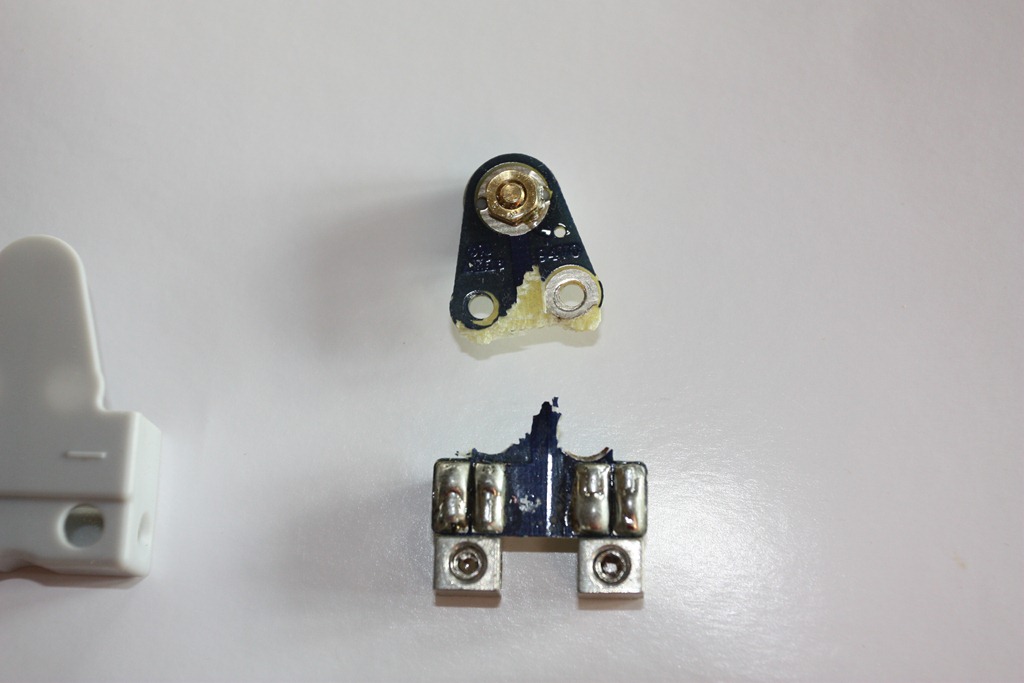
    Last month, on the night of the 15th November to be precise, a shelf collapsed in our living room. Unfortunately, one of the B&W M-1 speakers was sitting on it at the time. It fell to the floor, but the fall was broken by the speaker cable. However, these little speakers are surprisingly heavy, and the result was that a small circuit board in the table stand that connects the external cable connections to the speaker itself got ripped in two; one half remained attached to the cable, the other half remained in the stand:

    20111116-1415-00

    So, on the 16th November I contacted B&W, via their web site, to ask them if it would be possible to obtain a replacement. On submitting the request, the web site promised that I would have a reply from B&W within three working days, and an automated response, copying my request, was sent to my email address.

    Three working days went by, and nothing further was heard.

    On the 28th November, I submitted the request again. Once again, the web site promised a response within three working days, and once again an acknowledgement of the request arrived in my email inbox. That’s the only thing that arrived. Once again, I’ve heard nothing further from B&W. Er, hello? Is this supposed to be customer service? I think not.

    Bowers & Wilkins Customer Service – gone missing. Result: one very unhappy customer.

    I should have stuck to Quad.

    Update 7 December 2011

    Well, it seems as though blogging about my experience with B&W customer service has produced a result. I was contacted this morning, first by the Director of Export Sales, and subsequently by the Group Service Manager.

    It would appear that their web contact form misdirected my messages, so no action was taken. I just wonder how many other customers this may have affected, leaving a trail of bad feelings in its wake.

    However, in my case, the issue has been resolved, and I’ll be able to repair my speaker. B&W’s customer service has been found.

  • VST and ASIO Performance in Cubase 6

    Here’s a tip if you’ve been struggling with poor performance of your VST instruments and ASIO in Cubase.

    But first, a bit of history…

    The History

    Steinberg’s Cubase is one of the leading software applications for music production. It’s been around in various forms since 1984. In fact, I bought a copy of Pro-24 (the forerunner of Cubase) for my old Atari-ST computer back in 1987. The Atari was the first ever home computer that had built-in MIDI ports, and the Pro-24 was one of the first software MIDI sequencer applications for creating music.

    Over the course of the years, I have gradually acquired more MIDI equipment, and sold a few bits as well. Now I’ve ended up with three E-mu Proteus sound modules, and an ancient Yamaha TX81Z. I still use a Yamaha PF80 electronic piano as my MIDI keyboard, with a Yamaha MCS52 as a MIDI controller, both dating from around 1985. By the early 1990s I had also switched from my trusty old Atari ST over to what has become, over the years, a series of Windows PCs running various generations of Cubase software.

    In 1996, Steinberg introduced VST (Virtual Studio Technology), a software recreation of a variety of external synthesisers and effects modules. It also introduced ASIO (Audio Stream Input/Output) to handle the recording and playback of audio, in addition to MIDI.

    Up until now, I’ve not made much use of either VST or ASIO, using Cubase primarily as a MIDI sequencer and editor to drive my external MIDI equipment. However, I recently treated myself to an upgrade of my Cubase software from version 4 to version 6, and for the first time thought that perhaps I should look into using VST to supplement my external MIDI sound modules. For example, Cubase 6 came with a trial of HALion Symphonic Orchestra, a set of samples of the instruments of a symphony orchestra made for VST.

    The Issue

    But when I came to try out the HSO VST in Cubase, I found that the performance was pretty poor. After adding only a few instruments into the mix, I could see that the ASIO performance meter was overloading, and could hear clicks and pops on the audio channels.

    This struck me as odd, since the PC that I’m using has an AMD Phenom II X4 955 processor, i.e. it has four CPU cores, which Cubase should be making full use of. I looked through the Cubase manual and scoured the Cubase user forums to see if I could get a clue as to why the performance on my system was so poor. Nothing obvious came up.

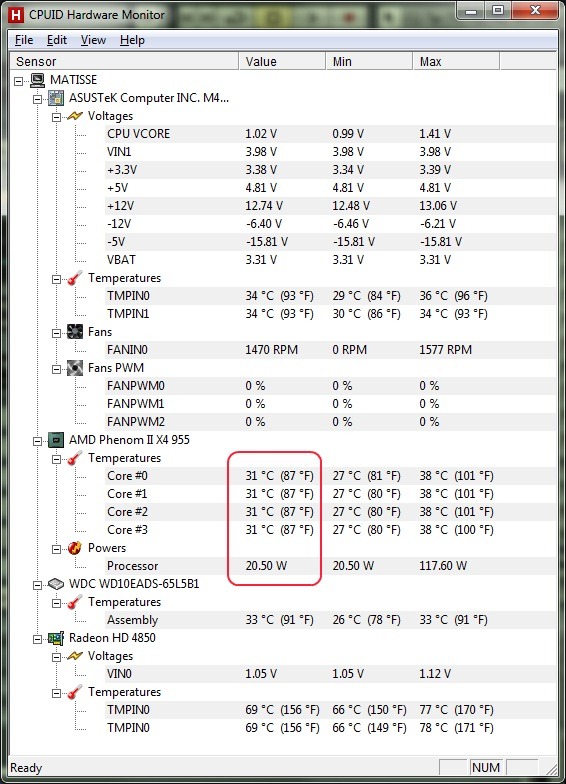
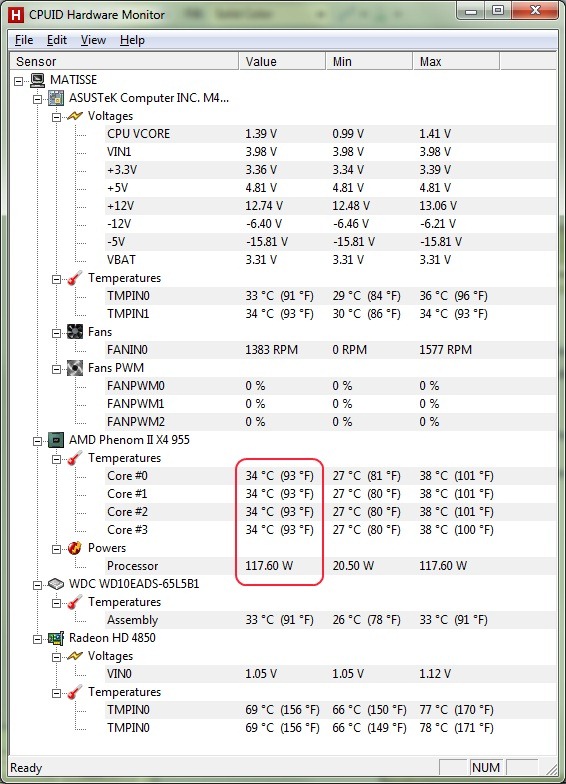
    After scratching my head for a while, I remembered that I had enabled AMD’s “Cool’n’Quiet” feature in my PC’s BIOS. This technology feature reduces the processor’s clock rate and voltage when the processor is idle, to reduce overall power consumption and lower heat generation. Here, for example, using CPUID’s HW Monitor, you can see that the power consumption of the processor is only 20.5 watts, in place of the usual 117.6 watts:

    VST 1

    As an experiment, I disabled Cool’n’Quiet in the BIOS, and ran Cubase again. This time, I did not experience performance problems. So it would seem that AMD’s power monitoring technology was interfering with the demands of Steinberg’s ASIO, causing performance glitches in the latter.

    I didn’t really want to run my computer with Cool’n’Quiet disabled for most of the time, and having to switch it on and off in the BIOS is somewhat of a nuisance. I wondered whether the power plans in Windows 7 were capable of doing the switching for me. Here’s what the Windows 7 Help and Support says about the Power Plans:

    Windows provides the following plans to help you manage your computer’s power:

    • Balanced. Offers full performance when you need it and saves power during periods of inactivity. This is the best power plan for most people.
    • Power saver. Saves power by reducing system performance and screen brightness. This plan can help laptop users get the most from a single battery charge.
    • High performance. Maximizes screen brightness and might increase the computer’s performance in some circumstances. This plan uses a lot more energy and will reduce the amount of time that a laptop battery lasts between charges.

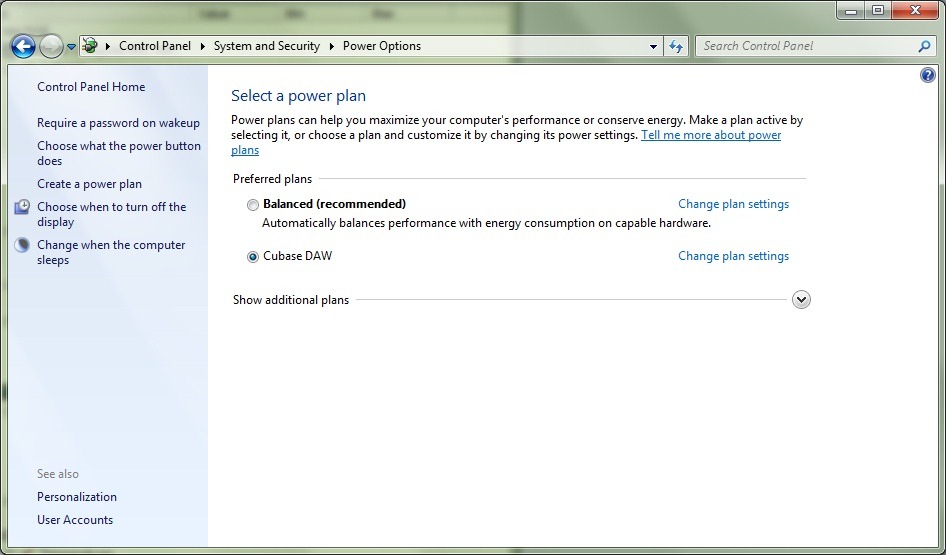
    I always run my PC with the Balanced power plan active. I decided to try enabling Cool’n’Quiet in the BIOS, but also to create a new power plan for when I am using Cubase. The new plan, based on the High performance plan, I named Cubase DAW (for Digital Audio Workstation).

    When I selected this plan, I discovered that Windows 7 itself disables Cool’n’Quiet, so I was able to run the processor at full power, and maximise ASIO performance.

    VST 3

    The Solution

    So now I have the best of both worlds; I can run my PC economically for most of the time using the Balanced power plan, but when I want to work with Cubase and HSO VST, I can readily switch over to the Cubase DAW power plan directly within Windows.

    VST 4

    Another problem solved – on to the next…

  • Obsession

    Bruce M. Hood draws our attention to a man who is obsessed with racing marbles.


    I was rather taken with the stoicism of his wife…
  • Making Changes

    We have a couple of ponds in our garden. A large one in the front garden, and a smaller pond abutting the patio at the back of the house. This was how the pond at the back used to look:

    20080824-1127-41 Stitch

    This smaller pond had a waterfall, but unfortunately that had a leak somewhere, so whenever it was turned on, the water level in the pond fell over the the course of a few days. The pond itself also seemed to have a slow leak, and the water level would drop to a lower level than we wanted. Earlier this year, Martin had had enough of the problems, and so we decided we would get rid of the whole thing and replace it with a more formal pond.

    Rather than tackle this project ourselves, we thought it would be better to get in the professionals. So we contracted the folks at the Watermolen to come in and do the heavy work, once we had drained the pond.

    20090311-0802-22 20090311-0802-35

    The bit that worried us the most was moving the millstone. The first crane could only just manage to slide it out of the way…

    20090311-0805-41

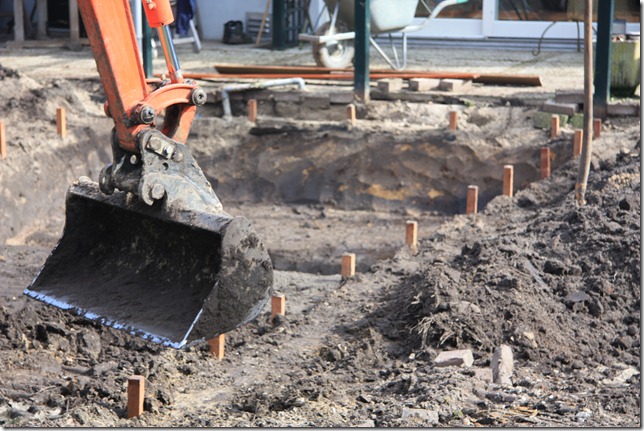
    Then the new pond was marked out and excavated…

    20090311-1301-45 20090311-1302-12

    Part of the area occupied by the old pond was filled in and would become the basis for a new patio.

     20090313-1236-12 20090313-1234-55

    The guys brought in a bigger crane when the time came to replace the millstone into its new spot in the pond.

    20090319-1346-54 20090319-1521-28

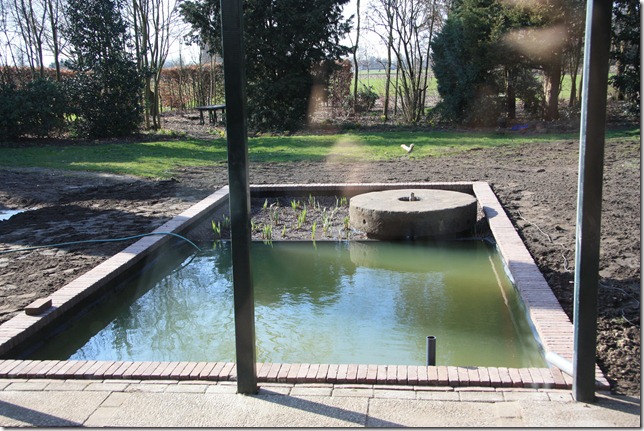
    And now, several months later, after the new patio and paths were laid, and the lawn resown, this is the result. We are very pleased with it.

    2009-05-15_IMG_7427 2009-05-15_IMG_7439

     20090612-1841-26

  • Cruel Clock

    The Turing Alarm Clock is a very clever idea – but if you’re not good at mental arithmetic, it seems a rather cruel and unusual punishment…
  • Winter’s Coming

    One thing about having a large garden is that there’s always work to be done. As a result of the storm last January, we had a lot of wood that needed to be chopped into firewood. We spent a couple of days this week doing just that with the aid of a hydraulic cleaver hired from a neighbour, and a friend who spent a day with us toting wood in a wheelbarrow (thanks, Carolien!). She also took these photos…
     
    Here’s me using the cleaver…
     
    20071001-1652-41 
     
    20071001-1652-51 
     
    20071002-1004-20 
     
    20071002-1004-07 
  • Draganflyer

    Ah, that’s a bit better, the Draganflyer radio-controlled helicopters are a bit more reasonably priced than MicroDrones. Still out of my price league, though…
  • Cleaning Gutters

    It’s getting to be that time of year when the gutters need frequent cleaning to keep them free of leaves and debris. My eye was caught by the iRobot Looj. Perhaps that’s more practical than a MicroDrone…
  • MicroDrones

    These little beauties are rather fascinating. I think I know what I’d like for Christmas…
     
     
    The only problem is that each one of these MicroDrones costs $60,000. Oh well, give it 10 years and they’ll be affordable toys.
  • A Bit of Excitement

    Yesterday evening there was hardly any wind and it was quiet. I was woken from a post-prandial snooze by a roar. It turned out to be the flames of a hot-air balloon coming in for a landing.
     
    20070915-1944-36 
     
    20070915-1945-51 
     
    20070915-1946-47 
     
    They had a nice evening for it…
     
    20070915-1944-55 
  • Quirky Collection

    The Radio Guy collects some strange and quirky items. I always wanted to have a Wimshurst machine, but some of his collection turns the strangeness knob up to eleven. Wonderful stuff. 
  • Horse Trials

    The local horse and carriage club held its annual horse trials event last weekend. I didn’t take as many pictures as last year, but I took some. The water pool was popular with spectators for obvious reasons.
     
    20070701-1456-26(1) 
     
    The horsepower came in all shapes and sizes. I was rather taken with these little beauties:
     
    20070701-1507-32 
  • Excuse Me?

    We’re currently well into the Gay Parade season, with reports, and photos up on Flickr, coming in thick and fast. I was rather taken by the Angry Professor’s tale of what happened when she took her four year-old along to the local gay parade. But then she mentioned a product of which I had not heard (I lead a sheltered life): Boy Butter. The web site is a revelation. Young people these days don’t know how lucky they are. We had to make do with vaseline when we were growing up.
     
    I was particularly struck by the comment of Eyal Feldman, owner of the company: "I am not only the president, I am also head of the research department". Oo-er, missus, as Frankie would have said.
  • A Poor Thing…

    …but mine own. That’s my blog. And today, I see the cumulative hit counter has reached 200,000. Thanks for dropping by…
  • Garden “Open Day”

    This past weekend, we opened up the garden at our home to the public. It’s the first time we’ve ever done something like this, and we didn’t really know what to expect.

    We also asked a friend, Gerda Grashuis, if she would like to exhibit her pottery, and a neighbour, Harry Nijhuis, if he would like to use the garden to exhibit some of his sculpture. Both accepted. Martin plotted out a route through the grounds, and Harry installed his work along the route, so the garden also became a sculpture park for the weekend. And in keeping with the traditional tourist attraction, we also provided a shopping opportunity at the end of the route. As well as light refreshments, we also had another neighbour, Herman Peppelman, provide a stall of his orchard produce.

    We were lucky with the weather. Both days remained dry during opening hours, and the sun shone for much of the time. We were surprised by the degree of interest – over 150 people turned up during the course of the two days. Even though the garden wasn’t looking at its best – it was devastated by a severe hailstorm last week – people seemed to enjoy their visit.

    One of the nicest things was that members of the original farming family who owned the farmhouse over 50 years ago turned up to see how things had changed. Some of them had actually been born in the house. I showed them around inside, and they were able to describe the original layout. This type of farmhouse used to shelter both humans and animals, and our living room is where the family’s six cows were kept, with their horse stabled in what is now our kitchen. At the front of the house were the living quarters for the family. The front section had the kitchen (Martin’s study), the living room (my study), with bedstees (small beds built into cupboards) and a small staircase leading up into a part of the attic where the children slept. 

    20070616-1500-48 


    20070616-1549-36 


    20070616-1544-53 


    20070618-1306-23 


    20070617-1533-43 


    20070617-1232-09 


    20070616-1502-24 


    20070618-1349-26 


    20070618-1309-39 


    20070617-1322-24 


    20070617-1534-46