Reflections on life at “De Witte Wand”…

Category: Music

  • Media in the Home – The Journey Continues, and Roon is Discovered

    Music

    My journey to get the best experience of listening to music began many years ago, when I was still a teenager. That was when I first dipped my toes into the waters of HiFi. Using the wages from the first couple of years of summer jobs, I invested in a Quad 33 pre-amp and a Quad 303 power amp, coupled with a pair of modest KEF speakers, Goldring Lenco turntable and Shure pickup. The resulting sound was a revelation when compared with my parent’s radiogram that squatted in the lounge of our family home.

    Over the course of the years I’ve been through several upgrades all of the components, and moved from vinyl to CD (yes, yes, I know many audiophiles will be frowning). There have been some constants over the years as well: I’ve stuck with Quad equipment. In 1976 I invested in a pair of Quad Electrostatic Loudspeakers, and in 1981 upgraded the amplifiers to a Quad 44 pre-amp and Quad 405 power amp. Today they are still going strong and continue to give me much listening pleasure.

    Movies

    The journey with Home Cinema only began in 2008, when I assembled our first flatscreen TV, a Bluray player, a Denon AVR, and eight B&W loudspeakers for our first Home Cinema system. This worked pretty well, but there were niggles. A couple of years later, these niggles grew in importance to the point where I decided to replace the Bluray player with an HTPC. So I built my first HTPC, and coupled it to my Windows Home Server, which by this time was holding the contents of our CD, DVD and Bluray discs.

    The next couple of years proved that HTPCs are still for enthusiasts who are able to roll up their sleeves and fiddle about, still I was happy doing that. Fast forward to October 2014, and it was clear that major changes would be necessary in the media application software of the HTPC. Microsoft would be dropping support for Windows Media Center (WMC) and I would have to find an alternative. I found two candidates: Plex and Emby. Neither of them were as good as WMC at the time, but I placed them on the waiting list.

    As promised, when Microsoft released Windows 10 at the end of July 2015, they had removed WMC from the operating system, so I needed a replacement. I was still not convinced that either Plex or Emby had Home Theater applications that were better than WMC had been, but needs must, and I ended up installing both on my HTPC, with the corresponding Plex and Emby server applications installed on the Windows Home Server 2011 system.

    From my perspective, and requirements, the weak points of both Plex and Emby are that they focus primarily on movies and TV; music and photos are way down the list of priorities as far as the developers are concerned. Another drawback is that both Plex and Emby are in the throes of redeveloping their Home Theater applications, and the new versions are little better than early alphas. We may be six months to a year away from solid releases of the new versions. What is even more disappointing is that the Plex Media Player (the new HT application) is even more limited in its handling of music collections than the Plex Home Theater application that it is supposed to be replacing.

    The current state of play is that I have both Plex and Emby servers running. I tend to use the old (now obsolete) Plex Home Theater application on the HTPC primarily for showing movies and TV episodes. I use both Plex and Emby Windows 10 apps on our other PCs and tablets, with a slight preference for the Emby app. I’m still looking at both to improve before being able to make a choice for one or the other.

    Music + Movies?

    There was a time when the HiFi system was integrated into the rest of the media environment. That was when I had Windows 7 or Windows 8.1 running on our PCs or tablets. Both operating systems supported “Play to”, which meant that I could use a music player application on a PC or tablet to stream music from the server to the Denon, and thence to the Quad pre-amp.

    Microsoft has effectively ruined “Play to” in Windows 10 to the point where it is not usable. I’ve given up any hope that Microsoft will get its act together and sort this out; the Windows 10 music player Groove continues to be without a “Play to” function and is practically useless in other ways. In addition, with every release of Windows 10 Microsoft seems content to give us a new collection of bugs, whilst crowing how much its customers love Windows 10.

    It’s difficult to switch between the Denon and the Quad when using either Plex or Emby; neither of them seem designed to handle multiple outputs, so I was rather resigned to going back to my physical CDs when I wanted to play music via the Quads.

    Then, a couple of weeks ago, I chanced upon a post in a Plex forum that alerted me to a music application called Roon.

    Roon – A Revelation

    So, what is Roon? It is an application available for both Windows and Mac OSX (with Linux coming soon) that:

    • cross references your own digital music library (plus the content of the Tidal streaming service if you subscribe to it) with hyperlinked metadata and editorial content in an intuitive interface; and
    • sends digital music in a variety of formats over a variety of connections to equipment that can play it.

    It certainly ain’t cheap (a yearly subscription costs $119 per year, while Lifetime membership costs $499). However, people choose to use Roon because it is the best “front end” for a music collection. The only thing like it is Sooloos, which is where Roon came from. Roon helps you organise and discover music.

    Audiophiles like Roon because it supports high resolution digital files and the sound quality it provides is second only to a very small number of other programs.

    Roon Labs is the company behind Roon, and although it is new, the people involved have been doing this stuff for a while (e.g. Sooloos). Roon Labs is working on the Roon software, and licenses software to hardware manufacturers for inclusion in output devices. So the Roon ecosystem over time will look something like:

    • Control Apps
    • Core (the central library management system and database)
    • Output devices

    In terms of software, Roon Labs are leaning towards:

    • Roon (all-in-one)
    • Roon Remote (Control App + Outputs (if applicable))
    • Roon Server (Core + Outputs)
    • Roon Bridge (Outputs)

    Plus you can get output devices from hardware manufacturers:

    • Roon Ready Audio Devices (Networked output devices, implementing RAAT – the network protocol used by Roon)
    • Roon Certified USB Device (USB devices that are known to work well and without quirks with Roon)

    And you can get server devices from hardware manufacturers (these devices run Roon Core and may or may not include Outputs):

    • Roon Core Certified Devices (Roon takes these devices into consideration when planning for the future, and assures they have a very long life with Roon)
    • Roon Core Capable Devices (Devices that work fine with Roon for now, but will not be taken into consideration when planning for future updates. For example, ARM, Intel Atom and J1900 based devices).

    Roon Labs haven’t committed to all the names yet, and that Roon Core Certified vs Roon Core Capable thing isn’t nailed down yet.

    Being an (ex-)Software Architect, I was impressed by the software design, and decided I’d give it a trial.

    Roon’s user interface is very elegant, and blows those of Plex, Emby and Groove clean out of the water. The entry screen gives an overview of your collection (note that it can be personalised for different users).
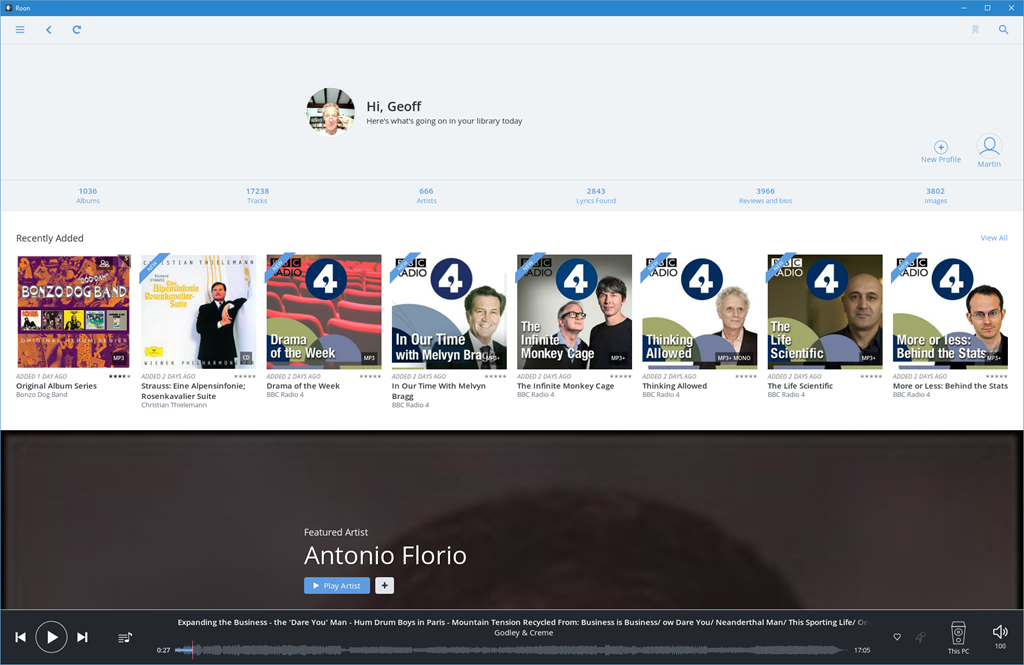
    Roon 20

    The top level menu immediately shows that in addition to Albums, Artists, and Tracks, Roon also knows about Composers and Works – these are elements that Plex, Emby and Groove haven’t got a clue about.
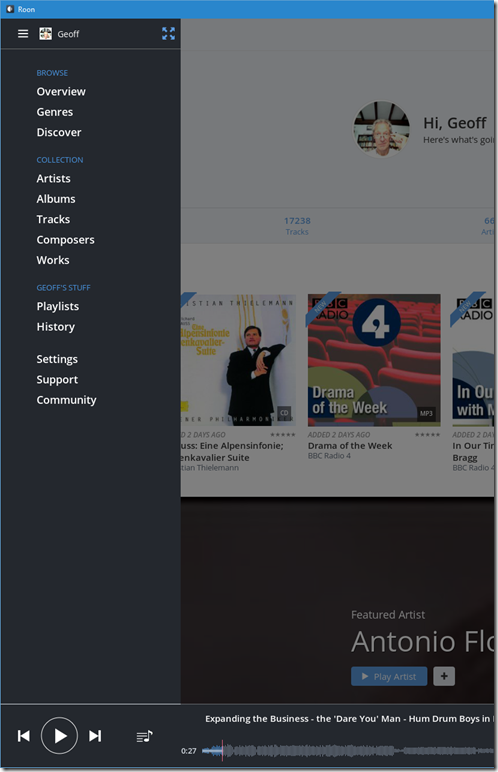
    Roon 21

    What I particularly like is that it can be clean and simple to use, but it is also easy to slice and dice your music collection (using the Focus feature) to find that hidden gem.
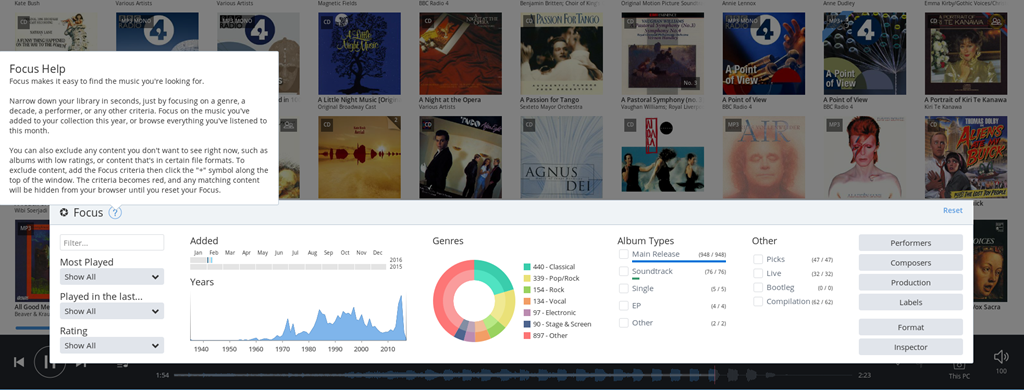
    Roon 22

    Or you can choose for serendipity, and follow links from the Discover screen, which changes over time:
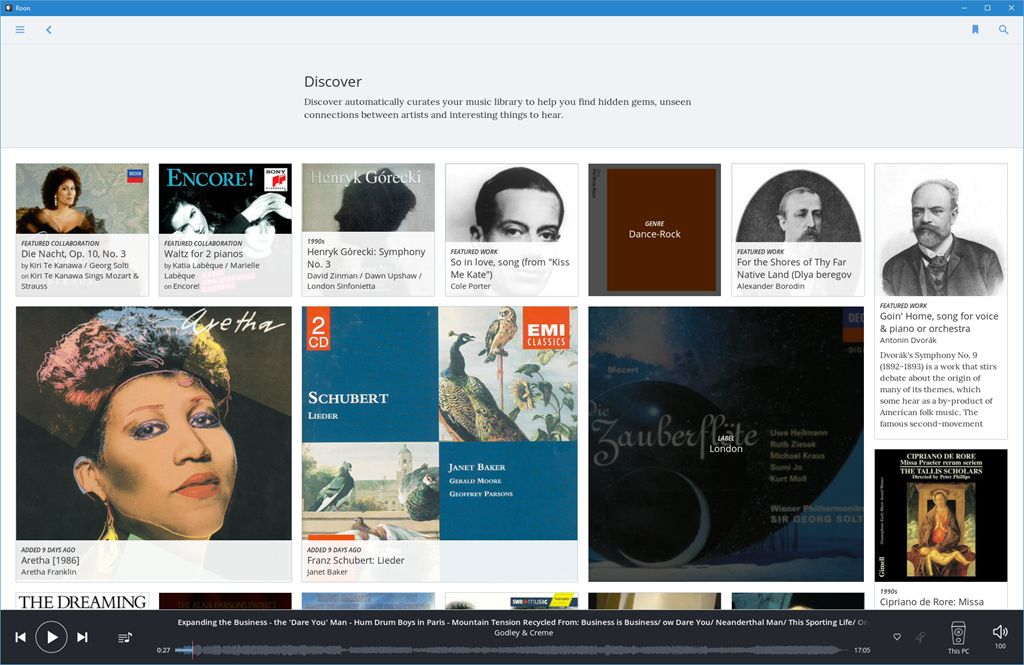
    roon 23

    Hans Beekhuyzen, a Dutch audiophile, has made a good introduction (in English) to the Roon user interface on his YouTube channel:

    I decided I would trial a client/server configuration of Roon – have the Core component of Roon (RoonServer) installed on the Windows Home Server 2011 system, and install Roon software on all our tablets and PCs – including the HTPC. That way I could use any device to play back the content of our music library.

    I also added an Audioquest Dragonfly DAC to the HTPC to connect it to the Quad pre-amp. Roon can support multiple outputs, so with the Roon software on the HTPC, I could easily choose to play music either through the Quad or through the Denon.

    I ran into a couple of problems:

    1. The RoonServer software didn’t really like running on WHS 2011, and Roon Labs don’t support WHS 2011.
    2. Streaming music (FLAC 44.1 kHz, 16 bit stereo format) from RoonServer to Roon running on tablets or laptops (i.e. devices connected via WiFi) was occasionally problematic. The streaming would break or stop altogether. This does not happen with the same music streamed via Plex or Emby.

    I solved problem 1 by deciding to migrate our server system off WHS 2011 to Windows 10 (which Roon Labs do support). The writing has been on the wall for a while that I would eventually have to do this migration. Microsoft stops mainstream support of WHS 2011 in April 2016. This issue with RoonServer was the straw that broke the camel’s back for me, and provided the impetus to migrate.

    I’ve provided Roon logs to Roon Labs for the second problem, and they are investigating. I suspect that it is caused by the fact that I have two access points for our WiFi network here – the main access point at the router in the meter cupboard at the front of the house, and a repeater in the attic. In some parts of the house, a tablet will dynamically switch between taking the Wifi from the router or the repeater and vice versa. The network traffic of Roon seems to be a fairly constant 1,5 Mbps:
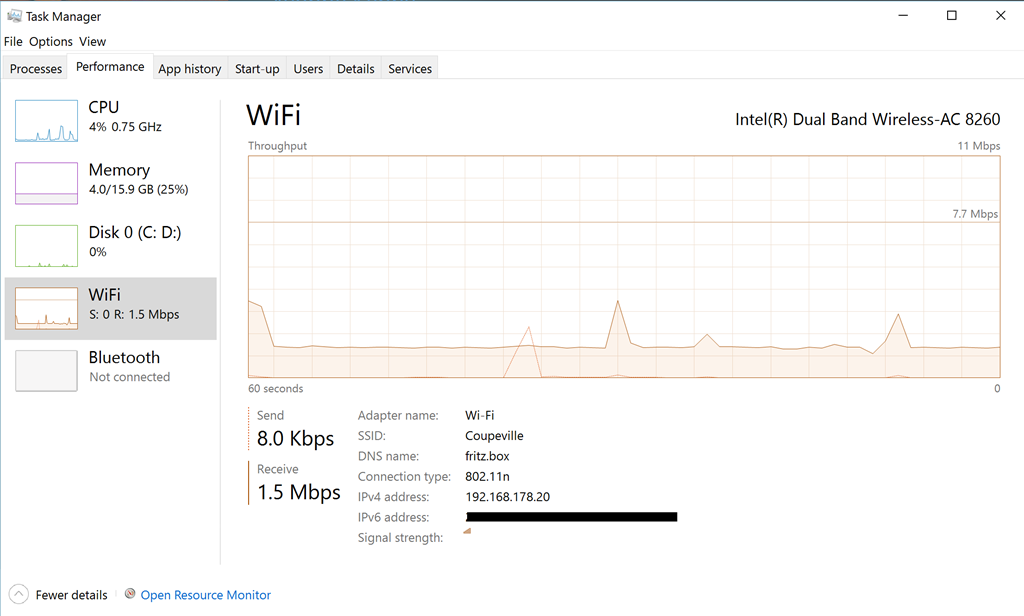
    Roon 08

    whereas that of Plex or Emby is much more “bursty”:
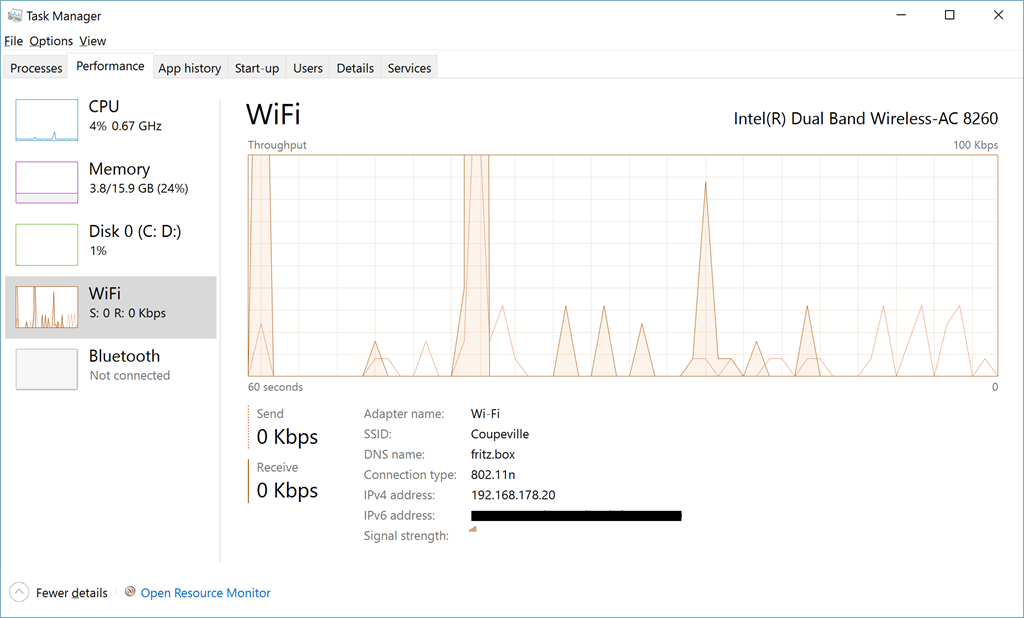
    Roon 10

    I am confident that this issue can be dealt with, and if the worst comes to the worst, I will still be able to use the tablets to browse the library and to control playback to the HTPC and the Quad. This feature comes in the upcoming version 1.2 of Roon. I can then continue with using Plex and Emby for music on our WiFi connected devices. Not perfect, but workable.

    Final Thoughts

    The journey is not at an end, but I think, at least as far as my music is concerned, I’ve reached a basecamp where I can pause awhile. It’s nice to be able to hear my music as it was intended to be heard on my Quad HiFi system once more, and that now includes high resolution music purchased online.

    Yes, I’ve crossed the Rubicon and invested in a lifetime subscription to Roon. I just hope that both I and the company can survive long enough to give me a decent return on my investment…

    With regards to our Home Theater experience, either Plex or Emby do it pretty well. I’ll wait to see how their Home Theater clients develop before deciding which one to go for. In the meantime, the now obsolete Plex Home Theater serves its purpose.

    Addendum: 18 May 2021

    I thought I’d add a note here to update the state of play as of the time of writing this addendum.

    I’ve dropped the use of Emby, but still use Plex for playing movies and video. I don’t use it for anything else (e.g. for Music, Photos, or Live TV).

    I’m still with Roon, which is now up to version 1.8, with much more functionality than when I started. And unlike some software applications, the additional functionality is genuinely useful.

  • Into The Woods…

    Just over a year ago, I blogged about the forthcoming film version of Into the Woods, the musical by Stephen Sondheim, which would be produced by Disney. I was a bit concerned that, despite a strong cast, the saccharine hand of Disney would ruin one of Sondheim’s best works. Add to that the fact that it was rumoured that Disney would be changing the story, and I wondered whether justice would be done.

    Fast forward a year, and I’ve now seen it. It’s not perfect, but it’s pretty damn good.

    What astounds me are the hugely negative reviews on IMDB. Dozens of one-star reviews from people who clearly hated the film.

    Some didn’t realise it was a musical, and hated it because of the fact that people sang in the film. Some who did realise that it was a musical didn’t like the tunes. This is rather like Emperor Joseph II telling Mozart that there are too many notes…

    Sondheim is a genius, and Into the Woods contains some of his best work. Highlights are “Agony”, “On the Steps of the Palace”. These are nicely done in the film, while Meryl Streep gives “Stay with me” real power and pathos.  And of course the perpetuum mobile of “Into the woods” itself is like a well-oiled sewing machine producing a rich tapestry of song.

    And then there are the legions of parents who unthinkingly thought that a Disney film would be suitable for young children, despite the fact that it has a PG certificate. Er, hello, people, have you never actually read the Brothers Grimm? Clearly not, since in the original Cinderella story, the stepmother cuts off the toes and heels of her two daughters in order to make the shoe fit, while the witch blinds Rapunzel’s prince by having his horse throw him onto a forest of thorns.

    There are five fairy tales: Cinderella, Jack and the Beanstalk, Little Red Riding Hood, Rapunzel, and a Sondheim invention, the Baker and his wife. The Baker’s tale is the thread stitching the other tales into one.

    Act I ends “happily ever after”, but then Sondheim deepens the stories in Act II showing the broader skein of human frailties. Be careful what you wish for, indeed.

    From the witch’s lament:

    No matter what you say, children won’t listen.
    No matter what you know, children refuse to learn.

    Guide them along the way, still they won’t listen.
    Children can only grow from something you love to something you lose…

    To the prince’s seduction of the baker’s wife in “Any moment”:

    Right and wrongs don’t matter in the woods, only feelings.
    Let us meet the moment unblushed, life is often so unpleasant,
    You must know that, as a peasant –
    Best to take the moment present as a present for the moment…

    In the stage play, the narrator and the Baker’s father are played by the same person. In the film, they are not, and I feel the film is weakened by this decision, particularly since the Baker’s father is played by Simon Russell Beale, and he is rather wasted in his few moments on-screen.

    It seems to me that Disney has softened the impact of Act II. In the stage play, Rapunzel is killed; here she lives happily ever after with her prince. Sondheim’s moral that life is messier than a simple fairy tale is somewhat lessened. Nevertheless, it’s a good effort – and far, far better than those depressing reviews on IMDB would suggest. It’s definitely worth taking a trip into the woods… No One Is Alone…

  • Groove Music – Amnesia in Action

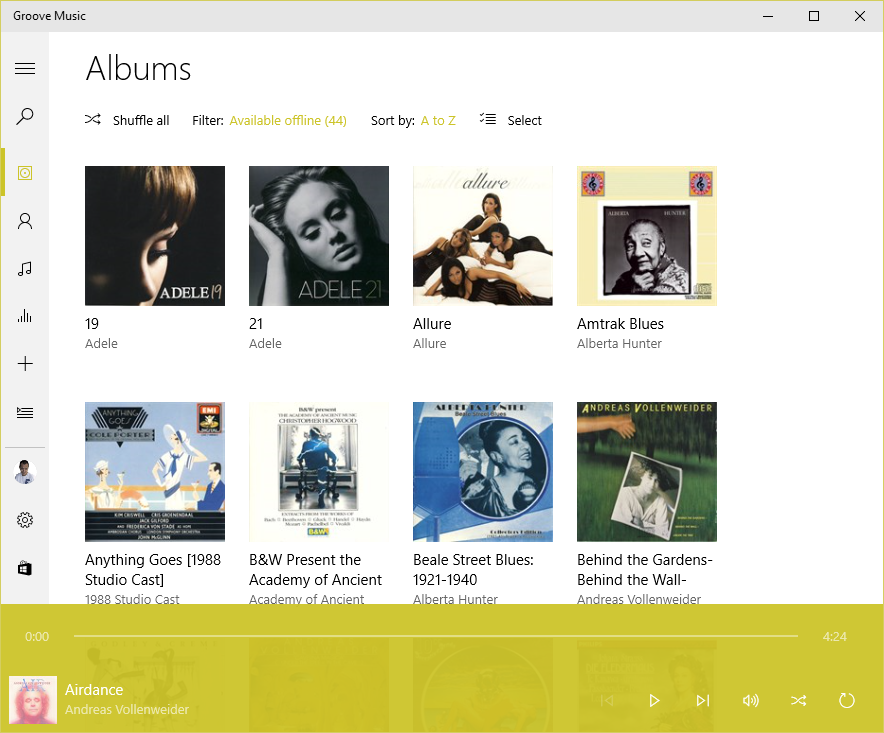
    Microsoft has released a new version of its Groove Music app (version 3.6.1210.0) for Windows 10. They’ve also introduced yet another bug into it, a showstopper, as far as I’m concerned.

    Groove keeps losing my entire album collection, and trying to rebuild it in a never-ending cycle.

    I have 1,000+ albums stored on a Windows Home Server 2011 system, and connected to it are four Windows PCs (desktop, laptop, a Windows Tablet and a Surface 3), all running Groove and Windows 10. On each of the connected devices, the root music folder on the WHS2011 system is defined as a music library (and hence defined as a watched folder – in my case, \\DEGAS\Music – within Groove on each system).

    Groove 04

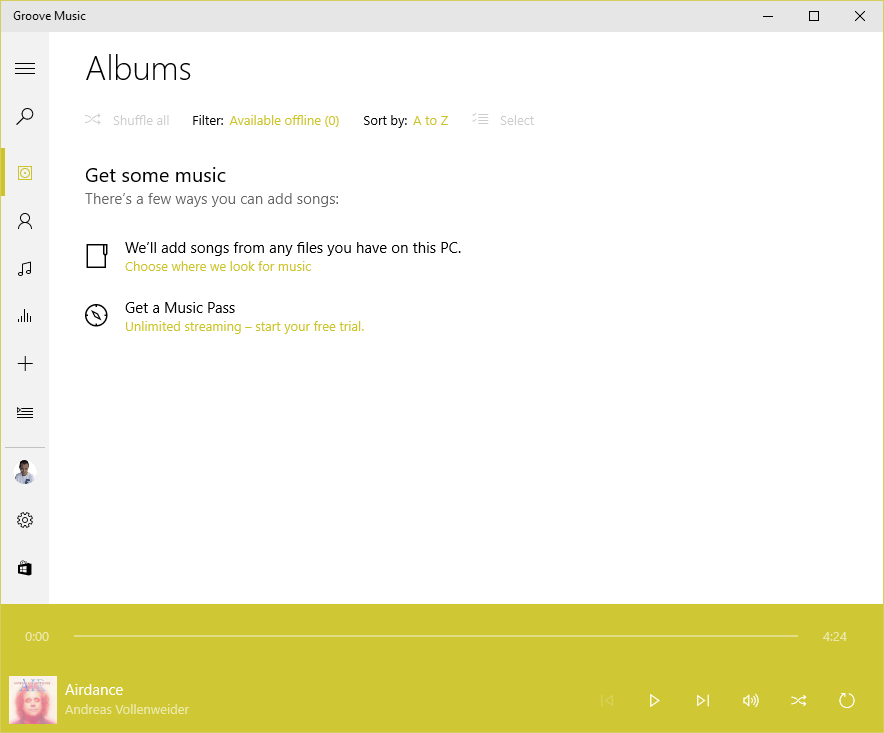
    Now that all the instances of Groove have been updated to version 3.6.12.10.0, what will happen is that when I’m viewing my Albums, the albums will suddenly disappear, Groove will say there are zero albums available offline, and  display the “Get some music” message.

    Groove 02

    After some time (30 minutes?), or a restart of the app, Groove will start re-indexing the music folders and albums will start appearing.

    Groove 03

    This goes on (slowly!) until all the albums have been scanned from the WHS2011 folders, at which point they will all suddenly disappear again and the process starts over.

    This is happening on three all four of the PCs. Interestingly, the Surface 3 is not losing the albums. However, it’s also not displaying the correct number of albums held in my music library. I have 1,103 albums in my collection; according to Groove on the Surface 3, I only have 1,084. I suspect that this instance of Groove isn’t actually watching my watched folders… Addendum: I forced the Groove on the Surface 3 to rebuild its index, and now the same thing is happening on the Surface 3 as on the other PCs.

    The 3.6.12.10.0 version of Groove is also not always displaying the “Adding music” notification when music is being added.

    I feel that Microsoft is not testing this app sufficiently well; I wonder whether anyone on the testing team bothers to test it with a library held on a Windows Home Server 2011 system.

    I don’t mind being a beta tester when software is in beta; but Windows 10 and the Microsoft apps are now released. Groove is still not fit for purpose.

    I have also sent this information in as feedback to Microsoft via the Windows 10 Feedback app. Whether this will result in a fix remains to be seen.

    Apparently, Microsoft has stated that for Windows 10 Home users, all operating system and app updates will be automatically installed, and this cannot be overridden by the user. That’s a bit worrying, since a bug in a new component can cause immediate damage. We don’t get the option to delay updates and check whether it’s safe to let installations proceed.

    Addendum 18 August 2015: Groove is now up to version 3.6.1239.0, but the issue is still present…

    Other people are also reporting this issue occurring for music collections held on both WHS 2011 and Windows Server 2012 systems, so I’m not the only one for whom this is a showstopper.

    Addendum 19 August 2015: This latest version of Groove running on my Surface 3 refuses to find any local files (including the collection on WHS 2011) at all. And it’s a hit and miss affair on my other systems as well. Groove on my desktop claims my collection has 1,109 albums available offline; on my Yoga 3 Pro, Groove says I have 1,112 albums, and on my ThinkPad 10, Groove says I have just 644 albums.

    Addendum 20 August 2015: after 36 hours(!) of adding files, Groove on my ThinkPad 10 now says I have 1,108 albums available offline. So what’s it to be? 1,109, 1,112, or 1,108? All instances of Groove are looking at exactly the same collection; one might think that they could agree on the correct total of albums. Oh, wait a minute, Groove on the Desktop PC has just lost the index again, and has restarted to index the collection, While Groove on the Surface 3 still resolutely refuses to see any albums at all…

    I’m sorry, but this software is absymal.

  • I Wish…

    …that the upcoming Disney version of Stephen Sondheim’s Into the Woods will do justice to the material.

    The first teaser trailer for the film of Into the Woods has been released, and it’s notable that there ain’t no singing in it, even though it’s a Sondheim Musical. Apparently the filmmakers have also taken out a couple of the songs and changed the plot. All of which leaves me hoping that they haven’t wrecked one of Sondheim’s best works. At least I saw the stage production of Into the Woods when it played in London back in 1990, and I have the DVD of the American Playhouse production of the work to remind me of how good it could be.

  • Rise Like a Phoenix…

    Well, of course, as soon as I read of the controversy surrounding Conchita Wurst, I couldn’t help but cheer her on in the Eurovision Song Festival. A drag queen, with a beard? It brings back fond memories of the Sisters of Perpetual Indulgence

    And then when I saw her in the second semi-final, I was even more pleased to realise that not only had she a damn good belter of a song with strong lyrics – Rise Like a Phoenix – but she could deliver it with style and panache.

    And now she’s won Eurovision 2014. Well done her!

    Martin and I watched the final last Saturday – Eurovision is a guilty pleasure. It is so over-the-top and almost the definition of camp. Every year it has more than its fair share of cringeworthy moments. This year, the French entry scored highly, and I’m still trying to get the image of the butter-churning Polish lady out of my mind.

    But there were some good songs. The Dutch entry, although I didn’t much care for it, did far better than we all hoped, coming second. If it hadn’t have been for the phenomenon of Conchita, it would have swept the board.

    I see that the UK public displayed their usual good taste by awarding the Polish girls the full douze points. It was only the UK jury voting them down that balanced it out. We Dutch were almost as bad – the public put them in 2nd place, while the jury put them in 25th place.

    At least we redeemed ourselves over Conchita – both public and jury placed her in 1st place.

    Also, while the Russian jury followed the party line and put Austria in 11th place, the Russian public actually ranked Conchita in 3rd place… We live in interesting times.

  • The UN Goes Bollywood

    The UN Human Rights Office has made the first ever Bollywood music video for gay rights as part of their Free & Equal initiative:

    With my Indian ancestry, I thought it rather charming and sweet…

  • Music and Windows Phone

    Back in the days of Windows Phone 7, Microsoft’s Zune application was used to copy or synchronise media (music, photos, videos and podcasts) between your PC’s media libraries and your Windows Phone. When I had a Nokia Lumia 800 (which used Windows Phone 7.8), it was wonderfully easy to transfer music and podcasts from my libraries to my phone and to manage them on my phone with it.

    Then I upgraded to a Nokia Lumia 1020, which uses Windows Phone 8, and found that I’d need to change the media management software, because Zune doesn’t work with Windows Phone 8. Microsoft has released a new generation of media management software for use with Windows Phone 8.

    Microsoft make two versions of this media management software for Windows, a desktop application and a Modern UI App.

    I have tried both of them, and I’m here to tell you that they are both absolutely abysmal. Microsoft should really be embarrassed at how bad they are.

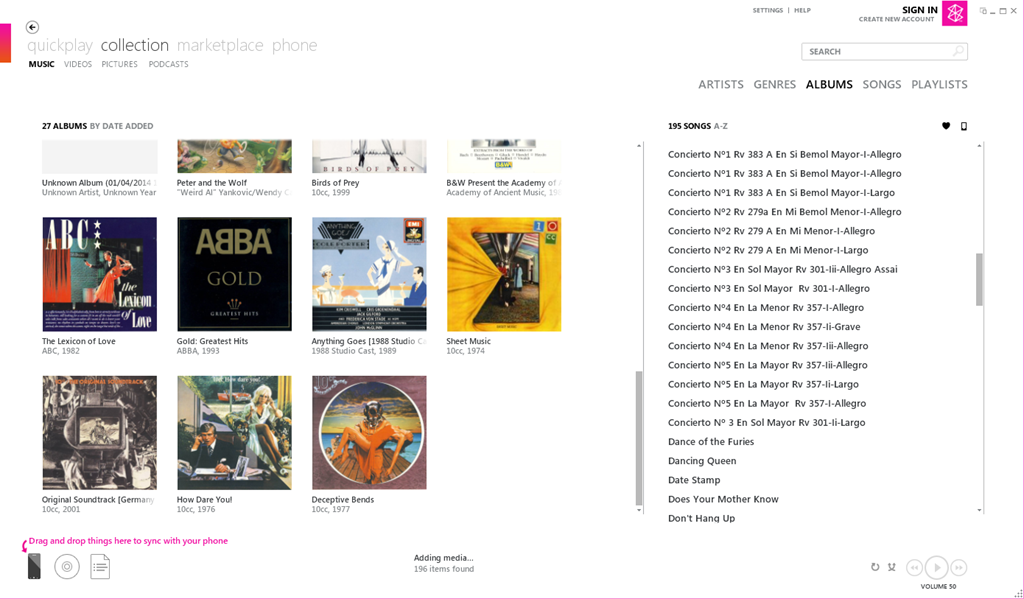
    Here’s a screenshot of Zune displaying some of my music albums. To copy an album across to the phone, I simply drag and drop the albums onto the icon of the phone:

    Zune 04

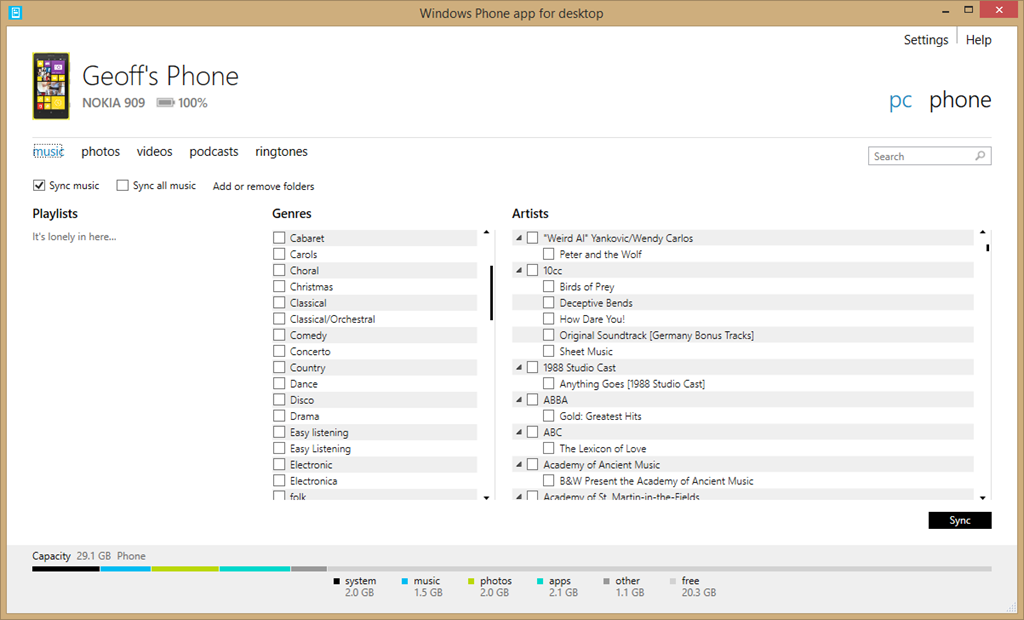
    Here’s the equivalent screen of the new desktop application:

    Zune 06

    For a start, there’s no way of displaying albums; only a list of genres and artists. Secondly, there’s no display of Album Art, which I find gives me useful visual cues. Thirdly, if I select a genre, then the list displayed under Artists does not change to display only those items (songs) that are tagged with the relevant genre, so I have no way of knowing the specifics of what I am about to sync. Also, I have no way of knowing how much space will be required on my phone.

    If you think this is bad, here’s the equivalent opening screenshot of the Modern UI App when adding music to your phone:

    Zune 07

    The problem is that Microsoft has focused on its subscription-based cloud service for music – Xbox Music – and forgotten about those of us who have our own music collections or have no interest in paying a monthly subscription fee. If you are a subscriber to the Xbox Music service, then you can download music from the service directly to your Windows Phone 8 device. But if you are not a subscriber, Microsoft will point you in the direction of one of their media management software applications to transfer music to your phone, and using them is a horribly painful process.

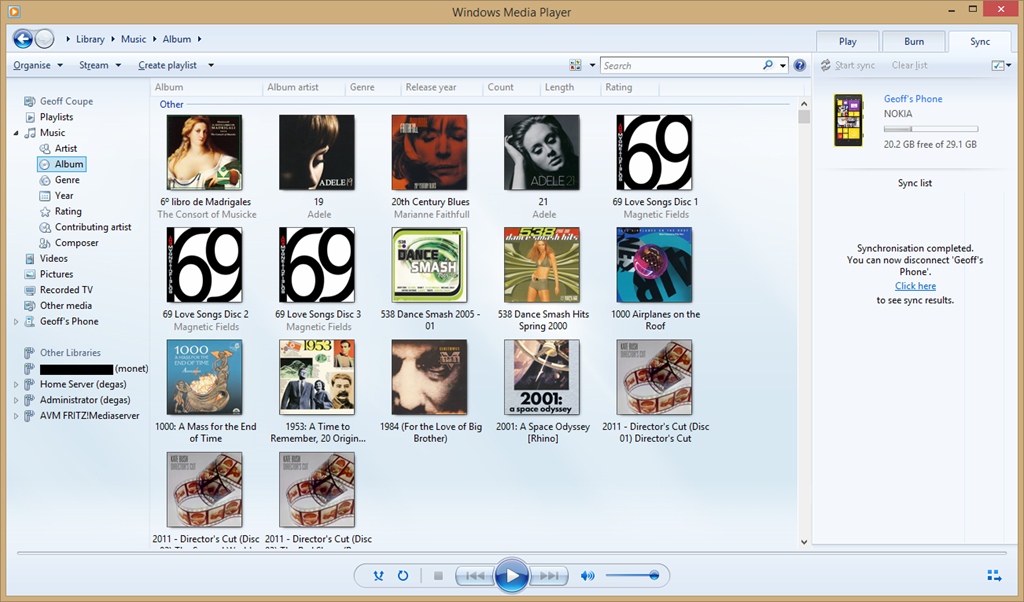
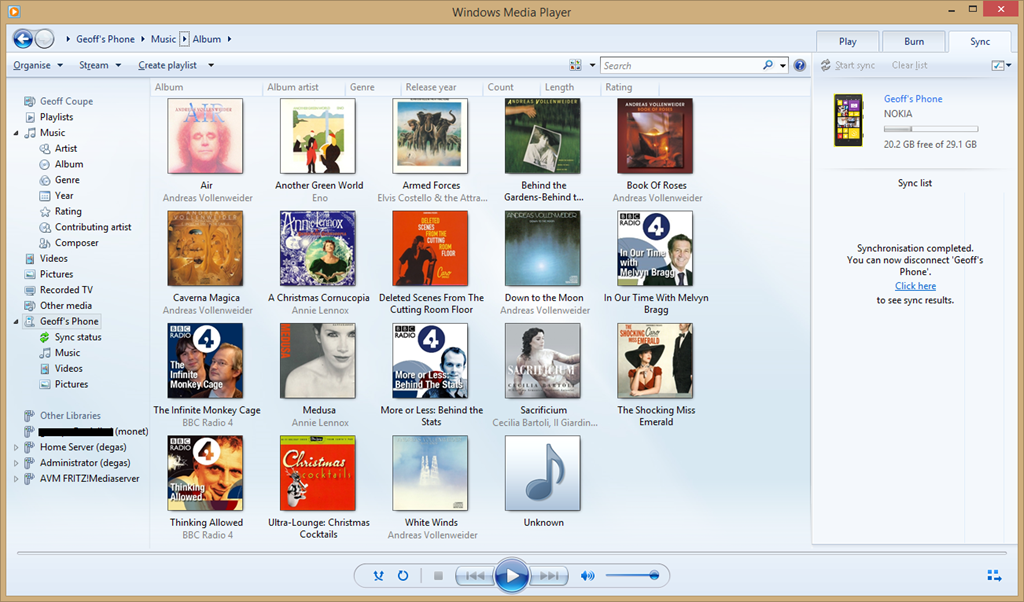
    Fortunately, I have discovered that there is another alternative; and that is Microsoft’s good old Windows Media Player. It knows about Windows Phone 8 devices, and can sync to them with ease. I can display my music collection by Album, Artist, Genre, Rating, even by Composer (none of the other Microsoft applications can do this), and sync my selection to my phone with ease.

    Zune 08

    You can also use it to browse the content of your Windows Phone and manage your media on the phone if you so wish. Here’s the Album view:

    Zune 09

    And here’s the photos on my phone:

    Zune 11

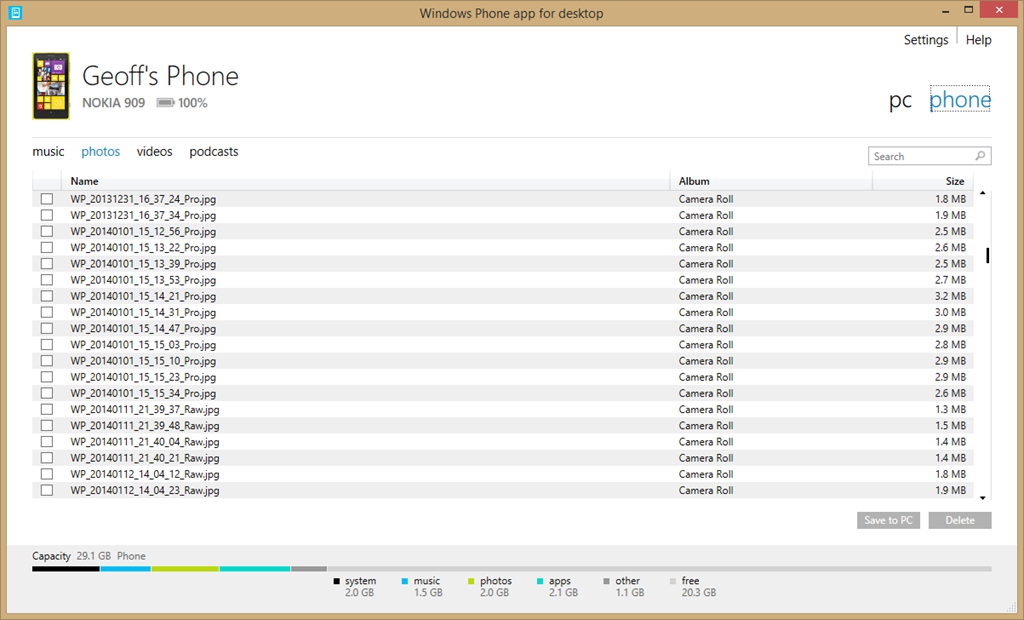
    By way of contrast, here’s what you see when you use Microsoft’s brand spanking new desktop application for Windows Phone to browse your photos:

    Zune 12

    Yup, it can’t even display thumbnails of your photos… As I say, Microsoft should be thoroughly ashamed of this rubbish.

    I’ll be sticking to Windows Media Player for managing the music media on my phone from now on.

    There’s a sting in the tail I’m afraid for those of you who are using a Windows device running Windows RT, such as the Surface 2. Windows Media Player isn’t available for Windows RT. I’m afraid you are stuck with Microsoft’s abysmal Windows Phone App.

  • Sleeping Beauty and Maleficent

    Back in 1959, when I was ten years old, I went to our local cinema and saw Walt Disney’s Sleeping Beauty. I was utterly mesmerised by it. Two things gripped me, and never let me go: the look of the film, and the music. Well, the music was by Tchaikovsky, after all, and it merely confirmed to me that classical music was worth listening to.

    The look of the film was extraordinary. The backgrounds were styled after the illustrations in medieval Books of Hours. For Sleeping Beauty, although Disney’s regular production designer was in charge of the film’s overall look, the film’s colour stylist and chief background designer was Eyvind Earle. His work was detailed, heavily stylised, and brought a real sense of landscape into the film.

    Sleeping Beauty 01

    There was a terrific villainess as well – the bad fairy, and in Disney’s version, she had a name: Maleficent. And now, she’s back – there’s a new Disney live-action film coming out in May this year, with Angelina Jolie as the eponymous villainess. I must admit that the film’s trailer looks as though it may actually give the old film a run for its money.

  • Xbox Music App – Metadata Madness

    I’m doing the old one-step-forwards-two-steps-back shuffle with Microsoft again. This time it’s the latest version of the Xbox Music App that is raising my frustration levels.

    Windows 8.1 has arrived with a new version of the Xbox Music App (version 2.2.177.0). While it has improved in certain respects from earlier versions of the App, in one respect it seems to have got a whole lot worse: it does not handle Album Art well at all.

    By default, when you add your collection of music albums and tracks to the App, it will query Microsoft’s online metadata service and fill in metadata such as the album name, artists and the cover art of the album (the Album Art) for display within the App. The first thing I had to do when installing the App was to change this default and prevent it from downloading any metadata and writing it into my music collection. I have learned, from bitter experience, that Microsoft’s music metadata is, to put it bluntly, utter crap for the music I listen to. I have spent many hours correcting the errors that Microsoft has injected into my music metadata from earlier incarnations of their music applications. Windows Media Player, Windows Media Center, Zune, Windows Home Server, they’ve all stomped all over my carefully prepared music metadata in their jackboots without so much as a by-your-leave. So when you tell a Microsoft music application that it must not, under any circumstances, use the online service to supply metadata when importing audio tracks and folders into its library, then what it should do is to look at the tracks and folders themselves to see if there is any metadata that it can use.

    As I say, I have spent many hours using Media Monkey to provide accurate metadata and high-resolution Album Art (at least 500×500 pixels) in every audio track (over 14,000) and Album folder in my collection and Windows Media Player, Windows Media Center and Zune will all read this metadata and use it properly.

    The Xbox Music App on my Desktop PC does not. It fails to read the metadata quite spectacularly. Let me illustrate this.

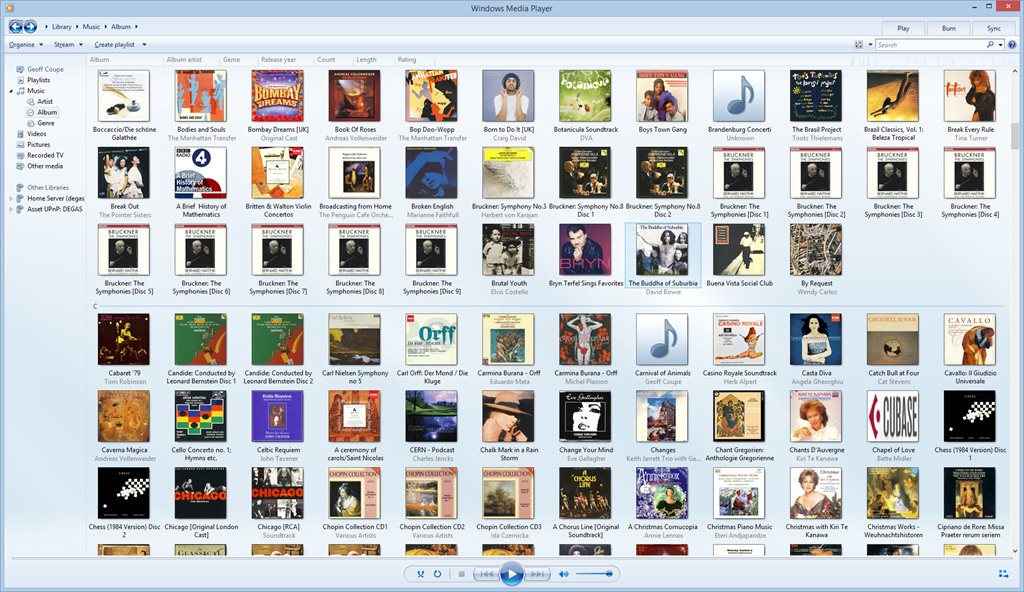
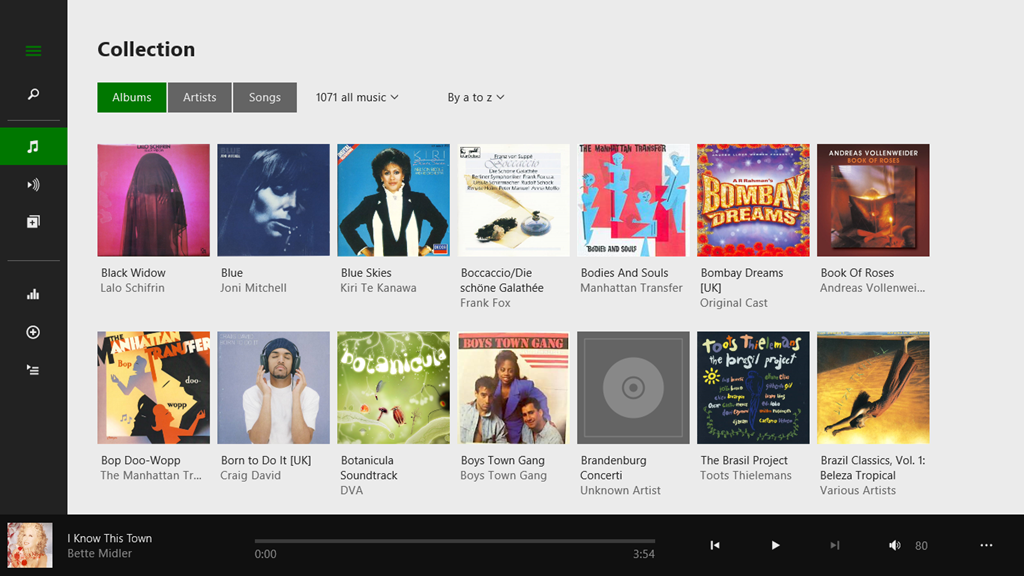
    Here’s a snapshot of part of my music collection being displayed in Windows Media Player:

    Xbox Music issue 11

    WMP has picked up the album art metadata and displays it (there are two albums shown with the default “music note” icon – but that is also correct, the tracks in these two folders do not have any album art metadata).

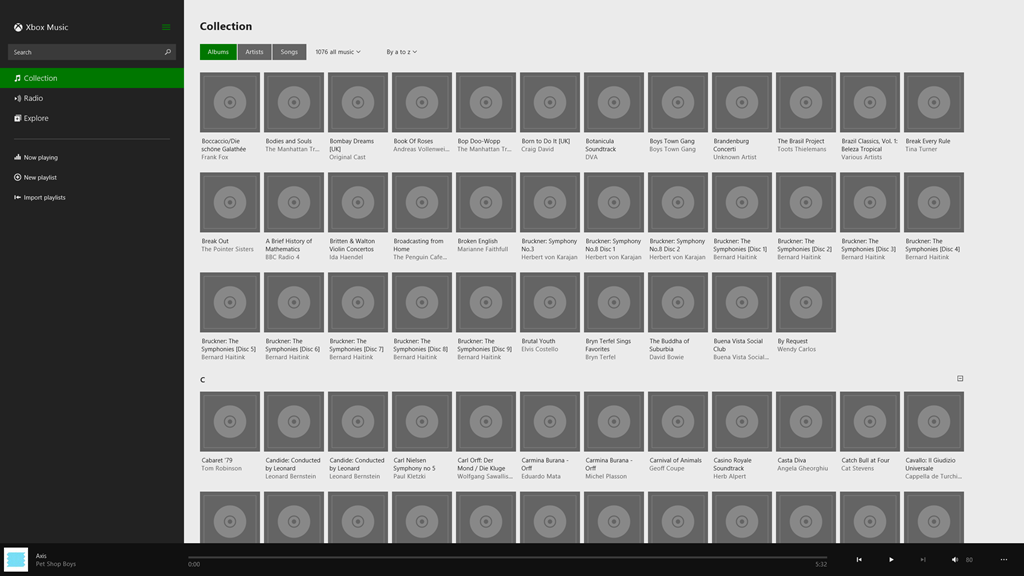
    And here’s the same part of the same music collection being displayed by the Xbox Music App running on the same Windows 8.1 PC:

    Xbox Music issue 10

    Er, hello? Is this supposed to be a good user experience?

    Interestingly, if I use the same version of the Xbox Music App running on my Windows 8.1 tablet, then that manages to do a slightly better job:

    Xbox Music issue 12

    There are fewer albums shown, because the App is running on a device with a lower-resolution screen. But the point is, here, the Xbox Music App does appear to be reading my Album Art metadata, whereas on the Desktop PC, the same App fails miserably.

    I’ve found where the Xbox Music App caches the Album Art images that it uses for display. It’s in the folder:

    C:\Users\Username\AppData\Local\Packages\Microsoft.ZuneMusic_8wekyb3d8bbwe\
    LocalState\ImageCache\20.

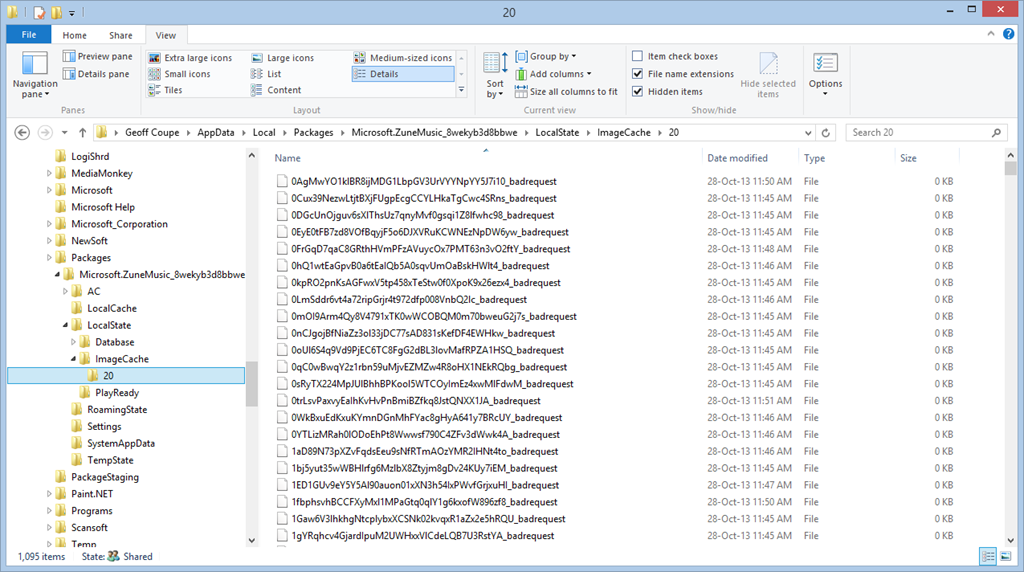
    On my Desktop PC, that folder is filled almost entirely with files of the form <some long string>_badrequest:

    Xbox Music issue 13

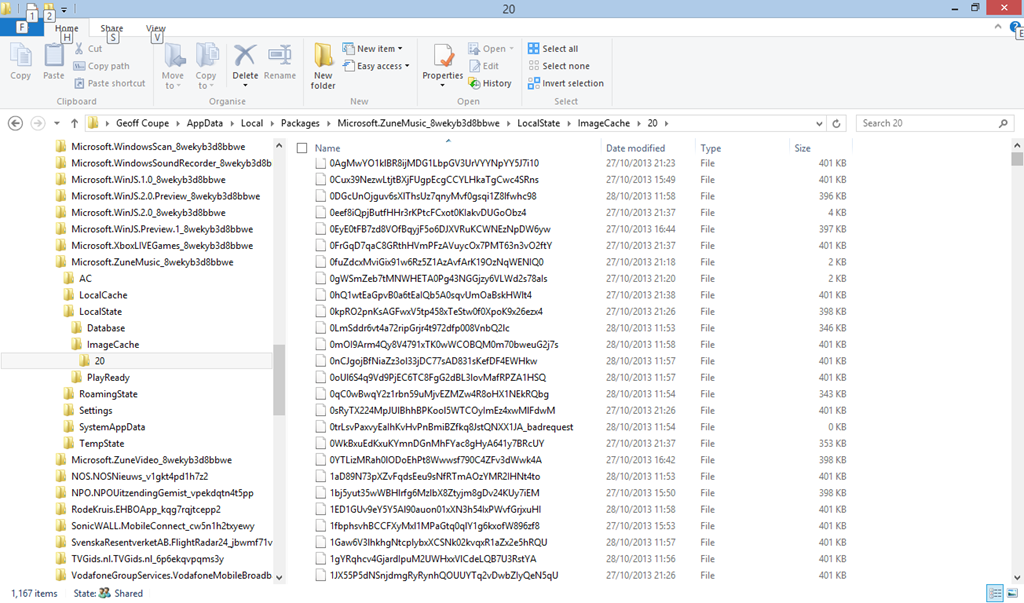
    Whereas on the tablet, that same folder is filled almost entirely with files having the same form and names, but without the “_badrequest” suffix. These are, in fact Album Art images:

    Xbox Music issue 14

    So the question is, why is the Xbox Music App running on the tablet able to succeed, while the same App running on the Desktop PC can not? Both Apps are working against the same music collection, which is held on a Windows Home Server 2011.

    The only thing that occurs to me is that there is possibly a race condition in the software that causes the App to fail on the much faster Desktop PC. Whatever the cause, I would like to think that Microsoft will fix it. We shall see.

    Update 17 December 2013: well, another new version has arrived from Microsoft (version 2.2.339.0) and been installed on my computers. Alas, it’s made no difference to this issue – the bug is still there; great swathes of non-existent Album Art.

    Update 23 January 2014: another day, another update of the Xbox Music App, this time to version 2.2.444.0. Still doesn’t fix the metadata bug though…

    Update 11 February 2014: another day, another update of the Xbox Music App, this time to version 2.2.550.0. Still no fix for the metadata bug though…

    Update 11 March 2014: This issue of disappearing Album art doesn’t seem to have started until I upgraded to Windows 8.1 on the Desktop PC.

    So I decided to implement a scorched earth policy: I did a fresh install of Windows 7 Home Premium, applied the 250+ updates that were required; installed Windows 8 Pro plus the 100+ updates that it required, and finally upgraded to Windows 8.1 Pro via the Store (and applied its updates…).

    Now, finally, Xbox Music is showing my album covers correctly for my music collection held on the WHS 2011.

    I’m still in the process of reinstalling all my applications and Apps – this will take a day or two to complete – but at the moment, Xbox Music appears to be working as it should.

    So, whatever the problem was, it does appear as though it was caused by something not being right in the previous installation of Windows 8.1, and now we’ll never know what it was…

    Update 17 April 2014: It’s very likely that this problem was caused by an obscure interaction between the Xbox Music App and another desktop application that integrates with the Windows Shell to add additional menu options in the Windows Explorer. In my old installation of Windows 8.1, I had the dBpoweramp Music Converter installed. Someone else had the same Xbox Music issue of no Album Art being displayed, and tracked it down to the Shell integration feature.

  • “Play to” and Windows 8.1

    Back in the distant days of 2009, Microsoft introduced a feature called “Play to” into its new operating system, Windows 7. Play to, so Microsoft claimed:

    makes it easy to stream music, video, and photos from your computer to other PCs, TVs, or stereos on your home network. You can stream music from your PC to your home entertainment system or stream slide shows and videos to another computer or to your TV. Just right-click the tracks you want to enjoy, or add them to your Windows Media Player 12 playlist, and click Play To. Now you’re hearing—or watching—what you want, where you want it.

    In those early days, it was something of a rocky road to negotiate; there were many bumps along the way. Nevertheless, I was happy with the end result. It worked for what I wanted.

    Then along came Windows 8. Once again, in the pre-release versions of Windows 8, there were issues, but these were fixed in the final version of Windows 8. However, while the operating system and the venerable Windows Media Player (unchanged from Windows 7) were working, the (brand-spanking-new-supposedly-fancy-but-really-very limited) Xbox Music App from Microsoft still had a number of shortcomings.

    Windows 8 also introduced a new wrinkle into Play to. I discovered that my ancient (5 years old) Denon AVR-3808 was being reported as a “not Windows Certified” device. Whilst I could continue to use it with Windows Media Player, I could not use it at all with any of the new Modern UI Apps, such as Xbox Music. Fortunately, digital mediaphile Barb Bowman came to the rescue and discovered a Registry fix, which allowed non-Windows Certified devices to be used in Modern UI Apps. Subsequent to that, Microsoft’s Gabe Frost supplied a simpler Registry fix to accomplish the same thing.

    I used Gabe’s fix, and all seemed fine.

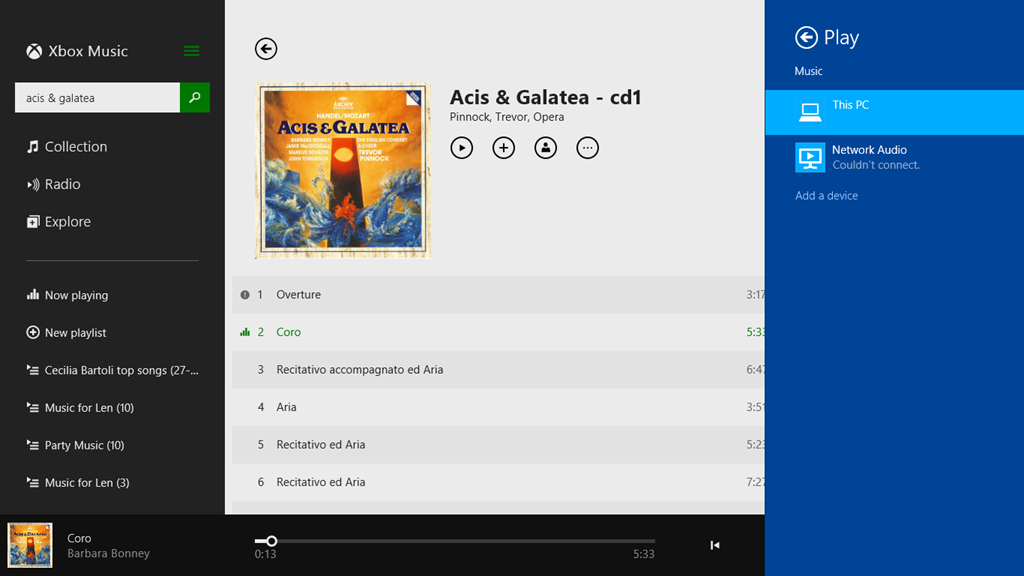
    Now we have Windows 8.1 and a much-improved Xbox Music App, and once again I seem to be taking a step back. While Windows Media Player continues to work as usual, Xbox Music is behaving very strangely when I attempt to use the Play to function. Here’s a screenshot of an attempt to use the Denon as a Play to device in Xbox Music (the Denon shows up with the name Network Audio in Windows):

    PlayTo 03

    Here, I’ve attempted to stream the first track to the Denon. That has failed, and Windows is telling me that it couldn’t connect to the Network Audio (the Denon), but in fact the second track is actually playing through the Denon. In addition, there’s a small information icon by the first track, click on it and you get:

    PlayTo 04

    which is a very odd message, since these tracks are not DRM-protected.

    I tried another Modern UI App, Media Monkey, and this seemed to behave much better. Occasionally it would refuse to Play to the Denon when first starting up, but once it got going, it seemed to be much more solid.

    So, what’s going on here?

    I raised the issue in a thread on one of Microsoft’s Answers forums. Gabe Frost himself responded:

    We have not seen this, and do not have this specific Denon model to test with, so would like to get further information from you.

    I provided the information he asked for, and very quickly the answer came back, and it’s very interesting.

    From the traces, we can see you’re trying to stream a WMA file from the Music app. Since Denon does not support WMA, the file has to be transcoded real-time into LPCM. When a file is transcoded in real-time, no system can know the resulting number of bytes, so in order to support seek, it has to be time-based (we do know the duration). However, Denon also does not support time-based seeking. In Windows 8.1, we introduced a feature that emulates time-based seeking for devices that do not support it. This is really nice in that users can seek their music or videos when they previously could not.

    In your case, since the Music app was already playing the song locally for a bit, we are doing “Seek Emulation” to seek the stream to the same position the Music app was last playing at. This involves sending some additional SetAVTransportURI requests to the Denon DMR. We see the Denon DMR reporting an error, “TransportStatus = ERROR_OCCURRED”.  Probably this is the result of the additional SetAVTransportURI requests that we send.

    That would explain why the bug does not happen when using WMP as the media controller (DMC) in Desktop. With the Desktop controller, we don’t try to seek immediately after starting to play.

    Looking at our code, we see that careful tuning was required to work with Denon because they often tend (incorrectly) to report an error when they are no longer in an error state. Denon tends to forget to set TransportStatus back to “OK” when it has received a new URL to play. While we tested with a wide range of devices (including some newer Denon devices) It appears that your Denon device is incompatible with this seek emulation because of the device bugs.

    We are investigating potential workarounds and will get back to you via this thread. A fix will take longer, unfortunately.

    One slight correction to what Gabe has written; the Denon (and all Denon AVR models, as far as I’m aware) does not support the WMA Lossless format, but they all support standard WMA format. My Denon even came with a Microsoft “PlaysForSure” sticker on it – so it was certified by Microsoft as being able to play standard WMA format!

    The issue I’m stuck with is that I have deliberately chosen to store my music collection in WMA Lossless format because it delivers higher-quality playback than standard WMA format. Lossless formats (e.g. WMA Lossless, FLAC) are better than formats that use lossy compression, such as WMA and MP3. The Denon supports FLAC, WMA and MP3, so in an ideal world, I would have chosen FLAC as my archival storage format.

    Unfortunately, Microsoft don’t support FLAC. While I can get a third-party FLAC add-on for Windows Media Player, there appears no way to use a third-party add-on for the Xbox Music App. And while I can use Media Monkey to play back FLAC files, in addition to WMA, WMA Lossless and MP3, the Xbox Music App is linked into a music store for purchasing downloads.

    I am going to have to think about the way forward for a while…

    Addendum: The Xbox Music App has other problems of its own. See Xbox Music App – Metadata Madness

    Addendum 2: As of April 8, 2014, Microsoft has released an Update to Windows 8.1 that makes it unnecessary to perform any registry edits to enable a DLNA Digital Media Renderer (DMR) to work with Modern Apps on the Start Screen. Devices will no longer appear as “uncertified” when Play is selected within an individual app (but if not certified will appear as such in the PC and Devices menu).

    Addendum 3: Native support for the FLAC format will apparently be coming in Windows 10. Good news, as far as I’m concerned.

    Addendum 4: Things will change yet again for Windows 10. First, the “Play to” function has been renamed to “Cast to”. Second, and more importantly, this function will have fundamental changes.  It appears as though Microsoft has removed DLNA DMR devices from system-level control (e.g. the Devices item in the Win 8.1 Charms bar), and demoted that function to needing to be controlled on an app-by-app basis.

    That’s all very well if app developers actually take account of it. I note that neither of Microsoft’s Music apps (Music or Music Preview) do this, and I also note that the Microsoft spokesperson uses the qualifier “eventually” in the context of support by the Microsoft app. That could mean it will be available on July 29 or it could mean in five years time. That does not give me a warm feeling.

    So, in summary, the “Play to” user experience is likely to take a step backwards in Windows 10 as compared to Windows 8/8.1. That’s a tad disappointing.

    Addendum 5: Well, Windows 10 has been released (on the 29th July 2015), and as expected Microsoft’s Music app (now called “Groove”) still does not have the “Cast to” function implemented. Sigh.

  • Music In The Cathedral

    The ISS is one of science’s cathedrals. Scientists can also be musicians. Space Oddity has always been one of my favourite songs.

    Commander Chris Hadfield brings it all together. The special effects were all provided by nature. Wonderful.

  • A Cappella After Ever After

    I think that this young man has a future in showbusiness…

    Clever words, too…

  • Doctor Dream Is No More

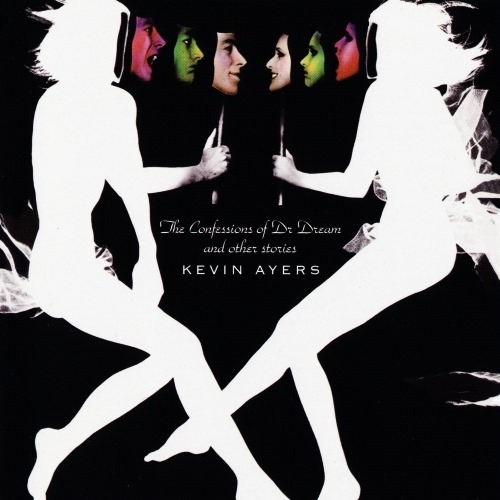
    Another influencer on my early adulthood is no more: Kevin Ayers has died. Damn. Time to listen again to some of his work: Joy of a Toy, Bananamour, and of course: The Confessions of Doctor Dream. RIP Mr. Ayers.

    Ayers1

  • Carmen – “Habanera”

    …as you’ve never seen it before…

    Strangely, I seem to have remembered the same odd places from the 1970s as well…

    August Schram – clearly someone who has the same odd recollections, even if he is too young to have been there.

  • Let’s Have A Kiki

    Despite those who feel that this is merely passé, I like this track enormously, and am pleased to see the video from the Scissor Sisters.

    My niece recently sent me an email reporting that she and her family had seen Scissor Sisters at the Wickerman Festival this year, and saying how much they had enjoyed the performance. As she wrote:

    They will be the talk of the festival for years and I’m delighted many of Ana Matronic’s comments will have upset all the homophobes in the audience.

    Amen!

  • Facets of Delius

    I was first introduced to the music of Frederick Delius back in 1968 via Ken Russell’s brilliant biographical film portrait: Song of Summer. The film dealt with Delius’s last six years of life, when he was a cantankerous old man; blind, paralysed, and dealing with tertiary syphilis. It is a superb film. Apparently, Eric Fenby, who was Delius’s amanuensis at the time, found the film so true to life that he suffered a nervous breakdown as a result of seeing it.

    We’ve had to wait nearly 45 years for another film portrait of Delius. Last night, we got it, in the shape of John Bridcut’s glorious film documentary: Delius: Lover, Composer, Enigma shown on BBC Four. This took a view of the whole of Delius’s life, from growing up as Fritz Delius in a German family in Bradford, through his time in Florida, and the flesh-pots of Paris, to his old age in Grez-sur-Loing, when he was married to the long-suffering Jelka Rosen.

    It was simply stunning. And it has made me want to explore more of Delius’s music – particularly his early work. His opera Koanga pre-dates Gershwin’s Porgy and Bess by thirty years, and his A Mass of Life celebrates the joy of life, without religious overtones.

    John Bridcut does good work – his biography of Benjamin Britten: Britten’s Children, which I read before I saw his documentary film on which the book was based, alerted me to his talent. Delius: Lover, Composer, Enigma is equally good. It contains many interviews, both current and archival material (e.g. Sir Thomas Beecham – a champion of Delius’s music), that elucidate Delius’s genius. I’ve just ordered more CDs of Delius’s music as a result. Thank you, Mr. Bridcut. And thank you, Frederick Delius.

  • A Talent To Watch…

    He’s a young man called Cosmo Jarvis, a singer-songwriter. I came across the video of his song “Gay Pirates”, and thought it was pretty good…

    And then I found a much darker song: “Sure As Hell Not Jesus

    Jarvis directed these videos as well. The boy’s got talent…

  • Testimony

    Yes, it’s pulling at the heartstrings, it’s trying to be Stephen Sondheim (but it’s Stephen Schwartz).

    Nevertheless.

    It speaks to me. Maybe, as Noel Coward once said: never underestimate the potency of cheap music – but still.

    This has power. It speaks to me. It speaks to what I went through growing up. It speaks to what I have achieved.

    Hang on in there. It gets more than better.

  • Rediscovering Holst

    Another note for the diary. Tony Palmer has made a documentary about Gustav Holst that will be broadcast on BBC4 on the 24th April.

    There is more to Holst than The Planets – but while I think Holst’s Beni Mora suite rather beguiling, Palmer tells us that:

    …at a meeting with the bosses of the Royal College of Music (where Holst had studied and taught), I suggested we should consider a Holst piece called Beni Mora. I was told it was rather dreary and not worthy of inclusion.

    I rather think that Holst, through the medium of Palmer’s documentary, will prove it otherwise…