Introduction
Lenovo has a range of consumer-oriented computers named IdeaPad. The range has a number of different series within it, each designed for a different purpose or user group. The Yoga series is a line of tablets and laptops. The name “Yoga” was chosen because the laptops have hinges that allow the screen to be fully folded back (up to 360°) to convert a laptop into a tablet. A Yoga laptop can also be placed in “tent” or “stand” mode for showing presentations or movies.
Back in October 2015, I reviewed Lenovo’s Yoga 900 Ultrabook. In January 2016, Lenovo announced a variant of the 900: the Yoga 900s. Slightly smaller and even thinner and lighter than the Yoga 900, this was intended as the ultimate Ultrabook. I reviewed it in February 2016.
Lenovo announced the next iteration of the Yoga 900 series at the end of August 2016: the Yoga 910. A few weeks ago, courtesy of Lenovo, FedEx delivered a Yoga 910 to me for review. This blog post is the result.
Here’s a table that shows a quick comparison between the Yoga 900, the Yoga 900s, and the new Yoga 910:
| |
Yoga 910 |
Yoga 900 |
Yoga 900s |
| OS |
Windows 10 64 / 10 Pro 64* |
Windows 10 64 / 10 Pro 64** |
Windows 10 64 / 10 Pro 64 |
| Screen |
13.9” FHD 1920×1080 IPS, 300nits or 3840×2160 UHD IPS, 10 point Touch |
13.3”QHD+ 3200×1800 IPS, 300nits
10 point Touch |
12.5” 1920×1080 FHD*** or 2560x1440QHD
10 point Touch |
| CPU |
Intel Core i7-7500U* /
Intel Core i5-7200U |
Intel Core i7-6500U** /
Intel Core i5-6200U |
Intel Core m7- 6Y75 |
| Graphics |
Intel HD Graphics 620 |
Intel HD Graphics 520 |
Intel HD Graphics 515 |
| Memory |
Up to 16GB DDR4* |
Up to 16GB DDR3L |
8GB DDR3L |
| Storage |
256GB/1TB SSD* |
256GB/512GB SSD |
256GB/512GB SSD*** |
| Active Pen support |
No |
No |
Yes*** |
| Audio |
JBL branded stereo speaker with Dolby Audio Premium certification, 2.0W x 2 |
JBL stereo speakers with Waves Audio and DOLBY Home Theatre certification |
JBL stereo speakers with Waves Audio and DOLBY Home Theatre certification |
| Webcam |
720p HD 1.0MP resolution, fixed focus |
720p, 30 fps |
720p, 30 fps |
| Connectivity |
802.11 a/c Wireless,
Bluetooth V4.1 |
802.11 a/c Wireless
Bluetooth V4.0 |
802.11 a/c Wireless
Bluetooth V4.0 |
| Battery Life |
78 Watt Hour – 15 hours |
66 Watt Hour – 9.2 hours |
54 Watt Hour – 10.5 hours |
| Ports |
USB 3.0 x 1 (support always on charging), USB 3.0 x 1 (Type C, support DP function), USB 2.0 x 1 (Type C, support DC-in function), audio combo jack x 1 |
2xUSB 3.0, 1xDC-in with USB 2.0 function, 4in1 card reader (SD, MMC, SDXC, SDHC), USB-C, Audio Combo Jack |
1xUSB 3.0, 1xDC-in with USB 2.0 function, USB-C, Audio Combo Jack |
| Weight |
1.38 kg. (3.04 lbs) |
1.29 kg. (2.84 lbs) |
999 gm. (2.2 lbs) |
| Dimensions |
323 x 224.5 x 14.3mm (12.72″ x 8.84″ x 0.56″) |
324 x 225 x 14.9 mm (12.75” x 8.85” x 0.58”)
|
304 x 212 x 12.8mm
(12”x 8.35” x 0.5”) |
Table 1
* The Yoga 910 I have for review has an Intel Core i7 and 16GB RAM fitted, with a 3840×2160 UHD display, a 1TB M.2 SSD/PCIe 3.0 drive and Windows 10 Home installed.
**There is an i7-6500U, 16GB and 256GB SSD fitted on the Yoga 900 I have, and it is running Windows 10 Pro.
***The Yoga 900s I had for review has a 1920×1080 FHD display, with 512GB M.2 SSD/PCIe 3.0 and Windows 10 Pro installed. The unit I received did not ship with an active pen included in the box.
The Yogas are examples of what Intel calls the Ultrabook class of laptop. That is, they are ultrathin, using solid-state drives, low-power Intel Core processors, and (because of their thinness) do not have optical disc drives or full-size Ethernet ports.
Unboxing
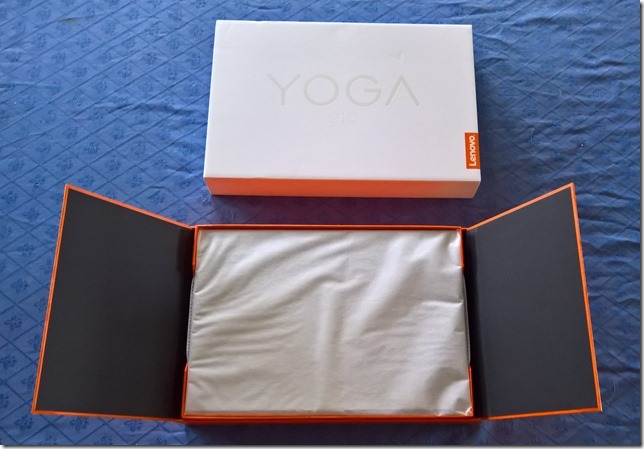
The box is a minimalist design: white (on top) and orange (underneath), with four icons on the side representing the four Yoga configurations (Laptop, Stand, Tent, and Tablet).
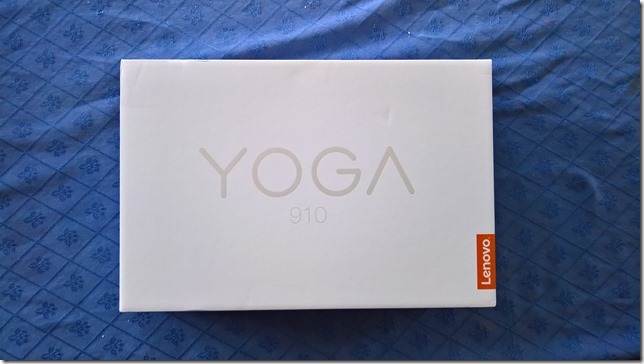
Like the boxes of the earlier Yogas, it contains a slick piece of paper engineering – after taking off the lid, you fold back the two flaps covering the top, and as you do so, the Yoga 910 (encased in its protective sleeve) rises out of the box to greet you. It’s a nice touch.
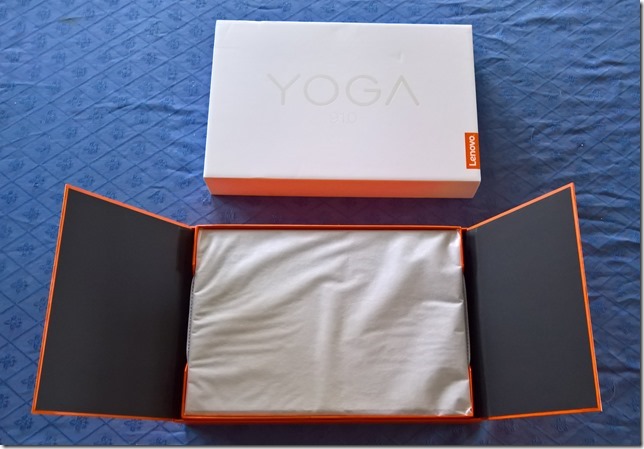
Underneath the Yoga 910 are compartments that hold the power adaptor (with a permanently-fitted USB-C connector), and a sleeve containing the quickstart user guide.
The 910 is practically the same size as the earlier 900, whilst being slightly thinner (and heavier). Unlike the 900, which had a plastic case material, the 910 uses aluminium. The review model came in the silver finish.
Yoga 910 Externals
The hinge on the Yoga 910 is the distinctive “watchband” design, which I personally find appealing and which works smoothly and very well.
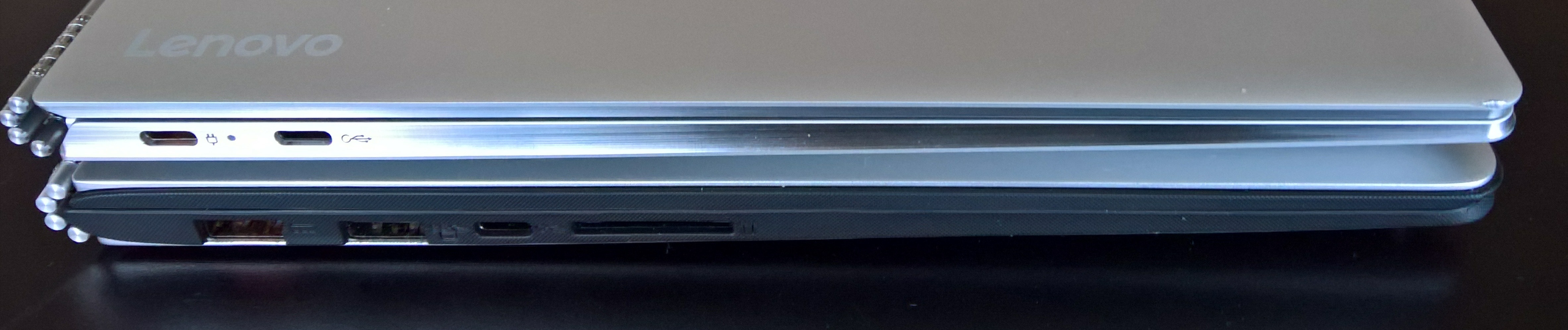
The Yoga 900 introduced a a USB-C port, supporting USB 3.0, native DisplayPort 1.2 video and VGA/HDMI output and which replaced the Micro-HDMI port of the Yoga 3 Pro. The Yoga 910 continues this move to a greater reliance on USB-C. Here’s a shot of the left-hand side of both Yogas (the 910 is on top).
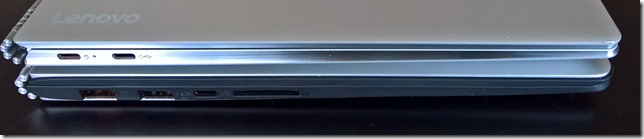
You’ll notice that the 910 has two USB ports (both USB-C) on this side, whilst the 900 has three (one of which is USB-C). The proprietary USB 3.0 port and cable used to charge the Yoga 900 and the 900s has been replaced in the 910 by a standard USB-C charging port and cable. That’s probably a welcome change and simplification for travellers. However, you’ll also notice that the Media Reader slot has been dropped in the 910 altogether. Customers who used the card reader port in the past (e.g. photographers transferring images from their camera memory cards to the computer) will now have to use an external card reader attached via USB.
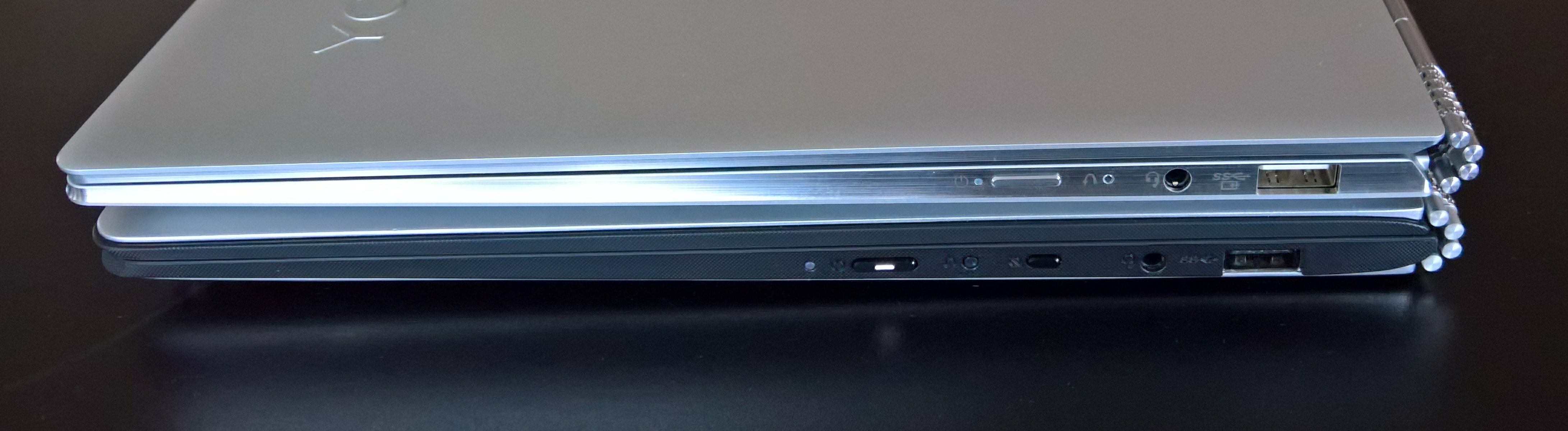
Here’s a comparison of the right-hand side of the Yoga 910 (on top) and the Yoga 900:

The Yoga 910 shows (from left to right) the power button, the recovery button, the headphone jack and a USB 3.0 port that can also be used to charge external devices. The Yoga 910 continues the precedent set by the 900s and has dropped the display rotation lock button that is present on the 900.
Since the 910 is the same size as the 900, I had rather hoped that the standard keyboard layout of the 900 would be preserved. Alas, Lenovo has taken the rather bizarre keyboard layout of the 900s, and just made it with bigger keys.
Here’s the keyboard of the Yoga 900:
Note the right-click menu key between the Alt and Ctrl keys to the right of the Spacebar. Here’s the keyboard of the (smaller) Yoga 900s:

The Right-click menu key has gone, as has the last column of function keys (Home, End, PgUp and PgDn). The right Shift key and the up-arrow keys have been switched around in this arrangement, and I still don’t like it very much. I suspect that for some people (e.g. touch typists) that will take some getting used to.
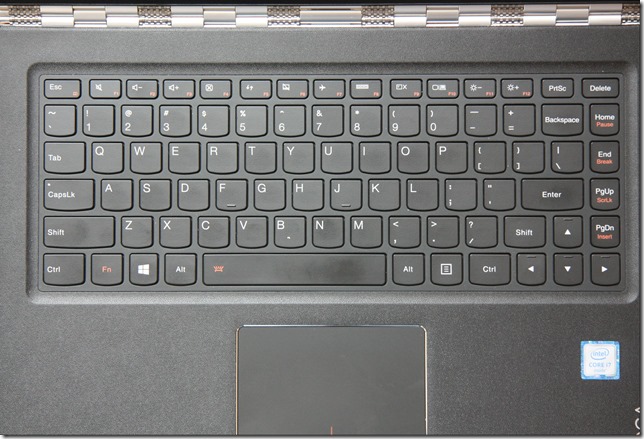
And now here’s the keyboard layout of the Yoga 910:
![20161212-1318-33[1]](https://coupeville.nl/wp-content/uploads/2017/01/20161212-1318-331_thumb.jpg "20161212-1318-33[1]")
It’s the same as for the 900s, but for some reason best known to Lenovo, the Insert and PrtSc keys in the top row have now been swapped. Why on earth do Lenovo keep futzing about with their keyboards?
The keyboard backlight has the same two illumination levels as in the Yoga 900. The black colour of the keys is a good contrast with the silver surround. And apart from the rearrangement and the lack of dedicated function keys, the keyboard feels pleasant to use, and is comparable with that of the Yoga 900.
The trackpad of the 910 is larger than that in the 900, with an area of 70mm x 105mm. At last Lenovo have now got a trackpad into the Yoga 9xx series that is certified by Microsoft as a Windows Precision Touchpad, and it is even slightly larger than Microsoft’s recommended optimal size of 65mm x 105mm. This means that the trackpad settings are integrated into Windows 10 Settings, rather than being handled by a third party (Synaptics) driver. More on the trackpad and keyboard in the Yoga’s Modes: Laptop section.
One other important addition: a built-in fingerprint reader (seen on the right of the photo above, below the cursor-right key). This is integrated into the Windows Hello feature of Windows 10, and makes signing in even simpler and quicker than using a PIN.
![20161212-1308-56[1]](https://coupeville.nl/wp-content/uploads/2017/01/20161212-1308-561_thumb.jpg "20161212-1308-56[1]")
While the Yoga 900 had a QHD high-resolution (3200 x 1800) display as standard, the Yoga 910 offers UHD (3840×2160) or standard FHD (1920 x 1080) displays as options, both with 10-point touch support. To be honest, at this physical size (13.9 inches diagonally), my old eyes would be perfectly satisfied with FHD resolution. The pursuit of ever-higher resolution in laptops is somewhat lost on me. It causes more drain on battery life, and can introduce scaling issues with older Windows software. What I do continue to regret is that Lenovo has stuck with a display ratio of 16:9. See my further thoughts on this in the Yoga’s Modes section.
You will notice that the 910 has a bigger screen at 13.9” diagonally, compared to the 13.3” of the 900. This means that the black bezels at the top and sides of the screen have been reduced in size. In the Yoga 900, the top bezel is 2 cm in height, whilst in the 910 it is now only 0.5 cm. That has meant that the webcam has had to be repositioned in the centre of the bottom bezel, instead of in the top bezel, giving rise to the extremely unflattering “nostril-cam” effect. To avoid this, it is best to put the Yoga 910 into Tent mode before Skyping, but then be aware that you can’t use the keyboard for typing during a video call. The Yoga 910’s webcam is capable of 720p @ 30 fps (the same as for the Yoga 900), and it has a dual-array microphone. The speaker grilles, with JBL speakers behind them, are positioned underneath on the Yogas.
Lenovo has kept the aesthetic of the Yoga 900 and the 900s by having a single piece of glass in the lid of the Yoga 910. All have a (very difficult to see) Lenovo logo, but at least the Windows button has now been dropped, since it has been made redundant by Windows 10.
Yoga 910 Internals
Lenovo introduced the 6th generation of Intel Core processors, codenamed “Skylake”, in the Yoga 900. With the Yoga 910, Lenovo has introduced the latest (7th) generation of Intel processors: “Kaby Lake”. Like the Yoga 900 series, the 910 relies on cooling fans being present (the 900s used a Core M processor, and was fanless). Kaby Lake also introduces a new generation of the graphics processor architecture, and the Yoga 910 has an Intel HD Graphics 620 engine. The Benchmarks section will tell the story.
The Yoga 910 comes with either 8GB or 16GB of DDR4 RAM installed. RAM is soldered to the motherboard, it is not possible for customers to upgrade their 910s from 8GB to 16GB. Storage for the Yoga 910 is specified at time of purchase; currently 256GB or 1TB SSDs can be specified. However, while the original Yoga 900 models had a SATA interface to the SSD, the Yoga 910 now comes equipped with the faster NVM Express interface.
The wireless connectivity technologies and interfaces support 802.11 A/C Wi-Fi and Bluetooth version 4.1. There are no WWAN or NFC options available for the 910 line.
The battery capacity in the Yoga 910 is 78 Watt hours, and Lenovo claims this gives up to 15 hours between charges.
And – I say this every time – like almost all laptops on the market today, there is no built-in GNSS to feed GPS coordinate data to the Windows Location service. I just feel that mobile devices should have a GNSS chip fitted as standard. Downloadable maps for map and navigation apps are supported directly by Windows 10, but I still can’t use the Yoga 910 (or indeed any of the Yogas) off the grid without an additional Bluetooth GPS logger to track its position.
Benchmarks
PassMark Benchmarks
PassMark Software provide benchmarking software and hardware. I downloaded their Performance Test 8.0 software and used it to run benchmarks on all the Yogas I have. The results are shown in Table 2 below. I also downloaded HWMonitor from CPUID, to record the maximum temperature of the CPU reached when running the benchmarks.
| |
Yoga 910 |
Yoga 900 |
Yoga 900s |
| PassMark |
2574 |
1821 |
1623.6 |
| CPU Mark |
5324 |
4493 |
2860 |
| 2D Graphics Mark |
385.6 |
393.4 |
373.2 |
| 3D Graphics Mark |
1099 |
426.6 |
435.6 |
| Memory Mark |
2494 |
1992 |
1528 |
| Disk Mark |
9381 |
3511 |
8139 |
| Max CPU Temperature |
83°C |
67°C |
62°C |
Notice the substantial improvement in the Disk Mark over the early model of the Yoga 900 that I have. The early 900 models used a M.2 SATA interface, which is slower than the NVM Express interface used in the 910 and the 900s. However, current versions of the 900 line now have the NVM Express interface as well, so I would expect the Disk Mark figure for current 900 models to be comparable with those of the 910 and 900s.
Despite the presence of twin fans, the maximum temperature reached by the CPU is substantially higher than that seen in the earlier Yogas. Bear in mind that this temperature is recorded when the performance benchmarks are pushing the limit of what the machine can deliver. Most of the time the temperature is around 50°C.
Windows System Assessment Tool
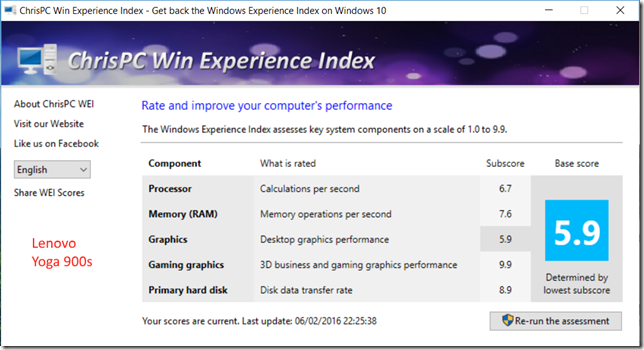
The Windows System Assessment Tool was first introduced by Microsoft in Windows Vista as a means to compare the performance of the hardware of Windows PCs. For Windows Vista and Windows 7, Microsoft provided an applet (the Windows Experience Index applet) to display the results. Although Microsoft no longer provides this applet in Windows 8.1 and Windows 10, the assessment telemetry is still in place and can be used by third-party tools to display the Windows Experience Index. I used the WEI tool from ChrisPC to display the results for all the Yogas: the Yoga 910, Yoga 900, and the Yoga 900s.
![Yoga 910 02[3]](https://coupeville.nl/wp-content/uploads/2017/01/yoga-910-023_thumb.png "Yoga 910 02[3]")

Battery Life Test
Lenovo claims that the Yoga 910 battery can last for 15 hours between charges. I did a very simple test of battery life under the following conditions:
- Display always on at 50% brightness
- Speakers at 100% volume with Dolby Audio on and set to music playback
- Continuous music playback via Groove Music
- Music streamed from a media server via WiFi
Under these conditions, the battery lasted for 9.25 hours continuous play. While this is not bad, and better than the Yoga 900, (which ran out of puff completely after only 6.5 hours under the same conditions), it’s not exactly the 15 hours claimed by Lenovo.
Performance summary
As a result of this testing, it seems clear that the Yoga 910 will perform very well in activities involving both productivity (office work) and media consumption (watching movies/videos and listening to music). Battery life is improved over that of the Yoga 900.
However, there were issues with the particular machine I have in my possession.
Issues
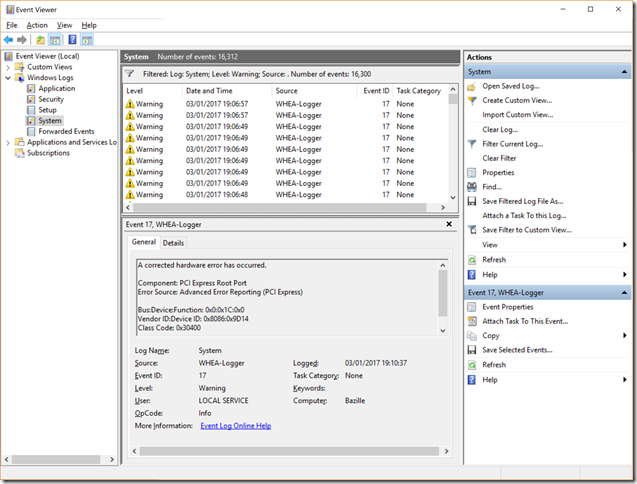
During the testing, I ran into a few problems. First, the 910 could not hold a 802.11ac connection using the 5GHz band very well at all. The connection would frequently drop, or be at greatly reduced throughput (less than 100 Kbps, instead of the usual 5 Mbps). Secondly, there were frequent floods of warning messages in the Event Viewer from the WHEA Logger:
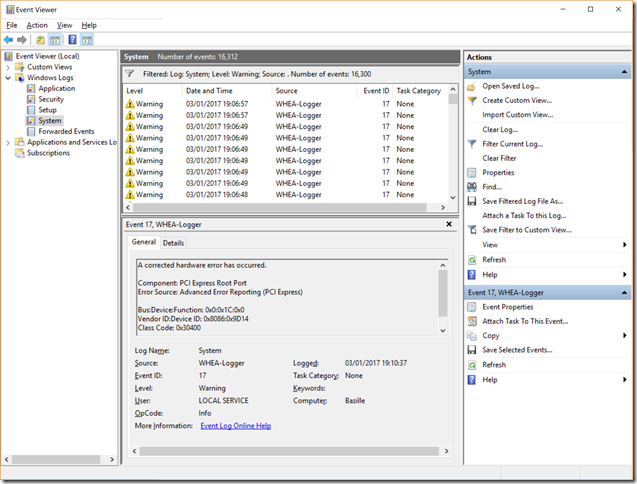
The device ID being reported as the cause of the hardware errors is given as 0x8086:0x9D14. Looking in the Device Manager, this is the PCI Express Root Port #5, which has, you’ve guessed it, the Qualcomm Atheros WLAN adaptor connected to it.
![Yoga 910 03_thumb[2]](https://coupeville.nl/wp-content/uploads/2017/01/yoga-910-03_thumb2_thumb.png "Yoga 910 03_thumb[2]")
Third, I’m seeing occasional freezing of the mouse cursor. This could be related to the cause of the first two issues.
Fourth, installing the WLAN driver from Lenovo caused a driver update process to consume 30% of the CPU continuously, with the result that the fans kicked in and the machine became very noisy. I uninstalled the driver update program, and the fans settled down. There have been complaints about fan noise on the Yoga 910. Some may have been caused by this driver update program, but Lenovo has also recently issued a BIOS update to tune the fan behaviour.
I haven’t been able to find the root cause of the first three issues. It could be either a hardware or software driver issue. However, the Lenovo hardware diagnostics (in the Lenovo Companion app) do not report any problems, and I opened up the 910 to see if the WLAN card and the antenna connections were sound. Apart from the fact that the antenna wires were routed slightly differently from the photo in the Lenovo Yoga 910 hardware maintenance manual, I did not see anything amiss. I rerouted the wires to match the manual, and closed up the 910, but that has not made any improvement to the wireless connectivity problems using the 5GHz band, and I’m still getting WHEA-Logger warnings.
There are fewer connectivity problems using the 2.4 GHz band and 802.11n, so I completed the testing using this wireless connection. I should also add that none of my other Lenovo laptops, or my Microsoft Surface, show any problems using the 5 GHz band of my WiFi network, so the cause must lie within the Yoga 910. I should also note that the Yoga 910 is the only machine that is using a Qualcomm Atheros WLAN card – the other devices use Intel or Broadcom WLAN cards.
I’ll be putting in a service call to Lenovo about the WLAN connectivity issues, so we’ll see how that goes. I’ll update this blog entry with the result.
Yoga’s Modes
This section is basically a repeat of the story I laid out in the review of the Yoga 900 from last October. The points remain, for the most part, the same for the Yoga 910.
A prime selling point of the Yoga is the fact that it can be folded into a variety of modes. At the time of introduction of the original Yoga back in September 2012, this was a unique innovation. Since then, the concept has been copied by other manufacturers such as Dell, HP, Toshiba and ASUS, which proves that imitation is indeed the sincerest form of flattery. It also clearly demonstrates that the concept is perceived to have market value. Lenovo followed up with the introduction of the “watchband” hinge in September 2014, and now with the Yoga 910 we can see both innovations in a mature form.
These are the four modes of the Yoga:
Laptop
The traditional laptop mode is probably the starting point for most people, and the mode in which I suspect most people will be using it for the majority of the time.
The Yoga 910 keyboard feel is good, but it has the same drawbacks as the Yoga 900s over the original Yoga 900. Switching around the Shift and Cursor Up keys was never a good idea, particularly for touch typists, and even though there is more real estate available (the 910 is wider than the 900s) Lenovo have kept the same number of keys as the 900s – and dropped the extra column of dedicated function keys that the 900 has.
The trackpad has been certified as a Windows Precision Touchpad by Microsoft, and its settings are therefore directly integrated into the Windows 10 Settings. This is the first model in the Yoga 900 series line to have this and it is good to see that Lenovo have at last got their trackpads properly certified and fully integrated into Windows 10.
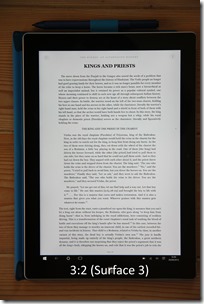
The UHD display is good, and it’s bigger (13.9”) than the display in the 900 (13.3”) or the 900s (12.5”). Like all the Yoga 9xx models, it’s a 16:9 ratio display, ideal for watching movies. For office work (e.g. word processing in Word, Excel), I personally prefer at least a 16:10 ratio. Even better would be the 3:2 ratio of Microsoft’s Surface range, or indeed of the Lenovo ThinkPad X1 Tablet. The 16:9 ratio is also not ideal in the Tablet mode (see later).
Tent
This mode is ideal for media (movies and videos) presentations, particularly in space restricted situations, e.g. on a shelf or an aircraft table. For viewing movies, of course, the 16:9 ratio of the display is now ideal. Couple the Yoga with a wireless presenter, and you can use this mode for PowerPoint presentations as well. In this mode the keyboard and trackpad are automatically disabled. It’s also the mode to use for Skyping, because the webcam is then better positioned.
Stand
As an alternative to the Tent mode, the Stand mode can be used for media and PowerPoint presentations. It requires more space than the Tent mode, but the screen can be set to a greater range of angles for the best viewing experience. The keyboard and trackpad are automatically disabled in this mode also.
Tablet
The last mode is where the lid is completely folded back over the (disabled) keyboard, and to convert the Yoga 910 into a tablet. You can select to have Windows 10 automatically switch into Tablet mode, or to give you the option to switch manually. I found that the size of the Yoga 910 made for a slightly unwieldy tablet. The smaller size and weight of the Yoga 900s works better for me. Also, unlike the 900s, the 910 has no support for an active pen, and personally, I find this to be a distinct disadvantage.
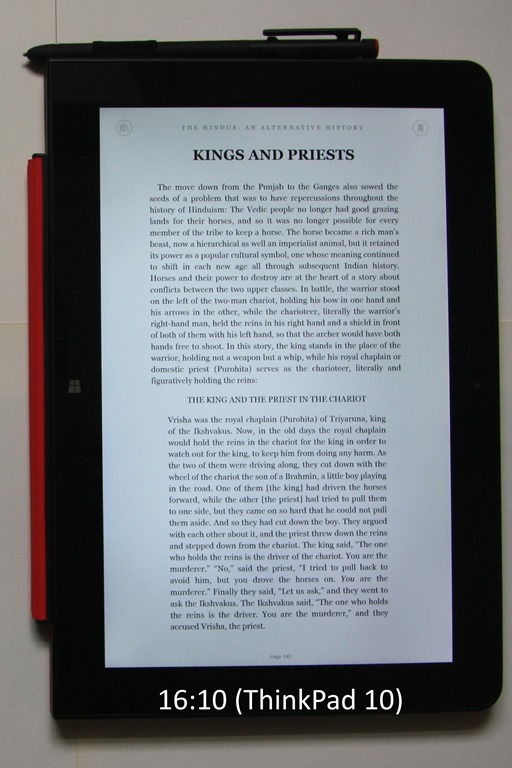
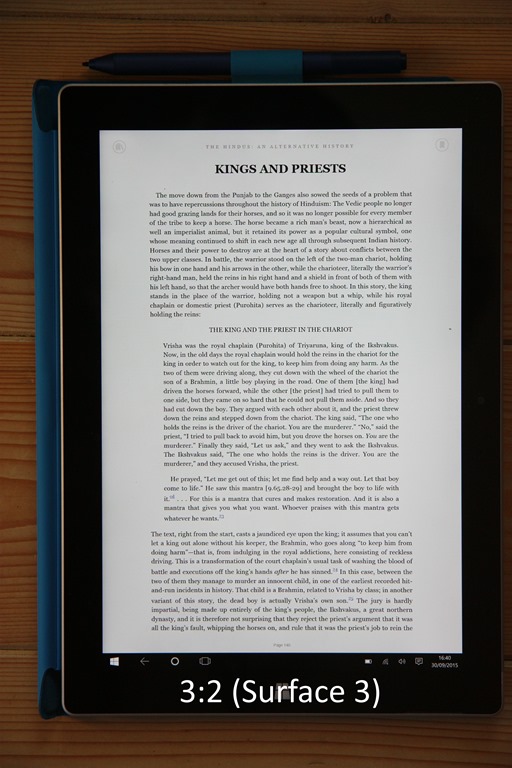
One of the frequent uses of a tablet is for reading books or magazines. And once again, the 16:9 ratio of all the current Yoga models (910, 900 or the Yoga 900s) provides (in my view) a diminished reading experience over devices with 16:10 ratios (e.g. the ThinkPad 10) or 3:2 ratios (e.g. the Surface 3 or ThinkPad X1 Tablet). Pages are rendered longer and narrower in 16:9, and the reading experience suffers as a result.


Overall Conclusions
In my review of the Yoga 900s, I stated that it was a refinement of the Yoga 900, a refinement that would appeal to a slightly different audience. The Yoga 910 is a refinement of the Yoga 900 that is aimed at the same audience as the original Yoga 900. If you want power and performance, then the Yoga 910 is your choice and a clear successor to the Yoga 900. If you want a smaller, lighter Ultrabook, with power for everyday productivity, and support for an active pen, then the Yoga 900s remains an excellent choice. Small, but (almost) perfectly formed.
The plus points of the Yoga 910 are:
- Sufficient performance suitable for a wide range of consumer and business users
- Good keyboard action
- Fingerprint reader supporting Windows Hello
- Precision Touchpad
- Good battery life between charges (better than the Yoga 900)
- Standard USB-C charger replaces the Lenovo proprietary charger connector
- Excellent display
- Flexibility in use
There are some minus points (in my view):
- Unusual keyboard layout, with fewer dedicated function keys than the Yoga 900
- WLAN connectivity issues (at least on my sample machine)
- Fans can be noisy.
If the WLAN issues on my sample machine can be ironed out, then the Yoga 900 would be a very fine example of the Ultrabook class of computer.






![20161212-1318-33[1]](https://coupeville.nl/wp-content/uploads/2017/01/20161212-1318-331.jpg "20161212-1318-33[1]")
![20161212-1308-56[1]](https://coupeville.nl/wp-content/uploads/2017/01/20161212-1308-561.jpg "20161212-1308-56[1]")
![Yoga 910 02[3]](https://coupeville.nl/wp-content/uploads/2017/01/yoga-910-023.png "Yoga 910 02[3]")
![Yoga 910 03_thumb[2]](https://coupeville.nl/wp-content/uploads/2017/01/yoga-910-03_thumb2.png "Yoga 910 03_thumb[2]")



 Geoff Coupe's Blog