Reflections on life at “De Witte Wand”…

Category: Windows Home Server

  • A Damp Squib Splutters Into Life

    I see that Windows Home Server 2011 has been released to manufacturing. So it should be available on the market in April/May.

    I’m sorry, but I can only raise a faint cheer about this product. It doesn’t strike me as a major step forward from the original Windows Home Server, and in some respects – notably the removal of the Drive Extender technology – it is a step backwards.

    The comparison datasheet is long on marketing and short on actual comparison with WHSv1, and that’s not really surprising.

    What really gets to me is that Microsoft had the chance to build upon the base of WHSv1 as a server and media appliance that could be used by the average consumer, and they’ve thrown that chance away.

  • I Don’t Believe It!

    I’m channelling Victor Meldrew again today. And the cause of my frustration is once again the forthcoming Windows Home Server 2011. I wasn’t too impressed with some of the backup features I found when I looked at them a few days ago. After digging a bit further, I’ve come across one “feature” that has flabbergasted me. It really should be called a bug, because it introduces an extraordinary limitation into WHS 2011.

    It turns out that the maximum size of a server backup that can be made is 2TB.

    OK, you say, but WHS 2011 recognises multiple backup discs. So suppose my WHS has 5 TB of data that needs to be backed up, then I just use three backup discs, right? Two discs of 2TB capacity and one disc of 1TB capacity (or three discs each of 2TB capacity; the third will only be half-used). Plug ‘em in, let the server backup processes run, and everything’s hunky-dory, right?

    Wrong.

    Even though WHS 2011 will recognise multiple backup discs, it won’t let you slice up the server storage across them. You can only backup the same files and folders to any of the multiple discs. So, in the example I used above, even though I have three backup discs, I can only ever backup a maximum of 2TB of the 5TB stored on my server.

    I ask you, what sort of design is that? The term brain-dead springs to mind.

    The WHS team at least do recognise the limitation. Over at the Microsoft Connect bug-reporting site, a member of the team has written:

    At this time we can only back up to 1 single 2 TB disk. We realize the limitation and are working with the Core Windows team to fix this. Hopefully it’s something we can provide in future releases. For now you have to pick your critical data.

    Er, “hopefully” you can fix it? Dear lord, is that the best that you can do?

    It turns out that there seems to be a workaround, but it’s not, I think, for the average home user – you know, the sort of person that WHS 2011 is targeted at.

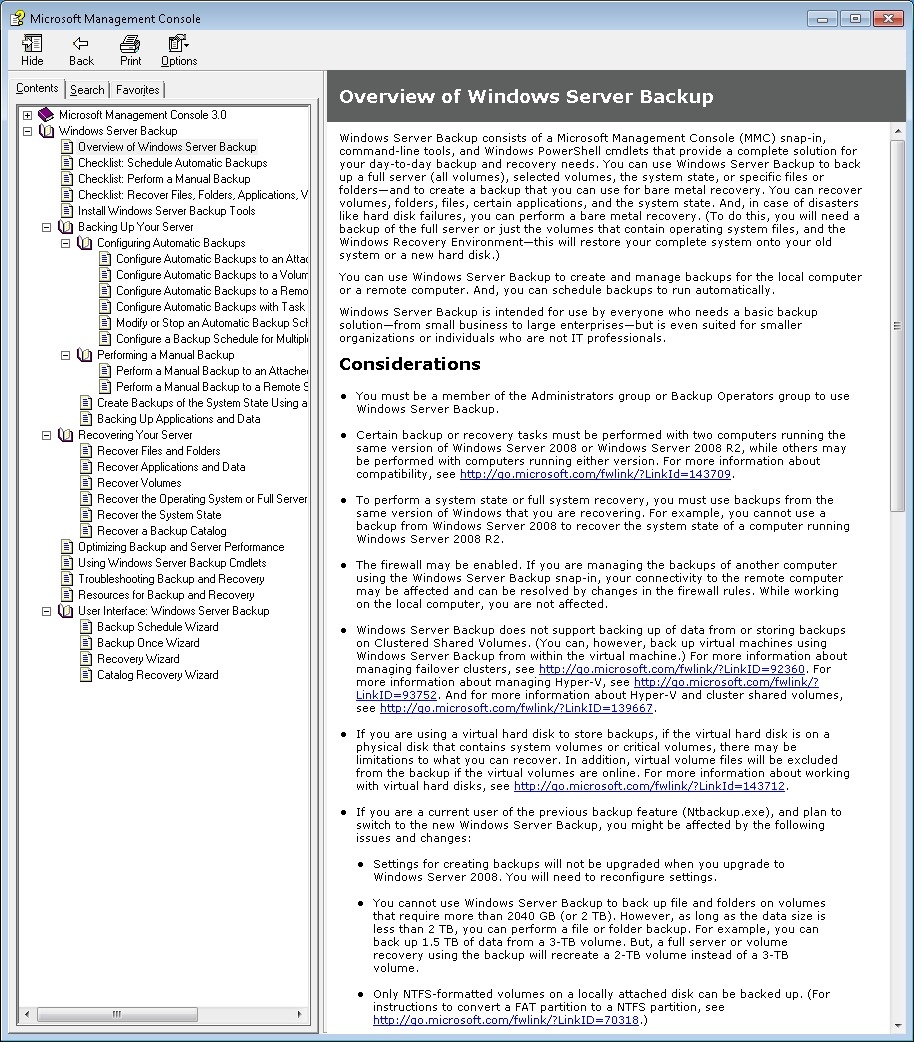
    WHS 2011 is built on top of Windows Server 2008 R2 – an extremely powerful server operating system. This has its own Backup and Restore mechanism, which is equally powerful. However, this mechanism is designed for IT people, not for the home user. Here, for example, is a screenshot of partof the Overview of Windows Server Backup, taken from the online help manual (click to see in its full gory glory). Full of jargon and certainly not for the faint of heart (or non-IT person)…

    WHS2011 19

    If you want to take a look at the full manual, then please, be my guest, and visit Microsoft’s online help web site.

    Now, it is certainly possible to use the Backup and Restore mechanism of Windows Server 2008 R2 to do what I want to do – slice the 5TB of storage on my WHS across three backup discs, but I’ll have to figure it out for myself, and start being an IT person again.

    The whole point is that I shouldn’t have to do this. WHS 2011 is supposed to be for the home user.

    The last irony about all of this is that in fact the backup features of WHS 2011 do seem to be using the underlying mechanisms of Windows Server 2008 R2, it’s just that their current design is extraordinarily limited, and, in my case with more than 2TB of data on my server, utterly useless.

    Update 20 October 2011: I see that Microsoft have now posted a TechNet article covering this 2TB limit in the TechNet Wiki. Since it’s a wiki, I’ve edited it to improve the language and the grammar. The original was clearly written by someone for whom English is not their first language.

    Update 31 March 2014: It appears as though there has been some improvement made to the Server Backup function in the Dashboard since I originally wrote this article. It remains the case that WHS 2011 continues to use the VHD format for backup, which has a maximum capacity of 2TB. However, it now appears (contrary to what Microsoft originally stated) as though the Server Backup function can now deal with multiple VHDs, providing the backup drive is big enough. So, if your backup drive is 4TB, that means you can have 2 VHDs of 2TB created on it. That, in turn, means that you can backup up to 4TB of data from your data storage drives (with a maximum of 2TB for any one drive). That’s a theoretical maximum, since Microsoft also recommend having some free space in the VHDs to handle incremental backups.

  • Backups in Windows Home Server 2011

    I wrote yesterday that I’d decided to kick the tyres of the Release Candidate of Windows Home Server 2011. Today, I thought I’d take a look at how server backups are handled in WHS 2011.

    First, a bit of background. WHS Version 1 can make backups of its shared folders (e.g. the Pictures, Videos, Music and User folders held on the server) to external discs. This is a one-click manual process (see figure 1). That means, unlike the backups of client computers attached to the server, there’s no built-in function in WHS V1 to schedule the backups of shared folders. Also, WHS V1 does not have the option of backing up the client computer backups from the server itself onto external discs. There’s a third-party add-in to do this, but this function is not built into WHS V1 by Microsoft.

    whs Storage 3

    figure 1

    When it comes to WHS 2011, there are a number of changes in this area over WHS V1. First, server backups are always scheduled – you can’t actually initiate a server backup manually with one click of a button (NOTE: the final version of WHS 2011 does now contain a button to start a server backup manually. Microsoft added this in). Second, in WHS 2011, server backups can include both the contents of the shared folders and the backups of the client computers held on the server.

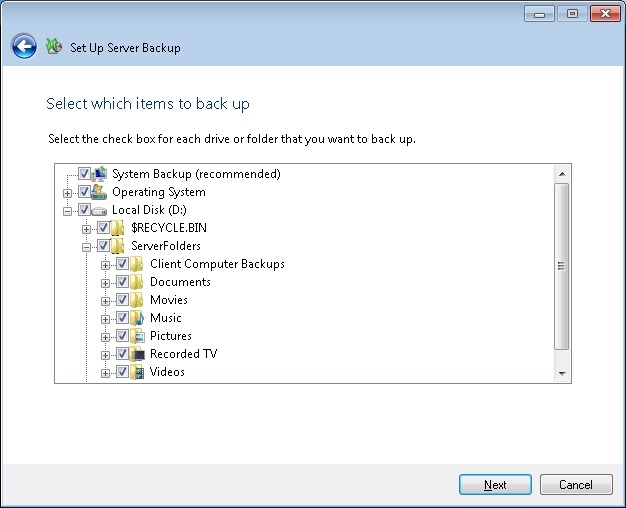
    I find these changes a bit of a mixed blessing. First the good news: it’s great that you can backup the client computer backups to external discs in addition to the shared folders (see figure 2).

    WHS2011 9

    figure 2

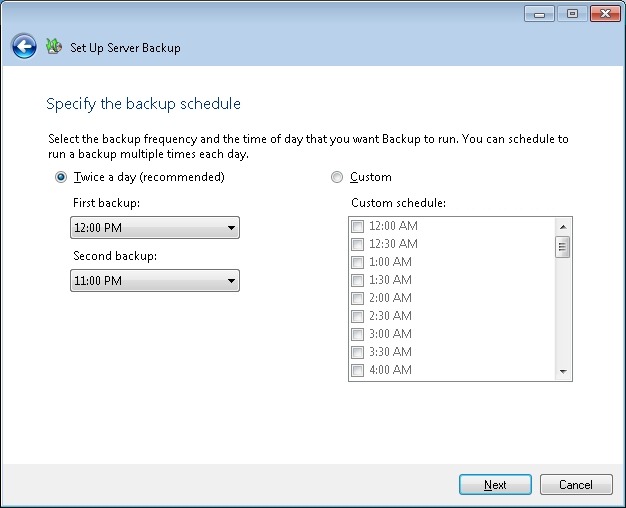
    However, I’m less enthusiastic about the fact that server backups are always scheduled, and that they run daily (see figure 3).

    WHS2011 8

    figure 3

    Let’s think a moment about the nature of these backups to external discs. As far as I’m concerned, they are for the purpose of making backups to be held offsite. That’s what I use them for, at any rate. If I were to have the external discs permanently connected to a WHS 2011 system, then, it seems to me, I’m only getting a slower version of the Shared Folder duplication that was built into WHS V1 and which was provided by the now-removed Drive Extender technology.

    And Microsoft’s own guidelines for Backup best practices for WHS 2011 state:

    You should backup server data to multiple external hard disks and rotate the hard disks between onsite and offsite storage locations. Doing so can improve your disaster preparedness planning by helping you recover your data if physical damage occurs to the hardware onsite.

    So if I’m going to be using the external discs for making server backups to be held offsite, then allowing the backups to be made only on a scheduled basis seems to be a bit counter-intuitive to me. I want to be able to fetch the discs from offsite, plug them in, push a button to initiate the server backups, and then return them offsite. I do this on a weekly basis. I can do this with WHS V1; I can’t do this with WHS 2011: (a ) there’s no manual server backup and (b ) the backups run on a daily schedule. At the time of originally writing this post, the Beta version of WHS 2011 did not have the capability to manually initiate a server backup. The final release version does. However, the backup task still continues to run on a daily basis…

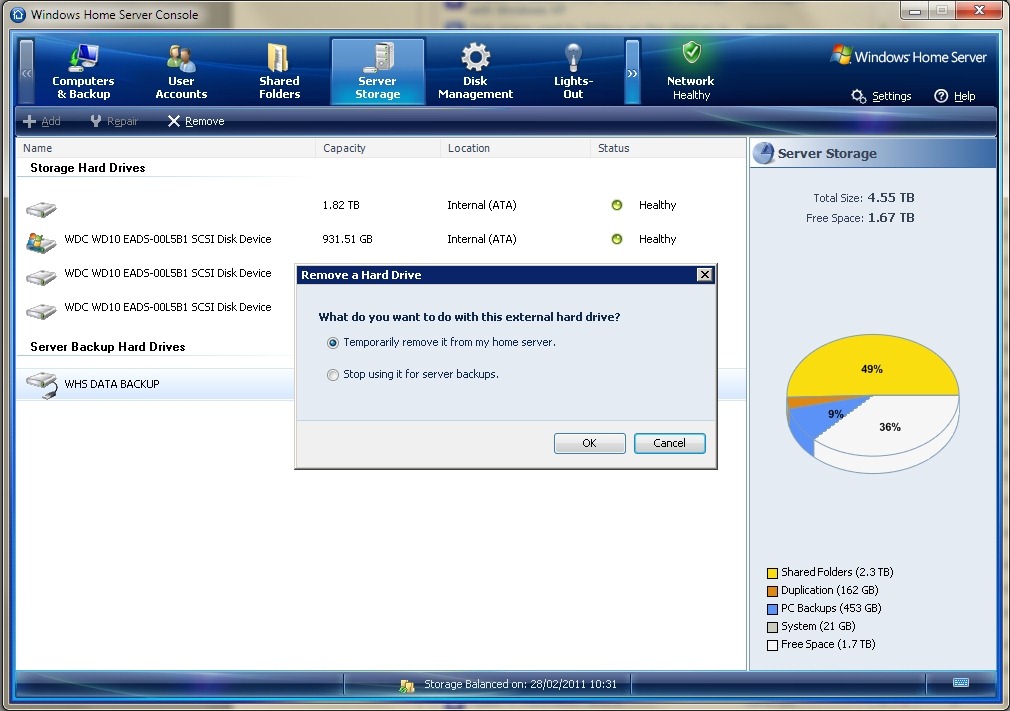
    In fact, even the act of removing external discs seems less clear in WHS 2011. In WHS v1, once the server backup is complete, then I simply select the external drive and click “Remove drive”. WHS V1 will ask if I want to remove the drive temporarily or permanently (see figure 4), and I select the “temporary” option. The disc is then safely dismounted from the system, and it can be returned to its offsite location.

    WHS Storage 4

    figure 4

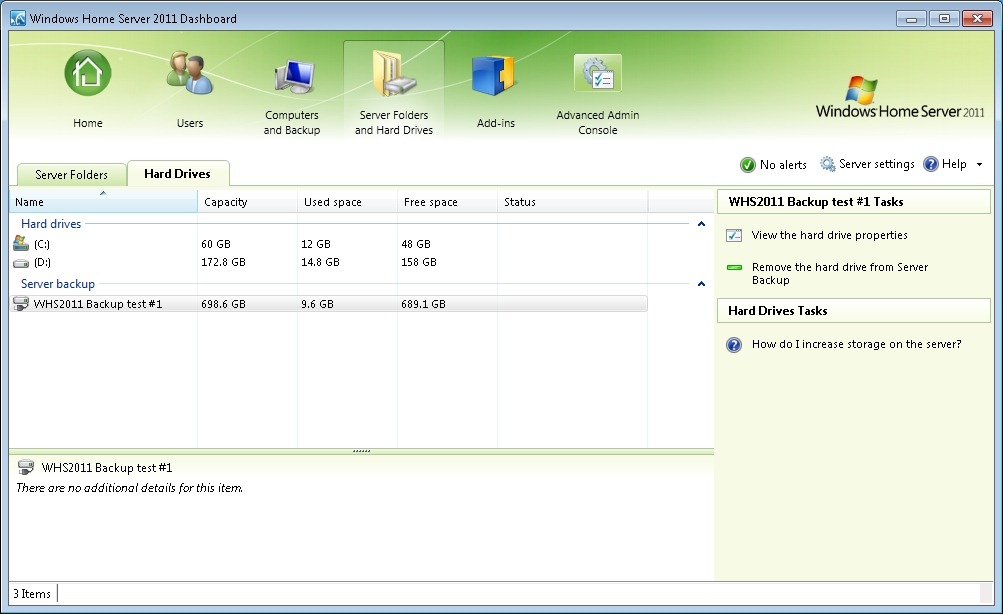
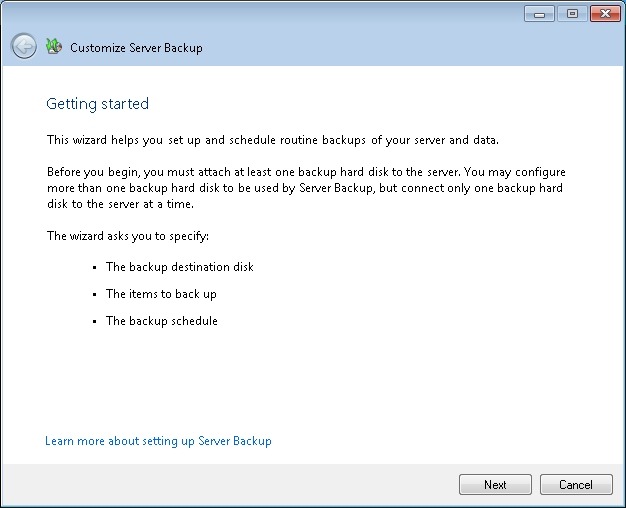
    In WHS 2011, if I select an external drive, I don’t get a choice to remove it temporarily, the only option shown is to remove it permanently from the server backup (see the tasks shown in figure 5). Choosing this starts the “Customise Server Backup” wizard (see figure 6), which I find somewhat confusing. I’m not trying to customise the server backup – I want to remove the drive… It turns out that the only way to temporarily remove a drive seems to be to yank out the cable. I suppose I’m set in my ways, but I always prefer to safely eject media (as WHS V1 allows me to do).

    WHS2011 14

    figure 5

    WHS2011 16

    figure 6

    The elephant in the room with server backups is that WHS 2011 can’t easily deal with discs bigger than 2TB. Now I know that even only a couple of years ago, this would have seemed an enormous capacity. However, with today’s high definition media, coupled with the ready availability of 3TB discs (with higher capacities on the horizon), then this limitation seems very surprising. The sad fact is that the backup method that Microsoft has chosen to go with in WHS 2011 has 2TB built-in as an upper limit. Never mind the fact that Windows 7 (even Windows Vista) and Windows Server 2008 (the operating system underneath WHS 2011) can support disks of more than 2TB capacity, WHS 2011 and its backup does not. If you install discs of more than 2TB into WHS 2011, then you must partition the disc into chunks, none of which can be more than 2TB in size. Even more frustrating, you can’t even backup a client computer that has a disc of more than 2TB assigned as one contiguous space. The Windows 7 client computer will be perfectly happy, but WHS 2011 will refuse to have anything to do with it (note: please see Addendum 2 at the bottom of this post for some clarification of this statement).

    I note that, on my WHS V1 server, my Movies shared folder is already at 1.86TB. Just a few more Blu-rays added to my library, and I won’t be able to use WHS 2011 without having to sit down and plan my storage, both for now, and in the future, very, very carefully.

    And this, to me, is the bottom line. WHS 2011 seems to force me to think like an IT support person; far, far more than WHS V1 ever did (or does!). That’s why I continue to think that the current WHS team don’t understand the home market sufficiently for WHS 2011 to succeed.

    Addendum 1: It just gets worse. It turns out that the 2TB limit doesn’t just apply to the size of a backup disc, but also to the maximum amount of server storage that you can backup for offsite storage. I don’t believe it!  Update 31 March 2014: It appears as though there has been some improvement made to the Server Backup function in the Dashboard since I originally wrote this article. It remains the case that WHS 2011 continues to use the VHD format for backup, which has a maximum capacity of 2TB. However, it now appears (contrary to what Microsoft originally stated) as though the Server Backup function can now deal with multiple VHDs, providing the backup drive is big enough. So, if your backup drive is 4TB, that means you can have 2 VHDs of 2TB created on it. That, in turn, means that you can backup up to 4TB of data from your data storage drives (with a maximum of 2TB for any one drive). That’s a theoretical maximum, since Microsoft also recommend having some free space in the VHDs to handle incremental backups.

    Addendum 2: Above, I wrote that: “you can’t even backup a client computer that has a disc of more than 2TB assigned as one contiguous space”. It turns out that’s too sweeping a statement. It was clarified by a discussion in the comments, and it’s worthwhile repeating the main points here in the blog entry itself.

    The issue is that you cannot Backup and then Restore a GPT OS drive with Windows Home Server. You can backup a GPT with v1 and perform the Restore but the disk will not boot. You can Restore individual files from a GPT backup but again not the OS into a bootable device.

    For WHS 2011, Microsoft’s release notes state:

    “If a client computer is running Windows Home Server 2011, and it has a hard disk that is configured to use the GUID Partition Table (GPT) format, you cannot use back up or restore data from the operating system, individual files, or folders on that computer. However, you can restore individual files or folders from other computers to a client computer that uses GPT formatting.

    In the event that a client computer is configured to use GPT hard disks, you must employ an alternative method to back up or restore that computer”.

    [Update 4th March 2013: Microsoft has at last issued a Hotfix to add backup support for UEFI-based computers to back up to servers that are running Windows Home Server 2011]

    Addendum 3: There are other issues with the Server Backup function in WHS 2011 that I explore in depth here. Sigh.

  • One Step Forward, Two Steps Back?

    Yes, this is yet another grumbling post about how the current Windows Home Server team just don’t seem to understand what the word “Home” means in the name of the product.

    I decided that I’d take a closer look at the Release Candidate for Windows Home Server 2011. So, I’ve wiped out the Windows 7 installation on my HP TX2000 laptop, and installed the WHS 2011 RC on it. On the plus side, I appreciated the way in which the installation process recognised hardware that had been developed since the days of Windows Server 2003 (that WHS V1 was based on). The installation process was painless.

    On the other hand, there are some losses if I compare what I would have with WHS 2011 versus what I had with the first version of WHS.

    The major difference is of course the removal of the Drive Extender technology. Now, this has been done to death (but that doesn’t mean that it’s not important), however, let’s look beyond that.

    I approach Windows Home Server from the perspective of a consumer who has computers in their home. I’m someone who wants to have two things:

    1. backup to a centralised server of all the data in the individual computers, such that, in the event of a failure of any individual computer, I can quickly restore that computer to a running state with the most recent data and,
    2. to have digital media (music, pictures, videos, movies) available throughout my home from the same centralised server, with connected devices sharing media as simply, and as directly, as possible.

    And I want that centralised server to be easy to manage, with regular offsite backups being made to ensure that the integrity of that server for both shared media and the data of client computers is preserved.

    All this must be done as simply as possible. I really don’t want to carry on being the IT guy in my household. If I fell under a bus tomorrow, I would want my nearest and dearest to be able to carry on without any special knowledge.

    And there’s the rub. While WHS V1 was certainly not perfect in this respect, it seems to me to be light-years ahead of the retrograde step of WHS 2011.

    As I said, let’s ignore the elephant in the room, the Drive Extender technology, for the moment. Let’s just look at managing storage on WHS 2011.

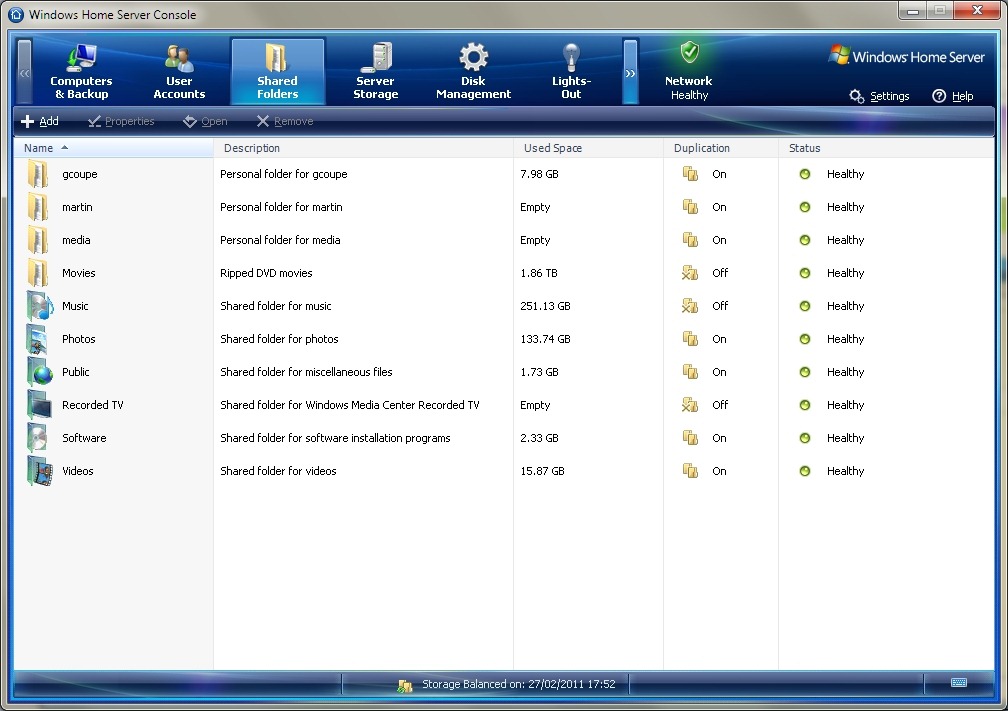
    In WHS V1, you could look at the shared folders to see how much space they currently took up. Here’s an example from my WHS V1 system:

    WHS Storage 2

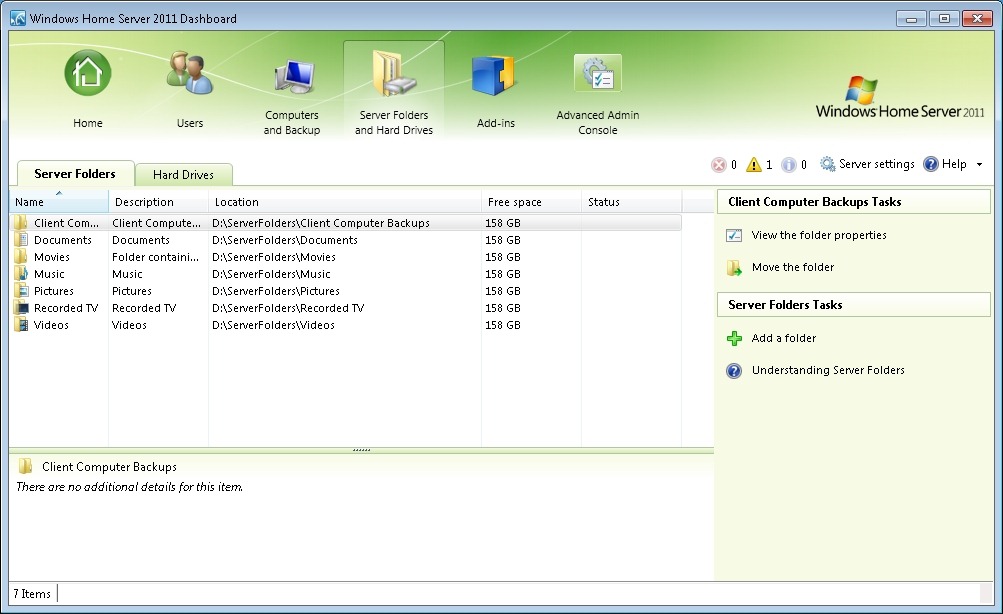
    And here’s the equivalent screenshot from WHS 2011:

    WHS2011 1

    Er, where’s the “used space” column? Well, surprise! It isn’t there. Instead, you have a “Free space” column that represents the space available on an individual drive. Nowhere near as useful. Because drive extender has been removed, the support person has to start thinking in terms of individual drives, not in terms of the total amount of storage as in WHS V1.

    This mode of thinking in terms of individual drives, instead of the total storage pool is also reflected when considering backups. WHS 2011 is unable to deal with backups (or discs) larger than 2TB.

    Frankly, if I were designing the follow-on product from WHS V1, then it would seem to me to be essential that I would handle the situation where discs and backups would be larger than 2TB. After all, if I’m going to claim that:

    Today large hard drives of over 1TB are reasonably priced, and freely available. We are also seeing further expansion of hard drive sizes at a fast rate, where 2Tb drives and more are becoming easy [sic] accessible. Since customers looking to buy Windows Home Server solutons [sic] from OEM’s will now have the ability to include larger drives, this will reduce the need for Drive Extender functionality.

    …then I would make sure that a 2TB limit did not exist in my product. Not so with WHS 2011.

    I really do wonder who the team are designing the product for. Certainly not home users.

  • Soldiering On

    I see that Paul Thurrott, in an article published on his Supersite for Windows, has done a U-turn and is now betting on Windows Home Server 2011. Back in October 2010, when he was first told by the current WHS team that they would be removing the Drive Extender technology from WHS 2011, his first reaction was that:

    “Removing Drive Extender was the equivalent of driving a dagger right through the heart of the product”.

    Indeed, that was my first reaction on hearing the news when it became public a month later, and the reaction of many, if not most, of us who had bought the original version of Windows Home Server.

    Despite the outcry (for example, there are currently 5,581 votes in favour of retaining the DE technology in WHS 2011 versus 73 against over at the Microsoft Connect site – tagline: your feedback improving Microsoft products), the technology will not be put back into the final WHS 2011 product. (Addendum: on the 12 March 2011, Microsoft removed all the suggestions that had been posted by WHS 2011 beta testers in the connect forum, including this one. An act that reminded me of the Soviet’s airbrushing ex-politicos out of photographs. One way of removing embarrassing facts, I suppose)

    So now, Paul Thurrott has put his sense of disappointment behind him, and written that:

    So yes, I’m disappointed about Drive Extender, I really am. And yes, I’ve sweated this decision for months. But when the final version of Windows Home Server 2011 appears in the months ahead, I’m switching. And I’ll let you know how it goes, of course. But I can tell you now that Microsoft’s home server solution is still the best game in town, even with the removal of Drive Extender. And if you could stop crying into your beer, I think you’ll admit the same.

    Well, perhaps. But what I find most telling about this whole debacle has been the way that it has been (mis)handled by Microsoft. It seems clear, from Thurrott’s own account, that the current WHS team did not have a clue, at least in the beginning, that the decision to remove DE would have such a negative reaction.

    In effect, the team had just torn up the guiding principles for the product developed by Charlie Kindel and the original WHS V1 team – but they don’t seem to have appreciated that fact, or the likely reaction from customers who had bought V1 on the strength of those principles.

    The team then soldiered on with the decision – and I have to give them credit for their brass necks – and very probably have weathered the storm. But I really could have done without the disingenous posts on their blog telling us that they were only following feedback from their customers:

    “When weighing up the future direction of storage in the consumer and SMB market, the team felt the Drive Extender technology was not meeting our customer needs”.

    There are some good things remaining in WHS 2011, but the heart of WHS V1 – its provision of consumer-friendly storage – has been surgically removed.

    The die has been cast – we’ll see what happens.

  • Making a Silk Purse out of a Sow’s Ear – Not

    Oh dearie me, Microsoft has just unleashed the Release Candidate of Windows Home Server 2011 upon the world. And as they had promised, they have surgically removed the one unique selling point that WHS version 1 had – the drive extender technology.

    Frankly, this confirms to me that Microsoft has totally lost the plot when it comes to crafting consumer technology that ordinary people – as opposed to IT experts – actually feel comfortable about having.

    They are, of course, putting their spin on how WHS 2011 will be wonderful, but it all has the air of them trying to make a silk purse out of a sow’s ear, and failing miserably. Take, for example, this YouTube video that they put up to show us how to manage our storage in WHS 2011. With WHS version 1, when your storage was getting full, you could just add another drive and carry on. Now, as this video painfully points out, you have to worry about whether you need to move your folders around to rebalance your storage across your discs.

    Hello, Microsoft, wake up – Mr or Ms average consumer doesn’t want to think like an IT support person.

    I, for one, will be carrying on with WHS version 1 for as long as I possibly can. WHS 2011, with the removal of Drive Extender, has nothing to offer.

  • Open Mouth, Change Feet

    There seems to be something in the water at the campus at Redmond. That must be the reason why I cannot fathom some of the decisions being made in Microsoft at the moment.

    The latest is today’s announcement from the Windows Home Server team that they will be dropping the Drive Extender technology for the next version of Windows Home Server (codenamed Vail) due to be released in 2011.

    I just don’t understand the rationale behind this. As far as I’m concerned, it’s been a brilliant piece of technology that just worked, and has been the underpinning of why I bought version 1 of WHS in the first place. If a drive failed, I could just slot in a new one, and the system would automatically recover. The drives didn’t all have to be the same size (as in a RAID setup).

    And now, Microsoft announce that they are dropping this for Vail, and claim that customers don’t want or need it. Hello, I’m a customer, and I want it… It was, and is, one of the major selling points of WHS.

    Is the world going mad? Or is it just Microsoft?

    Update 24 November 2010

    Well there’s been quite an outcry from WHS users since yesterday’s announcement. So much so that the unfortunate Michael Leworthy felt it necessary to issue a second statement . Reading the two together merely underlines the title of my post, and serves to point out the disingenuousness of Mr. Leworthy.

    Yesterday, for example, his reason for announcing the dropping of the Driver Extender technology was:

    When weighing up the future direction of storage in the consumer and SMB market, the team felt the Drive Extender technology was not meeting our customer needs.

    Yet today, clearly somewhat shocked, and yet knowing that the reaction was only to be expected he says:

    Hi, it is a rough day for Vail, and I have been dreading today for a while as an avid Vail user myself. We know this is popular feature in regards to our home server product, and as such all expected that it would have created this type of outreach from our community.

    Meanwhile, Paul Thurrot, over at his blog, probably reveals the real reason behind the dropping of the technology:

    In a briefing last month, I was told that Microsoft and its partners discovered problems with Drive Extender once they began typical server loads (i.e. server applications) on the system. This came about because Drive Extender was being moved from a simple system, WHS, to a more complex, server-like OS )(SBS “Aurora”) that would in fact be used to run true server applications. And these applications were causing problems.

    In addition, the Windows Home Server group now finds itself lumped in organisationally with the big boys: the Business Server group. So the business scenarios where the Driver Extender technology is showing shortcomings is overriding the simple fact that for home use by ordinary consumers, the technology works well and unobtrusively. Just which customers was Mr. Leworthy talking about when he claimed the “technology was not meeting our customer needs”?

    I suppose that the writing has been on the wall for Windows Home Server since last week, when HP suddenly announced that it would be selling Drobo servers – a clear rival to HP’s own MediaSmart servers based on WHS. What’s the betting that HP will shortly announce the dropping of the MediaSmart Server line entirely?

    (Update 1 December: well, that was an easy bet – HP has announced the dropping of the line, and the Windows Home Server team do their best “Crisis? What crisis?” impression)

    I think it’s worth quoting a chunk from the post over at We Got Served:

    Back in August 2008, Charlie Kindel, then General Manager for Windows Home Server at Microsoft outlined the guiding principles of Drive Extender, the spirit of which runs right across the platform “as a server designed for ordinary people”:

    Windows Home Server storage system design requirements

    • Must be extremely simple to use.Must not add any new concepts or terminology average consumers would not understand. Simple operations should be simple and there should not be any complex operations.
    • Must be infinitely & transparently extendible.Users should be able to just plug in more hard drives and the amount of storage available should just grow accordingly. There should be no arbitrary limits to the kinds of hard drives used. Users should be able to plug in any number of drives.  Different brands, sizes, and technologies should be able to be mixed without the user having to worry about details.
    • All storage must be accessible using a single namespace. In other words, no drive letters.  Drive letters are a 1970′s anachronism and must be squashed out of existence!
    • The storage namespace must be prescriptive.In other words, our research told us that consumers want guidance on where to store stuff. Our storage system needs to be able to tell users where photos go. Where music goes. Etc…
    • Must be redundant & reliable. There are two components in every modern computer that are guaranteedto fail: fans and hard drives. Because they have moving parts,  Windows Home Server must be resilient to the failure of one or more hard drives.
    • Must be compatible.Compatible with existing software, devices, disk drives, etc…
    • Must have great performance.
    • Must be secure.
    • Must enable future innovation. Both the amount of storage consumers are using, and capacity/$ are growing at Moore’s Law like rates (while nothing else really is). This creates a discontinuity in the industry and an opportunity for innovation. The storage system must operate at a higher level of abstraction to enable rich software innovation (file level vs. block level).

    These guiding principles remain as valid today as when they were coined. Unfortunately, with yesterday’s announcement, Microsoft has simply torn them up.

    Update 25 November 2010

    The outcry continues. However, every now and then, someone comments that Microsoft are doing the right thing, because all we need is RAID in place of the Drive Extender technology. Clearly, not only are such people techies who simply don’t appreciate that Windows Home Server is intended for the home, to be used by non-techie consumers, but they haven’t appreciated the very real advantages that DE technology has over RAID.

    To illustrate these, it’s worth quoting in full the comment by LarryA from the MediaSmartServer.Net blog:

    After reading all the comments on this subject, I’m beginning to wonder if some of the people suggesting that RAID is a good replacement for WHS or how WHS isn’t reliable have ever used WHS. I have used WHS from the very first day it was available from Amazon and have never had a corrupted file. Also there are some features of WHS that RAID doesn’t provide. A few examples:

    WHS backs up only one copy of identical files from multiple PCs. This saves a ton of space and backup time.

    WHS backs up only those sectors that have changed. Again a savings of a ton of space and time. After the first backup of a PC, the daily backup for my 5 PCs is less than 10 minutes each.

    Because of the first two automatic features I mentioned, I have about 20 terabytes of backups stored in only 2.6 terabytes of disk space. I have about 17 backups of each of my 5 PCs.

    I can choose to duplicate a folder for extra security by a single click. I can undo duplication with a single click.

    My WHS started with a single 500-GB drive and now contains drives ranging in size from 500-GB to 1.5-TB for a total of 4.78-TB of space available.

    I can start a backup prior to installation of new software with two clicks and have to wait for less than 10 minutes for it to complete. On at least 2 occasions I’ve had to restore a PC because of a bad installation.

    I don’t have to do anything to manage any of these features. Installation could not be simpler and my HP WHS takes up a tiny little bit of space under my desk.

    I don’t know of any existing system, RAID or otherwise, that has all these features. If anyone knows of one I would like to hear about it.

    And oh yea, I will never store my data or backups in the cloud!!! I’ve been a programmer in the financial industry for more than 35 years. So I have lots of experience with the internet, clouds and networks, all of which have been hacked.

    Without DE WHS is a dead product. Microsoft take your cloud and RAID solutions and stuff’um!! Screwed by Microsoft again!!

    Amen.

    Oh, and one other thing. I see lots of comments in the blogs from people thinking that the Drobo FS product is a replacement for WHS. As far as I can see, it is no such thing. It’s primarily intended as a data store, not as the complete systems store concept of WHS. Yes, it does give you the storage pool concept of WHS, but that’s the end of it. It will not:

    • back up only one copy of identical files from multiple PCs. Instead, you will end up with multiple copies of the same file, one for each PC.
    • back up only those sectors that have changed in a file. Instead, even if only one bit has changed in the file, the whole file must be backed up. No intelligent storage here.
    • be able to roll back to a complete backup snapshot taken earlier in time, without the need to take up additional storage space to actually hold all those multiple backups.
    • be able to restore a PC with a working image with one click, if the PC has a failure.
    • act as a DLNA media server out of the box. You have to add a third party application for this.

    Update 27 November 2010

    I can’t resist just pointing out that over at the Microsoft Connect (tagline “your feedback improving Microsoft products”) forum devoted to Windows Home Server, the responses from those of us asking Microsoft to put the DE technology back into the next version of WHS versus those who are saying that Microsoft should not is running at approximately 80-1 90-1 93-1 95-1 97-1 in favour of restoring DE to WHS. At the moment, it’s 3273 3602 3908 4088 4281 votes in favour of the restoration versus 44 against (as of 2 December).

    Nonetheless, I wouldn’t mind betting that Microsoft will simply go ahead and ignore this.

    I was watching the presentation that the unfortunate Mr. Leworthy gave at the recent TechEd conference held in Berlin earlier this month (i.e. just before the news broke about the removal of DE). Two things struck me:

    • He didn’t mention the automatic duplication of selected data across drives at all – whereas in previous TechEd presentations, this point (which depends on DE) would have been highlighted.
    • He made the point that the most requested feature for the next version of WHS was the inclusion of Media Center functionality. However, he said, it wasn’t going to happen, despite the requests.

    So I take from that that despite the outcry over the dropping of DE from the next version of WHS, Microsoft will almost certainly blithely ignore it and carry on as if nothing has happened. Which rather gives the “your feedback improving Microsoft products” a cynical air worthy of typical marketing-speak. What a surprise.

  • Windows Home Server

    Now that Microsoft has released the Windows Home Server product, I went ahead and bought the OEM version to install on the computer that I use as a server in our home network. Overall, I’m fairly pleased with it, it does (mostly) what it says on the tin with a minimum of fuss. However, there’s one thing that continues to irk me: Microsoft’s marketing claims do not tell the whole story, they are being economical with the truth.

    Microsoft claims that you can remote access “any home computer” using the product. For example, see this screenshot of the welcome page when I remotely log into my home server:

    WHS Remote Access 3

    Even on Microsoft’s product pages, their FAQ says that: “Windows Home Server … also allows you to connect remotely and use your home computers as if you were sitting in front of them”. See:

    WHS Remote Access 2

    Unfortunately, when Microsoft says “any home computer”, they don’t actually mean “any”. What they mean is their top-end operating systems: Windows XP Professional, Vista Business or Vista Ultimate. Those of us with Vista Home Basic or Vista Home Premium cannot remotely access their home PCs running those operating systems:

    WHS - Remote Access

    I really find this ridiculous. I’ve blogged about this before – I came across it while I was beta-testing the product. I had hoped that Microsoft would have remedied this with the final release of the product. But no, so I can reprise my rant:

    Let me get this straight, the Windows Home Server product, the one that is supposed to be for ordinary mortals, not geeks, the one that is supposed to give you remote access to any computer in your home, won’t actually do this if you have Windows XP Home, Vista Home Basic or Vista Home Premium installed on your home computers? You actually have to have XP Professional, Vista Ultimate, Vista Business or, gawd help us, Vista Enterprise installed on your goddam home computers?
    I’ve heard some nonsense in my time, but this takes some beating. The whole raison d’etre of Windows Home Server is being torpedoed by a product packaging decision… how stupid is that?
    Well, of course most homes will have XP Home, Vista Home Basic or Vista Home Premium. Only geeks buy XP Professional or Vista Ultimate… What really irritates me is that I had Windows XP Professional at home on all our systems, but wanted to move to Vista Home Premium in an attempt to be less geeky. More fool me, I suppose.

    I notice that none of the glowing reviews of Windows Home Server that I’ve seen (with the honourable exception of Paul Thurrott) has actually picked up on this shortcoming. Clearly, they’re all a bunch of geeks running Vista Ultimate, so this product hole goes straight over their heads. The rest of us mere mortals just fall straight into it.

  • WHS Is RTM

    That means Windows Home Server is Released To Manufacturing for those of you who are not acronymphiles.

    I, along with thousands of other folks, have been testing this software at home. I’ve found a few bugs, but most have been cured along the way. I’m still getting the “database inconsistency” bug, despite trying the steps to fix it. I see that Microsoft say that this bug will “more than likely be fixed by RTM”, so we’ll see.

    But one thing that is not yet clear is whether WHS will open up the ability to access all flavours of Windows operating systems via the internet. At the moment it does not, even though you might be forgiven for thinking that it does if you just listen to Microsoft’s marketing.

    Still, kudos to the development team for a product that has much to commend it.

  • The Workaround

    Well, after that rant about stupid packaging decisions for Windows Home Server, it comes as something of a relief to be able to say that I had one piece of good luck today. You know that conflict between the Windows Home Server client software and CA’s Anti-Virus 2007 product that I’ve been banging on about? Well, I discovered that there’s a workaround…
     
    I was watching a video podcast by Ian Dixon on TheDigitalLifestyle.com when I noticed something curious. He was demonstrating how to restore an individual file from a Windows Home Server backup, and he right-clicked on the file. I spotted that in the pop-up menu there was an entry for CA’s Anti-Virus. Hang on, thought I, how has he got that running on his machine, when he has also got the Windows Home Server client software running as well?
     
    An exchange of emails brought the answer… and for those of you wanting to have the workaround, here it is…
    1. Change the startup of the “Windows Home Server Connection Service” service [sic] from “Automatic” to “Manual”
    2. Remove the Windows Home Server tray application (WHStray.exe) from the list of programs that are started when Vista boots up. You can do this from the Software Explorer in Windows Defender or, alternatively, just delete the link to the application in C:ProgramDataMicrosoftWindowsStartMenuProgramsStartup.

    Then you should find that Vista will boot normally. Once you’re up and running, then starting the Windows Home Server console will start both the connection servce and the tray application for you. There you have it…