Reflections on life at “De Witte Wand”…

Tag: Microsoft

  • OneDrive Is Now Useless For My Photos

    I’ve been using Microsoft’s cloud storage service to hold a copy of my photo library since 2007. In those days the service was known as Windows Live SkyDrive. As a result of a lawsuit brought by the British television broadcaster Sky UK, the service was rebranded to OneDrive in 2014.

    While the PC application, Windows Photo Gallery, supported photo metadata tags it wasn’t until 2015 that OneDrive also supported them.

    At that point, the combination of Windows Photo Gallery and OneDrive was useful – I could search my photo library using tags in both and both supported using geo tags. The road to get there had been pretty bumpy, Windows Photo Gallery in particular had some bugs that caused havoc to my library and its metadata, but the issues were eventually (mostly) resolved.

    Alas, Microsoft dropped Windows Photo Gallery in favour of the Photos app that was first introduced with Windows 8 in 2012. The Photos app, to this day, does not support photo metadata tags, which meant that searching my photo library using tags could only be done in OneDrive.

    Since the Photos app is useless, I’m using Photo Supreme from IDimager on my PC as my digital asset management application for my photo library. It supports the industry standard photo metadata schema published by the IPTC. I can manage technical (Exif) tags, descriptive tags, geo tags and region tags (for putting names to faces) using Photo Supreme. The resulting photos are then synchronised with the copy of my photo library held on OneDrive, where the technical, descriptive and geo tags in a photo can be displayed (region tags are not supported in OneDrive).

    After 2015, I could also use OneDrive to search my descriptive tags (for example, display all the photos that have been tagged with the name of our dog “Watson”). However, I got a nasty surprise in October last year when I discovered that searching for tags in OneDrive no longer worked.

    The reason appears to be because Microsoft has drunk the AI Kool-Aid. OneDrive uses AI to tag your photos. There’s an option switch to enable this:

    You will note that it says “You can also add tags to your photos manually to organise and find them more easily”. Originally, this switch just turned on the AI tags function – my tags were always being indexed by OneDrive’s Search engine independently and I could search them.

    Now, it appears that Microsoft has tied the indexing of my tags to this option, so I have to turn it on to enable searching of my tags. I don’t want to do this for two reasons:

    1. I don’t want to use Microsoft’s AI tags; a) they are too error-prone and b) they would pollute my controlled vocabulary of metadata tags.
    2. I discovered that with this option turned on, as OneDrive was assigning AI tags to my photos, it downloads versions of those photos with no tags at all to my PC. This is a complete turnabout to the old OneDrive, which preserved tags in downloaded copies.

    I am a strong believer in the adage “The Truth is in the File” – that is, that an image file must contain complete and accurate metadata. For OneDrive to deliberately strip out my metadata from my image files is a complete showstopper for me, so there is no way that I’m going to turn this new incarnation of the Photo Tagging option on.

    With the option off, then the Explore page is useless to me, because OneDrive will not display either my descriptive tags, nor will it read my geo tags and show me “Places”. I simply get, what is, to all intents and purposes, a blank page:

    Thanks, Microsoft – you’ve destroyed OneDrive as far as I am concerned.

    Addendum 29 July 2025: Well, good news – it appears as though Microsoft has reinstated the indexing of our own tags. So now I can search my photo library once again. Pity that Microsoft didn’t bother to tell us.

  • Microsoft Copilot – Missing in Action…

    On the 21st September, Microsoft announced the inclusion of Microsoft Copilot (“your everyday AI companion”) into Windows 11. In the announcement Microsoft stated that “Copilot will begin to roll out in its early form as part of our free update to Windows 11, starting Sept. 26”.

    Since I am running the Release Preview versions of Windows 11, I assumed that I would be getting it pretty quickly, ahead of the general release.

    Well a week has passed, and no sign of it heading towards my PCs so I went back to the release notes for the version of the Release Preview that came on the 26th September – the one that includes Copilot.

    It was there that I discovered the footnote:

    ** Copilot in Windows will start to release in preview to select global markets as part of our latest update to Windows 11. The initial markets for the Copilot in Windows preview include North America and parts of Asia and South America. It is our intention to add additional markets over time.

    Ah, I see, so screw you Europe – you’re not getting it now, and we’re not going to tell you when, or indeed whether, you’re ever going to get it…

    Thanks a bunch, Microsoft.

  • Surface Duo – It’s Dead, Jim…

    I predicted back in July that the end was nigh for the Surface Duo line of devices made by Microsoft. I think we can now categorically state that the plug has been pulled and it is well and truly dead.

    The reason being that Panos Panay has announced that he is leaving Microsoft after 19 years at the company. Panay was the power behind the Surface line of products, and the Surface Duo was his baby.

    The timing of the announcement is also interesting – coming as it does just three days before Microsoft’s annual Surface event where new products are announced. It seems almost inevitable that a Surface Duo 3 will not be in that lineup.

    Panay himself will also not be at the event. Perhaps he didn’t want the embarrassment. I remember the strained performance of Steven Sinofsky, the champion of Windows 8, at its introduction event. He left the company very soon afterwards which led to the question of did he fall or was he pushed…

  • The End is Nigh…

    Once again, Microsoft appears to be stopping development on a product line. This time it’s the Surface Duo line of products.

    Truth to tell, from day one Microsoft has made a series of missteps with the Surface Duo. First, they shipped the original Surface Duo in September 2020 with the software in an unfinished state – full of bugs. Unsurprisingly, the initial reviews in the Tech press were pretty damning, which put a damper on the product right from the start. Secondly, Microsoft never really advertised the device to the general consumer – it was positioned purely as a device for Business users.

    The Surface Duo 2, which followed a year later, was a much improved device, with a better camera, battery life and performance.

    Both models have two touchscreens and open like a book to expose them. Unlike a book, the devices can be fully folded back to put the touchscreens on the outside and assume a smartphone form factor.

    I bought a Surface Duo 2 for myself, replacing my Nokia Smartphone. Because the Duo supports the Microsoft digital pens, it became my digital Moleskine notebook as well as the camera that I have with me at all times. I love the device for its flexibility and solid support for multitasking – I can be browsing the web on one screen while taking notes on the other.

    When people see me using it, they are always curious about what it is – no-one has ever said “oh, you have a Surface Duo” – which speaks volumes about the results of Microsoft’s “marketing” of the device. The usual reaction on being told it is a Microsoft device is “I had no idea that Microsoft made something like that”.

    And now it appears that the Surface Duo line is headed for the same scrapheap that has seen so many products from Microsoft before: Windows Phone, the Kin phone, Zune, Windows Home Server, Kinect, Microsoft Band, Microsoft Mice, Keyboards and Webcams…

    Oh well, I’ll continue to use my Duo 2 for as long as it lasts – it’s a unique device with a unique experience that matches my needs. There’s nothing else quite like it.

  • Another Day, Another Microsoft Rant…

    As I predicted a year ago, Microsoft is dropping Skype, and trying to persuade people to move to a version of Microsoft Teams intended for home users. It will come as standard in Windows 11, but it is already available for Window 10 as a download. Actually, it’s been available for some time for iOS and Android devices, with support for Windows having been added in the past few weeks.

    I’ve been using the business version of Microsoft Teams for some time, but I thought I would check the personal version out in view of the likely demise of Skype in the not too distant future (if Microsoft has its way).

    For years, I’ve had two Microsoft Accounts, each associated with its own separate email address, and for years, both accounts have had the same mobile number associated with them because I have a single mobile phone.

    I’ve just tried to set up the personal Microsoft Teams application with the second Microsoft Account.

    I get to the stage where it asks for a phone number to be added to the Microsoft Account. But, hang on I think, that account already has my number – why is Teams asking for it again? Oh well, no harm in giving it again I think.

    Wrong.

    I get a message saying: “That number is already taken”, followed by a message from the Authenticator app on my phone telling me that my phone number has been removed from my account. Er, what?

    Could it be that the developers of Microsoft Teams cannot conceive of a use case where someone can have multiple email addresses, but only has one mobile? Please say it isn’t so.

    Gah!

  • Microsoft: Opens Mouth to Change Feet Yet Again…

    I see that Microsoft is demonstrating its endless capability to snatch defeat from the jaws of victory yet again.

    Last week they proudly unveiled Windows 11.

    Their web page for Windows 11 includes an App to check whether your Windows PCs are ready for Windows 11. Naturally, I downloaded it and ran it on all my PCs and tablets.

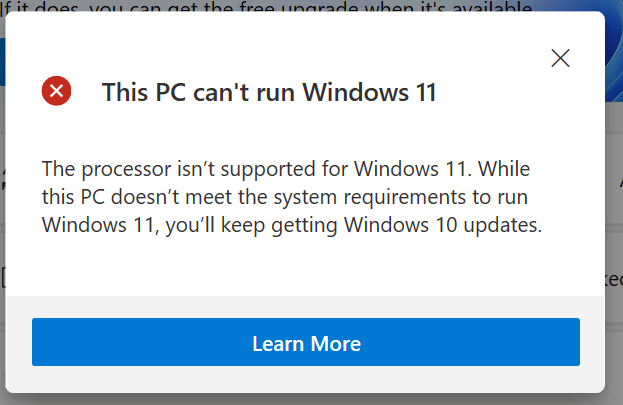
    I had expected that my old desktop PC would not meet the requirements, but I was somewhat flabbergasted to see that my 1 year-old Surface Go 2 also failed to pass the tests:

    The Surface Go 2 has an Intel Core m3-8100Y CPU, which is actually on the list of supported Intel CPUs for Windows 11.

    It turns out that the PC Health Check app is a load of dingos’ kidneys. And that Microsoft don’t seem to be able to agree amongst themselves what, precisely, the actual requirements are.

    Oh, and I see that while Microsoft says Windows 11 “will be coming later this year”, the fine print later on the same page qualifies that to “The upgrade rollout plan is still being finalized but is scheduled to begin late in 2021 and continue into 2022. Specific timing will vary by device”.

    ‘Twas ever thus for Microsoft. Plus ça change…

  • Will Microsoft Ever Learn?

    This is an old cartoon showing the organisation chart of Microsoft and its warring fiefdoms.

    microsoft-org-chart

    It was certainly true back in the day when I had business contacts with Microsoft on behalf of my employer.

    And it would seem that even today, plus ça change, plus c’est la même chose

    In this time of social-distancing, the need for an easy-to-use video-conferencing tool is self-evident. I needed to find one for our local village community committee (I’m the secretary) so that we could hold our meetings online.

    I’ve been a Skype user since its introduction in 2003, and so that was my first thought. However, it was acquired by Microsoft in 2011 and the technology became enmeshed in Microsoft’s internal politics. Microsoft had its own rival technology: Windows Live Messenger, and a shotgun marriage was hastily arranged.

    As a result, the evolution of Skype in Microsoft has not been smooth, and even today it looks as though it is the result of ideas that have been thrown at a wall to see if they would stick. There is also Microsoft’s Skype for Business (which, as Wikipedia points out is “Not to be confused with Skype”). Microsoft also announced in 2017 that Skype for Business would be phased out in favour of Microsoft Teams, yet another online collaboration platform.

    I took a quick look at the free version of Microsoft Teams to see whether it might be suitable for use in our committee. I was not impressed. I set up a simple team of two users and found that the security hoops that you have to jump through before Microsoft Teams will accept someone into a team would try the patience of Job. It also seems as though having a Microsoft Account is essential for entry, and that is already a stumbling block for many people. I don’t think everyone on our committee has such a thing, and it would be a big ask for them to get one.

    I then found that shared documents wouldn’t share – Teams would merely give me a cartoon of a melted ice-cream cone with the words “Something has gone wrong”. Not very helpful. Twenty-four hours later, it seems to have mysteriously fixed itself, but it doesn’t exactly fill me with confidence.

    So the choice at the moment (in Microsoft products) is between the simpler Skype or the bells and whistles of Microsoft Teams, which is firmly aimed at business and enterprise users.  The choice is not made easier by today’s announcement that Microsoft will be bringing a version of Teams aimed at home users – impinging on Skype’s turf. Skype is also under threat from non-Microsoft rivals such as Zoom. As Tom Warren says in his article in The Verge:

    Microsoft wasn’t afraid of ditching the 100 million people using Windows Live Messenger years ago, and I wouldn’t be surprised to see the company try and push Skype users over to Teams in the months ahead. Like Microsoft said, “For now, Skype will remain a great option for customers who love it and want to connect with basic chat and video calling capabilities.” The “for now” part of that statement is a telling sign that Microsoft’s focus is now Teams, not Skype.

    As I said: Plus ça change, plus c’est la même chose

    Addendum: I mentioned Zoom above. I see that it has rather become the victim of its own success. Because of Covid-19, the number of users has skyrocketed, and the resulting upsurge in numbers has revealed some rather worrying privacy and security issues in the product. I really don’t want to touch it with a bargepole, and will stick to Skype, thank you.

  • Microsoft – still asleep at the wheel

    Another day, and yet another rant at Microsoft.

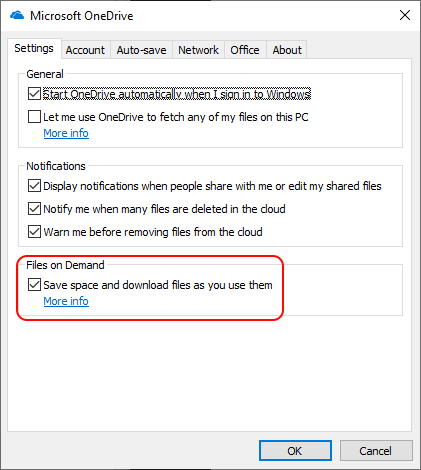
    I’ve already ranted about the fact that the OneDrive ‘Files on Demand’ feature is a step backwards from the old ‘Smart Files’ feature in Windows. I’ve also complained numerous times that the Microsoft Photos app is severely lacking in comparison with the Windows Photo Gallery, which Microsoft has withdrawn from the market, and no longer supports.

    And now these two – ‘Files on Demand’ and the Photos app – have together created the perfect storm, which has blown into the latest version of Windows 10 running on my Surface 3 tablet.

    A few weeks back, the Surface 3 began acting up – the screen kept on breaking up. It had all the appearances of a fault in the graphics hardware or the screen, but I thought I would try doing a factory reset on the device. That actually worked, and I was back up and running in Windows 10 in a couple of hours. Of course, I had to reinstall all my apps and Office, but at least I had a working machine again.

    All my documents and photos are now held in OneDrive, and shared across all my devices. I’ve got about 500 GB of data in OneDrive, and my Surface 3 only has about 80GB free. So I instructed OneDrive to use the Files on Demand feature, and save space by only downloading files as I used them on the Surface 3.

    OneDrive 23

    That was all fine and dandy, but the following day when I picked up the Surface 3 to use it, it immediately became apparent that it was running really slowly. A restart had no effect, and it wasn’t until I looked at the File Explorer that I realised why – there was only 110 MB of free space left on the C: drive. I have 330 GB of photos up on OneDrive, and OneDrive was trying to download all of them into the Surface 3.

    I straightaway set the properties of all the files and folders in Pictures to ‘clear space’ – so that space would be regained, and sure enough, the amount of free space began to climb as the ‘Files on Demand’ placeholders were used instead of the full files.

    I breathed a sigh of relief, but it was short-lived, as it quickly became apparent that OneDrive was starting to re-download all the files again. Something was going through all the files and folders in Pictures and accessing them. It certainly wasn’t me. OneDrive was saying that the ‘Runtime Broker’ application was doing it, and this was enough to make OneDrive copy the file from the cloud storage down to the Surface 3.

    It turned out to be that damned Photos app – even though I wasn’t using it, it now apparently runs in the background, and naturally includes the Pictures files and folders as a default location. It spawns the Runtime Broker for some devious purpose of its own. It’s probably running the facial recognition algorithm to look for people’s faces in photos, and in order to process the photo, it needs to have the photo present locally on the Surface 3.

    I thought perhaps something might have gone wrong during the initial re-install of Windows 10 – after all, surely I can’t be the only person suffering from this issue? So I did a second factory reset, and the issue is still there – OneDrive is still trying to pour a quart into a pintpot at the prompting of the Photos app.

    As a temporary workaround, I’ve deleted the Pictures folder from the locations scanned by the Photos app, and that seems to have stopped this unwanted behaviour.

    But the question remains, surely I can’t be the only person with this issue? Looking through Microsoft’s Feedback Hub reveals others – but we seem to be relatively few. Certainly too few for Microsoft to have noticed that anything is wrong. Doubtless it will never get fixed.

    Addendum 2 December: I had sent this issue through to Microsoft as feedback on the 26th November. I had the following reply:

    We have received your request for assistance and are busy researching a potential solution. We may need additional information. You can count on us to get back to you within within [sic] the next 24 hours.

    Naturally, I’ve not heard anything further… Why am I not surprised?

  • I’m Getting Nervous…

    It’s the little things that gradually mount up. A series of changes, often small in themselves, that suddenly align and bring about a situation that can cause a major catastrophe.

    Over the years, I’ve built up about 500GB of personal data stored on my computers: documents, emails, photos and videos. Naturally, I have this data backed up, in several locations, both locally and off-site.

    Over the years, I’ve used a variety of techniques to make the backups. In the early days, I used writable CDs, then tape cartridges, and then a local data server, backed up to hard drives that were then stored off-site. I’ve also gone through a variety of backup software, ranging from simple to sophisticated. For a long time, I was using Microsoft’s Windows Home Server to take backups of all our home data, and make copies for off-site storage. But as is Microsoft’s habit, Windows Home Server was dropped and no longer supported. As is also Microsoft’s habit, no decent alternative was forthcoming from them at the time.

    As a result, I started using Veeam’s Agent for Windows, which was perfectly satisfactory, if not as intelligent as the backup solution in Windows Home Server. VAW would take backups to our local data server, and I would then make copies for offsite storage.

    Then came Microsoft pushing the use of OneDrive as cloud storage. Over time, we started to make more use of it, but I also ensured that VAW was also backing up any data we stored in OneDrive.

    So far, so good. But then came the next change. Microsoft introduced the Windows 10 Spring Creators Update in April this year (a.k.a. Build 1803), and suddenly, VAW was no longer able to backup any of our data that was being held in OneDrive, and failed giving an error. According to Veeam, it is related to the reparse points mechanisms which are included in the ‘Files On-Demand’ OneDrive feature. This ‘Files On-Demand’ feature was added in the 1803 build and it doesn’t work with Veeam Agent.

    So, OK, I thought, OneDrive is itself a form of backup – our data is being held both locally and in the OneDrive cloud, do I need a second backup taken by VAW and a third copy stored offsite? What could possibly go wrong? And so I left things as they were.

    In August, Microsoft started pushing a new folder protection feature for OneDrive. Folder protection will offer to automatically sync your documents, pictures, and desktop folders to OneDrive to ensure a PC’s important folders are backed up to Microsoft’s cloud service. It sounded good, so I converted all our PCs to use the service for backing up our local data to OneDrive automatically. It meant that now the majority of our data was being backed up to OneDrive, and very little was being backed up by VAW. What could possibly go wrong?

    A week ago, Microsoft released the next major update to Windows 10 – Build 1809 – the Fall Creators Update. I let it be installed on all our PCs – Windows Update said it was available, downloaded it and installed it. And VAW was still failing to backup data held on OneDrive. However, I had the new folder protection feature for OneDrive in place. What could possibly go wrong?

    Well, disaster could strike.

    During the upgrade process to Build 1809 of Windows 10, Microsoft displays this on your PC:

    files-where-you-left-them-800x436

    Unfortunately, for some unknown percentage of people who have upgraded to Build 1809, the upgrade process has deleted all of their personal data, so their files are no longer exactly where they left them at all – they have gone – probably for good. They are not in OneDrive, they are not on the local PC, they have shuffled off this mortal coil…

    It’s not the first time that Microsoft, as a result of changes to its testing procedures, has released buggy software, which, under Windows 10 design, will be installed on unsuspecting customers’ PCs automatically. But this has to be the final straw. Changes have to be made, and heads will probably roll.

    So far, touch wood, we have not lost any of our personal data, but now do you see why I’m getting nervous? I only hope that Veeam Software fix the problem about backing up OneDrive data quickly. One can never have too many backups.

  • Microsoft Photos – Still a Disaster After All These Years

    Our local village community organisation – Heelwegs Belang – is holding its annual New Year’s Reception today. I thought that I would make a slide presentation to run continuously during the reception and be displayed on a screen in the village hall.

    I thought about what tool I would use to make the presentation; would it be PowerPoint, or something else? Initially, I thought I would try using Microsoft’s new presentation tool Sway. It seemed promising, but I quickly discovered that it requires a permanent connection to the internet to work. Since there is no WiFi in the village hall at the moment, that ruled out Sway from consideration.

    Then I realised that the much-maligned (by me and others) Microsoft Photos app now has a so-called “video creation” mode, which can be used to assemble slide presentations, and even put music to them. So I fired up Photos and set about assembling my presentation.

    Photos 01

    Dear lord, but what a painful experience that proved to be. The Photos app is slow as molasses in this mode, and crashes frequently. The workflow involved in assembling a presentation is primitive – for example, you must apply effects one at a time to each slide; you can’t select a group of slides and apply an effect or effects to the group. So if you want to change the default display time of 3 seconds to, say, 5 seconds – you have to plod through the presentation and change each slide timing individually. Given that “plodding” is the order of the day with the Photos app, I felt I was fighting the app every damn step of the way. Add to that the frequent crashes, and losing the last few minutes of work each time, I was ready to put my fist through the screen at several points.

    Frankly, next time, it will be back to PowerPoint. It may be old-school, but at least it works, and does what it says on the tin.

  • Facepalm Time Again

    I see that Microsoft has at last introduced a much-requested feature into their Photos app for Windows 10. Unfortunately, this being Microsoft, the feature is half-baked and not useful. Let me explain.

    With the Fall Creators Update, the Photos app started to be able to recognise faces in photos. There was no way to add names to the faces, or to group photos of the same face together under one name, as we could do in Microsoft’s Windows Photo Gallery 2012, but at least it appeared as though Microsoft was starting down the road to make the Photos app more useful by adding People Tags.

    There’s now at last a build (2017.39101.16720.0) of the Photos app released to Windows Insiders that allows you to assign names to faces. However, the names are local to the PC on which they are done, so they reside in the local database of the Photos app, rather than being written back to the file as metadata. That means that the information does not travel with the file. If the file is held in OneDrive, and accessed from another device, the People Tags are not available to that device. The experience is broken. If you want the People Tags to be available on the new device, you have to go through the manual process of adding names to faces again (and again and again on each new device that the files are copied to).

    What is truly depressing is that Microsoft helped define a metadata standard for tagging faces in the Metadata Working Group – and that standard has been available since 2010. It’s been implemented in products such as Adobe Lightroom, Photo Supreme and Google’s Picasa, so People tags created in any one of these products travel with the file, and can be read in any of the others.

    Here we are in 2018, and Microsoft still hasn’t learned how to build a seamless experience for People Tagging.

    And to add insult to injury, the Search facility for descriptive tags is also still broken.