Reflections on life at “De Witte Wand”…

Tag: Microsoft Surface

  • Surface Duo – It’s Dead, Jim…

    I predicted back in July that the end was nigh for the Surface Duo line of devices made by Microsoft. I think we can now categorically state that the plug has been pulled and it is well and truly dead.

    The reason being that Panos Panay has announced that he is leaving Microsoft after 19 years at the company. Panay was the power behind the Surface line of products, and the Surface Duo was his baby.

    The timing of the announcement is also interesting – coming as it does just three days before Microsoft’s annual Surface event where new products are announced. It seems almost inevitable that a Surface Duo 3 will not be in that lineup.

    Panay himself will also not be at the event. Perhaps he didn’t want the embarrassment. I remember the strained performance of Steven Sinofsky, the champion of Windows 8, at its introduction event. He left the company very soon afterwards which led to the question of did he fall or was he pushed…

  • The End is Nigh…

    Once again, Microsoft appears to be stopping development on a product line. This time it’s the Surface Duo line of products.

    Truth to tell, from day one Microsoft has made a series of missteps with the Surface Duo. First, they shipped the original Surface Duo in September 2020 with the software in an unfinished state – full of bugs. Unsurprisingly, the initial reviews in the Tech press were pretty damning, which put a damper on the product right from the start. Secondly, Microsoft never really advertised the device to the general consumer – it was positioned purely as a device for Business users.

    The Surface Duo 2, which followed a year later, was a much improved device, with a better camera, battery life and performance.

    Both models have two touchscreens and open like a book to expose them. Unlike a book, the devices can be fully folded back to put the touchscreens on the outside and assume a smartphone form factor.

    I bought a Surface Duo 2 for myself, replacing my Nokia Smartphone. Because the Duo supports the Microsoft digital pens, it became my digital Moleskine notebook as well as the camera that I have with me at all times. I love the device for its flexibility and solid support for multitasking – I can be browsing the web on one screen while taking notes on the other.

    When people see me using it, they are always curious about what it is – no-one has ever said “oh, you have a Surface Duo” – which speaks volumes about the results of Microsoft’s “marketing” of the device. The usual reaction on being told it is a Microsoft device is “I had no idea that Microsoft made something like that”.

    And now it appears that the Surface Duo line is headed for the same scrapheap that has seen so many products from Microsoft before: Windows Phone, the Kin phone, Zune, Windows Home Server, Kinect, Microsoft Band, Microsoft Mice, Keyboards and Webcams…

    Oh well, I’ll continue to use my Duo 2 for as long as it lasts – it’s a unique device with a unique experience that matches my needs. There’s nothing else quite like it.

  • How Not to Delight a Customer

    According to an article in Forbes, delighting the customer is not just profitable, but hugely profitable. It’s a win-win situation, both for the companies who pursue ways to delight the customer, and for the customers themselves.

    I’ve just been on the receiving end of the opposite experience: disappointing the customer; and the company who provided this experience was Microsoft.

    When the Surface 3 was announced, I wrote that it promised to be a good machine. It would suit me very well indeed. As a result, I pre-ordered a Surface 3, and it duly arrived on the release date of the 7th May.

    It is indeed a very nice machine, so where’s my disappointment? Well, Microsoft advertise the machine as including a one year subscription to Office 365 Personal. The fine print advises that the subscription is:

    Available on Surface 3 with Windows 8.1 purchased prior to December 31, 2015. While supplies last. Office activation required within 6 months of Windows activation date.

    As it happens, I had already purchased a one year subscription to Office 365 Personal back in February. The subscription allows Office to be installed on two machines, a PC and a Tablet (which can also be a Windows Tablet, such as the Surface 3).

    On the Office site, there’s a section where you can enter a product code key to renew/extend your Office 365 Subscription. So I tried that, and entered the Office product key that the Surface 3 told me it had. Nothing happened once I clicked the “Continue” button. The expiry date of my subscription remains as February 2016.

    I had a chat with Office Support, and was told that the Surface 3 Office 365 Personal subscription cannot be used to extend a current subscription; it can only be used by creating a new Microsoft Account specifically for my Surface 3.

    That seems particularly pointless – I don’t want to create a new Microsoft Account for my Surface 3 – I want to use my existing Microsoft Account on all my devices, and access all my documents in my OneDrive space. The subscription offer is thus worthless to me, and seems to me to skirt close to false advertising on Microsoft’s part. 

    And what is really annoying is that apparently the other way round works without problems. That is, had I first set up my Office 365 Personal account using a Surface 3 product key, and then purchased a year’s subscription, the purchase would have extended my subscription by a year.

    Thanks a bunch, Microsoft. Consider me very disappointed.

  • Game On: Microsoft’s Surface 3

    If you’ve been following my search for the ideal Tablet device, you’ll know that a number of them have passed through my hands, whilst I’ve passed up on others. To date, I’ve had an HP TX2000 convertible, a Lenovo ThinkPad Tablet 2, and currently I have a Lenovo ThinkPad 10 and a Lenovo Yoga 3 Pro convertible.

    I’ve long ruled out Apple’s iPads and the myriad of Android tablets, since I use the Windows ecosystem, and up until now, Microsoft’s Surface range of products has never ticked enough of my boxes. Whilst I had initially high hopes for the Surface Pro 3, it came with a poor fixed-focus rear camera, no GNSS capability, and a fan (I really want a fanless tablet). For more detail, see my “trying to nail it” post.

    This might all be about to change, as Microsoft has now introduced the Surface 3. This, like the Lenovo ThinkPad 10 (TP10), has an Intel Atom processor, but whereas the TP10 has the last generation of the Atom (codenamed Bay Trail), the S3 has the newest iteration of Atom chips. These are apparently slightly faster than Bay Trail, but not a major advance. Here’s a comparison of the basic specifications of the TP10 and the S3:

      ThinkPad 10 Surface 3
    Processor Intel Atom Z3795 processor (4 cores,2MB Cache, 1.6GHz with Intel Burst technology up to 2.4GHz) Intel Atom x7-Z8700 processor (4 cores, 2MB Cache, 1.6GHz with Intel Burst technology up to 2.4GHz)
    Display 1920 x 1200 (16:10) 1920 x 1280 (3:2)
    Memory 4GB / 1067MHz LPDDR3 4GB / 1600MHz LPDDR3
    Storage 128 GB eMMC + MicroSD up to 64GB 128 GB eMMC + MicroSD up to 128GB
    O.S. Windows 8.1 Pro 64bit Windows 8.1 64bit*
    Front camera 2 MP fixed-focus 3.5 MP fixed-focus
    Rear camera 8 MP auto-focus + LED flash 8 MP auto-focus, no flash
    Digitizer Pen Wacom N-Trig (optional)
    WLAN 11a/b/g/n 11a/c
    WWAN optional optional
    Bluetooth 4.0 4.0
    GNSS yes optional **
    NFC optional no
    Keyboard optional optional
    Base unit price €699.99 €729.00

    * Apparently, Windows 8.1 Pro 64bits will be available as an option. However, the non-Pro version is perfectly adequate for me.

    ** If you buy the WWAN (LTE) version of the Surface 3, that will also include GNSS, but you can’t have GNSS without WWAN (unlike the TP10, where all models have GNSS included).

    You’ll notice that the prices of these two tablets, while definitely in the “Premium” bracket, are close to each other. However I would definitely want the N-Trig pen, which adds another €49.99 to the price of the Surface 3. Then again, my ThinkPad 10 has a Quickshot Cover, which to my mind is an essential accessory, and that cost me €49. The Quickshot cover is thin, and only covers the screen (it can be completely folded back under the TP10 in use). It can also act as a stand, but it is less stable, and with less angles to choose from, than the kickout stand built into the Surface 3.

    Unfortunately, Microsoft do not produce an equivalent cover for their Surface range. Instead they have the Type Cover – a cover and keyboard combined. Nice idea, but it weighs in at an eye-watering €149,99. Since I don’t need a keyboard, I can’t see myself shelling out for this. So I’d probably go for just a slipcase to protect a Surface 3. Not as convenient as a flip-over cover, but a good deal cheaper. I just wish that Microsoft, or a third party would produce something like the Quickshot Cover for the Surface range.

    So let’s say that I find a decent case for €30, then my total outlay for a Surface 3 setup would be €808.99 versus €748.99 for the TP10. Still within shouting distance of each other, but the gap is widening, and not in the right direction. Physically, the two tablets are close in size, and smaller than the Surface Pro 3. Here’s a diagram to illustrate the differences:
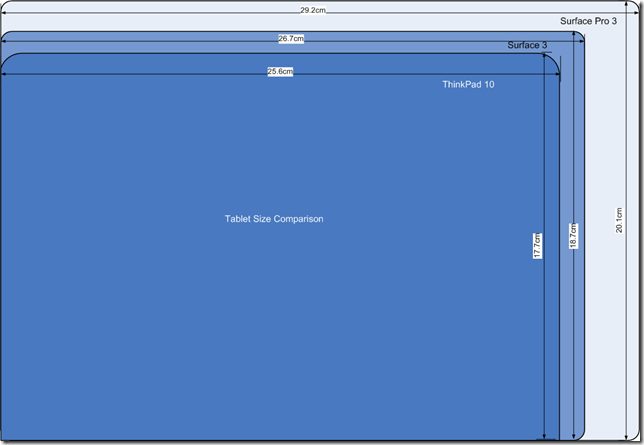
    Tablet Size Comparison

    The Surface 3 has a larger display than the TP10, and I like the 3:2 aspect ratio of the S3 even more than the 16:10 ratio of the TP10. It would be even better for reading books and documents:
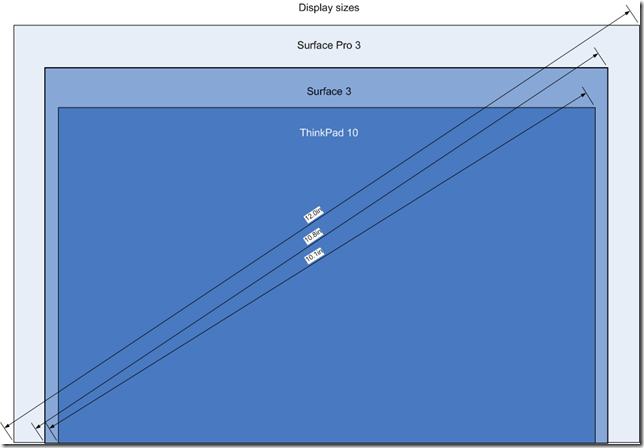
    Tablet Display Size Comparison

    This, to my mind, is where the S3 scores over the TP10. For me, its display has a nicer ratio, and a nice physical size. The Surface Pro 3, although it has the same aspect ratio, is bigger (almost the size of an A4 pad). It also has a much higher resolution, which causes scaling issues with some programs.

    I think the S3 is the Goldilocks model of the three (TP10, S3 and SP3). By way of comparison, the Yoga 3 Pro that I have is a bit bigger than an A4 pad, at 33cm x 22.8 cm, and when in tablet mode is simply too unwieldy for my liking. So the plus points of the S3 are:

    • it’s fanless (like the TP10)
    • screen ratio of 3:2 (better than the TP10)
    • bigger screen than a TP10, and smaller than a SP3.

    The drawbacks are

    • premium price
    • no reasonably-priced flip-over cover available
    • no GNSS

    I think, for my requirements, it measures up very well against the TP10, and might well be the tablet to go for once Lenovo ask for their loan TP10 back. Of course, waiting in the wings will be the Surface Pro 4. The question arises, would I consider this. Frankly, I don’t think it will be a good fit for my requirements. I suspect it will be at least as big, if not bigger, than the SP3, with power to match.

    I don’t need a poweruser’s laptab; the S3 is a much better match with what I’m looking for. As usual with Microsoft, the third time’s the charm. The Surface 3 promises to be a good machine. It would suit me, and I suspect many others, very well indeed.