
… and now you don’t. This is a tale about technology, about the little things that don’t quite work and hence irritate me out of all proportion, rhyme or reason. Unless you’re a technology nerd, this probably won’t interest you, so go and read something else. But if you are a technology nerd, then pull up a chair. Are you sitting comfortably? Then I’ll begin…
I’ve recently acquired a Denon AVR-3808 to sit at the heart of our home’s audio-visual system. As well as being able to handle the usual array of audio visual devices (DVD and Blu-ray players, Satellite receivers and TVs), it also comes equipped with an Ethernet port. So I’ve connected it into our home network. There, it is able to connect to the Internet to receive Internet Radio streams, and also connect to the audio media held on our PCs and Windows Home Server. It even comes with a nice little Microsoft PlaysForSure sticker on the front. Trouble is, it doesn’t “play for sure”.
It will quite happily play Internet Radio stations all day long, but if I try and play back music stored on any of the PCs or the Windows Home Server, then after a couple of hours, the connection will break, and the Denon will display a sad little “Server disconnected” message on its display.
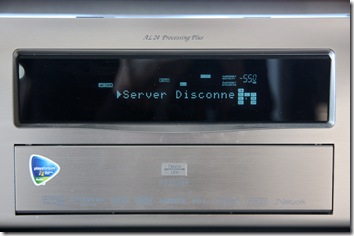
At this point, to get rid of the problem, I have to switch off the Denon and then switch it back on again. When it powers on, it will re-connect to the network, and then all will be well again for another couple of hours listening to music stored on the home network. It’s most odd – it will remain connected all the time as long as I play Internet Radio streams, but as soon as I try to play music stored on any of the devices connected to the home network, after a couple of hours the Denon will fall off its perch, and disappear off the network. Take a look at this snapshot of the network:
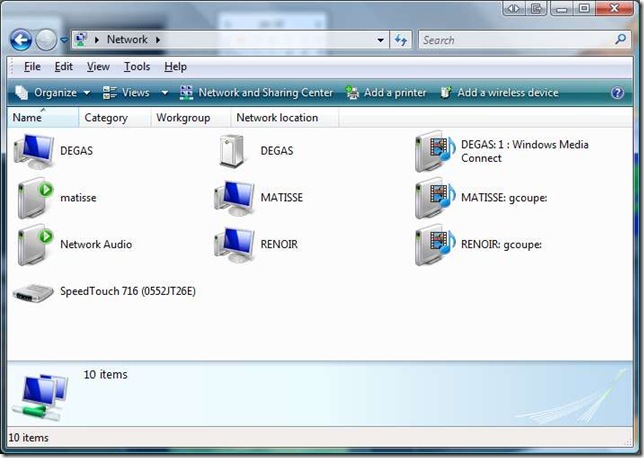
Here you see two of the PCs (Matisse and Renoir) and the Server (Degas). There are several icons for each of them representing the different functions:
- A PC that may have part of the file system and its attached printers accessible over the network
- A File Server and Backup device
- A Media Server device that can stream audio or video data on to the network. You can see that both PCs and the Windows Home Server can all act as Media Servers.
- A Media Player device that can connect to a Media Server to playback either audio or video data. The device labelled “Network Audio” is the Denon AVR-3808.
In addition, you can see that Matisse can also act as a playback device for any of the Media Servers. The Speedtouch is my ADSL modem and Router – the device that joins the home network to the Internet. Now, the above snapshot represents the situation that I see most of the time. But if I start using the Denon as a Media Player device to play back music from any of the Media Servers, then after a couple of hours I get the “Server disconnected” message, and this is what I see on the network:
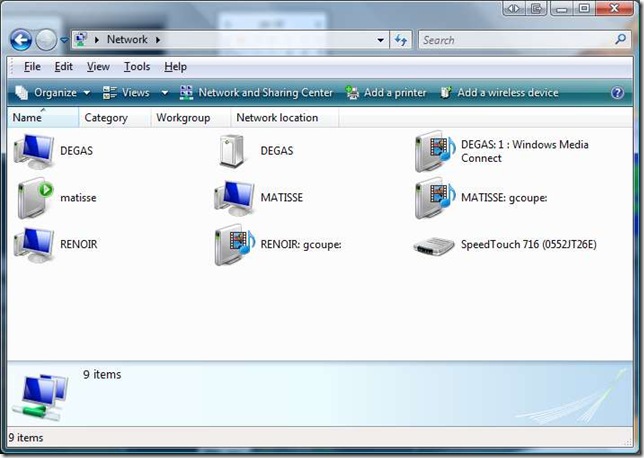
… the Denon has disappeared from the network… As I say, it’s a case of “now you see it, now you don’t”. But curiously, even though it disappears from the network diagram, it’s still possible to ‘ping’ its IP address:
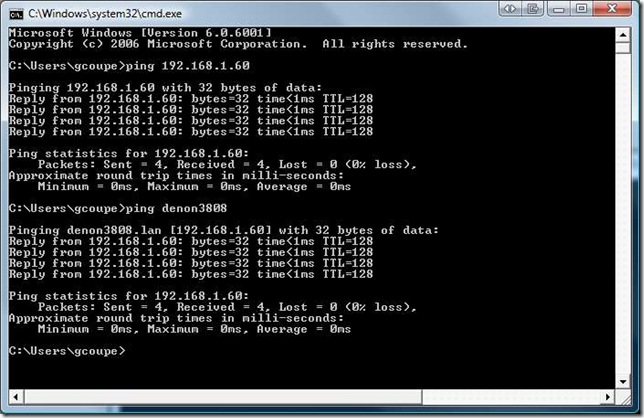
So even though the low-level functions of the Denon’s networking capabilities are still there, something has happened to the higher levels. It appears to have had a lobotomy. Even more curiously, if I switch off the ADSL modem/router, so that there is no connection possible with the Internet, or have the ADSL modem/router on, but with its firewall set to block all incoming and outgoing traffic to the Internet, then the Denon will quite happily stream music from the Media Servers the whole day long.
So it looks as though there is something in the Denon that has a heartbeat with something out on the Internet that conflicts with local audio streaming and which might lie at the bottom of the issue. I noticed something else that is curious. For those of you that are playing around with the Beta of Windows 7, you may have noticed there’s a new feature in the version of Windows Media Player than comes with it. While all versions of Windows Media Player can “pull” media from Media Servers, this new version can “push” media to Media Player devices out on the network. So, when you’re in Windows Media Player, you can select tracks to play, but instead of playing them locally, a right-click shows a new option: “Play to…” and a list of the Media Player devices attached to your network. Here’s an example of what I see when I “push” a track out to the Denon:
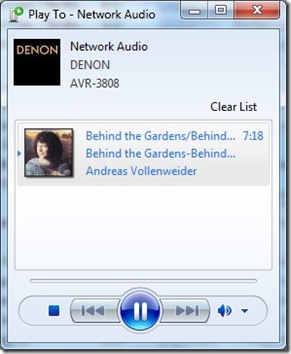
Notice that Windows 7 has correctly identified that the Network Audio device is in fact a Denon AVR-3808 – I didn’t have to set that up myself, it’s done automatically. But here’s the interesting thing. See that “Clear List” in the snapshot above? That’s actually a button, which when clicked will clear out the contents of the playlist in the panel below and stop streaming to the network device. And when I click that, sure enough, the Denon stops playing, but its built-in display shows something very odd:

What’s that “Rhapsody”? If I try to navigate to that item using the Denon’s controls, it instantly vanishes from the list of choices, which are normally: “Favorites, Internet Radio, Media Server, Recently Played”. Now Rhapsody is an online subscription digital music service. It looks as though the Denon is treating the Windows 7 Media Server as though it’s a Rhapsody stream, and that can’t be right. I have no idea why the Denon falls off the network when it’s connected to the Internet and streaming audio from our Media Servers on the home network, but I’m pretty sure that the problem lies with the Denon. Its firmware is the latest current version (2.01). This problem doesn’t seem to be common, but there is at least one other person who is seeing the same phenomenon. Trouble is, if it’s just the two of us, then this isn’t going to be fixed anytime soon. We’ll just have to continue to switch our Denons off and on every couple of hours… Sigh.
Update: I think a number of people are seeing this problem on their Denon equipment, but not everyone does, so it’s likely to remain problematic as far as resolution is concerned. Meanwhile, I do have a workaround, although it’s not very elegant. I’ve created a new Firewall profile on my ADSL modem/router. That allows all traffic from devices on my home network to reach the Internet and vice versa, apart from the Denon 3808. The Firewall profile has a rule that prevents any traffic between the 3808 and the Internet, although local traffic on the home network subnet is permitted. With this rule in place, I can stream music from the Media Servers on my home network to my heart’s content and all day long. No more cutting out after a couple of hours as the 3808 falls off the network. It’s not elegant, because if I wish to switch to listening to Internet Radio stations on the 3808, then I have to switch over the Firewall profile on the ADSL modem/router first. But at least I’ve proved, to my satisfaction at least, that the problem lies within the 3808.
Update II: A couple of people have run packet traces on their Denon’s network traffic and found that, even when using a local media server, an AVR-4308 or AVR-3808 will communicate with internet address 207.188.0.25 on port 443. Doing a “whois” lookup shows that this IP address is registered to Real Networks. My bet is that this is a server address of the Rhapsody Music service. Quite why the Denon receivers should be communicating with these servers out on the internet when using local media servers on a home network is anybody’s guess, but it looks like a bug to me, and definitely seems to be causing the “server disconnected” message.
I therefore modified my original Firewall rule, which stopped all communication between the Denon and anything out on the internet, to one that stops the Denon communicating with this specific internet address. This modified Firewall rule also stops the “server disconnected” problem from occurring, while allowing the Denon to continue to receive Internet Radio and to communicate with Denon’s servers for firmware updates. Now all we need is for Denon to acknowledge that this is a bug and fix it.
Update III: Denon provided a firmware upgrade A2.04, WEB=W200908260504 on October 15, 2009 that may have been to address this bug. I haven’t bothered to remove the Firewall rule, which I would need to do in order to test this, so I can’t confirm it.
Update IV: Since that firmware update was released (and I installed it on my Denon), I have replaced my old ADSL Modem/Router with a new one (it was on free loan from my ISP). Although that has the possiblity to create Firewall rules, I have not done so. Therefore, the “Denon rule” is not present in the new modem, and I have not seen a repeat of the “server disconnected” issue. Therefore I conclude that the October 15 update has fixed this issue. I should add that I’m not using the Rhapsody music service (Denon don’t offer this in Europe, and even if they did I wouldn’t use it), so I don’t know how this affects Denon users based in the US who do use the service…
Update V 9 May 2014: Damnation, the “Server Disconnected” message is back! And now it’s worse than before – it also affects Internet Radio as well as streaming from our home media server. I think I need to recreate the firewall rule again. Trouble is, I have a new router (a Fritz!Box 7360) which doesn’t seem to have a straightforward way of doing this.
Update V1 29 May 2014: Damnation again. It transpires that Rhapsody have changed their servers, and Denon have issued a new firmware to fix this. Trouble is, Denon have only issued the firmware for their new products. There has been no update for the 3808. Unless Denon issue the firmware for the 3808, or I can find out what the new version of the firewall rule needs to be, this problem will remain.


 Geoff Coupe's Blog
Leave a reply to Geoff Cancel reply