
Yes, I know that I’ve said before that Windows Live Photo Gallery 2011 is a disaster, but more problems caused by using it just keep crawling out of the woodwork.
The first problem I stumbled across was that if you are a photographer who uses IPTC metadata to record information about where your photos were taken, then WLPG 2011 will write false GPS data into your photos without telling you that it is doing so.
I, and others, have reported this issue to Microsoft, and I understand that they are looking into ways of correcting it. Meanwhile, I’ve become aware of another issue with WLPG 2011. It also screws up the Exif section of the metadata in images.
While trying to scrub my images clean of the false GPS data inserted by WLPG 2011, I noticed ExifTool was reporting that many of my images had problems with their Exif metadata. Often it was a simple warning that the Makernotes in the Exif section have been damaged. This is a warning from ExifTool that another utility has written to the Exif section and damaged the structure in some way.
In many cases, however, ExifTool is reporting that more serious damage has occurred and some of the data written into the original Exif section by the camera that took the image has been corrupted.
Here’s a screenshot that shows an example of an image exhibiting both types of issue (warnings and corruption). The screenshot is of Geosetter, and the highlighted image shows errors being reported by ExifTool (Geosetter uses ExifTool under the covers to do all the heavy lifting). Click on the image to open it full sized in a new window.
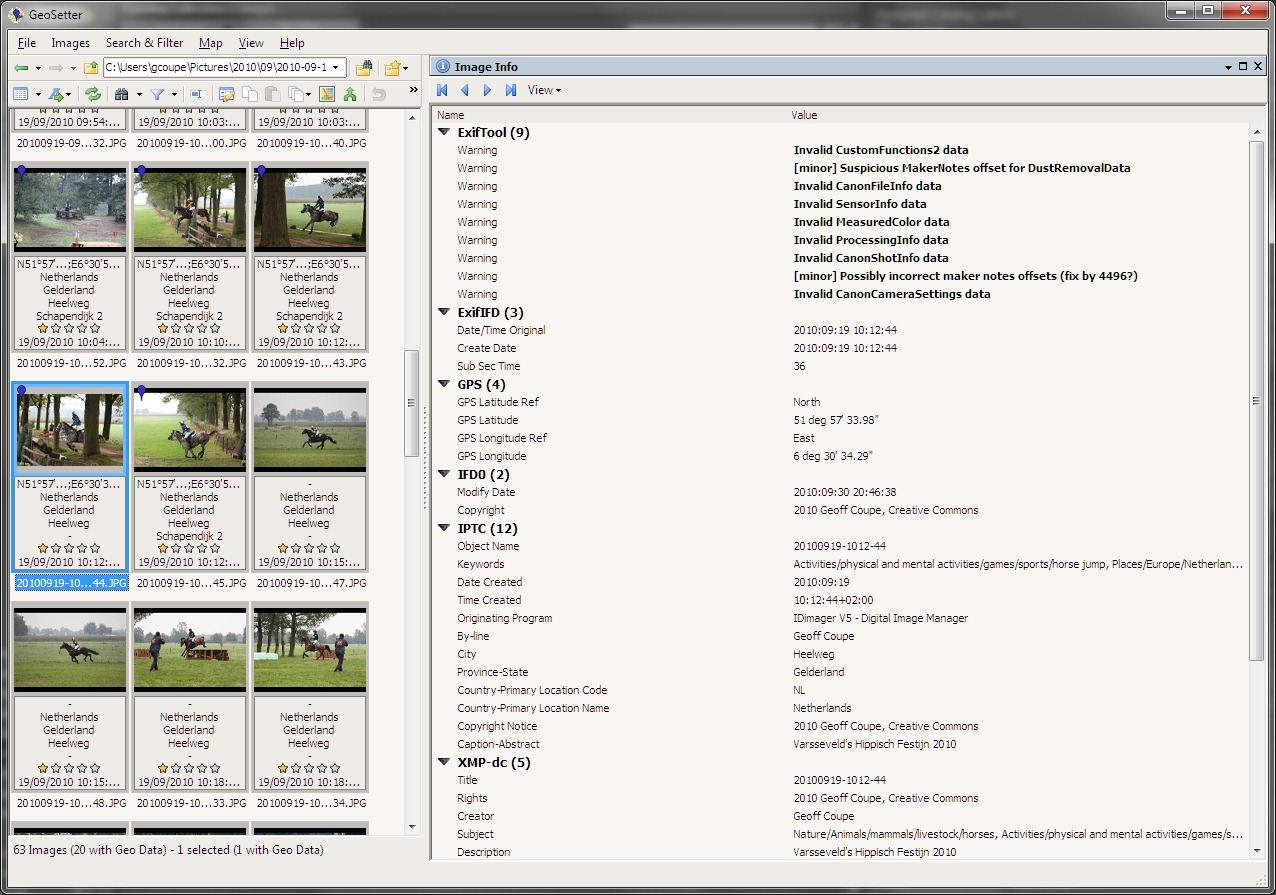
You’ll notice that the thumbnail, and some of the others, have a dark blue marker pin in the top left corner. That indicates that the image contains GPS information. But the interesting thing is that, for that particular image, I did not supply GPS data; WLPG 2011 has inserted it by itself.
Now here’s a screenshot of one of the other thumbnails that Geosetter is indicating have GPS information. For these thumbnails, I explicitly inserted GPS information myself, in other words, WLPG 2011 has not had cause to write anything out to the files. Notice that for this thumbnail, ExifTool is not reporting any errors or warnings. That’s the case for all the images where I have explicitly added GPS information.
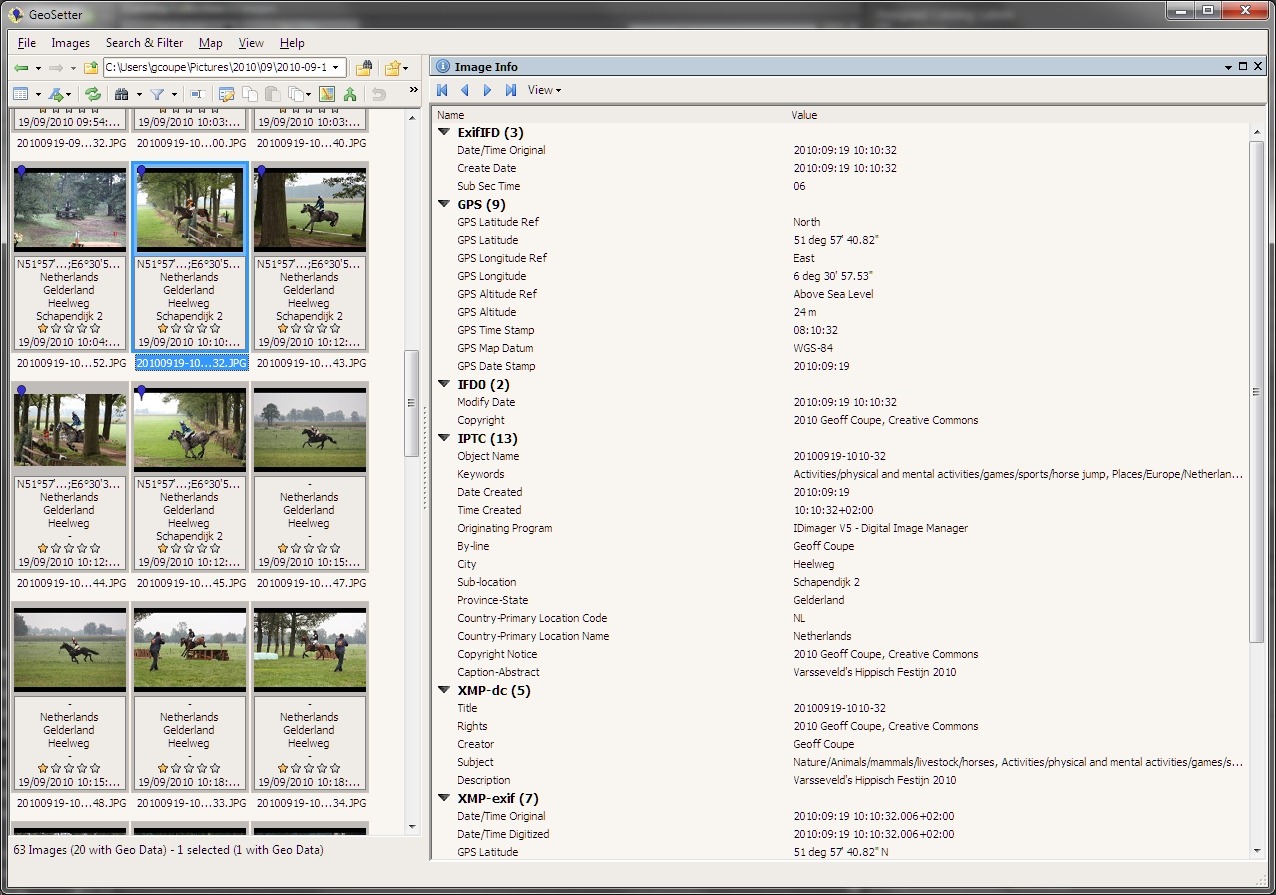
By the way, even though these two shots were taken at the same place, the GPS inserted (without my knowledge) by WLPG 2011 is wrong, and is located 500 metres distant.
I’m now going back through my images, and as far as I can see, all those which are being reported by ExifTool as having problems with their Exif metadata are ones that have had GPS information inserted by WLPG 2011.
The really irritating thing about this discovery is that WLPG has a track record of not dealing correctly with Exif metadata. Previous versions of WLPG have been reported as corrupting the Makernotes (data written by the camera manufacturer) in Exif.
It would appear that nothing has been done with WLPG 2011 to address this issue. So not only does it insert gratuitous, and false, GPS data into your images, it will also screw up their Exif metadata.
I repeat, this is a disaster.
24 Hours Later
So, I’ve been looking into this a bit more, but the more I look, the more I think: OMFG. The damage that has been done appears to be quite extensive, and will take some time to repair.
Today, for example, I decided to examine just one folder of photos and compare the contents with the contents of the same folder as it was in a backup taken on the 1st June 2010 – a date chosen because it was before any of the betas of WLPG 2011 had been released to the public. On that date, I would have had the previous version of WLPG installed and running. The first beta of WLPG 2011 wasn’t available to the public until the 24th June.
I looked for a folder that had photos containing entries in the IPTC Extension “Location Created” metadata fields. These fields are used by WLPG 2011 to store textual information for a location (e.g. the street address, city, state and country) in the image files. I don’t use these fields; I use the older IPTC Core “Location” fields for this purpose. So if I find an image file that contains IPTC Extension “Location Created” metadata, then I know it has been touched by WLPG 2011.
I chose a folder containing 24 photos that had been taken back in 2007, and which had IPTC Extension metadata present. I then got the same folder from the 1st June backup to compare the two side by side.
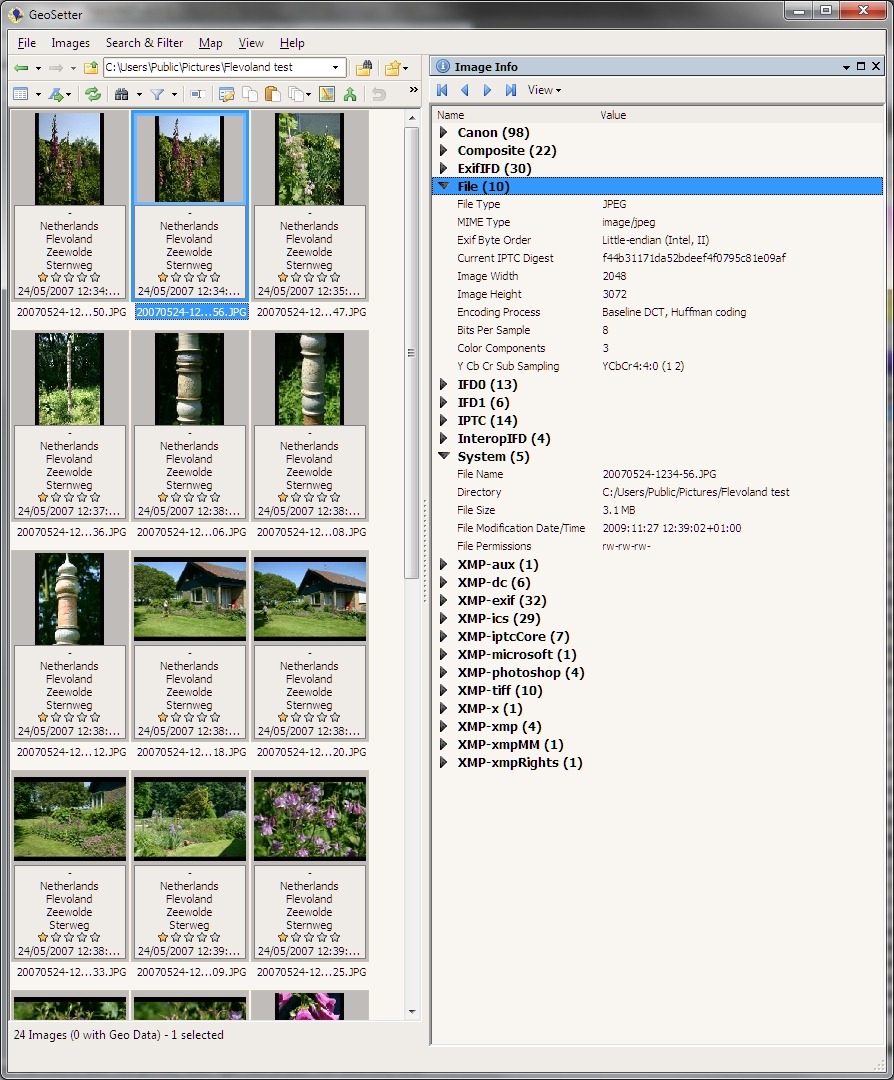
Here’s a screenshot of the folder, as it was on the 1st June, being displayed in Geosetter, with the metadata of the selected photo being shown (click on the screenshot to see it full-size in a new window):
Now here’s a screenshot of the same folder as it currently exists in my computer. The same image file has been selected to show its image metadata:
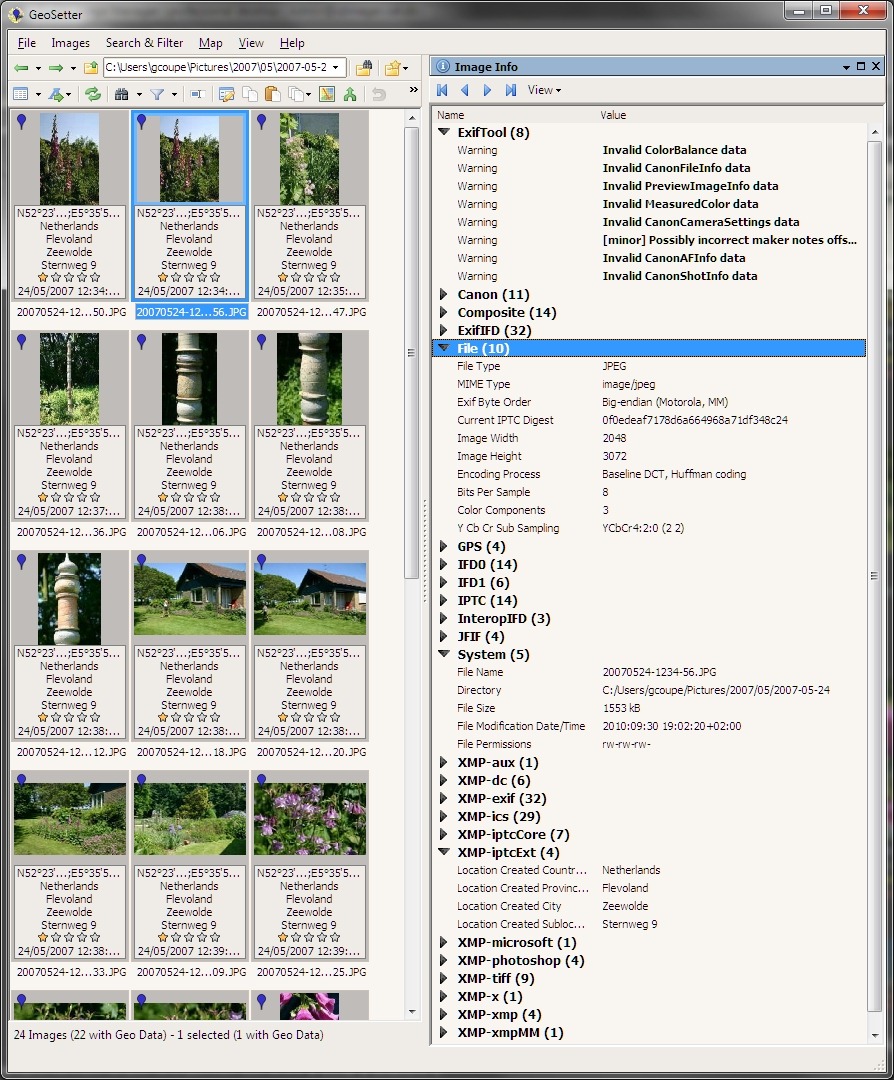
I’ve expanded some of the more interesting metadata sections. As you can see, the metadata has changed substantially. Let me list the ways:
- ExifTool is now listing a warning about a possibly incorrect Maker notes offset, together with three warnings about invalid camera data in the Exif section.
- While the original (backup) file had 98 elements of camera maker data in Exif, the current file has now only 11 left.
- The current file now has GPS metadata present in the Exif. This has been inserted by WLPG 2011, not by me. You will note from the other thumbnails in the second screenshot, that all the other files are also showing that they now have GPS data in them. None of the original files had GPS data. By the way, the GPS data is also incorrect by 300 metres.
- The original file had its Exif byte order in little-endian fashion; in the current file it is big-endian. According to the guidelines of the Metadata Working Group (of which Microsoft is a founding member), the “endianness” should be preserved, not reversed.
- The original file had a filesize of 3.1 MB; the current file has shrunk to a mere 1,553 KB.
- The current file now contains a JFIF block, which is not present in the original file. It also has changed YCbCr values, possibly as a result of this.
- The current file now contains an IPTC Extension metadata section, which lists textual information for the “Location Created”. This section is not present in the original file.
- The original file is showing that it was last modified on the 27th November 2009. The current file is showing that it was last modified on the 30th September 2010, which also happens to be the date of the final release of WLPG 2011. This is not a coincidence.
There may be other, more subtle, differences between the original and current versions of the files, but I’m already disheartened enough by the above list, particularly by the Exif corruption and by the fact that my JPEGs have been compressed in size without my knowledge or permission.
I suppose I can cut my losses by doing a full restore of the photo folders from the backup taken on the 1st June, but this will still not take account of new files that have been created since that time, or of older files that I have been working on.
What a mess. Thanks, WLPG 2011.
48 Hours Later
Oh gawd, it just keeps getting worse… I had hoped that WLPG 2011 was only corrupting Exif metadata when it actually changed the metadata, for example when it added (false) GPS coordinates to the Exif section.
After further examination of files today, I have discovered that WLPG 2011 will merrily corrupt Exif metadata even when it doesn’t need to change any of the Exif content.
You see, one of the new features of WLPG 2011 is automatic face recognition. When it discovers what it thinks is a face in a photograph, it will ask the user to confirm the person’s name. Once it gets confirmation, it will then write XMP metadata into the image file. This XMP metadata is structured according to Microsoft’s People Tag. However, when WLPG 2011 writes this XMP metadata out to the file it will also (a) corrupt the Exif metadata section and (b ) compress the JPEG image.
I’m afraid that I’ve been confirming face tags suggested by WLPG 2011. And now, every single one of those images that contain face tags has also had its Exif corrupted.
What a f*cking mess. Thanks, WLPG 2011.
Update 23 November 2010
I thought that it would be worthwhile to report that Microsoft are listening to those of us who are reporting tales of woe caused by using WLPG 2011. Please see here for a status report on where I think we are…
Update 2 December 2010
There’s an update to WLPG 2011 that addresses the geotagging issue. See here for more information.


 Geoff Coupe's Blog
Leave a reply to What Lies Beneath | Geoff Coupe's Blog Cancel reply