
I wrote yesterday that I’d decided to kick the tyres of the Release Candidate of Windows Home Server 2011. Today, I thought I’d take a look at how server backups are handled in WHS 2011.
First, a bit of background. WHS Version 1 can make backups of its shared folders (e.g. the Pictures, Videos, Music and User folders held on the server) to external discs. This is a one-click manual process (see figure 1). That means, unlike the backups of client computers attached to the server, there’s no built-in function in WHS V1 to schedule the backups of shared folders. Also, WHS V1 does not have the option of backing up the client computer backups from the server itself onto external discs. There’s a third-party add-in to do this, but this function is not built into WHS V1 by Microsoft.

figure 1
When it comes to WHS 2011, there are a number of changes in this area over WHS V1. First, server backups are always scheduled – you can’t actually initiate a server backup manually with one click of a button (NOTE: the final version of WHS 2011 does now contain a button to start a server backup manually. Microsoft added this in). Second, in WHS 2011, server backups can include both the contents of the shared folders and the backups of the client computers held on the server.
I find these changes a bit of a mixed blessing. First the good news: it’s great that you can backup the client computer backups to external discs in addition to the shared folders (see figure 2).
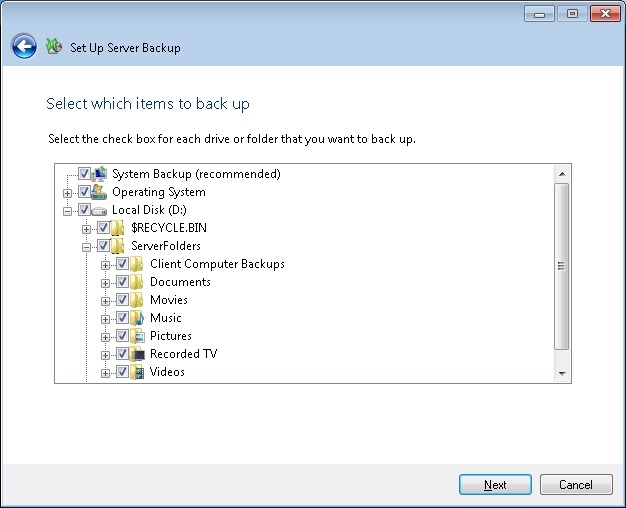
figure 2
However, I’m less enthusiastic about the fact that server backups are always scheduled, and that they run daily (see figure 3).
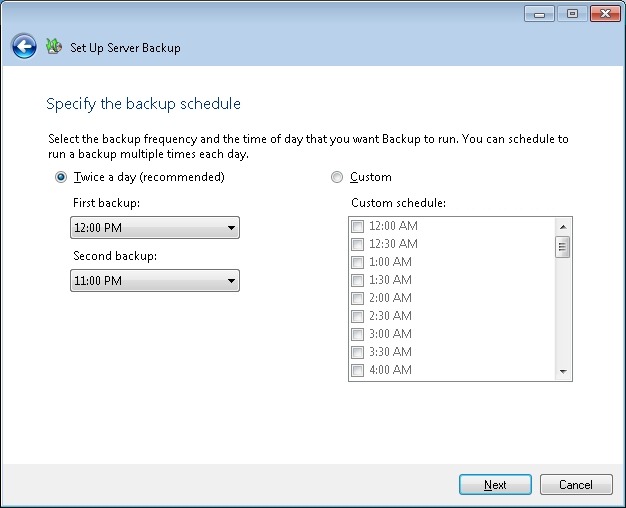
figure 3
Let’s think a moment about the nature of these backups to external discs. As far as I’m concerned, they are for the purpose of making backups to be held offsite. That’s what I use them for, at any rate. If I were to have the external discs permanently connected to a WHS 2011 system, then, it seems to me, I’m only getting a slower version of the Shared Folder duplication that was built into WHS V1 and which was provided by the now-removed Drive Extender technology.
And Microsoft’s own guidelines for Backup best practices for WHS 2011 state:
You should backup server data to multiple external hard disks and rotate the hard disks between onsite and offsite storage locations. Doing so can improve your disaster preparedness planning by helping you recover your data if physical damage occurs to the hardware onsite.
So if I’m going to be using the external discs for making server backups to be held offsite, then allowing the backups to be made only on a scheduled basis seems to be a bit counter-intuitive to me. I want to be able to fetch the discs from offsite, plug them in, push a button to initiate the server backups, and then return them offsite. I do this on a weekly basis. I can do this with WHS V1; I can’t do this with WHS 2011: (a ) there’s no manual server backup and (b ) the backups run on a daily schedule. At the time of originally writing this post, the Beta version of WHS 2011 did not have the capability to manually initiate a server backup. The final release version does. However, the backup task still continues to run on a daily basis…
In fact, even the act of removing external discs seems less clear in WHS 2011. In WHS v1, once the server backup is complete, then I simply select the external drive and click “Remove drive”. WHS V1 will ask if I want to remove the drive temporarily or permanently (see figure 4), and I select the “temporary” option. The disc is then safely dismounted from the system, and it can be returned to its offsite location.
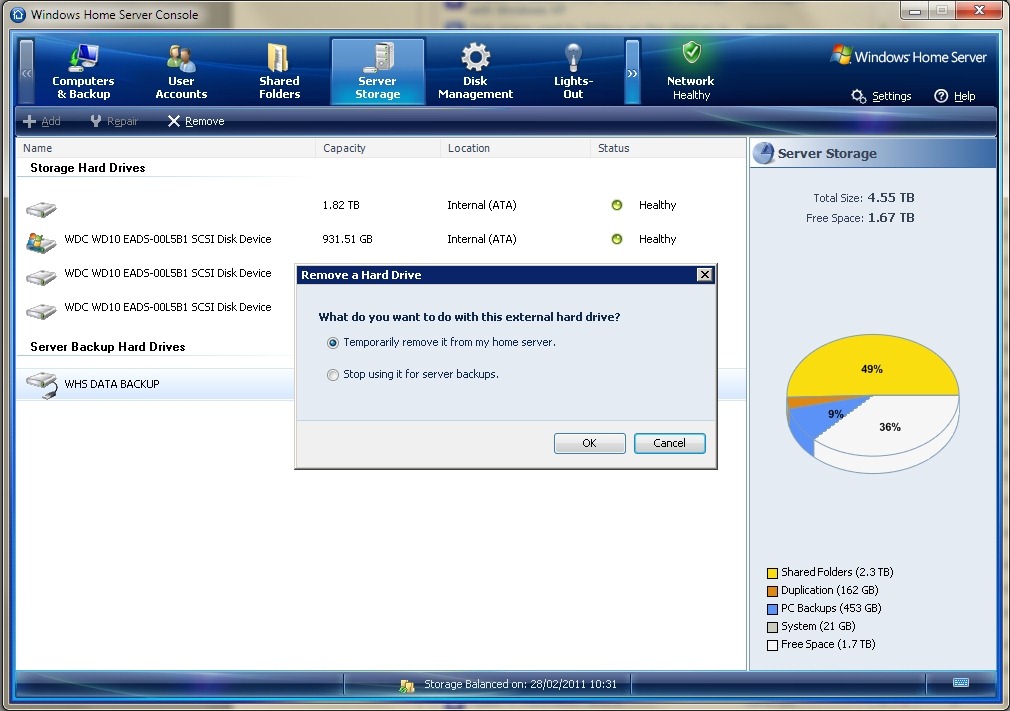
figure 4
In WHS 2011, if I select an external drive, I don’t get a choice to remove it temporarily, the only option shown is to remove it permanently from the server backup (see the tasks shown in figure 5). Choosing this starts the “Customise Server Backup” wizard (see figure 6), which I find somewhat confusing. I’m not trying to customise the server backup – I want to remove the drive… It turns out that the only way to temporarily remove a drive seems to be to yank out the cable. I suppose I’m set in my ways, but I always prefer to safely eject media (as WHS V1 allows me to do).
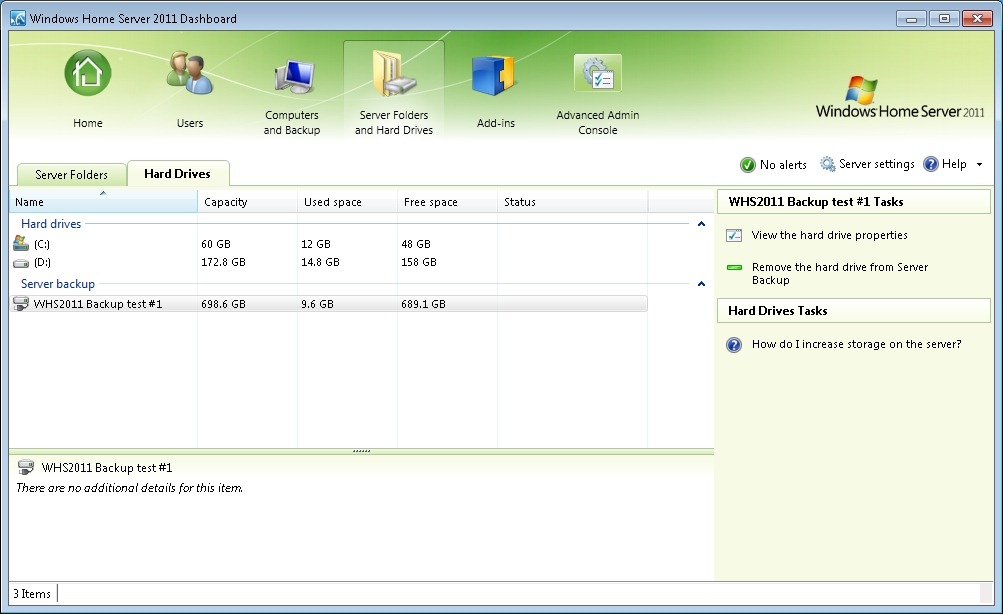
figure 5
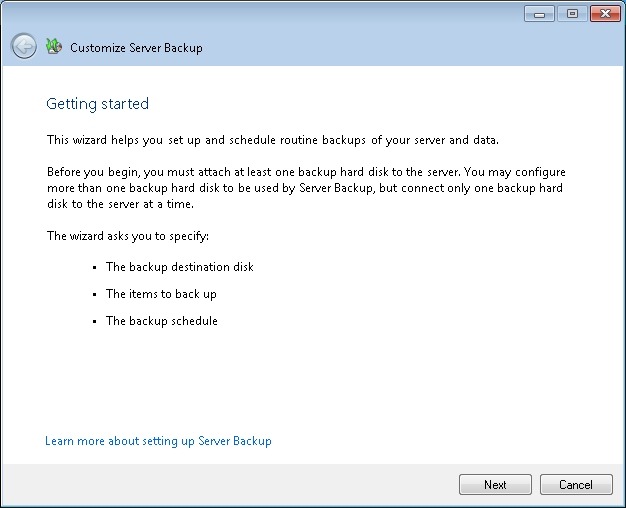
figure 6
The elephant in the room with server backups is that WHS 2011 can’t easily deal with discs bigger than 2TB. Now I know that even only a couple of years ago, this would have seemed an enormous capacity. However, with today’s high definition media, coupled with the ready availability of 3TB discs (with higher capacities on the horizon), then this limitation seems very surprising. The sad fact is that the backup method that Microsoft has chosen to go with in WHS 2011 has 2TB built-in as an upper limit. Never mind the fact that Windows 7 (even Windows Vista) and Windows Server 2008 (the operating system underneath WHS 2011) can support disks of more than 2TB capacity, WHS 2011 and its backup does not. If you install discs of more than 2TB into WHS 2011, then you must partition the disc into chunks, none of which can be more than 2TB in size. Even more frustrating, you can’t even backup a client computer that has a disc of more than 2TB assigned as one contiguous space. The Windows 7 client computer will be perfectly happy, but WHS 2011 will refuse to have anything to do with it (note: please see Addendum 2 at the bottom of this post for some clarification of this statement).
I note that, on my WHS V1 server, my Movies shared folder is already at 1.86TB. Just a few more Blu-rays added to my library, and I won’t be able to use WHS 2011 without having to sit down and plan my storage, both for now, and in the future, very, very carefully.
And this, to me, is the bottom line. WHS 2011 seems to force me to think like an IT support person; far, far more than WHS V1 ever did (or does!). That’s why I continue to think that the current WHS team don’t understand the home market sufficiently for WHS 2011 to succeed.
Addendum 1: It just gets worse. It turns out that the 2TB limit doesn’t just apply to the size of a backup disc, but also to the maximum amount of server storage that you can backup for offsite storage. I don’t believe it! Update 31 March 2014: It appears as though there has been some improvement made to the Server Backup function in the Dashboard since I originally wrote this article. It remains the case that WHS 2011 continues to use the VHD format for backup, which has a maximum capacity of 2TB. However, it now appears (contrary to what Microsoft originally stated) as though the Server Backup function can now deal with multiple VHDs, providing the backup drive is big enough. So, if your backup drive is 4TB, that means you can have 2 VHDs of 2TB created on it. That, in turn, means that you can backup up to 4TB of data from your data storage drives (with a maximum of 2TB for any one drive). That’s a theoretical maximum, since Microsoft also recommend having some free space in the VHDs to handle incremental backups.
Addendum 2: Above, I wrote that: “you can’t even backup a client computer that has a disc of more than 2TB assigned as one contiguous space”. It turns out that’s too sweeping a statement. It was clarified by a discussion in the comments, and it’s worthwhile repeating the main points here in the blog entry itself.
The issue is that you cannot Backup and then Restore a GPT OS drive with Windows Home Server. You can backup a GPT with v1 and perform the Restore but the disk will not boot. You can Restore individual files from a GPT backup but again not the OS into a bootable device.
For WHS 2011, Microsoft’s release notes state:
“If a client computer is running Windows Home Server 2011, and it has a hard disk that is configured to use the GUID Partition Table (GPT) format, you cannot use back up or restore data from the operating system, individual files, or folders on that computer. However, you can restore individual files or folders from other computers to a client computer that uses GPT formatting.
In the event that a client computer is configured to use GPT hard disks, you must employ an alternative method to back up or restore that computer”.
[Update 4th March 2013: Microsoft has at last issued a Hotfix to add backup support for UEFI-based computers to back up to servers that are running Windows Home Server 2011]
Addendum 3: There are other issues with the Server Backup function in WHS 2011 that I explore in depth here. Sigh.


 Geoff Coupe's Blog
Leave a reply to WHS2011 Backups Cancel reply