
If you were (or are!) using the original version of Microsoft’s Windows Home Server, you will probably have noticed that the WHS icon in the System tray changed colour to provide notifications at-a-glance:
- Green – your home network is healthy
- Yellow – your home network is at risk
- Red – your Home Server has found a critical problem
- Blue – your PC is currently being backed-up to the Home Server
- Grey – your Home Server is offline or unreachable
If you’re now running Windows Home Server 2011, then the WHS icon (now the Launchpad icon) no longer shows this range of notifications. Basically, you now have a choice of one colour: green. Green now simply means that the Launchpad is running.
However, the Getting Started Guide for WHS 2011 still shows the WHS v1 colour notifications as being present in WHS 2011:
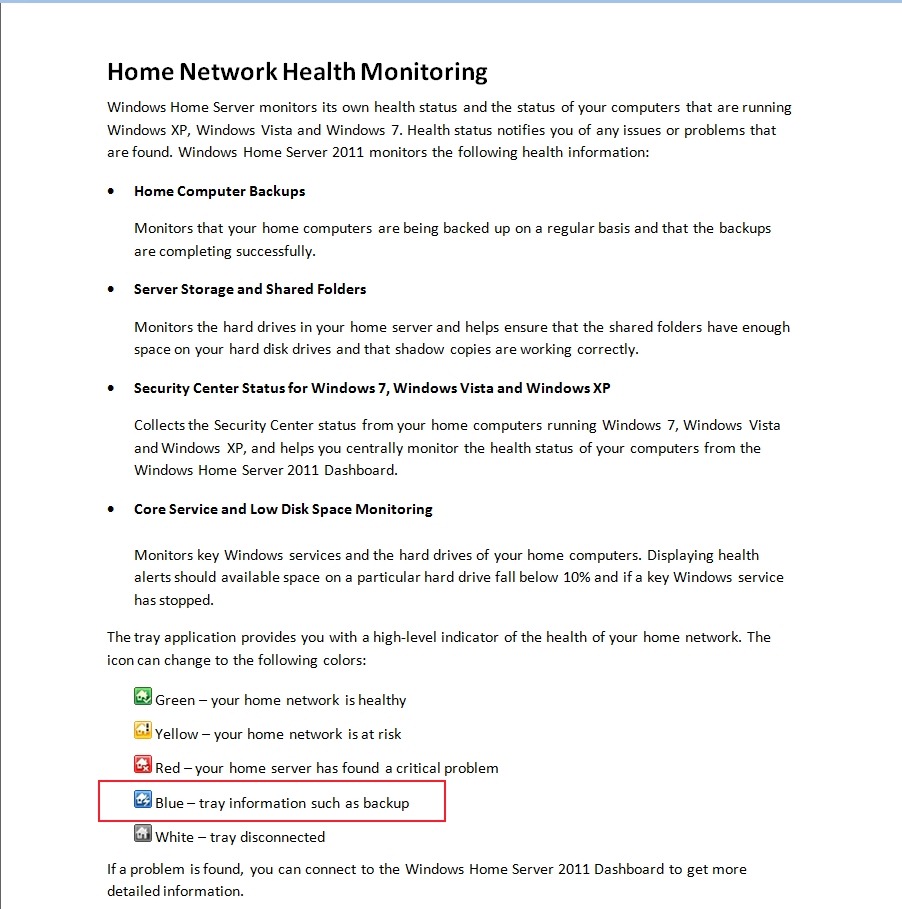
Not surprisingly, some people, reading this document, thought that they had found a bug, and reported it as such over at the Microsoft Connect web site (note: if you aren’t registered at this site, you won’t be able to see the actual bug report).
Microsoft did their “it’s not a bug, it’s a feature” trick and replied that:
we decided in the 2011 release that backups should be seamless and not neccessarily [sic] notify the user of when they are in place
and said that it would not be fixed. This is all very well, but it ignores the wishes of those folks who found that the additional notifications, particularly of backups, are extremely useful. It also points up Microsoft’s rather sloppy approach to the documentation of WHS 2011.
Since Microsoft, in their infinite wisdom, have declined to fix what many see as a bug, I’m pleased to report that a third party has stepped forward instead.
Jerry Wade has developed a utility (Home Server Status) for your Desktops and Laptops that indicates when a backup is in progress. Plus, it does a few other nifty things as well.
Check it out here.
I installed it and stopped using Microsoft’s Launchpad application, and have never looked back. I can thoroughly recommend it to ex-WHS v1 users who think that WHS 2011 has lost the plot with its bloated Launchpad application. And for those WHS 2011 users who are new to all of this, you could do worse than to check HSS out.


 Geoff Coupe's Blog
Leave a reply to Geoff Coupe Cancel reply