
Microsoft has just released a new interim build of their forthcoming Windows 10 operating system: build 9879, and blogged about the changes here.
I notice that Gabe Aul (leader of the Data & Fundamentals Team in the Operating Systems Group) trumpets that the build has “cool new features”. Er, no, Gabe, what you have done is to remove a cool new feature that was introduced in Windows 8.1, and thereby damaged the user experience.
In Windows 8.1, Microsoft introduced the concept of “smart files”. These are small placeholder files, which represent the actual files stored in the OneDrive cloud, and which appear in the OneDrive Folder hierarchy listed in the File Explorer. Here, for example, is the contents of a OneDrive folder (“Beside the Seaside”) being viewed in the Windows 8.1 File Explorer:
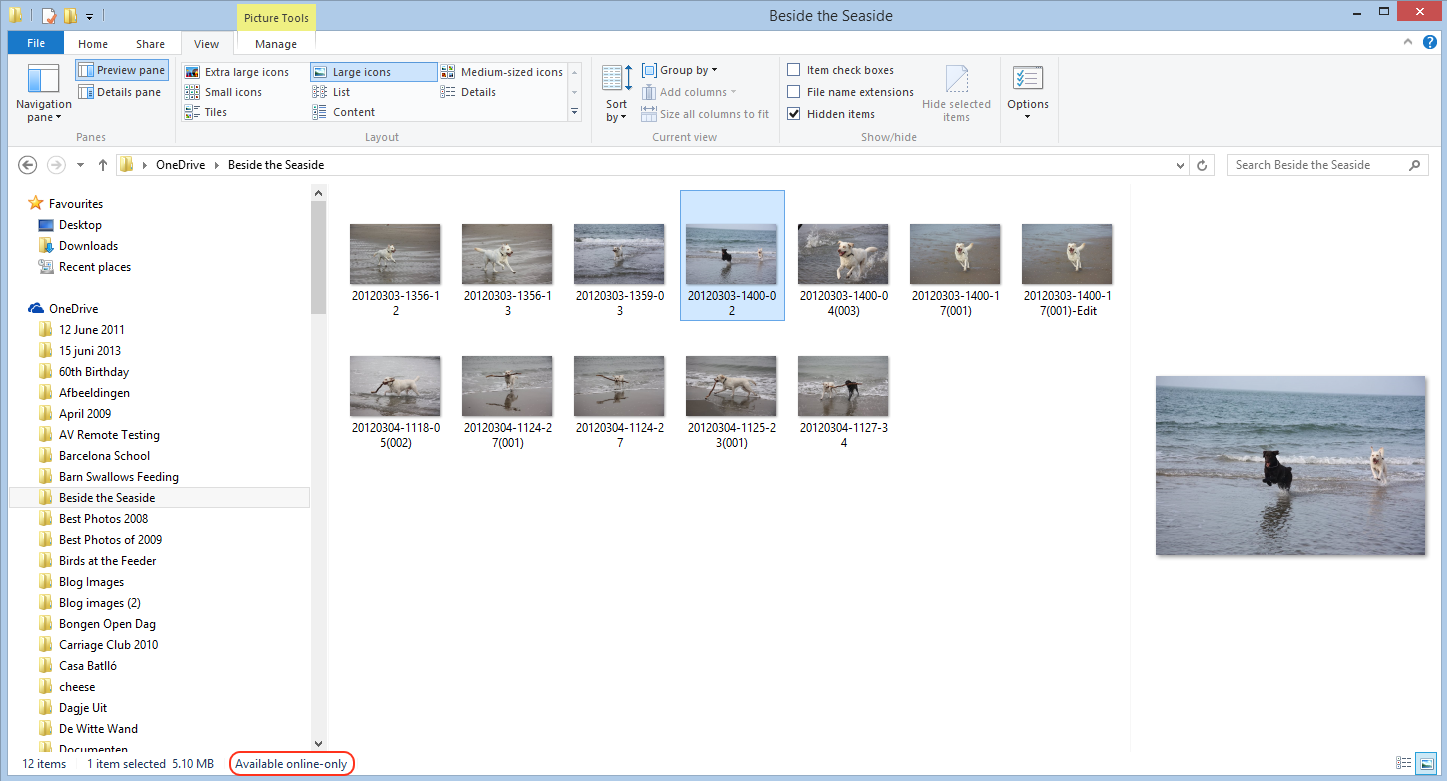
In Windows 8.1, the only indication you have that you’re looking at a smart file, rather than a full-size file is that “Available online-only” message at the bottom of the File Explorer window.
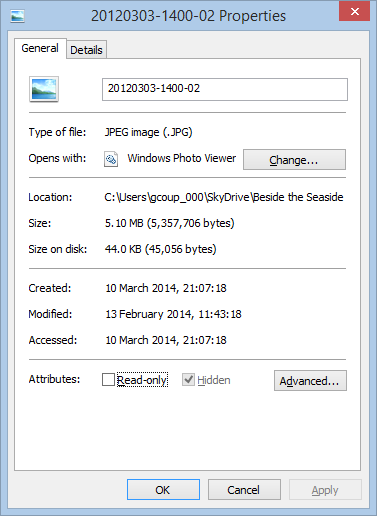
Other than that, to all intents and purposes, smart files look like the actual files, but they are usually a fraction of the size. They just hold the thumbnail and the metadata of the files they stand in for. In the example above, the selected image (in OneDrive) is 5.1 MB, but the smart file shown in File Explorer is just 44 KB in size:
Because the smart files hold metadata, it means that you can use File Explorer to search your OneDrive folders. This is also better than the online OneDrive Search, which can only search on filenames.
When a smart file is opened for editing, the actual file is automatically synced down onto the PC and opened instead. After use, the user can choose whether to keep the full-size file (which is then automatically kept in sync with the file in OneDrive), or go back to using a smart file to save space. This choice can also be made at Folder level, so that the contents of a Folder can be either “offline” (i.e. full-size files are in the PC’s folder and kept in sync with OneDrive) or “online-only (i.e. smart files are used in the Folder to save space on the PC or tablet).
When this feature was introduced, Mona Akmal (a group program manager for SkyDrive – what OneDrive was then called) blogged that:
In the Windows 8.1 preview we saw consumers using SkyDrive in two distinct ways. The first group of people are very conscious of what they have saved to disk and most of their files are online-only. We found that the majority of people using smart files take up 80% less disk space than they would without smart files. The second group of people are on the other end of the spectrum: they explicitly chose to have all their files available offline, and so have their entire SkyDrive stored locally. This showed us that users understand smart files and are tailoring the feature to their needs.
Fast forward a year, and now Gabe Aul is telling us:
People had to learn the difference between what files were “available online” (placeholders) versus what was “available offline” and physically on your PC. We heard a lot of feedback around this behavior. For example, people would expect that any files they see in File Explorer would be available offline by default. Then they would hop onto a flight (or go someplace without connectivity) and try to access a file they thought was on their PC and it wasn’t available because it was just a placeholder. It didn’t feel like sync was as reliable as it needed to be. For Windows 10, having OneDrive provide fast and reliable sync of your files is important. Starting with this build, OneDrive will use selective sync. This means you choose what you want synced to your PC and it will be. What you see is really there and you don’t need to worry about downloading it. You can choose to have all of your OneDrive files synced to your PC, or just the ones you select.
In other words some people clearly don’t understand smart files. So smart files have been removed for everyone. Gabe, this is not a “cool new feature”, this is removing a cool new feature.
What we have now is a very basic experience. Either a OneDrive folder or file is synced to the PC, or it’s not. That, in turn means that the Search experience is now completely broken.
For example, here’s what I see when I search for photos of our dog Kai in OneDrive using the File Explorer of Windows 8.1:
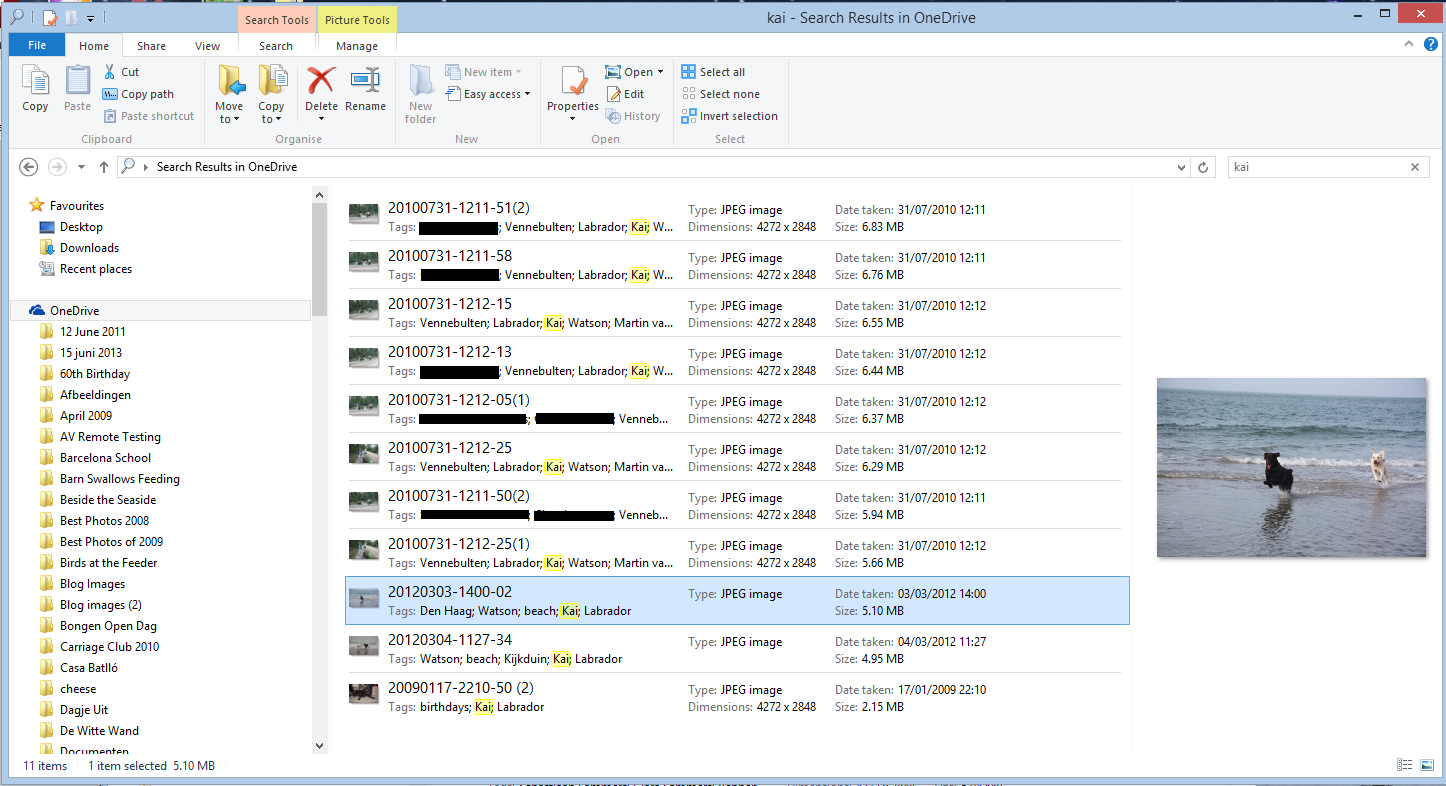
Search has found 11 images with the tag “Kai” from within three separate OneDrive folders, and as it happens, all of these are smart files, since I don’t have the contents of these folders held offline on my PC.
In the new build of Windows 10, however, the same search only returns two results:
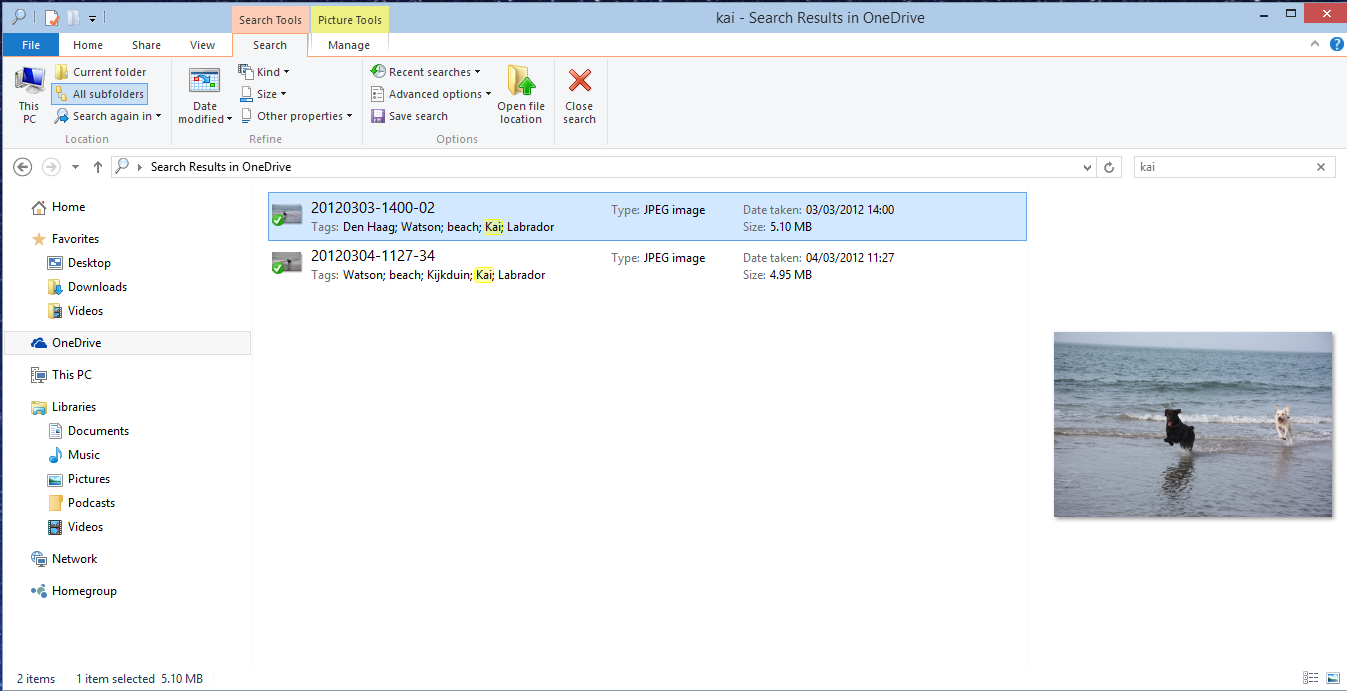
Why? Because I only have one folder (“Beside the Seaside”) synced to my PC, all the other folders (e.g. “Walking the Dogs”) claim that they are empty:


Of course, it’s only empty on my PC – in the OneDrive Cloud, it has photos of Kai. However, I also can’t search for photos of Kai in OneDrive – the online search doesn’t search tags, only filenames.
In summary, the removal of smart files is a huge step backwards. All Microsoft had to do was to use an overlay icon on files to distinguish between a smart file and the full-size original, and everybody would have been happy.
But no, Microsoft has removed a cool feature and broken the search experience completely. This does not bode well for Windows 10 as far as I’m concerned.
Addendum 15 November 2014: This removal of smart files has caused something of a disturbance in the Force. So much so, that Microsoft has moved to respond with a comment from a OneDrive team group program manager, Jason Moore:
Wanted to jump in here and address some of the questions and feedback we are getting about the changes we rolled out yesterday. As we look at the next version of OneDrive, we are working very hard to make sure it provides the best experience possible for our customers, and a big part of that is getting the sync model right.
We hear the feedback on placeholders, and we agree that there many great things about the model – for example, being able to see all your files in the cloud even if they are not all sync’ed to your PC. However, we were not happy with how we built placeholders, and we got clear feedback that some customers were confused (for example, with files not being available when offline), and that some applications didn’t work well with placeholders and that sync reliability was not where we needed it to be.
So, we stepped back to take a fresh look at OneDrive in Windows. The changes we made are significant. We didn’t just “turn off” placeholders – we’re making fundamental improvements to how Sync works, focusing on reliability in all scenarios, bringing together OneDrive and OneDrive for Business in one sync engine, and making sure we have a model that can scale to unlimited storage. In Windows 10, that means we’ll use selective sync instead of placeholders. But we’re adding additional capabilities, so the experience you get in Windows 10 build 9879 is just the beginning. For instance, you’ll be able to search all of your files on OneDrive – even those that aren’t sync’ed to your PC – and access those files directly from the search results. And we’ll solve for the scenario of having a large photo collection in the cloud but limited disk space on your PC.
Longer term, we’ll continue to improve the experience of OneDrive in Windows File Explorer, including bringing back key features of placeholders.
So keep the feedback coming. We’re working every day to improve OneDrive, and customer feedback is a hugely important part of that.”
It would thus appear that Microsoft has not in fact thrown the placeholder baby out with the bathwater, but is trying to improve it. That’s a good thing. However, it’s a pity that they couldn’t have been a bit more open about this upfront. Telling us that they were introducing cool new features, whilst in fact apparently removing one is yet another example of Microsoft opening its mouth, only to exchange feet.
Addendum 19 November 2014: Mary Branscombe has an excellent follow-up article on this whole debacle. Well worth reading.
Addendum 8 January 2015: Microsoft’s Chris Jones has posted an update on the OneDrive blog that (I think) tries to illuminate the OneDrive roadmap going forward. If I’m understanding what he’s writing, then Smart File functionality won’t be back in Windows 10 at release (Boo!), but should be returned at a later date (Hooray!), once the new technical solutions have been completed.
Addendum 23 January 2015: Microsoft has (finally) introduced full support for searching of tags into the OneDrive cloud service, so at least you can search your files online in a proper manner, even if you now can’t do it in the File Explorer in Windows 10. What Microsoft giveth with one hand, it taketh away with the other.


 Geoff Coupe's Blog
Leave a reply to Jonas Cancel reply