
When Microsoft introduced Windows Phone, precisely five years ago, the major differentiator from Apple’s iOS and Google’s Android was the user experience. Microsoft called the design language: Metro; that is until Metro AG threatened Microsoft with legal action for using that name. Now Microsoft no longer use the term Metro, and indeed it would appear that they no longer want to use many of the elements that made Metro the innovation that it was.
One of the design innovations was lateral scrolling within apps to reveal different functions (the so-called “Pivot” control). The use of large fonts in the app title cued the user that more was available by scrolling laterally, e.g. as here in the Photos app:
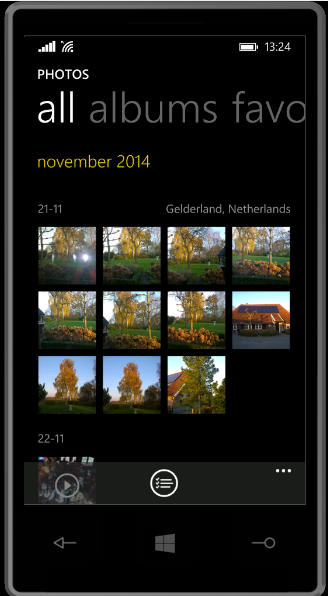
Along with Metro came concepts such as the “hub” – single points of entry where similar items from different sources would be consolidated. So, for example, the Photos app consolidated your photos from cloud sources such as Facebook, Flickr and OneDrive with the photos that were on the phone itself. You no longer had to worry about where the photos were held, and open up a Facebook app or a Flickr app; they were all available in one place.
Unfortunately, I suspect that companies such as Facebook and Flickr didn’t like the hub concept, because they saw it as threatening the power of their brand. Microsoft has responded by either removing the consolidation feature completely (e.g. the integration with Facebook and Flickr that existed in the Photos app in Windows 8 was ripped out for the Photos app in Windows 8.1), or watered down.
Now it seems that Microsoft is turning its back on other design aspects of Metro, and is busily introducing design concepts copied from Android (e.g. the infamous “Hamburger” button). We first saw this in the new version of the OneDrive app, introduced in October 2014:
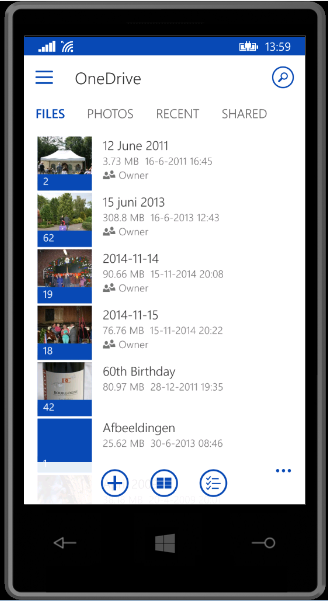
You’ll notice that not only is the “Hamburger” button present (it’s the three horizontal lines at the top left), but the Pivot design element has also gone. This redesign was met with howls of protest. As I said at the time:
Frankly, if I’d wanted an Android phone, I would have bought one. One of the key reasons why I went with a Windows Phone was the UI design. I like it a lot, and I am at ease with it. To have a key Microsoft team turn their back on it and introduce Android elements is a shock, to say the least.
One might almost wonder if the team had actually read the “Review questions for prototype” section on the “Design the best app you can” page of the UI guidelines, in particular:
- Are you coming from another mobile platform? Windows Phone users will expect fewer taps, clearer views, large typography, and the use of contrast and color.
- Are you using both axes of scrolling (the X and Y axes) and orientation (Portrait and Landscape)? Depending on the purpose of your app, users may expect both.
- Do you use Pivot and Hub controls effectively and correctly?
Even simple things, such as a transparent Tile for the app have been forgotten about (or ignored) in this bastardised design. I hope that the howls of protest that have greeted this version result in a swift redesign to make it a proper Windows Phone app.
Good design and adhering to UI guidelines are important, and help to build a brand. This horror does just the opposite.
Looking at what is coming out in the Windows 10 previews, Microsoft is simply steaming ahead with the Androidification of Windows. Metro has been dragged behind the arras, with a dagger in its back.


 Geoff Coupe's Blog
Leave a reply to mmusterd Cancel reply