Reflections on life at “De Witte Wand”…

Microsoft: One Step Forward, Two Steps Back – Again

Once upon a time, back in 2013, Windows had a feature called “Smart Files”. I found it very useful – I was able to use Windows Explorer to search all of the files stored in my OneDrive, even though the majority of the files were only stored in OneDrive, and not copied to my local computer. It was a step forward.

Then, in November 2014, Microsoft pulled the feature, claiming that some users found it difficult to use. Two steps back.

This resulted in an outcry from people who used (and loved) the Smart Files feature, with the result that Microsoft backtracked and promised that Smart Files would be re-engineered and returned to Windows at some point in the future.

That now looks to be later this year – three years since Smart Files was removed – with the announcement today that the “OneDrive Files On-Demand” feature is rolling out to Windows Insiders.

Despite the clumsy new name, this did sound like Microsoft was at last taking a step forward again, so, being a Windows Insider, I installed it on my PC. And, of course, the reality is deeply disappointing.

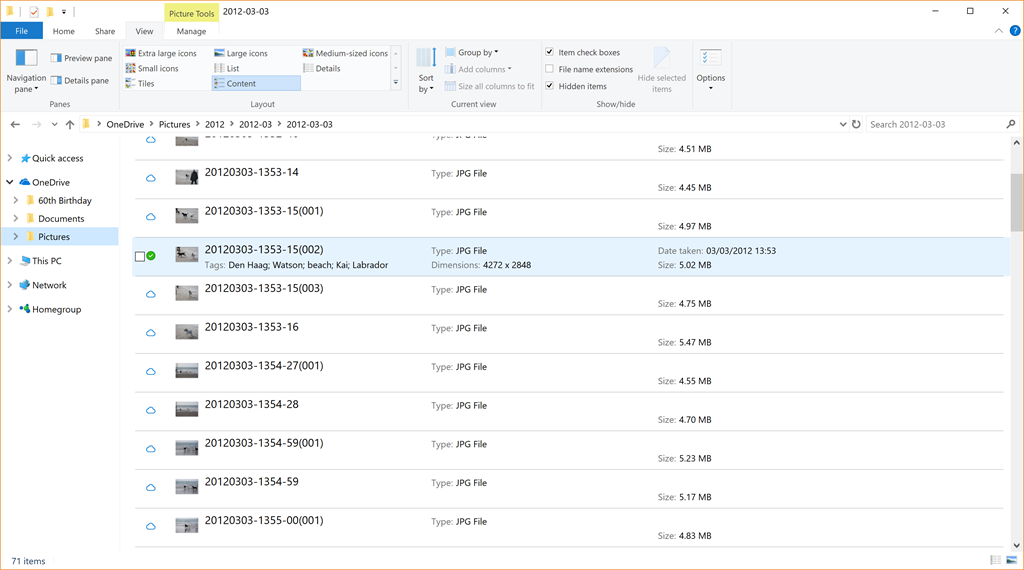
The problem is that, unlike the original Smart Files feature, metadata from the files stored in OneDrive is not retrieved and stored in the placeholder files, so using the “Search” function in Windows Explorer won’t work on these files. Only files that have been fully downloaded and stored on the PC will have the metadata present. Here’s an example:
OneDrive 22

In this folder of 71 photos held on OneDrive, only one (the photo shown selected in the screenshot) has been fully downloaded to the PC, the other 70 photos are still in the OneDrive cloud. They are listed as being present, with thumbnails, filenames and size, however, you can see that no other metadata from these files is present. The downloaded file naturally has all the metadata present: the photo tags, date taken, copyright information, camera used and so forth. 

This means that, as the OneDrive Files On-Demand feature currently stands, it is useless to me. I can’t search my online files directly from my PC.

Two steps back again. Thanks, Microsoft. Another fail.

11 responses to “Microsoft: One Step Forward, Two Steps Back – Again”

  1. DaveL Avatar
    DaveL

    It’s a pale imitation on what was there before. All you can do is to send your feedback into the feedback hub black hole and hope for the best.

    1. Geoff Coupe Avatar

      Indeed, DaveL – I’ve sent in my feedback a week ago (“Files on demand no local metadata?”), but so far it’s only been upvoted 4 times – so I fully expect Microsoft to ignore it totally…

      1. DaveL Avatar
        DaveL

        I’ve added my vote too – a grand total of 5 votes now, fat chance of it being noticed 🙂

  2. Ludwig Avatar

    Yep, talent they might have, vision or common sense, however, is nowhere in evidence. I just got rid of the “Mail App” in Windows 10 (back to Outlook, alas), like most of their current offering, “not even suitable for children being punished”.

  3. […] but you can’t search them, like any of your other files on your […]

  4. Halligan Projects Avatar

    I have more folders in my OneDrive Pictures folder than fit on my hard drive; Files On-Demand works for that. But when I try to use Windows Photo Gallery, my OneDrive Files On-Demand constantly try to download. Since, all those photos wouldn’t fit on my hard drive, it’s a nightmare. And since Photo Gallery isn’t supported, there’s nothing much I can do. It seems like the cloud-only thumbnails do show up in Photo Gallery but not the metadata. (I hear that one reason MS pulled the feature for a couple years was that metadata from lots of files on a small HD would fill some HDs.)

    1. Geoff Coupe Avatar

      Yes, I think the moral of the story is that you can’t turn Windows Photo Gallery loose on folders that are part of the OneDrive Files on Demand hierarchy. WPG will try and read the content, and that triggers the download behaviour.

      The irony is that all the metadata is present in the OneDrive cloud, and in the online search index. However, Microsoft still hasn’t got around to coupling the search engine in the Windows PC to this online service, if indeed they ever intend to implement this.

      A further irony is that the OneDrive app does in fact couple to the online search engine, so you can use it to search your photo metadata for photos in OneDrive. However, yet again, Microsoft falls at the hurdle – the app will only return up to 50 hits of any tag. So, for example, I have 1,500+ photos of our dog Watson in OneDrive, but searching for the tag “Watson” in the app only returns 50 results…

      1. Halligan Projects Avatar

        Thanks for your reply and leadership on this subject. I was just sifting through your posts to see if you had come up with a way to use all the tags we’ve added.

        1. Geoff Coupe Avatar

          I’m afraid the answer is – not using anything built by Microsoft… The Photo app is useless, and the OneDrive app has limitations as I’ve said.

          I’m still using Photo Supreme as my photo management system. It’s still got the best metadata management of the photo applications that I’ve used. It’s better than Lightroom in that respect. And now that Adobe are moving Lightroom across to the subscription model, I’ll be sticking with Lightroom 6 only for its photo editing functions.

          1. Halligan Projects Avatar

            Thanks again. Today’s task was to get all my photos of a particular person from People Tags. I could find what may have been all of them on OneDrive online — more than 50 — but couldn’t seem to select those to share. I got Photo Gallery installed and let it index a while. It doesn’t see the files on an SD card, and I already mentioned that it messed up my HD when I pointed it at my Files On-demand. I’ll stay tuned to your blog, hope some metadata standards solution comes along, and look at Photo Supreme.

  5. […] I’ve already ranted about the fact that the OneDrive ‘Files on Demand’ feature is a step backwards from the old ‘Smart Files’ feature in Windows. I’ve also complained numerous times that the Microsoft Photos app is severely lacking in comparison with the Windows Photo Gallery, which Microsoft has withdrawn from the market, and no longer supports. […]

Leave a comment