
Once upon a time, back in 2013, Windows had a feature called “Smart Files”. I found it very useful – I was able to use Windows Explorer to search all of the files stored in my OneDrive, even though the majority of the files were only stored in OneDrive, and not copied to my local computer. It was a step forward.
Then, in November 2014, Microsoft pulled the feature, claiming that some users found it difficult to use. Two steps back.
This resulted in an outcry from people who used (and loved) the Smart Files feature, with the result that Microsoft backtracked and promised that Smart Files would be re-engineered and returned to Windows at some point in the future.
That now looks to be later this year – three years since Smart Files was removed – with the announcement today that the “OneDrive Files On-Demand” feature is rolling out to Windows Insiders.
Despite the clumsy new name, this did sound like Microsoft was at last taking a step forward again, so, being a Windows Insider, I installed it on my PC. And, of course, the reality is deeply disappointing.
The problem is that, unlike the original Smart Files feature, metadata from the files stored in OneDrive is not retrieved and stored in the placeholder files, so using the “Search” function in Windows Explorer won’t work on these files. Only files that have been fully downloaded and stored on the PC will have the metadata present. Here’s an example:
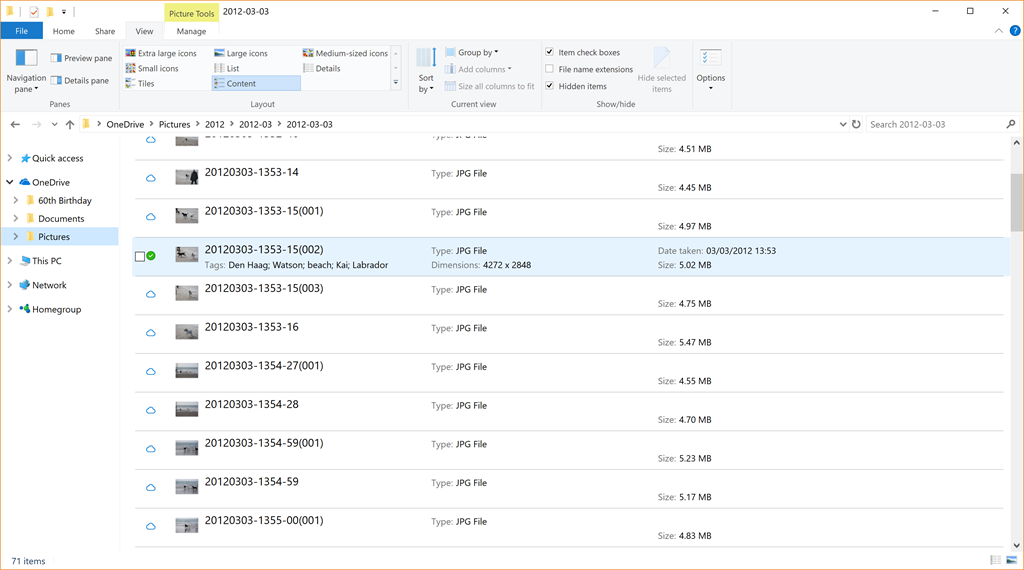
In this folder of 71 photos held on OneDrive, only one (the photo shown selected in the screenshot) has been fully downloaded to the PC, the other 70 photos are still in the OneDrive cloud. They are listed as being present, with thumbnails, filenames and size, however, you can see that no other metadata from these files is present. The downloaded file naturally has all the metadata present: the photo tags, date taken, copyright information, camera used and so forth.
This means that, as the OneDrive Files On-Demand feature currently stands, it is useless to me. I can’t search my online files directly from my PC.
Two steps back again. Thanks, Microsoft. Another fail.


 Geoff Coupe's Blog
Leave a reply to Geoff Coupe Cancel reply