Reflections on life at “De Witte Wand”…

Category: Computers and Internet

  • The Other Shoe Drops

    If you’ve been following this blog, you’ll be aware that I recently moved across to hosting it on Blogger after more than five years of it being hosted on Microsoft’s Windows Live Spaces.

    I made the move in June when Microsoft started removing features of the Spaces service. Despite a chorus of complaints from users, Microsoft would not come clean about their plans for the service. Indeed, they denied that anything was amiss. Nevertheless, I’ve been waiting for the other shoe to drop, and today it did.

    Microsoft have announced that they are pulling the plug on Windows Live Spaces. They have at least tried to sugar the pill by offering existing users the chance to migrate their blogs over to being hosted on WordPress.com, but the Microsoft gadgets that people used to customise the look and feel of their blogs are no more. So it’s not a full migration, just a migration of the core blog entries and nothing else.

    Although I had set up an account on WordPress.com in June as a trial, I finally decided to move to Blogger, because there I was able to use Javascript in widgets and blog entries. WordPress.com, like Windows Live Spaces, does not allow the use of Javascript. That meant that I could not embed my Photosynths in my posts, or use the LibraryThing widget to display a rolling selection of books from my library on my blog.

    I’ve decided to stick with hosting my blog on Blogger, but I have migrated the content of my old blog from Windows Live Spaces to WordPress.com in order to preserve it once Microsoft wipe out Spaces. That content can be found at Geoff Coupe’s (Old) Blog.

    So what can we learn from all of this? Well, it seems to me that Microsoft’s customer relations in this instance have clearly followed the mushroom model; i.e. keep your customers in the dark and throw shit on them. Not a good way to deal with your customers I would have thought. This debacle has certainly left a bad impression on me.

    Update: Cough, after a couple of months, I left Blogger and moved back to WordPress

  • Moving Forward

    Two news items that seem to reinforce each other.

    The first is Jan Chipchase’s presentation on the Ideas Economy. Key point:

    Within a few years time, in any part of the world where there is a cellular data connection you’ll be able to point camera phone at someone’s face and know within a reasonable time-frame and level of certainty who they are, their history and their history of interactions. And the same goes for them of you.

    And in today’s Observer, a story about the unveiling (hah!) of a hi-tech way for Egyptian women to report sexual harrassment:

    HarassMap allows women to instantly report incidents of sexual harassment by sending a text message to a centralised computer.

    The future rushes to meet us.

  • Geotagging and Metadata in Picasa 3.8

    Last month I wrote about the geotagging disaster that the current beta of Windows Live Photo Gallery is causing. At the moment, I daren’t have it running on my PC because it wantonly writes garbage GPS coordinates into my photos.

    While I’m waiting to see what Microsoft will do in the next beta of WLPG, I thought that I’d take a look at its closest rival, Google’s Picasa, to see how that’s shaping up.

    While I found on past experience that there’s lots to like about Picasa, I’d ruled it out up until now because it did not support XMP-based metadata. That meant as I use metadata following the IPTC Core standard, which itself uses XMP, then Picasa just didn’t cut it.

    However, things change, and the current version of Picasa, version 3.8 released last month, is being trumpeted by Google as now supporting XMP.

    So I downloaded and installed this new version of Picasa. And while it certainly seems to display XMP-based metadata (see below), it doesn’t seem to support writing out all of this metadata into image files. I also came across a major bug in how Picasa handles Geotags.

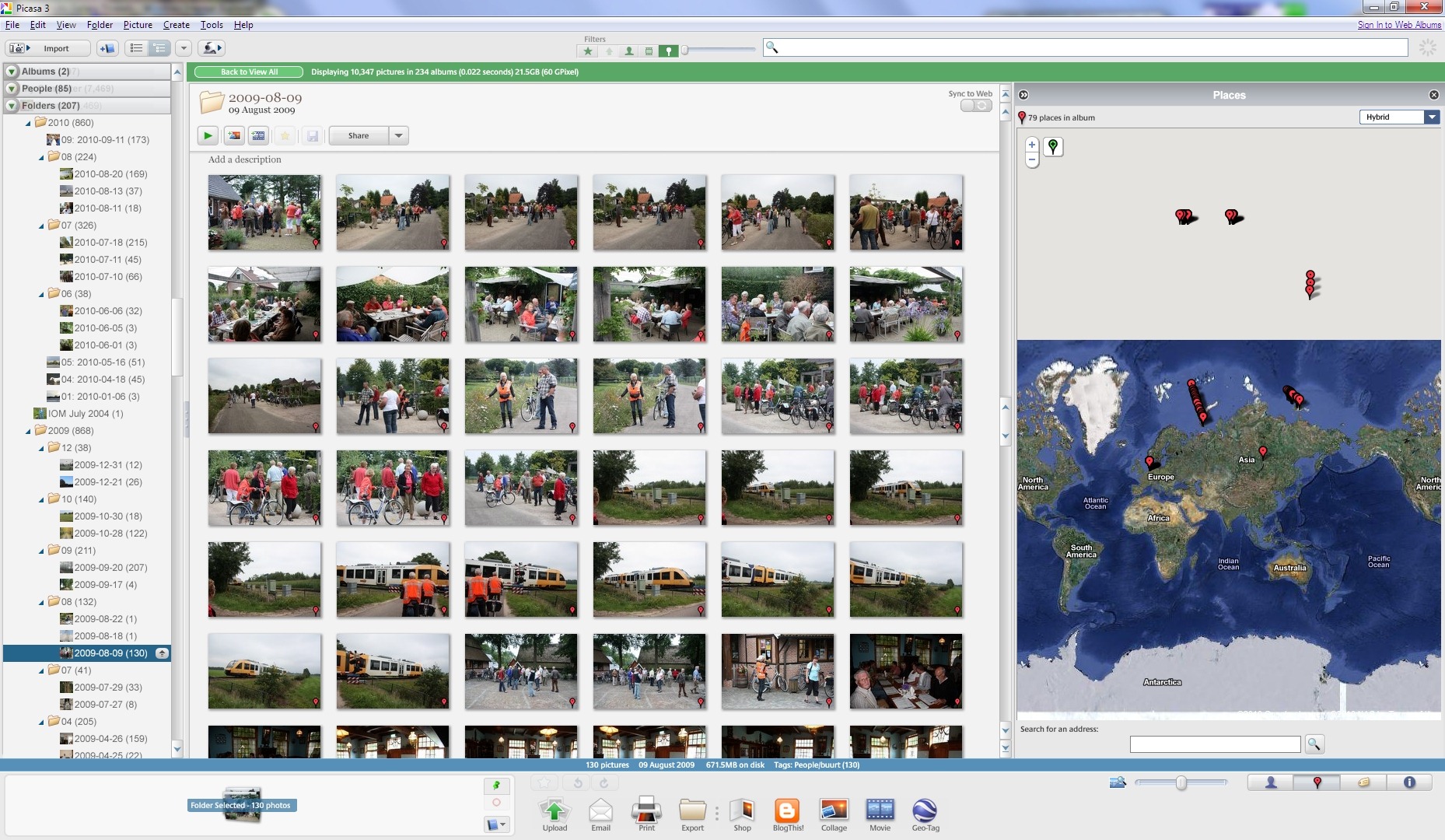
    It won’t display the correct GPS coordinates of many of my files on its map. Here’s an example, the contents of a folder containing images shot in the local area here in The Netherlands (click on the image to see it full-size in a new window).

    Picasa Geotag 2

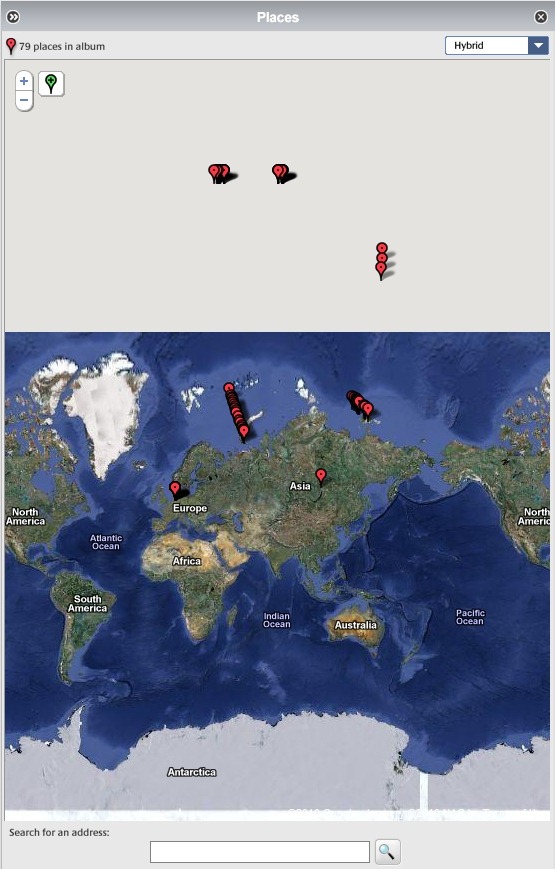
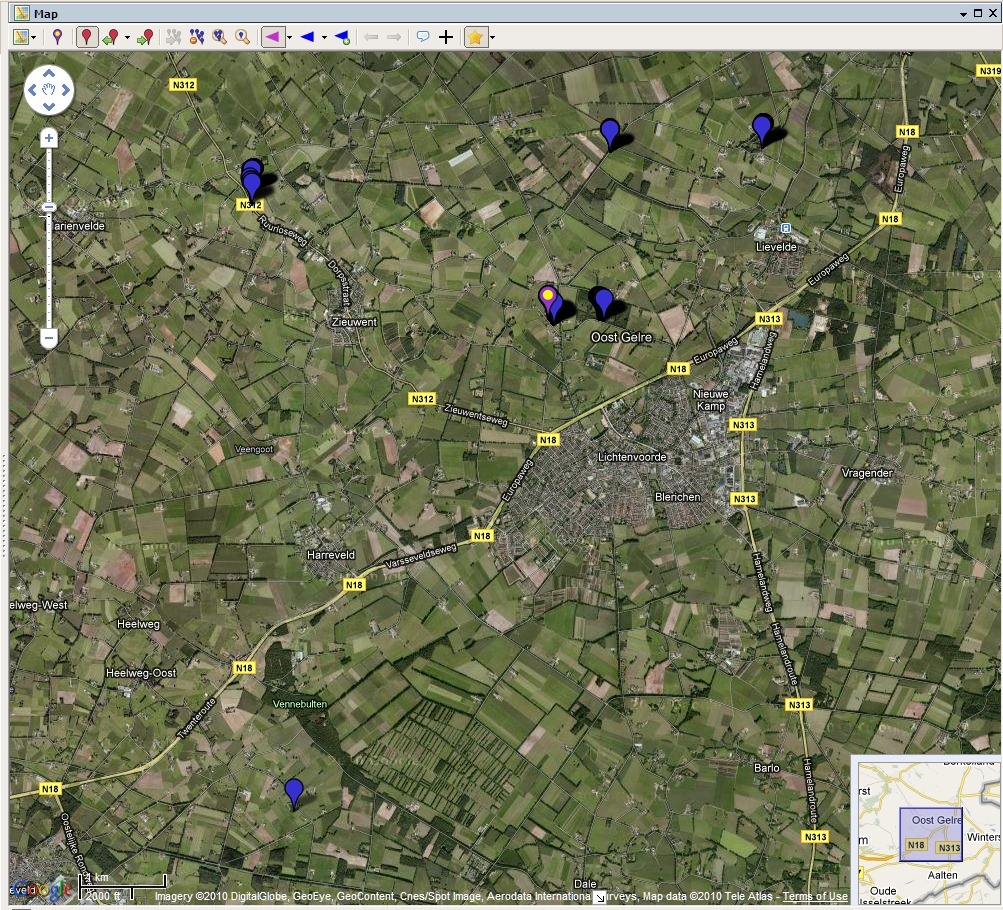
    Here’s a close-up of the map. As you can see, Picasa claims that many of the images have GPS coordinates corresponding to places outside of The Netherlands, in fact many of the images are literally out of this world, according to Picasa.

    Picasa Geotag 1

    These files have all had GPS coordinates added to them using IDimager. (Note: IDimager is no longer available. Its successor is Photo Supreme, which I am now using) All these files will display correctly in IDimager itself, and also in the map interfaces of Microsoft’s Pro Photo tools and Geosetter. Here are the files being displayed correctly in the map interface of Geosetter:

    Geosetter 1

    Clearly, this is a bug in the current version (3.8) of Picasa. Fortunately, Google have acknowledged that there is a problem, and it should get fixed at some point in the future.

    As to the XMP metadata support, it looks as though the following IPTC Core elements are at least read by Picasa for JPEG files:

    Description
    Description Writer
    Headline
    Keywords
    Title/ObjectName
    Job ID
    Instructions
    City
    Location
    State
    Country
    Creator
    Creator’s Job Title
    Provider
    Source
    Copyright Notice

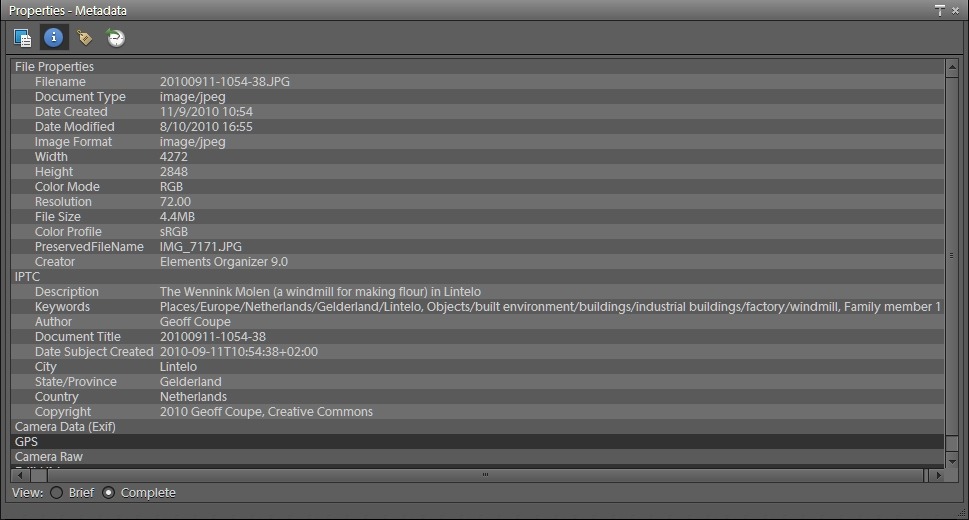
    In this version of Picasa, there doesn’t seem to be a way of writing data into all of these fields, but only a subset, so Picasa isn’t yet suitable for maintaining IPTC Core metadata. Picasa also doesn’t read and display these metadata fields at all from RAW files (at least for my Canon CR2 format). It only appears to display the Exif metadata from these RAW files. So, once again Picasa is getting closer, but it’s not good enough for what I’m looking for.

  • Augmented City 3D

    Keiichi Matsuda has created a short film to illustrate the idea of the real world augmented by fully 3D computer interfaces. Think of Minority Report, and you’ll get some idea.

    http://player.vimeo.com/video/14294054

    Augmented City 3D from Keiichi Matsuda on Vimeo.

    The thing that struck me the most was the idea of wading through a mass of adverts clustered around your feet. I think it’s going to be much, much worse – we’re going to be swimming through them, and they’re all going to be saying, in tinny little voices, “Pick me! Pick me!”

    Get out your old red and green 3D specs, and watch the video…

  • Geotagging in Windows Live Photo Gallery–Part 2

    Last month, I wrote about my findings on the experience in using the Beta of Windows Live Photo Gallery to geotag my photos. I wasn’t too impressed with the experience.

    This week, a second beta of WLPG was released by Microsoft so I’ve been revisiting the experience of geotagging.

    And today, it’s been borne in upon me just what a disaster geotagging in WLPG has proved to be.

    You see, I made an assumption. That was that WLPG would not alter any metadata in a photo without my explicit permission and knowledge. Wrong

    I was naive enough to think that WLPG would only write out GPS coordinates to the Exif metadata in a photo when I explicitly added a Geotag using WLPG. Wrong

    I realised that WLPG was reading in IPTC Core Location metadata from my photos and using that to create a geotag in WLPG’s internal database. I also realised that it was copying the metadata into the “Location Created” section of the newly specified IPTC Extension metadata. Since these are a set of text fields that reflect what already existed in the original IPTC Core Location fields, that didn’t bother me unduly.

    What I hadn’t also appreciated is that WLPG not only constructs a geotag in its internal database and creates Location Created metadata in the IPTC Extension section, but that it then proceeds to write out a set of GPS coordinates into the photo’s Exif metadata of where it thinks that the photo was taken.

    This is an unmitigated disaster!

    As I said last month, WLPG makes false assumptions about what the GPS coordinates are. If it doesn’t recognise the contents of the Sublocation field, it uses a GPS position derived from the contents of the City field. If it doesn’t recognise the contents of the City field, it uses a GPS position derived from the contents of the State field, and if it doesn’t recognise the contents of the State field, it uses a GPS position derived from the Country field.

    I have a collection of over 40,000 photos. The majority of these have IPTC Core Location metadata that I have catalogued over time. Only a very small percentage of these had GPS coordinates that I had carefully added myself.

    Now, WLPG has gone through my collection reading the Location metadata and has written out GPS coordinates to all of the photos containing Location metadata. And, of course, in a lot of cases, it doesn’t recognise the terms I’ve used for a particular location field, so it’s plucked a GPS value out that bears no relation to where the photo was taken.

    Worse still, I now have lost the needles of those photos which have accurate GPS positions in a haystack of huge proportions, which consists of photos with false GPS positions.

    Aargghh!

    Update 23 August 2010

    1. I’ve now looked at a backup of my photo collection taken on the 1st June 2010 (i.e. before the WLPG beta was installed). No photos had false GPS values inserted in the Exif at that time. Therefore I conclude that WLPG is the culprit.
    2. Contrary to what I first thought, not all photos with IPTC Location metadata get GPS values inserted into them by WLPG – there may be a pattern, but it’s not obvious to me why some files are hit, but not others.
    3. However, even though all files are not affected, I have still found over 7,000 photos with GPS values, and of these, only 2,359 of these photos have genuine GPS values that I have explicitly inserted. The rest have GPS values inserted by WLPG itself and which are also inaccurate (false).
    4. Some false values come from WLPG ignoring a sublocation, and inserting a central GPS value for the City.
    5. Some false values come from WLPG misinterpreting a sublocation and inserting a completely wrong GPS value for another location altogether; e.g. Sublocation: Voortman Bos, City: Heelweg gets interpreted as Voortmanweg in Deventer, 37 kilometres away…
    6. Some false values make no sense whatever; e.g. some photos I have of St. Pancras station in London have a GPS value assigned to them of Cuxham, a very small village in Oxfordshire…

    All together now: Aaaarrrggghhh!!!

    Update 8 September 2010

    I posted about this issue on the WLPG Help Forum. Now, Analy Otero, who works in the WLPG team, has posted a response  to confirm that WLPG does indeed write out what it thinks are correct GPS coordinates to image files based on the content of the IPTC Location fields. As she says:

    “The behavior you’re experiencing is the design of the feature and we’re working to improve both reliability of the process (to ensure all photos get proper geotags) and to improve the accuracy of the places.”

    Unfortunately, I don’t believe that Microsoft can ever sufficiently improve both the reliability of the process and improve the accuracy of the places to the extent where I can trust that accurate GPS information will be included in my images. My experience thus far has been an eye-opener of just how bad it currently is. I see that in the current release notes, Microsoft themselves say:

    “Landmarks (such as the Eiffel Tower) are not supported in the current implementation of geotagging”.

    The problem is that the textual IPTC sub-location field, in particular, will always be down to what the user decides, e.g. “the stern of HMS Ark Royal in dry dock”. I’d like to see Microsoft be able to give an accurate GPS for that. Of course, they can’t, and so the chances that rubbish GPS coordinates will be introduced by WLPG into an image remain very high.

    A further twist is that, apparently, once WLPG has introduced a GPS value (false or accurate) into a file, it can’t ever be subsequently changed by WLPG. Elsewhere in the release notes it states:

    If a photo or video contains no GPS data, coordinates will be added when the item is geotagged. However, updating or deleting a geotag string won’t modify the GPS coordinates. Any additional updates to the geotag field don’t change the original coordinates written to the file. (my emphasis)

    It seems to me that the way to cut this Gordian knot is for Microsoft to give us a proper mapping interface in WLPG itself (such as Picasa, IDimager, or Geosetter do) so that we can check locations prior to allowing GPS coordinates being written, and to use the map to modify or delete GPS coordinates. That is, writing of GPS coordinates is under the explicit control of the user, instead of something that WLPG does by itself in the background as a write-only operation.

    The current implementation of WLPG writing out what it thinks the GPS coordinates should be is dreadful and appalling. I simply cannot afford to have WLPG installed on my PCs as it is. It has already introduced garbage information into thousands of my images.

    Update 30 September 2010: Well, the final version of WLPG 2011 is now released, and as far as I can see it is still screwing up my GPS metadata.

    I’ve just found some photos taken this month in the Netherlands which now have GPS info for Wimereux in France inserted into them by the final release of WLPG.

    I am definitely not impressed.

    Update 2 December 2010

    There’s an update to WLPG 2011 that addresses the geotagging issue. See here for more information.

  • An Unmitigated Disaster?

    Apparently, there may be a further beta of Wave 4 of the Windows Live Essentials suite released next week. I’m beginning not to care any more, since Microsoft appear to have damaged the brand with what has already been released.

    Today, for example, I went to my Windows Live Home page (if you have a Windows Live ID, you’ll find yours at http://home.live.com ). Since I last visited it, Microsoft have done a redesign, and in keeping with what they’ve done with the rest of Wave 4, functions have been mysteriously airbrushed out of the picture.

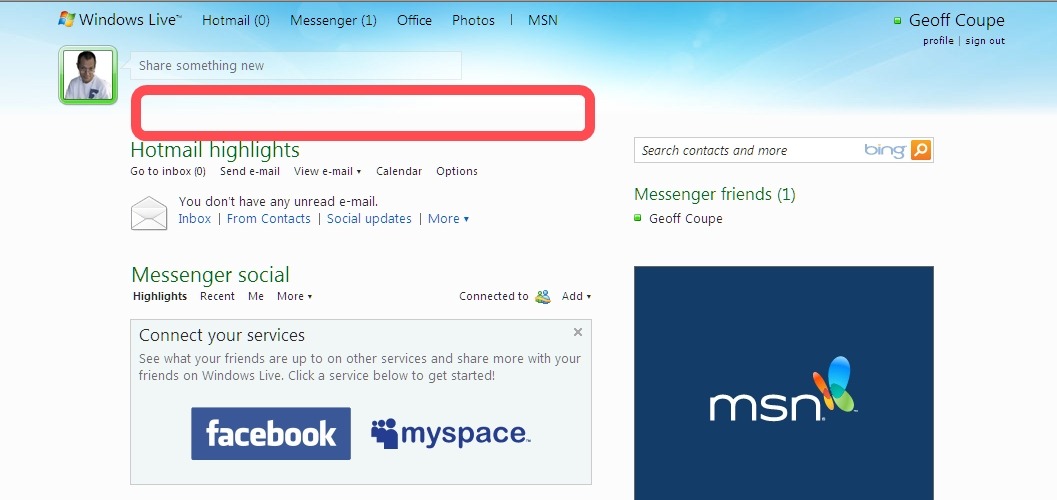
    I used to be able to see upcoming events in my Calendar, my local weather, and if I had private message in my Windows Live messaging inbox. That has all gone. The red outline in the following screenshot shows where they used to be…

    Windows Live Home 1

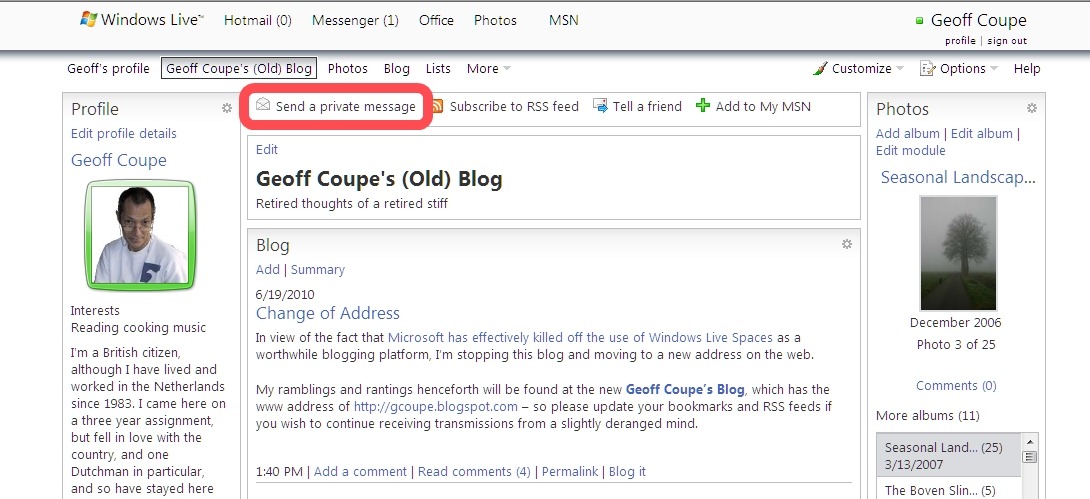
    I spent a long while trying to find out where my Windows Live Message inbox and sent messages have gone. I eventually discovered that the only way to access the system was to fake a message by clicking on the “Send a private message” button in my Windows Live Space (see below).

    Windows Live Home 2

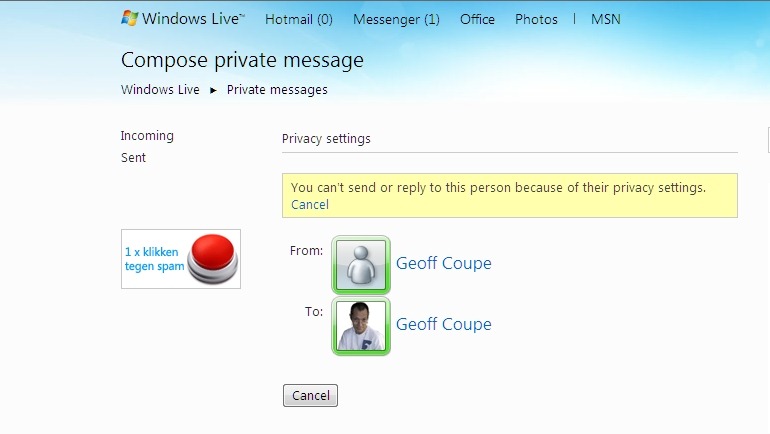
    This then gave me a error (since I was trying to send a message to myself), but it also gave me links to my inbox and my sent messages folder.

    Windows Live Home 3

    This is appalling user interface design, and a real step backwards. Microsoft should be ashamed of this crap.

    Update: since posting this, Microsoft have announced that they are pulling the plug on Windows Live Spaces, so I can’t now use the workaround shown above to get to my messages. The only way I’ve found to get there is to type in the URL into my browser directly. Hardly intuitive, and error-prone to boot.

  • The iPad is Not a PC

    Peter Bright has a very good article in Ars Technica on why Steve Ballmer and Microsoft still don’t understand why the iPad has been so successful. After all, Microsoft’s partners have been trying to sell Tablet PCs running Microsoft operating systems for years, but the number of sales have been like a drop in the ocean compared to the dominance of traditional PCs. On the other hand, sales of the iPad in its first three months of availability have already outstripped total sales of Tablet PCs for the whole of last year.

    Bright’s argument – and I think he has got it spot-on – is that the Windows operating system with its multiple miniature icons used for control is just not suitable for the human finger. I have a Tablet PC myself – the now obsolete HP TX2000. It came installed with Windows Vista, but I have replaced that with Windows 7. And although some of the touch aspects of Windows 7 are good – the handwriting recognition is almost frighteningly good – for the most part I find myself using the keyboard and trackpad in place of the touchscreen. When I do use the touchscreen, it is usually with the stylus – I very rarely just use my finger, for the very reasons that Bright points out.

    It’s odd that Ballmer appears to be insisting that Tablet and Slates are just another PC form factor – they are not, and they need something other than simply loading them up with bog-standard Windows 7. A way forward may be to adopt the approach of the forthcoming Windows Phone user interface, which is designed from the ground up to be driven by the human finger. After all, the iPad owes more to its roots in the iPhone than it does to the traditional Mac. If Ballmer can’t see that as an analogy for the next generation of Tablets and Slates, then it seems likely that sales will continue to languish.

  • Slide Show Quality in Windows Live Photo Gallery

    Microsoft’s Windows Live Photo Gallery (WLPG) can display selected photos as a slide show. In the new beta of the next version of Windows Live Photo Gallery, the slide show capability is still present, but Microsoft have changed the way in which it is done. Instead of having this capability within WLPG itself, it uses the new version of Windows Live Movie Maker to make and display the slide show.

    The problem is, the quality of the slide shows produced by Windows Live Movie Maker is terrible. Photos displayed as slides are blurry and noticeably degraded in quality.  I would be ashamed to show slides to family and friends using it.

    I raised this in the Windows Live help forum for Photo Gallery. The first response back from Microsoft was to deny that anything had changed between WLPG version 3 and the beta of version 4. However, once I sent them proof, then they admitted that things had changed and:

    “it appears that photo quality in slide shows in Windows Live Photo Gallery Beta is indeed a bit degraded when compared to the original file source”.

    I love that “a bit degraded”. No, Microsoft, it is noticeably degraded to the extent that it is unacceptable. The quality of the slide shows produced by Windows Live Movie Maker is simply not good enough. So now I will have to find an alternative to WLPG in order to show slides to friends and family.

  • Left Hand, Meet Right Hand…

    Sometimes, I despair about Microsoft. Far from being “the evil empire”, I often wonder how it can manage to walk and chew gum at the same time. For example, here’s Angus Logan, the Senior Technical Product Manager for Messenger Connect waxing lyrical about metrics and measurability in the context of the services provided by Windows Live.

    He’s published this blog post just over a week after Microsoft has removed the statistics feature from Windows Live Spaces, thus removing the tool that we bloggers used to monitor the metrics of our own Windows Live Spaces. Microsoft’s action has effectively driven a stake through the heart of Windows Live Spaces as a worthwhile blogging platform.

    It’s also instructive to note that all the new Microsoft blogs are not hosted on Windows Live Spaces at all, but on Telligent’s technology. Whatever happened to Microsoft’s once proud boast that they ate their own dogfood?

  • Contempt For The Customer

    Microsoft is about to launch the next major version of Windows Live, the so-called Wave 4. I’ve already blogged about the fact that we’ve discovered at least one nasty surprise in amongst all the new features: Microsoft has removed the statistics feature from Windows Live Spaces. This means that we bloggers, who use Windows Live Spaces, no longer have any means of monitoring traffic on our blogs.

    I’m mentioning this again, because I am rather taken aback by the responses from Microsoft representatives on the support forums for Windows Live Spaces to those of us who have asked why the statistics feature has been removed. I don’t think it’s an exaggeration to say that Microsoft is displaying contempt for the customer over this.

    It’s been quite instructive to view the evolution of these responses as the Microsoft representatives replied to the rising tide of indignation from users. First came the totally clueless response:

    At this time we have removed this feature while we explore another solution.  We appreciate your patience and hope to have updates availble [sic] for you shortly.

    Then came:

    With the latest release to the end-to-end Windows Live suite, we have removed the statistics feature from Windows Live Spaces.   We sincerely apologize for any inconvenience this may have caused you.    As we continue to evolve and improve the Windows Live suite, we add to and deepen many features, but of course are also sometimes faced with tough tradeoffs and decide to discontinue features. We will continue to keep you informed of any changes and coming improvements in the product.

    As I wrote before, the whole point is that Microsoft did not “continue to keep us informed of any changes” – they simply removed the statistics facility without any warning whatsoever. Now, the responses try to strike a conciliatory note:

    Hello All,

    Thank you for your commentary and interest in the continuation of the statistics feature.  We certainly understand the frustration that comes when a feature you have been utilizing suddenly goes away without warning and for that we apologize.  At this time we have no additional information to share regarding statistics.  If new developments arise we will update the solution article located here http://windowslivehelp.com/solution.aspx?solutionid=f31af022-eadf-4875-abe9-25b0ac466821

    Talk about locking the stable door after the horse has bolted… It’s too late, Microsoft, the damage has been done. It’s quite clear from this response that statistics aren’t going to be coming back any time soon. As one commenter noted:

    The whole thing beggars belief.

    CRITICAL FUNCTION.  Stats helps me to identify Comment Spam (since Live Spaces does not have a good Comments management facility).  It helps me to identify the efficacy different promotional vehicles to the sight.  It helps me to identify parties and communities with similar interests so I can engage with them.

    NO WARNING.  No warning that a change was going to happen.  No clarification on the redirect page.  Everyone is completely up to the own devices to used advanced navigation of Window Live’s difficult ‘Solution Center’ to find Carolyn’s clarification.

    NO PLAN.  It’s not like Live is having a ‘momentary disruption’.  It appears that they don’t even know what if anything they are  going to do about it.
    How does Microsoft defend this action?

    In addition, Microsoft has announced that web gadgets can no longer be added to our Spaces, and those that are currently included in our blogs will cease to work in the near future. Terrific, so my blog will start decaying very soon. In addition, it appears that comments on blog posts are now limited in length. Doubtless there will be other nasty surprises crawling out of the woodwork as well.

    I think the time has come to seriously consider moving my blog to another platform, probably Blogger. I shall make my decision once Wave 4 is launched and I can see for myself how much damage Microsoft has done to Windows Live Spaces as a blogging platform. The signs at the moment are not good; so bad in fact that a number of people are openly speculating on the forums that Microsoft will drop Windows Live Spaces altogether.

    If so, then it will be a great pity. For a while, Windows Live Spaces was a reasonable blogging platform. However, Microsoft, with its contempt for the customer and cack-handed change management skills seems intent on destroying it.

    Update: Since posting this, even more limitations on Windows Live Spaces have started to surface, so I’ve decided to jump ship even before the much vaunted Wave 4 is launched. I’ve decided to move to WordPress as my blogging platform, rather than Blogger as I originally thought. WordPress has more flexibility and looks better, IMHO, so that’s my choice.

    Update 2: Okay, I’ve changed my mind – I’ve moved to Blogger, rather than WordPress. The reason I’ve switched, is because I found that Blogger allows me to embed Photosynths in my posts, whereas WordPress, like Windows Live Spaces, insists on stripping out the embed code. I can also use the LibraryThing widget on Blogger; once again, WordPress and Windows Live Spaces forbid its use. So, while the look of Blogger is a bit more basic than the endless styles of WordPress, overall it gives me more choice in what I can post. So, Blogger, it is

    Update 3: Cough, I’ve finally decided to switch back to WordPress…

  • Another Fine Mess You’ve Got Us Into…

    Microsoft is gearing up for the next major release of the PC software that integrates with its web services: Windows Live Essentials. Wave 4 of the Windows Live Essentials software should be available to the masses in the next few weeks. Some folks have already been privy to the beta, and are extolling the new features.

    As well as major changes heading down the pike for the software on the PC, we are now beginning to see changes on the features and design of the web sites that Windows Live Essentials uses. Not always to the better, it has to be said. OK, we expect some hiccups – so for example, when I tried to access some web pages today I got an error message saying it’s currently unavailable because of a technical hitch. But, Microsoft does have this history of opening its mouth only to change feet, and I fear things have not improved.

    For example, in Windows Live Spaces, there was a “Statistics” feature that allowed the owner of a Space to see what activity there was. Quite useful, and I often checked it out to see which of my blog entries were generating traffic.

    But as of today, that feature has disappeared without any warning from Microsoft. Lots of people are complaining about it on a Windows Live Spaces forum. But the prize for “open mouth, change feet” goes to Microsoft support person Carolyn. Here’s her answer to someone asking why the “Statistics” feature has suddenly vanished:

    Hi There,

    Thank you for the report regarding the statistics feature.  At this time we have removed this feature while we explore another solution.  We appreciate your patience and hope to have updates availble [sic] for you shortly.

    Thank you,

    Carolyn

    Stunning. Let’s just savour the full richness of that shall we? – “At this time we have removed this feature while we explore another solution”. This is truly worthy of Monty Python. The difference is that the Python team knew they were creating humour. The people at Microsoft’s Windows Live Services simply don’t appear to have a clue.

    Update: There’s now a “solution” message posted that says:

    With the latest release to the end-to-end Windows Live suite, we have removed the statistics feature from Windows Live Spaces.   We sincerely apologize for any inconvenience this may have caused you.    As we continue to evolve and improve the Windows Live suite, we add to and deepen many features, but of course are also sometimes faced with tough tradeoffs and decide to discontinue features. We will continue to keep you informed of any changes and coming improvements in the product.

    Of course the whole point is that Microsoft did not “continue to keep us informed of any changes” – they simply removed the statistics facility without any warning whatsoever.  I suppose it’s the underlying contempt for the customer that bothers me the most, but really, I should not expect anything better from them.

  • RIP, Guy

    Damn, Guy Kewney has died. Only a couple of years older than me. His columns on the developments in IT and computing, particularly in the early days of the 1980s were the ones I trusted and enjoyed the most.
  • Fun With Technology – Part VI

    About six weeks ago, I wrote about the idiosyncrasies of the technology that makes up our Home Cinema setup, and wondered whether I should take the plunge and build my own HTPC. As I like building my own PCs, I decided to go ahead and did some research about what to get. The most helpful guide to building an HTPC was an enormous thread on the Audio/Visual Science Forum, called, as you might expect: Guide to Building a HD HTPC. This guide has been put together by someone called renethx, who has evidently been engaged in a labour of love. He lists a variety of different systems, from low-end to high performance, and clearly knows his subject.

    After reading through the thread (more than 13,000 posts!), I was beginning to suffer from information overload, but I also thought I was beginning to home in on what I wanted. My HTPC would be used to play Blu-Ray discs and standard DVDs. It would be connected, via a wired Ethernet network, to our Windows Home Server, which currently holds our music library and digital photos, but now could also hold the rips of our DVD and Blu-Ray collection. At this stage, I wouldn’t be using the HTPC to view/record terrestrial or satellite TV, but this might be on the cards in the future. With all that in mind, I decided to go for a mid-range system, which would have room for a modest amount of expansion. The final list of parts I settled on was:

    Item Description
    Motherboard Gigabyte GA-H57M-USB3
    CPU Intel Core i3 530 / 2.93 GHz
    RAM Corsair XMS3 – DDR3 – 4 GB ( 2 x 2 GB ) *see Note 1
    CPU Cooler Stock fan supplied with CPU
    Drive Western Digital Scorpio Blue WD2500BEVT 250GB
    Keyboard Microsoft Arc Keyboard
    Mouse Microsoft Arc Mouse
    Remote Control Hauppauge MCE Remote Control Kit
    Blu-Ray Drive LiteOn – Blu-Ray – BD-ROM
    PSU Nexus Value 430
    Case Silverstone Grandia GD05B
    Software Microsoft W7 Home Premium OEM 64bit

    The technology nerds amongst you may have noticed that there is no graphics card in the above list. That’s because I’ve chosen one of the new Intel “Clarkdale” processors, which actually has a graphics chip integrated into the CPU package itself, alongside the CPU chip. The graphics capabilities fit the requirements of an HTPC very nicely, having a hardware-accelerated decode for Blu-ray dual-stream picture-in-picture, and audio capabilities with support for Dolby TrueHD and DTS-HD Master Audio multi-channel bitstreaming. However, see Note 2.

    I chose Windows 7 as the operating system, because it comes with Windows Media Center, which I quite like as a “10-foot user interface”. I’ve tried to keep additional software to a minimum, primarily for simplicity’s sake. Reading through the HTPC forums, I see that there are a plethora of utilities and codec packages that some people install to tweak the performance of their system, but I can’t help feeling that doing so also increases the likelihood that something will break. As I remarked last time, the discussions over building an HTPC are characterised by a large number of posts on the forums that say “do this”, followed by an answering chorus of “no, don’t do that, do this…”. So it’s clear that building an HTPC is still something for enthusiasts and nerds – it hasn’t yet crossed the technology chasm to reach mainstream consumers.

    So far, I’ve added just two additional pieces of software to Windows 7 (and Windows Media Center). The first is Arcsoft’s TotalMedia Theater 3 Platinum Edition. That’s because while Windows Media Center will play standard DVDs, it doesn’t handle Blu-ray discs, and so I need a third party piece of software. I went for the Arcsoft product because it integrates into Windows Media Center, unlike some other Blu-ray player software products out there.

    The second add-on is the My Movies library software. While Windows Media Center has a movie library function, it only covers online media. The beauty of My Movies is that it handles both online and offline material (i.e. DVDs or Blu-ray discs). It also comes with a version for Windows Home Server, which is where some of my discs will be transferred to put them online. So I can browse our entire film library using the My Movies client within Windows Media Center, and my choice of film will be either streamed from the Windows Home Server, or I will be prompted to insert the relevant disc into the HTPC.

    The parts I ordered arrived from Azerty last Thursday, so I spent a happy few hours assembling them into the HTPC. I’m pleased with the result, but there are still a few rough edges that need to be sorted out. Most of these I expect to be covered by newer releases of software.

    For example, I had a weird error that occurred when I tried to play an online DVD or Blu-ray. Windows Media Center would report a Video Error of the form:

    Video Error: Files needed to display video are not installed or not working correctly.

    Trying to diagnose it led me to believe that it has absolutely nothing to do with the video side of things, but rather some incompatibility in the audio chain. For example, the error would go away if I turned off the navigation sounds in Windows Media Center. Even more bizarrely, I found that someone had reported that you could have navigation sounds in Windows Media Center and working online media files if you:

    • Set the Windows 7 HDMI Playback device to Stereo
    • Set the Speaker configuration in Windows Media Center to 5.1 channels

    I tried it and it works. No idea why. It follows no rhyme or reason, given that my Audio/Visual Receiver is a Denon 3808 with a physical configuration of 7.1 channels/speakers.  Just bizarre.

    Another weird error is that the Denon onscreen User Interface only appears if I set the HTPC to use an RGB colourspace, rather than the xvYCC extended colourspace that I think I should be using with my HDTV… And setting the xvYCC colourspace using the Intel-provided control panel is problematic. Sometimes it sticks, and sometimes it just reverts back to the RGB setting. No idea why.

    A niggle is that the HDMI handshake is relatively slow in getting everything set up between the HTPC, the Denon and the HDTV. The latter tries a couple of times in the space of about five seconds before it achieves a perfect picture. This is far, far better than the original situation with my old Panasonic DMP-BD30 player with the Denon and the HDTV – there, it could take anything up to several minutes before a stable picture was obtained. But I have seen a setup time of less than a second, and on the first try, with one of my other PCs being used as an HTPC. That was using a Sapphire ATI Radeon graphics adaptor, rather than the inbuilt graphics of the Intel i3.

    On the physical side of things, one thing that concerns me slightly is the noise made by the fans in the Silverstone GD05B case. This case has three 120mm fans built in. When you add in the fact that the power supply has a fan, and there is a fan on the CPU cooler, then we have a grand total of five bloody fans whirring away and making noise. Fortunately, the power supply fan is reviewed as being one of the quietest around, and the CPU cooler fan from Intel gets good reviews as well. So the noise is primarily down to the Silverstone case fans.

    Now, I noticed that the filters on these fans are attached on the exhaust side of the fan. Since the fans draw air into the case, I can’t help feeling that this will mean that the fans will be somewhat difficult to keep clean, and that dust will gather on the fans themselves. I would have thought that it would have been better to put the filters on the intake side of the fan, sandwiched between the fan and the inside face of the case. That way, dust buildup could be easily vacuumed off the filters through the outside grilles, without the need to open up the case for cleaning. I actually tried this, and put the filters sandwiched between the fans and the case.

    When I did this, the perceived noise definitely seemed to be reduced, so I was pretty happy with this. However, I also sent an email to the European branch of Silverstone in Germany to ask them if this was a recommended practice. They have replied that it is not, and advised me to stick with the original configuration. However, I am less than happy with this because a) the noise is increased and b) the filters are going to be a bugger to keep clean. And with two dogs lying on their beds in the near vicinity, dust and dog hairs are going to be an issue, I feel sure… I think I will try out Nexus fan speed reducers on the case fans to see if the noise will be reduced (see Note 3). The current internal temperatures are low enough that I think that slower (and hence quieter) fans are not going to cause a problem.

    So, to sum up, despite a few rough edges and niggles, overall I am well pleased with the result. There will doubtless be a bedding-down period while I tweak various things to improve satisfaction, but hopefully I will get it to the stage where I can learn to leave things well enough alone, and simply enjoy our new HTPC.

    Notes

    Note 1. Even though I was not overclocking the system in any way, I found that there seemed to be stability problems with this Corsair memory used in conjunction with this motherboard and CPU. The system would suddenly lose power every couple of days for no apparent reason (there would be nothing in the Windows Event logs). I eventually replaced the Corsair memory with Kingston memory (KVR1333D3N9K2/4G), and have had no problems since.

    Note 2. The idea of using the Intel i3 to handle the audio and video requirements for the HTPC did not pan out as I hoped. I found a number of problems. I gave up and put in a Sapphire ATi Radeon 5670 to handle the audio and video. That has been problem free so far.

    Note 3. I ended up using this Nexus fan speed reducer on one of the case fans and this one (using the 7V line) on the other two fans. That’s much better, but I think I can still get further improvement. I’ll probably try just using two case fans set at 7V, and will switch the filters to the intake side of the fans. The internal temperatures of the case seem to be low enough that using two fans should be OK.

  • Fun With Technology – Part V

    Here we go again, another trawl through the depths of technology. My problem is that I never could learn when to leave well enough alone; there are always a few niggles that will bother me, and usually I find that picking at them is like picking at a thread on my pullover, only to find that the pullover is starting to unravel.

    In this case, the starting point is that I currently have a fairly reasonable home cinema setup – nothing too fancy, such as these – but for the most part it works, and more importantly, the spouse acceptance factor is reasonably good (although we are currently juggling six remote control units, which really doesn’t help).

    However, it has a niggle.

    When the Blu-ray player (Panasonic DMP-BD30), the audio amplifier (Denon AVR-3808) and the HDTV (Panasonic TX-37LZD800) are first switched on, it can take up to three or four minutes before I see a stable picture on the TV. The three components are connected together using HDMI interfaces, supposedly the latest and greatest technology for interconnecting audio-visual equipment. Any two of the components will work perfectly together with each other, but add the third into the chain, and the problems begin. The three of them are obviously engaged in some form of electronic pass-the-parcel; trying to decide on what level of communication will form common ground to get a DVD or Blu-Ray disc in the player displayed properly on the TV. The picture will appear momentarily before it breaks up into a multi-coloured snowstorm, and the units start over again, trying some other set of parameters to forge the chain. This continues, as I’ve said, for up to three or four minutes at a time. I’ve tried every conceivable combination of the setup possibilities in all three components in order to find a suitable starting point, all to no avail. All the units are supposed to support the same level of the HDMI specification (1.3A), but I fear that there’s many a slip ‘twixt cup and lip – someone, somewhere, deep in the engineering departments of the companies concerned has interpreted the HDMI specification differently from his or her colleagues, and the resulting implementation doesn’t quite work properly.

    I had rather naively hoped that a firmware fix would emerge that would cure the problem, but alas, despite several iterations of firmware upgrades on all components, nothing has appeared to resolve this. And now we are at a stage where some of the equipment is positively ancient by today’s standards – the Blu-Ray player was released in November 2007, which apparently makes it geriatric in this particular technology area. So I don’t really expect any further upgrades to appear, hence the chances that the problem will ever be resolved are slim, as far as I can see.

    Thus, that is the niggle. And I am pulling on its thread by wondering whether I should change one of the components. The Blu-Ray player is the most obvious candidate – it is the least expensive component (comparatively speaking), and has already been shuffled off, by its makers, to the equivalent of the Old Folk’s Home. Now, I could simply replace it with a newer model of Blu-Ray player, but you know me, as Mrs. Lovett said, sometimes these ideas just pop into my head… What if, instead of a Blu-Ray player, I put in an HTPC? I must admit, I do rather like the features, and the look, of the latest iteration of the Windows Media Center software that is bundled with Windows 7. And it integrates with our Windows Home Server, which is storing all our music and photos. As an experiment, I hauled my PC out of the study, and temporarily hooked it up, using HDMI, in place of the Blu-Ray player. Sure enough, I was able to use it as an HTPC, and successfully demonstrated that it was able to play DVD and Blu-Ray discs through the home cinema setup, as well as access music and photos on the Windows Home Server. The only drawback was that the audio was only 2 channel stereo, instead of 7.1 channels, but that is a limitation of the hardware I currently have in the PC. What I also observed was that there was no protracted electronic “pass-the-parcel” – the setup between the three devices appeared instantaneous.

    So, in theory, an HTPC is a real possibility. OK, let’s pull on the thread a little more – what sort of HTPC should it be? A number of possibilities spring to mind: an off-the-shelf HTPC, such as the Dell Zino HD or the Mac Mini; or a home-built HTPC.

    I must admit, the design of both the Dell Zino HD and the Mac Mini is appealing, but the real question is: are they up to the job of acting as a proper HTPC?

    Let’s take the Mac Mini first. I’m not really convinced that this would be the right choice for me. First, Apple’s bundled media library software for HTPC functionality, Front Row, doesn’t seem to be nearly as polished as Microsoft’s Windows Media Center. Secondly, I’ve never liked the iTunes software or the service for a variety of reasons, and I don’t think I’m likely to change my mind now. Thirdly, at the moment, the Mac Mini is only available with a DVD player, not a Blu-Ray player, which kind of defeats the whole object of the exercise. It also doesn’t have an HDMI interface. The final nail in the coffin is cost: Apple gear always comes at a premium, and the Mac Mini is no exception. Let’s move swiftly on before this degenerates into a rant about the Apple religion.

    The Dell Zino HD is an interesting box. It can be configured in a variety of ways, including with a built-in Blu-Ray player, so this seems as though it could be a possibility. Once I started to look into it though, I began to have my doubts. It only comes with the 64bit version of Windows 7, which, frankly, strikes me as overkill for an HTPC. I found one enthusiast who had tried using the Zino as an HTPC, but then I found out that he’d wiped off the Dell software and done a clean install of the 32bit version of Windows 7 for the systems that he eventually bought. There’s a thread about the Zino on the AVSForum – it’s extremely active, with over 4,100 posts and counting. I can’t say that the overall impression that I get is positive. I think that what it boils down to is to get your expectations set correctly. Despite what Dell marketing might imply, this does not strike me as an HTPC out of the box. It may be a good basic PC with a small form factor (like the Mac Mini), but getting it to work flawlessly as an HTPC requires careful tweaking of software. It can be done, but most people just want to plug and play. That is unlikely to happen, at least with the current state of hardware and software. I am mildly amused by the volume of posts on the forum that say “do this”, followed by an answering chorus of “no, don’t do that, do this…” A sure sign that the technology is not yet ready for primetime. Anyway, the bottom line for me at least is that the Zino doesn’t (at least at the moment) output Dolby TrueHD or DTS-MA bitstreams, which is what my current (and geriatric) Blu-Ray player can do. Add to that the fact that I’m looking at around €800 for a system that needs further improvement, and I think, no, not for me.

    So, in that case, why not go the whole hog and build an HTPC from scratch? Well, I can certainly do this, there’s no shortage of advice (and it must be said, the inevitable choruses of “do this” and “no, don’t do that, do this”). The bottom line is that I think I can build a top-flight HTPC that is whisper-quiet for around €650. Will I go ahead? Mmm, I think I need to mull this over for a while…

  • You Don’t Say?

    So Chatroulette is the latest fad. I freely admit that I haven’t been brazen enough to hit "Play" yet, unlike Jason Kottke.
     
    I note, with a sense of irony, that the Chatroulette start page says:
    "Chatroulette does not tolerate broadcasting obscene, offending, pornographic material and and we will have to block users who violate these rules from using our service".
    Somehow, I can’t help feeling that that is precisely what is driving the curiousity of most of the evolved apes who are visiting this site…
  • Windows 7 – The Camel In Action

    The old saw says that "a horse is a camel designed by committee". When I first saw the default background that comes with Windows 7, I had to agree with Peter Bright – it is simply god-awful. The first thing I did with the three new installations of Windows 7 in our household was to banish the default background to the great bit-bucket in the sky.
     
    I wondered how on earth something so bad could have actually ended up being shipped by Microsoft. Here’s the answer. A video of Denise Trabona, who is a Senior UX (User Experience) Lead on the Windows Design and Research Team, talking about the process that ultimately led up to the choice of the default background.
     
    The pragmatic Dutch have a very good word to describe this process: mierenneuken. Literally, ant-fucking. The sort of nit-picking that loses sight of the wood for the trees, the inability to recognise that despite all the huffing and puffing over miniscule choices, what you have ended up with is simply not very good at all.
  • Willingness To Help: 10; Practicality: Null Points

    I amuse myself in my idle monents by browsing some of the web forums set up to help people get to grips with their computers. I do this partly out of a drive to actually try and help people with their computers, but also I fear out of an increasing realisation and desperation of the fact that we are all trapped in an inner circle of hell.
     
    Here’s an example: an innocent request from someone in Ireland who wants to know how to find a digital Photo-Frame that will connect with the online FrameIt service.
     
    The answer: it’s in Japanese.
     
    Are we any the wiser? Er, no, probably not.
  • Network Crash

    Martin complained that his mobile phone wasn’t working today. It’s an old Nokia, which has proved flaky in the past, so I thought that we’d probably need to get it replaced. Still, I thought I’d take a look at it and see if it just needed cleaning. First thing I noticed was that it was not showing as being connected to a network. Funny, thought I, so I took a look at the settings. Try as I might, I couldn’t get it connected to the Dutch Vodafone network, while my mobile, which also uses Vodafone was OK.
     
    I thought that it might be a problem with the phone, so I swapped Martin’s SIM card into my phone. Still no network. Very odd, thought I. I then tried to look at the Dutch Vodafone web site – and that was also out of action. A news item on the Tweakers site revealed the cause – there’s a countrywide problem with Vodafone’s mobile network, and doubtless the web site has crashed through the actions of thousands of irate Dutch Vodafone subscribers trying to find out why their mobiles have stopped working. Having replaced Martin’s SIM card in his own phone, and restarted mine, I see that now my phone is also not working.
     
    The problem started at 13:15 today, and as of now, 16:45, it’s still not resolved. Vodafone personnel must be feeling very uncomfortable at the moment – as an old acquaintance would put it: they’re running around in brown trousers…
     
    Update: it’s now over 21 hours since the problem started, and the Vodafone network still isn’t back in the air. I suspect thousands of the 4.7 million Dutch subscribers are beginning to think about changing their mobile service provider…
     
  • The Automated Curse Generator

    A lovely little tale from the Daily WTF about when good ideas go horribly wrong.
  • Windows 7: Some Thoughts

    As I mentioned last week, I’ve now got my new Windows 7 software, and am in the process of installing it on our computers. I’ve been running the beta version for a while, so I know what to expect; nevertheless, I’m pleased with it, at least for the most part. There are still some less than shiny bits on the final result, but on the whole it’s pretty good. The two areas that grate on me the most are these:

    1. Windows Media Player. Windows 7 comes with a new version of Windows Media Player (WMP12). With this, Microsoft has given with the left hand and taken away with the right. What’s new is that WMP12 has a “Play To” feature, which allows it to act as a digital media controller (see my Fun With Technology – Part IV post for more geeky information on this). This is a nice feature, and it’s far easier to use WMP12 running on my Tablet PC to stream music from my Windows Home Server to my Denon Hi-Fi system than it is to use the Denon’s limited interface to hunt through my music collection. Alas, while Microsoft has given us “Play To”, they’ve taken away the editor that the previous WMP version had for editing metadata. While that editor was far from perfect, what now remains is so limited and clumsy that it’s a disaster. I’ve resorted to using Media Monkey purely for its metadata editor, oh, and for Podcast support, which WMP still doesn’t have a clue about. Peter Bright’s extensive review of Windows 7 in Ars Technica deals with WMP12 in some detail, and points out just how poorly Microsoft has done with this latest, and not-the-greatest, incarnation of Windows Media Player.
    2. Remote Access. I’ve ranted on before about how Microsoft’s marketing of Windows Home Server is misleading; in particular that you can use it to access “any home computer” remotely via the internet. The fine print actually points out that if you are running Windows 7 Home Premium on your home computers, then you can’t do this. What really irks me is that I recently discovered that Microsoft’s Live Mesh (a free download) will give you this capability. As Peter Bright points out:

    “Home Premium users don’t get the ability to remotely view their PC’s desktop. Unless, that is, they install the (free) Live Mesh beta, which provides remote desktop support for all. One might suggest that perhaps the left hand is not so familiar with what the right hand is doing; if remote desktop support is a feature that we can have for a free download, on any supported version of Windows, why not let us use the (technically superior) built-in facility?”

    Yet another example of the phenomenon that I’ve remarked on before: Microsoft’s teams do not leverage each others’ work to the extent that they could. “Not Invented Here” could be the unofficial motto of many of them.

    If you’re a geek, it’s well worth reading Peter Bright’s review of Windows 7. I found myself nodding in fierce agreement with a lot of it. I note that some people have found his review too nit-picky, for example where he points out that the Windows 7 developers are not even following their own guidelines for Windows 7 look and feel. However, I side with Bright – it’s attention to detail where Microsoft often seems to fall down. And I had the same reaction as him when I saw the default wallpaper that now ships with the released version of Windows 7 – it is simply god-awful. Practically the first thing I did was to switch to another desktop theme…

    Even though Peter Bright’s review is fifteen pages of often dense detail, he has not managed to cover everything that is in Windows 7. For example, he makes no mention of the Homegroup feature, or of the many under-the-cover improvements that have been made over Windows Vista. Still, and despite the fact that he spends much of his review bemoaning the shortcomings, I agree with his conclusion:

    “But at the end of the day, that doesn’t really matter. Windows 7 is, overall, a fantastic OS. It builds on a solid platform, and just makes it even better.”