Reflections on life at “De Witte Wand”…

Category: Computers and Internet

  • The Internet Apologizes…

    … that’s the title of a sobering article on what has gone wrong with the internet. Well worth reading.

    The apology is necessary, but it’s too damn late – the damage is done. I’m not sure how it will ever be possible to undo the damage that platforms such as Facebook and Twitter have caused. To many people, Facebook is the internet, and it is a global monopoly. And it has connected people for both good and ill. The recent Buddhist violence against Muslims in Sri Lanka is but the latest example.

  • You Are the Product

    That’s the title of an article about Facebook by John Lanchester. Published back in August 2017, it is eerily prescient about the shit that has now hit Facebook’s fan.

    It’s a long article, but definitely worth a read. As Lanchester writes:

    I am scared of Facebook. The company’s ambition, its ruthlessness, and its lack of a moral compass scare me.

    His conclusion is sobering:

    Automation and artificial intelligence are going to have a big impact in all kinds of worlds. These technologies are new and real and they are coming soon. Facebook is deeply interested in these trends. We don’t know where this is going, we don’t know what the social costs and consequences will be, we don’t know what will be the next area of life to be hollowed out, the next business model to be destroyed, the next company to go the way of Polaroid or the next business to go the way of journalism or the next set of tools and techniques to become available to the people who used Facebook to manipulate the elections of 2016. We just don’t know what’s next, but we know it’s likely to be consequential, and that a big part will be played by the world’s biggest social network. On the evidence of Facebook’s actions so far, it’s impossible to face this prospect without unease.

    I deleted my Facebook account yesterday. I hope that I can remain outside its walled garden.

  • Pulling the Plug (again)

    I noticed this when I was reading the Guardian website today:

    https://www.theguardian.com/isle-of-man-travel

    I’ll bet it was triggered by some algorithm that knows I am Manx.

    I suspect it’s high time that I deleted my Facebook account (again). And to be clear, I loathe and detest Facebook, but I needed an account because of my community work. Everybody else insisted that using a Facebook group was the only way to coordinate. Bollocks, said I, but everyone else seems to have drunk the kool-aid…

    The invasion of the body snatchers has long since come to pass…

  • From Wet String to Glass

    If you’ve been following the saga of trying to get broadband internet here, you’ll know that last November a campaign started to persuade householders in our area to sign up for a new fibre optic network. We needed a minimum of 50% of the households in the area to sign up; so 2,800 addresses out of the total catchment area of 5,600 addresses.

    The campaign came to an end on the 19th February, and I’m very pleased to say that 69.4% of the households signed up.

    The detailed engineering plan for the network is now being worked on, and the expectation is that work will begin on laying the network in the 3rd quarter this year. The first households are expected to be connected by the end of the year, and everyone should be on the network by mid-2019.

    We’ve been fighting for a decent broadband connection here since the end of 2014, so it’s a bit of a relief that at last we seem to be in sight of getting the dream realised.

  • Microsoft Photos – Still a Disaster After All These Years

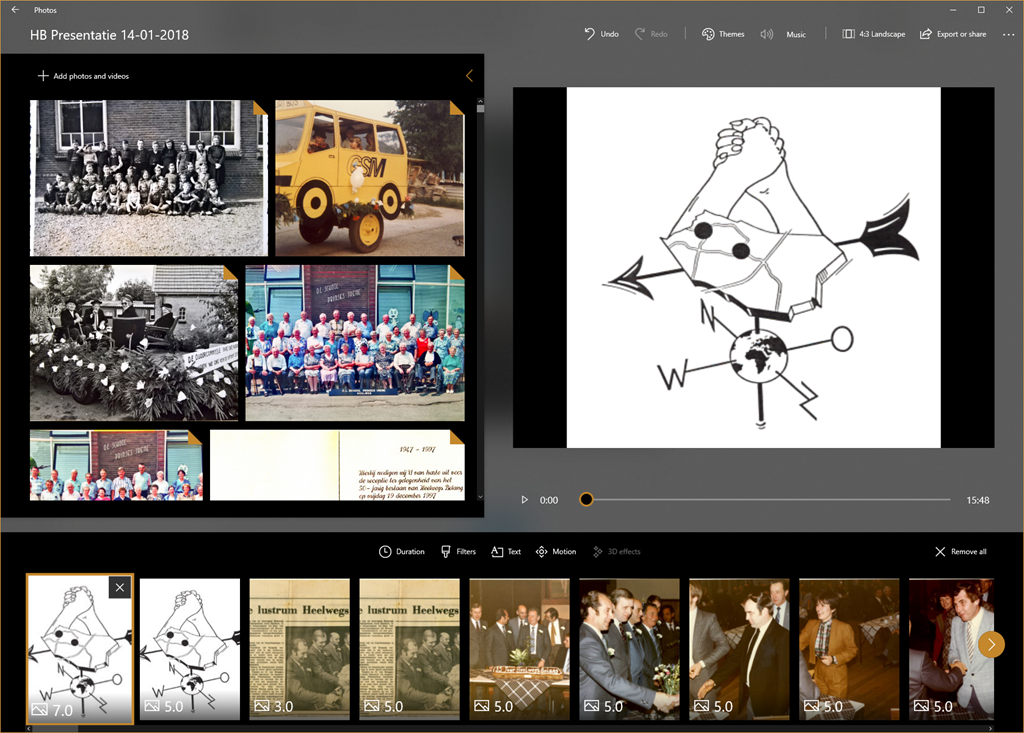
    Our local village community organisation – Heelwegs Belang – is holding its annual New Year’s Reception today. I thought that I would make a slide presentation to run continuously during the reception and be displayed on a screen in the village hall.

    I thought about what tool I would use to make the presentation; would it be PowerPoint, or something else? Initially, I thought I would try using Microsoft’s new presentation tool Sway. It seemed promising, but I quickly discovered that it requires a permanent connection to the internet to work. Since there is no WiFi in the village hall at the moment, that ruled out Sway from consideration.

    Then I realised that the much-maligned (by me and others) Microsoft Photos app now has a so-called “video creation” mode, which can be used to assemble slide presentations, and even put music to them. So I fired up Photos and set about assembling my presentation.

    Photos 01

    Dear lord, but what a painful experience that proved to be. The Photos app is slow as molasses in this mode, and crashes frequently. The workflow involved in assembling a presentation is primitive – for example, you must apply effects one at a time to each slide; you can’t select a group of slides and apply an effect or effects to the group. So if you want to change the default display time of 3 seconds to, say, 5 seconds – you have to plod through the presentation and change each slide timing individually. Given that “plodding” is the order of the day with the Photos app, I felt I was fighting the app every damn step of the way. Add to that the frequent crashes, and losing the last few minutes of work each time, I was ready to put my fist through the screen at several points.

    Frankly, next time, it will be back to PowerPoint. It may be old-school, but at least it works, and does what it says on the tin.

  • Facepalm Time Again

    I see that Microsoft has at last introduced a much-requested feature into their Photos app for Windows 10. Unfortunately, this being Microsoft, the feature is half-baked and not useful. Let me explain.

    With the Fall Creators Update, the Photos app started to be able to recognise faces in photos. There was no way to add names to the faces, or to group photos of the same face together under one name, as we could do in Microsoft’s Windows Photo Gallery 2012, but at least it appeared as though Microsoft was starting down the road to make the Photos app more useful by adding People Tags.

    There’s now at last a build (2017.39101.16720.0) of the Photos app released to Windows Insiders that allows you to assign names to faces. However, the names are local to the PC on which they are done, so they reside in the local database of the Photos app, rather than being written back to the file as metadata. That means that the information does not travel with the file. If the file is held in OneDrive, and accessed from another device, the People Tags are not available to that device. The experience is broken. If you want the People Tags to be available on the new device, you have to go through the manual process of adding names to faces again (and again and again on each new device that the files are copied to).

    What is truly depressing is that Microsoft helped define a metadata standard for tagging faces in the Metadata Working Group – and that standard has been available since 2010. It’s been implemented in products such as Adobe Lightroom, Photo Supreme and Google’s Picasa, so People tags created in any one of these products travel with the file, and can be read in any of the others.

    Here we are in 2018, and Microsoft still hasn’t learned how to build a seamless experience for People Tagging.

    And to add insult to injury, the Search facility for descriptive tags is also still broken.

  • The Great Work Begins…

    The last time I blogged about our Broadband saga was back in September – time for an update.

    Back then I wrote that there was good news – the company (the Communications Infrastructure Fund – CIF) financing the rollout of fibre optic cables had announced the green light to financing a further 5,000 FttH (Fibre to the Home) connections this year, which encompass all of the countryside addresses in our municipality (Oude IJsselstreek), plus parts of a further three (Montferland, Doetinchem and Bronckhorst).

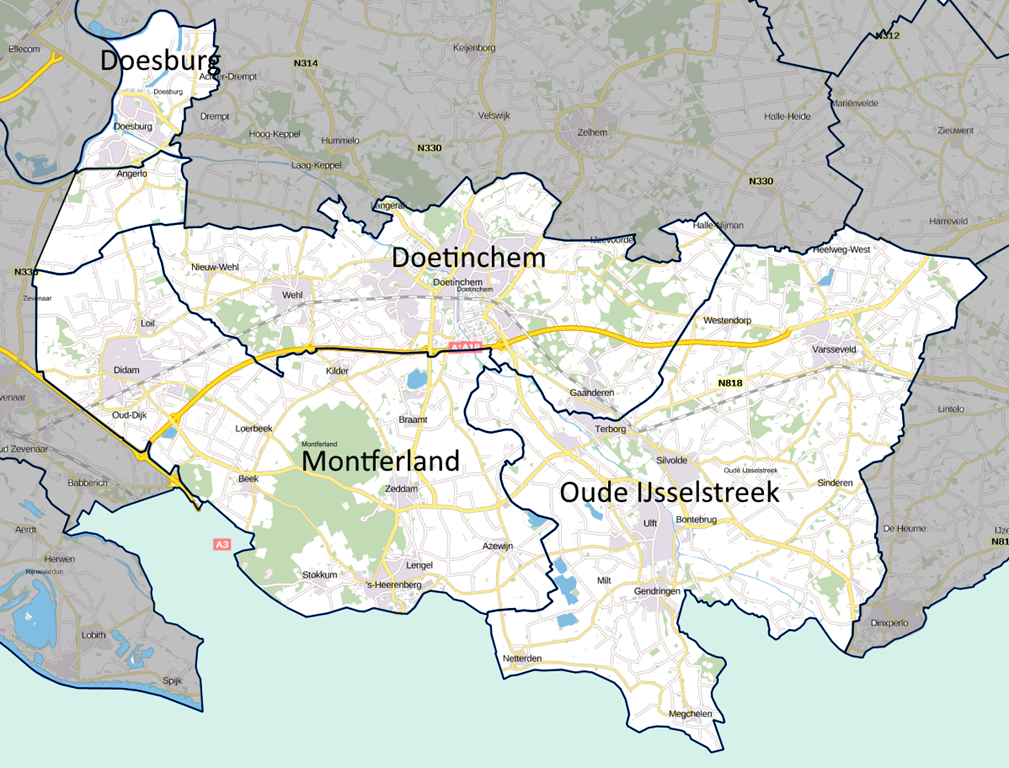
    However, there’s many a slip ‘twixt cup and lip – Bronckhorst decided that they weren’t going to play ball with CIF, and instead go ahead with their own plan to lay empty ducts, hoping that they can do a deal with KPN (the largest Dutch telecom provider) to put network cables in them. As a result, CIF has rejigged their plan, and now intend to implement 5,670 FttH connections to all countryside addresses in Oude IJsselstreek, Montferland, Doetinchem, and a further small municipality: Doesburg. They’re calling this area “Achterhoek Zuid” (South Achterhoek).

    Achterhoek Zuid 2

    CIF work together with a cable infrastructure company, COGAS, under the name “Glasvezel buitenaf” and last week, they organised a meeting for local volunteers (“ambassadors”) to give out information about the campaign.

    20171116-1947-25

    The campaign starts in earnest in the last week of November, when all 5,670 households will receive information about the project, and invitations to public meetings.

    The Great Work Begins…

  • The Saga of Broadband Internet – Part III

    I last blogged about the poor state of broadband internet here back in February. At that time things were not looking very good. The company (the Communications Infrastructure Fund – CIF) financing the rollout of fibre optic cables had made a start in two Local Authority areas, and had promised to make a start after the summer in two others. However, it was not yet able to commit to further projects with the remaining seven Local Authority areas (including ours), and this had led to tensions between it and those municipalities.

    As a result, the municipalities came up with their own plan to lay empty ducts and hire these out to other parties to put their own network cables in. Personally, I viewed this plan as a long shot for a number of reasons, not least the fact that it would need an investment from our Local Authority of €3.6 million – money which they do not have lying around.

    Still, back in February, CIF had said it would be able to announce news on further plans in September. Well, here we are, and there does seem to be some good news for a change.

    CIF has now made a start on a further two areas, as promised, for a total of 3,500 Ftth (Fibre to the Home) connections in the Aalten and Oost-Gelre municipalities. Households and companies in the countryside there have until the 23rd October to sign up for a connection. If 50% of them do so, then CIF will go ahead and lay the network.  If the 50% isn’t reached, there will be no network laid. It really is now or never…

    CIF has also announced that their investors have given the green light to financing a further 5,000 Ftth (Fibre to the Home) connections this year, which encompass all of the countryside addresses in our municipality (Oude IJsselstreek), plus parts of a further three (Montferland, Doetinchem and Bronckhorst). Once again, at least 50% of the households and companies in the countryside areas have to sign up for a FttH connection before CIF will go ahead and lay the network. Signing-up will be possible during a six week period which will (I hear) start in November.

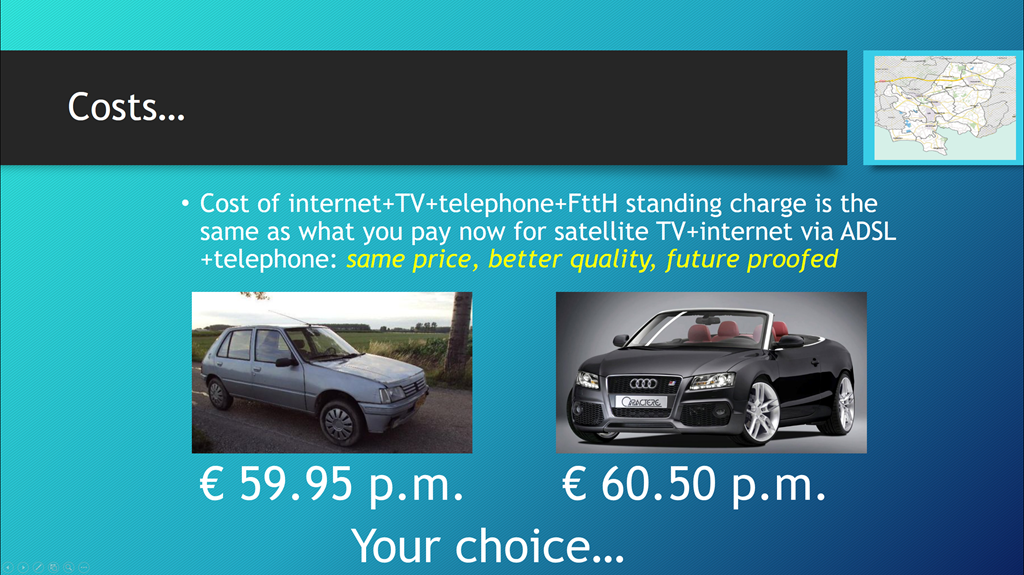
    We’ve been lobbying for FttH connections here in the outlying areas of Oude IJsselstreek for almost three years now, and at last things seem to be on the point of moving forward. During that time, we’ve built up a group of “ambassadors” who can explain to their neighbours why signing up for FttH makes sense. The cost case is usually the most important aspect to the Dutch(!), and it’s actually straightforward: the monthly cost of an “all-in-one” (internet, telephone and TV) subscription, plus the monthly standing charge for the FttH connection is the same as what they are currently paying for their (slow) internet and telephone connection via ADSL, together with their satellite television subscription (satellite TV is the norm here in the countryside). In our presentations to groups, the English language version of this would be:

    Cost Scenario

    Of course, now the real work begins, leading up to November, when we have to get at least 2,500 subscribers (the 50%). Given that here in Oude IJsselstreek there are only 2,441 potential subscribers (according to data we have from the municipality), we are going to have to ramp up efforts beyond our borders and drum up subscribers in the other municipalities. It’s going to be all hands to the pump over the next few months…

  • Falling Short

    I watched the live stream of the Microsoft keynote at IFA 2017 today, or at least I tried to. It was supposed to start at 14:00 CET, but for the first 18 minutes, there was no live stream, only music playing, and then, suddenly, we were thrown into the keynote, midway through the presentation by Microsoft’s Terry Myerson.

    I know that Mr. Myerson is an important person at Microsoft (being the Executive Vice President Windows and Devices Group Engineering, Microsoft Corporation), but really, someone should tell him that he is not at all good at presenting. It was something of an embarrassment.

    Even what he had to say struck me as falling short. He was extolling the virtues of the forthcoming “Windows 10 Fall Creators Update”, but it does irritate me that the claims made so clearly fall short from the reality. For example:

    We have reimagined our Photos Application to deliver remixed experiences for telling your stories with photos, videos, music, 3D, and even inking.

    Yes, but you can’t organise and search your photos as you could with Microsoft’s earlier photo applications (now dropped by Microsoft in Windows 10). And then there was:

    You can save all of your creations in OneDrive Files On-Demand, accessing your cloud files like any of your other files on your PC, without using up your local storage space.

    Yes, but you can’t search them, like any of your other files on your PC…

    There followed another couple of presentations that did not exactly set the keynote on fire, and the session closed with a pitch from Nick Parker (Corporate Vice President Consumer Device Sales, Microsoft Corporation) which was at least delivered with some conviction and passion. But even he ended with a video (apparently produced by the BBC, despite the Microsoft logo tacked on at the end) that was not related in any way with the mainstream businesses of Microsoft. It had clearly been chosen to tug at the heartstrings (and was effective enough at that), but had no connection at all with the rest of the keynote’s focus and content.

    Very disappointing.

  • Search in Microsoft’s Photos App – Simply Not Good Enough

    Another day, another rant at Microsoft. And once again, my despair is directed towards the team developing the Photos app in Windows 10.

    Ever since the Photos app had its debut in Windows 8, back in October 2013, it has been unable to search metadata in photos. This, despite the fact that its predecessors, Windows Photo Gallery (first introduced in Windows Vista back in 2007), Windows Live Photo Gallery (first introduced back in 2009) and Windows Photo Gallery 2012 were all able to do this. Microsoft, in its infinite wisdom, has now withdrawn all of these products from the market leaving only the miserably limited Photos app in place.

    Over the past four years there have been features added to the Photos app, but for the most part they have been akin to rearranging the deckchairs on the Titanic. Fundamental features present in the withdrawn Windows Photo Gallery 2012 are still not there.

    So it was with some interest that I read the other day that Search would at last be introduced to the Photos app. Since I’m a Windows Insider, it meant that I should get a preview of the app with the Search function in it. Well, it’s now arrived (version 2017.350631.13610.0 of the app) on one of my test laptops, and it turns out to be a huge disappointment. 

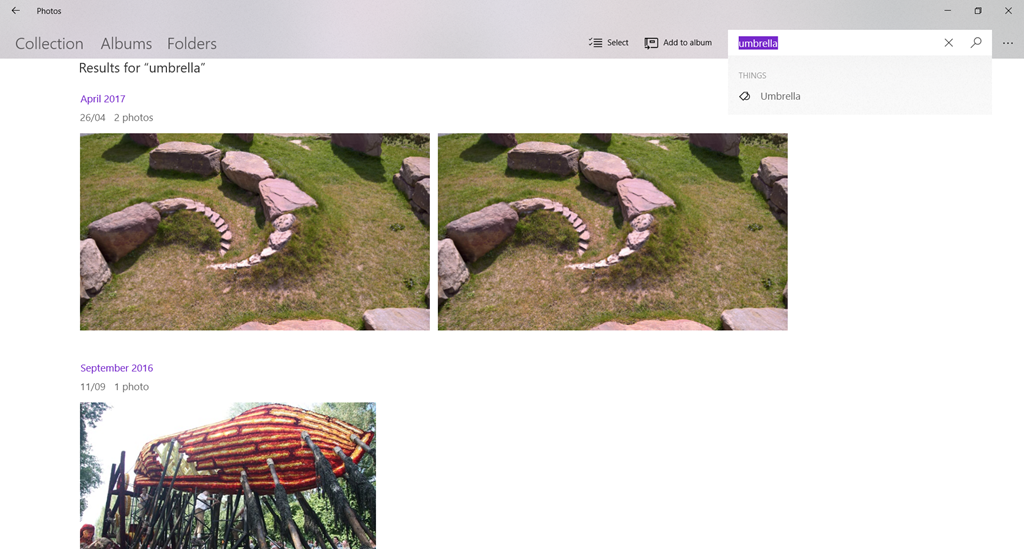
    The reason that I’m disappointed is that the Photos app still does not search photo metadata, instead it uses a Microsoft-built A.I. system that attempts to assign tags to your photos. I say “attempts” because currently it gets things more wrong than right. For example, here are my most recent photos that the Microsoft A.I. system thinks are photos of an umbrella:

    Photos 01

    Note that “umbrella” is not a word that I have chosen, the term has been assigned by the A.I. system, and popped up as a suggested search term.

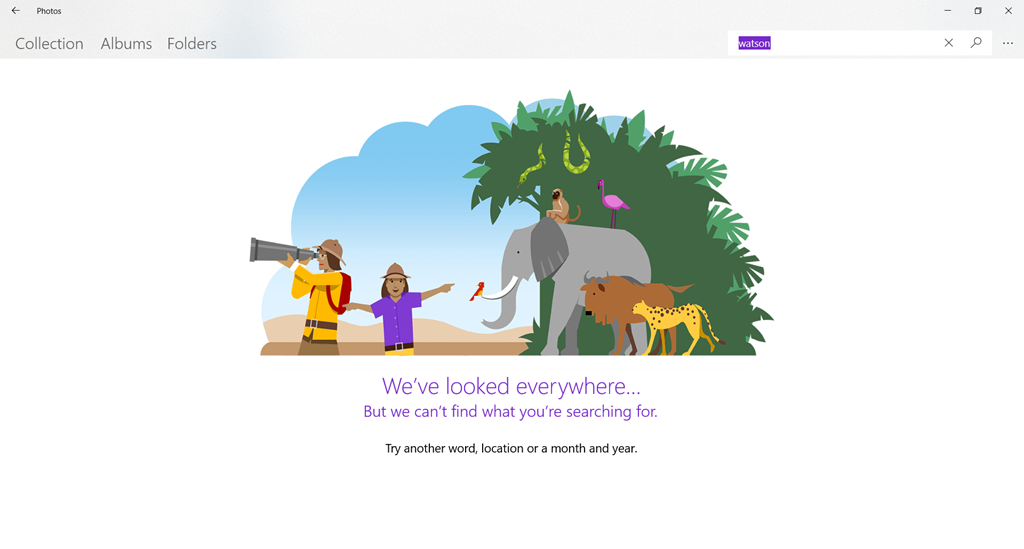
    I can’t search using my own terms. For example, if I try searching for photos of our dog, Watson, there are zero results:

    Photos 02

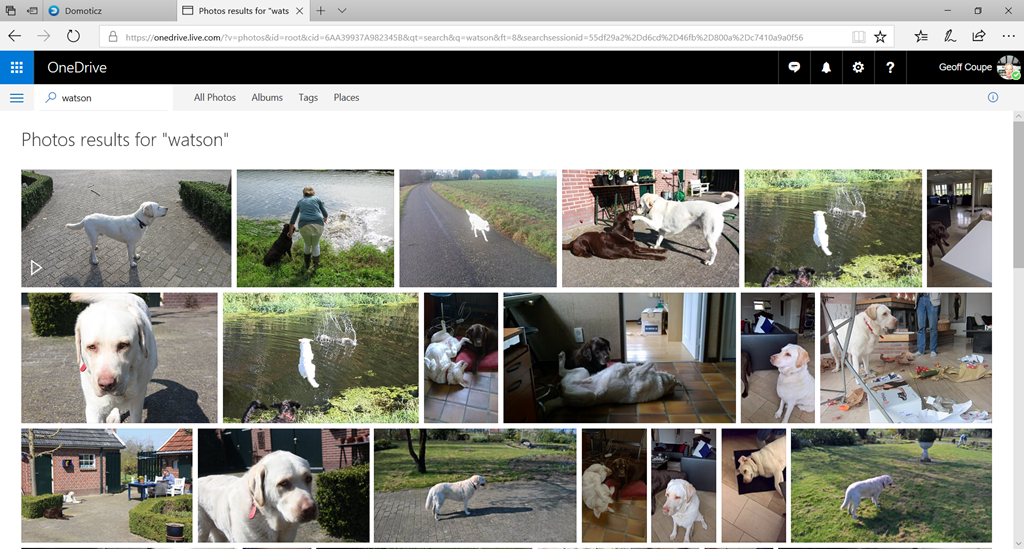
    The OneDrive search engine is certainly indexing my photo metadata, because if I search for “Watson” on OneDrive, it finds all the photos to which I have assigned the tag “Watson”:

    Photos 3

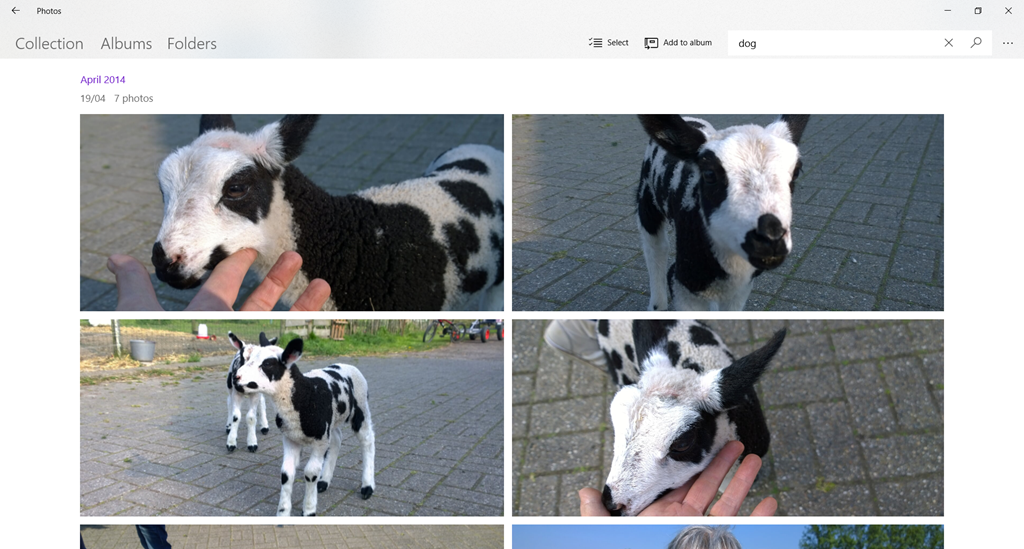
    At least the A.I. system knows about dogs, because I can search using “dog”. However, while that does return at least some of my pictures of Watson, it also thinks a lamb is a dog:

    Photos 04

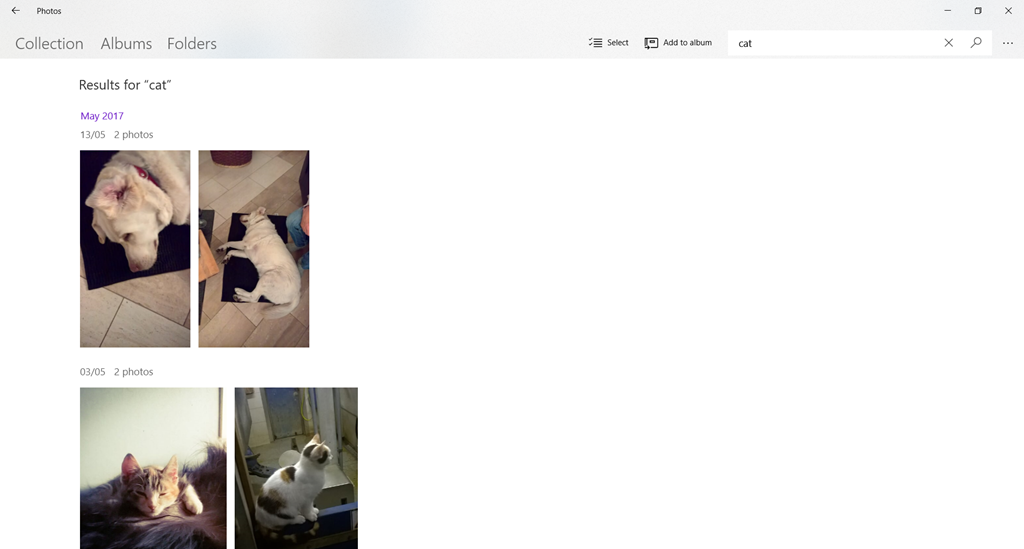
    The A.I. system does recognise the search term “cat”. Unfortunately, it’s even worse at recognising cats than dogs. It returned 45 photos that it claimed were of cats. It only correctly identified three photos of cats – the rest were of dogs (usually Watson), and one was a picture of a hand. Actually, I have 56 photos of cats in my collection.

    Photos 05

    There is currently no way to correct misidentified photos, so searching, it seems to me, is little better than a hit-and-miss affair at the moment. First, you’ve got to hit on a search term that the A.I. system uses, and then you’ve got to hope that it won’t return any misses in the results.

    The A.I. system also indexes the faces of people in your photos. Once again, there is no way to either assign a name to a face, or merge what the system thinks are different people into the one person. Both of these features were available in Windows Photo Gallery 2012, which I remind you was available five years ago, but which Microsoft has now withdrawn.

    I really wish that the Photos team would proceed in a more logical manner and provide features that put the Photos app on a par with what we had with Windows Photo Gallery before they introduce half-baked new features that do not advance the usability one jot.

  • Microsoft: One Step Forward, Two Steps Back – Again

    Once upon a time, back in 2013, Windows had a feature called “Smart Files”. I found it very useful – I was able to use Windows Explorer to search all of the files stored in my OneDrive, even though the majority of the files were only stored in OneDrive, and not copied to my local computer. It was a step forward.

    Then, in November 2014, Microsoft pulled the feature, claiming that some users found it difficult to use. Two steps back.

    This resulted in an outcry from people who used (and loved) the Smart Files feature, with the result that Microsoft backtracked and promised that Smart Files would be re-engineered and returned to Windows at some point in the future.

    That now looks to be later this year – three years since Smart Files was removed – with the announcement today that the “OneDrive Files On-Demand” feature is rolling out to Windows Insiders.

    Despite the clumsy new name, this did sound like Microsoft was at last taking a step forward again, so, being a Windows Insider, I installed it on my PC. And, of course, the reality is deeply disappointing.

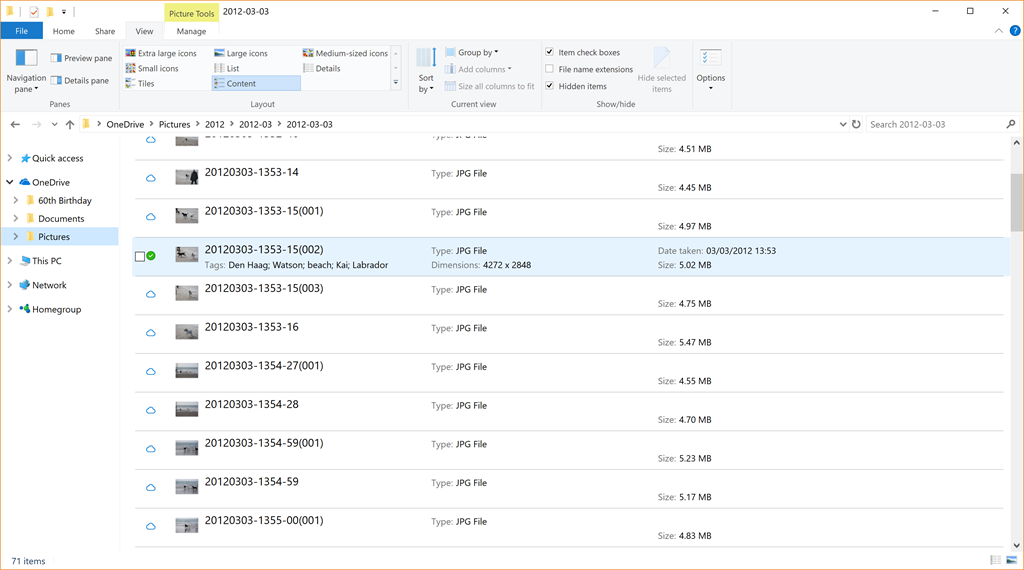
    The problem is that, unlike the original Smart Files feature, metadata from the files stored in OneDrive is not retrieved and stored in the placeholder files, so using the “Search” function in Windows Explorer won’t work on these files. Only files that have been fully downloaded and stored on the PC will have the metadata present. Here’s an example:

    OneDrive 22

    In this folder of 71 photos held on OneDrive, only one (the photo shown selected in the screenshot) has been fully downloaded to the PC, the other 70 photos are still in the OneDrive cloud. They are listed as being present, with thumbnails, filenames and size, however, you can see that no other metadata from these files is present. The downloaded file naturally has all the metadata present: the photo tags, date taken, copyright information, camera used and so forth. 

    This means that, as the OneDrive Files On-Demand feature currently stands, it is useless to me. I can’t search my online files directly from my PC.

    Two steps back again. Thanks, Microsoft. Another fail.

  • The Continuing Saga of Broadband Internet

    It’s been 15 months since I blogged about the poor state of broadband internet in our area. In that time, steps both forwards and back have occurred, so I thought it would be useful to summarise the current state of play in our household.

    We are still no closer to getting fibre optic cables laid in our neck of the woods, despite some initiatives from commercial companies. Our hopes were raised last year with announcements that ten Local Authorities (including ours) had signed a declaration of intent with an investment company to finance the commercial rollout of a fibre optic network. The company had already done similar projects elsewhere in the Netherlands, and things were looking good. However, after starting two projects in neighbouring Local Authorities, things seem to have slowed right down. The company refuses to commit to further projects in the remaining areas, and has said we must wait until September before any further news. The Local Authorities will be exploring other alternatives, but I see little hope of getting a fibre optic connection here to the Witte Wand before at least the end of 2018.

    So, what to do in the meantime? In the absence of fibre optic, some are saying that its time has passed, and that broadband internet will be delivered to the home by 4G and 5G networks. It’s certainly true that 4G can help, but it is not a complete solution, and it is an expensive alternative. It’s far too early to predict what will happen with 5G – the technology is still being developed, and I suspect that when the telecom companies make their initial investments, they are going to look to recoup their costs as quickly as possible. So when 5G does finally arrive, I’ll wager it won’t be cheap.

    Last year I mentioned that KPN had introduced a “4G fast internet for the home” product. Since then, T-Mobile has introduced a similar product. Although cheaper than KPN’s product, it still costs €50 per month for 100GB, and once your data allotment is used up, you have to buy extra blocks of data if you want to continue access to the internet.

    I’ve decided, as a (hopefully) temporary solution, that until the arrival of a fibre optic cable to our door, I will supplement our slow ADSL internet connection with a second, separate, 4G internet connection from T-Mobile.

    In effect, it doubles our internet costs from €50 per month to €100 per month.

    On the other hand, while the 100 GB per month data allowance lasts, our internet download speed goes from 4 Mbps to 40 Mbps, and our upload speed goes from less than 1 Mbps to at least 35 Mbps. T-Mobile also offer free access during the night (midnight to 6 am), and they are currently trialling free 50 GB bundles during weekends.

    I don’t want to stop our current ADSL subscription with XS4ALL (a Dutch ISP). For one thing, the subscription also covers our telephone usage, and T-Mobile do not support telephone usage in their 4G for the home package. Another reason is that our data usage is more than 100 GB per month (I’ve often seen it reach 200 GB).

    So I needed some way to manage simultaneous access to two internet service providers, in a transparent manner.

    A neighbour working in IT suggested the solution: use Sophos UTM Home Edition running in Hyper-V on my Windows 10 server that I use for our home cinema. With his help, I set it up, and after a couple of head-scratching moments, it’s been running flawlessly. Sophos UTM is firewall and router software that usually runs on dedicated hardware, but running it in a virtual machine on a server that is doing other things means I can kill two birds with one stone. It’s also free for home use. I have it set up so that the 4G connection is used preferentially, but if it goes down, or my monthly data allocation is used up, then the system automatically switches to the ADSL connection, and this is transparent to all the computers on the internal home network. Here’s a picture showing the two external internet connections and part of the internal home network.

    Network Layout January 2017 - Partial

    I’ve just completed my first month of operation of the new setup, and so far, it seems to be working well. However, it does come at a cost. As I wrote last year, those of us in the Dutch countryside must remain in the slow lane, or pay through the nose for fast internet.

  • The Lenovo YOGA Mouse

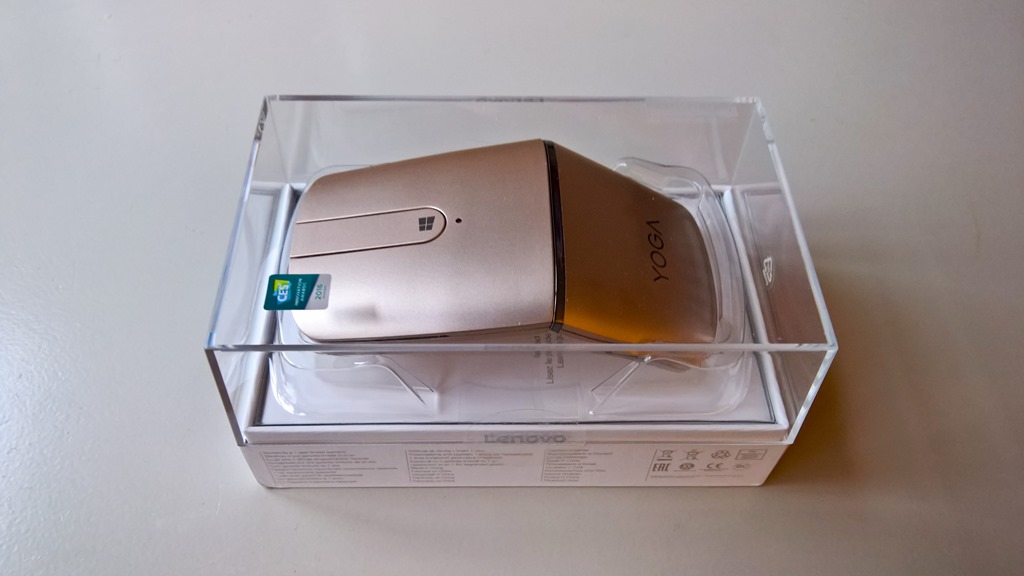
    Lenovo has a wide range of computer accessories, and recently they sent me an example of the new Lenovo YOGA Mouse for me to review. Lenovo tells me that, up to the end of December 2016, North American users can get a 25% discount off the listed price by using the code YOGASOCIAL in the online Lenovo shop.

    20161107-1608-58

    It’s designed as a travel mouse, and has a few tricks up its sleeve, which I’ll cover later.

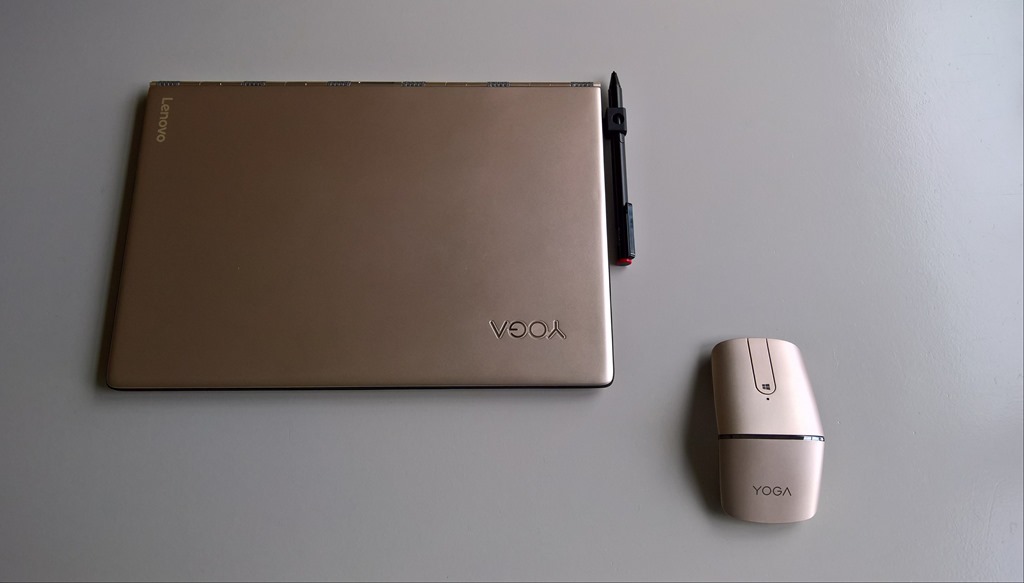
    It comes in Lenovo’s “Champagne Gold” colour, which makes it a natural to pair with my Lenovo Yoga 900s:

    20161122-1051-28

    It’s a wireless mouse, offering two modes to connect to your PC or laptop: 2.4 GHz wireless, or Bluetooth 4.0. The wireless dongle can be stored inside the mouse when travelling, or when Bluetooth is being used for the connection:

    20161107-1614-32

    Lenovo supplies a USB to micro-USB cable with the mouse, since the mouse is fitted with a rechargeable battery. Lenovo claims that the battery will have a 1 month life from a 2 hour charge. I don’t think that the battery itself is replaceable, and Lenovo gives no indication of what the total expected life of the battery might be.

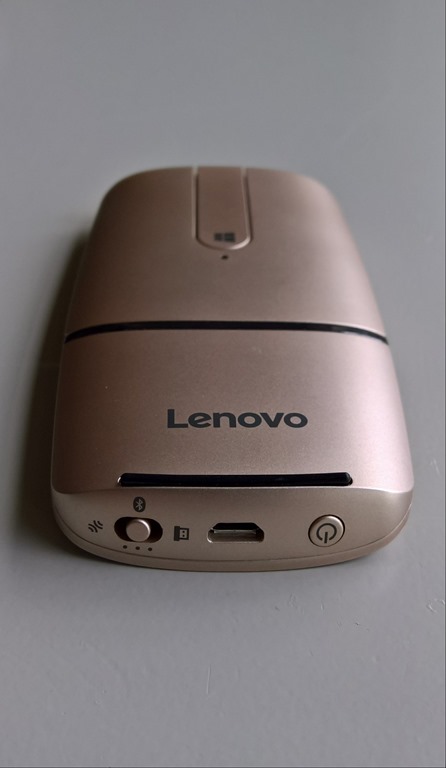
    At the bottom end of the mouse is the switch to select the wireless mode (and Bluetooth pairing), the micro-USB charging port, and the power switch that, when held in for two seconds, turns the mouse on or off.

    20161122-1059-25

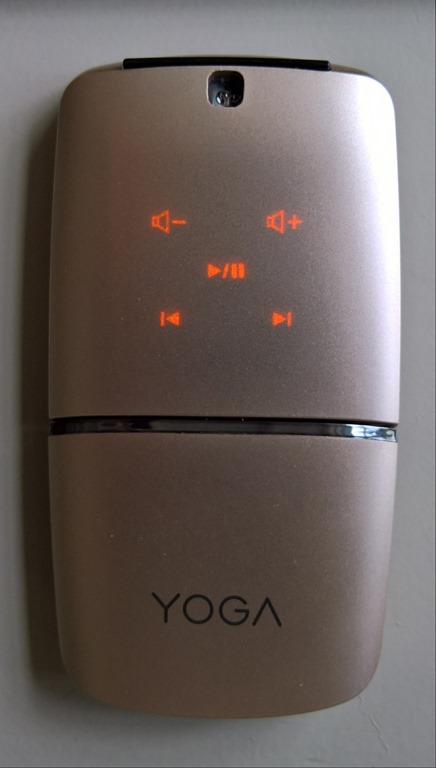
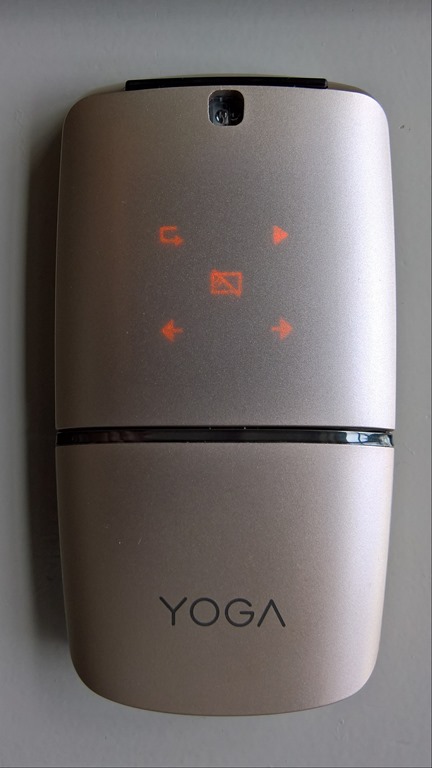
    The two halves of the mouse rotate 180° about the central hinge to transform it from the flat travel mode into the mouse mode. When in flat mode, it can also be used as a remote control for a media player or for presentations. Rotating the mouse into the flat mode causes what was the underside top panel of the mouse to become uppermost. At the same time, this surface now becomes touch-sensitive, and it lights up with the controls. Pressing the central mousebar switches between the two modes of the remote: media or presentation.

    20161122-1057-2920161122-1057-45

    Personally, I find the media mode to be the more useful of the two, and that’s down to the fact that the mouse uses touch for these modes, and not physical buttons. When I’m giving presentations, I’m looking at the audience or the presentation. Then it’s far easier to have a control in my hand that has physical buttons to control a presentation. I can feel the button and not have to physically glance at the control to ensure that I’m touching the right place on the mouse. I found it far too easy to accidentally touch a control to cause my presentation to jump forwards (or backwards!). The other thing I miss in this mouse when it’s in presenter mode is that it doesn’t have a laser pointer, and I certainly wouldn’t want to juggle two devices when giving presentations.

    I’m afraid that after trying the YOGA Mouse out in presentation mode, I very quickly went back to my trusty (and ancient) Acom Data USB Wireless Laser Pointer Mouse.

    In media mode, the YOGA Mouse is much more useful – it is no problem to glance at the mouse to control media playback and volume by touch.

    As a traditional mouse, the YOGA Mouse works well for me.

    20161122-1100-07

    The left and right mouse buttons are both physical switches, which I like. The central mousebar is both a physical switch, and a touch-sensitive surface. When in mouse mode, it can act as a scrollwheel by stroking along the bar. Pressing the section with the Windows logo on it will bring up the Windows Start menu on your PC.

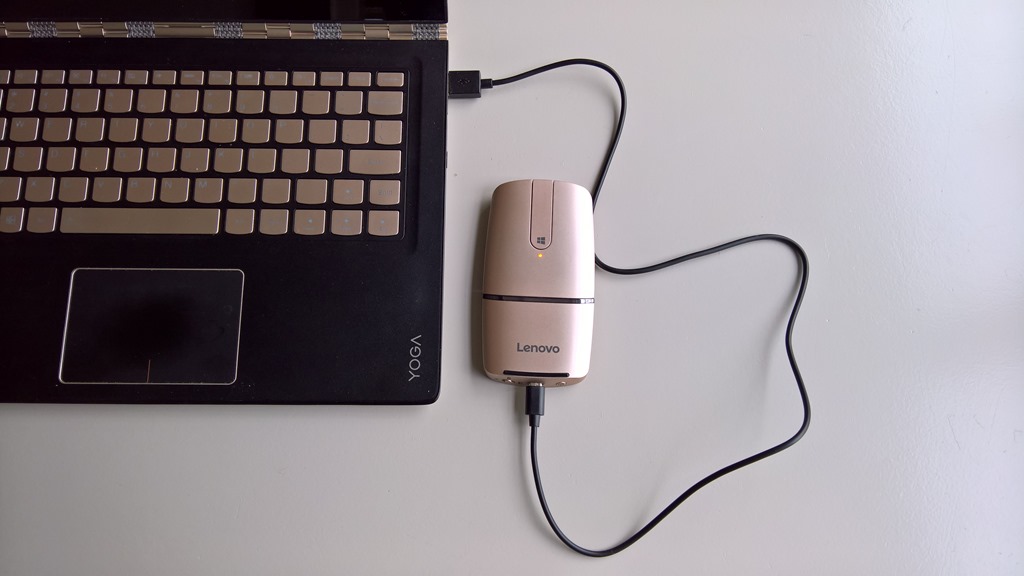
    When necessary, it can be charged from a PC or laptop fitted with a USB charging port. When the battery is getting low, the indicator just below the Windows logo will starting blinking with an amber colour. Just don’t expect to use it as a wired mouse while it’s being charged – the micro-USB connector lifts the mouse from the desk surface. It’s best charged when in flat mode as shown here, and the charging indicator changes from amber to white when fully charged:

    20161122-1103-23

    In summary, I found this to be a perfectly good travel mouse. It’s got an elegant and slim design, and is flexible in its connectivity options. The media mode is a clever idea, but the presenter mode leaves something to be desired in my view – a clever idea in theory, but one which in practice falls short; at least for me. Aside from this, it’s a nice device, and one that should readily appeal to those of us who insist on using a mouse with our laptops.

  • Microsoft Surface Studio

    Microsoft held a presentation in NYC yesterday and talked about both software and hardware. In software, the next major Windows update has been dubbed by Microsoft “the Windows 10 Creators Update” (being a grammar pedant, I note, with sadness, the missing apostrophe). It’s expected in the Spring of 2017, but those of us who are in the Windows Insider program are already seeing parts of it take shape.

    The most obvious new features in Windows 10 are the support for 3D capture and manipulation being built into Windows. For gamers, there will apparently be improvements enabling them to share and broadcast their gameplay. Not my thing, but I’m sure this is important to some.

    In hardware, alongside an upgrade to the existing Surface Book model, there was a totally new member of the Surface range introduced: the Surface Studio. It’s a gorgeous-looking device (with corresponding premium prices to match). It’s also aimed squarely at graphics artists and designers. Although it looks at first glance like a high-end All-in-One desktop PC, it converts at the touch of a finger into a drafting table. Microsoft also introduced a new peripheral for interacting with the Studio – the Surface Dial. Using the Surface Pen and Dial with the Studio display looks to be a major step forward for artists and designers, and presents a challenge to Microsoft’s competitors (Wacom and Apple) in this area. Perhaps it was no coincidence that this was unveiled the day before Apple unveiled its latest products.

    For a good in-depth look at the background to the development of the Surface Studio, see this story from Fast Company.

    Needless to say, I couldn’t possibly justify the purchase of a Surface Studio for myself – it would be a wasteful extravagance – but it certainly is a beautifully-designed piece of hardware.

  • Windows Essentials 2012 – the Bell Tools For Thee

    Microsoft has announced that its Windows Essentials Suite will reach end of support on January 10, 2017.

    Not really a surprise, the software suite has had no upgrades at all over the past four years. Still, it will be sad to bid goodbye to Windows Live Mail and Photo Gallery (two of the applications in the suite). They both have more functionality in their little fingers than Microsoft’s Mail and Photos apps have ever had in their whole stunted bodies.

    The Photos app, in particular, is a miserable thing that still does not offer support for managing descriptive, people and geo tags, or face recognition, even four years after its introduction.

    Microsoft has failed to deliver yet again.

  • Now It’s Amazon’s Turn

    I often castigate Microsoft here on the blog for their seemingly boneheaded decisions. Now it’s Amazon’s turn in the spotlight of shame.

    I’ve been using their Kindle app for Windows 8 ever since it was launched back in 2012; never saw the need to buy an Amazon Kindle e-reader device.

    Now Amazon has announced that they will be withdrawing the Kindle app from the Windows store later this month, and advise people to install the Kindle desktop application instead. Hooray – let’s all go back to 2005. Why on earth Amazon isn’t putting its development effort into a UWP version of the Kindle app instead, I have no idea. If they did, the app would be usable across all Microsoft Windows devices (PCs, Phones, Xbox, HoloLens, etc.).

    It also rather begs the question as to what will happen to the existing Kindle app on Windows Phones. I’ll be prepared to bet that Amazon will shortly announce that it will be withdrawing that as well. Since you can’t use the Kindle desktop application on a Windows Phone, the only possibility will be to use the browser-based version of the Kindle reader on the phone. That promises to be such a poor experience that I expect to be giving up using my phone for Kindle books.

    Amazon – what on earth are you playing at?

  • Media in the Home – The State of Play, part 2

    A month ago, I summarised the state of play concerning the media systems we have in our home. Since then, I’ve made some changes, so I thought I should once again summarise how things look at the moment.

    The major change is that I’ve added a second server to the network. This is an Intel NUC (Next Unit of Computing) box, the NUC6i3SYH.

    I did this because I need a server to be running 24/7 to host our Home Automation system (a Domoticz system). Originally, I had Domoticz installed on a low power Raspberry Pi2, but a couple of months back I repurposed the RPi2 to become a Roon Endpoint device for our music system, so the Domoticz system was moved across to the main media server. This meant that the media server had to be running 24/7 for the Home Automation role, and frankly, that was not particularly energy efficient (the server uses about 75 watts). I could have purchased another RPi2 solely for running Domoticz, but it struck me that we want to hear music much more often than sitting down to watch a film, so perhaps the alternative would be to split the roles of the main media server, and move the music server role off to a more energy-efficient server and combine it with the Home Automation role.

    So that’s what I’ve done. The Intel NUC now runs 24/7 and hosts Domoticz and Roon. It has a 256 GB SSD for the OS and the Domoticz and Roon databases, while the music library (mainly FLAC files) is held on an internal 1TB 2.5” hard drive. Being an Intel NUC, its power consumption is much lower than the original media server (less than 20 watts as compared to 75 watts).

    The original media server now holds our films, home videos, recorded TV and photo media, together with backups of our data from other PCs in the house. Since we don’t need this server running 24/7, I’ve installed the Lights Out software service on it so that it spends most of its time sleeping. Lights Out is set up so that when the HTPC is turned on, to watch a film for example, it will automatically wake up the server. When the HTPC is turned off, the server will go to sleep ten minutes later. If we want to view media from other PCs, laptops or tablets in the house, we can wake up the server remotely before launching a media player. That’s less than ideal, I’d prefer that launching a media player application would wake up the server automatically, but that’s not possible with Lights Out at the moment.

    I should perhaps add that I’m still dithering between Plex and Emby for handling visual media. At the moment Emby is back in the lead – Emby Theater is currently much more complete and polished than the Plex Media Player. However, both are still evolving, so for the moment I’m keeping both ecosystems running.

    As for music, I’m very happy with Roon, particularly over the wired connections to our Hi-Fi and Home Cinema systems. Its performance over WiFi still needs some further work I think. This may be down to our local setup, so I need to investigate further. In some rooms, I can have multiple laptops all playing different music without issue, whilst in other parts of the house I sometimes get dropouts even with just one music stream active. We do have WiFi repeaters installed here, but Roon seems particularly sensitive to network quality over WiFi.

    As a result of the changes in the past month, this is the current network setup:

    Network Layout May 2016

  • Media in the Home–The State of Play

    I’ve written a couple of posts over the past six weeks about Hi-Fi and Home Cinema, and I thought it would be useful to document the current state of play here in the Witte Wand.

    Six weeks ago, I was at the point where I had come to the conclusion that Microsoft has lost the plot when it comes to integrating Hi-Fi systems into the Windows ecosystem. I was still trying to decide between Plex and Emby as the basis for an all-in-one media handling system, and I had just come across the Roon music system.

    Part of the problem is that trying to base Hi-Fi audio streaming on the open protocol UPnP or Apple’s proprietary AirPlay protocol is an exercise ultimately doomed to failure. Some of the reasons why this is so are documented in this thread on the Roon Community forum.

    In addition, it is clear that handling music is not the focus of either Plex or Emby – their prime objective is on handling visual media: movies and TV.

    With this in mind, I decided that the way forward was to use Roon as the basis for managing and playing music to Hi-Fi quality in the house, and select between either Plex or Emby as the basis for our Home Cinema.

    Music

    To my mind, Roon has two key strengths. The first is that the user experience is the best of all the music systems that I’ve ever tried. The second is its underlying audio streaming protocol, RAAT (Roon Advanced Audio Transport), which is far in advance of anything else out there for handling Hi-Fi quality streaming audio that I know of. RAAT is being adopted by audio hardware manufacturers into so-called “RoonReady” devices.

    PI-DACSo I’ve put together a Raspberry Pi 3 with an IQaudIO Pi-DAC+ running the IQaudIO RoonReady software into a neat little enclosure from IQaudIO, and used it to connect Roon to my Quad 44 pre-amp. For a tad over €100, I’ve got an audiophile-quality network-connected DAC (Digital-to-Analogue Converter) delivering audio streams to my Hi-Fi system.

    hifiberryI also wanted to connect Roon to the Denon AVR-3808 used in our home cinema system. This time, because the Denon has its own internal DAC, I wanted to feed the digital audio stream straight into one of the Denon’s coaxial digital inputs. So I assembled a Raspberry Pi 2 with a HiFiBerry Digi+ card into a HiFiBerry enclosure to give me a network-connected S/PDIF device; total cost: €83.

    At the original time of writing this post, HiFiBerry didn’t have RoonReady software available, so originally I installed the open-source PiCorePlayer software onto the Raspberry Pi. Roon supports Squeezebox devices, so that both the Quad and the Denon systems were recognised as Roon endpoints in the network.

    Roon 49

    (note: the IQaudIO device is showing as “uncertified” because Roon haven’t released a Roon build since the device was approved in-house. Roon build 1.2 is expected in a few weeks, and then this warning will go away)

    Addendum 19 April 2016: In mid-April, Roon Labs released version 1.2 of Roon. As part of the release, they introduced Roon Bridge – a software package that (according to Roon Labs):

    …extends Roon’s audio playback capabilities to other devices or computers in your home.

    After installing RoonBridge on a device, any audio hardware attached to that device is made available to your Roon install exactly as if Roon had direct access to to the audio hardware.

    This enables you to place audio outputs anywhere in your home where you can connect an Ethernet cable or muster a decent WiFi signal, and makes it that much easier to separate the media server from your listening environment.

    So then what I did was to install Raspbian on the Raspberry Pi with the HiFiBerry hardware, and download and install Roon Bridge onto it.

    Now both the Raspberry Pi devices are recognised as true Roon endpoints, and I don’t need Squeezebox emulation any more.

    Roon 62

    Movies and TV

    As I said at the outset, the choice for handling our movie and TV collections was between Plex and Emby. I’ve decided to go for Emby for the following, completely personal, reasons:

    • Even though the new generation of Home Theatre clients of both Plex and Emby are still in beta, that of Emby is already more mature and appears to be evolving faster. The Plex client is still very crude, and Plex’s UI Experience team are still sitting on the pot wondering what to do as far as I can see.
    • Emby has explicitly stated that their Home Theatre client is designed to be controlled by a simple six-button remote from the ground up. Plex has gone the mouse/keyboard route, with support of a remote seemingly added on as an afterthought (it didn’t work at all in early betas). Since I want to carry on using my trusty MCE Remote, the point is awarded to Emby.

    Unfortunately, neither Emby nor Plex have a clue when it comes to supporting and displaying photo collections. The photo library functions in both is embarrassingly bad. This is particularly surprising given that one of the founders of Plex is a keen photographer. It may well be that Plex will buck their ideas up and deliver a more rounded product in the future. If so, I’ll revisit my current decision at that time. Until then, my money has gone to support Emby for at least the following year.

    The Music and Home Cinema Setup

    As a result of all of the above, our current home network now looks like this:

    Network Layout

    All our media is held on the central server (with off-site backup), and can be viewed/played on any of the attached PCs/laptops/tablets. In addition the Home Cinema system can handle both visual and music media, whilst the Quad system delivers the best Hi-Fi musical experience.

  • “It’s Easier To Use…”

    …oh, really?

    Yes folks, once again I’m referring to the good people at Microsoft, in particular the team behind OneDrive. They’ve just announced “A simpler sharing experience at OneDrive.com”. According to them:

    The new experience is, in a word, simple. We show the two most popular options for sharing right up front with big blue buttons that are easy to see and easy to hit. We use terms that are understandable to a wider range of users. We optimized for the common cases and present the rarely used options in less distracting ways. Basically, it’s not as messy.

    What they didn’t say is that they have removed one option: the ability to shorten a link from two lines of gobbledygook down to a simple string of 7 or 8 characters. This was perfect for those people who needed to include links in printed documents.

    Now they have to rely on people being able to type, without errors, something like https: //onedrive.live.com/redir?resid=6AA39937A982345B!10782&authkey=!AMBcijD6MBaGeF0&v=3&ithint=photo%2cjpg. Many email clients will also break these long links by splitting them over two lines so that they won’t work when clicked on.

    Needless to say, there’s been a storm of protest about this removal. So much so that Microsoft has (I suspect rather shamefacedly) now added an update to the post:

    We’re working on a new approach to shortening the sharing links that will better enhance our users’ experience. Unfortunately, we had to remove the current experience in preparation for the new one. We always keep the best interest of our users in mind so we appreciate your patience as we work this out. We expect to have it ready soon.

    What is even more astounding is that Microsoft apparently tested this new experience on “28,000 real-world users”. One might wonder why on earth none of the 28,000 users picked up on this removal of a very convenient feature (or perhaps Microsoft didn’t bother to ask them about it). One might also wonder why Microsoft didn’t get the new approach to short links ready before rolling out the complete new experience to the world, but I suppose we should never underestimate Microsoft’s unerring ability to snatch defeat from the jaws of victory.

  • The Pursuit of Excellence or Excess?

    A couple of weeks ago, I wrote about my adventures in the world of Hi-Fi. With the discovery of Roon, I’ve rekindled my quest to listen to music, rather than have it as background noise. It’s also had the side effect of making me take a look at my current Hi-Fi equipment and wondering whether I should upgrade or tweak it.

    Ever since I started my journey into the lands of Hi-Fi, back in 1968, I’ve been aware that there were esoteric areas, complete with warring tribes, contained within. Now, revisiting the subject some fifty years later, it seems that Hi-Fi has got more complex, rather than completely mapped out.

    There are many more companies involved in the field now. When I started there were a few well-known names, now there are seemingly thousands that I’ve never heard of. The choice is overwhelming. I’m finding it very difficult to sort the wheat from the chaff. Some decisions are easily made; for example, I don’t see myself plonking down £44,000 for an amplifier (the Dan D’Agostino Momentum Integrated Amplifier). Even if I had that sort of money lying around, I would be thinking twice or three times about it. And then there are the products which, to my mind, seem more associated with snake oil than science.

    Connecting cables is the big area here. Some of the claims made for expensive cables seem, shall we say, somewhat over the top? But then, if you are going to pay $22,000 for a cable to connect one piece of equipment to another (the Skogrand Beethoven cable), you have to believe that it makes a difference. This reviewer (and his cat) clearly did, but me? I doubt it very much. I’d be asking for the guaranteed blind testing of all such claims, and even then I’d probably suck my teeth and say “thanks, but no thanks”.

    As someone once said: ‘Although it is fully understood scientifically, the phenomenon of “gullibility” has been experienced by many audiophiles’.

    With all this in mind, I looked at my current Quad 44 preamp + Quad 405 amp + Quad ESL 57 speakers, and wondered: upgrade or tweak?

    My first port of call was Quad themselves. I see that they have introduced a new preamp/amp combo for the digital age: the Quad Artera. The product web page rather jarringly still gushes that it’s “coming soon for 2015” [since corrected, after I sent them an email to point it out]. That aside, it certainly looks good, and has very good specs. I took a look at the manual and noticed something missing: unlike the Quad 44 preamp, the Artera Play has no switched mains outlets. Those of us who use mains-powered loudspeakers (e.g. the Quad ESLs) like the convenience of being able to switch on the preamp, and everything else in the system gets powered up. Likewise for switching off. That convenience is gone with the Artera – it seems a step backwards to me, and something that seems to have been overlooked in the design. I wonder why?

    I think at this stage, I’m leaning towards a tweak of my existing setup. Although I’ve now got the Quad system hooked into our HTPC so that I can play music from our music server through it, I think that I can improve the sound quality further. This coming week I hope to get a Pi-DAC+ from IQaudIO, and then I can re-use my spare Raspberry Pi 2 to build a Roon endpoint. I’ve run an ethernet cable into the cabinet housing the Quad system, and then I can connect the RPi2 + Pi-DAC+ (housed in a neat little box) up to the Quad 44. An upgrade that hasn’t cost an arm and a leg.

    Addendum 1st March 2016: I emailed Quad to ask about the missing mains outlets, and got back the following from the Service Manager:

    The Artera uses true standby function is this is why we did not place a mains outlet socket on either unit.  The mains outlet sockets on the 44 pre-amp were for other Quad units and not really designed for ESL’s switching on and off.

    They may not have been really designed for that purpose, but I’d be prepared to bet that the majority of ESL owners used them that way…