Reflections on life at “De Witte Wand”…

  • The Crawick Multiverse

    Just back from a week in Scotland, visiting family living in Kirkcudbright. During the week, my brother took me to the Crawick Multiverse, a landscape work of art created by Charles Jencks.

    It’s stone circles for the 21st century, because it incorporates current cosmological theories into landforms. Quite stunning.

    2 responses to “The Crawick Multiverse”

    1. Hilary Avatar

      Reblogged this on therockshelf.com and commented:
      Thank you — Geoff Coupe and, ultimately, thank you to Charles Jencks for creating these places that speak not only of our Cosmic Speculations — but of our Cosmic affinity, dreaming, and love.

    2. […] 10 years later, I visited two landscapes designed by him: the Crawick Multiverse and the Garden of Cosmic Speculation itself. Neither […]

    Leave a comment

  • Floating and Voting

    Tomorrow, the 15th March, we in the Netherlands go to the polls to vote for our political candidate of choice. Note that I didn’t say “to vote for our next government” – with 27 political parties to choose from on the ballot paper, it is inevitable that we’ll end up with yet another coalition government.

    As well as the mainstream parties (8 or 11, depending on your definition of “mainstream”), the parties also include the “Non-Voters” party (12 candidates), the “Pirate Party” (with 37 candidates) and the “Jesus Lives” party (6 candidates). Somehow, I don’t think Jesus stands much of a chance. Perhaps he needs to hitch his wagon to the “Political Calvinist Party” – the evangelical Christian party, with their 30 candidates – not one of them a woman, because a woman’s place is of course in the home, and certainly not in politics. Yes, it’s the 21st century, but clearly not for some people.

    And as usual, Geert Wilders has been generating more heat than light. His manifesto – actually a list of 11 bullet points covering less than one side of an A4 page – lays bare his anti-Muslim and anti-EU soul. He must be fully aware that he hasn’t got a hope of forming a government – few other parties will touch him with a bargepole in a coalition – and one suspects that he only does it to provoke. What is worrying is that his probable strategy – to pull the other parties to the right – appears to be working, at least in the case of the VVD, led by the current prime minister, Mark Rutte. Wilders appears to have goaded Rutte successfully into matching his rhetoric. Rutte is increasingly trying to appeal to Wilders’ PVV voters, and that’s a very dangerous, and populist, game.

    Then we have Erdoğan butting in, and inflaming the passions of the Dutch citizens who have dual Dutch and Turkish nationalities. His “Nazi” rhetoric hasn’t exactly helped Dutch-Turkish relations of late, but then, one suspects, it wasn’t intended to.

    And on top of all this, our newspaper, de Volkskrant, has been full of vox-pop pieces on floating voters, there seems to be a veritable flood of them. I confess that I am bewildered by the number of people who seem incapable of making up their minds. The choices are clear, at least to me. Tomorrow I’ll be following in my father’s footsteps and voting left-wing. He was a lifelong socialist, as am I, and believed in a caring society. My vote will be going to the Dutch Labour Party (PvdA), and to a woman. Sorry about that, Calvinists.

    One response to “Floating and Voting”

    1. Matthew D Healy Avatar
      Matthew D Healy

      I am rather appalled by the resurgence of right-wing stupidity on both sides of the Atlantic these days! Also many people seem to have forgotten one of the main reasons for the refugee crisis: foolish wars started by President Bush after the September 2001 atrocities. Getting the West to overreact is a prime goal of the terrorists.

    Leave a comment

  • Media in the Home – The State of Play, part 3

    This weekend has seen a major upgrade in our HiFi system. I’ve replaced both the QUAD 44 preamplifier and the QUAD 405 power amplifier. Bought back in 1981, they’ve both given sterling service, but ever since I had our QUAD electrostatic speakers refurbished last year, I’ve been looking at QUAD’s new Artera range of equipment to drive them.

    The plan was to replace the QUAD 44 preamplifier with the Artera Link, and the QUAD 405 with the Artera Stereo. However, even though the Link was unveiled a year ago at the 2016 Sound and Vision show in Bristol, production of the units has only just begun.

    I am now the proud owner of an Artera Link, and it joins the recently purchased Artera Stereo to give new life to our music.

    Quad Artera Link

    I chose the Artera Link because it can be connected to the network; it is a streaming device, in addition to being a CD player, preamplifier and a high-end DAC. I’m taking a bit of a gamble here; the current streaming capabilities of the Link don’t interest me any more. It supports UPnP, AirPlay and Spotify Connect. UPnP is an example of the “lowest common denominator” approach to solving a problem and while it is a de facto standard in the market, it’s really not well-suited to delivery of high-quality audio streams. AirPlay is a bit better designed, but again, it doesn’t support high-quality audio streams, e.g. DSD. And while Spotify has a huge music library available for streaming, the audio quality of its streams is not (yet) HiFi.

    What I really want is for the Artera to become a Roon-certified network player.

    This is something that QUAD will have to develop in conjunction with Roon Labs, but if QUAD see it as a market opportunity, it’s well within the realms of the possible. Once developed, new firmware can easily be deployed to the Artera Link via the network.

    In the meantime, I’ve integrated my Artera Link into our Roon system via a USB connection to a Sonore microRendu. The latter is already a Roon Ready-certified device, so I can use it to feed FLAC and DSD audio files to the Artera Link.

    However, the icing on the cake would be for the Artera Link itself to become a Roon Ready device. That would mean fuller integration into Roon, for example being able to control the volume and digital filters of the Link from within Roon. Hopefully enough of QUAD’s customers feel the same way to persuade QUAD to take the step.

    Addendum, May 2017: I’ve sold the Sonore microRendu and replaced it with a humble Raspberry Pi 3, running DietPi and Roon Bridge software. To my old ears, this sounds just as good, but at a fraction of the price of the microRendu.

    Addendum, February 2018: I’ve now replaced the Raspberry Pi with an Allo USBridge. This is claimed to be a step up in audiophile quality from the RPi. I’m not sure that my ears are up to the task of hearing the difference, but I can now re-use the RPi in a project elsewhere.

    Addendum, August 2020: I’ve sold the Allo USBridge and gone to a Raspberry Pi 4 running RoPieee (which installs Roon Bridge). My ears can’t tell the difference, so I can enjoy the music.

    5 responses to “Media in the Home – The State of Play, part 3”

    1. […] should probably sleep on the idea of selling all my Quad kit4 just at the moment, but I am rather tempted to ask for a home […]

    2. […] managed to purchase an Artera Link in February 2017, and it’s been a key component in our HiFi system during the last […]

    3. Jonathan Avatar
      Jonathan

      Geoff, thank you for this and the Quad Artera blogs and the pragmatism. I have the opportunity to buy an Artera One but until I found your article your article was struggling to find out the details. I will use the streaming function, I use a Pi with an add on day, i2s I think, at present but would prefer one less box so I would need the control app. I reckon I can find it or tslk to Quad. I’m wondering how you have found the unit overall and if thete are any issues you have found. Thanks again. J.

      1. Geoff Coupe Avatar

        Jonathan – AFAIK, the Artera One doesn’t have a network connection, so I think you will be limited with what you can do with streaming. And I don’t think that the Artera control app for the Link is available any more (it’s no longer in the Google Playstore – it may still be available for iOS).

        I’m very happy with my Artera Link/Artera Stereo combination and haven’t had any issues with them. However, I only use the USB input, connected to an Allo USBridge, and using Roon. All my CDs have been ripped to my Roon Core server, so I never bother using the CD player function of the Artera Link.

        I make a few further comments on the QUAD Artera Link – Rare Bird or Lame Duck post, but I think you’ve seen those…

        Hope this helps.

    4. Jo Avatar
      Jo

      Hej Geoff!
      Thanks about details in your thread about Artera LINK. I considered to buy an Artera Play(without the plus). Can you confirm that the preamplifier section of the Artera Play(also maybe Play+) is without the connectivity of wlan, Bluetooth and Lan the same? Mention that because i would also prefer using USB only with my Mac 🙂 Or does all these Interface(active used or NOT) influence the sound in bad way? THANK you.
      Very nice regards, Jo

    Leave a comment

  • The Continuing Saga of Broadband Internet

    It’s been 15 months since I blogged about the poor state of broadband internet in our area. In that time, steps both forwards and back have occurred, so I thought it would be useful to summarise the current state of play in our household.

    We are still no closer to getting fibre optic cables laid in our neck of the woods, despite some initiatives from commercial companies. Our hopes were raised last year with announcements that ten Local Authorities (including ours) had signed a declaration of intent with an investment company to finance the commercial rollout of a fibre optic network. The company had already done similar projects elsewhere in the Netherlands, and things were looking good. However, after starting two projects in neighbouring Local Authorities, things seem to have slowed right down. The company refuses to commit to further projects in the remaining areas, and has said we must wait until September before any further news. The Local Authorities will be exploring other alternatives, but I see little hope of getting a fibre optic connection here to the Witte Wand before at least the end of 2018.

    So, what to do in the meantime? In the absence of fibre optic, some are saying that its time has passed, and that broadband internet will be delivered to the home by 4G and 5G networks. It’s certainly true that 4G can help, but it is not a complete solution, and it is an expensive alternative. It’s far too early to predict what will happen with 5G – the technology is still being developed, and I suspect that when the telecom companies make their initial investments, they are going to look to recoup their costs as quickly as possible. So when 5G does finally arrive, I’ll wager it won’t be cheap.

    Last year I mentioned that KPN had introduced a “4G fast internet for the home” product. Since then, T-Mobile has introduced a similar product. Although cheaper than KPN’s product, it still costs €50 per month for 100GB, and once your data allotment is used up, you have to buy extra blocks of data if you want to continue access to the internet.

    I’ve decided, as a (hopefully) temporary solution, that until the arrival of a fibre optic cable to our door, I will supplement our slow ADSL internet connection with a second, separate, 4G internet connection from T-Mobile.

    In effect, it doubles our internet costs from €50 per month to €100 per month.

    On the other hand, while the 100 GB per month data allowance lasts, our internet download speed goes from 4 Mbps to 40 Mbps, and our upload speed goes from less than 1 Mbps to at least 35 Mbps. T-Mobile also offer free access during the night (midnight to 6 am), and they are currently trialling free 50 GB bundles during weekends.

    I don’t want to stop our current ADSL subscription with XS4ALL (a Dutch ISP). For one thing, the subscription also covers our telephone usage, and T-Mobile do not support telephone usage in their 4G for the home package. Another reason is that our data usage is more than 100 GB per month (I’ve often seen it reach 200 GB).

    So I needed some way to manage simultaneous access to two internet service providers, in a transparent manner.

    A neighbour working in IT suggested the solution: use Sophos UTM Home Edition running in Hyper-V on my Windows 10 server that I use for our home cinema. With his help, I set it up, and after a couple of head-scratching moments, it’s been running flawlessly. Sophos UTM is firewall and router software that usually runs on dedicated hardware, but running it in a virtual machine on a server that is doing other things means I can kill two birds with one stone. It’s also free for home use. I have it set up so that the 4G connection is used preferentially, but if it goes down, or my monthly data allocation is used up, then the system automatically switches to the ADSL connection, and this is transparent to all the computers on the internal home network. Here’s a picture showing the two external internet connections and part of the internal home network.

    Network Layout January 2017 - Partial

    I’ve just completed my first month of operation of the new setup, and so far, it seems to be working well. However, it does come at a cost. As I wrote last year, those of us in the Dutch countryside must remain in the slow lane, or pay through the nose for fast internet.

    5 responses to “The Continuing Saga of Broadband Internet”

    1. Matthew Healy Avatar
      Matthew Healy

      We’re fortunate that we have two wired options: ADSL via local Telco and Cable through our local Cable provider. Since it’s mission critical for my wife and myself to have reliable Internet, we’ve got both. The ADSL is about 4 megabits down and 1 up while the Cable tests out at around 40 to 50 down (theoretically 60) and around 12 megabits up (theoretically 20). Most of our computers use the Cable, and while I’m home I use the ADSL with a phone and tablet so as to confirm it’s working. Occasionally the Cable is down for some reason and we switch everything over to ADSL for a while. When both go down from a hurricane, we use 4G as the last resort backup.

      1. Geoff Coupe Avatar

        Some of the villages around here have cable that was laid down a long time time ago. The cable provider (Ziggo) has no plans to extend their network into the surrounding countryside, so that’s not an option for us. In any case, many of the villages are complaining about the quality of service available from Ziggo, and want to jump on the fibre optic bandwagon as well. Unfortunately, the bandwagon seems further away from all of us than ever at the moment…

    2. Matthew Healy Avatar
      Matthew Healy

      P.S. I like your server names honoring famous painters.

      1. Geoff Coupe Avatar

        They are all named after French Impressionists. It’s a tradition that I started when the network began with the addition of our second computer 25 years ago…

    3. […] last blogged about the poor state of broadband internet here back in February. At that time things were not looking very good. The company (the Communications Infrastructure […]

    Leave a comment

  • Garden Visitors

    As if to provide a distraction from the ongoing horror that is Trump’s Presidency, we had a fleeting visit from a migrating flock of Fieldfares a few days ago. The flock had spotted the fruit still hanging on our small Japanese flowering crabapple, and descended en masse to strip the tree.

    20170127-1441-56(001)

    There must have been a hundred birds in our garden having a fine old time eating the fruit before moving on.

    20170127-1431-53

    I also noticed a Waxwing that had joined in the fun.

    20170127-1442-11

    Fruit on the ground was soon disposed of…

    20170127-1445-42

    And once the tree was bare, the flock moved on…

    20170127-1443-19

    2 responses to “Garden Visitors”

    1. Ludwig Avatar

      On this side of the pond we have cedar waxwings, birds about the same size as yours, descending on crabapple trees this time of year. Just proves that life goes on and that there is a good chance that we will survive.

      1. Geoff Coupe Avatar

        Thanks, Ludwig. I hope you’re right…

    Leave a comment

  • “A cruel, stupid and bigoted act”

    …and I’m sure we’re only at the beginning of Trump’s nightmare presidency. The Guardian editorial on Trump’s anti-Muslim orders nails it.

    The words in the Statue of Liberty’s pedestal famously read:

    “Give me your tired, your poor,
    Your huddled masses yearning to breathe free,
    The wretched refuse of your teeming shore.
    Send these, the homeless, tempest-tost to me,
    I lift my lamp beside the golden door!”

    Sorry, lady, but as far as Muslim refugees from countries where Trump does not have business interests are concerned, your lamp has just been doused.

    2 responses to ““A cruel, stupid and bigoted act””

    1. tom Avatar

      You are such an optimist. I doubt the world is coming to an end.

    2. Ludwig Avatar

      Let’s hope this nightmare will not go on for four long years ,,,

    Leave a comment

  • Testing, Testing…

    Testing Roon’s Share feature. Please ignore this post…

    Leave a comment

  • Even the Heavens Wept…

    I see Trump has begun as he means to go on. His first speech as President was, as Gary Younge says:

    as crude and unapologetic an appeal to nationalism as one might expect from a man incapable of rising to an occasion without first refracting it through his ego.

    This is not the triumph of democracy, but a tragedy.

    2 responses to “Even the Heavens Wept…”

    1. TomT Avatar
      TomT

      And we elected him. Not you of course, and not me specifically, but we Americans did this. Zod help us.

    2. Mark Avatar
      Mark

      You have to have a bogeyman to use for justification. During the election process it was illegal Mexicans and then “crooked Hillary” – now we have the sky is falling justification for anything he wants to do.

    Leave a comment

  • Responsible Leadership

    A sobering article on responsible leadership in the age of populism. Worth reading. An extract:

    The way today’s leaders increasingly rely on referenda, petitions and social media to legitimize their action suggests the emergence of a worrying trend of delegation of leadership and therefore responsibility.

    In Britain, the Brexit referendum is a case in point, where those who put this issue to a vote and campaigned for the UK to leave the EU did not take responsibility for the consequences. The illusion that politics can simply collect people’s preferences and mechanically turn them into a reality threatens to override the idea behind political representation.

    In a representative democracy, the mission of leaders should be to temper citizens’ input and emotional responses rather than to foster the violence of the majority. In other words, the relationship between representatives and represented must be ongoing and should entail judgement on both sides.

    The article lists 10 personal qualities that should be present in a responsible leader. The person who will assume the role of the next President of the US in a few days time would appear to lack all of them.

    2 responses to “Responsible Leadership”

    1. Mark Avatar
      Mark

      unfortunately, increasingly the population uses spoon-fed sound bites and unverified statements to make all voting decisions. Small wonder that those trying to be elected find that being a “responsible leader” doesn’t get them very far.

    2. Matthew D Healy Avatar
      Matthew D Healy

      “But his unbiassed opinion, his mature judgment, his enlightened conscience, he ought not to sacrifice to you, to any man, or to any set of men living. These he does not derive from your pleasure; no, nor from the law and the constitution. They are a trust from Providence, for the abuse of which he is deeply answerable. Your representative owes you, not his industry only, but his judgment; and he betrays, instead of serving you, if he sacrifices it to your opinion.”

      –Edmund Burke

    Leave a comment

  • The Yoga 910 – A Review

    Introduction

    Lenovo has a range of consumer-oriented computers named IdeaPad. The range has a number of different series within it, each designed for a different purpose or user group. The Yoga series is a line of tablets and laptops. The name “Yoga” was chosen because the laptops have hinges that allow the screen to be fully folded back (up to 360°) to convert a laptop into a tablet. A Yoga laptop can also be placed in “tent” or “stand” mode for showing presentations or movies.

    Back in October 2015, I reviewed Lenovo’s Yoga 900 Ultrabook. In January 2016, Lenovo announced a variant of the 900: the Yoga 900s. Slightly smaller and even thinner and lighter than the Yoga 900, this was intended as the ultimate Ultrabook. I reviewed it in February 2016.

    Lenovo announced the next iteration of the Yoga 900 series at the end of August 2016: the Yoga 910. A few weeks ago, courtesy of Lenovo, FedEx delivered a Yoga 910 to me for review. This blog post is the result.

    Here’s a table that shows a quick comparison between the Yoga 900, the Yoga 900s, and the new Yoga 910:

      Yoga 910 Yoga 900 Yoga 900s
    OS Windows 10 64 / 10 Pro 64* Windows 10 64 / 10 Pro 64** Windows 10 64 / 10 Pro 64
    Screen 13.9” FHD 1920×1080 IPS, 300nits or 3840×2160 UHD IPS, 10 point Touch 13.3”QHD+ 3200×1800 IPS, 300nits
    10 point Touch
    12.5” 1920×1080 FHD*** or 2560x1440QHD
    10 point Touch
    CPU Intel Core i7-7500U* /
    Intel Core i5-7200U
    Intel Core i7-6500U** /
    Intel Core i5-6200U
    Intel Core m7- 6Y75
    Graphics Intel HD Graphics 620 Intel HD Graphics 520 Intel HD Graphics 515
    Memory Up to 16GB DDR4* Up to 16GB DDR3L 8GB DDR3L
    Storage 256GB/1TB SSD* 256GB/512GB SSD 256GB/512GB SSD***
    Active Pen support No No Yes***
    Audio JBL branded stereo speaker with Dolby Audio Premium certification, 2.0W x 2 JBL stereo speakers with Waves Audio and DOLBY Home Theatre certification JBL stereo speakers with Waves Audio and DOLBY Home Theatre certification
    Webcam 720p HD 1.0MP resolution, fixed focus 720p, 30 fps 720p, 30 fps
    Connectivity 802.11 a/c Wireless,
    Bluetooth V4.1 
    802.11 a/c Wireless
    Bluetooth V4.0
    802.11 a/c Wireless
    Bluetooth V4.0
    Battery Life 78 Watt Hour – 15 hours 66 Watt Hour – 9.2 hours 54 Watt Hour – 10.5 hours
    Ports USB 3.0 x 1 (support always on charging), USB 3.0 x 1 (Type C, support DP function), USB 2.0 x 1 (Type C, support DC-in function), audio combo jack x 1 2xUSB 3.0, 1xDC-in with USB 2.0 function, 4in1 card reader (SD, MMC, SDXC, SDHC), USB-C, Audio Combo Jack 1xUSB 3.0, 1xDC-in with USB 2.0 function, USB-C, Audio Combo Jack
    Weight 1.38 kg. (3.04 lbs) 1.29 kg. (2.84 lbs) 999 gm. (2.2 lbs)
    Dimensions 323 x 224.5 x 14.3mm (12.72″ x 8.84″ x 0.56″)

    324 x 225 x 14.9 mm (12.75” x 8.85” x 0.58”)

    304 x 212 x 12.8mm
    (12”x 8.35” x 0.5”)

    Table 1
    * The Yoga 910 I have for review has an Intel Core i7 and 16GB RAM fitted, with a 3840×2160 UHD display, a 1TB M.2 SSD/PCIe 3.0 drive and Windows 10 Home installed.
    **There is an i7-6500U, 16GB and 256GB SSD fitted on the Yoga 900 I have, and it is running Windows 10 Pro.
    ***The Yoga 900s I had for review has a 1920×1080 FHD display, with 512GB M.2 SSD/PCIe 3.0 and Windows 10 Pro installed. The unit I received did not ship with an active pen included in the box.

    The Yogas are examples of what Intel calls the Ultrabook class of laptop. That is, they are ultrathin, using solid-state drives, low-power Intel Core processors, and (because of their thinness) do not have optical disc drives or full-size Ethernet ports.

    Unboxing

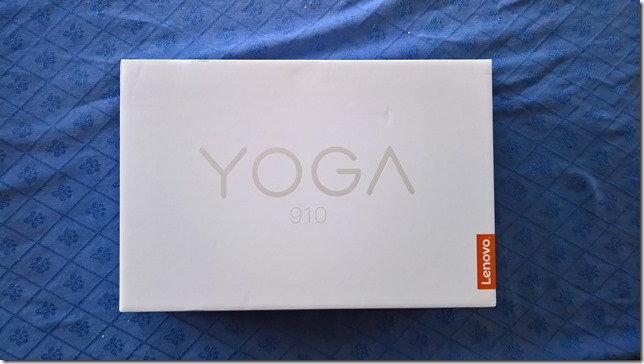
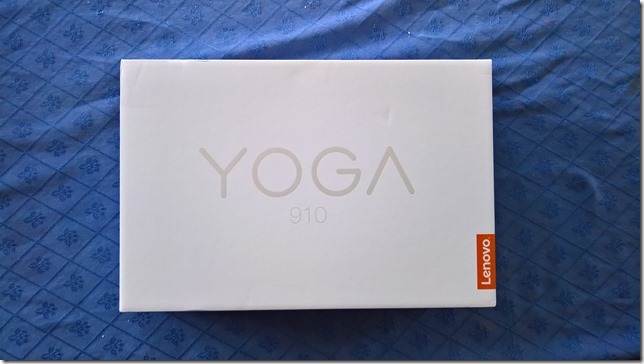
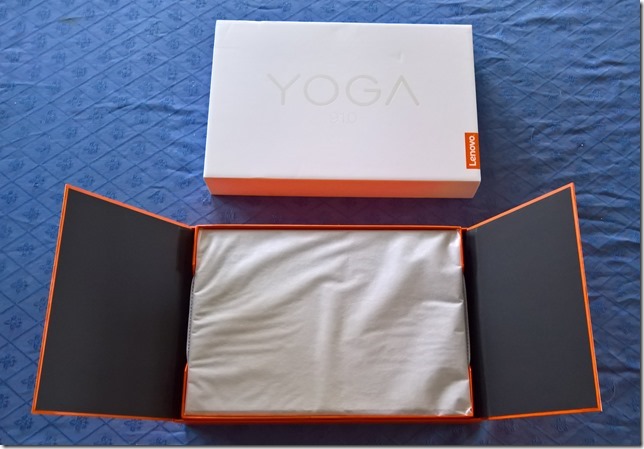
    The box is a minimalist design: white (on top) and orange (underneath), with four icons on the side representing the four Yoga configurations (Laptop, Stand, Tent, and Tablet).
    20161212-1251-17_thumb1

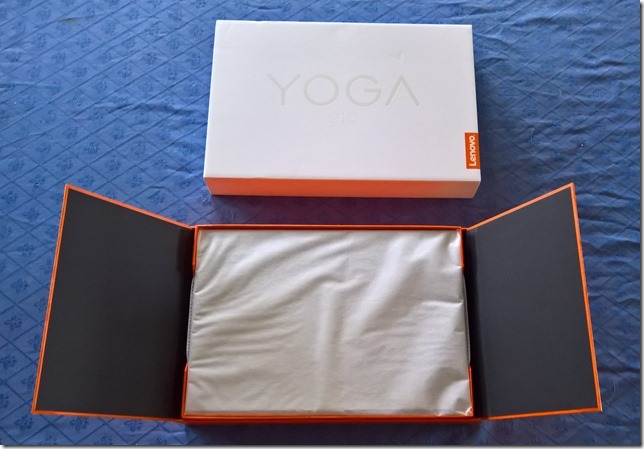
    Like the boxes of the earlier Yogas, it contains a slick piece of paper engineering – after taking off the lid, you fold back the two flaps covering the top, and as you do so, the Yoga 910 (encased in its protective sleeve) rises out of the box to greet you. It’s a nice touch.
    20161212-1256-54_thumb1

    Underneath the Yoga 910 are compartments that hold the power adaptor (with a permanently-fitted USB-C connector), and a sleeve containing the quickstart user guide.

    The 910 is practically the same size as the earlier 900, whilst being slightly thinner (and heavier). Unlike the 900, which had a plastic case material, the 910 uses aluminium. The review model came in the silver finish.

    Yoga 910 Externals

    The hinge on the Yoga 910 is the distinctive “watchband” design, which I personally find appealing and which works smoothly and very well.

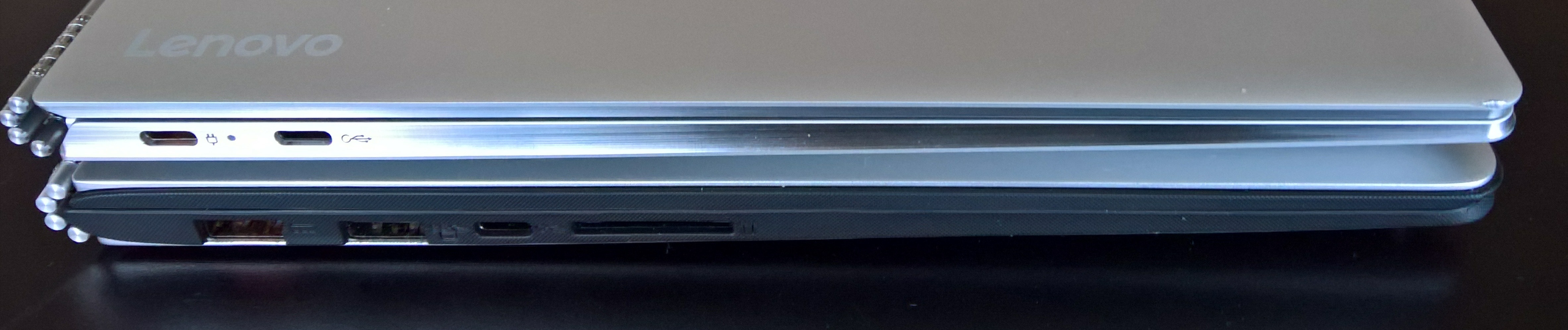
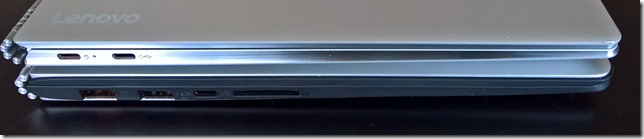
    The Yoga 900 introduced a a USB-C port, supporting USB 3.0, native DisplayPort 1.2 video and VGA/HDMI output and which replaced the Micro-HDMI port of the Yoga 3 Pro. The Yoga 910 continues this move to a greater reliance on USB-C. Here’s a shot of the left-hand side of both Yogas (the 910 is on top).
    20161231-1410-37

    You’ll notice that the 910 has two USB ports (both USB-C) on this side, whilst the 900 has three (one of which is USB-C). The proprietary USB 3.0 port and cable used to charge the Yoga 900 and the 900s has been replaced in the 910 by a standard USB-C charging port and cable. That’s probably a welcome change and simplification for travellers. However, you’ll also notice that the Media Reader slot has been dropped in the 910 altogether. Customers who used the card reader port in the past (e.g. photographers transferring images from their camera memory cards to the computer) will now have to use an external card reader attached via USB.

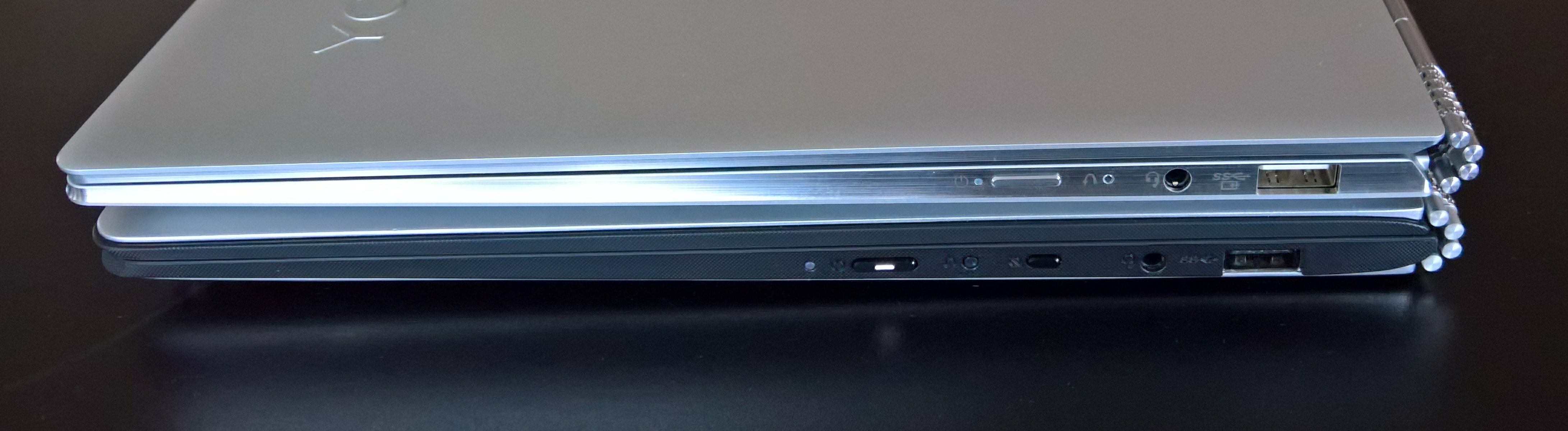
    Here’s a comparison of the right-hand side of the Yoga 910 (on top) and the Yoga 900:

    20161231-1410-52

    The Yoga 910 shows (from left to right) the power button, the recovery button, the headphone jack and a USB 3.0 port that can also be used to charge external devices. The Yoga 910 continues the precedent set by the 900s and has dropped the display rotation lock button that is present on the 900.

    Since the 910 is the same size as the 900, I had rather hoped that the standard keyboard layout of the 900 would be preserved. Alas, Lenovo has taken the rather bizarre keyboard layout of the 900s, and just made it with bigger keys.

    Here’s the keyboard of the Yoga 900:
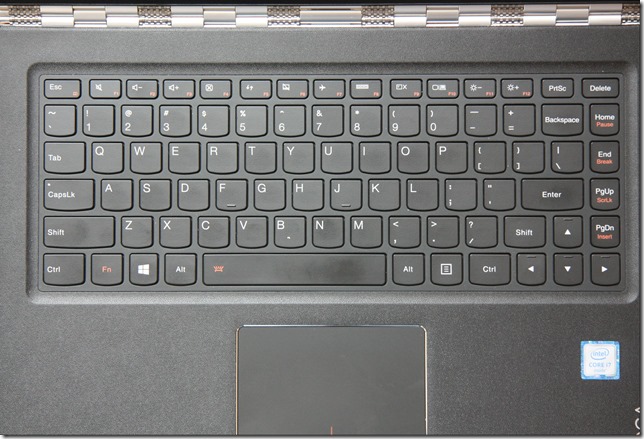
    20160206-1242-25

    Note the right-click menu key between the Alt and Ctrl keys to the right of the Spacebar. Here’s the keyboard of the (smaller) Yoga 900s:

    20160206-1242-19

    The Right-click menu key has gone, as has the last column of function keys (Home, End, PgUp and PgDn). The right Shift key and the up-arrow keys have been switched around in this arrangement, and I still don’t like it very much. I suspect that for some people (e.g. touch typists) that will take some getting used to.

    And now here’s the keyboard layout of the Yoga 910:

    20161212-1318-33[1]

    It’s the same as for the 900s, but for some reason best known to Lenovo, the Insert and PrtSc keys in the top row have now been swapped. Why on earth do Lenovo keep futzing about with their keyboards?

    The keyboard backlight has the same two illumination levels as in the Yoga 900. The black colour of the keys is a good contrast with the silver surround. And apart from the rearrangement and the lack of dedicated function keys, the keyboard feels pleasant to use, and is comparable with that of the Yoga 900.

    The trackpad of the 910 is larger than that in the 900, with an area of 70mm x 105mm. At last Lenovo have now got a trackpad into the Yoga 9xx series that is certified by Microsoft as a Windows Precision Touchpad, and it is even slightly larger than Microsoft’s recommended optimal size of 65mm x 105mm. This means that the trackpad settings are integrated into Windows 10 Settings, rather than being handled by a third party (Synaptics) driver. More on the trackpad and keyboard in the Yoga’s Modes: Laptop section.

    One other important addition: a built-in fingerprint reader (seen on the right of the photo above, below the cursor-right key). This is integrated into the Windows Hello feature of Windows 10, and makes signing in even simpler and quicker than using a PIN.

    20161212-1308-56[1]

    While the Yoga 900 had a QHD high-resolution (3200 x 1800) display as standard, the Yoga 910 offers UHD (3840×2160) or standard FHD (1920 x 1080) displays as options, both with 10-point touch support. To be honest, at this physical size (13.9 inches diagonally), my old eyes would be perfectly satisfied with FHD resolution. The pursuit of ever-higher resolution in laptops is somewhat lost on me. It causes more drain on battery life, and can introduce scaling issues with older Windows software. What I do continue to regret is that Lenovo has stuck with a display ratio of 16:9. See my further thoughts on this in the Yoga’s Modes section.

    You will notice that the 910 has a bigger screen at 13.9” diagonally, compared to the 13.3” of the 900. This means that the black bezels at the top and sides of the screen have been reduced in size. In the Yoga 900, the top bezel is 2 cm in height, whilst in the 910 it is now only 0.5 cm. That has meant that the webcam has had to be repositioned in the centre of the bottom bezel, instead of in the top bezel, giving rise to the extremely unflattering “nostril-cam” effect. To avoid this, it is best to put the Yoga 910 into Tent mode before Skyping, but then be aware that you can’t use the keyboard for typing during a video call. The Yoga 910’s webcam is capable of 720p @ 30 fps (the same as for the Yoga 900), and it has a dual-array microphone. The speaker grilles, with JBL speakers behind them, are positioned underneath on the Yogas.

    Lenovo has kept the aesthetic of the Yoga 900 and the 900s by having a single piece of glass in the lid of the Yoga 910. All have a (very difficult to see) Lenovo logo, but at least the Windows button has now been dropped, since it has been made redundant by Windows 10.

    Yoga 910 Internals

    Lenovo introduced the 6th generation of Intel Core processors, codenamed “Skylake”, in the Yoga 900. With the Yoga 910, Lenovo has introduced the latest (7th) generation of Intel processors: “Kaby Lake”. Like the Yoga 900 series, the 910 relies on cooling fans being present (the 900s used a Core M processor, and was fanless). Kaby Lake also introduces a new generation of the graphics processor architecture, and the Yoga 910 has an Intel HD Graphics 620 engine. The Benchmarks section will tell the story.

    The Yoga 910 comes with either 8GB or 16GB of DDR4 RAM installed. RAM is soldered to the motherboard, it is not possible for customers to upgrade their 910s from 8GB to 16GB. Storage for the Yoga 910 is specified at time of purchase; currently 256GB or 1TB SSDs can be specified. However, while the original Yoga 900 models had a SATA interface to the SSD, the Yoga 910 now comes equipped with the faster NVM Express interface.

    The wireless connectivity technologies and interfaces support 802.11 A/C Wi-Fi and Bluetooth version 4.1. There are no WWAN or NFC options available for the 910 line.

    The battery capacity in the Yoga 910 is 78 Watt hours, and Lenovo claims this gives up to 15 hours between charges.

    And – I say this every time – like almost all laptops on the market today, there is no built-in GNSS to feed GPS coordinate data to the Windows Location service. I just feel that mobile devices should have a GNSS chip fitted as standard. Downloadable maps for map and navigation apps are supported directly by Windows 10, but I still can’t use the Yoga 910 (or indeed any of the Yogas) off the grid without an additional Bluetooth GPS logger to track its position.

    Benchmarks

    PassMark Benchmarks

    PassMark Software provide benchmarking software and hardware. I downloaded their Performance Test 8.0 software and used it to run benchmarks on all the Yogas I have. The results are shown in Table 2 below. I also downloaded HWMonitor from CPUID, to record the maximum temperature of the CPU reached when running the benchmarks.

      Yoga 910 Yoga 900 Yoga 900s
    PassMark 2574 1821 1623.6
    CPU Mark 5324 4493 2860
    2D Graphics Mark 385.6 393.4 373.2
    3D Graphics Mark 1099 426.6 435.6
    Memory Mark 2494 1992 1528
    Disk Mark 9381 3511 8139
    Max CPU Temperature 83°C 67°C 62°C

    Notice the substantial improvement in the Disk Mark over the early model of the Yoga 900 that I have. The early 900 models used a M.2 SATA interface, which is slower than the NVM Express interface used in the 910 and the 900s. However, current versions of the 900 line now have the NVM Express interface as well, so I would expect the Disk Mark figure for current 900 models to be comparable with those of the 910 and 900s.

    Despite the presence of twin fans, the maximum temperature reached by the CPU is substantially higher than that seen in the earlier Yogas. Bear in mind that this temperature is recorded when the performance benchmarks are pushing the limit of what the machine can deliver. Most of the time the temperature is around 50°C.

    Windows System Assessment Tool

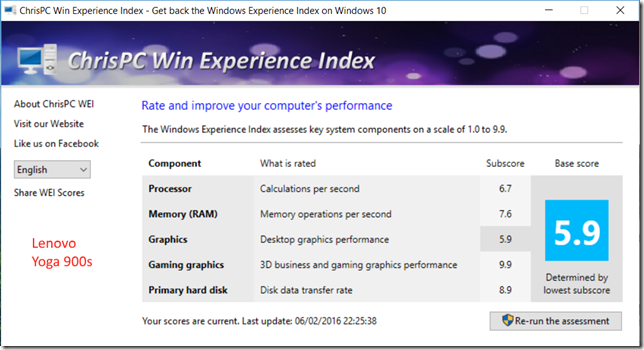
    The Windows System Assessment Tool was first introduced by Microsoft in Windows Vista as a means to compare the performance of the hardware of Windows PCs. For Windows Vista and Windows 7, Microsoft provided an applet (the Windows Experience Index applet) to display the results. Although Microsoft no longer provides this applet in Windows 8.1 and Windows 10, the assessment telemetry is still in place and can be used by third-party tools to display the Windows Experience Index. I used the WEI tool from ChrisPC to display the results for all the Yogas: the Yoga 910, Yoga 900, and the Yoga 900s.

    Yoga 910 02[3]


    Y900 28

    Y900s 04

    Battery Life Test

    Lenovo claims that the Yoga 910 battery can last for 15 hours between charges. I did a very simple test of battery life under the following conditions:

    • Display always on at 50% brightness
    • Speakers at 100% volume with Dolby Audio on and set to music playback
    • Continuous music playback via Groove Music
    • Music streamed from a media server via WiFi

    Under these conditions, the battery lasted for 9.25 hours continuous play. While this is not bad, and better than the Yoga 900, (which ran out of puff completely after only 6.5 hours under the same conditions), it’s not exactly the 15 hours claimed by Lenovo.

    Performance summary

    As a result of this testing, it seems clear that the Yoga 910 will perform very well in activities involving both productivity (office work) and media consumption (watching movies/videos and listening to music). Battery life is improved over that of the Yoga 900.

    However, there were issues with the particular machine I have in my possession.

    Issues

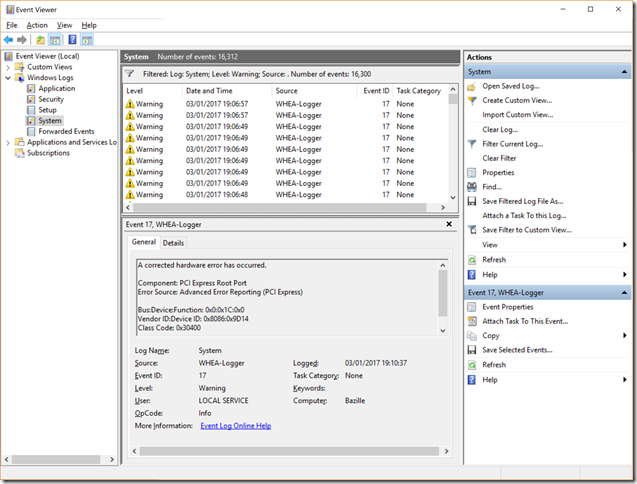
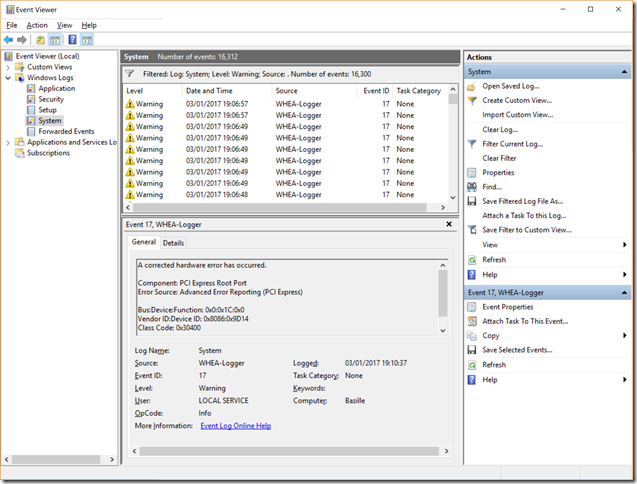
    During the testing, I ran into a few problems. First, the 910 could not hold a 802.11ac connection using the 5GHz band very well at all. The connection would frequently drop, or be at greatly reduced throughput (less than 100 Kbps, instead of the usual 5 Mbps). Secondly, there were frequent floods of warning messages in the Event Viewer from the WHEA Logger:
    Yoga 910 01_thumb

    The device ID being reported as the cause of the hardware errors is given as 0x8086:0x9D14. Looking in the Device Manager, this is the PCI Express Root Port #5, which has, you’ve guessed it, the Qualcomm Atheros WLAN adaptor connected to it.

    Yoga 910 03_thumb[2]

    Third, I’m seeing occasional freezing of the mouse cursor. This  could be related to the cause of the first two issues.

    Fourth, installing the WLAN driver from Lenovo caused a driver update process to consume 30% of the CPU continuously, with the result that the fans kicked in and the machine became very noisy. I uninstalled the driver update program, and the fans settled down. There have been complaints about fan noise on the Yoga 910. Some may have been caused by this driver update program, but Lenovo has also recently issued a BIOS update to tune the fan behaviour.

    I haven’t been able to find the root cause of the first three issues. It could be either a hardware or software driver issue. However, the Lenovo hardware diagnostics (in the Lenovo Companion app) do not report any problems, and I opened up the 910 to see if the WLAN card and the antenna connections were sound. Apart from the fact that the antenna wires were routed slightly differently from the photo in the Lenovo Yoga 910 hardware maintenance manual, I did not see anything amiss. I rerouted the wires to match the manual, and closed up the 910, but that has not made any improvement to the wireless connectivity problems using the 5GHz band, and I’m still getting WHEA-Logger warnings.

    There are fewer connectivity problems using the 2.4 GHz band and 802.11n, so I completed the testing using this wireless connection. I should also add that none of my other Lenovo laptops, or my Microsoft Surface, show any problems using the 5 GHz band of my WiFi network, so the cause must lie within the Yoga 910. I should also note that the Yoga 910 is the only machine that is using a Qualcomm Atheros WLAN card – the other devices use Intel or Broadcom WLAN cards.

    I’ll be putting in a service call to Lenovo about the WLAN connectivity issues, so we’ll see how that goes. I’ll update this blog entry with the result.

    Yoga’s Modes

    This section is basically a repeat of the story I laid out in the review of the Yoga 900 from last October. The points remain, for the most part, the same for the Yoga 910.

    A prime selling point of the Yoga is the fact that it can be folded into a variety of modes. At the time of introduction of the original Yoga back in September 2012, this was a unique innovation. Since then, the concept has been copied by other manufacturers such as Dell, HP, Toshiba and ASUS, which proves that imitation is indeed the sincerest form of flattery. It also clearly demonstrates that the concept is perceived to have market value. Lenovo followed up with the introduction of the “watchband” hinge in September 2014, and now with the Yoga 910 we can see both innovations in a mature form.

    These are the four modes of the Yoga:

    Laptop

    The traditional laptop mode is probably the starting point for most people, and the mode in which I suspect most people will be using it for the majority of the time.

    The Yoga 910 keyboard feel is good, but it has the same drawbacks as the Yoga 900s over the original Yoga 900. Switching around the Shift and Cursor Up keys was never a good idea, particularly for touch typists, and even though there is more real estate available (the 910 is wider than the 900s) Lenovo have kept the same number of keys as the 900s – and dropped the extra column of dedicated function keys that the 900 has.

    The trackpad has been certified as a Windows Precision Touchpad by Microsoft, and its settings are therefore directly integrated into the Windows 10 Settings. This is the first model in the Yoga 900 series line to have this and it is good to see that Lenovo have at last got their trackpads properly certified and fully integrated into Windows 10.

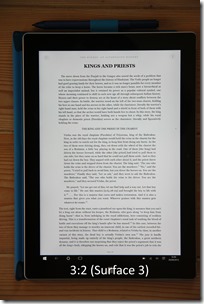
    The UHD display is good, and it’s bigger (13.9”) than the display in the 900 (13.3”) or the 900s (12.5”). Like all the Yoga 9xx models, it’s a 16:9 ratio display, ideal for watching movies. For office work (e.g. word processing in Word, Excel), I personally prefer at least a 16:10 ratio. Even better would be the 3:2 ratio of Microsoft’s Surface range, or indeed of the Lenovo ThinkPad X1 Tablet. The 16:9 ratio is also not ideal in the Tablet mode (see later).

    Tent

    This mode is ideal for media (movies and videos) presentations, particularly in space restricted situations, e.g. on a shelf or an aircraft table. For viewing movies, of course, the 16:9 ratio of the display is now ideal. Couple the Yoga with a wireless presenter, and you can use this mode for PowerPoint presentations as well. In this mode the keyboard and trackpad are automatically disabled. It’s also the mode to use for Skyping, because the webcam is then better positioned.

    Stand

    As an alternative to the Tent mode, the Stand mode can be used for media and PowerPoint presentations. It requires more space than the Tent mode, but the screen can be set to a greater range of angles for the best viewing experience. The keyboard and trackpad are automatically disabled in this mode also.

    Tablet

    The last mode is where the lid is completely folded back over the (disabled) keyboard, and to convert the Yoga 910 into a tablet. You can select to have Windows 10 automatically switch into Tablet mode, or to give you the option to switch manually. I found that the size of the Yoga 910 made for a slightly unwieldy tablet. The smaller size and weight of the Yoga 900s works better for me.  Also, unlike the 900s, the 910 has no support for an active pen, and personally, I find this to be a distinct disadvantage.

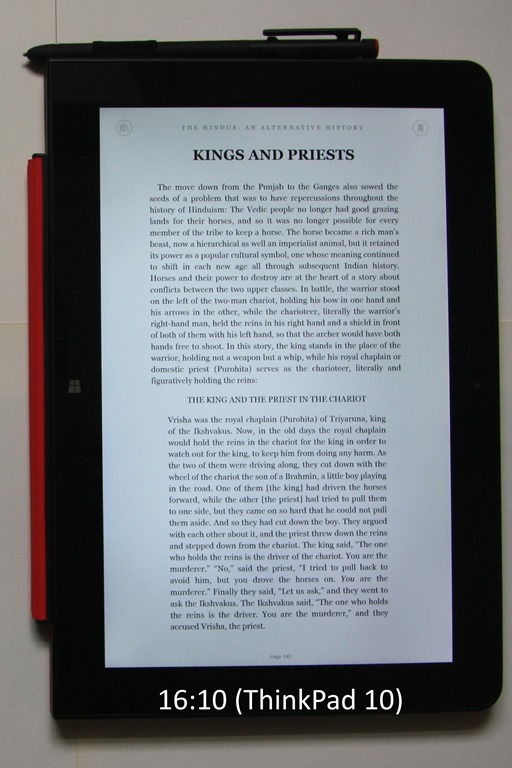
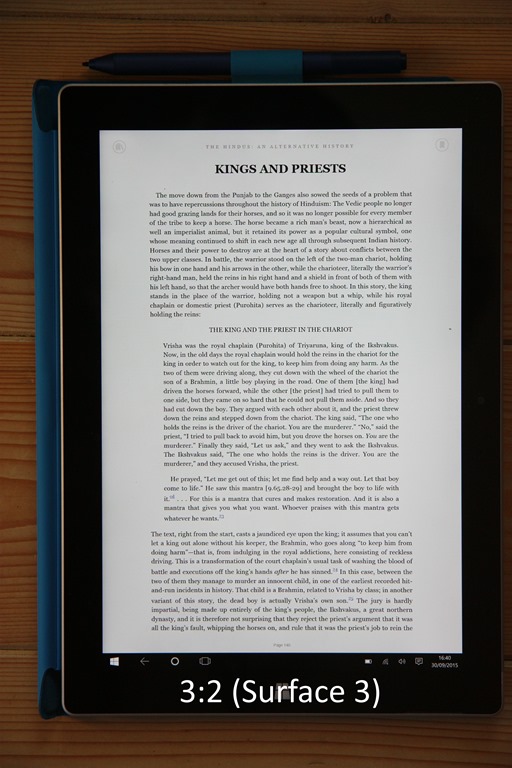
    One of the frequent uses of a tablet is for reading books or magazines. And once again, the 16:9 ratio of all the current Yoga models (910, 900 or the Yoga 900s) provides (in my view) a diminished reading experience over devices with 16:10 ratios (e.g. the ThinkPad 10) or 3:2 ratios (e.g. the Surface 3 or ThinkPad X1 Tablet). Pages are rendered longer and narrower in 16:9, and the reading experience suffers as a result.

    20150930-1640-01  20140930-1314-11b20150930-1639-03

    Overall Conclusions

    In my review of the Yoga 900s, I stated that it was a refinement of the Yoga 900, a refinement that would appeal to a slightly different audience. The Yoga 910 is a refinement of the Yoga 900 that is aimed at the same audience as the original Yoga 900. If you want power and performance, then the Yoga 910 is your choice and a clear successor to the Yoga 900. If you want a smaller, lighter Ultrabook, with power for everyday productivity, and support for an active pen, then the Yoga 900s remains an excellent choice. Small, but (almost) perfectly formed.

    The plus points of the Yoga 910 are:

    • Sufficient performance suitable for a wide range of consumer and business users
    • Good keyboard action
    • Fingerprint reader supporting Windows Hello
    • Precision Touchpad
    • Good battery life between charges (better than the Yoga 900)
    • Standard USB-C charger replaces the Lenovo proprietary charger connector
    • Excellent display
    • Flexibility in use

    There are some minus points (in my view):

    • Unusual keyboard layout, with fewer dedicated function keys than the Yoga 900 
    • WLAN connectivity issues (at least on my sample machine)
    • Fans can be noisy.

    If the WLAN issues on my sample machine can be ironed out, then the Yoga 900 would be a very fine example of the Ultrabook class of computer.

    13 responses to “The Yoga 910 – A Review”

    1. angelinthehell Avatar

      Nice review.
      Please keep us updated with the WIFI issue!
      I hope that all those errors do not mean that there is an hardware issue.
      Also, regarding the noisy fan issue: the fan is very noisy and speed up also with low worloads (20-40%) and screams like a jet with higher workload. Are you experiencing also a sound like “TRRRRR” along with the whistle?
      Please report it on lenovo forum too.

      Thank you for your review!
      Honestly, this is a beautiful (and expensive) machine, but those two issue are very annoying!!

      1. Geoff Coupe Avatar

        After applying the first BIOS revision from Lenovo, and removing the Atheros driver updater, the fans seem to have settled down, and don’t kick in so fiercely, or at low CPU usage. I just get the hissing that modulates into a jet engine whine at really high workloads, no “TRRRR” sounds…

        1. angelinthehell Avatar

          I bought my yoga 910 the last week of 2016 and arrived the 2nd of Jan.
          My machine has already the latest BIOS and it seems that the atheros driver is not clogging the cpu.
          Anyway, when I open some tabs on chrome and play a video on youtube, the fan is up do medium speed.
          I also hear a subtle “TRR” sound along with the fan “whistle”, but only at certain fan speed.

          I now limited the CPU to 60% using windows’ power settings, but I’m sad…

    2. Kim Williams Avatar

      Excellent review and analysis! I got my new Yoga 910 last night and am already seeing the problems with the 5Ghz band and mouse cursor hangs. It maintains a connection fine if I’m near the router but it degrades horribly and intermittently drops when I move away. This is in stark contrast to other machines. I’m seeing the same event viewer warnings too.

      I’m pretty concerned that on the first day I was already googling these sorts of errors and finding them confirmed on your blog. Guess I have to make a decision to keep or return – does anybody know Lenovo’s track record for addressing these kind of things?

      1. Geoff Coupe Avatar

        Kim, there’s a newer driver for the WLAN card on Lenovo’s support site (version 12.0.0.278 dated 2016/12/24). You should check to ensure that you have this one installed. It’s not perfect, but it’s somewhat better than the original.

        However, it’s still likely that the Qualcomm installer program will get stuck. You should remove it from the list of installed programs. You can also stop the flood of WHEA-Logger messages by turning off power management to the PCI Express bus. See this forum message.

        I realise that these are workarounds, and that Lenovo needs to get this driver fixed. It’s now February, and no sign as yet of a new driver. It’s your decision as to whether to return it or not. If it weren’t for Lenovo’s decision to use this Qualcomm Atheros WLAN card (other Yoga 9xx models use either Intel or Broadcomm WLAN cards), then the Yoga 910 would be a very nice machine indeed. I can live with my 910 not being perfect, but it’s a decision that everyone has to make their own judgement on.

    3. Dan Avatar
      Dan

      Hey guys,
      So it is the beginning of April now, are all the issues with fan and wifi been fixed by driver/bios updates or not?
      Thanks.

      1. Geoff Coupe Avatar

        Well, I feel that the fan issues have been improved, and a BIOS update seems to have stopped the flood of WHEA-Logger messages. I’m still not convinced that the WiFi card performance is as good as it could be on the 5GHz band. I usually keep my WiFi connections on the 2.4GHz band. I can live with the 910 as it now is. YMMV.

    4. Dan Avatar
      Dan

      Thanks, I think about buying one, I hope it will be ok.

    5. Sumeet Avatar
      Sumeet

      Hi,
      I have a lenovo Yoga 910. I am facing multiple issues with it.
      1. When I open apps like Skype, its looking too small & fonts are even smaller.
      2. A couple of other applications when opened, look tiny and I cant even maximimze the window of those apps.
      3. All Applications like Google Chrome, Firefox, etc when I open them , they open to miminzsed state initially. Not sure why thats happening,

      I even tried changing resolution but didnt help
      Have you faced similar issue with Skype atleast ? Any clue or suggestion ?

      1. Geoff Coupe Avatar

        Have you got display scaling turned on? On my 910, I have 250% scaling set (I think this is the default setting). The 910 has a high resolution display (3840×2160 pixels), and scaling is necessary.

        Some older Windows applications don’t work well with scaling, or ignore it altogether, and so menus, fonts and icons in the application will remain tiny. There’s not much you can do about these applications, other than to complain to the developers.

        The Skype app is behaving normally here. No problems with display scaling.

        Don’t know why your browser applications are opening in minimised state. Not happening here, but then I use Microsoft Edge.

    6. Robert Etten Avatar
      Robert Etten

      Thanks for the great review. Wish I saw it before I bought the 910. I’m not super sophisticated, and I’ve wasted 5 hours on the dang wifi. I’ll try to connect to just 2.4G, but if that doesn’t work, I’m drop kicking this otherwise beautiful machine back to Lenovo. What a shame. But really appreciate the blog. Thank you!

    7. Robert Etten Avatar
      Robert Etten

      A few other notes: additional research also indicated removing Microsoft Onedrive and I’ve done that, removed all lenovo utilities, turned off the Qualcomm bluetooth and it’s been a long time and it’s still up! Last 2 options also look like taking just 2.4G and selecting a specific channel and band. Again, this sure seems like a lot for someone to do who really has no clue on what I’m actually doing. But I guess it’s working.

      1. Geoff Coupe Avatar

        Hi Robert – thanks for your comments. I think that removing Microsoft OneDrive is rather a red herring. It’s true that it will be using the WiFi network connection often, and thus the chances that the connectivity issue would occur is higher, but this would be true of any service or application that used the connection frequently. I use Roon as my stress tester – the Hifi audio protocol RAAT makes great demands on a WiFi connection.

        My 910 seems to have settled down – there was a BIOS version 1.36 released back in March that seems to have helped considerably with the issue.

    Leave a comment

  • Pause For Reflection

    2016 has certainly had some very low points: Brexit, Trump, terrorist attacks in the Bataclan, Nice and Berlin, the ongoing horror that is Syria, the assassination of Jo Cox, and the loss of the talents of Bowie, Alan Rickman and Victoria Wood.

    At times like these, walking with the dogs in the woods is a good way to lift the spirit.

    Xmas 2016

    It’s also good to come across 99 reasons why 2016 was a good year.

    Best wishes to one and all.

    One response to “Pause For Reflection”

    1. Ludwig Avatar

      Merry Christmas and a Happy New Year, Geoff. May all your days be bright!

    Leave a comment

  • Why I Loathe and Detest Facebook

    Alas, I have to have a Facebook account because of my community work. And you can be damn sure that even though the community groups are “closed” and “members only”, that Facebook knows absolutely everything that is going on inside them…

    Addendum 23 June 2019: I should point out that once a lobbying action connected with my community work was (successfully) completed, I was able to delete my Facebook account – and have been Facebook-free for over a year. Don’t miss it in the slightest.

    4 responses to “Why I Loathe and Detest Facebook”

    1. kutukamus Avatar

      Nice piece, that one about free websites 🙂

    2. […] suspect it’s high time that I deleted my Facebook account (again). And to be clear, I loathe and detest Facebook, but I needed an account because of my community work. Everybody else insisted that using a […]

    3. […] Facebook want us all to use their new cryptocurrency Libra? I loathe and detest Facebook enough already without this being thrust upon us. As Kenan Malik writes: Libra cryptocurrency […]

    4. […] have long loathed and detested Facebook, so when the Cambridge Analytica scandal broke, it provided the impetus to delete my Facebook […]

    Leave a comment

  • The Lenovo YOGA Mouse

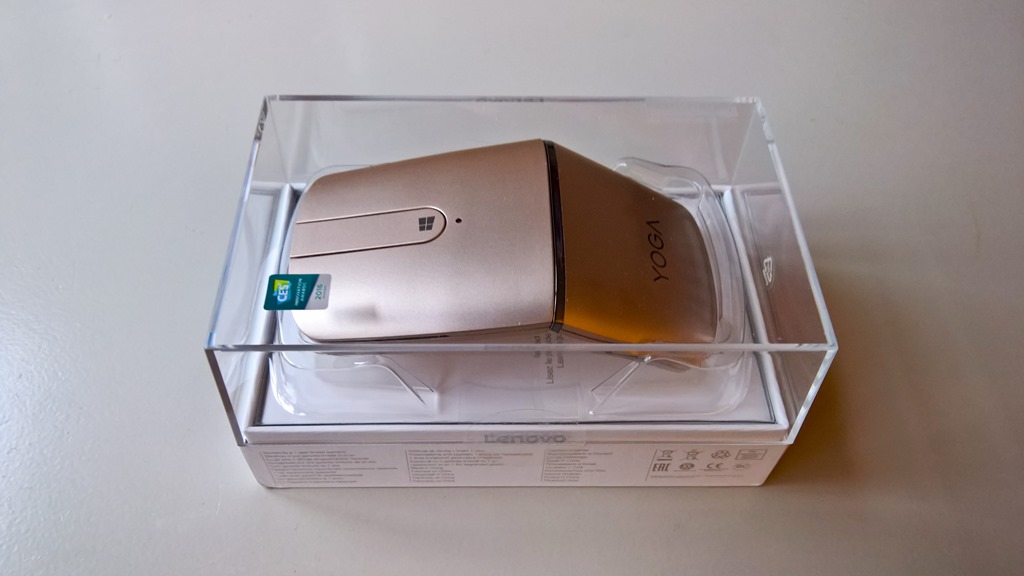
    Lenovo has a wide range of computer accessories, and recently they sent me an example of the new Lenovo YOGA Mouse for me to review. Lenovo tells me that, up to the end of December 2016, North American users can get a 25% discount off the listed price by using the code YOGASOCIAL in the online Lenovo shop.

    20161107-1608-58

    It’s designed as a travel mouse, and has a few tricks up its sleeve, which I’ll cover later.

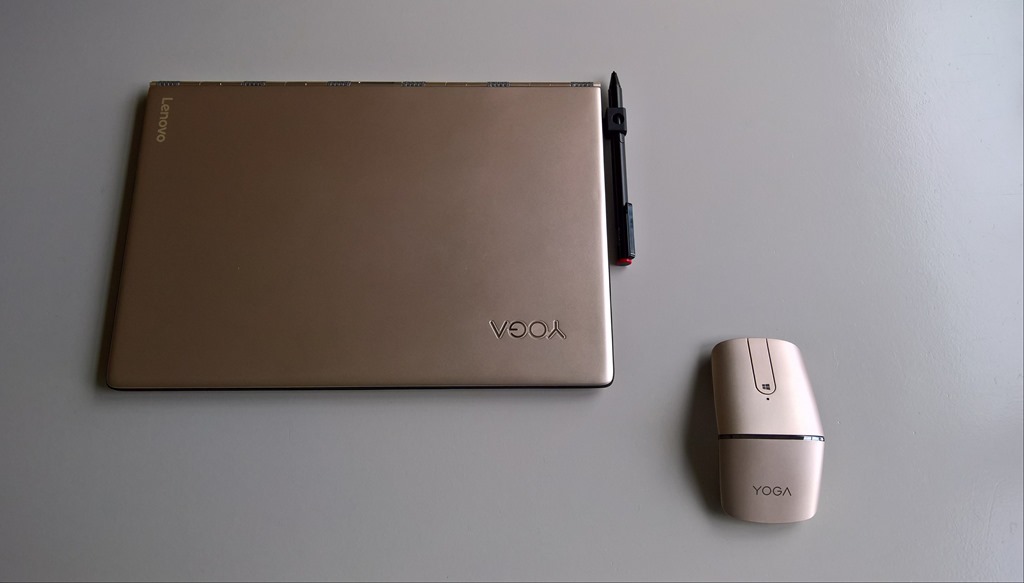
    It comes in Lenovo’s “Champagne Gold” colour, which makes it a natural to pair with my Lenovo Yoga 900s:

    20161122-1051-28

    It’s a wireless mouse, offering two modes to connect to your PC or laptop: 2.4 GHz wireless, or Bluetooth 4.0. The wireless dongle can be stored inside the mouse when travelling, or when Bluetooth is being used for the connection:

    20161107-1614-32

    Lenovo supplies a USB to micro-USB cable with the mouse, since the mouse is fitted with a rechargeable battery. Lenovo claims that the battery will have a 1 month life from a 2 hour charge. I don’t think that the battery itself is replaceable, and Lenovo gives no indication of what the total expected life of the battery might be.

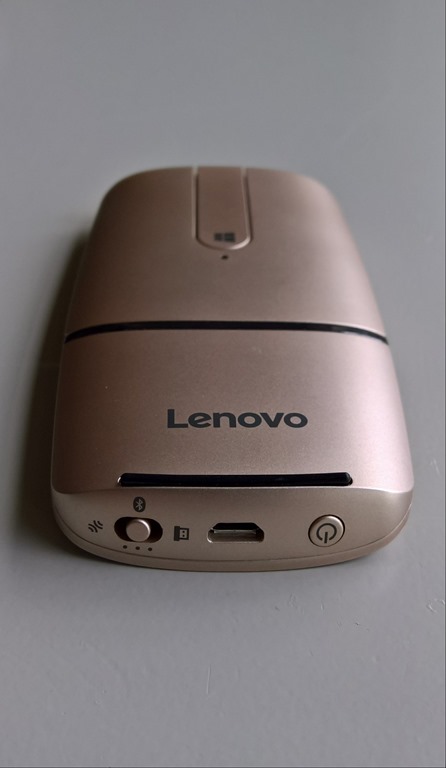
    At the bottom end of the mouse is the switch to select the wireless mode (and Bluetooth pairing), the micro-USB charging port, and the power switch that, when held in for two seconds, turns the mouse on or off.

    20161122-1059-25

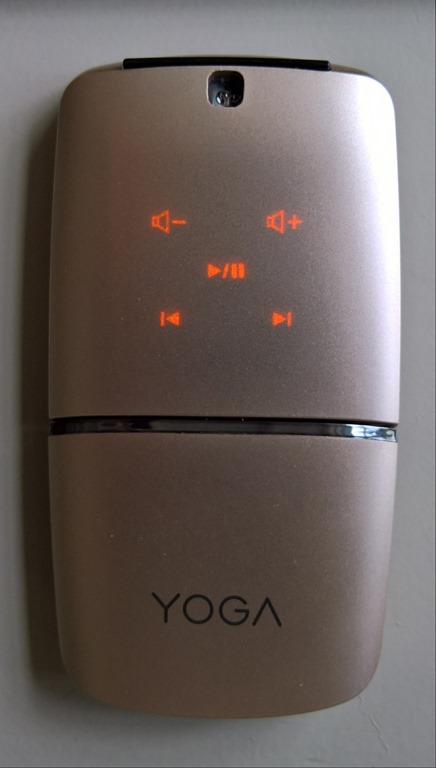
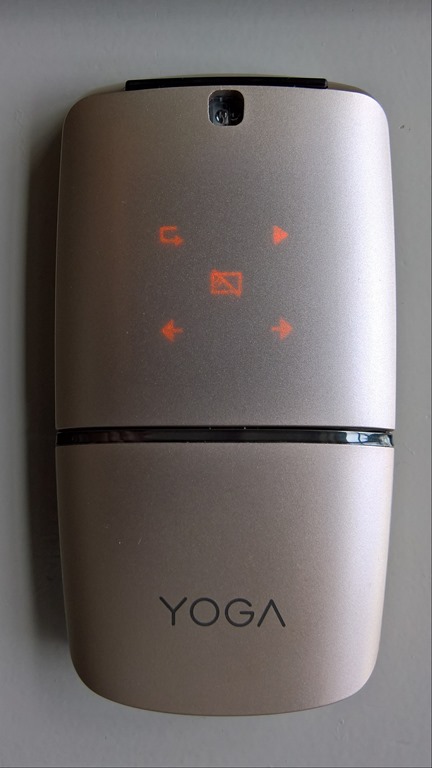
    The two halves of the mouse rotate 180° about the central hinge to transform it from the flat travel mode into the mouse mode. When in flat mode, it can also be used as a remote control for a media player or for presentations. Rotating the mouse into the flat mode causes what was the underside top panel of the mouse to become uppermost. At the same time, this surface now becomes touch-sensitive, and it lights up with the controls. Pressing the central mousebar switches between the two modes of the remote: media or presentation.

    20161122-1057-2920161122-1057-45

    Personally, I find the media mode to be the more useful of the two, and that’s down to the fact that the mouse uses touch for these modes, and not physical buttons. When I’m giving presentations, I’m looking at the audience or the presentation. Then it’s far easier to have a control in my hand that has physical buttons to control a presentation. I can feel the button and not have to physically glance at the control to ensure that I’m touching the right place on the mouse. I found it far too easy to accidentally touch a control to cause my presentation to jump forwards (or backwards!). The other thing I miss in this mouse when it’s in presenter mode is that it doesn’t have a laser pointer, and I certainly wouldn’t want to juggle two devices when giving presentations.

    I’m afraid that after trying the YOGA Mouse out in presentation mode, I very quickly went back to my trusty (and ancient) Acom Data USB Wireless Laser Pointer Mouse.

    In media mode, the YOGA Mouse is much more useful – it is no problem to glance at the mouse to control media playback and volume by touch.

    As a traditional mouse, the YOGA Mouse works well for me.

    20161122-1100-07

    The left and right mouse buttons are both physical switches, which I like. The central mousebar is both a physical switch, and a touch-sensitive surface. When in mouse mode, it can act as a scrollwheel by stroking along the bar. Pressing the section with the Windows logo on it will bring up the Windows Start menu on your PC.

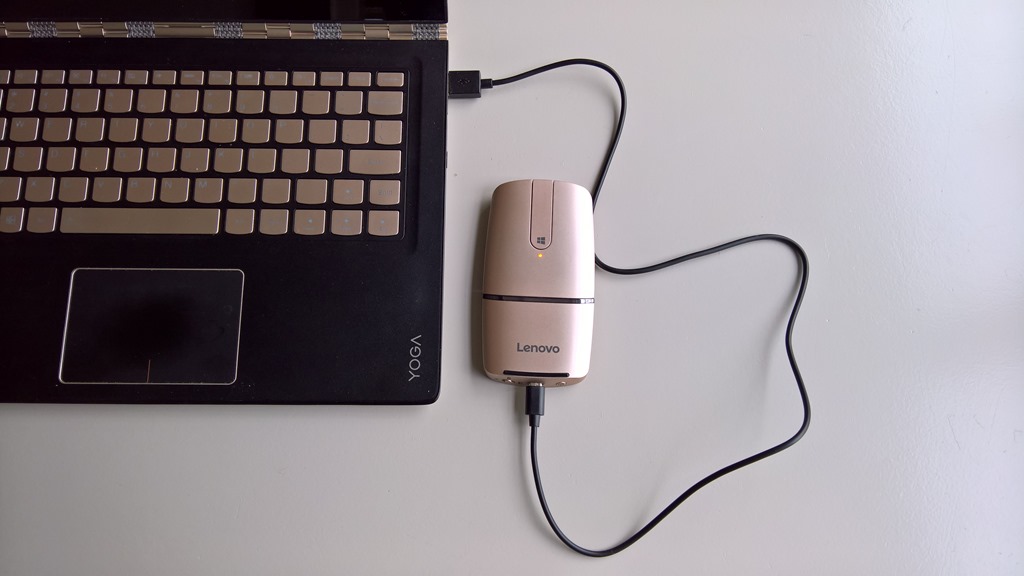
    When necessary, it can be charged from a PC or laptop fitted with a USB charging port. When the battery is getting low, the indicator just below the Windows logo will starting blinking with an amber colour. Just don’t expect to use it as a wired mouse while it’s being charged – the micro-USB connector lifts the mouse from the desk surface. It’s best charged when in flat mode as shown here, and the charging indicator changes from amber to white when fully charged:

    20161122-1103-23

    In summary, I found this to be a perfectly good travel mouse. It’s got an elegant and slim design, and is flexible in its connectivity options. The media mode is a clever idea, but the presenter mode leaves something to be desired in my view – a clever idea in theory, but one which in practice falls short; at least for me. Aside from this, it’s a nice device, and one that should readily appeal to those of us who insist on using a mouse with our laptops.

    Leave a comment

  • Cause and Effect

    A good article by Naomi Klein in the Guardian today on why America’s voters’ heeded the siren song of Trump. The core:

    Here is what we need to understand: a hell of a lot of people are in pain. Under neoliberal policies of deregulation, privatisation, austerity and corporate trade, their living standards have declined precipitously. They have lost jobs. They have lost pensions. They have lost much of the safety net that used to make these losses less frightening. They see a future for their kids even worse than their precarious present.

    At the same time, they have witnessed the rise of the Davos class, a hyper-connected network of banking and tech billionaires, elected leaders who are awfully cosy with those interests, and Hollywood celebrities who make the whole thing seem unbearably glamorous. Success is a party to which they were not invited, and they know in their hearts that this rising wealth and power is somehow directly connected to their growing debts and powerlessness.

    For the people who saw security and status as their birthright – and that means white men most of all – these losses are unbearable.

    Trump says what they want to hear. Whether he can deliver it is probably akin to asking how many angels can dance on a pin.

    One response to “Cause and Effect”

    Leave a comment

  • Shit – Meet Fan

    Back in May, I feared for a world where both a Brexit and a President Trump would be facts. Now, my worst fears are realised. We seem to have sunk to a new low, and there ain’t no light at the end of the tunnel. As I said last August, I ponder on how much the world has gone to hell in a handbasket in this year of our lord, 2016. I truly wonder whether we shall live to see the dawn of 2018.

    Fasten your seatbelts, it’s going to be a bumpy ride.

    One response to “Shit – Meet Fan”

    1. Sharon Avatar
      Sharon

      Hi Geoff, sad to say ” here here ” !

    Leave a comment

  • Microsoft Surface Studio

    Microsoft held a presentation in NYC yesterday and talked about both software and hardware. In software, the next major Windows update has been dubbed by Microsoft “the Windows 10 Creators Update” (being a grammar pedant, I note, with sadness, the missing apostrophe). It’s expected in the Spring of 2017, but those of us who are in the Windows Insider program are already seeing parts of it take shape.

    The most obvious new features in Windows 10 are the support for 3D capture and manipulation being built into Windows. For gamers, there will apparently be improvements enabling them to share and broadcast their gameplay. Not my thing, but I’m sure this is important to some.

    In hardware, alongside an upgrade to the existing Surface Book model, there was a totally new member of the Surface range introduced: the Surface Studio. It’s a gorgeous-looking device (with corresponding premium prices to match). It’s also aimed squarely at graphics artists and designers. Although it looks at first glance like a high-end All-in-One desktop PC, it converts at the touch of a finger into a drafting table. Microsoft also introduced a new peripheral for interacting with the Studio – the Surface Dial. Using the Surface Pen and Dial with the Studio display looks to be a major step forward for artists and designers, and presents a challenge to Microsoft’s competitors (Wacom and Apple) in this area. Perhaps it was no coincidence that this was unveiled the day before Apple unveiled its latest products.

    For a good in-depth look at the background to the development of the Surface Studio, see this story from Fast Company.

    Needless to say, I couldn’t possibly justify the purchase of a Surface Studio for myself – it would be a wasteful extravagance – but it certainly is a beautifully-designed piece of hardware.

    Leave a comment

  • RIP, Sheri

    Learned today that the author Sheri S. Tepper has died. My favourite book of hers has to be The Family Tree. For almost two thirds of the book there are two very different plotlines intercut with each other. And then the kaleidoscope shifts and the two lock into one with the force of a sudden revelation. A brilliant coup de théâtre. The story is good too.

    Leave a comment

  • Windows Essentials 2012 – the Bell Tools For Thee

    Microsoft has announced that its Windows Essentials Suite will reach end of support on January 10, 2017.

    Not really a surprise, the software suite has had no upgrades at all over the past four years. Still, it will be sad to bid goodbye to Windows Live Mail and Photo Gallery (two of the applications in the suite). They both have more functionality in their little fingers than Microsoft’s Mail and Photos apps have ever had in their whole stunted bodies.

    The Photos app, in particular, is a miserable thing that still does not offer support for managing descriptive, people and geo tags, or face recognition, even four years after its introduction.

    Microsoft has failed to deliver yet again.

    12 responses to “Windows Essentials 2012 – the Bell Tools For Thee”

    1. José Avatar

      Sad to see Windows Photo Gallery go. I have been testing various apps to act as a replacement (Photo Supreme, Digikam, ACDSee). When the Photos app was debuted on an Insider Build I was excited on what I thought was to be a Photo Gallery replacement (https://jmoliver.wordpress.com/2015/05/18/envisioning-a-cool-windows-10-photo-app/) but it has been a while and there have been no significant updates. Recently, there is some recent news of an updated Photos App – http://www.winbeta.org/news/windows-photo-app-updated-with-additional-editing-features-for-fast-ring-insiders-on-pc

      1. Geoff Coupe Avatar

        Hi José – I’m afraid that the updates to the Photos app amount to little more than rearranging the deckchairs on the Titanic. A few extra colour filters, and the ability to doodle on your photos with a pen. Well, colour me totally unimpressed…

    2. Ludwig Avatar

      Microsoft has lost its way, which was a drunk meander at best. There are probably no programmers left there, just script kiddies who have never known any users. Sad, sad, sad …

    3. vanroaming Avatar

      Whilst WLPG still works the Windows 10 update has caused the display to break up intermittently when I go into the large photo display mode (on my 2015 Dell laptop with latest display driver). I recently asked on the dpreview forum for suggestions on replacement programs. The only suggestion was IMatch which looks powerful and professional (and well supported by its developer) but has quite a steep learning curve and is probably more complicated than I need. All I use WLPG for is tagging, rating and captioning photos and using this metadata to make selections. I enjoy its slickness and the ease of tagging … even with ~160,000 photos it pops up tagging suggestions instantly as I type. Despite its power it looks as if IMatch will be both slower and more fiddly to use for my purposes. Do you have any experience with IMatch? If so, would you think it would be a suitable replacement? Are there others I should consider?

      1. Geoff Coupe Avatar

        Sorry, no experience at all with IMatch. I’ve been using Photo Supreme for some time now, and still find it the best DAM program for my needs. It’s relatively straightforward to use, but has enormous depth and flexibility if required. Well supported by the (small) development team, and with an active forum of users.

        1. vanroaming Avatar

          Thanks for the recommendation (and thanks also for your contributions to forum discussions on this subject that I’m now reading). I’ll give Photo Supreme a go.

    4. TomT Avatar
      TomT

      Please excuse a very random if tangentially related question, but I have a colleague with a problem and I suspect you may know of a solution. She has a large collection of images stored on Windows computer. These images have extensive notes stored in their “Comments” metadata property, viewable through File Explorer. We are trying to find an image editing program that will allow her to view and edit these comments (including batch editing) more easily than doing so through Windows own native File Explorer. And here’s the kicker: she needs to do so on a Windows XP machine. Do you happen to know of any software that fits the bill? Many thanks!

      1. Geoff Coupe Avatar

        Hi TomT – I think that Geosetter will do the trick. It handles batch editing of image metadata, and it runs on Windows XP.

        1. TomT Avatar
          TomT

          Thanks very much for the suggestion! After perusing Geosetter I am not sure it will work for this particular purpose, as it doesn’t seem to recognize Windows 10 metadata fields such as “Comments.” (Why the people working with my colleague chose to use Windows 10 metadata fields to store such information, I don’t know.) I may however suggest she use Geosetter and start over, transferring the data from the Windows 10 “Comments” field into a similar EXIF metadata field. In any case, I appreciate your help!

          1. Geoff Coupe Avatar

            Yes – sorry about that. It looks as though the Microsoft Comments field is something proprietary to Microsoft (why am I not surprised?) and has been there since the days of XP, if not earlier. Doubtless it’s still in Windows 10 for legacy and backward compatibility reasons. Most of the other fields have now been switched across to XMP de facto standards, but not this one.

          2. Geoff Coupe Avatar

            Here’s a thread that seems to confirm what I thought – the comments field is unique to Microsoft: http://www.sevenforums.com/music-pictures-video/82642-how-search-jpg-metadata-specifically-comments.html

            Mind you, it does say that Phil Harvey’s Exiftool can deal with them. The only problem is that the tool is command-line driven, which makes it problematic for mere mortals to use.

            1. TomT Avatar
              TomT

              That’s very helpful! Unfortunately my colleague’s colleagues initially decided to place comments in the Microsoft Comments field, I suspect merely because that field was there in File Explorer. Now that they want my colleague to be able to easily edit those comments, that location has become a problem. I think they will all be best served by biting the bullet and moving the comments to a more generally supported field.

    Leave a comment

  • Now It’s Amazon’s Turn

    I often castigate Microsoft here on the blog for their seemingly boneheaded decisions. Now it’s Amazon’s turn in the spotlight of shame.

    I’ve been using their Kindle app for Windows 8 ever since it was launched back in 2012; never saw the need to buy an Amazon Kindle e-reader device.

    Now Amazon has announced that they will be withdrawing the Kindle app from the Windows store later this month, and advise people to install the Kindle desktop application instead. Hooray – let’s all go back to 2005. Why on earth Amazon isn’t putting its development effort into a UWP version of the Kindle app instead, I have no idea. If they did, the app would be usable across all Microsoft Windows devices (PCs, Phones, Xbox, HoloLens, etc.).

    It also rather begs the question as to what will happen to the existing Kindle app on Windows Phones. I’ll be prepared to bet that Amazon will shortly announce that it will be withdrawing that as well. Since you can’t use the Kindle desktop application on a Windows Phone, the only possibility will be to use the browser-based version of the Kindle reader on the phone. That promises to be such a poor experience that I expect to be giving up using my phone for Kindle books.

    Amazon – what on earth are you playing at?

    Leave a comment

  • HyperNormalisation

    As I’ve written before, Adam Curtis makes amazing documentaries. Tomorrow sees the release of his latest work: HyperNormalisation. Unfortunately, it only seems to be available on the BBC iPlayer – which is geofenced to viewers in the UK. I hope that it will become more widely available…

    Leave a comment