Reflections on life at “De Witte Wand”…

  • Repairing the Cathedral

    From one point of view, this is nothing special – just a video of people doing their job. In this particular case, it’s repairing a telescope. A telescope that happens to be orbiting the earth. The Hubble telescope. Watching this gives me goosebumps. The same sort of goosebumps that I often feel when entering a cathedral. Except in this case, I feel that the sense of wonder is not tainted.


    (hat tip to Phil)

    Leave a comment

  • RIP, Pleo

    I’ve always had a soft spot for robotic simulacra of humans and animals. I went through a period of wondering whether to buy a Sony Aibo, until Sony announced that they were getting out of the robot dog business. The successor to Aibo, from a different manufacturer and from an earlier period in the earth’s evolutionary history was Pleo. Alas, I learned today that Pleo’s manufacturer has gone belly-up.

    Still, I’m sure that innovators and manufacturers around the world will keep striving to produce toys like Teddy that last the whole summer long. In the meantime, here’s a fascinating video of what happened when one Pleo’s owner took it on a visit to the local aquarium (skip forward to about 1 minute 46 seconds in…).

    Leave a comment

  • Passion or Greed?

    The scientific tale of Ida, a 57 million year-old primate fossil, is amazing enough, but what I found almost as striking was the light it also casts on the human passion for ownership. The tale of how the fossil passed from private hands into public ownership for the staggering sum of $1 million seems to me to illustrate that passion and greed are darkly interconnected.

    Leave a comment

  • Nightingales in the Orchard

    A wonderful article by Mary Warnock about self identity and ageing. Go and read it.

    Leave a comment

  • Five Minutes With Richard Dawkins

    A surprisingly good interview with Dawkins, considering the limited time available. I am envious of his bookshelves, and I’m sure I would be envious of the books were I to be able to examine them.

    Leave a comment

  • Why Am I Not Surprised?

    As expected, Russian police broke up today’s pro-gay demonstration in Moscow with excessive force. And I also note without surprise that Graham Norton and Andrew Lloyd-Webber are quoted as saying that they "knew little about" the tough line being taken by the Moscow authorities. Perhaps Messrs. Norton and Lloyd-Webber should open their eyes once in a while. 

    Leave a comment

  • Swine Flu and Tuberculosis

    Hans Rosling deserves to be not just a National Treasure, but a Global Treasure for his analyses of the wash of data that we are all swimming in (if not drowning in).
     
    Here, for example, is his comparison of the Media’s reporting of Swine Flu versus Tuberculosis. Please note that he is not saying that the health agencies are not right to sound a warning, but that the Media has over-reacted beyond all reasonable measure,

    Leave a comment

  • Fun With Technology – Part IV

    So, I blogged back in February about how I was having some problems with the “Play to” feature in the new Windows Media Player that will be part of Windows 7. Since getting the Release Candidate of Windows 7, I’ve been playing around with this feature, and I think I’m beginning to get to the bottom of why it will sometimes work and sometimes fail.

    First, a bit of background on the underlying technology specification, which hails from the industry consortium that goes by the pretentious moniker of the Digital Living Networking Alliance, or DLNA for short. As an aside, I note that their motto is “Connect and enjoy”. At this stage of the technology, it’s often felt more like “Connect and tear your hair out”, but I digress…

    Their specification defines how a variety of different types of digital devices can connect and share information. This I’ve summarised in the following table:

    Device Class What it does Examples
    Digital Media Server (DMS) Stores content and makes it available to networked digital media players (DMP) and digital media renderers (DMR). Some digital media servers can also help protect your content once stored. PCs and network attached storage (NAS) devices
    Digital Media Player (DMP)
    Finds content on digital media servers (DMS) and provides playback and rendering capabilities. TVs, stereos and home theaters, wireless monitors and game consoles
    Digital Media Renderer (DMR)
    These devices play content received from a digital media controller (DMC), which will find content from a digital media server (DMS). TVs, audio/video receivers, video displays and remote speakers for music.
    Digital Media Controller (DMC) These devices find content on digital media servers (DMS) and play it on digital media renderers (DMR). Internet tablets, Wi-Fi® enabled digital cameras and personal digital assistants (PDA).
    Digital Media Printer (DMPr) These devices provide printing services to the DLNA home network. Generally, digital media players (DMP) and digital media controllers (DMC) with print capability can print to DMPr. Networked photo printers and networked all-in-one printers.

    Table 1: Information drawn from the DLNA web site.

    Windows 7 implements a number of these classes as shown here:

    Device Class Windows Implementations
    Digital Media Server (DMS) When media streaming is enabled, Windows acts as a DMS.
    Digital Media Player (DMP)
    Windows Media Player and Windows Media Center act as a DMP when browsing shared media libraries
    Digital Media Renderer (DMR)
    Windows Media Player acts as a DMR when configured to allow remote control of the Player.
    Digital Media Controller (DMC) The “Play To” feature from Windows Media Player and Windows Explorer launches a DMC to control the media playback experience

    Table 2: Information drawn from the Engineering Windows 7 Blog.

    Note that in the above table, Microsoft had planned to have “Play to” added to Windows Explorer in Windows 7. This did not materialise.

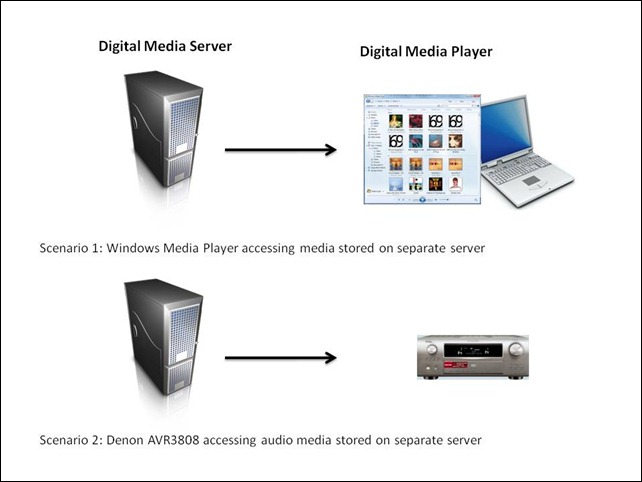
    At its simplest, just two devices can be involved: a Server and a Player. These can even be running on the same physical device, as in the case where your Windows Media Player on your Desktop PC is streaming music or video stored on the PC itself. The next step up is where the server and player are on separate physical devices. Two typical scenarios are shown in figure 1:
    WMP Scenarios
    Figure 1: Typical scenarios of simple case of DMP devices accessing DMS devices.

    I’ve used the Denon AVR3808 as an example, since this is what I have in my home network. My main DMS is an old headless (no monitor, keyboard or mouse) Dell PC running the Windows Home Server operating system. Actually, to be strictly accurate, the Dell is running two Digital Media Servers. The first is Microsoft’s Windows Media Connector version 2.0, which is built into WHS. The second is the Asset UPnP media server, which is a free piece of third party software installed onto WHS. The fact that I have two DMSes running will prove significant once I get into describing the next set of scenarios.

    In my particular case, all flavours of the two scenarios shown above will work, that is, both DMSes running on the Dell box will stream audio to other PCs in the home network, and to the Denon AVR3808. Under the covers, there’s actually some negotiation of streaming formats going on. This is because I have stored all my music files on the Dell server box in Windows Media Audio Lossless (WMAL) format. This presents no problems for the PCs, since the Windows Media Players installed on them can handle WMAL. But the Denon can only handle standard Windows Media Audio, not the Lossless variant. So when I use the Denon to browse my music library on the Dell and select a track to play, the DMS that I’m using sees that the Denon can’t handle WMAL and transcodes the stream into standard PCM (which the Denon can handle) on the fly. Both the Asset and the Windows Media Connect will do this. But this breaks down in the next set of scenarios.

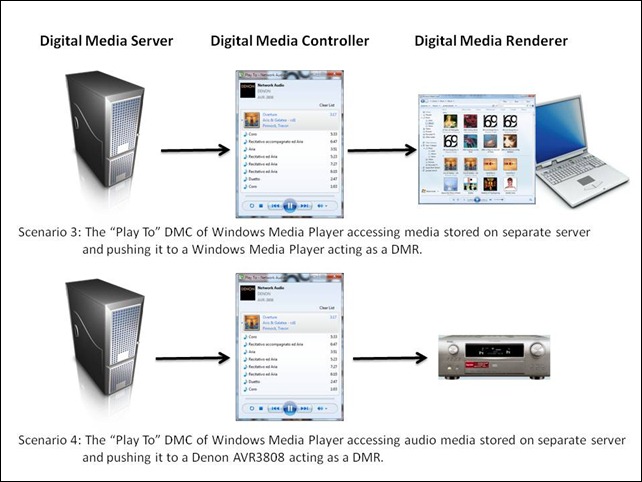
    So, the interesting scenarios are where there are three devices linked together: a Digital Media Server, a Digital Media Controller, and a Digital Media Renderer.
    WMP Scenarios 2
    Figure 2: Typical scenarios of a three device link (DMS-DMC-DMR).

    Once again, in my case, all flavours of scenario 3 will work. That is, I can stream from either DMS running on my Dell Windows Home Server using the “Play To” feature of Windows Media Player in Windows 7, and push the stream to either of my PCs that are currently running Windows 7.

    But scenario 4 has been giving me all sorts of problems. Sometimes it would seem to work, and other times it wouldn’t. I think I have finally got to the bottom of it.

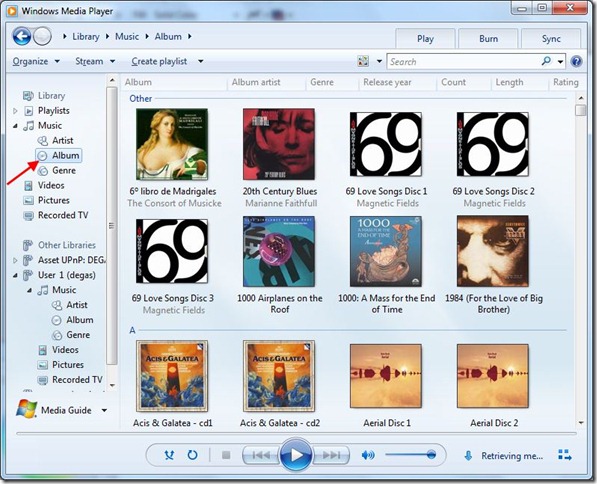
    The issue is that media libraries in Windows Media Player in Windows 7 can be built up in a number of ways. Take a look at this screenshot of the first few albums in my music library:
    WMP 12 3

    I’ve highlighted the fact that you are looking at the content of my music library in “Album” view. That is shown as part of the “Library” tree (Library – Music – Album). This screenshot has been taken from my Tablet PC, which is running the Windows 7 Release Candidate. Now the interesting part is where these albums are physically stored. There is far more storage required than my Tablet PC can cope with, so in fact these album files are sitting on my Windows Home Server. This next screenshot shows that my music library is in fact being comprised of three storage locations: my own music folders on the Tablet PC, the “Public” music folders on the Tablet PC, and the music folders on Degas – which is my Windows Home Server:
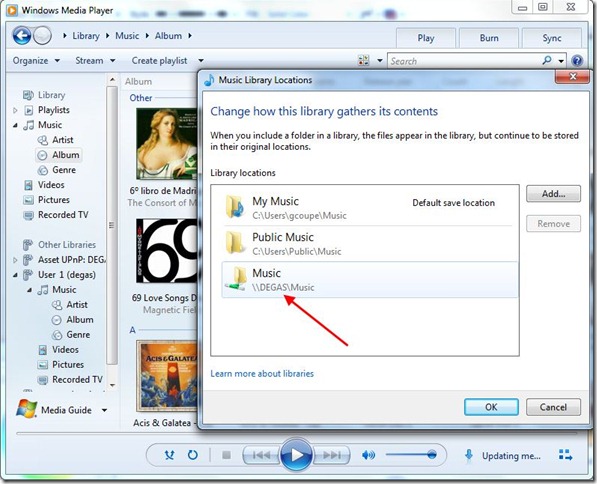
    WMP 12 4

    But hang on a minute, Windows Media Player is showing two navigation trees on the left hand side of its window: the “Library” tree and another one called “Other Libraries”. The content of the “Other Libraries” tree is populated by other Digital Media Servers which Windows Media Player discovers on the network. Sure enough, it’s found the Windows Media Connect DMS running on the Dell Windows Home Server (Degas), and this next screenshot shows the same album files being seen in the Album view under the “Other Libraries” tree:
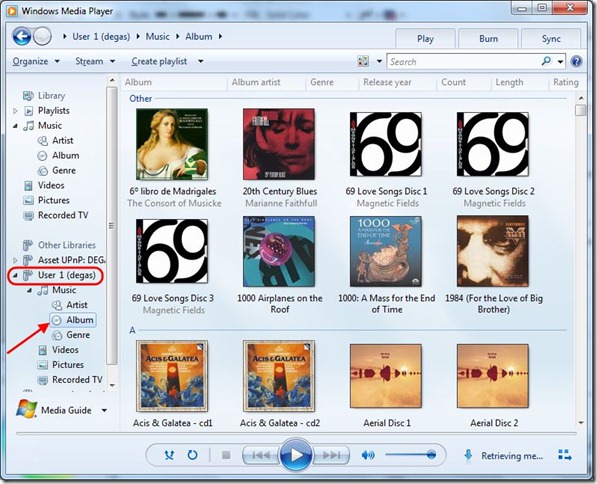
    WMP 12 6

    You’ll notice that just above “User 1 (degas)”, which is the Windows Media Connect DMS, is the Asset UPnP server entry, shown as “Asset UPnP: DEGAS”. So, under scenario 4, I can stream the same album in three different ways:

    1. Using “Play To” to pull from the Tablet PC’s Windows Media Player streaming server and push it out to the Denon.
    2. Using “Play To” to pull from the Windows Media Connect streaming server on the Dell and push it out to the Denon.
    3. Using “Play To” to pull from the Asset UPnP streaming server on the Dell and push it out to the Denon.

    What I’ve found is that method (1) and (3) will work, but that method (2) does not. These are illustrated in the following screenshots:

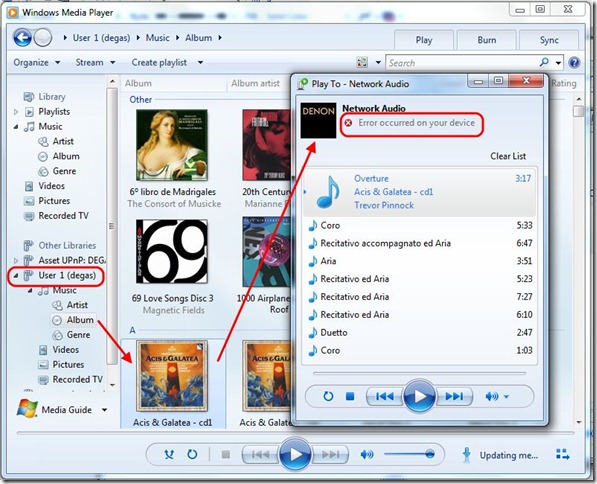
    WMP 12 7

    WMP 12 8

    WMP 12 9

    I should just point out that I’ve configured the Asset UPnP server to always stream in PCM format. If I didn’t do this, then while it would work in the simple case of scenario 2, in the case of scenario 4, it would fail just as the Windows Media Connect server does.

    The conclusion that I draw from all this is that in these “man-in-the-middle” scenarios, it looks as though end-to-end negotiation of the proper streaming format is not always being done correctly. I suspect that in scenario 4, method 2, the Windows Media Connect server is simply serving up WMAL format to the Denon, which causes it to fail. Now, I don’t know whether this is a shortcoming of the DLNA specification itself, or simply an outcome of how Microsoft have implemented it in the case where there are physically separate servers out on the network. Time will tell.

    At least I now know which scenarios work and which will fail. On to the next problem…

    26 responses to “Fun With Technology – Part IV”

    1. Sean Avatar
      Sean

      hey man, i am having a similar problem getting WMP 12 to "play to" my xbox360. here is forum link that i have described the problem in detail. http://windows7forums.com/windows-7-networking/6215-play-xbox-360-media-center-extender-not-working.html long story short though, i get this message "device can not be controlled" any suggestions?????

    2. Geoff Avatar
      Geoff

      Sean, I suspect that your xbox360 is only implementing version 1.0 of the DLNA spec, not version 1.5 – which seems to be required for full DMR functionality. With version 1.0, the xbox is a DMP – it’s not necessarily a full DMR. I came across a mention of this issue in the Twonky forums (see http://www.twonkyforum.com/viewtopic.php?f=25&t=6124). This may be what’s underlying your issue.Sorry that I can’t help further…

    3. Sean Avatar
      Sean

      hey man i got to work by messing with the homegroup settings. even though I don’t have any cpu’s in a homegroup! thanks though!

    4. Geoff Avatar
      Geoff

      Sean, glad that you got it working, although it seems strange that the homegroup functionality was behind the problem. Still, computers move in mysterious ways for much of the time…

    5. seth Avatar
      seth

      I just recently (3 weeks ago) got myself a brand new desktop PC with Windows 7 Ultimate 64 bit and am having some issues streaming WAV and WMAL files to my Denon AVP-A1HDCI preamp using WMP 12.The main problem is that when I stream either a WAV or WMA Lossless file they display on my Denon AVP-A1HDCI preamp as the wrong file type. Streamed WAV show up as MP3 and WMA Lossless show up as PCM. When I was using Windows XP and WMP 11 on my old PC I never experienced this issue. All file types were streamed and received correctly.One other thing I’ve noticed is that with WMP 12 I have now lost the ability to pause music using my Denon AVP’s remote. I can play, select next track, previous track, and stop, but no pause. Not a major biggie but a bit annoying nonetheless.Any help, tips or advice would be much appreciated.Thanks,Seth

    6. Geoff Avatar
      Geoff

      Seth,How are you streaming from WMP12 to the Denon – are you using "scenario 2" or "scenario 4" (see figure 1 & 2 above)? Does it make a difference which method you use?If I use scenario 4 to stream WMA Lossless to my Denon, then I also get the PCM indicator lit on the Denon. But I think that this is expected behaviour. Don’t forget that the Denons don’t support WMA Lossless directly, so WMP is transcoding to a LPCM stream on the fly. I don’t know why WAV stremas should be displayed as MP3 on the Denon. I don’t use WAV format, so I can’t test this.I’m afraid I also can’t help you with your remote issue. My Denon remote can pause music streamed from WMP12 with no problem.

    7. seth Avatar
      seth

      Geoff,Thank you for your quick reply. I’m using "scenario 2" I have my Denon preamp connected via CAT 6a to my router, and my desktop PC is the music server.As to my Denon preamp not supporting WMA Lossless directly, well actually it does, along with WAV, AAC and FLAC. And just to rule out that there isn’t something amiss with my Denon AVP preamp, I plugged in a USB stick into my Denon that has WAV and WMA Lossless music on it. It played the files in their correct audio format with no problems (WAV showed up as PCM and WMA Lossless showed up as WMA). So there must be some sort of incompatibility between my Denon preamp and WMP 12.I know that my Denon was designed to be used with WMP 11, and with my previous desktop that used Windows XP and WMP 11 all was well (I could even pause using the Denon remote). So now to find a solution to the issues I’m having. All I know is that if I stream WAV or WMA Lossless, I don’t want to be listening to a different audio format (especially a down resolutioned MP3). If I can’t get WMP 12 to stream things correctly I’m just going to have to find a different media manager to stream my music.Seth

    8. Geoff Avatar
      Geoff

      Seth, hmmm, interesting. I’ll have to check out a USB stick with WMA lossless files on my Denon to see if it will play. According to the table on page 66 of your manual (and page 53 of mine), the Denons only support WMA formats to bit rates between 48-192 kbps. Since WMA Lossless is using bit rates between 470-940 kbps, then WMA Lossless, according to Denon’s own manuals should not work. And that’s what I see with my AVR-3808. WMA is fine, but WMA Lossless does not work. But I must try a USB stick and see if that makes a difference…

    9. seth Avatar
      seth

      Looks like I was mistaken, you are in fact correct about WMA Lossless. The file type that happened to be on the USB stick was WMA, but not WMA Lossless. I found this out when I was going to add some other music to the USB stick. I went ahead and added some WMA Lossless files to the USB stick, and just like you said, it displayed "file format error". So you are 100% correct that Denon receivers and preamp will not play a WMA Lossless file natively.Thanks for pointing that out. And it’s a good thing that I noticed what was on the USB, as here all this time I thought I had WMA Lossless on it. D’oh!But I still need to get the WAV to MP3 issue resolved.Thank you for help. :)Seth

    10. seth Avatar
      seth

      Hi Geoff,I know that you do not use WAV to stream music to your Denon. But if you could do me a huge favor and add at least one WAV file to your library and see what it shows up as on your Denon when streamed I would really appreciate it. At least this way I would know that the issue indeed stems from either Windows 7 or WMP 12.Only asking as this info would really help me to determine the cause.Thanks,Seth

    11. Geoff Avatar
      Geoff

      Seth, OK, I scouted through my music collection, and found some WAV files that had been created by Cubase. They are a combination of files recorded at 48 kHz/1536 bps and 44.1 kHz/1411 bps.Now, when I stream these files from WMP12 to the Denon (using either scenario 2 or 4), the Denon MP3 indicator is lit. However, when I put the files onto a USB stick, and play them directly on the Denon, then the PCM indicator is lit. It seems pretty clear then that what is happening is that, in the negotiation that takes place between the Denon and WMP12 over what format to choose for streaming, MP3 is somehow chosen in place of PCM. If this doesn’t happen with WMP11, then it seems that WMP12 makes a bad call on choosing the format for streaming. Something that needs to be reported to Microsoft…

    12. seth Avatar
      seth

      Hi Geoff,Thank you VERY much for testing this out! This verifies that there is indeed something in WMP 12 that is transcoding WAV’s to MP3. You have been a HUGE help for me! 🙂 I will see about contacting Microsoft about this issue and hopefully they will get this resolved and offer an update to fix this very soon.I guess until they correct this, I will use WMA Lossless to stream to my Denon instead of WAV. At least I know that’s getting transcoded to PCM. The only downer now is that at least 90% (over 1,500 songs) of my music library are in WAV format. Is there any way to just convert my library of WAV files to WMA Lossless or will I have to manually re-rip all my CD’s into WMA Lossless?Thank you again for all your help with this. :)Seth

    13. Geoff Avatar
      Geoff

      Seth, doing a Google for converting WAV to WMA throws up a few possibilities, but I’m afraid I have no personal experience of any of them. So proceed at your own risk, I’m afraid… Good luck.

    14. seth Avatar
      seth

      Hi Geoff,Well for now I have found a excellent solution to my streaming woes. On the recommendation of a friend (and fellow Denon AVP-A1HDCI owner), I downloaded TwonkyMedia Manager. It automatically added all my music (including all my playlists!) to it’s library and found my Denon without me having to do anything. And now when I stream music using TwonkyMedia Manager, WAV’s stream as PCM! Woo hoo! And I can once again pause the music stream via the Denon remote. :)IMO TwonkyMedia Manager is way easier to use than WMP 12. And the best part is that it works right!! Even if Microsoft issues a fix for WMP 12, I may just continue using TwonkyMedia Manager. So it looks like now I will not need to convert my library of WAV’s to WMA Lossless, or re-rip them all.Thank you once again for all your help.Seth

    15. Geoff Avatar
      Geoff

      Seth,Glad you’ve found a solution in Twonky. Last time I looked at it, it was very buggy – it sounds as though the latest release is much improved.One thing that someone mentioned to me is that the WAV format is actually a file container format – it can contain a variety of compressed or uncompressed audio formats. So it’s possible that WMP12 is choosing what it thinks is the best match for the Codec in the WAV file, and it might be just as good a choice as PCM. The suggestion was to install one of the downloadable Codec packs into WMP12 (e.g. http://download.cnet.com/Media-Player-Codec-Pack/3000-13632_4-11118005.html ) and see if that makes a difference. Since I don’t use WAV in general, I don’t think I’ll bother.

    16. seth Avatar
      seth

      Hi Geoff,Yeah about a year and a half ago I tried using TwonkyMedia Server and I was NOT impressed. But this new Media Manager of theirs actually works quite nicely. Interestingly though, while I can stream WAV’s and MP3’s with not problems, WMA Lossless files for some reason do not stream. No biggie for me as nearly all of my music is WAV, but for others that have a large library of WMA Lossless, this Media Manger will not be a good choice.And after doing a bit of research myself, you’re right, a WAV can contain a variety of different audio formats. But by far the most widespread and common are WAV’s that are fully uncompressed in PCM with a bitrate of 1,411.2 kbit/s. And like you said an MP3 can indeed be contained in a WAV, but even though MP3 can have a non-standard max bit rate of 640 kbit/s, very few devices can play them. And according to the ISO standard, decoders are only required to be able to decode streams up to 320 kbit/s.So it’s quite likely that the WAV’s being transcoded to MP3’s are being played through our Denon’s at 320 kbit/s. Which is a far cry from 1,411.2 uncompressed PCM. I checked out the downloadable codec pack, and it does look promising. It might just do the trick, but in the off chance that it does not, I think I’ll no bother with it either.This is only my second day with using TwonkyMedia Manager, but so far I’m very happy with the results. I’m still going to let Microsoft know about the issue with WMP 12, and hopefully they will offer a fix for it.

    17. John McGinniss Avatar
      John McGinniss

      Hi Geoff. I wonder if you can help me as you appear to be a guru on DLNA and WMP12.
      I have set up my WMP12 to share photos, music and video libraries and stream to a Sony BDP-S570 DNLA capable device which connects via HDMI to a Sony Bravia.
      On the Sony BDP menu I can only see photos to play and no music or video libraries although these used to work.
      Any ideas on what I’ve misconfigured?

      Thanks,
      John.

      1. Geoff Coupe Avatar

        Hi John,
        Not being an owner of the Sony BDP-S570, I probably can’t be of much help. I had a quick look through the manual, but I didn’t see a setting that would block music or video, but not photos… I assume that the Sony is seeing your PC?

        The only thing I can think of is that perhaps you’ve turned off sharing of your music and videos on your PC. In WMP12, if you click on the “Stream” menu, and then choose “More streaming options…”, you should see a list of all the DLNA devices in your network. One of them should be the BDP-S570. Click on the “Customize” link, and you should see a window where you can select what medai you want to stream to the player. Now, by default, all media should be streamed, but just in case something is not working right, you could try unchecking the “Use default settings” box and check the “Make all of the media in my library available to this device” box…

        Other than that, I have no idea on what might be going on; sorry…

        1. John McGinniss Avatar
          John McGinniss

          Thanks, Geoff.
          I’ll check those settings later when I’m home and let you know the results.
          Excellent speedy reply!

    18. John McGinniss Avatar
      John McGinniss

      I tried altering streaming options but still no joy.
      I even removed WMP12 and re-installed with no luck.
      I’m beginning to think codec problems or something. Checked Windows firewall, seemed to be OK.
      Eventually installed a trial version of Mezzmo and it showed all folders, Music, Photos and Videos.
      My next move is to try out XBMC which is free.
      Thanks,

      John.

      1. Geoff Coupe Avatar

        Ah, yes, codec issues could be a cause of the problem. You say that at one time music and videos worked. Have you at some point installed a new codec package?

        Also, I went back and looked again at the player specs. I noticed that there were footnotes stating that the player wouldn’t play media files marked with DRM, or play WMA Lossless. I just wonder whether the player has had a firmware upgrade applied that might lock things down a bit more than they were when you first got it?

        Sorry I can’t be of more help…

    19. […] Fun With Technology – Part IV May 2009 21 comments […]

    20. […] three years ago, I wrote a post (Fun With Technology – Part IV) describing my trials and tribulations with this feature of Windows Media Player in an early […]

    21. […] WMP12 has a “Play To” feature, which allows it to act as a digital media controller (see my Fun With Technology – Part IV post for more geeky information on this). This is a nice feature, and it’s far easier to use […]

    22. […] I’ve explored various “Play to” scenarios and documented the results in Fun with Technology – Part IV. Share this:EmailFacebookTwitterPrintLike this:LikeBe the first to like […]

    23. […] Microsoft Windows and its “Play to” feature before. Back in the days of Windows 7, it caused a number of headaches, but the problems got resolved over time. Then with the introduction of Windows 8, it seemed that […]

    Leave a comment

  • Eurovision Roundup

    Eurovision looms, and I can do no better than to point you to this roundup in the Guardian of some of the sillier entries. Included in them is the Dutch contender: Shine, performed by the Toppers. Alas, the Guardian’s scathing comments are fully justified. Sample:
    Of the punters who pay to watch this band, one can only assume they are high on life, and other substances. Men about to turn 50 should know better than to sing about how "Love will make us glow in the dark".
    Very true.
     
    Mind you, I have to hand it to Gordon, one of the members of the Toppers for taking a stand against Russia’s anti-gay attitudes. He says he will withdraw from the final if violence is used against a pro-gay protest in Moscow planned for the 16th May. Although, I somehow doubt whether Shine will make it to the final, so he’s probably on safe ground…
     
    Update: I have just watched and listened to the Dutch entry for the very first time in its awesome entirety. Omifeckinggawd – that is cringeworthy stuff. I felt the enamel being stripped from my teeth as I beheld it.
     
    Update II: Jaysus – Ukraine’s entry is mainlining if you’re a chocoholic with a taste for erotica… I must go and lie down for a while…
     

    Leave a comment

  • Windows 7 RC

    Well, it’s now a week since I downloaded the Release Candidate of Windows 7, so how is it shaping up for me? For the most part, I’m very impressed.

    I’ve installed it on both my Tablet PC and (gulp) my desktop PC – my main workhorse. Yes, I know that Microsoft issue dire warnings against using it on your main systems, but this is my way of living dangerously, since I have no interest in extreme sports. Anyway, I have a complete image backup of my previous Vista installation stored on my Windows Home Server, so if the worst comes to the worst, I can roll back my desktop to exactly as it was on the 4th May. New documents and mail being created in the Windows 7 installation are also being backed up onto Windows Home Server every night, so I can add these into a restored Vista installation if I ever need to go back to it. But at the moment, I don’t think I will need to go back to Vista ever again.

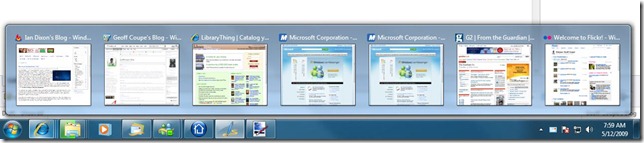
    What do I like so far about Windows 7? Well, I suppose the main thing is how snappy it is in comparison with Vista. There’s been a noticeable increase in speed on both my systems. Applications open and close faster, and are more responsive, while the performance of the GUI is definitely better. The second thing that I am liking a lot is the redesigned Taskbar. There are lots of subtle touches that improve the usability of the system. For example, while an operation is going on, such as Copy, Move, or Download, the progress bar window is also reflected in the degree of green shading on the application icon on the Taskbar, so even if the progress bar window is obscured, you can see at a glance how far the operation has got to. See this example of a file copy operation in the Windows Explorer icon:

    W7 5

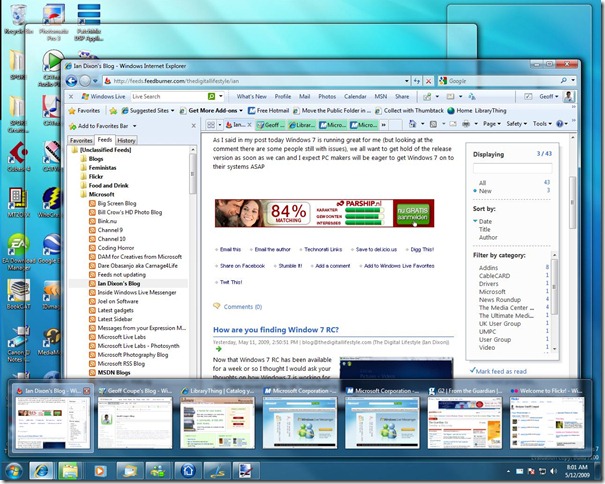
    The Taskbar indicates active applications by surrounding them with a highlighted window – applications with multiple active windows (e.g. Internet Explorer, Windows Explorer and Messenger in the example above) have a double window around them. Mousing over the icons of active applications instantly throws up miniature copies of the actual windows:

    W7 6

    Mousing over any of these miniature copies will instantly highlight that copy while simultaneously revealing that window on your desktop – all the other active windows become just outlines:

    W7 7

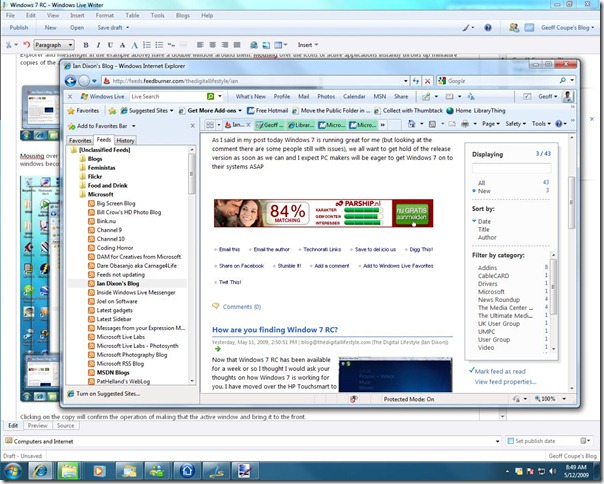
    Clicking on the copy will confirm the operation of making that the active window and bring it to the front:

    W7 8

    What issues have I come across? Well, none on the Tablet PC so far, but I have had some problems with the Desktop. It has two SATA disks installed, and I found that the D: drive seemed to vanish if I put the PC into sleep mode. Worse still, I got the dreaded BSOD occasionally. I had used the system BIOS to set the SATA drives into AHCI mode before doing a clean install of Windows 7. Even though Windows 7 has an AHCI driver, it seems as though this was the cause of the problems. After scouting around on the Windows 7 forums, I found advice that suggested that I should install software from Intel to replace the Microsoft AHCI driver. Since my desktop is a Dell system, I found an elderly copy of the Intel software (my Dell is equally elderly) on the Dell site and installed it. Touch wood, it seems to have done the trick. Interestingly, even though the Intel software was designed for Windows XP and earlier systems, Windows 7 was able to handle it perfectly in compatibility mode, and it installed without problem.

    The issue that I discovered back in February with the “Play to” feature in Window 7’s Media Player is still there, unfortunately. I don’t know whether the blame should be laid at the door of Microsoft or whether it’s a shortcoming in the DLNA specification. Either way, the result is that I can’t use the “Play to” feature to push music from my Windows Media servers to my Denon amplifier. Negotiation of setting up the correct streaming format for the player device (the Denon) isn’t being handled correctly when there are three devices in the playing chain (the server, the player and the controller). I have got a workaround though. I’ve installed the (free) Asset UPnP media server software onto my Windows Home Server. The Asset server can be set to automatically transcode the Windows Media Audio Lossless format (which the Denon can’t handle) into PCM (which the Denon is happy with). Then, when the Asset server is instructed to push an audio stream to the Denon by the “Play to” media controller of Windows 7, it will stream PCM by default. Result: music and bliss.

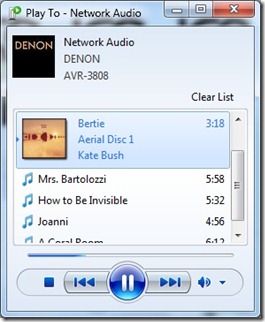
    I notice that the “Play to” media controller seems to have taken a step backwards from where it was in the Beta of Windows 7. Here’s screenshots of the “Play to” media controller window; on the left is a screenshot taken from the Beta, and on the right is a screenshot taken from the Release Candidate.

    WMP12 - Play To 1  W7 9

    Notice how the track indicator (the blue line) is operational in the Beta, but is not working in the Release Candidate? What is not obvious from the screenshots is that the track timing is also broken in the RC. In the Beta, the track timing display of the playing track counts down to zero as the track plays. In the RC, the track time remains unchanging. As usual in software development: fix a bug, introduce another one…

    However, overall, I’m pretty pleased with the Windows 7 RC. I think it will remain on both of my systems, only to be replaced by the final product when it comes out at the end of this year.

    Update: I have found that the track indicator and track timing work when the “Play to” control is being used against a library held as part of the main library hierarchy of Windows Media Player, but not when it it being used to control the content of a library held on a server and accessed via the “other libraries” hierarchy of Windows Media Player. Take a look at the following screenshots. The first shows albums in a library held on a separate server, but added into the main library of WMP running on my laptop:

    WMP 12 1

    The small window is the “Play to”media controller window – and it is showing a correctly working track indicator and track timing for the currently playing track. The track is being pulled from a remote server that is being accessed via “Library – Music – Album”.

    Now, this next shot is of exactly the same audio file, held on the same server, but this time it’s being accessed via the “Other libraries” section. And this time, the track indicator and track timing are not working…

    WMP 12 2

    The choice of using either the main Library tree or the “Other Libraries” tree in WMP also seems to have an influence on the “Play to” negotiation of formats. I found that when I navigate in the main Library tree and push audio files to my Denon they will play, but pushing the very same audio files to the Denon via navigation of the “Other Libraries” tree will fail. I surmise that in the first case, the negotiation and selection of the audio format to be pushed to the Denon works correctly, but not in the second case.

    Update: I’ve explored various “Play to” scenarios and documented the results in Fun with Technology – Part IV.

    Leave a comment

  • Windows 7 RC

    Today’s the day that the Release Candidate of Microsoft’s Windows 7 becomes available. Being a nerd, it’s downloading as I write this. But one thing already strikes me as being curious. Recently, on the Engineering Windows 7 blog, the Windows 7 team wrote that they wanted people to test the scenario of upgrading a Vista installation to a Windows 7 installation. Yet, the installation instructions make no mention of this scenario, the only option being recommended is a clean install (i.e. wiping out of the previous operating system and replacing it with a fresh installation of Windows 7).
     
    What gives?

    Leave a comment

  • RIP, Marilyn

    Marilyn French has died. I read "The Women’s Room" back in 1979, and it was clear that the quote on the front cover of the Sphere paperback: "This novel changes lives" was not simply hyperbole. I still have the book. I should re-read it and see whether things have changed much in the intervening years.

    Leave a comment

  • Condoleeza Rice

    The mask slips. I hope I live to see her in court.

    Leave a comment

  • The Politics of Torture

    Ophelia highlights a perceptive comment made on her blog, which paints a very persuasive case for the nature of the political game being played out by Obama in relation to the use of torture under the Bush administration. The game is simultaneously saddening – in that it exists as the alternative to actively pursuing war crime prosecutions – and probably the only way in which progress can be made to the point where such prosecutions are demanded by a substantial proportion of US citizens.
     
    Softly, softly, catchee monkey.

    Leave a comment

  • Damn

    This has probably put paid to the relaxed atmosphere that we all used to enjoy during Queen Beatrix’s walkabouts on Koninginnedag. And I don’t think there was anything "apparent", as the Guardian puts it, about Maxima’s look of horror. Damn, damn, damn.

    Leave a comment

  • Is Gay Marriage a Religious Issue?

    I see that the Guardian is running a series of opinion pieces this week centred around the question: “Is gay marriage a religious issue?

    So far, we’ve had four different people take four different stances. First, we had Candace Chellew-Hodge, an American gay Christian and associate pastor, arguing that marriage existed long before Christianity got its sticky fingers on it. Next up was Martin Prendergast, a British gay Catholic, arguing that the Catholic sacramental view of marriage could be applied to same-sex unions. While his heart is clearly in the right place, I can’t help feeling that he’s flogging a dead horse while the current Pope and his coterie are in power. Still, as he points out, the Catholic Church has itself recognised same-sex unions in the past, so it’s possible that once Benedict bites the bullet, reason, equality and doing the right thing might once again prevail.

    Then we got Theo Hobson, arguing that marriage should be opened up to gay people. Fine, except that, being Theo Hobson, his arguments are a pile of old codswallop. He gets off to an abysmal start in his opening two sentences:

    Is gay marriage a religious issue? Yes, in the sense that we can only really understand marriage with reference to religion.

    Er, sorry? The evidence for that assertion is, what, exactly? Theo attempts to explain:

    The event has a religious dimension, even if the couple are atheists, for they are affirming a tradition moulded by religious values.

    Ah, the “sticky fingers” argument. Well, sorry, Theo, but my civil marriage ceremony had no religious dimension to it whatsoever – God didn’t get an invite (how could she, when she doesn’t exist?).

    The ideal of total communion between two souls is religiously rooted.

    There you go again, Theo, I don’t have a soul either – that’s a concept that indeed is religiously rooted, but is total nonsense. However, two people can want to get married because of their love and commitment to each other – no souls required.

    And so is the discipline that this entails: confining sexuality to one relationship, for the sake of nurturing a new social entity, the family, involves an idea of social duty that has long been seen in religious terms.

    It may have “long been seen in religious terms”, but that doesn’t mean that that is the only way of seeing it. Discipline and the family are not the sole prerogatives of religion, no matter how much Hobson seems to need to believe it. He should try taking off his blinkers once in a while. But what really irritates me about Hobson’s piece is his final paragraph:

    Yes, this makes marriage a wider concept, but it doesn’t matter. Nor does it matter that many of us will still feel that there is something more real about heterosexual marriage, because of its union of gender opposites, and because of its reproductive potential.

    “More real”? Patronising, or what? Excuse me while I catch my breath.

    Today, Mark Simpson weighed in with his take on the subject, arguing that marriage is outdated, and that the existing civil partnership laws are all that is needed in 21st. Century Britain, and should be open to heterosexuals, not limited just to gays and lesbians. While there’s something to be said for this point of view, the fact of the matter is that in Britain, at present, straight people, religious or not, can get married, while gay people can only enter into a civil partnership. There’s the discrepancy and the discrimination right there.

    Britain is stuck in a halfway house at the moment. Perhaps the way out is indeed, as Simpson suggests, to open up civil partnerships to all.

    It’s interesting to reflect on the situation here in the Netherlands. We’ve got both civil marriage (open to all) and civil partnerships – known as registered partnerships (again, open to all). The point is that “marriage” is completely secular: two people must get married in a townhall for their marriage to be recognised as such. If they are religious, then they usually walk across the market square into the church to perform a church marriage, but that is a purely religious ceremonial, it has no standing in the eyes of the State. When Prince Willem-Alexander and his Maxima got married a few years back, that was the pattern they followed: civil marriage in the Townhall, followed by the religious marriage in the church.

    There are few real differences between civil marriage and civil partnerships here. If you want the nitty-gritty detail, then this paper by Kees Waaldijk will tell you all you need to know.

    I’m probably biased, but the Dutch model seems to be eminently pragmatic, sensible, and treats people equally. I wish more countries would adopt the model.

    2 responses to “Is Gay Marriage a Religious Issue?”

    1. Bal Avatar
      Bal

      Hey Geoff, I absolutely agree with you! For goodness sake ‘live and let live I say.’ If two gay people are as happy as ‘Mr & Mrs’ conventional’s relationship and feel as committed and secure as them, then what the heck is wrong a gay marriage???????? I just went out to quote on a job where the customer confesses to being in a civil partnership and I have no problem with that at all – they are an extremely loving and lovely couple and who am I to judge! xxx

    2. Geoff Avatar
      Geoff

      Hi Bal Maiden. Thanks for your comment. I cannot understand those people who claim that marriage will be damaged by opening it up to gay people. They seem to think that love is a non-renewable resource – that there’s only a limitied amount to go round, and if you allow gay people to love, then there will be less for straight people. Totally bizarre.

    Leave a comment

  • The Merchants of Light

    The Science Network has a series of videos up on the web that were made of the recent Origins Symposium held at Arizona State University earlier this month. Worth watching.

    Leave a comment

  • The British Museum

    I visited the British Museum last Sunday. It was the first time that I had seen the remodelled Courtyard. Very impressive. I took lots of shots, and here is the resulting Photosynth.
     
    (tip: when viewing the Photosynth, switch to Grid View to select another set of photos shot from a different point in the Courtyard)

    Addendum: And of course Microsoft has now scrapped the Photosynth product and technology, so none of these links work anymore. It’s dead, Jim.

    Leave a comment

  • London Bound

    I’m off to London for the weekend, hopefully to meet up with a couple of friends that I haven’t seen for many years. It’ll be my first visit to London in nearly five years. I expect that I will find some changes. Back next week.

    Leave a comment

  • Plus Ça Change…

    Since the recent success of the writings of the Four Horsemen, there’s been something of a backlash from people such as Our Maddy of the Sorrows and (surprisingly) Julian Baggini who claim that atheists are becoming, well, too noisy.
     
    There’s nothing new under the sun – John Stuart Mill (1806 – 1863) pointed out in his writings on Liberty:
    Before quitting the subject of freedom of opinion, it is fit to take some notice of those who say, that the free expression of all opinions should be permitted, on condition that the manner be temperate, and do not pass the bounds of fair discussion. Much might be said on the impossibility of fixing where these supposed bounds are to be placed; for if the test be offence to those whose opinion is attacked, I think experience testifies that this offence is given whenever the attack is telling and powerful, and that every opponent who pushes them hard, and whom they find it difficult to answer, appears to them, if he shows any strong feeling on the subject, an intemperate opponent.
     
    Hat tips to both Ophelia and Russell. Read both of them for why Mill further argues that "intemperance" is a false charge from those who have too much invested in not rocking the boat.
     
    And I am probably not the only gay man who sees parallels in this backlash from religionists (and their appeasers) with earlier examples of those in power claiming that those who spoke against them were getting too noisy (or "uppity" as one particular group would have said). I remember well the homophobes from the 1970s and the 1980s who said "the love that dare not speak its name has become the love that will not shut up". Different minority, same old shit.
     

    Leave a comment