Reflections on life at “De Witte Wand”…

Category: Photography

  • OneDrive Is Now Useless For My Photos

    I’ve been using Microsoft’s cloud storage service to hold a copy of my photo library since 2007. In those days the service was known as Windows Live SkyDrive. As a result of a lawsuit brought by the British television broadcaster Sky UK, the service was rebranded to OneDrive in 2014.

    While the PC application, Windows Photo Gallery, supported photo metadata tags it wasn’t until 2015 that OneDrive also supported them.

    At that point, the combination of Windows Photo Gallery and OneDrive was useful – I could search my photo library using tags in both and both supported using geo tags. The road to get there had been pretty bumpy, Windows Photo Gallery in particular had some bugs that caused havoc to my library and its metadata, but the issues were eventually (mostly) resolved.

    Alas, Microsoft dropped Windows Photo Gallery in favour of the Photos app that was first introduced with Windows 8 in 2012. The Photos app, to this day, does not support photo metadata tags, which meant that searching my photo library using tags could only be done in OneDrive.

    Since the Photos app is useless, I’m using Photo Supreme from IDimager on my PC as my digital asset management application for my photo library. It supports the industry standard photo metadata schema published by the IPTC. I can manage technical (Exif) tags, descriptive tags, geo tags and region tags (for putting names to faces) using Photo Supreme. The resulting photos are then synchronised with the copy of my photo library held on OneDrive, where the technical, descriptive and geo tags in a photo can be displayed (region tags are not supported in OneDrive).

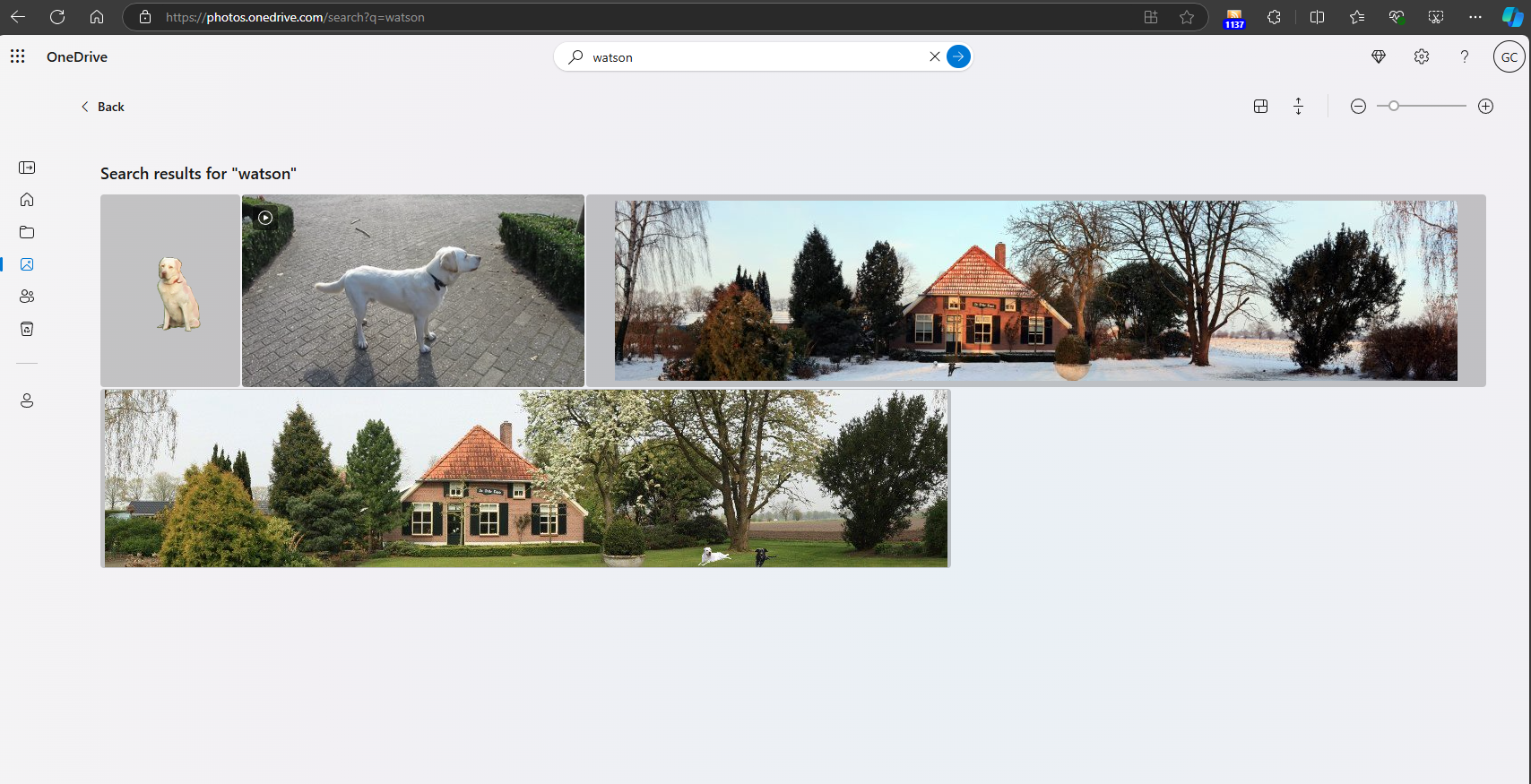
    After 2015, I could also use OneDrive to search my descriptive tags (for example, display all the photos that have been tagged with the name of our dog “Watson”). However, I got a nasty surprise in October last year when I discovered that searching for tags in OneDrive no longer worked.

    The reason appears to be because Microsoft has drunk the AI Kool-Aid. OneDrive uses AI to tag your photos. There’s an option switch to enable this:

    You will note that it says “You can also add tags to your photos manually to organise and find them more easily”. Originally, this switch just turned on the AI tags function – my tags were always being indexed by OneDrive’s Search engine independently and I could search them.

    Now, it appears that Microsoft has tied the indexing of my tags to this option, so I have to turn it on to enable searching of my tags. I don’t want to do this for two reasons:

    1. I don’t want to use Microsoft’s AI tags; a) they are too error-prone and b) they would pollute my controlled vocabulary of metadata tags.
    2. I discovered that with this option turned on, as OneDrive was assigning AI tags to my photos, it downloads versions of those photos with no tags at all to my PC. This is a complete turnabout to the old OneDrive, which preserved tags in downloaded copies.

    I am a strong believer in the adage “The Truth is in the File” – that is, that an image file must contain complete and accurate metadata. For OneDrive to deliberately strip out my metadata from my image files is a complete showstopper for me, so there is no way that I’m going to turn this new incarnation of the Photo Tagging option on.

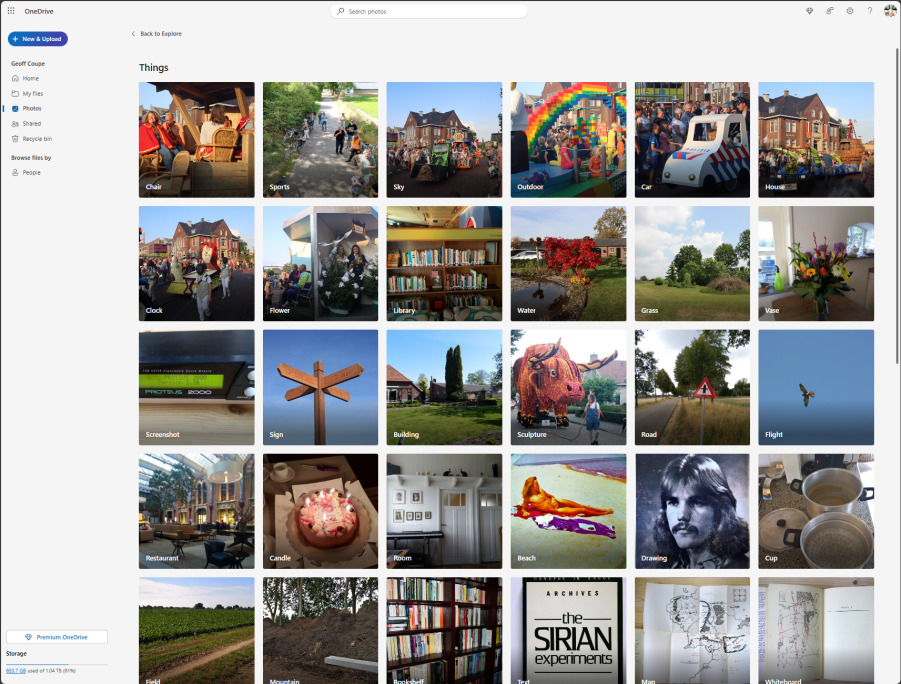
    With the option off, then the Explore page is useless to me, because OneDrive will not display either my descriptive tags, nor will it read my geo tags and show me “Places”. I simply get, what is, to all intents and purposes, a blank page:

    Thanks, Microsoft – you’ve destroyed OneDrive as far as I am concerned.

    Addendum 29 July 2025: Well, good news – it appears as though Microsoft has reinstated the indexing of our own tags. So now I can search my photo library once again. Pity that Microsoft didn’t bother to tell us.
  • One Step Forward, Two Steps Back…

    Sigh, once again Microsoft ruins a product – it is no longer possible to search tags in photos stored in OneDrive.

    When it was first launched in 2007 (under the name Windows Live SkyDrive), it was not possible to search for tags stored in photos’ metadata. This was finally made possible in 2015.

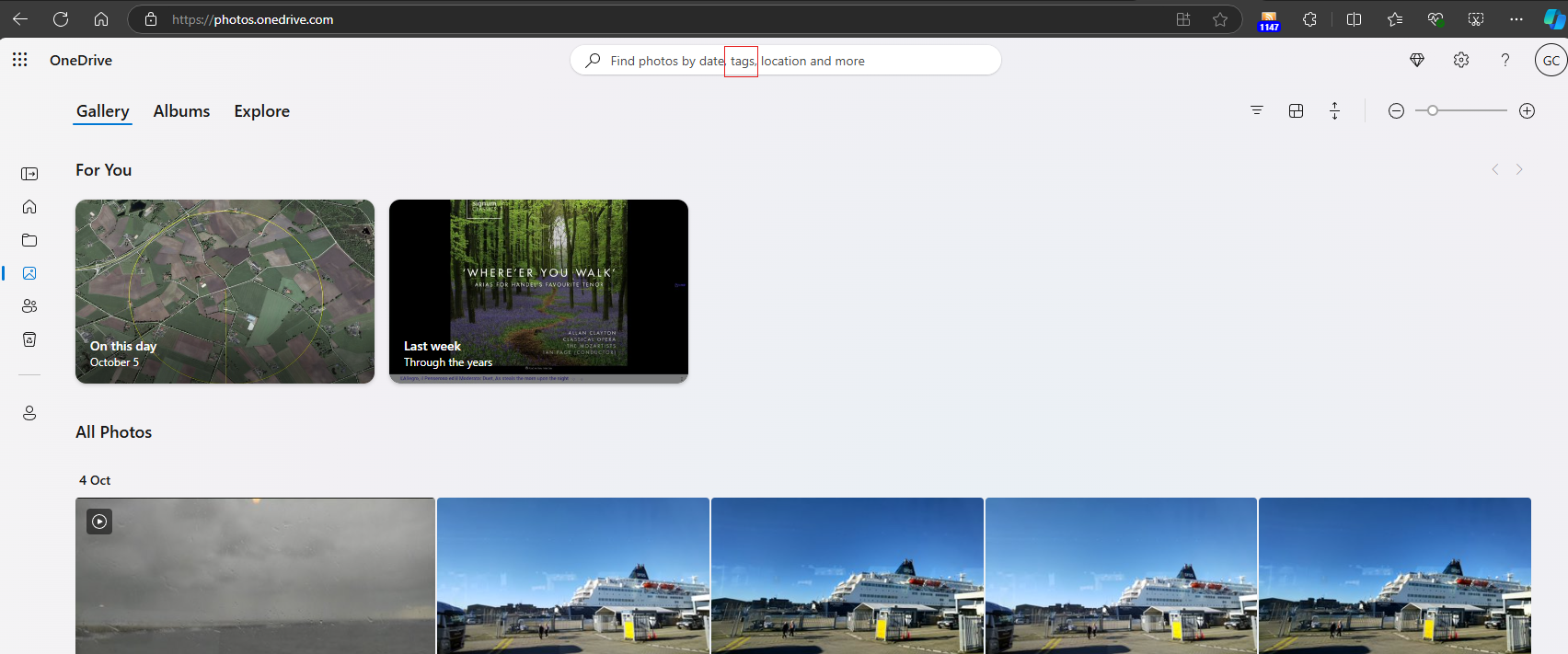
    The OneDrive Search function still claims that it is possible to search tags in photos:

    However, when I attempted to search for any of my tags in my photos, this function no longer works. Microsoft appear to have silently downgraded OneDrive, presumably to match their abysmal Photos app, which has never had the ability to support photo metadata tags since it was introduced.

    Once again Microsoft snatches defeat from the jaws of victory.

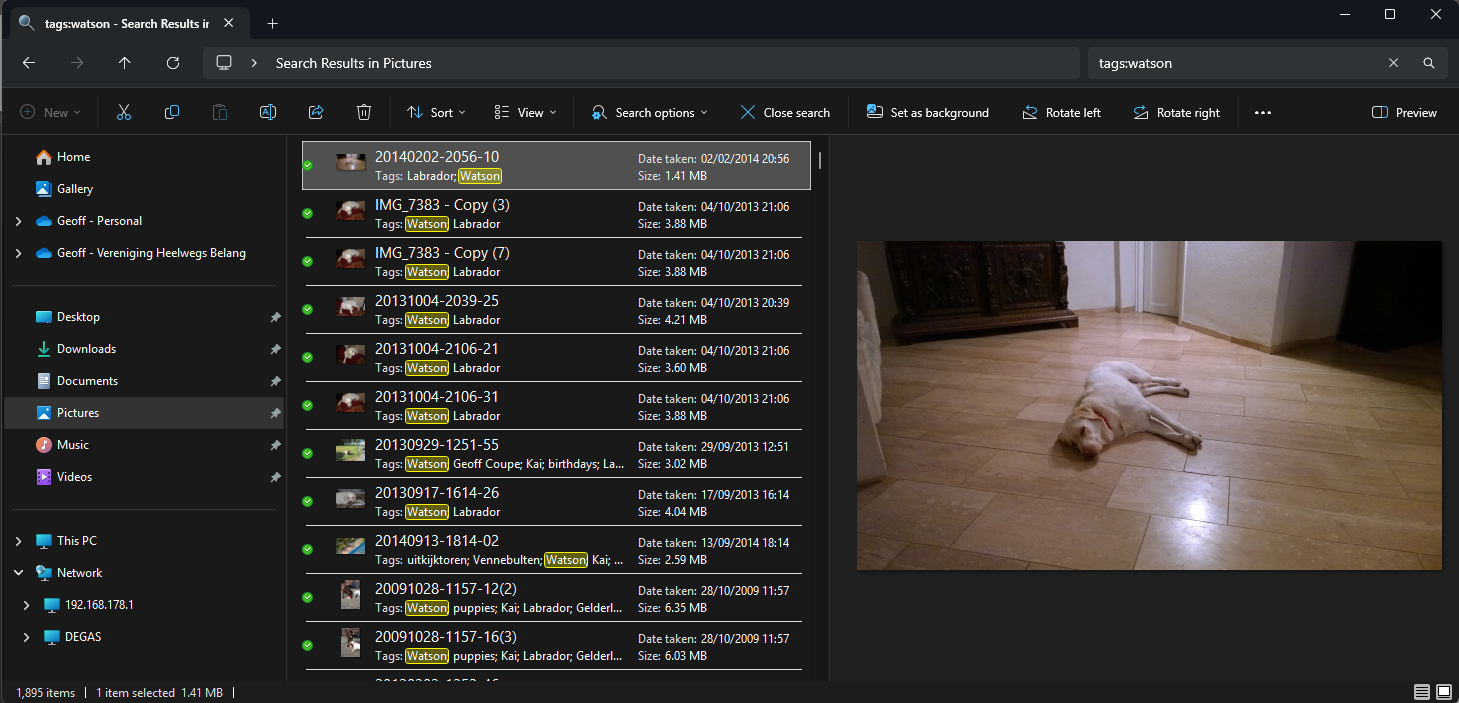
    Addendum: Here’s an example… My Pictures folder is backed up to OneDrive. Using Windows File Explorer to search for the tag “Watson” gives 1,895 photos as the result:

    OneDrive knows about the tags for each photo; for example:

    But searching for “Watson” in OneDrive only finds photos with “Watson” in the filename; all the tags are being ignored…

    Addendum 17 February 2025: I tried once again to contact Microsoft Support to report this (all my previous attempts disappeared into the ether). This time I actually got a link to a Community Post describing the same issue. The post was dated October 5th 2024. The issue was acknowledged to exist, but a few replies further on was this:

    FYI, in the past week I’ve been told by Microsoft this issue had been fixed, then that it would be fixed by the end of December, and finally I was told that the feature is being removed from One Drive altogether. Yes, you read that correctly: Microsoft is removing the search feature for photo tags.

    Un-f*cking-believable…

    However, a few posts further on, someone discovered a workaround, which is to post a query of the form:

    Try this link, https://photos.onedrive.com/explore/things/thing?id=testmytagsplease and replace “testmytagsplease” with your tag.

    Well, great that I can search for a single tag, but I used to be able to search on multiple tags in an AND operation, e.g. show me photos that have both our dogs in them (search for the tags Watson AND Lexie). Microsoft has simply removed this functionality and neutered OneDrive.

    Addendum 26 February 2025: I think I’ve discovered what Microsoft has done. They have indeed removed the ability to search our photo tags. Instead, OneDrive relies on their bloody AI engine to assign tags, and then group them on a new “Explore” page. It appears that your own tags are totally ignored when building these categories and Search now only searches photo filenames.

    Well, that’s a pile of Dingos’ kidneys – it renders OneDrive totally useless to me as an online resource to manage and search my photo library, and the AI is not much good either. There are many errors, and I simply haven’t the will to keep correcting its mistakes.

    Microsoft – you’ve ruined OneDrive for me.

    Addendum 28 February 2025: Just when I thought this couldn’t get any worse, Microsoft has managed it in spades. I turned off the Tag option in OneDrive, because Microsoft’s AI tags were poor and not what I wanted; I just wanted to have my own curated tags present. I checked that my tags were still present in the photos up on OneDrive (even though the Search function no longer works) and they were, and could be searched using the workaround I showed earlier.

    However, Microsoft has pulled a fast one on me – when the option was on, as OneDrive was assigning AI tags to photos, it appears to have downloaded versions of those photos with no tags at all to my PC. This is a complete turnabout to the old OneDrive, which preserved tags in downloaded copies.

    I discovered that I now have 32,000+ photos in my library that have had all my tags stripped out.

    Fortunately, I have my photos replicated in a shadow set of folders safely out of the reach of OneDrive, but now I have a lot of work to do to replace the castrated photos in my Pictures folder with curated ones.

    There was a time when the Microsoft software developers working on photo applications lived by the mantra that “the truth lives in the file” – i.e. accurate metadata and its preservation were paramount considerations. Those days are no more.

    Addendum 30 July 2025: Well, it appears as though the ability to search our tags has been restored to OneDrive. Pity that Microsoft didn’t bother to tell us…

  • RIP, Erwin

    Erwin Olaf has died at the early age of 64. He was a brilliant photographer and video maker.

    I was lucky enough to be able to go to the exhibition of his work held in the Hague in 2019 and have books of his work in my library.

    Here is the funeral service (it begins at 32:00 minutes in):

    https://vimeo.com/event/3730332/embed

    He will be missed.

  • Chris Killip Retrospective

    Like me, Chris Killip was born on the Isle of Man. Unlike me, he was expelled from school at 16, but went on to make a name for himself as a world-class photographer. He died in 2020.

    The Photographers’ Gallery in London opens a major retrospective of his work this coming week.

    I came across this short film of him talking about his time spent taking photographs in Skinningrove, a fishing village in the Northeast of England. As a friend said to me: “one of the best talks about his own photographs that I’ve seen any photographer make… the humanity shone through”.

  • Up, Up and Away

    Our neighbours took a balloon trip the other evening. The balloon was launched from their field, next to ours, and they took some photos of our house and garden…

  • If You Go Down To The Woods Today…

    …You’re sure of a big surprise.*

    Took the dogs for a walk in the woods this morning, and we were greeted by this newly-erected sign at the entrance.

    It says: “beware of defensive buzzard”. There’s obviously a nest up in the trees somewhere, but I couldn’t spot it. At any rate, we were not buzzed by a buzzard.

    The last time I saw a buzzard’s nest in these woods was eleven years ago.

    Good to see them back.

    *The Teddy Bears’ Picnic.

  • RIP Chris Killip

    Chris Killip has died. He probably made his name as a photographer with his photos documenting the industrial decline in the north-east of England. But for me, as a fellow Manxman, it is his photos of the people and places of the Isle of Man that resonate the most with me, because I grew up with them.

    My parents had a hotel, which like many hotels on the island was open only during the Summer season, which ran from June to September. When I was very young – up until I think my eighth year – I would be sent to stay with a family in the country during the season, because my parents had their hands full with running the hotel. This was no hardship for me, because I was living in the countryside, but farming was not an easy life as Killip’s photos show. This photo of the interior of a Manx cottage could have been taken in the cottage where I lived for at least two of the seasons:

    It was still common to see horse-drawn ploughs, and look at this photo of Mr. Corkhill, the blacksmith, and his son – the size of the horseshoe gives you an idea of how large the Shire horses were. To a small boy, they were gigantic, mysterious beasts, whose eyes held hidden secrets.

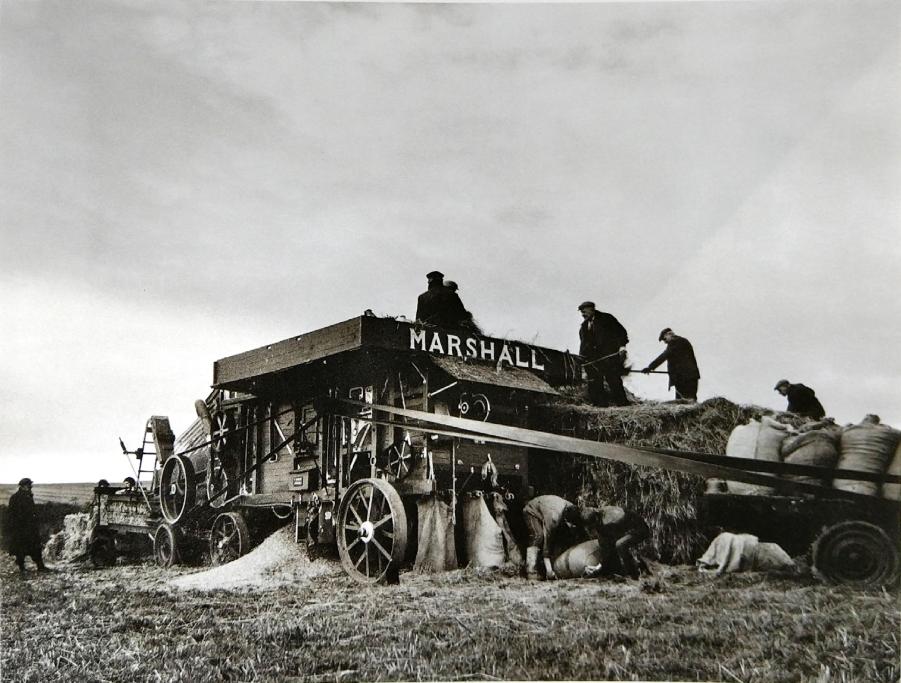
    I remember also seeing Mr. Kinnish’s threshing and milling machine in action:

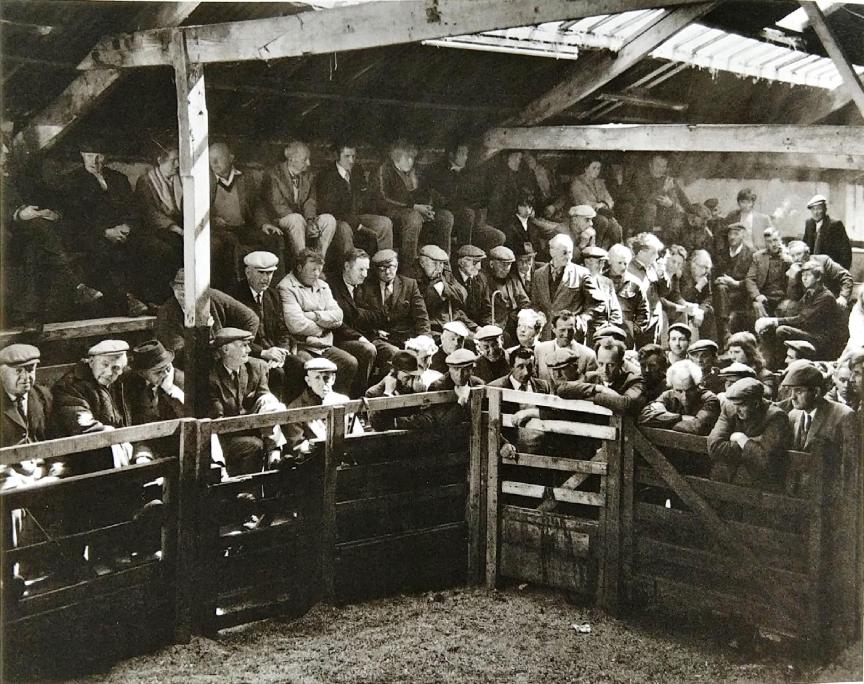
    I’m talking about the 1950s. Chris Killip took his photos between 1970 and 1973. It is clear that even 20 years after I lived amongst the farming community, that things had hardly moved on at all. The Farmers Mart at St. Johns, just a few miles from where I stayed in Greeba, looks much the same as when I was around 20 years earlier.

    The Manx Museum has a good collection of his Manx photos which can be seen online here.

  • Erwin Olaf: I Am

    My blog post about the photographer Jimmy Nelson reminded me to write a post about another photographer whose work I really like: Erwin Olaf.

    There’s recently been a major exhibition of his work in two museums in The Hague, and I visited it with a photographer friend of mine (this, I think, was his third visit to see the exhibition). Olaf has been making photographs since the early 1980s, and his first collection was published in Stadsgezichten (City Faces) in 1985.

    9070464314

    It was a collection of two styles: street photography of Amsterdam’s nightlife, and studio portraits.

    stadsgezichten

    I’m pretty sure that that is Henk (on the ground) and Laurens – two guys I used to know from when I lived in Scheveningen. They were frequent visitors to Amsterdam’s nightlife. I recall a visit with them to Chez Manfred and the Floral Palace

    stadsgezichten0001

    This is a self-portrait of Erwin and Teun, made in 1985. He reshot this with the exact same poses in 2019 for the exhibition. The two portraits hung side by side and made a statement about the passage of time.

    His work has evolved over the years, taking in video and installations along the way, to creating scenes that hint at stories captured in the image. What the stories are about is left for the viewer to construct. For example, this image from the 2012 series Berlin:

    Olaf - Clarchens Ballroom

    I’m pleased to have a selection of his books in the library, starting with Stadsgezichten, and travelling through Chessmen, Mind Of Their Own, Silver, Erwin Olaf, Own, and I Am.

    Olaf - Chessmen 9072216601

    Erwin Olaf - Erwin Olaf12051_f  Erwin Olaf

    2019_06_06 21_44 Office Lens 1  ErwinOlafErwinOlaf23070GHXJ_f

  • Homage to Humanity

    While I was in Deventer at the book market, I popped into Deventer’s largest bookshop to check out the new book by photographer Jimmy Nelson: Homage to Humanity.

    I already have a copy of his previous book Before They Pass Away in the library, which has the same theme: photographs of indigenous peoples and tribal cultures that are in danger of vanishing from the world.

    I freely admit to being in somewhat of two minds about the books. The photographs themselves are stunning, but also carefully posed; almost theatrical. A sort of National Geographic crossed with Vogue. And yet, and yet – they are undoubtedly a record of sorts:  aspects of human cultures that are undeniably in danger of being swept away.

    So I wanted to take a look at the new book to see whether I should stump up the cost of adding it to the library – at €125, it’s not exactly the cost of a paperback…

    And, well, I was persuaded. It is a gorgeous book, printed by Rizzoli.

    I’ve ordered it via our local village bookshop. Now I’ve got to find space in the bookshelves to put it.

    JimmyNelsonJimmyNelson23247_f  BeforeTheyPassAwayJimmy20798_f

  • Selfie Deaths

    Selfie deaths – a report. But I disagree strongly with the conclusion. It would only serve to affect the number of Darwin Award winners in a negative fashion.

  • Microsoft Photos – Still a Disaster After All These Years

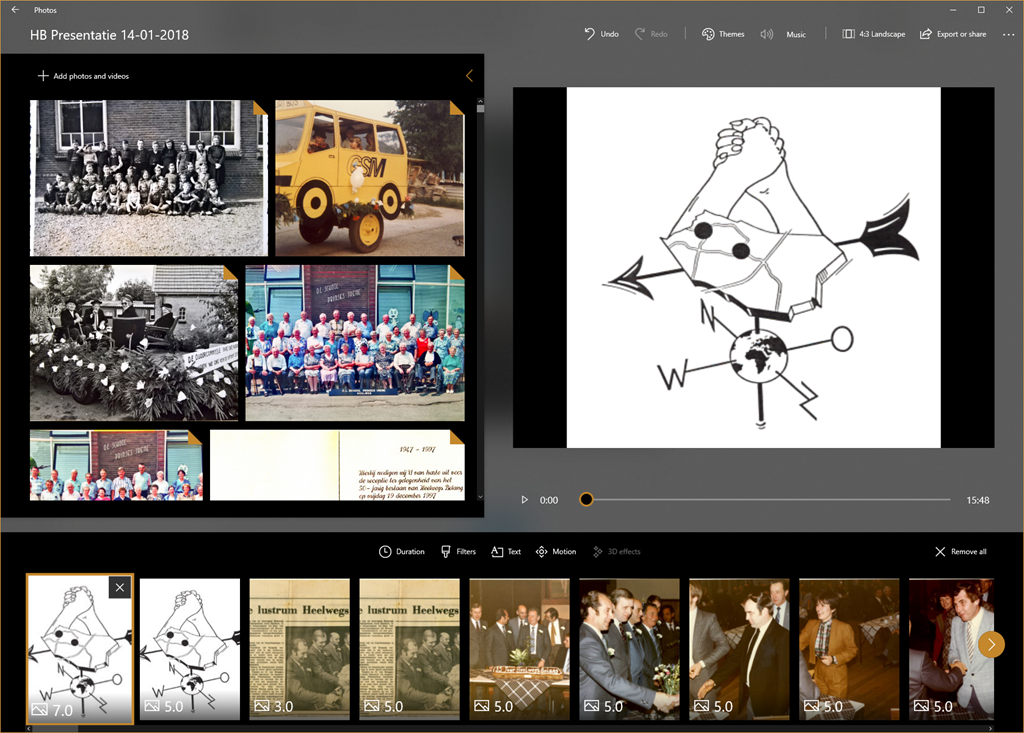
    Our local village community organisation – Heelwegs Belang – is holding its annual New Year’s Reception today. I thought that I would make a slide presentation to run continuously during the reception and be displayed on a screen in the village hall.

    I thought about what tool I would use to make the presentation; would it be PowerPoint, or something else? Initially, I thought I would try using Microsoft’s new presentation tool Sway. It seemed promising, but I quickly discovered that it requires a permanent connection to the internet to work. Since there is no WiFi in the village hall at the moment, that ruled out Sway from consideration.

    Then I realised that the much-maligned (by me and others) Microsoft Photos app now has a so-called “video creation” mode, which can be used to assemble slide presentations, and even put music to them. So I fired up Photos and set about assembling my presentation.

    Photos 01

    Dear lord, but what a painful experience that proved to be. The Photos app is slow as molasses in this mode, and crashes frequently. The workflow involved in assembling a presentation is primitive – for example, you must apply effects one at a time to each slide; you can’t select a group of slides and apply an effect or effects to the group. So if you want to change the default display time of 3 seconds to, say, 5 seconds – you have to plod through the presentation and change each slide timing individually. Given that “plodding” is the order of the day with the Photos app, I felt I was fighting the app every damn step of the way. Add to that the frequent crashes, and losing the last few minutes of work each time, I was ready to put my fist through the screen at several points.

    Frankly, next time, it will be back to PowerPoint. It may be old-school, but at least it works, and does what it says on the tin.

  • Facepalm Time Again

    I see that Microsoft has at last introduced a much-requested feature into their Photos app for Windows 10. Unfortunately, this being Microsoft, the feature is half-baked and not useful. Let me explain.

    With the Fall Creators Update, the Photos app started to be able to recognise faces in photos. There was no way to add names to the faces, or to group photos of the same face together under one name, as we could do in Microsoft’s Windows Photo Gallery 2012, but at least it appeared as though Microsoft was starting down the road to make the Photos app more useful by adding People Tags.

    There’s now at last a build (2017.39101.16720.0) of the Photos app released to Windows Insiders that allows you to assign names to faces. However, the names are local to the PC on which they are done, so they reside in the local database of the Photos app, rather than being written back to the file as metadata. That means that the information does not travel with the file. If the file is held in OneDrive, and accessed from another device, the People Tags are not available to that device. The experience is broken. If you want the People Tags to be available on the new device, you have to go through the manual process of adding names to faces again (and again and again on each new device that the files are copied to).

    What is truly depressing is that Microsoft helped define a metadata standard for tagging faces in the Metadata Working Group – and that standard has been available since 2010. It’s been implemented in products such as Adobe Lightroom, Photo Supreme and Google’s Picasa, so People tags created in any one of these products travel with the file, and can be read in any of the others.

    Here we are in 2018, and Microsoft still hasn’t learned how to build a seamless experience for People Tagging.

    And to add insult to injury, the Search facility for descriptive tags is also still broken.

  • Search in Microsoft’s Photos App – Simply Not Good Enough

    Another day, another rant at Microsoft. And once again, my despair is directed towards the team developing the Photos app in Windows 10.

    Ever since the Photos app had its debut in Windows 8, back in October 2013, it has been unable to search metadata in photos. This, despite the fact that its predecessors, Windows Photo Gallery (first introduced in Windows Vista back in 2007), Windows Live Photo Gallery (first introduced back in 2009) and Windows Photo Gallery 2012 were all able to do this. Microsoft, in its infinite wisdom, has now withdrawn all of these products from the market leaving only the miserably limited Photos app in place.

    Over the past four years there have been features added to the Photos app, but for the most part they have been akin to rearranging the deckchairs on the Titanic. Fundamental features present in the withdrawn Windows Photo Gallery 2012 are still not there.

    So it was with some interest that I read the other day that Search would at last be introduced to the Photos app. Since I’m a Windows Insider, it meant that I should get a preview of the app with the Search function in it. Well, it’s now arrived (version 2017.350631.13610.0 of the app) on one of my test laptops, and it turns out to be a huge disappointment. 

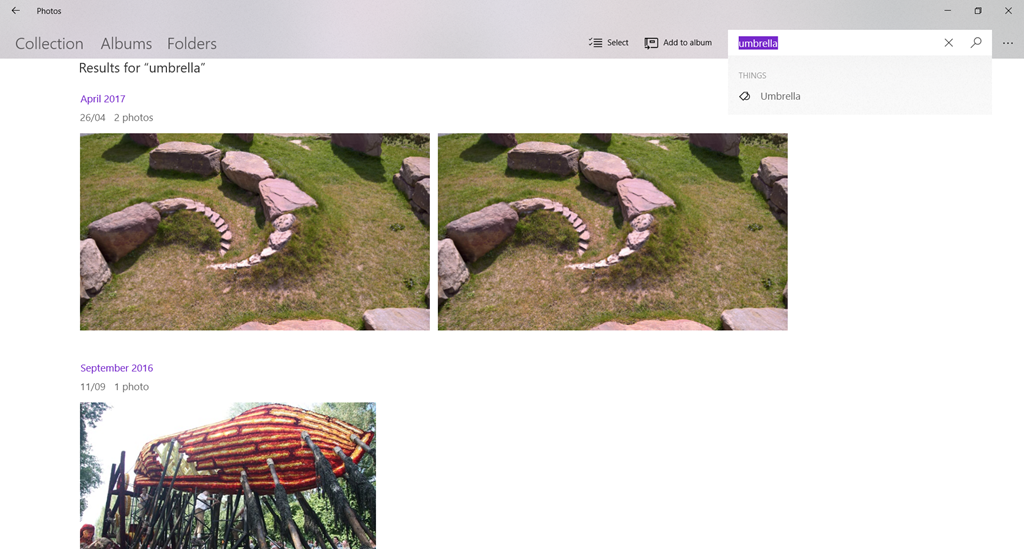
    The reason that I’m disappointed is that the Photos app still does not search photo metadata, instead it uses a Microsoft-built A.I. system that attempts to assign tags to your photos. I say “attempts” because currently it gets things more wrong than right. For example, here are my most recent photos that the Microsoft A.I. system thinks are photos of an umbrella:

    Photos 01

    Note that “umbrella” is not a word that I have chosen, the term has been assigned by the A.I. system, and popped up as a suggested search term.

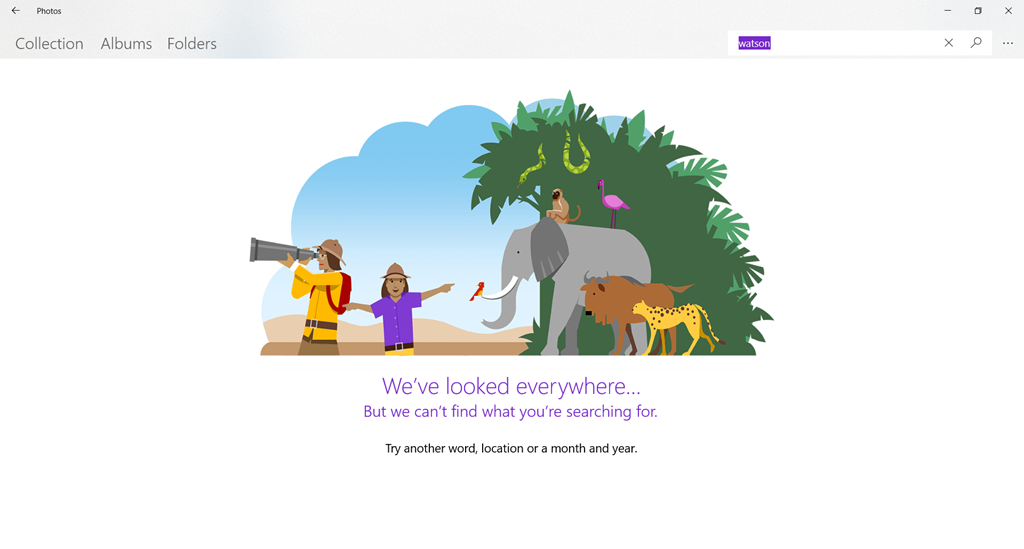
    I can’t search using my own terms. For example, if I try searching for photos of our dog, Watson, there are zero results:

    Photos 02

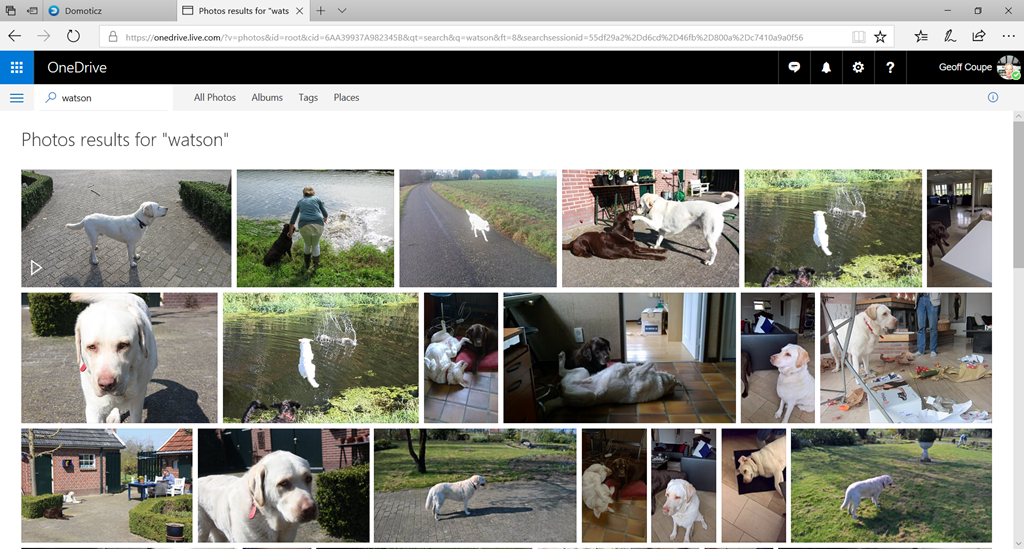
    The OneDrive search engine is certainly indexing my photo metadata, because if I search for “Watson” on OneDrive, it finds all the photos to which I have assigned the tag “Watson”:

    Photos 3

    At least the A.I. system knows about dogs, because I can search using “dog”. However, while that does return at least some of my pictures of Watson, it also thinks a lamb is a dog:

    Photos 04

    The A.I. system does recognise the search term “cat”. Unfortunately, it’s even worse at recognising cats than dogs. It returned 45 photos that it claimed were of cats. It only correctly identified three photos of cats – the rest were of dogs (usually Watson), and one was a picture of a hand. Actually, I have 56 photos of cats in my collection.

    Photos 05

    There is currently no way to correct misidentified photos, so searching, it seems to me, is little better than a hit-and-miss affair at the moment. First, you’ve got to hit on a search term that the A.I. system uses, and then you’ve got to hope that it won’t return any misses in the results.

    The A.I. system also indexes the faces of people in your photos. Once again, there is no way to either assign a name to a face, or merge what the system thinks are different people into the one person. Both of these features were available in Windows Photo Gallery 2012, which I remind you was available five years ago, but which Microsoft has now withdrawn.

    I really wish that the Photos team would proceed in a more logical manner and provide features that put the Photos app on a par with what we had with Windows Photo Gallery before they introduce half-baked new features that do not advance the usability one jot.

  • Microsoft: One Step Forward, Two Steps Back – Again

    Once upon a time, back in 2013, Windows had a feature called “Smart Files”. I found it very useful – I was able to use Windows Explorer to search all of the files stored in my OneDrive, even though the majority of the files were only stored in OneDrive, and not copied to my local computer. It was a step forward.

    Then, in November 2014, Microsoft pulled the feature, claiming that some users found it difficult to use. Two steps back.

    This resulted in an outcry from people who used (and loved) the Smart Files feature, with the result that Microsoft backtracked and promised that Smart Files would be re-engineered and returned to Windows at some point in the future.

    That now looks to be later this year – three years since Smart Files was removed – with the announcement today that the “OneDrive Files On-Demand” feature is rolling out to Windows Insiders.

    Despite the clumsy new name, this did sound like Microsoft was at last taking a step forward again, so, being a Windows Insider, I installed it on my PC. And, of course, the reality is deeply disappointing.

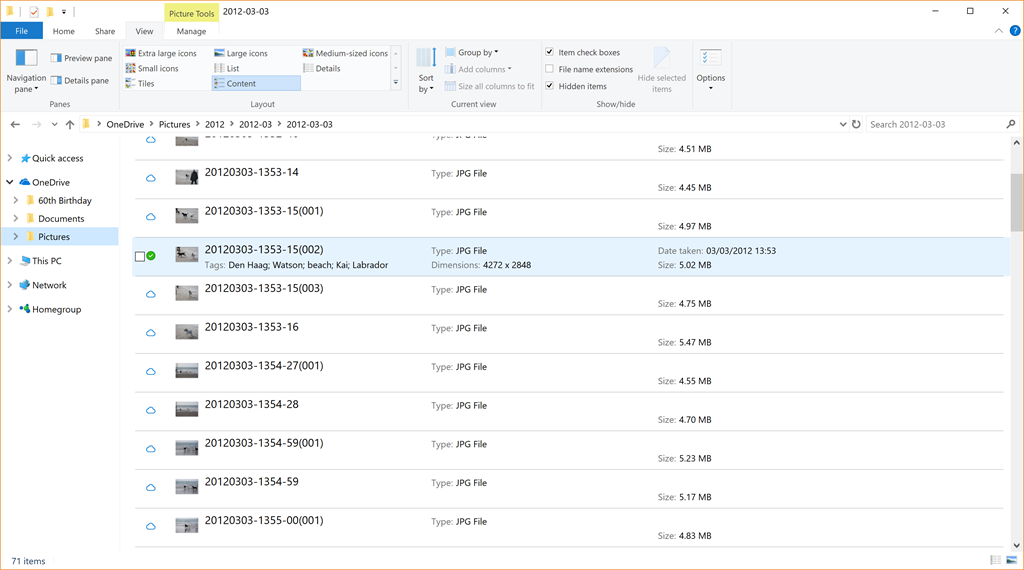
    The problem is that, unlike the original Smart Files feature, metadata from the files stored in OneDrive is not retrieved and stored in the placeholder files, so using the “Search” function in Windows Explorer won’t work on these files. Only files that have been fully downloaded and stored on the PC will have the metadata present. Here’s an example:

    OneDrive 22

    In this folder of 71 photos held on OneDrive, only one (the photo shown selected in the screenshot) has been fully downloaded to the PC, the other 70 photos are still in the OneDrive cloud. They are listed as being present, with thumbnails, filenames and size, however, you can see that no other metadata from these files is present. The downloaded file naturally has all the metadata present: the photo tags, date taken, copyright information, camera used and so forth. 

    This means that, as the OneDrive Files On-Demand feature currently stands, it is useless to me. I can’t search my online files directly from my PC.

    Two steps back again. Thanks, Microsoft. Another fail.

  • Windows Essentials 2012 – the Bell Tools For Thee

    Microsoft has announced that its Windows Essentials Suite will reach end of support on January 10, 2017.

    Not really a surprise, the software suite has had no upgrades at all over the past four years. Still, it will be sad to bid goodbye to Windows Live Mail and Photo Gallery (two of the applications in the suite). They both have more functionality in their little fingers than Microsoft’s Mail and Photos apps have ever had in their whole stunted bodies.

    The Photos app, in particular, is a miserable thing that still does not offer support for managing descriptive, people and geo tags, or face recognition, even four years after its introduction.

    Microsoft has failed to deliver yet again.

  • Google Pulls the Plug on Picasa

    I see that Google has announced that it’s pulling the plug on its Picasa product; both the online service and the Windows application.

    Frankly, I could care less about the online service, but I’m sorry to see that Google will no longer be supporting or developing the Picasa application for Windows. For a while, it was pretty good, supporting photo metadata standards more than many products on the market. Yes, there were issues with it, and bugfixes seemed to take forever to come through (if at all), but for many folks it was good enough.

    I suppose we now know why those fixes were slow in coming, it seems obvious in hindsight that Google has had Picasa on the back burner for a while now. I note that the last major release was version 3.9, back in December 2011.

    The nearest free equivalent to Picasa that I’ve seen is Microsoft’s Windows Photo Gallery, but I suspect that Picasa users jumping ship to that product will merely be jumping out of the frying pan into the fire. The last major update to Photo Gallery was in 2012, and since then there has been deathly silence. I think that Microsoft has probably got Photo Gallery on the life-support machine, and their hands are hovering very close to the “off” switch.

    As for me, I shall carry on quite happily using Idimager’s Photo Supreme to do my metadata management, and Adobe Lightroom for digital development and retouching.

  • Season’s Greetings

    20090109-0859-10

    Our Christmas card this year features the row of seven oak trees in front of the woods where we walk the dogs. The photo was taken in January 2009. So far, this winter has been unseasonably warm. We are definitely not going to have a White Christmas…

  • Left Hand – Meet Right Hand…

    Once again, Microsoft demonstrates that its left hand seemingly hasn’t got a clue what its right hand is doing.

    The OneDrive team has been making “improvements” to the OneDrive service. A couple of weeks ago they blogged about these.

    A couple of days ago, Martin tried to send some photos of the garden to a friend. He uses Windows Live Mail (WLM) as his email program. This has a very nice feature that allows the easy creation of a photo album in an email, and it uses OneDrive. What happens is that WLM will create a folder in your OneDrive to hold the full-size photos, upload those into OneDrive for you, and use thumbnails in the email message. So the email is small and efficient, and the recipient can view the photos in the OneDrive folder.

    As I say, it’s a nice feature, and very easy to use.

    Except that this time, the email got stuck in WLM’s outbox; it would never complete the publishing process. We tried it a couple of times, and the result was always the same.

    It turns out that this problem is hitting a lot of people who are using the Photo Album feature in WLM. It’s been caused by a change made by the OneDrive team in the OneDrive service.

    Clearly, no-one in the OneDrive team uses Windows Live Mail. It’s probably too old-school for them. I have a strong suspicion that Microsoft would love to drop WLM and the rest of the Windows Essentials software suite. It hasn’t had an update for several years now.

    The big question now is what will Microsoft do? Will the OneDrive team fix the issue, and restore the photo album feature to WLM users? Or, as I fear will be the case, will this just be ignored in an attempt to shift users away from WLM and onto the Mail app that will be delivered in Windows 10? Conspiracy theorists will probably surmise that this breaking of WLM is a deliberate move on the part of Microsoft. I suspect it was probably unintentional, but it does now provide a useful lever to Microsoft to drive users away from future use of WLM. So I don’t think we will see a fix…

    Addendum: 8 July 2015. Well, I may be wrong. It looks as though the issue has been fixed. No official word from Microsoft, one way or another, but photo albums do now seem to be getting through…

    Addendum: 13 October 2016. It turns out we only had a temporary reprieve. What appears to be happening is that Microsoft is making changes to its Outlook infrastructure in the cloud, and these break the photo feature in WLM. There’s no chance that Microsoft will reverse these changes, and equally no chance that they will adjust WLM to fix the issue. Sigh.

  • OneDrive Now Searches Tags!

    I’ve been complaining for nearly four years now that Microsoft’s OneDrive does not support searching of photo metadata. In July 2013, I was told by a Microsoft project manager:

    “this work just ranks lower on the priority list than some other things we are doing right now”

    In May 2014, Microsoft trumpeted that they had made improvements to the OneDrive service, but proper support for Tags (in photo metadata) still wasn’t there. So searching for a Tag (for example: “Clouds”) in all the photos I have stored in OneDrive returned zero results:

    Onedrive 04

    And that’s where things stood right up to the last time I tried the experiment, which was earlier this month.

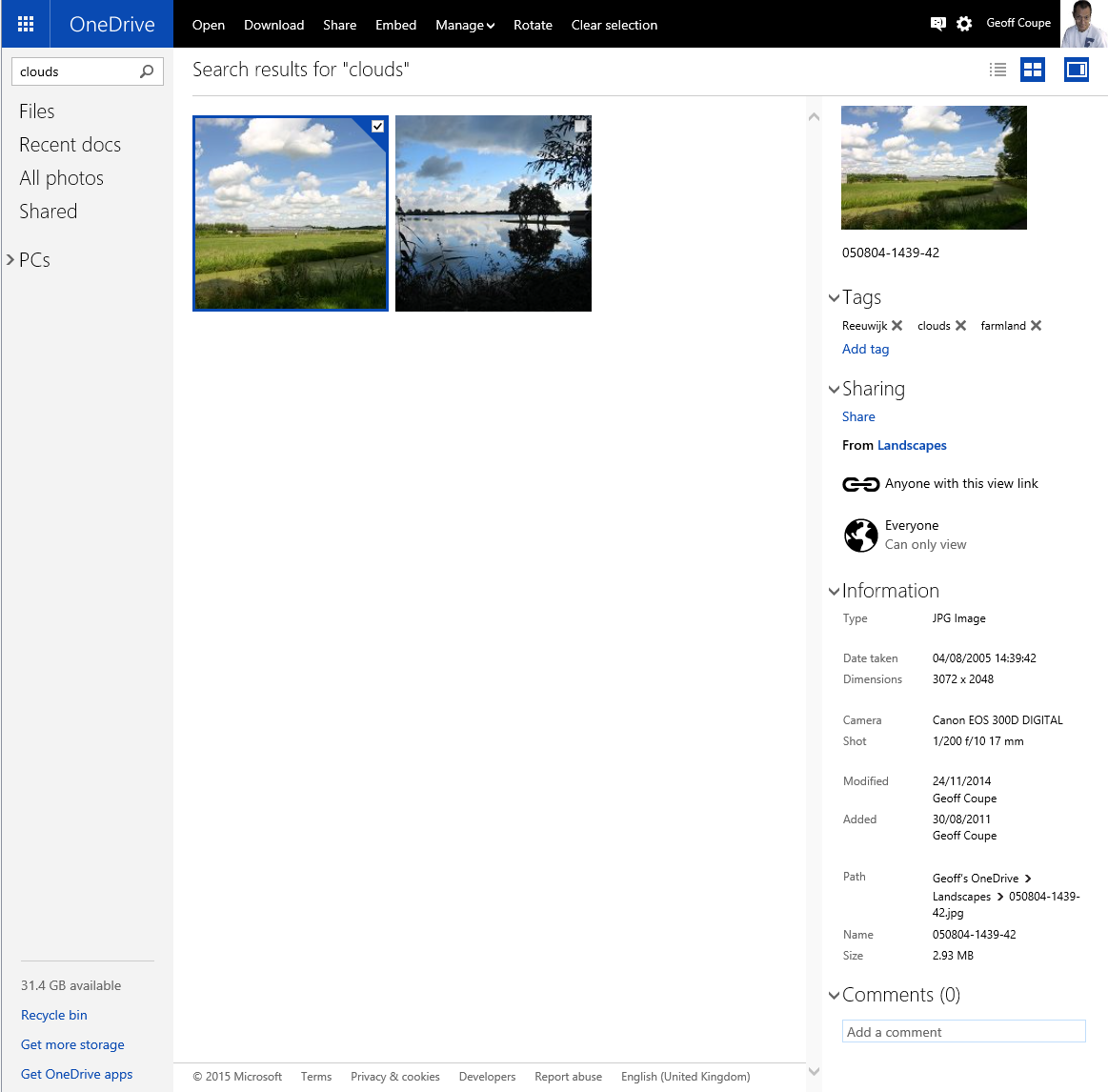
    Today, I thought that I would try once again, and this time, to my surprise and delight, there was a result:

    OneDrive 10

    As you can see from the information pane on the right, the selected photo does indeed have the descriptive tag “clouds” included in the photo metadata.

    There have been some other changes to the OneDrive service as well. If I look at a photo in OneDrive, instead of being able to open up an information pane to display all the photo metadata, there is now an information icon shown in the bottom right of the window:

    OneDrive 12

    Clicking/Touching that icon now displays the photo metadata in an overlay instead of in an adjacent pane:

    OneDrive 11

    I’m really pleased that this support for Tags, and being able to search on them is finally included in OneDrive. In one way, it really had to be, because Microsoft has gone back to the drawing board and will be removing the ability to search OneDrive files in the Windows Explorer in Windows 10, at least in the initial release of Windows 10.

    What Microsoft giveth with one hand, it taketh away with the other…

    Addendum 5th October 2024: And now Microsoft has silently removed this feature – OneDrive will no longer search tags in photos. Damn them.

  • Photo Supreme V3

    I’m an amateur photographer. I’m not a good photographer, but occasionally, more by luck than judgement, I take a photo that looks pretty good to me. Almost as important to me as the image is the information describing the photo; when it was taken, where, the subject – that sort of thing. In technical terms, this is the photo’s metadata.

    I’ve been trying to capture, and manage, this sort of information since  2005, and have tried a lot of software applications in the process. In 2007, I settled on IDimager as the most suitable tool for what I was looking for. It was what I used for tagging my photos.

    Two years ago, IDimager was suddenly withdrawn from the market by the company, and replaced by Photo Supreme. After my initial shock, I switched to Photo Supreme, and after an uncertain start, I found that it was, in large part, covering my requirements for a Digital Asset Management (DAM) tool.

    This week, version 3 of Photo Supreme is announced. It has over 150 additions and improvements over version 2.

    I was fortunate enough to be one of the beta testers for version 3. It is definitely a big step forward from version 2 (which in itself was a very good tool), so version 3 has become my DAM tool of choice going forward. I’m also a Lightroom 5 Standalone user, but the only reason I have that is for its image processing capabilities. The metadata handling of Photo Supreme strikes me as being head and shoulders above what Lightroom currently has to offer.

    It supports a wide range of photo metadata standards out of the box: Exif, IPTC Core, Extension and Plus. I can now automatically synchronize entries for the IPTC Extension fields for “Person In Image”, “Places”, and “Event” IPTC fields – something that I had to do manually in V2. It also now supports the Image Region metadata standard defined by the Metadata Working Group – the same standard used by Google’s Picasa for People Tags. That means that as well as being able to list the people appearing in a photo, I can now show their names on the photo itself.
    If you’re looking for a good tool to manage your photo metadata, take a look at Photo Supreme.