Reflections on life at “De Witte Wand”…

Category: Photography

  • Geotagging and Metadata in Picasa 3.8

    Last month I wrote about the geotagging disaster that the current beta of Windows Live Photo Gallery is causing. At the moment, I daren’t have it running on my PC because it wantonly writes garbage GPS coordinates into my photos.

    While I’m waiting to see what Microsoft will do in the next beta of WLPG, I thought that I’d take a look at its closest rival, Google’s Picasa, to see how that’s shaping up.

    While I found on past experience that there’s lots to like about Picasa, I’d ruled it out up until now because it did not support XMP-based metadata. That meant as I use metadata following the IPTC Core standard, which itself uses XMP, then Picasa just didn’t cut it.

    However, things change, and the current version of Picasa, version 3.8 released last month, is being trumpeted by Google as now supporting XMP.

    So I downloaded and installed this new version of Picasa. And while it certainly seems to display XMP-based metadata (see below), it doesn’t seem to support writing out all of this metadata into image files. I also came across a major bug in how Picasa handles Geotags.

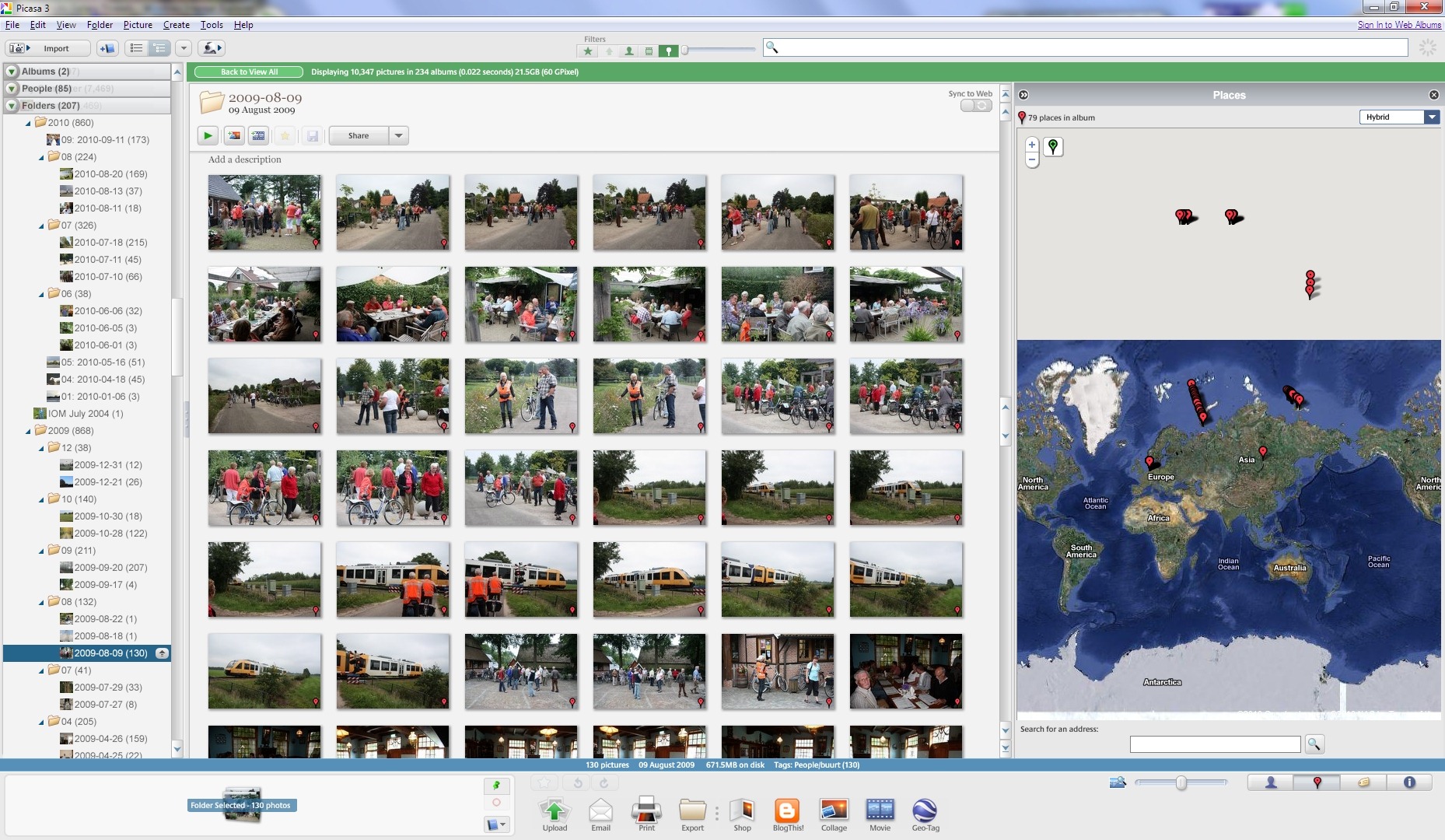
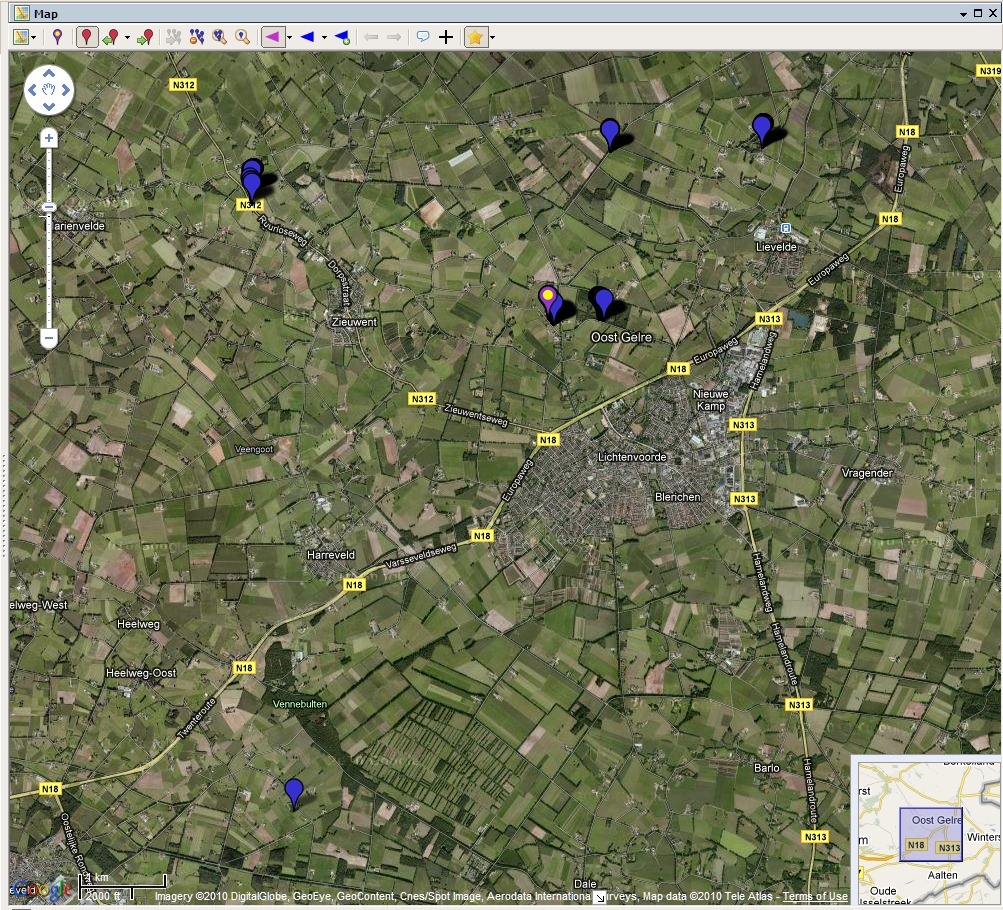
    It won’t display the correct GPS coordinates of many of my files on its map. Here’s an example, the contents of a folder containing images shot in the local area here in The Netherlands (click on the image to see it full-size in a new window).

    Picasa Geotag 2

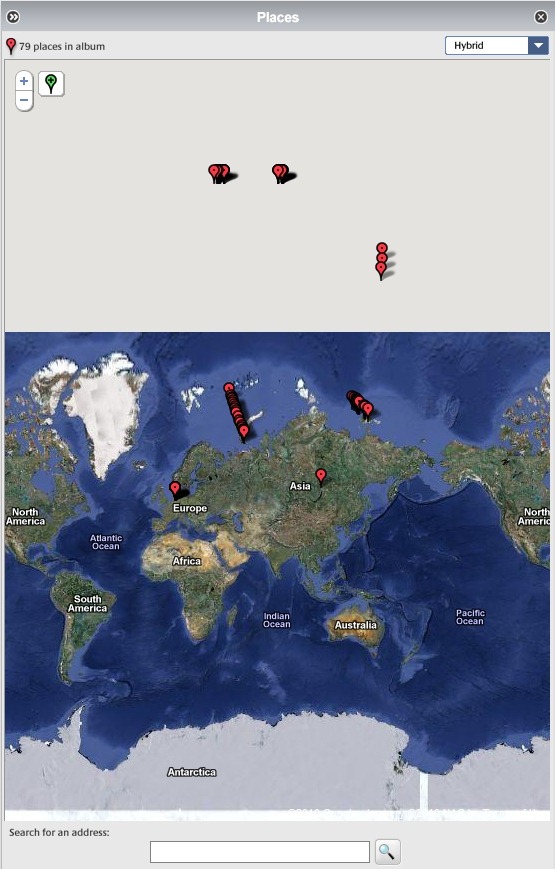
    Here’s a close-up of the map. As you can see, Picasa claims that many of the images have GPS coordinates corresponding to places outside of The Netherlands, in fact many of the images are literally out of this world, according to Picasa.

    Picasa Geotag 1

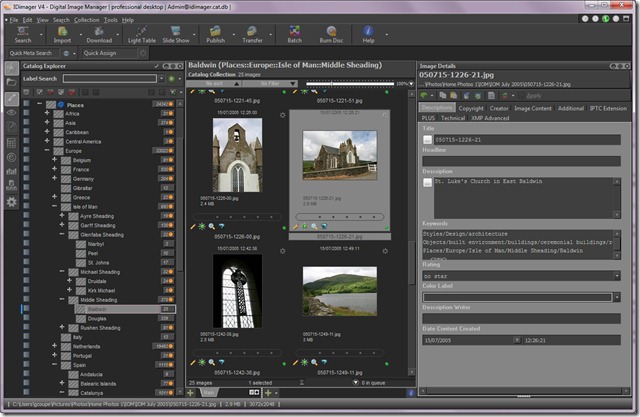
    These files have all had GPS coordinates added to them using IDimager. (Note: IDimager is no longer available. Its successor is Photo Supreme, which I am now using) All these files will display correctly in IDimager itself, and also in the map interfaces of Microsoft’s Pro Photo tools and Geosetter. Here are the files being displayed correctly in the map interface of Geosetter:

    Geosetter 1

    Clearly, this is a bug in the current version (3.8) of Picasa. Fortunately, Google have acknowledged that there is a problem, and it should get fixed at some point in the future.

    As to the XMP metadata support, it looks as though the following IPTC Core elements are at least read by Picasa for JPEG files:

    Description
    Description Writer
    Headline
    Keywords
    Title/ObjectName
    Job ID
    Instructions
    City
    Location
    State
    Country
    Creator
    Creator’s Job Title
    Provider
    Source
    Copyright Notice

    In this version of Picasa, there doesn’t seem to be a way of writing data into all of these fields, but only a subset, so Picasa isn’t yet suitable for maintaining IPTC Core metadata. Picasa also doesn’t read and display these metadata fields at all from RAW files (at least for my Canon CR2 format). It only appears to display the Exif metadata from these RAW files. So, once again Picasa is getting closer, but it’s not good enough for what I’m looking for.

  • Geotagging in Windows Live Photo Gallery–Part 2

    Last month, I wrote about my findings on the experience in using the Beta of Windows Live Photo Gallery to geotag my photos. I wasn’t too impressed with the experience.

    This week, a second beta of WLPG was released by Microsoft so I’ve been revisiting the experience of geotagging.

    And today, it’s been borne in upon me just what a disaster geotagging in WLPG has proved to be.

    You see, I made an assumption. That was that WLPG would not alter any metadata in a photo without my explicit permission and knowledge. Wrong

    I was naive enough to think that WLPG would only write out GPS coordinates to the Exif metadata in a photo when I explicitly added a Geotag using WLPG. Wrong

    I realised that WLPG was reading in IPTC Core Location metadata from my photos and using that to create a geotag in WLPG’s internal database. I also realised that it was copying the metadata into the “Location Created” section of the newly specified IPTC Extension metadata. Since these are a set of text fields that reflect what already existed in the original IPTC Core Location fields, that didn’t bother me unduly.

    What I hadn’t also appreciated is that WLPG not only constructs a geotag in its internal database and creates Location Created metadata in the IPTC Extension section, but that it then proceeds to write out a set of GPS coordinates into the photo’s Exif metadata of where it thinks that the photo was taken.

    This is an unmitigated disaster!

    As I said last month, WLPG makes false assumptions about what the GPS coordinates are. If it doesn’t recognise the contents of the Sublocation field, it uses a GPS position derived from the contents of the City field. If it doesn’t recognise the contents of the City field, it uses a GPS position derived from the contents of the State field, and if it doesn’t recognise the contents of the State field, it uses a GPS position derived from the Country field.

    I have a collection of over 40,000 photos. The majority of these have IPTC Core Location metadata that I have catalogued over time. Only a very small percentage of these had GPS coordinates that I had carefully added myself.

    Now, WLPG has gone through my collection reading the Location metadata and has written out GPS coordinates to all of the photos containing Location metadata. And, of course, in a lot of cases, it doesn’t recognise the terms I’ve used for a particular location field, so it’s plucked a GPS value out that bears no relation to where the photo was taken.

    Worse still, I now have lost the needles of those photos which have accurate GPS positions in a haystack of huge proportions, which consists of photos with false GPS positions.

    Aargghh!

    Update 23 August 2010

    1. I’ve now looked at a backup of my photo collection taken on the 1st June 2010 (i.e. before the WLPG beta was installed). No photos had false GPS values inserted in the Exif at that time. Therefore I conclude that WLPG is the culprit.
    2. Contrary to what I first thought, not all photos with IPTC Location metadata get GPS values inserted into them by WLPG – there may be a pattern, but it’s not obvious to me why some files are hit, but not others.
    3. However, even though all files are not affected, I have still found over 7,000 photos with GPS values, and of these, only 2,359 of these photos have genuine GPS values that I have explicitly inserted. The rest have GPS values inserted by WLPG itself and which are also inaccurate (false).
    4. Some false values come from WLPG ignoring a sublocation, and inserting a central GPS value for the City.
    5. Some false values come from WLPG misinterpreting a sublocation and inserting a completely wrong GPS value for another location altogether; e.g. Sublocation: Voortman Bos, City: Heelweg gets interpreted as Voortmanweg in Deventer, 37 kilometres away…
    6. Some false values make no sense whatever; e.g. some photos I have of St. Pancras station in London have a GPS value assigned to them of Cuxham, a very small village in Oxfordshire…

    All together now: Aaaarrrggghhh!!!

    Update 8 September 2010

    I posted about this issue on the WLPG Help Forum. Now, Analy Otero, who works in the WLPG team, has posted a response  to confirm that WLPG does indeed write out what it thinks are correct GPS coordinates to image files based on the content of the IPTC Location fields. As she says:

    “The behavior you’re experiencing is the design of the feature and we’re working to improve both reliability of the process (to ensure all photos get proper geotags) and to improve the accuracy of the places.”

    Unfortunately, I don’t believe that Microsoft can ever sufficiently improve both the reliability of the process and improve the accuracy of the places to the extent where I can trust that accurate GPS information will be included in my images. My experience thus far has been an eye-opener of just how bad it currently is. I see that in the current release notes, Microsoft themselves say:

    “Landmarks (such as the Eiffel Tower) are not supported in the current implementation of geotagging”.

    The problem is that the textual IPTC sub-location field, in particular, will always be down to what the user decides, e.g. “the stern of HMS Ark Royal in dry dock”. I’d like to see Microsoft be able to give an accurate GPS for that. Of course, they can’t, and so the chances that rubbish GPS coordinates will be introduced by WLPG into an image remain very high.

    A further twist is that, apparently, once WLPG has introduced a GPS value (false or accurate) into a file, it can’t ever be subsequently changed by WLPG. Elsewhere in the release notes it states:

    If a photo or video contains no GPS data, coordinates will be added when the item is geotagged. However, updating or deleting a geotag string won’t modify the GPS coordinates. Any additional updates to the geotag field don’t change the original coordinates written to the file. (my emphasis)

    It seems to me that the way to cut this Gordian knot is for Microsoft to give us a proper mapping interface in WLPG itself (such as Picasa, IDimager, or Geosetter do) so that we can check locations prior to allowing GPS coordinates being written, and to use the map to modify or delete GPS coordinates. That is, writing of GPS coordinates is under the explicit control of the user, instead of something that WLPG does by itself in the background as a write-only operation.

    The current implementation of WLPG writing out what it thinks the GPS coordinates should be is dreadful and appalling. I simply cannot afford to have WLPG installed on my PCs as it is. It has already introduced garbage information into thousands of my images.

    Update 30 September 2010: Well, the final version of WLPG 2011 is now released, and as far as I can see it is still screwing up my GPS metadata.

    I’ve just found some photos taken this month in the Netherlands which now have GPS info for Wimereux in France inserted into them by the final release of WLPG.

    I am definitely not impressed.

    Update 2 December 2010

    There’s an update to WLPG 2011 that addresses the geotagging issue. See here for more information.

  • Slide Show Quality in Windows Live Photo Gallery

    Microsoft’s Windows Live Photo Gallery (WLPG) can display selected photos as a slide show. In the new beta of the next version of Windows Live Photo Gallery, the slide show capability is still present, but Microsoft have changed the way in which it is done. Instead of having this capability within WLPG itself, it uses the new version of Windows Live Movie Maker to make and display the slide show.

    The problem is, the quality of the slide shows produced by Windows Live Movie Maker is terrible. Photos displayed as slides are blurry and noticeably degraded in quality.  I would be ashamed to show slides to family and friends using it.

    I raised this in the Windows Live help forum for Photo Gallery. The first response back from Microsoft was to deny that anything had changed between WLPG version 3 and the beta of version 4. However, once I sent them proof, then they admitted that things had changed and:

    “it appears that photo quality in slide shows in Windows Live Photo Gallery Beta is indeed a bit degraded when compared to the original file source”.

    I love that “a bit degraded”. No, Microsoft, it is noticeably degraded to the extent that it is unacceptable. The quality of the slide shows produced by Windows Live Movie Maker is simply not good enough. So now I will have to find an alternative to WLPG in order to show slides to friends and family.

  • The Courtyard of the British Museum

    Here’s a Photosynth of the courtyard in the British Museum that I did last year.

    On this blog, hosted on WordPress.com, I can at least embed a link to the Photosynth, even if I don’t get a thumbnail (as I can on the same entry in my blog on Blogger). On my old blog on Microsoft’s Windows Live Spaces, I was unable to embed Photosynth pictures or links, because Spaces strips out the embed code. This while Photosynth is yet another Microsoft product.

    Yet another case of Microsoft’s left hand not knowing (or caring) what the right hand is doing…

     http://photosynth.net/embed.aspx?cid=7303a8f0-f8af-435c-8685-afc774c898c6&delayLoad=true&slideShowPlaying=false

    (tip: when viewing the Photosynth, switch to Grid View to select another set of photos shot from a different point in the Courtyard)

    Addendum: And of course Microsoft has now scrapped the Photosynth product and technology, so none of these links work anymore. It’s dead, Jim.

  • On the Internet…

    …nobody knows you’re a dog. That’s the caption of an iconic New Yorker cartoon by Peter Steiner.

    The Dutch newspaper, De Volkskrant, has a page in its weekly magazine devoted to photographs sent in by readers on a theme that is given in the previous week’s issue. Last week, the theme was “the view from your webcam”.

    I thought I’d do an update on Steiner’s joke. So here is “On the Internet, nobody knows you’re a dog – unless you use a webcam”

    GeoffCoupeHeelweg

    It didn’t get published… Oh well, there’s always another day…

  • Photos of the Year

    Here are my photos from 2009 that I am most pleased with. They’re no great shakes from a professional point of view, but I am happy with them…

  • Pretentious? – Moi?

    Olympus UK have launched their new PEN camera with a series of video adverts. You can see them here – click on the video tab to choose between them (once you’ve pressed play to activate it).
     
    I have to say that I’m in the camp that finds the Kevin Spacey adverts pretentious twaddle; more evidence that Marketing people should be first up against the wall, come the revolution. However, the ‘Stop Motion’ advert is a little gem. It also tells you absolutely nothing about the camera, but as a work of art, it shines.
  • All You Wanted To Know About Digital Photography

    There’s a new web site that just been launched, which is devoted to the topic of Digital Photography. It looks very comprehensive, and covers topics such as best practice in Digital Photography and Workflows.
    The site has been set up by the American Society of Media Photographers with funding from the US Library of Congress. The project team includes Peter Krogh, who has written a well-respected book on Digital Asset Management and Digital Workflows.
    If you’re interested in Digital Photography, this definitely looks like a site worth checking out.
  • De Witte Wand

    I made a new photosynth of the front of the farmhouse and garden yesterday. You can see it here.

    Addendum: And of course Microsoft has now scrapped the Photosynth product and technology, so none of these links work anymore. It’s dead, Jim.

  • All You Wanted To Know About Photo Metadata

    I’ve mentioned photo metadata lots of times in the life of this blog. Now I’ve just come across a really excellent web site that tells you everything you ever wanted to know about photo metadata. It’s at http://www.photometadata.org/
    Worth checking out.
  • Photos of the Year

    Here are the photos that I am most pleased with of all those that I took in 2008. I know that they’re not very good from a professional’s point of view, but I like them…

  • Windows Live Wave 3

    I see that the latest versions of the standalone applications (including Windows Live Mail, Windows Live Photo Gallery and Windows Live Writer) have now been released. This download page is still currently describing the applications as “beta”, but the applications themselves seem to have dropped that moniker from their titles.

    I’m pleased to see that at least one bug in Windows Live Photo Gallery that I reported to Microsoft over a year ago has finally been corrected.

    I’m using Windows Live Writer to create this post, and one thing that I want to check is how it handles image metadata. While it’s very easy to use WLW to insert images into your blog, the previous version seemed to be stripping out image metadata, and therefore creating orphan works, which I think is a very bad idea. So, here’s a test image, which in the original has my copyright information and IPTC Coreinformation as metadata embedded in the file.

    20080915-1152-07(1)

    Once an image is published in my blog, it can be downloaded from there as well. Let’s see what has happened to the metadata…

    Yep, all the metadata has been stripped out – copyright, creator, keywords – everything. That’s not good, in my opinion.

  • Postcards Home

    One of the careers that my father had was as a ship’s engineer. He began with the Isle of Man Steam Packet Company on the ships that crisscrossed the Irish Sea. The Island at that time (the 1920s) was a popular holiday destination, which meant that during the summer months, far more ships would be sailing than in the winter. At the end of the season, the junior engineers would work on the overhaul of the laid-up vessels. When the overhaul on a ship was completed, the men were paid off, and as my father wrote:

    We walked round the town until the next vessel had her overhaul. This happened every year, and meant that over 100 men could be out of work for between 12 and 16 weeks. This did not appeal to me – I had seen too much of it, and I applied for a seagoing job with the Ellerman Line. I received a letter offering me a post as 4th Engineer on the City of Wellington from the Ellerman Line and this is what I really wanted because I would then begin to get my 18 months sailing time in before I could sit for my 2nd Class Marine Engineer’s Certificate.

    I left Douglas on the 11th November 1925 and joined the City of Wellington on her maiden voyage round the world. Our first port of call was St. Johns, Nova Scotia, where during the war a munitions ship had blown up and destroyed the town.

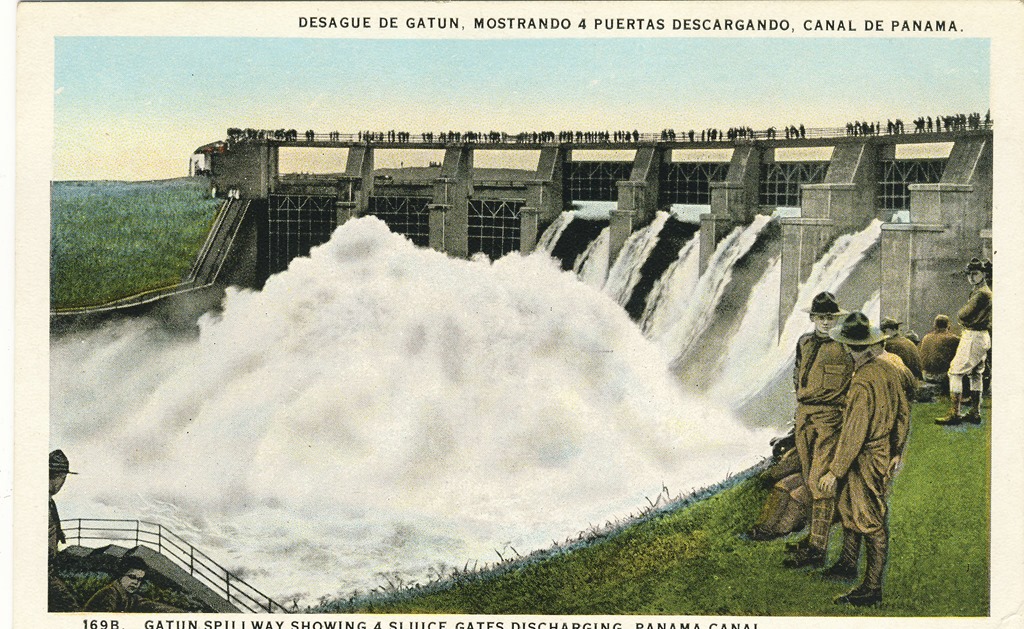
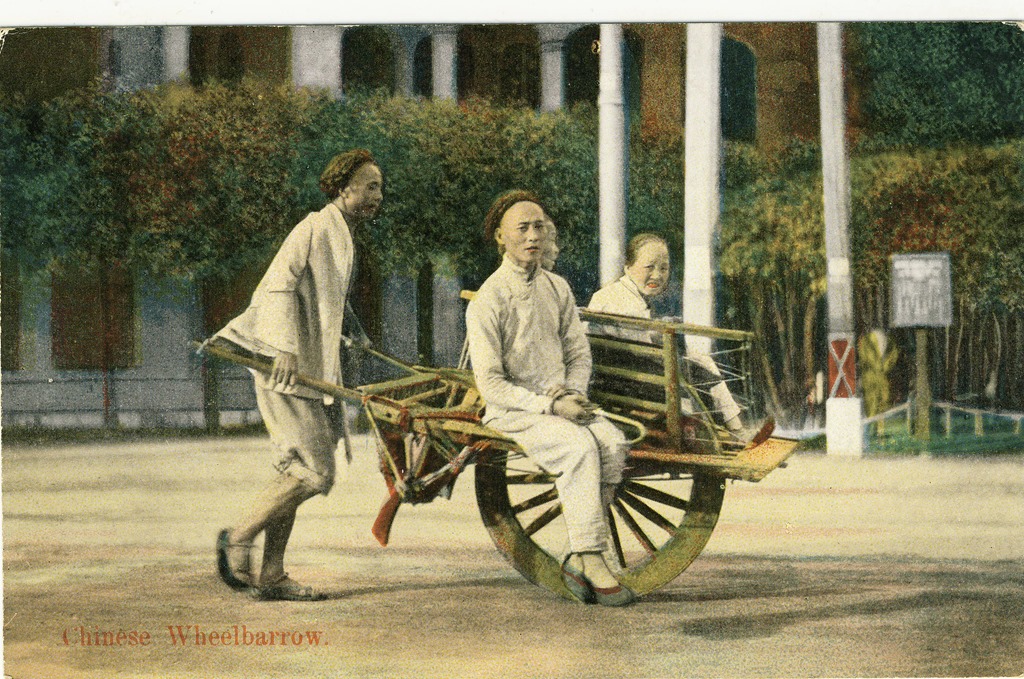
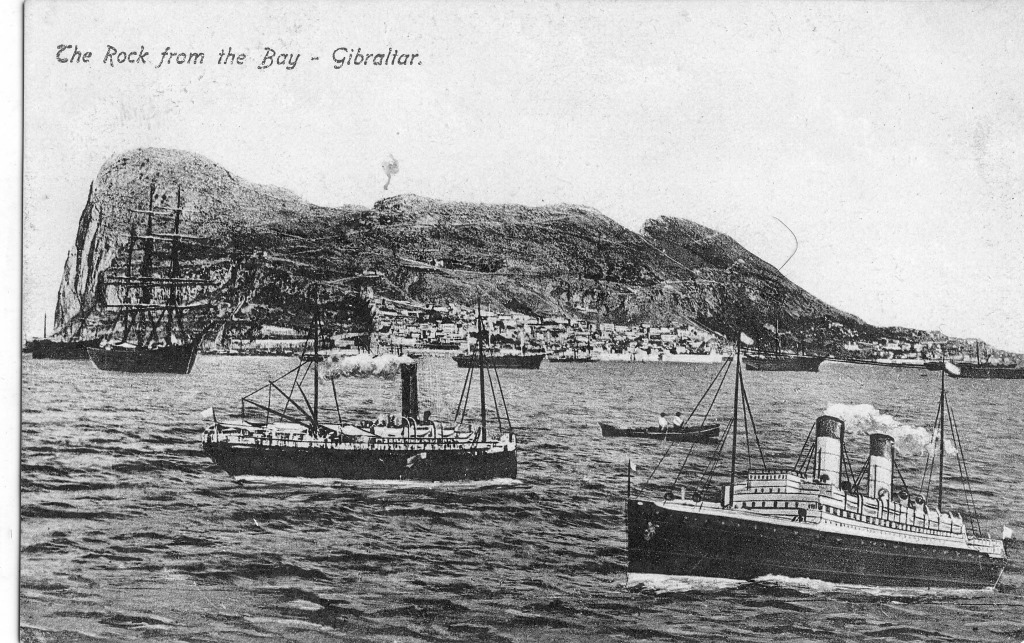
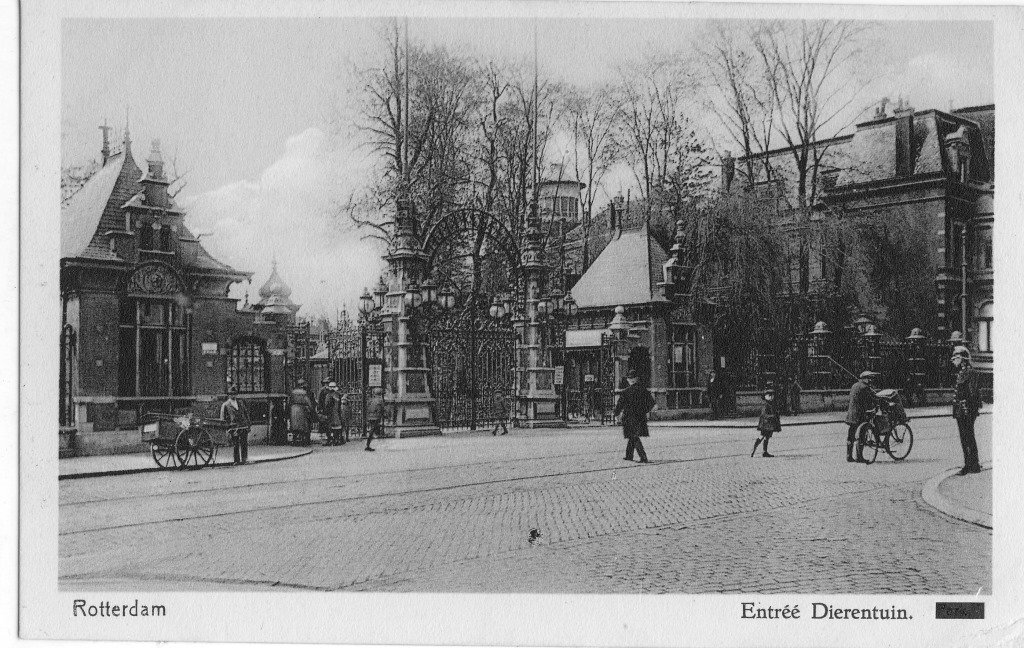
    From there, the ship (and dad) visited Boston, New York, Newport, Panama, Honolulu, Yokohama, Kobe, Shanghai, Hong Kong, Suez, Gibraltar and Rotterdam. Dad bought postcards when he had the chance. Some he would send home – usually to his younger brother, Doug – but others he kept for himself, to remind him of where he had been on this, and subsequent voyages. After his voyaging days were over, he put them in an album where they’ve been ever since. They are a wonderful record of places and peoples that in many cases have changed beyond recognition or even vanished completely.

    Scan10016 Scan10021

    Scan10120

    Scan10035

    Dad wrote of Yokohama:

    The massive destruction of the town by the earthquake in 1923 was there to be seen, and I will always remember the forts at the entrance to the harbour and the large blocks of concrete tossed higgledy-piggledy about.

    Scan10030

    Scan10032

    Scan10029

    Scan10050

    Scan10077

    Scan10063

    Scan10135

    I love the fact that the publisher of this postcard has pasted in, not very convincingly, some ships in the foreground…

    Scan10151

    Scan10166

    Scan10167

    This is just a small selection of about 250 postcards. I think I’ll post a few more illustrating the places he visited in other voyages another time.

  • Windows Live Photo Gallery Revisited

    Last month I mentioned that I was trying out the latest release of Windows Live Photo Gallery, and that I’d run into a couple of bugs. Subsequent to that, I’ve been in communication with the WLPG team trying to sort out the bug whereby WLPG doesn’t seem to be tracking changes to IPTC/XMP keyword metadata.

    I had documented what I’d seen and sent it off to Michael Palermeti, a Program Manager on the WLPG team for investigation. He reported back that the developers could not find anything untoward with the test files and data that I’d provided. They were unable to reproduce the failure to track metadata changes. This struck me as being very odd, since I was clearly seeing the behaviour on two systems at home (my desktop and laptop PCs). So I went back to do more testing. And I think I’ve found out what’s going on.

    It is, as I suspected, associated with the fact that I’m using hierarchical keywords. A hierarchical keyword means that, for example, my keyword trees is actually the leaf node of a hierarchy:

    Objects/built environment/settlements and landscapes/landscapes/natural landscapes/vegetation/trees

    What’s going on is that when I assign a keyword to an image, I also explicitly assign the parent keywords to the image. So when trees is added as a keyword to an image, I’m also explicitly adding the additional strings:

    Objects/built environment/settlements and landscapes/landscapes/natural landscapes/vegetation
    Objects/built environment/settlements and landscapes/landscapes/natural landscapes
    Objects/built environment/settlements and landscapes/landscapes
    Objects/built environment/settlements and landscapes
    Objects/built environment/

    And there’s the problem: WLPG doesn’t seem to register these six instances of hierarchical keywords (trees, vegetation, natural landscapes, landscapes, settlements and landscapes, built environment) properly when they are assigned at the same time as a group. Worse, WLPG will not respond to subsequent deletions or additions to any keywords on the image. It’s almost as though a repetition of a part of a keyword hierarchy has the effect of locking the file as far as WLPG is concerned.

    When I change the method of assigning keywords to simply assigning only the full string once, then for the most part, WLPG appears to be happy. It will correctly register the keyword as a tag, and also track subsequent changes to the keywords.

    However, there is one crucial set of circumstances where WLPG still does not work correctly. That is where I assign keywords that share part of the same hierarchy to an image.

    Let’s take an example. I have a number of images with the keyword natural landscapes assigned (I.e. I have the hierarchical string: Objects/built environment/settlements and landscapes/landscapes/natural landscapes assigned to the images). Subsequently, I want to refine the metadata of some of these images by also assigning the keyword trees to them. So I go ahead and assign trees – in other words I’m adding an additional keyword string:

    Objects/built environment/settlements and landscapes/landscapes/natural landscapes/vegetation/trees to the selected images.

    The problem is that WLPG does not register this change – it continues to display only the natural landscapes tag associated with these images. Because the trees keyword is actually part of the same hierarchy as natural landscapes, WLPG fails to work properly and add this additional keyword string as an additional tag.

    What I actually have to do is explicitly delete the natural landscapes keyword from these images before I add the trees keyword to the images. This also has the effect of never being able (in WLPG) of having both the natural landscapes and trees tags associated with the same image because they are part of the same hierarchy. This strikes me as being somewhat of a limitation… In fact, I would say that it’s a bug, since now I cannot have certain combination of keywords associated with my files and have them tagged correctly in WLPG. Take house, castle, and dining room. They all share parent keywords in common in my hierarchy, so within WLPG I cannot tag images in such a way that will distinguish between a dining room in a castle and a dining room in a house. I suspect that this all goes back to the design decision that appears to have been made for WLPG that selecting multiple tags is an OR function and not an AND function. In my opinion, that was a very bad decision, but that’s another story

    Anyway, to sum up, I’ve now found out that WLPG cannot cope with multiple instances of hierarchical keywords that share the same parents. I hope that it can be fixed in future versions.

  • Managing Photo Libraries – Part 6

    Time for another episode in my saga of trying to manage my library of photos. This has been prompted by the release this week of the beta of what will be the next major release of Microsoft’s Windows Live Photo Gallery.

    While there’s a lot to like about Photo Gallery, it continues to have shortcomings that stop me from making much use of it. Some of them are down to bugs that Microsoft really should address, while others are limitations in its capabilities. But even here, at least one of the limitations could be removed by Microsoft as I’ll illustrate.

    First, the bugs. One that I find particularly irritating, because it’s been known about by Microsoft for nearly a year, but still has not been fixed in this new beta, is the “Publish to Flickr” bug. It’s probably even a very simple fix – a change to a single line of code would probably do it – so I fail to understand why this has not been done. Update: this bug was finally fixed by a release of WLPG on 16 December 2008.

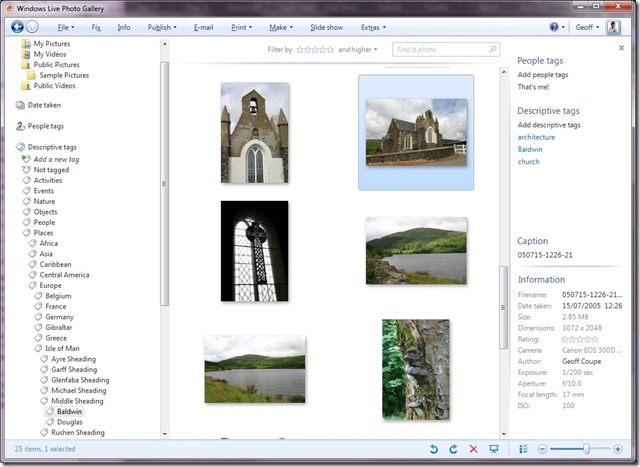
    Another long-standing bug, but one that may be more tricky to fix, is that Windows Live Photo Gallery (WLPG) is aware of IPTC/XMP metadata tags that images may have, but seems to deal with them on a hit or miss basis. Sometimes WLPG will correctly read in the IPTC/XMP tags from an image file and add them to its own tag list, and sometimes it won’t. Here’s an illustration of this. The following image is a WLPG screenshot of twelve photos that have been tagged with IPTC/XMP metadata. I happen to have used IDimager, which is my current tool of choice at the heart of my digital workflow, but I could also have used Microsoft’s own Pro Photo Tools 2 to add IPTC/XMP metadata. (Note: IDimager is no longer available. Its successor is Photo Supreme, which I am now using)

    In this screenshot of WLPG, I have selected the first of the twelve images, and in the information panel on the right are the description tags associated with the image. I’ve highlighted the tags with a red box for clarity. Now, I did not use WLPG to add the tags to the image, they were automatically read in from the image by WLPG itself and added to WLPG’s list of tags.

    WLPG Wave 3 Beta 1 test 1

    That’s how it should work – WLPG should check images for IPTC/XMP metadata and use this to maintain its own tag hierarchy. But now look at this next screenshot. Here, I’ve selected the second image in the sequence of twelve. Remember that all twelve images have had IPTC/XMP metadata added to them, in fact they all have exactly the same metadata. But here, in this screenshot, WLPG is showing that there are no tags associated with this image, so it seems to have failed to read in the metadata from the image.

    WLPG Wave 3 Beta 1 test 2

    In fact, in this set of twelve images, all of which have the same metadata, WLPG failed on nine images, and only correctly read in the metadata on three (numbers 1, 10 and 12). While WLPG has a “Refresh” command, this doesn’t seem to have any effect on reading in metadata. It still stubbornly claims that nine of the images have no descriptive tags associated with them.

    This is a showstopper of a bug as far as I’m concerned. For me, the “truth is in the file” – in other words, the metadata describing an image file must be preserved in the file itself. That means that the IPTC/XMP and EXIF metadata is central for management of my photo library. Having metadata held outside the image files (as WLPG is doing in its own database) may be necessary for performance reasons, but the content must always reflect the metadata in the files themselves.

    A rather good analogy that I came across is this… Imagine that you have an album of family photos. It’s full of photos of members of your family stretching back several generations. Underneath each photo is a handwritten description of who is in the photo – that is the metadata for the photo. It’s a marvellous resource for you and your family – a record of your family history. But over time, the glue degrades, and the photos become loose. Worse, many of them become unstuck. What do you have then? A pile of loose photos, and an album with blanks where the photos should be – and no way of knowing which photo should go where. The metadata has become separated from the photos.

    What’s the solution? Well, what should have been done in the first place is to write on the back of every photo who is in the photo before sticking the photos in the album. In other words, the metadata should be directly associated with the photos themselves. Then it doesn’t matter if the photos fall out, the album can always be reconstructed. Indeed, a new album can be made when the old one falls apart.

    Anyway, back to WLPG. I mentioned limitations. One is in the photo import process (when you transfer off a batch of photos from a camera or memory card into the PC). While WLPG gives some options for creating folders and renaming the files as part of the process, they are nowhere near flexible enough to meet my requirements. I spelt out what I was looking for in part 5 of this series of posts. I also mentioned that Microsoft had claimed that the underlying import engine was flexible enough to do what I wanted. It’s a pity then that in this latest beta, the claimed flexibility has not been exposed. We still have the same old limited options that we had a year ago.

    There are a couple of new features in this beta of WLPG. The first is one that has long been asked for: the ability to select photos based on rating. I’m a little surprised that it’s taken so long to be included, given that it has always been in Vista’s Photo Gallery. Still, I suppose I shouldn’t be churlish.

    The second is a totally new feature: face recognition. You can tag faces in your photos with people tags. Interestingly, if you are using Windows Live Contacts, then your people tags are automatically populated with your contact list to start with, and changes to this list are reflected in WLPG. I still need to investigate this feature a bit more carefully. Unless these tags are written back to the individual image files as XMP metadata, so that they can be used in other applications, then I would not want to make much use of this feature. It would be too much like simply writing names underneath photos in an album. No guaranteed longevity there, then…

    So, all in all, one cheer for WLPG. But until the metadata bug in particular is addressed, I’m not going to be making much use of this application.

    Update 24 September 2008: I’ve done some more testing on the metadata bug, and I think what is happening is that WLPG is confused by hierarchical keyword metadata. In WLPG, you can have a long list of keywords/tags, or you can start to group them in a hierarchy. So, for example, my keyword cows is actually part of a hierarchy that starts Nature/Animals/livestock/cattle/dairy cattle/cows. That way, when I search for photos with the keyword cows, it will just show me those with cows in them. But if I search for photos with the keyword livestock, it will show me photos of cows, horses, pigs, sheep, and so on.

    It looks as though WLPG will recognise a hierarchy of IPTC/XMP keywords in new files, and uses it to add to its own hierarchy. However, thereafter it refuses to recognise any changes to the metadata of image files containing hierarchical metadata, and so ignores them. Not very useful, and what I consider to be a showstopper bug.

    Update 4 December 2008: here’s the blog entry where I track down this issue of hierarchical keywords causing a problem in WLPG…

  • Photosynth

    I mentioned a couple of days ago that Microsoft has released Photosynth. The site seems to be a bit overwhelmed by the demand, as my first experiments in creating Synths failed on the uploading stage. However, they seem to be there now. Here’s an example
     
    Note: if you want to explore it, the Photosynth applet will first have to be downloaded and installed into your browser.

    Addendum: And of course Microsoft has now scrapped the Photosynth product and technology, so none of these links work anymore. It’s dead, Jim.

  • Photosynth Released

    I see that Microsoft has now released the first version of Photosynth that allows you to use your own photos to create 3D spaces. I can’t wait to try it out…

    Addendum: And of course Microsoft has now scrapped the Photosynth product and technology, so none of these links work anymore. It’s dead, Jim.