Reflections on life at “De Witte Wand”…

  • What’s Sauce for the Goose…

    …is sauce for the gander.

    Not being a Catholic, I have little skin in the game. However, given that Pope Benedict has little time for us homosexual secularists, and has made it plain enough, I just thought that I would muse on the fact that:

    a) He seems keen on pointing out that contraception is a thwarting of God’s will, whilst at the same time being happy to…

    b) …have a pacemaker fitted to extend his allotted time in this vale of tears. God might well feel cheated at the presumption.

    I gain no joy and I shed no tears at his relinquishing of the Papal crown, knowing full well that the next wearer will be stamped from the same ultra-conservative, human-hating mould.

    As a bit of light relief, here’s Crispian Jago’s version of the Situation Vacant ad:

    2 responses to “What’s Sauce for the Goose…”

    1. JL Avatar

      Coupe, I rejoiced at the news. Perhaps that was over-emoted. I haven’t followed his track record closely so I don’t know for sure. Has he done anything to endear himself to humanity? Even our own Prime Minister, in response to the news of his resignation, said something along the lines of “… will live in the hearts of Canadians forever …” and I thought what Canadians is he referring to? AND I guess that’s the kind of thing politicians say when they just can’t think of anything else.

      1. Geoff Coupe Avatar

        Perhaps Mr. Harper was thinking along the lines of Benedict being some sort of heart tumour? I don’t think Ratzinger has ever done endearment in his life – even empathy seems far out of his reach.

    Leave a comment

  • What’s Changed?

    And so the British Parliament finally decided to see sense. Not without the usual grumblings from the bigots and homophobes. Even Jesus and Mo seem surprised at the lack of divine retribution. Welcome to the 21st century. Meanwhile, we’re heading towards our 15th wedding anniversary.

    2 responses to “What’s Changed?”

    1. Mark Avatar
      Mark

      Congratulations.. still have a way to go though, my wife and I are at 31…lol

      1. Geoff Coupe Avatar

        Thanks Mark – well, Martin and I have been together for 29 years – we had to wait for the law to catch up!

    Leave a comment

  • Windows 8 Media Apps and Media Services

    I’ve written before about the issues I’ve had with the “Play to” function in Windows 8. Paul Thurrott wrote an article yesterday: The Sad Tale of Play To and Windows 8, with much the same conclusions. It is worth reading the comment by John Galt after the Thurrott article. He lists a number of shortcomings in the media “features” that Microsoft have implemented in Windows 8, any one of which has me tearing my hair out.

    For example, the Music App

    1. has a tendency to play advertisements even when you’re playing your own music.
    2. has no support for open audio codecs such as FLAC, and no apparent way to add such support
    3. constantly forgets the contents of my music library, and has to rebuild the index from scratch practically every time I fire it up.
    4. has no support for accessing media stored on NAS devices
    5. has no support for Microsoft’s own eHome remote control standard (used by Windows Media Center since 2001)
    6. has no support for acting as a “Play to” target, i.e. as a Digital Media Renderer.

    Issues 4, 5, and 6 are also common to the other Microsoft-supplied Media Apps, i.e. the Video App and the Photos App.

    One wonders how Microsoft can be so dismal in delivering products that should delight, and not disappoint in so many ways.

    Addendum: here’s a secondary rant about the Music App, triggered by a comment below.

    Navigation in the Music App is really badly thought out.

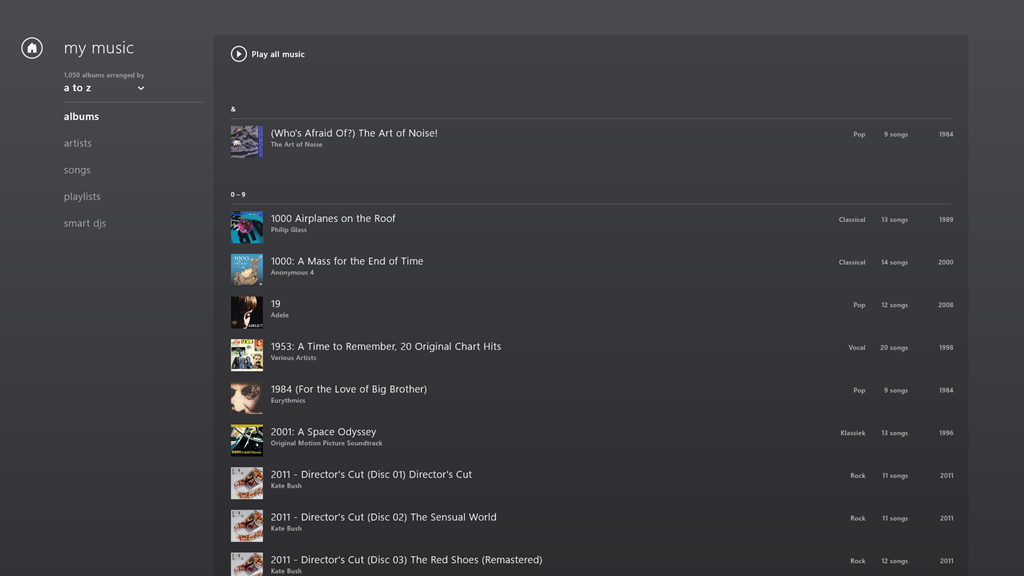
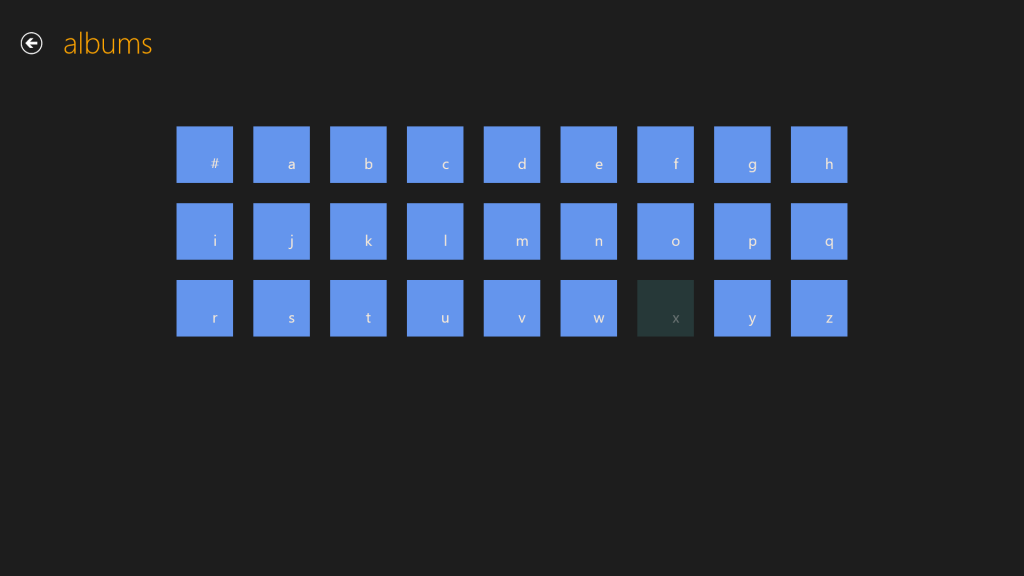
    Take the Album view, for example. Choose it, and you’ll see a list of your albums.
    W8 Music 10

    The question is, how do you rapidly navigate through the list? The answer is: you can’t. You have to manually scroll up and down, using either your mouse or your finger. Since I have over 1,000 albums in my library, this gets very tiresome, very quickly.

    The answer that Windows Media Center came up with in 2001 is that pressing a character on your keyboard will cause the display to jump to that position in the list. So pressing “m” for example, will immediately skip the display to the start of the list of albums beginning with “m”.

    But the keyboard is dead in the Music App’s list displays… You can only scroll up or down.

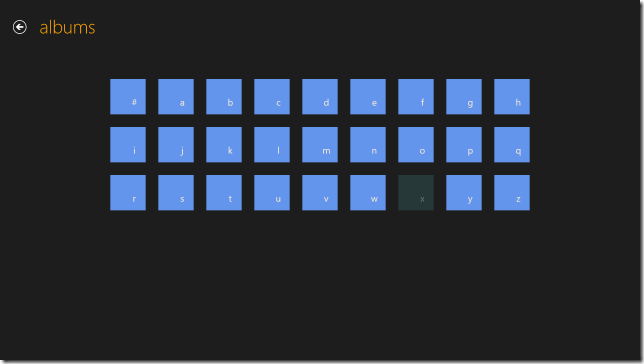
    What I find really irritating is that the developers of this App have also learned nothing from Apps built for Windows Phone. Here, there is support in the operating system itself for viewing lists at two levels of zoom. You can see a view at the level of the alphabet (a,b,c, etc.), and by touching a letter, you instantly zoom into the detailed list at that level.

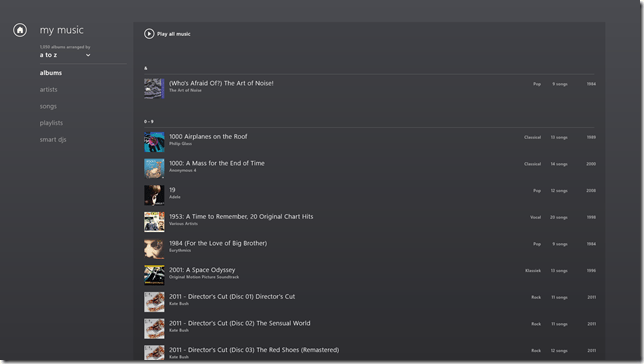
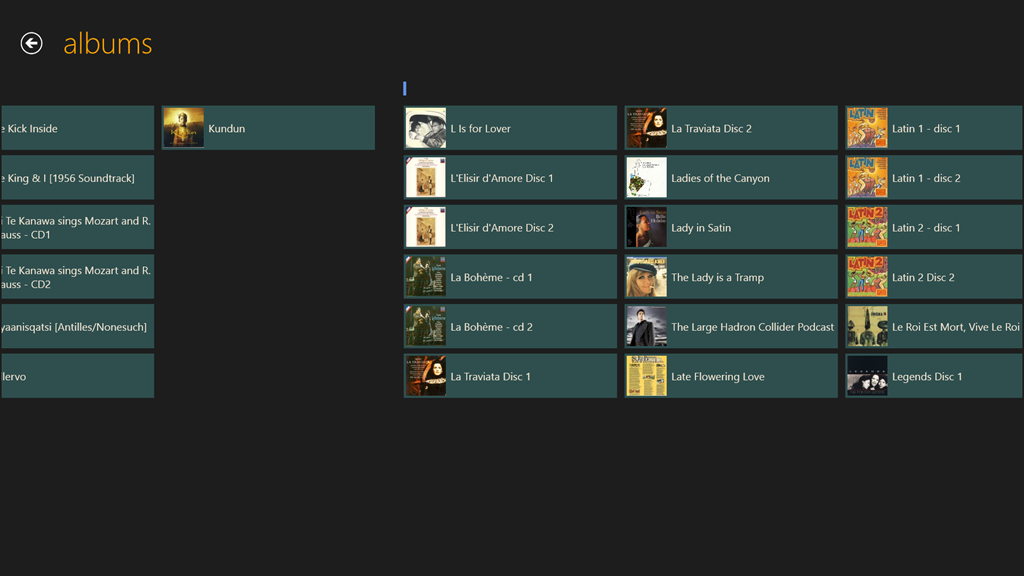
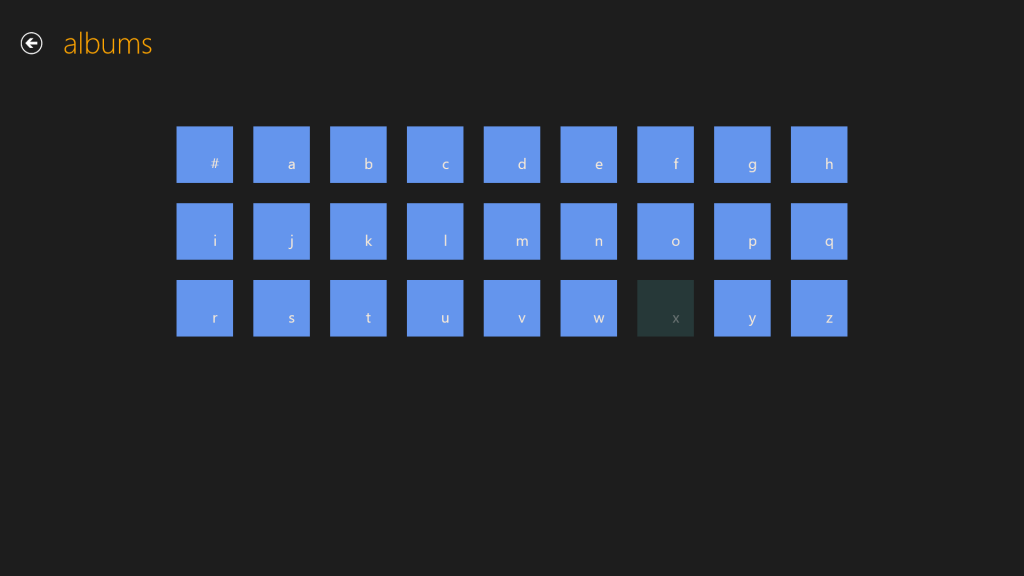
    This can be done for Windows 8 applications as well. Here for example, is the Media Center Remote app built by Brad Mauk, and available for both Windows Phone and Windows 8. These are screenshots taken from the Windows 8 App. On entering the Albums view, you are presented with the zoomed-out view of your library:
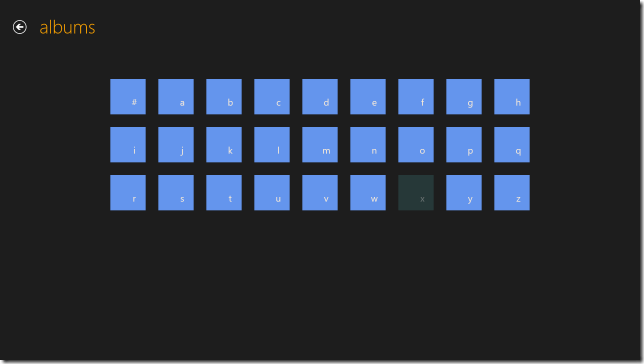
    W8 Music 08

    Notice that “x” is dimmed – this immediately tells me that I have no albums with titles beginning with “X” in my library. Now, it is true that in this App, in this view, the keyboard is also not active. So I can’t type a character on my keyboard and jump to that part of my library. However, and crucially, I can use either my mouse or Touch to choose one of the characters on this screen to jump into my library. Let’s click (or Touch) “l”:

    W8 Music 09

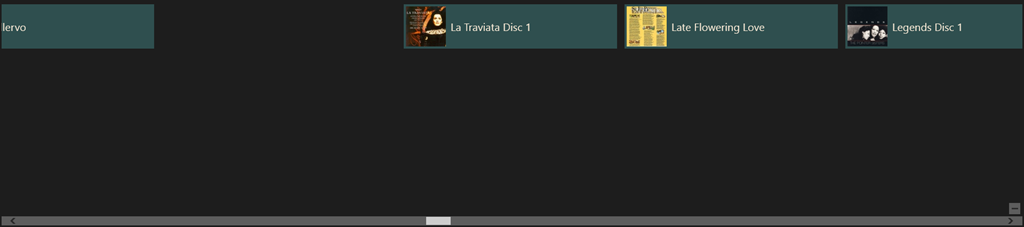
    Instantly, I’m there. If I want to return to the high-level view, I can either click the “-“ icon that appears with the horizontal scrollbar when I mouse down:
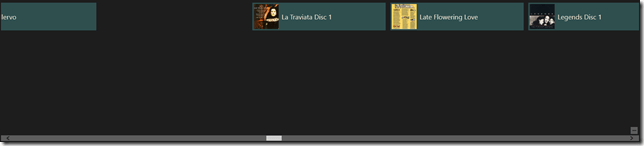
    W8 Music 11

    …or, if I’m using Touch, I simply use the “pinch” gesture on the screen to return to the alphabetic list of the high-level view:
    W8 Music 08

    Navigation within my library is easy with this App, and I happily use it to control my Windows Media Center.

    The developers of Microsoft’s Music App should take note. What they have produced thus far is abysmal.

    Update 26th March 2013

    Today, the Music App has received an update. I’m very pleased to see that Microsoft has at last incorporated a “zoom” function to make navigation in a large library more practical. It’s implemented slightly differently from the “Windows Phone” approach taken by the Media Center Remote App described above.

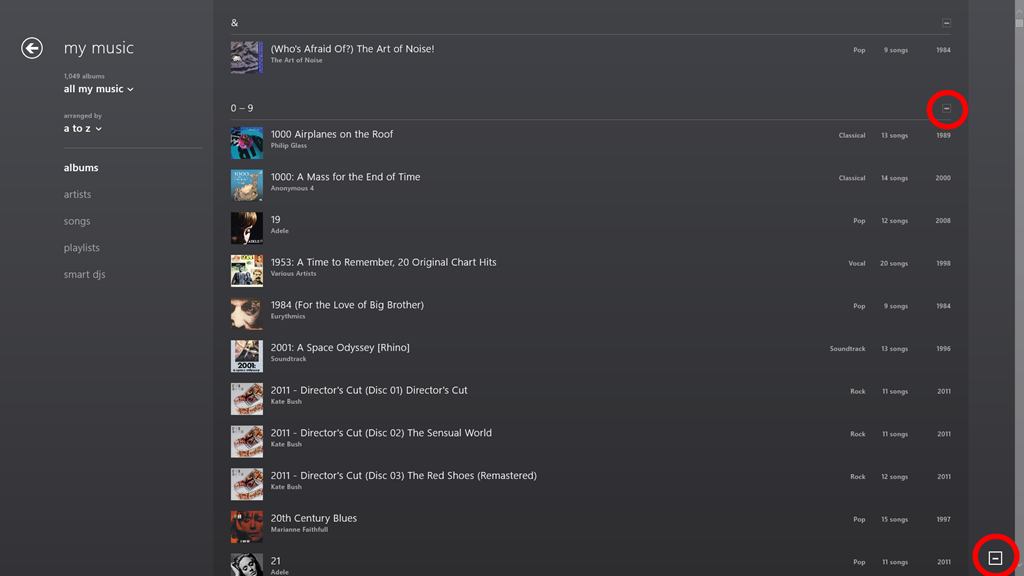
    In the new version of Music App, the contents of the various views (Albums, Artists, Songs, Playlists etc.) are separated alphabet headings, when listed in alphabetical order. Here you can see the start of the list of my albums:
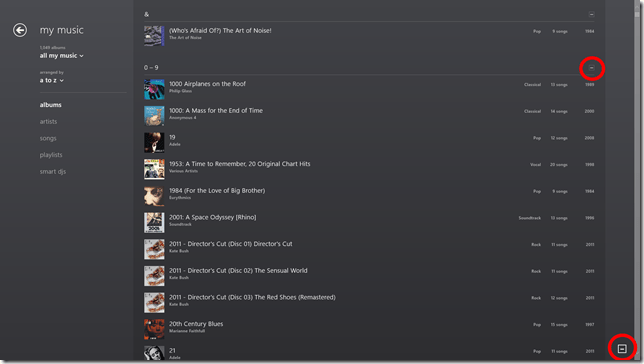
    Music App 02

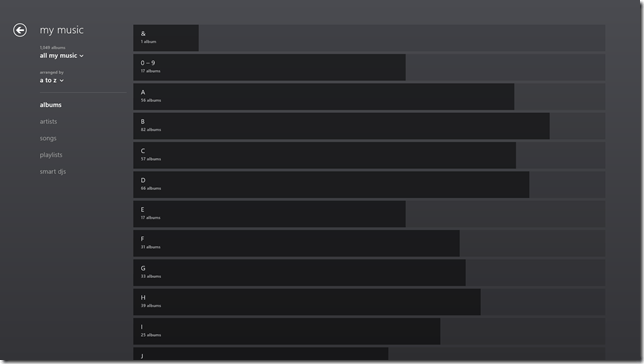
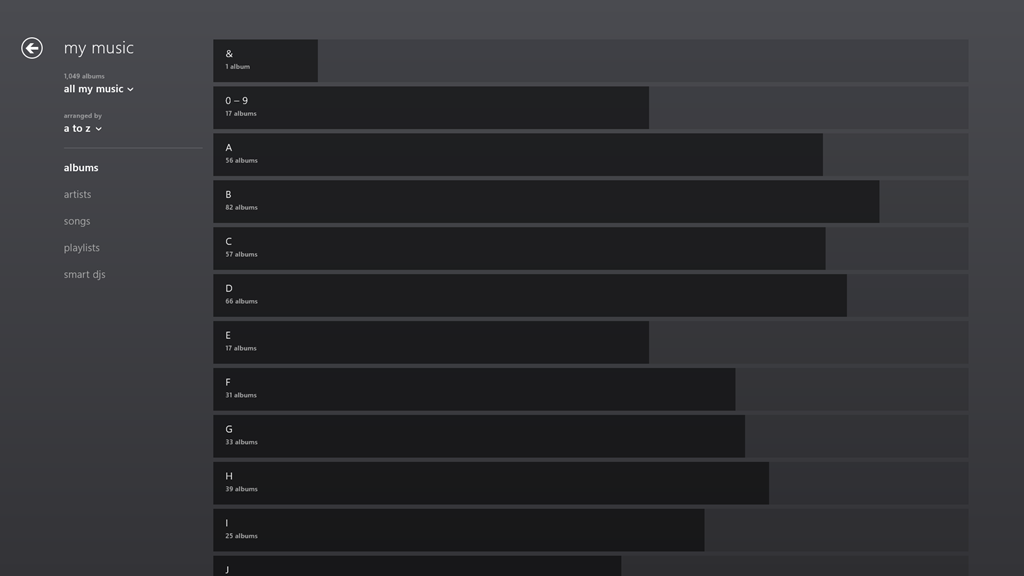
    Note the icons that I’ve circled in red. When clicked (or touched), the view zooms out to the alphabetic sections only:
    Music App 03

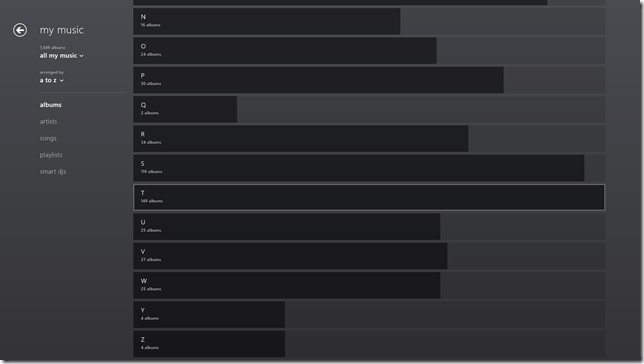
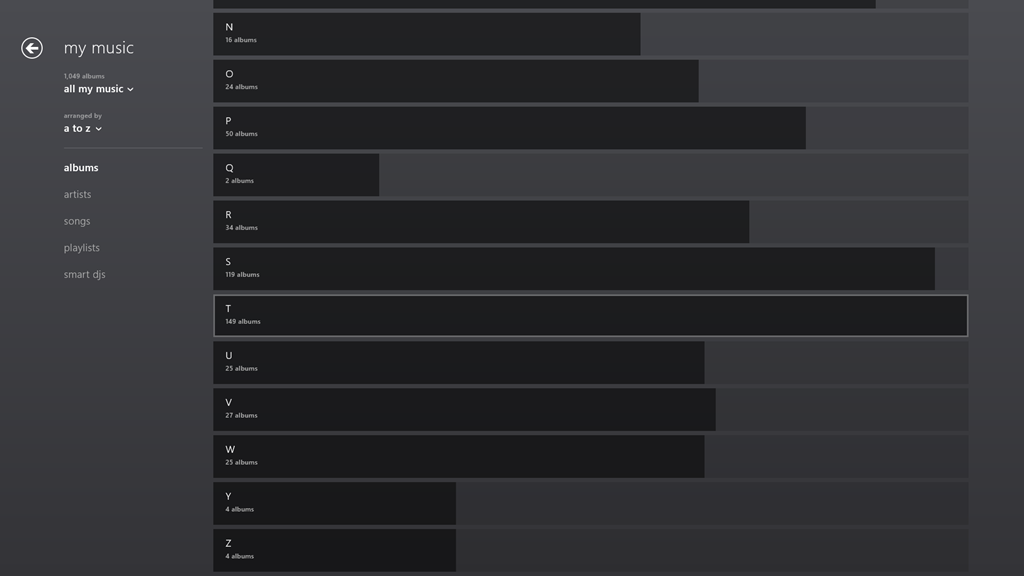
    One rather nice touch is that the length of the bars represents the number of albums in that section as a proportion of the highest section total. If there are no albums in a particular section, then – unlike the Windows Phone convention, where the section is dimmed – here it is dropped altogether. For example, there is no entry for “X”, since I have no albums that begin with “X”:
    Music App 04

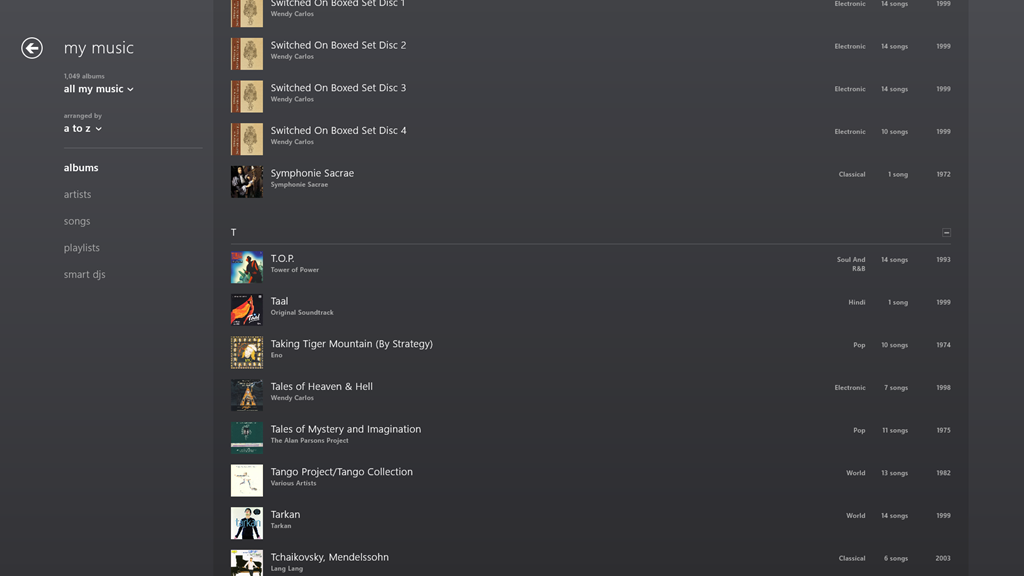
    Clicking, or touching, anywhere along the dark/light grey bar of a section will zoom back into the library to the point represented by the section heading. In the screenshot above, I have moved my mouse over the “T” section, which is why it has become highlighted (the touch interface does not use this highlighting prompt). Left-clicking (or touching) jumps me back into the list of individual albums, starting with those beginning with “T”:
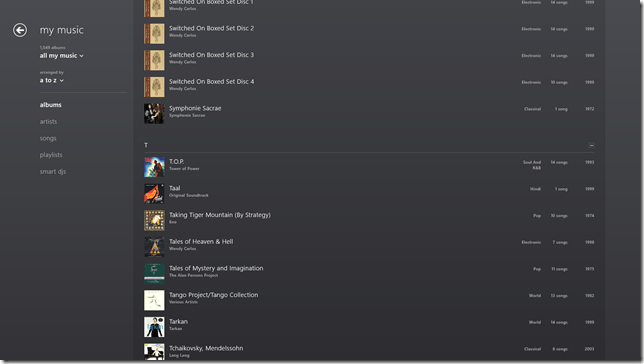
    Music App 05

    You’ll notice that the “T” section contains the highest total number of albums. That’s because the Music App – unlike Windows Media Center – has not the intelligence to ignore words like “The” or “A” in an album title. It’s a small point, but it’s evidence that teams in Microsoft often don’t appear to build on what went before, but start with a blank sheet of paper. One step forward, two steps back…

    In summary, while it’s nice to see that this new version of the Music App has addressed the navigation issue, it still has a long way to go. Of the six issues that I give at the top of this post, only issue 3 seems to have been resolved, the other five issues have yet to be addressed – if indeed they ever will be.

    Update 30 March 2013

    I’ve been using the Music App to play music stored in my Library, and I’ve got good news and bad news.

    See here for more information.

    16 responses to “Windows 8 Media Apps and Media Services”

    1. aarondr Avatar

      Geoff – As far as point 6 goes. I haven’t tried this feature, but this article: http://www.donaldmarang.org/DLNA_Windows.html seems to think that pressing Windows + k will result in the ability to redirect the output of any of the media apps to a DLNA rendered. I like to see MS embrace standards like DLNA over their own history of failed protocols. Pardon me if I’m speaking of ignorance (because I was about to rant about the lack of DLNA support in Windows when it’s just finally catching on before I double checked my opinion).

      1. Geoff Coupe Avatar

        Aaron, pressing Windows+k just brings up the Devices screen appropriate to the running App. The trouble is that it will only list Microsoft-certified devices. My Denon AVR-3808 is a certified DLNA DMR – but it ain’t (and never will be) a Microsoft-certified device.

        The result is that I can “Play to” the Denon if I use the legacy Windows Media Player, but I can’t “Play to” the Denon if I use the Music App.

        This is a pain if I’m using my Tablet, because it’s (somewhat) easier to navigate using Touch in the Music App, rather than fiddling about with tiny buttons in Windows Media Player.

        1. aarondr Avatar

          That’ll show you for buying a non-Microsoft certified DLNA device.

          But seriously – that’s stupid. I get /why/ they are doing it – really. DLNA has always been a flaky experience for me, maybe part of that experience is bad implementations of DLNA servers/targets/receivers. Having a ‘certified’ devices gives more ‘assurances’ of what formats play, how certain material gets interpreted, etc. We’re in the ‘new world’ of user experience first, at the cost of compatibility/flexibility. Of course the other side of the sword here is that if you’re removing the experience for the user (e.g. this won’t work with my stuff – resulting in ‘no experience’) then you aren’t really improving anything.

          1. Geoff Coupe Avatar

            You know, what is really irritating is that when I bought my Denon, it had a Microsoft “Plays for Sure” sticker on it. Fast forward a few years, and the “Plays for sure” initiative of Microsoft has been consigned to the dustbin of history, by Microsoft.

            I give the Microsoft-certified imprimatur about the same lifetime.

    2. Mark Avatar
      Mark

      Quite the interesting read…and it is really sad, Microsoft could have used the metro interface and delivered a set of killer must-have apps that would have won over detractors and fence-sitters, instead all they do is provide fodder for the “what good is win8” crowd.

      It is a 1.0 release, but the MS developers have had more than a year (probably more) to program the supposedly “simple to develop in” Metro environment, so either its not as easy as they say, or MS programmers are not as competent as they say or more likely they have no interest in creating that type of app – its lowest-common-denominator mentality in a blind drive to the app-store and its ad revenue

      1. Geoff Coupe Avatar

        Mark, I don’t know what the reasons are for why the Microsoft Apps are so poor, but the end result is, as you say, very sad indeed.

    3. […] updated my post on the Xbox Music App here. In summary, whilst navigation has taken a step forward, there are many issues with this App that […]

    4. Mark Avatar
      Mark

      So are you using it as your dayindayout music app yet? I’m still using itunes but am unhappy with 11, specifically around the video portion and playlists.

      1. Geoff Coupe Avatar

        Mark, now that the navigation has been fixed, it’s probably at the point where it starts to be usable for me. I’m also playing around with the Media Monkey for Windows 8 App – but this is still very much at beta status. Both are still limited in what they can do. I’m still using the Desktop Media Monkey for all my metadata work, for example.

      2. Geoff Coupe Avatar

        Further to my last note, I think I’m beginning to be won round to the Music App. Yesterday I tried buying a Cecilia Bartoli album. I was pleased to see that the Music App downloaded it and added it to my default Music Library – which happens to be on my Windows Home Server. So I’ve now got the album (in DRM-free MP3 tracks @ 320kbps) stored in a folder on my WHS, where it can be accessed, and played, by all our other systems.

    5. Mark Avatar
      Mark

      I don’t know, so far it seems too “click and play only” for me. Is there a way to see number of plays, last played date or even a 5 star-rating? Want to know what the actual file location is? want to change the genre? want “smart” playlists (i.e. all 80’s music?) want more/less files on one page or larger album art? sorry, no luck.

      Even basic things seem difficult. Want to see all songs of a genre? instead of selecting a genre view on the left, you have to change the view to show by genre, then click the little minus to zoom out then select the genre and then you only get alphabetical by song name – no other options. Want to skip a minute into a song? start the song playing, the single-click to select it, then right-click to bring up the bottom bar, then click on the album cover art to be taken to xbox music and there you can click on the song-progress bar to skip forward

      and whats up with not being able to double-click to play a song, That has been a staple of Windows for what? 30+ years, Now I have to single-click and then click the play icon that appears. Am I that much of a luddite that click, move to play button and click again is more efficient/intuitive than double-clicking?

      1. Geoff Coupe Avatar

        Mark, I agree that the interface leaves much to be desired, no exposure (for setting, searching or viewing) of Ratings or Composer. Or editing of any tags, for that matter.

        And I can understand that moving the Genre from being a Category (as in WMP12) to a Sorting attribute, has altered the way in which we are used to navigating.

        Still, there’s an easier way to skip into a playing song. Once you’ve made your music selection (and populated your playlist), just go back to the main screen and click on the “Now Playing” section. Then you have the main Play/Playlist screen where you can skip around both the currently playing track or the playlist…

        And I agree that the Microsoft team have forgotten to implement double-clicking in the interface – they’ve just concentrated on Touch. That’s bad.

        The App clearly needs much further improvement, but for me, it is starting to be usable. I never use all the bells and whistles in Media Monkey, anyway…

    6. […] As I wrote here, Microsoft has recently updated the Xbox Music App for Windows 8. The update improved the navigation of the music library to the extent where I thought I could start using the App (it was absymal on first release). […]

    7. […] Mail, Calendar and People Apps are still far inferior to Windows Live Mail. The Xbox Music App is still lagging traditional music library applications, and the less said about the Photos and Video Apps the […]

    8. […] Then along came Windows 8. Once again, in the pre-release versions of Windows 8, there were issues, but these were fixed in the final version of Windows 8. However, while the operating system and the venerable Windows Media Player (unchanged from Windows 7) were working, the (brand-spanking-new-supposedly-fancy-but-really-very limited) Xbox Music App from Microsoft still had a number of shortcomings. […]

    9. […] version of the Xbox Music App (version 2.2.177.0). While it has improved in certain respects from earlier versions of the App, in one respect it seems to have got a whole lot worse: it does not handle Album Art well at […]

    Leave a comment

  • Carmen – “Habanera”

    …as you’ve never seen it before…

    Strangely, I seem to have remembered the same odd places from the 1970s as well…

    August Schram – clearly someone who has the same odd recollections, even if he is too young to have been there.

    One response to “Carmen – “Habanera””

    1. […] was revisiting an old post of mine about a strange version of Carmen, and discovered that there’s a sequel that is perhaps even […]

    Leave a comment

  • You Might Think That…

    …but I couldn’t possibly comment.

    Ah, that immortal line, uttered by Francis Urquhart MP in the BBC’s masterful adaptation of House of Cards.

    Fast Forward twenty years or so, and we have House of Cards – American style. Actually, I think it could be pretty good. Kevin Spacey could give the late, lamented, Ian Richardson a run for his money. However, not having Netflix, or any of these new-fangled internet channel thingies, it may take me a while before I can compare the two.

    Leave a comment

  • Paperman

    Nice to see that Disney can still produce heartfelt animation. Short and sweet.
    One response to “Paperman”

    1. TomT Avatar
      TomT

      Yes, I was very pleasantly and unexpectedly surprised to see this recently before some new Disney blockbuster. Thanks for reminding me of its name and tracking it down 🙂

    Leave a comment

  • It’s an Incredible Deal – Part II

    Back in September last year, I wrote about the pricing of Microsoft Office 2013. Unlike Paul Thurott , I failed to see how it was “An Incredible Deal”. For my use, the change to a subscription model would increase my cost of ownership over a 6 year period by almost 5 times.

    Subsequent to that, Microsoft announced an offer to buy a copy of Office Home and Student 2010, and get a copy of Office Home and Student 2013 when it became available, for free. Well, I thought, that sounded pretty good. A little further investigation rather took the icing off the cake. The 2010 version of Home and Student’s licensed for use on 3 PCs, while the 2013 version is only licensed for use on one. Nevertheless, I thought that the offer remained sufficiently attractive to warrant investing in a copy of Home and Student 2010. I could install Office 2013 on my tablet, and carry on with 2010 on our other two PCs.

    So I   purchased a copy of Office Home and Student 2010 and registered for the offer. And yesterday, I received an email from Microsoft telling me that the new Office was available and that I could redeem my offer.

    I clicked on the link in the email and arrived at the Microsoft web page setup for the offer. Clicking on the “Redeem now” button, brought up a page where, amongst other things , I was asked to enter the Product key of my existing version of Office and select the country/region where I would be using the version of Office 2013. Note that I have an English language version of Office 2010, and I would be using Office 2013 here in the Netherlands.

    I filled in all the fields, clicked the “Submit” button and promptly got an error 012913 -very helpful, not. Noticing that the web page was set to English (US) , I changed it to English (International), and tried again. Nope, same error.

    With a sinking heart l changed the web page to Nederlands and repeated the process yet again. This time I got further – I was asked whether I wanted the subscription version of Office 2013 or the single license version. However, note that I am now looking at a page written in Dutch. The clear implication is that if I download the single license version I will end up with the Dutch version of Office.

    Now, this might not be a problem providing I can change the display language and the proofing tools to UK English. This blog post from Julian Parish in the Office team seems to suggest that the language packs are available, but that, as a consumer, I have to buy them. That’s not really what I wanted to hear. It is particularly galling when you realise that the display and help languages of Windows 8 can be changed or added to for free.

    One other little thing. Microsoft has also changed the licensing terms of the downloadable software. Unlike earlier versions, it can no longer be uninstalled from one PC and transferred to another. Now, once installed on a PC, that’s it – it can never be transferred. And if your PC breaks, and you get a new motherboard, for example, then tough, Office will stop working, and you will need to buy a new license.

    I can’t say that I’m delighted with these changes, but I fear it’s the shape of things to come from Microsoft. Next up, I fear that Windows 9 will switch to a subscription model as well.

    Update: Well, I decided that I’d see what would happen if I went one step further on the Dutch web site, and selected the downloadable Office Home and Student version. Thankfully, the next page gave me the opportunity to confirm that my country was the Netherlands, but also gave me the option of choosing English. I rather think that should have been made clearer earlier in the process…

    So now I’m in the process of downloading and installing what I hope will be an English language version of Office. Oh gawd, now I’ve got a perky little welcome video playing.

    Update 2: I see that Paul Thurrott is still convinced that the subscription model is “an incredible deal”. He writes:

    Office 365 Home Premium, at just $99.99 a year, with five easily distributed and changed PC/device installs of Office 2013 Professional, is obviously the way to go for most people.

    I’m clearly not most people. It’s way too expensive and a very bad way to go for me. However, I do agree that the fact that Microsoft has apparently removed the right to transfer licenses between machines is a slap in the face from the customer’s point of view.

    Update 3: Peter Bright, writing in Ars Technica, calls a spade a spade:

    If you buy a perpetual retail license for Office 2013, it will be locked to the computer you first install it on, forever. Buy a new PC and you won’t be allowed to install your existing copy of Office on it, even if you wipe the disk of the old PC. You’ll have to splurge for a new one.

    This is a change in policy from Office 2010. Office 2010 permitted a single transition from one PC to a new one. It’s not, however, an entirely new policy: OEM pre-installed versions of Office (and Windows) are similarly tied to their (OEM) hardware and can’t migrate. Adam Turner at The Age first pressed Microsoft for clarification over what its “single PC” constraint actually meant, and noted the newly aligned OEM and retail licenses.

    It’s difficult to see the wisdom in this change. It’s not a big change, but it’s not a nice one, either.

    Update 6th March 2013: Following protest, it appears as though Microsoft has changed its mind. Excellent news.

    2 responses to “It’s an Incredible Deal – Part II”

    1. Al Feersum Avatar

      Microsoft are certainly up to something with regard to their licensing models. One theory is that they feel that they’re missing out on the mobile computing market – but that doesn’t make sense. A license is a license, whether you’re running it on a tablet or a PC. But yes, that license transfer for downloaded ‘ware is a bit of a pain.

      This year, the cost of MSDN subcriptions under my company’s EA has more than doubled – putting the price of MSDN Premium higher than the previous MSDN Ultimate subscription charge – and there are some development tools that aren’t available to Premium subscribers.

      Also, ‘doze 8 seems to be making huge inroads into the market – in the UK, I can’t find a PC for sale in the major chains that hasn’t got 8 installed – I was looking for a laptop for my grandson for a Christmas present, and wanted to get him a ‘doze 7 machine because it’s got a familiar interface, and isn’t that far removed from what he’s using at school (probably XP or Vista) – and I couldn’t get one. Only 8 is available, so if you wanted a 7 PC, tough luck.

      I suspect that MS are clawing in as much money as they can through license fees so that they can either a) fund their next major acquisition, b) fund their next major product release (‘doze 9? – doubt it) or c) offset the loss that they’re making on the Surface and the Nokia deal so that they can increase their market share by undercutting their rivals for similar products.

    2. […] commented a couple of times before on the new licensing models that Microsoft has introduced with Office […]

    Leave a comment

  • Queen Abdicates

    Stop Press: the Queen is abdicating in favour of her middle-aged son.

    Nope, this is not Betty handing over the reins of the monarchy to Charlie (god forbid); it’s Queen Beatrix of The Netherlands handing the reins over to Prince Willem-Alexander.

    A well-timed and sensible choice.

    The Prince and Princess Maxima are well-equipped to pick up the reins and carry on. They are, like Beatrix herself, not unintelligent, understand both business and society and are well-liked by their subjects. I’m no monarchist, but I have a lot of respect for them.

    4 responses to “Queen Abdicates”

    1. Matt Healy Avatar
      Matt Healy

      I don’t know much about the Netherlands Royal Family, but from what little I know they do seem a more sensible lot than the House of Windsor, who can be something of a reality TV drama. The closest my country (the US) has to a dynasty would be the Bush family; FOUR TIMES I have voted against a guy named George Bush in an election.

      1. Geoff Coupe Avatar

        Matt, yes, they’re a *much* more sensible lot than the Windsors.

    2. Al Feersum Avatar

      I think Peggy should give Charlie the reins for the short time that he’ll be around (well… maybe not – given their longevity, he’ll still be on the throne when William is his age now).

      It’s not as if they actually do anything with regard to exercising their royal powers. After all, the UK is up shit creek, and despite furious bailing out, the crap is still coming in the boat because the real problems still aren’t being addressed.

      The Queen (or King as it may be) does have the power to dissolve parliament and force a re-election – but sitting in their cosy palace(s), they don’t seem to have a measure of how the public feel (not that I’m saying that Charlie would be any better). It seems that they don’t care about the little people: after all, it’s not as if they’re going to get voted out of office, is it?

      And as for Matt H. Well… I’m sorry you had to endure the reign of the republicans (12 years of the Parks Department – hell!)… but what can you do? The majority are stupid, and they voted for him.

      1. Geoff Coupe Avatar

        King Charles? Noooo! He has a long history of meddling in politics and pontificating on things that he knows nothing about. It would get worse if he were monarch. Don’t feed his addiction!

    Leave a comment

  • Thoughts on the Lenovo ThinkPad 2 – Part IV

    Welcome back to the next episode in what seems to be turning out to be a series of posts on my experience of using my first Windows 8 tablet – a Lenovo ThinkPad 2.

    The last post took a look at some of the software applications that Lenovo has provided for their tablet, and I’ll continue that look in this post. I ended that post somewhat abruptly when I discovered how awful Lenovo’s tutorial on Windows 8 was. Not only was it shockingly poor, but it is also built for the Desktop version of Internet Explorer. One might expect that a Windows 8 tutorial would take advantage of the Modern UI of Windows 8. Clearly Lenovo don’t think so.

    To see how it should be done, I think it’s instructive to take a look at HP’s tutorial for Windows 8. It is fully a Modern UI App – no forcing the hapless user to open the Desktop web browser here. This tutorial, while it was originally designed by HP for use on their Windows 8 systems, is now freely available in the Windows Store for download and installation onto any Windows 8 system:

    TPT2 28

    If you’re new to Windows 8, it’s worth taking a look at this tutorial.

    OK, now onwards with the contents of Lenovo’s Companion App:

    TPT2 29

    Ah, QuickLaunch turns out to be yet another Start Button replacement tool. I really don’t understand the attraction of these. I want to learn how to ride my bike, not go through life with training wheels clamped to it.

    Next up is the trial version of Norton Internet Security that Lenovo installed on my ThinkPad. One of the first things I did was to uninstall it, and to revert to Microsoft’s Windows Defender, which is built into Windows 8. It’s sufficient protection, in my opinion.

    Then we have a couple of adverts for two of Lenovo’s own utilities: Settings and QuickSnip. I’ll deal with them later.

    Lenovo Blogs opens a scrolling view of links to Lenovo’s corporate blogs. Clicking on a link will open the blog post inside the Companion App, rather than switching to the web browser, which is a nice touch. E.g. the “8 Cool Things About The ThinkPad Tablet 2” post shown here:

    TPT2 31

    Needless to say, the blogs are primarily a marketing tool, and present a rosy picture. I couldn’t help but comment on the above blog post to correct some of the rosiness.

    The links to the Lenovo channels on YouTube and Twitter are further examples of marketing. Once again, these channels are displayed within the Companion App itself, rather than shelling out to a separate instance of the web browser. I suspect the same thing is supposed to happen for the Accessories tile, but all I got was a blank page and a plaintive message that there was “No matched content for this system”. There is in fact an online Lenovo shop in the Netherlands, so I suspect that once again the developers of the Companion App assume that we all live in the US of A.

    And as I said in my last post, I have no interest in signing up for Lenovo’s Cloud Storage – I am already a satisfied SkyDrive user.

    To summarise, the Companion App strikes me as primarily a Marketing tool from Lenovo. I think it can be uninstalled without any second thoughts. Right, that about wraps it up for the Companion App, now let’s take a look at the Settings App.

    The Settings App is a bit strange on my system. I’m not sure whether it’s working as it is supposed to. If I look at the Settings App in the Windows Store, I see this:

    TPT2 32

    It shows a screenshot of the Settings App that contains five major sections:

    • Mobile Hotspots (for internet sharing)
    • Power
    • Location Awareness
    • Camera
    • Audio

    Yet, when I open up the Settings App on my ThinkPad, this is what I see:

    TPT2 33

    That is, just three:

    • Power
    • Location Awareness
    • Audio

    Yet, I have two cameras in the ThinkPad. Why aren’t the settings for these shown here? ‘Tis a puzzlement.

    (Update 26 February 2013: Lenovo has just released a new version of the Settings App, and there is now an entry for the Camera Settings. They’ve also said that they are working on the Mobile Settings entry for the ThinkPad Tablet 2, so this should arrive at some point)

    I suppose this App is OK, as far as it goes, but I think I would have liked to have seen the Power setting (in particular, the battery charge remaining) broken out into a separate tile that could be pinned to the Start Screen, or displayed in the Settings App tile itself. That would have been useful. Having to start up the Settings App, and then select the Power section – not so much.

    TPT2 41

    There’s not much more to say about this App – it’s pretty ho-hum as it stands.

    The Support App opens with a horizontally scrollable window showing six sections:

    • User Guide
    • Services and Warranty
    • System Health
    • Hints and Tips
    • Knowledge Base
    • Discussion Forum

    TPT2 36

    TPT2 37

    The User Guide section launches the PDF file of the user guide in the Microsoft Reader App. While it may be thought to be a little more clumsy to launch the Reader, rather than display the user guide directly within the Support App, this does have one advantage. The Reader App is able to use the Devices in the Charms bar to print out pages from the user guide. The Support App (just like all the other Lenovo Apps) does not support Devices. What is more, the Reader App, unlike Microsoft’s Modern UI Internet Explorer and Mail Apps, can print out a subset of pages from the guide.

    I do like the fact that the Service and Warranty section displays the exact state of the warranty on my ThinkPad. It tells me how many days I have left before something will inevitably break – just after the warranty runs out, or am I being overly cynical here?

    TPT2 38

    The System Health section is a little useful. It does indicate the amount of free storage and the amount of installed memory. However, while it tantalisingly states that “You can run certain tests on your computer to check the condition of your hard disk drive”, it doesn’t actually tell you what these tests actually are and where to find them.

    TPT2 39

    I’m also slightly disappointed that under the memory section, there is a clickable link that takes you to the online Lenovo shop where you can buy additional memory. Er, the ThinkPad 2 uses the Intel Clover Trail Atom chip – this only supports a maximum of 2GB memory, and more cannot be fitted. That link should never appear if this App is running on the ThinkPad 2.

    TPT2 40

    Attention to detail is important, I think. It makes the difference between an acceptable user experience, and a great user experience. It also turns your users into active supporters of your products.

    The rest of the sections (“Hints and Tips”, “Knowledge Base”, “Discussion Forum”) show information scraped from the various Lenovo resources and forums on the web. Like the Companion App, these are shown directly within the Support App itself, rather than shelling out to the web browser. For a quick overview, this is probably OK, but frankly, if I want to read the Lenovo ThinkPad forums, it is far easier to read them directly in a web browser. I can also interact, by replying to threads or making new ones. I cannot do this from within the Support App.

    In summary, I find the App OK. It is good-looking, but without much depth. However, it can stay on my system.

    The QuickSnip App is a simple image cropping tool, which uses the Share function in the Charms bar to pass on cropped images:

    TPT2 34

    TPT2 35

    This App from Lenovo is like the majority of the current crop of Modern UI Apps provided by Microsoft: almost entirely useless.

    I’ve just uninstalled it from my system.

    Overall, I cannot say that the Lenovo Apps have provided a great experience. I still think that the ThinkPad 2 hardware is basically a solid product, and I’m still very happy with my purchase. But I don’t think I’m head over heels in love with it. Perhaps I’m just too rational – I doubt whether I could ever be an Apple fanboi either.

    10 responses to “Thoughts on the Lenovo ThinkPad 2 – Part IV”

    1. […] Thoughts on the Lenovo ThinkPad 2 – Part IV […]

    2. Mark Avatar
      Mark

      Thanks for the update! I think it is interesting seeing how the mfg are stepping in with their own products to handle the Windows8 consumer questions. I guess that is what Microsoft wanted – to create an environment rather than an all-inclusive product.

      Unfortunately phase 1 of this process seems to be primarily advertisements. My “HP Printer Control” software includes 4 tiles, “choose a different printer” (I only have 1), “Get HP Full-featured software”, “Get online support”, “Shop for supplies” – remarkably absent is anything remotely resembling “printer control”…but anyway, the environment is there and hopefully the next wave will be useful utilities and software.

      1. Geoff Coupe Avatar

        Thanks, Mark. Yup, I think all of us are still in the learning phase – Microsoft, the OEMs, and us – the punters.

    3. Robert Dammers Avatar
      Robert Dammers

      I’m childishly excited to be reading about your experience with the TPT2. I remain a financially-challenged trailing-edge adopter (with the exception of my iPad2 – but my Zagg keyboard was heavily discounted on Amazon), but I made a very conscious decision when replacing Matthew’s (younger son) laptop a year and a half ago not to get another laptop, but instead a little Acer Revo Nettop, expecting that we might get a Win 8 machine when he goes to Cambridge in September (since he could then have a tablet that ran CAD and stress models). And if that sounds ambitious, the little Revo with two cores running at 1.8GHz ran Dassault’s SolidWorks 3D CAD application (under his school’s license), including ray traced solid visualisation just beautifully. Yup, you could design offshore platforms or Space Shuttles now with a box marketed as a mediacenter PC.

      So I’m rather pleased that it looks like the market is going to produce what I want, when I want it.

      1. Geoff Coupe Avatar

        Robert, good to hear from you. You know the thing that jumped out at me when I read your comment was the phrase “when he goes to Cambridge in September”. Not so much the fact that it’s Cambridge (but congratulations anyway), but the fact that I seem to remember a photo of two little boys sitting on your desk at work. Tempus fugit.

    4. alphaOri Avatar

      Very informative post. I appreciate you sharing. My TPT2 just arrived this morning… so anxious to start playing with it.

    5. p.teufel@live.de Avatar
      p.teufel@live.de

      Thanks for this great post. Have you tried to connect the tablet to an external monitor? Some people described it as laggy. Have you made the same experience (for example: surfing and listening music at the same time on the external monitor)

      1. Geoff Coupe Avatar

        No – so far I haven’t tried connecting the tablet to an external monitor. I use the tablet as a pure slate.

    6. Tessa Avatar
      Tessa

      Hi Geoff

      Thank you for the very informative posts.

      I purchased a Lenovo Thinkpad Tablet 2 yesterday, and have one question I hope you can answer.
      When the device is switched off / shut-down and I plug in the charger there is no indicator or light that notifies me that the device is being charged.
      Also, when the device has been fully charged no indicator or light notifies me that the device is now fully charged, and thus the charger can now be unplugged.
      Is this the way the device has been engineered by Lenovo, or is my device faulty in that I can’t seem to find any charging indicator or light ?
      Does your Thinkpad Tablet 2 have some kind of charging light or indicator ?

      1. Geoff Coupe Avatar

        Hi Tessa,

        No, your TPT2 has no charging light – that’s the way the device has been engineered by Lenovo. The only indicators you have are the icons that are displayed by Windows 8 itself, or by application software.

        Windows 8 will show the battery level icon, and whether the device is currently plugged in and charging, on the Lock Screen, or when you right-swipe in to show the Charms bar (the battery/charging icons are displayed next to the Clock on the left).

        The Lenovo Settings App will show you a precise reading of how much charge the battery has, and an estimate of how much running time remaining you have with the charge. I wish the Lenovo Settings App would show this as a Tile Notification on the Start Screen, but unfortunately it doesn’t.

    Leave a comment

  • Thoughts on the Lenovo Thinkpad 2 -Part III

    Following on from the last post, here’s some further thoughts on the software experience of the ThinkPad tablet.

    One criticism that I’ve often read of PC OEMs is that they stuff their machines with bloat-ware. While I don’t think that Lenovo is quite as bad as some, it still comes with some software of questionable utility.

    TPT2 18

    Here we see five utilities, I’ve already removed a couple; the inevitable anti-virus trial, and an application to access Lenovo’s cloud storage

    TPT2 17

    Since I already use Skydrive (with luckily 25 GB free storage), I don’t need the hassle of managing more cloud storage.

    Let’s take a look at the remaining five applications. First up, the Companion App.

    TPT2 19

    Oh dear, this doesn’t look good. Basically lots of (questionable) style, and little (apparent) substance. OK, let’s take a look at the “Getting Started” section.

    TPT2 20

    Oh gawd, another invitation to install Norton Internet Security. Look, people, Windows 8 comes with a perfectly good anti-virus and anti-malware software out of the box. A Pox on your suggested alternatives. I’ve been there, I’ve done that. I’ve paid the money, had the bloated software experience, and frankly – no more…

    OK. What’s this “Customize your start menu” stuff?  Well, frankly, I haven’t a clue, because there’s nothing on that screen that is a link to take me to anything resembling a “Lenovo Quicklaunch”.  It’s dead. Fail number two.

    So then I made the mistake of clicking on the “About Companion”  tile.

    Welcome to the land of Exclamation Points!!!

    TPT21

    Discover! Change is Good! Your Companion!

    Er, basically – fuck off.

    OK – onwards to the next point in our journey: the “Stay Connected” tile. This is, as expected an advert for the Lenovo Mobile Access service.

    TPT2 21

    Well, this is all very well; but unfortunately, it doesn’t work for me, as I’ve documented here. I still haven’t had my connectivity issues resolved by Macheen’s Support service, so I’m continuing to use Vodafone’s service, thank you very much.

    Update 25 February 2013: I’ve now heard back from Lenovo/Macheen Support, and they have indeed fixed my problems with Lenovo Mobile Access, so I can now choose to use their pay-as-you-go mobile access service. Excellent.

    Update 30 December 2013: Ah, not so excellent. Lenovo/Macheen have deactivated my SIM card because I hadn’t used it for six months, and expect me to buy a new one to continue using their service. Sorry, guys, you’ve just lost a customer, and I’m certainly not recommending you to all my friends.

    Onwards to the Lenovo Services, with its very busy graphic. This turns out to be an invitation to shell out money to enjoy extra warranty protection or premium support services.

    TPT2 22

    While I have no objection in principle to this, I do wish that the developers of these web pages would realise that not everyone lives in the US of A and direct us to the local country services.

    On to the “App Showcase”tile. Personally, I’m underwhelmed, but maybe that’s just me.

    TPT2 23

    After all, I could just search for “Lenovo” in the Windows Store and see many more possibilities to choose from. Or not, as the case may be:

    TPT2 24

    I’ll skip over the “Last Gadget Standing” tile, which is a transient advert for an event in the past, and the “rara.com” tile, which is an invite to download yet another music service and move swiftly on to the “How to DO Windows® 8” tile. Really, the title alone is enough to make me want to lose the will to live. Still, let’s steel ourselves and press on.

    TPT2 25

    There are some ominous signs in the welcome message that this is not going to be a smooth experience. For example: “When you click the ‘Learn more’ button, you will be prompted to open the Desktop browser”. Oh dearie me; this does not bode well.

    And sure enough:

    TPT2 26

    Oh, dear god – is this really the best you could do?

    I’m sorry. I really need to pause and take a deep breath at this point. I’ll carry on with exploring the Lenovo experience later on, when I’ve had a chance to recover.

    I should just say that I do rather like the Lenovo ThinkPad 2 tablet. It’s just that the software that’s been tossed onto it rather sours the overall experience.

    2 responses to “Thoughts on the Lenovo Thinkpad 2 -Part III”

    1. […] ← Thoughts on the Lenovo Thinkpad 2 -Part III […]

    2. […] Thoughts on the Lenovo Thinkpad 2 -Part III […]

    Leave a comment

  • Thoughts on the Lenovo Thinkpad 2 -Part II

    This is a followup to my last post , which concentrated on the hardware of my recently acquired Lenovo ThinkPad 2, This time I’m looking at the software experience.

    Well, of course, the software experience is all about the use of Windows 8. As I’ve said many times before, people seem to either love or hate Windows 8. Personally speaking, I love it. True, there are many areas in which it could be improved , but overall I am well satisfied.

    Let’s take the area of handwriting recognition.

    This entire post has been created by using a pen. No keys have been pressed in the making of this post. Well, apart from the Prtscn key on a wireless keyboard to take screenshots.

    It is true that there are changes between the handwriting recognition input panels of Windows 7 and Windows 8. For example:

    In Windows 7, there are three ways in which the tablet input panel can be invoked on the Desktop. In Windows 8, there is just one way on the Desktop to invoke the panel – tapping the icon in the taskbar.

    Secondly, the Windows 7 tablet input panel had three modes that the user could switch between by means of explicit buttons on the input panel. In Windows 8 , although the three modes are still present, they are accessed differently. Now, the tablet input panel is larger and takes up half the screen.

    TPT2 11

    The icon at the bottom right is used to switch between the handwriting and keyboard modes:

    TPT2 12

    TPT2 13

    The default mode for the pen input is handwriting (freehand)

    TPR2 14

    Tapping on a word switches the panel into its third mode. This is the character mode where individual characters may be edited, and where the dictionary kicks in and shows alternatives:

    TPT2 15

    To my mind, the tablet input panel has been improved in Windows 8 over that in Windows 7. However , not everyone feels that way. Some people are finding it difficult to adjust to the new design.

    I’ll carry on with thoughts on the software experience in a later post.

    3 responses to “Thoughts on the Lenovo Thinkpad 2 -Part II”

    1. Mike Tremoulet (@coffeemike) Avatar

      Looking forward to more, and congratulations on your new addition! I have been looking very seriously at some of the Lenovo devices. They have seemed to be the best mix of physical hardware design and usability of any of the current round of things. (That, or the Surface Pro.)

      As luck and fortune would have it, I managed to win a drop-your-business-card-in-the-bowl drawing at a trade show yesterday for a Surface with Windows RT. That puts me a bit out of the market for a Windows 8 Pro tablet. 🙂

      24 hours in, my experiences seem to mirror yours (more so the first post) with the obvious exception of pen support. I’m impressed both at the quality of the handwriting recognition and your tenacity to write out that entire post longhand. I’ve been touch typing for so long, I can’t slow down to write complete sentences by hand anymore.

      RT is an interesting beast. This is a fully capable “second screen”, more useful for _doing_ things than my iPad, but it won’t by any means replace my MacBook Air as my primary computer. With Windows 8 Pro, the new tablets and hybrids really can be the replacement machine.

      Looking forward to hearing more thoughts!

      1. Geoff Coupe Avatar

        Hi Mike, good to hear from you! The handwriting recognition of Windows is indeed scarily good – particularly with my scrawl. I did take the time to train the recognition engine (writing out 50 short sentences that it gives for the user to copy), so I expect that had a lot to do with it. It also had a habit of writing Lenora in place of Lenovo at first, but it seems to have got the hang of it now.

        I know what you mean about the “second screen” aspect of Windows RT. And while I could use RDP on it to connect to a full Windows 8 Pro environment, there would still be some x86 apps or drivers that I’d be unable to install that was the dealbreaker for me.

        The ThinkPad seems to be a good compromise for me. It’s not a desktop replacement, but it runs everything I need (e.g. Windows Live Writer, Windows Media Player) without a problem.

    2. […] ← Test Post Thoughts on the Lenovo Thinkpad 2 -Part II → […]

    Leave a comment

  • Thoughts On The Lenovo ThinkPad 2

    I received my Lenovo ThinkPad 2 tablet last Friday. Since then, I’ve been playing around with it to get a feel for the good points and bad points of both the tablet itself, and how the experience of using Windows 8 on a proper tablet might be.

    First the hardware.

    As I wrote last week, I chose the Lenovo tablet from a shortlist of four. Well, five if you include the outside candidate: the Microsoft Surface Pro tablet. There were a number of reasons as to why I picked out the Lenovo tablet.

    • The build quality looked  promising.
    • The dimensions were compact, so that the tablet was not unwieldy. It could be comfortably held in one hand.
    • The pen could be stored in a silo in the tablet itself’. The three other tablets on my shortlist came with loose pens.
    • The particular model of the ThinkPad range that I chose (the 3679-25G) came with a full set of sensors and capabilities: GPS , WiFi, Bluetooth, WWAN and NFC.
    • It was a pure “slate” tablet.

    A couple of the other models on my shortlist were hybrid convertibles. That is, they looked like notebooks, but the “screen” could be completely detached, and then they acted as a slate tablet. Such hybrids have their advantages – for example, some carry an extra battery in the keyboard section for extra life between charges. But in the end I decided that the form factor was not what I was looking for. I already had a wireless keyboard (a Microsoft Arc) that I could use directly with the tablet when required.

    So how is the hardware shaping up? Well, so far, I think it’s shaping up pretty well. The build quality does seem to be very good and the form factor is just right for me. There are trade-offs though. Because of the small form factor, the pen is smaller than I would like. It is a bit fiddly to use for long passages. In fact, while this whole post has been created using a pen, from this point on I’ve changed to using a full-size pen (an ancient Wacom pen that I’ve had for at least 10 years). The supplied pen will still be fine for quick notes, and for on the road use; but for extended writing, the full-size pen is much more comfortable.

    One thing, like all the tablets currently available, it has a smooth glossy screen. This is all very well, but it does mean that the feel of the pen writing on the glass is very slippery – like writing on glass, in fact. I might look out for a screen protector that turns the experience into something that approximates closer into writing on paper.

    The display is bright and clear enough for me and with a wide viewing angle. I admit that I haven’t tried to use it outside in the garden in bright sunlight, but that’s partly because we have overcast skies, 20 cms. snow, and -8 degrees Celsius at the moment. There is only so much that I’m prepared to suffer in my testing. The sound quality is also good enough for me. It’s a tablet, for heaven’s sake, not a piece of Hi-Fi equipment.

    Battery life is perfectly acceptable. I’m getting a day’s use out of it, and that seems to be improving as the battery beds in.

    The cameras front and back seem OK. I have not done any extensive testing on them. I’ve had a couple of Skype sessions with the front camera, and everything seemed perfectly satisfactory to both parties.

    Looking at the Lenovo forum devoted to the ThinkPad slates, there are two hardware issues that are being reported. These are:

    I have not tried a range of USB devices, so I cannot confirm this issue. However, even if my tablet suffers from this issue, I would not consider this a showstopper because of my patterns of usage. But I can well understand that for some people it would be – for example, those who need true portability on the road with no power point in sight and who need to plug in external hard drives into their tablet.

    I have not seen any evidence of unacceptable lack of sensitivity in the WiFi of my tablet. It seems perfectly normal to me.

    Update: it’s possible that this poor sensitivity is being caused by an assembly issue. A recent posting in that thread suggests that the cable connector of the WiFi antenna is not seating correctly on the WiFi board in the models showing poor sensitivity.

    I do have an issue with my WWAN connectivity at the moment. This model has a WWAN modem, and came with a Lenovo SIM card installed. When I start up the Lenovo Mobile Access App, I see the start screen, then briefly a screen with fields for my user details, but immediately this is overlaid with an error screen that claims that I am missing either the WWAN modem or my SIM card.

    TPT2 5

    TPT2 4

    However, both the WWAN and SIM card are present. In the Windows 8 Network settings there is a Mobile Broadband network shown, with NL KPN showing as the network service provider.

    TPT2 3

    Unfortunately, the fields for the APN, username and password are all blank. I can hear network activity is present, by the interference on the speakers of my desktop PC nearby, so I assume that the WWAN and SIM card are working. The device manager is also claiming that the WWAN modem is working properly.

    TPT2 2

    I rang the helpdesk and unlike many of my experiences, the person I spoke to was very helpful. I sent through the logs of the application via email at his request and a support ticket has been opened.

    Today, I noticed a change. The APN and other fields now had values in them.

    TPT2 6

    I assume that they have been put there by a Macheen engineer (the company that provides the mobile access services for Lenovo). However, I still can’t connect. This is probably because the engineer has put in the details for an APN in Germany, while I, and KPN, reside in The Netherlands. I’ve sent another email to the support service, so we’ll see what will happen.

    Update: I had an email reply back from Support, which contained another set of APN details. I tried this, and definitely got connected to their mobile access service, but alas, the Lenovo Mobile Services App is still complaining that either the WWAN modem or the SIM card is missing. It’s lying, and I’ve told Support this. We’ll see what they come up with next…

    Update 2: While I’m waiting for Lenovo/Macheen Support to get back to me, I thought I’d try a Vodafone pre-paid SIM card in my tablet. Vodafone NL are offering these pre-paid SIM cards for Tablets for free at the moment, so it didn’t cost me anything to try it.

    The experience was pretty straightforward. I plugged in the SIM, looked at the Network settings, and it showed a “Locked” indication. Touching that brought up the field to enter the SIM code, which I did, and then it showed a Vodafone NL service connection. Interestingly, it also showed a link to download the Vodafone Windows 8 Mobile Access application. Touching that took me to the application’s entry in the Windows Store, so I installed it.
    Now I have a working Broadband connection which I can use while I’m travelling. The Vodafone app is pretty good and straightforward to use. Here’s a screenshot showing the app, with the network settings screen overlaid on the right.

    TPT2 10

    I may just stick with the Vodafone service.

    That is all I can think of now. I’ll put my thoughts on the software into another post.

    Update 3: Here are the other posts concerning my impressions of the ThinkPad’s software experience.

    Thoughts on the Lenovo Thinkpad 2 -Part II

    Thoughts on the Lenovo Thinkpad 2 -Part III

    Thoughts on the Lenovo ThinkPad 2 – Part IV

    Update 4: well, I’ve had my tablet for ten days now, and I thought I’d add a few comments on how the tablet has been behaving during that time.

    When I first started it up, there were thirty-four Windows 8 updates that needed to be applied, and these all went without a hitch. Similarly for some Modern UI App updates. On the second day, I installed Office 2010 on the tablet, and that then installed twenty-seven Office 2010 updates. A day later, I had a further ten Windows 8 updates installed automatically. Since that initial flurry of activity, there has been the usual daily update of the Windows Defender signature file. All this has gone faultlessly.

    During the ten days of operation, I have had just two occasions where the pen and touch input stopped working, and I needed to restart the tablet. I see that on the Lenovo forum, there are complaints that the tablet does not wake up after going to sleep. However, for me, there has only been one time when I couldn’t bring the tablet out of sleep, and I needed to physically reset the machine by pushing a bent paperclip into the reset hole. Other than that, the machine has behaved faultlessly. I am very pleased with it.

    Update 5: 25 February 2013. I’ve just had an email back from Lenovo/Macheen support saying that they’ve fixed my problems with using Lenovo Mobile Access. And indeed they have – it’s now working satisfactorily. Now I just have to decide whether I continue with the Lenovo or the Vodafone service. Ah, decisions, decisions.

    Update 6: 11 May 2013. Some people have been reporting issues with the speakers in the ThinkPad Tablet; one of the speakers, usually the one on the right hand side, will start distorting the sound, and playing back at a lower volume. It’s now started happening on my tablet. It’s a hardware issue, so to fix it means returning the tablet for repair under warranty.

    Update 7: 26 May 2013. I raised an Electronic Service Call with Lenovo on the 14th. Two days later (Thursday), the tablet was picked up by courier for delivery to a repair centre in Frankfurt. A week later, the tablet was repaired under warranty and returned to me on the Friday. That was a turnaround of four working days (we had a holiday weekend), and within Lenovo’s target of six working days for repairs. I’m pleased with this.

    20 responses to “Thoughts On The Lenovo ThinkPad 2”

    1. […] this is all very well; but unfortunately, it doesn’t work for me, as I’ve documented here. I still haven’t had my connectivity issues resolved by Macheen’s Support service, so I’m […]

    2. Nicolai Avatar
      Nicolai

      Hi
      How is the start up time and resume time from stand-by or the new connected stand-by?

      1. Geoff Coupe Avatar

        Startup time appears to be dependent on what you have plugged in. Without my Vodafone SIM card, and my 32GB MicroSD card, then boot times are fast – about 15 seconds. With the MicroSD card plugged it, it takes about a minute before the lock screen appears – it’s as though the system is running a memory test on the MicroSD card.

        Then with the Vodafone SIM card plugged in, there’s a further minute’s delay between entering my password/pin code for the system, and getting the start screen appearing.

        This is for a full cold boot.

        Resume from standby or connected standby is instantaneous in both cases. Press the Windows button, or the power button, and the lock screen immediately appears.

    3. Shoaib Hasim Avatar
      Shoaib Hasim

      Hi

      Have you tried office 2013/Google Chrome and if so how is the performance?
      Also what is the overall performance on the Atom processor? does it slow down or become sluggish with few windows open etc

      Many Thanks

      1. Geoff Coupe Avatar

        Hi Shoaib,
        I have Office 2013 installed on the TPT2, but not Google Chrome. I just use IE 10 as my browser (both Desktop and Metro versions). Office runs fast enough for me, but I don’t stress it with huge spreadsheets or novel-length documents in my typical use.
        At the moment I am writing this with the pen in a Metro window with Excel, Word and Mail also open and running. Performance is fine for me.
        It is an Atom-based tablet. So it’s not a speed demon, but it is perfectly good enough for my usage

        1. Shoaib Hasim Avatar
          Shoaib Hasim

          Thank you for confirming, kind make my mind up between the TPT2 or Surface Pro!

          1. Shoaib Hasim Avatar
            Shoaib Hasim

            #can’t

            1. Geoff Coupe Avatar

              Shoaib – take a look at Lisa Gade’s comparison between the Surface Pro and the ThinkPad Tablet 2; it might help you…
              http://www.mobiletechreview.com/ubbthreads/showflat.php?Cat=0&Number=44239&an=0&page=1#Post44239

    4. Schlave Avatar
      Schlave

      Hey Geoff, nice writeup. I see you have the model with 3g/4g connectivity. I understand that the TPT2 supports connected standby thru windows 8 – the ability to hold ultra-low-power-consuming connectivity that allows receiving of messages/notifications while on standby, similar to smartphones. Do you have to periodically reconnect your 3g connection when coming out of standby?

      1. Geoff Coupe Avatar

        Schlave – for the majority of the time, my TPT2 is connected via WiFi. It’s only rarely that I am out travelling around and dependent on a 3G connection. However, on the occasions where I have been, I haven’t noticed that I needed to reconnect my 3G connection. That’s not to say that there isn’t a potential issue here, just to say that I haven’t personally noticed it.
        1. Schlave Avatar
          Schlave

          Amazingly prompt – thanks. So connected standby has worked well for you so far then?

          1. Geoff Coupe Avatar

            Well, yes. My tablet lies around at home, so it’s connected via WiFi for most of the time, and I get notifications, email and Skype calls when it’s in Connected Standby. So I have no complaints…

    5. Birger Avatar
      Birger

      Hi Geoff, nice “live” review. Have you noticed any delays in the GPS position updating. I ask because we have 30 of these tablets, and that seems to be the biggest issue…the GPS stalls and forgets to update its position for several minutes, which leads to missed driving directions..

      1. Geoff Coupe Avatar

        Birger, I don’t use my TPT2 as a navigation device, so the GPS data is only occasionally used. As a result I haven’t noticed dropouts, but that may be down to how I’m using it.

        1. Michael Avatar
          Michael

          Hi there, could you tell me how to get this GPS thing working? I read Google Earth does not work with this COM-less GNSS sensor but even Microsoft maps sais, there is no GPS device. If I look in the PC settings under “Position” (thats what it is in german, I don’t know what it sais in english settings) I see “These applications can use the GPS blah blah blah” but in top, the switch is OFF and it is grey, so I can’t switch it on.
          Have you any ideas for me to get this thing working? Seems not to be trivial or I am to dumb :-).

          Thx in advance
          Michael

          1. Michael Avatar
            Michael

            Oh I forgot: I do have a TPT2 tablet with GNSS sensor (seen as broadcom device in device manager) 🙂

          2. Geoff Coupe Avatar

            Michael,
            Try checking in a couple of places. First, make sure that the Sensors section in the Device Manager is not showing any warnings. If it is, try uninstalling/reinstalling the driver. Second, look in the “Location Settings” (or the German equivalent) in the traditional Desktop Control Panel and make sure that the checkboxes are ticked.

    6. JP Avatar
      JP

      Hi,
      Can someone please help me to find out whether Lenovo ThinkPad Tablet 2 3679-25G/N3S25GE is having 3G or 4G. I am having LTE SIM(21mbps) card with me and I am looking for hi speed internet connection. in the specification it is mentioned clearly like 3G(UMTS). If the above model can support upto 10-14Mbps will be fine for me.

      Please reply me to yoursjp@gmail.com.

      Thank you in advance.

    7. […] Taking the Surface 2 first, the showstopper issue that I have with this machine is the simple fact that it does not run traditional Windows applications. It can only run the new Windows 8 Apps, and as far as I’m concerned, they are still a sorry bunch, with minimal functionality. That was what drove me to choose an Intel Atom-based tablet (the Lenovo ThinkPad Tablet 2) last January. It’s a decision that I don’t regret, and I am still very satisfied with my choice. […]

    8. […] get either an iPad or an Android tablet, and the TPT2 was the first Windows tablet that started to tick all the boxes I had in my list. Being a tablet with a second generation Intel Atom processor at its heart, it was […]

    Leave a comment

  • Test Post

    This is a test post made on my new Lenovo ThinkPad 2 using the handwriting recognition of Windows 8. I must admit that it’s pretty scarily good at recognising my scrawl.

    Leave a comment

  • I’m Sorry, I Haven’t a Clue

    You know, I think it is preferable for someone to acknowledge that they don’t know the answer, rather than to either studiously ignore the question, or make something up on the spot.

    This has been brought to mind during my hunt for a suitable Windows 8 Tablet.

    You may recall that I haven’t been too impressed with the current state of the Windows 8 Tablet market. Well, it’s now six weeks further on, so I’ve been gathering more data points in my search for a suitable tablet to invest in.

    My shortlist of tablets came down in the end to

    The Lenovo and the Dell are pure tablets, while the Asus and HP are hybrid convertibles – they can be used as notebooks, but their keyboards completely detach when required. All four supposedly had active digitizers with proper pen support, which was one of my requirements.

    I also had an outside candidate, the Microsoft Surface Pro. Outside, because although it uses the more powerful Intel Core i5 CPU, in place of the Intel Atom Z2760 CPU used in the above tablets, this in turn means that it has a shorter battery life, and requires a cooling fan. There’s also a question mark over whether it will be available in the Dutch market.

    In the end, I dropped both the HP and the Asus from consideration. The HP, while it supposedly had an active digitizer, the pen was optional, and at the moment is completely unobtainable. In fact, it’s like the mythical unicorn – some people claim to have seen it, but in practice, it’s missing in action. The Asus looks good, and seems to have a decent build quality, but what finally knocked it out of consideration for me is the fact that Asus support is lagging badly. Unlike the other vendors, Asus still do not yet have updated software drivers available for their product, or the Intel Atom chipset. That’s not a good sign in my book.

    It was then down to a choice between the Lenovo or the Dell. I liked the fact that the Dell had a replaceable battery, but on the other hand, the prices for the accessories were always higher than for the Lenovo range. So my choice came down to the Lenovo Thinkpad 2.

    The problem was, that there was not just the one model in the Thinkpad 2 range, there was a veritable army of them, and it was far from clear as to what precisely the differences might be, or what what be available in the Dutch market.

    Lenovo publish documents that detail the models that are available in Western Europe. The first time I looked, last December, there were only a few to choose from. Then, in January, more became available. There seemed to be two series of products: the 3679 series and the 3682 series. From the published information (as of January 2013), that detailed the models as follows:

    Type-model Storage

    Tablet
    Pen

    WWAN NFC O.S.
    3679-23G 64GB No None None Win8 32
    3679-24G 64GB Pen Yes None Win8 Pro32
    3679-25G 64GB Pen Yes NFC Win8 Pro32
    3679-2PG 32GB No None None Win8 32
    3679-4HG 64GB No Yes None Win8 32
    Type-model Storage

    Tablet
    Pen

    WWAN NFC O.S.
    3682-28G 64GB Pen None None Win8 Pro32
    3682-29G 64GB Pen None NFC Win8 Pro32
    3682-25G 32GB No None None Win8 32
    3682-42G 64GB No Yes None Win8 Pro32
    3682-4FG 64GB Pen Yes NFC Win8 Pro32

    However, when I looked at the sites of the Dutch retailers, I was seeing a completely different series of numbers:

    N3S23MH – 64GB, Win 8 (not clear whether it has the pen or NFC)
    N3S25MH – 64GB, Win 8 Pro (not clear whether it has the pen or NFC)
    N3S4HMH – 64GB, Win 8 (not clear whether it has the pen or NFC)
    N3S2PMH – 32GB, Win 8 (not clear whether it has the pen or NFC)

    Looking at all the sets of numbers, and the prices, then I was fairly sure that the mapping would be:

    3679-23G – N3S23MH
    3679-24G – ?
    3679-25G  – N3S25MH
    3679-2PG – N3S2PMH
    3679-4HG – N3S4HMH

    However, I had no clue as to what the difference was between the 3679 and the 3682 series.

    I documented all this in the Lenovo Thinkpad forum, and hoped that someone from Lenovo would pop along to clear up the confusion.

    No such luck.

    And there it stood until a few days ago when I saw that one of the Dutch retailers (only the one so far) had the N3S25MH model arriving in stock. So, I emailed the retailer to ask whether this model shipped with the digitizer and the pen.

    No response.

    Yesterday, the model was showing as in stock, so I asked again. I also took a chance and ordered it.

    Of course, as soon as my order was accepted, I had a reply from the retailer that (1) this model did not come with a pen, but that (2) I could order a pen part number FRU39T0803. Naturally, this pen was NOT the Thinkpad 2 pen, but something else entirely. 

    Clearly, either this salesperson did not have a clue, or my assumption that the N3S25MH model was the 3679-25G model was completely wrong. I might add that a few weeks back, I was reliably informed by another Dutch reseller that the N3S23MH model came with a digitizer and pen (it doesn’t).

    Well, the Thinkpad 2 arrived today, and I’m relieved to report that the N3S25MH is exactly the same as the 3679-25G model – it even says this on the box. So it came with the pen, with WWAN and NFC.

    It also came with a large sticky label plastered on the back saying NON-ENCRYPTION. I suspect that this is the difference between the 3679 series and the 3682 series. The latter has the TPM hardware fitted and enabled, while the former does not.

    It is a bit frustrating that we have to figure all this out by ourselves. Lenovo don’t make it clear, and their resellers, judging from my experience of the Dutch resellers, don’t have a clue.

    15 responses to “I’m Sorry, I Haven’t a Clue”

    1. sekyal Avatar

      Typical salespeople. Glad you got the tablet you wanted. I too want one, but will have to wait till the price comes down some more.

    2. Peter Ferguson Avatar
      Peter Ferguson

      I need a new laptop/tablet and while it maybe that I am getting old, I have never found it so hard to make a choice. I feel like better ones are just around the corner but experience has taught me those feeling result in never actually making a decision. Tablets with multitouch are obviously the go. The world is moving in this direction rapidly. Do I want a keyboard? Not sure as I have always had one but then I use my new HTC 8X efficiently without one. Do I want a W8? I’m definite about that. YES. Don’t get the concept of Windows RT. Do I want SOC (Atom Z2760 – AMDZ60) or an i5 even an i7. This is where it gets very hard. Lightweight, battery life,no noise or heat verses a chunky heavy noisy maximum 5 hour beast. Finally, do I want 7″, 11″ or 13″ screen. Will be very interested in your comments after using the Thinkpad 2 for a week or so.

      1. Geoff Coupe Avatar

        Peter, I’m still in the honeymoon period, but I’ll definitely make a post about the Thinkpad 2 once the delight has been tempered with some reality.

    3. Al Feersum Avatar

      Good for you Geoff. I hope the TP is suitable for your needs and doesn’t let you down in some undiscovered area. Personally I’m going to wait until next year, for a second generation hybrid/tablet. So far, I haven’t seen anything that really floats my boat.

      But then again, OEMs are building systems that most people will want, instead of what the very few want.

      Bit like phones: I like my Lumia 800, and I am considering the Lumia 920, but I can’t upgrade until December (by then, my carrier will be stocking the 920), and I’m hoping to get my hands on the 920 with the aluminium case – and I also hope that they will have addressed the hardware by adding an SD slot (the 820 has already got one). This could double up as a tablet, albeit one with a smaller screen – though it’ll be WP8 (not RT or Pro).

      The 2014 crop of consumer hybrids may indeed include something that suits my needs, but I doubt it.

      BTW, O2 are releasing WP7.8 within the next two weeks for the Lumia 800. Don’t know what your carrier is doing with it though.

      1. Geoff Coupe Avatar

        Al, as Peter said above, the better products are always just around the corner. I do think that we’ll see a step-change with the release of Intel’s Haswell and Broadwell chips, but, frankly, I couldn’t delay my gratification that long. The TPT2 ticks most of my boxes now.

        We’ll see how it stands up. There’s a USB power issue that’s causing some users a lot of concern, but it doesn’t affect me for my usage patterns.

        I’ve got an unlocked Lumia 800, and use Vodafone NL as the carrier – one way or another I should be getting WP7.8 in the not too distant future…

        1. Al Feersum Avatar

          … if you can’t wait that long, there are some DIY ‘how to brick your Lumia 800’ sites out there that link to the Nokia download servers for the WP7.8 update… but if you’re prepared to wait a couple of weeks, most carriers will push out an authorised version anyway.

          1. Geoff Coupe Avatar

            Ha! – ”How to brick my Lumia 800′ is almost certainly what would happen. I’ll wait for official channels…

      1. Geoff Coupe Avatar

        Ah, yes – Origami Computing. You heard it here first…

    4. […] As I wrote last week, I chose the Lenovo tablet from a shortlist of four. Well, five if you include the outside candidate: the Microsoft Surface Pro tablet. There were a number of reasons as to why I picked out the Lenovo tablet. […]

    5. Christopher Russell Goodall Avatar

      Morning Geoff. I have a simple question for you: With the SO being Windows 8, am I right in assuming that you can install normal Windows programs on it (as you would on a desktop version of Windows 8)? Dank u wel.

      1. Geoff Coupe Avatar

        Morning Christopher. I assume that you’ve mistyped SO instead of SP (Surface Pro)? If so, then, yes, you can install all the traditional Windows desktop programs on it. It uses Intel chips, and runs the 64-bit version of Windows 8/8.1.

        It’s the Surface RT and the Surface 2 that are based on ARM hardware, not Intel chips. You therefore can’t install traditional Windows desktop programs on these machines.

        1. Christopher Russell Goodall Avatar

          Sorry Geoff. I’m like you (dual nationality) and I meant to type OS (Operating System) but reverted to the Spanish (SO – sistema operativo)! So sorry for the confusion. In that case (if I’ve understood you correctly), you can install traditional desktop programs on them as long as it is NOT Windows RT? These Lenovo hybrids seem a fantastic idea and great alternative to Android & iOS systems. My 9 year old laptop is on its way out so this could be very interesting….

          1. Geoff Coupe Avatar

            Yes, that’s right, Windows 8 and Windows 8.1 are operating systems designed for Intel and AMD chips (i.e. x86 instruction set and architecture). You can install all your old Windows programs on them.

            Windows RT is the operating system designed for ARM hardware (i.e. the sort of chips that you find in smartphones). Examples of devices using Windows RT are the Surface 2, Nokia’s new 2520 tablet, the Asus VivoTab RT, the Samsung Ativ Tab and the Dell XPS 10.

            It’s because I needed to run some traditional Windows programs (e.g. Windows Live Writer) on my tablet that I went with the Lenovo ThinkPad Tablet 2 (an x86 device) in the first place. Five years down the road, and the decision may not be so clearcut. I may be living entirely within the new Modern UI environment by that time.

            1. Christopher Russell Goodall Avatar

              Well I certainly appreciate your time in replying to what must seem to be a daft question. I think I will go down that route too and get a Lenovo ThinkPad when my laptop finally gives up working. Thanks again for a very informative post.

    Leave a comment

  • A Fine Balance

    I see that the European Court of Human Rights has delivered its judgments in the cases of four Christians who claimed that their religious rights were being infringed by their employers.

    And I think that the ECHR got it right. They supported the claim of Nadia Eweida, and dismissed the other three claimant’s cases.

    Frankly, I didn’t think British Airways had a leg to stand on when (1) they refused to allow Eweida to wear a crucifix visibly while (2) they allowed the wearing of turbans and hijabs, and (3) they subsequently changed the rules so that the wearing of crucifixes was permissible.

    In the other three cases, the ECHR quite rightly pointed out that Christian rights do not trump human rights. However, Andrea Williams of the Christian Legal Centre wants to reframe these as cases where gay rights is apparently winning over human rights:

    In the cases of Ladele and McFarlane, she added, sexual rights had been given priority over religious liberty: “[The judges said] that if an employer has an equalities policy and says there should be no discrimination in any way on the grounds of sexual orientation no matter what your Christian belief is that the sexual orientation rights win.”

    Nonsense. As Joshua Rozenberg writes:

    Take the case of Lilian Ladele, the registrar of births, deaths and marriages who lost her job when she refused to conduct civil partnership ceremonies. By a majority of five votes to two, the Strasbourg judges dismissed her claim that she had suffered discrimination in comparison to a registrar with no religious objection to same-sex unions.

    That was because the local authority for which she worked also had a legitimate duty to protect the rights of same-sex couples. The human rights court generally allows member states a wide discretion — what it calls a “margin of appreciation” — when it comes to striking a balance between competing rights. According to the five judges in the majority, the decision to sack her was within that discretion.

    But what am I to make of the language used by the two dissenting judges (out of the seven on the panel)?

    In a dissenting judgment, two ECHR judges, Nebojsa Vucinic and Vincent de Gaetano, said Ladele’s right to freedom of conscience had been infringed. They explained: “We are of the view that once a genuine and serious case of conscientious objection is established, the state is obliged to respect the individual’s freedom of conscience.”

    They also launched a fierce verbal attack on the culture prevalent in her local authority: “In the third applicant’s case, however, a combination of backstabbing by her colleagues and the blinkered political correctness of the borough of Islington (which clearly favoured ‘gay rights’ over fundamental human rights) eventually led to her dismissal.”

    That is quite extraordinary language from judges who sit on the ECHR. However, as Rozenberg points out:

    Minority judgments are written by the judges themselves, unlike the majority ruling which is compiled by officials. The court itself would never have said that gay rights were not human rights.

    I note that the two judges hail from Montenegro and Malta. Clearly, based on these two individuals, who, one would assume, represent the highest flowering of moral and judicial sensibility, the moral zeitgeist has not moved forward in those countries at the same rate as elsewhere.

    Leave a comment

  • Pwned!

    I couldn’t help but chuckle over this quote from Vint Cerf during his presentation at CES yesterday. He was speaking at the Consumer Electronics Show’s “Silvers Summit” on technology geared toward the older population:

    “Some people think silver surfers don’t know how to use technology. I have news for you: some of us invented this stuff,” the 69-year-old Cerf noted.

    Thank you Vint. It needed saying.

    Leave a comment

  • My Precious…

    Lawrence Krauss, articulating both the wonder and the insignificance of humanity. I agree.

    No gods required.

    4 responses to “My Precious…”

    1. Ludwig Avatar

      Thank you Geoff for your thoughtful and sharing comments and contributions. Take joy – and all the best to you in the coming year!

      1. Geoff Coupe Avatar

        Thanks, Ludwig – and best wishes to you too!

    2. M. Rodriguez Avatar

      Oh this is a great video

    3. […] in this new mindset I find life much more precious and beautiful.  Our life is precious, because we give meaning to death by living.  In that I don’t fear […]

    Leave a comment

  • “It’s Smaller On The Outside”

    I loved the Doctor Who Christmas Special.

    Just typical of Steven Moffat’s writing that he inverts the time-worn trope of “It’s bigger on the inside” by having Clara Oswin Oswald exclaim the mirror opposite – which elicits a glance from the Doctor as if to say: buckle your seatbelts, we’re in for a bumpy ride

    I’ll be there, for every minute of the journey.

    Leave a comment

  • A Small Demonstration

    I admit that I am getting fed up with two things.

    • The constant drip-drip of people complaining about Windows 8, and how it is a disaster of epic proportions.
    • Microsoft’s seeming inability to market Windows 8 as something that really is a step change for the better.

    So it gives me some pleasure to be able to claim that someone, somewhere in Microsoft knows how to do proper marketing. Enter the (small) demonstrator.

    I really like the punchline at the end. It punctures prejudices on a number of levels.

    4 responses to “A Small Demonstration”

    1. Al Feersum Avatar

      Personally I’m looking forward to getting my hands on an 8 device, though I’m not prepared to update my existing OSs simply because I don’t have any Touch capable hardware (apart from the Lumia 800). What’s the point of having a Touch optimised UI without having anything to use it with?

      But… something that might interest you Geoff (it certainly piqued my interest, anyway): http://www.neowin.net/news/rumor-nokia-to-unveil-tablet-in-february-at-mwc-2013

      And if it has some Phone capability too (e.g. 3/4G, location sensors etc), it’ll be the killer tablet…

      1. Geoff Coupe Avatar

        Yes, but Al, you don’t need touch-capable hardware to be able to enjoy Windows 8… I’m using it on my desktop with mouse/keyboard, and I still have no intention to revert back to Windows 7.

        With regard to the Nokia – it could be good, so long as it is NOT a Windows RT tablet. I want backwards compatibility with the 25+years of Windows…

    2. Jim Avatar
      Jim

      Hi Geoff, good video. Seems MS never can do anything without scores of nay-sayers coming out of the wood work. I’ve been using Win8 since the end of Aug, coupled with Server 2012 essentials since mid nov (thanks to TechNet subscription) on my non-touch hardware. I’ve found both to be rock solid performers and have had no real glitches. There have been a few java type errors here and there however a required update fixed the minor woes. With the cost factor aside, I think (imho) its a viable alternate to win7 or older OS. I agree though that a tablet with Win8RT could be too trimmed down to be worthwhile. I have to admit though I couldn’t go forward without the start menu so the 3rd party apps do help cross the bridge.

      1. Geoff Coupe Avatar

        Hi Jim. I’ve been running W8 since the Consumer Preview last February, and never once considered going back to W7 (apart from on our HTPC, but that’s another story). I must say that I don’t miss the Start button on the desktop at all – the Start Screen is fine. I don’t really see the point of the 3rd party Start button apps, but that’s just me.

    Leave a comment

  • Stop The World, I Want To Get Off

    There is much to admire about the march of technology, but it has its dark side as well – a rate of obsolescence that takes my breath away.

    A case in point.

    I thought that I would upgrade our Home Theatre PC, which has been running Windows 7 and Windows Media Center quite happily for a couple of years, to Windows 8 Pro and the castrated Windows Media Center that comes with it.  This was done just to see:

    1. whether the latest and greatest software actually gave any improvement over what I had, and partly,
    2. to position myself to take advantage of the possibility that new Windows 8 applications might prove worthy replacements for the venerable Windows Media Center.

    Well, I tried. I have given the new setup a month or two, but today I went back to my trusted Windows 7 + Windows Media Center combination.

    What transpired was the fact that Microsoft really, really want to kill Windows Media Center stone dead, and Intel really, really, are just not interested in supporting older hardware with Windows 8 drivers.

    I battled with the fact that Microsoft had taken functionality out of Windows Media Center for Windows 8 Pro, and wrote scripts to boot directly into Windows Media Center when the HTPC was turned on. That sort of worked, not always, mind. I had the feeling that it was a string and sealing wax sort of solution. But I could more or less live with it.

    However, today I finally discovered something that had been lurking in the undergrowth all along. Our HTPC uses a motherboard that has the Intel 1156 socket and the H57 chipset. I was concerned that the software drivers for Windows 8 were not of the best, and today I discovered why. Intel don’t make Windows 8 drivers for the CPUs and chipsets for the products that use the 1156 socket. They date from 2010.

    Er, hello, this is not yet three years old, and it is obsolete?

    A plague on both your houses.

    I’ve restored the system images of our Windows 7 + WMC software onto our HTPC (thank heavens at least for Windows Home Server 2011). We’ll struggle on somehow without the dubious benefits of Microsoft’s and Intel’s efforts to sell us newer technology.

    Fuck ‘em.

    7 responses to “Stop The World, I Want To Get Off”

    1. Mark Avatar
      Mark

      With the demise of AMD, Intel is definitely deciding they are in the drivers seat (and not the customer) for just about everything. Look at Intels decision to stop making removable processors ( http://arstechnica.com/gadgets/2012/11/like-it-or-not-nonreplaceable-cpus-may-be-the-future-of-desktops ) – I’ve heard they backed away from this temporarily due to the outcry but Intel says its only a temporary stay.

      1. Geoff Coupe Avatar

        It seems that we are moving inexorably towards a world where major software will be only available on a subscription basis, and hardware will be deliberately obsoleted after a year or two…

    2. Dominic Bufton Avatar

      Hi Geoff. If you’ve never played with it, I suggest a peek at http://xbmc.org/ – XBox Media Centre is by far the best media centre I’ve used, with great community support (I’ve used it on PC and Xbox). I actually found a key on a MS site to upgrade and “release” the Win8 to Media Centre component the other week… and was sorely disappointed to find it identical to on 7. Rubbish.

      1. Geoff Coupe Avatar

        Dominic, thanks for the suggestion. I actually quite like Media Center, so even though I’m aware of alternatives, such as XBMC, I’m not in a hurry to change. The thing is, Microsoft actually removed a couple of features from the version that is available for Windows 8 Pro, which is why I, and others, get so frustrated…

        1. John Newby Avatar
          John Newby

          I have the same chipset (Intel 1156). I have been trying to figure out why since upgrading to Windows 8 I could no longer stream .wtv files to my Xbox through media center. Do you know if the lack of a new driver is responsible? I get an error message on the 360 that says files needed to play this video are not installed. Restart the computer or media center. Nothing seems to fix the problem.

          1. Geoff Coupe Avatar

            John, I’m sorry, I don’t know the answer to this. I don’t have an Xbox. You could try asking over at the GreenButton, in either the Xbox or the Windows 8 forums:
            http://www.thegreenbutton.tv/forums/index.php

    3. […] with the rate of change being what it is, support for many of the software and hardware components very soon became either dying or […]

    Leave a comment