Reflections on life at “De Witte Wand”…

  • The Joy of Schadenfreude

    I’m sorry, but I cannot refrain from giving in to some feelings of schadenfreude at the news that Cardinal Keith O’Brien has resigned following accusations of acts of inappropriate behaviour.

    This is the man who has consistently demonised us.

    Good riddance.

    Update 3 March 2013: O’Brien has now admitted, and apologised for, sexual misconduct. However, even in his statement it seems as though he wishes to offer his disingenuous version of the facts. His statement reads, in part:

    In recent days certain allegations which have been made against me have become public. Initially, their anonymous and non-specific nature led me to contest them.

    However, the facts of the matter are that the allegations, by an ex-priest and four serving priests, were not anonymous and non-specific:

    A narrative has begun to be embroidered on the cardinal’s magic mitre. A fairytale. He is named but his accusers are not, and therefore the accusations are invalid. Let us be clear about one thing: the three priests, and one former priest, who have made complaints are not anonymous. They have given sworn, signed statements to the papal nuncio.

    The four complainants made their statements to the papal nuncio, Archbishop Mennini, around 8 or 9 February.

    The Cardinal is either being utterly disingenuous, or he’s telling porkies.

    Once again, with feeling: good riddance.

    4 responses to “The Joy of Schadenfreude”

    1. Al Feersum Avatar

      Whether he’s bigot or not, I couldn’t give a stuff. Anything that damages the reputation of the church of any faith is fine by me.

      But the Catholic faith is particularly strange. Consider the symbolism: “Kneel down and kiss my ring.” – WTF is that all about? Innapropriate behaviour is kind of built in.

      Still – what is it they say? Evil contains the seeds of its own destruction – and here it is in action.

      1. Geoff Coupe Avatar

        Al, Catholicism is no stranger than its parent – a religion that fetishises an instrument of torture as the very symbol of its faith? I find it all very perturbing.

    2. […] and now, of course, he has shown himself to be a hypocrite. Hoist by his own petard. Just […]

    Leave a comment

  • Microsoft Does It Again…

    I see that I’ve used the phrase “open mouth, change feet” a number of times in the life of this blog to describe the continuing ability of Microsoft to snatch defeat from the jaws of victory. Today I came across yet another example.

    I had noticed some reports that people weren’t able to get their navigation software to interface with the GPS sensor built in to some Windows 8 tablets.

    Now the thing is that until very recently, PCs did not have GPS hardware built into them. Instead, external devices such as GPS Data Loggers were used to provide GPS data, and interfaced to Windows software applications via Windows COM (communications) ports. In the old days, these were physical RS232 ports. These days, they are “virtual” ports set up over a Bluetooth or USB connection.

    In the development of Windows 8, support for a variety of sensors, including GPS, was built into the operating system, and exposed by a new set of APIs. The point being that this means that there is a new set of interfaces for developers to use, and they are different from the traditional COM port interfaces.

    So, as you might expect, traditional Windows navigation software, which has been written expecting to find GPS data coming in via traditional COM port interfaces, won’t see the new generation of GPS receivers being built directly into PC hardware running Windows 8.

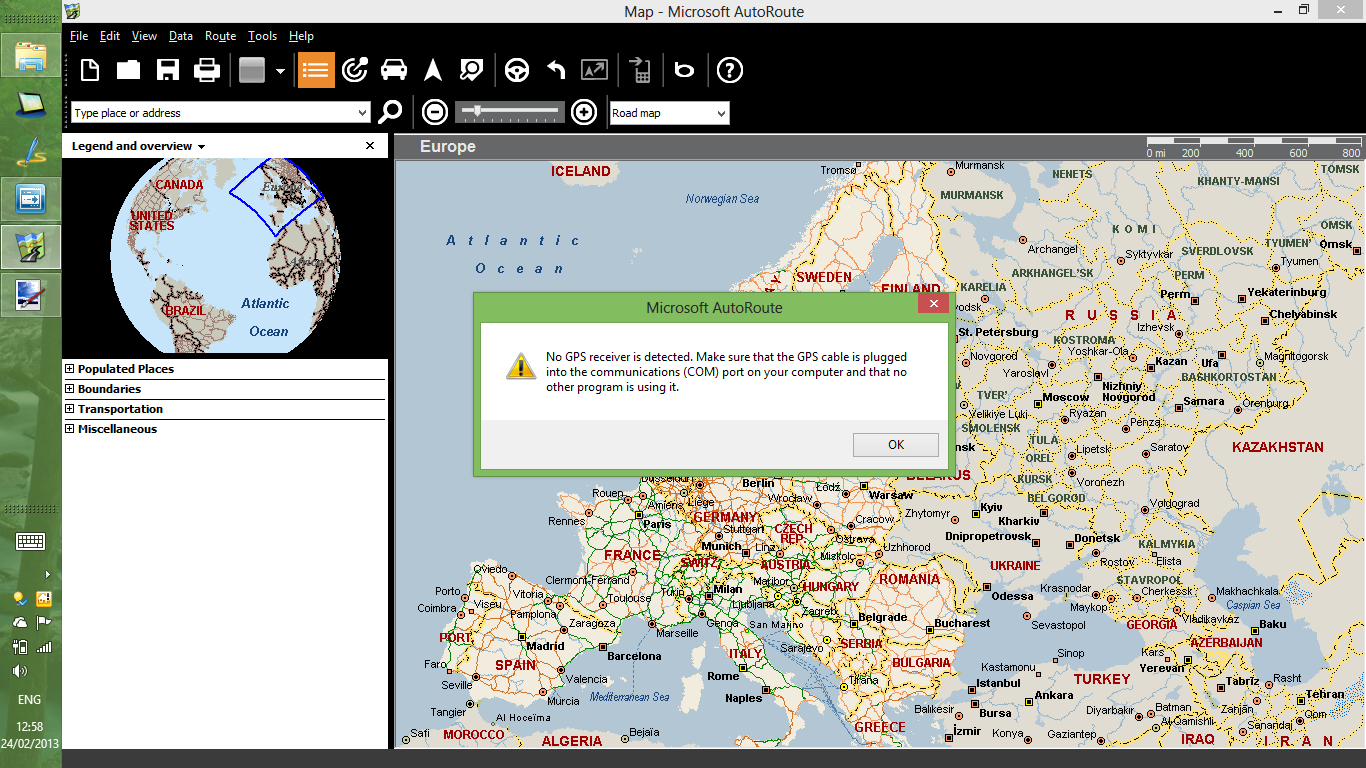
    And so it is. Here for example is the very latest version of Microsoft’s AutoRoute 2013. I downloaded a trial version and installed it on my Lenovo ThinkPad Tablet 2, which has a Broadcom GNSS Gelocation Sensor in it. As you can see, AutoRoute 2013 expects to find GPS data arriving via a COM port, and complains that it can’t find the GPS receiver:

    Autoroute 01

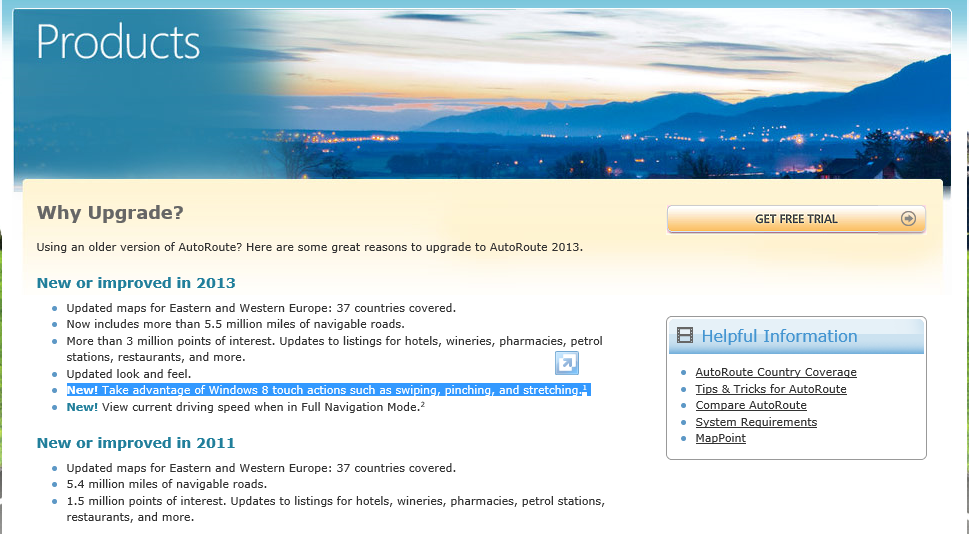
    What I find truly ironic about this is that Microsoft trumpets the fact that AutoRoute 2013 now has support for the Touch features of Windows 8:

    Autoroute 03

    However, the AutoRoute team has completely forgotten to use the new interfaces for GPS sensors that may be present in Windows 8 devices. Open mouth, change feet.

    A further irony is given by the fact that when this issue was raised in a Microsoft forum, Janet Schneider, a Microsoft employee, blithely writes that

    You can use the Location API and a Location Provider Driver to get NMEA strings, instead of using a virtual COM port.

    Janet, please tell that to your fellow developers in Microsoft, not us, the poor users of this stuff. The left hand of Microsoft clearly has no clue what the right hand is doing.

    Now what would be really useful is for someone in Microsoft to code a software shim that would connect a virtual COM port to a Location Provider Driver. That would enable us to carry on using our legacy Windows navigation software on Windows 8 tablets with GPS receivers. It would even allow the AutoRoute 2013 software to work as advertised.

    Addendum: Well, Microsoft hasn’t bothered to write a software shim, or updated their Streets & Trips or AutoRoute software at this time of writing (December 2013), but at least two third parties have developed shims:

    Addendum 25 February 2014: If you’re looking for a map application that has maps held on your Tablet, and which will work directly with the GNSS sensor in the ThinkPad Tablet 2, then the good news is that Nokia has released its HERE Maps App for all Windows 8.1 devices. Even better, it’s free.

    Addendum 8 July 2014: Microsoft has announced that AutoRoute, Streets and Trips, and Mappoint will no longer be developed, and will be dropped. I can’t say that I’m surprised, but on the other hand there are many Line of Business applications that have been built on top of MapPoint services, so those will have to be migrated over to Bing, HERE or Google Maps…

    Addendum 25 August 2015: And Microsoft drops the ball once more… I’m now seeing reports that Microsoft has changed something in Windows 10 that affects the traditional virtual COM ports. The effect is that Bluetooth GPS loggers no longer connect properly. This means that I can no longer use my Qstarz GPS logger with my Surface 3 to feed GPS data into the Microsoft Maps app. Honestly, I despair at Microsoft sometimes; they are their own worst enemy…

    Addendum 30 August 2015: For those of us who are definitely having problems getting the SPP slave port to work, there could be some good news on the horizon…
    I’ve just upgraded my Yoga 3 Pro to the latest Insider Preview build (10532), and the SPP problem seems to have been fixed. I’m able to connect my Qstarz GPS logger and get data. This result has been confirmed by another person who had the same problem with the 10240 build of Windows 10.  I hope that this fix will be present in the October update to Windows 10 that will be available to everyone…

    Addendum 1 October 2015: Microsoft has issued an update (KB3093266) to Windows 10 that fixes the virtual COM ports issue. Excellent.

    32 responses to “Microsoft Does It Again…”

    1. Peter Ferguson Avatar
      Peter Ferguson

      Oh no! I have been waiting for the Surface Pro specifically to run Oziexplorer which I have been using for over 10 years on MS X86 laptops for Marine navigation. Originally I used it with a GPS attached via the serial port then via USB Garmin GPS (when laptops stopped having serial ports). So I Google the subject and find not only are people having problems connecting such software to the internal GPS on W8 laptops they are having problems connecting to external USB GPS’s. Garmin have produced W8 driver updates but problems still exist. One guy says his “sees” the external GPS 50% of the time, another guy says he only got his to work by rolling back the device driver for the GPS. Very frustrating.

      1. Peter Ferguson Avatar
        Peter Ferguson

        After finally purchasing a Sony Vaio Duo 11 (which I am extremely happy with) because it does have an internal GPS I too discovered that not many navigation programs are able to use the sensor API provided by W8. But the latest version of Oziexplorer does support it. (A fact discovered by Geoff quite a while back I read in a forum.) It seems a simple programming change is all that is needed for these programs to be able use the sensor API’s. I know it also seems strange that MS’s own software was not able to do this from the get go but according to guru Paul Thurrott, no division of MS ever liaise with another. A major problem at MS in his opinion.

        1. Geoff Coupe Avatar

          Peter, glad that you’ve found that the latest version of Oziexplorer works with the internal GPS; my apologies for not closing the loop with you here. And yes, I can confirm, from personal experience, that the many divisions of Microsoft often act as warring fiefdoms. See https://gcoupe.wordpress.com/2012/11/13/a-sudden-departure/

    2. Charles Avatar
      Charles

      Hello,
      I encounter the same problem with my Lenovo Tablet 2, on which I managed to install Fugawi Global Navigator 4.5. My remedy for the time beeing is the successful connection of a WinTec Data Logger GPS device via Bluetooth. That works without any driver problems, as you don’t need to install them for a Bluetooth connection. Another possibility could be the use of GPSGate, which is able to digest many different kinds of GPS inputs, not only COM-Ports, and to generate many COM-Port outputs. For that, I do need some more information how to access the inbuilt GPS sensor of my Lenovo Tablet. I’m still waiting for an answer from Lenovo….

      Kind regards, Charles

      1. Geoff Coupe Avatar

        Charles, thanks for your comment. I have a Qstarz GPS data logger, which uses Bluetooth. I did a test and added it to my ThinkPad as a Windows 8 device. Windows 8 installed it automatically, and it set up a couple of virtual COM ports using Serial Link over Bluetooth itself. So then AutoRoute was able to use the Qstarz to get GPS data. That’s similar to what you did with the WinTec Data Logger. However, it rather defeats the object of being able to just take the ThinkPad along without an extra piece of kit.

        This issue seems common to a lot of existing software out there that has been written to use the virtual COM port technique of interfacing with GPS devices. I suspect that some of the software vendors will adapt their software to use the new Location Provider Driver and APIs. See the discussion on this thread for example:
        http://forums.arcgis.com/threads/75252-Using-ArcGIS-for-Windows-Mobile-with-the-Windows-sensor-location-API

        I’ve also seen a comment from a Lenovo staff member promising to see whether Lenovo would be able to develop a “software shim” to allow interfacing between virtual COM ports and the new APIs and drivers. However, I’m not holding my breath. Unless Microsoft does this for everybody, then I think what we will see, over time, is that every GPS software vendor will develop their own software shims. Reinventing the wheel many times instead of once.

        It’s possible that GPSGate may come up with their own software shim, but at the moment they haven’t. They are still working with the legacy interfaces; as far as I know they haven’t released anything for the new interfaces.

    3. Peter Ferguson Avatar
      Peter Ferguson

      Geoff, have you tried http://www.centrafuse.com/centrafuse-localizer. It is designed to output sensor data to a virtual comm port. I cannot get it to work on my Sony Vaio Duo 11 but others have it working on Lenovo TPT2

      1. Geoff Coupe Avatar

        Peter, I’ve gone the route of using software that recognises the GNSS sensor data via the Windows 8 Location APIs, so I don’t need the centrafuse shim. But thanks for pointing it out; this should help others.

        1. Peter Ferguson Avatar
          Peter Ferguson

          Geoff,
          May I enquire the name of the software?

          1. Geoff Coupe Avatar

            Peter, I’m simply using Bing Maps on my tablet. My main navigation device is my Nokia Windows Phone (Lumia 800). I use that for drive navigation (Nokia Drive) or recording GPS tracks (Run the Map).

            1. Peter Ferguson Avatar
              Peter Ferguson

              Got it. Nokia Drive on a Nokia Phone is the Rolls Royce.

    4. Ken Zielinski Avatar
      Ken Zielinski

      I’ve solved that problem with a little VB magic… Using Janet’s API I was able to convert the Longitude and Latitude to a NEMA sentence that I send to output com port. The magic is complete when I employed a free virtual comport software that cross couples two virtual com ports together. I now have Delorme Street Atlas V8 (circa 2000) connected to one virtual com port and my program to the other and Delorme is happy. Ken Zielinski kazielinski@mindspring.com

    5. […] Like the Surface Pro, the Surface Pro 2 does not have GPS. I find this surprising. Many tablets and convertibles (e.g. the ThinkPad Tablet 2) have this; why would a top-of-the-line tablet not have it? Perhaps Microsoft thinks that it is necessary to have 3G/4G/LTE mobile connectivity (the Surface Pro line does not have this) before GPS is provided. If so, they are wrong. It is true that Microsoft’s own Maps App for Windows 8 requires internet connectivity to get map data while on the move, but not all navigation applications require this. Indeed, Microsoft’s own AutoRoute and Streets and Trips applications are designed to run on Windows laptops without internet connectivity. All they need is GPS data to be supplied. But there again, Microsoft have shot themselves in the foot here, because these applications don’t use the new Windows 8 GPS data interfaces. […]

    6. […] has a GPS chip, Microsoft's Streets and Trips CAN'T USE IT! See here for the full sorry story: Microsoft Does It Again… | Geoff Coupe's Blog You'll need something like the Centrafuse localiser to act as a software shim to interface between […]

    7. […] use a COM port) and I'm not aware of any windows software that is updated to use the new interface. Microsoft Does It Again? | Geoff Coupe's Blog googletag.cmd.push(function() { googletag.display('div-gpt-ad-1385926220379-0'); }); […]

    8. powermatt Avatar

      An alternative I’ve found for those of us that own an Android smartphone; an app called extGPS. Admittedly, it defeats the purpose of having built-in GPS, because it uses your phone’s GPS radio instead. Essentially, you pair your phone with your tablet, and then the extGPS app can create a virtual com port through the Bluetooth driver (the same way dedicated GPS receivers do it). There might be some issues with specific phones, though. It works well with an HTC One, but not at all with a Nexus 4.

    9. nathan Avatar
      nathan

      I just got a Dell XPS with win 8.1, intent on mounting it in my big rig. My previous system was an XP pro machine. I used a Garmin USB receiver and GPSGate to create a virtual com. It worked great with my logbook program (eclipse) and my nav software (ALK Copilot truck laptop). I tried the same setup on the new Dell XPS W8.1 only to find my logbook program sees it but not my nav software. I tried a couple different nav programs but to no avail. I also installed Centrafuse Localizer but never could get that running. I’m running out of ideas here. Any thoughts?

      1. Geoff Coupe Avatar

        Nathan, it seems odd that the logbook program will continue to work, but that your nav software doesn’t. Both should be seeing the GPS data coming in through the virtual COM port created by GPSGate, as they did on Windows XP Pro. It sounds as though the connection between GPSGate and ALK Copilot is not working properly.

        The Centrafuse Localizer software would only work if your Dell XPS is fitted with an internal GPS chip – is it? Then you would be using the internal GPS chip to provide GPS data (appearing in the Windows 8.1 Location Service) via the Localizer, which takes that data and creates a virtual COM port to interface with your applications and pipe the data to them. In that scenario, you wouldn’t be using your Garmin USB receiver at all.

    10. Ben Williams Avatar
      Ben Williams

      Geoff, struggling with Bluetooth GPS devices, OziExplorer and Win 8.1 specifically a Surface Pro 3, a Toshiba Encore and a Toshiba Slider. A USB device works fine with OziExplorer however when I try a Bluetooth device I only get occasional position updates. It would be nice to get back to the virtual COM ports etc that work with win 7 and before. Advice please. Ben

      1. Geoff Coupe Avatar

        I’m not sure what you mean by “It would be nice to get back to the virtual COM ports etc that work with win 7 and before”. These are just the same in Windows 8 as in Windows 7.

        You seem to be saying that your USB GPS device is providing more position updates than your Bluetooth GPS device. I assume that the Bluetooth device is showing up in the GPS Port Checker utility that Oziexplorer provides? I don’t know whether it is possible to adjust the BT GPS device settings? I suggest you email Oziexplorer support, they’ll probably be able to help you more than I can. I don’t use Oziexplorer myself.

    11. Zach Anderson Avatar
      Zach Anderson

      I’m attempting to write a Visual Basic app for desktops to receive GPS NMEA data. My old USB GPS receiver (Delorme Earthmate LT-20) is apparently not supported in Windows 8.1, although it is detected as a device and as functioning properly. I do have a Nokia Lumia 920 Windows Phone w/GPS, however. I could use either USB or BT, I suppose, but nothing is detected so far by any app on my laptop. How can I receive the data onto my laptop? VB.Net code appreciated. Thanks.

      1. Zach Anderson Avatar
        Zach Anderson

        My laptop does not have a GPS chip.

      2. Geoff Coupe Avatar

        Zach, if your GPS receiver is detected and apparently functioning properly, then it should be delivering GPS data via a COM port. You could try installing the trial version of Maps Pro (https://mapspro.uservoice.com/), which can use either COM ports or the Location service to obtain GPS data. I don’t know of a way to feed the GPS data from a phone through to a COM port on your laptop. Sorry.

    12. Peter Ferguson Avatar
      Peter Ferguson

      Thought I better update my experiences here. My Sony Vaio Duo 11 died (lent it to my sister who when for a 2 week trip on a yacht with it.) Bought a surface pro 3. Absolute love it EXCEPT no GPS. I have searched the internet for a week trying to find someone who can absolutely tell me the name of a USB or BT GPS that will work on surface pro 3 with 8.1. I have 2 Garmin USB GPS that are more than 8 years old. I have tried all new drivers but nothing, I cannot get them to work. I have my beloved oziexplorer loaded on my surface 3 just waiting for any real GPS to connect.

      1. Geoff Coupe Avatar

        Peter, when you say you cannot get them to work, do you mean that they won’t work anymore with oziexplorer, or they don’t work period? I have an old GPS logger (a Qstarz) that is of a similar vintage, and this still works in Windows 8.1. Can you try the dongles with a different mapping program? For example, try the Maps Pro app (in the Windows store). That will work with both the Windows Location service interfaces or the old-school virtual COM ports. Could be a way to check where the issue lies?

      2. Matt Avatar
        Matt

        I realise this is an old post, but I thought I’d share for reference. Globalsat BU-353S4 is a USB GPS receiver that I have recently setup successfully on a Dell tablet running Windows 10. Oziexplorer works (set to USB Mouse GPS) well, I went for a drive and moving maps works as expected. The GPS has a magnetic base so you can put it on your roof and it is also water proof. They’re only 70 odd dollars and I see that you can purchase them from Oziexplorer direct.

    13. Clive Avatar
      Clive

      Well, after a long time Microsoft seems to have made a step forward! I’ve just upgraded to the major revision of Windows 10 (Threshold 2) and was pleased to find that USB GPS are recognised by the location service. You don’t even need to tell the location service that one is there. That means that you can now use your USB GPS with the Windows 10 Maps App, which is reasonable as free software and lets you download maps for many countries, so you don’t need to be connected to the internet. I still prefer to use Autoroute 2013, which runs fine under Windows 10, even though Microsoft withdrew support at the end of 2014.

      As an aside, before the major update I was having problems installing Autoroute under Windows 10 due to the ‘licensing error’ that has arisen at times for people since Windows 7. The problem was resolved after the major update.

    14. Sean Avatar
      Sean

      Looks like I am not the only one that is disappointed that the Surface doesn’t have built in GPS! Obviously there are solutions and workarounds for this, however my issue is that I have a Lumia 950 and cannot find an app that allows me to share my NMEA GPS data from my Lumia to Surface. Any thoughts suggestions on the subject are welcome…..

      Cheers!

      1. Geoff Coupe Avatar

        Sean, I don’t think such an app exists unfortunately. And with the current low market share of Windows Phone, I doubt that we’ll be seeing one appear. A separate GPS logger using Bluetooth is probably your best bet to get NMEA data into your Surface.

    15. Lukas Jenkins Avatar
      Lukas Jenkins

      Would a Surface 3 LTE with built in GPS (Broadcom GNSS 47531 chip) provide NMEA data to applications automatically? Or does the visual com that exists in Windows 10 have to be set up somehow? Or would a external GPS such as the GlobalSat BU-353-S4 USB GPS Receiver be needed for NMEA data?

      1. Lukas Jenkins Avatar
        Lukas Jenkins

        spelling correction: *virtual com

      2. Geoff Coupe Avatar

        Lukas, I’m not sure what the Surface 3 LTE will do. If it’s anything like my Lenovo ThinkPad 10 (which has a Broadcom GNSS 4752 chip fitted), then it should use the chip to feed data to the Windows 10 sensor APIs, which are used in turn by Windows 10 apps.

        Also, as far as I know, most of the external USB GPS receivers will use Virtual COM ports to feed in NMEA data (the traditional Win32 method). You’d need to use Windows 10 apps that supported this set of APIs – e.g. Maps Pro.

    16. Marcus Avatar

      Thank you for being youu

    Leave a comment

  • Disingenuous, Contemptible, or Both?

    I’ve commented a couple of times before on the new licensing models that Microsoft has introduced with Office 2013.

    The nub of the situation is that whilst with earlier versions of Office (e.g. Office 2003, Office 2007 and Office 2010) it was possible to transfer your licence from one computer to another; with Office 2013, if you buy a licence for Office 2013 and install it on a computer, that’s it. You can’t transfer it to another computer. So if, for example, after a couple of years, you upgrade your computer to a newer model, you can’t move your Office 2013 licence across. You have to purchase a completely new licence, which is in turn locked to your new computer.

    I see that Jevon Fark, in Microsoft’s Office Team, has attempted to clarify the licensing situation. However, he singularly fails to make the proper comparison between the earlier so-called Full Package Product versions of Office 2003, 2007 and 2010 (i.e. Office products that were supplied with actual DVDs) and the current situation with Office 2013, where it is no longer possible to purchase the software. Instead, all you get is a product key, and if you download the software to a computer and activate it using the key – that’s it – it is locked to that particular computer.

    So, is Fark’s blog post disingenuous, contemptible, or both?

    In my opinion, it’s both.

    I will neither purchase Office 2013 licences, nor subscribe (at five times the cost of my current Office licences). Instead I will continue to use my (transferable) Office 2010 licences for the foreseeable future. And if in the future I require to replace my Office 2010 product, then I will seriously consider alternatives before I look again at what Microsoft has to offer.

    Update 6 March 2013: Well, it appears as though Microsoft has had second thoughts. Mr. Fark has now posted that it is possible to transfer licences between computers. Good to see that common sense can prevail after all. Thank you to all those who protested that Microsoft were doing the wrong thing with the original licence conditions.

    5 responses to “Disingenuous, Contemptible, or Both?”

    1. Simon Bradley Avatar
      Simon Bradley

      This is something that bothers me, also, and I have pretty much the same plan as you, Geoff: I’ll continue with Office 2010 for now, but I’ll probably move to LibreOffice (assuming it maintains the same level of quality it enjoys now) when the time for an upgrade arrives.

    2. Mark Avatar
      Mark

      I currently have no plans for office 2013 – the licensing thing is part of the issue ( I wonder how many people will be bitten by that a few years from now ) and I am more of a “buy” guy, not a “rent” guy so the whole monthly payment to keep using my software doesn’t appeal at all.

      But truth be told, I don’t use 99% of the power of office 2010, and the new features which are primarily cloud-centric don’t appeal to me, so the only reason I would have to upgrade would be ease-of-use and the the beta I played with was far too white and seemed worse in that regard.

      So I will be one of Therot’s “luddites” for as long as I can.

    3. […] 6th March 2013: Following protest, it appears as though Microsoft has changed its mind. Excellent […]

      1. Geoff Coupe Avatar

        Brother Feersum – I know. I’ve welcomed the change, Microsoft sees sense for once.

    Leave a comment

  • Doctor Dream Is No More

    Another influencer on my early adulthood is no more: Kevin Ayers has died. Damn. Time to listen again to some of his work: Joy of a Toy, Bananamour, and of course: The Confessions of Doctor Dream. RIP Mr. Ayers.

    Ayers1

    One response to “Doctor Dream Is No More”

    1. Al Feersum Avatar

      Yup – real shame. And a highly influential musician to boot.

      Dunno if you frequent it, but Stuart Maconie’s Freak Show features SM’s ‘Probe’. It’s only available for a couple more days though: http://www.bbc.co.uk/programmes/b01qrkp5

      Stuart Maconie’s Freakier Zone is doing an hour of Canterbury Scene: http://www.bbc.co.uk/programmes/b00rwkjd (12 hours left at the time of writing – get it while it’s hot)

    Leave a comment

  • Why Don’t You Govern The Bloody Country?

    …instead of making asinine comments on media storms in teacups?

    Honestly, I despair about David Cameron’s ability to discern what is important and what is not.

    Hilary Mantel’s piece about Royal Bodies was a forensic analysis, flensing the media spin from the actuality. It’s a pity that Cameron could not comprehend this, and does not bode well for his governance.

    Hadley Freeman has a better eye than David Cameron for what is going on.

    Leave a comment

  • Parenthood Is No Place For Perfectionists

    While still shaking my head over the idiocy of David Jones, who claims that two same-sex partners cannot provide a warm and safe environment for their children, I came across a new book written by Andrew Solomon: Far From the Tree: A Dozen Kinds of Love. In it he:

    tells the stories of parents who learn to deal with their exceptional children and find profound meaning in doing so.

    He introduces us to families coping with deafness, dwarfism, Down syndrome, autism, schizophrenia, disability, with children who are prodigies, who are conceived in rape, who become criminals, who are transgender. While each of these characteristics is potentially isolating, Solomon documents repeated triumphs of human love and compassion to show that the shared experience of difference is what unites us.

    Solomon is himself the gay child of straight parents, and is now, in turn, a parent himself. Here he talks movingly and lucidly about the nature of vertical identities (those that we inherit from our parents) and horizontal identities (those that we do not share with our parents, and which we develop through our peer groups). This short video is worth watching.

    The Guardian’s Carole Cadwalladr also has an interesting interview with him.

    His book is now on my list to get. Perhaps David Jones should also read it. He might learn a thing or two.

    Leave a comment

  • “Clearly”

    It’s a word that I use a lot in my blog posts: “Clearly”.

    I use it where others might deploy “Obviously” or “Without a shadow of a doubt” or “It must be patently obvious to all people with more than one brain cell to rub together that…

    And today I read that Tory MP David Jones, the Welsh Secretary, no less, has used the same word in an interview. He said:

    “I regard marriage as an institution that has developed over many centuries, essentially for the provision of a warm and safe environment for the upbringing of children, which is clearly something that two same-sex partners can’t do”.

    Clearly, David Jones is a fuckwit. Clearly, some people voted for him to represent them. Clearly, they should be regretting that they ever thought that he had any ability to think things through. Clearly, if ever I happened to find myself in his constituency, I would not be voting for either him or his idiotic ideas.

    Clearly.

    3 responses to ““Clearly””

    1. Simon Bradley Avatar
      Simon Bradley

      What an idiot! It’s disappointing that the people of Wales would elect such a fuckwit, as you so rightly label him. Fortunately, the Conservatives are relatively underrepresented in Wales (8/40 MPs and 14/60 Assembly seats). But those numbers are still too high for my liking! (Well, clearly, zero would be optimal.)

    2. Mark Avatar
      Mark

      I don’t understand, does he really feel that two same-sex partners are incapable of creating a warm and safe environment for the upbringing of children? how sad, to be incapable of believing in the goodness of people.

    Leave a comment

  • A Sad Day For Hedgehogs Everywhere

    Ronald Dworkin has died. By coincidence, I listened last week to the podcast of Thinking Allowed, originally broadcast on 26 January 2011. In it, Dworkin discussed his book Justice for Hedgehogs with the philosopher A. C. Grayling and the sociologist Laurie Taylor. I thought at the time that I should get hold of the book, and now I definitely will.

    Leave a comment

  • What’s Sauce for the Goose…

    …is sauce for the gander.

    Not being a Catholic, I have little skin in the game. However, given that Pope Benedict has little time for us homosexual secularists, and has made it plain enough, I just thought that I would muse on the fact that:

    a) He seems keen on pointing out that contraception is a thwarting of God’s will, whilst at the same time being happy to…

    b) …have a pacemaker fitted to extend his allotted time in this vale of tears. God might well feel cheated at the presumption.

    I gain no joy and I shed no tears at his relinquishing of the Papal crown, knowing full well that the next wearer will be stamped from the same ultra-conservative, human-hating mould.

    As a bit of light relief, here’s Crispian Jago’s version of the Situation Vacant ad:

    2 responses to “What’s Sauce for the Goose…”

    1. JL Avatar

      Coupe, I rejoiced at the news. Perhaps that was over-emoted. I haven’t followed his track record closely so I don’t know for sure. Has he done anything to endear himself to humanity? Even our own Prime Minister, in response to the news of his resignation, said something along the lines of “… will live in the hearts of Canadians forever …” and I thought what Canadians is he referring to? AND I guess that’s the kind of thing politicians say when they just can’t think of anything else.

      1. Geoff Coupe Avatar

        Perhaps Mr. Harper was thinking along the lines of Benedict being some sort of heart tumour? I don’t think Ratzinger has ever done endearment in his life – even empathy seems far out of his reach.

    Leave a comment

  • What’s Changed?

    And so the British Parliament finally decided to see sense. Not without the usual grumblings from the bigots and homophobes. Even Jesus and Mo seem surprised at the lack of divine retribution. Welcome to the 21st century. Meanwhile, we’re heading towards our 15th wedding anniversary.

    2 responses to “What’s Changed?”

    1. Mark Avatar
      Mark

      Congratulations.. still have a way to go though, my wife and I are at 31…lol

      1. Geoff Coupe Avatar

        Thanks Mark – well, Martin and I have been together for 29 years – we had to wait for the law to catch up!

    Leave a comment

  • Windows 8 Media Apps and Media Services

    I’ve written before about the issues I’ve had with the “Play to” function in Windows 8. Paul Thurrott wrote an article yesterday: The Sad Tale of Play To and Windows 8, with much the same conclusions. It is worth reading the comment by John Galt after the Thurrott article. He lists a number of shortcomings in the media “features” that Microsoft have implemented in Windows 8, any one of which has me tearing my hair out.

    For example, the Music App

    1. has a tendency to play advertisements even when you’re playing your own music.
    2. has no support for open audio codecs such as FLAC, and no apparent way to add such support
    3. constantly forgets the contents of my music library, and has to rebuild the index from scratch practically every time I fire it up.
    4. has no support for accessing media stored on NAS devices
    5. has no support for Microsoft’s own eHome remote control standard (used by Windows Media Center since 2001)
    6. has no support for acting as a “Play to” target, i.e. as a Digital Media Renderer.

    Issues 4, 5, and 6 are also common to the other Microsoft-supplied Media Apps, i.e. the Video App and the Photos App.

    One wonders how Microsoft can be so dismal in delivering products that should delight, and not disappoint in so many ways.

    Addendum: here’s a secondary rant about the Music App, triggered by a comment below.

    Navigation in the Music App is really badly thought out.

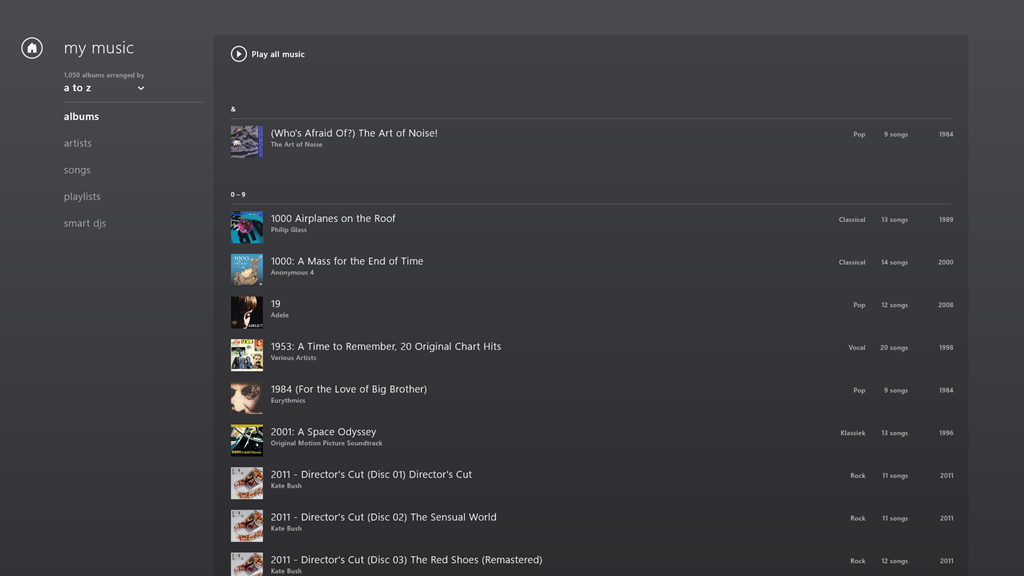
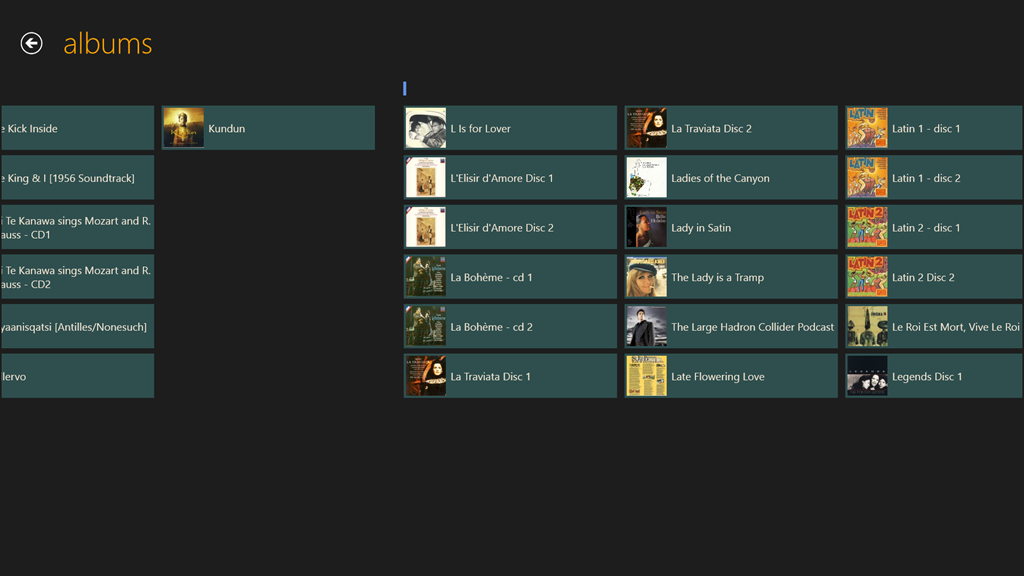
    Take the Album view, for example. Choose it, and you’ll see a list of your albums.
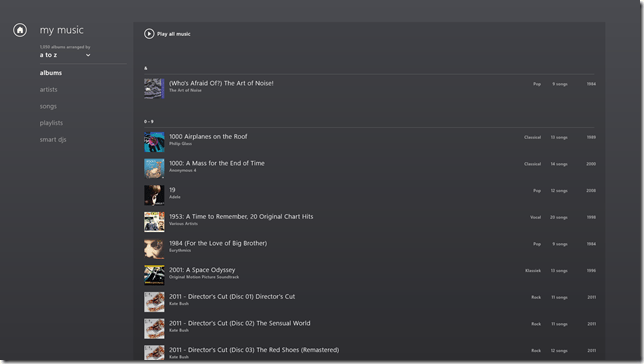
    W8 Music 10

    The question is, how do you rapidly navigate through the list? The answer is: you can’t. You have to manually scroll up and down, using either your mouse or your finger. Since I have over 1,000 albums in my library, this gets very tiresome, very quickly.

    The answer that Windows Media Center came up with in 2001 is that pressing a character on your keyboard will cause the display to jump to that position in the list. So pressing “m” for example, will immediately skip the display to the start of the list of albums beginning with “m”.

    But the keyboard is dead in the Music App’s list displays… You can only scroll up or down.

    What I find really irritating is that the developers of this App have also learned nothing from Apps built for Windows Phone. Here, there is support in the operating system itself for viewing lists at two levels of zoom. You can see a view at the level of the alphabet (a,b,c, etc.), and by touching a letter, you instantly zoom into the detailed list at that level.

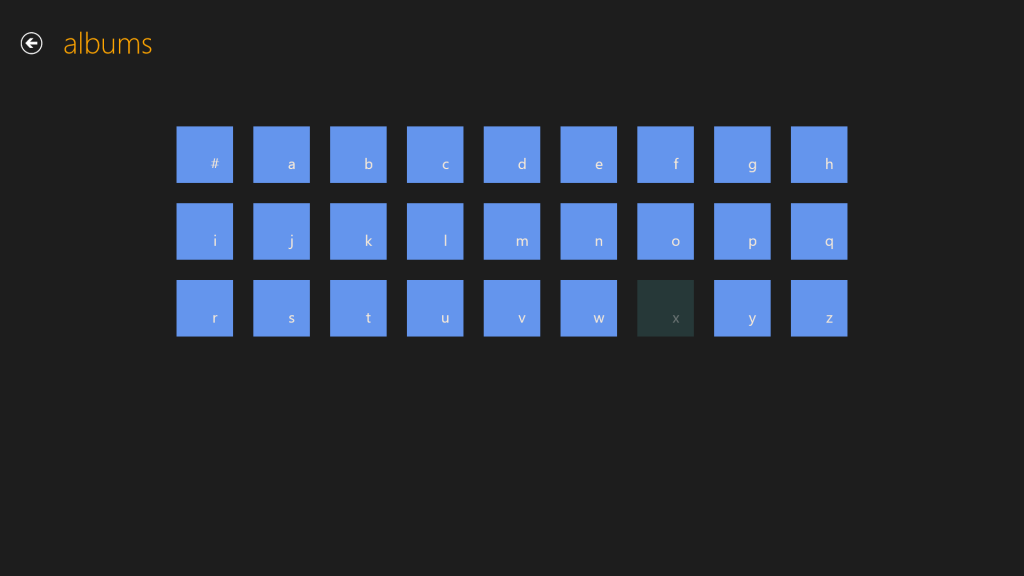
    This can be done for Windows 8 applications as well. Here for example, is the Media Center Remote app built by Brad Mauk, and available for both Windows Phone and Windows 8. These are screenshots taken from the Windows 8 App. On entering the Albums view, you are presented with the zoomed-out view of your library:
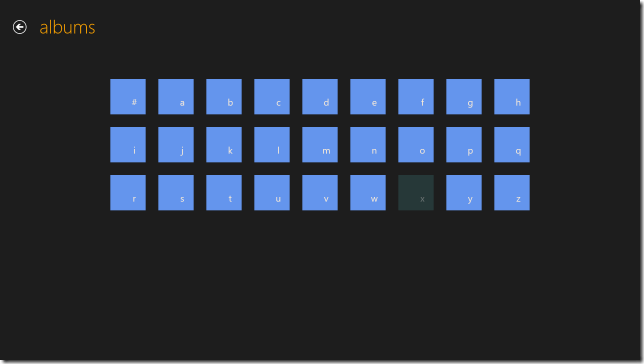
    W8 Music 08

    Notice that “x” is dimmed – this immediately tells me that I have no albums with titles beginning with “X” in my library. Now, it is true that in this App, in this view, the keyboard is also not active. So I can’t type a character on my keyboard and jump to that part of my library. However, and crucially, I can use either my mouse or Touch to choose one of the characters on this screen to jump into my library. Let’s click (or Touch) “l”:

    W8 Music 09

    Instantly, I’m there. If I want to return to the high-level view, I can either click the “-“ icon that appears with the horizontal scrollbar when I mouse down:
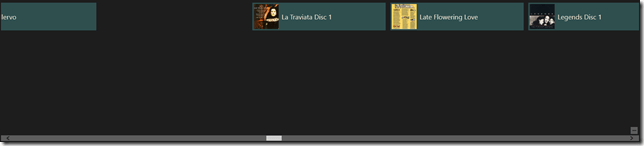
    W8 Music 11

    …or, if I’m using Touch, I simply use the “pinch” gesture on the screen to return to the alphabetic list of the high-level view:
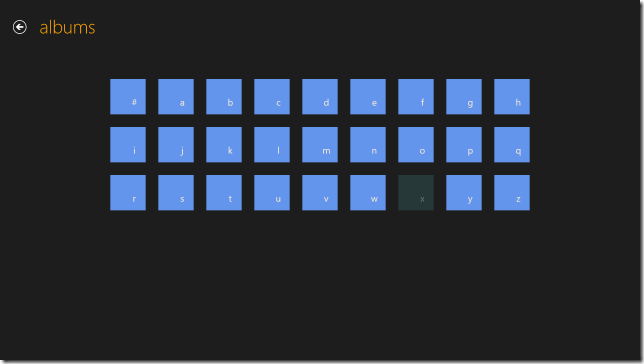
    W8 Music 08

    Navigation within my library is easy with this App, and I happily use it to control my Windows Media Center.

    The developers of Microsoft’s Music App should take note. What they have produced thus far is abysmal.

    Update 26th March 2013

    Today, the Music App has received an update. I’m very pleased to see that Microsoft has at last incorporated a “zoom” function to make navigation in a large library more practical. It’s implemented slightly differently from the “Windows Phone” approach taken by the Media Center Remote App described above.

    In the new version of Music App, the contents of the various views (Albums, Artists, Songs, Playlists etc.) are separated alphabet headings, when listed in alphabetical order. Here you can see the start of the list of my albums:
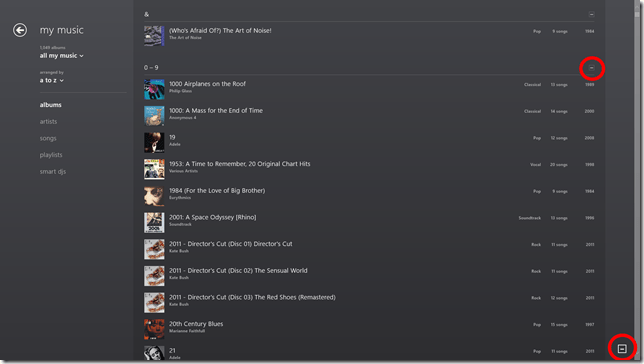
    Music App 02

    Note the icons that I’ve circled in red. When clicked (or touched), the view zooms out to the alphabetic sections only:
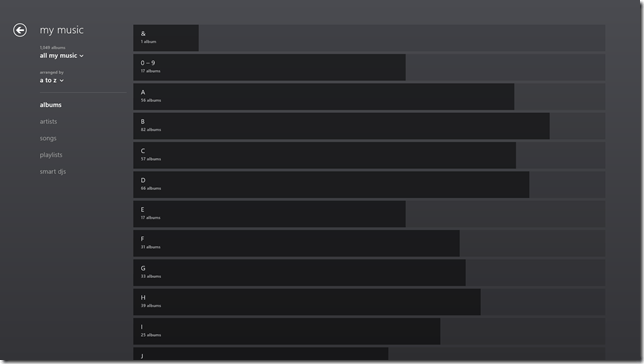
    Music App 03

    One rather nice touch is that the length of the bars represents the number of albums in that section as a proportion of the highest section total. If there are no albums in a particular section, then – unlike the Windows Phone convention, where the section is dimmed – here it is dropped altogether. For example, there is no entry for “X”, since I have no albums that begin with “X”:
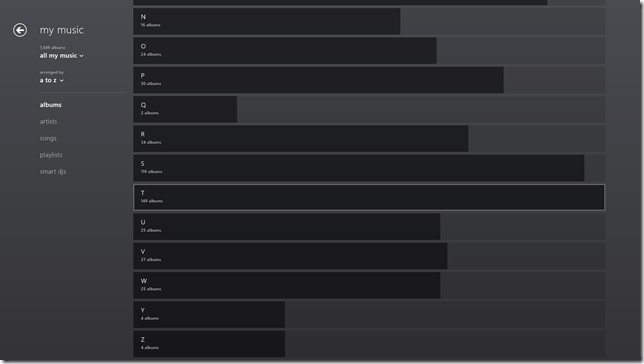
    Music App 04

    Clicking, or touching, anywhere along the dark/light grey bar of a section will zoom back into the library to the point represented by the section heading. In the screenshot above, I have moved my mouse over the “T” section, which is why it has become highlighted (the touch interface does not use this highlighting prompt). Left-clicking (or touching) jumps me back into the list of individual albums, starting with those beginning with “T”:
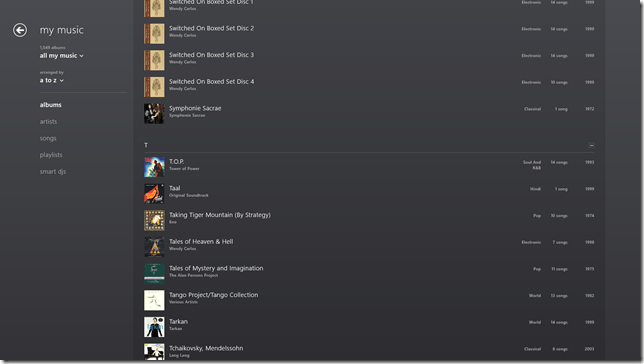
    Music App 05

    You’ll notice that the “T” section contains the highest total number of albums. That’s because the Music App – unlike Windows Media Center – has not the intelligence to ignore words like “The” or “A” in an album title. It’s a small point, but it’s evidence that teams in Microsoft often don’t appear to build on what went before, but start with a blank sheet of paper. One step forward, two steps back…

    In summary, while it’s nice to see that this new version of the Music App has addressed the navigation issue, it still has a long way to go. Of the six issues that I give at the top of this post, only issue 3 seems to have been resolved, the other five issues have yet to be addressed – if indeed they ever will be.

    Update 30 March 2013

    I’ve been using the Music App to play music stored in my Library, and I’ve got good news and bad news.

    See here for more information.

    16 responses to “Windows 8 Media Apps and Media Services”

    1. aarondr Avatar

      Geoff – As far as point 6 goes. I haven’t tried this feature, but this article: http://www.donaldmarang.org/DLNA_Windows.html seems to think that pressing Windows + k will result in the ability to redirect the output of any of the media apps to a DLNA rendered. I like to see MS embrace standards like DLNA over their own history of failed protocols. Pardon me if I’m speaking of ignorance (because I was about to rant about the lack of DLNA support in Windows when it’s just finally catching on before I double checked my opinion).

      1. Geoff Coupe Avatar

        Aaron, pressing Windows+k just brings up the Devices screen appropriate to the running App. The trouble is that it will only list Microsoft-certified devices. My Denon AVR-3808 is a certified DLNA DMR – but it ain’t (and never will be) a Microsoft-certified device.

        The result is that I can “Play to” the Denon if I use the legacy Windows Media Player, but I can’t “Play to” the Denon if I use the Music App.

        This is a pain if I’m using my Tablet, because it’s (somewhat) easier to navigate using Touch in the Music App, rather than fiddling about with tiny buttons in Windows Media Player.

        1. aarondr Avatar

          That’ll show you for buying a non-Microsoft certified DLNA device.

          But seriously – that’s stupid. I get /why/ they are doing it – really. DLNA has always been a flaky experience for me, maybe part of that experience is bad implementations of DLNA servers/targets/receivers. Having a ‘certified’ devices gives more ‘assurances’ of what formats play, how certain material gets interpreted, etc. We’re in the ‘new world’ of user experience first, at the cost of compatibility/flexibility. Of course the other side of the sword here is that if you’re removing the experience for the user (e.g. this won’t work with my stuff – resulting in ‘no experience’) then you aren’t really improving anything.

          1. Geoff Coupe Avatar

            You know, what is really irritating is that when I bought my Denon, it had a Microsoft “Plays for Sure” sticker on it. Fast forward a few years, and the “Plays for sure” initiative of Microsoft has been consigned to the dustbin of history, by Microsoft.

            I give the Microsoft-certified imprimatur about the same lifetime.

    2. Mark Avatar
      Mark

      Quite the interesting read…and it is really sad, Microsoft could have used the metro interface and delivered a set of killer must-have apps that would have won over detractors and fence-sitters, instead all they do is provide fodder for the “what good is win8” crowd.

      It is a 1.0 release, but the MS developers have had more than a year (probably more) to program the supposedly “simple to develop in” Metro environment, so either its not as easy as they say, or MS programmers are not as competent as they say or more likely they have no interest in creating that type of app – its lowest-common-denominator mentality in a blind drive to the app-store and its ad revenue

      1. Geoff Coupe Avatar

        Mark, I don’t know what the reasons are for why the Microsoft Apps are so poor, but the end result is, as you say, very sad indeed.

    3. […] updated my post on the Xbox Music App here. In summary, whilst navigation has taken a step forward, there are many issues with this App that […]

    4. Mark Avatar
      Mark

      So are you using it as your dayindayout music app yet? I’m still using itunes but am unhappy with 11, specifically around the video portion and playlists.

      1. Geoff Coupe Avatar

        Mark, now that the navigation has been fixed, it’s probably at the point where it starts to be usable for me. I’m also playing around with the Media Monkey for Windows 8 App – but this is still very much at beta status. Both are still limited in what they can do. I’m still using the Desktop Media Monkey for all my metadata work, for example.

      2. Geoff Coupe Avatar

        Further to my last note, I think I’m beginning to be won round to the Music App. Yesterday I tried buying a Cecilia Bartoli album. I was pleased to see that the Music App downloaded it and added it to my default Music Library – which happens to be on my Windows Home Server. So I’ve now got the album (in DRM-free MP3 tracks @ 320kbps) stored in a folder on my WHS, where it can be accessed, and played, by all our other systems.

    5. Mark Avatar
      Mark

      I don’t know, so far it seems too “click and play only” for me. Is there a way to see number of plays, last played date or even a 5 star-rating? Want to know what the actual file location is? want to change the genre? want “smart” playlists (i.e. all 80’s music?) want more/less files on one page or larger album art? sorry, no luck.

      Even basic things seem difficult. Want to see all songs of a genre? instead of selecting a genre view on the left, you have to change the view to show by genre, then click the little minus to zoom out then select the genre and then you only get alphabetical by song name – no other options. Want to skip a minute into a song? start the song playing, the single-click to select it, then right-click to bring up the bottom bar, then click on the album cover art to be taken to xbox music and there you can click on the song-progress bar to skip forward

      and whats up with not being able to double-click to play a song, That has been a staple of Windows for what? 30+ years, Now I have to single-click and then click the play icon that appears. Am I that much of a luddite that click, move to play button and click again is more efficient/intuitive than double-clicking?

      1. Geoff Coupe Avatar

        Mark, I agree that the interface leaves much to be desired, no exposure (for setting, searching or viewing) of Ratings or Composer. Or editing of any tags, for that matter.

        And I can understand that moving the Genre from being a Category (as in WMP12) to a Sorting attribute, has altered the way in which we are used to navigating.

        Still, there’s an easier way to skip into a playing song. Once you’ve made your music selection (and populated your playlist), just go back to the main screen and click on the “Now Playing” section. Then you have the main Play/Playlist screen where you can skip around both the currently playing track or the playlist…

        And I agree that the Microsoft team have forgotten to implement double-clicking in the interface – they’ve just concentrated on Touch. That’s bad.

        The App clearly needs much further improvement, but for me, it is starting to be usable. I never use all the bells and whistles in Media Monkey, anyway…

    6. […] As I wrote here, Microsoft has recently updated the Xbox Music App for Windows 8. The update improved the navigation of the music library to the extent where I thought I could start using the App (it was absymal on first release). […]

    7. […] Mail, Calendar and People Apps are still far inferior to Windows Live Mail. The Xbox Music App is still lagging traditional music library applications, and the less said about the Photos and Video Apps the […]

    8. […] Then along came Windows 8. Once again, in the pre-release versions of Windows 8, there were issues, but these were fixed in the final version of Windows 8. However, while the operating system and the venerable Windows Media Player (unchanged from Windows 7) were working, the (brand-spanking-new-supposedly-fancy-but-really-very limited) Xbox Music App from Microsoft still had a number of shortcomings. […]

    9. […] version of the Xbox Music App (version 2.2.177.0). While it has improved in certain respects from earlier versions of the App, in one respect it seems to have got a whole lot worse: it does not handle Album Art well at […]

    Leave a comment

  • Carmen – “Habanera”

    …as you’ve never seen it before…

    Strangely, I seem to have remembered the same odd places from the 1970s as well…

    August Schram – clearly someone who has the same odd recollections, even if he is too young to have been there.

    One response to “Carmen – “Habanera””

    1. […] was revisiting an old post of mine about a strange version of Carmen, and discovered that there’s a sequel that is perhaps even […]

    Leave a comment

  • You Might Think That…

    …but I couldn’t possibly comment.

    Ah, that immortal line, uttered by Francis Urquhart MP in the BBC’s masterful adaptation of House of Cards.

    Fast Forward twenty years or so, and we have House of Cards – American style. Actually, I think it could be pretty good. Kevin Spacey could give the late, lamented, Ian Richardson a run for his money. However, not having Netflix, or any of these new-fangled internet channel thingies, it may take me a while before I can compare the two.

    Leave a comment

  • Paperman

    Nice to see that Disney can still produce heartfelt animation. Short and sweet.
    One response to “Paperman”

    1. TomT Avatar
      TomT

      Yes, I was very pleasantly and unexpectedly surprised to see this recently before some new Disney blockbuster. Thanks for reminding me of its name and tracking it down 🙂

    Leave a comment

  • It’s an Incredible Deal – Part II

    Back in September last year, I wrote about the pricing of Microsoft Office 2013. Unlike Paul Thurott , I failed to see how it was “An Incredible Deal”. For my use, the change to a subscription model would increase my cost of ownership over a 6 year period by almost 5 times.

    Subsequent to that, Microsoft announced an offer to buy a copy of Office Home and Student 2010, and get a copy of Office Home and Student 2013 when it became available, for free. Well, I thought, that sounded pretty good. A little further investigation rather took the icing off the cake. The 2010 version of Home and Student’s licensed for use on 3 PCs, while the 2013 version is only licensed for use on one. Nevertheless, I thought that the offer remained sufficiently attractive to warrant investing in a copy of Home and Student 2010. I could install Office 2013 on my tablet, and carry on with 2010 on our other two PCs.

    So I   purchased a copy of Office Home and Student 2010 and registered for the offer. And yesterday, I received an email from Microsoft telling me that the new Office was available and that I could redeem my offer.

    I clicked on the link in the email and arrived at the Microsoft web page setup for the offer. Clicking on the “Redeem now” button, brought up a page where, amongst other things , I was asked to enter the Product key of my existing version of Office and select the country/region where I would be using the version of Office 2013. Note that I have an English language version of Office 2010, and I would be using Office 2013 here in the Netherlands.

    I filled in all the fields, clicked the “Submit” button and promptly got an error 012913 -very helpful, not. Noticing that the web page was set to English (US) , I changed it to English (International), and tried again. Nope, same error.

    With a sinking heart l changed the web page to Nederlands and repeated the process yet again. This time I got further – I was asked whether I wanted the subscription version of Office 2013 or the single license version. However, note that I am now looking at a page written in Dutch. The clear implication is that if I download the single license version I will end up with the Dutch version of Office.

    Now, this might not be a problem providing I can change the display language and the proofing tools to UK English. This blog post from Julian Parish in the Office team seems to suggest that the language packs are available, but that, as a consumer, I have to buy them. That’s not really what I wanted to hear. It is particularly galling when you realise that the display and help languages of Windows 8 can be changed or added to for free.

    One other little thing. Microsoft has also changed the licensing terms of the downloadable software. Unlike earlier versions, it can no longer be uninstalled from one PC and transferred to another. Now, once installed on a PC, that’s it – it can never be transferred. And if your PC breaks, and you get a new motherboard, for example, then tough, Office will stop working, and you will need to buy a new license.

    I can’t say that I’m delighted with these changes, but I fear it’s the shape of things to come from Microsoft. Next up, I fear that Windows 9 will switch to a subscription model as well.

    Update: Well, I decided that I’d see what would happen if I went one step further on the Dutch web site, and selected the downloadable Office Home and Student version. Thankfully, the next page gave me the opportunity to confirm that my country was the Netherlands, but also gave me the option of choosing English. I rather think that should have been made clearer earlier in the process…

    So now I’m in the process of downloading and installing what I hope will be an English language version of Office. Oh gawd, now I’ve got a perky little welcome video playing.

    Update 2: I see that Paul Thurrott is still convinced that the subscription model is “an incredible deal”. He writes:

    Office 365 Home Premium, at just $99.99 a year, with five easily distributed and changed PC/device installs of Office 2013 Professional, is obviously the way to go for most people.

    I’m clearly not most people. It’s way too expensive and a very bad way to go for me. However, I do agree that the fact that Microsoft has apparently removed the right to transfer licenses between machines is a slap in the face from the customer’s point of view.

    Update 3: Peter Bright, writing in Ars Technica, calls a spade a spade:

    If you buy a perpetual retail license for Office 2013, it will be locked to the computer you first install it on, forever. Buy a new PC and you won’t be allowed to install your existing copy of Office on it, even if you wipe the disk of the old PC. You’ll have to splurge for a new one.

    This is a change in policy from Office 2010. Office 2010 permitted a single transition from one PC to a new one. It’s not, however, an entirely new policy: OEM pre-installed versions of Office (and Windows) are similarly tied to their (OEM) hardware and can’t migrate. Adam Turner at The Age first pressed Microsoft for clarification over what its “single PC” constraint actually meant, and noted the newly aligned OEM and retail licenses.

    It’s difficult to see the wisdom in this change. It’s not a big change, but it’s not a nice one, either.

    Update 6th March 2013: Following protest, it appears as though Microsoft has changed its mind. Excellent news.

    2 responses to “It’s an Incredible Deal – Part II”

    1. Al Feersum Avatar

      Microsoft are certainly up to something with regard to their licensing models. One theory is that they feel that they’re missing out on the mobile computing market – but that doesn’t make sense. A license is a license, whether you’re running it on a tablet or a PC. But yes, that license transfer for downloaded ‘ware is a bit of a pain.

      This year, the cost of MSDN subcriptions under my company’s EA has more than doubled – putting the price of MSDN Premium higher than the previous MSDN Ultimate subscription charge – and there are some development tools that aren’t available to Premium subscribers.

      Also, ‘doze 8 seems to be making huge inroads into the market – in the UK, I can’t find a PC for sale in the major chains that hasn’t got 8 installed – I was looking for a laptop for my grandson for a Christmas present, and wanted to get him a ‘doze 7 machine because it’s got a familiar interface, and isn’t that far removed from what he’s using at school (probably XP or Vista) – and I couldn’t get one. Only 8 is available, so if you wanted a 7 PC, tough luck.

      I suspect that MS are clawing in as much money as they can through license fees so that they can either a) fund their next major acquisition, b) fund their next major product release (‘doze 9? – doubt it) or c) offset the loss that they’re making on the Surface and the Nokia deal so that they can increase their market share by undercutting their rivals for similar products.

    2. […] commented a couple of times before on the new licensing models that Microsoft has introduced with Office […]

    Leave a comment

  • Queen Abdicates

    Stop Press: the Queen is abdicating in favour of her middle-aged son.

    Nope, this is not Betty handing over the reins of the monarchy to Charlie (god forbid); it’s Queen Beatrix of The Netherlands handing the reins over to Prince Willem-Alexander.

    A well-timed and sensible choice.

    The Prince and Princess Maxima are well-equipped to pick up the reins and carry on. They are, like Beatrix herself, not unintelligent, understand both business and society and are well-liked by their subjects. I’m no monarchist, but I have a lot of respect for them.

    4 responses to “Queen Abdicates”

    1. Matt Healy Avatar
      Matt Healy

      I don’t know much about the Netherlands Royal Family, but from what little I know they do seem a more sensible lot than the House of Windsor, who can be something of a reality TV drama. The closest my country (the US) has to a dynasty would be the Bush family; FOUR TIMES I have voted against a guy named George Bush in an election.

      1. Geoff Coupe Avatar

        Matt, yes, they’re a *much* more sensible lot than the Windsors.

    2. Al Feersum Avatar

      I think Peggy should give Charlie the reins for the short time that he’ll be around (well… maybe not – given their longevity, he’ll still be on the throne when William is his age now).

      It’s not as if they actually do anything with regard to exercising their royal powers. After all, the UK is up shit creek, and despite furious bailing out, the crap is still coming in the boat because the real problems still aren’t being addressed.

      The Queen (or King as it may be) does have the power to dissolve parliament and force a re-election – but sitting in their cosy palace(s), they don’t seem to have a measure of how the public feel (not that I’m saying that Charlie would be any better). It seems that they don’t care about the little people: after all, it’s not as if they’re going to get voted out of office, is it?

      And as for Matt H. Well… I’m sorry you had to endure the reign of the republicans (12 years of the Parks Department – hell!)… but what can you do? The majority are stupid, and they voted for him.

      1. Geoff Coupe Avatar

        King Charles? Noooo! He has a long history of meddling in politics and pontificating on things that he knows nothing about. It would get worse if he were monarch. Don’t feed his addiction!

    Leave a comment

  • Thoughts on the Lenovo ThinkPad 2 – Part IV

    Welcome back to the next episode in what seems to be turning out to be a series of posts on my experience of using my first Windows 8 tablet – a Lenovo ThinkPad 2.

    The last post took a look at some of the software applications that Lenovo has provided for their tablet, and I’ll continue that look in this post. I ended that post somewhat abruptly when I discovered how awful Lenovo’s tutorial on Windows 8 was. Not only was it shockingly poor, but it is also built for the Desktop version of Internet Explorer. One might expect that a Windows 8 tutorial would take advantage of the Modern UI of Windows 8. Clearly Lenovo don’t think so.

    To see how it should be done, I think it’s instructive to take a look at HP’s tutorial for Windows 8. It is fully a Modern UI App – no forcing the hapless user to open the Desktop web browser here. This tutorial, while it was originally designed by HP for use on their Windows 8 systems, is now freely available in the Windows Store for download and installation onto any Windows 8 system:

    TPT2 28

    If you’re new to Windows 8, it’s worth taking a look at this tutorial.

    OK, now onwards with the contents of Lenovo’s Companion App:

    TPT2 29

    Ah, QuickLaunch turns out to be yet another Start Button replacement tool. I really don’t understand the attraction of these. I want to learn how to ride my bike, not go through life with training wheels clamped to it.

    Next up is the trial version of Norton Internet Security that Lenovo installed on my ThinkPad. One of the first things I did was to uninstall it, and to revert to Microsoft’s Windows Defender, which is built into Windows 8. It’s sufficient protection, in my opinion.

    Then we have a couple of adverts for two of Lenovo’s own utilities: Settings and QuickSnip. I’ll deal with them later.

    Lenovo Blogs opens a scrolling view of links to Lenovo’s corporate blogs. Clicking on a link will open the blog post inside the Companion App, rather than switching to the web browser, which is a nice touch. E.g. the “8 Cool Things About The ThinkPad Tablet 2” post shown here:

    TPT2 31

    Needless to say, the blogs are primarily a marketing tool, and present a rosy picture. I couldn’t help but comment on the above blog post to correct some of the rosiness.

    The links to the Lenovo channels on YouTube and Twitter are further examples of marketing. Once again, these channels are displayed within the Companion App itself, rather than shelling out to a separate instance of the web browser. I suspect the same thing is supposed to happen for the Accessories tile, but all I got was a blank page and a plaintive message that there was “No matched content for this system”. There is in fact an online Lenovo shop in the Netherlands, so I suspect that once again the developers of the Companion App assume that we all live in the US of A.

    And as I said in my last post, I have no interest in signing up for Lenovo’s Cloud Storage – I am already a satisfied SkyDrive user.

    To summarise, the Companion App strikes me as primarily a Marketing tool from Lenovo. I think it can be uninstalled without any second thoughts. Right, that about wraps it up for the Companion App, now let’s take a look at the Settings App.

    The Settings App is a bit strange on my system. I’m not sure whether it’s working as it is supposed to. If I look at the Settings App in the Windows Store, I see this:

    TPT2 32

    It shows a screenshot of the Settings App that contains five major sections:

    • Mobile Hotspots (for internet sharing)
    • Power
    • Location Awareness
    • Camera
    • Audio

    Yet, when I open up the Settings App on my ThinkPad, this is what I see:

    TPT2 33

    That is, just three:

    • Power
    • Location Awareness
    • Audio

    Yet, I have two cameras in the ThinkPad. Why aren’t the settings for these shown here? ‘Tis a puzzlement.

    (Update 26 February 2013: Lenovo has just released a new version of the Settings App, and there is now an entry for the Camera Settings. They’ve also said that they are working on the Mobile Settings entry for the ThinkPad Tablet 2, so this should arrive at some point)

    I suppose this App is OK, as far as it goes, but I think I would have liked to have seen the Power setting (in particular, the battery charge remaining) broken out into a separate tile that could be pinned to the Start Screen, or displayed in the Settings App tile itself. That would have been useful. Having to start up the Settings App, and then select the Power section – not so much.

    TPT2 41

    There’s not much more to say about this App – it’s pretty ho-hum as it stands.

    The Support App opens with a horizontally scrollable window showing six sections:

    • User Guide
    • Services and Warranty
    • System Health
    • Hints and Tips
    • Knowledge Base
    • Discussion Forum

    TPT2 36

    TPT2 37

    The User Guide section launches the PDF file of the user guide in the Microsoft Reader App. While it may be thought to be a little more clumsy to launch the Reader, rather than display the user guide directly within the Support App, this does have one advantage. The Reader App is able to use the Devices in the Charms bar to print out pages from the user guide. The Support App (just like all the other Lenovo Apps) does not support Devices. What is more, the Reader App, unlike Microsoft’s Modern UI Internet Explorer and Mail Apps, can print out a subset of pages from the guide.

    I do like the fact that the Service and Warranty section displays the exact state of the warranty on my ThinkPad. It tells me how many days I have left before something will inevitably break – just after the warranty runs out, or am I being overly cynical here?

    TPT2 38

    The System Health section is a little useful. It does indicate the amount of free storage and the amount of installed memory. However, while it tantalisingly states that “You can run certain tests on your computer to check the condition of your hard disk drive”, it doesn’t actually tell you what these tests actually are and where to find them.

    TPT2 39

    I’m also slightly disappointed that under the memory section, there is a clickable link that takes you to the online Lenovo shop where you can buy additional memory. Er, the ThinkPad 2 uses the Intel Clover Trail Atom chip – this only supports a maximum of 2GB memory, and more cannot be fitted. That link should never appear if this App is running on the ThinkPad 2.

    TPT2 40

    Attention to detail is important, I think. It makes the difference between an acceptable user experience, and a great user experience. It also turns your users into active supporters of your products.

    The rest of the sections (“Hints and Tips”, “Knowledge Base”, “Discussion Forum”) show information scraped from the various Lenovo resources and forums on the web. Like the Companion App, these are shown directly within the Support App itself, rather than shelling out to the web browser. For a quick overview, this is probably OK, but frankly, if I want to read the Lenovo ThinkPad forums, it is far easier to read them directly in a web browser. I can also interact, by replying to threads or making new ones. I cannot do this from within the Support App.

    In summary, I find the App OK. It is good-looking, but without much depth. However, it can stay on my system.

    The QuickSnip App is a simple image cropping tool, which uses the Share function in the Charms bar to pass on cropped images:

    TPT2 34

    TPT2 35

    This App from Lenovo is like the majority of the current crop of Modern UI Apps provided by Microsoft: almost entirely useless.

    I’ve just uninstalled it from my system.

    Overall, I cannot say that the Lenovo Apps have provided a great experience. I still think that the ThinkPad 2 hardware is basically a solid product, and I’m still very happy with my purchase. But I don’t think I’m head over heels in love with it. Perhaps I’m just too rational – I doubt whether I could ever be an Apple fanboi either.

    10 responses to “Thoughts on the Lenovo ThinkPad 2 – Part IV”

    1. […] Thoughts on the Lenovo ThinkPad 2 – Part IV […]

    2. Mark Avatar
      Mark

      Thanks for the update! I think it is interesting seeing how the mfg are stepping in with their own products to handle the Windows8 consumer questions. I guess that is what Microsoft wanted – to create an environment rather than an all-inclusive product.

      Unfortunately phase 1 of this process seems to be primarily advertisements. My “HP Printer Control” software includes 4 tiles, “choose a different printer” (I only have 1), “Get HP Full-featured software”, “Get online support”, “Shop for supplies” – remarkably absent is anything remotely resembling “printer control”…but anyway, the environment is there and hopefully the next wave will be useful utilities and software.

      1. Geoff Coupe Avatar

        Thanks, Mark. Yup, I think all of us are still in the learning phase – Microsoft, the OEMs, and us – the punters.

    3. Robert Dammers Avatar
      Robert Dammers

      I’m childishly excited to be reading about your experience with the TPT2. I remain a financially-challenged trailing-edge adopter (with the exception of my iPad2 – but my Zagg keyboard was heavily discounted on Amazon), but I made a very conscious decision when replacing Matthew’s (younger son) laptop a year and a half ago not to get another laptop, but instead a little Acer Revo Nettop, expecting that we might get a Win 8 machine when he goes to Cambridge in September (since he could then have a tablet that ran CAD and stress models). And if that sounds ambitious, the little Revo with two cores running at 1.8GHz ran Dassault’s SolidWorks 3D CAD application (under his school’s license), including ray traced solid visualisation just beautifully. Yup, you could design offshore platforms or Space Shuttles now with a box marketed as a mediacenter PC.

      So I’m rather pleased that it looks like the market is going to produce what I want, when I want it.

      1. Geoff Coupe Avatar

        Robert, good to hear from you. You know the thing that jumped out at me when I read your comment was the phrase “when he goes to Cambridge in September”. Not so much the fact that it’s Cambridge (but congratulations anyway), but the fact that I seem to remember a photo of two little boys sitting on your desk at work. Tempus fugit.

    4. alphaOri Avatar

      Very informative post. I appreciate you sharing. My TPT2 just arrived this morning… so anxious to start playing with it.

    5. p.teufel@live.de Avatar
      p.teufel@live.de

      Thanks for this great post. Have you tried to connect the tablet to an external monitor? Some people described it as laggy. Have you made the same experience (for example: surfing and listening music at the same time on the external monitor)

      1. Geoff Coupe Avatar

        No – so far I haven’t tried connecting the tablet to an external monitor. I use the tablet as a pure slate.

    6. Tessa Avatar
      Tessa

      Hi Geoff

      Thank you for the very informative posts.

      I purchased a Lenovo Thinkpad Tablet 2 yesterday, and have one question I hope you can answer.
      When the device is switched off / shut-down and I plug in the charger there is no indicator or light that notifies me that the device is being charged.
      Also, when the device has been fully charged no indicator or light notifies me that the device is now fully charged, and thus the charger can now be unplugged.
      Is this the way the device has been engineered by Lenovo, or is my device faulty in that I can’t seem to find any charging indicator or light ?
      Does your Thinkpad Tablet 2 have some kind of charging light or indicator ?

      1. Geoff Coupe Avatar

        Hi Tessa,

        No, your TPT2 has no charging light – that’s the way the device has been engineered by Lenovo. The only indicators you have are the icons that are displayed by Windows 8 itself, or by application software.

        Windows 8 will show the battery level icon, and whether the device is currently plugged in and charging, on the Lock Screen, or when you right-swipe in to show the Charms bar (the battery/charging icons are displayed next to the Clock on the left).

        The Lenovo Settings App will show you a precise reading of how much charge the battery has, and an estimate of how much running time remaining you have with the charge. I wish the Lenovo Settings App would show this as a Tile Notification on the Start Screen, but unfortunately it doesn’t.

    Leave a comment

  • Thoughts on the Lenovo Thinkpad 2 -Part III

    Following on from the last post, here’s some further thoughts on the software experience of the ThinkPad tablet.

    One criticism that I’ve often read of PC OEMs is that they stuff their machines with bloat-ware. While I don’t think that Lenovo is quite as bad as some, it still comes with some software of questionable utility.

    TPT2 18

    Here we see five utilities, I’ve already removed a couple; the inevitable anti-virus trial, and an application to access Lenovo’s cloud storage

    TPT2 17

    Since I already use Skydrive (with luckily 25 GB free storage), I don’t need the hassle of managing more cloud storage.

    Let’s take a look at the remaining five applications. First up, the Companion App.

    TPT2 19

    Oh dear, this doesn’t look good. Basically lots of (questionable) style, and little (apparent) substance. OK, let’s take a look at the “Getting Started” section.

    TPT2 20

    Oh gawd, another invitation to install Norton Internet Security. Look, people, Windows 8 comes with a perfectly good anti-virus and anti-malware software out of the box. A Pox on your suggested alternatives. I’ve been there, I’ve done that. I’ve paid the money, had the bloated software experience, and frankly – no more…

    OK. What’s this “Customize your start menu” stuff?  Well, frankly, I haven’t a clue, because there’s nothing on that screen that is a link to take me to anything resembling a “Lenovo Quicklaunch”.  It’s dead. Fail number two.

    So then I made the mistake of clicking on the “About Companion”  tile.

    Welcome to the land of Exclamation Points!!!

    TPT21

    Discover! Change is Good! Your Companion!

    Er, basically – fuck off.

    OK – onwards to the next point in our journey: the “Stay Connected” tile. This is, as expected an advert for the Lenovo Mobile Access service.

    TPT2 21

    Well, this is all very well; but unfortunately, it doesn’t work for me, as I’ve documented here. I still haven’t had my connectivity issues resolved by Macheen’s Support service, so I’m continuing to use Vodafone’s service, thank you very much.

    Update 25 February 2013: I’ve now heard back from Lenovo/Macheen Support, and they have indeed fixed my problems with Lenovo Mobile Access, so I can now choose to use their pay-as-you-go mobile access service. Excellent.

    Update 30 December 2013: Ah, not so excellent. Lenovo/Macheen have deactivated my SIM card because I hadn’t used it for six months, and expect me to buy a new one to continue using their service. Sorry, guys, you’ve just lost a customer, and I’m certainly not recommending you to all my friends.

    Onwards to the Lenovo Services, with its very busy graphic. This turns out to be an invitation to shell out money to enjoy extra warranty protection or premium support services.

    TPT2 22

    While I have no objection in principle to this, I do wish that the developers of these web pages would realise that not everyone lives in the US of A and direct us to the local country services.

    On to the “App Showcase”tile. Personally, I’m underwhelmed, but maybe that’s just me.

    TPT2 23

    After all, I could just search for “Lenovo” in the Windows Store and see many more possibilities to choose from. Or not, as the case may be:

    TPT2 24

    I’ll skip over the “Last Gadget Standing” tile, which is a transient advert for an event in the past, and the “rara.com” tile, which is an invite to download yet another music service and move swiftly on to the “How to DO Windows® 8” tile. Really, the title alone is enough to make me want to lose the will to live. Still, let’s steel ourselves and press on.

    TPT2 25

    There are some ominous signs in the welcome message that this is not going to be a smooth experience. For example: “When you click the ‘Learn more’ button, you will be prompted to open the Desktop browser”. Oh dearie me; this does not bode well.

    And sure enough:

    TPT2 26

    Oh, dear god – is this really the best you could do?

    I’m sorry. I really need to pause and take a deep breath at this point. I’ll carry on with exploring the Lenovo experience later on, when I’ve had a chance to recover.

    I should just say that I do rather like the Lenovo ThinkPad 2 tablet. It’s just that the software that’s been tossed onto it rather sours the overall experience.

    2 responses to “Thoughts on the Lenovo Thinkpad 2 -Part III”

    1. […] ← Thoughts on the Lenovo Thinkpad 2 -Part III […]

    2. […] Thoughts on the Lenovo Thinkpad 2 -Part III […]

    Leave a comment

  • Thoughts on the Lenovo Thinkpad 2 -Part II

    This is a followup to my last post , which concentrated on the hardware of my recently acquired Lenovo ThinkPad 2, This time I’m looking at the software experience.

    Well, of course, the software experience is all about the use of Windows 8. As I’ve said many times before, people seem to either love or hate Windows 8. Personally speaking, I love it. True, there are many areas in which it could be improved , but overall I am well satisfied.

    Let’s take the area of handwriting recognition.

    This entire post has been created by using a pen. No keys have been pressed in the making of this post. Well, apart from the Prtscn key on a wireless keyboard to take screenshots.

    It is true that there are changes between the handwriting recognition input panels of Windows 7 and Windows 8. For example:

    In Windows 7, there are three ways in which the tablet input panel can be invoked on the Desktop. In Windows 8, there is just one way on the Desktop to invoke the panel – tapping the icon in the taskbar.

    Secondly, the Windows 7 tablet input panel had three modes that the user could switch between by means of explicit buttons on the input panel. In Windows 8 , although the three modes are still present, they are accessed differently. Now, the tablet input panel is larger and takes up half the screen.

    TPT2 11

    The icon at the bottom right is used to switch between the handwriting and keyboard modes:

    TPT2 12

    TPT2 13

    The default mode for the pen input is handwriting (freehand)

    TPR2 14

    Tapping on a word switches the panel into its third mode. This is the character mode where individual characters may be edited, and where the dictionary kicks in and shows alternatives:

    TPT2 15

    To my mind, the tablet input panel has been improved in Windows 8 over that in Windows 7. However , not everyone feels that way. Some people are finding it difficult to adjust to the new design.

    I’ll carry on with thoughts on the software experience in a later post.

    3 responses to “Thoughts on the Lenovo Thinkpad 2 -Part II”

    1. Mike Tremoulet (@coffeemike) Avatar

      Looking forward to more, and congratulations on your new addition! I have been looking very seriously at some of the Lenovo devices. They have seemed to be the best mix of physical hardware design and usability of any of the current round of things. (That, or the Surface Pro.)

      As luck and fortune would have it, I managed to win a drop-your-business-card-in-the-bowl drawing at a trade show yesterday for a Surface with Windows RT. That puts me a bit out of the market for a Windows 8 Pro tablet. 🙂

      24 hours in, my experiences seem to mirror yours (more so the first post) with the obvious exception of pen support. I’m impressed both at the quality of the handwriting recognition and your tenacity to write out that entire post longhand. I’ve been touch typing for so long, I can’t slow down to write complete sentences by hand anymore.

      RT is an interesting beast. This is a fully capable “second screen”, more useful for _doing_ things than my iPad, but it won’t by any means replace my MacBook Air as my primary computer. With Windows 8 Pro, the new tablets and hybrids really can be the replacement machine.

      Looking forward to hearing more thoughts!

      1. Geoff Coupe Avatar

        Hi Mike, good to hear from you! The handwriting recognition of Windows is indeed scarily good – particularly with my scrawl. I did take the time to train the recognition engine (writing out 50 short sentences that it gives for the user to copy), so I expect that had a lot to do with it. It also had a habit of writing Lenora in place of Lenovo at first, but it seems to have got the hang of it now.

        I know what you mean about the “second screen” aspect of Windows RT. And while I could use RDP on it to connect to a full Windows 8 Pro environment, there would still be some x86 apps or drivers that I’d be unable to install that was the dealbreaker for me.

        The ThinkPad seems to be a good compromise for me. It’s not a desktop replacement, but it runs everything I need (e.g. Windows Live Writer, Windows Media Player) without a problem.

    2. […] ← Test Post Thoughts on the Lenovo Thinkpad 2 -Part II → […]

    Leave a comment

  • Thoughts On The Lenovo ThinkPad 2

    I received my Lenovo ThinkPad 2 tablet last Friday. Since then, I’ve been playing around with it to get a feel for the good points and bad points of both the tablet itself, and how the experience of using Windows 8 on a proper tablet might be.

    First the hardware.

    As I wrote last week, I chose the Lenovo tablet from a shortlist of four. Well, five if you include the outside candidate: the Microsoft Surface Pro tablet. There were a number of reasons as to why I picked out the Lenovo tablet.

    • The build quality looked  promising.
    • The dimensions were compact, so that the tablet was not unwieldy. It could be comfortably held in one hand.
    • The pen could be stored in a silo in the tablet itself’. The three other tablets on my shortlist came with loose pens.
    • The particular model of the ThinkPad range that I chose (the 3679-25G) came with a full set of sensors and capabilities: GPS , WiFi, Bluetooth, WWAN and NFC.
    • It was a pure “slate” tablet.

    A couple of the other models on my shortlist were hybrid convertibles. That is, they looked like notebooks, but the “screen” could be completely detached, and then they acted as a slate tablet. Such hybrids have their advantages – for example, some carry an extra battery in the keyboard section for extra life between charges. But in the end I decided that the form factor was not what I was looking for. I already had a wireless keyboard (a Microsoft Arc) that I could use directly with the tablet when required.

    So how is the hardware shaping up? Well, so far, I think it’s shaping up pretty well. The build quality does seem to be very good and the form factor is just right for me. There are trade-offs though. Because of the small form factor, the pen is smaller than I would like. It is a bit fiddly to use for long passages. In fact, while this whole post has been created using a pen, from this point on I’ve changed to using a full-size pen (an ancient Wacom pen that I’ve had for at least 10 years). The supplied pen will still be fine for quick notes, and for on the road use; but for extended writing, the full-size pen is much more comfortable.

    One thing, like all the tablets currently available, it has a smooth glossy screen. This is all very well, but it does mean that the feel of the pen writing on the glass is very slippery – like writing on glass, in fact. I might look out for a screen protector that turns the experience into something that approximates closer into writing on paper.

    The display is bright and clear enough for me and with a wide viewing angle. I admit that I haven’t tried to use it outside in the garden in bright sunlight, but that’s partly because we have overcast skies, 20 cms. snow, and -8 degrees Celsius at the moment. There is only so much that I’m prepared to suffer in my testing. The sound quality is also good enough for me. It’s a tablet, for heaven’s sake, not a piece of Hi-Fi equipment.

    Battery life is perfectly acceptable. I’m getting a day’s use out of it, and that seems to be improving as the battery beds in.

    The cameras front and back seem OK. I have not done any extensive testing on them. I’ve had a couple of Skype sessions with the front camera, and everything seemed perfectly satisfactory to both parties.

    Looking at the Lenovo forum devoted to the ThinkPad slates, there are two hardware issues that are being reported. These are:

    I have not tried a range of USB devices, so I cannot confirm this issue. However, even if my tablet suffers from this issue, I would not consider this a showstopper because of my patterns of usage. But I can well understand that for some people it would be – for example, those who need true portability on the road with no power point in sight and who need to plug in external hard drives into their tablet.

    I have not seen any evidence of unacceptable lack of sensitivity in the WiFi of my tablet. It seems perfectly normal to me.

    Update: it’s possible that this poor sensitivity is being caused by an assembly issue. A recent posting in that thread suggests that the cable connector of the WiFi antenna is not seating correctly on the WiFi board in the models showing poor sensitivity.

    I do have an issue with my WWAN connectivity at the moment. This model has a WWAN modem, and came with a Lenovo SIM card installed. When I start up the Lenovo Mobile Access App, I see the start screen, then briefly a screen with fields for my user details, but immediately this is overlaid with an error screen that claims that I am missing either the WWAN modem or my SIM card.

    TPT2 5

    TPT2 4

    However, both the WWAN and SIM card are present. In the Windows 8 Network settings there is a Mobile Broadband network shown, with NL KPN showing as the network service provider.

    TPT2 3

    Unfortunately, the fields for the APN, username and password are all blank. I can hear network activity is present, by the interference on the speakers of my desktop PC nearby, so I assume that the WWAN and SIM card are working. The device manager is also claiming that the WWAN modem is working properly.

    TPT2 2

    I rang the helpdesk and unlike many of my experiences, the person I spoke to was very helpful. I sent through the logs of the application via email at his request and a support ticket has been opened.

    Today, I noticed a change. The APN and other fields now had values in them.

    TPT2 6

    I assume that they have been put there by a Macheen engineer (the company that provides the mobile access services for Lenovo). However, I still can’t connect. This is probably because the engineer has put in the details for an APN in Germany, while I, and KPN, reside in The Netherlands. I’ve sent another email to the support service, so we’ll see what will happen.

    Update: I had an email reply back from Support, which contained another set of APN details. I tried this, and definitely got connected to their mobile access service, but alas, the Lenovo Mobile Services App is still complaining that either the WWAN modem or the SIM card is missing. It’s lying, and I’ve told Support this. We’ll see what they come up with next…

    Update 2: While I’m waiting for Lenovo/Macheen Support to get back to me, I thought I’d try a Vodafone pre-paid SIM card in my tablet. Vodafone NL are offering these pre-paid SIM cards for Tablets for free at the moment, so it didn’t cost me anything to try it.

    The experience was pretty straightforward. I plugged in the SIM, looked at the Network settings, and it showed a “Locked” indication. Touching that brought up the field to enter the SIM code, which I did, and then it showed a Vodafone NL service connection. Interestingly, it also showed a link to download the Vodafone Windows 8 Mobile Access application. Touching that took me to the application’s entry in the Windows Store, so I installed it.
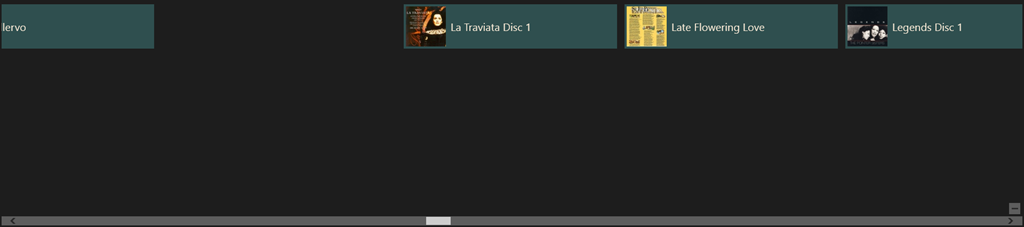
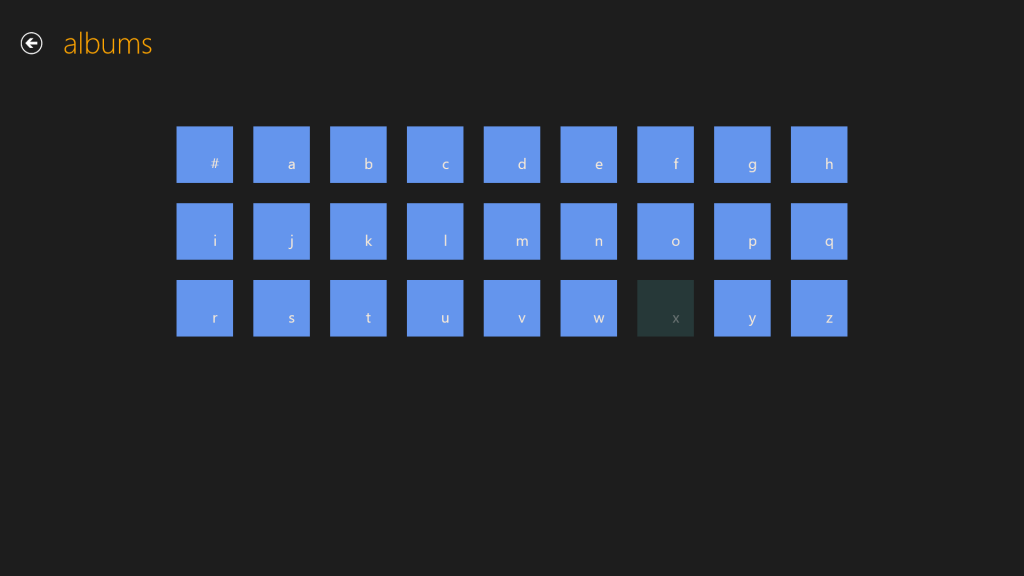
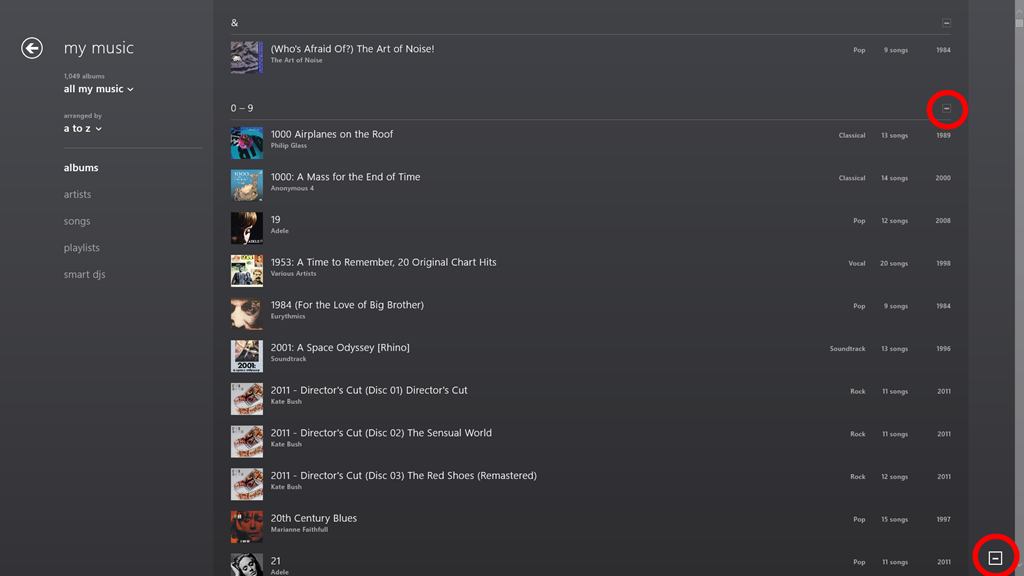
    Now I have a working Broadband connection which I can use while I’m travelling. The Vodafone app is pretty good and straightforward to use. Here’s a screenshot showing the app, with the network settings screen overlaid on the right.

    TPT2 10

    I may just stick with the Vodafone service.

    That is all I can think of now. I’ll put my thoughts on the software into another post.

    Update 3: Here are the other posts concerning my impressions of the ThinkPad’s software experience.

    Thoughts on the Lenovo Thinkpad 2 -Part II

    Thoughts on the Lenovo Thinkpad 2 -Part III

    Thoughts on the Lenovo ThinkPad 2 – Part IV

    Update 4: well, I’ve had my tablet for ten days now, and I thought I’d add a few comments on how the tablet has been behaving during that time.

    When I first started it up, there were thirty-four Windows 8 updates that needed to be applied, and these all went without a hitch. Similarly for some Modern UI App updates. On the second day, I installed Office 2010 on the tablet, and that then installed twenty-seven Office 2010 updates. A day later, I had a further ten Windows 8 updates installed automatically. Since that initial flurry of activity, there has been the usual daily update of the Windows Defender signature file. All this has gone faultlessly.

    During the ten days of operation, I have had just two occasions where the pen and touch input stopped working, and I needed to restart the tablet. I see that on the Lenovo forum, there are complaints that the tablet does not wake up after going to sleep. However, for me, there has only been one time when I couldn’t bring the tablet out of sleep, and I needed to physically reset the machine by pushing a bent paperclip into the reset hole. Other than that, the machine has behaved faultlessly. I am very pleased with it.

    Update 5: 25 February 2013. I’ve just had an email back from Lenovo/Macheen support saying that they’ve fixed my problems with using Lenovo Mobile Access. And indeed they have – it’s now working satisfactorily. Now I just have to decide whether I continue with the Lenovo or the Vodafone service. Ah, decisions, decisions.

    Update 6: 11 May 2013. Some people have been reporting issues with the speakers in the ThinkPad Tablet; one of the speakers, usually the one on the right hand side, will start distorting the sound, and playing back at a lower volume. It’s now started happening on my tablet. It’s a hardware issue, so to fix it means returning the tablet for repair under warranty.

    Update 7: 26 May 2013. I raised an Electronic Service Call with Lenovo on the 14th. Two days later (Thursday), the tablet was picked up by courier for delivery to a repair centre in Frankfurt. A week later, the tablet was repaired under warranty and returned to me on the Friday. That was a turnaround of four working days (we had a holiday weekend), and within Lenovo’s target of six working days for repairs. I’m pleased with this.

    20 responses to “Thoughts On The Lenovo ThinkPad 2”

    1. […] this is all very well; but unfortunately, it doesn’t work for me, as I’ve documented here. I still haven’t had my connectivity issues resolved by Macheen’s Support service, so I’m […]

    2. Nicolai Avatar
      Nicolai

      Hi
      How is the start up time and resume time from stand-by or the new connected stand-by?

      1. Geoff Coupe Avatar

        Startup time appears to be dependent on what you have plugged in. Without my Vodafone SIM card, and my 32GB MicroSD card, then boot times are fast – about 15 seconds. With the MicroSD card plugged it, it takes about a minute before the lock screen appears – it’s as though the system is running a memory test on the MicroSD card.

        Then with the Vodafone SIM card plugged in, there’s a further minute’s delay between entering my password/pin code for the system, and getting the start screen appearing.

        This is for a full cold boot.

        Resume from standby or connected standby is instantaneous in both cases. Press the Windows button, or the power button, and the lock screen immediately appears.

    3. Shoaib Hasim Avatar
      Shoaib Hasim

      Hi

      Have you tried office 2013/Google Chrome and if so how is the performance?
      Also what is the overall performance on the Atom processor? does it slow down or become sluggish with few windows open etc

      Many Thanks

      1. Geoff Coupe Avatar

        Hi Shoaib,
        I have Office 2013 installed on the TPT2, but not Google Chrome. I just use IE 10 as my browser (both Desktop and Metro versions). Office runs fast enough for me, but I don’t stress it with huge spreadsheets or novel-length documents in my typical use.
        At the moment I am writing this with the pen in a Metro window with Excel, Word and Mail also open and running. Performance is fine for me.
        It is an Atom-based tablet. So it’s not a speed demon, but it is perfectly good enough for my usage

        1. Shoaib Hasim Avatar
          Shoaib Hasim

          Thank you for confirming, kind make my mind up between the TPT2 or Surface Pro!

          1. Shoaib Hasim Avatar
            Shoaib Hasim

            #can’t

            1. Geoff Coupe Avatar

              Shoaib – take a look at Lisa Gade’s comparison between the Surface Pro and the ThinkPad Tablet 2; it might help you…
              http://www.mobiletechreview.com/ubbthreads/showflat.php?Cat=0&Number=44239&an=0&page=1#Post44239

    4. Schlave Avatar
      Schlave

      Hey Geoff, nice writeup. I see you have the model with 3g/4g connectivity. I understand that the TPT2 supports connected standby thru windows 8 – the ability to hold ultra-low-power-consuming connectivity that allows receiving of messages/notifications while on standby, similar to smartphones. Do you have to periodically reconnect your 3g connection when coming out of standby?

      1. Geoff Coupe Avatar

        Schlave – for the majority of the time, my TPT2 is connected via WiFi. It’s only rarely that I am out travelling around and dependent on a 3G connection. However, on the occasions where I have been, I haven’t noticed that I needed to reconnect my 3G connection. That’s not to say that there isn’t a potential issue here, just to say that I haven’t personally noticed it.


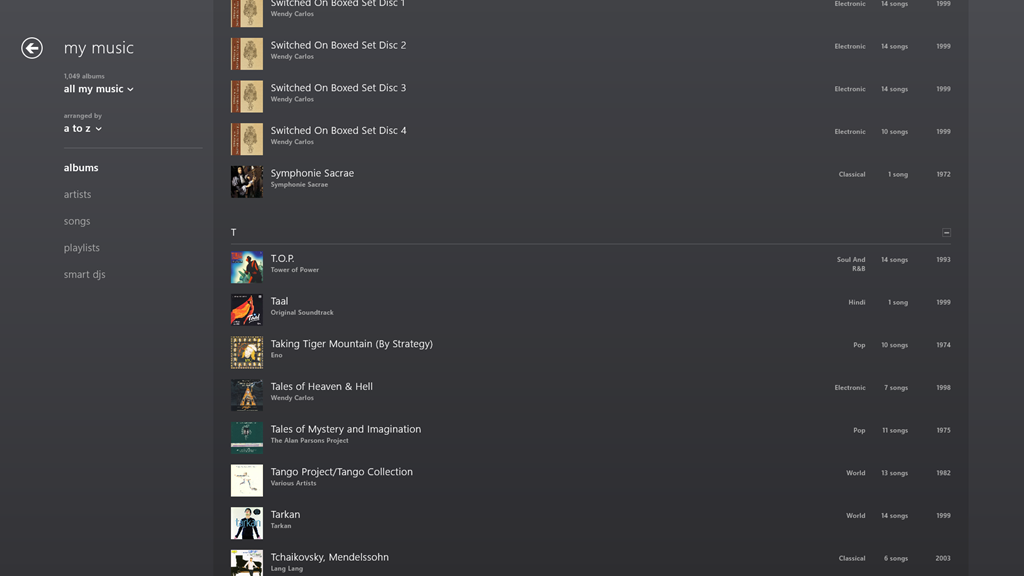
        1. Schlave Avatar
          Schlave

          Amazingly prompt – thanks. So connected standby has worked well for you so far then?

          1. Geoff Coupe Avatar

            Well, yes. My tablet lies around at home, so it’s connected via WiFi for most of the time, and I get notifications, email and Skype calls when it’s in Connected Standby. So I have no complaints…

    5. Birger Avatar
      Birger

      Hi Geoff, nice “live” review. Have you noticed any delays in the GPS position updating. I ask because we have 30 of these tablets, and that seems to be the biggest issue…the GPS stalls and forgets to update its position for several minutes, which leads to missed driving directions..

      1. Geoff Coupe Avatar

        Birger, I don’t use my TPT2 as a navigation device, so the GPS data is only occasionally used. As a result I haven’t noticed dropouts, but that may be down to how I’m using it.

        1. Michael Avatar
          Michael

          Hi there, could you tell me how to get this GPS thing working? I read Google Earth does not work with this COM-less GNSS sensor but even Microsoft maps sais, there is no GPS device. If I look in the PC settings under “Position” (thats what it is in german, I don’t know what it sais in english settings) I see “These applications can use the GPS blah blah blah” but in top, the switch is OFF and it is grey, so I can’t switch it on.
          Have you any ideas for me to get this thing working? Seems not to be trivial or I am to dumb :-).

          Thx in advance
          Michael

          1. Michael Avatar
            Michael

            Oh I forgot: I do have a TPT2 tablet with GNSS sensor (seen as broadcom device in device manager) 🙂

          2. Geoff Coupe Avatar

            Michael,
            Try checking in a couple of places. First, make sure that the Sensors section in the Device Manager is not showing any warnings. If it is, try uninstalling/reinstalling the driver. Second, look in the “Location Settings” (or the German equivalent) in the traditional Desktop Control Panel and make sure that the checkboxes are ticked.

    6. JP Avatar
      JP

      Hi,
      Can someone please help me to find out whether Lenovo ThinkPad Tablet 2 3679-25G/N3S25GE is having 3G or 4G. I am having LTE SIM(21mbps) card with me and I am looking for hi speed internet connection. in the specification it is mentioned clearly like 3G(UMTS). If the above model can support upto 10-14Mbps will be fine for me.

      Please reply me to yoursjp@gmail.com.

      Thank you in advance.

    7. […] Taking the Surface 2 first, the showstopper issue that I have with this machine is the simple fact that it does not run traditional Windows applications. It can only run the new Windows 8 Apps, and as far as I’m concerned, they are still a sorry bunch, with minimal functionality. That was what drove me to choose an Intel Atom-based tablet (the Lenovo ThinkPad Tablet 2) last January. It’s a decision that I don’t regret, and I am still very satisfied with my choice. […]

    8. […] get either an iPad or an Android tablet, and the TPT2 was the first Windows tablet that started to tick all the boxes I had in my list. Being a tablet with a second generation Intel Atom processor at its heart, it was […]

    Leave a comment