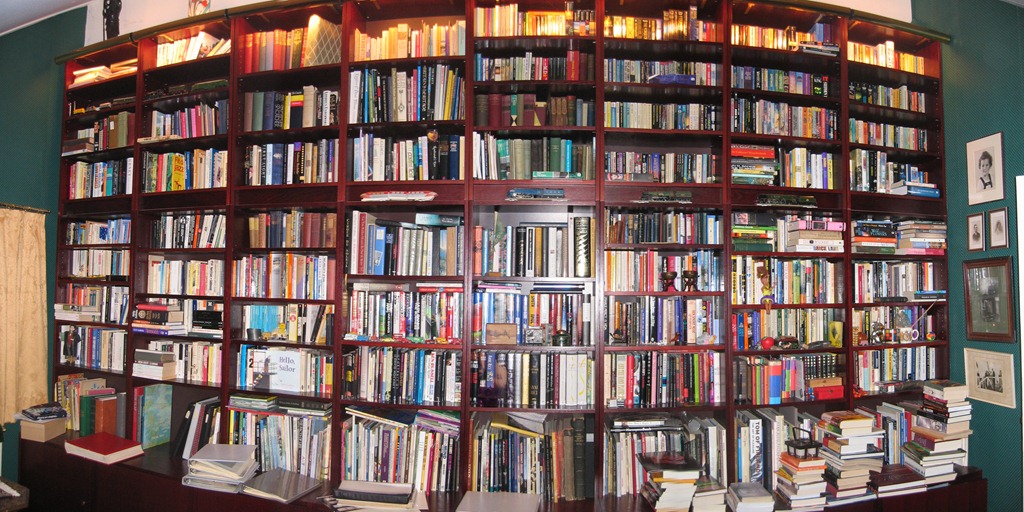
Here’s a flavour of what it means to be a book-collector
I don’t really fall into the category of being a book-collector, but I do have an inkling of what it means…

Reflections on life at “De Witte Wand”…
Here’s a flavour of what it means to be a book-collector
I don’t really fall into the category of being a book-collector, but I do have an inkling of what it means…

My wife and I are no more able to leave the bookstore with just one book than an alcoholic is able to leave the bar after just one drink (whereas I have often left a bar after just one or two drinks). We have many shelves, but we always seem to have some books in random piles.
Over the past year, there have been a number of cases reported in the Dutch media of gay couples being harassed to such an extent that they have sold up and moved elsewhere in The Netherlands. Such cases usually occur in the housing areas of the large cities, such as Utrecht and The Hague, where you can get very different cultural and ethnic communities living cheek-by-jowl.
The latest case was reported last Friday, and I was somewhat surprised to learn that it happened just eleven km. down the road in Ulft, a little town of about 11,000 people. We live in the same municipality, and I was pleased to read in the local paper today (and on the council’s website) a statement on the case from the Mayor. It’s worth quoting in full:
Perhaps you too have seen this on TV or read it in the newspaper in the last week. A homosexual couple will be moving out of our community. They have been harassed for years. Last Friday I spoke with one of them. He stated that he had repeatedly called the police and had also tried to pass their complaints about harassment to me. Only after four calls to the municipality’s office was an appointment made. By that time, they had already decided to move. Because they were so upset that they felt compelled to leave their beloved Ulft, they made the media aware of their displeasure.
Apparently their complaint over harassment was not taken seriously enough for a meeting with me or the police. I want this to occur in the future. Meanwhile, I have made an agreement with the police that they are more alert over bullying, and over cases reported. In the Municipal Office, we will also be more alert. The Police have found no reports and the complaint is not known to the police on the beat. It is not an unwillingness of the police or municipalities, but bullying can be underestimated.
The lesson for me is: when people call with complaints about bullying, then it deserves more attention than this couple has received. We shall be more alert. I find it too crazy for words that people were bullied out of their village because they are ‘different’. Let’s be on our guard about this, so that respect and tolerance are important values and remain so in our communities. We are jointly responsible for ensuring that everyone has a place, regardless of origin, race, orientation or religion. Everyone needs a safe place to live in and to live. If that is not the case then we must, depending on the specific conditions, get around the table and look together at what can be done. I want to know how many bullying problems there are. Therefore I make this appeal to you.
Are you being bullied or know of situations where something like this is happening? I hope that you will report this to me. Naturally I will respect your confidentiality.
I like the fact that the Mayor has looked beyond the fact that the trigger here was a case of harassment of a gay couple, and used it to assert that harassment of anyone ‘different’ in the community is unacceptable. Quite right too.
Steve Jobs has died at the young age of 56. He had a massive influence on at least three industries: computing, film animation and music.
I thought that Dan Gillmor’s eulogy on Jobs probably came closest to a rounded portrait: “a man of contradiction and genius”. Gillmor also links to the commencement speech Jobs gave at Stanford University a few years ago and that is certainly worth reading; in particular, his thoughts on life and death:
No one wants to die. Even people who want to go to heaven don’t want to die to get there. And yet death is the destination we all share. No one has ever escaped it. And that is as it should be, because Death is very likely the single best invention of Life. It is Life’s change agent. It clears out the old to make way for the new. Right now the new is you, but someday not too long from now, you will gradually become the old and be cleared away. Sorry to be so dramatic, but it is quite true.
Over a year ago, I blogged about Peter Bright’s article in Ars Technica on why Steve Ballmer and Microsoft didn’t understand how Apple’s iPad has been so successful.
I wrote at the time that:
It’s odd that Ballmer appears to be insisting that Tablet and Slates are just another PC form factor – they are not, and they need something other than simply loading them up with bog-standard Windows 7. A way forward may be to adopt the approach of the forthcoming Windows Phone user interface, which is designed from the ground up to be driven by the human finger. After all, the iPad owes more to its roots in the iPhone than it does to the traditional Mac. If Ballmer can’t see that as an analogy for the next generation of Tablets and Slates, then it seems likely that sales will continue to languish.
Well, fast forward a year, and we have the Developer’s Preview of Windows 8, and we are beginning to see that Microsoft are indeed adopting the tenets of Metro – the interface used in Windows Phone.
I had intended to download and install the Developer’s Preview of Windows 8 onto my HP TX2000 Tablet PC, but unfortunately it chose this moment to die. However, I went ahead and installed it on my main PC, as the secondary operating system that can be chosen at boot-up.
I can see that Windows 8 is a gamble for Microsoft, and it’s one that I think that they might very well pull off. I think it’s because that they can have the same operating system running on a much broader range of devices (at different price points) than is possible currently, and all of these devices can be supported within the same ecosystem of backend (read: Cloud) services and applications.
By way of illustration: a couple of friends visited us this last weekend. One of them works in a Dutch government Ministry, so she was fully equipped with a Smartphone and an iPad. This was my first chance to get my hands on an iPad and try it out. And, while I marvelled at the form factor, I soon found that it seemed to be very good at consuming content, but not particularly good at creating content – an impression that my friend concurred with.
My old HP TX2000 – while it was larger and heavier than her iPad – ran a fully-fledged operating system (Windows 7) and was equipped with both a Touchscreen and pen interface, as well as a keyboard, so I could use it in ways that I simply could not accomplish with an iPad. Taking notes with my pen (using OneNote) or using the built-in handwriting recognition of Windows 7 (with its scary accuracy) is a task that is completely alien to the much more limited iPad. Then again, the iPad is designed from the bottom-up for fingers; Windows 7 needs a mouse or a pen. While it is possible to adjust Windows 7 to be more finger-friendly, this has its limits.
This is where it starts to get interesting with Windows 8.
Devices, with their operating systems and user interfaces are all about horses for courses. The iPad is a device designed for a much more limited purpose than a high-end notebook. And the newly-announced Kindle Fire is a device that aims at a purpose lower than both of them, but one which may well satisfy millions of people who simply want to read books or play games. The price points of the devices reflect their capabilities.
I think that we about to see an opportunity for devices that can span a wider range, yet even though they have a higher price point, will be attractive to people.
Samsung will introduce their Series 7 Slate PC (the XE700T1A) this month – well, hopefully this month, although I’m beginning to think that November might be nearer the mark.
It has the specs – and the price – of a high-end notebook, yet can be used as a finger-driven Slate PC. In price, it’s comparable with the Apple MacBook Air models, yet the Series 7 Slate comes with a built-in Wacom digitiser in the display and a pen. I’ve long been a fan of Wacom digitisers – I had one back in the days of Windows XP; so did the HP TX2000 – the pressure sensitive pens combined with accurate sensing are a joy. If I were an artist, then the Series 7 Slate would replace my sketchpad. The Series 7 Slate also comes with the accelerometer, compass, and GPS (see Update below) sensors that are expected these days in tablets. As someone comments on this review here:
The 11″ Air costs $999 for the base model, $1199 for the second tier model. This tablet costs $1099 for the base model, $1349 for the second tier model. That’s an extra 10-12%.
Unlike an iPad, Android tablet, etc., this tablet can perform as a laptop in most scenarios — if you give it a keyboard, you can use it to run the full Excel, Photoshop, a full desktop browser, development tools, and anything else a laptop can do.
If you want to be able to do some light reading and watch some video on your tablet sometimes, and you need to be able to run Photoshop sometimes, you have to buy a MacBook of some kind *and* an iPad. Buy one of these Samsungs, and you don’t have to choose. As an extra added bonus, you don’t have to sync anything between the two devices either. If that works for your, it’s a screaming deal.
But again, for me, this just isn’t a good enough tablet without real tablet software. So hurry up, Win 8.
Samsung have already said that the Series 7 Slate can be upgraded to Windows 8.
It’s possible that this is the first product that heralds the rebirth of Tablet PCs, and one that will be joined by lower-cost models running Windows 8. I’m sorely tempted.
Update 3 November 2011: It appears as though the first units that are being delivered to the market are not equipped with a compass and GPS sensors. These were available on the units that were given to developers at the Microsoft Build conference in September, so these sensors must be part of the optional 3G mobile telecommunications capability. However, since the 3G card is apparently fitted inside the sealed case, it is not going to be something that an end-user can fit after purchase.
There are also some concerns being raised about the build quality of these units. Some people are reporting the the screen glass is lifting away from the bezel along the bottom edge of the screen. Sounds as though Samsung’s glue is not good enough.
All this is probably helpful in tempering my enthusiasm. It wouldn’t do any harm to wait a while…
As part of the national disaster warning system, there are over 4,000 sirens placed around the Netherlands. These are tested at 12:00 on the first Monday of every month for a couple of minutes.
Our younger dog, Watson, reacts to the sound of these sirens by howling in sympathy. Perhaps it’s some deep-seated instinct that he’s inherited from his wolf ancestors? Whatever the reason, he always reacts this way on the first Monday of every month.
I see from Youtube that many other dogs react this way, so perhaps there is some instinctive reaction at work here.
[…] I think that if I were to get a second generation Aibo, Watson would not be best pleased, as shown in this test of a first generation Aibo in a Sony […]
Almost a year after the first release of Windows Phone 7, the first major upgrade (“Mango”) of the phone operating system is being rolled out. Although it is a major upgrade, the official version number is 7.5, rather than 8. I suspect that’s because Microsoft want to reserve that for a future major upgrade – presumably to be rolled out at, or around, the time that Windows 8 hits the market.
WP7.5 apparently addresses most of the shortcomings of the original release. As usual, Peter Bright, over at Ars Technica, gives a very complete review of WP7.5.
His final summing-up:
With Mango, Microsoft has got the smartphone operating system right. It’s fast, it’s fun, it’s easy to use, it does everything you need, and it looks great. It takes the things that made the original release unique and makes them better, and it addresses nearly every criticism made of that version. As a piece of software, it’s a triumph, and it’s more than good enough to take on Android and iOS.
As a complete package, though, questions remain. Much is being demanded of the hardware companies, and much is staked on Nokia’s ability to make hot handsets. If they don’t deliver phones that people want, Windows Phone will continue to struggle. But it won’t be because of the operating system.
I find those last two sentences particularly telling. And in my view, it’s not just down to the hardware companies, it’s also down to Microsoft’s marketing, the phone application Marketplace, and to Microsoft’s infrastructure used in the Marketplace. That infrastructure has, I think, a pretty serious flaw, which I have pointed out before. And that is: it assumes that people stay in one country all their lives.
Microsoft have chosen to use the infrastructure used by their Zune music player as the basis to support the application Marketplace for Windows Phone. The problem being that once you create an account in the Marketplace, and define your country of residence, you cannot change that country, nor even delete your account. I find this last point almost incredible. I can close my Windows Live ID account, but I can’t close my Zune account? Which bright spark thought that one up?
This shortcoming has been in the Zune Marketplace since at least 2007, and people have been complaining about it ever since. When Windows Phone was released in October 2010, and the Zune Marketplace, running as a PC application, was used to access, purchase, and deliver applications to Windows Phones, a whole new group of people were suddenly confronted with the shortcoming and started complaining. There are many threads about it on the support forums, such as this one, which is currently running at 17 pages of pure frustration.
I had thought that with the introduction of WP7.5, together with a web-based Marketplace alongside the Zune Marketplace PC application, that perhaps the shortcoming would be addressed. Particularly since the Marketplace has been broadened to 35 countries from the original 16.
But no, not a bit of it, you can still neither change your country nor delete your Zune account to start over again.
Almost as frustrating are the assumptions that Microsoft make about the languages used in those countries. I see that because I am based in The Netherlands, I am given no choice about the language I use: it has to be Dutch. Even some native Dutch speakers prefer to use their computers and phones in English. Still, it could be worse, I could live in Switzerland, where there are four official languages, but the Swiss Marketplace only offers French or German…
Microsoft are clearly firm believers in the Procrustean solution.
[…] mentioned a number of times before on this blog how irritating it is to be saddled with a Zune/Xbox Live/Windows Phone account […]
A large package was delivered yesterday morning. It turned out to be a work of art. My dearest friend, Len Curran, had, amongst his many other talents, an eye for Art. Many was the time during his travels abroad that he would struggle back with a sculpture, or a huge painting, and then argue with the airline about excess baggage.
The end result was that his house became ever more stuffed with his art collection. It was made even more acute as he downsized his accommodation space over the course of the years.
When Len died, his closest friend Mo asked me if I wanted anything from the collection as a memento, and I said that, if it were possible, I would like one particular piece. It’s by a Filipino artist, Noel Soler Cuizon, and is a mixed media piece with the title: Someday, I’ll Go Back To Heaven. That’s what arrived yesterday.
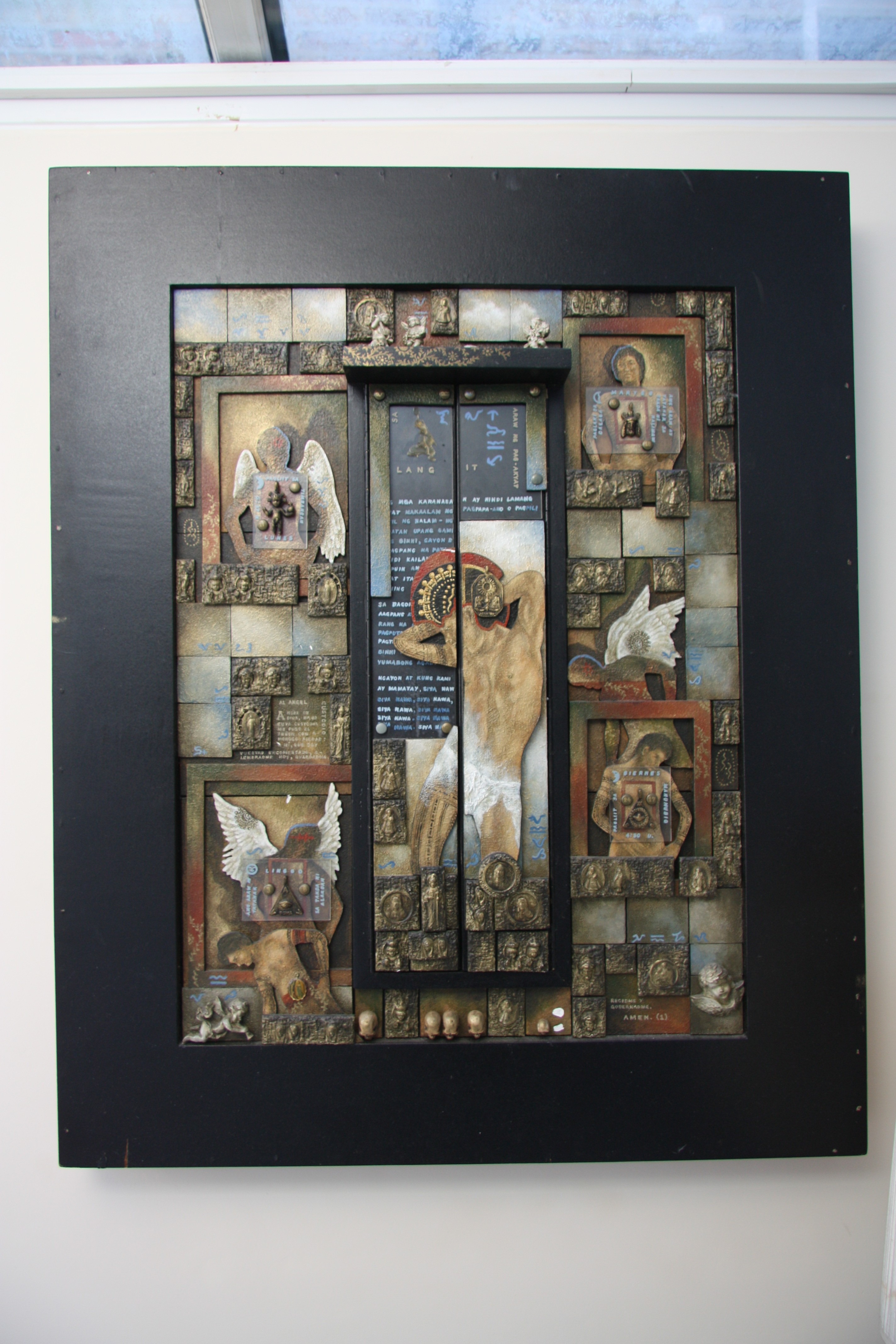
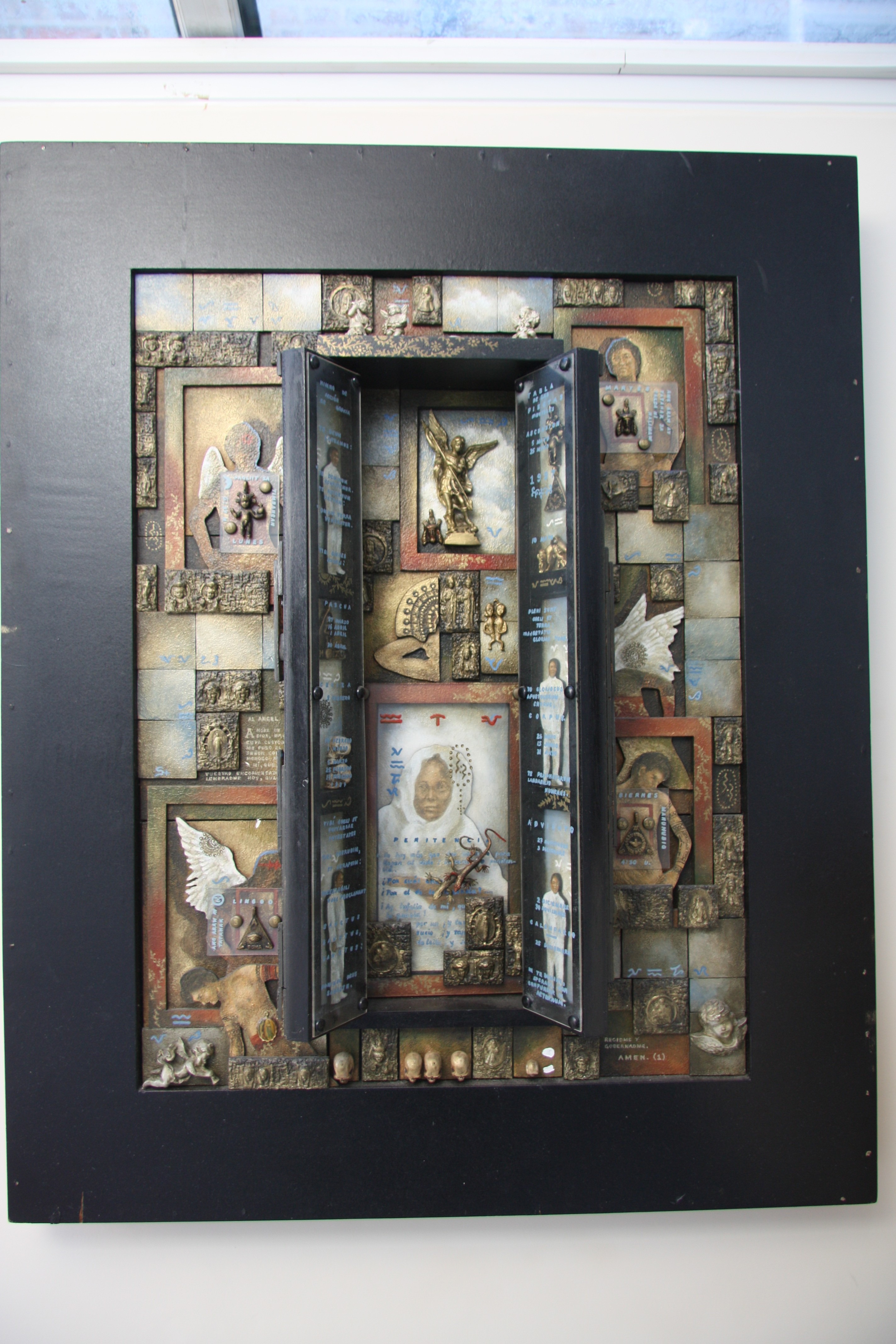
Unfortunately, it got a bit shaken up in transit, so I’m going to have to do a bit of restoration work (these photos were taken in Len’s last house), but it shouldn’t be too much of a problem. I’m looking forward to it hanging on the wall, and it will be a constant reminder of Len.
Addendum 24 May 2020: I found an archive article written about Noel and his work. Pleased to see that Someday, I’ll Go Back To Heaven was mentioned in it.

Geoff
Sad to hear of Len’s death, I remember the 50th birthday party and a few interesting times with Len at both his homes. Your blog brought back a lot of memories.
Please give my love to Mo and tell him I think of them often especially the dinner parties at 15. If he does not remember I used to live with Peter Waddington. Though after splitting up with Peter it did not seem to be the wisest action to keep contact.
I hope you are doing well.
Regards Mike

Thanks Mike. I’ve sent you a private message. Cheers, Geoff

Hi Geoff,
Let me introduce myself – I’m Noel Soler Cuizon, the artist who made “Someday I’ll Go back to Heaven” . I accidentaly came across your post (here in Google) as I was checking for some works I haven’t documented in the past. I’m so sorry (albeit a bit too late) for the demise of your dear friend Len Curran who first acquired my work. I met Len briefly at Hiraya Gallery, here in Manila some years back. He struck me as a man with sophistication and a good sense of humor.
Anyway, I’m glad that the work is with you now in the Netherlands. It would be great to touch base with you sometime in the future.
Thanks for posting.
Best regards,
(Nuki) Noel Soler Cuizon
Hello Noel,
Wonderful to hear from you. I’ll be sending you a private message. Cheers, Geoff
We noticed that the grass in our field was looking a bit scrubby, and the earth was being scraped over. At first, we suspected our dog, Watson, was looking for moles, but the damage was becoming too widespread.

One of our neighbours solved the mystery for us – we have a plague of Cockchafer larvae, known as Engerlingen in Dutch. Apparently, we’re not the only ones around here, it’s becoming a common problem in this area.

There are no pesticides approved to deal with it, so we’ve reverted to the Mediaeval method of dealing with the Cockchafer – killing the adult beetles or their larvae. I reckon that there are about 50 larvae per square meter, and most of the field seems to be affected.

We’ve been stripping off the turf to expose the larvae and collecting them in buckets for killing and disposal. It’s a very tedious job.
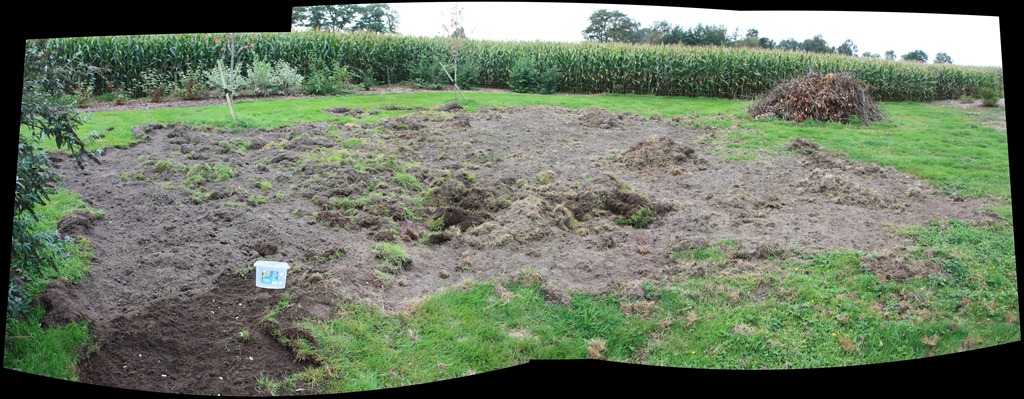
I can think of more pleasant ways to spend a day…

Over here on this side of the pond we had pests that look exactly like you pictured. A biological treatment (I think using Bacillus thuringiensis) was effective for us and we have not had the grub problem in years since.
Thanks, Ludwig, I’ll keep an eye out for whether biological treatments are availbe here…
Last weekend was the annual horse festival held around here: the Varsseveld Hippisch Festijn. It’s a three-day event, but as usual, I only had time for going along to view a couple of hours of the cross-country event and the horse and carriage event on Sunday morning.



My HP TX2000 Tablet PC died this week, just as I wanted to put the Windows 8 Developer Preview on it. It won’t boot, or even display the BIOS screen. It turns out that this problem is fairly common, and apparently caused by the video chip.
As is usual with these things, the three-year warranty that I had with the Tablet expired 6 months ago, so getting it repaired, even if it is possible, will not be cheap. It’s probably better to cut my losses by salvaging what I can from the Tablet (e.g. the hard disk) and dumping the rest.
I haven’t got another machine lying around that I can install the Developer Preview on, so I’m just going to have to curb my curiosity. Perhaps I should just wait until Windows 8 Tablets start appearing in the market (end 2012?). However, I must admit that I am sorely tempted by Samsung’s Series 7 Slate PC that is supposedly going to be available next month. But then again, I think that the Financial Controller (a.k.a. Martin) will probably be reluctant to authorise the expenditure…
That is the problem with modern electronics, not economically repairable. I have a laptop that lost its video, I use it now – with the covers off – as a demo in computer classes.
On Windows 8 you may have saved yourself a lot of aggravation. I tried to install it in VMware Player – no go. Got it to work in VirtualBox but it kept hanging up. Finally gave it 3GB memory and two processors, also allowed it to “mellow”, it now seems to work ok. The Metro-style interface is rather overwhelming on a 23-inch monitor. I don’t have a touch screen and the mouse takes some getting used to. The delevoler release does not come with many of the apps that will be part of Windows 8 like Photo Gallery, Messenger, etc. The next release should be more interesting.
Ludwig, yes, I see that Steven Sinofsky has a blog entry saying that not all virtual environements are working with the W8 preview at the moment:
http://blogs.msdn.com/b/b8/archive/2011/09/16/running-windows-8-developer-preview-in-a-virtual-environment.aspx
I think I’d prefer to try it out in a dual-boot environment, to run it on real hardware. I might give it a go on my main Desktop PC. I’ve got room to re-partition the drive. I realise that this isn’t even a beta release, but I’m curious, and I can’t resist scratching an itch…
[…] to download and install the Developer’s Preview of Windows 8 onto my HP TX2000 Tablet PC, but unfortunately it chose this moment to die. However, I went ahead and installed it on my main PC, as the secondary operating system that can […]
So I was otherwise engaged last weekend when the latest episode of Doctor Who aired. I had travelled to Northern Ireland to say a final goodbye to my dearest friend. That’s another story, and I don’t feel ready to tell it, so instead I’ll turn to the artifice of The Girl Who Waited. I caught up with it today.
There’s something about a good story, well told. It can seize the heart and provoke a deep emotional reaction. The Girl Who Waited had that effect on me. Simply superb, developing from the basic setting up of the story, to the working out of the morality of how it affects the three protagonists, in particular the relationship of Rory and Amy, both balanced and unbalanced through time. As before, others can tell the story better than I.
“This is a kindness”. But, of course, it isn’t, and like the older Amy, one wants to rage against it. Arthur Darvill, and above all, Karen Gillan, as both the old and the young Amy, made this one of the best episodes of Doctor Who I’ve ever seen.
Bravo!
I made a connection today. Between the artist called Hannes Bok, who produced some rather unsettling art, and the man called Hannes Bok who possibly died of starvation.
I’ve said it before, but I’ll say it again: I’m very lucky to be able to live in a country that has Civil Marriage for both same-sex and different sex couples. Some countries have only Civil Partnerships for same-sex couples, reserving Civil Marriage for different sex couples only.
Many people think that these are, for all practical purposes, the same. But they are not. In Ireland, for example, the differences can have real consequences.
The OK Go band + Pilobolus = Amazing Video.

Amazing indeed. My daughter will love it!
Sometimes I feel like Alice – I’m in a looking-glass world where black is portrayed as white, good is bad, or up is down. It’s at times like these when I’m likely to throw a Victor Meldrew fit at the apparent stupidity, cupidity or just plain bare-faced effrontery of those in charge, who have the power to dictate what we will experience in our daily lives.
What’s brought on this latest attack is the publication in yesterday’s Volkskrant newspaper of a two page spread covering the likely future of rail transport in the Netherlands.
The kernel of the report was the finding that breaking up the national rail network into separate chunks and putting services out to tender will reduce delays, according to research by network operator ProRail.
Let’s just savour that, shall we? And why would that proposition be true, in any meaning in the real world? Ah, we read, it’s because services will not be so interdependent, reducing the domino effect of delays, ProRail is quoting as saying.
Dear god in heaven, do these people not have two braincells to rub together?
Let’s just take a practical example. I want to travel from Amsterdam to my home – nearest station Varsseveld. That means that I’m using the Dutch National Railways (the NS) from Amsterdam until Arnhem, and then changing over to Syntus for the last hour from Arnhem to Varsseveld.
So excuse me, but surely for me, these services are interdependent – I want to step out at Arnhem and step onto a train bound for Varsseveld with the minimum of delay.
As a matter of fact, at the moment, Syntus (one of the independent rail operators that the Dutch Government is so in love with) offer what can only be described as a truly shitty service. I’ve lost count of the number of times that services have been delayed or cancelled, while the hapless train drivers run around like headless chickens, glued to their mobile phones receiving zero practical information.
On more than one occasion, I, together with my fellow travellers in the outer regions of Hell, have been herded from one platform to another in Zevenaar at the behest of the Syntus staff for what seemed like hours at a time. “The next train for Winterswijk will leave from platform 3”, “no, platform 4”, “no, that’s going back to Arnhem”, “Platform 1”, “no, we’re putting buses on” – so three train’s worth of passengers have to fight for seats on a single bus.
So, ProRail, don’t tell me that delays are not interdependent. Wherever they happen, they will have a domino effect on the individual traveller, if that traveller is where the delays are.
I note, with a roll of my eyes, that the ProRail research report was carried out at the request of the private rail operators. I can’t say I’m totally surprised at the findings then, although it only serves to underline the fact that we are indeed in looking-glass land.
And, oh joy, because of the love affair the Dutch Government have with the idea that more independent operators make for more efficiency, we have the situation to look forward to that if we want to travel from Amsterdam to Varsseveld, we will have not two, but three train operators to deal with: the NS, Breng and Syntus.
It’s at times like this when I earnestly wish to be face to face with the authors of these research reports and the faceless bureaucrats who decide our transport fate and slap them hard around the face with a wet fish.
If you were (or are!) using the original version of Microsoft’s Windows Home Server, you will probably have noticed that the WHS icon in the System tray changed colour to provide notifications at-a-glance:
If you’re now running Windows Home Server 2011, then the WHS icon (now the Launchpad icon) no longer shows this range of notifications. Basically, you now have a choice of one colour: green. Green now simply means that the Launchpad is running.
However, the Getting Started Guide for WHS 2011 still shows the WHS v1 colour notifications as being present in WHS 2011:
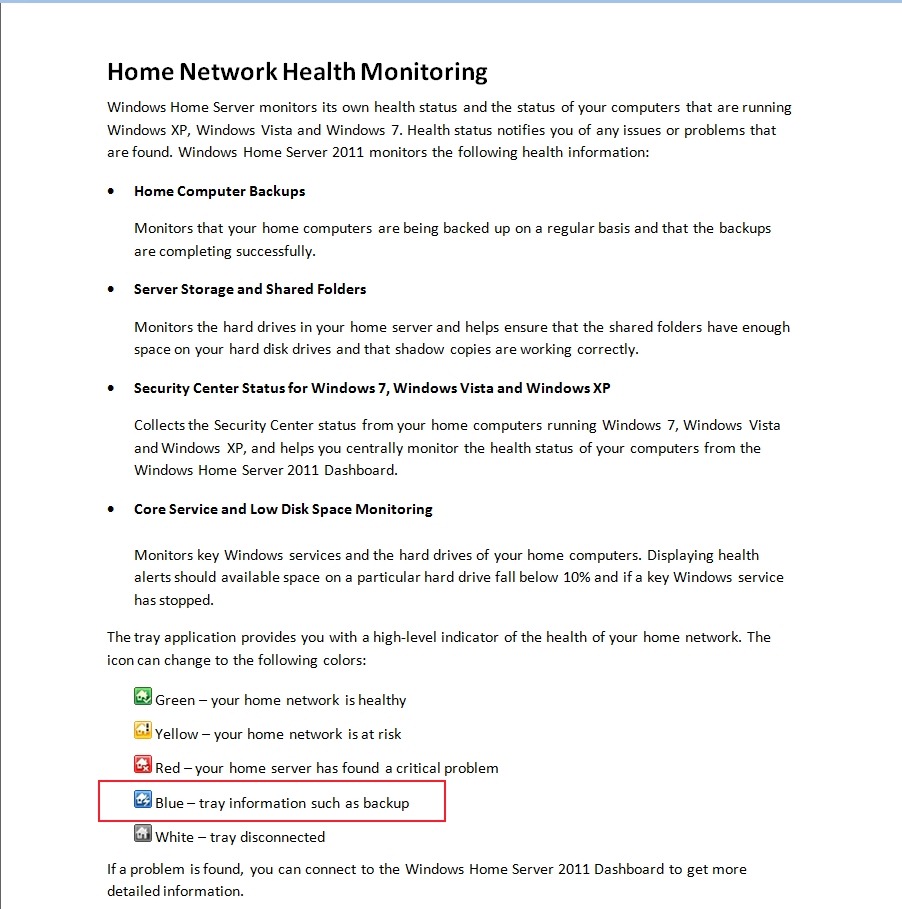
Not surprisingly, some people, reading this document, thought that they had found a bug, and reported it as such over at the Microsoft Connect web site (note: if you aren’t registered at this site, you won’t be able to see the actual bug report).
Microsoft did their “it’s not a bug, it’s a feature” trick and replied that:
we decided in the 2011 release that backups should be seamless and not neccessarily [sic] notify the user of when they are in place
and said that it would not be fixed. This is all very well, but it ignores the wishes of those folks who found that the additional notifications, particularly of backups, are extremely useful. It also points up Microsoft’s rather sloppy approach to the documentation of WHS 2011.
Since Microsoft, in their infinite wisdom, have declined to fix what many see as a bug, I’m pleased to report that a third party has stepped forward instead.
Jerry Wade has developed a utility (Home Server Status) for your Desktops and Laptops that indicates when a backup is in progress. Plus, it does a few other nifty things as well.
Check it out here.
I installed it and stopped using Microsoft’s Launchpad application, and have never looked back. I can thoroughly recommend it to ex-WHS v1 users who think that WHS 2011 has lost the plot with its bloated Launchpad application. And for those WHS 2011 users who are new to all of this, you could do worse than to check HSS out.

Hi, I have some problems relating to a (lethal) combination of WHS Vail expiration, Raid Array failures, and needing access to a client computer backup that may or may not be there. Do you think you might be able to help?
Joe, I suggest that you ask your question in one of the community support forums, e.g.:
http://social.microsoft.com/Forums/en-US/whs2011/threads
http://forum.wegotserved.com/index.php/forum/196-windows-home-server-2011/
http://homeservershow.com/forums/index.php?/forum/36-windows-home-server-2011/
Personally, I deliberately don’t use RAID in my server, so I have no experience to draw upon. Hope that someone else can help in the forums.
Thanks very much! Hope someone there can help!
As you may be aware, I’m not very happy with the Media Library in Windows Home Server 2011. As well as the shortcomings and design issues that I wrote about here, it also turned out that WHS 2011 has a tendency to corrupt music metadata and Album art stored in the Music Library.
In one of the discussions about these issues that went on in various forums, I came across a reference to an application called Bliss. It’s an application that seeks out Album covers online and will download and install them into your music collection automatically.
Since WHS 2011 had blithely overwritten all my carefully-prepared high-resolution Album art with its own low-resolution versions, I thought that I would give Bliss a whirl to see if it could repair the damage wreaked by WHS 2011.
To cut to the bottom line, Bliss does what it says on the tin, and I can recommend it; but there are a few quirks to be aware of if you want to use it to maintain Album art on a WHS 2011 system.
What follows is the detail of what I did and what I found…
While Bliss can be installed and run on WHS 2011, it is not packaged as a true Add-in application for WHS 2011. Add-ins are designed to be downloaded onto your Desktop PC or your Laptop, and installed onto your WHS 2011 from there. Once installed, the Add-in appears in the WHS 2011 Dashboard, where the application can be accessed and controlled. Bliss, on the other hand, is packaged as a traditional application. Once installed and started, it runs in the background and is accessed and controlled via your web browser. This means that it can be installed on your Desktop, your laptop, or the home server. Once running, you can point Bliss at the location of your Music Library, and it will go to work.
To install Bliss on WHS 2011, you need to open up a Remote Desktop Connection to your WHS 2011 system to gain access to the Administrator’s Desktop on the server. From there, you can double-click on the Bliss Setup program, and it will be installed on the server. Since it is installed in a server environment, it is best that it is running as a Windows service. That way, it will automatically start up when the server is booted – you won’t need to manually start it. Full instructions on how to install it as a Windows service are given on the Bliss web site here.
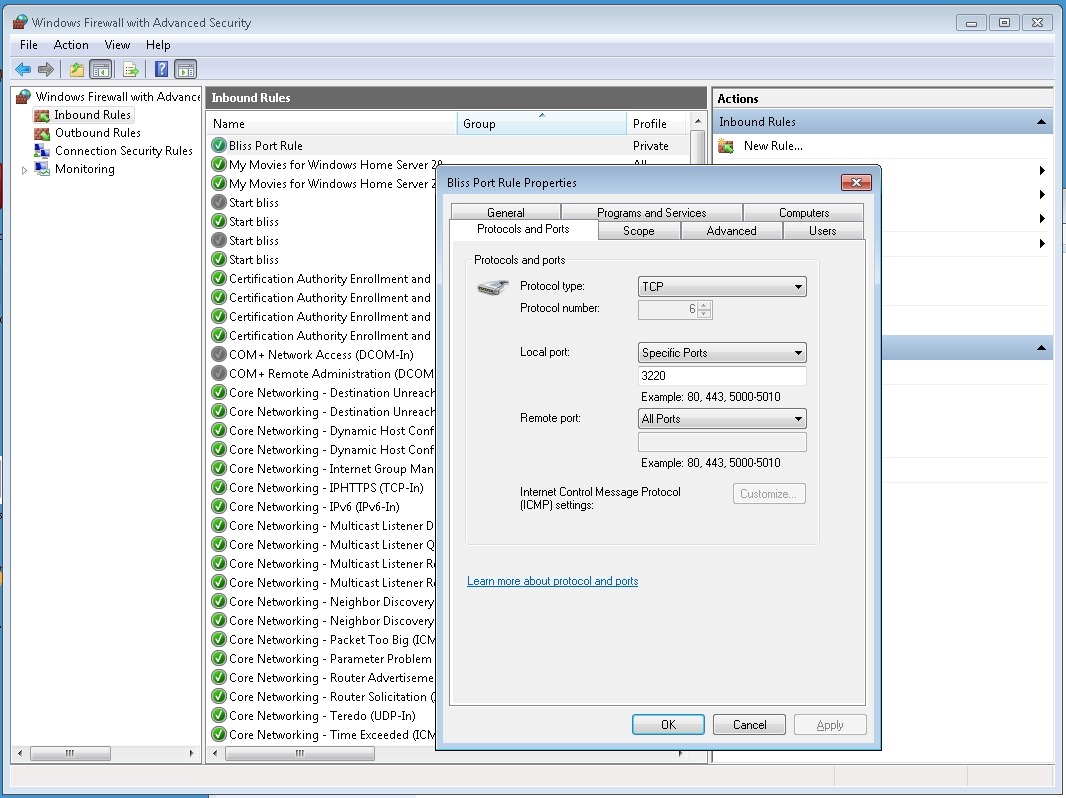
Once Bliss is running (either as a Windows service, or by being started manually), then access to the functions of Bliss is done via a web browser. If Bliss is running on your Desktop, then accessing Bliss is done via the URL: http://localhost:3220. However, if it is running on your WHS 2011, then you’ll need to point your Desktop PC web browser to http://Servername:3220, where Servername is the name of your server. And here comes the first quirk. When I tried that, the web browser failed to find the Bliss web page.
The reason is that installing Bliss on WHS 2011 does not automatically add in a Firewall rule to allow access via the 3220 TCP port. I needed to once again open up a Remote Desktop Connection to my WHS 2011 system to gain access to the Administrator’s Desktop on the server. From there, I used the Windows Firewall Management applet to create a new TCP port rule to allow inbound access to port 3220:
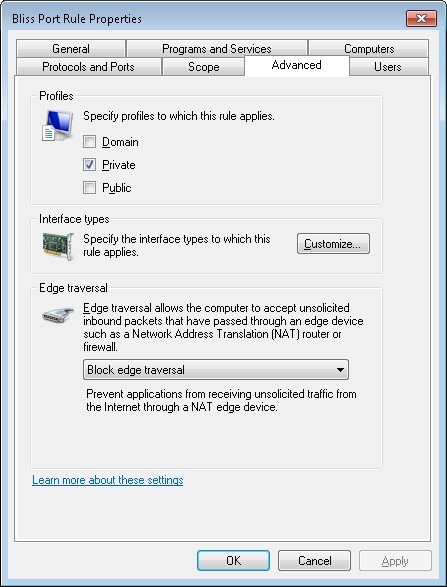
I also made sure that this rule was only valid for my Home (private) network:
Now, to me, all this remote accessing of the Administrator’s Desktop of the WHS 2011 system in order to install the program (preferably as a Windows service) and configure the firewall stretches beyond what I think the average Home User can reasonably be expected to cope with. It is OK for those of us who are comfortable rummaging about under the hood, but not, I think, for your average Home User who really wants to view WHS 2011 as a backup and storage appliance for his or her digital media. The design principle of WHS 2011 should be that such a user can access and control all the necessary functionality of the system via the WHS 2011 Dashboard. The system should be simple to install, run and maintain.
For Bliss to fit this paradigm, it would be necessary for it to be available as a true WHS 2011 Add-in. Since it’s not available in this form, if you are going to install it on your WHS 2011 system, you have to know what you’re doing, and feel comfortable about rummaging in the innards of WHS 2011.
Please don’t think that I’m casting aspersions on the developer because Bliss is not a WHS 2011 Add-in. Turning Bliss into a proper WHS 2011 Add-in can be a major development and rewrite project, and frankly, given the less than stellar impact WHS 2011 has had in the market, I doubt that the monetary returns would justify the work for many applications such as Bliss.
Given all the above, then if you are just an ordinary Home User who wants to have a nifty Album art application for your music collection on your WHS 2011 system, then what should you do? My recommendation would be simply to install it on your Desktop PC or Laptop, and use it from there. You can point Bliss to your music library on your WHS 2011 system and everything’s hunky-dory.
Well, almost.
Remember that I said that WHS 2011 corrupts Album art? The reason is that, by default, WHS 2011 runs a scheduled task every 24 hours to replace what you think the Album art should be with what Microsoft thinks it should be.
That’s bad enough, but even worse is that when this task replaces your high-resolution Album art file with its crappy low-resolution version, it sets the attributes of the file to “Hidden” and “System”. A file with these attributes cannot be updated by Bliss – any attempt to do so will generate an “Access denied” error.
So, I’m afraid that even if you are just an ordinary Home User, you will still need to use a Remote Desktop Connection to your WHS 2011 system to do three things:
Then Bliss will be free to do its stuff and supply decent quality Album art where it can.
You know, it’s somewhat ironic that Microsoft has shot itself in the foot here. Far from supplying an operating system that can form the basis of a backup and storage appliance, the shortcomings of WHS 2011 are often working against that goal. Applications such as Bliss are in danger of being subject to collateral damage through no fault of their own.
I’m happy to continue to use Bliss, because, as I said, it does what it says on the tin. I just have to keep an eye on WHS 2011, because it often does not.

Hi Geoff, this is Dan, the developer for bliss. You have a good point about the installer – maybe it should “punch some holes” in the firewall, if allowed by the user. It would be a generally useful step for all versions of the product. I’ll take a look into how easy this is.

Great tip Geoff. Might look at Bliss myself.
@Dan – maybe you could also build in some logic to have a checkbox with ‘Force overwrite of Folder.jpg files set as Hidden and System’, and then… well, nuff said.
Hah! Far too straightforward, Al 😉 Maybe that is something I might look at.
So the final half of the sixth series of the regenerated Doctor Who kicked off last night with “Let’s Kill Hitler”. Oh, but I did enjoy every single moment of it. Steven Moffat is such a brilliant and audacious writer, and the excellent actors have a field day with his lines.
Look, I don’t care that there were some probable plot holes – the Doctor should have known about River’s lipstick trick by now – I was still loving every single moment: the introduction of Mel, the growing-up sequences, the use of Hitler as a MacGuffin, the antibodies in the tesselrator channelling the Sirius Cybernetic Corporation of Douglas Adams, the redemption of Mel/River… It was a blast. Knocked the current sorry mess of Torchwood into a cocked hat.
If you are an enthusiast photographer using a digital camera, you may well have set your camera to take photos using its RAW format. It’s what every professional photographer does. The rest of us take the easy way out, and take photos using our cameras, smartphones, or similar image capture devices using the ubiquitous JPEG format.
The advantage of the RAW format is that, like the old film negative, it contains the truest record of the data captured by the camera’s image sensor. That data can be processed to suit what the photographer wants as the final image. In traditional photography, this is equivalent to processing the negative into the final positive print.
The JPEG format, on the other hand, can be thought of as the end result of the image processing that happens in the camera itself using a standard set of parameters. While the image can be further tweaked in computer applications, the flexibility of what can be done, as compared to that when using the RAW format, is severely limited.
Microsoft’s Windows has, over the years, supported the JPEG format out of the box. That means that utilities such as the Windows Explorer will display thumbnails of your JPEG images and tools such as Microsoft’s Windows Live Photo Gallery will be able to process those images further.
However, up until now, support of the RAW format has not been present in Windows itself. If you have images using a RAW format, Windows has probably given you a message telling you that it can’t display the image, and suggesting that you go to your camera manufacturer’s web site to download and install an image codec to plug into the Windows Imaging Component of Windows that will enable the display of your images.
There are also third party software solutions that offer portmanteau RAW codecs for a wide range of cameras and RAW formats (each camera manufacturer defines their own RAW format in a unique way). These third party solutions have been around since the days of Windows XP.
Now, Microsoft have trumpeted that, in order to make it easy for the consumer, they have developed their own portmanteau codec for a range of RAW formats. This can be downloaded and installed into Windows. It enables both Windows Explorer and Windows Live Photo Gallery to display RAW images directly.
While I think it’s a good thing that Microsoft have done this, what left a nasty taste in my mouth, in both the announcement and the accompanying video, was there was no acknowledgement whatsoever of existing third party solutions. Even worse were the statements such as that made by Jason Cahill in the video that the Microsoft codec supports “all the cameras you may have had or may have now”. Er, no, it doesn’t.
Axel Rietschin, the developer of the excellent FastPictureViewer Codec Pack has made an excellent comparison between his own offering and Microsoft’s codec. If you are interested in seeing the full picture, and wanting a superior codec pack, then you should read it.
Another thing that Microsoft fails to mention is that their new codec does not permit adding metadata, such as author or copyright, to the raw image, something other codecs typically do. I thought I had broken my computer when all of a sudden I could no longer add copyright information. I went back to using Nikon’s codec although it has limitations on a 64-bit system (I use a Nikon camera). I prefer to add certain metadata to the raw image so I don’t forget to do so after conversion and processing.
Ludwig at cafeludwig.com
… so, published 6 months ago, and still no word on supporting RAF (Fuji RAW)… not a problem using CS, but it’d be nice to run a batch convert and have them accessible to WHS…
This is a very difficult post to write. It concerns my oldest and closest friend.
We first met back in the early 1970s when I first moved up to London. I wanted to do some volunteer work, and ended up asking a gay counselling organisation, Centre, if I could be a volunteer. I was interviewed by, amongst others, Dr. Leonard Patrick Curran, a psychologist who was working for the UK’s Home Office in the Prison Service department at the time.
Thus began a friendship that has continued for almost forty years. Alas, it has now been brought to a close because Len has died.
Len Curran was a psychologist and an epidemiologist. He worked for many years in the UK’s Prison Service where he was responsible for the development of policy on HIV/AIDS in prisons, for medical research and ethics. After leaving the Prison Service he worked for international agencies such as the World Health Organisation and the International Red Cross as a consultant on infectious diseases in uniformed services. In this capacity he worked in over 40 countries across the globe. He was also a Trustee on the Board of Red Kite Learning for six years.
He was, perhaps, the most intelligent man I have ever known personally. He could also be, and frequently was, the most frustrating, infuriating, and angst-inducing friend that ever was inflicted upon us mere mortals. Len did not suffer fools gladly.
I liken the experience of knowing Len to that of living on the slopes of a volcano. The intellectual view is amazing, wonderful and far-reaching, the soil of intelligent discussion is rich, deep and fertile. But every now and then there comes an eruption, seemingly out of nowhere, and then you are simply left wondering what you have done to incur the wrath of the gods.
I don’t think I ever measured up to his exacting standards – I suspect very few did. But, all the same, I kept going back for more. He was a powerful drug, that at its best delivered pure enlightenment and joie de vivre.
He supported me through good times and bad times, and he also provided the lash to my back when he thought I was not measuring up.
In the late 1970s, we bought a house together in London’s Maida Vale. A former squat, it was a Victorian terrace house that had seen far better days. I remember the first time he drove me along the street – Bristol Gardens – pointing out the two properties that he thought we should put in a bid for. He was very excited at the prospect of us going into a joint project together, I was just looking at the faded glory, the bricked-up windows and thinking: “Aarghh!”


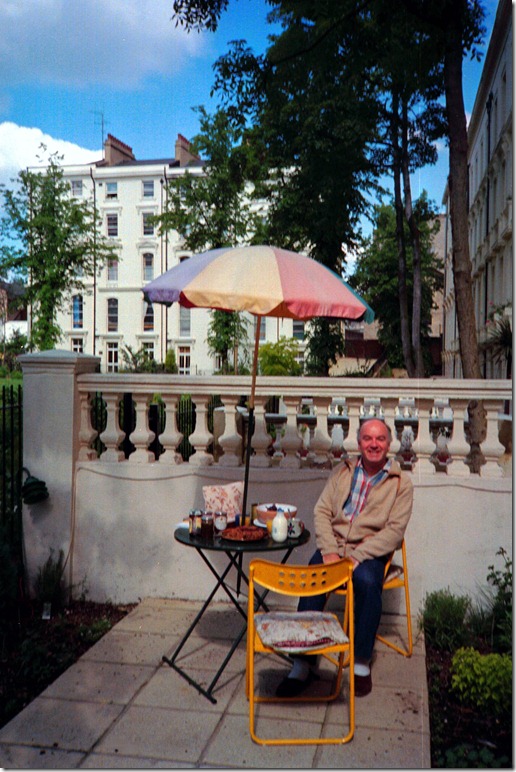
I thought he was out of his mind. However, such was his persuasive power that we ended up as the successful bidders for one of the two properties: 15 Bristol Gardens. Then came the heartburn of securing the finance – Len’s first option, the Allied Irish Bank (Len was born in Belfast), got cold feet, but finally we managed to persuade Barclays Bank to come through with the mortgages. With the help of an architect friend (Peter W.) and a builder (Peter B.), this disaster of a house was turned into two flats – one for Len (the garden flat) and one for me (the top two floors). I’m afraid that we managed to drive our builder into bankruptcy in the process, but eventually, and through a lot of our own work, we ended up with two flats in the up and coming area of Maida Vale. The house was a bit cantankerous, but it did deliver a lot of pleasure and good times during the 1980s to us both. Here’s Len partaking of breakfast in his garden at the back of the house.
I moved to the Netherlands for my work in late 1983, and eventually started renting out the top flat to a succession of people. This put Len in the position of being the landlord’s representative living downstairs, a role that he certainly didn’t want or ask for. However, after telling me in no uncertain terms that he objected to the role being thrust upon him, he accepted it with good grace and performed it admirably. Finally, in 1995, I sold the flat to Len. I can’t now recall how long he continued to live in Bristol Gardens, but eventually he sold the house and moved to a house in a nearby Mews.
Up until mid-2004, I would often be back in London on business, and very often stayed with Len. That invariably meant very late nights full of wide-ranging conversations washed down by a bottle or two of wine (or, as he would say: a bucket of wine). I recall one occasion, following a visit to the newly-opened Tate Modern, where we sat up all night talking about the art, and life in general. Fortunately, I did not have to go to work the following morning.
Because I was living in the Netherlands in the mid-1980s, Len stepped in to being in direct contact with a friend of mine who was HIV-positive. As a result, he became close friends with Kerry, with whom he shared the same wicked sense of humour. The three of us went on holiday together to the South of Spain in September 1986.
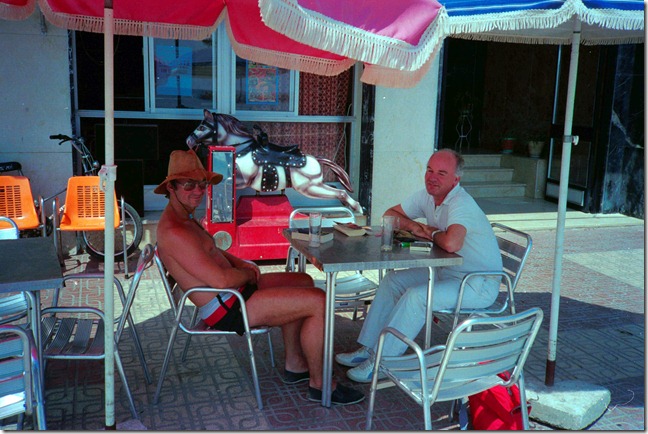
We stayed in the holiday home owned by Kerry’s sister in Murcia. They drove down in Kerry’s car from Calais, having many adventures on the way, while I flew to Malaga, where they picked me up. By the time we arrived at the house, it was dark, so they asked me to go ahead and switch on the porch light while they got the case out of the car. I didn’t suspect a thing, so I went ahead, found the switch and turned it on. Instantly, a swarm of insects and beetles flew straight at me – some of them bright green, and hard, like dried peas. Naturally, I let out a shriek, whereupon Len and Kerry turned to each other and said loudly in unison: “Yep, he’s a queen…”
Kerry and Len could both truthfully say that they had danced with Nureyev. Kerry, because he was a ballet dancer by profession, and Len, because he once met Nureyev at a party and asked him for a dance.
Len lived life to the full; I could never keep up with him. So I contented myself with listening to the many tales that he told. He was a great raconteur, and at many a dinner-party would hold us all spellbound as he wove his tales, which were frequently outrageous and would reduce his listeners to tears of laughter. He moved through all of society’s strata, and brought back stories to share with us. As a result of this oral storytelling, most of his anecdotes only exist in our memories, but here’s one I found in one of his letters:
It reminds me of when I was staying at the Loyal Liver Hotel in Bangkok (Royal River Hotel). Eventually I got so used to this that I used to leap into a taxi and with a straight face say in perfect Thai-English “Loyal Liver Hotel, Sangheee!” Which usually worked, though not always, because not all taxi drivers spoke Tinglish. So the hotels had cards printed with the address in English on one side and in Thai on the other.
One night I had been out visiting the boy-boy and boy-girl bars with the AIDS Task Force and they gave me a card showing their new condom promotion campaign for sex tourists which said: “Welcome to Bangkok. We want you to be safe whilst you are here. Please wear this condom when you are with me and it will make me feel safer and we can have good times together”. English on one side, Thai language on the other.
At the end of the evening, I leapt into a taxi and said “Loyal Liver hotel Sangheee!”, but no response so I took out a card and gave it to the taxi driver, who as Thais do when they haven’t understood, went into a meditative state to work out what you mean. We sat like that for a few minutes until I realised I’d given him the wrong card. I can imagine him later telling his wife in Thai: “Hey Martha, you’ll never guess what happened tonight!”
He also had a reflective side, so that his stories could also be moving and profound. I keep a letter in which he describes the experience of attending the funeral of a friend’s father where he pens loving portraits of the participants that bring them instantly to mind for me.
In September 1996, Len turned 50. Despite living in London, Len decided to mark the occasion by holding the party in Southern Spain at a campsite run by José and Tony, two close friends of his. People came from far and wide and it was a huge success. We ended the party dinner with a singing contest between the Spaniards and the rest of the guests fighting back with a variety of Irish, Scottish, American and German ditties. I think it was a draw, but my memory was extremely hazy by that point in the evening…
Len was born into an Irish Catholic family. Whilst in later life, he was an atheist and no longer a practicing Catholic, he recognised the value of his Catholic education:
During that time I received a very good education, compassion for those poorer and needier than me, a sense of honesty and of public service which I followed all my working life. I never suffered any guilt and I often laugh when I hear my ex-prison service psychologist (English) colleagues pontificate about ‘Catholic’ guilt. The most guilt ridden people I’ve met have been the English… not the French, Spanish, Irish or Italians. It’s true that in Ireland ‘Holy Mother Church’ was very down on sex but without that the whole country would have been at it day and night!!
Late in life, he had the rewards of being the “uncle” to the twin children of his dearest friend, Mo (Mohammed). He doted on Ayman and Ayaa, and they adored him in return.
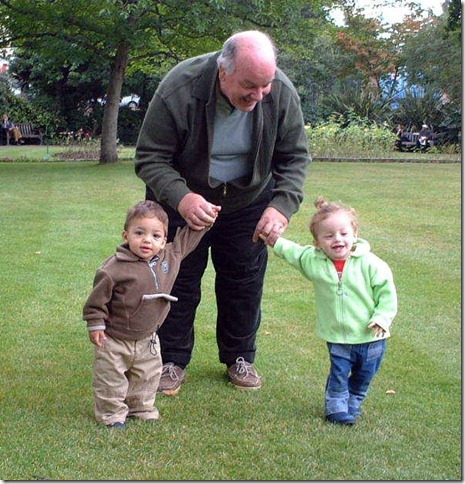
He often remarked to me on the simple and unalloyed joy that they brought him. They, like his beloved Mo, will miss Len sorely.
In 2009, although he was not in the best of health, he still made the effort to travel to the Netherlands and attend my 60th birthday party. During the weekend we were together we again had the opportunity to talk about life in general and at length. We talked about the choice of music for our own funerals. Typical of Len, as well as the Mozart and Monteverdi, one of the songs he wanted to have at his own memorial service was Marlene Dietrich singing “See What the Boys in the Backroom Will Have”:
See what the boys in the backroom will have
And tell them I’m having the same
Go see what the boys in the backroom will have
And give them the poison they nameAnd when I die don’t spend my money
On flowers and my picture in a frameChorus: Just see what the boys in the backroom will have
And tell them I sighed and tell them I cried
And tell them I died of the sameAnd when I die don’t buy a casket of silver
With the candles all aflameJust see what the boys in the backroom will have
And tell them I sighed and tell them I cried
And tell them I died of the sameAnd when I die don’t pay the preacher
For speaking of my glory and my fameJust see what the boys in the backroom will have
And tell them I sighed and tell them I cried
And tell them I died of the same
I last saw Len in person in January 2011, when I visited him in the Royal Free Hospital in London over the course of three days. It was the opportunity for him to confirm his choice of music for his memorial service; he gave me my instructions as to what he wanted, and which versions. It was also an opportunity to reminisce on all the times we had together. When the time came to take our leave, we both fully expected that this would be the last we would see of each other. It was bittersweet, but with no regrets. However, Len had one last trick up his sleeve.
Len was moved to a Nursing Home, but he was determined to get back home to his house in Oliphant Street and lead as independent a life as he could to the very end. It seemed an impossible goal back in January, but once Len put his mind to something, he would get there. And get there, he did. In June, he moved back home. I spoke to him a few times via computer video conference, and he was very much improved and on very good form. The difference between then and when I saw him in January was incredible.
It was, perhaps, too good to last. He went back into hospital very recently, and developed heart problems last Sunday. He died a peaceful death yesterday. Mo rang us late last night with the news. Martin says that we should open our best bottle of champagne and drink it to his memory, and today that’s just what we’ll do.
Len, for all the ups and downs we had, it’s been wonderful. We miss you.

Leonard Patrick Curran
16 September 1946 – 10 August 2011

A right ‘Royal’ eulogy for a regal and well loved fella.
Chris Connor

Prachtig verwoord. Een mooi man en een fijne vriend.
Carolien Kooi

Many condolences, Geoff. What a wonderful friendship to have enjoyed. And how bittersweet to recall.

Now it’s time to reply to Geoff’s blog about Len.
When I read Geoff’s Blog, the tears ran over my face. Len was a special friend for Geoff and vice versa. I know that Len would be very proud about what Geoff wrote about him.
Len came into my life when I was introduced as the new lover of Geoff, it happened a hundred years ago… He was not convinced about me and saw me as a handsome guy with not much cells in the brain. It took years to get to know each other, the distance, the language, misunderstandings etc.
I wish my English was better, but I do my best.
In the years to come Len and I came to understand each other with respect and on the 60th birthday of Geoff ( I secretly invited Len for the party in the Netherlands) Len came to stay with us.
That evening/night Len and I spend the night talking, a lot of drinks and cigarettes, from 4 till 9 o ‘clock in the morning. He wanted to know why I loved Geoff and in the end he gave me his blessings. That was a struggle for me to explain my thoughts and feelings to such an intellectual man, but I managed and it affected our friendship in a very warm way.
My love for the man, who was a very dear friend for more than 40 years of my lover.
martin van hooft

Lovely… someone I would have wanted to know…
Ed
16 Sept 1947
[…] latest episode of Doctor Who aired. I had travelled to Northern Ireland to say a final goodbye to my dearest friend. That’s another story, and I don’t feel ready to tell it, so instead I’ll turn to the […]

Geoff, that’s an amazingly well-written piece. Thank you for making, in some small way, such a person real for the rest of us.
[…] My dearest friend, Len, had, amongst his many other talents, an eye for Art. Many was the time during his travels abroad that he would struggle back with a sculpture, or a huge painting, and then argue with the airline about excess baggage. […]

Dear Geoff I am grieved to learn about the death of Len Curran.I first met him in the mid seventies when he was involved with a counselling service for gay men.We became friends and our relationship continued until I moved to Australia in 1979.It was resumed on my visits to London and we travelled to Spain in 1989 and stayed with Tony and Jose.After another falling out in the early nineties,I never saw him again,I may have met you when I stayed at the grand house in Maida Vale
I would like to contact Lens sister and Tony and Jose in Spain,and would like their e-mail details..if possible
regards
Abed
Abed, thanks very much for your comment. I’ll send you a private reply.

Many years (almost 20?) ago I had an enormous pleasure to meet and work for a couple of days with Len, over one of his numerous travels abroad. This time to Warsaw. Some time later we met again in his home in Little Venice, visited Holloway and Wormwood Scrubs. Born just a week earlier than my Mother …. Amazing personality. And wonderful recollection. Thank you.
Piotr
[…] of Margi Levy in the Guardian. I knew Margi back in the 1970s. I met her via a mutual friend, Len Curran. She was warm, funny, passionate and intelligent. Len was a great one for having parties, and I […]
[…] on BBC television in the late 1980s. The woman had style and wit. She was also the neighbour of my best friend who was living in a London Mews at the the time. I’m sorry I never had the opportunity to meet […]
[…] doesn’t seem possible that it has been ten years since Len died. He is still much missed. He still occasionally visits me in my dreams. I’ll be back in a […]

A very touching memorial.
I knew Len in the mid 70s. He and I were students together at the Institute of Education in London – we were doing a Masters degree in Reseach Methods in Child Psychology. For a few years we were firm friends until i moved to New Orleans in 1981.
Thanks for publishing your recollections of him. He was a remarkable man – larger than life!
Peter Clark
[…] at La Scala. She said that she had never seen Nureyev in person, so I told her the story of when Len & I saw him in the production he did with London Festival Ballet at the London […]
 Geoff Coupe's Blog
Leave a comment