Reflections on life at “De Witte Wand”…

  • Microsoft’s Big Day

    Microsoft had a big day of product announcements yesterday. I watched the videostream to see and hear what they had to say.

    Product announcements can be tricky things to do well. Too often they can be mind-numbingly boring, and Microsoft has been guilty of doing plenty of those in the past. However, I have to say that – for the most part – Microsoft did a very good job. Agreed, the first few minutes did not bode well. The event opened with the typical corporate aspirational video, followed with a welcoming introduction from Terry Myerson, Microsoft’s Executive Vice President of the Windows and Devices Group. Gawd love him, he’s clearly doing a good job at Microsoft, but an inspirational speaker he is not. He opened with some facts and figures about the takeup of Windows 10 in both the consumer and business markets, then segued into talking about Xbox One and finished by introducing a demonstration of a HoloLens game. The demonstration looked pretty impressive, but questions remain about the experience that the wearer of the HoloLens actually sees. Time will tell.

    Following that was a video and then a product presentation of the next generation of the Microsoft Band given by Lindsey Matese from the team that developed the product. She did a reasonable job, and there were whoops and cheers from the crowd, but my attention kept wandering. Perhaps it’s because the Microsoft Band and the Microsoft Health cloud service behind it is currently focused on athletes. If a focus on pensioners’ healthcare were to be added, then I’m sure that I would be more interested.

    Right, we are now 30 minutes into the product announcement, and so far, it’s your typical corporate event. Now, Myerson moves on to talking about Lumia and Surface, and introduces Panos Panay (head of engineering of all premium Microsoft devices), and things move up a gear or three.

    Panay is a showman. He is passionate about his products, and there’s more than a whiff of the preacher about him. He works the crowd (and the crowd are already a noisy bunch) and they respond enthusiastically. Part of me hates this style of presentation, because it’s so nakedly manipulative – like an evangelical prayer meeting – and part of me can’t help admiring it, because he does it so well. It’s helped, of course, by the fact that when you get down to it, the products mostly stand up to the hype.

    He starts with the Lumia phones: the 950 and 950XL.

    Panay introduces Bryan Roper to demonstrate the Continuum feature of the new Lumia phones, and once again I think this is not your father’s Microsoft product announcement. Once again, I am struck by my ambivalence towards Roper’s style of presentation. Roper reminds me of the old-style market trader, with his patter. I should hate it, but I am won over by the corniness of it, by his humour, and by the fact that he really does demonstrate (with consummate ease) why Continuum has the potential to turn the Windows Phone business around and grow the market share in the Business and Enterprise markets.

    Back to Panay to wrap up the Lumia part of the presentation, and then he says: “So, I guess you want to talk about Surface?”.

    He starts with a review of how well the Surface Pro 3 has done in the market (“98% of people who use Surface Pro 3 recommend it”), and then unveils the Surface Pro 4. He proceeds to walk us through the technology of the Surface and the Surface Pen, and throws in a little dig against the Apple Pencil, which is loved by the home crowd. After 20 minutes devoted to the Surface Pro 4 and related products, he asks: “Do you want to talk about another product?”.

    This is his cue to move into the final part of his presentation and introduce the Surface Book – Microsoft’s entry into the 2-in-1 Laptop market. The crowd goes wild.

    After a further gripping presentation on the Surface Book, he is finished, and after a final video, the floor is given over to Satya Nadella (Microsoft’s CEO) to wrap up.

    Panay and Roper delivered, and lifted that product announcement up several levels.

    Leave a comment

  • Eyewash, Flapdoodle and Bullshit

    The UK Parliament is about to debate a bill put forward to change the law on assisted dying. In yesterday’s Observer, the current Archbishop of Canterbury had an opinion piece on why he believes assisting people to die would have detrimental effects both on individuals and on society.

    Needless to say, I disagree with his viewpoint.

    I can’t help feeling that he’s being a tad disingenuous when he claims:

    With other faith leaders, I have joined in writing to members of parliament, urging them to oppose Rob Marris’s assisted dying bill.

    We have written, not in an attempt to push “the religious” viewpoint on others, but because we are concerned that a change in the current law on assisted suicide would have detrimental effects both on individuals and on our society.

    It sounds very much like pushing the “religious viewpoint” to me. While he might wish to claim that:

    …the faith leaders’ letter represents the considered opinion of our communities that have analysed, discussed and debated the issue over many years. Their response springs from philosophical and theological reflections as well as from a vast range of pastoral experience and a profound sense of compassion.

    …it really deserves little more than the Mandy-Rice Davies response: Well, he would, wouldn’t he? As Ophelia Benson writes, it’s typically loaded language that at its heart is little more than “eyewash, flapdoodle and bullshit”.

    He sets up a completely false dichotomy:

    …we need to reflect on what sort of society we might become if we were to permit assisted suicide. At present, we can show love, care and compassion to those who at all ages and stages of life are contemplating suicide.

    We still can, and, more to the point, we still do here in The Netherlands where assisted dying is legal. It would be as well to get some facts on the table, and dismiss the “slippery slope” argument in Welby’s rhetoric:

    The incidence of the different circumstances of death in the Netherlands since 1995 has been determined in several successive robust epidemiological studies (Onwuteaka-Philipsen et al., Lancet. 2003;362: 395-399). In 2005, of all deaths in the Netherlands, not 20% but 0.4% were the result of the ending of life without an explicit request by the patient (van der Heide et al., New England Journal of Medicine. 2007;356:1957-1965).

    In the UK, the figure was 0.33%, i.e. quite similar to the 0.4% in the Netherlands (Seale, Palliative Medicine 2006; 20: 3-10). These instances have been found to be in dying patients who had become incompetent, were compassionate and are generally considered ethically acceptable (Rietjens et al. Death Studies 2007;31:205-221).

    In 2005 in the Netherlands euthanasia was given in 1.7% of deaths and physician-assisted suicide occurred in 0.1%. These rates were somewhat lower than in 2001. Since the legalisation of euthanasia in Belgium its overall incidence changed little, but the care with which it is carried out improved markedly (Bilsen et al. New England Journal of Medicine 2009; 361: 1119-1121). If cases of euthanasia with no or only perfunctory precautions came to light, there would be prosecution. And if in the future there were to be evidence for anyone requesting euthanasia because of e.g. a waiting list for palliative care, there would be an outcry. Thus, legal euthanasia is one more safeguard against the health-care system falling short of its duty to offer optimal care at the end of life. In Belgium, legal euthanasia and palliative care are not opposites, but complementary and synergistic (Bernheim et al., British Medical Journal 2008;336:864-867).

    Note that Welby uses the term “assisted suicide”. As a hospice director pointed out:

    There is often a deliberate and emotive attempt to confuse the terms assisted dying and assisted suicide. These are subtly but fundamentally different. People with a terminal illness are not choosing to die, they are already dying. Assisted dying offers an individual with a terminal illness and clear prognosis to have some say in the timing and place of their death if they want it. And, what is likely to be proposed in the bill is restricted to people who are terminally ill with a prognosis of less than six months. Individuals would also be required to administer the medication to end their life themselves.

    However, facts do not seem to concern Justin Welby overmuch. He seems more content with hyperbole, half-truths and lies:

    We risk all this for what? Becoming a society where each life is no longer seen as worth protecting, worth honouring, worth fighting for? The current law and the guidelines for practice work; compassion is shown, the vulnerable are protected. In spite of individual celebrity opinions and the “findings” of snap opinion polls (that cannot hope to do justice to the intricacies of the issue) the current law is not “broken”. There is no need to fix it.

    The current law in the UK is broken. I am relieved that I live in The Netherlands where I have the option of assisted dying, should circumstances bring me to that point.  I’ve lived a good life, and hopefully will continue to do so for many more years. I don’t think it is selfish of me to wish for a good death as well.

    Leave a comment

  • Into The Woods…

    Just over a year ago, I blogged about the forthcoming film version of Into the Woods, the musical by Stephen Sondheim, which would be produced by Disney. I was a bit concerned that, despite a strong cast, the saccharine hand of Disney would ruin one of Sondheim’s best works. Add to that the fact that it was rumoured that Disney would be changing the story, and I wondered whether justice would be done.

    Fast forward a year, and I’ve now seen it. It’s not perfect, but it’s pretty damn good.

    What astounds me are the hugely negative reviews on IMDB. Dozens of one-star reviews from people who clearly hated the film.

    Some didn’t realise it was a musical, and hated it because of the fact that people sang in the film. Some who did realise that it was a musical didn’t like the tunes. This is rather like Emperor Joseph II telling Mozart that there are too many notes…

    Sondheim is a genius, and Into the Woods contains some of his best work. Highlights are “Agony”, “On the Steps of the Palace”. These are nicely done in the film, while Meryl Streep gives “Stay with me” real power and pathos.  And of course the perpetuum mobile of “Into the woods” itself is like a well-oiled sewing machine producing a rich tapestry of song.

    And then there are the legions of parents who unthinkingly thought that a Disney film would be suitable for young children, despite the fact that it has a PG certificate. Er, hello, people, have you never actually read the Brothers Grimm? Clearly not, since in the original Cinderella story, the stepmother cuts off the toes and heels of her two daughters in order to make the shoe fit, while the witch blinds Rapunzel’s prince by having his horse throw him onto a forest of thorns.

    There are five fairy tales: Cinderella, Jack and the Beanstalk, Little Red Riding Hood, Rapunzel, and a Sondheim invention, the Baker and his wife. The Baker’s tale is the thread stitching the other tales into one.

    Act I ends “happily ever after”, but then Sondheim deepens the stories in Act II showing the broader skein of human frailties. Be careful what you wish for, indeed.

    From the witch’s lament:

    No matter what you say, children won’t listen.
    No matter what you know, children refuse to learn.

    Guide them along the way, still they won’t listen.
    Children can only grow from something you love to something you lose…

    To the prince’s seduction of the baker’s wife in “Any moment”:

    Right and wrongs don’t matter in the woods, only feelings.
    Let us meet the moment unblushed, life is often so unpleasant,
    You must know that, as a peasant –
    Best to take the moment present as a present for the moment…

    In the stage play, the narrator and the Baker’s father are played by the same person. In the film, they are not, and I feel the film is weakened by this decision, particularly since the Baker’s father is played by Simon Russell Beale, and he is rather wasted in his few moments on-screen.

    It seems to me that Disney has softened the impact of Act II. In the stage play, Rapunzel is killed; here she lives happily ever after with her prince. Sondheim’s moral that life is messier than a simple fairy tale is somewhat lessened. Nevertheless, it’s a good effort – and far, far better than those depressing reviews on IMDB would suggest. It’s definitely worth taking a trip into the woods… No One Is Alone…

    Leave a comment

  • Groove Music – Amnesia in Action

    Microsoft has released a new version of its Groove Music app (version 3.6.1210.0) for Windows 10. They’ve also introduced yet another bug into it, a showstopper, as far as I’m concerned.

    Groove keeps losing my entire album collection, and trying to rebuild it in a never-ending cycle.

    I have 1,000+ albums stored on a Windows Home Server 2011 system, and connected to it are four Windows PCs (desktop, laptop, a Windows Tablet and a Surface 3), all running Groove and Windows 10. On each of the connected devices, the root music folder on the WHS2011 system is defined as a music library (and hence defined as a watched folder – in my case, \\DEGAS\Music – within Groove on each system).

    Groove 04

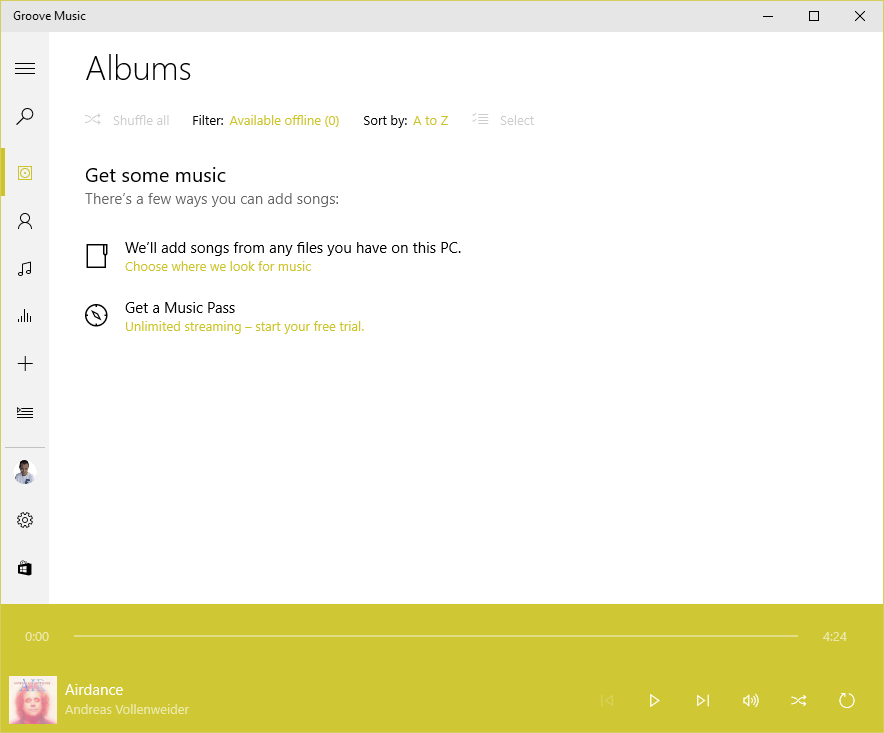
    Now that all the instances of Groove have been updated to version 3.6.12.10.0, what will happen is that when I’m viewing my Albums, the albums will suddenly disappear, Groove will say there are zero albums available offline, and  display the “Get some music” message.

    Groove 02

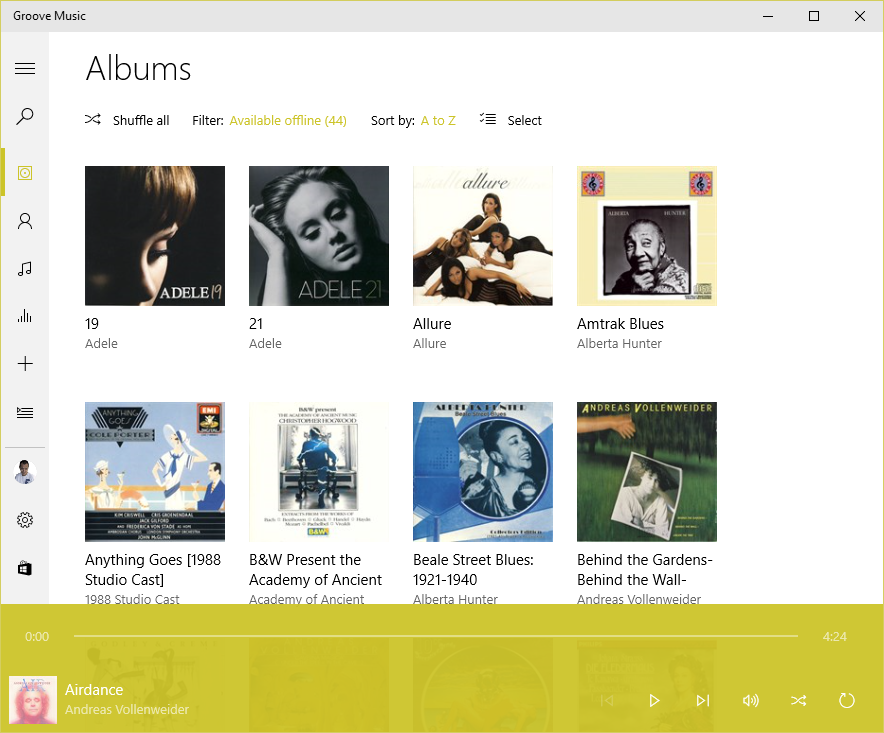
    After some time (30 minutes?), or a restart of the app, Groove will start re-indexing the music folders and albums will start appearing.

    Groove 03

    This goes on (slowly!) until all the albums have been scanned from the WHS2011 folders, at which point they will all suddenly disappear again and the process starts over.

    This is happening on three all four of the PCs. Interestingly, the Surface 3 is not losing the albums. However, it’s also not displaying the correct number of albums held in my music library. I have 1,103 albums in my collection; according to Groove on the Surface 3, I only have 1,084. I suspect that this instance of Groove isn’t actually watching my watched folders… Addendum: I forced the Groove on the Surface 3 to rebuild its index, and now the same thing is happening on the Surface 3 as on the other PCs.

    The 3.6.12.10.0 version of Groove is also not always displaying the “Adding music” notification when music is being added.

    I feel that Microsoft is not testing this app sufficiently well; I wonder whether anyone on the testing team bothers to test it with a library held on a Windows Home Server 2011 system.

    I don’t mind being a beta tester when software is in beta; but Windows 10 and the Microsoft apps are now released. Groove is still not fit for purpose.

    I have also sent this information in as feedback to Microsoft via the Windows 10 Feedback app. Whether this will result in a fix remains to be seen.

    Apparently, Microsoft has stated that for Windows 10 Home users, all operating system and app updates will be automatically installed, and this cannot be overridden by the user. That’s a bit worrying, since a bug in a new component can cause immediate damage. We don’t get the option to delay updates and check whether it’s safe to let installations proceed.

    Addendum 18 August 2015: Groove is now up to version 3.6.1239.0, but the issue is still present…

    Other people are also reporting this issue occurring for music collections held on both WHS 2011 and Windows Server 2012 systems, so I’m not the only one for whom this is a showstopper.

    Addendum 19 August 2015: This latest version of Groove running on my Surface 3 refuses to find any local files (including the collection on WHS 2011) at all. And it’s a hit and miss affair on my other systems as well. Groove on my desktop claims my collection has 1,109 albums available offline; on my Yoga 3 Pro, Groove says I have 1,112 albums, and on my ThinkPad 10, Groove says I have just 644 albums.

    Addendum 20 August 2015: after 36 hours(!) of adding files, Groove on my ThinkPad 10 now says I have 1,108 albums available offline. So what’s it to be? 1,109, 1,112, or 1,108? All instances of Groove are looking at exactly the same collection; one might think that they could agree on the correct total of albums. Oh, wait a minute, Groove on the Desktop PC has just lost the index again, and has restarted to index the collection, While Groove on the Surface 3 still resolutely refuses to see any albums at all…

    I’m sorry, but this software is absymal.

    9 responses to “Groove Music – Amnesia in Action”

    1. Rob Avatar
      Rob

      If Microsoft replies, I predict they will say WHS2011 has been unsupported since 8 January 2013, so tough.

      1. Geoff Coupe Avatar

        Funny if they do say that, since their product support lifecycle information states that Mainstream Support will end in April 2016 for WHS 2011…

    2. sesenter Avatar
      sesenter

      I came across this post when searching for information of how to force Groove to add music from watched folders. I’m using Windows 10 with a separate internal hard drive that I use for media, so my watched folder is primarily “m:\media” although windows media player is still ripping CDs to C:\users\steve\music but every time I try and change the rip folder to M:\media it locks up and is back to C:\users\steve\music when I start media player again. My experience so far with the apps in Windows 10 is that they aren’t at all intuitive, and that Microsoft has a ways to go if they don’t want Windows 10 to join some of the other legendary Microsoft Flops. As a support tech, I can emphatically say that the majority of end users just want things to make sense and work like they’re supposed to.

      Anyway, I’m ripping CDs into the c:\users\steve\music folder and it is being watched by Groove, but when Groove decides to add the new music is anyone’s guess. I can’t find a way to force it to add anything, either. Not to mention it’s a bit off putting using another program altogether to rip CDS.

    3. Mark Avatar
      Mark

      I will never understand why Microsoft chooses to make things so difficult. Although not groove-related I spent quite a bit of time trying to get OneDrive for Business to sync our file server drive to the cloud..only to find out Microsoft specifically put in code to prevent server folders from being synced.

      It is very possible/probable that Microsoft chooses to ignore WHS2011 in groove as a way to force you to start subscribing to their paid service.

      1. Geoff Coupe Avatar

        “It is very possible/probable that Microsoft chooses to ignore WHS2011 in groove as a way to force you to start subscribing to their paid service.”

        Oh gawd, I hope not, but the fact that it is entirely conceivable speaks volumes for the current perception of Microsoft in customers’ eyes.

    4. Breno Assis Avatar
      Breno Assis

      I also have the very same issue here. Upgraded yesterday and the installed version of Groove (Music) did index my whole libray, today (Aug 19th) the app was updated to 3.6.1239.0 and the issue began… Got here trying to find a solution… If anyone manages to find one.

    5. […] out; the Windows 10 music player Groove continues to be without a “Play to” function and is practically useless in other ways. In addition, with every release of Windows 10 Microsoft seems content to give us a […]

    6. jarrodfactor Avatar

      Hi Geoff. Frequent reader of your blog, which I first came across when searching for some troubleshooting with the Cast To feature.

      I too have a Denon amp, and it actually works pretty well with Cast To, apart from Windows incorrectly limiting (and transcoding down) the resolution of audio sent to it. Hi-res Flacs are converted down to 44.1khz, even though the amp can natively play back 96/24 flac files.

      Do you know of a way of editing the Windows driver for the Denon amp to add more audio formats?
      In the Device Details there is a property called DLNA UPnP sink protocol info which has the value:

      http-get:*:audio/L16;rate=44100;channels=1:DLNA.ORG_PN=LPCM,http-get:*:audio/L16;rate=44100;channels=2:DLNA.ORG_PN=LPCM,http-get:*:audio/L16;rate=48000;channels=1:DLNA.ORG_PN=LPCM,http-get:*:audio/L16;rate=48000;channels=2:DLNA.ORG_PN=LPCM,http-get:*:audio/mpeg:DLNA.ORG_PN=MP3,http-get:*:audio/x-ms-wma:DLNA.ORG_PN=WMABASE,http-get:*:audio/x-ms-wma:DLNA.ORG_PN=WMAFULL,http-get:*:audio/mp4:DLNA.ORG_PN=AAC_ISO,http-get:*:audio/3gpp:DLNA.ORG_PN=AAC_ISO,http-wavetunes:*:audio/x-ms-wma:*,http-get:*:audio/wav:*,http-get:*:audio/x-wav:*,http-get:*:audio/flac:*,http-get:*:audio/x-flac:*,http-get:*:image/jpeg:*

      … so it seems obvious what needs to be added here. But I can’t for the life of me work out how to make the additions.

      I agree it’s a shame the way Microsoft has treated it’s Play To / Cast To feature. I just discovered that it also works with my WDTV – and quite successfully too, streaming full 1080p MKV files with little issues.

      1. Geoff Coupe Avatar

        Hi jarrodfactor, I’m sorry, I don’t know how to edit the Windows driver to do this. It sounds as though you would need to be able to get the source for the driver, and I don’t know how you would do that.

    Leave a comment

  • Windows 10

    So, the great day is here; Windows 10 has been unleashed.

    Microsoft is in full Dr. Pangloss mode at the moment, trumpeting that Windows 10 is the best of all possible worlds.

    Forgive my cynicism, but from what I have seen so far, I think it’s more of a curate’s egg.

    The one saving grace is that it might improve over time, but going on Microsoft’s past performance, I’m not holding my breath. Having said all that, I will be updating all our windows devices to Windows 10, but not without regrets.

    8 responses to “Windows 10”

    1. Mike Tremoulet (@coffeemike) Avatar

      Curmudgeon. I’m having fun with it. 🙂

      Thanks for teaching me “curate’s egg”. Now to work it into conversation someplace so it sticks…

      1. Geoff Coupe Avatar

        It’s fine for desktop users, but Microsoft has ripped out too many good Windows 8.1 features for hardened tablet users like me.

    2. Mark Avatar
      Mark

      After using Windows 10 for awhile now, I find surprisingly that I don’t like the menu. On my low-powered tablet, the Cortana-powered search is slow and jerky almost always missing the first letter I type. Having the desktop apps forced into alphabetic sorting makes sense in a full-screen view, not so much in a scrolling one and if I click “all apps” then decide I want to type – I have to click down in the type window (which looks like it is greyed out) before I can type anything.

      1. Geoff Coupe Avatar

        Yup, “fast and fluid” it certainly ain’t…

    3. vanroaming Avatar

      I have seen you commenting elsewhere about the dumbing down of the Windows 10 photos app. Are you able to use Windows Photo Gallery 2012 (or any other version of WLPG) in Windows 10?

      1. Geoff Coupe Avatar

        Yes, WPG 2012 will run in Windows 10. I doubt whether Microsoft will develop it any further, but if it meets your needs, then you can use it under Windows 10. There’s an issue with it that means that I don’t use it to edit my metadata any more (it corrupts Makernotes metadata produced by Canon cameras in the workflow that I use), but most people won’t worry about this.

        1. vanroaming Avatar

          Thanks. It’s good to hear that WPG 2012 will run. I had never heard of Makernotes so I hope their corruption won’t matter to me.

          1. Geoff Coupe Avatar

            I don’t think the Makernotes issue will bother you – as I say it’s down to the combination of tools that I use. See this blog entry for the full gory story.

    Leave a comment

  • Media in Windows 10 – Stepping Backwards?

    Just a couple of days to go before the launch of Windows 10, and Microsoft has blogged about the built-in apps present in the new operating system. Microsoft describes the apps as “great”. I think many of us would beg to differ; we are finding that the media apps in particular are a step backwards from those that are in Windows 8.1.

    Barb Bowman goes into detail about the shortcomings, and, if using Windows to play back your media is important to you, you should definitely check out her post.

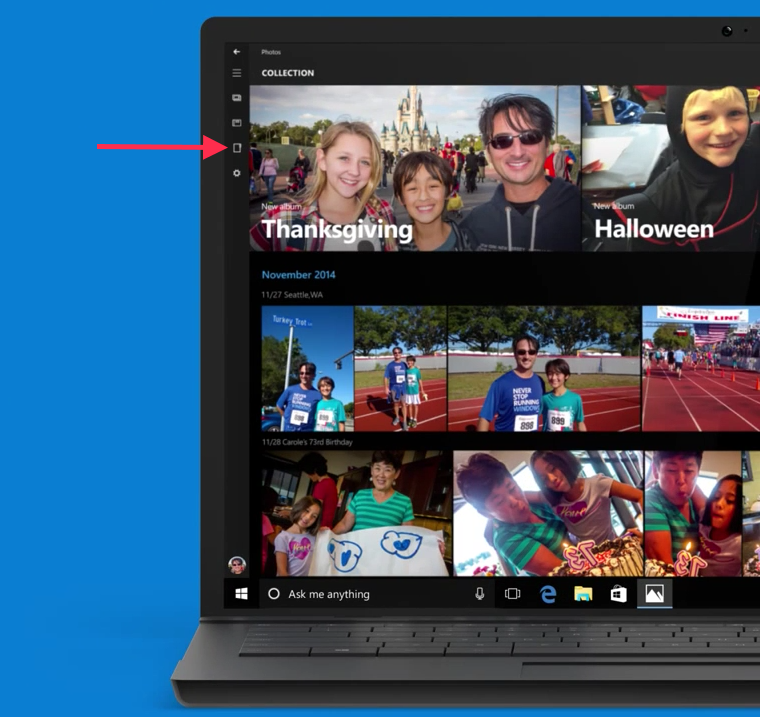
    In addition to these shortcomings, the Windows 10 Photos app is pretty abysmal. You can’t browse individual folders of pictures, it will only display pictures arranged by date. Interestingly, browsing by folders was originally in the app, but it has now been removed by Microsoft. I notice that the advert in the Microsoft blog post still shows the older version of the app, with folder browsing present:

    Windows 10 08

    Either Microsoft are being disingenuous here, or someone’s been sloppy, because the Folder view is missing from the latest version (and has been for some months now):

    Windows 10 09

    So where has the Folders view gone? I need it back – it makes it impossible to find stuff without it (and there is still no possibility to search photo metadata tags in the app).

    Frankly, with the current state of this app, I find it next to useless, and use other photo apps in preference. However, Windows 10 will force you to use it in certain circumstances. For example, if I want to add someone’s picture to their contact details in the People app, Windows 10 will bring up the Photo app so that you can select the picture you want to use. Without a folders view, I have to use File Explorer to find out the date taken of an image, and then use the Collection view in the Photos app to scroll to the date of the image to copy it into the People app. This is extremely cumbersome, and far from fast and fluid.

    It almost gives the impression that Microsoft teams don’t actually test out the use cases… I am not impressed.

    Leave a comment

  • The Egg Master

    I didn’t know whether to laugh or cry at Rhik Samadder’s review of the Egg Master

    So I did both.

    The comments are worth reading as well. A&E units – you have been warned…

    2 responses to “The Egg Master”

    1. Matt Healy Avatar
      Matt Healy

      Yuck! Do shops in the Netherlands have a special shelf dedicated to “As Seen on TV” tchotchkes? In the US, this idiotic contraption would be right at home on that shelf.

      1. Geoff Coupe Avatar

        No, thankfully, we do not – not that I’ve noticed anyway…

    Leave a comment

  • Windows 10 Looms…

    We are just three weeks away from Microsoft launching Windows 10 on the 29th July. The tech media has plenty of articles discussing the pros and cons, and now the “should I upgrade to Windows 10” articles are starting to appear in the mainstream press. Here’s one from the UK’s Telegraph. It’s actually surprisingly positive:

    Windows 10 for desktop is a massive improvement over Windows 8. It builds on the more intuitive aspects of Windows 7 and Windows 8, combining the familiarity of the Start menu with a number of new features that genuinely seem to improve user experience, such as Edge and Cortana.

    It’s also surprisingly accurate (I’ve begun to despair at the quality of what passes for technical journalism these days, even in the tech press), although in some places I would have a different take. For example:

    When used on a tablet or smartphone, Windows 10 is not hugely different from Windows 8; most of the changes are under the hood. However, small improvements in usability should make learning the system less of a chore for the uninitiated.

    As a user of Windows 8.1 on various tablets, I would disagree with the first part of this statement. There are substantial changes, and the changes are not under the hood, but very much in your face. The Charms bar of Windows 8/8.1 has gone and been replaced by the Action Centre, which holds notifications and is the entry point to Windows settings. Windows 10 also introduces the dreaded “Hamburger” button. These and other changes represent a major shift away from the design language pioneered in Windows 8/8.1 and in Windows Phone 8/8.1.

    So for those of us that use Windows 8.1 and are completely comfortable with it, the move to Windows 10 is going to mean changes, and the relearning of our muscle memories. People who use Windows 7, on the other hand, are, I think, going to find it easier to adapt, because Windows 10 is very much closer to what they are used to.

    After trying out the previews of Windows 10, I wrote, back in April, that I just didn’t like it. There seemed to be too many features of Windows 8.1 that had been removed or changed.

    Now, twelve weeks and several preview builds later, I am somewhat less anxious. I have moved three PCs over to Windows 10. A laptop, a tablet and lastly, and most recently, my main workhorse, my Desktop PC. I have left my Surface 3 tablet running Windows 8.1; I will wait until the official release of Windows 10 before upgrading it.

    I still miss the Smart Files feature of Windows 8.1, and the new version of this feature probably won’t appear in Windows 10 until late 2016. I will also be going through a period of relearning how to use my tablets.

    Will the pain be worth the gain? In some areas, definitely yes. Windows 10 introduces native support for the FLAC audio and MKV media container formats. Both of these are important to me for the future of my music and home cinema systems. However, what Microsoft gives with one hand, it taketh away with the other. The “Play to” feature of Windows 8.1 is renamed to “Cast to” in Windows 10, and this function will have fundamental changes.  It appears as though Microsoft has removed DLNA DMR devices from system-level control (e.g. the Devices item in the Win 8.1 Charms bar), and demoted that function to needing to be controlled on an app-by-app basis.

    That’s all very well if app developers actually take account of it. I note that Microsoft’s Music app does not do this, and I also note that the Microsoft spokesperson uses the qualifier “eventually” in the context of support by the Microsoft app. That could mean it will be available on July 29 or it could mean in five years time. That does not give me a warm feeling.

    The Music app has recently been rebranded by Microsoft as the Groove Music app. It’s still primitive, and does not even have the capabilities of the venerable Windows Media Player, Microsoft’s Windows desktop application that last had an update back in 2009. For example, as a lover of Classical music, I want to be able to search and sort my music collection by composer. I can do this in Windows Media Player – in Groove? No, not yet – and I suspect not ever.

    Microsoft keep saying that their media applications will have a constant stream of improvements, but they’ve been saying this for a very long time now, with precious little result.

    So in summary, the underlying platform of Windows 10 is good, with new features that promise much. It remains to be seen whether Microsoft and other players will exploit that platform with a new generation of apps that deliver value and delight.

    Leave a comment

  • Left Hand – Meet Right Hand…

    Once again, Microsoft demonstrates that its left hand seemingly hasn’t got a clue what its right hand is doing.

    The OneDrive team has been making “improvements” to the OneDrive service. A couple of weeks ago they blogged about these.

    A couple of days ago, Martin tried to send some photos of the garden to a friend. He uses Windows Live Mail (WLM) as his email program. This has a very nice feature that allows the easy creation of a photo album in an email, and it uses OneDrive. What happens is that WLM will create a folder in your OneDrive to hold the full-size photos, upload those into OneDrive for you, and use thumbnails in the email message. So the email is small and efficient, and the recipient can view the photos in the OneDrive folder.

    As I say, it’s a nice feature, and very easy to use.

    Except that this time, the email got stuck in WLM’s outbox; it would never complete the publishing process. We tried it a couple of times, and the result was always the same.

    It turns out that this problem is hitting a lot of people who are using the Photo Album feature in WLM. It’s been caused by a change made by the OneDrive team in the OneDrive service.

    Clearly, no-one in the OneDrive team uses Windows Live Mail. It’s probably too old-school for them. I have a strong suspicion that Microsoft would love to drop WLM and the rest of the Windows Essentials software suite. It hasn’t had an update for several years now.

    The big question now is what will Microsoft do? Will the OneDrive team fix the issue, and restore the photo album feature to WLM users? Or, as I fear will be the case, will this just be ignored in an attempt to shift users away from WLM and onto the Mail app that will be delivered in Windows 10? Conspiracy theorists will probably surmise that this breaking of WLM is a deliberate move on the part of Microsoft. I suspect it was probably unintentional, but it does now provide a useful lever to Microsoft to drive users away from future use of WLM. So I don’t think we will see a fix…

    Addendum: 8 July 2015. Well, I may be wrong. It looks as though the issue has been fixed. No official word from Microsoft, one way or another, but photo albums do now seem to be getting through…

    Addendum: 13 October 2016. It turns out we only had a temporary reprieve. What appears to be happening is that Microsoft is making changes to its Outlook infrastructure in the cloud, and these break the photo feature in WLM. There’s no chance that Microsoft will reverse these changes, and equally no chance that they will adjust WLM to fix the issue. Sigh.

    2 responses to “Left Hand – Meet Right Hand…”

    1. Matt Healy Avatar
      Matt Healy

      This illustrates a key advantage of open source tools: nobody can take them away from you.

    2. Ludwig Avatar

      The problem is widespread as you point out. I don’t think it is intentional, Microsoft is just not that good or clever. They aren’t even smart enough to realize that their new dabbles don’t come close to the quality and features of the old Windows Essentials suite – all the old pieces are far better than anything they have done since then. Their convoluted APIs make updating older software items a nightmare. The Essentials group was disbanded a long time ago according to my “usually reliable sources”, so there is nobody there who cares or knows how to fix problems. Sad, sad, sad.

    Leave a comment

  • Hung Out To Dry – Or Hoist By His Own Petard?

    There’s been a disturbance in the Force recently over remarks made by Sir Tim Hunt at a luncheon organised by the Korea Federation of Women’s Science and Technology Associations. He stood up and said:

    “Let me tell you about my trouble with girls … three things happen when they are in the lab … You fall in love with them, they fall in love with you and when you criticise them, they cry.”

    Adding that he was in favour of single-sex labs, but allowing that he didn’t want to “stand in the way of women”.

    Hunt was clearly unprepared for the wave of negative reactions that followed, saying that while what he said was wrong, the price he and his wife have had to pay for his mistakes has been extreme and unfair. “I have been hung out to dry,” says Hunt. He has resigned from his position as Honorary Professor with the UCL Faculty of Life Sciences.

    And just as night follows day, the wave of negative reactions has been followed by a wave of support from fellow scientists such as Richard Dawkins and Brian Cox. However, I can’t help but feel that Dawkins, in particular, is certainly not helping with statements such as

    “ the baying witch-hunt that it unleashed among our academic thought police: nothing less than a feeding frenzy of mob-rule self-righteousness.”

    There’s none so blind as those who will not see, professor Dawkins. At least Sir Tim has recognised the enormity of his gaffe. As his hosts pointed out in a letter:

    “As women scientists we were deeply shocked and saddened by these remarks, but we are comforted by the widespread angered response from international social and news media: we are not alone in seeing these comments as sexist and damaging to science. Although Dr. Hunt is a senior and highly accomplished scientist in his field who has closely collaborated with Korean scientists in the past, his comments have caused great concern and regret in Korea.”

    They also noted that although Hunt belatedly called his remarks an attempt at humour, he had earlier defended them as “trying to be honest.” His remarks, the letter said, 

    “show that old prejudices are still well embedded in science cultures. On behalf of Korean female scientists, and all Koreans, we wish to express our great disappointment that these remarks were made at the event hosted by KOFWST. This unfortunate incident must not be portrayed as a private story told as a joke”.

    Sir Tim has written to them regretting his “stupid and ill-judged remarks.” He added:

    “I am mortified to have upset my hosts, which was the very last thing I intended. I also fully accept that the sentiments as interpreted have no place in modern science and deeply apologize to all those good friends who fear I have undermined their efforts to put these stereotypes behind us.”

    As is said in the article in which this exchange of letters is quoted:

    The real point is our failure, so far, to make science a truly inclusive profession. The real point is that that telling a roomful of female scientists that they aren’t really welcome in a male-run laboratory is the sound of a slamming door. The real point is that to pry that door open means change. And change is hard, uncomfortable, and necessary.

    What we certainly don’t need is other old, white, male scientists telling us that this is a “baying witch-hunt”.

    Leave a comment

  • Showing Their True Colours

    It would appear that the Catholic Church is not happy, not happy at all, about the result of the Irish referendum supporting same-sex marriage.

    First we had the Archbishop Diarmuid Martin of Dublin saying that the church needed to take “a reality check” and “not move into denial”. The church, he said, had lost its connection with young people, and needed to work to reconnect with them. Now while some liberal Catholics have seen this as an outbreak of common sense, it was very clear to me that this was a brilliant piece of equivocation on the Archbishop’s part. While to liberal Catholics it could be interpreted as recognising that the Church has to change, for the rest of us it was perfectly clear that his message was: “our attempt to indoctrinate Irish youth has failed, and we must redouble our efforts – marriage can only be between a man and a woman for the sole purpose of procreation”.

    Luckily, we now have the Vatican’s number two, Cardinal Pietro Parolin, making it crystal-clear for us all.  He is quite clear that Ireland’s vote was “a defeat for humanity”, adding that he was “deeply saddened” by it, and that the answer for the church is to “strengthen its commitment to evangelisation”.

    Let’s just ponder that for a moment: a vote for equality and recognising that love can exist between two people of the same sex is seen by the Catholic Church as “a defeat for humanity”.

    I truly wonder what goes on in the minds of the leaders of the Catholic Church. And for all the posturing of Pope Francis, I really do not expect him to correct Cardinal Parolin. He may equivocate, but he is unlikely to contradict the cardinal. Let’s wait and see; a miracle might yet happen.

    Addendum: Grania Spingies has an excellent commentary on the Catholic Church’s position over at the Why Evolution Is True web site. In summary:

    • First, yes, they really believe this stuff.
    • Second, they are so out of touch with people that they have no idea how unintentionally funny and simultaneously insulting they are.
    • Third, they fear the Internet
    • Fourth, they have no intention of changing the Church’s position

    2 responses to “Showing Their True Colours”

    1. Grania Spingies Avatar
      Grania Spingies

      Thank you for the mention.
      I’ve been browsing around your site, and wow – you live in paradise. Also, your Wedding Album made the sappy, incurable romantic in me all misty-eyed.

      1. Geoff Coupe Avatar

        Awww… Thank you for your kind comments! All the best.

    Leave a comment

  • Reading Between The Lines

    Microsoft’s Joe Belfiore has published a blog post today that has caused a slight disturbance amongst the company’s fans: Your Windows 10 PC will love all the devices you own.

    The reason for their discomfiture is that Microsoft is intent on bringing features, which hitherto have been unique to Windows, to rival smartphone operating systems. Personally, I think it’s an understandable strategy, and one that Microsoft has already shown that it wants to pursue.

    However, the post also caused me some discomfort, but not for the above reasons. My hackles went up with Belfiore’s opening sentence:

    Whether it’s a 3-year-old printer or projecting to your brand new TV with Miracast, we’re building Windows 10 to be terrific at connecting all your devices.

    Mr. Belfiore seems to be implying that a 3-year-old device is pretty well obsolete, and at the limits of supportability. I have an HP Laserjet 5MP printer that is still going strong, 20 years after I bought it. It almost sounds as though it will be more by luck than judgement that such devices will continue to work in Microsoft’s brave new world of Windows 10.

    The other part of the post that caused a slight intake of breath was where he wrote:

    Join the Windows Insider Program to try out the Phone Companion app on a new Windows 10 Insider Preview build we’ll flight out in a few weeks.

    “…flight out”? That’s a new verb to me, and a particularly ugly one to boot. What’s wrong with simply saying “we’ll release in a few weeks”? I realise that language constantly evolves, but does it have to do so in such awkward ways? However, I’m probably fighting a lost cause for British English here. I remember, with a shudder, the first time I heard an American airline stewardess announce on arrival in America that we should deplane. That was years ago, and I still haven’t got used to it.

    3 responses to “Reading Between The Lines”

    1. Ludwig Avatar

      Well, I too have an old, but in working order, HP Laserjet sitting around – because nobody would take it off my hands. Since I am an import to the “other side of the pond”, my chuckles with the English language go the other way also. I still smile when thinking about the captain on British Caledonian Airlines asking the attendants to “please tether the trolleys”. Over her we park the carts, not nearly as colorful, or should I say colourful. But you do have me buffaloed, what do you do instead of deplaning?

      1. Geoff Coupe Avatar

        You leave (remembering to take all your items of hand-baggage with you).

        1. Ludwig Avatar

          That’s it? You just leave? How utterly uncomplicated!

    Leave a comment

  • Ireland Has Voted

    And it’s a vote for sanity, equality, and same-sex marriage… I’m delighted, and not a little surprised – I had thought that reactionary forces, e.g. the Catholic Church, would have been able to make a greater dent in the majority view. It is clear, from the results, that rural areas are further behind, but hopefully, with this result, attitudes will begin to change in the country as a whole.

    Well done to all the “Yes” campaigners, and thanks to all those who voted Yes.

    Leave a comment

  • Banning the Burqa

    Back in 2010, I wrote about my misgivings about the fact that the Netherlands was considering banning the burqa. Fast forward to now, and the government has indeed now proposed a ban on wearing the burqa in certain places, including in courts, schools, townhalls, and on public transport.

    I remain unconvinced that this ban is going to help our samenleving (literally: living together, but usually translated as society). Kenan Malik’s words at the time about the ban remain as true today as they were back then:

    The burqa is a symbol of the oppression of women, not its cause. If legislators really want to help Muslim women, they could begin not by banning the burqa, but by challenging the policies and processes that marginalize migrant communities: on the one hand, the racism, social discrimination and police harassment that all too often disfigure migrant lives, and, on the other, the multicultural policies that treat minorities as members of ethnic groups rather than as citizens. Both help sideline migrant communities, aid the standing of conservative ‘community leaders’ and make life more difficult for women and other disadvantaged groups within those communities.

    As I wrote at the time:

    While I have qualms about why women should choose to wear the burqa, the answer is not to ban it. The answer is to make it as ludicrous as a codpiece, and that must emerge from the women themselves.

    Leave a comment

  • How Not to Delight a Customer

    According to an article in Forbes, delighting the customer is not just profitable, but hugely profitable. It’s a win-win situation, both for the companies who pursue ways to delight the customer, and for the customers themselves.

    I’ve just been on the receiving end of the opposite experience: disappointing the customer; and the company who provided this experience was Microsoft.

    When the Surface 3 was announced, I wrote that it promised to be a good machine. It would suit me very well indeed. As a result, I pre-ordered a Surface 3, and it duly arrived on the release date of the 7th May.

    It is indeed a very nice machine, so where’s my disappointment? Well, Microsoft advertise the machine as including a one year subscription to Office 365 Personal. The fine print advises that the subscription is:

    Available on Surface 3 with Windows 8.1 purchased prior to December 31, 2015. While supplies last. Office activation required within 6 months of Windows activation date.

    As it happens, I had already purchased a one year subscription to Office 365 Personal back in February. The subscription allows Office to be installed on two machines, a PC and a Tablet (which can also be a Windows Tablet, such as the Surface 3).

    On the Office site, there’s a section where you can enter a product code key to renew/extend your Office 365 Subscription. So I tried that, and entered the Office product key that the Surface 3 told me it had. Nothing happened once I clicked the “Continue” button. The expiry date of my subscription remains as February 2016.

    I had a chat with Office Support, and was told that the Surface 3 Office 365 Personal subscription cannot be used to extend a current subscription; it can only be used by creating a new Microsoft Account specifically for my Surface 3.

    That seems particularly pointless – I don’t want to create a new Microsoft Account for my Surface 3 – I want to use my existing Microsoft Account on all my devices, and access all my documents in my OneDrive space. The subscription offer is thus worthless to me, and seems to me to skirt close to false advertising on Microsoft’s part. 

    And what is really annoying is that apparently the other way round works without problems. That is, had I first set up my Office 365 Personal account using a Surface 3 product key, and then purchased a year’s subscription, the purchase would have extended my subscription by a year.

    Thanks a bunch, Microsoft. Consider me very disappointed.

    Leave a comment

  • Ireland Votes

    This coming Friday, Ireland will be voting in a referendum to legalise same-sex marriage. I’d like to think that sanity will prevail, and that the vote will be “Yes”, but I shouldn’t underestimate the continuing power of the Catholic Church, aided by US Christian groups, evangelical Christians and religious societies such as the Iona Institute to poison the well.

    Take, for example, Breda O’Brien’s opinion piece in the Irish Times: Think about intolerance of thought police before you vote. I confess, my irony meter all but exploded on reading that headline. O’Brien is a patron of the Iona Institute, thus she can quite blithely state:

    Think about the dogmatism and intolerance of the new thought police, the contempt for the conscientious objections of others, as you decide which way to vote.

    I would hope rather that the Irish voters will dwell more upon the dogmatism and the intolerance of the old thought police as they decide which way to vote. O’Brien’s piece fulminates:

    Nothing wrong with that, until you realise from the INTO LGBT group that they intend to normalise same-sex marriage in the teaching of children as young as four, using poster displays in classrooms and picture books.

    They suggest using King and King, described by Amazon as presenting “same-sex marriage as a viable, acceptable way of life within an immediately recognizable narrative form, the fairy tale”. The prince is only happy when he meets and marries another prince.

    Ah, yes, King and King – otherwise known as Koning & Koning in the original Dutch, published back in 2000. A charming little book for children – I have a copy in my library – whose message is nothing more than not everyone is the same, and love comes in different forms. Also in my library is a copy of Jenny lives with Eric and Martin, published way back in 1983, and which caused a similar furore in the UK at the time. The message here is that not all families are the same.

    These seem to be messages that worry and concern Ms. O’Brien. I fail to see why. Her implicit cry is “won’t somebody please think of the children!”. We do, Ms. O’Brien. we do. Your way of thinking is to continue to lock children up, and make some of them continue to feel wrong. Your way of thinking leads to a lifetime of suffering. Ask Ursula Halligan.

    Leave a comment

  • Nine Billion Flies Can’t Be Wrong…

    A couple of months ago I wrote a post “Metro – Murdered By Microsoft?” in which I expressed my concern that it appeared as though Microsoft was dropping many of the elements of the Metro design language. As I said:

    Frankly, if I’d wanted an Android phone, I would have bought one. One of the key reasons why I went with a Windows Phone was the UI design. I like it a lot, and I am at ease with it. To have a key Microsoft team turn their back on it and introduce Android elements is a shock, to say the least.

    A few days ago, we got confirmation that Microsoft has indeed stuck a dagger in the back of Metro. The confirmation came in the form of an AMA (Ask Me Anything) discussion on Reddit by an ex-Microsoft Windows Phone designer, Jon Bell. It’s clear that he doesn’t care for the Pivot design element that is a key part of the design language:

    Swiping sucks. It hides content. Let’s say you’re in Format and you want to get to something 5 tabs away. Five swipes is an unacceptable series of interactions. The carousel model has been disproven repeatedly, every single decade, for several decades. We have the data. It’s a dumb interaction model, full stop.

    It clearly doesn’t matter that I (and presumably many others) happen to like the Pivot and its swiping action very much indeed. Microsoft has the data that “proves” it’s a dumb interaction model. And as an ex-Microsoft designer explains:

    So on the day of the Meeting, the PM [Project Manager] will go on and on about how the Decision benefits the User. They come up with facts that support the Decision. We don’t want to confuse the User with too many options. Only 3% of people used it that way, so clearly it’s okay to remove. Consistency is good for Microsoft, so it must be good for the User. Everybody smiles and nods and agrees this is the best way. The newest to the team, because it just makes so much sense. The veterans, possibly because they secretly know it’s about the engineers and not about the User, but more likely because engineers are inherently lazy. The meeting ends and the Feature has a new direction. It’s a little bit farther from the vision, and maybe little bit worse user experience, but writing software is about compromise. This was a good compromise. It’s not that bad, anyway. It was the best option available. If only the User was there to see it, they’d understand that.

    Probably more to the point, the Metro design language is radically different to those of iOS and Android, and Microsoft wants to attract those users across to Windows Phone if it can. Having a distinct design language acts as a barrier, so Microsoft appears to have made the decision that nine billion flies can’t be wrong, and moved to a similar design language. I think that’s a pity, I like Metro, but at the end of the day, Microsoft wants to make money.

    Leave a comment

  • Filling A Reservoir With A Teaspoon

    I’ve been using Microsoft’s OneDrive since it was launched as Windows Live SkyDrive, back in 2007. By the time it got renamed as OneDrive in 2014, I had 40 GB of free storage available in the Cloud to use for storing documents and photos.

    I’ve noticed a change in my computing habits over the years. When I had just my Desktop PC, my primary location for storing both documents and photos was local storage on my PC. Backups were taken daily and stored on our Windows Home Server system, with secondary backups of the most important data taken from that server and stored off-site.

    With the arrival of the Cloud, I first started storing copies of selected photos and documents in Microsoft’s SkyDrive/OneDrive, primarily as a means of sharing them with friends and family.

    With the arrival of my first “proper”tablet, the ThinkPad Tablet 2, back in January 2013, I started to make more use of OneDrive as the primary location for my OneNote documents. It was simple to create a OneNote document (usually on the Tablet), and then continue to work on it on my PC. That has grown to the point where my primary storage location for OneNote documents is no longer a local device (the desktop PC or the Tablet), but the Documents folder in OneDrive, which is synchronised transparently across all my devices (now a desktop PC, a Windows tablet, a Lumia Smartphone and a laptop).

    When I bought a license for Office Home & Student 2013 for my ThinkPad Tablet, I began storing all my Office documents (Word, Excel, PowerPoint) in OneDrive by default. That way, they would be immediately accessible from my other machines and synchronised with them.

    With my 40 GB of free online storage available in OneDrive, this would probably suffice for my documents and selected photos.

    But then, last month, Microsoft announced that music media could be stored in OneDrive, and be available to my devices. In truth, it’s not really necessary for me, I already use the Windows Home Server as my music media storage; but the thought of having extra backup options appealed to me. With a music collection that is currently 215 GB in size, I would not be able to hold a duplicate, backup copy, on OneDrive as it stood.

    I decided to bite the bullet, and take out a yearly subscription to Office 365 Personal (70 euros annually). That way I would kill several birds with one stone:

    • Upgrade my license of Office 2010 on my Desktop PC to Office 2013,
    • Be able to install Office 2013 on a further Windows tablet
    • Get 1TB of OneDrive storage, and
    • Get 60 minutes of Skype calls to landline telephone numbers (useful for overseas calls).

    So I’ve subscribed, and also signed up for the “unlimited storage” option of OneDrive that Microsoft announced last year. Today, I received an email from Microsoft telling me that my Office 365 account now has unlimited storage and they’ve added an initial 10TB of storage. I’m only scratching the surface of what is available:

    OneDrive 14

    And now I’m discovering that I’m trying to fill a reservoir with a teaspoon. My connection to the internet is via ADSL, and with 4 Mbps download and 1 Mbps upload speeds, it is not blazingly fast. I reckon that it’s going to take several weeks to upload my music collection to OneDrive, and a couple of weeks for my photos. An added complication is that the Smart files feature of Windows 8.1 is being removed by Microsoft in Windows 10, while they work out how to re-engineer it. This means that the user experience of using OneDrive storage will take a step backwards until at least mid 2016.

    Still, I’ve now moved across to using OneDrive as my primary storage for documents, and given time, it will also become the primary storage for my photos, and possibly for my music. I’ll still be using our Windows Home Server for local storage and backup as an additional safety measure.

    3 responses to “Filling A Reservoir With A Teaspoon”

    1. Matthew Healy Avatar

      I also find myself doing more and more in the cloud so I can access it from various devices. In August I’ll fly across the Atlantic to visit Greece with my wife and my parents. I’m old enough to remember waiting for film developing after a trip (also my first programs were in Fortran on punch cards). Of course now I’ll be taking pictures digitally as I have since 2001. But the really cool but today very ordinary thing is how I’ll show pix to my wife and parents while there: from my phone I’ll post them to the cloud so I can display them on my tablet (because my phone has a better camera than my tablet, but my tablet has a bigger screen). In other words, the easiest way of getting my pictures across the hotel room will be sending them across the Atlantic and back!

      1. Geoff Coupe Avatar

        Matt, it wouldn’t surprise me if in fact your pictures first end up in a European data centre, and then get replicated across to the US. Both Google and Microsoft have data centres set up worldwide, with more being built all the time (http://www.datacenterknowledge.com/archives/2014/09/23/massive-google-data-center-coming-to-netherlands/)

        1. Matt Healy Avatar
          Matt Healy

          You’re right, and actually that’s kind of the point: neither my relatives in the US nor I in Greece will know or care on which continent my pictures are stored — that’s the nature of the cloud. In my case it will be the Google cloud.

          As you know, I’m in pharmaceutical research. My employers are beginning to use the cloud for analyzing our scientific data such as genome sequences from patients in our clinical trials. With clinical data we do need to know the physical location, so we’re working with a vendor to establish a secure private cloud. Rate-limiting steps in setting this up have not been technical issues so much as the need for everything to be approved by lawyers at both companies.

    Leave a comment

  • Game On: Microsoft’s Surface 3

    If you’ve been following my search for the ideal Tablet device, you’ll know that a number of them have passed through my hands, whilst I’ve passed up on others. To date, I’ve had an HP TX2000 convertible, a Lenovo ThinkPad Tablet 2, and currently I have a Lenovo ThinkPad 10 and a Lenovo Yoga 3 Pro convertible.

    I’ve long ruled out Apple’s iPads and the myriad of Android tablets, since I use the Windows ecosystem, and up until now, Microsoft’s Surface range of products has never ticked enough of my boxes. Whilst I had initially high hopes for the Surface Pro 3, it came with a poor fixed-focus rear camera, no GNSS capability, and a fan (I really want a fanless tablet). For more detail, see my “trying to nail it” post.

    This might all be about to change, as Microsoft has now introduced the Surface 3. This, like the Lenovo ThinkPad 10 (TP10), has an Intel Atom processor, but whereas the TP10 has the last generation of the Atom (codenamed Bay Trail), the S3 has the newest iteration of Atom chips. These are apparently slightly faster than Bay Trail, but not a major advance. Here’s a comparison of the basic specifications of the TP10 and the S3:

      ThinkPad 10 Surface 3
    Processor Intel Atom Z3795 processor (4 cores,2MB Cache, 1.6GHz with Intel Burst technology up to 2.4GHz) Intel Atom x7-Z8700 processor (4 cores, 2MB Cache, 1.6GHz with Intel Burst technology up to 2.4GHz)
    Display 1920 x 1200 (16:10) 1920 x 1280 (3:2)
    Memory 4GB / 1067MHz LPDDR3 4GB / 1600MHz LPDDR3
    Storage 128 GB eMMC + MicroSD up to 64GB 128 GB eMMC + MicroSD up to 128GB
    O.S. Windows 8.1 Pro 64bit Windows 8.1 64bit*
    Front camera 2 MP fixed-focus 3.5 MP fixed-focus
    Rear camera 8 MP auto-focus + LED flash 8 MP auto-focus, no flash
    Digitizer Pen Wacom N-Trig (optional)
    WLAN 11a/b/g/n 11a/c
    WWAN optional optional
    Bluetooth 4.0 4.0
    GNSS yes optional **
    NFC optional no
    Keyboard optional optional
    Base unit price €699.99 €729.00

    * Apparently, Windows 8.1 Pro 64bits will be available as an option. However, the non-Pro version is perfectly adequate for me.

    ** If you buy the WWAN (LTE) version of the Surface 3, that will also include GNSS, but you can’t have GNSS without WWAN (unlike the TP10, where all models have GNSS included).

    You’ll notice that the prices of these two tablets, while definitely in the “Premium” bracket, are close to each other. However I would definitely want the N-Trig pen, which adds another €49.99 to the price of the Surface 3. Then again, my ThinkPad 10 has a Quickshot Cover, which to my mind is an essential accessory, and that cost me €49. The Quickshot cover is thin, and only covers the screen (it can be completely folded back under the TP10 in use). It can also act as a stand, but it is less stable, and with less angles to choose from, than the kickout stand built into the Surface 3.

    Unfortunately, Microsoft do not produce an equivalent cover for their Surface range. Instead they have the Type Cover – a cover and keyboard combined. Nice idea, but it weighs in at an eye-watering €149,99. Since I don’t need a keyboard, I can’t see myself shelling out for this. So I’d probably go for just a slipcase to protect a Surface 3. Not as convenient as a flip-over cover, but a good deal cheaper. I just wish that Microsoft, or a third party would produce something like the Quickshot Cover for the Surface range.

    So let’s say that I find a decent case for €30, then my total outlay for a Surface 3 setup would be €808.99 versus €748.99 for the TP10. Still within shouting distance of each other, but the gap is widening, and not in the right direction. Physically, the two tablets are close in size, and smaller than the Surface Pro 3. Here’s a diagram to illustrate the differences:

    Tablet Size Comparison

    The Surface 3 has a larger display than the TP10, and I like the 3:2 aspect ratio of the S3 even more than the 16:10 ratio of the TP10. It would be even better for reading books and documents:

    Tablet Display Size Comparison

    This, to my mind, is where the S3 scores over the TP10. For me, its display has a nicer ratio, and a nice physical size. The Surface Pro 3, although it has the same aspect ratio, is bigger (almost the size of an A4 pad). It also has a much higher resolution, which causes scaling issues with some programs.

    I think the S3 is the Goldilocks model of the three (TP10, S3 and SP3). By way of comparison, the Yoga 3 Pro that I have is a bit bigger than an A4 pad, at 33cm x 22.8 cm, and when in tablet mode is simply too unwieldy for my liking. So the plus points of the S3 are:

    • it’s fanless (like the TP10)
    • screen ratio of 3:2 (better than the TP10)
    • bigger screen than a TP10, and smaller than a SP3.

    The drawbacks are

    • premium price
    • no reasonably-priced flip-over cover available
    • no GNSS

    I think, for my requirements, it measures up very well against the TP10, and might well be the tablet to go for once Lenovo ask for their loan TP10 back. Of course, waiting in the wings will be the Surface Pro 4. The question arises, would I consider this. Frankly, I don’t think it will be a good fit for my requirements. I suspect it will be at least as big, if not bigger, than the SP3, with power to match.

    I don’t need a poweruser’s laptab; the S3 is a much better match with what I’m looking for. As usual with Microsoft, the third time’s the charm. The Surface 3 promises to be a good machine. It would suit me, and I suspect many others, very well indeed.

    11 responses to “Game On: Microsoft’s Surface 3”

    1. Joost Verhoeks Avatar
      Joost Verhoeks

      Hi Geoff (and others),
      I have been following your discussions on the tablet with care, since it looks that you favour roughly the same features as me 🙂
      I recently have chosen for the Dell Venue 11 Pro (7140 series). The main reasons being:
      – Fanless, M-core, much faster than the Thinkpad Tablet 2 !! I choose the more expensive Intel® Core™ M-5Y71 processor (4 MB cache, tot 2,9 GHz, Quad-Core).
      – LTE
      – approx 735 grams
      – Intel® 7265 Dual-Band 2×2 802.11 AC WiFi
      – Full USB 3.0 port (is very usefull I found out with the Thinkpads, in case you have trouble..)
      – micro HDMI
      – NFC
      – 10.9 inch touchscreen with pen application. Pen itzelf is optional
      – option for full hard case keyboard
      My version 7140-5907 (as above) was just below Euro 900,– incl VAT(BTW)
      So a bit more expensive, but the features are also TOP.

      Maybe also an option for you to review when your Thinkpad 10 leaves the house 🙂
      I am interested in your comment ?
      Joost Verhoeks

      1. Geoff Coupe Avatar

        Hi Joost,
        Thanks for your comments. I admit I hadn’t considered the Dell. At around the time when I bought my ThinkPad Tablet 2, I had included the Dell Latitude tablet in my shortlist, but the TPT2 finally won out.

        I’ve just taken a look at the Dell Venue 11 Pro offerings, and I admit they look interesting. One thing that worries me a little is the fact that the stylus is an optional extra, and reviews of the stylus are generally not very positive.

        Does the Dell do Connected Standby (InstantGo)? Not all Core M machines do…

        Cheers, Geoff

        1. Joost Verhoeks Avatar
          Joost Verhoeks

          Hi Geoff,
          I find on the forum the topic: Dell Venue 11 Pro (7140) Connected Standby Battery Drain (http://en.community.dell.com/support-forums/mobile-devices/f/4586/t/19622704 ) which I think implies that it does. It is a spec point out of my search viewpoint 🙂
          On the tablet of this size I am not using a pen, so pass on the comments here.
          Best regards, Joost

        2. Joost Verhoeks Avatar
          Joost Verhoeks

          For information for people finding it difficult to find the Dell Venue, it can among others be found on the Dutch Dell website: http://www.dell.com/nl/p/dell-venue-11-pro-7000-7140/pd.aspx?c=nl&cs=nldhs1&l=nl&s=dhs&~ck=mn
          Joost

    2. Matt Healy Avatar
      Matt Healy

      I still find high-end tablets some combination of too costly and/or too big for easy portability. For me, a low-end Android tablet and a midrange laptop together cost about what one high-end tablet does, but give me more functionality than that high-end tablet. I find for heavy content creation or data analysis I want a laptop plus a second display and a keyboard.

      1. Geoff Coupe Avatar

        Yes, not everyone has the same requirements. Having said that, if I had your requirements, it would probably push me to a Surface Pro 3 plus a second display. Or alternatively wait for the Surface Pro 4 which can’t be too long now.

    3. joe75 Avatar
      joe75

      The surface 3 looks tempting.
      My computer at home is the Thinkpad 8 128 4G LTE at the moment but it does have some limitations(Desktop mode is difficult to use on such a small screen) and the charging and battery life!!!
      Also i do not do any serious task on it at the moment.I use it with the Microsoft Universal Keyboard and a Bluetooth mouse(or sometimes my phone as a trackpad)
      I will wait for an annoucement on the Surface 4 but a 10.8 inches tablet 622g with no fan is very attractive to me .
      Will wait a few months though for LTE version and price to come down or bundle offer with pen and cover.

      1. Geoff Coupe Avatar

        Joe, there will definitely be bundles and deals coming along if you’re prepared to wait. I suspect when the Surface Pro 4 is launched, we’ll see Surface 3 deals.

        I’m afraid the temptation for the Surface 3 has proved too much for me – I’ve put in my pre-order for a Surface 3 and a pen. No Type Cover, though – that’s still too rich for my liking.

    4. hjk Avatar

      Re: “If you buy the WWAN (LTE) version of the Surface 3, that will also include GNSS, but you can’t have GNSS without WWAN (unlike the TP10, where all models have GNSS included).”
      I’m guessing that the LTE version of the Surface 3 does not have a true GNSS chip, but rather has “Assisted” Glonass, which means you cannot use it offline (unlike tabs with a true GNSS chip, like the TP 10, AVTN8, Yoga Tablet 2, etc.).

      1. Geoff Coupe Avatar

        I believe that you are quite correct. I’ve never used such a device, so I couldn’t say for certain. However, if I look to my smartphone, I can at least turn off the data connection (while still being able to use the phone function), and still have GPS enabled.

    5. […] the Surface 3 was announced, I wrote that it promised to be a good machine. It would suit me very well indeed. As a result, I pre-ordered a Surface 3, and it duly arrived on […]

    Leave a comment

  • Windows 10 Technical Previews

    Over the past few months, I’ve been playing with Microsoft’s technical previews of their forthcoming Windows 10 operating system. It’s the version of Windows that is supposed to marry the best features of Windows 7 (which was designed for traditional PCs with a mouse and keyboard) and Windows 8.1 (which is designed for both traditional PCs and devices such as Tablets that use touch for input).

    It’s safe to say that Windows 8.1, and Windows 8 before it, has had a poor reception in the market. Acres of newsprint have been spread with the cries of pain, and vitriol, from many users of traditional PCs. Personally speaking, I singularly fail to see what all the fuss is about. I use Windows 8.1 on both my PCs and Tablets, and am perfectly comfortable in both environments. I took to the new operating system like a duck to water, and could not countenance ever going back to Windows 7.

    Nonetheless, perception is reality, and Microsoft have realised that their challenge is to introduce a new version of Windows that keeps as many users as possible happy, no matter which camp (PC or Tablet) they are in.

    So, as I say, I’ve been playing with the previews of Windows 10, and I’m coming to the dismaying conclusion that, as a user of a Windows 8.1 Tablet, I just don’t like it

    While the Desktop side of things has improvements, from my perspective as a Windows Tablet user (Lenovo ThinkPad 2 and Lenovo ThinkPad 10), the UI experience in Windows 10 is significantly worse than that delivered by Windows 8.1.

    From what I’ve seen so far, Microsoft is bending over backwards to pander to traditional desktop PC users. They are removing valuable UI features (the Charms bar has gone) from the Tablet experience, or poking desktop features into the Tablet UI (I do not want the Desktop Taskbar to be present in the Tablet UI, but there it is, whether I want it or not).

    Now I know that it’s a Technical Preview, but if Microsoft are going to deliver the final version in summer 2015 as promised, then it’s more than likely that the major features are now locked down, and all that remains are bug fixes and minor tweaks (e.g. improving the Toytown icons in File Explorer).

    It seems to me, on current evidence, that Microsoft are throwing the baby out with the bathwater. I am not impressed, and I’m not the only one.

    3 responses to “Windows 10 Technical Previews”

    1. Joost Verhoeks Avatar
      Joost Verhoeks

      Hi Geoff and others,
      I fully agree with your statement that the current version of Windows 10 is not very tablet friendly (as an understatement). I also feel with you that time is short to change anything, so I am worried that the final commercial version will be (very) tablet unfriendly 😦
      Joost Verhoeks

    2. […] I have installed Build 9926 of the Windows 10 Technical Preview on to the Y3P, but I’ll keep my comments on that for another post. […]

    3. […] trying out the previews of Windows 10, I wrote, back in April, that I just didn’t like it. There seemed to be too many features of Windows 8.1 that had been removed or […]

    Leave a comment