Reflections on life at “De Witte Wand”…

  • Banning the Burqa

    Back in 2010, I wrote about my misgivings about the fact that the Netherlands was considering banning the burqa. Fast forward to now, and the government has indeed now proposed a ban on wearing the burqa in certain places, including in courts, schools, townhalls, and on public transport.

    I remain unconvinced that this ban is going to help our samenleving (literally: living together, but usually translated as society). Kenan Malik’s words at the time about the ban remain as true today as they were back then:

    The burqa is a symbol of the oppression of women, not its cause. If legislators really want to help Muslim women, they could begin not by banning the burqa, but by challenging the policies and processes that marginalize migrant communities: on the one hand, the racism, social discrimination and police harassment that all too often disfigure migrant lives, and, on the other, the multicultural policies that treat minorities as members of ethnic groups rather than as citizens. Both help sideline migrant communities, aid the standing of conservative ‘community leaders’ and make life more difficult for women and other disadvantaged groups within those communities.

    As I wrote at the time:

    While I have qualms about why women should choose to wear the burqa, the answer is not to ban it. The answer is to make it as ludicrous as a codpiece, and that must emerge from the women themselves.

    Leave a comment

  • How Not to Delight a Customer

    According to an article in Forbes, delighting the customer is not just profitable, but hugely profitable. It’s a win-win situation, both for the companies who pursue ways to delight the customer, and for the customers themselves.

    I’ve just been on the receiving end of the opposite experience: disappointing the customer; and the company who provided this experience was Microsoft.

    When the Surface 3 was announced, I wrote that it promised to be a good machine. It would suit me very well indeed. As a result, I pre-ordered a Surface 3, and it duly arrived on the release date of the 7th May.

    It is indeed a very nice machine, so where’s my disappointment? Well, Microsoft advertise the machine as including a one year subscription to Office 365 Personal. The fine print advises that the subscription is:

    Available on Surface 3 with Windows 8.1 purchased prior to December 31, 2015. While supplies last. Office activation required within 6 months of Windows activation date.

    As it happens, I had already purchased a one year subscription to Office 365 Personal back in February. The subscription allows Office to be installed on two machines, a PC and a Tablet (which can also be a Windows Tablet, such as the Surface 3).

    On the Office site, there’s a section where you can enter a product code key to renew/extend your Office 365 Subscription. So I tried that, and entered the Office product key that the Surface 3 told me it had. Nothing happened once I clicked the “Continue” button. The expiry date of my subscription remains as February 2016.

    I had a chat with Office Support, and was told that the Surface 3 Office 365 Personal subscription cannot be used to extend a current subscription; it can only be used by creating a new Microsoft Account specifically for my Surface 3.

    That seems particularly pointless – I don’t want to create a new Microsoft Account for my Surface 3 – I want to use my existing Microsoft Account on all my devices, and access all my documents in my OneDrive space. The subscription offer is thus worthless to me, and seems to me to skirt close to false advertising on Microsoft’s part. 

    And what is really annoying is that apparently the other way round works without problems. That is, had I first set up my Office 365 Personal account using a Surface 3 product key, and then purchased a year’s subscription, the purchase would have extended my subscription by a year.

    Thanks a bunch, Microsoft. Consider me very disappointed.

    Leave a comment

  • Ireland Votes

    This coming Friday, Ireland will be voting in a referendum to legalise same-sex marriage. I’d like to think that sanity will prevail, and that the vote will be “Yes”, but I shouldn’t underestimate the continuing power of the Catholic Church, aided by US Christian groups, evangelical Christians and religious societies such as the Iona Institute to poison the well.

    Take, for example, Breda O’Brien’s opinion piece in the Irish Times: Think about intolerance of thought police before you vote. I confess, my irony meter all but exploded on reading that headline. O’Brien is a patron of the Iona Institute, thus she can quite blithely state:

    Think about the dogmatism and intolerance of the new thought police, the contempt for the conscientious objections of others, as you decide which way to vote.

    I would hope rather that the Irish voters will dwell more upon the dogmatism and the intolerance of the old thought police as they decide which way to vote. O’Brien’s piece fulminates:

    Nothing wrong with that, until you realise from the INTO LGBT group that they intend to normalise same-sex marriage in the teaching of children as young as four, using poster displays in classrooms and picture books.

    They suggest using King and King, described by Amazon as presenting “same-sex marriage as a viable, acceptable way of life within an immediately recognizable narrative form, the fairy tale”. The prince is only happy when he meets and marries another prince.

    Ah, yes, King and King – otherwise known as Koning & Koning in the original Dutch, published back in 2000. A charming little book for children – I have a copy in my library – whose message is nothing more than not everyone is the same, and love comes in different forms. Also in my library is a copy of Jenny lives with Eric and Martin, published way back in 1983, and which caused a similar furore in the UK at the time. The message here is that not all families are the same.

    These seem to be messages that worry and concern Ms. O’Brien. I fail to see why. Her implicit cry is “won’t somebody please think of the children!”. We do, Ms. O’Brien. we do. Your way of thinking is to continue to lock children up, and make some of them continue to feel wrong. Your way of thinking leads to a lifetime of suffering. Ask Ursula Halligan.

    Leave a comment

  • Nine Billion Flies Can’t Be Wrong…

    A couple of months ago I wrote a post “Metro – Murdered By Microsoft?” in which I expressed my concern that it appeared as though Microsoft was dropping many of the elements of the Metro design language. As I said:

    Frankly, if I’d wanted an Android phone, I would have bought one. One of the key reasons why I went with a Windows Phone was the UI design. I like it a lot, and I am at ease with it. To have a key Microsoft team turn their back on it and introduce Android elements is a shock, to say the least.

    A few days ago, we got confirmation that Microsoft has indeed stuck a dagger in the back of Metro. The confirmation came in the form of an AMA (Ask Me Anything) discussion on Reddit by an ex-Microsoft Windows Phone designer, Jon Bell. It’s clear that he doesn’t care for the Pivot design element that is a key part of the design language:

    Swiping sucks. It hides content. Let’s say you’re in Format and you want to get to something 5 tabs away. Five swipes is an unacceptable series of interactions. The carousel model has been disproven repeatedly, every single decade, for several decades. We have the data. It’s a dumb interaction model, full stop.

    It clearly doesn’t matter that I (and presumably many others) happen to like the Pivot and its swiping action very much indeed. Microsoft has the data that “proves” it’s a dumb interaction model. And as an ex-Microsoft designer explains:

    So on the day of the Meeting, the PM [Project Manager] will go on and on about how the Decision benefits the User. They come up with facts that support the Decision. We don’t want to confuse the User with too many options. Only 3% of people used it that way, so clearly it’s okay to remove. Consistency is good for Microsoft, so it must be good for the User. Everybody smiles and nods and agrees this is the best way. The newest to the team, because it just makes so much sense. The veterans, possibly because they secretly know it’s about the engineers and not about the User, but more likely because engineers are inherently lazy. The meeting ends and the Feature has a new direction. It’s a little bit farther from the vision, and maybe little bit worse user experience, but writing software is about compromise. This was a good compromise. It’s not that bad, anyway. It was the best option available. If only the User was there to see it, they’d understand that.

    Probably more to the point, the Metro design language is radically different to those of iOS and Android, and Microsoft wants to attract those users across to Windows Phone if it can. Having a distinct design language acts as a barrier, so Microsoft appears to have made the decision that nine billion flies can’t be wrong, and moved to a similar design language. I think that’s a pity, I like Metro, but at the end of the day, Microsoft wants to make money.

    Leave a comment

  • Filling A Reservoir With A Teaspoon

    I’ve been using Microsoft’s OneDrive since it was launched as Windows Live SkyDrive, back in 2007. By the time it got renamed as OneDrive in 2014, I had 40 GB of free storage available in the Cloud to use for storing documents and photos.

    I’ve noticed a change in my computing habits over the years. When I had just my Desktop PC, my primary location for storing both documents and photos was local storage on my PC. Backups were taken daily and stored on our Windows Home Server system, with secondary backups of the most important data taken from that server and stored off-site.

    With the arrival of the Cloud, I first started storing copies of selected photos and documents in Microsoft’s SkyDrive/OneDrive, primarily as a means of sharing them with friends and family.

    With the arrival of my first “proper”tablet, the ThinkPad Tablet 2, back in January 2013, I started to make more use of OneDrive as the primary location for my OneNote documents. It was simple to create a OneNote document (usually on the Tablet), and then continue to work on it on my PC. That has grown to the point where my primary storage location for OneNote documents is no longer a local device (the desktop PC or the Tablet), but the Documents folder in OneDrive, which is synchronised transparently across all my devices (now a desktop PC, a Windows tablet, a Lumia Smartphone and a laptop).

    When I bought a license for Office Home & Student 2013 for my ThinkPad Tablet, I began storing all my Office documents (Word, Excel, PowerPoint) in OneDrive by default. That way, they would be immediately accessible from my other machines and synchronised with them.

    With my 40 GB of free online storage available in OneDrive, this would probably suffice for my documents and selected photos.

    But then, last month, Microsoft announced that music media could be stored in OneDrive, and be available to my devices. In truth, it’s not really necessary for me, I already use the Windows Home Server as my music media storage; but the thought of having extra backup options appealed to me. With a music collection that is currently 215 GB in size, I would not be able to hold a duplicate, backup copy, on OneDrive as it stood.

    I decided to bite the bullet, and take out a yearly subscription to Office 365 Personal (70 euros annually). That way I would kill several birds with one stone:

    • Upgrade my license of Office 2010 on my Desktop PC to Office 2013,
    • Be able to install Office 2013 on a further Windows tablet
    • Get 1TB of OneDrive storage, and
    • Get 60 minutes of Skype calls to landline telephone numbers (useful for overseas calls).

    So I’ve subscribed, and also signed up for the “unlimited storage” option of OneDrive that Microsoft announced last year. Today, I received an email from Microsoft telling me that my Office 365 account now has unlimited storage and they’ve added an initial 10TB of storage. I’m only scratching the surface of what is available:

    OneDrive 14

    And now I’m discovering that I’m trying to fill a reservoir with a teaspoon. My connection to the internet is via ADSL, and with 4 Mbps download and 1 Mbps upload speeds, it is not blazingly fast. I reckon that it’s going to take several weeks to upload my music collection to OneDrive, and a couple of weeks for my photos. An added complication is that the Smart files feature of Windows 8.1 is being removed by Microsoft in Windows 10, while they work out how to re-engineer it. This means that the user experience of using OneDrive storage will take a step backwards until at least mid 2016.

    Still, I’ve now moved across to using OneDrive as my primary storage for documents, and given time, it will also become the primary storage for my photos, and possibly for my music. I’ll still be using our Windows Home Server for local storage and backup as an additional safety measure.

    3 responses to “Filling A Reservoir With A Teaspoon”

    1. Matthew Healy Avatar

      I also find myself doing more and more in the cloud so I can access it from various devices. In August I’ll fly across the Atlantic to visit Greece with my wife and my parents. I’m old enough to remember waiting for film developing after a trip (also my first programs were in Fortran on punch cards). Of course now I’ll be taking pictures digitally as I have since 2001. But the really cool but today very ordinary thing is how I’ll show pix to my wife and parents while there: from my phone I’ll post them to the cloud so I can display them on my tablet (because my phone has a better camera than my tablet, but my tablet has a bigger screen). In other words, the easiest way of getting my pictures across the hotel room will be sending them across the Atlantic and back!

      1. Geoff Coupe Avatar

        Matt, it wouldn’t surprise me if in fact your pictures first end up in a European data centre, and then get replicated across to the US. Both Google and Microsoft have data centres set up worldwide, with more being built all the time (http://www.datacenterknowledge.com/archives/2014/09/23/massive-google-data-center-coming-to-netherlands/)

        1. Matt Healy Avatar
          Matt Healy

          You’re right, and actually that’s kind of the point: neither my relatives in the US nor I in Greece will know or care on which continent my pictures are stored — that’s the nature of the cloud. In my case it will be the Google cloud.

          As you know, I’m in pharmaceutical research. My employers are beginning to use the cloud for analyzing our scientific data such as genome sequences from patients in our clinical trials. With clinical data we do need to know the physical location, so we’re working with a vendor to establish a secure private cloud. Rate-limiting steps in setting this up have not been technical issues so much as the need for everything to be approved by lawyers at both companies.

    Leave a comment

  • Game On: Microsoft’s Surface 3

    If you’ve been following my search for the ideal Tablet device, you’ll know that a number of them have passed through my hands, whilst I’ve passed up on others. To date, I’ve had an HP TX2000 convertible, a Lenovo ThinkPad Tablet 2, and currently I have a Lenovo ThinkPad 10 and a Lenovo Yoga 3 Pro convertible.

    I’ve long ruled out Apple’s iPads and the myriad of Android tablets, since I use the Windows ecosystem, and up until now, Microsoft’s Surface range of products has never ticked enough of my boxes. Whilst I had initially high hopes for the Surface Pro 3, it came with a poor fixed-focus rear camera, no GNSS capability, and a fan (I really want a fanless tablet). For more detail, see my “trying to nail it” post.

    This might all be about to change, as Microsoft has now introduced the Surface 3. This, like the Lenovo ThinkPad 10 (TP10), has an Intel Atom processor, but whereas the TP10 has the last generation of the Atom (codenamed Bay Trail), the S3 has the newest iteration of Atom chips. These are apparently slightly faster than Bay Trail, but not a major advance. Here’s a comparison of the basic specifications of the TP10 and the S3:

      ThinkPad 10 Surface 3
    Processor Intel Atom Z3795 processor (4 cores,2MB Cache, 1.6GHz with Intel Burst technology up to 2.4GHz) Intel Atom x7-Z8700 processor (4 cores, 2MB Cache, 1.6GHz with Intel Burst technology up to 2.4GHz)
    Display 1920 x 1200 (16:10) 1920 x 1280 (3:2)
    Memory 4GB / 1067MHz LPDDR3 4GB / 1600MHz LPDDR3
    Storage 128 GB eMMC + MicroSD up to 64GB 128 GB eMMC + MicroSD up to 128GB
    O.S. Windows 8.1 Pro 64bit Windows 8.1 64bit*
    Front camera 2 MP fixed-focus 3.5 MP fixed-focus
    Rear camera 8 MP auto-focus + LED flash 8 MP auto-focus, no flash
    Digitizer Pen Wacom N-Trig (optional)
    WLAN 11a/b/g/n 11a/c
    WWAN optional optional
    Bluetooth 4.0 4.0
    GNSS yes optional **
    NFC optional no
    Keyboard optional optional
    Base unit price €699.99 €729.00

    * Apparently, Windows 8.1 Pro 64bits will be available as an option. However, the non-Pro version is perfectly adequate for me.

    ** If you buy the WWAN (LTE) version of the Surface 3, that will also include GNSS, but you can’t have GNSS without WWAN (unlike the TP10, where all models have GNSS included).

    You’ll notice that the prices of these two tablets, while definitely in the “Premium” bracket, are close to each other. However I would definitely want the N-Trig pen, which adds another €49.99 to the price of the Surface 3. Then again, my ThinkPad 10 has a Quickshot Cover, which to my mind is an essential accessory, and that cost me €49. The Quickshot cover is thin, and only covers the screen (it can be completely folded back under the TP10 in use). It can also act as a stand, but it is less stable, and with less angles to choose from, than the kickout stand built into the Surface 3.

    Unfortunately, Microsoft do not produce an equivalent cover for their Surface range. Instead they have the Type Cover – a cover and keyboard combined. Nice idea, but it weighs in at an eye-watering €149,99. Since I don’t need a keyboard, I can’t see myself shelling out for this. So I’d probably go for just a slipcase to protect a Surface 3. Not as convenient as a flip-over cover, but a good deal cheaper. I just wish that Microsoft, or a third party would produce something like the Quickshot Cover for the Surface range.

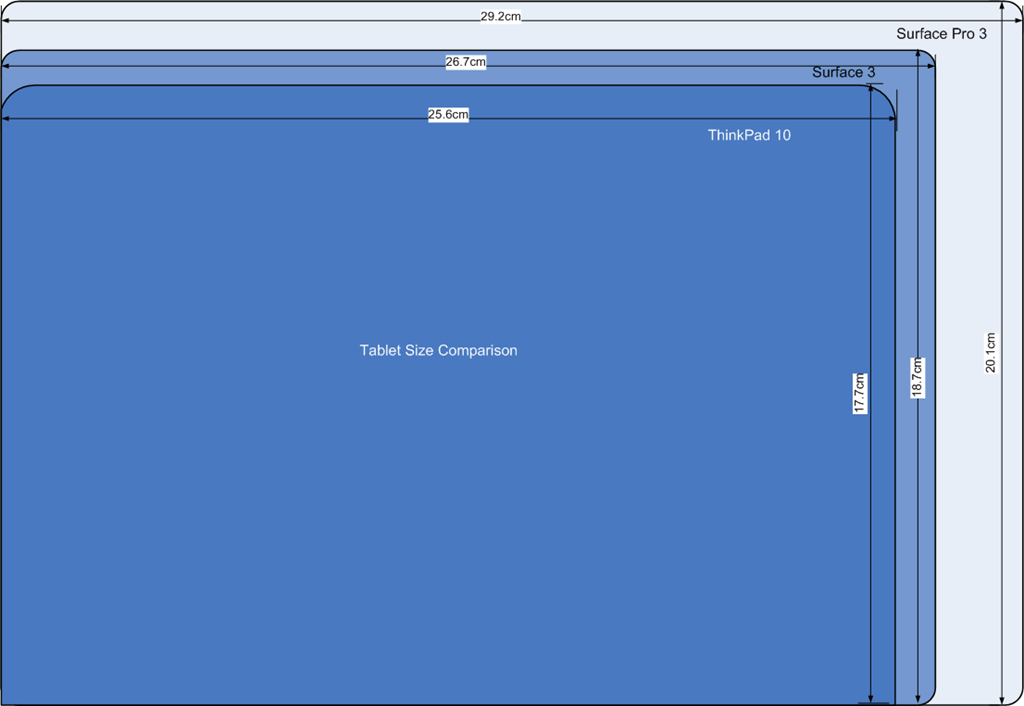
    So let’s say that I find a decent case for €30, then my total outlay for a Surface 3 setup would be €808.99 versus €748.99 for the TP10. Still within shouting distance of each other, but the gap is widening, and not in the right direction. Physically, the two tablets are close in size, and smaller than the Surface Pro 3. Here’s a diagram to illustrate the differences:

    Tablet Size Comparison

    The Surface 3 has a larger display than the TP10, and I like the 3:2 aspect ratio of the S3 even more than the 16:10 ratio of the TP10. It would be even better for reading books and documents:

    Tablet Display Size Comparison

    This, to my mind, is where the S3 scores over the TP10. For me, its display has a nicer ratio, and a nice physical size. The Surface Pro 3, although it has the same aspect ratio, is bigger (almost the size of an A4 pad). It also has a much higher resolution, which causes scaling issues with some programs.

    I think the S3 is the Goldilocks model of the three (TP10, S3 and SP3). By way of comparison, the Yoga 3 Pro that I have is a bit bigger than an A4 pad, at 33cm x 22.8 cm, and when in tablet mode is simply too unwieldy for my liking. So the plus points of the S3 are:

    • it’s fanless (like the TP10)
    • screen ratio of 3:2 (better than the TP10)
    • bigger screen than a TP10, and smaller than a SP3.

    The drawbacks are

    • premium price
    • no reasonably-priced flip-over cover available
    • no GNSS

    I think, for my requirements, it measures up very well against the TP10, and might well be the tablet to go for once Lenovo ask for their loan TP10 back. Of course, waiting in the wings will be the Surface Pro 4. The question arises, would I consider this. Frankly, I don’t think it will be a good fit for my requirements. I suspect it will be at least as big, if not bigger, than the SP3, with power to match.

    I don’t need a poweruser’s laptab; the S3 is a much better match with what I’m looking for. As usual with Microsoft, the third time’s the charm. The Surface 3 promises to be a good machine. It would suit me, and I suspect many others, very well indeed.

    11 responses to “Game On: Microsoft’s Surface 3”

    1. Joost Verhoeks Avatar
      Joost Verhoeks

      Hi Geoff (and others),
      I have been following your discussions on the tablet with care, since it looks that you favour roughly the same features as me 🙂
      I recently have chosen for the Dell Venue 11 Pro (7140 series). The main reasons being:
      – Fanless, M-core, much faster than the Thinkpad Tablet 2 !! I choose the more expensive Intel® Core™ M-5Y71 processor (4 MB cache, tot 2,9 GHz, Quad-Core).
      – LTE
      – approx 735 grams
      – Intel® 7265 Dual-Band 2×2 802.11 AC WiFi
      – Full USB 3.0 port (is very usefull I found out with the Thinkpads, in case you have trouble..)
      – micro HDMI
      – NFC
      – 10.9 inch touchscreen with pen application. Pen itzelf is optional
      – option for full hard case keyboard
      My version 7140-5907 (as above) was just below Euro 900,– incl VAT(BTW)
      So a bit more expensive, but the features are also TOP.

      Maybe also an option for you to review when your Thinkpad 10 leaves the house 🙂
      I am interested in your comment ?
      Joost Verhoeks

      1. Geoff Coupe Avatar

        Hi Joost,
        Thanks for your comments. I admit I hadn’t considered the Dell. At around the time when I bought my ThinkPad Tablet 2, I had included the Dell Latitude tablet in my shortlist, but the TPT2 finally won out.

        I’ve just taken a look at the Dell Venue 11 Pro offerings, and I admit they look interesting. One thing that worries me a little is the fact that the stylus is an optional extra, and reviews of the stylus are generally not very positive.

        Does the Dell do Connected Standby (InstantGo)? Not all Core M machines do…

        Cheers, Geoff

        1. Joost Verhoeks Avatar
          Joost Verhoeks

          Hi Geoff,
          I find on the forum the topic: Dell Venue 11 Pro (7140) Connected Standby Battery Drain (http://en.community.dell.com/support-forums/mobile-devices/f/4586/t/19622704 ) which I think implies that it does. It is a spec point out of my search viewpoint 🙂
          On the tablet of this size I am not using a pen, so pass on the comments here.
          Best regards, Joost

        2. Joost Verhoeks Avatar
          Joost Verhoeks

          For information for people finding it difficult to find the Dell Venue, it can among others be found on the Dutch Dell website: http://www.dell.com/nl/p/dell-venue-11-pro-7000-7140/pd.aspx?c=nl&cs=nldhs1&l=nl&s=dhs&~ck=mn
          Joost

    2. Matt Healy Avatar
      Matt Healy

      I still find high-end tablets some combination of too costly and/or too big for easy portability. For me, a low-end Android tablet and a midrange laptop together cost about what one high-end tablet does, but give me more functionality than that high-end tablet. I find for heavy content creation or data analysis I want a laptop plus a second display and a keyboard.

      1. Geoff Coupe Avatar

        Yes, not everyone has the same requirements. Having said that, if I had your requirements, it would probably push me to a Surface Pro 3 plus a second display. Or alternatively wait for the Surface Pro 4 which can’t be too long now.

    3. joe75 Avatar
      joe75

      The surface 3 looks tempting.
      My computer at home is the Thinkpad 8 128 4G LTE at the moment but it does have some limitations(Desktop mode is difficult to use on such a small screen) and the charging and battery life!!!
      Also i do not do any serious task on it at the moment.I use it with the Microsoft Universal Keyboard and a Bluetooth mouse(or sometimes my phone as a trackpad)
      I will wait for an annoucement on the Surface 4 but a 10.8 inches tablet 622g with no fan is very attractive to me .
      Will wait a few months though for LTE version and price to come down or bundle offer with pen and cover.

      1. Geoff Coupe Avatar

        Joe, there will definitely be bundles and deals coming along if you’re prepared to wait. I suspect when the Surface Pro 4 is launched, we’ll see Surface 3 deals.

        I’m afraid the temptation for the Surface 3 has proved too much for me – I’ve put in my pre-order for a Surface 3 and a pen. No Type Cover, though – that’s still too rich for my liking.

    4. hjk Avatar

      Re: “If you buy the WWAN (LTE) version of the Surface 3, that will also include GNSS, but you can’t have GNSS without WWAN (unlike the TP10, where all models have GNSS included).”
      I’m guessing that the LTE version of the Surface 3 does not have a true GNSS chip, but rather has “Assisted” Glonass, which means you cannot use it offline (unlike tabs with a true GNSS chip, like the TP 10, AVTN8, Yoga Tablet 2, etc.).

      1. Geoff Coupe Avatar

        I believe that you are quite correct. I’ve never used such a device, so I couldn’t say for certain. However, if I look to my smartphone, I can at least turn off the data connection (while still being able to use the phone function), and still have GPS enabled.

    5. […] the Surface 3 was announced, I wrote that it promised to be a good machine. It would suit me very well indeed. As a result, I pre-ordered a Surface 3, and it duly arrived on […]

    Leave a comment

  • Windows 10 Technical Previews

    Over the past few months, I’ve been playing with Microsoft’s technical previews of their forthcoming Windows 10 operating system. It’s the version of Windows that is supposed to marry the best features of Windows 7 (which was designed for traditional PCs with a mouse and keyboard) and Windows 8.1 (which is designed for both traditional PCs and devices such as Tablets that use touch for input).

    It’s safe to say that Windows 8.1, and Windows 8 before it, has had a poor reception in the market. Acres of newsprint have been spread with the cries of pain, and vitriol, from many users of traditional PCs. Personally speaking, I singularly fail to see what all the fuss is about. I use Windows 8.1 on both my PCs and Tablets, and am perfectly comfortable in both environments. I took to the new operating system like a duck to water, and could not countenance ever going back to Windows 7.

    Nonetheless, perception is reality, and Microsoft have realised that their challenge is to introduce a new version of Windows that keeps as many users as possible happy, no matter which camp (PC or Tablet) they are in.

    So, as I say, I’ve been playing with the previews of Windows 10, and I’m coming to the dismaying conclusion that, as a user of a Windows 8.1 Tablet, I just don’t like it

    While the Desktop side of things has improvements, from my perspective as a Windows Tablet user (Lenovo ThinkPad 2 and Lenovo ThinkPad 10), the UI experience in Windows 10 is significantly worse than that delivered by Windows 8.1.

    From what I’ve seen so far, Microsoft is bending over backwards to pander to traditional desktop PC users. They are removing valuable UI features (the Charms bar has gone) from the Tablet experience, or poking desktop features into the Tablet UI (I do not want the Desktop Taskbar to be present in the Tablet UI, but there it is, whether I want it or not).

    Now I know that it’s a Technical Preview, but if Microsoft are going to deliver the final version in summer 2015 as promised, then it’s more than likely that the major features are now locked down, and all that remains are bug fixes and minor tweaks (e.g. improving the Toytown icons in File Explorer).

    It seems to me, on current evidence, that Microsoft are throwing the baby out with the bathwater. I am not impressed, and I’m not the only one.

    3 responses to “Windows 10 Technical Previews”

    1. Joost Verhoeks Avatar
      Joost Verhoeks

      Hi Geoff and others,
      I fully agree with your statement that the current version of Windows 10 is not very tablet friendly (as an understatement). I also feel with you that time is short to change anything, so I am worried that the final commercial version will be (very) tablet unfriendly 😦
      Joost Verhoeks

    2. […] I have installed Build 9926 of the Windows 10 Technical Preview on to the Y3P, but I’ll keep my comments on that for another post. […]

    3. […] trying out the previews of Windows 10, I wrote, back in April, that I just didn’t like it. There seemed to be too many features of Windows 8.1 that had been removed or […]

    Leave a comment

  • Mist Eclipse

    Today was an opportunity to see a partial eclipse here in the Netherlands. Unfortunately the weather gods were not smiling. Much of the country had cloudy skies.

    Here in the Achterhoek, there were not only cloudy skies but heavy mist. So in a sense, we had not only a missed eclipse, but a mist eclipse. When I took the dogs out for their morning walk, we were surrounded by mist; not a chance of even a glimpse of the sun. We went for a walk in the woods at around the time of the eclipse. It was very noticeable how it became much darker during the maximum coverage of the sun by the moon, and then the day returned to normal brightness as we returned home.

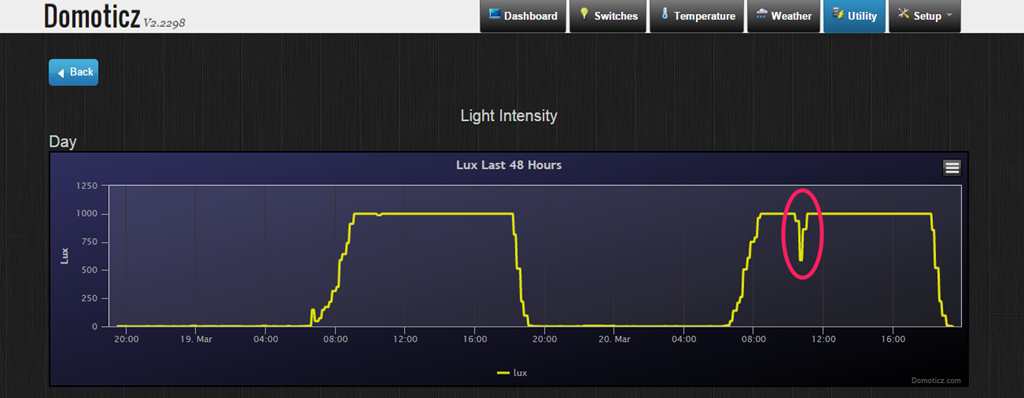
    Therefore, even though I was not able to observe the eclipse directly, I certainly had indirect evidence that something was afoot. In addition, one of our outside motion sensors (part of our Home Automation installation) has a light sensor. The readings from that today clearly show how the light from the sun was obscured during the moon’s transit:

    Domoticz 25

    3 responses to “Mist Eclipse”

    1. Tom_T Avatar
      Tom_T

      Love the graph!

    2. Matt Healy Avatar
      Matt Healy

      Cool graph; sorry you didn’t get to see it directly. Back in the 1990s I got to see one partial solar eclipse from the lawn of Yale Medical School when I was a Postdoc, and then a total eclipse in Germany where I was attending a scientific meeting. Where I was, the clouds parted at the critical moment. The organizer of our meeting was a few km away with his son’s school group; I was saddened later to learn they had clouds at the time of totality.

      As the Moon’s shadow raced across Europe towards us, we watched live video from the MIR space station.

      I took some pictures during the eclipse but they did not come out because I got the exposure wrong. Soon after that I got my first digital camera! Digital photography is great for lousy photographers like me because one knows right away whether one got the photo and can try again if need be…

    Leave a comment

  • Home Automation Revisited

    Back in January, I wrote about putting my toe into the waters of Home Automation. As I said at the time, there’s a bewildering array of products and standards out there. Over the past couple of months, I’ve been taking a look at some of the HA solutions out there, and I think I’ve landed on one that seems to fulfil my requirements pretty well.

    I had decided back in January that my solution would be one that used Z-Wave, and that’s still the case. I’ve been able to purchase Z-Wave HA devices from several different manufacturers, and they interoperate as promised. I’m satisfied that the choice of Z-Wave is a good one for me.

    As I said in January, there is a wide range of possibilities in the choice of the controller for a HA system. I could buy an off-the-shelf unit such as the Fibaro Home Center 2, the Zipato ZipaBox, a VeraEdge controller, or a HomeSeer controller. Or I could buy just the controller software, such as HomeSeer, and install it on a PC or a Rasberry Pi box.

    In the end, I decided not to purchase an off-the-shelf unit. Fibaro still seem to be struggling to deliver a stable version of their latest software for the Home Center 2, and not being able to trial the other hardware products meant that purchasing one would be a gamble. It seemed to me that a better approach would be to trial a software solution, using an existing computer.

    I ended up taking a look at the following software solutions:

    The first two are commercial products, the rest are open source projects, funded by donations.

    For my testing, I purchased a variety of devices:

    With the devices installed, and included in the ZWave network (registered in the ZStick controller), I connected the ZStick to a variety of software controllers in turn…

    HomeSeer has been around for a while. That means it’s comprehensive (it can control a wide range of devices using a variety of standards), and it has a wide range of third-party add-ons. However, it still strikes me as being expensive: $249.95 for the basic version of the controller software and $199.95 for the UI designer software. If I were to go with HomeSeer, it would probably make more sense for me to buy the basic (linux-based) HomeTroller Zee controller at $199.95. I installed the trial software of HomeSeer version 3, and used it for a week or two. It worked, and the diagnostic information was copious. However, the interface struck me simultaneously as being rather basic, and yet somewhat complex in places. I decided not to proceed further with HomeSeer.

    I admit I only took a cursory look at both Charmed Quark and OpenHAB. I found both difficult to set up, and got the impression that I would spend more time fiddling with them than using them. OpenHAB, in particular, seemed aimed at programmers and developers, rather than end-users at this stage. As a result, I moved on.

    HomeGenie is also something that will delight programmers and developers at the moment. Nonetheless, I was able to get it up and running very easily on Windows, and it works well. Here’s the “dashboard” that I see for the devices I currently have in my HA network:

    HomeGenie 06

    It’s primarily the result of the efforts of one developer, and he’s done a very good job. It’s still at a fairly early stage, so, for example, if you want to develop automated control of your devices, you will find yourself very rapidly at the limit of what the built-in “Wizards” are capable of, and have to turn to grown-up programming to get the job done. That’s all very well, if that’s your thing, but it’s really not what I want to do any more. I made a donation to the project, because I appreciate what has been achieved, and I hope it continues to develop. There’s a small (around 350 members) community forum where ideas are exchanged and bugs highlighted for solving. I could certainly make use of HomeGenie, if there were not other, and for my purposes, better solutions available.

    Domoticz is another open-source project, and while it is primarily led by one developer, there are others actively involved, and the community forum is large (around 3,270 members) and active. Domoticz and HomeGenie are similar in many ways, but there are a few differences, which can be both strengths and weaknesses, depending on where you stand. Here’s the Domoticz dashboard:

    Domoticz 18

    The strength of Domoticz is its maturity; it already has solutions and support for a lot of hardware. In particular, it supports the reading and display of data supplied by our “Smart Meter” for our gas and electricity consumption. With the simple purchase of a cable, I was able to connect our smart meter to the Domoticz system and get real-time graphs of our energy consumption. Here’s what I see for our electricity usage:

    Domoticz 16

    It not only records our consumption (blue), but also the electricity generated by our solar panels (green) that is returned to the electricity grid. Gas consumption can also be tracked:

    Domoticz 17

    HomeGenie, at the moment, does not have this connection to Smart Meters built-in. The programmatic interfaces are there, and such an interface could be built, but I’m not the one to do it.

    For me, the strength of HomeGenie is that it is a complete solution, in that the developer has written software to control Z-Wave devices directly. Domoticz, on the other hand, hands off the control of Z-Wave devices to another piece of software, developed by a separate open source project: Open-ZWave. That means that there is the chance of issues arising out of effects caused by the fact that there are two different software components developed by two different groups. I’ve already come across an issue with my Z-Wave sensors, which may be caused by a bug in Domoticz, a bug in Open-ZWave, or some combination of the two.

    Nonetheless, I can live with that issue, and the quirk that the Fibaro wall plugs don’t always show the correct status in Domoticz. There are two reasons for this:

    • The fact that I can track our energy consumption directly in Domoticz (as shown above), and
    • the fact that Domoticz supports Blockly for building automation programs.

    Think of Blockly as Lego for programming. It’s wonderfully easy to use, and I’ve already programmed the motion sensors on the driveway and by the front door to turn on the outside lights if someone comes along during the hours of darkness (which have been defined, using Blockly and a “virtual device” in Domoticz that I defined: IsDark):

    Domoticz 19

    Domoticz 20

    So for the moment, I’m going to stick with Domoticz for our Home Automation system, with HomeGenie held in reserve as my fallback position.

    And while I tested both on Windows, both Domoticz and HomeGenie are available for the Raspberry Pi. I’ve also stuck my toe into the waters of using a Raspberry Pi, and Domoticz is currently running very happily on it. But that’s the subject of another post, I think…

    20 responses to “Home Automation Revisited”

    1. Matthew Healy Avatar

      Interesting; back in the 1980s I was an electrical control systems engineer with Siemens. At that time, industrial controls were mostly mechanical: relays, contactors, timers, etc. Programmable controllers were very new and expensive. At that time, just as now, there were competing standards for hooking stuff up to the controllers; customers pushed vendors into defining some standards. Now I suppose the same process will happen with home automation. I won’t buy until it is clear which vendor-independent standard will win because I dislike being locked into one vendor.

      1. Geoff Coupe Avatar

        Agreed, that’s why I went with ZWave. There are over 250 manufacturers producing devices and components that implement this wireless communication standard for HA.

    2. Matt Healy Avatar
      Matt Healy

      Do you know how well Z-Wave deals with an environment with lots of RF noise? My residence is a condominium in a large building of them; from where I sit I can see about a dozen WiFi access points including moline. Some gadgets work OK here; some don’t

      .WiFi is pretty good at handling the interference, though I recall reading once the late Steve Jobs had to ask everbody in the room at some demo to please turn off their WiFi hotspots because with over 200 of them in the room they were jamming his demo!

      Of course, I’ve got WPA2 encryption turned on; does Z-Wave have encryption? Wouldn’t want anybody driving by to access my devices…

      1. Geoff Coupe Avatar

        Matt, from the Wikipedia article: “Z-Wave operates in the sub-gigahertz frequency range, around 900 MHz. This band competes with some cordless telephones and other consumer electronics devices, but avoids interference with Wi-Fi, Bluetooth and other systems that operate on the crowded 2.4 GHz band”. What would happen if you live in an environment that is saturated with Z-Wave devices, I don’t know. I’ve not heard of issues, but then I haven’t actively looked for them – I don’t need to, since I live in the middle of nowhere.

        As for security, yes Z-Wave has it. This is an interesting article on attack vectors:
        http://blog.opensecurityresearch.com/2013/07/potential-attack-vectors-against-z-wave.html
        The conclusion seems to be that it is theoretically possible, but no-one seems to have done it as yet.

    3. […] ← Home Automation Revisited […]

    4. Matt Healy Avatar
      Matt Healy

      Was your power affected by Friday’s blackout?

      1. Geoff Coupe Avatar

        No – we live in the wilds of the Dutch countryside, so we were spared…

    5. Marcel Avatar
      Marcel

      I’m working on a HomeGenie Smart meter widget and have a working prototype if you want to try it out.

      1. Geoff Coupe Avatar

        Marcel, many thanks for your offer, but I’m running Domoticz now as my operational system. Thanks.

    6. Christophe Avatar
      Christophe

      Any reason for not considering Jeedom ?

      1. Geoff Coupe Avatar

        a) I wasn’t aware of it when I was looking at various products.
        b) My French is practically non-existent, and large swathes of the documentation is in French as far as I can see.
        c) The English forum is not very active – by contrast, even though Domoticz was started by a Dutch developer, the English-speaking forum is very active.

        If I were French, then I expect I would have reached a different decision, but I’m still happy with Domoticz, and thanks for asking.

    7. Jack Avatar
      Jack

      Hi Geoff,

      I found you via the domoticz site.
      I am struggling with my windows pfone and the domoticz app. do you have it running allready?
      There is connection but then I can not do annything.
      The midlle button for settings stay gray.
      Further compliments for nyour website..looks great.

      Greatszzz,

      Jack

      1. Geoff Coupe Avatar

        Hi Jack, I’m having the same problem with the Windows Phone app. I can’t get it working. Instead, I’m just using the mobile web site of Domoticz via my Windows Phone. Cheers.

    8. Jack Avatar
      Jack

      Hi Geoff,
      I think we will get an update very soon.
      After a post in the domoticz forum there was a reaction from the developer.
      He changed some things and is testing now.

      Greetszzzz

    9. Jack Avatar
      Jack

      For me it works now

    10. Roland Avatar
      Roland

      Hello Geoff,

      I’m currently starting my home automation project. I have some colleagues that are using a Fibaro HC2 and are very happy with it. I also planned to buy a HC2. But I already gave a basic try to Domoticz, without any real z-wave hardware, and it was working easy (installed on FreeNas). So I have some doubts, going further and start for real with Domoticz and buy a USB z-wave device or start with a Fibaro HC2.

      My doubts:
      + Fibaro
      – The Fibaro has an easy accept at home factor with easy iPhone/iPad app;
      – The Fibaro has a good support for all Fibaro (and other) hardware;
      – The Fibaro looks to be easier to configure.

      + Domoticz
      – The Fibaro is very expensive, it’s nice when I’m able to invest more in z-wave devices and less in the controller;
      – With the usb z-wave device and Domoticz i’m able to get a z-wave plus solution.

      Any suggestions? What about the iOS apps for Domoticz, what is comparable with Fibaro and easy to use for all home users? And what about the hardware and firmware updates, is it just as easy to update the firmware from a Fibaro device, like the smoke detector, from Domoticz as from a HC2?

      Thanks,
      Roland

      1. Geoff Coupe Avatar

        Roland, your decision probably boils down to whether you feel more comfortable buying an off-the-shelf solution (the HC2), or building your own, using open source software produced by a community of enthusiasts (Domoticz).

        I went for the latter, because at the time when I was looking, the Fibaro support forums were full of angry customers complaining about the quality of the software running in the HC2, and this had been going on for some time. I had also come across reviews which mentioned that the HC2 runs hot, which raised a warning flag for me. I don’t know whether Fibaro has managed to get a grip on the quality of their software development, perhaps you could take a look at the forums to see for yourself, and come to your own conclusion.

        There are always pros and cons in the comparison of functionality between the two systems as well. For example, you can easily upgrade the firmware of Fibaro devices using the HC2 – that function is not in Domoticz (though it’s been asked for). So far I’ve not felt the need to update any of my devices’ firmware, but it would be nice to be able to do this if necessary. On the other hand, the Domoticz software is more flexible than that of the HC2. It’s easy enough to get started and build event triggers using Blockly, but there is also full scripting available if required.

        I don’t use iOS or Android, so I can’t comment on the apps available.

        I’m still very happy with my choice for Domoticz, but as I say, it’s down to you to decide…

    11. […] Regualr readers of this blog may recall that I dipped my toe into the waters of Home Automation at the beginning of last year, and I have been running a Domoticz system since last March. […]

    12. […] did this because I need a server to be running 24/7 to host our Home Automation system (a Domoticz system). Originally, I had Domoticz installed on a low power Raspberry Pi2, but a […]

    13. […] years ago, I posted about my first foray into the realms of Home Automation. Then, after evaluating a number of HA systems available at the time, I chose Domoticz as the basis […]

    Leave a comment

  • Goodbye, Facebook, and Good Riddance

    Let me put my cards on the table; I’ve never been a fan of Facebook. However, it seems that most of our neighbours are avid Facebook fans, so after holding out for years, I decided that I’d open up a Facebook account in November last year, primarily as a means of being kept up to date with what was happening in my neighbourhood.

    Even after I signed up, I rarely accessed my Facebook page, and contented myself with batting away the many, many Facebook notifications that appeared in my email inbox or on my Windows Phone. My prime channel for revealing my thoughts to the (largely indifferent) world has remained this blog.

    Then today, out of the blue, I got a notification from Facebook that I’m restricted from seeing the profiles of people that I don’t know for one week:

    Facebook 01

    Er, excuse me? I don’t make a habit of trying to see the profiles of people that I don’t know (I have tried looking up two old friends since I joined), so why the restriction?

    Well, sod this for a game of conkers. I don’t need Facebook, so I’ve deleted my account. Goodbye and good riddance.

    Addendum 15 October 2016: It is with great regret that I have to confess that I’ve been forced to reopen a Facebook account. There’s a group of us lobbying for internet services via optical fibre in our area, and it has been decided that a closed Facebook group is the best way of keeping the group organised. Sigh. I still loathe and detest Facebook, but needs must, I suppose…

    Addendum 23 June 2019: I should point out that once the lobbying action was (successfully) completed, I deleted my Facebook account – and have been Facebook-free for over a year. Don’t miss it in the slightest.

    3 responses to “Goodbye, Facebook, and Good Riddance”

    1. Mark Avatar
      Mark

      its been almost 2 weeks now. still happy about it?

      1. Geoff Coupe Avatar

        What’s Facebook? 🙂

    2. […] suspect it’s high time that I deleted my Facebook account (again). And to be clear, I loathe and detest Facebook, but I needed an account because of my community […]

    Leave a comment

  • Damn

    Terry Pratchett has left.

    One response to “Damn”

    1. Matt Healy Avatar
      Matt Healy

      http://m.xkcd.com/1498/

      Says it all:
      “Thank you for teaching us how big our world is by sharing so many of your own.”

    Leave a comment

  • Visits to Dystopian Realms

    My bedside table has a small pile of the books that I’m currently reading. I tend to switch between fiction and non-fiction books, but I noticed yesterday that I seem to have been on a run of fictional dystopias.

    9780340921609It kicked off a few months back with David Mitchell’s The Bone Clocks, which I enjoyed, but which I thought was less impressive than his Cloud Atlas, or The Thousand Autumns of Jacob de Zoet. The Bone Clocks uses the device of having different characters tell their story in the first person, and the main character’s voice and wisdom develops from that of a teenager to being an old woman over the course of the novel. I liked hearing the different voices (Crispin Hershey, the English novelist, is not a million miles from a caricature of Martin Amis), and Holly Sykes as the central protagonist is beautifully portrayed. There are explicit references to characters from other Mitchell books (I recall that he said, in an interview, something along the lines of that he’s writing one meta-book). If there’s a weakness (for me) in The Bone Clocks, it was the “An Horologist’s Labyrinth” section, which rather came across to me as in the style of Denis Wheatley’s “The Devil Rides Out” – a rattling yarn, but with rather over-wrought language.

    The final section, “Sheep’s Head” stepped back from the pyrotechnics of “An Horologist’s Labyrinth” and redeemed the book for me. This is where the dystopian society is portrayed – the Endarkenment – as it is named in the book. We return to Holly as a woman in her seventies, living in 2043 in a world where the chickens of energy-guzzling, resource-stripping and climate change have come home to roost. Darkness descends, but there is a glimmer of light as well.

    beteNext up was Adam Roberts’ Bête. This was dystopia all the way down, but at times very funny with it. It opens with something that is almost straight from Monty Python – a farmer is about to kill his cow, but the animal insists on discussing his right to do so with him. The tale is set in a time not too distant from our own, where artificial intelligence computer chips have been embedded in some livestock by animal activists. The story is once again told in the first person, by Graham Penhaligon, the farmer. He’s irascible, unsympathetic, a Victor Meldrew sort, yet I couldn’t help but warm to him. Roberts has some amazing, and outrageous ideas (wait until you meet the lamb!), but the novel remains very believable. And the ending is a whole new beginning…

    9781408819708I followed that up with Margaret Atwood’s MaddAddam. This is the third in her trilogy of dystopian novels that began with Oryx and Crake, and continued with Year of the Flood. I read Oryx and Crake a few years back and enjoyed it, but I haven’t read Year of the Flood. However, I came across MaddAddam at the Deventer Book Fair last August, so I picked it up for a song and added it to the pile of books to read.

    I have to say that I don’t think it’s one of Atwood’s best works. Where Oryx and Crake resonated, MaddAddam fell flat for me. Yes, there’s a sense (right at the end) of how books and writing will be an important driver to the future post-human society of the Crakers, but most of the book is taken up with providing the backstory of a few characters that I assume were introduced in Year of the Flood, and waving the bogeymen of the Painballers in the reader’s face.

    9780553418842Now I’m on to Michel Faber’s The Book of Strange New Things. You might think that this is a strange choice, given that I’m an atheist, and the book’s protagonist is an evangelical Christian minister recruited to do missionary work. It’s true that I view all religions with the utmost suspicion, and I simply couldn’t finish Marilynne Robinson’s Gilead (an elderly Congregational minister writes to his 7-year old son). However, Faber also wrote Under The Skin, which engrossed me with its strange atmosphere and other-worldliness.

    I’m still reading The Book of Strange New Things (I’m at the point where Peter has just met with a member of his new flock), and the book of the title is, of course, the Bible. Already there is no doubt in my mind that this is a book that I will finish and find just as thought-provoking as Under The Skin. I don’t know yet whether the society of Peter’s new flock is a dystopia or a utopia, but it’s already clear that the society that Peter has left is painted in dystopian hues.

    Next up, a change of pace and subject matter; Kenan Malik’s The Quest for a Moral Compass; an exploration of the history of moral thought as it has developed over three millenia, across the world’s cultures…

    3 responses to “Visits to Dystopian Realms”

    1. Matthew Healy Avatar

      There’s a fair chance I’ll see 2043 since I was born in 1960. I hope it’s not quite that dystopian but who knows?

      1. Geoff Coupe Avatar

        Good luck, in any event… 🙂

    2. Mark Avatar
      Mark

      After watching the City of Ember and Logans Run, I was very interested in dystopian fiction – especially around isolated communities discovering a forgotten world outside of them. Unfortunately most of it seems to be pretty wacky or YA stuff.

    Leave a comment

  • Wolf Hall

    The BBC’s six-part adaptation of Hilary Mantel’s novels (Wolf Hall and Bring Up The Bodies) drew to a close last night. What a wonderful six hours that was! Mesmeric, with acting of the highest order from all concerned.

    If I have one small carp (a tiny goldfish, really), it was that the director’s insistence on shooting night scenes lit only by torchlight and candles, whilst artistically correct, was not well served by the lenses that they used. It’s a pity that they couldn’t have got hold of the lenses used by Kubrick for Barry Lyndon, that might have helped a bit with the gloom.

    Leave a comment

  • The World’s Most Important Operating System

    I was saddened to learn today that Bill Hill died of a heart attack back in October 2012. Bill was a Scotsman who started out life as a newspaperman and became a typographer, but ended up working for Microsoft.

    In this short video clip Bill explains why the world’s most important operating system is not Windows or OSX or Linux or Android. It’s Homo sapiens 1.0. It’s an operating system that first booted up about 100,000 years ago, and has never yet had an upgrade.

    There’s more videos of Bill available here. A memorial, of sorts. RIP, Bill.

    Leave a comment

  • Metro – Murdered By Microsoft?

    When Microsoft introduced Windows Phone, precisely five years ago, the major differentiator from Apple’s iOS and Google’s Android was the user experience. Microsoft called the design language: Metro; that is until Metro AG threatened Microsoft with legal action for using that name. Now Microsoft no longer use the term Metro, and indeed it would appear that they no longer want to use many of the elements that made Metro the innovation that it was.

    One of the design innovations was lateral scrolling within apps to reveal different functions (the so-called “Pivot” control). The use of large fonts in the app title cued the user that more was available by scrolling laterally, e.g. as here in the Photos app:

    WP8 04

    Along with Metro came concepts such as the “hub” – single points of entry where similar items from different sources would be consolidated. So, for example, the Photos app consolidated your photos from cloud sources such as Facebook, Flickr and OneDrive with the photos that were on the phone itself. You no longer had to worry about where the photos were held, and open up a Facebook app or a Flickr app; they were all available in one place.

    Unfortunately, I suspect that companies such as Facebook and Flickr didn’t like the hub concept, because they saw it as threatening the power of their brand. Microsoft has responded by either removing the consolidation feature completely (e.g. the integration with Facebook and Flickr that existed in the Photos app in Windows 8 was ripped out for the Photos app in Windows 8.1), or watered down.

    Now it seems that Microsoft is turning its back on other design aspects of Metro, and is busily introducing design concepts copied from Android (e.g. the infamous “Hamburger” button). We first saw this in the new version of the OneDrive app, introduced in October 2014:

    WP8 05

    You’ll notice that not only is the “Hamburger” button present (it’s the three horizontal lines at the top left), but the Pivot design element has also gone. This redesign was met with howls of protest. As I said at the time:

    Frankly, if I’d wanted an Android phone, I would have bought one. One of the key reasons why I went with a Windows Phone was the UI design. I like it a lot, and I am at ease with it. To have a key Microsoft team turn their back on it and introduce Android elements is a shock, to say the least.

    One might almost wonder if the team had actually read the “Review questions for prototype” section on the “Design the best app you can” page of the UI guidelines, in particular:

    • Are you coming from another mobile platform? Windows Phone users will expect fewer taps, clearer views, large typography, and the use of contrast and color.
    • Are you using both axes of scrolling (the X and Y axes) and orientation (Portrait and Landscape)? Depending on the purpose of your app, users may expect both.
    • Do you use Pivot and Hub controls effectively and correctly?

    Even simple things, such as a transparent Tile for the app have been forgotten about (or ignored) in this bastardised design. I hope that the howls of protest that have greeted this version result in a swift redesign to make it a proper Windows Phone app.

    Good design and adhering to UI guidelines are important, and help to build a brand. This horror does just the opposite.

    Looking at what is coming out in the Windows 10 previews, Microsoft is simply steaming ahead with the Androidification of Windows. Metro has been dragged behind the arras, with a dagger in its back.

    5 responses to “Metro – Murdered By Microsoft?”

    1. mmusterd Avatar
      mmusterd

      Could not agree more.
      Last few days I took the opportunity to try out windows phone 10 technical preview, and what we have there is a random mix of design elements seemingly randomly gobbled together from android and windows phone.
      Bing search (“de loep”) is one of the worst offenders, with both the hamburger icon and the … in the menu bar below.
      Really, the design language that was there in windows phone 7 was really good.
      The only reason I can think of for changing this is one that scares me: Microsoft creates universal apps for android first, and as an afterthought recompiles them for their own platform.

      I uninstalled windows 10 from my phone because of some other bugs.

      1. Geoff Coupe Avatar

        I don’t think it’s the reason you give. I suspect that Microsoft has given up on trying to differentiate with Metro, but instead thinks that it will make it easier to attract Android users across to the Windows platform. I doubt that this strategy will succeed; instead it seems to me to be more a case of Hanlon’s Razor

    2. negative1ne Avatar

      i am using a windows 7.8 phone still, and although the old style still works well. perhaps newer applications need this new style to match the other windows 10 platforms on the PC, and on tablets. finally, taking out the hubs makes it easier for updates to be made to single applications than having an OS update which takes longer to test, and has to be approved by the carriers. that is why a lot of applications were decoupled.

    3. […] couple of months ago I wrote a post “Metro – Murdered By Microsoft?” in which I expressed my concern that it appeared as though Microsoft was dropping many of the […]

    4. […] Windows 10 also introduces the dreaded “Hamburger” button. These and other changes represent a major shift away from the design language pioneered in Windows 8/8.1 and in Windows Phone […]

    Leave a comment

  • Dear God…

    …will someone please take the new Guardian web site and its designers far, far away? It’s not an improvement on the old, staid, “newspaper on the web” approach.

    Here’s a case in point: an article about the great Irish actor Michael Gambon having to call it a day because he can’t remember his lines any more:

    http://www.theguardian.com/stage/2015/feb/08/sir-michael-gambon-ends-theatre-career-memory

    And what does the Guardian show us as “related content”? Fucking obituaries! Er, hello, Guardian web people, Gambon is not dead yet.

    I despair…

    2 responses to “Dear God…”

    1. James Avatar
      James

      The Guardian has always been away with the fairies as far as the physical integrity of what it puts “out there” goes. Why not continue and expand the tradition into the internet age?

      1. Geoff Coupe Avatar

        The typos of the Grauniad are both legend and legion, but there appears to be a whole new arena of off-kilter algorithms opening up now. I’m beginning to yearn for simpler times.

    Leave a comment

  • Lenovo ThinkPad 10 vs Yoga 3 Pro

    I’ll kick this post off with a disclaimer: YMMV – Your Mileage May Vary. That’s to say that what follows is entirely my subjective impression based upon my usage requirements for portable computing. Your requirements may well be entirely different, and so would your conclusions be in the following comparison.

    With that disclaimer out of the way, let me remind you that last September, I received a ThinkPad 10 tablet on long-term loan from Lenovo. I blogged about my first impressions of it in a post that compared it to my ThinkPad Tablet 2, which I had purchased myself back in January 2013.

    I must admit that in the ensuing months, I quickly began to like the ThinkPad 10 (TP10); so much so that I sold my ThinkPad Tablet 2. The TP10, in combination with the Lenovo Quickshot Cover, fits my requirements for portable computing very well indeed. In particular I like:

    • the size and weight (not too big, clumsy or heavy),
    • the 16:10 screen aspect ratio (better for reading books than 16:9 aspect ratio devices)
    • the pen – I prefer scribbling notes and diagrams in OneNote during meetings to typing
    • the performance – not a speed demon, but more than adequate for what I use (OneNote, Mail, browsing with IE, Word, Excel, Powerpoint)
    • the UI experience of Windows 8.1 in a tablet.

    And there things stood until a couple of weeks ago, when Lenovo asked me if I would like to try a Yoga Pro 3 (Y3P). I replied that I was interested in trying out the Consumer Technical Preview of Windows 10, so if I could use the Y3P for that, then yes, please. A package containing a rather smart box (see below) was delivered a few days later, a couple of days before Microsoft unveiled the next stage of Windows 10. The box itself is a slick piece of paper engineering – after taking off the lid, you fold back the two flaps covering the top, and as you do so, the Y3P rises out of the box to greet you. A nice touch.

    20150203-1214-56

    I have the orange version of the Y3P, which is pleasingly different to the usual black or silver Ultrabooks:

    20150203-1216-06

    The most striking thing, of course, is that “ watchband” hinge. It’s unique in the portable computer world. I rather like it, I have to say.

    20150203-1216-19

    Being an Ultrabook, the Y3P has more ports than the TP10. The left side has Lenovo’s battery charger port (which also doubles as a USB 2.0 port), a USB 3.0 port, a Micro-HDMI port, and a full-size 4-in-1 (MMC, SD, SDXC and SDHC) Memory Card slot. The right side has another USB 3.0 port (which can also be used to charge Smartphones), a headphone socket, Volume controls, Auto screen rotation lock, a recessed Reset button and a Power button.

    20150203-1339-29

    20150203-1339-52

    I do prefer the buttons on the Y3P, they are slightly proud of the case, and far easier to use than those on the TP10, which continue to be a slight source of irritation if ever I need to use them. Fortunately I rarely need to, as the TP10’s Quickshot cover acts as a power (sleep) button, and I tend to use the onscreen Volume controls in place of the physical buttons.

    Opening up the Y3P is a bit of a palaver, in comparison to simply flipping open the Quickshot Cover on the TP10. The watchband hinge is stiff (as it needs to be), and my fingers find it difficult to get a purchase at the front of the Y3P to begin prising it open. Once open, a fairly standard keyboard and trackpad are revealed (you’ll notice that the matt finish of the trackpad shows up finger oil very well).

    20150203-1219-53

    I’m sure some long-term Lenovo users will be complaining that there is no TrackPoint device, but it’s been so long since I used one that I don’t miss it. This Y3P is the first device I’ve used that has a backlit keyboard, and I must admit that is one innovation that I have really begun to appreciate. Tapping away of an evening, seated in front of the TV, is so much easier with a backlit keyboard. With my tablet, most of the time I’m either writing, or using the on-screen keyboard (which of course is easily visible), but on the occasions when I do use a physical keyboard, it’s been one without a backlight, and now I realise the advantage of having a backlit keyboard.

    The Y3P is of course much bigger than the TP10. That means both more weight (1.9 Kg versus 0.6 Kg), and a bigger screen.  Here’s the TP10 laid on top of the Y3P to give you an idea of the difference:

    20150203-1225-51

    The screen of the Y3P is not only physically bigger (13.3” diagonal versus 10.1”), but it has a higher resolution (3200 x 1800 versus 1920 x 1200) than the TP10. It also has a higher pixel density (276.05 dpi versus  224.17 dpi), but note that it is yet another 16:9 aspect ratio device.

    Like the TP10, it has a touchscreen capable of registering 10-point gestures. However, unlike the TP10, there is no pen or active digitiser.

    A couple of other things that are lacking in the Y3P in comparison to the TP10:

    • There is no rear camera, so capturing documents will have to be done with your Smartphone.
    • There’s no GNSS chip, so you’ll have to rely on your WiFi location being known accurately if you are using a map application. However, I doubt that this will work if you are using your laptop with the train’s WiFi during your daily commute.
    • There’s no WWAN option available (my loan TP10 doesn’t have WWAN either, but this is available as an option).

    The Y3P is equipped with an Intel Core M processor. The model I have has the 5Y70 chip, which is a 2 core/4 thread chip running at 1.1GHz or 2.6 GHz in Turbo boost. It has 8 GB of memory, and a 256 GB SSD fitted for storage. Although in theory the Core M processors are suitable for fanless designs, the Y3P is fitted with a fan. I can occasionally just hear it – a faint hiss coming from the right hand end of the watchband.

    Performance-wise, then, it far outstrips the Intel Atom processor with its 4 GB memory in the TP10. Yet, most of the time, I simply don’t notice it in the software I use.

    The Y3P came with even more Bloatware pre-installed by Lenovo than the TP10. As you can tell, I am not a fan of the extra software that OEM manufacturers throw into their machines. I spent an afternoon getting rid of most of them (and one of Lenovo’s applications – Harmony – refused to uninstall itself, until I took extreme measures). There must have been well over twenty different packages, practically all of them of questionable utility as far as I’m concerned.

    I have installed Build 9926 of the Windows 10 Technical Preview on to the Y3P, but I’ll keep my comments on that for another post.

    To sum up my thoughts on the comparison between the Y3P and the TP10 thus far, I think it’s safe to say that I still much prefer the TP10 over the Y3P.

    The Yoga 3 Pro is a nice machine; well engineered, but I think it has helped confirm my suspicion that my preferred portable computing device is a tablet equipped with a pen. I look forward to continuing to test out Windows 10 on it, but I’ll continue to take my trusty TP10 with me to meetings, and for kicking back on the sofa of an evening. But as I said at the outset, your requirements, and your conclusions may be completely different to mine…

    2 responses to “Lenovo ThinkPad 10 vs Yoga 3 Pro”

    1. Ludwig Avatar

      Just earlier today I was asked who I thought the innovation leader was in laptops/tables. I offered Lenovo, and you have just confirmed that my thinking was right. Thank you for this detailed review.

    2. […] date, I’ve had an HP TX2000 convertible, a Lenovo ThinkPad Tablet 2, and currently I have a Lenovo ThinkPad 10 and a Lenovo Yoga 3 Pro convertible. I’ve long ruled out Apple’s iPads and the myriad of Android tablets, since I use the Windows […]

    Leave a comment

  • OneDrive Now Searches Tags!

    I’ve been complaining for nearly four years now that Microsoft’s OneDrive does not support searching of photo metadata. In July 2013, I was told by a Microsoft project manager:

    “this work just ranks lower on the priority list than some other things we are doing right now”

    In May 2014, Microsoft trumpeted that they had made improvements to the OneDrive service, but proper support for Tags (in photo metadata) still wasn’t there. So searching for a Tag (for example: “Clouds”) in all the photos I have stored in OneDrive returned zero results:

    Onedrive 04

    And that’s where things stood right up to the last time I tried the experiment, which was earlier this month.

    Today, I thought that I would try once again, and this time, to my surprise and delight, there was a result:

    OneDrive 10

    As you can see from the information pane on the right, the selected photo does indeed have the descriptive tag “clouds” included in the photo metadata.

    There have been some other changes to the OneDrive service as well. If I look at a photo in OneDrive, instead of being able to open up an information pane to display all the photo metadata, there is now an information icon shown in the bottom right of the window:

    OneDrive 12

    Clicking/Touching that icon now displays the photo metadata in an overlay instead of in an adjacent pane:

    OneDrive 11

    I’m really pleased that this support for Tags, and being able to search on them is finally included in OneDrive. In one way, it really had to be, because Microsoft has gone back to the drawing board and will be removing the ability to search OneDrive files in the Windows Explorer in Windows 10, at least in the initial release of Windows 10.

    What Microsoft giveth with one hand, it taketh away with the other…

    Addendum 5th October 2024: And now Microsoft has silently removed this feature – OneDrive will no longer search tags in photos. Damn them.

    31 responses to “OneDrive Now Searches Tags!”

    1. […] 23 January 2015: OneDrive now searches Tags – at […]

    2. […] Update 23rd January 2015: OneDrive has finally introduced support for searching on Tags! […]

    3. osm Avatar
      osm

      Are you sure it’s not doing a fancy image search like Google does? (both your photos actually have clouds in them)

      Easy thing to rule out.

      1. Geoff Coupe Avatar

        Positive – I’ve also tested it with tags (e.g. the names of my dogs) that would not be known via an image search, no matter how fancy…

    4. Omar Shahine Avatar

      You’ve discovered that OneDrive has learned some new tricks.

      1. Geoff Coupe Avatar

        ha! Thanks for this, Omar. It’s been a long time coming, but it is extremely welcome for us photographers…

    5. José Oliver-Didier Avatar

      Hurray! This is a much valued addition to Onedrive! However, I did stumble upon some odd results when searching People Tags and Geotags. I searched for my son’s name and only a folder with his name appeared. The photos with People Tags with his name did not show in the results. I have most of my photos Geotagged and when searching location names some or none results appear. This is a bit baffling. It could be a sync issue, I’ll play with this a bit further.

      Also, I have not seen if the captions, tags are written back to the file and synchronized back to the PC to see if they show up in Windows Photo Gallery. Geoff: Have you gotten to test this scenario out?

      1. Geoff Coupe Avatar

        Hi José, I’ve only tested the search with Descriptive Tags – I haven’t tried People tags yet. Stop press, just done that with the single People Tag I have in all my OneDrive files – and Search found it. There may well be a lag between files being up in OneDrive and being indexed. And I also have the feeling that some old files may not be getting indexed at all. New files uploaded do seem to be getting included in the index fairly quickly. I haven’t tried adding a tag to a photo in OneDrive and seeing whether that will get put into the metadata so that it will end up appearing in Windows Photo Gallery. That’s the next step…

    6. Ludwig Avatar

      Hey Geoff, I re-blogged this post. Something I have never done before. We are on the same page on this one. Glad Omar reads, and responds, to your blog!

    7. Greg Edmiston Avatar
      Greg Edmiston

      https://blog.onedrive.com/introducing-an-all-new-way-to-view-manage-and-share-your-photos-in-onedrive/
      🙂
      Check photos.onedrive.com in about 6 hours; you should be able to play with the new features.

      1. Geoff Coupe Avatar

        Greg, I may be missing something, but I really don’t find it easy to create an Album under your current system. For me, the most obvious way to create an Album is to search on a tag and add the results into an Album. I can’t see how to do this under your current scheme.

        1. Greg Edmiston Avatar
          Greg Edmiston

          This works in the new version (search results –> add to album). Check back in 6 hours. We’re progressively rolling out to our users today. You’ll know that you have the new version when you see tabs for Photos, Albums, and Tags at the top when you visit photos.onedrive.com

          1. Geoff Coupe Avatar

            Great! – Thanks, Greg.

            1. Greg Edmiston Avatar
              Greg Edmiston

              New tag and album features are online!

              1. Geoff Coupe Avatar

                Greg, thanks! One question, why has Microsoft added the # character to every tag when a tag is displayed in OneDrive? It doesn’t exist in the tag in the photo metadata. I could understand it if Microsoft used the # to distinguish between automatic tags that OneDrive has created, and those tags created by the user. Now, I don’t always know which are automatic tags that you have added, and which are tags that I have added (and which are definitely present in the photo metadata).

              2. Geoff Coupe Avatar

                Greg, something odd about the tags…

                1) Select a photo and click on the Information icon to display metadata (including tags).
                2) click on a tag. I expected this operation to then show me all the photos with this tag. Instead:
                3) I see a page with the tag displayed at the top, together with all the top-level folders.

                I don’t think this is working properly….

                Edit: I think the problem is that it works if I select one of your automatic tags, but it doesn’t work if I select one of my (user-added) tags… See here for an example (“buurt” is Dutch for neighborhood)

    8. […] 23 January 2015: Microsoft has (finally) introduced full support for searching of tags into the OneDrive cloud service, so at least you can search your files online in a proper manner, even if you now can’t do it […]

    9. Danish Ali Avatar
      Danish Ali

      The tags are working on my one drive app on android but not opening on any browser (including edge) on my windows 10 device . its says something went wrong and shows the link to my onedrive below it. can anyone please tell me how to fix it?

      1. Geoff Coupe Avatar

        I think I’m seeing the same – if I use the Edge browser to try and display the Tags page of my OneDrive photos, then I always get a plaintive “Something went wrong” message. However, if I use Chrome, then this will display the tags.

        It may be connected to the number of photos and tags that we have. I have thousands of photos, and almost 2,000 tags in use.

        I’ve reported this to OneDrive support, but so far they haven’t been able to suggest any fix.

      2. Geoff Coupe Avatar

        Just to follow up on this. I reported the issue to OneDrive technical support. They asked me to run a diagnostic tool and send them the results for escalation within Microsoft. I did that a couple of weeks ago, and not heard anything since.

    10. Alex Pyper Avatar
      Alex Pyper

      Very interesting. Thanks.

      I’m about to start scanning thousands of paper photos I have.
      I also have thousands of digital photos.

      I want a “foolproof” tagging method that is was to use.

      I have Windows 10 and Onedrive.

      Should I use the Windows photo App to tag and store the results on OneDrive?

      Or would it be better to use, say, Photoshop Elements to tag?
      Will OneDrive search for tags made with Elements?

      I would like to share all my tagged photos, in the future, with my children, some of whom use Apple computers.

      Your suggestions would be much appreciated.

      1. Geoff Coupe Avatar

        Alex, when you ask about the “Windows Photo App”, I assume that you mean the built-in Photos App in Windows 10? If so, then be aware that at this stage of its development, it does NOT support tagging at all. Yes, yes, I know, the App has been available since the days of Windows 8, thus over four years ago, but Microsoft STILL has not got around to adding a tagging function to it. IMO, it is still a poor shadow of Microsoft’s Photo Gallery – a free tool that is part of Windows Essentials. Unfortunately, Photo Gallery, like the rest of the Windows Essentials suite is no longer being actively developed by Microsoft. However, it’s the only option if you want to use a Microsoft-developed tool for tagging your photos at the moment.

        I haven’t looked at Adobe’s Photoshop Elements since version 9, but at that time, I had strong reservations about using PE for tagging. Things may have improved, but I would be wary of it. If you have the chance of testing it before purchase, then I would advise you to do so, and check to see whether it will create tags in the image metadata that can be read by OneDrive.

        Microsoft’s Photo Gallery certainly does create tags in the image metadata that is read by OneDrive (and also Windows 10). The tags use a de facto industry standard (IPTC Core) based on XMP.

        I’m not familiar with Apple products. This support document from Apple hints that they do support some IPTC metadata, but doesn’t go into any detail. I note that it also mentions Face tags, but whether Apple uses the de facto industry standard defined by the Metadata Working Group is debatable. Even Microsoft’s Photo Gallery does not, being software developed before the Standard (from the Metadata Working Group) became available.

        It will be interesting to see whether Microsoft ever gets round to extending the Windows 10 Photos App with support for tagging (both Descriptive and Face tags). At the current rate of progress, I wouldn’t be holding my breath. I continue to rely on Photo Supreme for all my tagging and metadata (a) because it’s the best tool I’ve found in all the years of looking and (b) because it supports all the industry standards.

        1. Alex Pyper Avatar
          Alex Pyper

          Thank you so much. Very helpful.

          Once you tag with Photo Supreme, you put your tagged photos in OneDrive and search using OneDrive?

          All photos, after tagging, are released into one big (or verrry big) folder?

          Thanks Again.

          1. Geoff Coupe Avatar

            My workflow is covered in some detail here. In particular:

            – I don’t have one verry big folder. I use a folder structure that is ordered by date to three levels: year, month and day. It’s automatically created for me by Photo Supreme, which uses the time/datestamp on each photo to create the necessary folders on the fly.

            – I can search these folders for tags using Windows 10 (as well as Photo Supreme).

            – I backup the entire Pictures folder hierarchy both locally and up into OneDrive (I have an Office 365 subscription, so I have 1TB of storage available). Once in OneDrive, they are also searchable by OneDrive itself.

            – I can make individual files or folders viewable to others via OneDrive sharing, but I usually create separate folders in OneDrive for this purpose and copy selected pictures from my Pictures library into them.

    11. bernhtp Avatar

      The lack of support for people/face tags created by Windows (Live) Photo Gallery is really disappointing. I have tens of thousands of photos people-tagged by Photo Gallery in addition to subject tags, captions and location. All of this information is embedded in each photo by PG in XMP format (a format agreed to by Adobe and Microsoft that is an extension of the EXIF header). All of the information is readily available to OneDrive.

      So when I am in a restaurant, run into an old friend, type his last name into OneDrive app on my phone, I expect it to bring up his photos and/or other docs where he is tagged or otherwise mentioned.

      In Trumpian terms, Sad!

    12. Brent Avatar
      Brent

      this does not work correctly with me I opened a case and MS said that this feature does not exist. So I assume it must have been backed out

      1. Geoff Coupe Avatar

        Well, it’s working here in my OneDrive files – all the descriptive tags are present and searchable. Clearly, Microsoft’s support people are being their usual incompetent selves.

    13. […] When it was first launched in 2007 (under the name Windows Live SkyDrive), it was not possible to search for tags stored in photos’ metadata. This was finally made possible in 2015. […]

    14. […] While the PC application, Windows Photo Gallery, supported photo metadata tags it wasn’t until 2015 that OneDrive also supported them. […]

    Leave a comment

  • Home Automation: A Modern Tower of Babel

    A little while back, I blogged about the fact that broadband internet in our neck of the Netherlands is like a piece of wet string. In trying to drum up local support for improving the situation, I’ve been looking into scenarios where real broadband internet (that is, speeds of at least 10 Mbps, and preferably 20+ Mbps) are going to be required.

    From a purely selfish perspective, I’m uncomfortably aware that given my age, there’s going to come a time when I may need to depend on healthcare services delivered through broadband internet direct to our home. One of the aspects of such services is support for home automation (or Domotica, as it’s often called here in the Netherlands). While HA is usually thought about in terms of ease, security and energy efficiency, there’s also a healthcare aspect to it as well. For example, remote monitoring can allow patients with dementia to continue to live at home in the environment that they are comfortable with.

    So I thought that I should start exploring the possibilities of HA for our home. I’d start simple, for example, have certain lights come on at around sunset, and turn off at midnight, or install a motion sensor in our driveway to get early warning when we have visitors; and at night the sensor could also turn on lights for the driveway. That would in turn be a convenience for visitors and a deterrent for intruders.

    Of course, these simple scenarios could be realised with a few timers and lights controlled by motion sensors, but the real advantages start to come when individual items are linked together into a system. An individual neuron doesn’t do much – intelligence is the emergent property that arises out of the interconnection between billions of them. While I’m not looking to build a brain, a flexible method of controlling the environment and security of our house would be nice.

    However, when I started researching the technologies available for Home Automation, I soon realised that there’s a dog’s breakfast of competing products and standards out there. Some have been around for years. The X10 standard for example was developed in 1975, and while popular and used by an installed base of millions of devices, is beginning to show its age and limitations. Other newer products, while technically impressive, rely on proprietary technology unique to the vendor. Examples are the Insteon or the Loxone systems. Navigating through the shoals of reefs and whirlpools of Home Automation was not going to be an easy matter. As the Automated Home site says:

    There are a multitude of Home Automation systems available, from budget plugin modules that are easily retro-fitted into existing properties, to professionally designed bespoke installations that require a CI (customer installer or integrator) and structured wiring at time of build.

    I think I can forget about the professionally designed bespoke installations with their structured wiring – I’m going to be looking at something that can be retro-fitted easily into our farmhouse. That means that I’ll be looking at wireless systems as much as possible. I’d also prefer to go for products that share a modern de facto standard, rather than rely on a single vendor. As a result, I’ve decided that devices that implement the Z-Wave wireless communications protocol are probably my best bet, given that Z-Wave is supported by over 250 manufacturers worldwide.

    I’ve started small, and invested in one switchable power plug (the Fibaro Wall Plug) and a motion sensor (the Everspring SP103) – both Z-Wave devices.

    The next step is to make a choice about the controller for the HA system. Once again, there is a wide range of possibilities here. I could buy an off-the-shelf unit such as the Fibaro Home Center 2, the Zipato ZipaBox, a VeraEdge controller, or a HomeSeer controller. Or I could buy just the controller software, such as HomeSeer, and install it on a PC or a Rasberry Pi box. There are also open source projects for Home Automation software, such as HomeGenie and Domoticz.

    I’m still exploring the possibilities here. I’ve come across a few issues so far. For example, while the Fibaro Home Center 2 looks good on paper, judging from the user support forum, Fibaro are struggling to deliver a stable version of the controller software. The ZipaBox relies on a Cloud service to provide much of the controller functionality, and that’s a design choice that I personally would be less comfortable with. The HomeSeer software has been around for a while, and is now in its third generation. That does mean that it is very comprehensive; it can control a wide range of Home Automation hardware – far more than I would ever need or use. It also has a wide range of third-party plugins. However, its user interface can best be described as old-school utilitarian. There is an additional software product that can be used to design custom user interfaces for smartphones and tablets. And the HomeSeer software strikes me as being pricey: $249.95 for the basic version of the controller software and $199.95 for the UI designer software. If I were to go with HomeSeer, it would probably make more sense for me to buy the basic (linux-based) HomeTroller Zee controller at $199.95.

    So I’ll probably spend the next month or two trying out some of the controller software that’s available for Z-Wave networks, and hanging out in the user support forums to read about the experiences of others who are using controllers, both packaged and software-only solutions. Watch this space.

    3 responses to “Home Automation: A Modern Tower of Babel”

    1. ottomate Avatar

      Looking forward to hearing how you get on with Z-Wave Geoff. Thanks.

    2. […] in January, I wrote about putting my toe into the waters of Home Automation. As I said at the time, there’s a bewildering array of products and standards out there. Over the […]

    3. […] readers of this blog may recall that I dipped my toe into the waters of Home Automation at the beginning of last year, and I have been running a […]

    Leave a comment

  • The Talos Principle

    I’m not an avid player of computer games. I really do not like the shoot-em-up type of game at all, and avoid them at all costs. However, I am partial to Adventure games, particularly if there’s a good story behind it.

    I’ve just finished playing The Talos Principle, which is a sort of cross between puzzle-solving, rather reminiscent of the testing chambers of Portal 2, and an exploration of philosophical questions on what it means to be human.

    1_The-Talos-Principle-670x376

    Some people apparently haven’t liked the mixing of the puzzles with the philosophy, but I think it adds to the depth of the game. Over the course of exploring a variety of environments (Roman, Eygptian, Mediaeval, future industrial), you get the chance to interact with computer terminals scattered throughout them, and gradually learn the backstory of what’s going on.

    Talos 02

    Talos 03

    Talos 04

    Talos 05

    Talos 06

    Talos 07

    The worlds are beautifully rendered, with evocative soundscapes. However, they are devoid of animal or insect life – with two exceptions: butterflies in one world, and a few roosting pigeons high up in a tower that holds the key to the worlds.

    On awakening in the game, you soon get to hear the voice of god – Elohim – who is clearly modelled on the god of the Old Testament, and who shares that fictional character’s tiresome arrogance. I soon found myself actively disobeying his commandments, partly out of spite, but also because it took me to places that I otherwise would not have seen.

    If you Liked Portal 2, I think you’ll like The Talos Principle.

    Leave a comment