Reflections on life at “De Witte Wand”…

  • Mist Eclipse

    Today was an opportunity to see a partial eclipse here in the Netherlands. Unfortunately the weather gods were not smiling. Much of the country had cloudy skies.

    Here in the Achterhoek, there were not only cloudy skies but heavy mist. So in a sense, we had not only a missed eclipse, but a mist eclipse. When I took the dogs out for their morning walk, we were surrounded by mist; not a chance of even a glimpse of the sun. We went for a walk in the woods at around the time of the eclipse. It was very noticeable how it became much darker during the maximum coverage of the sun by the moon, and then the day returned to normal brightness as we returned home.

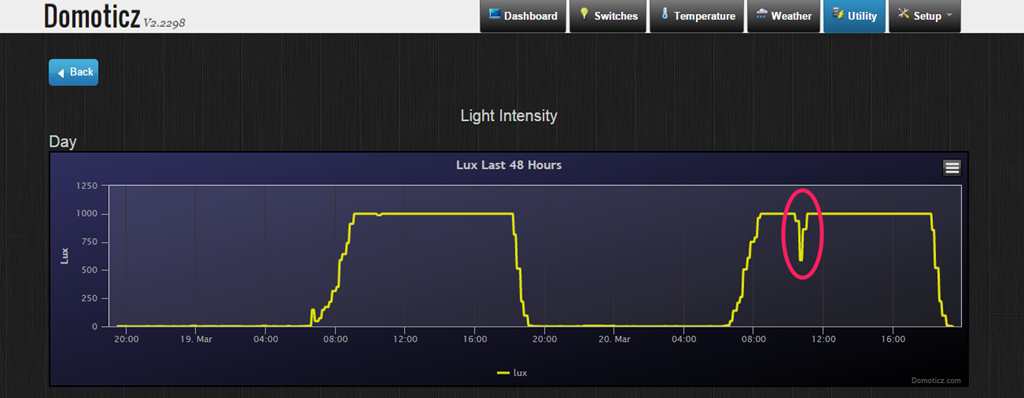
    Therefore, even though I was not able to observe the eclipse directly, I certainly had indirect evidence that something was afoot. In addition, one of our outside motion sensors (part of our Home Automation installation) has a light sensor. The readings from that today clearly show how the light from the sun was obscured during the moon’s transit:

    Domoticz 25

    3 responses to “Mist Eclipse”

    1. Tom_T Avatar
      Tom_T

      Love the graph!

    2. Matt Healy Avatar
      Matt Healy

      Cool graph; sorry you didn’t get to see it directly. Back in the 1990s I got to see one partial solar eclipse from the lawn of Yale Medical School when I was a Postdoc, and then a total eclipse in Germany where I was attending a scientific meeting. Where I was, the clouds parted at the critical moment. The organizer of our meeting was a few km away with his son’s school group; I was saddened later to learn they had clouds at the time of totality.

      As the Moon’s shadow raced across Europe towards us, we watched live video from the MIR space station.

      I took some pictures during the eclipse but they did not come out because I got the exposure wrong. Soon after that I got my first digital camera! Digital photography is great for lousy photographers like me because one knows right away whether one got the photo and can try again if need be…

    Leave a comment

  • Home Automation Revisited

    Back in January, I wrote about putting my toe into the waters of Home Automation. As I said at the time, there’s a bewildering array of products and standards out there. Over the past couple of months, I’ve been taking a look at some of the HA solutions out there, and I think I’ve landed on one that seems to fulfil my requirements pretty well.

    I had decided back in January that my solution would be one that used Z-Wave, and that’s still the case. I’ve been able to purchase Z-Wave HA devices from several different manufacturers, and they interoperate as promised. I’m satisfied that the choice of Z-Wave is a good one for me.

    As I said in January, there is a wide range of possibilities in the choice of the controller for a HA system. I could buy an off-the-shelf unit such as the Fibaro Home Center 2, the Zipato ZipaBox, a VeraEdge controller, or a HomeSeer controller. Or I could buy just the controller software, such as HomeSeer, and install it on a PC or a Rasberry Pi box.

    In the end, I decided not to purchase an off-the-shelf unit. Fibaro still seem to be struggling to deliver a stable version of their latest software for the Home Center 2, and not being able to trial the other hardware products meant that purchasing one would be a gamble. It seemed to me that a better approach would be to trial a software solution, using an existing computer.

    I ended up taking a look at the following software solutions:

    The first two are commercial products, the rest are open source projects, funded by donations.

    For my testing, I purchased a variety of devices:

    With the devices installed, and included in the ZWave network (registered in the ZStick controller), I connected the ZStick to a variety of software controllers in turn…

    HomeSeer has been around for a while. That means it’s comprehensive (it can control a wide range of devices using a variety of standards), and it has a wide range of third-party add-ons. However, it still strikes me as being expensive: $249.95 for the basic version of the controller software and $199.95 for the UI designer software. If I were to go with HomeSeer, it would probably make more sense for me to buy the basic (linux-based) HomeTroller Zee controller at $199.95. I installed the trial software of HomeSeer version 3, and used it for a week or two. It worked, and the diagnostic information was copious. However, the interface struck me simultaneously as being rather basic, and yet somewhat complex in places. I decided not to proceed further with HomeSeer.

    I admit I only took a cursory look at both Charmed Quark and OpenHAB. I found both difficult to set up, and got the impression that I would spend more time fiddling with them than using them. OpenHAB, in particular, seemed aimed at programmers and developers, rather than end-users at this stage. As a result, I moved on.

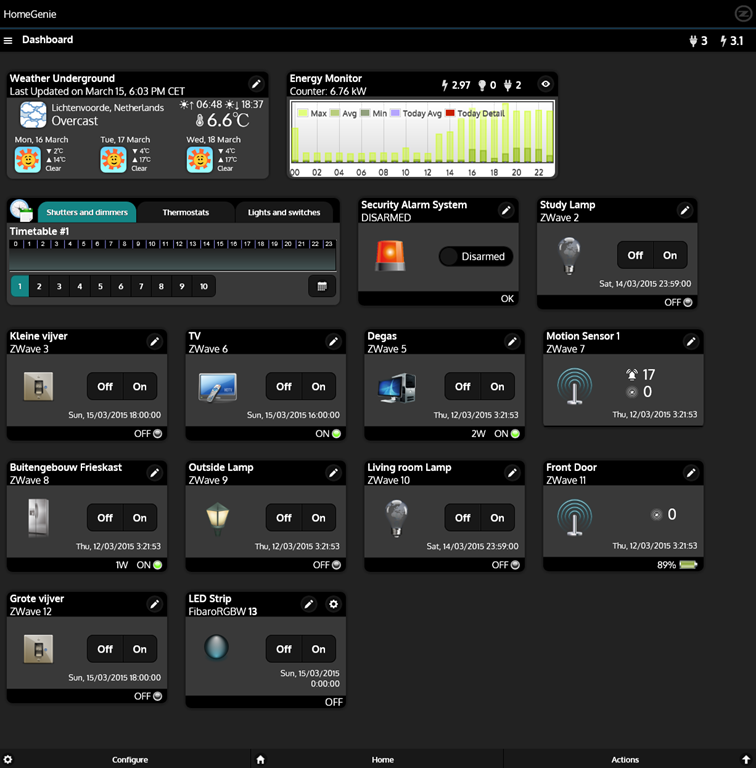
    HomeGenie is also something that will delight programmers and developers at the moment. Nonetheless, I was able to get it up and running very easily on Windows, and it works well. Here’s the “dashboard” that I see for the devices I currently have in my HA network:

    HomeGenie 06

    It’s primarily the result of the efforts of one developer, and he’s done a very good job. It’s still at a fairly early stage, so, for example, if you want to develop automated control of your devices, you will find yourself very rapidly at the limit of what the built-in “Wizards” are capable of, and have to turn to grown-up programming to get the job done. That’s all very well, if that’s your thing, but it’s really not what I want to do any more. I made a donation to the project, because I appreciate what has been achieved, and I hope it continues to develop. There’s a small (around 350 members) community forum where ideas are exchanged and bugs highlighted for solving. I could certainly make use of HomeGenie, if there were not other, and for my purposes, better solutions available.

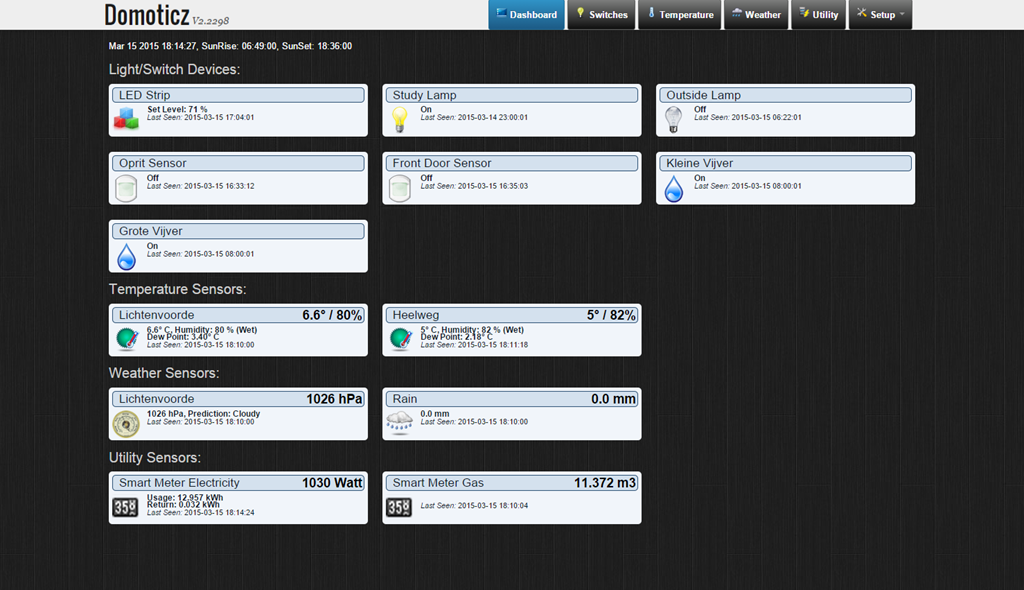
    Domoticz is another open-source project, and while it is primarily led by one developer, there are others actively involved, and the community forum is large (around 3,270 members) and active. Domoticz and HomeGenie are similar in many ways, but there are a few differences, which can be both strengths and weaknesses, depending on where you stand. Here’s the Domoticz dashboard:
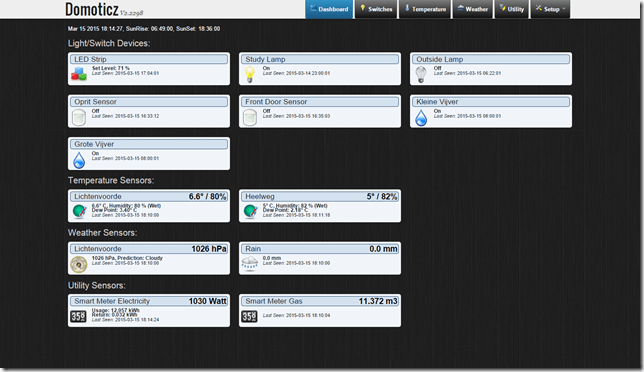
    Domoticz 18

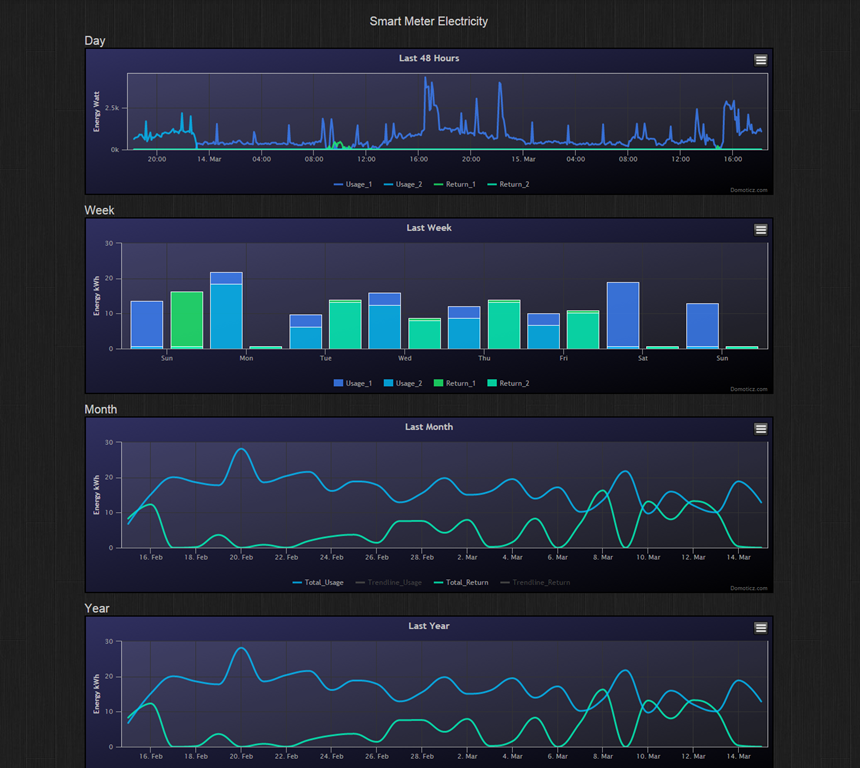
    The strength of Domoticz is its maturity; it already has solutions and support for a lot of hardware. In particular, it supports the reading and display of data supplied by our “Smart Meter” for our gas and electricity consumption. With the simple purchase of a cable, I was able to connect our smart meter to the Domoticz system and get real-time graphs of our energy consumption. Here’s what I see for our electricity usage:
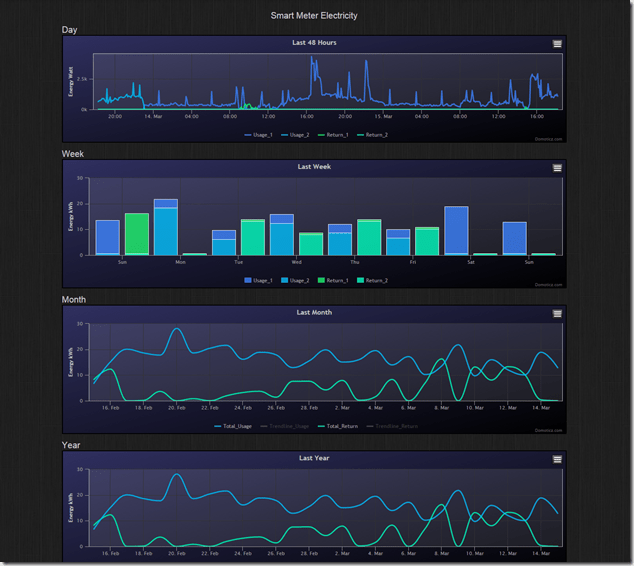
    Domoticz 16

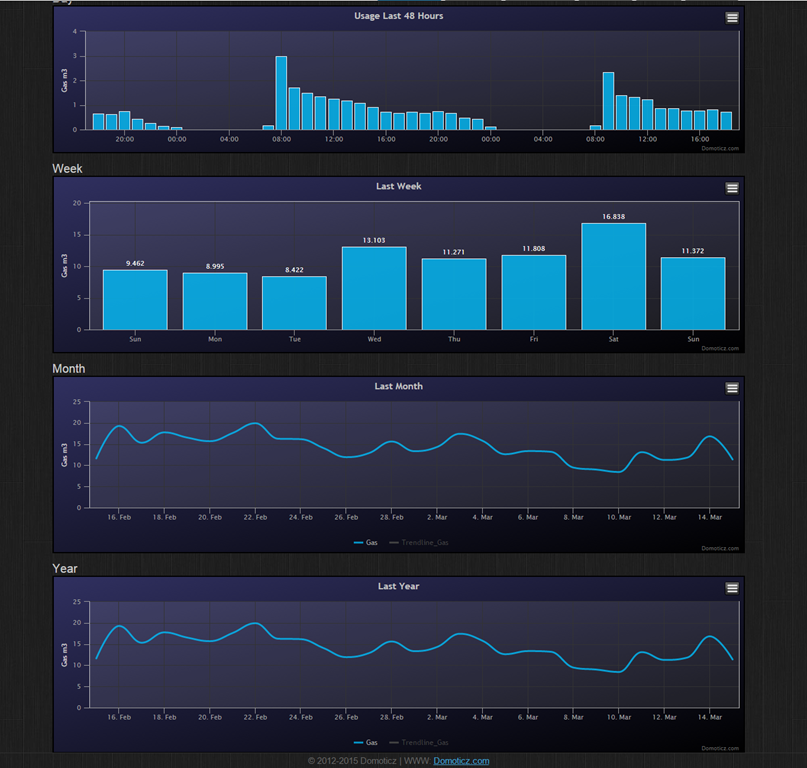
    It not only records our consumption (blue), but also the electricity generated by our solar panels (green) that is returned to the electricity grid. Gas consumption can also be tracked:
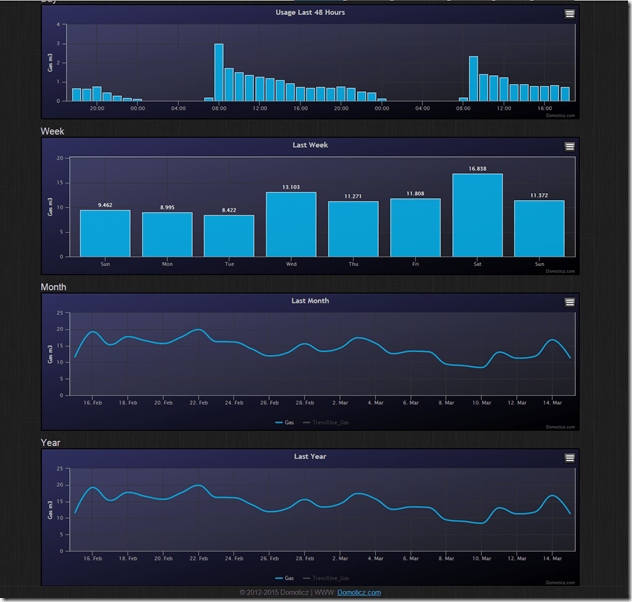
    Domoticz 17

    HomeGenie, at the moment, does not have this connection to Smart Meters built-in. The programmatic interfaces are there, and such an interface could be built, but I’m not the one to do it.

    For me, the strength of HomeGenie is that it is a complete solution, in that the developer has written software to control Z-Wave devices directly. Domoticz, on the other hand, hands off the control of Z-Wave devices to another piece of software, developed by a separate open source project: Open-ZWave. That means that there is the chance of issues arising out of effects caused by the fact that there are two different software components developed by two different groups. I’ve already come across an issue with my Z-Wave sensors, which may be caused by a bug in Domoticz, a bug in Open-ZWave, or some combination of the two.

    Nonetheless, I can live with that issue, and the quirk that the Fibaro wall plugs don’t always show the correct status in Domoticz. There are two reasons for this:

    • The fact that I can track our energy consumption directly in Domoticz (as shown above), and
    • the fact that Domoticz supports Blockly for building automation programs.

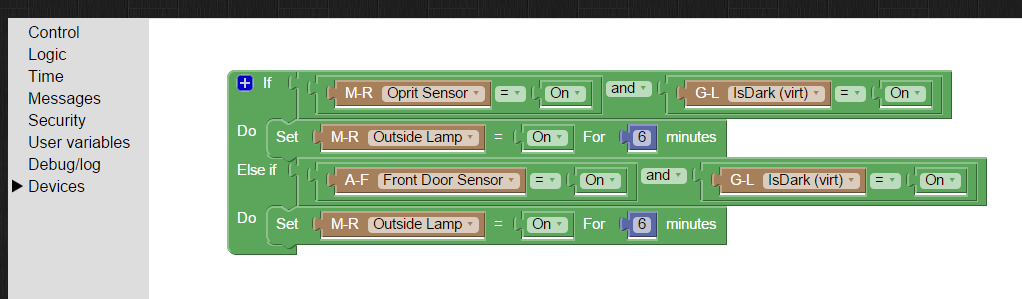
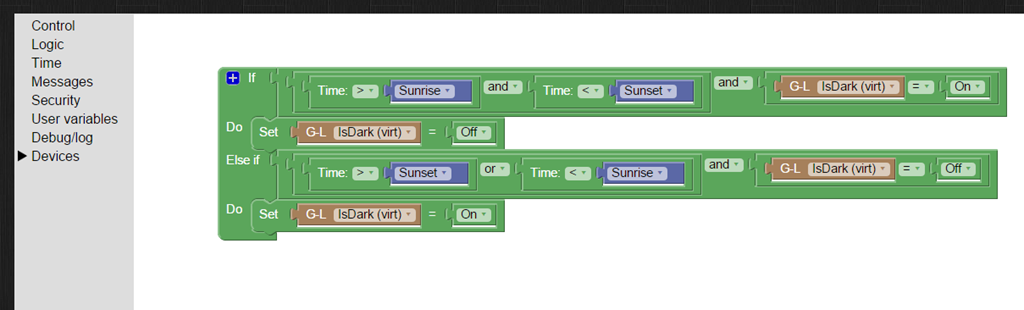
    Think of Blockly as Lego for programming. It’s wonderfully easy to use, and I’ve already programmed the motion sensors on the driveway and by the front door to turn on the outside lights if someone comes along during the hours of darkness (which have been defined, using Blockly and a “virtual device” in Domoticz that I defined: IsDark):
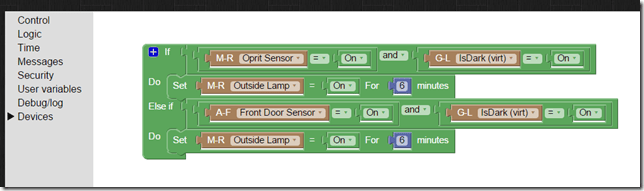
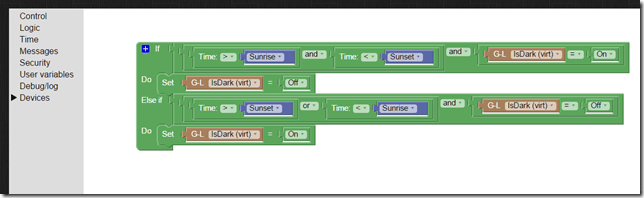
    Domoticz 19

    Domoticz 20

    So for the moment, I’m going to stick with Domoticz for our Home Automation system, with HomeGenie held in reserve as my fallback position.

    And while I tested both on Windows, both Domoticz and HomeGenie are available for the Raspberry Pi. I’ve also stuck my toe into the waters of using a Raspberry Pi, and Domoticz is currently running very happily on it. But that’s the subject of another post, I think…

    20 responses to “Home Automation Revisited”

    1. Matthew Healy Avatar

      Interesting; back in the 1980s I was an electrical control systems engineer with Siemens. At that time, industrial controls were mostly mechanical: relays, contactors, timers, etc. Programmable controllers were very new and expensive. At that time, just as now, there were competing standards for hooking stuff up to the controllers; customers pushed vendors into defining some standards. Now I suppose the same process will happen with home automation. I won’t buy until it is clear which vendor-independent standard will win because I dislike being locked into one vendor.

      1. Geoff Coupe Avatar

        Agreed, that’s why I went with ZWave. There are over 250 manufacturers producing devices and components that implement this wireless communication standard for HA.

    2. Matt Healy Avatar
      Matt Healy

      Do you know how well Z-Wave deals with an environment with lots of RF noise? My residence is a condominium in a large building of them; from where I sit I can see about a dozen WiFi access points including moline. Some gadgets work OK here; some don’t

      .WiFi is pretty good at handling the interference, though I recall reading once the late Steve Jobs had to ask everbody in the room at some demo to please turn off their WiFi hotspots because with over 200 of them in the room they were jamming his demo!

      Of course, I’ve got WPA2 encryption turned on; does Z-Wave have encryption? Wouldn’t want anybody driving by to access my devices…

      1. Geoff Coupe Avatar

        Matt, from the Wikipedia article: “Z-Wave operates in the sub-gigahertz frequency range, around 900 MHz. This band competes with some cordless telephones and other consumer electronics devices, but avoids interference with Wi-Fi, Bluetooth and other systems that operate on the crowded 2.4 GHz band”. What would happen if you live in an environment that is saturated with Z-Wave devices, I don’t know. I’ve not heard of issues, but then I haven’t actively looked for them – I don’t need to, since I live in the middle of nowhere.

        As for security, yes Z-Wave has it. This is an interesting article on attack vectors:
        http://blog.opensecurityresearch.com/2013/07/potential-attack-vectors-against-z-wave.html
        The conclusion seems to be that it is theoretically possible, but no-one seems to have done it as yet.

    3. […] ← Home Automation Revisited […]

    4. Matt Healy Avatar
      Matt Healy

      Was your power affected by Friday’s blackout?

      1. Geoff Coupe Avatar

        No – we live in the wilds of the Dutch countryside, so we were spared…

    5. Marcel Avatar
      Marcel

      I’m working on a HomeGenie Smart meter widget and have a working prototype if you want to try it out.

      1. Geoff Coupe Avatar

        Marcel, many thanks for your offer, but I’m running Domoticz now as my operational system. Thanks.

    6. Christophe Avatar
      Christophe

      Any reason for not considering Jeedom ?

      1. Geoff Coupe Avatar

        a) I wasn’t aware of it when I was looking at various products.
        b) My French is practically non-existent, and large swathes of the documentation is in French as far as I can see.
        c) The English forum is not very active – by contrast, even though Domoticz was started by a Dutch developer, the English-speaking forum is very active.

        If I were French, then I expect I would have reached a different decision, but I’m still happy with Domoticz, and thanks for asking.

    7. Jack Avatar
      Jack

      Hi Geoff,

      I found you via the domoticz site.
      I am struggling with my windows pfone and the domoticz app. do you have it running allready?
      There is connection but then I can not do annything.
      The midlle button for settings stay gray.
      Further compliments for nyour website..looks great.

      Greatszzz,

      Jack

      1. Geoff Coupe Avatar

        Hi Jack, I’m having the same problem with the Windows Phone app. I can’t get it working. Instead, I’m just using the mobile web site of Domoticz via my Windows Phone. Cheers.

    8. Jack Avatar
      Jack

      Hi Geoff,
      I think we will get an update very soon.
      After a post in the domoticz forum there was a reaction from the developer.
      He changed some things and is testing now.

      Greetszzzz

    9. Jack Avatar
      Jack

      For me it works now

    10. Roland Avatar
      Roland

      Hello Geoff,

      I’m currently starting my home automation project. I have some colleagues that are using a Fibaro HC2 and are very happy with it. I also planned to buy a HC2. But I already gave a basic try to Domoticz, without any real z-wave hardware, and it was working easy (installed on FreeNas). So I have some doubts, going further and start for real with Domoticz and buy a USB z-wave device or start with a Fibaro HC2.

      My doubts:
      + Fibaro
      – The Fibaro has an easy accept at home factor with easy iPhone/iPad app;
      – The Fibaro has a good support for all Fibaro (and other) hardware;
      – The Fibaro looks to be easier to configure.

      + Domoticz
      – The Fibaro is very expensive, it’s nice when I’m able to invest more in z-wave devices and less in the controller;
      – With the usb z-wave device and Domoticz i’m able to get a z-wave plus solution.

      Any suggestions? What about the iOS apps for Domoticz, what is comparable with Fibaro and easy to use for all home users? And what about the hardware and firmware updates, is it just as easy to update the firmware from a Fibaro device, like the smoke detector, from Domoticz as from a HC2?

      Thanks,
      Roland

      1. Geoff Coupe Avatar

        Roland, your decision probably boils down to whether you feel more comfortable buying an off-the-shelf solution (the HC2), or building your own, using open source software produced by a community of enthusiasts (Domoticz).

        I went for the latter, because at the time when I was looking, the Fibaro support forums were full of angry customers complaining about the quality of the software running in the HC2, and this had been going on for some time. I had also come across reviews which mentioned that the HC2 runs hot, which raised a warning flag for me. I don’t know whether Fibaro has managed to get a grip on the quality of their software development, perhaps you could take a look at the forums to see for yourself, and come to your own conclusion.

        There are always pros and cons in the comparison of functionality between the two systems as well. For example, you can easily upgrade the firmware of Fibaro devices using the HC2 – that function is not in Domoticz (though it’s been asked for). So far I’ve not felt the need to update any of my devices’ firmware, but it would be nice to be able to do this if necessary. On the other hand, the Domoticz software is more flexible than that of the HC2. It’s easy enough to get started and build event triggers using Blockly, but there is also full scripting available if required.

        I don’t use iOS or Android, so I can’t comment on the apps available.

        I’m still very happy with my choice for Domoticz, but as I say, it’s down to you to decide…

    11. […] Regualr readers of this blog may recall that I dipped my toe into the waters of Home Automation at the beginning of last year, and I have been running a Domoticz system since last March. […]

    12. […] did this because I need a server to be running 24/7 to host our Home Automation system (a Domoticz system). Originally, I had Domoticz installed on a low power Raspberry Pi2, but a […]

    13. […] years ago, I posted about my first foray into the realms of Home Automation. Then, after evaluating a number of HA systems available at the time, I chose Domoticz as the basis […]

    Leave a comment

  • Goodbye, Facebook, and Good Riddance

    Let me put my cards on the table; I’ve never been a fan of Facebook. However, it seems that most of our neighbours are avid Facebook fans, so after holding out for years, I decided that I’d open up a Facebook account in November last year, primarily as a means of being kept up to date with what was happening in my neighbourhood.

    Even after I signed up, I rarely accessed my Facebook page, and contented myself with batting away the many, many Facebook notifications that appeared in my email inbox or on my Windows Phone. My prime channel for revealing my thoughts to the (largely indifferent) world has remained this blog.

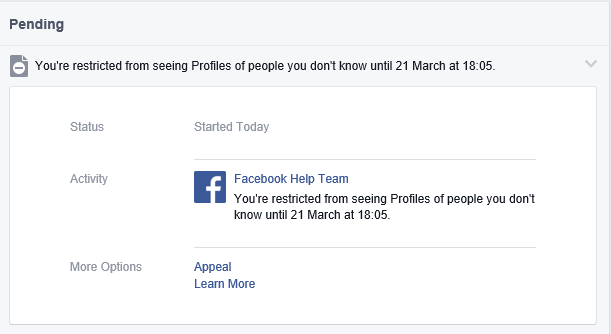
    Then today, out of the blue, I got a notification from Facebook that I’m restricted from seeing the profiles of people that I don’t know for one week:

    Facebook 01

    Er, excuse me? I don’t make a habit of trying to see the profiles of people that I don’t know (I have tried looking up two old friends since I joined), so why the restriction?

    Well, sod this for a game of conkers. I don’t need Facebook, so I’ve deleted my account. Goodbye and good riddance.

    Addendum 15 October 2016: It is with great regret that I have to confess that I’ve been forced to reopen a Facebook account. There’s a group of us lobbying for internet services via optical fibre in our area, and it has been decided that a closed Facebook group is the best way of keeping the group organised. Sigh. I still loathe and detest Facebook, but needs must, I suppose…

    Addendum 23 June 2019: I should point out that once the lobbying action was (successfully) completed, I deleted my Facebook account – and have been Facebook-free for over a year. Don’t miss it in the slightest.

    3 responses to “Goodbye, Facebook, and Good Riddance”

    1. Mark Avatar
      Mark

      its been almost 2 weeks now. still happy about it?

      1. Geoff Coupe Avatar

        What’s Facebook? 🙂

    2. […] suspect it’s high time that I deleted my Facebook account (again). And to be clear, I loathe and detest Facebook, but I needed an account because of my community […]

    Leave a comment

  • Damn

    Terry Pratchett has left.

    One response to “Damn”

    1. Matt Healy Avatar
      Matt Healy

      http://m.xkcd.com/1498/

      Says it all:
      “Thank you for teaching us how big our world is by sharing so many of your own.”

    Leave a comment

  • Visits to Dystopian Realms

    My bedside table has a small pile of the books that I’m currently reading. I tend to switch between fiction and non-fiction books, but I noticed yesterday that I seem to have been on a run of fictional dystopias.

    9780340921609It kicked off a few months back with David Mitchell’s The Bone Clocks, which I enjoyed, but which I thought was less impressive than his Cloud Atlas, or The Thousand Autumns of Jacob de Zoet. The Bone Clocks uses the device of having different characters tell their story in the first person, and the main character’s voice and wisdom develops from that of a teenager to being an old woman over the course of the novel. I liked hearing the different voices (Crispin Hershey, the English novelist, is not a million miles from a caricature of Martin Amis), and Holly Sykes as the central protagonist is beautifully portrayed. There are explicit references to characters from other Mitchell books (I recall that he said, in an interview, something along the lines of that he’s writing one meta-book). If there’s a weakness (for me) in The Bone Clocks, it was the “An Horologist’s Labyrinth” section, which rather came across to me as in the style of Denis Wheatley’s “The Devil Rides Out” – a rattling yarn, but with rather over-wrought language.

    The final section, “Sheep’s Head” stepped back from the pyrotechnics of “An Horologist’s Labyrinth” and redeemed the book for me. This is where the dystopian society is portrayed – the Endarkenment – as it is named in the book. We return to Holly as a woman in her seventies, living in 2043 in a world where the chickens of energy-guzzling, resource-stripping and climate change have come home to roost. Darkness descends, but there is a glimmer of light as well.

    beteNext up was Adam Roberts’ Bête. This was dystopia all the way down, but at times very funny with it. It opens with something that is almost straight from Monty Python – a farmer is about to kill his cow, but the animal insists on discussing his right to do so with him. The tale is set in a time not too distant from our own, where artificial intelligence computer chips have been embedded in some livestock by animal activists. The story is once again told in the first person, by Graham Penhaligon, the farmer. He’s irascible, unsympathetic, a Victor Meldrew sort, yet I couldn’t help but warm to him. Roberts has some amazing, and outrageous ideas (wait until you meet the lamb!), but the novel remains very believable. And the ending is a whole new beginning…

    9781408819708I followed that up with Margaret Atwood’s MaddAddam. This is the third in her trilogy of dystopian novels that began with Oryx and Crake, and continued with Year of the Flood. I read Oryx and Crake a few years back and enjoyed it, but I haven’t read Year of the Flood. However, I came across MaddAddam at the Deventer Book Fair last August, so I picked it up for a song and added it to the pile of books to read.

    I have to say that I don’t think it’s one of Atwood’s best works. Where Oryx and Crake resonated, MaddAddam fell flat for me. Yes, there’s a sense (right at the end) of how books and writing will be an important driver to the future post-human society of the Crakers, but most of the book is taken up with providing the backstory of a few characters that I assume were introduced in Year of the Flood, and waving the bogeymen of the Painballers in the reader’s face.

    9780553418842Now I’m on to Michel Faber’s The Book of Strange New Things. You might think that this is a strange choice, given that I’m an atheist, and the book’s protagonist is an evangelical Christian minister recruited to do missionary work. It’s true that I view all religions with the utmost suspicion, and I simply couldn’t finish Marilynne Robinson’s Gilead (an elderly Congregational minister writes to his 7-year old son). However, Faber also wrote Under The Skin, which engrossed me with its strange atmosphere and other-worldliness.

    I’m still reading The Book of Strange New Things (I’m at the point where Peter has just met with a member of his new flock), and the book of the title is, of course, the Bible. Already there is no doubt in my mind that this is a book that I will finish and find just as thought-provoking as Under The Skin. I don’t know yet whether the society of Peter’s new flock is a dystopia or a utopia, but it’s already clear that the society that Peter has left is painted in dystopian hues.

    Next up, a change of pace and subject matter; Kenan Malik’s The Quest for a Moral Compass; an exploration of the history of moral thought as it has developed over three millenia, across the world’s cultures…

    3 responses to “Visits to Dystopian Realms”

    1. Matthew Healy Avatar

      There’s a fair chance I’ll see 2043 since I was born in 1960. I hope it’s not quite that dystopian but who knows?

      1. Geoff Coupe Avatar

        Good luck, in any event… 🙂

    2. Mark Avatar
      Mark

      After watching the City of Ember and Logans Run, I was very interested in dystopian fiction – especially around isolated communities discovering a forgotten world outside of them. Unfortunately most of it seems to be pretty wacky or YA stuff.

    Leave a comment

  • Wolf Hall

    The BBC’s six-part adaptation of Hilary Mantel’s novels (Wolf Hall and Bring Up The Bodies) drew to a close last night. What a wonderful six hours that was! Mesmeric, with acting of the highest order from all concerned.

    If I have one small carp (a tiny goldfish, really), it was that the director’s insistence on shooting night scenes lit only by torchlight and candles, whilst artistically correct, was not well served by the lenses that they used. It’s a pity that they couldn’t have got hold of the lenses used by Kubrick for Barry Lyndon, that might have helped a bit with the gloom.

    Leave a comment

  • The World’s Most Important Operating System

    I was saddened to learn today that Bill Hill died of a heart attack back in October 2012. Bill was a Scotsman who started out life as a newspaperman and became a typographer, but ended up working for Microsoft.

    In this short video clip Bill explains why the world’s most important operating system is not Windows or OSX or Linux or Android. It’s Homo sapiens 1.0. It’s an operating system that first booted up about 100,000 years ago, and has never yet had an upgrade.

    There’s more videos of Bill available here. A memorial, of sorts. RIP, Bill.

    Leave a comment

  • Metro – Murdered By Microsoft?

    When Microsoft introduced Windows Phone, precisely five years ago, the major differentiator from Apple’s iOS and Google’s Android was the user experience. Microsoft called the design language: Metro; that is until Metro AG threatened Microsoft with legal action for using that name. Now Microsoft no longer use the term Metro, and indeed it would appear that they no longer want to use many of the elements that made Metro the innovation that it was.

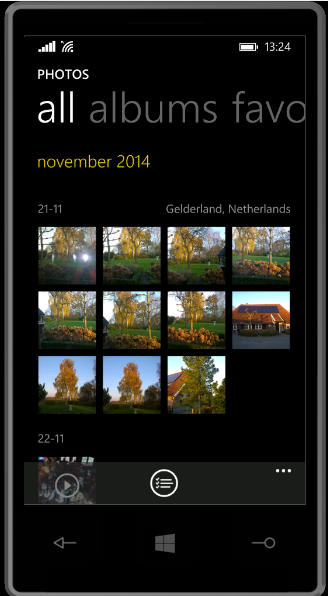
    One of the design innovations was lateral scrolling within apps to reveal different functions (the so-called “Pivot” control). The use of large fonts in the app title cued the user that more was available by scrolling laterally, e.g. as here in the Photos app:

    WP8 04

    Along with Metro came concepts such as the “hub” – single points of entry where similar items from different sources would be consolidated. So, for example, the Photos app consolidated your photos from cloud sources such as Facebook, Flickr and OneDrive with the photos that were on the phone itself. You no longer had to worry about where the photos were held, and open up a Facebook app or a Flickr app; they were all available in one place.

    Unfortunately, I suspect that companies such as Facebook and Flickr didn’t like the hub concept, because they saw it as threatening the power of their brand. Microsoft has responded by either removing the consolidation feature completely (e.g. the integration with Facebook and Flickr that existed in the Photos app in Windows 8 was ripped out for the Photos app in Windows 8.1), or watered down.

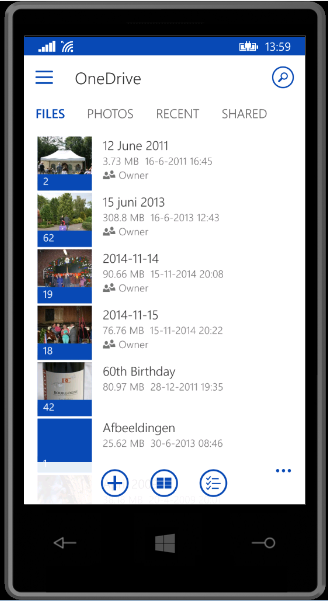
    Now it seems that Microsoft is turning its back on other design aspects of Metro, and is busily introducing design concepts copied from Android (e.g. the infamous “Hamburger” button). We first saw this in the new version of the OneDrive app, introduced in October 2014:

    WP8 05

    You’ll notice that not only is the “Hamburger” button present (it’s the three horizontal lines at the top left), but the Pivot design element has also gone. This redesign was met with howls of protest. As I said at the time:

    Frankly, if I’d wanted an Android phone, I would have bought one. One of the key reasons why I went with a Windows Phone was the UI design. I like it a lot, and I am at ease with it. To have a key Microsoft team turn their back on it and introduce Android elements is a shock, to say the least.

    One might almost wonder if the team had actually read the “Review questions for prototype” section on the “Design the best app you can” page of the UI guidelines, in particular:

    • Are you coming from another mobile platform? Windows Phone users will expect fewer taps, clearer views, large typography, and the use of contrast and color.
    • Are you using both axes of scrolling (the X and Y axes) and orientation (Portrait and Landscape)? Depending on the purpose of your app, users may expect both.
    • Do you use Pivot and Hub controls effectively and correctly?

    Even simple things, such as a transparent Tile for the app have been forgotten about (or ignored) in this bastardised design. I hope that the howls of protest that have greeted this version result in a swift redesign to make it a proper Windows Phone app.

    Good design and adhering to UI guidelines are important, and help to build a brand. This horror does just the opposite.

    Looking at what is coming out in the Windows 10 previews, Microsoft is simply steaming ahead with the Androidification of Windows. Metro has been dragged behind the arras, with a dagger in its back.

    5 responses to “Metro – Murdered By Microsoft?”

    1. mmusterd Avatar
      mmusterd

      Could not agree more.
      Last few days I took the opportunity to try out windows phone 10 technical preview, and what we have there is a random mix of design elements seemingly randomly gobbled together from android and windows phone.
      Bing search (“de loep”) is one of the worst offenders, with both the hamburger icon and the … in the menu bar below.
      Really, the design language that was there in windows phone 7 was really good.
      The only reason I can think of for changing this is one that scares me: Microsoft creates universal apps for android first, and as an afterthought recompiles them for their own platform.

      I uninstalled windows 10 from my phone because of some other bugs.

      1. Geoff Coupe Avatar

        I don’t think it’s the reason you give. I suspect that Microsoft has given up on trying to differentiate with Metro, but instead thinks that it will make it easier to attract Android users across to the Windows platform. I doubt that this strategy will succeed; instead it seems to me to be more a case of Hanlon’s Razor

    2. negative1ne Avatar

      i am using a windows 7.8 phone still, and although the old style still works well. perhaps newer applications need this new style to match the other windows 10 platforms on the PC, and on tablets. finally, taking out the hubs makes it easier for updates to be made to single applications than having an OS update which takes longer to test, and has to be approved by the carriers. that is why a lot of applications were decoupled.

    3. […] couple of months ago I wrote a post “Metro – Murdered By Microsoft?” in which I expressed my concern that it appeared as though Microsoft was dropping many of the […]

    4. […] Windows 10 also introduces the dreaded “Hamburger” button. These and other changes represent a major shift away from the design language pioneered in Windows 8/8.1 and in Windows Phone […]

    Leave a comment

  • Dear God…

    …will someone please take the new Guardian web site and its designers far, far away? It’s not an improvement on the old, staid, “newspaper on the web” approach.

    Here’s a case in point: an article about the great Irish actor Michael Gambon having to call it a day because he can’t remember his lines any more:

    http://www.theguardian.com/stage/2015/feb/08/sir-michael-gambon-ends-theatre-career-memory

    And what does the Guardian show us as “related content”? Fucking obituaries! Er, hello, Guardian web people, Gambon is not dead yet.

    I despair…

    2 responses to “Dear God…”

    1. James Avatar
      James

      The Guardian has always been away with the fairies as far as the physical integrity of what it puts “out there” goes. Why not continue and expand the tradition into the internet age?

      1. Geoff Coupe Avatar

        The typos of the Grauniad are both legend and legion, but there appears to be a whole new arena of off-kilter algorithms opening up now. I’m beginning to yearn for simpler times.

    Leave a comment

  • Lenovo ThinkPad 10 vs Yoga 3 Pro

    I’ll kick this post off with a disclaimer: YMMV – Your Mileage May Vary. That’s to say that what follows is entirely my subjective impression based upon my usage requirements for portable computing. Your requirements may well be entirely different, and so would your conclusions be in the following comparison.

    With that disclaimer out of the way, let me remind you that last September, I received a ThinkPad 10 tablet on long-term loan from Lenovo. I blogged about my first impressions of it in a post that compared it to my ThinkPad Tablet 2, which I had purchased myself back in January 2013.

    I must admit that in the ensuing months, I quickly began to like the ThinkPad 10 (TP10); so much so that I sold my ThinkPad Tablet 2. The TP10, in combination with the Lenovo Quickshot Cover, fits my requirements for portable computing very well indeed. In particular I like:

    • the size and weight (not too big, clumsy or heavy),
    • the 16:10 screen aspect ratio (better for reading books than 16:9 aspect ratio devices)
    • the pen – I prefer scribbling notes and diagrams in OneNote during meetings to typing
    • the performance – not a speed demon, but more than adequate for what I use (OneNote, Mail, browsing with IE, Word, Excel, Powerpoint)
    • the UI experience of Windows 8.1 in a tablet.

    And there things stood until a couple of weeks ago, when Lenovo asked me if I would like to try a Yoga Pro 3 (Y3P). I replied that I was interested in trying out the Consumer Technical Preview of Windows 10, so if I could use the Y3P for that, then yes, please. A package containing a rather smart box (see below) was delivered a few days later, a couple of days before Microsoft unveiled the next stage of Windows 10. The box itself is a slick piece of paper engineering – after taking off the lid, you fold back the two flaps covering the top, and as you do so, the Y3P rises out of the box to greet you. A nice touch.

    20150203-1214-56

    I have the orange version of the Y3P, which is pleasingly different to the usual black or silver Ultrabooks:

    20150203-1216-06

    The most striking thing, of course, is that “ watchband” hinge. It’s unique in the portable computer world. I rather like it, I have to say.

    20150203-1216-19

    Being an Ultrabook, the Y3P has more ports than the TP10. The left side has Lenovo’s battery charger port (which also doubles as a USB 2.0 port), a USB 3.0 port, a Micro-HDMI port, and a full-size 4-in-1 (MMC, SD, SDXC and SDHC) Memory Card slot. The right side has another USB 3.0 port (which can also be used to charge Smartphones), a headphone socket, Volume controls, Auto screen rotation lock, a recessed Reset button and a Power button.

    20150203-1339-29

    20150203-1339-52

    I do prefer the buttons on the Y3P, they are slightly proud of the case, and far easier to use than those on the TP10, which continue to be a slight source of irritation if ever I need to use them. Fortunately I rarely need to, as the TP10’s Quickshot cover acts as a power (sleep) button, and I tend to use the onscreen Volume controls in place of the physical buttons.

    Opening up the Y3P is a bit of a palaver, in comparison to simply flipping open the Quickshot Cover on the TP10. The watchband hinge is stiff (as it needs to be), and my fingers find it difficult to get a purchase at the front of the Y3P to begin prising it open. Once open, a fairly standard keyboard and trackpad are revealed (you’ll notice that the matt finish of the trackpad shows up finger oil very well).

    20150203-1219-53

    I’m sure some long-term Lenovo users will be complaining that there is no TrackPoint device, but it’s been so long since I used one that I don’t miss it. This Y3P is the first device I’ve used that has a backlit keyboard, and I must admit that is one innovation that I have really begun to appreciate. Tapping away of an evening, seated in front of the TV, is so much easier with a backlit keyboard. With my tablet, most of the time I’m either writing, or using the on-screen keyboard (which of course is easily visible), but on the occasions when I do use a physical keyboard, it’s been one without a backlight, and now I realise the advantage of having a backlit keyboard.

    The Y3P is of course much bigger than the TP10. That means both more weight (1.9 Kg versus 0.6 Kg), and a bigger screen.  Here’s the TP10 laid on top of the Y3P to give you an idea of the difference:

    20150203-1225-51

    The screen of the Y3P is not only physically bigger (13.3” diagonal versus 10.1”), but it has a higher resolution (3200 x 1800 versus 1920 x 1200) than the TP10. It also has a higher pixel density (276.05 dpi versus  224.17 dpi), but note that it is yet another 16:9 aspect ratio device.

    Like the TP10, it has a touchscreen capable of registering 10-point gestures. However, unlike the TP10, there is no pen or active digitiser.

    A couple of other things that are lacking in the Y3P in comparison to the TP10:

    • There is no rear camera, so capturing documents will have to be done with your Smartphone.
    • There’s no GNSS chip, so you’ll have to rely on your WiFi location being known accurately if you are using a map application. However, I doubt that this will work if you are using your laptop with the train’s WiFi during your daily commute.
    • There’s no WWAN option available (my loan TP10 doesn’t have WWAN either, but this is available as an option).

    The Y3P is equipped with an Intel Core M processor. The model I have has the 5Y70 chip, which is a 2 core/4 thread chip running at 1.1GHz or 2.6 GHz in Turbo boost. It has 8 GB of memory, and a 256 GB SSD fitted for storage. Although in theory the Core M processors are suitable for fanless designs, the Y3P is fitted with a fan. I can occasionally just hear it – a faint hiss coming from the right hand end of the watchband.

    Performance-wise, then, it far outstrips the Intel Atom processor with its 4 GB memory in the TP10. Yet, most of the time, I simply don’t notice it in the software I use.

    The Y3P came with even more Bloatware pre-installed by Lenovo than the TP10. As you can tell, I am not a fan of the extra software that OEM manufacturers throw into their machines. I spent an afternoon getting rid of most of them (and one of Lenovo’s applications – Harmony – refused to uninstall itself, until I took extreme measures). There must have been well over twenty different packages, practically all of them of questionable utility as far as I’m concerned.

    I have installed Build 9926 of the Windows 10 Technical Preview on to the Y3P, but I’ll keep my comments on that for another post.

    To sum up my thoughts on the comparison between the Y3P and the TP10 thus far, I think it’s safe to say that I still much prefer the TP10 over the Y3P.

    The Yoga 3 Pro is a nice machine; well engineered, but I think it has helped confirm my suspicion that my preferred portable computing device is a tablet equipped with a pen. I look forward to continuing to test out Windows 10 on it, but I’ll continue to take my trusty TP10 with me to meetings, and for kicking back on the sofa of an evening. But as I said at the outset, your requirements, and your conclusions may be completely different to mine…

    2 responses to “Lenovo ThinkPad 10 vs Yoga 3 Pro”

    1. Ludwig Avatar

      Just earlier today I was asked who I thought the innovation leader was in laptops/tables. I offered Lenovo, and you have just confirmed that my thinking was right. Thank you for this detailed review.

    2. […] date, I’ve had an HP TX2000 convertible, a Lenovo ThinkPad Tablet 2, and currently I have a Lenovo ThinkPad 10 and a Lenovo Yoga 3 Pro convertible. I’ve long ruled out Apple’s iPads and the myriad of Android tablets, since I use the Windows […]

    Leave a comment

  • OneDrive Now Searches Tags!

    I’ve been complaining for nearly four years now that Microsoft’s OneDrive does not support searching of photo metadata. In July 2013, I was told by a Microsoft project manager:

    “this work just ranks lower on the priority list than some other things we are doing right now”

    In May 2014, Microsoft trumpeted that they had made improvements to the OneDrive service, but proper support for Tags (in photo metadata) still wasn’t there. So searching for a Tag (for example: “Clouds”) in all the photos I have stored in OneDrive returned zero results:

    Onedrive 04

    And that’s where things stood right up to the last time I tried the experiment, which was earlier this month.

    Today, I thought that I would try once again, and this time, to my surprise and delight, there was a result:

    OneDrive 10

    As you can see from the information pane on the right, the selected photo does indeed have the descriptive tag “clouds” included in the photo metadata.

    There have been some other changes to the OneDrive service as well. If I look at a photo in OneDrive, instead of being able to open up an information pane to display all the photo metadata, there is now an information icon shown in the bottom right of the window:

    OneDrive 12

    Clicking/Touching that icon now displays the photo metadata in an overlay instead of in an adjacent pane:

    OneDrive 11

    I’m really pleased that this support for Tags, and being able to search on them is finally included in OneDrive. In one way, it really had to be, because Microsoft has gone back to the drawing board and will be removing the ability to search OneDrive files in the Windows Explorer in Windows 10, at least in the initial release of Windows 10.

    What Microsoft giveth with one hand, it taketh away with the other…

    Addendum 5th October 2024: And now Microsoft has silently removed this feature – OneDrive will no longer search tags in photos. Damn them.

    31 responses to “OneDrive Now Searches Tags!”

    1. […] 23 January 2015: OneDrive now searches Tags – at […]

    2. […] Update 23rd January 2015: OneDrive has finally introduced support for searching on Tags! […]

    3. osm Avatar
      osm

      Are you sure it’s not doing a fancy image search like Google does? (both your photos actually have clouds in them)

      Easy thing to rule out.

      1. Geoff Coupe Avatar

        Positive – I’ve also tested it with tags (e.g. the names of my dogs) that would not be known via an image search, no matter how fancy…

    4. Omar Shahine Avatar

      You’ve discovered that OneDrive has learned some new tricks.

      1. Geoff Coupe Avatar

        ha! Thanks for this, Omar. It’s been a long time coming, but it is extremely welcome for us photographers…

    5. José Oliver-Didier Avatar

      Hurray! This is a much valued addition to Onedrive! However, I did stumble upon some odd results when searching People Tags and Geotags. I searched for my son’s name and only a folder with his name appeared. The photos with People Tags with his name did not show in the results. I have most of my photos Geotagged and when searching location names some or none results appear. This is a bit baffling. It could be a sync issue, I’ll play with this a bit further.

      Also, I have not seen if the captions, tags are written back to the file and synchronized back to the PC to see if they show up in Windows Photo Gallery. Geoff: Have you gotten to test this scenario out?

      1. Geoff Coupe Avatar

        Hi José, I’ve only tested the search with Descriptive Tags – I haven’t tried People tags yet. Stop press, just done that with the single People Tag I have in all my OneDrive files – and Search found it. There may well be a lag between files being up in OneDrive and being indexed. And I also have the feeling that some old files may not be getting indexed at all. New files uploaded do seem to be getting included in the index fairly quickly. I haven’t tried adding a tag to a photo in OneDrive and seeing whether that will get put into the metadata so that it will end up appearing in Windows Photo Gallery. That’s the next step…

    6. Ludwig Avatar

      Hey Geoff, I re-blogged this post. Something I have never done before. We are on the same page on this one. Glad Omar reads, and responds, to your blog!

    7. Greg Edmiston Avatar
      Greg Edmiston

      https://blog.onedrive.com/introducing-an-all-new-way-to-view-manage-and-share-your-photos-in-onedrive/
      🙂
      Check photos.onedrive.com in about 6 hours; you should be able to play with the new features.

      1. Geoff Coupe Avatar

        Greg, I may be missing something, but I really don’t find it easy to create an Album under your current system. For me, the most obvious way to create an Album is to search on a tag and add the results into an Album. I can’t see how to do this under your current scheme.

        1. Greg Edmiston Avatar
          Greg Edmiston

          This works in the new version (search results –> add to album). Check back in 6 hours. We’re progressively rolling out to our users today. You’ll know that you have the new version when you see tabs for Photos, Albums, and Tags at the top when you visit photos.onedrive.com

          1. Geoff Coupe Avatar

            Great! – Thanks, Greg.

            1. Greg Edmiston Avatar
              Greg Edmiston

              New tag and album features are online!

              1. Geoff Coupe Avatar

                Greg, thanks! One question, why has Microsoft added the # character to every tag when a tag is displayed in OneDrive? It doesn’t exist in the tag in the photo metadata. I could understand it if Microsoft used the # to distinguish between automatic tags that OneDrive has created, and those tags created by the user. Now, I don’t always know which are automatic tags that you have added, and which are tags that I have added (and which are definitely present in the photo metadata).

              2. Geoff Coupe Avatar

                Greg, something odd about the tags…

                1) Select a photo and click on the Information icon to display metadata (including tags).
                2) click on a tag. I expected this operation to then show me all the photos with this tag. Instead:
                3) I see a page with the tag displayed at the top, together with all the top-level folders.

                I don’t think this is working properly….

                Edit: I think the problem is that it works if I select one of your automatic tags, but it doesn’t work if I select one of my (user-added) tags… See here for an example (“buurt” is Dutch for neighborhood)

    8. […] 23 January 2015: Microsoft has (finally) introduced full support for searching of tags into the OneDrive cloud service, so at least you can search your files online in a proper manner, even if you now can’t do it […]

    9. Danish Ali Avatar
      Danish Ali

      The tags are working on my one drive app on android but not opening on any browser (including edge) on my windows 10 device . its says something went wrong and shows the link to my onedrive below it. can anyone please tell me how to fix it?

      1. Geoff Coupe Avatar

        I think I’m seeing the same – if I use the Edge browser to try and display the Tags page of my OneDrive photos, then I always get a plaintive “Something went wrong” message. However, if I use Chrome, then this will display the tags.

        It may be connected to the number of photos and tags that we have. I have thousands of photos, and almost 2,000 tags in use.

        I’ve reported this to OneDrive support, but so far they haven’t been able to suggest any fix.

      2. Geoff Coupe Avatar

        Just to follow up on this. I reported the issue to OneDrive technical support. They asked me to run a diagnostic tool and send them the results for escalation within Microsoft. I did that a couple of weeks ago, and not heard anything since.

    10. Alex Pyper Avatar
      Alex Pyper

      Very interesting. Thanks.

      I’m about to start scanning thousands of paper photos I have.
      I also have thousands of digital photos.

      I want a “foolproof” tagging method that is was to use.

      I have Windows 10 and Onedrive.

      Should I use the Windows photo App to tag and store the results on OneDrive?

      Or would it be better to use, say, Photoshop Elements to tag?
      Will OneDrive search for tags made with Elements?

      I would like to share all my tagged photos, in the future, with my children, some of whom use Apple computers.

      Your suggestions would be much appreciated.

      1. Geoff Coupe Avatar

        Alex, when you ask about the “Windows Photo App”, I assume that you mean the built-in Photos App in Windows 10? If so, then be aware that at this stage of its development, it does NOT support tagging at all. Yes, yes, I know, the App has been available since the days of Windows 8, thus over four years ago, but Microsoft STILL has not got around to adding a tagging function to it. IMO, it is still a poor shadow of Microsoft’s Photo Gallery – a free tool that is part of Windows Essentials. Unfortunately, Photo Gallery, like the rest of the Windows Essentials suite is no longer being actively developed by Microsoft. However, it’s the only option if you want to use a Microsoft-developed tool for tagging your photos at the moment.

        I haven’t looked at Adobe’s Photoshop Elements since version 9, but at that time, I had strong reservations about using PE for tagging. Things may have improved, but I would be wary of it. If you have the chance of testing it before purchase, then I would advise you to do so, and check to see whether it will create tags in the image metadata that can be read by OneDrive.

        Microsoft’s Photo Gallery certainly does create tags in the image metadata that is read by OneDrive (and also Windows 10). The tags use a de facto industry standard (IPTC Core) based on XMP.

        I’m not familiar with Apple products. This support document from Apple hints that they do support some IPTC metadata, but doesn’t go into any detail. I note that it also mentions Face tags, but whether Apple uses the de facto industry standard defined by the Metadata Working Group is debatable. Even Microsoft’s Photo Gallery does not, being software developed before the Standard (from the Metadata Working Group) became available.

        It will be interesting to see whether Microsoft ever gets round to extending the Windows 10 Photos App with support for tagging (both Descriptive and Face tags). At the current rate of progress, I wouldn’t be holding my breath. I continue to rely on Photo Supreme for all my tagging and metadata (a) because it’s the best tool I’ve found in all the years of looking and (b) because it supports all the industry standards.

        1. Alex Pyper Avatar
          Alex Pyper

          Thank you so much. Very helpful.

          Once you tag with Photo Supreme, you put your tagged photos in OneDrive and search using OneDrive?

          All photos, after tagging, are released into one big (or verrry big) folder?

          Thanks Again.

          1. Geoff Coupe Avatar

            My workflow is covered in some detail here. In particular:

            – I don’t have one verry big folder. I use a folder structure that is ordered by date to three levels: year, month and day. It’s automatically created for me by Photo Supreme, which uses the time/datestamp on each photo to create the necessary folders on the fly.

            – I can search these folders for tags using Windows 10 (as well as Photo Supreme).

            – I backup the entire Pictures folder hierarchy both locally and up into OneDrive (I have an Office 365 subscription, so I have 1TB of storage available). Once in OneDrive, they are also searchable by OneDrive itself.

            – I can make individual files or folders viewable to others via OneDrive sharing, but I usually create separate folders in OneDrive for this purpose and copy selected pictures from my Pictures library into them.

    11. bernhtp Avatar

      The lack of support for people/face tags created by Windows (Live) Photo Gallery is really disappointing. I have tens of thousands of photos people-tagged by Photo Gallery in addition to subject tags, captions and location. All of this information is embedded in each photo by PG in XMP format (a format agreed to by Adobe and Microsoft that is an extension of the EXIF header). All of the information is readily available to OneDrive.

      So when I am in a restaurant, run into an old friend, type his last name into OneDrive app on my phone, I expect it to bring up his photos and/or other docs where he is tagged or otherwise mentioned.

      In Trumpian terms, Sad!

    12. Brent Avatar
      Brent

      this does not work correctly with me I opened a case and MS said that this feature does not exist. So I assume it must have been backed out

      1. Geoff Coupe Avatar

        Well, it’s working here in my OneDrive files – all the descriptive tags are present and searchable. Clearly, Microsoft’s support people are being their usual incompetent selves.

    13. […] When it was first launched in 2007 (under the name Windows Live SkyDrive), it was not possible to search for tags stored in photos’ metadata. This was finally made possible in 2015. […]

    14. […] While the PC application, Windows Photo Gallery, supported photo metadata tags it wasn’t until 2015 that OneDrive also supported them. […]

    Leave a comment

  • Home Automation: A Modern Tower of Babel

    A little while back, I blogged about the fact that broadband internet in our neck of the Netherlands is like a piece of wet string. In trying to drum up local support for improving the situation, I’ve been looking into scenarios where real broadband internet (that is, speeds of at least 10 Mbps, and preferably 20+ Mbps) are going to be required.

    From a purely selfish perspective, I’m uncomfortably aware that given my age, there’s going to come a time when I may need to depend on healthcare services delivered through broadband internet direct to our home. One of the aspects of such services is support for home automation (or Domotica, as it’s often called here in the Netherlands). While HA is usually thought about in terms of ease, security and energy efficiency, there’s also a healthcare aspect to it as well. For example, remote monitoring can allow patients with dementia to continue to live at home in the environment that they are comfortable with.

    So I thought that I should start exploring the possibilities of HA for our home. I’d start simple, for example, have certain lights come on at around sunset, and turn off at midnight, or install a motion sensor in our driveway to get early warning when we have visitors; and at night the sensor could also turn on lights for the driveway. That would in turn be a convenience for visitors and a deterrent for intruders.

    Of course, these simple scenarios could be realised with a few timers and lights controlled by motion sensors, but the real advantages start to come when individual items are linked together into a system. An individual neuron doesn’t do much – intelligence is the emergent property that arises out of the interconnection between billions of them. While I’m not looking to build a brain, a flexible method of controlling the environment and security of our house would be nice.

    However, when I started researching the technologies available for Home Automation, I soon realised that there’s a dog’s breakfast of competing products and standards out there. Some have been around for years. The X10 standard for example was developed in 1975, and while popular and used by an installed base of millions of devices, is beginning to show its age and limitations. Other newer products, while technically impressive, rely on proprietary technology unique to the vendor. Examples are the Insteon or the Loxone systems. Navigating through the shoals of reefs and whirlpools of Home Automation was not going to be an easy matter. As the Automated Home site says:

    There are a multitude of Home Automation systems available, from budget plugin modules that are easily retro-fitted into existing properties, to professionally designed bespoke installations that require a CI (customer installer or integrator) and structured wiring at time of build.

    I think I can forget about the professionally designed bespoke installations with their structured wiring – I’m going to be looking at something that can be retro-fitted easily into our farmhouse. That means that I’ll be looking at wireless systems as much as possible. I’d also prefer to go for products that share a modern de facto standard, rather than rely on a single vendor. As a result, I’ve decided that devices that implement the Z-Wave wireless communications protocol are probably my best bet, given that Z-Wave is supported by over 250 manufacturers worldwide.

    I’ve started small, and invested in one switchable power plug (the Fibaro Wall Plug) and a motion sensor (the Everspring SP103) – both Z-Wave devices.

    The next step is to make a choice about the controller for the HA system. Once again, there is a wide range of possibilities here. I could buy an off-the-shelf unit such as the Fibaro Home Center 2, the Zipato ZipaBox, a VeraEdge controller, or a HomeSeer controller. Or I could buy just the controller software, such as HomeSeer, and install it on a PC or a Rasberry Pi box. There are also open source projects for Home Automation software, such as HomeGenie and Domoticz.

    I’m still exploring the possibilities here. I’ve come across a few issues so far. For example, while the Fibaro Home Center 2 looks good on paper, judging from the user support forum, Fibaro are struggling to deliver a stable version of the controller software. The ZipaBox relies on a Cloud service to provide much of the controller functionality, and that’s a design choice that I personally would be less comfortable with. The HomeSeer software has been around for a while, and is now in its third generation. That does mean that it is very comprehensive; it can control a wide range of Home Automation hardware – far more than I would ever need or use. It also has a wide range of third-party plugins. However, its user interface can best be described as old-school utilitarian. There is an additional software product that can be used to design custom user interfaces for smartphones and tablets. And the HomeSeer software strikes me as being pricey: $249.95 for the basic version of the controller software and $199.95 for the UI designer software. If I were to go with HomeSeer, it would probably make more sense for me to buy the basic (linux-based) HomeTroller Zee controller at $199.95.

    So I’ll probably spend the next month or two trying out some of the controller software that’s available for Z-Wave networks, and hanging out in the user support forums to read about the experiences of others who are using controllers, both packaged and software-only solutions. Watch this space.

    3 responses to “Home Automation: A Modern Tower of Babel”

    1. ottomate Avatar

      Looking forward to hearing how you get on with Z-Wave Geoff. Thanks.

    2. […] in January, I wrote about putting my toe into the waters of Home Automation. As I said at the time, there’s a bewildering array of products and standards out there. Over the […]

    3. […] readers of this blog may recall that I dipped my toe into the waters of Home Automation at the beginning of last year, and I have been running a […]

    Leave a comment

  • The Talos Principle

    I’m not an avid player of computer games. I really do not like the shoot-em-up type of game at all, and avoid them at all costs. However, I am partial to Adventure games, particularly if there’s a good story behind it.

    I’ve just finished playing The Talos Principle, which is a sort of cross between puzzle-solving, rather reminiscent of the testing chambers of Portal 2, and an exploration of philosophical questions on what it means to be human.

    1_The-Talos-Principle-670x376

    Some people apparently haven’t liked the mixing of the puzzles with the philosophy, but I think it adds to the depth of the game. Over the course of exploring a variety of environments (Roman, Eygptian, Mediaeval, future industrial), you get the chance to interact with computer terminals scattered throughout them, and gradually learn the backstory of what’s going on.

    Talos 02

    Talos 03

    Talos 04

    Talos 05

    Talos 06

    Talos 07

    The worlds are beautifully rendered, with evocative soundscapes. However, they are devoid of animal or insect life – with two exceptions: butterflies in one world, and a few roosting pigeons high up in a tower that holds the key to the worlds.

    On awakening in the game, you soon get to hear the voice of god – Elohim – who is clearly modelled on the god of the Old Testament, and who shares that fictional character’s tiresome arrogance. I soon found myself actively disobeying his commandments, partly out of spite, but also because it took me to places that I otherwise would not have seen.

    If you Liked Portal 2, I think you’ll like The Talos Principle.

    Leave a comment

  • Je Suis Charlie

    From the reporting of the Guardian on today’s barbaric act in Paris, the words of the former Charlie Hebdo publisher Phillipe Val, whose friends were assassinated today:

    “We cannot let silence set in, we need help. We all need to band together against this horror. Terror must not prevent joy, must not prevent our ability to live, freedom, expression – I’m going to use stupid words – democracy, after all this is what is at stake. It is this kind of fraternity that allows us to live. We cannot allow this, this is an act of war. It might be good if tomorrow, all newspapers were called Charlie Hebdo. If we titled them all Charlie Hebdo. If all of France was Charlie Hebdo. It would show that we are not okay with this. That we will never let stop laughing. We will never let liberty be extinguished.”

    (translated from French by @rayajalabi)

    Read the full interview in French here.

    Addendum: During a restless night, while trying to sleep, I got to thinking about why I had blogged about this event, and not about other examples of violent religious extremism, for example the kidnapping of 276 female students from the Government Secondary School in the town of Chibok in Borno State, Nigeria by by Boko Haram, or the murder of 140 people, mostly schoolchildren, in a Taliban attack on a school in Pakistan. I suppose that a banal reason is simply that the Paris attack seems closer to home. It doesn’t seem a particularly strong or good reason, but there it is. The schoolchildren and their teachers have grieving families also.

    Salman Rushdie, as usual, has a few wise words on the situation:

    Religion, a mediaeval form of unreason, when combined with modern weaponry becomes a real threat to our freedoms. This religious totalitarianism has caused a deadly mutation in the heart of Islam and we see the tragic consequences in Paris today. I stand with Charlie Hebdo, as we all must, to defend the art of satire, which has always been a force for liberty and against tyranny, dishonesty and stupidity. ‘Respect for religion’ has become a code phrase meaning ‘fear of religion.’ Religions, like all other ideas, deserve criticism, satire, and, yes, our fearless disrespect.

    Addendum 2: Juan Cole gives a very good analysis here in Sharpening Contradictions. A sample:

    Most of France will also remain committed to French values of the Rights of Man, which they invented. But an insular and hateful minority will take advantage of this deliberately polarizing atrocity to push their own agenda. Europe’s future depends on whether the Marine LePens are allowed to become mainstream. Extremism thrives on other people’s extremism, and is inexorably defeated by tolerance.

    Addendum 3: And, as only to be expected, Geert Wilders is stoking the fire to thrive on the situation:

    This is not the end of the trouble, but the beginning,’ he said. Accusing political leaders of cowardice, Wilders said very tough measures had to be introduced. The borders must be closed and ‘the army has to be brought in to protect our stations, our streets and our shopping centres’

    Idiot.

    One response to “Je Suis Charlie”

    1. Ludwig Avatar

      It is not my style to blog or comment on events in our world, but this occasion also caused me to reach back into my archive and reshape an old photo. Je suis Charlie. https://galleryludwig.wordpress.com/2015/01/11/je-suis-charlie/

    Leave a comment

  • Merry Christmas To All

    Christmas 2014s

    We hope you and yours have a happy and peaceful time.

    The photo is of our garden in January 2009. In these days of climate change, I wonder whether we’ll see its like again…

    Leave a comment

  • The Hobbit

    Last Tuesday, I paid one of my very rare visits to a cinema. I went to see a midnight showing of The Hobbit – The Battle of the Five Armies, in 3D no less. It was a somewhat surreal experience; I think that with the possible exception of three others, I was the oldest person present. The majority seemed to be in their late teens or of student age. There were also two people in full costume; one dressed as Gandalf, and one dressed as Bilbo. Unfortunately, the Dutch are, on average, a tall race, and this Bilbo was no exception. He towered over me, which rather ruined the Hobbit effect. However, to give him credit, he really was barefoot, which in December in the Netherlands is rather a brave thing to attempt. And I was pleased to see that Gandalf removed his large hat when seated in the cinema.

    TH-TBOTFA is the third film in Peter Jackson’s Hobbit trilogy, and come last Tuesday, I hadn’t actually seen the second part (The Hobbit – The Desolation of Smaug). However, I made the pilgrimage because I wanted to see it in 3D, and the cinema in Winterswijk, although bijou, and with slightly tired decor, has good sound and a decent screen.

    So, was it worth it? Well, my answer would be a slightly qualified yes. It’s visually spectacular, partly down to the beauty of the New Zealand locations, and partly down to the wizardry of CGI and set design that produces locations that feel real and lived in. The acting is good, and in some cases excellent. And the eponymous battle is epic. However, I didn’t feel that it reached the intensity of visual spectacle that Jackson achieved with the Battle of Helm’s Deep in The Lord of the Rings – the Two Towers. There is humour in the film, almost slapstick in places, and this does serve to lighten the mix. I did like it though, and I will certainly get it when Jackson releases the inevitable Extended Version in Bluray format sometime in 2015.

    Speaking of which, the Bluray format of the Extended Version of the second film in the trilogy landed in our letterbox on Thursday, so I have now seen all three films, albeit in the wrong order. Of course, this filmic version of The Hobbit is not the book. There are new characters introduced, or those, who in the book flit past in an instant, who have their characters greatly inflated in the film. Tolkien purists hate this, but personally, I accept that the film is not the book. I do think that Jackson and his co-writers, Fran Walsh, Philippa Boyens and Guillermo del Toro, have captured the essence of Middle Earth.

    With the release of TH-TBOTFA, my seventeen hour sojourn in Middle Earth has been completed. I’ve already revisited it several times since the journey began 13 years ago, and no doubt I will continue to do so, because Jackson’s vision is a compelling one. And I will also continue to reread the source material, because it too has fired my imagination.

    Leave a comment

  • Racism: The Crack Cocaine of Politics

    The bogeyman of English politics of the late 1960s was Enoch Powell, and Hanif Kureishi has written a masterful article on the effect of Powell: Knock, knock, it’s Enoch. It’s well worth reading.

    Like Kureishi, I was a teenager in 1968 when Powell gave his Rivers of Blood speech. Like Kureishi, I was born in Britain, although unlike Kureishi, I was white. So even though I was appalled at what Powell unleashed, I was never the target of white racism. Ironically, I am a child with immigrant blood – my mother’s side of the family has maternal roots in 19th Century India. As I’ve written before, my great-aunts and great-uncle were clearly Indian (as can be seen in the photograph below), and my mother remembered the casual racism directed at her father when she was a young girl.

    G Aunts Corra & Annie, G uncle George Johnson circa 1915

    Perhaps because of what my mother remembered, I was brought up without being conscious of the fact that racism existed. I also grew up on the Isle of Man, and I only recall ever seeing one black person in real life as a child; he worked at one of the hotels during one summer season. I was more struck by the fact that his bicycle had a real radio on it, than by the fact that he was black. Nonetheless, racist attitudes existed in the wider society, and I must have subconsciously been aware of them. I recall one incident that happened when I must have been 11 or 12, and visiting my aunt and uncle who lived in Tottenham. I was walking along a London street and saw a very expensive car – it was either a Rolls or a Bentley – and being rather impressed by its beauty. Then, the owner and his family appeared and got into the car. They were black, and from seemingly nowhere, the thought popped into my head: “how have the likes of them got a car like that?” I stopped in shock, absolutely appalled at what I had just thought, and horrified that I could think such a thing. Despite my parents care and attention, racism had snuck in and lodged itself in my brain.

    It’s an insidious thing. Look again at that photo of my great-uncle George above. The uncle that I was visiting in Tottenham looked just like a whiter version of George. By his, and my mother’s, generation, their Indian origins had faded enough so that they could pass for white. He lived in the same terrace house where he had grown up. Tottenham became a multicultural melting pot, and during the 1960s contained a large population of African-Caribbean people. I became very aware during that time that my uncle and aunt had racist attitudes towards their neighbours. I would often bite my tongue in their presence. Lovely people, but with that side to them that I found very difficult to deal with.

    As Kureishi writes:

    Appealing to the worst in people – their hate – is a guaranteed way to get attention, but it is also fatal. Powell talked in whole sentences and was forever translating Herodotus, so was known for his cleverness. But he wasn’t smart enough to resist the temptation of instant populism for which he traded in his reputation. Racism is the fool’s gold, or, rather, the crack cocaine of politics.

    Forty-five years on, and it’s still happening. We have Nigel Farage and UKIP in the UK, and Geert Wilders and the PVV here in the Netherlands.

    Kureishi again:

    Britain survived Powell and became something he couldn’t possibly have envisioned. He was a pessimist and lacked faith in the ability of people to cooperate with one another, to collaborate and make alliances. The cultural collisions he was afraid of are the affirmative side of globalisation. People do not love one another because they are “the same”, and they don’t always kill one another because they are different. Where, indeed, does difference begin? Why would it begin with race or colour?

    Racism is the lowest form of snobbery. Its language mutates: not long ago the word “immigrant” became an insult, a stand-in for “paki” or “nigger”. We remain an obstruction to “unity”, and people like Powell, men of ressentiment, with their omens and desire to humiliate, will return repeatedly to divide and create difference. The neoliberal experiment that began in the 80s uses racism as a vicious entertainment, as a sideshow, while the wealthy continue to accumulate. But we are all migrants from somewhere, and if we remember that, we could all go somewhere – together.

    I hope we can survive Farage and Wilders as well.

    Leave a comment

  • The Wanderers

    A rather impressive short film, with the always impressive words of Carl Sagan. I won’t live to see these scenes in reality, but hopefully some of our species will.

    4 responses to “The Wanderers”

    1. Matt Healy Avatar
      Matt Healy

      Stunning indeed. When I watched the Apollo moon landings on TV as a child, I had no idea there would then be a period of over 40 years during which no human went beyond low-earth orbit. Maybe the Chinese or India will be the next to go beyond LEO. Maybe a Chinese or Indian space spectacular is what it will take to get the US, EU, and Russians to care about space again? India has made an impressive start by sending a probe to Mars orbit for less than Hollywood spent making Gravity!

    2. Matt Healy Avatar
      Matt Healy

      Now we can add Pluto and Charon to the bodies for which we have good images. I’ve been wondering what Pluto is like since childhood!

      1. Geoff Coupe Avatar

        Indeed, it is amazing what wonders we can achieve when we put our minds to it

        1. Matt Healy Avatar
          Matt Healy

          And, sadly, what ugly things we do when we put our minds to that.

    Leave a comment

  • A Marxist Demolition of “Strictly Come Dancing”

    Alexi Sayle is a comedian with Marxist leanings. I like him a lot. The BBC is currently into the twelfth series of its hit show Strictly Come Dancing, which is a dance competition that pairs celebrities with professional dancing partners. I like it a lot.

    Alexi does not like it, not one little bit, so he’s penned a column in the Guardian to explain why. And, to be fair, he makes some good points. He clearly doesn’t like Ballroom Dancing, because, as he says:

    Ballroom dancing is an aesthetic pursuit, an art form, that has been turned into a competition the result of which is that everything is done to attract the attention of the judges. The competitors must try to fit within a set of rules and so a tawdry, flashy, kitsch aesthetic takes over.

    I can see what he means. But on the other hand, there must be many people who go Ballroom Dancing purely for the pleasure it gives them. I remember my parents, back in the 1950s, were avid ballroom dancers. They didn’t do it in any competitive sense, but purely for the pleasure – for the chance of dressing up a bit and having a good night out with their friends.

    Family0153 

    And quite frequently, when the evening was over, they would return home with their ballroom dancing friends and carry on the party, using the large lounge (my parents owned a small hotel), the piano, and the gramophone stacked with a bunch of Victor Silvester records.

    Despite my parents passion for ballroom dancing, I never learned to dance; something that I’ve often regretted. And while I can understand Alexi’s distaste for what the Argentinian Tango has become:

    If you see a couple performing a proper Argentine tango, you are watching a dance created in the brothels of Buenos Aires that reeks of melancholy and sex and is accompanied by complex music that has grown alongside the dance and is inseparable from it. Then you watch the ballroom version, all gurning faces and robotic, angular, hideous movement, which on the show is generally accompanied by awful music that has absolutely nothing to do with the dance; you are seeing a great popular art reduced to a terrible travesty.

    … I can also appreciate that it doesn’t have to be this way. It can be the most wonderful sensual dance:

    Leave a comment

  • A Piece of Wet String

    One of the less attractive things about living in the Dutch countryside is that the internet is usually delivered via the old copper cables used by the telephone companies. In the far distant days of using dialup modems (that is, 25 years ago), this was perfectly adequate. When ADSL technology was first introduced, using the same cabling, it seemed blazingly fast by comparison. And providing that you live close to the telephone exchange, it is still perfectly acceptable. However, the further away from the exchange that you are, the lower the internet speed becomes.

    So for those of us out in the countryside, using the internet is usually akin to dealing with a piece of wet string. I’ve just surveyed the addresses around us that make up our postal area. It’s about 6 km by 3 km with two small villages in it surrounded by outlying farms and houses. There are, in total, 436 addresses. It’s possible to do an online check of what internet speed is available at each address, and this is the rather depressing result:

    image 

    There are only 54 households that have internet (download) speeds of 8 Mbps or more, whilst the great majority (391) have 4 Mbps or less, with 101 households stuck with only 1 Mbps available via ADSL internet.

    These days, such speeds are considered low, bordering on completely unacceptable, for the services that are being delivered via the internet. For example, there are changes in the Dutch Healthcare services coming that will require broadband speeds beyond what is currently available for most of us round here. The government and local authorities would like to see more of the elderly being able to live at home in their own houses for as long as possible, while being supported by healthcare professionals, carers, and volunteers. Their services will increasingly be delivered virtually by the internet. The district nurse and the doctor will no longer be carrying out housecalls by driving round, but using video conferencing to see their patients (or “clients” in the new Healthcare-speak).

    At the other end of the age-range, today’s schoolchildren are using education services delivered via the internet, and this will only broaden and demand more bandwidth in the future. I know that the Director of our local schools is already concerned for the pupils at our village school. They are being disadvantaged in comparison with her pupils at the town school, which has broadband internet delivered via fibre optic cables.

    The laying of fiber optic cables began ten years ago in the Netherlands, and now there are almost 2 million Dutch households connected to the network, mostly in large towns and cities. The issue has always been that it is more financially attractive for the cable provider to lay cable in built-up areas than in the open countryside. The Province of Gelderland tried to get an initiative off the ground earlier this year: a public-private partnership with a cable provider, but the deal fell through. Now they have just announced an initiative, in cooperation with ten of the Province’s local councils (including ours!), to lay fibre optic cables in countryside areas. The Province is making 32 million euros available for investment, with the ten local councils adding a further 25 to 30 million.

    I expect that this investment will take the form of loans, with low or zero interest, made to individual householders who wish to pay for a connection to the fibre optic network. The challenge will be to get sufficient people willing to pay, so that the price per connection comes down to an attractive price for the majority of people. Our village community council is asking people how satisfied they are with the current situation for both internet and mobile telephone coverage. We’ll be using the results of that in our discussions with the Council. I’m hoping that we can get enough people around here to be interested in replacing the current pieces of wet string with pieces of glass – a fibre optics network.

    10 responses to “A Piece of Wet String”

    1. Matt Healy Avatar
      Matt Healy

      I’m rather more fortunate when it comes to Internet speeds where I live, about 75 miles from New York City. Typically I get over 10 megabit/sec downloading and over 5 megabit/sec uploading at home via cable modem. I get about 2 megabit/sec with 4G LTE wireless on the road. The 4G service has also been very convenient when hurricanes or blizzards have disrupted our cable service, which has happened rather a lot in recent years; of course 4G gets somewhat slower when lots of neighbors are using it at the same time because their cable modem connections have also been affected by the storm! But the 4G is a lot better than no connection at all in the aftermath of a disaster.

      I have relatives who live in rural areas where broadband means a satellite connection, for which the latency inherent in a geosynchronous satellite link is a major disadvantage. Of course people in Seoul would think my 10 megabit/sec connection horribly slow. But I can remember when Ethernet was only 10 megabit/second (and finding the bad t-connection on the coax could be plenty of fun).

      The snowflake effect is rather cute; we had our first major snowstorm here in the New England region of the US last week. Looked lovely but played hob with many folks’ travel plans!

      1. Geoff Coupe Avatar

        For most of the Netherlands, 20-50 Mbps is the norm, and for those with optical fibre, subscription plans with speeds of up to 500 Mbps are available. 4G is now supposed to cover the country, but here at the border with Germany, reception is often flaky because of interference from the German providers. This affects 3G as well, and questions have been raised in parliament about it because many people in the area can’t use their mobiles to make calls to the emergency services.

        1. Matt Healy Avatar
          Matt Healy

          Some of my wife’s rural relatives live where our mobile phones also do not work, so when visiting them we call from on the road to let them know we are on our way. Sometimes we forget to do this until we’re already out of mobile phone range, in which case we must use a coin-operated phone (remember those?). In the US as in the Netherlands, political noise is sometimes made about getting better service for such places, but the basic issue is of course the same: fewer customers per square kilometer means cost per customer of putting in the needed infrastructure is higher.

    2. Matt Healy Avatar
      Matt Healy

      I should have mentioned: last week was the US Thanksgiving holiday; the Wednesday and Sunday of Thanksgiving week are among the biggest travel days of the year. So last Wednesday’s snowstorm was rather inconveniently timed for the airlines.

    3. […] while back, I blogged about the fact that broadband internet in our neck of the Netherlands is like a piece of wet string. In trying to drum up local support for improving the situation, I’ve been looking into scenarios […]

    4. […] now I’m discovering that I’m trying to fill a reservoir with a teaspoon. My connection to the internet is via ADSL, and with 4 Mbps download and 1 Mbps upload speeds, it is not blazingly fast. I reckon that it’s […]

    5. […] a year ago, I blogged about the poor state of internet in the Dutch countryside, and about our area in particular. Even though the Netherlands as a whole is high up in the league table of countries enjoying fast […]

    6. […] been fighting for a decent broadband connection here since the end of 2014, so it’s a bit of a relief that at last we seem to be in sight of getting the dream […]

    7. […] area. Our story began five years ago when I described the connection to the internet as being like a piece of wet string. Thus began our struggle to get a fibre-optic network laid around […]

    8. […] been a journey that has taken more than five years, but we have a fibre-optic broadband network connection here at the farmhouse at last. Now we have […]

    Leave a comment