Reflections on life at “De Witte Wand”…

  • People Don’t Like Change

    It’s been a month now since I, like probably over one million others, downloaded and installed Microsoft’s Windows 8 Consumer Preview. As I wrote at the time, people seemed to either love it or hate it.

    The haters seem to hold that opinion because the user interface of Windows 8 is so very different from all the previous versions of Windows from Windows 95 onwards.

    I think it’s worth remembering that when Windows 95 was introduced, its user interface was radically different from previous versions of Windows, and there was a similar outcry from people who hated the new interface. Over time, people accepted the change, and now, once again, it seems that many cannot conceive of Windows in any way other than what they are used to.

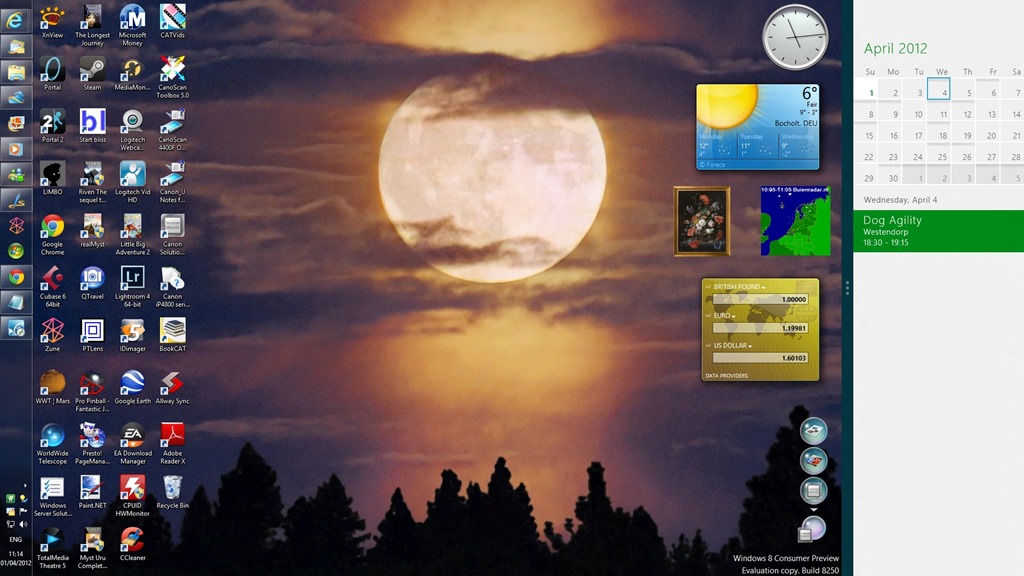
    As for me, after a month of using Windows 8, I am very relaxed about the new user interface. It doesn’t bother me, and I seem to be accomplishing my tasks equally well, albeit in a different way. It is still the fact that, at the moment, I rarely use any of the new Metro applications (except to play the occasional game), but that’s simply because their functionality is not yet on a par with their traditional Desktop equivalents. The only Metro App I have permanently displayed alongside my desktop (using the tile function of Windows 8) is the Calendar App:

    W8CP 06

    On the whole, I like what Microsoft has done to reimagine Windows. The past is another country, they do things differently there. I don’t want to live in the past, I want to look forward to the future.

    5 responses to “People Don’t Like Change”

    1. […] I was interested to read what Norman thinks about Windows 8. As I’ve written before, an awful lot of people seem to think it is a disaster (I’m not one of them). And it […]

    2. […] be aware, I’ve been following the development of Microsoft’s Windows 8 operating system with some […]

    3. […] to be productive using Windows 8, unlike some technical reviewers. I rather suspect that either they don’t like change, or they don’t like […]

    4. […] mentioned before how much I’ve been surprised by the level of vitriol and hatred that has been unleashed against […]

    5. […] They don’t seem particularly savvy to me. I cottoned on to this facility very early on, and use it to share my Desktop with Modern UI […]

    Leave a comment

  • It’s the Daffodils Turn

    Following on from my post about the field of crocuses, it’s now the turn of the daffodils to have their day in the sun…

    20120324-1018-10

    20120324-1051-43

    Leave a comment

  • Spambots and Sofas

    Jon Ronson always seems to turn up some interesting aspects of society. Sometimes however, it seems as though he’s turned over a stone and found something particularly unpleasant underneath.

    For example, I found it very difficult to watch the three specimens sitting on this sofa. The one in the middle, in particular, strikes me as someone I would find it very difficult to warm to under any circumstance. His name is Dan O’Hara, lecturer in literature at the University of Cologne. His rationale for doing what he did to Jon Ronson (when he finally reveals it at the end of the video) seemed to me to be thin, unconvincing, and insincere.

    One response to “Spambots and Sofas”

    1. JL Avatar

      Yep, what a crock.

    Leave a comment

  • Chroma

    I’m not always a fan of modern ballet, but I have to say that I found this performance of Wayne McGregor’s Chroma by the Royal Ballet absolutely stunning.

    Leave a comment

  • Testimony

    Yes, it’s pulling at the heartstrings, it’s trying to be Stephen Sondheim (but it’s Stephen Schwartz).

    Nevertheless.

    It speaks to me. Maybe, as Noel Coward once said: never underestimate the potency of cheap music – but still.

    This has power. It speaks to me. It speaks to what I went through growing up. It speaks to what I have achieved.

    Hang on in there. It gets more than better.

    Leave a comment

  • Lightroom 4 – A Mixed Blessing?

    Adobe has just released the latest version of their Swiss Army knife for digital photography: Lightroom 4.

    Since there’s a free trial available (which lasts for 30 days), I thought I’d download it and give it a go.

    Lightroom is a Digital Asset Management (DAM) tool for digital photographs. That is to say, it covers all aspects of dealing with digital photos, such as acquisition of the photos from the camera, selecting the ones to keep, editing for the final versions, organisation of photo collections, and publishing.

    At the moment, I use IDimager as my DAM tool, so I was interested to see how this latest version of Lightroom would compare. In some respects, the two tools are fairly similar, but there are also some substantial differences. (Note: IDimager is no longer available. Its successor is Photo Supreme, which I am now using)

    One area that I found to be similar is the acquisition process – getting your photos off a camera’s memory card and into your PC environment. Both products allow flexible renaming of your files, and applying metadata templates to the resulting files as part of the acquisition process. So far, so good.

    Once the files are in the tools’ workspaces then the main work of selecting the photos you want to keep and adding metadata to help organise the collection can begin in earnest. Again, both Lightroom and IDimager have similar features. For example, you can rapidly compare photos side-by-side in a virtual “light table” to aid in selection of those images that you want to keep.

    However, I quickly ran into a couple of issues with Lightroom’s handling of photo metadata that, for me, are quite serious.

    First, some background. Both Lightroom and IDimager use the concept of a Catalogue to hold a list of keywords that are used to organise your photo collection (or collections). While this list of keywords can be just a simple list, both products support, and encourage, the use of a keyword hierarchy for ease of use and flexibility.

    As I described a while back, the keyword hierarchy I use has been built up from a number of sources:

    I’ve ended up with a structure that has the following items at the top level of the hierarchy:

    • Activities
    • Events
    • Nature
    • Objects
    • People
    • Places
    • Science
    • Styles

    Each of these splits down into further categories as necessary as you go down the levels. For example, Activities splits into

    • Disciplines
    • Hobbies
    • Physical and mental activities
    • Processes and techniques

    So then a photo of a tennis match would have the structured keyword string of Activities/physical and mental activities/games/sports/ball game/tennisassigned to it.

    You’ll notice that I’m using the “/” character to separate the various levels contained in a keyword. The choice of the separation character is arbitrary, some applications use the period (“.”) or the pipe (“|”) character , since there is no industry standard at the moment. A standard for handling keyword hierarchies in image metadata has been proposed (by the Metadata Working Group), but as far as I am aware, there is no product on the market that implements it as yet.

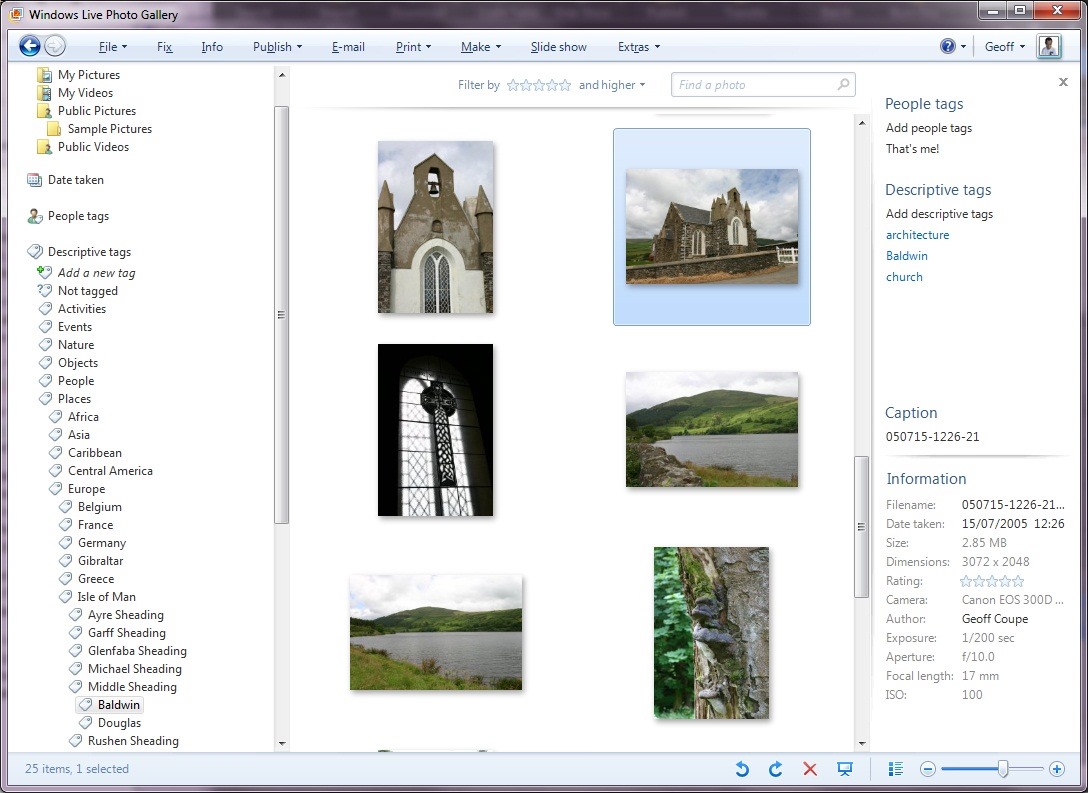
    I chose the “/” character because Microsoft’s Windows Live Photo Galleryuses it as the separator to structure the keyword hierarchy (Microsoft calls keywords “Tags” in Windows Live Photo Gallery).

    For example, here’s a screenshot of Windows Live Photo Gallery with a thumbnail photo of a church in the Isle of Man shown being selected (the light blue frame around the image).

    Church2

    You can see, on the right of the screenshot, that the photo has three keywords (tags) associated with it: architecture, Baldwin, church. These are actually all structured keywords stored in the photo’s metadata as:

    • Styles/design/architecture
    • Places/Europe/Isle of Man/Middle Sheading/Baldwin
    • Objects/built environment/buildings/ceremonial buildings/religious buildings/church

    You can see part of the “Places” hierarchy being shown on the left of the screenshot, with the “Baldwin” tag being highlighted.

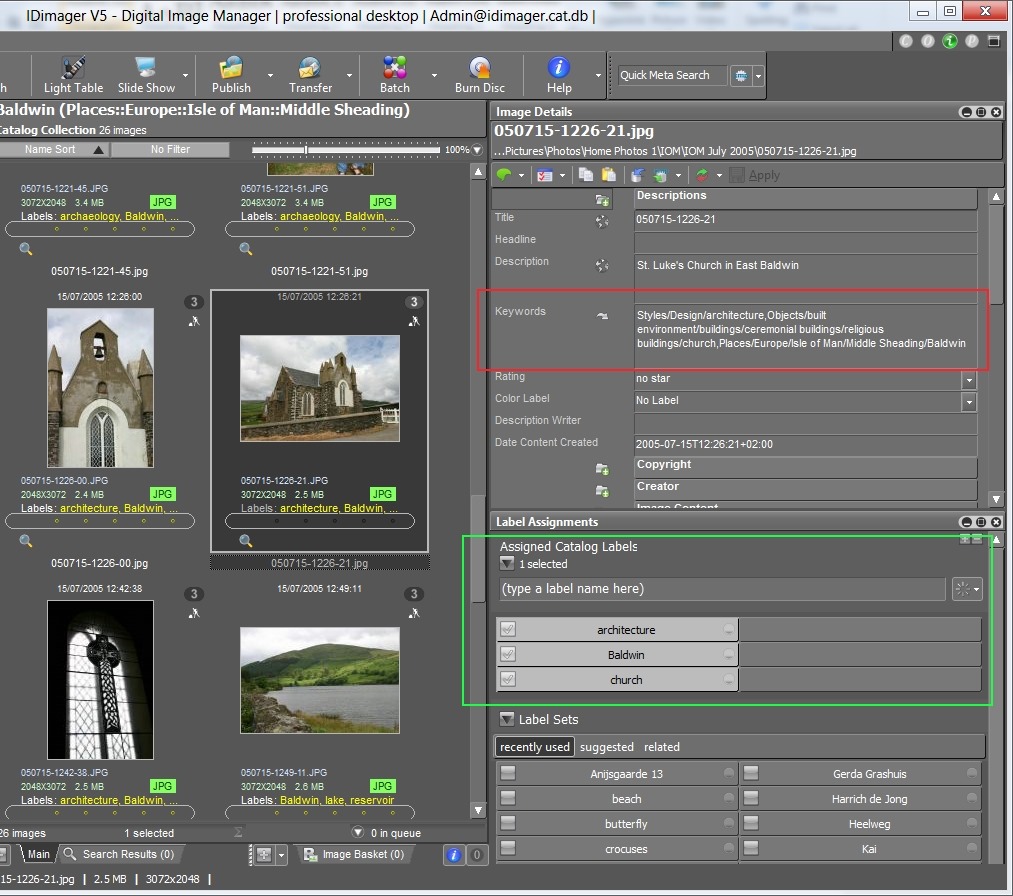
    Because Windows Live Photo Gallery is easy to use for other family members, I’ve adopted this method of implementing a keyword hierarchy, i.e. using the “/” separator, in my main DAM tool: IDimager. Here’s a screenshot of IDimager showing the same photo:

    Church1

    You can see on the left that IDimager uses the same keyword hierarchy. And on the right of the screenshot, you see the keyword strings that are being stored in the photo’s metadata.

    Now, the reason that both IDimager and Windows Live Photo Gallery have the same keyword hierarchy is that both tools are constructing it from the keywords stored in the photo metadata. And because they understand that the “/” is the separator character, they build up the same keyword structure on the fly as they read the photos in my collection. IDimager is the more flexible of the two applications, since you can define different separator characters if necessary. WLPG is fixed, and only understands the “/” character.

    So, what happens with Lightroom 4?

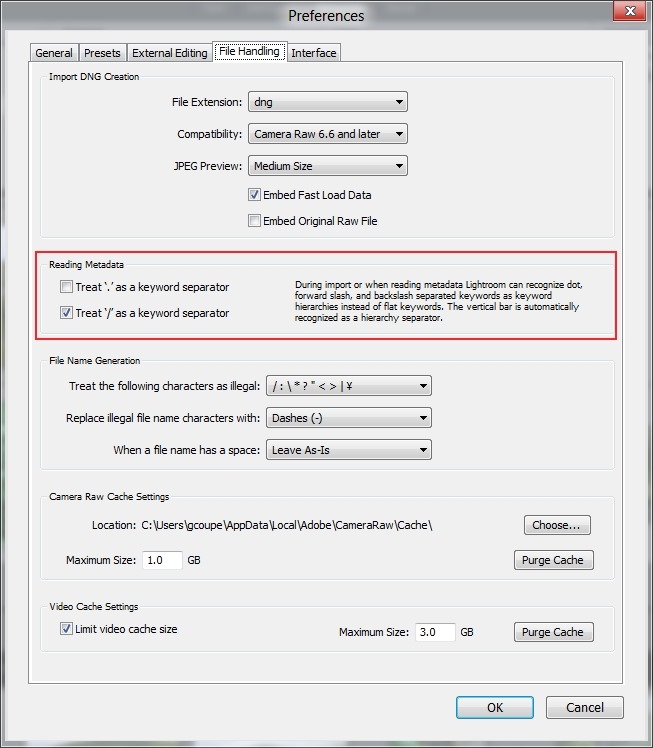
    Well, at first I thought everything was going to play nicely together. Just as with IDimager, Lightroom 4 has an option to choose the separator character that you want to use when reading the keywords in your photo metadata:

    LR4 002

    I’ve chosen “/” as the separator character – the same as for IDimager and WLPG.

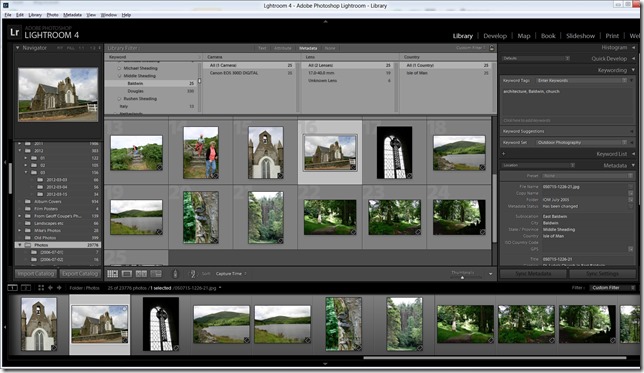
    Sure enough, when I imported my photo collection into Lightroom 4, the keyword hierarchy got reconstructed to match the ones in IDimager and WLPG (click on the screenshot to see it full-size in a new window):
    Church3

    But then things started to go wrong.

    First, I discovered that although this process of recognising the separator works when importing photos into the Lightroom 4 Catalogue, it doesn’t work when reading metadata from individual photos – even though Lightroom claims it does (see the text in the “Preferences” screenshot above).

    I added the keyword “Christmas” to a photo using IDimager. This is a structured keyword, so the keyword string that was written to the photo’s metadata was actually: Events/holidays/Christmas. Lightroom 4 correctly saw that the photo had had its metadata altered, but when I used Lightroom to read in the photo metadata, instead of adding the photo to the “Christmas” keyword in the existing hierarchy in its Catalogue, it created a brand-new single-level keyword string: Events/holidays/Christmas – it did not treat the “/” character as a level separator.

    Now, this, I think is a simple bug, and has been reported as such. However, much to my dismay, I discovered I was not out of the woods yet.

    Up to now, I use IDimager to do all my keyword work. When a keyword in the IDimager Catalogue is assigned to a photo, IDimager will write out the structured keyword string into the photo, and WLPG will then pick up the change and modify its own Catalogue of tags automatically.

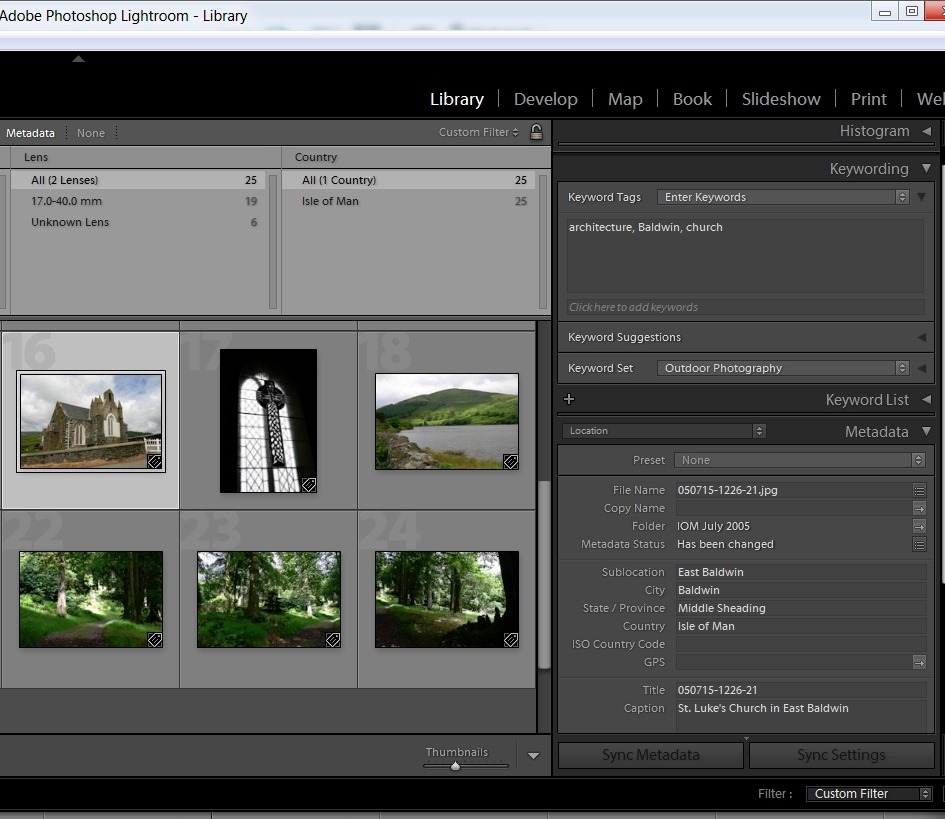
    As a test, let’s use that photo of the church in Baldwin in the Isle of Man. Here you can see the current keywords assigned to it: architecture, Baldwin, church, as seen in Lightroom 4.

    LR4 003

    Remember, these are all structured keywords with a hierarchy. Lightroom, like WLPG, is just showing the lowest level of each keyword. Using IDimager, I can look at both the actual photo metadata (showing the full keyword strings), highlighted in red, as well as the Catalogue keywords/labels, highlighted in green:

    Church4

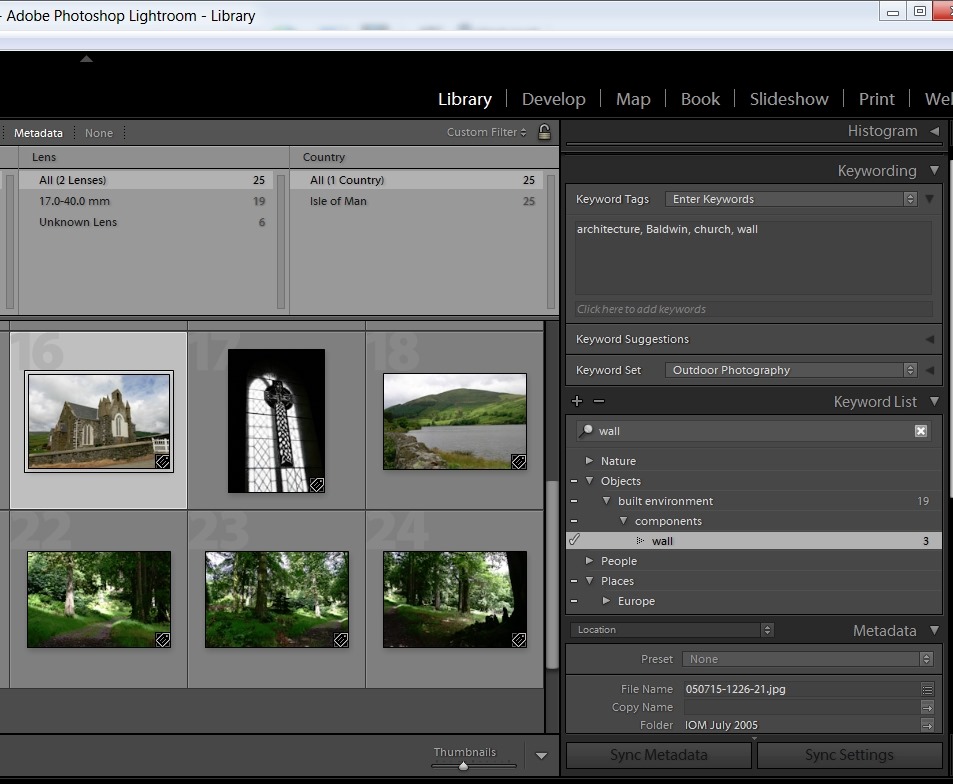
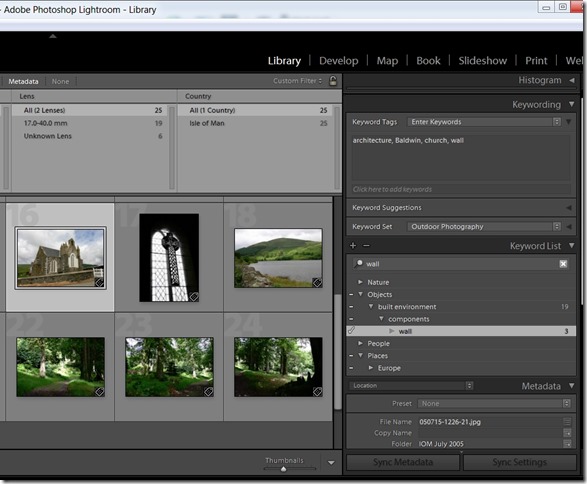
    Now, let’s use Lightroom 4 to add a keyword to the photo, and then get Lightroom 4 to write out the changed metadata into the photo. Here, I’ve added the keyword wall:
    LR4 004

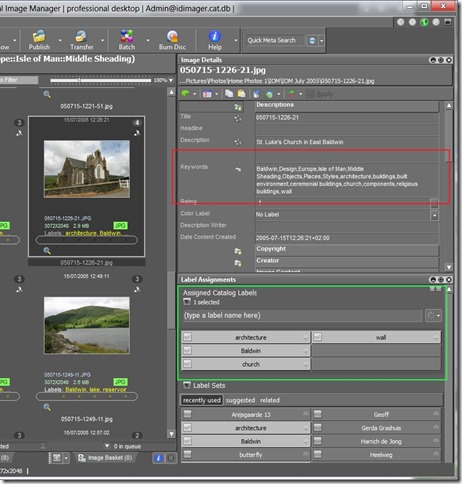
    Looking at the photo in IDimager, what do I see:
    Church5

    Disaster! Lightroom has not written out a structured keyword string, but a series of individual keywords separated by commas. While IDimager has been able to sort the wheat from the chaff (the labels, highlighted in green, show that it knows that the structured keyword wall has been added), Windows Live Photo Gallery is not so clever.

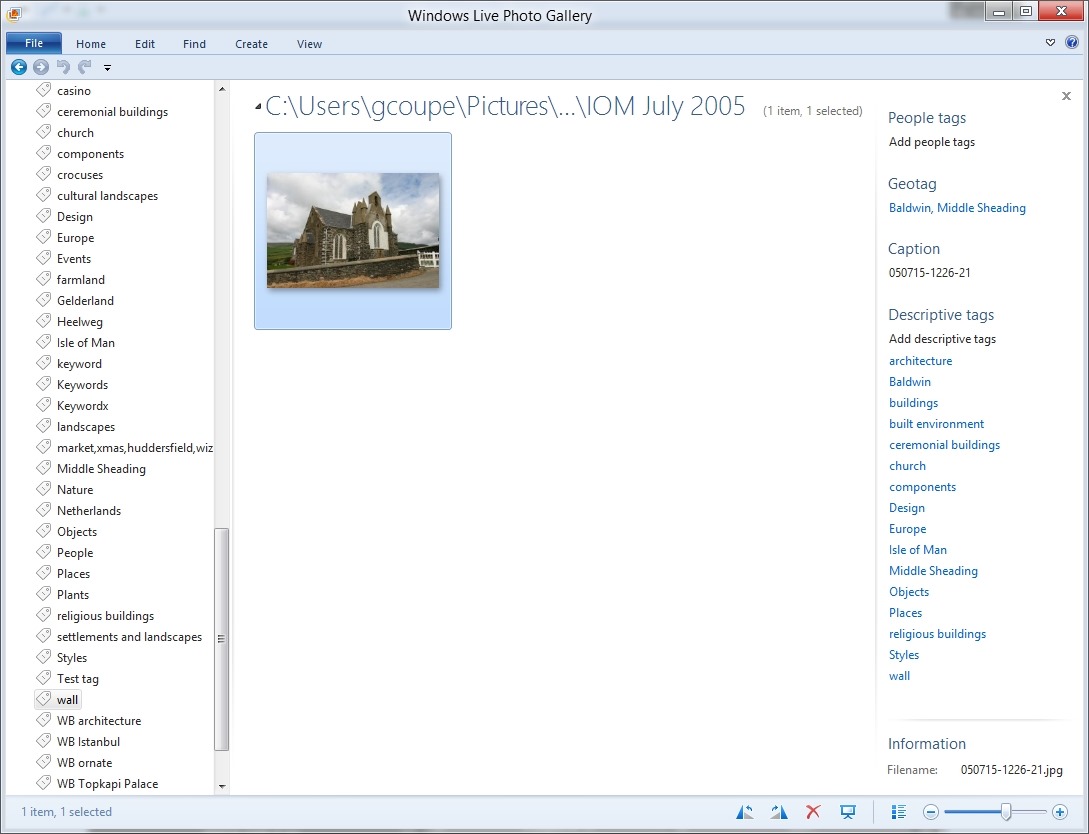
    Church6

    It is now showing all the individual keywords assigned to the image, and worse, it has created new, false, levels in the keyword hierarchy shown on the left in the screenshot. For example, wall is now shown as a top-level keyword.

    So Lightroom 4 will read structured keyword strings using the “/” character as a separator from photo metadata, but, unlike IDimager, it will not write out structured keyword strings to photo metadata. Instead it writes single level keywords and additional, Adobe-proprietary, metadata to describe the hierarchy. This is, apparently, expected behaviour.

    Well, it may be expected, but it’s pretty much useless to me if I want to keep WLPG as the easy to use browser for others in the family. If I use Lightroom 4 to do any metadata work, it will destroy the keyword structure that I use as far as other programs are concerned.

    So where does this leave me, as far as the trial of Lightroom 4 is concerned?

    I have to say that the Lightroom tools for editing and developing photos (especially those in RAW format) are far in advance of anything that IDimager or WLPG possess. So while I could continue to use IDimager for metadata work, I could supplement that with the image adjustment tools of Lightroom 4. Frankly, the other modules of Lightroom (Map, Book, Print and Web) are of little use to me; my other tools give me all that I require in those areas. So, are the image adjustment tools of Lightroom alone worth an investment of 130 Euros to me? If I were heavily into manipulating my images using the RAW format, then, yes, very probably. But at the moment? To be honest, I’m not sure.

    18 responses to “Lightroom 4 – A Mixed Blessing?”

    1. Steven Grimm Avatar

      FYI (or for the benefit of anyone else reading this later), I replied to the Adobe forum thread with a description of how to use EXIFTool to convert Adobe’s hierarchy format to the form you’re looking for. Of course, whether having to run a postprocessing step is too much hassle is not for me to say, but it’s at least possible.

      1. Geoff Coupe Avatar

        Steven, thanks for the tip.

    2. JL Avatar

      Rather calm of you, I’d say, saying you’re ‘not sure’ if it’s worth using. Since I’m still repairing the EXIF damage from WLPG a year and a half later, the mere thought of another software program that messes around with my metadata … Good Lord!

      1. Geoff Coupe Avatar

        Yes, I know what you mean. Reading the Adobe forum, I get the impression that most of the people there are photographers who care passionately about the images themselves, and pushing the artistic envelope using Ligthroom’s image processing tools. There are fewer on the other side of the fence, those who care passionately about the information depicted by the photo…

    3. jlbeeken Avatar
      jlbeeken

      Being as this is (was) a reputable company, I expected they’d have it together for both sides. The metadata setup in Adobe Photoshop Elements is horrible as well and I thought it might be worth trying a higher end product. Obviously not and thank-you for your review of it. I can just imagine how much work you’ve put into your controlled vocabulary. I’ve spent more hours than I’d care to remember annotating my photos so I can find them easily and I hardly think it’s a non-issue.

    4. EddyKilowatt Avatar
      EddyKilowatt

      I had a bad run-in with metadata handling in Elements Organizer as well, lost a couple years’ worth of keywords moving to WLPG due to Adobe not following standards, swore off Adobe for a couple years as a result. I’ve just been tiptoeing back in with Lightroom, figured it was supposed to be the pro-grade tool so should be robust for an amateur like me. I don’t use keyword hierarchies (yet, though I can see the benefits), so I haven’t had much trouble, but it’s disappointing that Adobe is still writing important information in proprietary formats. I’ll be thinking pretty carefully about upgrading to LR4, and looking at other options more carefully.

    5. elisabethbucci Avatar
      elisabethbucci

      Thanks so much for this blog entry! I evaluated LR 3.5(?) about two months ago. Like you I am a big fan of hierarchical tagging (my system is similar to yours 😉 ) and of WLPG. For this reason when I discovered that LR does not write hierarchical tags (my tests and conclusions were the same as yours), I had to dump LR. (I was so relieved that I am the only one obsessed with hierarchical tags: I was thrilled when I came across your 2009/09/03 post regarding hierarchical tagging and WLPG!). All this to say that when LR4 came out, I was curious to know if they solved the problem of writing hierarchical tags…thanks to you I won’t even bother downloading the trial version.
      Thanks again, love your blog!

      1. Geoff Coupe Avatar

        Elisabeth, thanks for your kind comments.

    6. Randolf Avatar
      Randolf

      Well, the whole keyword business is a big historically grown mess. In the beginnig, there were simple keywords, only. Adobe introduced then hierarchical keywords — and in order to not mess up flat keywords with hierarchical keywords, they kept both separated from each other. So, when you look in your XMP file (which is an open Adobe file format, like TIFF, DNG, PDF) you will see your keywords written once as flat separate keywords and once in a hierarchical form. But not all programs evaluate both versions, give preference to the one and ignore the other.

      Regarding the “/” as the keyword separator, when you read carefully the text beside the checkmark, you will see that it says “when importing”. I.e. LR is willing to recognize it as such a separator when reading third-party programs. But nothing is said about exporting. You’re right that there is no formal industry standard. You may love it or hate it: But considering the fact, that the XMP files are an Adobe file format and that currently I don’t see any other company in photo software business which has the potential to survive the next 30 years, I would strongly recommend to follow the Adobe way as the standard, ie. use the “|” as a separator, and forget what others do, if you don’t want to mess up your image collection completely.

      Clearly, you can only transfer your metadata between WLPG, IdImager, LR, Media Pro etc, because they recognize more or less (!) Adobe’s XMP files. And don’t blame Adobe, that Microsoft doesn’t follow Adobe’s standard in Adobe’s file formats and uses “/” instead of “|”. Next time, someone else writes a program which uses an “*” as separator, only — then you can’t blame neither Mircosoft nor Adobe that they doen’t write out the metadata with * as a separator to be compatible with your new favourite software.

      So, my advice: For maximum compatibility and future-proof, stick to the way the owner of the file format has defined it and ignore programs which doesn’t follow that definition.

      1. Geoff Coupe Avatar

        Randolf, thanks for your comments, but I think you are mistaken in some respects. It is true that Adobe first came up with XMP, but now it is an ISO standard, i.e. a full industry standard, and no longer controlled by Abobe. It is also true that Adobe established the use of the “|” character as the separator for keyword hierarchies. However, there is a proposed XMP standard for keyword hierarchies that has been documented by a cross-industry group, the Metadata Working Group. That group has both Adobe and Microsoft as members. The proposed standard does not use the “|” character (or indeed the “/” character), since that was a simplistic and limited way of achieving the goal of keyword hierarchies. The proposed standard is much more in keeping with the XMP way of doing things.

        I’m hoping that both Microsoft and Adobe will put their money where their mouths are and implement the proposed standard in their products.

    7. […] couldn’t care less about other programs (their competitors), this is one of the main reasons that some people prefer to stay with other image cataloging software […]

    8. Murat Korkmazov Avatar

      Hi Geoff,

      This is Murat from Daminion Software. I’m sure you remember our PicaJet Photo Manager which now has a new lease of life and is being actively developed under the new name of Daminion.

      I was just starting to write a blog article about the issue of hierarchical keywords in Lightroom when I came across your post:
      http://blog.daminion.net/upcoming-posts/hierarchical-keywords-in-lightroom-be-careful/

      The root of the problem you describe above is that the LR team has added its own metadata scheme for storing hierarchical keywords (as you know it stores as lr:HierarchicalSubject) and also stores flattened keywords in the Dublin Core Scheme (dc:subject).

      According to MWG, the hierarchical path elements of keywords MUST be flattened. This means that each hierarchy node must be stored as a separate keyword entry in XMP dc:subject (a very dubious decision IMO).

      So Lightroom will store a hierarchical keyword in two different places: with a preserved hierarchy and with a flattened hierarchy, and there is no way to determine which location is valid; especially if third-party software that aware of LR’s Scheme updates “dc:subject”. This breaks the compatibility of LR with other software programs.

      Because LR is such a widely adopted program we’ve developed a temporary solution. We’ve set the priority of “lr:HierarchicalSubject” higher than “dc:subject” in Daminion’s Keyword mapping list, but this is simply because LR is a widely used program.

      1. Geoff Coupe Avatar

        Hi Murat,
        Thanks for that explanation of LR’s behavior. That’s an interesting point that you make about the fact that the MWG guidance states that hierarchical keywords MUST be flattened by a Changer application. I hadn’t noticed that before.

        Like you, I am far from convinced that it is a good decision, and I wonder which came first, the MWG decision or the fact that LR does it…

        1. Murat Korkmazov Avatar

          MWG decision is known: a new complex way to store hierarchical tags and as you said above there is no product on the market that implements it.

          The probability of ignoring MWG recommendation by LR team is higher, although they are on mountain top and can cares about compatibility between LR’s versions only.

          1. Geoff Coupe Avatar

            What I was hinting at is that Adobe are founding members of MWG, so if LR already had this flattening of keywords by adding them in as single-level keywords to dc:subject, then I wonder if Adobe were behind the putting in of this rule into the MWG guidance…

    9. Matthew J Aschliman Avatar

      Fantastic keyword structure you have Geoff!!! Something I must learn to implement!! Ive only been shooting for a couple years now and would love your criticism! – https://www.facebook.com/MJAcreative

      1. Geoff Coupe Avatar

        Er, thanks. Matthew. ‘Tis a small thing, but (almost) mine own. But seriously, I think that metadata is important – especially for professional photographers.

        Criticism? I wouldn’t presume – I’m only an amateur. Good luck!

    10. […] couldn’t care less about other programs (their competitors), this is one of the main reasons that some people prefer to stay with other image cataloging software […]

    Leave a comment

  • Field of Crocuses

    One of our local farmers has changed from growing the usual crops to cultivating flowers. His fields are currently full of crocuses.

    20120315-1038-34 Stitch

    20120315-1038-00

    20120315-1039-21

    20120315-1110-33

    3 responses to “Field of Crocuses”

    1. all time oldes Avatar
      all time oldes

      This is my dream and goal … farming. I would love a flower farm! Lovely pictures.

    2. Ludwig Avatar

      Gorgeous landscape, beautifully photographed. More, more!!

    3. […] on from my post about the field of crocuses, it’s now the turn of the daffodils to have their day in the […]

    Leave a comment

  • An Orrery For The 21st Century

    Ever since I was a small boy with an interest in astronomy, I’ve wanted an Orrery.

    Today, 55 years further on, I’m no closer to owning my very own Orrery than ever I was.

    Still, hope is on the horizon. Dr. David Brown has been working on the 21st century’s equivalent of an Orrery with his NUIverse designed for Microsoft Surface. I reckon it will be between 5 and 10 years before this trickles down to Windows 8 Tablets.

    I might just be able to make it before I die.

    5 responses to “An Orrery For The 21st Century”

    1. Al Feersum Avatar

      w00t. now!

      Makes yer sick don’t it.

      1. Geoff Coupe Avatar

        Yup. If I were rich, I’d have a Microsoft Surface just sitting in the living room running only this application,,,

    2. Al Feersum Avatar

      … plugged into near real-time satellite imagery…

    3. Ludwig Avatar

      With a coffee table like that, I’ll never get my visitors to leave – assuming that they can get me away from the table so they get a chance to play.

    Leave a comment

  • The Centre Cannot Hold

    I’m not a Christian, nor even religious, but I have respect for Rowan Williams, the current Archbishop of Canterbury. I say current, because it was announced today that he will be stepping down at the end of the year from his post and returning to academia.

    I couldn’t resist a wry smile at this quote from the article:

    …he has been respected on all sides for his gifts as a preacher of great eloquence and flashes of clarity.

    Yes, “flashes of clarity” – I confess that I find his writing a bit of a struggle to comprehend. A clear writer he is not. I sometimes amuse myself by putting his prose through the reading comprehension tester in Microsoft Word. Inevitably it will rate the text as being difficult to understand.

    I think that he’s basically a good man, who has been trying to do an impossible job as leader of the Anglican Church. It will probably come as a relief to be able to pass on the poisoned chalice to his successor. That looks as though it may well be John Sentamu, whose hard-line views will contrast greatly with Williams. I can’t say that I feel particularly well-disposed towards Sentamu, based on his past performance. Still, I shouldn’t think that’s going to worry him one iota.

    2 responses to “The Centre Cannot Hold”

    1. Al Feersum Avatar

      I dunno. I found Rowan Willams a bit dry – although a lot less so than his predecessor. I think they should have someone with a bit of life as The Right Reverendship: get Dr John Sentamu in. After all, he’s next in line to the throne. Maybe the Anglicans will start getting higher memberships as a result…

      1. Geoff Coupe Avatar

        He may be dry, but I found his heart to be in the right place. Carey was/is scary. A real example of all that is wrong about Anglicanism. And Sentamu’s views always seem to be counter to mine. I don’t think he likes/understands gay people (despite any of that “love the sinner, hate the sin” tosh), and he seems to imply that women should know their place…

        Anyway, it’s not my affair, being resolutely non-Christian. But don’t expect me to hold back if he sets out his stall in the public marketplace of ideas.

    Leave a comment

  • Please Send Money

    I received an email this morning from a distant relative. This is what it said:

    I’m sorry for this odd request because it might get to you too urgent but it’s because of the situation of things right now, I’m stuck in Madrid Spain with Family right now, we came down here on holiday we were robbed,the situation seems worse as bags,cash ,credit cards and cell phone were stolen at GUN POINT, It’s such a crazy experience for us, we need help flying back home, the authorities are not being 100% supportive but the good thing is that we still have our passport but don’t have enough money to get our flight ticket back home, please I need you to lend me some money, I will reimburse you right as soon as I’m back home. I promise

    Alarm bells started ringing immediately. It looked suspicious, but at first I wasn’t sure. I only had an email address for this person, so I couldn’t ring her up and ask if her email address had been hacked.

    It didn’t take long to confirm that indeed the message was a scam – typing in just the first phrase from the message into Bing produced over 500,000 hits.

    It’s clear that her Hotmail account has been hacked, and taken over by a scammer. She may be able to get it back, with Hotmail’s help, but any damage has already been done.

    This article, Hacked!, by James Fallows describes the situation very well, and in fact it’s almost the same scam email that was used. The only difference is that in the article, it’s a Gmail account that was hacked. One statistic that leapt out at me:

    At Google I asked Byrant Gehring, of Gmail’s consumer-operations team, how often attacks occur. “Probably in the low thousands,” he said. “Per month?,” I asked. “No, per day,” followed by the reassurance that most were short-lived “hijackings,” used to send spam and phishing messages, and caused little or no damage, unlike our full-out attack.

    As more of us start relying on the Cloud to handle our email and to store confidential data, it becomes even more important to use strong passwords that are changed often. As the saying goes: passwords are like underwear…

    4 responses to “Please Send Money”

    1. Al Feersum Avatar

      … and some underwear is like a chastity belt…

    2. TomT Avatar
      TomT

      Dear Geoff, thank your for this timely warning, I too am stuck with family right now, in New York City, New York, USA, we wish to go on holiday but have been robbed (by the collapse of the financial system,) we need help flying overseas to Ibiza or Mallorca or Capri, I have asked the authorities for help but they have been less than forthcoming, the good thing is that we still have our passports, so please wire me enough for three plane tickets (USD $10,000 ought to do it) and I will repay you as soon as possible, or at least send you a nice postcard, I promise.

      1. Geoff Coupe Avatar

        Many people would probably gladly do a swap with you for a chance to visit New York City. Can I suggest you try following that line of attack? 🙂

    3. Matt Healy Avatar
      Matt Healy

      A while back a friend of mine got his email account hacked; my wife and I both got “Help I am stranded in London” messages. Right away I suspected this was a scam, so we called his US phone number and learned (1) he was not stranded in London, he was in the US, (2) friends from all over the world had been calling or emailing to offer assistance.

      Even before Googling, my first reason to suspect a scam was that we had some mutual friends who lived in or near London, so if he was stranded there wouldn’t he phone one of them (or some other London friend) rather than emailing somebody in the US? Surely somebody who was nearby would be a more logical choice if immediate assistance was required.

    Leave a comment

  • This Isn’t A Pub Anymore!

    Yesterday’s Jesus and Mo is a humorous allegory on a current topic. Cardinal Keith O’Brien is credited as the scriptwriter.

    Leave a comment

  • Feet of Clay

    One of my daily joys is walking the dogs in the nearby woods. Since I bought my Windows Phone, I’ve got an additional dimension of joy by listening the podcasts of In Our Time, a weekly radio programme on a wide range of subjects (e.g. Science, Religion, Philosophy, History, etc.). Each 40 minute episode nicely times with the morning walk in the woods. The programme has the format of three experts on the week’s topic being led in a discussion by Melvyn Bragg (now Baron Bragg of Wigton).

    Now I like Melvyn Bragg – I think he’s a good writer and broadcaster, and In Our Time deals with serious ideas in a way that does them justice.

    So I was somewhat shocked at this attack on Richard Dawkins from Bragg. I had expected better of him. As Ophelia says:

    He’s either bullshitting or totally confused, and since he’s a knowledgeable guy, I’m guessing he’s bullshitting. Yes feelings are important; yes we mostly don’t rely on reason; no it is not therefore the case that emotions and feelings are reliable sources of knowledge. He implies that they are. I call bullshit.

    Baron Bragg is proudly displaying his feet of clay.

    Leave a comment

  • You Couldn’t Make It Up!

    That revered institution, the Thought For The Day on BBC Radio 4, is still carrying on churning out platitudes. I always read the Rev. Dr. Peter Hearty’s merciless skewering of the Thoughts. Yesterday, we had Canon Angela Tilby’s thoughts on gay marriage.

    The poor woman was a bit caught in the middle, as she likes to think of herself as a liberal, but she couldn’t quite bring herself to say that the Churches had got it wrong.

    I particularly liked the moment when she actually said:

    The point about sacraments is that they can’t be made up…

    Ah, but Canon Tilby, the whole point is that they are made up. Humanity has created its gods, not the other way around, however much you might want to believe that.

    Meanwhile, I suppose we are into hearing more of the same from churchmen (and women) saying that same-sex marriage is simply wrong. The UK has clearly got some distance to travel before they arrive at the point that we enjoy here in The Netherlands. As a commentator (who lives in The Netherlands) wrote in response to Canon Tilby’s piece:

    It’s obvious from the pronouncements from a variety of god-botherers over the last week or so, that they still think their Church, (whichever one it happens to be), still owns marriage, and consequently they have the right to decide who may or may not get married. But marriage, in this country [the Netherlands] at least, is not a religious institution, but a social and legally binding secular contract. Although couples may choose to have a religious ceremony, the marriage still has to be registered with secular authorities in order to be valid. Weddings not so validated, as sometimes happens with ones carried out according to Islamic rites, are not recognised in law, and the couples do not have the rights of married couples regarding property, custody of children, inheritance, etc.

    As I understand it, there is no suggestion that any church or religious institution will be forced to conduct gay marriages, but equally they should have no right to dictate who should or should not be allowed to marry outside of religious buildings.

    Quite.

    Here, couples who are religious will always have their civil marriage ceremony in the local Townhall first, before trooping across the market square into the church for the religious marriage ceremony. Even Prince Willem-Alexander and Princess Máxima did the same. They were married, by Amsterdam’s Mayor at the time, Job Cohen, on the 2nd February 2002 in a civil ceremony in the Great Hall of the Beurs van Belage, before going to the Nieuwe Kerk (the New Church) for the religious ceremony.

    Leave a comment

  • Just Testing…

    You can ignore this post. It’s just a test to check something out.

    I use Windows Live Writer to prepare blog posts. It’s a very good application; easy to use and functional. However, I’ve noticed that since I’ve been running the Windows 8 Consumer Preview, I often get an error message when I try and publish a post to my blog.

    Leave a comment

  • Petitioning Microsoft

    I’ve mentioned a number of times before on this blog how irritating it is to be saddled with a Zune/Xbox Live/Windows Phone account that has the wrong country shown for my country of residence, and being totally unable to correct it.

    The issue is now spelt out in detail over at the It Is Our Data web site, and there’s a petition set up asking Microsoft to rectify this shortcoming.

    I’ve signed, and will be sending letters to Microsoft and the relevant Data Protection authority. Will you?

    Update: As a result of sending letters, I finally managed to get Microsoft to correct the false data in my account, so it can be done…

    Leave a comment

  • A Voice of Sanity

    After Cardinal Keith O’Brien’s very unpleasant outburst on the possibility of the UK’s legalising same-sex marriage, it comes as something of a relief to be able to point to a voice of sanity on the subject. It belongs to the philosopher Norman Geras.

    Actually, he has two blog posts on the subject. The first is a reaction to the Cardinal directly, in which Geras notes how feeble the arguments put forward by the Cardinal are.

    The second is his reaction to the text of a letter co-signed by the Archbishop of Westminster and the Archbishop of Southwark on the subject of same-sex marriage that will be read out 2,500 Catholic churches in the UK next Sunday. As Geras says:

    I make no attempt to judge these remarks in the light of Catholic teaching, since I’m not competent to do so. But if we measure them against the more general understanding of marriage in our society, the exercise suggests that what the two Archbishops define as the true meaning of marriage is an insult to many people’s marriages.

    By the way, I found it instructive to read the comments on the article in the Catholic Herald that gave the text of the letter. It was mostly a singularly unpleasant experience. Clearly there are plenty of Catholics who align themselves with Cardinal O’Brien. Bigotry is alive and well.

    Leave a comment

  • Raising the Drawbridge

    I’ve written a couple of times before over my worries that the Dutch government will make it illegal to hold dual nationality.

    We seem to be getting close to that position. Last Friday, the Dutch Cabinet decided to go ahead with legislation aimed at reducing the number of people with dual nationality.

    The idiotic thing is that it will not affect those who are presumably the real targets of this xenophobic drive. The real targets (in the sights of the “Little Hollander” view of the PVV and its supporters) are the Turks and Moroccans who settle here. Unfortunately (from the PVV’s perspective), they are required, by their country of birth, to hold onto their original nationality. So the proposed law cannot apply to them. Meanwhile, others, whose country of birth is more relaxed about the holding of dual nationality, will be required to renounce their birth nationality, simply because the Dutch government can make it so.

    So I’ll be forced to renounce my British and Manx nationalities, merely to satisfy the xenophobia of the Dutch government and the PVV. A plague on them both.

    Meanwhile, in other news, Geert Wilders, leader of the PVV, announced today that the Netherlands should leave the Euro and return to the Guilder.

    The drawbridge is being raised a little further every day…

    2 responses to “Raising the Drawbridge”

    1. Robert Dammers Avatar
      Robert Dammers

      I don’t know if it is the case in the Netherlands, but the elephant in the room might be the EU concept of citizenship. I lost my Dutch citizenship when I turned 21 because they just made it so hard to maintain my dual nationality. My elder sister had insisted on maintaining both on her marriage, and she had a “Bewijs van Nederlandschap” leaf inserted into her British passport. But even then (1970s), it was frowned upon – because citizenship of any EU member state was equivalent – wasn’t it?

      On your second point, the question is, surely, whether the Euro region splits into a Northern Euro (because the Guilder had been a cheap Deutschmark for years) and a Southern Euro, or whether the Southern Eurozone is itself not an optimal currency region, which would mean separate exits for the Drachma (which would inflate out of trouble) and the Peseta, Punt and Lira (which don’t have a severe spending crisis, and only require a different interest rate).

      1. Geoff Coupe Avatar

        I’d be happy to be an EU citizen – but that’s not what the politicians are thinking about. I’d even be relatively happy (up to a point) with a two-tier Euro – but that’s not what Wilders is talking about.

        It seems to me that I am looking outwards, and the Dutch politicians are looking inwards… Inclusiveness vs exclusiveness…

    Leave a comment

  • Beside the Seaside…

    We paid a short visit to friends in The Hague last weekend. The city lies on the North Sea coast, and many of its inhabitants go for weekend walks in the dunes or along the beach – usually whatever the weather.

    20120303-1410-45

    20120303-1351-27

    We, and the dogs, joined them. This was our younger dog Watson’s first experience of the sea. He loved it.

    20120303-1353-16

    Leave a comment

  • Microsoft’s Marmite

    Marmite is a British food – a paste that is smeared on bread or toast. It has a very distinctive taste, which splits people into two camps: they either love it or hate it.This polarised reaction seems to be how people are reacting to Microsoft’s Windows 8 Consumer Preview: they either love it or hate it. This post is about my first impressions of W8CP.

    As I said I would, I’ve installed the Windows 8 Consumer Preview, and have been playing with it over the past couple of days. There are several ways to install it: in a virtual machine, on a separate drive partition for dual-boot with Windows 7, but I’ve gone for the highwire act – I’ve done an upgrade installation. My PC is no longer running Windows 7, but it is running only Windows 8.

    I haven’t completely lost my mind – I took a full backup of my running Windows 7 installation immediately prior to installing the Consumer Preview, so I can always rollback to Windows 7 if I lose my nerve.

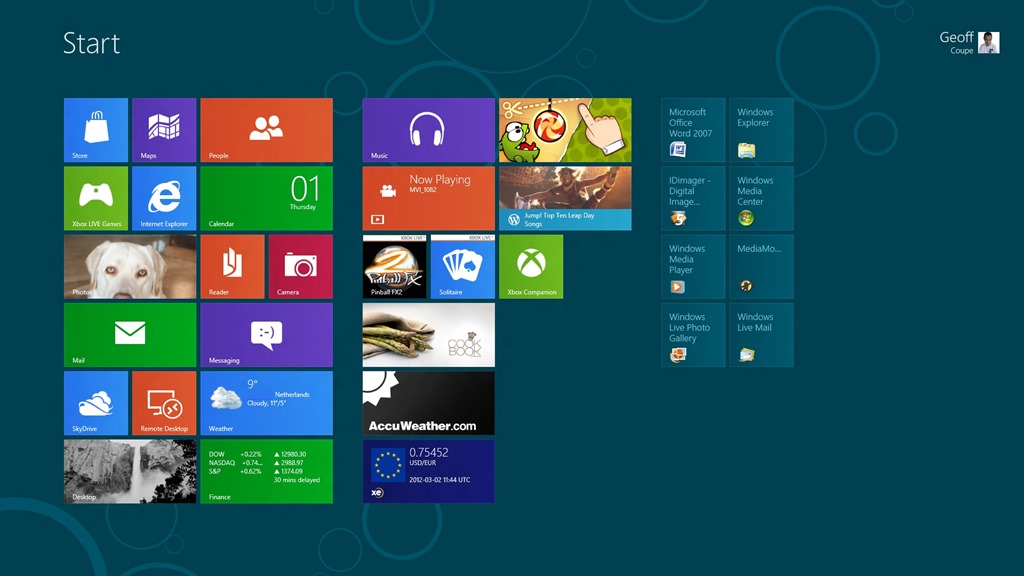
    So now, what I see when I sign on to Windows 8 is something like this:

    W8CP 01

    This Start screen has effectively replaced the Start button, that has been a part of Windows since Windows 95. On the traditional Desktop view in Windows 8, there is no Start button, instead, when you mouse down to the bottom left corner of the Desktop (where the Start button traditionally was), you get a small pictogram of the Start screen. Clicking the mouse brings you to the Start screen itself.

    It’s certainly a shock to the system, and I found it needed getting used to. Some people have already found ways of forcing the traditional Start button back into Windows 8, but I don’t want to go down that route. I’d rather give Windows 8 a chance, and see how I feel about the UI after a few weeks.

    I’ve already started adding icons for some of my most-used applications onto the Start screen, and am starting to use the Search function much more than I used to in Windows 7.

    One thing that I am definitely finding at the moment: I spend the majority of my time on the traditional Desktop, using traditional applications. The much-vaunted Metro Apps that have shipped with the Consumer Preview are dumbed down too far for me. To be fair, many of them are previews themselves, and Microsoft claim that they will be improved for final release. Still, I don’t think Microsoft has done itself any favours by shipping such limited Apps in the Preview. Let’s look at a few examples.

    The Mail App. Unless you have a Hotmail, Google, or Exchange account, you won’t be able to use the Mail App – it has no support for IMAP or POP mail servers. Guess what I have? Yup, my Internet Service Provider supports IMAP and POP mail services. So I won’t be using the Mail App. One other thing, it is just a very simple mail application. I use Windows Live Mail as my mail client, and this integrates my mail, my calendar, and my contacts list. In Windows 8, these are separate applications. I like the integrated approach. Windows 8 seems to be taking a step backwards. Although Microsoft have introduced a new mechanism for sharing information between apps in Windows 8, at the moment all three, Mail, Calendar and People apps, plaintively bleat that they can’t share… This may change on final release. I hope so.

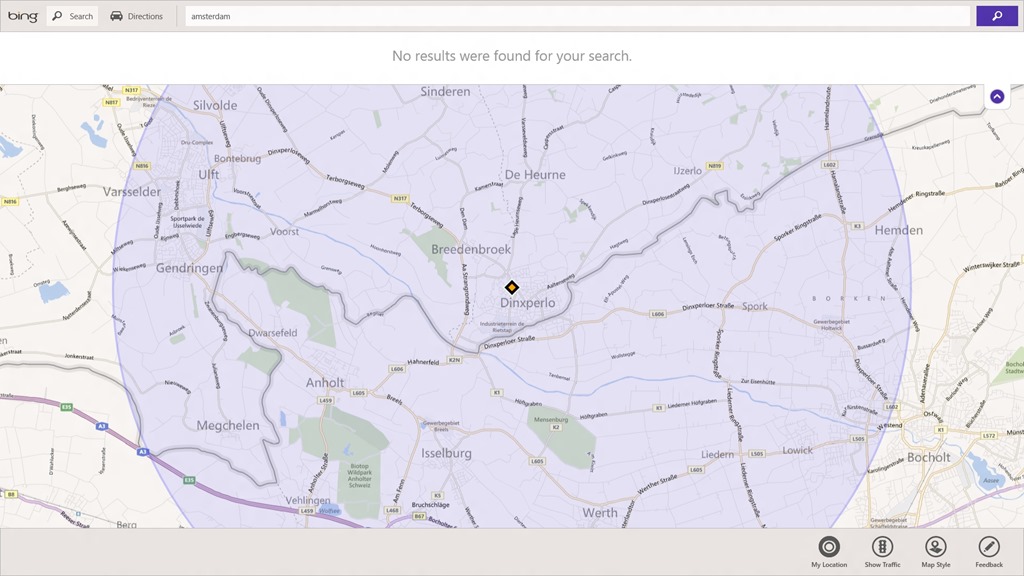
    The Maps App. The Search function in this app doesn’t work. Here, for example, it claims it can’t find Amsterdam:

    W8CP 02

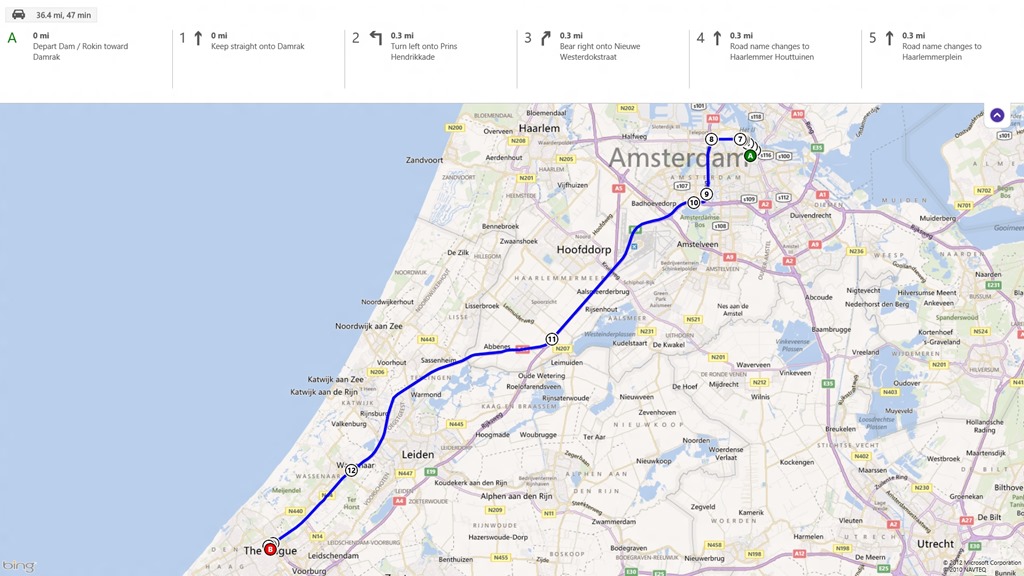
    Yet, strangely enough, it works with driving directions:

    W8CP 03

    Update 7 March 2012: The Map App was updated today, and that seems to have fixed the search problem. Excellent.

    The Photos App. Another very simple application, really only suitable for searching and browsing. It will display photos held both locally and online. Note that in the screenshot below, there is no Facebook panel shown, because I don’t use Facebook, so I removed the panel.

    W8CP 04

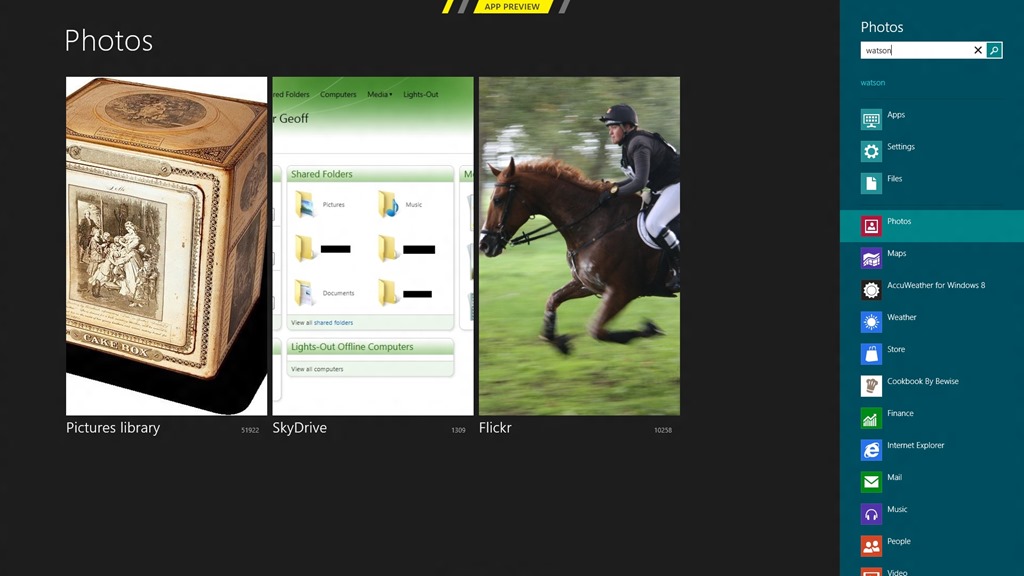
    At least the searches are aware of tags in the photos, so searching for the name of my dog turns up all the photos that have been tagged “Watson”:

    W8CP 05

    However, unlike Windows Live Photo Gallery, I don’t think you can do complex searches (a AND b, but NOT c), and there’s certainly no function for editing photos as WLPG has. Once again, though, this is a preview – the final release may be another story. The Photos app can Share with the Mail app, and use it to send photos via email; either as attachments or via Skydrive. However, unlike WLPG, there doesn’t seem to be any way of choosing the size of the photo files that you send. Update 13 March 2012: hmm, even the Search functiona has problems at the moment. I discovered today that it finds less photos with a given tag than actually exist. It seems to only find about half the number it should be finding.

    The Music App. You may have thought that Windows Media Player and the Zune application were limited – this one’s even worse. No Podcast support, no “Play to” support, no way to view and filter your collection other than by Album, Artist, Song, and Genre.

    The opportunity is here for this app to be a full DLNA implementation – a player, a renderer and a control device (think of a Windows 8 tablet running this app being used to control your home’s networked media – music, video, movies, photos – stored locally and in the Cloud). Unless this app improves, it will be a missed opportunity. The Consumer Preview comes with the old Windows Media Center application, that has been around since 2005. I would like to think that Microsoft are revamping it for Windows 8…

    And so it goes – I don’t think I’ve found a single app yet that I find I’m using in preference to an equivalent traditional Windows 7 application. Yes, it’s early days; but thus far, I find the experience disappointing.

    The other thing I’m noticing is that my system feels sluggish. Not too much (at least not too often), but it has definitely slowed. Once again, this is to be expected with a beta, so I’m pretty confident that come final release, things will have improved so that it is no longer an issue.

    The most positive thing I’m noticing at the moment is that underneath it all, Windows 8 is running all my Windows 7 applications without (so far) any issue. I’m very hopeful that I can continue to use the Consumer Preview on my main PC as my everyday operating system.

    The one big concern I have is that the issue of being unable to change my country of residence in the Windows Store could be a make or break issue for me.

    7 responses to “Microsoft’s Marmite”

    1. technogran Avatar

      Geoff, if you right click on any of the apps that you have used, you will see a ‘feedback’ button, and I do hope that you have used it. I too found it couldn’t find my location, despite the fact that Windows phone found me straight away! Also the ‘people’ app in Windows 8 is no where near as good as the one on my Windows phone which really makes me far more disappointed than you, because I expected the same level in both. But I am also going to ride it through and I am getting far more used to the tiles. I did want to try and use only the apps, but my ISP account is also POP so I’ve had to resort to using Live Mail and of course, there’s blogging to be done which means using Live Writer! Do give feedback though Geoff about any problems that you have found. It only takes a moment to do.
      TG

      1. Geoff Coupe Avatar

        TG – don’t worry, I’ve made good use of the Feedback facility! I’ve also rated/reviewed the Apps in Windows Store.

        I’m intrigued as to why W8 thinks my location is in Dinxperlo – I’m actually about 15 kilometres from there. Clearly my PC doesn’t have GPS, so how is it getting a location at all?

        It’s funny, Metro on the Phone works very well, but so far on the PC it feels like a toy. Perhaps it’s because I know that the PC is capable of so much more, and that Metro and its Apps haven’t scaled up as well as they’ve scaled down…

    2. […] over one million others, downloaded and installed Microsoft’s Windows 8 Consumer Preview. As I wrote at the time, people seemed to either love it or hate […]

    3. […] I was interested to read what Norman thinks about Windows 8. As I’ve written before, an awful lot of people seem to think it is a disaster (I’m not one of them). And it appears, […]

    4. […] you may be aware, I’ve been following the development of Microsoft’s Windows 8 operating system with some […]

    5. […] With the introduction of Windows 8, Microsoft is moving into old, familiar territory. When Windows 95 was released, the interface changed how computing was perceived. Steve Ballmer himself said in his keynote speech at BUILD on Tuesday that the release of Windows 95 “which was really the thing that brought computing into the mainstream.” I couldn’t agree more. Microsoft even got two of the biggest celebrities at the time, Jennifer Aniston and Matthew Perry, in on the promo material and market push. Now, 17 years later, Microsoft has radically changed the interface that’s been established since Windows 95 and making it more relevant for today’s hardware and interface capabilities. Windows 95, helped make computers cool (or maybe I should say relevant) for the average consumer, but the interface has only been evolving over the past 17 years. So to be truly revolutionary, Microsoft is changing the game again with Windows 8’s ‘Marmite’ UI. […]

    6. […] in March, I wrote a post called “Microsoft’s Marmite”, which likened the reactions of people to Marmite to their reactions to Windows 8 – they […]

    Leave a comment

  • Lipstick On A Pig

    Yes, this is a post about the Windows 8 Consumer Preview, but despite what you may be thinking, this is not a post about how awful the Metro UI is. I’ll deal with that later. No, this is a post about how awful “Microsoft Account” is.

    You may recall my post of last week, where I was worried about whether Windows 8 would do anything to change the inflexibility of Microsoft’s back-end infrastructure used for digital distribution of apps and digital media. Well, now I’ve got my answer:

    Absolutely nothing.

    Yes, there’s been a name change: the Windows Live ID service has been rebranded to Microsoft Account, but beyond that, the same problem remains: once you have registered a country of residence in your Zune or Xbox Live billing account, neither you nor Microsoft can change it, nor even delete your account.

    So the name change to Microsoft Account is the lipstick, and the pig of the billing account remains as porcine as ever.

    I thought I’d try one last time to contact Customer Support via the online Chat channel to see if I could get my Zune account deleted without having to also delete my Windows Live ID. Nope. No joy.

    As I wrote last week:

    Unfortunately (for me), a few years ago I made the mistake of downloading and playing with the Zune software. Along the way, I created a Zune account using my Windows Live ID, just to try out the experience, not realising that the country of residence would be hardwired to the US without any possibility of change or deletion. At the time, I just shrugged my shoulders and thought no more about it.

    And because of that mistake, if Windows 8 uses the same backend infrastructure as Zune, I will not be able to use my trusty Windows Live ID. If I did, I will not be able to purchase anything in Windows Store, because I do not have a credit card with a US address. Because of a badly-thought-out design in a Microsoft infrastructure, I’m expected to throw all the history of what’s associated with my old Windows Live ID away, and start again with a new one.

    Windows 8 does use the same backend infrastructure. I’m screwed.
    Update: It took writing letters to Microsoft, but I finally managed to get my old Zune/Xbox Live account deleted, and used my existing Windows Live ID to create a new account.

    3 responses to “Lipstick On A Pig”

    1. […] Geoff Coupe's Blog Reflections on life at "De Witte Wand" Skip to content HomeAboutGardensWedding AlbumWines I Have Known ← Lipstick On A Pig […]

    2. […] mentioned a number of times before on this blog how irritating it is to be saddled with a Zune/Xbox Live/Windows Phone account that has […]

    3. […] Your Microsoft Account is tied to a single country/region, and can’t be changed, either by you or Microsoft. Bad news if you move to a different country. Microsoft claims to be working on addressing this, but when we will see results is anyone’s guess. […]

    Leave a comment