Reflections on life at “De Witte Wand”…

  • Backing Up Your Data

    Here’s a simple question: do you have backups of the data held on your Windows PC or your Mac?

    Apparently, the answer from most people (if they’ve ever even thought about the question) is a resounding “no”. That’s the conclusion that Microsoft has reached. In a post on the Building Windows 8 blog, they state:

    Our telemetry shows that less than 5% of consumer PCs use Windows Backup and even adding up all the third party tools in use, it is clear nowhere near half of consumer PCs are backed up. This leaves user’s personal data and digital memories quite vulnerable as any accident can lead to data loss.

    Windows has had data backup tools included in it for years, but the fact is that very few people actually use them. Microsoft is introducing a totally new backup method in Windows 8 called File History. It comes with a user interface that is designed to be attractive and easy to use.

    Now there’s a lot to like about the Windows 8 File History feature, but it focuses on the user’s personal data. It will only backup data held in the user’s Libraries, Desktop, Contacts and Favourites. It will completely ignore applications that have their own databases, e.g. Adobe’s Lightroom. For some time, Microsoft has been telling developers to store application data in locations contained in the C:\ProgramData folder, and now the File History feature will totally ignore such files. Also, user data that is not document-based is supposed to be held in locations contained in the C:\Users\Username\AppData folder. That is also ignored by the File History feature. It turns out that Microsoft’s own Windows 8 Mail App stores mail messages in the AppData folder, so File History will not backup your mail messages. Microsoft seems to be assuming that we store our mail in the Cloud, e.g. in their Hotmail service. I’ve got news for them – we don’t all do this.

    I’ve got used to the elegant and simple-to-use client PC Backup function of Windows Home Server (which covers all files and provides a bare-metal restore). Moving to Windows 8 on my current hardware will mean that I will continue to use WHS for backup.

    However, because WHS does not support backup/restore of client PCs that use EFI/GPT technology, that will mean that I will have to use a combination of File History and some other method of backing up application data, if I invest in new hardware (a PC or a Tablet). Modern PCs use EFI/GPT.

    [Update 4 March 2013: Microsoft has at last issued a Hotfix to add backup support for UEFI-based computers to back up to servers that are running Windows Home Server 2011]

    Frankly, that makes it sound a bit of a kludge, instead of the current “set it and forget it” method of WHS.

    Peter Bright has a good analysis of the new File History feature, and a comparison with the older methods of data backup in Windows here. I rather like one of the comments on his analysis:

    So basically, they killed Windows Home Server but still don’t have an effective product to replace its backup mechanism. Got it.

    3 responses to “Backing Up Your Data”

    1. […] Backing up your data. Windows 8 has a new backup method: File History. Be aware that it only covers the contents of your Libraries, Desktop, Contacts and Favourites. It won’t cover application data, or your mail messages… Microsoft assumes that we all hold our email in the Cloud. Er, no, we don’t. […]

    2. Spike Avatar
      Spike

      I just discovered this very issue wrt the AppData and ProgramData folders.
      While the old way to backup still exists under “Windows 7 File Recovery”, it’s not the way forward, and the two (old way and File History) are mutually exclusive.

      Have you come across a way to keep using File History for backup?
      Only thing I can come up with is custom libraries but that seems dumb…

      1. Geoff Coupe Avatar

        I think custom libraries is the only way to do it, but it is a bit of a kludge…

        I’m not currently using File History at all – I rely on my WHS to backup all our PCs (none of them use GPT formatted drives, so we’re OK for the moment).

        There’s been a hint from Microsoft that it’s possible that support for GPT drives will appear in a future update to WHS 2011.

    Leave a comment

  • Well, I Told You So…

    So Microsoft has effectively killed off their Windows Home Server product.

    Being Microsoft, of course, they don’t say this quite as baldly as I just did. Instead, they’ve announced some details of their forthcoming Windows Server 2012 lineup of software, and buried on page 4 of the 6 page FAQ we find this:

    Q: Will there be a next version of Windows Home Server?

    A: No. Windows Home Server has seen its greatest success in small office/home office (SOHO) environments and among the technology enthusiast community. For this reason, Microsoft is combining the features that were previously only found in Windows Home Server, such as support for DLNA-compliant devices and media streaming, into Windows Server 2012 Essentials and focusing our efforts into making Windows Server 2012 Essentials the ideal first server operating system for both small business and home use—offering an intuitive administration experience, elastic and resilient storage features with Storage Spaces, and robust data protection for the server and client computers.

    OK, so they are saying that Windows Server 2012 Essentials is to be “the ideal first server operating system for both small business and home use”. And how much will it cost? Well, it’s $425. And how much does Windows Home Server 2011 cost? Er, $40. There’s no way I can possibly justify shelling out $425 for Microsoft’s proposed successor to WHS 2011.

    Now, to be fair, that $425 price is a retail price, while the $40 is an OEM price. There isn’t an OEM price for Windows Server 2012 Essentials, instead, there’s another product in the range that will be available as OEM software, and that’s Windows Server 2012 Foundation. We don’t yet know what the OEM price will be for this software, and while it will be less than $425, I very much doubt that it will be $40 either, probably more in the $100 – $150 range.

    But there’s another issue to worry about, will there be things missing from the Foundation version that are present in Essentials? Microsoft says this:

    “If you’re a small business with limited in-house skills, Windows Server 2012 Essentials is an appropriate option. It’s simple, affordable, and easy to manage, and has been tailored to address common small business IT scenarios. Windows Server 2012 Essentials is the ideal solution if you plan to expand your business capabilities through the cloud as it is designed to facilitate your connection to online services. On the other hand, if you have some level of in-house IT skills and want the ability to tailor server roles to their unique environments, then Windows Server Foundation is potentially better suited to your business.”

    In other words, if you are a home user, then you had better have some degree of IT skills at your fingertips if you want to use Windows Server Foundation, assuming that it does contain all the necessary functionality. It certainly won’t have the easy-to-use Wizards that will be present in the Essentials edition…

    The upshot of all this is that Microsoft has essentially dropped the whole concept of a Home Server product, priced for the consumer market. I can’t say that I’m the least little bit surprised, the writing has been on the wall since the early days of the development of WHS 2011.

    The first version of Windows Home Server began with a vision and a focus on the home consumer. There was even a set of guiding principles for the design of the storage system for WHS v1 that were predicated on the needs of the home consumer. After the release of that first version of WHS, the team leader (Charlie Kindel) moved on, the WHS team got reorganised, and ended up in the Server group at Microsoft – small fish in a very big pond. In the process of developing WHS 2011, they effectively tore up Kindel’s guiding principles, and the result has been a product that while it bears the word “Home” in its title, is far less focused on the home consumer than the first version. Now that focus has been reduced even further to a blur.

    While some people will question the value proposition of a home server in these days of cloud services and online streaming, I firmly believe that it has a place. I have more data than I can affordably hold in the cloud, and living as I do in the countryside, I am at the end of a piece of wet string, so streaming of high-quality content is not an option.

    The original concept of WHS, with its easy to manage storage, and single-instance backup of up to 10 client PCs was something that had clear value to me. Microsoft weakened that with WHS 2011, and now they are in effect getting out of the home server market altogether.

    The one possible ray of hope is that it may be possible to replicate the functionality of WHS using Windows 8. That is dependent on someone developing an App for Windows 8 that replicates the client PC backup functionality that is present in WHS, while addressing its limitation (it can’t backup PCs that use EFI/GPT technology). There’s a gap in the market opening up – let’s hope someone will fill it…

    [Update 4th March 2013: Microsoft has at last issued a Hotfix to add backup support for UEFI-based computers to back up to servers that are running Windows Home Server 2011]

    Update 15 July 2012

    Being somewhat curious, I downloaded the beta of Windows Server 2012 Essentials and installed it into a virtual machine. I followed the excellent guides provided by Jim McCarthy on how to do this. Here’s his guide on installing Hyper-V (the virtual machine environment) in Windows 8 and here’s his guide on installing the beta of Windows Server 2012 Essentials.

    I found that I needed to make a change to my PC to enable the virtualisation mode of the CPU, but once that was done (and the PC rebooted multiple times), the Hyper-V environment was up and running. The installation of the beta of WSE 2012 was very straightforward, and before too long, I saw the server appear on my home network.

    I have to say that I think Microsoft is being disingenous when they say that WSE 2012 is suitable for “home use”. From what I saw of the environment, it is clearly aimed at a small business, not the home. For one thing, it provides a full domain controller environment, which is very much overkill for the home.

    I confess that I didn’t leave WSE 2012 in place for very long before I deleted it and removed the Hyper-V environment.

    For one thing, although it may have been a coincidence, following the installation of WSE 2012 into Hyper-V running on my main Desktop PC, the WHS backup service of that PC stopped running. Looking in the Event Viewer showed .NET runtime errors occurring with the Windows Server Client Computer Backup Provider Service, which manages the backup and restore service for client computers. Since this service was stopped (and couldn’t be restarted without errors), I could not back up or restore data for my Desktop PC.

    The other thing that sealed the fate of WSE 2012 for me was the news that a version of MyMovies will not be developed for WSE 2012. Brian Binnerup, the developer of MyMovies, believes (quite rightly, in my view) that the market will be too small to justify development and support of a WSE 2012 version. Since I have the MyMovies server installed on my WHS 2011 system, that rather closes off a possible upgrade path from WHS 2011 to WSE 2012 (quite apart from the cost of WSE 2012, of course). It looks as though a future version of the MyMovies server will only be developed for Windows 8. Update 24 August 2012: I see that Brian Binnerup now seems to have changed his mind about supporting Windows Server Essentials 2012. That’s good to know, but it’s still too expensive for me.

    As a result, I have turned my back on Windows Server Essentials 2012. It has been removed from my PC. I’ve reinstalled the WHS 2011 Connector, and now my Desktop PC is once more being backed up on a daily basis to my WHS 2011 server.

    7 responses to “Well, I Told You So…”

    1. Matt Healy Avatar
      Matt Healy

      Have you looked at Retrospect backup software? I haven’t used it in years, and never used the Windows version, but back in the 1990s as the IT guy for a lab group that used Apple Macs I mafe heavy use of Retrospect to back them all up. The company is still around, and if their Windows product now is as good as their MacOS stuff was back then, it’s pretty darned good!

      The version I used basically turned client-server around: a small lightweight server runs on each machine that is to be backed up, to which the master machine used for scheduling backups talks. A very nice feature is it has an excellent way to detect duplicate files that minimizes network traffic: the program running on each machine sends back filename, datestamp, and hash value for each file. The machine with the tape drive compares each file to a catalog of what it already has on tape, so the actual data need only be transmitted over the network if the file isn’t a duplicate.

      I used Retrospect from 1992 through 1998 to back up about a dozen Macs at Yale School of Medicine, during which time I needed either to restore a crashed machine or rescue old data numerous times. I found Retrospect to be a very robust and flexible tool.

      1. Geoff Coupe Avatar

        Matt, thanks for the info. It sounds as though Retrospect uses a similar algorithm to the WHS client PC backup function. I suspect that I’ll be in the market for an alternative to the WHS backup by the time I buy/build my next PC – since that will almost certainly be using EFI/GPT. However, that is probably a year or so away, and I’ll see what’s on the market (and in the Windows Store) then.

    2. Aussie_Z Avatar

      Geoff … thanks for the update … As you say the writing was on the wall … And I had just (finally) got over my “computer monitoring error bug” too … I don’t feel that the ”Gauntlet has been thrown down” … I feel that it has been thrown at me. Thanks Microsoft – as usual we spend all our time and money debugging your product … and then you cancel it!!! 😦

      Retrospect seems like an option … but there appears to be a $119 cost … Which might be OK if the system works as advertised. Of course WHS provided remote access too … which means that we will need an OS at additional cost, and other software to replicate full WHS functionality.

      I will also be looking for a WHS replacement in a year or so … so we’ll see if someone steps up to fill the gap. Let’s hope so.

    3. Poppapete Avatar
      Poppapete

      No one seems to be addressing the problem of backing up GPT disks. I want to upgrade both my desktop (over 3 years old) and my laptop (over 5 years old) to UEFI ASUS based systems. Unless I have it wrong there is no server based solution that can accomplish this effectively. I am using WHS 2011 at present.

    4. Al Feersum Avatar

      Meh. There are backup solutions available: I use CrashPlan for my HomeServer OS partition (but I also use the internal server backup too, onto a dedicated VHD).

      I’ve been running my HomeServer in a Hyper-V environment on a 2008 R2 server for a long time – V1 was OK, although I started getting issues with the DriveExtender – one thing I’m glad they got rid of for 2011. But it’s been a pretty good platform all told, apart from trying to do stupid things like running multiple small VHDs under software RAID control.

      It also means I can use one machine to host a SQL Server 2008 R2 instance, a vanilla XP SP1 machine so I can strip the DRM off BBC WMVs downloaded from iPlayer, and my HomeServer.

      As for 2012 Essentials… I’ll give it a look, but if it doesn’t provide similar services to WHS2011 then I think I’ll give it a miss.

    5. […] it was clear that Microsoft no longer loved Windows Home Server, and it was no surprise when Microsoft announced in July 2012 that there would be no next version of WHS. That means, according to Microsoft’s Product Support […]

    6. […] it was clear that Microsoft no longer loved Windows Home Server, and it was no surprise when Microsoft announced in July 2012 that there would be no next version of WHS. That meant, according to Microsoft’s Product Support […]

    Leave a comment

  • The Gauntlet Has Been Thrown Down

    Just to follow up on my post about Microsoft Surface for a moment, I do think we live in interesting times.

    Peter Bright, over at Ars Technica, has a good article on the impact on OEMs of Microsoft entering the tablet hardware market; he likens it to Microsoft giving the OEMs a gentle kick in the teeth. The problem is that, compared with Apple’s iPad, the build quality of tablets running either Android or Windows is pretty dire. Even the so-called quality manufacturers have not exactly covered themselves with glory here. Samsung’s flagship Windows 7 Tablet, the 700T, for example is still plagued with the fact that its screen lifts away from the housing.

    As Peter Bright says:

    To allow Windows 8 to compete with iOS, Microsoft needs hardware to compete with the iPad. Bad hardware would jeopardize Redmond’s ability to play in the tablet space, but the PC OEMs have established for themselves a track record of producing little else. And while many of the OEMs have produced Android tablets to try to compete with the iPad, they’ve also consistently failed to match its quality.

    So Microsoft has drawn upon its 30-year history of producing hardware and made two models of Windows 8 tablets to show the OEMs how its done. Now admittedly, that 30-year history has been mostly spent in the area of producing mice and keyboards. But, on the other hand, Microsoft also makes the Xbox, which although it is a game console, has a similar level of complexity as a PC. Still, the engineering that is required for a high-quality tablet is definitely up a notch from the Xbox, so I am intrigued to see whether Microsoft can pull it off, and kick the OEMs in the teeth.

    What I also find intriguing is Peter Bright’s thoughts on how this might all play out. Scenario one is that the OEMs rise to the challenge and produce high-quality Windows 8 tablets. In which case, Microsoft can keep the Surface going as a small-scale, US-only operation.

    However, as Peter Bright points out, at least one OEM, Acer, has dismissed Microsoft’s challenge. In fact Acer, in the form of Oliver Ahrens, Acer’s senior VP and president for Europe, Middle East and Africa, believes that Microsoft is making a failed attempt to mimic Apple. He’s quoted as saying “I don’t think it will be successful because you cannot be a hardware player with two products”. Ahrens appears to overlook the fact that Apple dominates the tablet market with just two iPad products.

    Frankly, with friends like Oliver Ahrens, I don’t think Microsoft needs enemies.

    So then it might be opportune for Peter Bright’s second scenario to be realised. If the OEMs fail to rise to the challenge, the Microsoft must ramp up the Surface operation to a global scale, much as they have done with the Xbox.

    As I say, we live in interesting times.

    Addendum, 27 July 2012

    Charlie Kindel has an interesting post up on this subject of whether Microsoft is a hardware company. His view?

    Microsoft is not, and never will be, a hardware company.

    Kindel worked in Microsoft for over twenty years, and knows the company well. What I found particularly telling in today’s post was the observation that there are still organisational silos there:

    I know some of the people who drove the Xbox360 hardware design and supply chain management. They are now war scarred and seasoned experts. They are the type of people you want working on the next big thing. None of them even knew about Surface until it was announced. Typical Microsoft organizational silos.

    Oh dear.

    Leave a comment

  • Some People Just Don’t Grok It

    Yesterday, Microsoft revealed that it would be entering the Tablet market with two models of its own. I’ll come back to them later, but first, I must say that I’m struck by the continuing negative press that Windows 8 continues to receive. While it’s by no means perfect, I find the hyperbolical vitriol poured on it by some of the technical press quite astounding, and almost entirely without basis.

    Yes, the Metro user interface (UI) is very different from the UI of the traditional Windows Desktop, but I note that the iPad UI is very different from the traditional Mac desktop OS X UI, and yet none of the negative reviewers seem to even give this a second thought. Somehow, they seem to have adapted to being able to use both devices, and praise Apple to the skies.

    Apple, when it created iOS, took the view that a touch-oriented direct-manipulation user interface demands entirely different solutions and paradigms than mouse/pointer-driven user interfaces do. Microsoft, on the other hand, recognises the same challenge, yet is attempting to support both within the one operating system: Windows 8. That seems to me to be a far riskier strategy that the play-it-safe one that Apple has followed.

    I don’t have either a touchscreen or a touchpad on my PC, yet I’ve not found any problem about continuing to be productive using Windows 8, unlike some technical reviewers. I rather suspect that either they don’t like change, or they don’t like Microsoft.

    And now Microsoft has further upped the ante, by announcing two Tablets bearing the Microsoft name, and called Surface. The entry-level Tablet runs Windows RT (the version of Windows 8 designed to run on ARM hardware), while the top-of-the-range model runs Windows 8 Pro and uses Intel’s Ivy Bridge architecture.

    The entry-level Tablet is clearly aimed at the iPad market niche, but I’ve never found that market niche particularly interesting. I want something that is more than just a device for consuming content. I want one that has the power of a desktop available. So the more interesting one (to me) is the one running Windows 8 Pro. This comes with a pen, and (excellent) handwriting recognition is part of Windows 8. Coupled with the detachable keyboard, this model of the Surface range looks as though it meets my desire for origami computing.

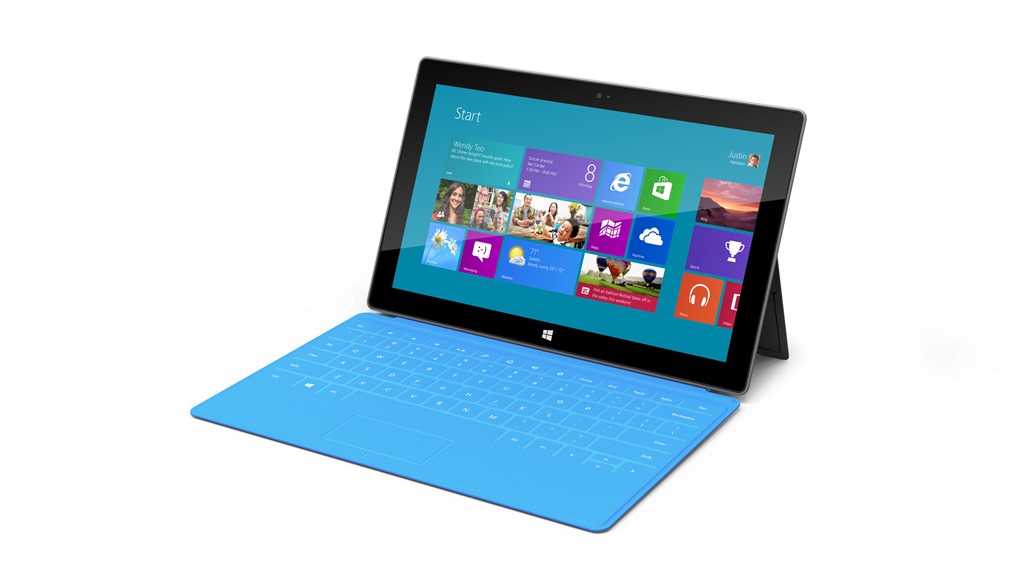
    surface_01

    As well as the Surface tablets, Microsoft also announced two new keyboards (which double as covers for the Surface). The “Touch” model (3mm thick) is shown in the picture above. The “Type” model (5 mm thick) comes with moving keys for a traditional feel.

    The specifications of the Surface tablets are still not spelt out in great detail, but the top model seems to have two cameras (one forward-facing and one rear-facing), and a screen resolution of 1920 x 1080 pixels. The Intel-based Surface has a mini DisplayPort for Video. I wonder whether this could also be a Thunderbolt port for connecting other devices, although I suspect that that will come in a future Surface model in 2013. No word on price, either, so I’ll have to wait to see whether this is a good match with my wishlist. But I have to say, it does look good.

    Update: I watched the video of the Microsoft presentation yesterday and picked up on a couple of things.

    First, the Windows RT machine being demonstrated by Steven Sinofsky froze up on him during the demo. He had to switch it for another machine. To be fair, demos of unreleased hardware and software are always a highwire act, so it’s hardly surprising he had to rely on the safety net of a second machine.

    Second, the words that are spoken during these Microsoft presentations are very carefully chosen. When Sinofsky talked about retail channels, he only talked about Microsoft’s own stores, both physical and online. These are both US-only, which leads me to worry that Surface may only ever be available in the US. It won’t be the first time Microsoft has done this; the Zune and Microsoft Kin products were also US-only. If that does turn out to be the case, then that will be a real disappointment to me.

    One other thought, I know that I said that it would be the Windows 8 Pro version of Surface that I would be interested in, because I thought the Windows RT Surface would be too limiting, like the iPad. Someone pointed out that you can still get the full PC experience on a Windows RT device by using the Remote Desktop App, and accessing the full environment of a desktop PC through the Surface tablet. Now that is a very interesting idea, and one that I had not considered. I often use the Remote Desktop App to remotely login to my Windows Home Server from my desktop PC, and the experience is indeed just as though I have my monitor, keyboard and mouse directly connected to the server. However, it would mean that I would have to upgrade my Desktop PC to Windows 8 Pro, so it is not a cost-free route.

    So I may have options. Options are good.

    8 responses to “Some People Just Don’t Grok It”

    1. MarkB Avatar
      MarkB

      I suspect that if Apple told their faithful that iOS was going to be their next desktop OS and that multitasking and overlapping windows were to be sunsetted, and that many options and features not used by the “majority” of them were being eliminated – they would be unhappy also.

      With that said, I have been using Win8 since the CP and have adjusted to it (what a ringing endorsement) – unfortunately for Metro, I have yet to find a single Metro version I would rather have. Looking at photos? Metro version is far too limited – try opening up 5 in a non-standard location, videos? Can’t tell because it requires me to agree to the Xbox Live Terms just to watch videos and then drops me into their store EVERY TIME, Mail? far too insecure – try telling it not to download pictures from a unsecure zone, Internet Explorer – please..no favorites, no addons, try doing 5 backpage clicks in a row using a mouse without getting angry, etc.

      I have gotten used to the start screen by not using it as MS states, but rather as a shortlist of frequently used programs and removing all the extras – they are still available via the “all programs” screen. But forcing desktop/mouse people to make large sacrifices in the way they do things and probably in productivity – so it is easier for the next generation of touch devices, well it is understandable there is a lot of resistance.

      1. Geoff Coupe Avatar

        Mark, I totally agree that the current state of the Metro Apps is abysmal – and I’ve said so a number of times. Until they improve, I’ll continue living in the Desktop environment for most of the time. But the point is that, with Windows 8, I can do this. Indeed, there are some improvements under the covers over Windows 7 for the Desktop. So I really don’t feel that I’m being “forced to make large sacrifices in productivity”

        I grant you that I have made some changes to the way I do things – primarily moving from a Start Button to a Start Screen – but frankly, I don’t think of it as a large sacrifice. I’m now driving on the right side of the road, instead of on the left, and I have a different set of road signs to deal with – but I can still get from A to B with the minimum of fuss…

        1. MarkB Avatar
          MarkB

          True – but if you stay in the desktop environment and reconfigure defaults (not a trivial task for a non-expert) to use desktop versions of tools then it seems there is little point of going to WIn8 unless you have a specific requirement (such as Windows-on-a-stick).

          Remember, many of those improvements (such as the video and playback enhancements) are Metro-only, while important items such as the NTFS alternate data stream flag are gone.

          1. Geoff Coupe Avatar

            I suspect many a non-expert will be perfectly happy with the Metro Apps, and won’t bother trying to reconfigure defaults to stick with the old Desktop tools. Then again, I haven’t bothered to reconfigure them either, since I tend to open the old desktop tool first and then choose my file.

            Are the video and playback enhancements really only able to be exploited by Metro Apps? I don’t think so, if I’m understanding this post by renethx: http://www.avsforum.com/t/1414544/windows-8-media-enhancements-described-in-building-windows-8#post_22113723

            I’m sure that some features can only be exploited by Metro Apps, but some are available to traditional desktop apps as well. It would be interesting to find a list that clearly specifies which group an improvement would fall into.

            Is the NTFS alternate data stream flag really so important? I thought it was a legacy hangover, and one that nowadays often gets exploited by Malware.

            1. MarkB Avatar
              MarkB

              I am not a AV expert or programmer. My comments came from my interpretation of the Win8 blog (http://blogs.msdn.com/b/b8/archive/2012/06/08/building-a-rich-and-extensible-media-platform.aspx) where it states, “Smooth Streaming is Microsoft’s initiative to deliver high quality multi-bitrate content and enable Video-on-demand, Live, Linear TV, and Download-and-Play.” and checking the Smooth Streaming SDK (http://forums.iis.net/t/1187882.aspx) it is Metro-only. Hopefully the improvements outlined in the blog will be available to desktop apps as well!

              1. Geoff Coupe Avatar

                Yes, the SDK in question is designed for Metro Apps, but the underlying technology can be utilized by traditional desktop apps as well, as pointed out in renethx’s post…

    2. […] Geoff Coupe's Blog Reflections on life at "De Witte Wand" Skip to content HomeAboutGardensWedding AlbumWines I Have Known ← Some People Just Don’t Grok It […]

    3. […] I’ve mentioned before how much I’ve been surprised by the level of vitriol and hatred that has been unleashed against Microsoft’s forthcoming Windows 8 operating system. Everywhere I turn, on tech blogs and forums, there are articles, posts and threads complaining about the “disaster” that Windows 8 is. Opinions galore, often complete with falsehoods stated as facts. […]

    Leave a comment

  • Gone, But Not Forgotten

    I didn’t write about the fact that Ray Bradbury died on the 5th June 2012, simply because I didn’t feel able to say anything of note. Like millions of people, I grew up recognising my feelings and emotions in some of his stories, and being amazed and shaken by the visions of others.

    However, Neil Gaiman has the ability to pen something that is a worthy memento of Bradbury. Go and read his short story: The Man Who Forgot Ray Bradbury.

    If you have ever read anything by Bradbury, you will feel the echoes and remember anew.

    Leave a comment

  • Windows 8 “Play to” Revisited

    Important Update 27 October 2012: The bug I describe below does seem to have been fixed in the final release of Windows 8. I can now use the “Play to” feature with my Denon AVR-3808.

    Hoorah!

    However, this is just one cheer. The Denon is not a “Windows Certified Play to” device, so the Microsoft-supplied Music Modern UI App does not recognise it as a device that can be used in a “Play to” scenario. While I can use the desktop Windows Media Player to “Play to” my Denon (as I could under Windows 7), the new Music App doesn’t even recognise the Denon as a “Play to” device.

    In a post on the Building Windows 8 blog, Microsoft states:

    Metro style apps work only with Windows certified Play To receivers [my emphasis]. These devices are validated to support modern media formats, are DLNA standards-compliant, and have great performance (including the updated Xbox 360 available later this year). The desktop experience first introduced in Windows 7 has been added to the Explorer Ribbon and will continue to support all DLNA DMR devices.

    So if I get one of the new tablets (e.g. Microsoft Surface) which run Windows RT, I won’t be able to use it to play music to my Denon. Why? Well, Windows RT does not support the desktop Windows Media Player, and Microsoft has just told me that their Metro Media Apps will not support my Denon, even though it is DLNA-certified. Yet another reason not to touch the Microsoft Surface with a bargepole, I think.

    It looks as though Microsoft are building proprietary extensions on top of the cross-industry DLNA specifications. I’m not convinced that this is a good thing.

    Update 4 February 2013: I see that Paul Thurrott has just written an article on this subject: The Sad Tale of Play To and Windows 8, with much the same conclusions. As I write in the comments here, it’s good to see that Mr. Thurrott is banging the same drum. He is able to make far more noise than I, but I think that Microsoft will remain deaf to the sounds. BTW, it’s worth reading the comment by John Galt after the Thurrott article. He lists a number of shortcomings in the media “features” that Microsoft have implemented in Windows 8, any one of which has me tearing my hair out. One wonders how Microsoft can be so dismal in delivering a product that should delight, not disappoint in so many ways.

    Update 31 March 2013: Barb Bowman has found a way to hack the Registry to get Windows 8 to recognize “uncertified” DLNA devices, and to use them within Windows 8 Apps. Like her, I wish that Microsoft would give advanced users the option to add our DLNA devices directly, without the need for these hacks.

    Update 21 October 2013: Well, now that the final release of Windows 8.1 is available, the Play to experience seems to be broken again. I applied the registry fix given by Barb Bowman (and which came originally from Microsoft’s Gabe Frost), and that no longer seems to work for me. One step forward, two steps back yet again. Thank you Microsoft.

    Update 24 October 2013: I posted the Windows 8.1 issue in a Microsoft forum, and got some useful feedback from Gabe Frost. The issue is not resolved, but at least we now know what’s going on. See https://gcoupe.wordpress.com/2013/10/23/play-to-and-windows-8-1/

    Original post

    You may recall that I’ve found that the “Play to” feature of Windows 8 is broken. I’ve been poking around trying different scenarios to see what’s going on, and come up with some further information.

    The bottom line is, yes, the Windows 8 implementation is broken as far as I’m concerned. However, I fear that Microsoft will simply say that this is not a bug, it’s a feature… What’s the old joke? Ah yes:

    Q: How many Microsoft developers does it take to change a lightbulb?
    A: None. Microsoft simply declares darkness to be the new standard.

    This is what I think I have found:

    • In Windows 7, the “Play to” feature will negotiate with the media renderer device to ensure that the audio format streamed from the server can be handled. If it can’t, it will try and have the server transcode it to a format that can be understood by the renderer.
    • In Windows 8, the “Play to” feature doesn’t bother to find out whether the device can cope with the streamed format, it just sends it, and the consequences be damned…

    Here are the details:

    First, let me recapitulate some of the terms and technology specification used by Microsoft in its implementation of “Play to”. These come from the Digital Living Networking Alliance, or DLNA for short. Their specification defines how a variety of different types of digital devices can connect and share information. I’ve summarised the devices used in “Play to” in the following table:

    Device Class What it Does Examples
    Digital Media Server (DMS) Stores content and makes it available to networked digital media players (DMP) and digital media renderers (DMR). PCs, Windows Home Server, and network attached storage (NAS) devices
    Digital Media Player (DMP) Finds content on digital media servers (DMS) and provides playback and rendering capabilities. TVs, stereos and home theaters, wireless monitors and game consoles. Windows Media Player also has a DMP capability
    Digital Media Renderer (DMR) These devices play content received from a digital media controller (DMC), which will find content from a digital media server (DMS). TVs, audio/video receivers, video displays and remote speakers for music
    Digital Media Controller (DMC) These devices find content on digital media servers (DMS) and play it on digital media renderers (DMR). Internet tablets, Wi-Fi® enabled digital cameras and the “Play to” function in Windows 7 and Windows 8.

    Table 1: Information drawn from the DLNA web site.

    Windows 7 and Windows 8 implement a number of these classes as shown here:

    Device Class Windows Implementations
    Digital Media Server (DMS) When media streaming is enabled, Windows acts as a DMS.
    Digital Media Player (DMP) Windows Media Player and Windows Media Center act as a DMP when browsing shared media libraries
    Digital Media Renderer (DMR) Windows Media Player acts as a DMR when configured to allow remote control of the Player.
    Digital Media Controller (DMC) The “Play To” feature from Windows Media Player (and the Windows Explorer in Windows 8) launches a DMC to control the media playback experience

    Table 2: Information drawn from the Engineering Windows 7 Blog.

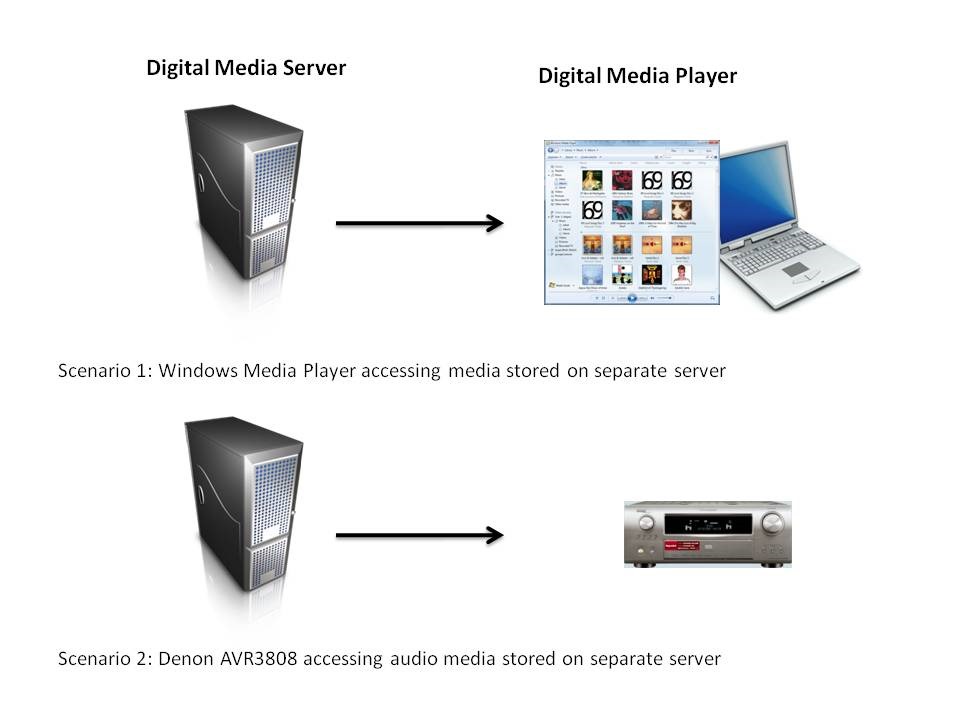
    At its simplest, just two devices can be involved: a Server and a Player. These can even be running on the same physical device, as in the case where your Windows Media Player on your Desktop PC is streaming music or video stored on the PC itself. The next step up is where the server and player are on separate physical devices. Two typical scenarios are shown in figure 1:
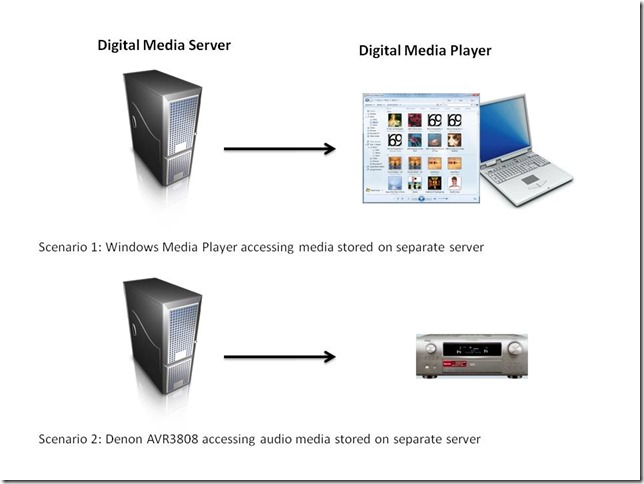
    WMP Scenarios

    Figure 1: Typical scenarios of simple case of DMP devices accessing DMS devices.

    I’ve used the Denon AVR-3808 as an example, since this is what I have in my home network. My DMS is a headless (no monitor, keyboard or mouse) home-built PC running the Windows Home Server 2011 operating system.

    In my particular case, both the two scenarios shown above will work, that is, the DMS that is part of WHS 2011 will stream audio to other PCs in the home network, and to the Denon AVR3808.

    Now, this next bit is important, I’ll return to it later: Under the covers, there’s actually some negotiation of streaming formats going on.

    This is because I have stored all my music files on the WHS 2011 in Windows Media Audio Lossless (WMAL) format. This presents no problems for the PCs, since the Windows Media Players installed on them can handle WMAL. But while the Denon can handle standard Windows Media Audio, it can’t handle the Lossless variant. So when I use the Denon to browse my music library on the server and select a track to play, the DMS in WHS 2011 sees that the Denon can’t handle WMAL and transcodes the stream into a format that the Denon can handle on the fly – it transcodes it into a PCM stream, which the Denon can deal with.

    Now let’s look at scenarios are where there are three devices linked together: a Digital Media Server, a Digital Media Controller, and a Digital Media Renderer.
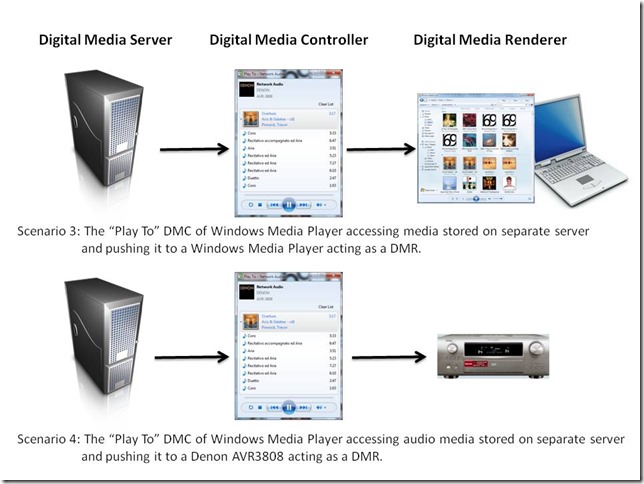
    WMP Scenarios 2

    Figure 2: Typical scenarios of a three device link (DMS-DMC-DMR).

    In my case, all flavours of scenario 3 will work. That is, I can stream from my Windows Home Server using the “Play To” feature in either Windows 7 or Windows 8 Release Preview, and push the stream to PCs that are running Windows Media Player in Windows 7 or the Windows 8 Release Preview.

    But while scenario 4 (streaming to the Denon) works with the “Play to” of Windows 7, it does not always work with the “Play to” of Windows 8 Release Preview.

    The following table shows which formats work and which don’t, when using scenario 4:

    Format Windows 7 Windows 8
    MP3 Yes Yes
    Windows Media Audio Yes Yes
    Windows Media Audio Lossless Yes No

    Table 3: Audio formats used with “Play to” features in Windows 7 and Windows 8

    Now take a look at a table showing which formats are supported by the Denon AVR-3808:

    Format Supported by the Denon
    MP3 Yes
    Windows Media Audio Yes
    Windows Media Audio Lossless No
    FLAC Yes

    Table 4: Audio formats supported by the Denon AVR-3808

    My very strong suspicion, therefore, is that the Windows 8 “Play to” does not negotiate a playable format with the DMR of the the Denon, it simply sends the source format regardless. The Denon’s display panel has indicators  (MP3, WMA, PCM) that show the audio formats being received.  Let’s take another look at Table 3, but this time, show the state of the Denon indicators:

    Format Windows 7 Windows 8
    MP3 MP3 MP3
    Windows Media Audio WMA WMA
    Windows Media Audio (Lossless) MP3

    Table 5: Denon front panel indicators state

    You can see that, for Windows 7, the WMA Lossless format of the source media has been transcoded into an MP3 stream so that the Denon can deal with it. In scenario 2 (the Denon communicating directly with the Windows Home Server), the PCM indicator lights, showing that the negotiation with WHS 2011 has resulted in an alternative format being used.

    If the Windows 8 “Play to” is not carrying out any negotiation, as I think is happening in scenario 4, then of course the Denon will respond with an error – it cannot play native Windows Media Audio Lossless format.

    I note that Microsoft states that:

    Improved device experience: Metro style apps work only with Windows certified Play To receivers. These devices are validated to support modern media formats, are DLNA standards-compliant, and have great performance (including the updated Xbox 360 available later this year). The desktop experience first introduced in Windows 7 has been added to the Explorer Ribbon and will continue to support all DLNA DMR devices.

    Fine words, except that Microsoft are being economical with the truth at the moment. “The desktop experience first introduced in Windows 7” does not “continue to support all DLNA DMR devices”.

    It’s broken.

    31 responses to “Windows 8 “Play to” Revisited”

    1. xpclient Avatar
      xpclient

      It’s broken and what a shame that despite notifying them about it, they say “This is by design”. Many features are broken. I expect a disaster worse than Vista. Microsoft need to re-visit their own definitions of “improved” and “no compromise experience”.

    2. Lili_acul Avatar
      Lili_acul

      I have a Denon 3808CI that was working good with HP Ex type media servers. I have now and HP N40L with WHS 2011. I can see from Denon the server, it shows Music and PlayList. If I select Music, Denon will lockup. I need to power cycle to recover. If I go to the Playlist, it will show F: the letter fo the HDD and then Serverfolders and then Music. Only some of the music folders will show up. I tested also with a Sony streamer , same thing nothing will be shown in the music folder. I feel there is something wrong with the server setup/ database. I do have in the server settings Media server is on. Please help.

      1. Geoff Coupe Avatar

        Lili_acul, can you play your music stored on your WHS 2011 using a Windows Media Player running on one of your client PCs? That would be the first thing to check, I think.

    3. Scary Biscuits Avatar
      Scary Biscuits

      Not being fully compatible with a five year old Denon amp hardly marks Windows 8 as ‘broken’. You could equally blame Denon by selling a high-end amp but not supporting high-end music formats which were around at the time (2007) and thus crippling their DNLA device.
      Microsoft adding on-the-fly conversion like this is a good example of Microsoft bending over backwards to support the quirky decisions of third-parties. However, they shouldn’t be expected to do this indefinitely for a very small number of people particularly now as bulky code or extra processing carries a higher cost on portable devices.
      The obvious work-around is to manually convert lossless files in your collection to lossy ones, which has the added advantage of saving you electricity by doing it only once. The other obvious work-around is to buy a new amp and pressure Denon (who make excellent and arguably the best home power amplifiers) to give similar attention to detail to the user-interface and interoperability side. Their latest releases are better but still woeful compared with a Windows Media Centre of 2005.

      1. Geoff Coupe Avatar

        Sorry, Scary Biscuits, but I disagree with your argument. The point is that it works under Windows 7, but it doesn’t work under the Windows 8 Release Preview.

        Actually, I believe that Microsoft have acknowledged the issue, and fixed it for RTM. I will find out for myself on October 26th when I will upgrade my main PC to Windows 8.

        And as for the “on-the-fly conversion” – that’s something that all DLNA DMS devices are supposed to make provision for – it ain’t “Microsoft bending over backwards to support the quirky decisions of third parties”. And we are talking about this transcoding being done on the SERVER, not the player device, so it’s irrelevant for power consumption on the player.

        I made a deliberate decision to store my files on my server in lossless format, for the benefits of maximum quality. I chose WMA Lossless simply because my computing environment is Windows-based. The alternative would have been FLAC (which the Denon supports natively). In retrospect, FLAC might have been the wiser choice, but it would have meant almost certainly battling with Microsoft’s failure to support it, and having to search out third-party plug-ins for Microsoft applications.

        Denon’s latest range of amplifiers still do NOT support WMA Lossless, so buying a new amp, even if I wished to do that, would be pointless.

        1. Scary Biscuits Avatar
          Scary Biscuits

          You may well be right.
          Franly, I’d be happy with a DNLA service that worked. I’ve had both a Denon 1611 and and 1912 and neither has worked reliably with DNLA. Sometimes it does, sometimes it doesn’t. Sometimes fixes like starting and stopping the WMP Network Sharing Service and UPnP Windsor services or rebooting work. Sometimes they don’t. Either way the Windows software was clearly written in a tearing hurry with no trouble taken to debug or to provide useful error messages.
          Airplay on Windows 7, by contrast, works all the time which is really annoying because I hate being trapped in Apple’s walled garden.

          1. Geoff Coupe Avatar

            In the early days of my ownership of my Denon 3808, I had a lot of problems with the network interface and streaming. These were fixed by a firmware update from Denon back in 2009. Since then, the Denon has performed very well in a variety of DLNA scenarios. Up until the Windows 8 “Play to” issue crawled out, I had been very satisfied.

    4. Mel Holmes Avatar
      Mel Holmes

      I was happily “playing to” a Sony Bravia Internet TV on my home network in Windows 7. I have “upgraded to Windows 8 and now cannot “play to this device”. I have effectively DOWNGRADED my home network by installing windows 8! VERY ANGRY

      1. Geoff Coupe Avatar

        Mel,

        I suggest that you report this in the Microsoft forum for Windows 8: http://answers.microsoft.com/en-us/windows/forum/windows_8
        It’s clearly something that Microsoft should be told about.

        1. Mel Holmes Avatar
          Mel Holmes

          You’re right – will do.

    5. Jeff Jeffers Avatar
      Jeff Jeffers

      Microsoft shit bags. My Bravio no longer plays video.

    6. KantBZH Avatar
      KantBZH

      Hi,
      The only answer I got from Microsoft is that my 1912 is outdated and it’s not their problem.
      In French : http://answers.microsoft.com/fr-fr/windows/forum/windows_8-pictures/scandaleuse-%C3%A9volution-de-play-to/511b2f39-6010-40ba-a4ee-9352a3bf40fc
      BUT : old Denon Devices are listed as ” Windows 8 certified” (ex : 3311)! So I don’t understand their standards…

    7. William Turner Avatar
      William Turner

      I have searched and searched the internet and I am shocked that this tiny little blog is really all there is on the subject! It’s annoying me to no end that things will work in “desktop mode” but not with the rest of Windows. I purchased a Sony wifi speaker that was admittedly end of line when I bought it but it filled the need I had and was really making me happy. Then I upgraded to Windows 8 and wanted to try out the “Music” app. Its essentially worthless to me unless I want to play it out the tiny pc speakers. Finding out this whole mess is “by design” is baffling.

    8. Brian Darroch Avatar
      Brian Darroch

      Even though the Video and Music app doesn’t allow me to PlayTo my uncertitied Panasonic Veira TV. I can still do it by opening file explorer and right clicking on the file name and select PlayTo. It’s a pain but at least it works

    9. Mike Avatar
      Mike

      Your bargepole comment re the Surface is wrong. As a previous commenter noted, even though Windows RT doesn’t have a desktop media player, the desktop file explorer now has Play To functionality. On top of that the file explorer will now allow you to browse a DLNA library as if it were just another drive.

      1. Geoff Coupe Avatar

        Mike, while I agree that the Windows Explorer has “Play to” functionality, and it will work with the Denon, it is a pretty poor substitute for a dedicated Music Library application such as Windows Media Player.

        And the fact remains that (1) Windows Media Player does not run on the Surface RT, and (2) the dedicated Music Library application supplied by Microsoft – Xbox Music – does not “Play to” the Denon. Nor do any other Modern UI Apps that I’ve looked at.

        I’m still not touching a Surface RT with a bargepole. At the moment I’m vacillating between a Lenovo Thinkpad 2 or the Surface Pro. However, it remains to be seen whether Microsoft will bother to release any Surface models into the Dutch market.

    10. Mike Avatar
      Mike

      Have you seen the article at winsupersite?
      http://winsupersite.com/windows-8/sad-tale-play-and-windows-8

      Maybe this can help…

      1. Geoff Coupe Avatar

        Hah! Thanks Mike, for the heads up. I would have seen it later today when I do my daily round of reading the blogs, but the early warning is appreciated.

        Good to see that Mr. Thurrott is banging the same drum. He is able to make far more noise than I, but I think that Microsoft will remain deaf to the sounds.

    11. […] written before about the issues I’ve had with the “Play to” function in Windows 8. Paul Thurrott wrote an article yesterday: The Sad Tale of Play To and Windows 8, with much the […]

    12. tema Avatar
      tema

      Thanks for a very nice info on this subject.
      I currently have Denon AVR-3313 and Play-to from w8 desktop works nicely.
      However when I folowed the instructions in the registry hack page about turning your uncertified DLNA renderer into certified ones I’m not able to do that. The device remain uncertified.
      There is one difference in my case compared to the instructions:
      – My Denon is not visible in the library section on Explorer
      – I’m locating the manufacturer and Model from Control panel Devices and Printers section
      Is there a more reliable way to identify the correct spelling of the Manufacturer and Device model ?

      Again thanks a lot for this nice information

      Tema

      1. Geoff Coupe Avatar

        Tema – you need to open the Properties page of the Denon from the “Network” section of Windows Explorer. If your Denon is switched on, then you should see it showing as a “Network Audio” device. Open the Properties page of that device, and you’ll see the correct names to use in the Registry key.

        For some reason, the Properties page of the device displayed in the Devices and Printers page gives different names, that don’t work, as you have found.

    13. leon Avatar
      leon

      Even easier with windows RT 8.1 on my surface. Got my denon 3808 working flawlessly!!

    14. darkmoon Avatar

      I have the same problem after 8.1 came in the picture, before in windows 8 the play to feature worked flawlessly with my lg smart tv even it was a non-windows certified device . ..so any luck in finding a solution ?

        1. darkmoon Avatar

          nah still cannot find my play to device

          1. Geoff Coupe Avatar

            Is it showing in the PC & Devices section of the Modern UI PC Settings? And you did a reboot after making the changes to the Registry?

            1. darkmoon Avatar

              nope it is not showing up in that section and i did do a reboot..mayaybe i should have chosen 64 bit for the key?

              1. Geoff Coupe Avatar

                No – it’s definitely a Dword, as Barb writes in the wiki. I suggest that you double-check the changes you’ve made in the Registry (and that you have taken out any earlier changes to add specific DLNA devices). You should certainly be seeing your device appear on that screen (when it’s switched on, and reachable over your network – it may not be shown unless this is the case).

    15. darkmoon Avatar

      wow your more responsive than the guys at the microsoft support forum lol but its definitely windows software issue because some third party i tried recognize my play to feature without any fuzz…so i will try your fix. whew i found your blog after searching days for a solution.

    16. Nils Hallberg Avatar
      Nils Hallberg

      Darkmoon:
      I seem to have exactly the same problem as you do. The play to function on the desktop worked flawlessly with my LG TV until i upgraded to win 8.1. Now I can’t find the TV in the metro settings device list.
      The TV is listed under the “media devices” in the network section of the file explorer but it is not identified as a play device.

    Leave a comment

  • Onward Christian Soldiers…

    I see that the Church of England has now formally submitted its response to the UK Government’s consultation on same-sex marriage. They’re against it. If I were a Christian, like Giles Fraser, then, like him, I would be both ashamed and angry at the Church’s stance. But I’m not a Christian, so I’m simply disgusted and appalled at their continuing bigotry, and not in the least little bit surprised.

    The summary of the C of E’s 13-page submission makes interesting reading. They’re against it because:

    Such a move would alter the intrinsic nature of marriage as the union of a man and a woman, as enshrined in human institutions throughout history.

    Marriage, as they very well know, has taken on many forms in human institutions throughout history. There is nothing “intrinsic” about it. And if we’re talking about human institutions here, then your God can damn well keep his nose out of my marriage, thank you very much.

    Marriage benefits society in many ways, not only by promoting mutuality and fidelity, but also by acknowledging an underlying biological complementarity which, for many, includes the possibility of procreation.

    I totally agree with the first part of this statement, marriage does benefit society in many ways, including promoting mutuality and fidelity. However, after stating this, the C of E wants to erect “keep-out” signs to prevent this being available to same-sex couples. How very charitable of them. And as for “an underlying biological complementarity” it’s certainly easier if a married couple already possess the right bits, but if they don’t, it still doesn’t rule out the possibility of procreation and raising children in a loving family.

    We have supported various legal changes in recent years to remove unjustified discrimination and create greater legal rights for same sex couples and we welcome that fact that previous legal and material inequities between heterosexual and same-sex partnerships have now been satisfactorily addressed. To change the nature of marriage for everyone will be divisive and deliver no obvious legal gains given the rights already conferred by civil partnerships. We also believe that imposing for essentially ideological reasons a new meaning on a term as familiar and fundamental as marriage would be deeply unwise.

    To claim that the CofE has “supported various legal changes in recent years to remove unjustified discrimination and create greater legal rights for same sex couples” is a downright lie. As Giles Fraser writes:

    In the main House of Lords debate in June 2004 the majority spoke against it and voted six to one in favour of a wrecking amendment. The leadership of the C of E will do anything to keep gay people out of the church. It uses the sickly language of welcome but won’t let gay priests (even celibate ones) become bishops and is prepared to cut the Church of England off from the Episcopal church in the US because they do. At every turn, the Church of England treats gay people as an unwanted headache.

    As I say, I am not surprised that the C of E objects to the proposals, they’ve cherry-picked the bits of scriptures to form the basis of their objections. The bible also condones slavery and the stoning of adulterers, but somehow society (at least in the West) has managed to move on from that. But what I do object to is their insistence that their beliefs should apply to the rest of us:

    In common with almost all other Churches, the Church of England holds, as a matter of doctrine and derived from the teaching of Christ himself, that marriage in general – and not just the marriage of Christians – is, in its nature, a lifelong union of one man with one woman.

    from page 2 of the submission, my emphasis in bold. As I said above, their god can keep his nose out of my marriage.

    Then there’s the usual cry of “allowing same-sex marriages will dilute traditional marriage”. Section 13, page 4, of their submission (bold in the original):

    We believe that redefining marriage to include same-sex relationships will entail a dilution in the meaning of marriage for everyone by excluding the fundamental complementarity of men and women from the social and legal definition of marriage.

    You know, it’s ironic. Here in The Netherlands, civil partnership was introduced for same-sex couples back in 1998, and then in 2001 full civil marriage for same-sex couples became available. There’s been no “dilution in the meaning of marriage for everyone” at all. There are still church weddings for those who believe, but importantly, every couple first goes through a secular civil marriage ceremony, performed by a civil servant authorised to conduct weddings. This has long been the case – certainly before same-sex marriage became available. And there have been no challenges to the European Court of Human Rights to force Dutch Churches to marry same-sex couples, as the C of E apparently fears will happen in the UK.

    The news of the C of E’s submission has appeared on the 12th June 2012. By coincidence, this is what we consider as our 14th Wedding Anniversary. Martin and I had a civil partnership ceremony on the 12th June 1998. In 2003, we had this upgraded to a full civil marriage. The C of E’s continuing scaremongering on this issue of same-sex marriage is just another example of how, to quote Christopher Hitchens, religion poisons everything.

    3 responses to “Onward Christian Soldiers…”

    1. Simon Avatar
      Simon

      This brought a wry smile to my face:

    2. […] earnestly entreated the UK government to forbid the possibility of same-sex marriage, for a number of dubious reasons, it is now horrified when the UK government has responded by effectively saying: OK, you don’t […]

    Leave a comment

  • A Boerenbruiloft

    Boerenbruiloft is the Dutch word for a farmers’ wedding. Here in the Achterhoek area of the Netherlands, the sense of tradition is still very strong, so last Saturday I was able to be an onlooker of a boerenbruiloft. It was actually all a bit of play-acting from the members of the local horse and carriage club to celebrate thirty years of their existence. So they set out to show how a happy couple would get married with all the trappings and traditions that would accompany a typical farmer’s wedding in the first couple of decades of the 20th century.

    That would involve the bridegroom travelling in horse and carriage to the house of the bride’s parents:

    20120609-1222-08 

    Once the bride was collected, the whole entourage (bride and bridegroom, parents, witnesses, and guests) would set off for the wedding ceremony:

    20120609-1237-51

    20120609-1240-25

    20120609-1240-32

    20120609-1240-46

    20120609-1240-50

    20120609-1241-04

    20120609-1241-14

    This being the Netherlands of the 21st century, Health and Safety issues seemed to also be creeping in…

    20120609-1242-29

    The “marriage” ceremony itself was conducted in the Hofshuus in Varsseveld, an old farmhouse that dates from the 17th century.

    Here in the Netherlands, marriage is a secular institution, with marriages conducted by a civil servant (ambtenaar) who has the right to perform marriages (an ambtenaar van de burgerlijke stand). So the “ambtenaar” formally asked the parents and the couple if they assented to the marriage, and then invited the couple to exchange rings.

    20120609-1353-00

    Following the “marriage” ceremony, we had a re-enactment of another tradition that was once common in the Actherhoek: the presentation of a cow (the bruidskoe) to the bride by the bride’s father:

    20120609-1408-25

    The people living in the neighbourhood (the buurt) of the new couple would also traditionally present the couple with a gift to welcome them into the buurt. Very often this would be a clock for the farmhouse:

    20120609-1410-17

    There would then be a communal meal for everyone to celebrate the marriage:

    20120609-1445-50

    The forms may change, but the essentials remain the same, from the time of Brueghel the Elder to today…

    Following the meal, the bride and bridegroom would travel back to their new home, but along the way, the buurt would stretch a rope across the road, and demand payment of a toll.

    20120609-1534-16

    That would take the form of a glass of strong drink offered by the couple to the buurt. Note that the glasses have no foot – you’re meant to down the drink in one go…

    20120609-1535-59(001)

    Leave a comment

  • Tracing The Family Tree

    I’ve mentioned my family tree on the blog before. That post got responses from distant relatives whom I never knew I had. So here’s another post, prompted by my brother and one of my cousins, in the hope that we might get back in contact with a particular long-lost relative.

    I’ll start with my maternal grandparents: Edward Thomas Johnson and Eleanor Johnson:

    Grandparents Kate & Ted Johnson 1942.

    They had six children, three boys and three girls. In order of age (eldest first), they were Claude, Olive (my mother), Hilda, Eric, Murray, and Eugenie.

    This post concerns my uncle: Murray Johnson (born 7 October 1912, died 31 March 1988).

    Now, I only have a scattering of photos of Murray. Here are three examples: one as a toddler, one as a youngish man (on the right in glasses), and one taken in 1987, flanked by his nephews – me, the obviously gay one on the left in the picture, and my brother on the right.

    Family0152

    Family0158

    Murray, G & M, Richmond Park, July 1987

    Murray had three marriages. The first was to Jane Foreman. The second to Violet Gray, and the last to Barbara Pavitt. As a child, and a teenager, I can only ever recall Barbara, I can’t recall anything of his previous partners.

    Now, the point of this post is that Murray and Jane had a daughter: Juanita Johnson, born in 1940, in Brentford, England.

    My older brother tells me that Juanita was adopted, and thus grew up in a family other than either of her birth parents.

    So now: I have put this message in a virtual bottle and I have cast it out into the ocean of the internet.

    Should Juanita, or her descendants, ever retrieve this and would like to get in touch with us, then we would be delighted to hear from you…

    Leave a comment

  • The Secret History of our Streets

    Last night, BBC Two broadcast the first in a series of documentaries about streets in London. It was The Secret History of our Streets: Deptford High Street.

    It was truly excellent – up there with what the BBC does best. Starting with the sociological maps of Charles Booth, it moved to the present day with vox pop interviews of residents and those connected with the history of Deptford High Street.

    The centre of the programme was John Price, whose family have lived in and around Deptford High Street for 250 years. His was the arresting voice of a community that was forced into a diaspora by the well-meaning, but ultimately ruinous, city planners of the 1960s.

    It was riveting television, that, as Lucy Mangan writes, prodded your brain awake as it broke your heart. Do read the comments on her article, and the comments on the producer’s blog of the programme, they are worth it.

    I was close to tears at several points, and moved to white-hot fury as the programme revealed that one street in Deptford had been saved from the city planners’ bulldozers. In a final irony, it turned out that the street that survived was of housing stock that was at the absolute bottom of the pile. Better streets, one of which contained John Price’s family, were flattened. And now, this street, consisting of tiny terraced houses built for the poorest of the poor in the 19th century, has properties that are on the market for £750,000.

    We were treated to the spectacle of an oleaginous estate agent showing a well-to-do couple around one such tiny property. I have never come closer to wanting to hurl something through the television as at that moment. It made me sick to the bottom of my heart.

    And while the programme showed some of the new life that has come to Deptford High Street, including the (to me) rather questionable evangelical preacher, I couldn’t help feeling that the programme makers had made the right choice by using the song and words of the evangelical choir to close what was a brilliant example of a documentary. The  choir sang ‘Will the Circle be Unbroken’ – a bitter comment on how a community was shattered for ever by the Council’s bulldozers. The chorus, ‘There’s a better home a-waitin’ – in the Sky, Lord, in the Sky’ was perhaps a cruel, but knowing, joke about the highrise apartment blocks the Council built. The new slums to be marked as such on the map of a 21st Century Charles Booth, whilst the original community has been scattered to the four winds…

    Leave a comment

  • What’s Not To Like In Windows 8?

    Unlike many people, I don’t consider myself a dyed-in-the-wool hater of Windows 8. In fact, I find much to like in Microsoft’s latest operating system, which will be available this October. Nevertheless, I thought it might be useful to gather together in one place all the bugs, quirks, and the WTFs that I’ve come across in the last few months of kicking the tyres of the pre-release versions of Windows 8.

    This post will be updated and/or corrected as I come across new information.

    The List

    • I really dislike the marketing decision that Microsoft has made concerning Windows Media Center. However, on the upside, it means that I won’t be upgrading my HTPC to Windows 8. It will remain on Windows 7, running Windows Media Center, until something better comes along.
      NOTE: since writing that, Microsoft has announced an upgrade offer of just $40 to upgrade Windows 7 systems to Windows 8 Pro. That sweetens the pill substantially, since the Pro version will include Media Center for free until 31st January 2013.
    • Not only is Microsoft’s marketing going to hamper Windows Media Center, but they have also deliberately removed two of its features that are required for use in dedicated HTPC systems.
    • Windows 8 takes full advantage of modern PC hardware, such as UEFI for firmware and GPT drives. However, Microsoft’s dirty little secret is that their Windows Home Server 2011 product cannot backup or restore any systemusing UEFI and GPT drives. [Update 4th March 2013: Microsoft has at last issued a Hotfix to add backup support for UEFI-based computers to back up to servers that are running Windows Home Server 2011]
    • Your Microsoft Account is tied to a single country/region, and can’t be changed, either by you or Microsoft. Bad news if you move to a different country. Microsoft claims to be working on addressing this, but when we will see results is anyone’s guess (this has been a known issue since at least 2007 – it’s caused by a limitation in the Xbox Live infrastructure).
      Update 17th October 2012 – it looks as though Microsoft are starting to offer Xbox Live customers the ability to migrate their accounts under certain circumstances.
    • The Photos App cannot access pictures held on Network Shares. This includes photo libraries held on Windows Home Server systems.
      See Update 1 and Update 2 below.
    • The Music App only has four views of your music library: songs, albums, artists and playlists. I miss the sorting by composer that I have in Windows Media Player or Windows Media Center. And where is “Play to” or Podcast support?
    • The “Play to” feature that was introduced in Windows 7 is now broken in Windows 8.
      Update: This has been fixed in the final release of Windows 8.
    • I consider that the Windows Explorer in Windows 8 is more clumsy than the version in Windows 7. I find it’s a step backwards in usability.
    • The Mail App still doesn’t have IMAP or POP support. This is a staggering omission, since these protocols are the foundation on which internet email clients have been based for years.
      See Update 2 below.
    • To search within a Metro App, you use Winkey+Q. However, not all Apps support this, including, rather strangely, the Reader App. Here, you have to right-click in the App to reveal the Search button (which then has to be clicked to reveal the Search box where you type your search terms).
    • Searches in the Video App will only return results from the Video Marketplace (if your region has a Marketplace). It does not seem to search any of your own content, not even filenames that match the search terms. As for searching on any metadata, such as tags, in your video files; forget it.
    • The Weather App is supposed to have a “Live Tile”. On my system it doesn’t; why, I have no idea.
    • Microsoft’s News App looks good, but the news it displays is hardly up-to-the-minute, is it? There are articles dating from 4 days ago (at least in the UK feeds). That’s not news – that’s what we use to wrap fish and chips in. Also, this App (like too many others) can’t use Printing Devices. I’m sufficiently old-fashioned to want to be able to print things for hardcopy now and then.
    • Printing in Metro Apps. So tell me, how do I just print the current page, or a selection of pages? Something that’s easily done with the traditional Windows Print dialog, but that seems totally impossible with the whizzo new Metro design with certain Apps. The Metro Mail and IE10 Apps, for example. They drop the “Pages” setting from the Metro Print screen. See below for screenshots. Sigh.
    • Backing up your data. Windows 8 has a new backup method: File History. Be aware that it only covers the contents of your Libraries, Desktop, Contacts and Favourites. It won’t cover application data, or your mail messages… Microsoft assumes that we all hold our email in the Cloud. Er, no, we don’t.

    Here’s examples of the confusing Print screen in Metro. This is what you see when you want to print something in the Metro Reader App:

    W8RP 10

    Note that you’ve got a “Pages” setting, where you can select to print “All pages”, “Current page” or a “Custom” selection of pages from the document.

    Now here’s what you see (using the same printer device) when you want to print out a mail message from the Metro Mail App (you’ll also see the same settings when you print out a web site in the Metro IE10 App):

    W8RP 08

    Er, hello? We’ve got additional options, but the “Pages” setting has disappeared altogether. Don’t bother clicking on the “More settings” link, it’s not lurking under there either. I like consistency in my tools, not nasty surprises.

    Update 28th October 2012: This inconsistent print behaviour is still present in the final version of Windows 8, despite some of the Apps being updated. The Mail App and IE10, for example, still can’t print out a single page or a range of pages. Sigh.

    Update 1: Brad Weed, a program manager in the Windows Live team has contributed a post on the Photos App in the Building Windows 8 blog. I note that he doesn’t even mention the fact that the Photos App cannot display photos held on Windows Home Server, yet he boasts that the Photos App will “display photos from all your devices”. Er, no, Mr. Weed, it won’t, as you damn well know. Please try harder.

    Update 2: On October 5th, Microsoft announced that many of its Modern Apps would be updated in the run-up to the release of Windows 8 on October 26th. This includes the the Mail App, which will at long last get IMAP support, and the Photo App, which will finally be able to support network locations. I found it rather curious that only a couple of days earlier, Analy Otero, on the Photo App team, said (my emphasis):

    …support for network locations is definitely something we will consider for future versions of the app.

    When she could quite easily have said:

    …support for network locations is definitely something we will provide for future versions of the app.

    Odd. Mind you, it still doesn’t support searching on Tags. So, the Photo App is still a miserable excuse for what it should be.

    Microsoft are doing themselves no favours with the current collection of Metro Apps, which are little better than toys.

    Update 26th March 2013: The Mail, People, Calendar and Xbox Music Apps have been updated. Some small improvements, but there are still shortcomings.

    18 responses to “What’s Not To Like In Windows 8?”

    1. doctorwhofan98 Avatar

      The weather tile also doesn’t update on my machine (it did in the Consumer Preview). I’ve found that if you change the region/language etc. to US then it does, but change back, log off and on again, and it doesn’t. I’m presuming this minor bug will be fixed before the final release.

      1. Geoff Coupe Avatar

        Thanks for that. I suspect that there are plenty more problems lurking in the woodwork that will be caused by the region setting. Now that this setting is being used in earnest by things such as the Windows Store and Marketplaces, the chances that something will not work correctly has just been boosted. Hopefully, as you say, minor bugs will get fixed, but this insistence on regional settings leads to unintended consequences.

    2. MarkB Avatar
      MarkB

      I completely agree about the included Metro apps. I find them so limiting – Probably the next generation of users will grow up without all the choices we have today and will find the apps perfect for them but I find them too limiting to be usefu.

      For example, the News app: it is Bing-only as a source, you can select other sources but the next time you start it, you are back to Bing. No ability to change anything – don’t care about politics? it doesn’t matter because you cannot remove the category or even move it to the end of the list. If you click on an article, you get a text-only article, want pictures? sorry you cant have any. You can customize somewhat using the “My News” option, but the only ability is a simple 1980’s-style title string match, want a category of information? sorry, you can’t.

      I think Microsoft is doing the right thing in making the apps uninstallable and unless there are major changes in functionality I won’t be downloading any of them when Win8 is finally released.

    3. Simon Bradley Avatar
      Simon Bradley

      “Microsoft’s dirty little secret is that their Windows Home Server 2011 product cannot backup or restore any system using UEFI and GPT drives.”

      This is a serious concern for me. I’m starting to use GPT for all my new drives. So far, none of my client machines have received a new drive that needs to be backed up to my WHS box, but I’m not happy about the idea of being forced to use MBR when they do.

      1. Geoff Coupe Avatar

        I suspect that most modern PCs and all the non-RT Windows 8 tablets that will shortly be available will use UEFI/GPT by default, so I can’t help but feel that there’s a disaster waiting to happen.

        Microsoft has just released the beta of Update Rollup 3 for WHS 2011, and it doesn’t contain a fix for this issue.

    4. […] together in one place all the bugs, quirks and WTFs that I’ve found thus far with Windows 8. Check it out if you want to see the full list. Share this:EmailFacebookTwitterPrintLike this:LikeOne blogger […]

    5. […] I can live with the first two, but the last does worry me. New PC systems are increasingly based on UEFI/GPT technology, so I am likely to be faced with a problem in the future if Microsoft don’t fix this. Update: I’ve gathered all the bugs, quirks, and WTFs that I’ve found in Windows 8 thus far into one place: here. […]

    6. […] say that I’m struck by the continuing negative press that Windows 8 continues to receive. While it’s by no means perfect, I find the hyperbolical vitriol poured on it by some of the technical press quite astounding, and […]

    7. […] find it all a bit bemusing. To be sure, Windows 8 is not without blemishes, but it’s hardly a disaster. I actually like it. I’ll be upgrading my release preview of […]

    8. […] App (just like all the other Lenovo Apps) does not support Devices. What is more, the Reader App, unlike Microsoft’s Modern UI Internet Explorer and Mail Apps, can print out a subset of pages from the […]

    9. Nancy James Avatar
      Nancy James

      I’m new to Win8 and just discovered the fact there is no option to print a specific range of pages. Is there any hope that Microsoft will ‘fix’? There must be a fair number of us ol’ hard copy folk out here!

      1. Geoff Coupe Avatar

        Nancy, it depends on the Metro App – some of them will expose the page range dialog, others won’t. Best is to use a Desktop application and use the old Windows print dialog…

        1. Nancy James Avatar
          Nancy James

          No page-range on mine…(yet — I have hope 🙂 How do you call up the old Windows print dialog? Every time I try I get the new-non-page range app 😦

          1. Geoff Coupe Avatar

            Nancy, what application are you wanting to print from? If it’s a Metro App, then it will always use the new Metro print system. If that doesn’t show the Page dialog, then perhaps you could switch to an equivalent traditional Desktop application to print from.

            For example the new Metro Internet Explorer does not give you the Page dialog, but if you switch to the Desktop version of Internet Explorer, that uses the traditional Windows Print dialog, and then you could use that to print out the pages that you want.

            1. Nancy James Avatar
              Nancy James

              Ah, I get it now. I’ll try the non-Metro IE. You have been very helpful during this learning-phase for me. Thus far, I am enjoying Win8. Thanks, again.

            2. Nancy James Avatar
              Nancy James

              That works like a charm … thanks Geoff Coupe!

              1. Geoff Coupe Avatar

                Glad to have been of help. Cheers!

    10. […] regard to (1), that’s been there since the very start of Windows 8. You can’t just print the current page, or a selection of pages from the Mail App. Something […]

    Leave a comment

  • Fun With Technology – Part VIII

    Important Update 27th October 2012: The bug I describe below was fixed in the final release of Windows 8. I can now use the “Play to” feature with my Denon AVR-3808 receiver.

    Hoorah!

    Update 24 October 2013: With the release of Windows 8.1, I was getting problems with “Play to” again. I posted the Windows 8.1 issue in a Microsoft forum, and got some useful feedback from Microsoft’s Gabe Frost. The issue is not resolved, but at least we now know what’s going on. See https://gcoupe.wordpress.com/2013/10/23/play-to-and-windows-8-1/

    Original Post

    Sigh. I’m having another facepalm moment with Microsoft again. I’ve downloaded and installed the Windows 8 Release Preview, and am currently kicking the tyres. I’ve already found some nasty things in Microsoft’s Metro Apps; this post is about something else.

    Microsoft introduced the “Play to” feature in Windows 7. It’s a very useful feature that allows Windows Media Player to stream music to other devices (e.g. my Hi-Fi amplifier) on the network. I found that this feature was broken when I tried it in the Windows 8 Consumer Preview. Now that I have the Release Preview installed, I had hoped that Microsoft would have fixed it.

    Alas, no, it still doesn’t work, and there’s been a rather worrying development… Here’s what I saw when I tried it in the Consumer Preview:

    WMP 12 13

    Now take a look at the error message I get when I try using the “Play to” feature in the Release Preview:

    W8RP 06

    Er, what’s that “Not Windows certified” message? I thought the whole point of having DLNA-certified devices (which I have) was that they would plug and play. It worked in Windows 7. Now it seems as though Microsoft are introducing something else for Windows 8 – and breaking the whole concept that DLNA is trying to address.

    I would have thought that Microsoft would have learned from the failure of their “Plays for Sure” branding, but no, they’re at it again. In a final irony, my Hi-Fi amplifier, a Denon 3808 AVR, proudly bears a Microsoft “Plays for Sure” sticker. Well, it doesn’t “play for sure” any more, thanks to Microsoft and Windows 8.

    4 responses to “Fun With Technology – Part VIII”

    1. […] Geoff Coupe's Blog Reflections on life at "De Witte Wand" Skip to content HomeAboutGardensWedding AlbumWines I Have Known ← Fun With Technology – Part VIII […]

    2. […] may recall that I’ve found that the “Play to” feature of Windows 8 is broken. I’ve been poking around trying different scenarios to see what’s going on, and come up with […]

    3. Lightweight Avatar

      Typical. MS’ best days are far behind them.

    4. […] along came Windows 8. Once again, in the pre-release versions of Windows 8, there were issues, but these were fixed in the final version of Windows 8. However, while the operating system and […]

    Leave a comment

  • Thoughts on the Windows 8 Release Preview

    I must admit, since Windows 8 is going to be released in October 2012, I was expecting Microsoft’s Metro Apps in the Windows 8 Release Preview to be more fully functional than they are. To my mind, they are still little better than toy demos. Yes, I know that they are still labelled “Previews”, but there’s precious little time left before October, and an enormous amount of functional ground left to cover.

    For example, the Mail App still doesn’t have IMAP or POP support. This is a staggering omission, since these protocols are the foundation on which internet email clients have been based for years. Then there’s all the extra stuff in the Windows Live Mail client that is missing from the Metro App, such as message rules or the ability to define extra storage folders. Since my email is hosted on an IMAP mail server by my internet service provider, I haven’t been able to use the Metro Mail App in earnest. There may well be other shortcomings that I haven’t discovered yet.

    The Music App only has four views of your music library: songs, albums, artists and playlists, as shown in this screenshot:

    W8RP 04

    Since you can’t define your own additional views, I miss the sorting by genre or composer that I have in Windows Media Player or Windows Media Center. And where is “Play to” or Podcast support? Missing in action, it would seem.

    The Photos App is still only a viewer, not an organizer/editor/metadata tagger in the manner of Windows Live Photo Gallery or Picasa.

    And then there are the bugs.

    For example, amazingly, it turns out that the Photos App cannot deal with photos that are stored on a Windows Home Server. The Photos App is supposed to use the Picture Libraries that you define in Windows 8. In both Windows 7 and Windows 8, you have a standard set of libraries defined for your media. See this screenshot:

    W8RP 01

    The Documents, Music, Pictures and Videos libraries are defined by default in installations of Windows 7 or Windows 8. If you install the Zune client (which is currently needed to support Windows Phones), then you get a Library defined for Podcasts as well.

    By default, each of these libraries point to the corresponding folder in your Windows account on your PC, plus a pointer to the corresponding folder in the Public account on your PC. Here’s the pointers for the Documents library as an example:

    W8RP 02

    You can add additional pointers to folder hierarchies held locally on your PC, or network locations. If you have a Windows Home Server, then it will automatically add pointers to the corresponding Shared Folders on the server. Here’s a screenshot of the pointers to my music folders in the Music Library as an example:

    W8RP 03

    However, it turns out that the Photos App can only handle local folders, not network locations, such as the Shared Folder for pictures held on a Windows Home Server.

    This is even more curious when you realise that the Music App can handle music held in the Shared Folder for music on a Windows Home Server… That screenshot above of the Music App is showing music stored on my Windows Home Server.

    Now, the team responsible for the Photos App have admitted this is an issue. In this thread on the Microsoft Answers forum, Analy Otero, a member of the Photos App’s team states:

    The Photos team is aware of the concerns and issues that surround network locations, removable storage and Windows Home Servers. Unfortunately there are technical limitations to supporting them completely and correctly and as you have noted those locations are not supported in the Release Preview version either. 

    Rest assured that we are want to see these scenarios work and we aspire to support them just as all of you do so that you can use the Photos app as one place to see all of your photos regardless of where they are.

    If you have your photos in other PCs (Vista, Win7 or Win8 machines) you have the option to install the recently released SkyDrive client on them to be able to fetch files from them from anywhere. This includes being able to browse all your photos (and videos) from the Photos app as well. Definitely check it out if you have a chance.

    Thanks for the feedback, we’re definitely are listening and understand that support for WHS and other network locations is important for you.

    Notice that she mentions that the SkyDrive client can be used as a workaround to allow the Photos App to access files and folders held on other PCs in your network. It’s not clear whether the client is officially supported on the WHS operating system. This post on the SkyDrive forum does say that it will run on Windows Server 2008 R2, and that is the operating system that underlies WHS 2011. However, whether this also means that Microsoft will support the use of the client on WHS 2011 is another matter.  Update: Analy Otero has confirmed that Microsoft does not support the use of the SkyDrive client on WHS 2011, and it won’t install at all on WHS v1.

    I downloaded the SkyDrive client onto my Windows 8 system (which is 64bit), and then copied it across to my WHS 2011 (this is a 64bit operating system). I then did a Remote Desktop connection into my (headless) WHS, and successfully installed the client.

    Sure enough, the client then started synchronizing with my SkyDrive photos, but interestingly, something else also started happening… When I next opened the Metro Photo App, an additional pane had appeared on the opening screen – it was for “Degas” – the name of my WHS 2011 system.

    W8RP 05

    This view of the pictures folder on my Windows Home Server is not the default Pictures Shared Folder. Instead, it appears to be mapped to the Pictures folder of the Public user on WHS 2011. Now, while this is logical when the SkyDrive client is installed on a Vista, Windows 7, or Windows 8 PC, it makes no sense at all for a Windows Home Server. For one thing, no user account folders, including the Public user account folders, are ever exposed over the network in a standard Windows Home Server setup. A standard WHS 2011 system uses Shared Folders that are not tied to the Public user account.

    WHS2011 57a

    Also, I discovered that the Public Folders are only exposed so long as you are logged on to the Administrator’s Desktop (so that the SkyDrive Client runs). So if you want to use this workaround, you’re going to have to Remote Desktop in to your WHS, and populate the Pictures folder of the Public user account and keep logged on via Remote Desktop; photos in the standard Shared Folder for Pictures simply aren’t accessible by the Photos App. In my opinion, it’s a kludge. An unsupported kludge. Sigh.

    Update: I’ve gathered together in one place all the bugs, quirks and WTFs that I’ve found thus far with Windows 8. Check it out if you want to see the full list.

    One response to “Thoughts on the Windows 8 Release Preview”

    1. […] Geoff Coupe's Blog Reflections on life at "De Witte Wand" Skip to content HomeAboutGardensWedding AlbumWines I Have Known ← Thoughts on the Windows 8 Release Preview […]

    Leave a comment

  • A Close Shave

    On the other side of the lane that runs past our property is a narrow verge and a ditch. Every year in Spring, the verge erupts with nettles. And every year, I do battle with the brush-cutter to try and trim the verge back a bit.

    This year was no different. Yesterday, I strode forth and did battle with the nettles such that they lay vanquished.

    This morning, I noticed that Watson, our youngest Labrador, was interested in something that had been exposed by the trimming of the nettles.

    It turned out to be a blackbird’s nest. I’m surprised that she had built it at ground-level, even if it had been hidden in the nettles. While I’m thankful that I didn’t decapitate the chicks, I do fear for their safety now that they are so exposed.

    20120526-1555-15

    20120526-1145-39

    20120526-1554-36

    Update: as I feared, one day later and the nest is empty. The chicks have been predated.

    Leave a comment

  • Facets of Delius

    I was first introduced to the music of Frederick Delius back in 1968 via Ken Russell’s brilliant biographical film portrait: Song of Summer. The film dealt with Delius’s last six years of life, when he was a cantankerous old man; blind, paralysed, and dealing with tertiary syphilis. It is a superb film. Apparently, Eric Fenby, who was Delius’s amanuensis at the time, found the film so true to life that he suffered a nervous breakdown as a result of seeing it.

    We’ve had to wait nearly 45 years for another film portrait of Delius. Last night, we got it, in the shape of John Bridcut’s glorious film documentary: Delius: Lover, Composer, Enigma shown on BBC Four. This took a view of the whole of Delius’s life, from growing up as Fritz Delius in a German family in Bradford, through his time in Florida, and the flesh-pots of Paris, to his old age in Grez-sur-Loing, when he was married to the long-suffering Jelka Rosen.

    It was simply stunning. And it has made me want to explore more of Delius’s music – particularly his early work. His opera Koanga pre-dates Gershwin’s Porgy and Bess by thirty years, and his A Mass of Life celebrates the joy of life, without religious overtones.

    John Bridcut does good work – his biography of Benjamin Britten: Britten’s Children, which I read before I saw his documentary film on which the book was based, alerted me to his talent. Delius: Lover, Composer, Enigma is equally good. It contains many interviews, both current and archival material (e.g. Sir Thomas Beecham – a champion of Delius’s music), that elucidate Delius’s genius. I’ve just ordered more CDs of Delius’s music as a result. Thank you, Mr. Bridcut. And thank you, Frederick Delius.

    Leave a comment

  • A Prelate’s Pork Pies

    I drew your attention to John Sentamu’s piece on why he does not support same-sex marriage a few days ago. One thing I missed in that farrago is that His Grace was being economical with the truth. He stated that the bishops in the House of Lords supported civil partnerships when the bill was debated.

    Strange that, if one checks Hansard, as Iain McLean has done, that is not what you will find:

    The main Lords debate on the civil partnership bill took place in June 2004. Richard Harries, then bishop of Oxford, did indeed signal Church of England support for civil partnerships. But his efforts were contradicted by the five conservative bishops who spoke on the other side. Going by the bishops’ contributions to debate, the score is 5/3 against. Going by the bishops’ votes, it is 6/1 against. Six bishops voted for a successful wrecking amendment in the name of Lady O’Cathain, which made the bill unworkable. Only the Commons’ insistence on rejecting the O’Cathain amendment made it possible to enact civil partnerships.

    His Grace tells porkies. What a surprise. 

    A tip of the hat to Eric McDonald for drawing my attention to this doubtless unintended failure of His Grace to recall facts correctly when it suits him to do so.

    One response to “A Prelate’s Pork Pies”

    1. […] to remove unjustified discrimination and create greater legal rights for same sex couples” is a downright lie. As Giles Fraser writes: In the main House of Lords debate in June 2004 the majority spoke against […]

    Leave a comment

  • Origami Computing

    As you may be aware, I’ve been following the development of Microsoft’s Windows 8 operating system with some interest.

    I confess that I have been somewhat taken aback at the amount of negative press that Windows 8 has been receiving, both from technology pundits and users, because I’m finding Windows 8 rather exciting. I’ve been using it on my main desktop PC since the Windows 8 Consumer Preview was released in February, and I’ve never thought for a moment about uninstalling it and going back to Windows 7. Indeed, I’m looking forward to the Release Preview of Windows 8 that will be available in a couple of weeks.

    It’s true that my joy over Windows 8 has not been entirely unalloyed. At the moment, I have a list of three negatives:

    I can live with the first two, but the last does worry me. New PC systems are increasingly based on UEFI/GPT technology, so I am likely to be faced with a problem in the future if Microsoft don’t fix this. Update: I’ve gathered all the bugs, quirks, and WTFs that I’ve found in Windows 8 thus far into one place: here.

    It seems to me that with Windows 8, Microsoft has a chance to move personal computing into a new era, one where not only can a range of computing devices (PCs, Tablets, Smartphones) share a common operating system and applications, but where the hardware itself can have a range of flexibility that goes beyond what we have seen so far.

    I got a taste of this with my old HP TX2000 Tablet PC, but running Windows 7, it couldn’t deliver what will be possible with Windows 8.

    Paul Thurrott touches upon this in his latest opinion piece. I think he is right. My next PC purchase is unlikely to be a Desktop PC. It will be a Slate, running Windows 8, based on Intel’s Broadwell. It will have multitouch and a pressure-sensitive stylus. I will be able to carry it around and take notes/photos/videos on the move, and I’ll be able to plug it into multiple monitors, a keyboard, and a mouse for my next generation Desktop.

    We are at the dawn of Origami Computing. Apple and Android are way behind.

    5 responses to “Origami Computing”

    1. […] The entry-level Tablet is clearly aimed at the iPad market niche, but I’ve never found that market niche particularly interesting. I want something that is more than a just device for consuming content. I want one that has the power of a desktop available. So the more interesting one (to me) is the one running Windows 8 Pro. This comes with a pen, and (excellent) handwriting recognition is part of Windows 8. Coupled with the detachable keyboard, this model of the Surface range looks as though it meets my desire for origami computing. […]

    2. […] mentioned before how much I’ve been surprised by the level of vitriol and hatred that has been unleashed […]

    3. […] I might want something that can act as either a tablet or a full-blown desktop PC (what I term Origami computing), at this stage, I would be comfortable with something that acts simply as a tablet – something […]

    4. […] I’ve said before that, if I don’t build my next desktop PC myself, I want to have a multi-functional device. It will be a tablet, running Windows 8 or its successors. It will have multitouch and a pressure-sensitive stylus. I will be able to carry it around and take notes/photos/videos on the move, and I’ll be able to plug it into a docking unit to support multiple monitors, a keyboard, and a mouse for my next generation Desktop. This is what I call Origami Computing. […]

    5. […] seems to me that the only option worth considering (for my case) would be the “origami computing” option – going for the i7 SP3 + docking station + type cover to replace both the […]

    Leave a comment

  • A Prelate’s Petitio Principii

    …Or, a bigot begs the question. John Sentamu explains why he objects to same-sex marriage. It’s a staggering piece, chock-full of circular arguments and some breathtaking disingenuousness. A prime example of the latter is his opening:

    I will be the first to accept that homosexual people have suffered discrimination and sometimes worse through the decades and that the churches have, at times, been complicit in this.

    Er, at times the churches have been complicit in this? Dear God, Sentamu, your Christian church has our blood on its hands. It has been the powerhouse of discrimination and violence against us for centuries, and remains so in many cases, the Roman Catholic Church and the African Anglican churches to name but two.

    I think it’s instructive, as one of the commenters on this piece has done, to use Sentamu’s opening words and replace the targets of his piece. It throws into sharp relief Senatmu’s bigotry:

    I will be the first to accept that slaves have suffered discrimination and sometimes worse through the decades and that the churches have, at times, been complicit in this. There is much penance to be done before we can look our enslaved brothers and sisters in the eye. But that baleful history does not diminish the need to speak the truth in love.

    I firmly believe that redefining society to embrace emancipation would mean diminishing the meaning of life for most people, with very little if anything gained for black people. If I am right, in the long term we would all be losers.

    Of course, if someone should ask, “how will my household be affected if servants can be free to come and go as they please?”, the answer is: not at all. But let me put the question another way: what sort of a society would we have if we came to see all social relations primarily in terms of equal rights? Society is designed to meet the different needs of its different members in different ways. It is the model of the just society that responds intelligently to differences rather than treating everyone the same.

    While I am a strong supporter of justice and equality of opportunity for all people, I want to insist that with those rights go our responsibilities to one another. These are enshrined, I believe, in our legal definition of human property. Would we be a better society if we made the master-servant relation simply a private contract between two individuals, with no wider implications of society and property rights? I do not believe that we would. The issue is not the implication for any existing household,  but the implication for people in the future, when the social meaning of bondage has been changed and, in my view, diminished.

    Drawing parallels between the proposed emancipation and the introduction of same-sex marriage ignores the fact that there is more than one paradigm of equality. For me, sexual equality rests on the doctrine that there is only one dominant race – the white race – and any difference of treatment on sexual grounds is therefore unjustifiable. But there is another view, based on the complementary nature of blacks and whites. In short, should there be equality between the races because a black man  can do anything a white man can do or because a good society needs the different perspectives of blacks and whites equally?

    We’ve moved on from the days when people, including influential churchmen (they’re always men), could say something like the above in polite society. Sentamu may well believe that he is speaking the truth in love, but he is not. He is preaching the same old hatreds that have bedevilled humanity down the centuries.

    Sentamu is likely to be the next Archbishop of Canterbury. I’m glad I’m no longer a Christian.

    4 responses to “A Prelate’s Petitio Principii”

    1. jlbeeken Avatar
      jlbeeken

      First I thought I was reading something written 200 years ago. Then I thought I was reading something written by a 13-year old hacking his homework together. And then I got to ‘same-sex marriage’ and figured it must be somewhere in present times. And then I read ‘next Archbishop of Canterbury’ and I had to step out for some air. A re-read might kill me.

    2. novocoboro Avatar

      “Marriage is built around complementarity of the sexes, and therefore the institution of marriage is a support for stable families and societies.”

      This one sentence blows Sentamu’s argument out of the water. Let us take the first clause.

      By asserting such, he maintains that the coming together of two persons in a commitment of lifelong devotion can only be predicated on their being reproductive entities. This dehumanises the individuals involved into merely reproductive organisms. In none of his preceding argument does he make the case for the commitment of one person to another of the same sex as having any validity other than to diminish marriage for others. If he reduces marriage to the complementarity of the sexes, then he does not allow for the humanity of the people involved. The divorce rate testifies that complementarity of the sexes is the least reason to hold marriages together.

      The second part of his statement is not logically dependant on the first. If the institution of marriage leads to stable families and societies, then surely extending marriage to stable couples, of whatever sex, can only lead to stable societies. If such unions result in the succesful nurturing of children, does that not support stable families and societies?

      In bringing children into the argument against same-sex marriage, the antagonists not only dehumanise parents into a sexual function, they hold the children hostage to a specious argument.

      Equality never forces unjustified change on anyone. It only redeems justice for all. Sentamu is under the misguided assumption that, with no sociological or spiritual justification, same-sex marriage will diminish the institution of marriage. He offers only vague defense, and scant justification.

      His Grace’s arguments are ill-considered and badly thought out, and so may be discarded.

    3. Geoff Coupe Avatar

      Sentamu’s piece continues to gain responses over at The Guardian site. The majority are pointing out that he’s got it wrong. Example:

      Dr Sentamu, you have said the ‘there is still much penance to be done before we can look our homosexual brothers and sisters in the eye’

      Let me make it very clear to you that as far as I am concerned, there is NO penance that your church or the catholics could ever do to make up for the abhorrent acts of hate and discrimination that your church and the Catholics have either perpetrated or been complicit in against the gay community. Unspeakable and immeasurable damage has been done and forgiveness is not on the cards. I cannot speak for others in the gay community, but I would not imagine that I am alone in this view.

      I do not advocate that you should not be allowed to practice a religion such as yours, despite my personal views on it. Yet you feel it appropriate to tell people like me that we cannot get married?

      Your view comes from a fundamental misunderstanding of sexuality and humanity. You cannot choose your sexuality any more than you can choose the colour of your eyes, your are born with both and as such, both are worthy of respect and protection as immutable qualities. The same cannot be said of religion, as it is a choice of belief.

      I grew up in the 1980’s it he era of the unequal age of consent and section 28. We were not even allowed the small crum that is civil partnership. I had your religion shoved down my through and as a result, I was made to feel that there was something wrong with me. We are now thankfully moving to a stage where people like you and your organisations are become increasingly irrelevant. Hopefully soon you will not be allowed to sit in our legislature. You wil slowly be reduced to a faith allowed to practice so long as you do not harm others, and that is your right and is as it should be.

      Marriage does not belong to any one religion or faith, (though it was originally a pagan construct). It is something that belongs to all humans and as such I as a human have the right to marry someone of my choice. The government is simply trying to make it so that this right is reflected in our civil law. This will not degrade marriage, but will enhance it as a fully inclusive institution. Your church and others like it will not be forced to participate in or host such marriages. You will be able to continue to follow your narrow view. Given this fact, why is it so hard for you to accept this compromise?

      You have referred to marriage and children. Firstly, not all straight marriages involve children. They are no less valid than those who do. Secondly, gay people (and hopefully myself one day) have children, either through adoption or other means. Should this not mean that following your logic, gay people should marry to (In your words) create a stable foundation for the raising of children. I suppose you think that it’s dangerous for children t be raised by gays and therefore that the childre of gay parents are a lost cause, undeserving of the benefits (such as they may be) of marriage. I would just say that in my view, it is not necessary for parents to be married or for there to be two parents for a child to grow up and be raised successfully. I a living proof of this, but I am just following your arguments.

      Here is the thing. My view of marriage as someone who is not allowed one, is that it is my chance to stand up in front of the people I love and proclaim my love and commitment to the person I have chosen to spend my life with and to receive their blessing. It is a privilege which I would not take lightly or use frivolously. What is so wrong with that? What hate must you feel to deny another human being this joy?

      I would write more, but I have no words which I consider to be appropriate in retaliation for such reckless hate. Keep to your faith and beliefs if you must, but do not them and your position to inflict your faith and beliefs on others. Your actions are not something which would be enforced by your god. I would go as far as to say that he would be ashamed.

      However, I see that the countering voices are still there, Such as from the interestingly named “forequality” commenter. Oh, whoops!, the Guardian moderator has already removed it. Pity. I wanted to reproduce it as an example of how pitiful some people’s prejudice and bigotry can be…

    4. […] I drew your attention to John Sentamu’s piece on why he does not support same-sex marriage a few days ago. One thing I missed in that farrago is that His Grace was being economical with the truth. He stated that the bishops in the House of Lords supported civil partnerships when the bill was debated. […]

    Leave a comment

  • At Long Last – A Result!

    You may recall that I’ve been trying for some time to get Microsoft to correct some false data that they’ve been holding on me. My Microsoft account for their online stores (the Zune/Xbox Live/Windows Phone service account) states that I live in the US, and not The Netherlands. It’s not possible for the owner of the personal data held in these service accounts to change this, so I’ve been asking Microsoft since December 2010 to either change it on my behalf, or delete the account so that I can create a new one with the correct data.

    The answer (stated in both Microsoft’s Support Forums and by their online Customer Support Teams) has always been that neither of these two options are possible.

    The only option that has ever been offered is to create a new Windows Live ID (WLID) and then use this to create a new service account that is linked to the new Windows Live ID. This has never been an attractive option to me, because it means I would end up with multiple online identities (the WLIDs), and multiple service accounts – at least one of which would still be holding incorrect data.

    It also seems to me that Microsoft could also be said to be contravening EU law on Data Protection, by refusing to correct false data that they hold on me.

    After feeling like I was beating my head against a brick wall with Microsoft’s online Customer Support Teams about this, in March I wrote to Microsoft’s European Headquarters to complain.

    I received a reply from Rob Warwick, XBOX EMEA Senior Advocacy Team, that had me scratching my head, because he was claiming that it was possible to delete my old service account (with the false information) and set up a new one that used my existing Windows Live ID. This directly contradicted everything stated in Microsoft’s Support Forums and by their Customer Support Teams, so I wrote and told him this. For good measure, I also wrote a formal complaint to Microsoft in The Netherlands, using text supplied by the Dutch Data Protection Authority, pointing out that, by holding incorrect data about me, Microsoft was in contravention of Dutch Law (artikel 36 van de Wet bescherming persoonsgegevens).

    I don’t know which of the two complaints worked (see update below), but last week I received an email from a member of Microsoft’s Xbox Global Escalations team. He informed me that they are the highest point of escalation for Xbox across the whole of Europe and that my case had been passed up to them to handle and they now had full ownership.

    He proposed creating a new temporary email address that would be attached to my old service account, thus freeing up my existing Windows Live ID to create a new service account (with the correct data). The old service account, and the temporary email address, would then be deleted by Microsoft. This is effectively what I had been asking for since December 2010.

    I must say that I was a little surprised that I had to get it escalated so far. I’ve asked repeatedly on the Microsoft Answers forums for the old account to be deleted and a new account opened with the same WLID, and had two attempts via online chat with Customer Support to get this done. In all cases, I (and many other people who asked for the same thing) have been repeatedly told that this was not possible, but that I needed to create a new WLID and use it to create a new account. However, it appears, as the Xbox Global Escalations team have demonstrated, to be perfectly possible.

    There are many people who are still in the same situation as I was, and equally frustrated. I find it strange that Microsoft should continue to frustrate and anger its customers, and not take steps to rectify the false information spread via its own Answers forum and Customer Support staff. I should add that the person in the Escalation Team that was dealing with my case has told me that he has now passed the case details regarding this to Microsoft’s Call Center feedback team to ensure the support staff are aware of this process and to ensure that moving forward this is an option for future customers. So hopefully things will improve.

    So to summarise, if you find yourself in the same position as I was, and are being given the runaround by Microsoft’s Customer Support, just write a formal letter of complaint to Microsoft, and ask that it get escalated within Microsoft.

    Update: I’m now pretty sure that it was writing to Microsoft’s European Headquarters, and the subsequent correspondence with Rob Warwick, that got my complaint escalated and successfully addressed. I say this because last week I was phoned by the Dutch Xbox Live support team. My letter to Microsoft in the Netherlands had been passed to them to deal with. The support team proceeded to tell me that the data could not be corrected, and that I’d need to create a new Windows Live ID and a new service account. The same old story, in other words. I took some delight in being able to tell them that in fact I had already got my data corrected, and I did not need to have a new Windows Live ID created. Clearly, the message from the Xbox Global Escalations team has not yet got out to customer support…

    Update 11 October 2012: I’ve seen it being reported in several places on the web that Microsoft Customer Support is now able to migrate your account from one country to another. So it’s just taken five months for the message to get out from the Global Escalation team to Customer Support that migrations are possible…

    Update 25 January 2014: I’m back battling with Microsoft again. This time it’s because of the same problem that has occurred with Martin’s WLID (now called Microsoft Account). It has a US billing account associated with it, despite the fact that we live in the Netherlands. Trying to get Microsoft to resolve the issue is proving frustrating, to say the least.

    42 responses to “At Long Last – A Result!”

    1. markiz Avatar
      markiz

      I am unclear about this, but here me out..

      Does the Xbox escalations team have an official central email address that could be made public? By you? 😀

      I reckon if more people complain directly, more hasty change of policy might be implemented.

      In any case, I’ll give it a try.

      Thanks so much for this, it’s the first example of someone who succeeded that i know of.

      1. Geoff Coupe Avatar

        Markiz, I’d rather not simply give out an email address without permission, so what I’ll do is ask the member of the team with whom I’ve been in contact if there is a public email address that people can use to contact them with.

        1. markiz Avatar
          markiz

          I understand. that’s why i was being coy about it 🙂

      2. Geoff Coupe Avatar

        Markiz, I asked, but the reply is that there is no public email address for the Xbox Global Escalations Team. You’ll have to try and get it escalated via Customer Support, or, if that still doesn’t work, make a formal complaint in writing to Microsoft, and ask that it be escalated to the Team.

        1. markiz Avatar
          markiz

          Thanks for your time!

          Last night I was having a chat with an xbox live official support, and the women on the chat has escalated (what an awesome work BTW 🙂 my problem further. She even took my mobile phone number. I’m still not expecting anything, and not soon especially (she told me it would take weeks) but I got it started at least.

          I will also make a formal complaint directly to MS hq here in Croatia and in US probably, to increase my chances.

          Thanks again for offering a possible way to make this work.

          I will also update my topic on theverge.com when i get the time.

    2. Erik Avatar
      Erik

      Could you please share you letter? This way I can fill in my details?

      1. Geoff Coupe Avatar

        Erik, I based my letter to Microsoft Nederland on the example letters found on the http://www.mijnprivacy.nl site:

        Geachte mijnheer of mevrouw,

        Met verwijzing naar artikel 36 van de Wet bescherming persoonsgegevens, wil ik graag verbetering van mijn gegevens.

        Ik wens de volgende aanpassingen in mijn gegevens:

        Mijn Zune/Xbox Live account heeft “US” in plaats van “Nederland” als ‘country of residence’. Ik wil “Nederland” hebben, maar ik kan het niet veranderen.

        Mijn Zune/Xbox Live account is gekoppeled met mijn Windows Live ID: geoff.coupe@xxxxxxx(uniek ID: nnnnnnnn)

        Ik verzoek u mij binnen vier weken schriftelijk te berichten of dan wel in hoeverre u aan mijn verzoek voldoet.

        Als u aan mijn verzoek hebt voldaan, dient u zo spoedig mogelijk de aanpassingen door te geven aan derden aan wie u mijn gegevens hebt verstrekt.

        Als u met het oog op de vaststelling van mijn identiteit behoefte heeft aan een kopie van een rijbewijs, paspoort of ander identiteitsbewijs, ben ik bereid u deze te verstrekken.

        Ik wil u erop attenderen dat ik, indien u mijn verzoek niet inwilligt, genoodzaakt ben mij te wenden tot het College bescherming persoonsgegevens (CBP).

        Hoogachtend,

        G. Coupe

        1. Erik Avatar
          Erik

          Thank You. I didn’t receive an email about your reply. Maybe check your wordpress settings as this helps to keep this blog active. I can help with testing the settings of course.

          Below this reply I see:
          Notify me of follow-up comments via email.
          Notify me of new posts via email.

          Both of OFF by default. I can’t remember if I forgot this option the first time.

          1. Geoff Coupe Avatar

            Erik, you need to check the “Notify me of follow-up comments via email” at the time when you make the comment. Otherwise, you don’t receive any follow-ups…

    3. markiz Avatar
      markiz

      Geoff, this is an email i got yesterday from the escalations team, and now i’m confused, as it seems they are saying that WLID can be made free just by moving gamertag:

      “We’re sorry to hear you are experiencing difficulty changing the Windows LIVE ID associated with your gamertag. We understand you want to free your Windows LIVE ID so you can create a new account that corresponds with your country of residence (Croatia).

      As you indicated this can be done by associating the existing gamertag with a different Windows LIVE ID. We understand you received an error indicating the WLID can only be changed once every 30 days. Please understand certain restrictions apply to Windows LIVE ID changes:

      1. The WLID cannot be changed within 30 days of the GT creation

      2. The WLID cannot be changed within 30 days of the creation of the WLID.

      3. The WLID cannot be changed if the new WLID was associated with another Gamertag within the past 30 days.

      4. The WLID cannot be changed if the account was recovered to a new device in the past 30 days.

      To ensure the WLID can be changed after 30 days please login to accounts.live.com to update all information associated with both Windows Live IDs. Your existing Windows LIVE ID will be available for use with a new gamertag after a new Windows LIVE ID is associated with your existing gamertag. You can de-activate any undesired Windows LIVE IDs by logging into accounts.live.com, and closing the account. Have a great day.
      Regards,
      Xbox LIVE Escalations Team”

      What do you make of this?

      1. Geoff Coupe Avatar

        Markiz, this is a way to use your existing WLID to create a new Xbox Live account (with its new Gamertag), and then eventually get rid of the old Xbox Live account. You use your Xbox to do this. Since I don’t have an Xbox, I couldn’t make use of this method for myself.

        It’s similar to the method that Microsoft used for me:

        1) Create a new, temporary email address and use it to create a new WLID
        2) Transfer the existing Zune/Xbox Live account to the new WLID
        3) Your existing WLID then becomes free to have a new Zune/Xbox Live account created for it
        4) The new WLID/temporary email address can be deleted, and then the old Zune/Xbox Live account will also be deleted.

        The main drawback of the method is that none of your existing Xbox profile, achievements, or licensed games will be migrated to the new Xbox Live account – you will be starting again from scratch. If this matters to you, then you should reply asking for a migration. However, be aware that Microsoft will not guarantee that any licensed content will be migrated. I think only your profile and your achievements can be moved across to the new Xbox Live account. See the post from pmdci on this thread:
        http://answers.microsoft.com/en-us/windows/forum/windows_8-security/why-are-there-such-seemingly-arbitrary-divisions/16e1187c-2829-4e15-92f3-3f3015fda3bb?page=2#last

        1. markiz Avatar
          markiz

          How confident are you that by using this method I will in fact get to the point where I am able to link a new gamertag to my existing liveID?

          I am willing to go as far as finding someone online with an Xbox who would do this for me. In fact, I have a separate thread on MS answers about the issue where a moderator has offered me his assistance in this.
          But, on my first chat with an xbox support technician, he/she told me that that would not actually free up my existing WLID. And that confuses me.

          BTW, I got an response from escalations team where they revert back to suggesting me to use a new WLID 😦

          I have contacted personal data protection agency of my country and am waiting for a reply. If they give me some concrete links to specific laws, do you think I should contact MS HQ, or HQ of the croatian branch of microsoft?

          1. Geoff Coupe Avatar

            Markiz, well, as I said, I don’t have an Xbox, so I cannot be 100% certain that using an Xbox to shuffle accounts between WLIDs will work. I’ve seen people on the Microsoft Answers forum say it does – but that’s just what I read.

            If the escalations team are still suggesting that you simply create a new WLID and a new account linked to it, then I think that you have to reply that this simply is not good enough. If you cannot/will not delete your original WLID (because it is used for your online identity elsewhere), then your original Zune/Xbox Live account remains active – holding incorrect data – and this is clearly contrary to EU law.

            First, reply to the escalations team saying that their response is not satisfactory. By all means, point them to my blog, because that shows that it is possible to continue using your existing WLID with a new account. What they have told you is not the full story.

            In parallel to that, when you have a response from your local Data Protection Authority, use that to follow up with Microsoft in Croatia. It doesn’t hurt to pursue multiple routes, as I found in my own case.

            Good luck.

            1. markiz Avatar
              markiz

              For future reference, I tried the Xbox method, but it can only be done once the WLID/gamertag you want to free has been on the console for 30 days at least. Since I do not own one, that’s a no go.

    4. […] It took writing letters to Microsoft, but I finally managed to get my old Zune/Xbox account deleted, and used my existing Windows Live ID to create a new […]

    5. […] It took writing letters to Microsoft, but I finally managed to get my old Zune/Xbox Live account deleted, and used my existing Windows Live ID to create a new […]

    6. […] As a result of sending letters, I finally managed to get Microsoft to correct the false data in my account, so it can be done… Share this:EmailFacebookTwitterPrintLike this:LikeBe the first to like […]

    7. boma23 Avatar

      hi Geoff,
      Having moved from the UK a few years ago, I too am having an absolute nightmare getting anywhere with this same issue. It has been ongoing for over a year, and only when i decided to stick it up my own blog did I finally find yours, suggesting there is light at the end of the tunnel.
      I hope you don’t mind me posting a link, as I feel th more hits this issue gets, the better for all in the same situation.

      Microsoft Windows Live ID, Zune ID and Windows Phone 7 account nightmares if you go international…

      1. Geoff Coupe Avatar

        Hello Dominic – that’s quite a saga. It looks as though your case still hasn’t been escalated high enough within Microsoft – it’s still rattling around in Customer Support. I (and someone else I know of) got no result until my case was sent to the Xbox Global Escalation Team. Then it got resolved with their help. Note: I do NOT have an Xbox. The billing account that was causing the problem is shared between the Zune/Xbox Live and Windows Phone backend infrastructure used for billing and purchases.

        1. boma23 Avatar

          Saga isn’t the word… if this was fantasy fiction I’d be Terry Pratchett! There’ll be another post with the latest XBox Support transcript going up later.

          The lack of XBox console availability is also my main issue. Annoyingly though, It’s stopping me from fully utilizing my WindowsPhone7 device (which as you say relies on Zune, in turn linked to the old UK Xbox Gamertag causing the issue). When it does finally get resolved, I fully expect to lose my entire app history as a result!

    8. Markiz Avatar
      Markiz

      I too have managed to solve my problems.
      I did it using an Xbox. Since I do not own one, and do not even know anyone who ownes one, I accepted help from a Microsoft answers moderator to do it for me.

      I changed my password and gave it him. He put it in his xbox. It did not work. I changed my password back. We waited a month and tired again, and this time it was successful.

      I did not have to hard reset or anything. When I opened marketplace, it asked me to choose region/locale (it offered me the correct one: croatia).

      Whenever an app gets an update now and i tap “update” an error is reported, but than i just uninstall and install the app again.

      So I can conform that the xbox method works.
      ———————————————————–

      I do have a new problem though. Marketplace only accepts INTERNATIONAL CREDIT CARDS. Meaning, TRUE visa, mastercard and american.
      I am a student. So I am unable to get those credit cards. All of my cards are DEBIT.

      I was shocked after I was unable to add a card because I was sure the issue was resolved.
      I started a chat on ms support website. During the chat session, agent even called me (from USA), so as to make things faster. And at the end he said it must be the issue with a card, because everything checks out on their side. I checked on my banks website, and sure enough, all the cards I have are debit.

      So I am still unable to purchase anything, but one of these days, when I finish up with college and get a job, I’ll be on the horse 🙂

      1. Geoff Coupe Avatar

        Markiz – thanks for lettings us know that the Xbox method does work. Sorry to hear that you still have an issue because Microsoft don’t support debit cards. One step forwards, two steps back…

      2. kurotsuki Avatar
        kurotsuki

        Hello Markiz. Could you tell us who this moderator who kindly help you to fix your problem? I bought a Lumia 710 more than a month a go and my live id is already set to US (I don’t even has the chance to chose region). I wonder if I can use this method (by asking that same person to try fix this problem which I think is similar to yours).

        1. markiz Avatar
          markiz

          You choose the regio when you first open the marketplace/store app on your phone.

          I can not directly give you a contact email, but you could ask for help on this thread on microsoft answers. That’s where i got it.

          http://answers.microsoft.com/en-us/winphone/forum/wp7-wpapps/liveid-locked-to-us-region-because-of-the-xbox/478acffd-e115-4e58-8ba2-7ab136bf1bb1

          1. kurotsuki Avatar
            kurotsuki

            OK. I’ve replying on your thread to ask for similar help. I hope I can get over this 😦
            Thanks for your help ^^a

    9. Eugene Hawkins Avatar

      Hello
      I have create a new email account and put that as my email address for the Zune account. What do i do then? I cant seem to follow how to change it… Please help 🙂

      1. Geoff Coupe Avatar

        Eugene, I’m not sure what you mean when you say you have “put that (your new mail address) as my email address for the Zune account”. When a Zune account is created, it uses the email address of your Windows Live ID, and that address can never be changed…

        So, you may have created another email address, but you can’t edit your Zune account to change to your new email address. The system doesn’t allow it.

        1. Eugene Hawkins Avatar

          Sorry to sound dumb but is there an actual way to change my country for my Zune account?

          1. Geoff Coupe Avatar

            Eugene – as I wrote above:

            “So to summarise, if you find yourself in the same position as I was, and are being given the runaround by Microsoft’s Customer Support, just write a formal letter of complaint to Microsoft, and ask that it get escalated within Microsoft”.

            That’s the only actual way to get your country changed. You can’t do it yourself, and Customer Support will say they can’t do it. You have to get your request escalated within Microsoft so that it reaches the Xbox Global Escalations Team. They are the only ones who can get the country changed in your Zune/Xbox Live/Windows Phone account. And even there, what they are in fact doing is creating a new account, but linking it back to your original email/Windows Live ID, and then deleting the old account. So the effect is that your Zune account gets the correct country. Depending on what your old country and your new country are, you may get your Zune purchases migrated to the new account, but this is unlikely.

            1. Trygve Hovland Avatar
              Trygve Hovland

              Hi,
              I’m a norwegian who got my first windows phone quite early so i deliberately chose UK as my country when I created my zune account to get access to marketplace apps. After a while norway got in the mix and marketplace opened up for us.
              So therefore I wanted to change my zune account country to be able to buy norwegian apps and have region based apps available to me.

              I have googled this issue for a long time and stumbled upon this webiste just a month ago. I first tried the xbox support and got nowhere. They told me this wasnt possible at all. (as you have already stated on this blog) Instead of writing a formal letter I found some employees in Microsoft Norway and sent a descibribing e-mail also refering to this blog.
              First I got an answer that they would look in to this for me and get back to me. After a couple of days I was told this wasnt possible.. I didn’t reply to this e-mail and a couple of days later I got a new e-mail telling me that a english speaking representative from the Xbox team would contact me by telephone the next few days.

              A couple of days later i got a call from a member of the xbox support team explaining my case and also refering to this blog and the person at the other end new of this blog and issue at hand. I asked me a few questions on what my needs where and to be sure of some issues that could occur and he changed my zune accont contry from UK to Norway.

              Success! 😀

              I have the name and e-mail address of this person but I’m not sure its the right thing to do to publish this information here.

              1. Geoff Coupe Avatar

                Trygve, good to hear that you have also had success. But in answer to your question, please do not publish the name and email address of the Microsoft contact person here. It is private information.

              2. boma23 Avatar

                Trygve, I would DEARLY like the contact information of the MS rep you spoke to (I promise to keep it private!). I have currently run out of options going forward – XBOX support refuse to escalate it, and MS Support say they can’t do anything as it’s an XBox issue!
                Your solution seems the best yet, as you had your current tag’s region changed to the correct location, meaning app history is retained.

                please email me boma23 ( at ) outlook.com

                Many Thanks,
                Dom

    10. Asbjørn Avatar
      Asbjørn

      Thank you for this post! I live in Denmark, but when I created my Live ID over ten years ago, I chose the US as country – for obvious reasons. Now, this is causing me no ends of trouble. Thank you for pointing out that Microsoft is in breach of EU law. Unfortunately, the Danish data protection agency (Datatilsynet) is not quite as proactive as the Dutch one. I have, however, sent Microsoft an e-mail asking for this change to be made – and threatening them with the relevant authorities if they don’t comply with the law (we have a similar provision in the Danish law on personal information). I hate to take such steps, but it appears to be necessary. I had actually given up on this, but your story has proven that it is possible. It is just absurd the lengths you have to go to make such a simple change.

      1. Geoff Coupe Avatar

        Thanks, Al. Yes, I have seen it reported in a number of places now. It sounds as though it’s only taken five months for the message to get out from the Global Escalation team that these migrations are in fact possible…

        I suspect that Microsoft is trying to head off what would have been an avalanche of frustration that would have emerged once Windows 8 hits the streets.

        However, it still sounds a rather cumbersome process, so I suspect that many folks will still get frustrated – certainly if they have to wait six weeks for it to be completed…

    11. kurotsuki Avatar
      kurotsuki

      OK. After one week of email communication, the XBox support team help me by re-associate my old gamertag to a newly created live id, which makes my current live id doesn’t tied to any gamertag. Then I do the same thing with Markiz by re-register marketplace account using correct region this time. It’s worked and I now can see all apps that only released to my region.

      My only consent is xbox live games. Since my region doesn’t supported by xbox live, this makes my previous xbox live games (like fruit ninja, angrybirds, etc) are missing from my game list. I wonder how can I uninstall those games so I can use their space for music collections. My last resort is hard reset the phone. But that will make me lose all installed apps that is not supported by my region. So this is the last resort if there no other way. So, how can I uninstall unlisted apps?

      1. Geoff Coupe Avatar

        Kurotski, that’s a good point, but I’m sorry, I don’t know how you can uninstall unlisted apps without a reset of your phone. Perhaps you should ask this over at the Windows Phone forum:
        http://answers.microsoft.com/en-us/winphone/forum/wpapps?tab=all

    12. […] a US billing account was created some years ago, even though I live in the Netherlands. That took two years of battling Microsoft to get it resolved. Things have moved on, so perhaps it would not take so much effort this time […]

    13. […] I’m thinking that the next step will be a formal letter of complaint to Rob Warwick in the Xbox EMEA Senior Advocacy Team. At least he managed to get a similar issue with my Microsoft Account sorted. […]

    Leave a comment

  • OK, So I’m Old…

    Scott Hanselman has a post about computer icons that refer to dead technology.

    Depressingly, I found that I knew all of them firsthand. In my defense, I claim that books are not a dead technology.

    4 responses to “OK, So I’m Old…”

    1. Matt Healy Avatar
      Matt Healy

      Another one missed in that post: the hourglass icon! I also remember those obsolete technologies, once upon a time I owned a car with an 8-track player. Those who don’t remember 8-track tapes also don’t remember extracting a snarled tape from the player!

      1. Geoff Coupe Avatar

        Hah – you’re right! The hourglass is also now obsolete – although I remember them as egg-timers when I was a child.

    2. coffeemike Avatar

      If it makes you feel better, *I* experienced all of the original sources firsthand. So, either now I’m old or you’re not as old as you thought you were – see it however you like.

      I also disagree about the visual voicemail icon – clearly it’s meant to resemble a cassette tape, or possibly reel-reel, but certainly not 110 film. (Although I can see the likeness. And have used 110 film.)

      1. Geoff Coupe Avatar

        Mike, yes, cassette is the most likely – probably the mini-cassette that was used in Dictaphones and answering machines. And thank you for making me feel slightly less old…

    Leave a comment