Reflections on life at “De Witte Wand”…

  • Storms In Teacups

    I see that Torchwood is returning to our haunted fishtanks next month. While I’ve been pretty disparaging about the series in the past, I have to say that I thought that it redeemed itself with the Children of Earth series.

    Now, however, there is some faux controversy being drummed up by a certain Dan Martin over in a Guardian blog. He is fulminating over the fact that viewers in the US get to see the show a whole six days before viewers in the UK:

    We get the culture we deserve, really. But it’s hard not to think that the BBC is treating a big show – a show that it developed and established – recklessly. Yes, of course, contracts are contracts. But a two-day broadcast gap worked perfectly well for Game Of Thrones. Why the long pause here?

    Shock. Horror. It’s six days, Mr. Martin. Get over it. Deferred gratification is a good thing, and a sign of maturity in a human.

    Leave a comment

  • Getting Started With Windows Home Server 2011

    I see that Microsoft’s Michael Leworthy has posted that the latest update of the “Getting Started With Windows Home Server 2011” document is now available. This version is dated June 2011, and replaces an earlier one dated February 2011.

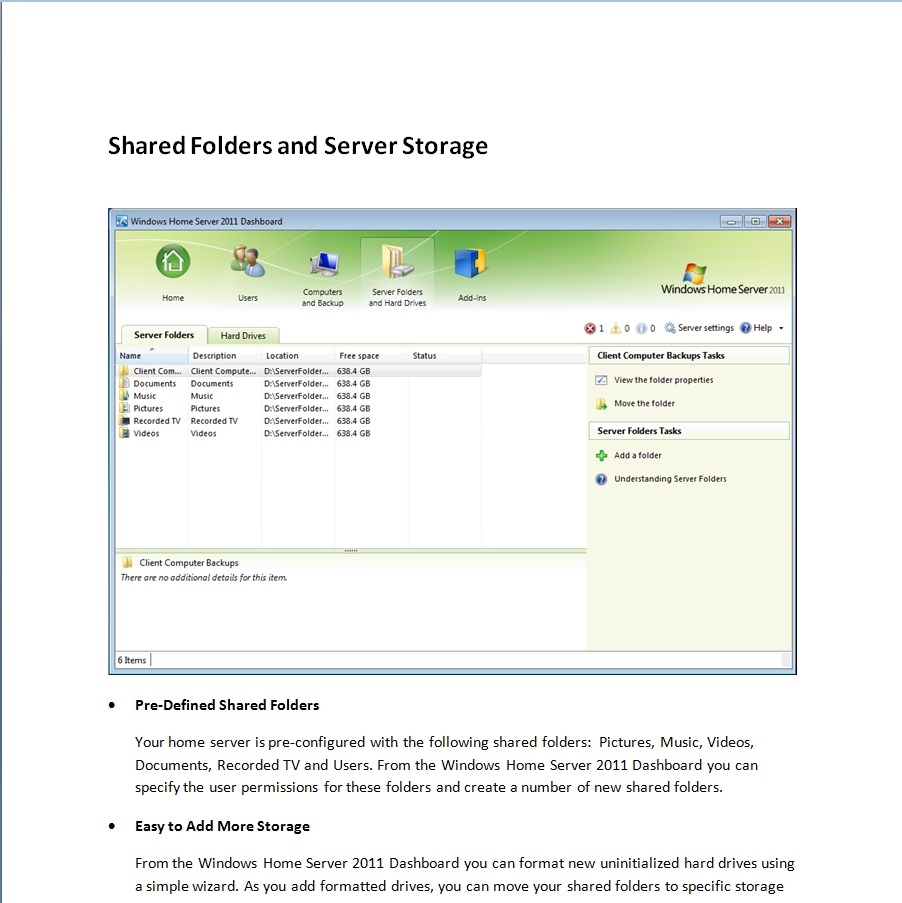
    It’s a pity, therefore, to report that errors that were present in the February version are still there in the June edition. For example, take this page:

    WHS2011 57

    In the Pre-Defined Shared Folders section, it states:

    Your home server is pre-configured with the following shared folders: Pictures, Music, Videos, Documents, Recorded TV and Users. From the Windows Home Server 2011 Dashboard you can specify the user permissions for these folders and create a number of new shared folders.

    Wrong. In WHS 2011, the pre-defined shared folders are: Client Computer Backups, Documents, Music, Pictures, Music, Recorded TV, and Videos (as can be seen in the screenshot immediately above in the Guide). In the original version of WHS, the pre-defined folders were Photos, Music, Videos, Public, and Software. In addition, every user who had an account created on WHS would automatically have a folder created for them; e.g. user Geoff would have a folder  \\server\users\geoff. In WHS 2011, these user folders are no longer created automatically, so there is no “users” folder.

    At the end of the Guide, there is a section on Resources that are available to help you with WHS 2011:

    WHS2011 58

    Unfortunately, the links given for Installation Instructions and General Help are still mistakenly swapped (doesn’t anyone at Microsoft check this stuff?). The link under Installation Instructions takes you to the General Help pages, and the link under the General Help pages takes you to the online Release Notes (which contain the latest Installation Instructions).

    I’ve commented on the poor quality of the General Help pages before (both here on the blog, and in feedback direct to Microsoft); unfortunately, as far as I can see, they are still unchanged and as bad as ever. The WHS 2011 Product Pages were supposed to be cleaned up this week also. As of today, they are still in the same chaotic state that they’ve had for a few weeks now.

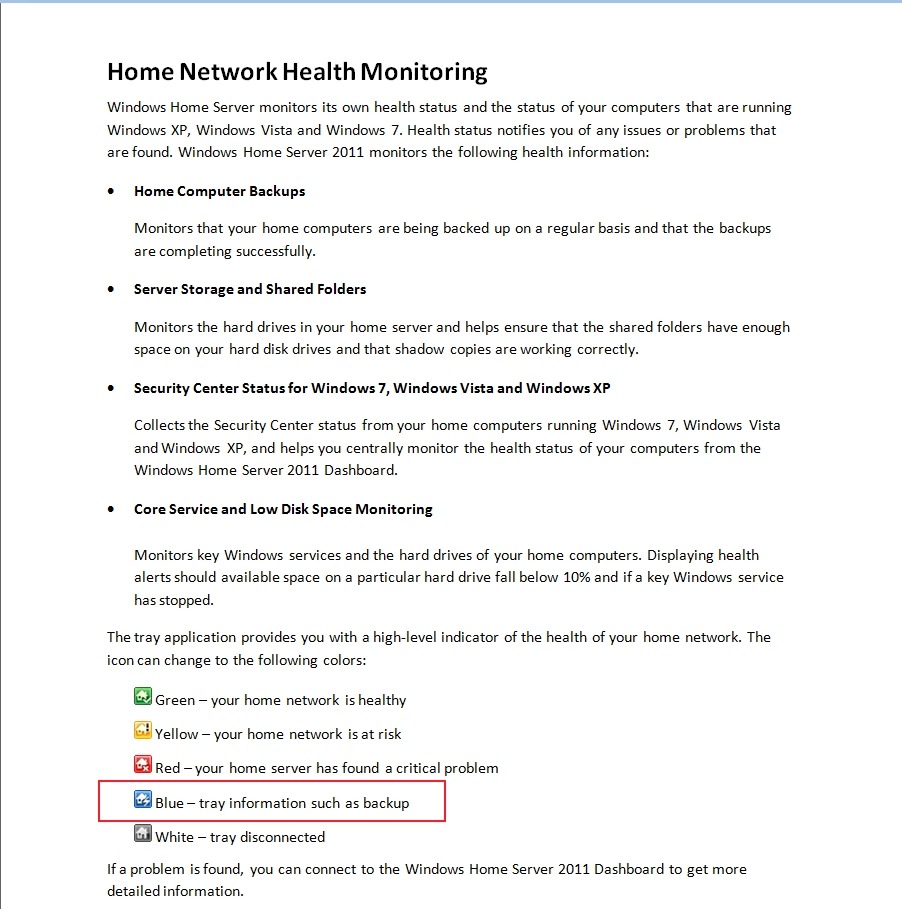
    Addendum 5th July 2011: I was browsing through the excellent We Got Served forums today, and noticed that someone had reported that the WHS 2011 notification icon in the Windows System Tray wasn’t turning blue when a backup of the PC was in progress. This was always the case in WHS v1, so I was surprised to read that it wasn’t apparently working in WHS 2011. It’s even mentioned in the Getting Started documentation:

    WHS2011 62 

    Intrigued, I looked at the System Tray icon on a couple of my PCs whilst they were having a backup taken, and sure enough, it wasn’t turning blue. I then discovered that this bug had been reported to Microsoft on the Microsoft Connect web site (note, if you haven’t got an account there, you won’t be able to follow that link, I’m afraid). Astonishingly, Microsoft have replied:

    This is a good suggestion, although we decided in the 2011 release that backups should be seamless and not neccessarily [sic] notify the user of when they are in place.

    Ah, yes, the “it’s not a bug, it’s a feature” defence. If they’re going to pull that one, then they should also change the documentation to be in line… And what on earth do they mean by describing this as “seamless”? “Invisible”, more like. The whole point of the icon behaviour in WHS v1 was that you could see at a glance whether a backup was in progress, so that you didn’t shut down your computer while it was underway. I’m already seeing complaints on the forums that people are missing this, and pointing out that it was very easy to use by family members. Now, you have to go into the Launchpad and click the backup button. If there’s no backup underway, the Launchpad will ask you if you want to start one. If there is one underway, the Launchpad will tell you how far it’s got. Family members don’t want this hassle (many don’t even want to see the Launchpad), and neither do I.

    I’m sorry that I always seem to be negative about WHS 2011. I really want it to succeed, but it seems to me that the lack of attention to detail and the resulting slip in quality, not to mention the issues in the shipped software, does not generate a good impression of the product. It could have been so much better.

    3 responses to “Getting Started With Windows Home Server 2011”

    1. Robert Dammers Avatar

      Actually Geoff, it’s probably half-updated. “Documents” is a 2011 share, not present by default in V1. Apart from my own new folders (Calendar, Downloads, GI Laptop Backups :), P80ServiceImages and WebFolders4WHSShare) I have Music, Photos, Public, Recorded TV, Software, Users and Videos. I wonder if it got typed on autopilot and the proof-readers saw what they thought they saw – Grauniad-style.

      1. Geoff Coupe Avatar

        Hah! – you’re right, of course, Robert! Thanks.

    2. […] complained about the poor quality of the support documentation for Windows Home Server before (here, here, and here), but I just keep finding more […]

    Leave a comment

  • Daisy, Daisy, Give Me Your Answer Do…

    No, it’s no good, I must stop reading the stuff that Mark Vernon is prone to write (and, I might add, get paid for!). It’s not good for my spleen.

    This time he’s using some philosophical fenceplay from Raymond Tallis as an excuse to trot out his (Vernon’s) own earnestly desired wish that we are not just wetware, meat machines; that consciousness simply has to be more than just neurons firing.

    While I rather like the work of Tallis as an author and philosopher, it does strike me that he’s got a book to sell (Aping Mankind), so coining terms such as neuromania and Darwinitis may be good for the book sales, rather than having any real basis behind them. I note also that his book has garnered glowing reviews from the likes of Roger Scruton and Mary Midgley – neither of whom I count for much when it comes to the field of science. And on the basis of this article, that goes for Mark Vernon as well.

    Leave a comment

  • Windows Home Server 2011 Product Pages

    Update 13 January 2012: Well, it’s taken Microsoft over six months to do it, but it looks as though they now have a new set of Product Pages. They are very much simplified (perhaps too much so), but at least the howlers of the previous set are no more.

    I’ve been looking through the web pages that Microsoft has put up to market the Windows Home Server 2011 product.

    The web pages were originally set up for the first Windows Home Server product, and have now been updated, not always consistently or completely, to reflect the new, 2011, version.

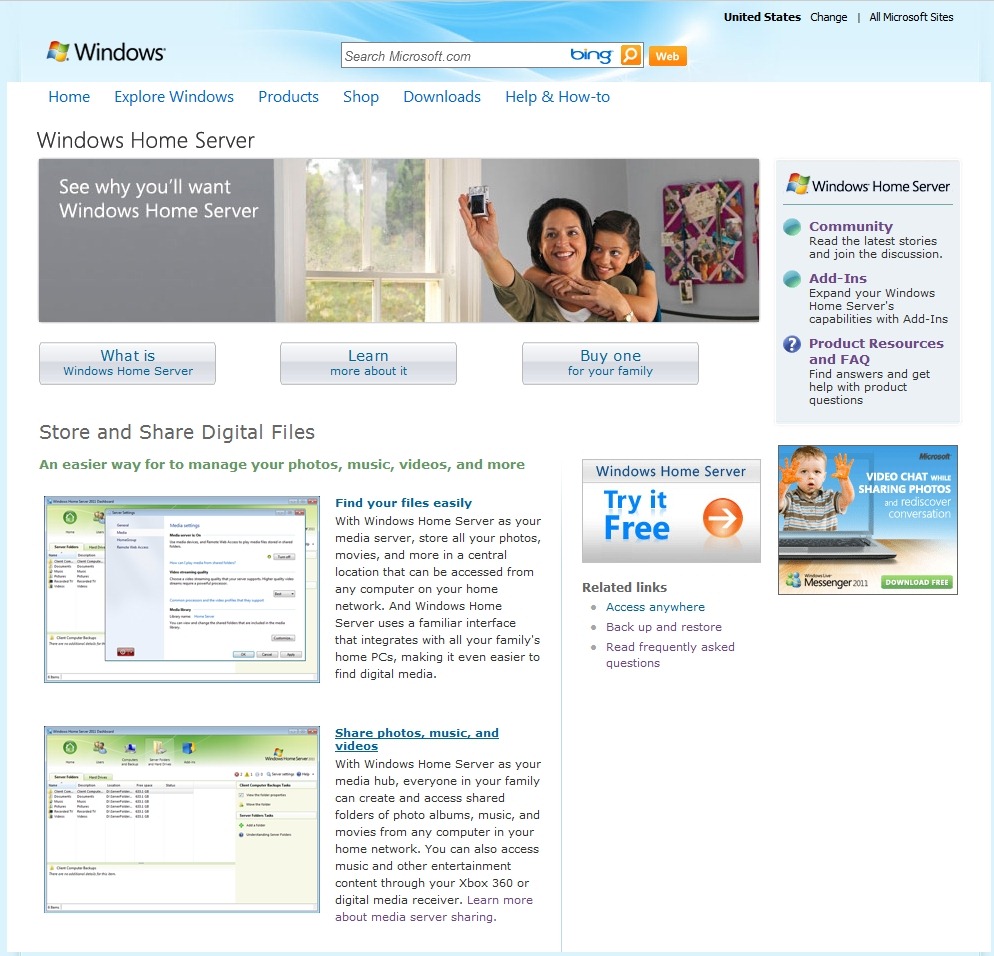
    For example, on this page, the “Find your files easily” and “Share photos, music, and videos” links are currently broken:

    WHS2011 54

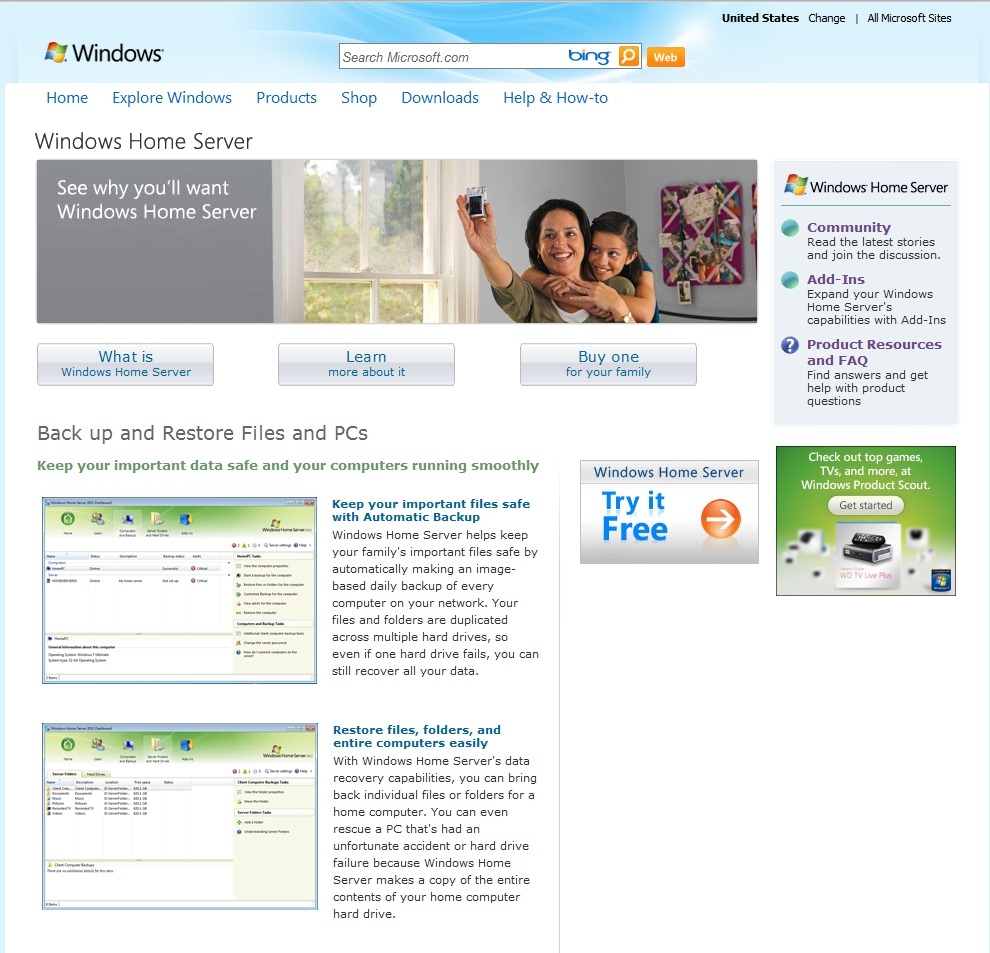
    Other pages also have lots of broken links. This one, for example:

    WHS2011 55

    Update 18 July 2011: Well, it looks as though Microsoft have removed the broken links instead of fixing them. Originally (i.e. on the WHS v1 pages), those links led you to the full-size screenshots of the thumbnails to the left of each link. And the thumbnails themselves had embedded links to do the same thing. Now Microsoft have simply deleted all the links, both in the text and the thumbnails, so there is no way someone reading the product pages can see the full-size screenshots. Instead they have to be satisfied by squinting at the thumbnails. This is supposed to be good marketing?

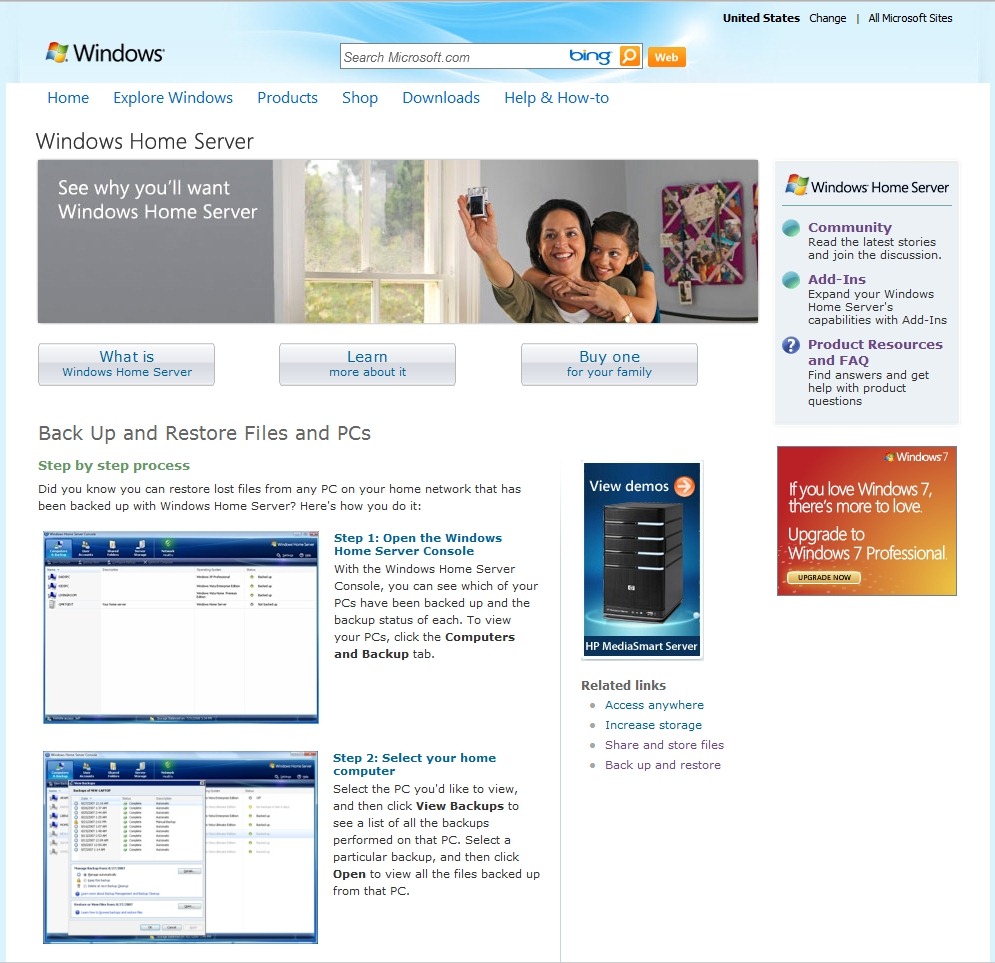
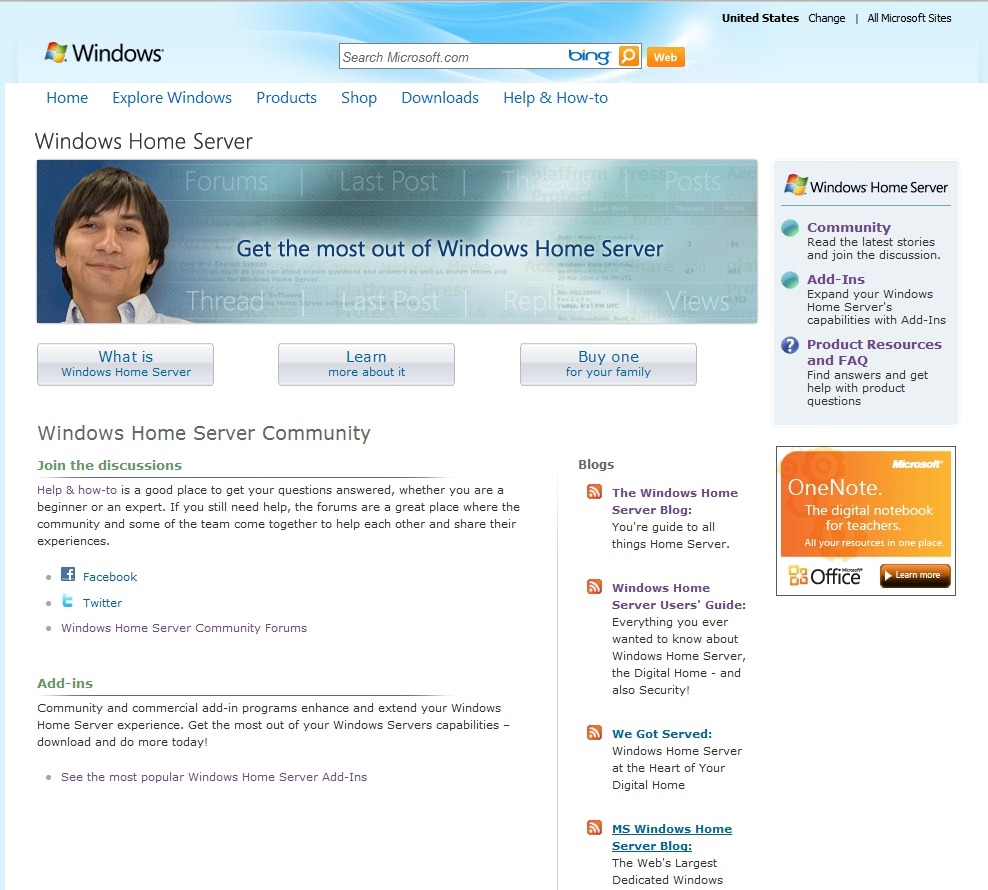
    And then there are pages that still continue to refer to the old version of Windows Home Server. This page, for example, still has screenshots of the WHS version 1, and it refers to the “Console” of WHS v1, instead of the “Dashboard” of WHS 2011:

    WHS2011 56

    And it’s not the only page to do this. There’s plenty of other examples to be found, including pages that refer to the Drive Extender technology, which has been dropped from WHS 2011.

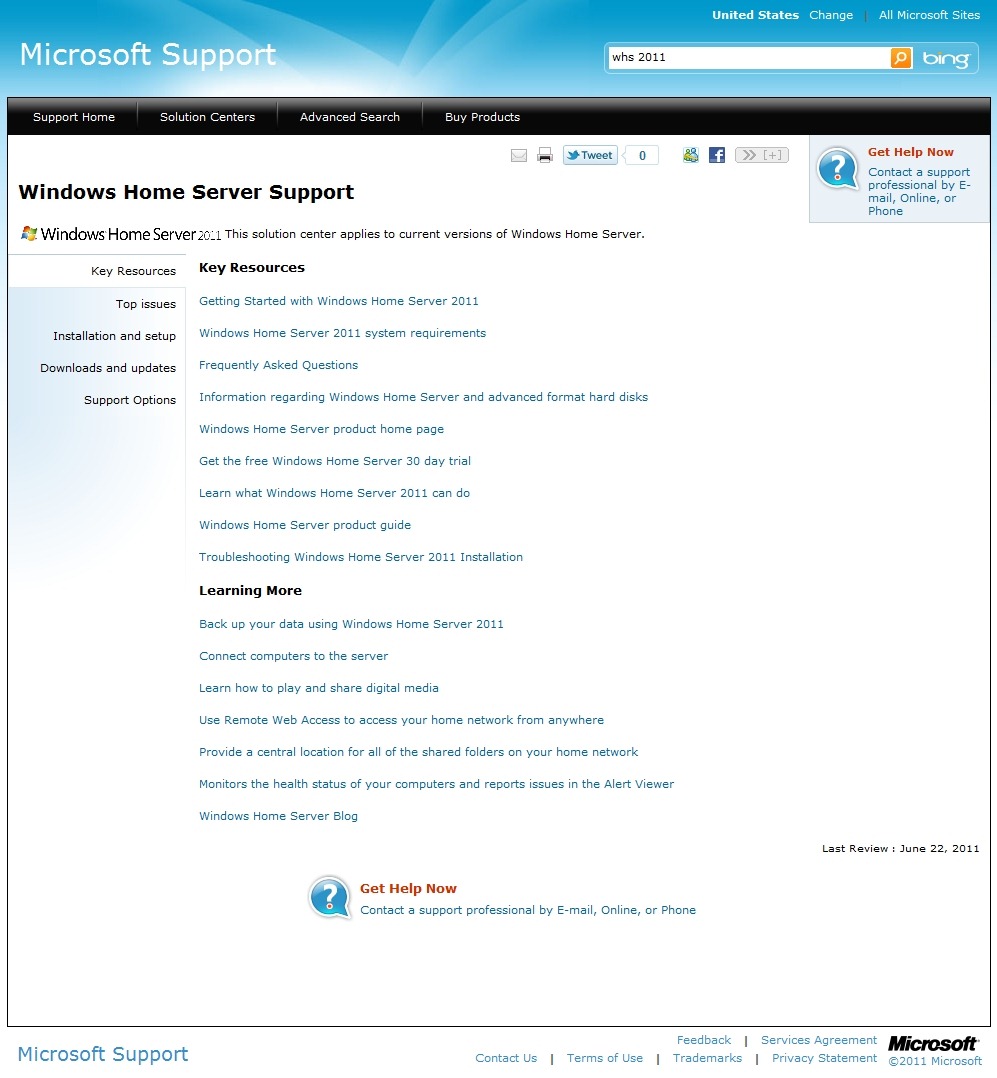
    Microsoft seem to be intent on not only confusing the home user, but also their developer community. On the Windows Home Server Support page, the link given under the Developer resources section leads not to the Windows Home Server MSDN site as it claims, but to a now-obsolete toolkit (it was designed for WHS v1 and will not work on WHS 2011) to install diagnostic software on WHS v1. Diagnostic software, note, not information about how to build software for WHS 2011, which is what developers need to get started with. The link should really go to the SDK (Software Development Toolkit) for WHS 2011.

    Finally, I know that I’m a pedant about grammar, so I let out a groan of despair when I read this page:

    WHS2011 52

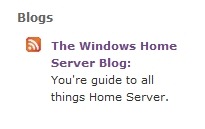
    Take a look at the tagline under the link to the official Blog of the Windows Home Server Team:

    WHS2011 53

    You’re guide…”? Sigh – whatever happened to good education? Or useful and accurate web pages, for that matter?

    2 responses to “Windows Home Server 2011 Product Pages”

    1. […] I’ve commented on the poor quality of the General Help pages before (both here on the blog, and in feedback direct to Microsoft); unfortunately, as far as I can see, they are still unchanged and as bad as ever. The WHS 2011 Product Pages were supposed to be cleaned up this week also. As of today, they are still in the same chaotic state that they’ve had for a few weeks now. […]

    2. […] about the poor quality of the support documentation for Windows Home Server before (here, here, and here), but I just keep finding more […]

    Leave a comment

  • The Lace Anniversary

    Last Sunday, the 12th June, we celebrated our 13th (Lace) Wedding Anniversary. Our combined ages are now 120 years, we’ve been together for (almost) 30 years, and this is our fifth year of living in our farmhouse, De Witte Wand.

    All the above seemed like a good excuse for a party, so on Sunday over thirty friends (old and new) joined us for lunch in the garden.

    Our new friends are from the neighbourhood, and they followed the local tradition of placing two fir trees decorated with paper roses outside the front door.

    20110612-1612-13

    As it was Martin’s birthday very recently, they also brought along an Abraham to mark the occasion.

    20110612-1548-27

    And since we had put up a tent for the party in the garden, they planted a Meiboom (Maypole) next to it. Whenever a new building is erected in this part of the Netherlands, a Meiboom is placed next to it to mark the occasion.

    20110612-1224-26

    20110612-1227-36

    It’s also traditional to make speeches at these events. Fortunately, these were light-hearted, accompanied by joke presents (e.g. we were presented with walking sticks, a box to soak our false teeth overnight in, and two pairs of long-johns), so everyone was thoroughly entertained.

    The weather was kind, and I think a good time was had by all. Martin and I certainly enjoyed it. Our thanks to everyone who helped make it special, and particularly to our new friends from the neighbourhood who have welcomed us so warmly, and who went to great trouble to make this a special day for us.

    Leave a comment

  • iPod Illusions

    Marco Tempest is, on this evidence, a very good magician indeed.


    (hat tip to Richard Wiseman)

    Leave a comment

  • World IPv6 Day

    The very first World IPv6 day was, er, yesterday. There’s a good explanation of what it was all about by Richard Cooper on the BBC’s Internet blog.

    I have to say that it passed very uneventfully for me, the internet continued to work…

    The day before I had set up my new ADSL router/modem, which I got on free loan from my Internet Service Provider, XS4ALL. They’ve always been at the forefront of internet technologies – the company was originally started as a Foundation back in 1993 to offer access to the Internet to private individuals. The only ISP operating in the Netherlands at the time (NLnet) offered its services only to companies. NLnet thought that there was no market in offering access to the Internet to the consumer – what a mistake that turned out to be.

    XS4ALL has been using IPv6 alongside IPv4 since last year; for example, 194.109.6.92 is the IPv4 address and 2001:888:0:18::80 the IPv6 address of www.xs4all.nl. With the advent of the first World IPv6 day, they’ve been actively trying to get their customers to register for an IPv6 address alongside their existing IPv4 address. That’s what I did on Monday, and the new addressing service seems to work OK for me. I now have both an IPv4 address and an IPv6 address at home. And with that new IPv6 address in place, I can also now access web sites that have IPv6 addresses, such as ipv6.bbc.co.uk. Of course, for the foreseeable future, the major web sites will have dual addresses in place, but the transition has now begun. IPv4 addresses are almost used up, and IPv6 addresses are starting to come on stream.

    Leave a comment

  • So, How Was It For You? (part II)

    Last Saturday night saw the mid-season finale (who came up with that particular twist?) of Doctor Who, Series Six: A Good Man Goes To War.

    Actually, because we had visitors, I didn’t get to see it until the repeat on Sunday, and then I watched it straight through, twice, without stopping.

    While it seems to have divided the viewers, I loved it from beginning to end. Yes, there was an awful lot going on, the sounds of multiple kitchen sinks being thrown in, but they all seemed to have a purpose. The anchor is the quality of Steven Moffat’s writing: the plotting, the one-liners, the sly references to things outside the Who Universe. And then add into that actors who can deliver the lines with believability and panache, and I was on the edge of my seat with a huge grin, and/or tears, on my face.

    I particularly savoured the “Lady Penelope” exchange between the Victorian Silurian, and lesbian, Madame Vastra and her hansom-cab driver:

    “Thank you Parker, I won’t be needing you again tonight.”

    “Yis Me Lady.”

    There was Moffat’s playing to the gallery humour of “by special dispensation of the Papal Mainframe, Herself” from Colonel Manton of the Clerics, and then there was the look on Rory’s face as he attempts to offer some comfort to the dying Commander Strax, the Sontaran warrior, and Strax spits back the fact that instead of dying as a warrior, he dies forced to be a nurse as penance for his crimes. Rory is, of course, a nurse.

    There’s lots more in there. The episode repays multiple viewings and I look forward to doing just that. And the final joke by Moffat is the next episode to follow this one in the Autumn. He seems to have deliberately invoked Godwin’s Law. The episode’s title? Let’s Kill Hitler.

    2 responses to “So, How Was It For You? (part II)”

    1. dr. who (duncan) Avatar
      dr. who (duncan)

      please will you email me about shelock holmes tv series i need to no about season 2.
      if there is more than just 3 episodes and other things.

      1. Geoff Coupe Avatar

        Duncan, I suggest you consult wikipedia for this information. It knows more than I do. See:
        http://en.wikipedia.org/wiki/Sherlock_(TV_series)

    Leave a comment

  • Slideshow Quality in Windows Live Photo Gallery 2011

    Almost a year ago, in July 2010, I blogged about something that I had noticed in the beta of Windows Live Photo Gallery 2011: the quality of the slideshows it displayed was noticeably poorer than in the previous version.

    It turned out that WLPG 2011 uses Windows Live Movie Maker to display slideshows, and this was what was causing the poorer quality. This was unchanged in the final release of WLPG 2011. Because of this poor quality, when I wanted to display a slideshow on my PC, I used the slideshow function in Windows Explorer. It doesn’t have any fancy transitions, but it displayed the images at a far higher quality than WLPG/WLMM 2011.

    And there the matter has stood, until now. Yesterday, I received an email from someone with the nickname tuxplorer, describing a simple change in the Windows Registry that will stop WLPG 2011 from using WLMM to display slideshows, and use its own built-in slideshow capability (that has been left in there from the previous version!).

    All you have to do is use Regedit to go in the registry to HKCU\Software\Microsoft\Windows Live\Photo Gallery and change the value of the “AutoMoviePlayerSlideshow” value to 0.

    That stops WLPG 2011 from using Windows Live Movie Maker, and makes it use its own slideshow capability. That slideshow engine has a number of transition effects, but if you choose the “Classic” theme, then you will get the same high-quality slideshows as in Windows Explorer.

    Hat-tip to tuxplorer!

    10 responses to “Slideshow Quality in Windows Live Photo Gallery 2011”

    1. madscientist Avatar

      OH thank god for that! This has been a problem since the very beginning of Windows Live Photo Gallery where it resamples pictures, even if the WinSAT score / system score is good enough.
      Very strange.

    2. madscientist Avatar

      *Though they STILL haven’t sorted out colour management with this program! Sure, the photos viewed normally are colour managed, but as soon as you open them in the slideshow, boom, profiles get thrown out the window and you end up with over-saturated hideousness (depending on monitor, naturally).

      1. Geoff Coupe Avatar

        That’s a good point. I don’t know of a fix for this, or even if it’s possible to correct it. My suspicion is that it’s not. Despite all the noises from the WLPG team that they want to do right by photographers, the evidence is that they mean people who use their smartphones to take snaps at drunken parties.

        1. madscientist Avatar

          Yes exactly! I guess they do expect semi-pro and above to be using pro-tools, but to be honest I still prefer the organisation of WLPG and the things it offers like face tagging, plus just for viewing slideshows etc I don’t want to bother loading up anything else, but looks like I will have to! Sucks to want to achieve more!

          1. Geoff Coupe Avatar

            There was a time – back in 2008 – when Microsoft were actively courting the pro photographer market. They had a whole series of web pages with articles aimed at the pro and enthusiastic amateur photographer. And while they were pushing their Expression 2 product (since dropped), they also covered their consumer tools. Alas, these pages have all been pulled.

    3. John Avatar
      John

      Thanks for this. There’s one issue that still annoys me – you can’t display the captions that many of us have laboriously entered against our photos. I have resorted to using my old copy of MS’s Digital Image Suite 2006, which also lets me use a mouse scroll-wheel to zoom, and forwards and backwards buttons on the mouse work too.

      1. Geoff Coupe Avatar

        Yes, the ability to turn on the captions for display in the slideshow would be a very useful feature…

    4. Petrovu Avatar
      Petrovu

      Thank you, Geoff, for the great tip.
      Do you happen to know, is it possible to drop still photos AND short videos into the same slideshow? Before or after the registry change? This is something that Vista Slideshow was able to do and I can’t find it anywhere in Windows 7 or various free Windows programs.

      1. Geoff Coupe Avatar

        Hi Petrovu, I honestly don’t know whether it’s possible to do that. I’ve never had occasion to try… Sorry.

    5. Gary Lippe Avatar

      When I changed the value of AutoMoviePlayerSlideshow” to 0, the player skipped all movies. I am on W7 home premium win live photo gallery build 15.4.3538.513. Currently Quick time movies plays in a herky jerky manner. Any ideas?

    Leave a comment

  • Windows 8

    Microsoft have given the first public demo of the user interface that will be included in the next version of Windows, currently known as Windows 8.

    At the D9 conference yesterday, Windows and Windows Live President Steven Sinofsky brought Corporate Vice President of Windows Program Management, Julie Larson-Green with him to show a demo to the audience. She has also written about the design of the interface in this article.

    Microsoft have also posted the first of what promises to be a series of videos to YouTube. This one gives a good impression of the new user interface.

    It’s clear that it is designed around touch and gesture, and shares a lot in common with the Metro interface of Windows Phone 7. Thankfully, for old fogies like me, the traditional Windows 7 interface will still be available. While I think that the new touch interface will be wonderful on tablets, slates and other handheld devices, I’ve never been convinced about its efficacy on touchscreen PCs. Reaching out to the screen in front of me all day will have a tendency to give me gorilla arm, I’m sure.

    And while the interface can be driven by a mouse, I have the feeling that a mouse is not the best device for this sort of interface. For example, you can use a mouse in a paint application, but the experience has been likened to “painting with a rock”. A digitiser with either a touch interface or pen is much more suited to these applications. I suspect that we’ll see a resurgence of digitiser pads if Windows 8 takes off.

    I look forward to trying it out on my old HP TX2000 Tablet PC – Windows 8 and an SSD replacement for the hard drive should give it a whole new lease of life…

    Leave a comment

  • All Watched Over By Machines Of Loving Grace – II

    I mentioned how much I was looking forward to the new series of documentaries by Adam Curtis: All Watched Over By Machines Of Loving Grace.

    Actually, the first episode was last week, and it was every bit as good as I had hoped for. I never realised, until Curtis made it clear, that there was a close, if not intimate, connection between Alan Greenspan and the ethical egoist-cum-sociopath Ayn Rand. Pause for shudder

    Tonight’s episode will look at how our view of Nature, as interconnected ecosystems, echoes our view of machines. Should be good. And next week, Curtis will look at our view of the human being as machine, and tell the riveting, and almost outlandish, story of George Price, who was one of the first to come up with the idea of the Selfish Gene.

    Adam Curtis has also been on Little Atoms, talking about the series and the ideas behind it (the second link on this page). Well worth a listen.

    The underpinning theme of All Watched Over… is that of Cybernetics, with which I was fascinated when younger. I wonder whether Curtis will mention William Grey Walter and his cybernetic tortoises? I built one of those when I was a teenager, but really, one was not enough, you really needed several to be able to study the emergent behaviour…

    At the very least, I hope that Curtis gives a shout-out to Anthony Stafford Beer, who was invited by Salvador Allende to implement Cybersyn to manage the planned economy of Chile. Unfortunately, like so much else, the experiment was swept away in the military coup of 1973, which was, surprise, surprise, endorsed by the US.

    3 responses to “All Watched Over By Machines Of Loving Grace – II”

    1. jonpatterns Avatar
      jonpatterns

      Adam mentions Chile, but not Stafford?

      1. Geoff Coupe Avatar

        Yes, I was a little bit disappointed in that, as well. Perhaps it didn’t fit his thesis.

    2. jonpatterns Avatar
      jonpatterns

      He seems down on any sort of system analysis. But I think it can be useful, necessary to reduce complexity – but it is important to remember that it is just analysis.

    Leave a comment

  • The Media Library in Windows Home Server 2011

    As promised yesterday, here’s the follow-up post describing my experience (thus far) with the Media Library in Windows Home Server 2011.

    On installation, Windows Home Server 2011 will create a number of Folders by default for music, pictures, documents, recorded TV, and videos. These can be accessed either via Windows networking, or via the web using the Remote Web Access facilities of WHS 2011.

    On my home network, I’m using Windows networking for access by my Home Theatre PC (HTPC) and other computers to the digital media files held on my WHS 2011 system. This seems to be working as expected. I can play my music, or watch DVDs and Blu-rays streamed from the server to my PCs without issue.

    I did, however, find a couple of wrinkles when trying to access the same digital media files via the Remote Web Access facility of WHS 2011.

    Wrinkle 1

    When I first set up my WHS 2011 system, I had installed my music library on drive D:. And, I could access my music in the Music library displayed via the Remote Web Access. However, after a few days, I thought that I should move my picture and video libraries to different drives. I used the “Move the folder” Wizard in the Dashboard to accomplish these tasks.

    I then found that instead of being able to see in excess of 45,000 pictures in the Media Library, I was presented with the grand total of one picture:

    WHS2011 24a

    I also saw that I had a total of 54 videos, but when I tried to play any of them, the web-based player would start, but then fail with an error message complaining that the file-type may not be supported.

    Using Remote Web Access to browse the shared folders would show all the pictures, and would play the videos without problems.

    I thought at first that it was simply a case of the index service needing time to register the new locations of my picture and video files, so I waited, and I waited… I waited a couple of days, and nothing changed.

    At this point, I decided to reboot my server, and lo and behold, the picture and video files were found:

    WHS2011 37

    You will notice that there are now 45,058 pictures and 92 videos found, and that the thumbnails show a real photo and video thumbnail.

    So I infer from this that using the “move folders” wizard is not sufficient to keep the WHS 2011 system running smoothly – it is also necessary to reboot the server in order for the indexing service to discover the new location of files. This, despite the fact that accessing the files via Windows networking appears to be able to account for the changes.

    For the case of web access, the server’s left hand does not know what the right hand has done…

    Wrinkle 2

    I noticed, from the forums, that some people were complaining that their Album Art (CD covers) in their Music Library was showing up in their Pictures Library. Clearly, this is wrong, and should not be happening.

    Then I realised that when the Pictures Library of WHS 2011 was showing just one picture, it was in fact a CD cover stored in my Music Library. Well, (a ) this should not be displayed in my Picture Library, but (b ) why was it just one? After all, my Music Library has 990 albums:

    WHS2011 39

    – why was it just displaying one album cover, and not 990 in the Picture Library?

    It turns out that WHS 2011 will ignore certain filenames when it is searching for items for inclusion in the Picture Library.

    WHS 2011 will ignore filenames in the Music Library folders when they have the form:

    • AlbumArt_{alphanumeric}_Large,
    • AlbumArt_{alphanumeric}_Small, AlbumArtSmall, and
    • Folder.jpg files

    However, if you have Album Art files that do not follow this convention, then WHS 2011 will count them in as part of the Picture Library.

    And that’s what was happening. I had an Album Art cover file with this name:

    Cover- Wiener Philharmoniker _Orchestra_- Strauss, R. Eine Alpensinfonie; Rosenkavalier-Suite.jpg

    Cover- Wiener Philharmoniker _Orchestra_- Strauss, R. Eine Alpensinfonie; Rosenkavalier-Suite

    and so WHS 2011 included it into the Picture Library…

    Sometimes I feel as though I’m an archaeologist, trying to second-guess what has been left by extinct civilisations…

    Update: I have discovered more issues with the Media Library. See this post.

    10 responses to “The Media Library in Windows Home Server 2011”

    1. […] The Media Library in Remote Web Access has issues (I’ll address this in a follow-up post). […]

    2. […] Windows Home Server 2011–Revisited Posted on June 4, 2011 by Geoff Coupe A week ago, I blogged about my first impressions of using the Media Library in Windows Home Server 2011. My experience wasn’t entirely positive, […]

    3. Matt Avatar
      Matt

      Finding similar problems but they extend, seems my videos are in the pictures (all of them), my pictures are not in any of them, my movies are in my videos and meh its a mess….
      Hope they bring out a fix or something for it

    4. Matt Avatar
      Matt

      Also note: I did not come from WHS v1, so my files arn’t perfectly layed out in MS format, if thats what MS needs I hope there is a way to batch convert (to correct file type and file structure) a whole tonne of files some how?

    5. Derek Avatar
      Derek

      I’ve had this problem too, and it’s ridiculous that the web interface won’t just look at the “Pictures” folder for pictures. I’ve got “backdrop.jpg” “logo.jpg” “banner.jpg” for all my movies which also now appear as photos in the “Pictures” library.

    6. dszigeti Avatar

      Geoff … Great article thanks. I am coming from WHS V1 – actually I am running both V1 and 2011 in parallel until I can be sure that I can migrate successfully).

      I found the same problems that you mentioned with WHS 2011 – it is unfortunate that these bugs exist in what could be a good system. As someone famous … and you said … “definitely a Curate’s egg …”

      I am also coming to the same conclusion that you are. WHS 2011 generally works but it is not home user friendly … and we seem to be heading toward needing an IT guy to maintain the system. I don’t dislike WHS 2011 (except for the bugs) but I did expect it to build on WHS V1 and refine the “experience.” I am not seeing an improved experience at this time.

    7. Dan Avatar
      Dan

      Hi Geoff, great blog. I’ve have just started using WHS 2011 this week and have found when I’m streaming media to my Win 7 Media Center from the server that Recorded TV does not appear in the shared tab in win 7 media center. It appears to stream fine to media player on the same pc just not to media center shared tab in the recorded tv menu. Just wondering if your experience was the same?
      Cheers,
      Dan

      1. Geoff Coupe Avatar

        Dan, as far as I know, the “recorded TV” folder is used for archived TV recordings that are made on your Media Center PC, and then automatically transferred across to the WHS 2011 system. On the Media Center PC, there should be a Home Server tab, with “archived TV” under it.

        I don’t use my Media Center PC for making TV recordings, so I’ve never been able to test this out.

        1. Aussie_Z Avatar

          Hi Geoff et al … I concur with your assessment … I don’t understand why WMC doesn’t allow us to just connect to a shared WHS 2011 folder(s) to select and play video. I don’t understand how the “automatic” archiving works … my thoughts are that, as usual, Microsoft has made this too difficult, when a simple solution would have been fine. I am not happy with the implementation … If I am wrong, I would be happy to hear the solution.

          1. Geoff Coupe Avatar

            Hi Aussie, er, WMC does allow you to connect to a shared WHS 2011 folder(s) to select and play video… At least, it does on my systems. I’m not using any “special” codec packs, just the ones supplied with Microsoft. That allows me to play the videos that I have in the video library held on my WHS 2011. That library is separate from the “Recorded TV” folder, which, as I say, I don’t use.

    Leave a comment

  • The Psychopath Test

    I see that Jon Ronson has got a new book out: The Psychopath Test. I like Jon Ronson’s writing, so I think I should add his new book to my wishlist. There’s also a very positive review of the book in today’s Guardian, by Will Self. Check it out.

    One response to “The Psychopath Test”

    1. […] weeks back I mentioned that I should put Jon Ronson’s new book: The Psychopath Test on my list of books to read. I did, […]

    Leave a comment

  • My WHS 2011 Experience (Thus Far)

    I think it’s safe to say that the development of Microsoft’s Windows Home Server 2011 (version two of the original Windows Home Server product) has not exactly been plain sailing. Fairly late on in the development cycle, Microsoft took the decision to pull the Drive Extender technology (the unique selling point of WHS v1) from the v2 product. The decision was greeted with howls of protest from WHS customers (including me), but Microsoft soldiered on and released WHS 2011 in April.

    Now, I know that I had said that I would be sticking with WHS V1 as long as possible, but those who really know me are aware that I am often unable to resist poking new technology to see how well it works. And so, I’ve messed about with the beta versions of WHS 2011 (and found some bad limitations, as well as the occasional plus point).

    I’ve been using version 1 of Windows Home Server since it was released in November 2007 (and I was kicking the tyres of the betas before that). So we have a long history together (in computer terms). And WHS v1 has served me well. There was the saga of the file corruption bug, but once identified, I was able to work around it until it was fixed by Microsoft in November 2008. Since then, I’ve been using WHS v1 very happily indeed. It has just worked, and has saved my bacon on a couple of occasions.

    Why, you might then ask, have I yielded to temptation and invested in an OEM disc of Windows Home Server 2011?

    Well, the major omission in WHS v1, from my perspective, was that it was not possible to backup the server itself. I wanted to be able to take server backups for off-site storage. Yes, it was possible to take copies of the Shared Folders of the server onto external discs for storage off-site (which I did); but it was not possible, using the facilities of WHS v1, to take a backup of the server operating system and copies of the client PC backups onto external storage. With WHS 2011 comes the additional feature of being able to make backups of all of the server itself for off-site storage.

    Thus, while WHS 2011 has lost the Drive Extender feature, it has seemingly gained the ability to make complete backups of the server. On balance, and given my hankering for new technology, I thought that I would invest in WHS 2011 and see how it would go.

    So, how has it gone?

    To be honest, it’s been a bit of a curate’s egg – it has good parts and bad parts.

    The Good Parts

    • Practically painless installation of the software (WHS v1 needed coddling to understand modern hardware) – but note the comment under the Questionable Parts heading.
    • Backup of the server is now possible.
    • Improvements for Remote Web Access.

    The Bad Parts

    • Removal of drive pooling because the Drive Extender technology is gone.
    • Server backup has a limit of 2TB. Note: See the Addendum at the bottom of this post.

    The Questionable Parts

    • Server installation defaults to a Workgroup called “Workgroup”. If yours is named something else (as mine was), you need to be aware of a workaround. I used it and it worked for me.
    • Server backups to more than one external drive don’t seem to be working properly.
    • The Media Library in Remote Web Access has issues (I’ll address this in a follow-up post).

    The Details

    I divide the data held on my Windows Home Server into two classes: critical and non-critical.

    • Critical data is that which I view as unique and irreplaceable. For example, the 44,000 (and counting) photos that I have taken over the course of my 62 year life. Then there are the 10,000+ emails generated over my 20 years online that I wish to preserve, at least for me, if not for posterity. And not forgetting documents that I have written, which are important to me, if not to anyone else.
    • In the class of non-critical fall the digital copies of my music and film collection. The originals are the CDs, DVDs and Blu-rays that I own. If the digital copies are lost, I can at least regenerate them from the original media.

    It turns out that this classification into two types of data is important because one of the bad (not to say ugly) parts of WHS 2011 is the fact that a server backup cannot exceed 2TB maximum.

    Because of this limitation, I am forced to adopt the strategy of saying that critical data is handled by the WHS 2011 server backup facility, while non-critical data is handled by an alternative facility – in my case I have chosen for SyncToy. It would have been wonderful to let all of my data be handled by the WHS 2011 server backup facility, but since I have more than 2TB of data, this just isn’t possible by the design that Microsoft have given us.

    Let’s just pause a moment and let this sink in. Because of the fact that the WHS 2011 server backup facility has a hard limit of 2TB, I have to use a mixture of backup methods in order to ensure that all my data is backed up. This means:

    • We are no longer in home user territory. We are in the world of needing to know IT.
    • I can use the WHS 2011 Server backup facility for critical data, but…
    • I must use the Remote Desktop Connection application to connect to the WHS 2011 server and run SyncToy to backup my non-critical data.

    As Dorothy said: Toto, I don’t think we’re in Kansa anymore.

    In an ideal world, I would have the following scenario:

    • My data is in two classes: critical and non-critical.
    • For critical data, I want to rotate external drives between the WHS 2011 server and off-site storage on a daily basis.
    • For non-critical data, I want to rotate external drives between the WHS 2011 server and off-site storage on a weekly or monthly basis.
    • Both of these tasks should be doable via the WHS 2011 server backup facility – and via a single mouse-click once set up.

    Currently, this can’t be done. I need to have fudges and workarounds that require IT knowledge. In other words, I think that WHS 2011 fails to meet the needs of the home user.

    But the story doesn’t end there. According to the online help for Windows Home Server 2011, it is possible to rotate external backup drives: “You can use multiple external storage drives for backups, and you can rotate the drives between onsite and offsite storage locations. This can improve your disaster preparedness planning by helping you recover your data if physical damage occurs to the hardware onsite”.

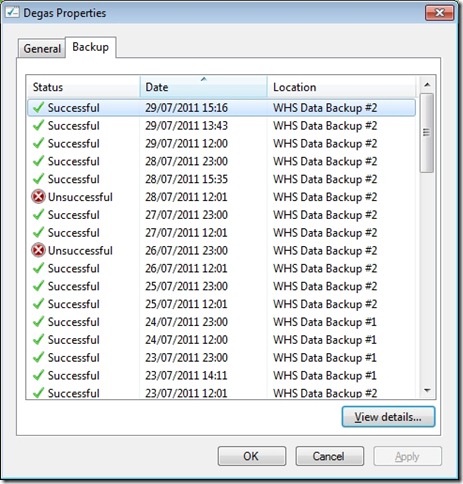
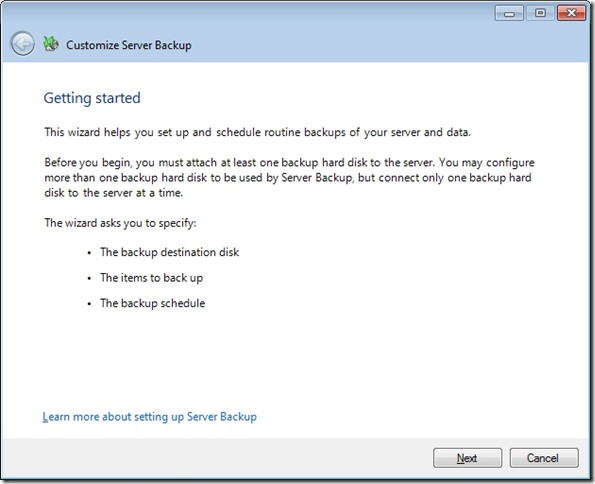
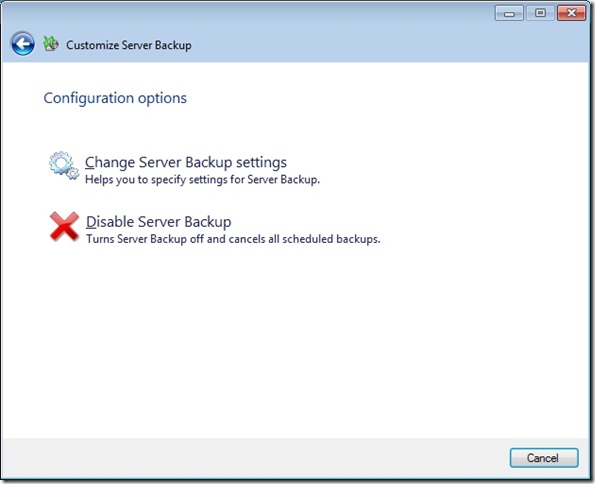
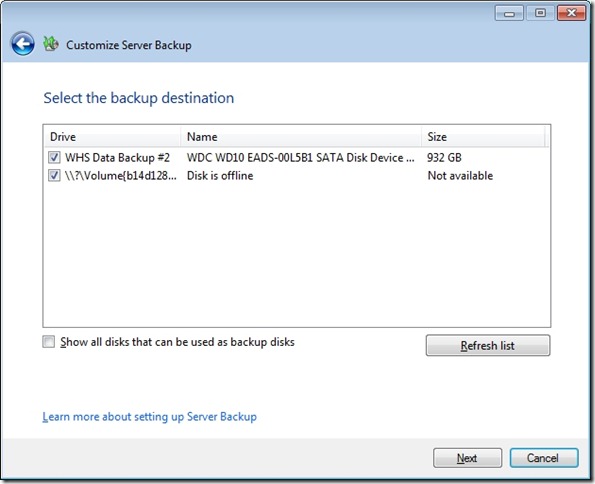
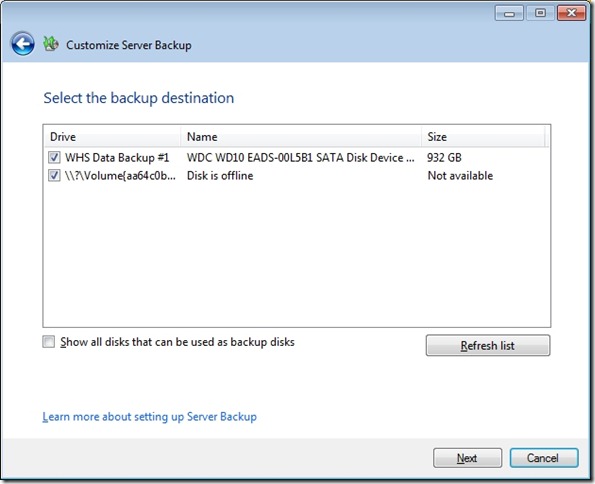
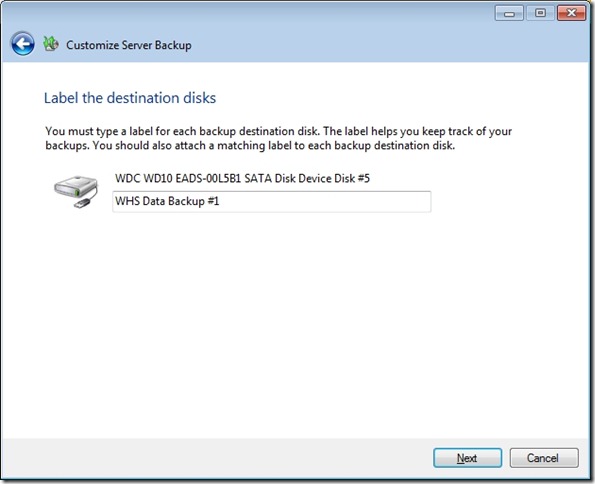
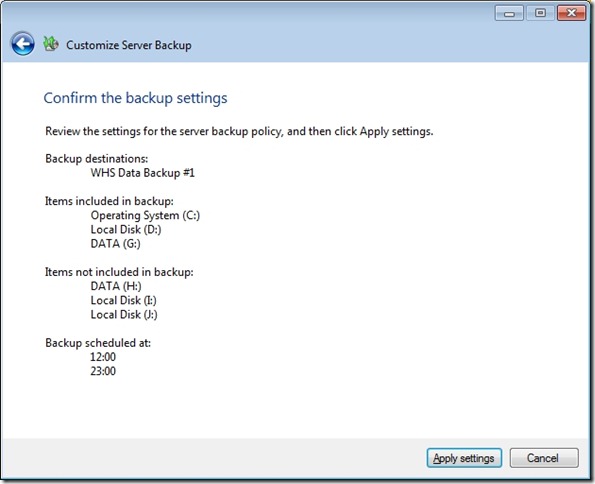
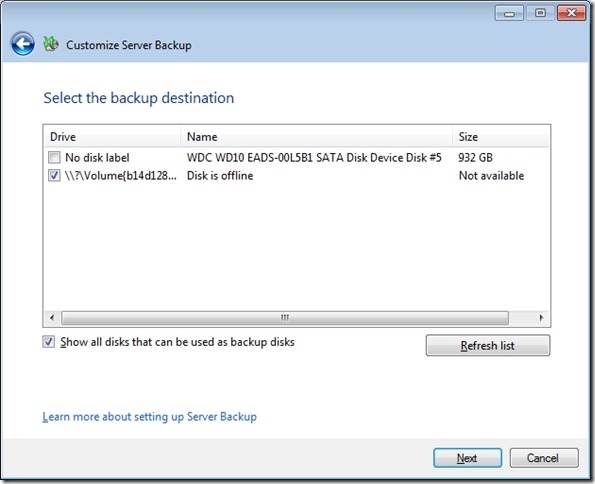
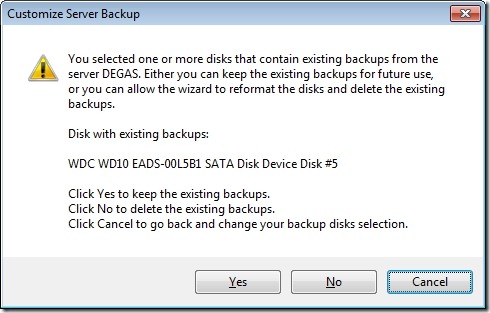
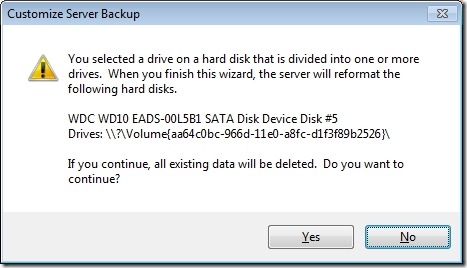
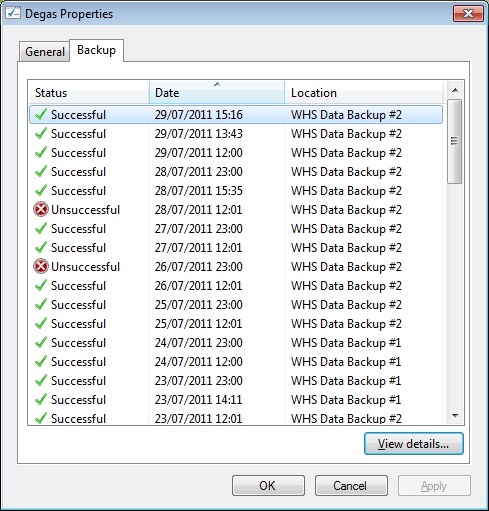
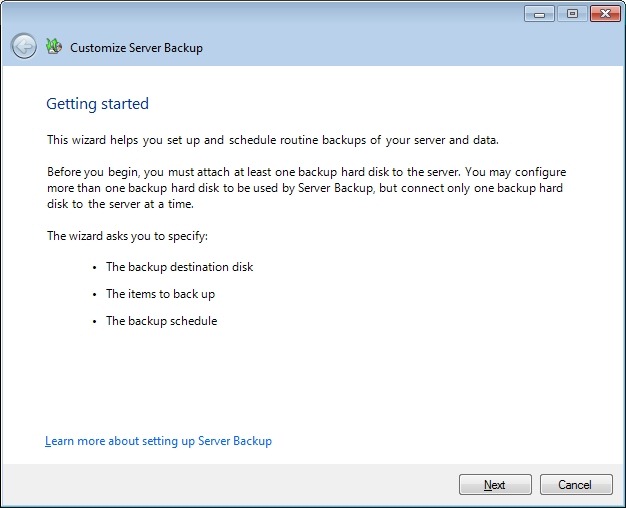
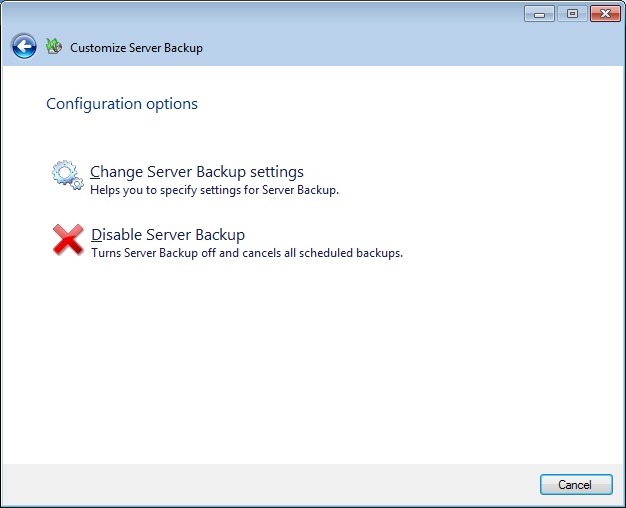
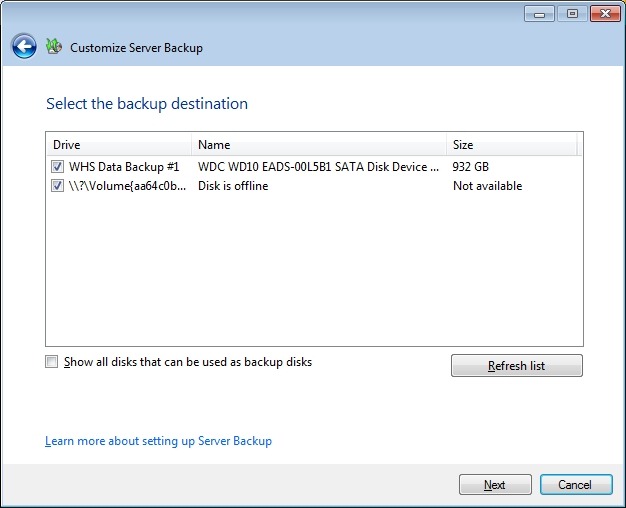
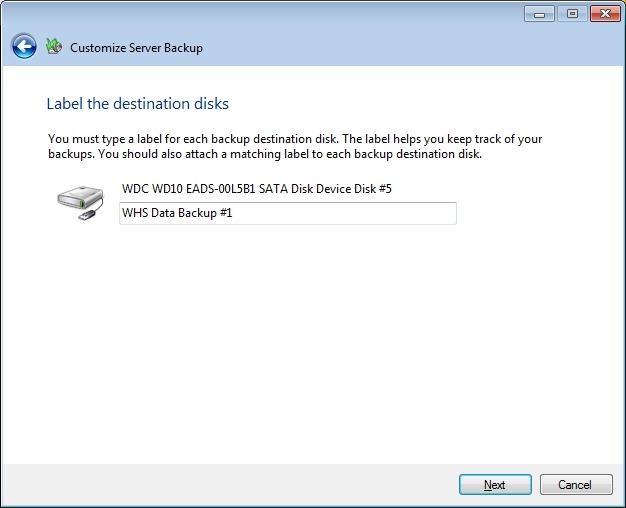
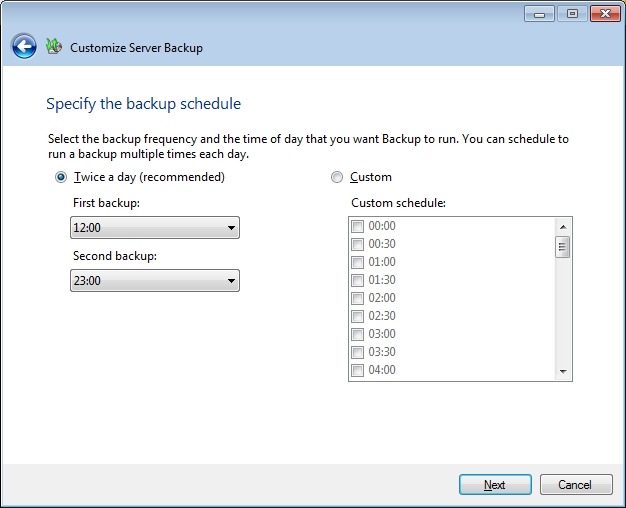
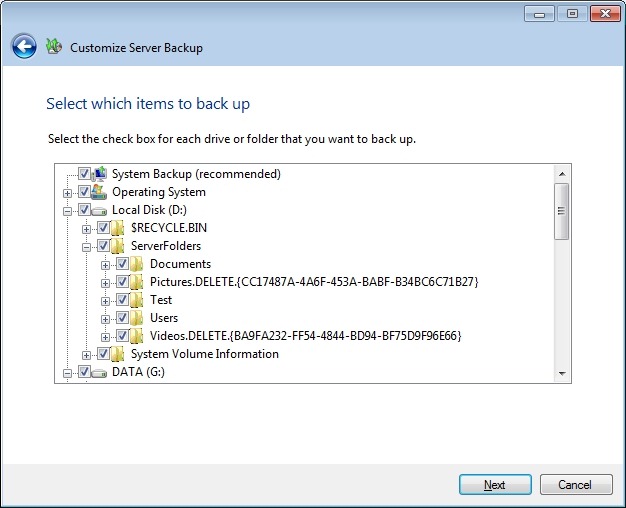
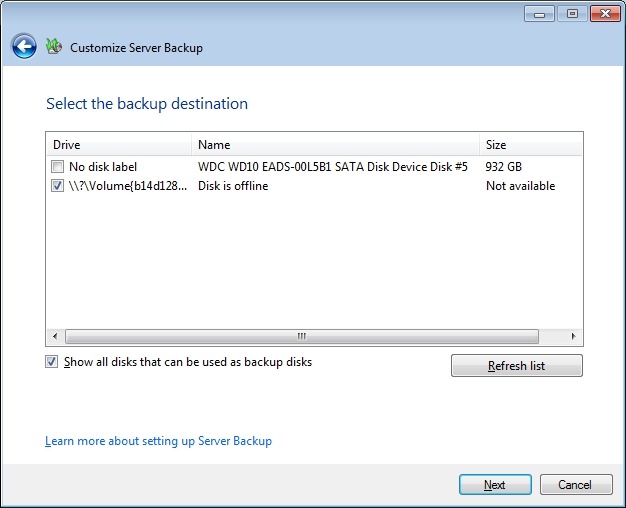
    So I tried to do this. At the moment, I have about 500 GB critical data that I want to store using the Server Backup facility in the Dashboard, and I have two drives; one of 1TB capacity (Drive #1) and one of 750GB capacity (Drive #2). I set these up in the WHS 2011 Server Backup Wizard.

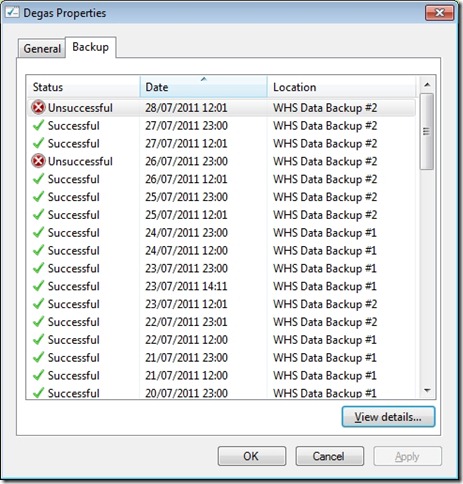
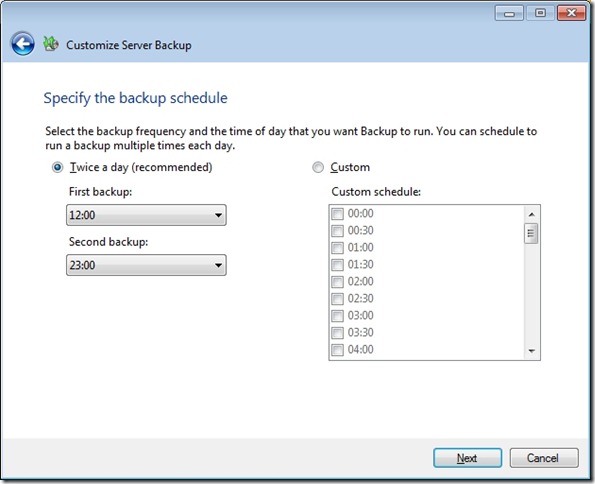
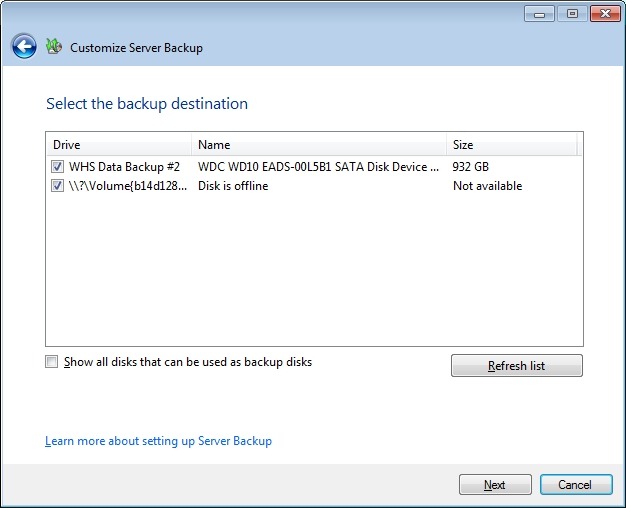
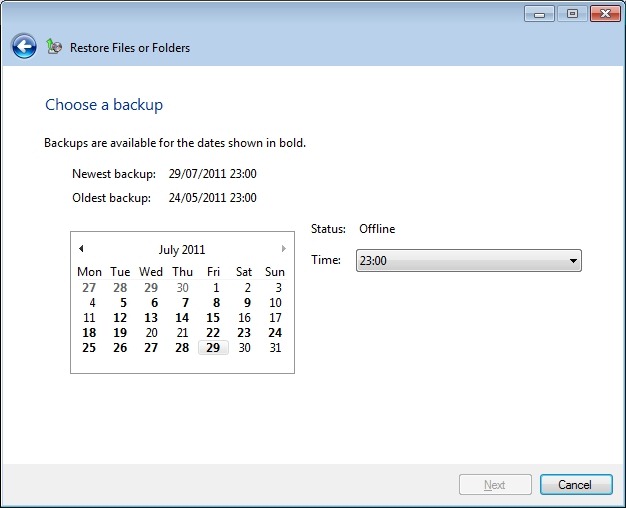
    Day 1 went fine, two successful backups (the default setting) were made to Drive #1. On day 2, I removed Drive #1 and added Drive #2. The “Customize Server Backup” Wizard showed that Drive #2 was attached and Drive # 1 was offline.

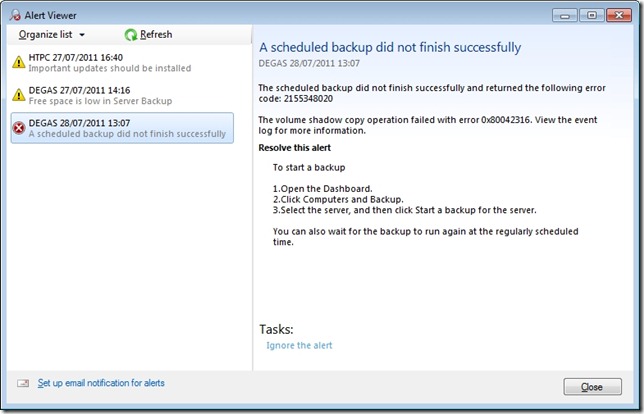
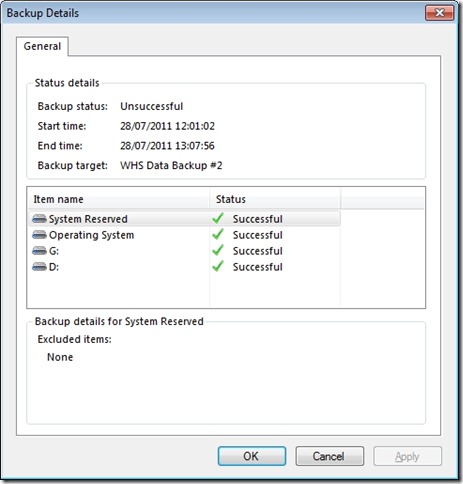
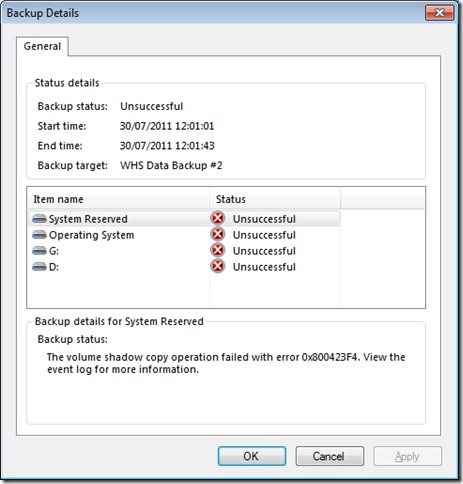
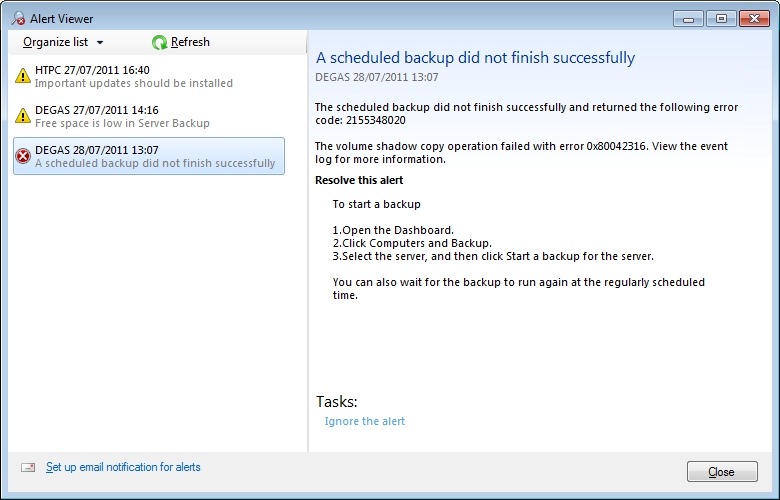
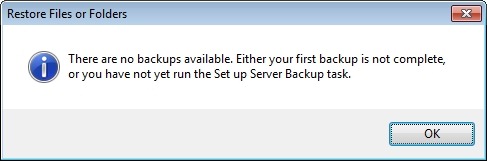
    However, this time, the Server Backup failed, with an error 2155348020:

    WHS2011 25

    I love the way that this message simply tosses out the fact that we should view the event log for more information. I think that most Home Users presented with this message would simply think: WTF is the Event log? And they can’t view the Event log via the WHS 2011 Dashboard anyway – you have to be sufficiently IT-savvy to be able to open up a Remote Desktop Connection and then start up the Event Viewer on the server. Once you’ve done that, you will be presented with something like this:

    WHS2011 38

    It says: The shadow copy of volume \\?\Volume{21bc2a5f-85fc-11e0-a4dd-002354da5014} being created failed to install. Frankly, I have no idea what this means. I do understand that my disc drives have storage volumes created on them; but I can’t find any volume with the reference {21bc2a5f-85fc-11e0-a4dd-002354da5014} – it doesn’t seem to exist.

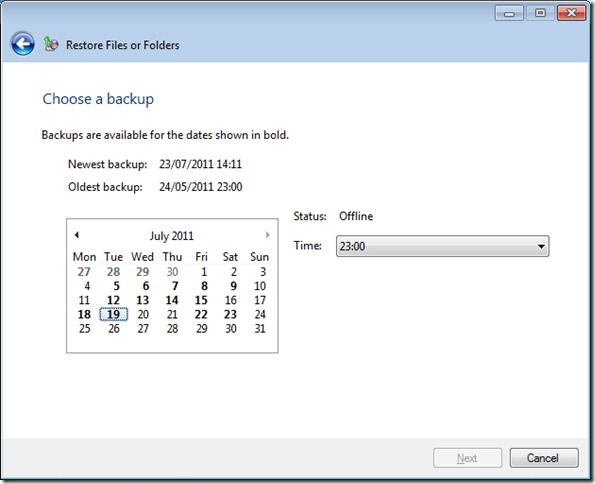
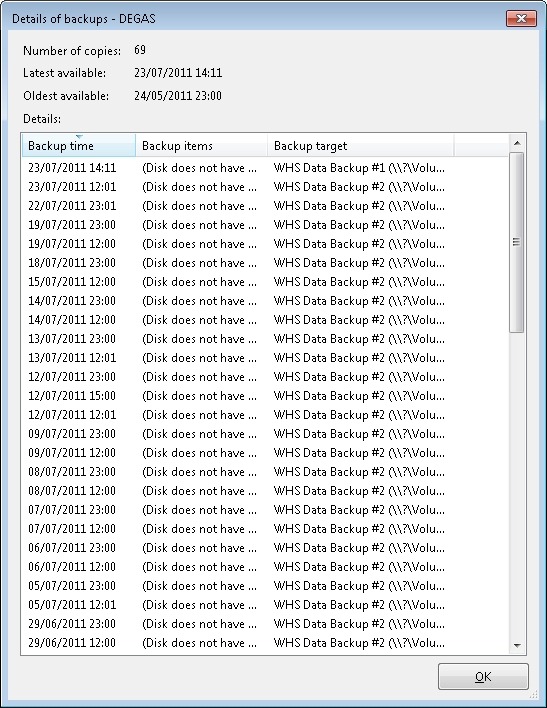
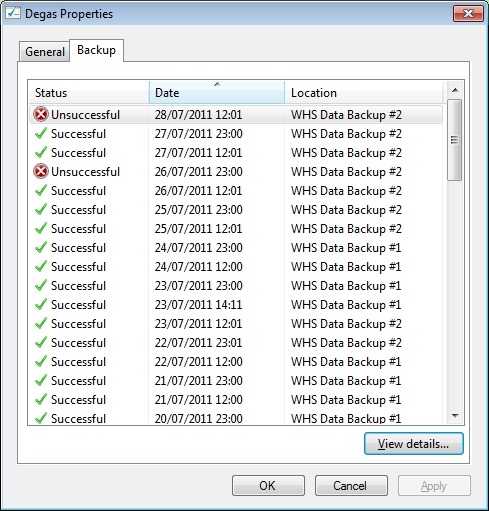
    Anyway, I ran the server backup again, but this time with both backup drives attached. It worked. After a few more experiments, I proved that:

    • Backup drive #1 works.
    • Backup drive #2 does not work by itself.
    • Backup drive #1 and #2 together works.

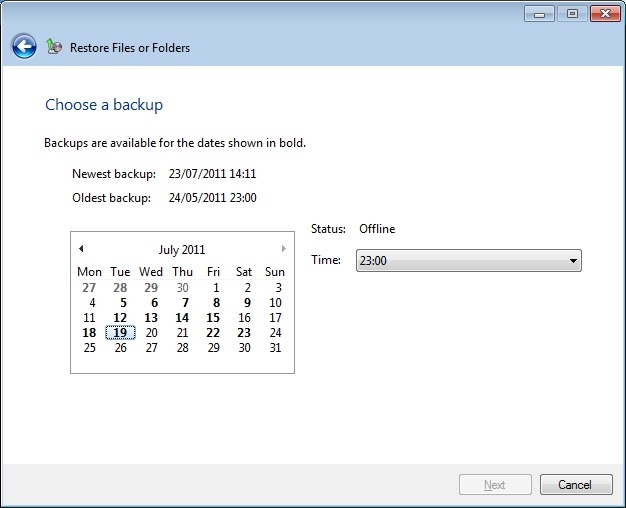
    The bottom line is that I can’t seem to be able to rotate backup drives – that is, (for example) on day 1, I attach drive #1 to the server and have drive #2 held off-site. On day 2, I attach drive #2 to the server and hold drive #1 off-site. Day 3, and it’s back to drive #1 attached to the server, with drive #2 held off-site. And so on… It would seem that I have to have either the first or both drives attached when I’m making backups. But needing to have both drives attached isn’t what I think of when I want to implement a rotating backup drive strategy…

    I want to put something like an ICY Dock MB877IK into my server and have 2 x 2TB drives that I can rotate on a daily basis. It looks as though this is not possible with WHS 2011 at the moment. According to the WHS 2011 online help, it should work. In the real world, on my system, it doesn’t.

    A word about the demise of Drive Extender.

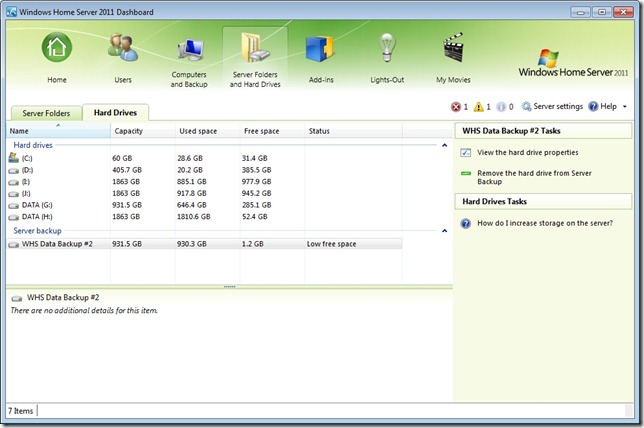
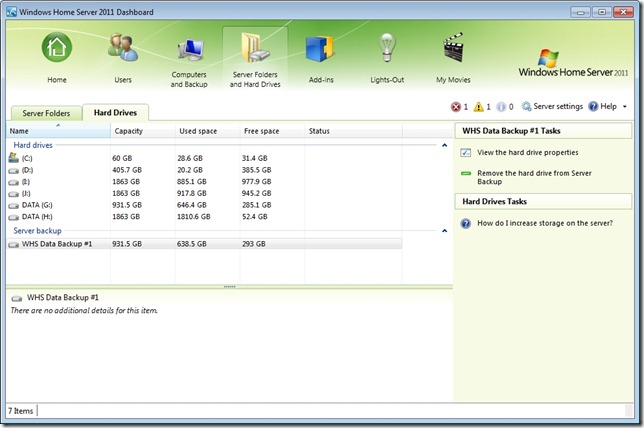
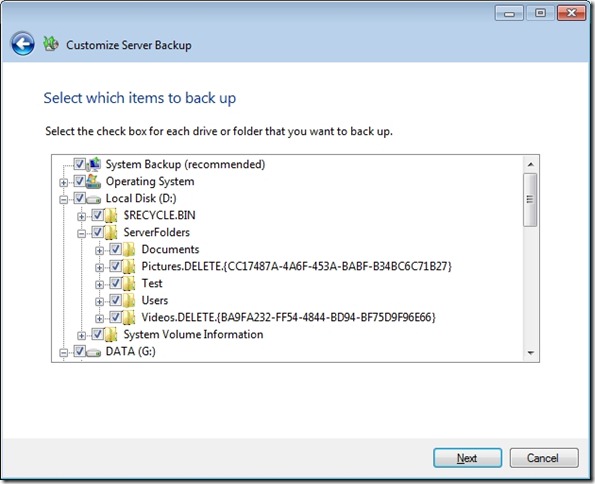
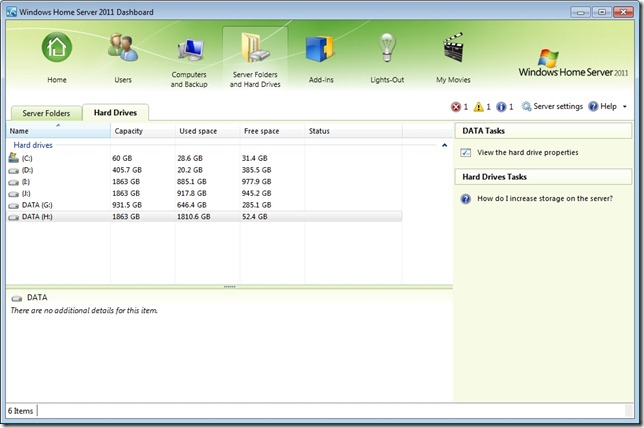
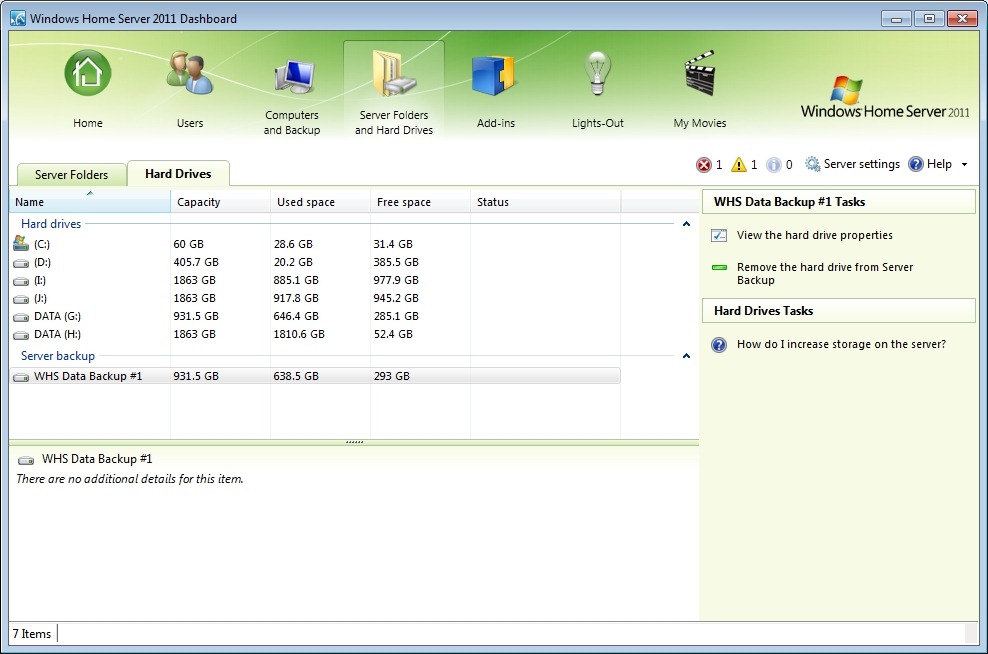
    While I can understand why Microsoft made the decision they did, I still think that the loss of DE is a great loss for the home user. It was such a brilliant concept and it worked for me. When I was setting up my new WHS 2011 system, I found myself having to think carefully about how best to juggle my data across a number of discs, instead of just dealing with one storage pool. I ended up (after a couple of trial runs) with data distributed across my drives like so:

    WHS2011 20

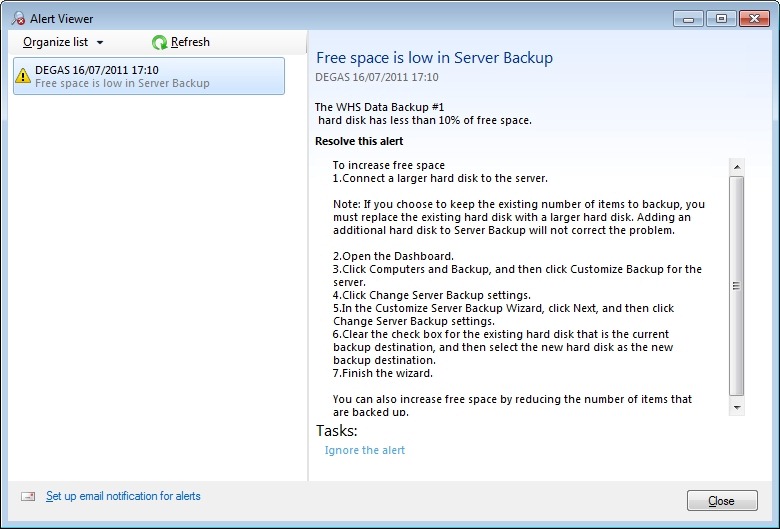
    Here, the drive shown as Elements (J:) is the external drive that I’m using for SyncToy, and server backups of my critical data are being put onto the WHS Data Backup #1 drive.

    And, as already stated, the fact that I’m having to mess about with Remote Desktop Connections and running SyncToy underlines to me the fact that Microsoft have blown it – WHS 2011 is not a product suitable for the “home user”. OEMs will have to invest in addressing the brain-dead backup “feature” in order to come up with a backup and digital media storage appliance suitable for the masses… Will any of them do this? We’ll see.

    Meantime, for us, the home builders, I would say that there’s definitely a gap in the market for someone to develop a replacement Backup Add-in that uses the underlying Windows Server 2008 R2 facilities that would simplify our lives, and allow us to build WHS 2011 systems for friends and relatives that they could actually use…

    WHS 2011: definitely a Curate’s egg…

    Addendum: Update 31 March 2014: It appears as though there has been some improvement made to the Server Backup function in the Dashboard since I originally wrote this article. It remains the case that WHS 2011 continues to use the VHD format for backup, which has a maximum capacity of 2TB. However, it now appears (contrary to what Microsoft originally stated) as though the Server Backup function can now deal with multiple VHDs, providing the backup drive is big enough. So, if your backup drive is 4TB, that means you can have 2 VHDs of 2TB created on it. That, in turn, means that you can backup up to 4TB of data from your data storage drives (with a maximum of 2TB for any one drive). That’s a theoretical maximum, since Microsoft also recommend having some free space in the VHDs to handle incremental backups.

    12 responses to “My WHS 2011 Experience (Thus Far)”

    1. John Zajdler Avatar

      Nice writeup, now I know about something else I did not know.

      1. Geoff Coupe Avatar

        Thanks, John. As you can tell, I’ve got mixed feelings about WHS 2011. I can use it, and I’m fairly sure it will be OK, but I’m having to be the IT guy in the house. I just wish it could have simply been the backup/storage appliance that anyone could use…

    2. Ethan Moie Avatar
      Ethan Moie

      Hi Geoff,

      Excellent write up- completely sums up Microsoft’s mistakes on the Home Server front. It’s funny really- when WHS v1 came out I (like most IT people) thought “WTF is the DE rubbish?” and “why on earth didn’t they just use RAID??”- again like you I had a lot of fun with data corruption prior to Power Pack 1, but I have definitely become a convert over the years and am even now enjoying the remote access features of my beloved WHS box- especially given all the amazing add-ons that are now available.

      The loss of DE will certainly be a significant hit to Microsoft’s market share in this sector; as with the corporate world they are again going from being pretty much the only player to just being one of many- and unfortunately WHS v2 just doesn’t stack up to its predecessor, never mind the competition. Having said that though, there are already add-ons in the works for WHS v2 to “bring back” DE so there is hope…

      Personally I’ll be sticking with WHS v1 for now. 🙂

      Regards,

      Ethan

      1. Geoff Coupe Avatar

        Thanks, Ethan. Yes, there’s still a lot to be said for WHS v1. Now that I’m adding media to my WHS 2011 box, I keep on having to worry about manually spreading and balancing stuff across five discs instead of just throwing it in to one big storage pool. I do rather miss DE. I may invest in one of the third party add-ins once they’ve been out and shaken about in the real world.

        1. Jeremy Stevens Avatar
          Jeremy Stevens

          Geoff,

          I jsut got my WHS 2011 box up and running. Have you thought of just using the option of Spanning the volume? It creates a large pool of drives. I have 4 2TB drives, and one of the pools is 6 TB. Well, 5.5 TB….. Just thought I would throw it out there.
          Thanks for the article, well written indeed!

          1. Geoff Coupe Avatar

            Jeremy, it’s a good point. I haven’t done this as yet. The problem, it seems to me, is that if any one drive fails (as inevitably, one day, it must), then the whole spanned volume is lost, and must be rebuilt. It’s true that I would still have all the data backed-up offsite, so it could be restored, so in that case I could restore the data.

            The thing about DE was that if any one drive failed, only the data on that drive would be lost and it would be much simpler to recover from. And for any folders that were duplicated onto other drives the data would still be preserved.

    3. Shannon Avatar
      Shannon

      I would really like to be able to rotate internal drives as well. The closest option I have seen to that right now is setting up mirroring via the server manager’s storage manager. But I agree that is way beyond the scope of the target audience here…

    4. Geoff Coupe Avatar

      Shannon, despite my problems with rotating external backup drives, I thought I’d try an ICY Dock with two 1TB drives being rotated. So far, this seems to be working. I haven’t yet had the 2155348020 error, and the drives have been rotated a couple of times. Early days yet, but perhaps it is now working.

      I’ve no idea why the USB-connected drives were causing problems…

    5. […] Notice that it’s given me an error code 2155348020, and, as I’ve written before: […]

    6. Matt Avatar
      Matt

      I don’t care about DE too much as never had a WHSv1 (well for about one week then I found I purchased something old and got WHS2011).

      Now this WHS2011 goes slow when it shouldn’t, the hardware is quite fast (using windows 7 it is fine to transfer files on the network) with WHS2011 it is useless…..

      I can’t seem to get past the first Server Backup at all, and client backups are of the same nature.
      The drive is all well connected and internal, the system even says both items where successful but overall it says it’s unsuccessful….

    7. Matt Auckland (@mattauckland) Avatar

      The biggest issue I’ve found with WHS 2011 so far, is remote desktop doesn’t seem to work outside of the LAN. In other words if I login in using IE to the web control panel, then attempt to access the servers remote desktop connection, it runs through the initial connection, but fails on some odd certificate issue, asking me to login to the web url of the WHS I just logged into. In effect putting me in a loop.

      Haven’t found a solution yet, but I’m trying.

    8. john salazar Avatar
      john salazar

      Hi hasd anyone tried using the original WHS to do a full backup of 2011? I have about 6tb of data has anyone figured out how to do a full backup of that large a collection of files?

    Leave a comment

  • My Heart Bleeds…

    I see that Adele is complaining that she has to pay 50% Income Tax on her earnings of, apparently, £8 million for last year.

    I pay more tax (52%) on my earnings that, last year, amounted to less than 1% of her income. Somehow, if I were in her shoes, I think that I would be able to struggle by on an after-tax income of four million quid.

    Feet of clay, feet of clay…

    Leave a comment

  • Favourite Does Not Necessarily Equal Best

    To celebrate the opening of an exhibition (Out of this World) at the British Library later this month, today’s Guardian has asked leading SF writers to pick their favourite novel or author in the genre. However, the Guardian’s sub-editors have given the piece the title: The stars of modern SF pick the best science fiction. That adjective “best” doesn’t quite ring true for me. I’m always wary of lists that claim to be a compilation of the “best”: best books, best films, best paintings and so on. “Personal favourites” is a much better description, and makes no claims for absolute rankings, which is, to my mind, quite impossible for art.

    I’m pleased to see that some of my own personal favourites appear in the list, and many more are popping up in the lots of comments from people adding their suggestions.

    Leave a comment

  • The History of the User Interface

    Here’s a video of Bill Buxton talking about the history of (some of the) user interfaces in computing.

    http://channel9.msdn.com/Series/Show-Us-Your-Tech/Bill-Buxton-Shows-Us-His-Favorite-Tech/player?w=512&h=288

    An interview with a researcher who has passion and whose passion shines through to teach important lessons. And the basic lesson is that history is important. Those who forget their history are condemned to repeat it.

    Leave a comment

  • Uganda’s “Kill the Gays” Bill

    The appalling David Bahati is still pushing on with his abhorrent piece of anti-gay legislation in the Ugandan parliament. It would seem that it is now reaching a crucial point. This travesty has been going on since 2009. Perhaps it’s always useful to have scapegoats ready in order to deflect the population from the real problems at hand.

    Update 14 May 2011: the current Ugandan parliament ran out of time to debate the bill, so it’s been shelved. Unfortunately, that probably means that Baharti will try and re-introduce it in the next parliament.

    2 responses to “Uganda’s “Kill the Gays” Bill”

    1. lilyandtom Avatar

      Hi Geoff,

      Lovely blog you got here. I stumbled upon your blog while i was browsing WLW album features on tecnogran’s blog (super awesome eh!).

      Can i ask, do you still use WLW? and if so, where are your pictures being saved? on the Sky Drive automatically when you “insert picture”? I just started on wordpress and not sure where the best way to store the pictures cos i find the wordpress media library quite messy!

      Thanks a lot and i hope you will reply!

      1. Geoff Coupe Avatar

        Hi lilyandtom,

        Yes, I use WLW for my blog. All the images in my blog will be saved in WordPress’ Media Library. They get saved when I publish an entry. When we had Windows Live Spaces, then publishing to Spaces would automatically save the images to Sky Drive, but now that we’re using WordPress, the publishing process uses the WordPress Media Library instead. Same process, different destination…

        I rarely look at the Media Library directly – and then only to check that I’ve still got plenty of room.

        Cheers,

        Geoff

    Leave a comment