Reflections on life at “De Witte Wand”…

  • All Watched Over By Machines Of Loving Grace – II

    I mentioned how much I was looking forward to the new series of documentaries by Adam Curtis: All Watched Over By Machines Of Loving Grace.

    Actually, the first episode was last week, and it was every bit as good as I had hoped for. I never realised, until Curtis made it clear, that there was a close, if not intimate, connection between Alan Greenspan and the ethical egoist-cum-sociopath Ayn Rand. Pause for shudder

    Tonight’s episode will look at how our view of Nature, as interconnected ecosystems, echoes our view of machines. Should be good. And next week, Curtis will look at our view of the human being as machine, and tell the riveting, and almost outlandish, story of George Price, who was one of the first to come up with the idea of the Selfish Gene.

    Adam Curtis has also been on Little Atoms, talking about the series and the ideas behind it (the second link on this page). Well worth a listen.

    The underpinning theme of All Watched Over… is that of Cybernetics, with which I was fascinated when younger. I wonder whether Curtis will mention William Grey Walter and his cybernetic tortoises? I built one of those when I was a teenager, but really, one was not enough, you really needed several to be able to study the emergent behaviour…

    At the very least, I hope that Curtis gives a shout-out to Anthony Stafford Beer, who was invited by Salvador Allende to implement Cybersyn to manage the planned economy of Chile. Unfortunately, like so much else, the experiment was swept away in the military coup of 1973, which was, surprise, surprise, endorsed by the US.

    3 responses to “All Watched Over By Machines Of Loving Grace – II”

    1. jonpatterns Avatar
      jonpatterns

      Adam mentions Chile, but not Stafford?

      1. Geoff Coupe Avatar

        Yes, I was a little bit disappointed in that, as well. Perhaps it didn’t fit his thesis.

    2. jonpatterns Avatar
      jonpatterns

      He seems down on any sort of system analysis. But I think it can be useful, necessary to reduce complexity – but it is important to remember that it is just analysis.

    Leave a comment

  • The Media Library in Windows Home Server 2011

    As promised yesterday, here’s the follow-up post describing my experience (thus far) with the Media Library in Windows Home Server 2011.

    On installation, Windows Home Server 2011 will create a number of Folders by default for music, pictures, documents, recorded TV, and videos. These can be accessed either via Windows networking, or via the web using the Remote Web Access facilities of WHS 2011.

    On my home network, I’m using Windows networking for access by my Home Theatre PC (HTPC) and other computers to the digital media files held on my WHS 2011 system. This seems to be working as expected. I can play my music, or watch DVDs and Blu-rays streamed from the server to my PCs without issue.

    I did, however, find a couple of wrinkles when trying to access the same digital media files via the Remote Web Access facility of WHS 2011.

    Wrinkle 1

    When I first set up my WHS 2011 system, I had installed my music library on drive D:. And, I could access my music in the Music library displayed via the Remote Web Access. However, after a few days, I thought that I should move my picture and video libraries to different drives. I used the “Move the folder” Wizard in the Dashboard to accomplish these tasks.

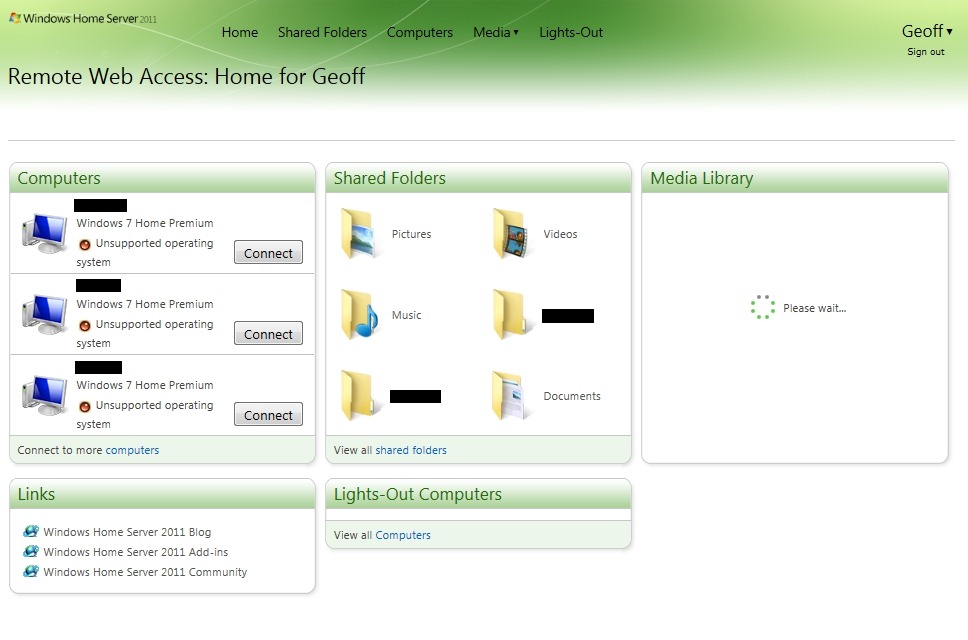
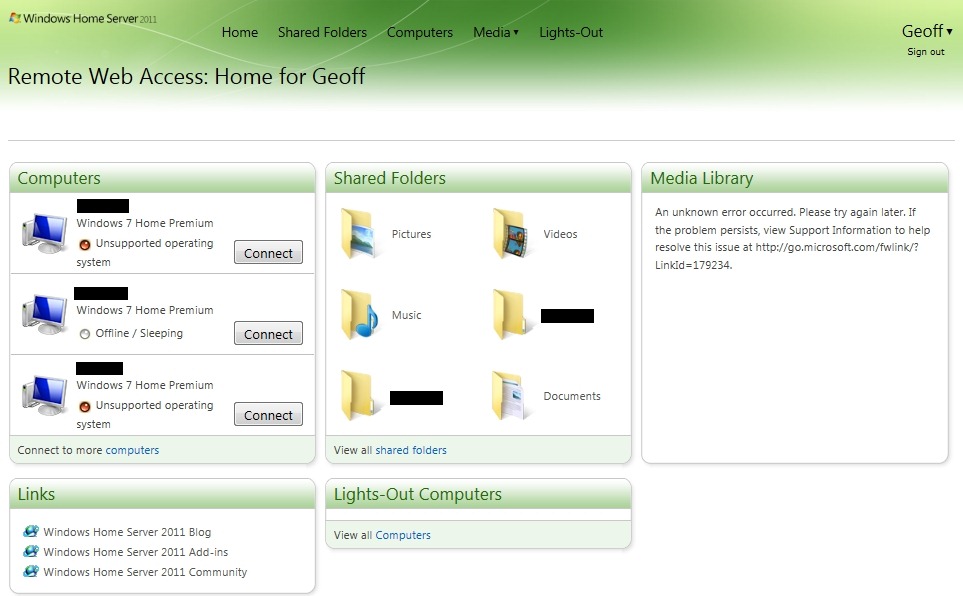
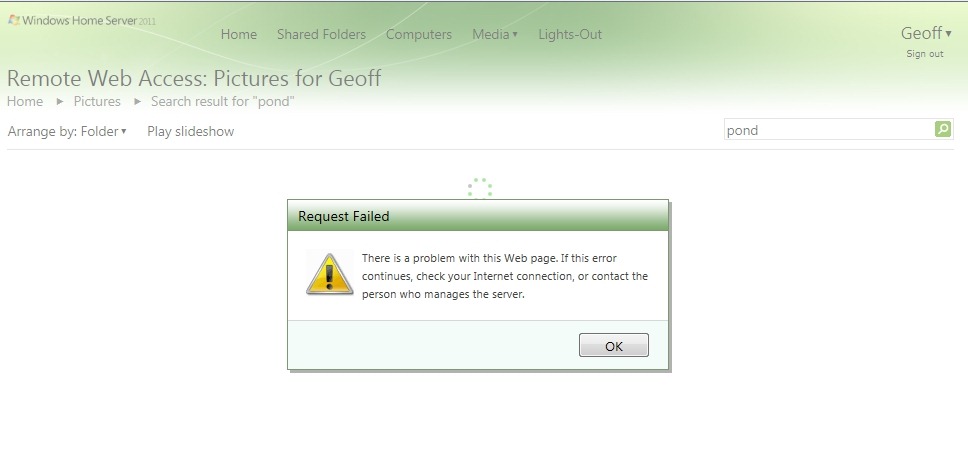
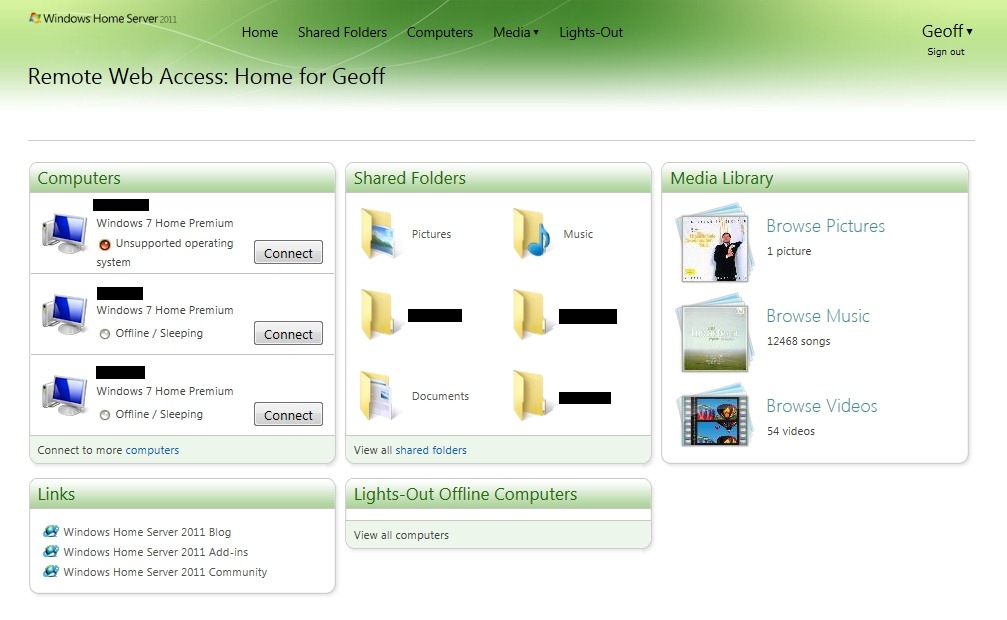
    I then found that instead of being able to see in excess of 45,000 pictures in the Media Library, I was presented with the grand total of one picture:

    WHS2011 24a

    I also saw that I had a total of 54 videos, but when I tried to play any of them, the web-based player would start, but then fail with an error message complaining that the file-type may not be supported.

    Using Remote Web Access to browse the shared folders would show all the pictures, and would play the videos without problems.

    I thought at first that it was simply a case of the index service needing time to register the new locations of my picture and video files, so I waited, and I waited… I waited a couple of days, and nothing changed.

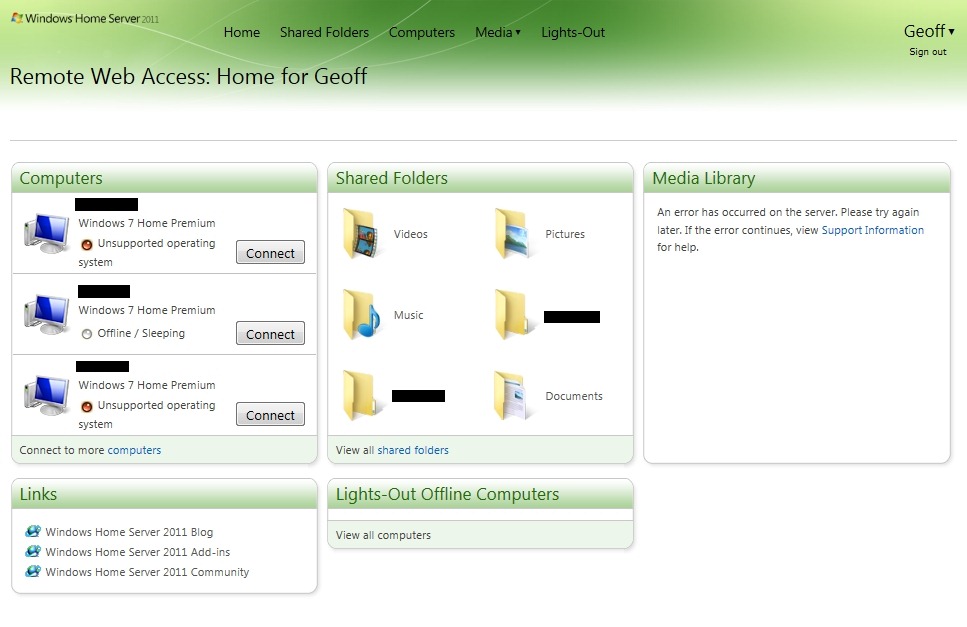
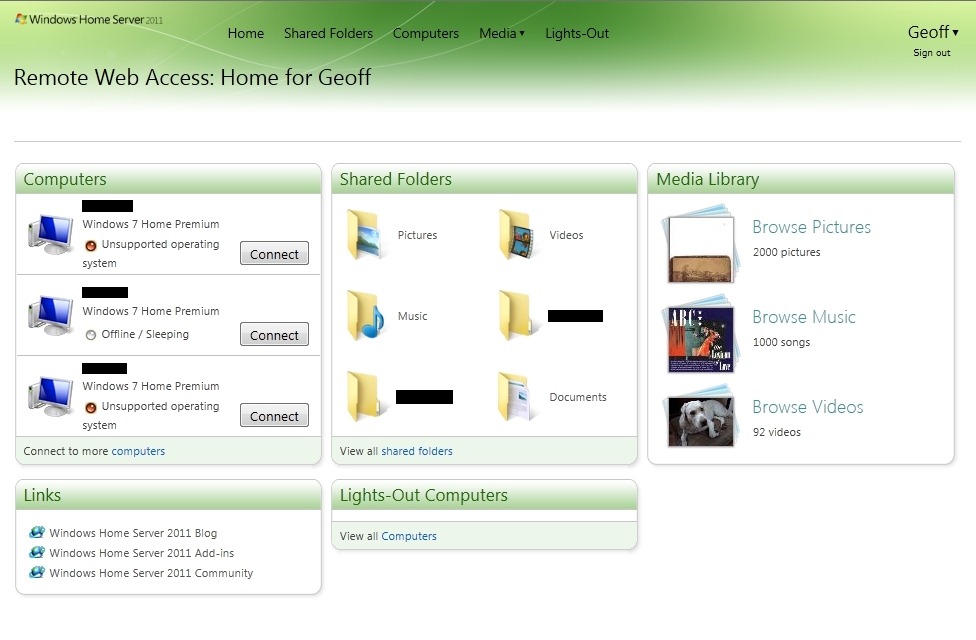
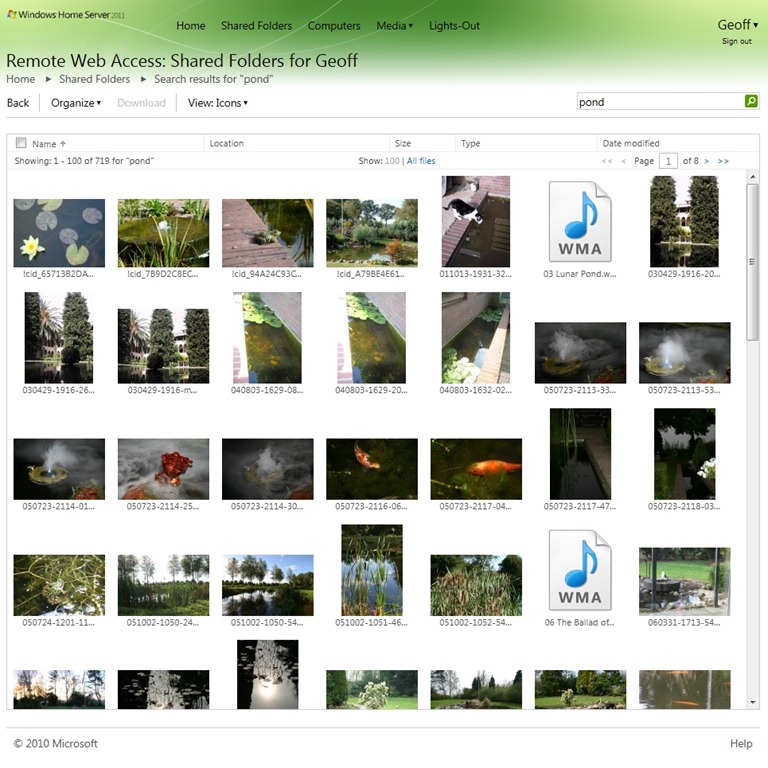
    At this point, I decided to reboot my server, and lo and behold, the picture and video files were found:

    WHS2011 37

    You will notice that there are now 45,058 pictures and 92 videos found, and that the thumbnails show a real photo and video thumbnail.

    So I infer from this that using the “move folders” wizard is not sufficient to keep the WHS 2011 system running smoothly – it is also necessary to reboot the server in order for the indexing service to discover the new location of files. This, despite the fact that accessing the files via Windows networking appears to be able to account for the changes.

    For the case of web access, the server’s left hand does not know what the right hand has done…

    Wrinkle 2

    I noticed, from the forums, that some people were complaining that their Album Art (CD covers) in their Music Library was showing up in their Pictures Library. Clearly, this is wrong, and should not be happening.

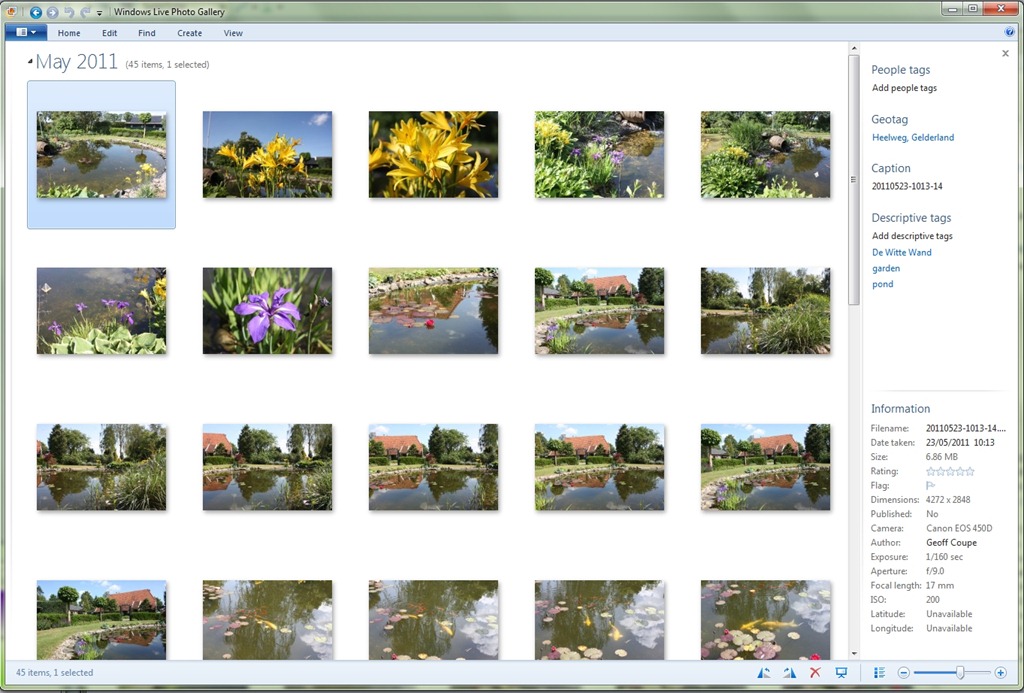
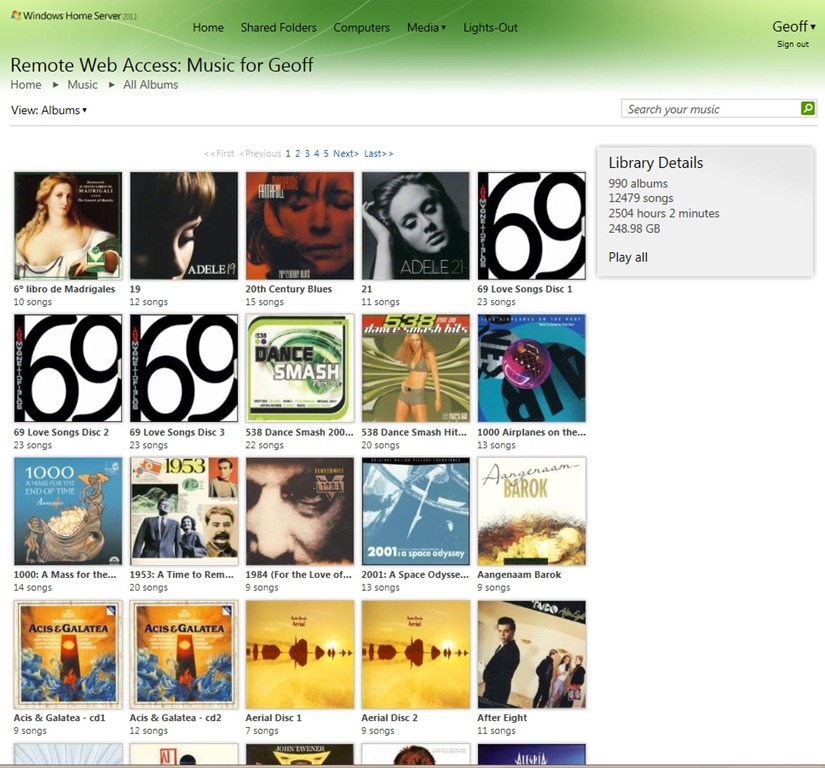
    Then I realised that when the Pictures Library of WHS 2011 was showing just one picture, it was in fact a CD cover stored in my Music Library. Well, (a ) this should not be displayed in my Picture Library, but (b ) why was it just one? After all, my Music Library has 990 albums:

    WHS2011 39

    – why was it just displaying one album cover, and not 990 in the Picture Library?

    It turns out that WHS 2011 will ignore certain filenames when it is searching for items for inclusion in the Picture Library.

    WHS 2011 will ignore filenames in the Music Library folders when they have the form:

    • AlbumArt_{alphanumeric}_Large,
    • AlbumArt_{alphanumeric}_Small, AlbumArtSmall, and
    • Folder.jpg files

    However, if you have Album Art files that do not follow this convention, then WHS 2011 will count them in as part of the Picture Library.

    And that’s what was happening. I had an Album Art cover file with this name:

    Cover- Wiener Philharmoniker _Orchestra_- Strauss, R. Eine Alpensinfonie; Rosenkavalier-Suite.jpg

    Cover- Wiener Philharmoniker _Orchestra_- Strauss, R. Eine Alpensinfonie; Rosenkavalier-Suite

    and so WHS 2011 included it into the Picture Library…

    Sometimes I feel as though I’m an archaeologist, trying to second-guess what has been left by extinct civilisations…

    Update: I have discovered more issues with the Media Library. See this post.

    10 responses to “The Media Library in Windows Home Server 2011”

    1. […] The Media Library in Remote Web Access has issues (I’ll address this in a follow-up post). […]

    2. […] Windows Home Server 2011–Revisited Posted on June 4, 2011 by Geoff Coupe A week ago, I blogged about my first impressions of using the Media Library in Windows Home Server 2011. My experience wasn’t entirely positive, […]

    3. Matt Avatar
      Matt

      Finding similar problems but they extend, seems my videos are in the pictures (all of them), my pictures are not in any of them, my movies are in my videos and meh its a mess….
      Hope they bring out a fix or something for it

    4. Matt Avatar
      Matt

      Also note: I did not come from WHS v1, so my files arn’t perfectly layed out in MS format, if thats what MS needs I hope there is a way to batch convert (to correct file type and file structure) a whole tonne of files some how?

    5. Derek Avatar
      Derek

      I’ve had this problem too, and it’s ridiculous that the web interface won’t just look at the “Pictures” folder for pictures. I’ve got “backdrop.jpg” “logo.jpg” “banner.jpg” for all my movies which also now appear as photos in the “Pictures” library.

    6. dszigeti Avatar

      Geoff … Great article thanks. I am coming from WHS V1 – actually I am running both V1 and 2011 in parallel until I can be sure that I can migrate successfully).

      I found the same problems that you mentioned with WHS 2011 – it is unfortunate that these bugs exist in what could be a good system. As someone famous … and you said … “definitely a Curate’s egg …”

      I am also coming to the same conclusion that you are. WHS 2011 generally works but it is not home user friendly … and we seem to be heading toward needing an IT guy to maintain the system. I don’t dislike WHS 2011 (except for the bugs) but I did expect it to build on WHS V1 and refine the “experience.” I am not seeing an improved experience at this time.

    7. Dan Avatar
      Dan

      Hi Geoff, great blog. I’ve have just started using WHS 2011 this week and have found when I’m streaming media to my Win 7 Media Center from the server that Recorded TV does not appear in the shared tab in win 7 media center. It appears to stream fine to media player on the same pc just not to media center shared tab in the recorded tv menu. Just wondering if your experience was the same?
      Cheers,
      Dan

      1. Geoff Coupe Avatar

        Dan, as far as I know, the “recorded TV” folder is used for archived TV recordings that are made on your Media Center PC, and then automatically transferred across to the WHS 2011 system. On the Media Center PC, there should be a Home Server tab, with “archived TV” under it.

        I don’t use my Media Center PC for making TV recordings, so I’ve never been able to test this out.

        1. Aussie_Z Avatar

          Hi Geoff et al … I concur with your assessment … I don’t understand why WMC doesn’t allow us to just connect to a shared WHS 2011 folder(s) to select and play video. I don’t understand how the “automatic” archiving works … my thoughts are that, as usual, Microsoft has made this too difficult, when a simple solution would have been fine. I am not happy with the implementation … If I am wrong, I would be happy to hear the solution.

          1. Geoff Coupe Avatar

            Hi Aussie, er, WMC does allow you to connect to a shared WHS 2011 folder(s) to select and play video… At least, it does on my systems. I’m not using any “special” codec packs, just the ones supplied with Microsoft. That allows me to play the videos that I have in the video library held on my WHS 2011. That library is separate from the “Recorded TV” folder, which, as I say, I don’t use.

    Leave a comment

  • The Psychopath Test

    I see that Jon Ronson has got a new book out: The Psychopath Test. I like Jon Ronson’s writing, so I think I should add his new book to my wishlist. There’s also a very positive review of the book in today’s Guardian, by Will Self. Check it out.

    One response to “The Psychopath Test”

    1. […] weeks back I mentioned that I should put Jon Ronson’s new book: The Psychopath Test on my list of books to read. I did, […]

    Leave a comment

  • My WHS 2011 Experience (Thus Far)

    I think it’s safe to say that the development of Microsoft’s Windows Home Server 2011 (version two of the original Windows Home Server product) has not exactly been plain sailing. Fairly late on in the development cycle, Microsoft took the decision to pull the Drive Extender technology (the unique selling point of WHS v1) from the v2 product. The decision was greeted with howls of protest from WHS customers (including me), but Microsoft soldiered on and released WHS 2011 in April.

    Now, I know that I had said that I would be sticking with WHS V1 as long as possible, but those who really know me are aware that I am often unable to resist poking new technology to see how well it works. And so, I’ve messed about with the beta versions of WHS 2011 (and found some bad limitations, as well as the occasional plus point).

    I’ve been using version 1 of Windows Home Server since it was released in November 2007 (and I was kicking the tyres of the betas before that). So we have a long history together (in computer terms). And WHS v1 has served me well. There was the saga of the file corruption bug, but once identified, I was able to work around it until it was fixed by Microsoft in November 2008. Since then, I’ve been using WHS v1 very happily indeed. It has just worked, and has saved my bacon on a couple of occasions.

    Why, you might then ask, have I yielded to temptation and invested in an OEM disc of Windows Home Server 2011?

    Well, the major omission in WHS v1, from my perspective, was that it was not possible to backup the server itself. I wanted to be able to take server backups for off-site storage. Yes, it was possible to take copies of the Shared Folders of the server onto external discs for storage off-site (which I did); but it was not possible, using the facilities of WHS v1, to take a backup of the server operating system and copies of the client PC backups onto external storage. With WHS 2011 comes the additional feature of being able to make backups of all of the server itself for off-site storage.

    Thus, while WHS 2011 has lost the Drive Extender feature, it has seemingly gained the ability to make complete backups of the server. On balance, and given my hankering for new technology, I thought that I would invest in WHS 2011 and see how it would go.

    So, how has it gone?

    To be honest, it’s been a bit of a curate’s egg – it has good parts and bad parts.

    The Good Parts

    • Practically painless installation of the software (WHS v1 needed coddling to understand modern hardware) – but note the comment under the Questionable Parts heading.
    • Backup of the server is now possible.
    • Improvements for Remote Web Access.

    The Bad Parts

    • Removal of drive pooling because the Drive Extender technology is gone.
    • Server backup has a limit of 2TB. Note: See the Addendum at the bottom of this post.

    The Questionable Parts

    • Server installation defaults to a Workgroup called “Workgroup”. If yours is named something else (as mine was), you need to be aware of a workaround. I used it and it worked for me.
    • Server backups to more than one external drive don’t seem to be working properly.
    • The Media Library in Remote Web Access has issues (I’ll address this in a follow-up post).

    The Details

    I divide the data held on my Windows Home Server into two classes: critical and non-critical.

    • Critical data is that which I view as unique and irreplaceable. For example, the 44,000 (and counting) photos that I have taken over the course of my 62 year life. Then there are the 10,000+ emails generated over my 20 years online that I wish to preserve, at least for me, if not for posterity. And not forgetting documents that I have written, which are important to me, if not to anyone else.
    • In the class of non-critical fall the digital copies of my music and film collection. The originals are the CDs, DVDs and Blu-rays that I own. If the digital copies are lost, I can at least regenerate them from the original media.

    It turns out that this classification into two types of data is important because one of the bad (not to say ugly) parts of WHS 2011 is the fact that a server backup cannot exceed 2TB maximum.

    Because of this limitation, I am forced to adopt the strategy of saying that critical data is handled by the WHS 2011 server backup facility, while non-critical data is handled by an alternative facility – in my case I have chosen for SyncToy. It would have been wonderful to let all of my data be handled by the WHS 2011 server backup facility, but since I have more than 2TB of data, this just isn’t possible by the design that Microsoft have given us.

    Let’s just pause a moment and let this sink in. Because of the fact that the WHS 2011 server backup facility has a hard limit of 2TB, I have to use a mixture of backup methods in order to ensure that all my data is backed up. This means:

    • We are no longer in home user territory. We are in the world of needing to know IT.
    • I can use the WHS 2011 Server backup facility for critical data, but…
    • I must use the Remote Desktop Connection application to connect to the WHS 2011 server and run SyncToy to backup my non-critical data.

    As Dorothy said: Toto, I don’t think we’re in Kansa anymore.

    In an ideal world, I would have the following scenario:

    • My data is in two classes: critical and non-critical.
    • For critical data, I want to rotate external drives between the WHS 2011 server and off-site storage on a daily basis.
    • For non-critical data, I want to rotate external drives between the WHS 2011 server and off-site storage on a weekly or monthly basis.
    • Both of these tasks should be doable via the WHS 2011 server backup facility – and via a single mouse-click once set up.

    Currently, this can’t be done. I need to have fudges and workarounds that require IT knowledge. In other words, I think that WHS 2011 fails to meet the needs of the home user.

    But the story doesn’t end there. According to the online help for Windows Home Server 2011, it is possible to rotate external backup drives: “You can use multiple external storage drives for backups, and you can rotate the drives between onsite and offsite storage locations. This can improve your disaster preparedness planning by helping you recover your data if physical damage occurs to the hardware onsite”.

    So I tried to do this. At the moment, I have about 500 GB critical data that I want to store using the Server Backup facility in the Dashboard, and I have two drives; one of 1TB capacity (Drive #1) and one of 750GB capacity (Drive #2). I set these up in the WHS 2011 Server Backup Wizard.

    Day 1 went fine, two successful backups (the default setting) were made to Drive #1. On day 2, I removed Drive #1 and added Drive #2. The “Customize Server Backup” Wizard showed that Drive #2 was attached and Drive # 1 was offline.

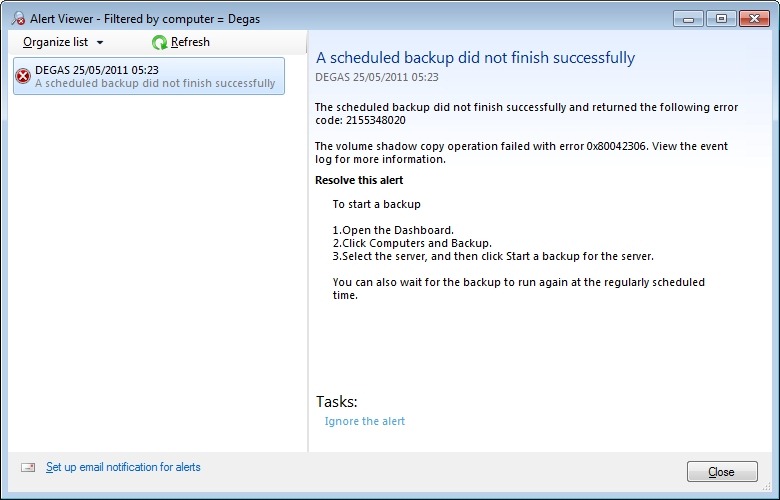
    However, this time, the Server Backup failed, with an error 2155348020:
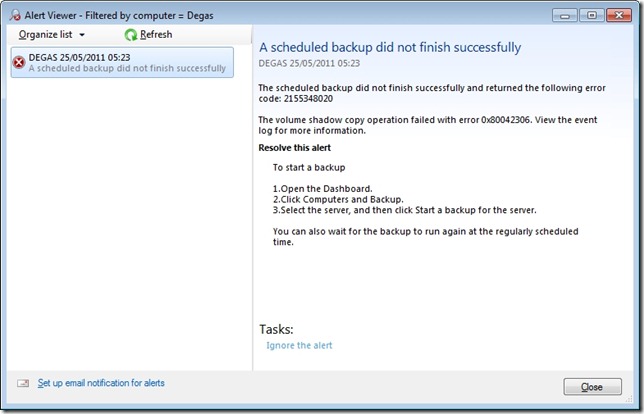
    WHS2011 25

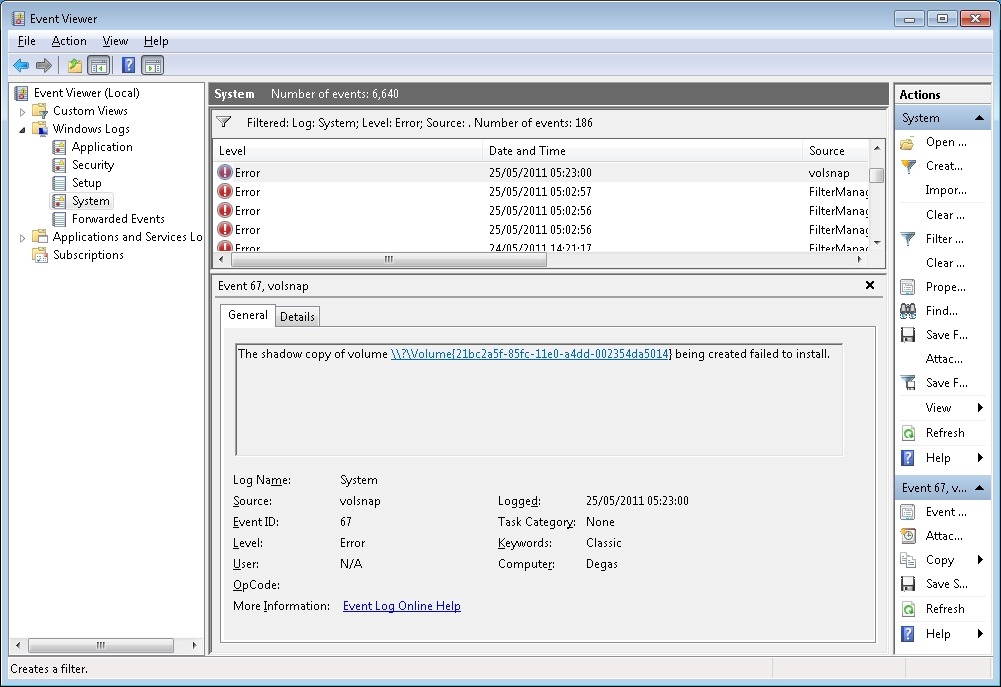
    I love the way that this message simply tosses out the fact that we should view the event log for more information. I think that most Home Users presented with this message would simply think: WTF is the Event log? And they can’t view the Event log via the WHS 2011 Dashboard anyway – you have to be sufficiently IT-savvy to be able to open up a Remote Desktop Connection and then start up the Event Viewer on the server. Once you’ve done that, you will be presented with something like this:
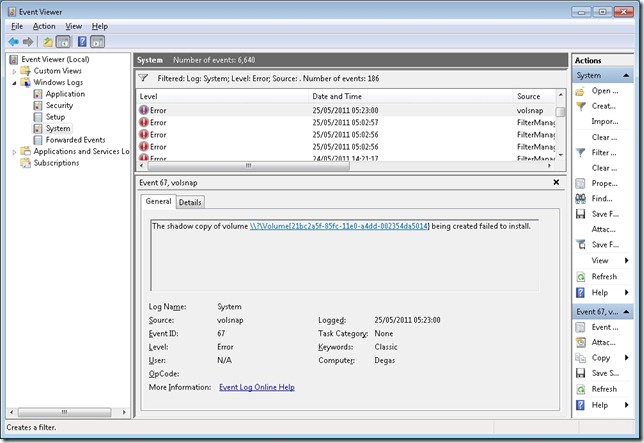
    WHS2011 38

    It says: The shadow copy of volume \\?\Volume{21bc2a5f-85fc-11e0-a4dd-002354da5014} being created failed to install. Frankly, I have no idea what this means. I do understand that my disc drives have storage volumes created on them; but I can’t find any volume with the reference {21bc2a5f-85fc-11e0-a4dd-002354da5014} – it doesn’t seem to exist.

    Anyway, I ran the server backup again, but this time with both backup drives attached. It worked. After a few more experiments, I proved that:

    • Backup drive #1 works.
    • Backup drive #2 does not work by itself.
    • Backup drive #1 and #2 together works.

    The bottom line is that I can’t seem to be able to rotate backup drives – that is, (for example) on day 1, I attach drive #1 to the server and have drive #2 held off-site. On day 2, I attach drive #2 to the server and hold drive #1 off-site. Day 3, and it’s back to drive #1 attached to the server, with drive #2 held off-site. And so on… It would seem that I have to have either the first or both drives attached when I’m making backups. But needing to have both drives attached isn’t what I think of when I want to implement a rotating backup drive strategy…

    I want to put something like an ICY Dock MB877IK into my server and have 2 x 2TB drives that I can rotate on a daily basis. It looks as though this is not possible with WHS 2011 at the moment. According to the WHS 2011 online help, it should work. In the real world, on my system, it doesn’t.

    A word about the demise of Drive Extender.

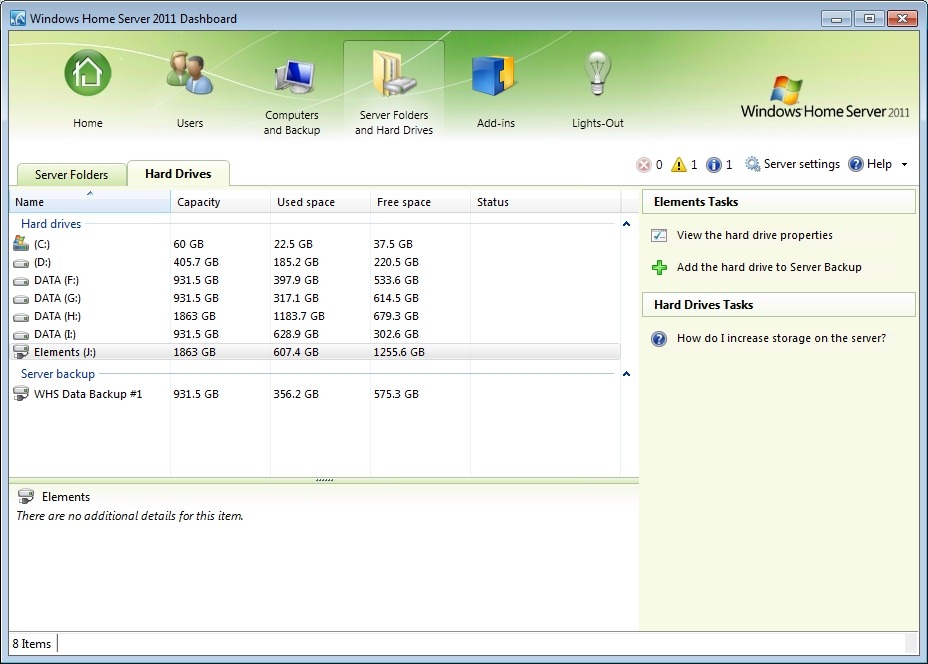
    While I can understand why Microsoft made the decision they did, I still think that the loss of DE is a great loss for the home user. It was such a brilliant concept and it worked for me. When I was setting up my new WHS 2011 system, I found myself having to think carefully about how best to juggle my data across a number of discs, instead of just dealing with one storage pool. I ended up (after a couple of trial runs) with data distributed across my drives like so:

    WHS2011 20

    Here, the drive shown as Elements (J:) is the external drive that I’m using for SyncToy, and server backups of my critical data are being put onto the WHS Data Backup #1 drive.

    And, as already stated, the fact that I’m having to mess about with Remote Desktop Connections and running SyncToy underlines to me the fact that Microsoft have blown it – WHS 2011 is not a product suitable for the “home user”. OEMs will have to invest in addressing the brain-dead backup “feature” in order to come up with a backup and digital media storage appliance suitable for the masses… Will any of them do this? We’ll see.

    Meantime, for us, the home builders, I would say that there’s definitely a gap in the market for someone to develop a replacement Backup Add-in that uses the underlying Windows Server 2008 R2 facilities that would simplify our lives, and allow us to build WHS 2011 systems for friends and relatives that they could actually use…

    WHS 2011: definitely a Curate’s egg…

    Addendum: Update 31 March 2014: It appears as though there has been some improvement made to the Server Backup function in the Dashboard since I originally wrote this article. It remains the case that WHS 2011 continues to use the VHD format for backup, which has a maximum capacity of 2TB. However, it now appears (contrary to what Microsoft originally stated) as though the Server Backup function can now deal with multiple VHDs, providing the backup drive is big enough. So, if your backup drive is 4TB, that means you can have 2 VHDs of 2TB created on it. That, in turn, means that you can backup up to 4TB of data from your data storage drives (with a maximum of 2TB for any one drive). That’s a theoretical maximum, since Microsoft also recommend having some free space in the VHDs to handle incremental backups.

    12 responses to “My WHS 2011 Experience (Thus Far)”

    1. John Zajdler Avatar

      Nice writeup, now I know about something else I did not know.

      1. Geoff Coupe Avatar

        Thanks, John. As you can tell, I’ve got mixed feelings about WHS 2011. I can use it, and I’m fairly sure it will be OK, but I’m having to be the IT guy in the house. I just wish it could have simply been the backup/storage appliance that anyone could use…

    2. Ethan Moie Avatar
      Ethan Moie

      Hi Geoff,

      Excellent write up- completely sums up Microsoft’s mistakes on the Home Server front. It’s funny really- when WHS v1 came out I (like most IT people) thought “WTF is the DE rubbish?” and “why on earth didn’t they just use RAID??”- again like you I had a lot of fun with data corruption prior to Power Pack 1, but I have definitely become a convert over the years and am even now enjoying the remote access features of my beloved WHS box- especially given all the amazing add-ons that are now available.

      The loss of DE will certainly be a significant hit to Microsoft’s market share in this sector; as with the corporate world they are again going from being pretty much the only player to just being one of many- and unfortunately WHS v2 just doesn’t stack up to its predecessor, never mind the competition. Having said that though, there are already add-ons in the works for WHS v2 to “bring back” DE so there is hope…

      Personally I’ll be sticking with WHS v1 for now. 🙂

      Regards,

      Ethan

      1. Geoff Coupe Avatar

        Thanks, Ethan. Yes, there’s still a lot to be said for WHS v1. Now that I’m adding media to my WHS 2011 box, I keep on having to worry about manually spreading and balancing stuff across five discs instead of just throwing it in to one big storage pool. I do rather miss DE. I may invest in one of the third party add-ins once they’ve been out and shaken about in the real world.

        1. Jeremy Stevens Avatar
          Jeremy Stevens

          Geoff,

          I jsut got my WHS 2011 box up and running. Have you thought of just using the option of Spanning the volume? It creates a large pool of drives. I have 4 2TB drives, and one of the pools is 6 TB. Well, 5.5 TB….. Just thought I would throw it out there.
          Thanks for the article, well written indeed!

          1. Geoff Coupe Avatar

            Jeremy, it’s a good point. I haven’t done this as yet. The problem, it seems to me, is that if any one drive fails (as inevitably, one day, it must), then the whole spanned volume is lost, and must be rebuilt. It’s true that I would still have all the data backed-up offsite, so it could be restored, so in that case I could restore the data.

            The thing about DE was that if any one drive failed, only the data on that drive would be lost and it would be much simpler to recover from. And for any folders that were duplicated onto other drives the data would still be preserved.

    3. Shannon Avatar
      Shannon

      I would really like to be able to rotate internal drives as well. The closest option I have seen to that right now is setting up mirroring via the server manager’s storage manager. But I agree that is way beyond the scope of the target audience here…

    4. Geoff Coupe Avatar

      Shannon, despite my problems with rotating external backup drives, I thought I’d try an ICY Dock with two 1TB drives being rotated. So far, this seems to be working. I haven’t yet had the 2155348020 error, and the drives have been rotated a couple of times. Early days yet, but perhaps it is now working.

      I’ve no idea why the USB-connected drives were causing problems…

    5. […] Notice that it’s given me an error code 2155348020, and, as I’ve written before: […]

    6. Matt Avatar
      Matt

      I don’t care about DE too much as never had a WHSv1 (well for about one week then I found I purchased something old and got WHS2011).

      Now this WHS2011 goes slow when it shouldn’t, the hardware is quite fast (using windows 7 it is fine to transfer files on the network) with WHS2011 it is useless…..

      I can’t seem to get past the first Server Backup at all, and client backups are of the same nature.
      The drive is all well connected and internal, the system even says both items where successful but overall it says it’s unsuccessful….

    7. Matt Auckland (@mattauckland) Avatar

      The biggest issue I’ve found with WHS 2011 so far, is remote desktop doesn’t seem to work outside of the LAN. In other words if I login in using IE to the web control panel, then attempt to access the servers remote desktop connection, it runs through the initial connection, but fails on some odd certificate issue, asking me to login to the web url of the WHS I just logged into. In effect putting me in a loop.

      Haven’t found a solution yet, but I’m trying.

    8. john salazar Avatar
      john salazar

      Hi hasd anyone tried using the original WHS to do a full backup of 2011? I have about 6tb of data has anyone figured out how to do a full backup of that large a collection of files?

    Leave a comment

  • My Heart Bleeds…

    I see that Adele is complaining that she has to pay 50% Income Tax on her earnings of, apparently, £8 million for last year.

    I pay more tax (52%) on my earnings that, last year, amounted to less than 1% of her income. Somehow, if I were in her shoes, I think that I would be able to struggle by on an after-tax income of four million quid.

    Feet of clay, feet of clay…

    Leave a comment

  • Favourite Does Not Necessarily Equal Best

    To celebrate the opening of an exhibition (Out of this World) at the British Library later this month, today’s Guardian has asked leading SF writers to pick their favourite novel or author in the genre. However, the Guardian’s sub-editors have given the piece the title: The stars of modern SF pick the best science fiction. That adjective “best” doesn’t quite ring true for me. I’m always wary of lists that claim to be a compilation of the “best”: best books, best films, best paintings and so on. “Personal favourites” is a much better description, and makes no claims for absolute rankings, which is, to my mind, quite impossible for art.

    I’m pleased to see that some of my own personal favourites appear in the list, and many more are popping up in the lots of comments from people adding their suggestions.

    Leave a comment

  • The History of the User Interface

    Here’s a video of Bill Buxton talking about the history of (some of the) user interfaces in computing.

    http://channel9.msdn.com/Series/Show-Us-Your-Tech/Bill-Buxton-Shows-Us-His-Favorite-Tech/player?w=512&h=288

    An interview with a researcher who has passion and whose passion shines through to teach important lessons. And the basic lesson is that history is important. Those who forget their history are condemned to repeat it.

    Leave a comment

  • Uganda’s “Kill the Gays” Bill

    The appalling David Bahati is still pushing on with his abhorrent piece of anti-gay legislation in the Ugandan parliament. It would seem that it is now reaching a crucial point. This travesty has been going on since 2009. Perhaps it’s always useful to have scapegoats ready in order to deflect the population from the real problems at hand.

    Update 14 May 2011: the current Ugandan parliament ran out of time to debate the bill, so it’s been shelved. Unfortunately, that probably means that Baharti will try and re-introduce it in the next parliament.

    2 responses to “Uganda’s “Kill the Gays” Bill”

    1. lilyandtom Avatar

      Hi Geoff,

      Lovely blog you got here. I stumbled upon your blog while i was browsing WLW album features on tecnogran’s blog (super awesome eh!).

      Can i ask, do you still use WLW? and if so, where are your pictures being saved? on the Sky Drive automatically when you “insert picture”? I just started on wordpress and not sure where the best way to store the pictures cos i find the wordpress media library quite messy!

      Thanks a lot and i hope you will reply!

      1. Geoff Coupe Avatar

        Hi lilyandtom,

        Yes, I use WLW for my blog. All the images in my blog will be saved in WordPress’ Media Library. They get saved when I publish an entry. When we had Windows Live Spaces, then publishing to Spaces would automatically save the images to Sky Drive, but now that we’re using WordPress, the publishing process uses the WordPress Media Library instead. Same process, different destination…

        I rarely look at the Media Library directly – and then only to check that I’ve still got plenty of room.

        Cheers,

        Geoff

    Leave a comment

  • A Maze Of Twisty Little Passages

    Online Help forums can be a lifeline for people having difficulties with their computers, or other gadgets. Some of these forums are thriving communities in their own right, with thousands of members.

    When I started thinking about building my first Home Theatre PC (HTPC), I looked around for some forums that would be a source of information and help. I quickly homed in on two:

    • The AVS Forum (which covers all aspects of audio-visual equipment, and which has a wide range of sub-forums devoted to topics such as Hi-Fi, HTPC, HDTV, etc.).
    • The Green Button – a set of forums run by Microsoft, and devoted to Windows Media Center and related topics.

    Microsoft recently announced that it would be migrating The Green Button forums to a new forum platform, and this week they threw the switch. The Green Button is no more, but has now become part of what Microsoft call the Windows Experts Community (click the image below to enlarge it).

    WEC 2

    The Green Button forums have been migrated/merged into a new set of forums collectively titled Windows Entertainment and Connected Home. It’s a bit of a clunky title, and misses the snappiness of The Green Button, but if that were all, then I’d let it pass.

    WEC 1

    However, this new home has a user interface that is just as ploddingly dull and clunky as its name. Lord knows, the old Green Button user interface was not wonderful, but this new interface has some surprising limitations. After a few days of using this forum platform, I am getting very frustrated by the lack of easy navigation. For example:

    • While I can see all the unread posts across all the Windows Entertainment and Connected Home forums at a glance, I can’t mark them as read with one mouse-click. I have to go into each forum individually and mark them as read from there.
    • Once you’re in a thread, and you’ve read down to the end, there are no navigation links at the bottom to be able to move forwards or backwards to either unread posts or the posts next to the thread currently being read.
    • the only navigation possibility is to scroll all the way back to the top of the thread, and either follow the link to the Forum containing the thread, or jump higher in the Forum hierarchy using the breadcrumb path at the top.

    There’s a list of almost 50 issues that has been created by old Green Button users frustrated by the poor design of their new home.

    Well, OK, it’s new – and most people don’t like change – but there’s something else that I find very frustrating. That’s the fact that the Windows Experts Community is yet another online help forum run by Microsoft. There’s also Microsoft Answers and Windows Live Solution Center. That in itself wouldn’t be so bad – they are addressing slightly different communities of users. But the real killer for me, and what continually makes me want to bang my head against the desk, is that all three systems work differently. The forum navigations are completely different, the forum capabilities are different (e.g. one can embed images into posts,  two can’t), and there’s little cross reference flagged on the sites that other help forums exist.

    For example, look at the home page of the Windows Expert Community above. You’ll see a link to the Microsoft Answers forums, but no mention of the Windows Live Solution Center forums. Now look at the home page of the Microsoft Answers forums:

    Answers 1

    …there’s no reference whatsoever to either the Windows Experts Community or Windows Live Solution Center. And over on the home page of the Windows Live Solutions Center, there’s a link to Microsoft Answers, but no mention of the Windows Experts Community, even though the latter has forums dedicated to Windows Live products!

    WLSC 1

    Welcome to a maze of twisty little passages. No wonder many customers are totally confused.

    6 responses to “A Maze Of Twisty Little Passages”

    1. Robert Dammers Avatar
      Robert Dammers

      There’s nothing like a Willie Crowther reference to date one.

      Plugh!

      1. Geoff Coupe Avatar

        I’m pleased that you picked up on it 🙂

    2. JL Avatar

      Ah, cripes. Every time you talk about Microsoft they fall even further in my estimation (which was already below sea level) and now they’ve gone and bought Skype. Is there no end? The only thing that would have depressed me more would be if Google had beat them to it.

      1. Geoff Coupe Avatar

        They do seem to have been making some pretty strange decisions since Mr. Gates left to do his charitable work. Perhaps it’s just the fact that they’re a large organisation, and we’re seeing the Peter Principle at work (“in a hierarchy every employee tends to rise to his level of incompetence”).

        I suspect that they bought Skype precisely because otherwise Google would have. Now they’ve just got figure out what on earth to do with it.

        1. JL Avatar

          What I’m hoping is that they just leave it alone. At this point it works.

          1. Geoff Coupe Avatar

            My prediction is that we will see the same thing play out as what happened when Microsoft bought iView Pro, which then became Microsoft’s Expression Media: the team failed to gel with the Microsoft culture and the product became moribund. The team left Microsoft and Microsoft sold the technology to a third party…

    Leave a comment

  • All Watched Over By Machines Of Loving Grace

    Adam Curtis makes documentaries. But these aren’t just plain documentaries, they are visual poems that contain much food for thought. His latest effort is All Watched Over By Machines Of Loving Grace – to be broadcast on BBC2 on 23rd May at 9pm UK time. Can’t wait.

    Oh, and it has Ayn Rand – the stinking fart in the face of the Enlightenment…

    Here’s the background to the films.

    One response to “All Watched Over By Machines Of Loving Grace”

    1. […] By Machines Of Loving Grace – II Posted on May 30, 2011 by Geoff Coupe I mentioned how much I was looking forward to the new series of documentaries by Adam Curtis: All Watched Over By Machines Of Loving […]

    Leave a comment

  • The Writing On The Wall

    Further to my entry about the fact that the Dutch Government is thinking of banning the concept of dual nationality here in The Netherlands, I see that the Dutch Central Bureau of Statistics is reporting that a majority of the Dutch are in favour of this change.

    According to their survey, a large majority are in favour of banning dual nationality. Unsurprisingly, members of Wilder’s PVV party are 90% in favour of banning Cabinet Ministers from holding dual nationality.

    It’s funny, when I first moved to The Netherlands in 1983, the Dutch had a reputation for tolerance, but now, in 2011, it seems to me that it’s no longer so self-evident. I would not be surprised if I will formally have to renounce my British citizenship in a few years time. Frankly, I think it reflects badly on the Dutch – a raising of the barriers to draw a line between “us” and “them”.

    One response to “The Writing On The Wall”

    1. […] written a couple of times before over my worries that the Dutch government will make it illegal to hold dual […]

    Leave a comment

  • Courage

    Via a post on PZ Myer’s blog, I have discovered the blog of a lesbian in Syria: A Gay Girl in Damascus.

    She has courage, and a brave father. I hope that they both manage to come through the current troubles in that country.

    Update 13 June 2011: Sigh, the internet strikes again. The lesbian in Damascus turns out to be a 40 year-old American married man studying in Scotland: Tom McMasters.

    While I don’t like to be fooled, his idiotic actions have not helped genuine LGBT voices in the Middle East to be heard. Shame, shame on him.

    Leave a comment

  • A Frame of Groans

    Some time ago, I wrote about George R. R. Martin’s epic fantasy books “A Game Of Thrones” in these terms:

    In my old age, I’m getting a bit tired of epic fantasy. I was recently recommended A Game of Thrones by George R. R. Martin (what is it about these R.R. initials, anyway?). It wasn’t bad, but halfway through the second book I came down with fantasy fatigue. Endless pages of characters discussing their lineage, forsooth, doth not a gripping yarn make. Still, I battled on, and yes, there were places where my interest quickened. But what came as a really cold shower was the realisation that the author was churning out these books like there was no tomorrow (What! will the line stretch out to the crack of doom?). There are at least six books in the projected series, and I’m exhausted after three.

    I see that HBO has now brought the series to the small screen with much blood and gore and the resolutely anti-metrosexual Sean Bean. While I’m sure it has been lovingly done, I think I’ll wait until the DVDs reach the bargain bin before I might invest. Ask me again in about five years whether I thought it was worth it.

    One response to “A Frame of Groans”

    1. […] you will gather, I am not a fan of the series, having lost hope whilst slogging through book two (or was it three?). In that, I seem to be in a […]

    Leave a comment

  • Fledged

    A few weeks back, I noted that a blackbird was sitting on a nest that she’d built in our pony stall. She hatched four eggs, and the chicks have all grown and successfully fledged. Today, the nest was empty. She and her brood are now out in the wild. Here’s a few pictures charting their growth.

    20110418-1154-19

    20110419-1327-13

    20110420-1319-58

    20110423-1055-04

    20110427-1428-49

    3 responses to “Fledged”

    1. jessiethought Avatar

      They are very cute! I have only once found a nest with babies in it–and I wish I had taken more pictures. I took a few, but I have lost them!

    2. jessiethought Avatar
      1. Geoff Coupe Avatar

        Thanks, it’s the converted farmhouse where we are lucky enough to live.

    Leave a comment

  • The Devils

    The Devils is a film made by Ken Russell forty years ago. Right from the outset, it ran into trouble from the censors, and still today, it is not available on DVD.

    I can understand why it caused such a furore, because it is probably Russell’s masterpiece, and he did not pull any punches. According to this interview with Russell, it’s going to be shown once more in the uncut version at the East End Film festival this coming Sunday. I rather hope that this might lead to a release on DVD. I would rather like to smell, once again, the whiff of brimstone that I recall from seeing the film (even in its cut version) all those years ago.

    When it was first released, my best friend (brought up a good Irish Catholic) and his best friend (another Irish Catholic by upbringing) went to see a screening of The Devils. They hadn’t appreciated what the film was about, other than it was set in Medieval times and involved nuns and a priest. So off they went with the friend’s Spanish boyfriend and his extremely devout Catholic mother.

    As the film unfolded, and the goings-on on the screen got ever more extravagant, they all shrank back further and further into their seats with ever-wider eyes, and did not dare glance at each other. After the screening, the friend’s mother got straight on the phone to her friends in Spain to warn them against ever seeing this blasphemous film…

    2 responses to “The Devils”

    1. […] films were never less than interesting, and often courted controversy; most notoriously with The Devils. Apparently, the fully restored and uncut version of The Devils will be released in March next year […]

    2. […] the mixture of religion, politics, sex (both sacred and profane) and violence is a heady brew, with more than a whiff of brimstone about it. As my favourite film critic, Mark Kermode, says, it is: Russell’s greatest work. A fearsome, […]

    Leave a comment

  • So, How Was It For You?

    I wrote about how much I was looking forward to the opening episode of the next series of Doctor Who. So I suppose I should write a few words on what I thought about it. Well, look, I’m not very good at this sort of thing, so I’ll just hand you over to the review by Teresa Jusino over at Tor.com. She seems to have read my mind pretty well.

    Warning: it has spoilers (© Professor River Song).

    I thought that it was brilliant, but I can understand that some would miss the references – I’m not sure that I caught them all. But how refreshing it is to have a writer (Steven Moffat) who does not dumb down everything to the lowest common denominator. Can’t wait for next Saturday, when I’m parked on the sofa again.

    2 responses to “So, How Was It For You?”

    1. Robert Dammers Avatar
      Robert Dammers

      Like her I appreciate the agony behind the simple word “spoilers”. She describes it perfectly.

      1. Geoff Coupe Avatar

        Yes, I think that the River Song character is a brilliant addition to the Doctor Who canon, and Alex Kingston plays her wonderfully…

    Leave a comment

  • Hoist By Their Own Petard

    A rather ironic little story in the Dutch news todayTomTom, the Dutch SatNav company collects information from its devices installed in cars. This information gives an insight into the driving habits of the motorists using the TomTom devices.

    TomTom sells this information on to other companies. One such company has taken a very enterprising approach and sells the data to the Dutch Police, who use it to determine where best to set their speed traps. Quite right, too.

    Leave a comment

  • Wise Words

    Christopher Hitchens was due to address the American Atheist Convention, but had to cancel because of illness. So he wrote them a letter instead. Hitchens writes like an angel wielding a flaming sword, and the letter is an excellent example of his way with words. Example:

    Our weapons are the ironic mind against the literal: the open mind against the credulous; the courageous pursuit of truth against the fearful and abject forces who would set limits to investigation (and who stupidly claim that we already have all the truth we need). Perhaps above all, we affirm life over the cults of death and human sacrifice and are afraid, not of inevitable death, but rather of a human life that is cramped and distorted by the pathetic need to offer mindless adulation, or the dismal belief that the laws of nature respond to wailings and incantations.

    Do go and read the rest. By coincidence, his friend, Martin Amis has a biographical sketch of him in today’s Observer. Also worth reading to catch a flavour of the man.

    Leave a comment

  • Rediscovering Holst

    Another note for the diary. Tony Palmer has made a documentary about Gustav Holst that will be broadcast on BBC4 on the 24th April.

    There is more to Holst than The Planets – but while I think Holst’s Beni Mora suite rather beguiling, Palmer tells us that:

    …at a meeting with the bosses of the Royal College of Music (where Holst had studied and taught), I suggested we should consider a Holst piece called Beni Mora. I was told it was rather dreary and not worthy of inclusion.

    I rather think that Holst, through the medium of Palmer’s documentary, will prove it otherwise…

    Leave a comment

  • The Tree of Life

    This piques my interest.

    I can still remember sitting in what was then the National Film Theatre on the Southbank during an afternoon showing of Days of Heaven back in 1978 and realising that I was watching something that would change the way I looked at things.

    Leave a comment